Facilitating social constructivist learning environments for
product design Students using social software (Web2) and
wireless mobile device.
COCHRANE, Thomas, BATEMAN, Roger
<http://orcid.org/0000-0002-3086-6273> and FLITTA, Issac
Available from Sheffield Hallam University Research Archive (SHURA) at:
http://shura.shu.ac.uk/3544/
This document is the author deposited version. You are advised to consult the
publisher's version if you wish to cite from it.
Published version
COCHRANE, Thomas, BATEMAN, Roger and FLITTA, Issac (2009). Facilitating
social constructivist learning environments for product design Students using social
software (Web2) and wireless mobile device. Design principles and practice, 3 (1),
67-88.
Copyright and re-use policy
See
http://shura.shu.ac.uk/information.html
Checking your Typeset Proof
Multi-Authored Papers
In the case of multi-authored papers, authors are advised to collaborate when checking
the typeset proof. One author should be nominated to either accept or submit corrections
on behalf of all of the authors of the paper.
We can only accept one set of revisions, or one acceptance of the typeset proof, from the
nominated author. Once an author approves the typeset proof further revisions may not be
requested.
Replying to us
After you review the typeset SURRI\RXQHHGWRFOLFNRQWKHµ$XWKRU9HULI\7\SHVHW
3URRI¶EXWWRQDYDLODEOHDWWKHOLQN\RXGRZQORDGHGWKHW\SHVHWSURRIIURP<RXZLOO
then need to select the appropriate option to proceed.
Option 1: Accept Typeset Proof
To be selected when your paper is ready for publication
-
Please thoroughly check the typeset proof before accepting it. You will not have
further opportunities to make additional changes after the typeset proof has been
accepted.
-
Once you have accepted the typeset proof of your paper it will be ready to be
published. You will be notified when your paper has been published and given
instructions on how to access the published version.
Option 2: Request Resubmission of Typeset Proof
To be selected when your paper requires corrections
-
3OHDVHVHHVHFWLRQRQµ'RFXPHQWLQJ\RXU&RUUHFWLRQV
-
The typesetter will receive notification of your requested corrections. Once the
corrections have been completed you will be notified of the availability of a
revised typeset proof for your approval.
Bibliographical Details
Checklist for Reviewing the Typeset Proof
We recommend that you print the typeset proof and proofread it slowly and with great
care. Request that a colleague also proofread your paper as they may notice errors that
you may miss due to your familiarity with the content.
Remember to check your typeset proof for:
-
Completeness: inclusion of all text, figures, illustrations and tables
-
Correct title and subtitle
-
Correct authorship and order of authors
-
Current affiliation details
-
Heading levels
-
Position and size of illustrations and figures
-
Matching of captions to illustrations and figures
-
Position of tables
-
Presentation of quotes
-
Presentation of equations
-
Footnotes and footnote numbering
-
Inclusion of acknowledgements
-
References and reference style
-
Typesetting or conversion errors
Please check the Journal Standard Style prior to requesting changes to style as we adhere
to standard presentation requirements for all papers to ensure consistency throughout the
Journal.
It is important that all of your corrections (and those of your co-authors if applicable) are
submitted to us in one communication.
Journal Standard Style
Order of the Paper:
1.
Cover page
2.
Copyright/imprint page
3. Paper: title/subtitle; author names with affiliation; abstract; keywords; body of
paper; acknowledgement (if applicable); reference list; appendix (if any); about
the author section
4.
Journal colophon
Journal Standard Style:
Paper title/subtitle and all headings appear in Title Case whereby only definite
DQGLQGHILQLWHDUWLFOHVHJµWKH¶DQGµD¶FRQMXQFWLRQVHJµDQG¶DQG
SUHSRVLWLRQVHJµLQ¶µRI¶HWFappear in lower case.
No italics in titles and subtitles.
Affiliation of the author will include only the name of the author, university or
organization name and country. Honorifics are not included.
Abstract will appear in italics as a single paragraph.
No italics included in the keyword list.
No footnotes attached to title/subtitle, authors or the abstract.
The first paragraph of the paper will appear in floating style - first three words
appear in capital case and bold.
Footnotes within tables have separate numbering to that of the footnotes within
the paper.
Hyphenation cannot be altered.
No underline will be included.
Figure captions are centred below the figure. The figure number and caption
appear on the same line.
Table titles appear above the table, left justified, in bold. The table number and
table title appear on the same line.
Flow of columns: If a figure or table appears in the middle of the page then the
flow of the text will be from top left column to top right column, followed by
table or figure. The remaining text will begin in the left column under the
figure/table and will continue in the bottom right column.
Documenting your Corrections
Changes to the Abstract
If you wish to make changes to the abstract of your paper please provide the revised
abstract either as a Word document (if there are also changes to the text), or by entering it
in the text box provided when you select Option 2.
Additional Authors
If you need to add a co-author we require the following information for each additional
author to be added:
1.
Name of the co-author
2.
Affiliation details
3.
Email address of the co-author (Mandatory)
4.
Short Biography (limit of 30 words)
5.
Long Biography (limit of 200 words one paragraph only)
Corrections to Text
If you have changes to the text please complete these in the Word version of your paper
available at the link where you downloaded this PDF (or an existing word version). You
can then upload the revised document for typesetting by selecting Option 2.
Corrections to Style:
You will need to clearly indicate all corrections in the following manner:
1. Page Number - paragraph number - line number - correction to be made
eg:
1. Page 4 - last paragraph, line 4, please put a comma after Tom in the sentence Mary,
Tom, Jane and her friends...
The page number is the actual page of the PDF. As the paper has not been paginated yet,
no numbers appear on the pages.
Submitting Corrections
&OLFNWKHµ$XWKRU9HULI\7\SHVHW3URRI¶EXWWRQavailable at the link you downloaded the
typeset proof from) and select Option 2.
Option 2: Request Resubmission of Typeset Proof
-
Please upload the corrected Word document, or add your instructions for
corrections in the text box provided
-
Note that you can only upload one document, and this document must contain all
of the corrections (and those of your co-authors if applicable).
www.design-journal.com
DESIGN
Principles & Practices:
An International Journal
Volume 3
Facilitating Social Constructivist Learning
Environments for Product Design Students Using
Social Software (Web2) and Wireless Mobile
Devices
Facilitating Social Constructivist Learning Environments for Product
Design Students Using Social Software (Web2) and Wireless Mobile
Devices
Thomas Cochrane, UNITEC, New Zealand
Roger Bateman, Unitec New Zealand, New Zealand
Isaac Flitta, Unitec New Zealand, New Zealand
Abstract: It is well understood and has been well documented that there is much to gain by using social software in creating collaborative learning communities. However little is known about using a context independent interactive collaborative environment with an emphasis upon sharing, ease of use, customization and personal publishing (Mobile Web2). This paper describes an innovative and integrated Mobile Web2 technology in a product design live project setting, that assists product designers to solve a real problem to serve a real client. Students and teaching staff use a smartphone to capture design de-cisions and prototypes and collate and share these via an online eportfolio. From the data collected from staff/students surveys it was found that this method provided a stimulating collaborative environment that develops personal skill to bring out their latent creativity in such a way that these will become part of their project. Opportunities for mobile web2 product design projects are outlined. The logistics of providing access to appropriate hardware and software for all students are also discussed.
Keywords: Mobile Web2, Social Constructivism, Product Design, Education
Introduction
T
HE TERM WEB 2.0 was coined in 2005 (O’Reilly, 2005) as a way of characterising the emerging interactive, user-centred web based tools that were revolutionising the way the Internet was conceptualised and used. These tools include: blogs, wiki’s, image-sharing (e.g. Flickr), video-sharing (e.g. YouTube), podcasting etc… Many educators have harnessed web 2.0 tools for creating engaging student-centred learning environ-ments. This appropriation of web 2.0 tools within a social constructivist pedagogy facilitates what has been termed “pedagogy 2.0” (McLoughlin & Lee, 2008). This research project is interested in appropri-ating the benefits of web 2.0 and pedagogy 2.0 any-where anytime using mobile web 2.0 (web 2.0 ser-vices that are formatted for use with mobile deser-vices) and wireless mobile devices (or WMDs).Definitions of mobile learning have focused ini-tially upon the mobility of the devices and more re-cently the mobility of the learners. Sharples (2006) proposes a form of Laurillard’s conversational framework (Laurillard, 2001), excluding the teacher, to define mobile learning by its contextual and in-formal learning characteristics. “The processes of coming to know through conversations across mul-tiple contexts amongst people and personal interact-ive technologies” (Mike Sharples et al., 2006). However, a key element in the conversational
framework is the dialogue between teacher & stu-dent. In contrast to Sharples et al (2006), Laurillard (2007) emphasises the teacher’s input in mobile en-vironments through good pedagogic design that fa-cilities continuity between the face to face and remote peer learning contexts. Her definition of mobile learning incorporates the critical pedagogical design input of the teacher: “Mlearning, being the digital support of adaptive, investigative, communicative, collaborative, and productive learning activities in remote locations, proposes a wide variety of environ-ments in which the teacher can operate” (Laurillard, 2007).
Recent research into mlearning has highlighted the context ‘awareness’ of mobile devices (Cooket al., 2007; M Sharpleset al., 2007), and the ability to ‘span’ learning contexts (Wali et al., 2008). However, what is unique about WMDs for mlearning is their ability to BRIDGE contexts – i.e. to provide ubiquitous connectivity independent of the context of use, thus linking multiple contexts into the learn-ing environment, continulearn-ing learnlearn-ing ‘conversations’ via social presence and communication technologies. The WMD’s wireless connectivity and data gathering abilities (e.g. photoblogging, video recording, voice recording, and text input) allow for bridging the on and off campus learning contexts – facilitating “real world learning”. In particular, the context bridging and media recording capabilities of today’s
smart-DESIGN PRINCIPLES AND PRACTICES: AN INTERNATIONAL JOURNAL, VOLUME 3, 2008
http://www.Design-Journal.com, ISSN 1833-1874
phones make them ideal tools for mobile blogging. Smartphones allow a user to send text, photos, video and audio directly from the site of recording to the users online Blog. An example of the potential of mobile blogging is the rise of citizen journalism (Cameron, 2006; Elmendorp, 2007; Fulton, 2007; Skoeps, 2007). Collaboration and communication with peers and Lecturers can be maintained in any context using WMDs with a variety of communica-tion technologies (email, online LMS, Instant Mes-saging, audio and video conferencing, SMS, MMS, mobile phone calls etc…).
This paper explores how the introduction of mo-bile web 2.0 technologies into a Bachelor of Product Design programme have impacted, disrupted and transformed the established teaching and learning paradigms. Several scenarios are detailed illustrating this transformation. The goal of the research and project has been to move pedagogical approaches in tertiary education from instructivist pedagogies to a social constructivist pedagogy (Vygotsky, 1978) and to facilitate a context bridging collaborative learning environment.
Disruptive technologies (Mike Sharples, 2000, 2001, 2005; Stead, 2006) are those technologies that challenge established systems and thinking, requiring change and are thus viewed by many as a threat to the status quo. Disruptive technologies democratise education environments challenging the established power relations between lecturers and students. Their disruptive nature forces a rethink of pedagogical strategies and relationships in education.
Research Methodology
The philosophical basis for this research is particip-atory action research in a sense that it was intended to examine the potential of mobile web2.0 as a phe-nomenon constructed by lecturers and learners in the context of tertiary education. The research summar-ised in this paper is part of a wider research project investigating the potential of mobile web 2.0 for en-hancing education teaching and learning through a series of participatory action research projects (Creswell, 1994; Wadsworth, 1998) in a variety of disciplines since 2006.
Yoland identifies the key characteristics of ‘parti-cipatory action research’ as: the researcher is a participant, the researcher is the main research in-strument, it is cyclical in nature, involves action fol-lowed by reflection folfol-lowed by informed action, and is concerned with producing change.This change is ongoing throughout the process, and the research is interested in input from participants and stakeholders. The contexts of the wider research project included: Bachelor of Product Design, Diploma of Landscape Design, and the Diploma of Contemporary Music. The wider characteristics of the research are
1. The identification of the key factors in integrat-ing Wireless Mobile Devices (WMDs) within tertiary education courses
2. The Challenges/advantages of these disruptive technologies present to established pedagogies 3. The capacity at which these WMDs can be utilised to support learner interactivity, collab-oration, communication, reflection and interest, and thus provide pedagogically rich learning environments that engage and motivate the learner.
4. The extent of WMDs that can be used to harness the potential of current and emerging social constructivist e-learning tools.
This particular research paper is focused upon the effect of mobile web 2.0 upon the pedagogical devel-opment of the Third year Bachelor of Product Design programme. Within this context the authors are fo-cused on positive pedagogical changes within the course that lead to benefits for the students. The re-search was designed to reveal relevant constructs based on the experiences of the students and lecturers and their reflections as determined through actions. Thus the emphasis upon the following key character-istics:
• The potential benefits of the mobile web2 tech-nology to enhance teaching and learning • The increase participation and engagement of
the students in using the technology.
• The Issues of the integration of the technology into the course then programme
• The consequent methodology on the lecturer teaching approach using the technology.
The methodology involved using a combination of structured surveys and semi-structured focus groups with both students and lecturers in a way which en-able them to reflect in detail their experience of using the technology. They were given maximum oppor-tunity to be reflective about their experiences of us-ing the technology. The data gatherus-ing consisted of:
• Pre-trial surveys of lecturers and students, to es-tablish current practice and expertise
• Post-trial surveys and focus groups, to measure the impact of the wireless mobile computing en-vironment, and the implementation of the guidelines.
The survey tool and focus group questions can be viewed online on Google Docs at ht-tp://docs.google.com/Doc?id=dchr4rgg_5478zdzbgw&hl= en_GB (Cochrane & Bateman, 2008). An action search methodology is used, creating a reflective re-search environment that continually seeks to improve the student learning outcomes based on regular stu-dent and tutor feedback. Stustu-dents and teaching staff volunteer to participate in the research project, sign-ing acceptable use and ethics consent forms to be-come participants. Participants were asked to reflect on the impact of mobile web 2.0 at several points throughout the trial, and used a variety of media to capture their reflections, including posts to their blogs, and VODCasts (video recordings uploaded to their blogs and YouTube).
Bachelor of Product Design Mobile Web 2.0 Project
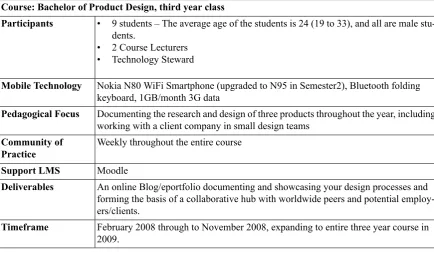
The Product Design Programme at UNITEC NZ is developed through continuous cross fertilisation of ideas between teaching staff and design industries. The programme believes strongly in collaboration with industry so that all students are exposed to live projects to provide ‘hands-on’ experience. In the first semester of 2008, third Year Product Design students undertook major collaborative projects in conjunction with three industrial partners and were given the brief to develop commercially viable products. Students used blogs and eportfolios to record pictures, videos,
[image:10.595.86.521.485.738.2]articles related to their project etc. and reflect on their design process. These were made available to their respective client for feedback and interaction to guide the development process and address any relevant design issues. Students and staff were initially sup-plied with a Nokia N80 WiFi/3G smartphone and folding Bluetooth keyboard, which was later up-graded to a Nokia N95 smartphone. Students used the smartphone for recording and uploading evidence of their design development process and models to their VOX blog (http://www.vox.com) and other online media sites such as YouTube for video. They were marked on this evidence of the design process, eportfolio and reflection, as well as their critique and reflection on other students’ blogs via commenting. The smartphones are also used as a communication tool between students and with teaching staff for immediate feedback via instant messaging, email and RSS subscriptions. Students are responsible for paying for a voice call and text message account but are reimbursed the cost of a 1GB/month 3G data account. The project is supported by a weekly “Community of Practice” (Lave & Wenger, 1991), comprising the course Lecturers, the student volun-teers, and the researcher who is also the ‘technology steward’ (Wenger et al., 2005) for the community of practice. An interactive concept map illustrating the integration of the mobile web 2.0 technologies with the smartphone is available at http://ltxserv-er.unitec.ac.nz/~thom/mobileweb2concept2.htm.
Table 1: Outline of the Product Design Mobile Web2 Project Course: Bachelor of Product Design, third year class
Participants • 9 students – The average age of the students is 24 (19 to 33), and all are male stu-dents.
• 2 Course Lecturers • Technology Steward
Nokia N80 WiFi Smartphone (upgraded to N95 in Semester2), Bluetooth folding keyboard, 1GB/month 3G data
Mobile Technology
Documenting the research and design of three products throughout the year, including working with a client company in small design teams
Pedagogical Focus
Weekly throughout the entire course Community of
Practice
Moodle Support LMS
An online Blog/eportfolio documenting and showcasing your design processes and forming the basis of a collaborative hub with worldwide peers and potential employ-ers/clients.
Deliverables
February 2008 through to November 2008, expanding to entire three year course in 2009.
Timeframe
Transforming Product Design
The following section outlines several examples il-lustrating how the introduction of mobile web 2.0 technologies has impacted and transformed the Bachelor of Product Design course.
Mobile Web 2.0 Scenarios in Product Design
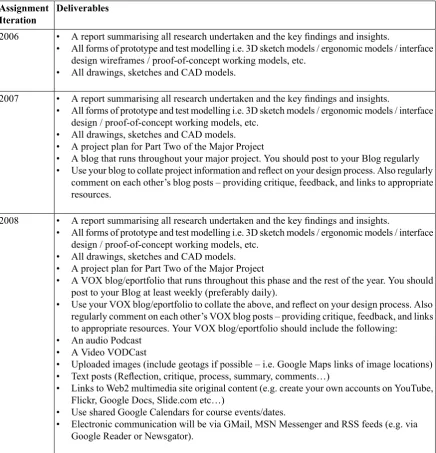
Major Project – Changes from 2006 to 2008 The third year major assignment has been modified each year between 2006-2008 to assist students to
[image:11.595.74.511.273.727.2]grasp and understand the complexity of the design process, facilitate social constructivist learning and improve the level of integration within student pro-jects. The full assignment outline is available for viewing on Google Docs (Bateman & Cochrane, 2008), included here are the details of deliverables that have changed between 2006 and 2008.
Table 2: Third Year Bachelor of Product Design Major Assignment Changes Deliverables
Assignment Iteration
2006 • A report summarising all research undertaken and the key findings and insights.
• All forms of prototype and test modelling i.e. 3D sketch models / ergonomic models / interface design wireframes / proof-of-concept working models, etc.
• All drawings, sketches and CAD models.
2007 • A report summarising all research undertaken and the key findings and insights.
• All forms of prototype and test modelling i.e. 3D sketch models / ergonomic models / interface design / proof-of-concept working models, etc.
• All drawings, sketches and CAD models. • A project plan for Part Two of the Major Project
• A blog that runs throughout your major project. You should post to your Blog regularly • Use your blog to collate project information and reflect on your design process. Also regularly
comment on each other’s blog posts – providing critique, feedback, and links to appropriate resources.
2008 • A report summarising all research undertaken and the key findings and insights.
• All forms of prototype and test modelling i.e. 3D sketch models / ergonomic models / interface design / proof-of-concept working models, etc.
• All drawings, sketches and CAD models. • A project plan for Part Two of the Major Project
• A VOX blog/eportfolio that runs throughout this phase and the rest of the year. You should post to your Blog at least weekly (preferably daily).
• Use your VOX blog/eportfolio to collate the above, and reflect on your design process. Also regularly comment on each other’s VOX blog posts – providing critique, feedback, and links to appropriate resources. Your VOX blog/eportfolio should include the following:
• An audio Podcast • A Video VODCast
• Uploaded images (include geotags if possible – i.e. Google Maps links of image locations) • Text posts (Reflection, critique, process, summary, comments…)
• Links to Web2 multimedia site original content (e.g. create your own accounts on YouTube, Flickr, Google Docs, Slide.com etc…)
• Use shared Google Calendars for course events/dates.
• Electronic communication will be via GMail, MSN Messenger and RSS feeds (e.g. via Google Reader or Newsgator).
Student Example/s
A student decided to use the Smartphone’s camera to record still images and video podcasts outlining significant and iterative steps in the design process when designing a snow kite harness. This allowed the student to reflect and critique their design work and design methodology using visual media rather than simply creating a text-based book or online journal. This took place over the six month product design project. Video clips were recorded from the design studio on campus, from testing in the local park, and from test flights during two ski-field trips in the South Island of New Zealand. The course lec-turers followed the student’s blog posts, offering tips and design guidance while on campus, at home, and while attending overseas conferences. The video clips were later edited and compiled into a ten minute
video overview of the most significant design steps taken over course of the design project. The compil-ation video was then uploaded to YouTube and the student’s blog for showcasing and sharing.
This illustrates the affordances of mobile web 2.0 tools to facilitate user content creation and sharing, and context independent (ubiquitous and seamless) input from lecturers (Laurillard, 2007).
NPC Project – Changes from 2007 to 2008 One of the Bachelor of Product Design courses modified by the inclusion of mobile web 2.0 techno-logies was the New Product Commercialisation (NPC) paper. Below is an outline of the change in NPC assessment deliverables facilitated by mobile web 2.0:
Table 3: Third year Bachelor of Product Design Major Assignment Changes Deliverables
Assignment Iteration
2007 • One booklet that provides a concise overview of successful product development and com-mercialisation processes. This booklet must have high production values and must reflect the importance that design plays in this process (see letter that you have been sent to read more detail of what is required).
2008 • A blog that provides a concise overview of successful product development and commercial-isation processes. The blog must reflect the importance that design plays in this process. • On a weekly basis and in addition to notes taken at each of the guest lectures, you must find
an article that raises issues related to “New Product Commercialisation” (e.g. NZ magazines Design and Business, such as IDEALOGY, BRIGHT, UNLIMITED), the article maybe directly relevant e.g. the description of an NPC project, or it may simply raise issues that you can discuss in terms of NPC e.g. the impact of imports, a clever marketing initiative, tax changes for R&D etc...
• Using a blog as a mean of communication, you will write a synopsis of the article followed by your own interpretation of the points raised in it (Around 500 words per post). The synopsis and comments are to be published in a blog along with a link to the original article either as a weblink or magazine’s reference for the submission. Tag your NPC project blog posts (and any other relevant media you upload to your Blog – e.g. supporting images, video, podcasts, embedded YouTube videos etc...) with the tagword “NPC” to allow tracking and collation of your posts. You could also define an “NPC” collection within Vox.
• Collaboration and interaction are important aspects of the project. Therefore each student will work with their group to refine their chosen article and any additional comments on it using the ‘comments’ feature of each other’s Blogs. The article will then be presented every week at the tutorial group sessions. It is expected that each member of the work-group will be fa-miliar with the article and be able to assist the author in reporting back.
Student Blogging Example/s
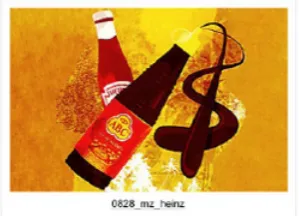
The following is an example of a student blog post for their NPC paper and the resulting comments from their classmates. The post (Figure1.) and comments (Figure2.) show significant engagement and critical reflection occurring by multiple parties and within multiple contexts. The use of the blog facilitated the posting of student reflections on examples of new
keyboards, and subscribed to student blogs via RSS. However, students tended to read each other’s blogs on their laptops. This is an example of a socially constructed use of the technology rather than an af-fordance of the technology itself (Bijkeret al., 1987). Students were encouraged to subscribe to each
[image:13.595.219.369.331.439.2]oth-er’s blog RSS feeds to enable automatic notification of new posts for discussion. Additionally, VOX features a weekly ‘neighbourhood update’ email, that students could receive and read on their smart-phones. This facilitated a social constructivist learn-ing environment.
Fig 1: Screenshot of Example Student NPC Blog Post
Fig 2: Screenshot of Example Student NPC Blog Comments
Students used the mobile web 2.0 technologies to blog their assignment posts from virtually any con-text. As an example, four of the students decided to go on a mid-term ‘research’ trip to the snowfields of Queenstown, officially to test their prototype snow-kite harness designs. However, two of these students were scheduled to present their NPC research to the class that week. These students therefore recorded their NPC class presentations on their N95 smart-phones, and uploaded the virtual presentations to their Vox blogs for the rest of the class and the course tutor to view and comment on their presentations, in almost realtime. To ‘prove’ they were in Queenstown they also blogged mobile videos of their campervan and Queenstown scenery.
Beyond NPC
During the course of the year academic teaching staff have visited three overseas countries: Japan, UK, Spain, France as well as numerous New Zealand towns outside of Auckland: Rotarua, Tauranga, Napier, Hastings. Staff used mobile web 2.0 techno-logies to pass relevant information to their student(s) from these countries and locations.
Context Bridging Scenarios
member to test the use of Web2 as a distance communication tool: could regular contact be maintained between the staff member and stu-dents and information be easily shared using a smartphone? The use of mobile web 2.0 techno-logies allowed real time text, video and still images of the conference, sites, design, architec-ture to be easily and immediately uploaded to the staff members blog for students to see and share in. By return, the use of instant messaging and blog comments allowed students to remark on the posts, pose questions and request further information on the conference before the end of the visit.
2. In a second case, a staff member was required to make a trip to the UK and France taking valuable time away from teaching. At this stage, students were well advanced into their projects and having a staff member overseas posed a potentially difficult situation for them and the programme. The use of mobile web 2.0 techno-logies allowed the staff member, his fellow staff members and students to stay in regular contact sharing comments and project concerns: in ef-fect a ‘virtual studio situation’ was created. Upon the staff members return, there was no need for time consuming catching up to take place and students were not significantly disad-vantaged due to his taking time away from stu-dio teaching.
Student Feedback
Student feedback on the integration of mobile web 2.0 technologies into the curriculum has been
ex-tremely positive. Students were asked to provide re-flective feedback at the end of semester one:
As a record keeping tool, these things (Blogs) allow you to go back and see what you did last week, and you can constantly inform your de-cisions based on what you have done in the past. Whereas if you have it in a notebook that sits in a corner of your room you forget that stuff, but you look at your blog everyday, and so from that perspective it makes things better. Tradi-tionally when you write something down in a notebook a lecturer will only read it at the end of the project when they mark it, but with blogging you can write something down and Lecturers and other students can comment al-most immediately, so you get more real-time feedback.
An example of moblogging is – here’s a bunch of images I’ve just photographed while in the Library and then I straight-away upload them, then I can comment on them, my classmates can comment on them, so I find it a lot faster, and it’s productive time. Also you can see what other students have just blogged and see what they are thinking about at the moment – so we’ve got our heads in everyone else’s projects as well, so you are not just in your own little box (Bachelor Product Design Students 2008).
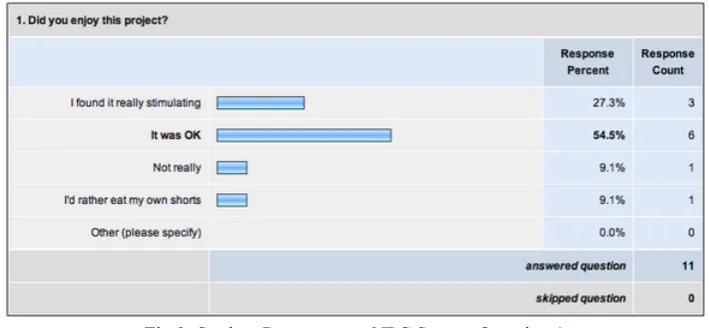
[image:15.595.113.468.518.682.2]Students were surveyed at the end of the NPC Project (mid semester two 2008) using Surveymonkey. The student feedback is useful in critiquing the impact of the mobile web2.0 technologies on the course. Sixteen of the eleven students in the class responded, nine of these were mobile web 2.0 users:
Fig 3: Student Responses to NPC Survey Question 1
The majority of the students enjoyed the project (see fig 3).
Fig 4: Student Responses to NPC Survey Question2
Students recognised and appreciated the benefits of the use of a blog for facilitating the project (See fig 4).
Fig 5: Student Responses to NPC Survey Question 3
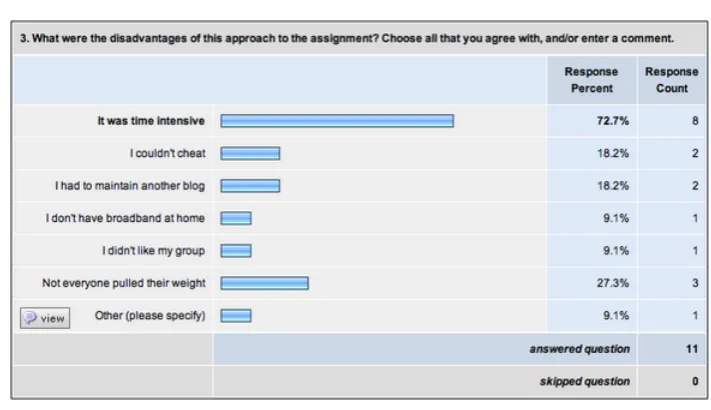
Students expressed the time intensive nature of reg-ular blogging and commenting, and the issues of work-parity in group assignments (See fig 5),
[image:16.595.125.481.365.570.2]Fig 6: Student Responses to NPC Survey Question 4
Students used their smartphones to research content, upload and interact with their blogs in a variety of ways (see fig 6).
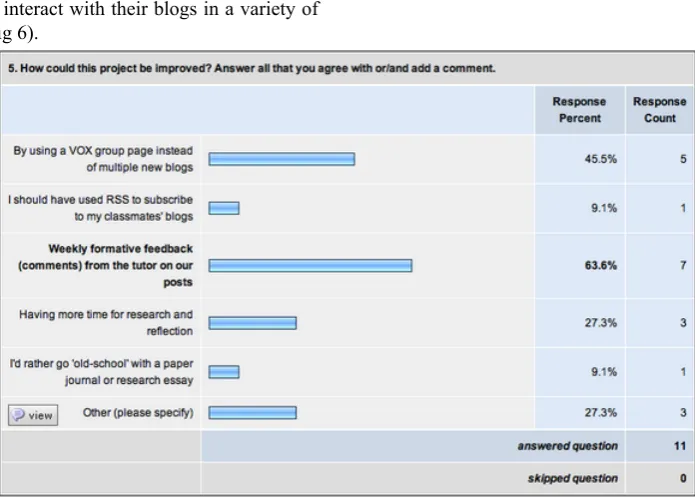
Fig 7: Student Responses to NPC Survey Question 5
While students were encouraged to use their original course VOX blog for the NPC project and identify NPC postings using tags, most students created a secondary blog using VOX for the NPC project. The effort of maintaining multiple blogs convinced stu-dents of the benefits of tagging within a single blog, or alternatively creating a group within VOX for specific projects.
[image:17.595.117.465.398.647.2]2.0 tools (Mike Sharples, 2001) changing Lecturer pedagogies and learner experiences, illustrated by the affordance of mobile blogging for providing an avenue for regular formative feedback from Lectur-ers.
The initial usage of mobile web 2.0 tools places new and increased time, organisational, and pedago-gical demands on the lecturers. To mitigate potential increased workload when using web 2.0 tools across multiple projects the use of the features of VOX such as tagging, RSS and groups are essential. Critically, the successful use of mobile web 2.0 tools requires a change in time management and a refocus on regu-lar formative feedback rather than the traditional
summative end-of-project feedback and assessment procedures. When this is implemented the benefits for students and lecturers in being continuously emersed in the projects is realised, creating much lower reliance upon end-of-project presentations and summative assessment.
[image:18.595.200.409.255.630.2]Fig 8 provides and overview of what types of activities and how regularly students used their smartphones as enabling tools within their course and their wider social lives. This illustrates that stu-dents integrated the mobile technologies into their daily routines in a variety of ways, and they were encouraged to personalise the use of the smartphones throughout the period of the project.
Fig 8: Student Mobile Usage
Staff Feedback
Teaching staff were asked to reflect on the impact of the introduction of the mobile web 2.0 technolo-gies on the course, using the following questions re-lated to the main research questions for the overall research project.
1. What potential benefits do you see for mobile web 2.0 to enhance teaching and learning? 2. Have you (so far) seen increased engagement
in the course from students when using this technology?
3. What are the key issues for integrating this technology into your courses?
4. In what ways has (or will) your teaching ap-proach changed by using these tools?
What Potential Benefits do you see for Mobile Web 2.0 Technologies to Enhance Teaching and Learning?
The integration of mobile web 2.0 has facilitated a shift away from the default Atelier ‘private method’ of instruction to a new more fluid and dynamic ped-agogical method. This project has deliberately dis-rupted the timetabled instructivist studio learning that is frequently used and placed the student group in a social constructivist framework.
The chief benefits we have noted are:
1. Increased interaction, problem solving and sharing between students, increased interactivity in general – this has come in the forms of: en-couragement, sharing of data and content, passing on of online material and the ‘hey you should know about this’ comments.
2. Increased interaction from external commentat-ors – especially when working on live projects. Clients have been able to track projects in the making and steer students if need be. At final presentations clients have followed the projects over the duration of the assignment and can closer comment on the projects outcomes and validity.
3. The development of student reflective journals. The Blogs have effectively become online re-flective rich media journals. Keeping an over-view of a design project is difficult. Valuable time is taken up when standing back and assess-ing the state of the project. Reflectassess-ing on project work is difficult as the designer is often en-gulfed in the project. By introducing blogs to the students and requiring them to blog daily, we have created ‘natural’ times when a brief overview of the design project can be created in a readily accessible and exciting form. This overview can serve to keep the project on track and act as a ‘call’ for comments from peers and staff.
4. Designers often find it difficult to document their processes and methodologies and as a result of this find it hard to remember how they got to the end result. This project has created a ‘bread crumb’ trail that students can go back to both during and after the project to check their working methods.
Have you seen Increased Engagement in the Course from Students when using this Technology?
The initial stages of the project saw a drop off in normal project activity as students explored the mo-bile web 2.0 tools, including the setting up of the software and hardware and the fun students had
ex-ploring the new technology that was available to them. However as the tools became second nature and integrated into the students’ daily work-flows a significant uptake in engagement in the course was observed.
The increased engagement came from:
1. A sense of connectivity that is characterised by the immediate access to the Internet, photo sharing, instant messaging (IM), emailing and the usual voice and txt messaging that the smartphones bring. Virtually any space is now transformed into a collaborative learning space. Students often group together looking at online material, send each other files and photos, URLs and other digital information. Mobile video blogging has become a favourite activity and is an effective way to get out of studio informa-tion across in a short space of time.
2. The use of mobile web 2.0 provided a sense of current technology being embedded into the learning experience. In comparison, even though virtually all students in the third year course have access to their own laptop com-puters for use in the studio/class room, this is seen as standard these days. This project has facilitated a culture of mutual support, network-ing and collaboration among students, which also enhances students’ skills in communication with their peers, academics and industry repres-entatives.
3. Evenings see a sharp increase in student posts – often comments on each other’s blogs as well as end of day reflective posts.
4. Students’ editorial skills have increased due to the constant need to monitor the content of their blogs. A look over almost all of the blogs from the start of the project to today will show signi-ficant progression in what the students have learned about editing content and getting ideas across.
5. Students construe the use of the technology in their project as exciting and gained enjoyment from working in teams. This lead to students to subscribe to each other’s blog and created a social constructivist learning environment and increased interest in the subject overall. 6. A noticeable increase in students’ confidence
as the year progressed, and become more reflect-ive about the learning processes they have mastered.
What are the Key Issues to Successfully Integrating this Technology into Courses?
and the uptake of students was lower than 2008 where assessment of the blog was embedded. It makes sense that students want to receive credit for doing something that takes time, focus and commitment.
2. It is vital that staff participate in the blogging process and run their own blogs alongside the student ones. It is important, that lecturers con-tinue to provide the support on the type, scope, size, and pedagogical input of the mobile web 2.0 aspects of the projects that are introduced into courses. Students want to see that staff are visiting the blogs and commenting on posts as well as offering links to sites where students can pick up information that might assist them with their projects.
3. This project allowed students to have the smartphones (and Bluetooth folding keyboards) and use them as if they owned the device, and they were also supplied with a 1GB data plan for the duration of the course. This ensured that participants had the tools they needed to work effectively. Therefore programmes need to provide the hardware or make it a compulsory course purchase to enable access.
4. Creating a course-wide strategy for the integra-tion of mobile web 2.0 within the programme that would enable all of the teaching team to support one another in supporting these innova-tions should be a goal for 2009.
In what way has your Teaching Approach Changed by Using this Technology and Tools?
1. Breaking down the walls! This encapsulates the thrust of this project.
2. As a result of integrating and assessing mobile blogging technology tools into the programme I have become far more tolerant of students working from different locations, something the class room/studio model struggles to cope with.
3. Putting time aside to read and comment on the content of each student blog is important and time during working hours needs to be allocated for this. By allocating time during the stu-dio/teaching to work on the student blogs late night work at home can be kept to a minimum. 4. It isn’t ‘easy’ working in this way but it is im-mensely valuable and exciting. I think that it would be very hard go back to traditional
teaching only methods now I have begun to use blogging and mobile blogging.
Key Issues
The mobile web 2.0 integration project within the Bachelor of Product Design has highlighted several key issues.
The project has illustrated the potential to create increased student engagement with the learning en-vironment.
Higher levels of student reflection and critique were achieved compared to that previously seen with more traditional assessment procedures.
Anywhere, anytime learning (context independent and context bridging) has been facilitated and made use of in unforeseen scenarios.
Tutor engagement with the technology is essential for students to value its use and to gain an understand-ing of its pedagogical usefulness beyond social activities.
The integration of the mobile web 2.0 technologies into the assessment (Both formative and summative) is critical for student motivation.
Access issues must be considered carefully when planning to integrate the use of mobile web 2.0 technologies. The sustainable provision of hardware, software and connectivity (3G data plans and wifi availability) must be thought through. Various models for achieving this sustainability are being brainstormed for the future of this project.
The integration of mobile web 2.0 facilitated a change in pedagogical approach that needed signific-ant scaffolding for both students and Lecturers. This made supporting the project via a Community of Practice, and sound pedagogical design essential.
Conclusions
The work over the last two and a half years on the integration of mobile web 2.0 technologies into the Unitec Bachelor of Product Design has been very successful. As both case studies show the student and lecturer experience within the programme have been enhanced through the facilitation of a social constructivist environment that bridges multiple contexts. Over the last two and a half years signific-ant changes in pedagogical approach and levels of student engagement have been realised. Our future aim is to build upon the insights gained and form a foundational model to fully embed mobile web 2.0 tools into the entire Bachelor of Product Design curriculum.
References
Bateman, R., & Cochrane, T. (2008). Design project outline. Retrieved 16 October, 2008, from http://docs.google.com/Doc?id=dchr4rgg_71dgp6ntf6
Bijker, W., Hughes, T., & Pinch, T. (Eds.). (1987).Social construction of technological systems: New directions in the so-ciology and history of technology. Cambridge: MIT Press.
Cameron, D. (2006, 4-7 December).The rocket in your pocket: How mobile phones became the media by stealth.Paper presented at the 2nd joint JEANZ/JEA conference, Rendevous Hotel, Auckland, New Zealand.
Cochrane, T., & Bateman, R. (2008, 1-3 October).Engaging students with mobile web2.0.Paper presented at the EIT Teaching & Learning Conference, EIT, Napier, New Zealand.
Cook, J., Bradley, C., Lance, J., Smith, C., & Haynes, R. (2007). Generating learner contexts with mobile devices. In N. Pachler (Ed.),Mobile learning: Towards a research agenda(Vol. 1, pp. 33-54). London: WLE Centre, Institute of Education.
Creswell, J. (1994).Research design: Qualitative and quantitative approaches. Thousand Oaks: Sage Publications. Elmendorp, R. (2007). Videoreporter.Nl. Retrieved 21 October, 2007, from http://www.videoreporter.nl/videos.htm Fulton, N. (2007, 22 October). The mobile journalism toolkit contents.Reuters Mobile JournalismRetrieved 24 October,
from http://reutersmojo.com/2007/10/22/the-mobile-journalism-toolkit-contents/
Laurillard, D. (2001).Rethinking university teaching: A framework for the effective use of educational technology(Second ed.). London: Routledge.
Laurillard, D. (2007). Pedagogcal forms of mobile learning: Framing research questions. In N. Pachler (Ed.),Mobile learning: Towards a research agenda(Vol. 1, pp. 33-54). London: WLE Centre, Institute of Education. Lave, J., & Wenger, E. (1991).Situated learning: Legitimate peripheral participation. Cambridge: Cambridge University
Press.
McLoughlin, C., & Lee, M. J. W. (2008). Future learning landscapes: Transforming pedagogy through social software. In-novate: Journal of Online Education, 4(5).
O’Reilly, T. (2005). What is web 2.0: Design patterns and business models for the next generation of software. Retrieved March, 2006, from http://www.oreillynet.com/pub/a/oreilly/tim/news/2005/09/30/what-is-web-20.html Sharples, M. (2000). Disruptive devices: Personal technologies and education. Retrieved 27 June, 2006, from
ht-tp://www.eee.bham.ac.uk/handler/ePapers/disruptive.pdf
Sharples, M. (2001). Disruptive devices: Mobile technology for conversational learning.International Journal of Continuing Education and Lifelong Learning, 12(5/6), 504-520.
Sharples, M. (2005).Learning as conversation: Transforming education in the mobile age.Paper presented at the Conference on Seeing, Understanding, Learning in the Mobile Age, Budapest, Hungary.
Sharples, M., Milrad, M., Sanchez, I. A., & Vavoula, G. (2007). Mobile learning: Small devices, big issues. In N. Balacheff, S. Ludvigsen, T. de Jong, A. Lazonder, S. Barnes & L. Montandon (Eds.),Technology enhanced learning: Principles and products(Vol. chapter 14, pp. 20).
Sharples, M., Taylor, J., & Vavoula, G. (2006). A theory of learning for the mobile age (pre-print). Retrieved February, 2007, from http://kn.open.ac.uk/public/document.cfm?docid=8558
Skoeps. (2007). Skoeps - everyone’s a reporter. Retrieved 24 October, 2007, from http://www.skoeps.com/landing.html Stead, G. (2006). Mobile technologies: Transforming the future of learning.Emerging Technologies for LearningRetrieved
6 April, 2006, fromhttp://www.becta.org.uk/corporate/publications/
Vygotsky, L. (1978).Mind in society. Cambridge, MA: Harvard University Press.
Wadsworth, Y. (1998). What is participatory action research? Retrieved May 3, 2002, from http://www.scu.edu.au/schools/gcm/ar/ari/p-ywadsworth98.html
Wali, E., Winters, N., & Oliver, M. (2008). Maintaining, changing and crossing contexts: An activity theoretic reinterpret-ation of mobile learning.ALT-J, Research in Learning Technologies, 16(1), 41-57.
Wenger, E., White, N., Smith, J., & spa, K. R.-. (2005). Technology for communities. Retrieved 14 July, 2006, from
http://technologyforcommunities.com/
About the Authors
Thomas Cochrane
mobile computing on teaching and learning in higher education in New Zealand". Harnessing the potential of social software tools (such as: Mobile Blogging, RSS, Instant Messaging, Moodle and Elgg…) using wireless mobile devices, such as: PDAs, laptops, and the new generation of mobile phones. Thomas Cochrane BE, BD, GDHE, MTS, MComp Academic Advisor (eLearning & Learning Technologies) Centre for Teaching & Learning Innovation, Unitec [email protected] (00649) 815-4321 xtn 7067 http://ltxserv-er.unitec.ac.nz/~thom/ http://ltxserver.unitec.ac.nz/mediawiki/index.php/Main_Page Blogs: http://tcblogtest.blog-spot.com http://thomcochrane.wordpress.com http://thomcochrane.vox.com
Roger Bateman
Roger began his career in design as a studio assistant at the London company Flux Designs in 1985. In 1989 he began 'Square One' studio; concerned with the design and development of furniture and product designs for contract and domestic markets, the studios' clients included Viaduct Furniture, London/ Glosbrook and the Liverpool City Council. In 1994 Roger joined rds London as partner and design director. The company designed, developed, manufactured and sold contemporary furniture to clients as diverse as Diesel, British Airways, the V&A Museum London, Scottish parliament, KLM, Morgan Grenfell, TSB, Foreign and Commonwealth Offices, The Royal Opera House London, The Dome UK, British Council, Warner Music and Virgin Music. In 1998 he joined the Keen Group Ltd London, overseeing the design and development of office furniture solutions. Keens clients include Apple Computers, BBC, Chanel, IXC Tokyo and the Stella McCartney Studio. In 2000 Roger moved to Spain to oversee design development and manufacture of Keen Products whilst at the same time forming a design partnership with Jane Dillon and Tom Grieves. Their clients included Casas Barcelona and AvantGarde Milan. Throughout his career in furniture and product design Roger has academic positions at LIHE, Liverpool, Edinburgh College of Art, IED Barcelona and Eina Barcelona. Roger is currently Associate Head and Senior Lecturer in the School of Design where he has been working since November 2004. Roger teaches in the Bachelor of Product Design the Master of Design, is Head of the Schools Design & Business Incubator and a member of the School’s Research & Advanced Practice Committee. Roger is currently devel-oping the areas of Design Enterprise, Knowledge Transfer and Knowledge Exchange within the School.
Dr. Isaac Flitta
I have been an academic and a research active for over 12 years. I am currently a senior lecturer and Programme Director for the Bachelor of Product Design at UNITEC. I joined UNITEC at the beginning of this year from Bournemouth University in the UK. I was Programme Leader for the BSc (Hons) Design Engineering Programme, and was involved with teaching design courses in different programmes at both undergraduate and postgraduate level.