General
Technical InforlDation
Constellation
®
LIMITED WARRANTY
Corvus warrants its hardware products against defects in materials and workmanship for a period of 180 days from the date of purchase from any authorized Corvus Systems dealer. If Corvus receives notice of such defects during the warranty period, Corvus will, at its option, either repair or replace the hardware products which prove to be defective. Repairs will be performed and defective parts replaced with either new or reconditioned parts.
Corvus software and firmware products which are designed by Corvus for use with a hardware product, when properly installed on that hardware product, are warranted not to fail to execute their programming instructions due to defects in materials and workmanship for a period of 180 days. If Corvus receives notice of such defects during the warranty period, Corvus does not warrant that the operation of the software, firmware or hardware shall be uninterrupted or error free. Limited Warranty service may be obtained by delivering the product during the 180 day warranty period to Corvus Systems with proof of purchase date. YOU MUST CONTACT CORVUS CUSTOMER SERVICE TO OBTAIN A "RETURN AUTHORIZATION CODE" PRIOR TO RETURNING THE PRODUCT. THE RAC
(RETURN AUTHORIZATION CODE) NUMBER ISSUED BY CORVUS CUSTOMER SERVICE MUST APPEAR ON THE EXTERIOR OF THE SHIPPING CONTAINER. ONLY ORIGINAL OR EQUIVALENT SHIPPING MATERIALS MUST BE USED. If this product is delivered by mail, you agree to insure the product or assume the risk of loss or damage in transit, to prepay shipping charges to the warranty service location and to use the original shipping container. contact Corvus Systems or write to Corvus customer Service, 2100 Corvus Drive, San Jose, CA, 95124 prior to shipping equipment. ALL EXPRESS AND IMPLIED WARRANTIES FOR THIS PRODUCT, INCLUDING THE WARRANTIES OF MERCHANTABILITY AND FITNESS FOR A PARTICULAR PURPOSE, ARE LIMITED IN DURATION TO A PERIOD OF 180 DAYS FROM DATE OF PURCHASE, AND NO WARRANTIES, WHETHER EXPRESS OR IMPLIED, WILL APPLY AFTER THIS PERIOD. SOME STATES DO NOT ALLOW LIMITATIONS ON HOW LONG AN IMPLIED WARRANTY LASTS, SO THE ABOVE LIMITATIONS MAY NOT APPLY TO YOU.
IF THIS PRODUCT IS NOT IN GOOD WORKING ORDER AS WARRANTED ABOVE, YOUR SOLE REMEDY SHALL BE REPAIR OR REPLACEMENT AS PROVIDED ABOVE. IN NO EVENT WILL CORVUS SYSTEMS BE LIABLE TO YOU FOR ANY DAMAGES, INCLUDING ANY LOST PROFITS, LOST SAVINGS OR OTHER INCIDENTAL OR CONSEQUENTIAL DAMAGES ARISING OUT OF THE USE OF OR INABILITY TO USE SUCH PRODUCT, EVEN IF CORVUS SYSTEMS OR AN AUTHORIZED CORVUS SYSTEMS DEALER HAS BEEN ADVISED OF THE POSSIBILITY OF SUCH DAMAGES, OR FOR ANY CLAIM BY ANY OTHER PARTY.
SOME STATES DO NOT ALLOW THE EXCLUSION OR LIMITATION OF INCIDENTAL OR CONSEQUENTIAL DAMAGES FOR CONSUMER PRODUCTS, SO THE ABOVE LIMITATIONS OR EXCLUSIONS MAY NOT APPLY TO YOU.
Constellation Software General Technical Information
Corvus Part #: 7100-05944-01 Release date: 22 February 1985
Table of Contents
Scope
Related documents Conventions
Chapter 1: Introduction Overview
How to use this manual
Chapter 2: Constellation II data structures Overview
Detailed table descriptions Table manipulation
Encryption algorithm Active User Table Image volumes
Chapter 3: Constellation II disk drivers Driver initialization
Device read, device write Send Corvus drive command
Mount, unmount, get mount information Send Omninet command
Chapter 4: Boot and logon procedure Overview
Detailed description of boot process Building the mount table
Setting read and write access Special versions of boot code Chapter 5: User utilties
Mount manager
Setting read and write access Library routines
Spooler and despooler Spooler driver
Chapter 6: Management utilities Overview
Menu file (C2.MENU.TEXT) options file (C2.MISC.TEXT)
Update file (installing new versions of utilities) Program descriptions
Chapter 7: utility server utility server software Management utilities
Appendix A: Tables
Table 1: Constellation Table 2 : Volume types
Device types Table 3 : Operating system types Table 4 : Boot types
Appendix B: Details on operating system implementations: Volume format; driver calls; boot and logon; memory locations used
B.l: Corvus Concept Operating System B.2: MSDOS 1.1
B. 3: MSDOS 2.0
B.4: Softech p-system version IV B.5:
CPIM
86B.6: Apple II Pascal B.7: Apple
III
SOS B.8: Apple II DOS B.9: Apple II PRODOS B.IO: Apple Macintosh2.1 2.2 2.3 2.4 2.5 2.6 2.7 2.8 2.9 2.10 2.11 2.12 2.13
3.1
4.1
4.2 4.3 4.4 4.5 4.6
Figures
Constellation II network layout Constellation II drive layout Drive Information Block
Corvus volume System Boot table Network User Table Drive Volume Table Drive User Table Drive Access Table Volume Access Table
Flowcharts of table search, insertion, deletion Active User Table
Flowchart of Find all active devices
Summary of disk driver calls
Boot block numbers and boot file names Disk layout of boot blocks
Flowchart of first stage boot Flowchart of second stage boot
Scope
This manual describes the Constellation software provided by Corvus. It covers the Constellation IIII data structures, Constellation drivers, booting and logon procedures, and the Constellation II management utilities. It also contains an appendix which covers the operating system specific details of each implementation supported by Corvus.
Related documents
Corvus Mass storage Systems General Technical Information Part Number: 7100-05945-01
omninet General Technical Information Part Number: 7100 OC,(.t4 ·O(
You should also be familiar with the System Manager Guide for your particular system.
Conventions
Hexadecimal values are suffixed with an h. For example, FFh,
02h.
A block is always 512 bytes.
Lsb means least significant byte or least significant bit,
Data structures are explained by describing each field of the structure, as shown below:
Field name I Off/Len I Type I Description
==============================================================
Field name is the name commonly used, either in the code or in this manual, to refer to the piece of data being discussed. Field names, when used in this manual, appear in bold.
Off is the offset of length of the field. otherwise specified; specified.
the start of this field, and len is the off and len are always in bytes, unless off is zero-based, unless otherwise
Type is the data type of the field. The meaning of each type is given in the table below:
Type Meaning
---BYTE An unsigned B-bit value.
WORD An unsigned l6-bit value; msb, lsb format.
FWRD An unsigned l6-bit value; lsb, msb format; a byte-flipped word.
ADR2 An unsigned l6-bit value; msb, lsb format.
ADR3 An unsigned 24-bit value; msb •. lsb format.
ADR4 An unsigned 32-bit value; msb •. lsb format.
BSTR A string of 1 or more characters, padded on the right with blanks (20h) •
NSTR A string of 1 or more characters, padded on the right with NULs (OOh) •
FLAG A BYTE with bits numbered 7 .• 0; msb •. lsb format.
ARRY An array of 1 or more BYTEs.
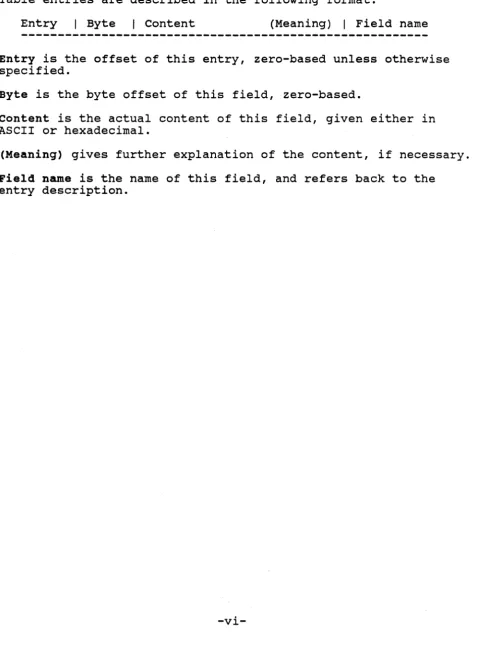
Table entries are described in the following format:
Entry I Byte I Content (Meaning) I Field name
Entry is the offset of this entry, zero-based unless otherwise specified.
Byte is the byte offset of this field, zero-based.
content is the actual content of this field, given either in ASCII or hexadecimal.
(Meaning) gives further explanation of the content, if necessary.
[image:10.618.71.551.94.745.2]Introduction
Chapter 1: Introduction
Constellation software is written specifically for the care and management of the Corvus hard disk system. The Constellation software system allows you to create and maintain a mUlti-user system consisting of one or more computers in conjunction with one or more Corvus mass storage devices.
Constellation I software supports Rev B/H drives, HUX networks, and single disk server Omninet networks. Constellation II software supports these, as well as omnidrives, Banks, and multiple disk server omninet networks.
Access to the network is managed through user accounts. An account consists of a name, password, and a list of volumes to which the user is given access. Users must "log-on" to the network in order to start accessing their volumes. Once a user has logged-on, most applications software written for single-user systems may be used with no modification.
Constellation software differs from other networking software in two key respects:
1) Constellation software requires a system manager, who is responsible for disk space allocation and assigning
user names and volume access.
2) Transparent volume sharing is NOT supported. That is, Constellation software does not detect the case where two users attempt to write to the same volume at the same time. The application must explicitly coordinate such access.
Constellation software is divided into two parts: management ,utilities and user utilities. Management utilities are operating
system independent and are used to maintain the disk resident data structures that define the network configuration. User utilities are operating system dependent, and include a boot or logon program, a disk driver, a mount utility, and a spooler.
OVerview
Introduction
Data structures
Several data structures are maintained on the disks comprising the network. These include the Network User Table, the System Boot Table, and the Drive User, Volume, and Access Tables.
The data structures are described in Chapter 2.
Disk Drivers
For each supported the Corvus disk as operating system.
operating system, code is provided to support a file-structured device under the host
The operating systems supported are listed in Appendix B.
A typical disk driver is described in Chapter 3.
Boot and logon
For each operating system, code is provided which installs the disk driver into the host operating system, and initializes the mount table for a given user.
The boot and logon process is described in Chapter 4, with specific details for each operating system given in Appendix B.
Utilities
Constellation software also encompasses a set of user utilities and a set of management utilities which are used to access and maintain the data structures. User utilities must run under the host operating system, whereas management utilities may be run from any available computer.
The utilities are described in Chapters 5 and 6.
How to use this manual
Introduction
This manual should be useful to several kinds of readers:
o Software developers - Appendix B gives specific
implementation details about memory locations used and volume formats. Software developers who are having
trouble getting their applications to run with the Corvus software installed may consult the appropriate section of Appendix B to see where conflicts might exist.
Additionally, the implementation of Constellation software uses several of the features of Corvus mass
storage systems, including semaphores, the boot protocol, and the Active User Table (These features are described in the Corvus Mass storage System General Technical
Information Manual). You can refer to this manual for examples of how to use these features in your own
applications, such as electronic mail or a network data base.
o Implementing support for a new operating system - Chapters 3, 4, and 5 describe the pieces of software which must be written: a disk driver, boot or logon code, and user utilities. You will need to refer to Chapter 2 for descriptions of data structures.
Constellation II data structures
Chapter 2: Constellation II data structures
---This chapter describes the data structures used by Constellation II.
overview
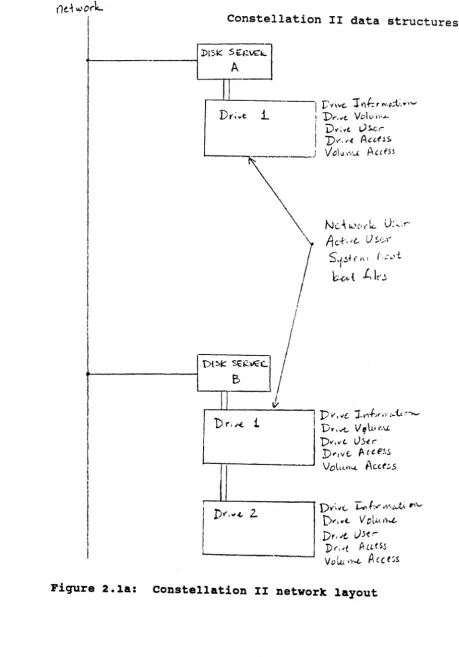
Each network, which consists of one or more disk servers, has a Network User Table. The Network User Table contains entries for all users of the network, and is stored at each disk server. Also stored at each disk server is the System Boot Table. The System Boot Table points to the location of the boot code for each computer type attached to the network. The user information and boot code is stored at all disk servers so that it can be obtained from any disk server on the network, as required by the cold boot procedure (see Chapter 4).
One or more disk drives is attached to each disk server. Information local to each disk drive is stored only on the particular drive. This information includes the following:
o Drive Information Block - drive name and password o Drive Volume Table - location of each volume
o Volume Access Table - volume access information o Drive User Table, Drive Access Table - user access
information
Rather than reserve a large fixed area for the Constellation II tables, we chose instead to reserve 1 block, through which all of the other tables may be located. Block 8, the Drive Information Block, is this reserved block. All other tables are located in a volume known as the Corvus volume. This volume is like any other volume: it has an entry in the Drive Volume Table, and it may be located anywhere on the drive. The only identifier of the Corvus volume is a pointer to it in the Drive Information Block.
The Corvus volume is a UCSD-format volume (see Appendix B for details on UCSD volume format). All of the tables in the Corvus volume are treated as data files, and each has an entry in the volume directory.
()d wo,.k...
I
Constellation II data structurest---I
DtS~
':"C<C
J
I
I
I
I
I
I
!
I
--1
r."i"," 1 ¥'It; r rvoc;t:. .. ,.,! D ... ,,,,e. Volv,,· ...
I
I
!
I
I 'i)."i.' Vr..c,.-! D\'o'~ A"e~s
I I/O\oJ.I"\.J. A,ces~
WI< : " " ' ' -
I
I
jJ,
1) r. ,<- i
I
DI'", ... ",
Z.I
I
-I
Pit', Dr,.tt.. V fill,,','''' >Ie,. J-1'1+-)( ,I (~{.. .~..., D..-,ve,. I.h-erD"wt.. Po. ('-F.<.;'
VOlL~'N. i\,((.:.s
D)'"~~(.. I:.-
r ...
v't'\...tA ,.., ...D..-, ,,(.
V OL~L Ii..£..Dr",,'
U5(:-Dr,,! AatSs
Vol.u,)~ A(ct~s
[image:16.618.81.541.43.701.2]("
-;:.
~
B
,
J
II.
1<
ot~e(l
VOU.ll1','-. S 10 t - - - - -t - - --"1 t
-Q
v
Corvus
VD \ .. I".'-V
0\
her
volvn",{.$
...
r-,v
:;;..
1
""
]
-l~
-I'
~
Constellation II data structures
'SjStt yy\ (?/:v+ 4o.~ -\oJ..u s
Ne.(wc
1'''-
Use
I'10.
b\:.. !>r;,c,. Vo \1.1 ""..(..1o .. Lk ..
'Dn ... " I,)se"'"
~b\e..-D
.,
\ ,,,-,A
c cl!>';. -h-.... \;k• I \ vO l.\Vl".(.. " " f" (S.' ; ~.;1. l:
,:.-.c.,
\e ~
Constellation II data structures
Detailed table descriptions
Each structure is described in detail in Figures 2.3 through 2.10. You should probably skip to the next section, Table
manipulation, on first reading.
There are implicit links among the Constellation II tables; that is, for each entry in a particular table, a corresponding entry may occur in another table. Figure 2.2 shows these implicit links. Required links are indicated by a double arrow, and optional links are indicated by a single arrow. Field names appear in bold.
For instance, the double arrow pointing at Drive User indicates that for each entry in Drive Access, there must be an entry in Drive User that has the same value in the userid field. In other words, if there is an entry in Drive Access with a Userid of 1, then there must be an entry in Drive User with a Userid of 1, and these two entries refer to the same user.
As another example, the single arrow pointing from Drive Volume to Volume Access indicates that for each entry in Drive Volume, there may be an entry in Volume Access that has the same value in the startblk field. In other words, if there is an entry in
Drive Volume with a startblk of 1024, then there may be an entry in Volume Access with a startblk of 1024 as well. If there is, then the two entries refer to the same volume.
Network User «-User--> Drive User «-Userid--> Drive Access
I I
User/owner I
I
v
Volume Access <---startblk---»
I I
Voladdr/startblk I
I
v v
Drive Volume
Drive information block (block 8)
File name: N/A
Location: Block 8 of each drive.
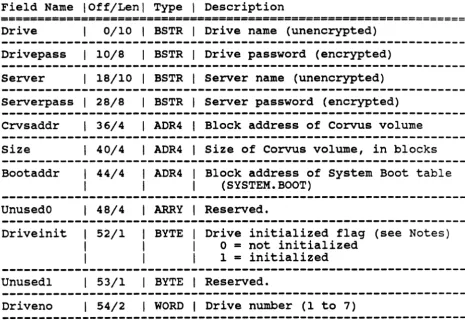
Description: The Drive Information Block occupies a fixed
location on each disk on a Corvus network. This is the table used to find everything else.
Access: All Corvus utilities accessing the Corvus volume make use of this table since the address of the Corvus volume is located here. Only SYSGEN and FIXIT modify the information contained here.
Format: 1 entry of 512 bytes
Field Name I Off/Len I Type I Description
================================================================ Drive 0/10 I BSTR I Drive name (unencrypted)
Drivepass I 10/8 I BSTR I Drive password (encrypted)
Server I 18/10 I BSTR I Server name (unencrypted)
Serverpass I 28/8 I BSTR I Server password (encrypted)
Crvsaddr
I
36/4I
ADR4I
Block address of Corvus volumeSize I 40/4 I ADR4 I Size of Corvus volume, in blocks
Bootaddr I 44/4 I
I
ADR4I
Block address of system Boot table I I (SYSTEM. BOOT)UnusedO
I
48/4I
ARRYI
Reserved.Driveinit
I
52/1I
I
BYTEI
Drive initialized flag (see Notes) I I 0 = not initializedI
I I 1 = initialized---Unused1 I 53/1 I BYTE I Reserved.
---Driveno
I
54/2I
WORDI
Drive number (1 to 7)[image:19.617.101.567.291.613.2]
Drive information block (block 8)
Field Name I Off/Len I Type I Description
================================================================
Online
Unused2
NUblks
DVblks
DUblks
DAblks
SBblks
Special
NUaddr
I
56/1I
I
I
BYTEI
Drive o.nline indicator (see Notes) 1I
0 - not online1 I 1
=
online 1 57/1 1 BYTEI
Reserved.1 58/2 I WORD 1 NETWORK. USER table size, in blocks 1 60/2
I
WORD 1 DRIVE. VOLUME table size, in blocks1 62/2 1 WORD I DRIVE. USER table size, in blocks I 64/2 1 WORD 1 DRIVE.ACCESS table size, in blocks 1 66/2 1 WORD I SYSTEM. BOOT table size, in blocks 1 68/2 1 WORD 1 Version code - 1982 (see Notes)
1 70/4 1 ADR4 1 NETWORK. USER table block address
---DVaddr 1 74/4 1 ADR4 1 DRIVE. VOLUME table block address
DUaddr 1 78/4 1 ADR4 1 DRIVE. USER table block address
DAaddr 1 82/4 IADR4 1 DRIVE.ACCESS table block address
SBaddr 1 86/4 1 ADR4 1 SYSTEM. BOOT table block address
---DIversion 1 90/1 I BYTE I Drive Information version (0 or 1) *Unused3 1 91/1 1 BYTE 1 Reserved.
*VAblks 1 92/2 1 WORD I VOLUME.ACCESS table size, in blocks *VAaddr 1 94/4 1 ADR4 1 VOLUME.ACCESS table block address
Reserved I 98/4141 ARRY I Reserved -- use OOh.
Figure 2.3: Drive Information Block (block 8) (continued from previous page)
Drive information block (block 8)
Notes: The fields driveinit, online, and special can be examined to determine whether a Drive Information Block is valid. I.e., if driveinit
=
1 and online=
1 and special=
1982, then the Drive Information Block is probably valid.In Drive Information Blocks with DIversion of 0, the directory of the Corvus volume was written incorrectly; each file length was 1 block shorter than it should have been, indicating unused areas where data was actually located. This is not a problem unless the user "crunches" the Corvus volume.
Corvus volume
File name: N/A
Location: A Corvus volume is located on each drive of the network, at the location indicated by the
Crvs&ddr field of the Drive Information Block.
Description: The Corvus volume contains the following tables, each embedded within the indicated file:
Access:
Format:
*
(1)~2)
(3) (4) (5)
*
(6)*
(7)Table
System Boot Table Network User Table Drive Volume Table Drive User Table Drive Access Table boot files
Volume Access Table
*These tables are optional.
File name
SYSTEM. BOOT NETWORK. USER DRIVE. VOLUME DRIVE. USER DRIVE.ACCESS BOOT. xxx
VOLUME.ACCESS
The Corvus volume is a standard UCSD format volume. Volume size may range from 64 to 600
blocks.
Only Constellation II utilities modify the data within the Corvus volume. The tables are normally found via the directory, although some utilities use the addresses found in block 8 instead.
Offset and length are in blocks.
Field Name
I
Off/LenI
TypeI
Description=======================--===---=======-=========================
I 0/2 I Unused.
---
I
2/4
I
UCSD format directory (see Appendix B)---
6/2 I ISYSTEM. BOOT file
---
IFile name SYSTEM. BOOT NETWORK. USER DRIVE. VOLUME DRIVE.USER DRIVE.ACCESS BOOT. IBM
< ••• >
EOF 512 512 512 512 512 512 Date 1 Sep 84 1 Sep 84 1 Sep 84 1 Sep 84 1 Sep 84 1 Sep 84
Off: 6: 8: 40: 72: 104: 202: 212: Len 2 32 32 32 98 10 88
Corvus volume
Type data data data data data data
Fiqure 2.4b: Example Corvus volume directory
Notes: Although the Corvus volume is a standard UCSD volume, and it can be mounted under either the p-system or CCOS
operating systems, you should never crunch the Corvus volume. If you do crunch the Corvus volume, you will
System Boot Table
File name: SYSTEM. BOOT
Location: Corvus Volume. The contents of the System Boot Table should be the same on each drive on the network.
Description: The System Boot Table is always the first file of the Corvus volume. It is used by the Corvus Read Boot Block command described in the Corvus Mass storage System GTI. Each entry in the table is the relative block address of the start of the boot code file for a particular computer.
Access: The table is manipulated by the Corvus BOOT MANAGER utility.
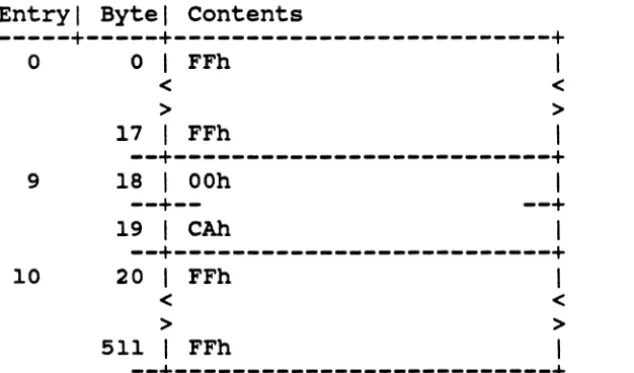
Format: 2 bytes per entry; space for 256 entries. Unused entries contain FFh, FFh. Entries are ordered by boot code number (see Table A.4).
Field Name I Off/Len I Type I Description
================================================================
0/2 I WORD I Block offset to start of boot file,
I I relative to start of Corvus volume.
Fiqure 2.5: System Boot Table
Entry I Byte I contents
---+---+---+
o
9
10
o
<
> FFh
17 I FFh
< >
I
--+---+
18 I OOh I
--+-- --+
19 I CAh I
--+---+
20 FFh
< >
511 I FFh
I
< >
I
--+---+
System Boot Table
Figure 2.5b: Example system Boot Table
Notes: In the example above, there is one entry in the System Boot table, entry number 9. Entry number 9 is assigned to the IBM PC (see Table A.4 for computer number
[image:25.620.135.452.85.271.2]Network User Table
File name: NETWORK. USER
Location: Corvus volume. The contents of the Network User Table should be the same on each drive on the network.
Description: The Network User Table identifies each user of the network. Each valid user of the network must have an entry in the user table.
Access: Entries are modified by the USER MANAGER utility.
Format: Table size ranges from 4 to 32 blocks (a maximum of 511 users requires 32 blocks). Each entry is 32
bytes long, allowing 16 entries per block. The first 32 bytes of the first block are reserved. Unused entries contain all OOh; end of table is
indicated by an entry containing all FFh: see next section, Table manipulation, for more information.
Sort field: User
Field Name I Off/Len I Type I Description
===============--===-==---==-===============================
User 0/10
I
BSTRI
User or device name (encrypted)Userpass I 10/8 I BSTR I User password (encrypted)
Server I 18/10 I BSTR I Home disk server name (encrypted)
~---Opsys I 28/2 I WORD I Operating system type (see Notes)
--~---Hostkind I 30/1 I BYTE I Type of user or device (see Notes)
~---~---Hoststa I 31/1 I BYTE I Network address (devices only)
---piqure 2.6.: Network User Table
Notes: Values for opsys are positive integers: meanings are given in Table A.3. Values for Hostkind are whole numbers; meanings are given in Table A.l; only generic meanings are used for this table. If Hoatkind = 0, the entry is for a user, and Hoatat. is ignored.
Network User Table
Entry I Byte I contents (Meaning) I Field name
---+---+---+---o
0 I FFh I Reserved< <
> >
31 I FFh I
--+---+
1 32-41
I
g .• C.%.N}b (DENISE)I
User--+--
--+
42-49
I
yPI.t=cs (PITSCH)I
Userpass--+-- --+
50-59 I ••• i .. T.h (S) I Server
--+-- --+
60-61 I 0010h (CCOS) I Opsys
--+-- --+
62 I OOh (User) I Hostkind
--+--
--+63 I OOh (Unused) I Hoststa --+---+
2 64-73 I .•. i .. T.h (S) I User
--+-- --+
74-81 I .$z.+. 'p ( ) I
--+-- --+
82-91 I ••.• c •• N}b (S) I
--+-- --+
92-93 I OOOOh (Unused) I
--+-- --+
94 I 01h (Disk) I
--+-- --+
95 I OOh (OOh) I
--+---+
96 FFh
< <
> >
511
I
FFhI
--+---+
Userpass Server Opsys Hostkind Hoststa
Unused
Fiqure 2.6b: Example Network User Table
Notes: In the entries above, user, Userpass, and Server are encrypted; the unencrypted values are given in
Drive Volume Table
File name: DRIVE. VOLUME
Location: Corvus volume
Description: The Drive volume Table contains an entry for each volume located on the drive. All operating system dependent information must be embedded in the
volume itself. The Drive volume Table contains an entry for the Corvus volume.
Access: All modifications to the Drive volume Table are performed by the Corvus VOLUME MANAGER utility.
~ Format: 4 - 64 blocks (maximum allows 511 volumes/drive); 32 bytes per entry; 16 entries per block; the
first 32 bytes of the first block are reserved. Unused entries contain all OOh; end of table is
indicated by an entry containing all FFh; see next section, Table manipulation, for more information.
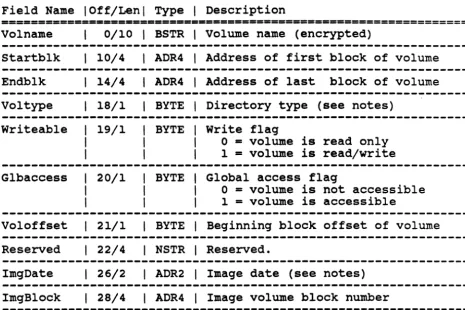
Drive Volume Table
Field Name I Off/Len I Type I Description
==============----======-==--=====-===================
==========
Volname 0/10 I BSTR I Volume name (encrypted)
Startblk I 10/4 I ADR4 I Address of first block of volume
---Endblk I 14/4 I ADR4 I Address of last block of volume Vol type I 18/1 I BYTE I Directory type (see notes)
Writeable I 19/1 I
I
Glbaccess I 20/1 I
I
I BYTE I write flag
I I 0 ~ volume is read only I I 1 = volume is read/write I BYTE I Global access flag
I I 0 = volume is not accessible I I 1 = volume is accessible
Voloffset I 21/1 I BYTE I Beginning block offset of volume Reserved I 22/4 I NSTR I Reserved.
ImgDate I 26/2 I ADR2 I Image date (see notes) ImgBlock I 28/4 I ADR4 I Image volume block number
Figure 2.7a: Drive Volume Table
Notes: Volottset is normally 0, but can be used to reserve
some blocks at the start of a volume for additional volume information. When mounting a volume, the starting block address should be calculated as startblk + volottset.
Vol type is a value between 1 and 255 which indicates the volume directory type. Values are given in Table A.2.
[image:29.620.102.567.85.395.2]Drive Volume Table
Entry I Byte I contents (Meaning) Field name
---+---+---+---o
1 2o
< > FFh31 I FFh
< >
I
--+---+
32-41 I e •• X.;.V.j (CORVUS) I
--+-- --+
42-45 I OOOOOAOOh (1024) I
--+-- --+
46-49 I 00000B2Bh (1223) I
--+-- --+
50-53 I 01h, 01h, (UCSD, yes, I
I 01h, OOh yes, 0) I
--+-- --+
54-57 I OOh, OOh, OOh, OOh I
--+-- --+
58-63 I OOh (Unused) I
--+---+
64-73 I e •• [ ••. V.j (CCSYS) I
--+-- --+
74-77 I 00000B2Ch (1224) I
--+-- --+
78-81 I 00000B2Bh (
....
) I--+-- --+
82-85 I 01h, 01h, (UCSD, yes, I I 01h, OOh yes, 0) I
--+-- --+
86-89 I OOh, OOh, OOh, OOh I
--+-- --+
90-95 I OOh (Unused)
--+---+
96 FFh
< <
> >
511 I FFh I
--+---+
Reserved
Volname
Startb1k
Endb1k
Vol type , Writeable, G1baccess, Vo1offset
Reserved
ImgDate, ImgB10ck
Volname
Startblk
Endblk
Vol type, Writeable, Glbaccess, Voloffset
Reserved
ImgDate, ImgBlock
Figure 2. 7b: Example Drive Volume Table
[image:30.618.64.523.84.719.2]Drive user table
File name: DRIVE. USER
Location: Corvus Volume
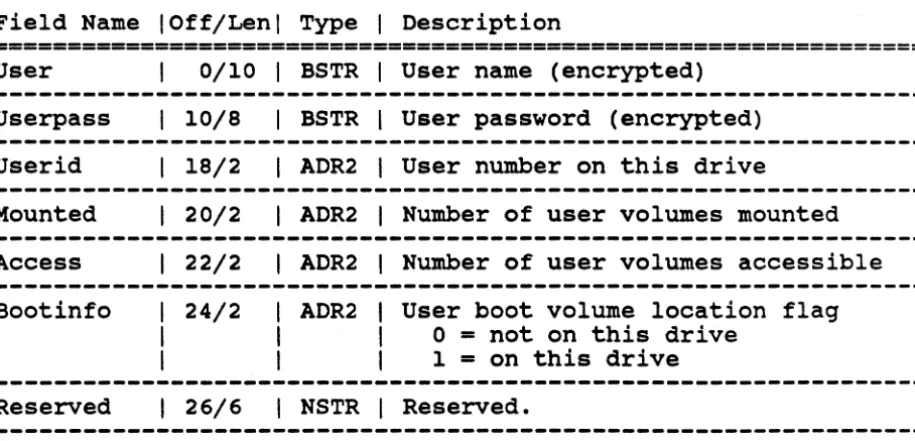
Description: The Drive User Table is used to map user names to volumes accessible on a particular drive. Each user with access to a volume on the drive has an entry in the Drive User Table. The userid field of each entry corresponds to the userid field in the Drive Access Table.
Access: All table additions are made via the Corvus ACCESS MANAGER utility. Both the ACCESS MANAGER and the USER MANAGER utilities may delete entries.
Format: 4 - 32 blocks (maximum of 511 entries requires 32 blocks); 32 bytes per entry; 16 entries per block; first 32 bytes of the first block are reserved. Unused entries contain all OOh; end of table is
indicated by an entry containing all FFh; see next section, Table manipulation, for more information.
Sort field: User
Field Name I Off/Len I Type I Description
================================================================
User
Userpass
userid
Mounted
Access
Bootinfo
Reserved
0/10
I
BSTRI
User name (encrypted)I 10/8 I BSTR I User password (encrypted)
I 18/2 I ADR2 I User number on this drive
I 20/2 I ADR2 I Number of user volumes mounted
I
22/2I
ADR2I
Number of user volumes accessible24/2 ADR2 User boot volume location flag
o
=
not on this drive1
=
on this driveI
26/6I
NSTRI
Reserved. [image:31.617.102.560.383.603.2]Drive user table
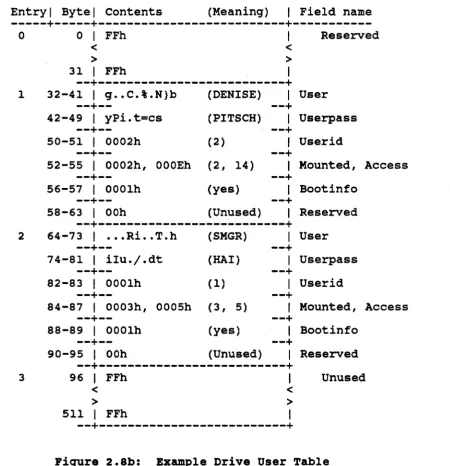
Entry I Byte I contents (Meaning) I Field name
---+---+---+---0 0 FFh Reserved
< <
> >
31 I FFh I
--+---+
1 32-41 I g .• C.%.N}b (DENISE) I User
--+--
--+
42-49 I yPi.t=cs (PITSCH) I Userpass
--+--
--+
50-51 I 0002h (2) I Userid
--+--
--+
52-55 I 0002h, OOOEh (2, 14) I Mounted, Access
--+--
--+
56-57 I 0001h (yes) I Bootinfo
--+--
--+
58-63 I OOh (Unused) I Reserved
--+---+
2 64-73 I ••• Ri •. T.h (SMGR) I User
--+--
--+
74-81 I ilu./.dt (HAl) I Userpass
--+--
--+
82-83 I 0001h (1) I Userid
--+--
--+
84-87 I 0003h, 0005h (3, 5) I Mounted, Access
--+--
--+
88-89 I 000lh (yes) I Bootinfo
--+--
--+
90-95 I OOh (Unused) I Reserved
--+---+
3 96 FFh I Unused
< <
> >
511 I FFh I
--+---+
Figure 2.8b: Example Drive User Table
[image:32.615.67.518.85.551.2]Drive Access Table
File name: DRIVE.ACCESS
Location: Corvus Volume
Description: The Drive Access Table identifies each volume on the drive to which the user has access. Each entry contains the userid of a user identified in the Drive User Table, the physical volume location, and user access information. The mount information mntinfo indicates which drive specifier a volume is associated with on boot.
Access: The Drive Access Table is modified by the Corvus ACCESS MANAGER. The USER MANAGER, VOLUME MANAGER, and ACCESS MANAGER may delete entries.
Format: 4 - 256 blocks (512 users, with access to 256 volumes each, on a single drive requires 256
blocks); 8 bytes per entry; 64 entries per block; first 32 bytes of first block are reserved.
Unused entries contain all OOh; end of table is indicated by an entry containing all FFh; see next section, Table manipulation, for more information.
Sort field: Userid concatenated with vo1addr
Field Name I Off/Len I Type I Description
=============================-==================================
userid I 0/2 I ADR2 I User number on this drive
---Voladdr I 2/4 I ADR4 I Starting block of volumeMntinfo
Readonly/ Bootflag
6/1 I BYTE I OS dependent mount information 7/1 BYTE Readonly flag - bits 7-4
o -
volume is read-write 1=
volume is read-only Boot volume flag - bits 3-0o -
not user's boot volume 1 = is user's boot volume [image:33.617.98.558.410.577.2]Drive Access Table
Entry I Byte I contents (Meaning) Field name
---+---+---+---
04
5
6
0 FFh
< <
> >
31 I FFh I
--+---+
32-33 I 0001h (User 1) I
--+--
--+
34-37 I OOOOOAOOh (1032)
--+--
--+
38-39 I xxxxh (
..
)I
--+---+
40-41 I 0001h (User 1) I
--+--
--+
42-45 I OOOOOAOOh (1032) I
--+--
--+
46-47 I xxxxh (
..
) II I
--+---+
48-49 I 0002h (User 2)
--+--
--+
50-53 I OOOOOAOOh (1032) I
--+--
--+
54-55 I xxxxh (
..
)I
--+---+
56 < > FFh511 I FFh
< > I
--+---+
Reserved Userid VoladdrMntinfo, Readon1y, Bootflag
Userid
Vo1addr
Mntinfo, Readonly, Bootf1ag
Userid
Voladdr
Mntinfo, Readonly, Bootflag
Unused
Figure 2.9b: Bxample Drive Access Table
Notes: In the example above, user 1 has access to 2 volumes: the volume starting at block 1032, and the volume
starting at-block 2048. To find the name of the volume starting at block 1032, you must search the Drive Volume Table for the entry that has a value of 1032 in the field
[image:34.615.71.532.85.750.2]Drive Access Table
File name: VOLUME.ACCESS
Location: Corvus Volume
Description: The Volume Access Table contains an entry for each volume located on the drive, giving access
information for the volume.
Access: All modifications to the Volum~ Access Table are performed by the Corvus VOLUME MANAGER utility.
Format: 4 - 64 blocks (maximum allows 511 volumes/drive); 32 bytes per entry; 16 entries per block; the
first 32 bytes of the first block are reserved. Unused entries contain all OOh; end of table is
indicated by an entry containing all FFh; see next section, Table manipulation, for more information.
Sort field: startblk
Field Name I Off/Len I Type I Description
================================================================
Startblk 0/4 I ADR4 I Address of first block of volume
Owner 4/10 I BSTR I Name of user with R/W access I I (encrypted)
~---
---VOlpsw I 14/8 I BSTR I Volume password (encrypted)
--~-
---AccType I 22/2 I
I
Case AccTYPI 24/8 Lock I 24/1
I
I
I WORD I Access type
I I 0 - uncontrolled; 2 = public; I I 1 - controlled; 3 = private I ARRY I Access information
I BYTE I If AccType - 1 (controlled), then I I 0
=
Volume is not lockedI I 1
=
Volume is currently locked [image:35.620.96.560.334.538.2]Drive Access Table
Notes: Acctype specifies the type of access allowed for this volume. If no entry exists for a volume in the Volume Access table, or if no Volume Access table exists, then the volume is mounted using information from the Drive Access table.
The mount algorithm for each type of access is given below. The field Writeable is from the corresponding entry in the Drive Volume table, and denotes either RO
(writeable=O) or RW (writeable=l): the variable Username is the user name the user is logged in under. The
parameter on the call to MountIt is either RO (read-only) or RW (read-write).
{ start of mount algorithm }
Psw2Str( volpsw, pswd): {decrypt volume password}
NeedPswd := LENGTH(Pswd>O): { does volume have a password? }
IF NeedPswd THEN GetPswd(pass): {prompt user for volume password}
CASE Acctype OF
Uncontrolled: IF «NeedPswd) AND (Pswd=pass» OR (not NeedPswd) THEN MountIt(Writeable)
Controlled: IF «NeedPswd) AND (Pswd=pass» OR (not NeedPswd) THEN MountIt(RO)
END;
Public: IF «NeedPswd) AND (Pswd=pass» OR (not NeedPswd) THEN BEGIN
IF Username = owner THEN MountIt(Writeable) ELSE MountIt(RO)
END:
Drive Access Table
Entry I Byte I contents (Meaning) Field name
---+---+---+---0
1
2
0 FFh
< <
> >
31 I FFh I
--+---+
32-35 I OOOOOAOOh (1024)
--+--
--+
36-45 I
·
.
.
.
.
. .
. .
.
(SMGR) I--+--
--+
46-53 I
·
. .
. .
.
.
.
(XYZ) I--+--
--+
54-55 I OOOOh (Uncontrol) I
--+--
--+
56-63 I OOh (Unused)
--+---+
64-67 I 000OOB2Ch (1224) I
--+--
--+
68-77 I
·
.
.
. . .
.
. . .
(SMGR) I--+--
--+
78-85 I
· . . . .
. .
.
(ZZZZ) I--+--
--+
86-87 I 0001h (Controlle) I
--+--
--+
88-95 I OOh (Varies) I
--+---+
96 FFh < > 511 I FFh
< >
I
--+~---+
Reserved
Startblk Owner Volpsw Acctype Filler Startblk Owner Volpsw Acctype Lock
Figure 2.10b: Example Volume Access Table
[image:37.618.99.465.86.478.2]Table manipulation
Table manipulation
A common set of routines is used to manipulate those tables which have a defined sort field. Each such table consists of one or more table blocks, where each table block is 2 disk blocks or 1024 bytes. Each table block contains an integral number of entries; the entry size for each table was given in the previous fiqures.
within a table block, some entries are used, and some are empty. All used entries are grouped together at the beginning of the block, and all empty entries are always grouped together at the end of the block. Empty entries contain either OOh or FFh in all bytes of the entry. An entry containing OOh indicates that an entry has been deleted; an entry containing FFh indicates that the entry has never been used. The illustration on the next page will help you picture the table organization.
Table manipulation
+---+
1st table block: (1st 32 bytes reserved)
The first 32 bytes of the first table block contain FFh, and
should be ignored.
Once you see an entry containing all COh's, you can skip to the next table block.
Used table block:
An empty entry always indicates that a
deletion has occurred.
A table block may contain all COh's, if many deletions have occurred.
Table block with never-used
< <
Used entries
> I
·
·
·
·
> I+---+
I < > IEmpty entries (all OOh)
I < > I
+---+
+---+
I I
< Used entries <
> >
I I
+---+
I I
< <
>
I
Empty entries
(all OOh) >
I
+---+
+---+
entr~es: < Used entries <
Once you see a table block with an entry of FFh, all succeeding table blocks should contain only FFh.
•
•
·
·
> >
I I
+---+
I I
< Never-used entries <
> (all FFh) >
I I
[image:39.617.76.505.76.725.2]Table manipulation
Four operations are allowed these tables: search, insert,
delete, and replace. The routines used by the Constellation II manaqement utilities to manipulate these tables are described in Chapter 6. The alqorithms used for these operations are
described here in order to qive you a better feel for how the tables are orqanized.
Each table has a defined sort field. Table entries are ordered alphabetically by this sort field. The search alqorithm allows you to specify which field to base the search on; the search
field mayor may not be the sort field. If the search field is the sort field, the search stops when an entry qreater than the entry beinq searched for is found. Otherwise, the search stops when a never-used entry is found.
The search and insert alqorithms are described in detail by Fiqures 2.10a and 2.10b.
Table deletion is handled by findinq the desired entry and moving all following entries in the table block back one entry. The last bytes in the table block are overwritten with OOh or FFh, indicatinq an empty entry. FFh is used only if other never-used entries are in this block.
,'~ start
I
- E--' --.----.. -...
---.-.-'-.----'Read next table block.
set Entr1es
<-number of used entries in table block (may be 0) set Cnt <- 0
y
Table manipulation
N
Not found,-l.
">----"'IIend of table~-l
- - - 7
l
I\ I
\
\
\
I
\
~----'----·---~)IFOund:J_---·--···· ?
y
cnt
l---r---'
*
Test only done if search field is the sort field.Figure 2.10a: Table search alqorithm
\/
[image:41.620.59.550.75.562.2]Use search algorithm to find spot where entry will go.
Table manipulation
Place item at
y first empty
')o---?Ientry in pre-ceding block.
Move appropriate
®
'{ entries forward i'> B
1'h--~--'7 one entry and
Unable insert no
insert item.
Move appropriate
Y entries back one
®
')..-_-'-_~I entry and insert item.
S fI£~+ P. e.
y
[image:42.618.121.551.70.659.2]Table manipulation
The insertion algorithm for inserting into a full table block is shown below. In each case, the new entry is to be inserted into block n+2, which is full.
Case 1: a preceding block has empty entries
Block n +---+
I I
I I
I I
I I
+---.a--'-+~-I empty I
I I
+---+
Block n+l Block n+2 +---+ +---+
~<
1\ I · I
I
~
II
J
I,~
IL~J
J
L~_~j
r~~~-:~::r
I~
I +---+Block n+3 +---+
I I
I I
I I
+---+ I empty I
I I
I I
+---+
Case 2: All preceding blocks are full, but a following block has empty entries.
Block n Block n+l Block n+2 +---+ +---+ +---+
I I I I
I I I I
I I I I
I I
I I
I I
I
I
I I
I I
I I
I I
I ';2
I ';
I ~1_-4----+---+ +---+ +---+
new entry +---+ I +---+
Block n+3 +---+
I 7 ~ I
I ~ I
I ~ I +---;!----+
I empty I
I I
I I
[image:43.615.72.509.51.733.2]Encryption
Encryption
All names and passwords in the tables are encrypted. Encrypting the names makes it harder for a malicious user to locate the Constellation II tables. Even if a user does locate the tables, figuring out how to decrypt the information is not easy, since each byte is encrypted based on its location within a name.
Additionally, a different algorithm is used for encrypting names than is used for encrypting passwords.
The name encryption algorithm preserves alphabetic ordering, so that a list of encrypted names and a list of the corresponding unencrypted names will sort in the same order.
A set of procedures which performs encryption and decryption is described in Chapter 6.
Active User Table
The Active User table contains a list of those users and servers currently active on, or "logged-on" to, the network. Thus, it is a dynamic table which can be used to determine the current state of the network. As stated in the Corvus Mass storage Systems
GTI however, the Active User Table is not always up-to-date.
Active User Table
File name: N/A
Location: In firmware area
Description: The Active User Table contains entries for all users or servers currently active on the network. Each new user of the network is added to the table during cold boot or via the server logon protocol. An Active User Table entry consists of the user or server name, and the host address of the user or server. This table can be read by utility programs to find the addresses of various users or servers on the network.
Access: This table is initialized by the disk server. It is modified by the firmware in response to commands from a user logon or server power-up.
Format: 4 blocks (maximum 128 entries - there are more than 64 to allow for multiple users per host) 16 bytes per entry; 32 entries per block
Field Name I Off/Len I Type I Description
-================-==============================================
Host 0/10 I BSTR I User or ~evice name Hostno I 10/1 I BYTE I Network address
Hostkind I 11/1 I BYTE I User or device type (see Table A.l) Reserved I 12/4 I BSTR I Reserved
Active User Table
Entry I Byte I contents (Meaning) I Field name
---+---+---+---0
1
2
0-9 I SERVER1 I
--+-- --+
10 I 01h (1) I
--+-- --+
11 I OOh (disk) I
--+-- --+
12-15 I OOh (Unused) I
--+---+
16 20h
< <
> >
31 I 20h I
--+---+
32-41 I DENISE
--+-- --+
42 I 13h (19) I
--+-- --+
43 I 20h (Concept) I
--+-- --+
44-47 I OOh (Unused) I
--+---+
48 < >
511 I 20h < > I
+---+
Host Hostno Hostkind Reserved Unused Host Hostno Hostkind Reserved UnusedPiqure 2.12b: Example Active User Table
There is an Active User Table on each disk server on the network. See the Corvus Mass storage Systems GTI, for descriptions of the commands which access the Active User table.
The Active User Table can be updated by choosing the List Drives On-line option of the Constellation II management
start
Read Active User table from a server
set
N
(;\
'>-~----7)0J
y
rset---i~t;a;;;, ActAddr,
I
Actkind from AUT entry.,
V __
---_-__
Active User Table
*Actname, ActAddr, and Actkind are the name, host address, and device type from the current Active User Table (AUT) entry.
**Curname, CurAddr, and Curkind are the name, host address, and device type obtained by the Who Are You message.
Send Echo command to
A:~~d_dz:_,,---
_J
N
'
~
>---11)\ Broadcast Goodbye
\---,..---;'/'L--l-
Send Who are you message. Set Curname**, CurAddr,Curkind from response.
\message for Actname~_ ,
---
---_._----.,
Broadcast Goodbye
--~--7~\message for Actname.
Broadcast Hello message for Curname.
Cnt<-Cnt+l '
[image:47.617.62.566.68.683.2]Constellation disk drivers
Chapter 3: Constellation Disk drivers
A simple disk driver was described in Chapter 3 of the Corvus Mass storage Systems GTI. You will have to refer to that
chapter for complete information on writing a disk driver; this chapter discusses only the particular functions of a
Constellation disk driver.
Figure 3.1 summarizes the disk driver functions required of a Constellation disk driver. These functions are the ideal set that a driver should provide. In reality, it is not always
possible to provide all of these functions, due to limrtations of the operating system interface, or space limitations. The actual functions provided by the drivers supplied by Corvus are
described in Appendix B.
Function
Driver initialization Device read
Device write
Send Corvus drive command
Send Omninet command
Mount Unmount
Get mount information
Figure 3.1:
How used
standard BIOS call
"
"
utilities, user applications
"
Mount utility, user applications
"
Disk driver functions
A Constellation disk driver maintains a structure known as the mount table. The mount table serves as a map between an
operating system device number and a volume on a Corvus drive. The driver will normally support a fixed sized mount table, supporting between 6 and 10 mount table entries. We have found through experience that while 2 or 3 disk devices are sufficient for most applications, there are occasions where 6 are not
Constellation disk drivers
Each entry in the mount table must contain the following information:
o Corvus disk server address - 1 byte o Corvus disk drive number - 3 bits
o Corvus disk block address (starting block address of volume) - 3 or 4 bytes
o Corvus volume length, or ending address (2 or 3 bytes) o Read-write flag - 1 bit
Therefore, each device entry requires at least 7 bytes. In addition, the driver must store the user's name, and may also store the user's password, home disk server address, and
transporter address. Figure 3.2 shows a typical mount table description. See Appendix B for the exact format of each operating system's mount table.
VAR MT: RECORD
Devices: ARRAY Diskserver: DriveNo: StartBlk: VolLen: Writeflag: END;
User: Userpass: HomeDS: UserAddr: END;
[1 •• 10) OF RECORD BYTE;
BYTE;
PACKED ARRAY [1 •• 4) OF BYTE; INTEGER;
BOOLEAN;
PACKED ARRAY [1 •• 10) OF CHAR; PACKED ARRAY [1 •• 8] OF CHAR; BYTE;
[image:50.617.110.502.301.480.2]BYTE;
Figure 3.2: sample mount table declaration
Each function listed in figure 3.1 is now discussed in detail.
Driver initialization
This call is a standard BIOS function in most operating systems. It is used to perform Whatever initialization is required. In the case of a Constellation disk driver, this call can be used to initialize the mount table, if this has not been done previously
Constellation disk drivers
Device read, device write
The usual parameters to device read or write include the following:
Device number sector number Number of sectors Data buffer
Result code
The driver must first of all check that the device number is valid, and that a mount table entry exists for this device number. If the device number is invalid, the driver should return a result code indicating "device not on-line".
If the request is a device write, then the driver must validate that the write flag is set in this device's mount table entry. If not, the driver should return a result code indicating "write protected".
Next, the driver must validate that the sector number is valid, by comparing it to the volume length field in the mount table. If the sector number is out of range, the driver should return a result code indicating "invalid sector address".
Next,the driver must build the appropriate read or write command to be sent to the Corvus disk. Refer to Chapter 3 of the Corvus
Mass storage Systems GTI for a thorough description of this
step, which includes building a command vector, sending it to the proper disk, and receiving the results. Remember that the sector size is operating system dependent, and that the appropriate
Corvus read or write sector command must be used. The sector number specified in the driver call must be converted to an absolute disk sector address by adding it to the starting block address from the mount table. The drive number and disk server address must also be obtained from the mount table.
The read or write command must be repeated for the appropriate number of sectors, as specified in the driver call.
Send Corvus drive command (CDSEND, CDRECV)
The driver should provide an interface for sending arbitrary disk commands, such as pipes or semaphores commands. Refer to Chapter 4 of the Corvus Mass Storage Systems GTI for a detailed
Constellation disk drivers
Mount, unmount, get mount information
The driver should also provide an entry point that allows for changing the mount table. This function can be used by
applications which require certain volumes to be mounted, and by a user who has access to more volumes than the driver supports.
In Corvus implementations, these functions are often provided by two low-level functions: Read mount table and write mount table. As their names imply, these functions simply move the entire mount table between the driver's memory and a user-supplied buffer. Since these functions require a detailed knowledge of the structure of the mount table, it is desirable to provide a user library which implements the higher-level functions mount, unmount, and get mount information. These functions are
described in Chapter 5, User Utilities.
The Read Mount Table entry point has two parameters, both output parameters. The first parameter is an integer which contains the length of the mount table: the second parameter is a buffer which contains the mount table itself. The caller must ensure that the buffer is large enough to accomodate the mount table.
The Write Mount Table entry point has one parameter, a buffer which contains the new mount table.
Extreme caution must be used in calling these entry points, since writing incorrect information to the mount table could cause data on the Corvus drive to be overwritten.
Send omninet command
The driver may also provide an interface for sending arbitrary omninet messages, such as Send message or Setup Receive message. The details of this interface vary widely among implementations; you should look at the individual descriptions in Appendix B for information on this function.
Constellation disk drivers
is important to realize that providing a separate transporter driver and disk driver is much superior to providing only a disk driver. with only a disk driver, certain sockets and data
Boot and logon procedure
Chapter 4: Boot and logon procedure
---This chapter describes the tasks of a typical boot from the Corvus drive. As mentioned for disk drivers, the set of tasks described here is the ideal; in reality, it is not always
possible to provide all of these functions, due to limitations of the operating system interface, or space limitations. The actual functions provided by the various boot and logon programs
supplied by Corvus are described in Appendix B.
This chapter discusses both boot and logon, which are two
separate functions. Boot refers to the process of loading and launching the operating system; logon refers to the process of validating a user's name and mounting the user's volumes. How boot and logon are accomplished is operating system dependent. In some cases logon is performed after the boot has been
completed, and in other cases it is performed as part of the boot.
There are several reasons why it is desireable to boot from the Corvus disk, rather than from some local device such as a floppy. First, one of the reasons for buying a network is to minimize hardware cost per user; if each user can boot from the Corvus disk, then each computer does not need to have a floppy drive attached. Second, it is usually faster to boot from a hard disk than it is to boot from a floppy disk. Thirdly, when a new
version of the operating system is released, only the copy on the hard disk needs to be updated; with a floppy disk boot, each
user's boot floppy needs to be updated.
Despite the many advantages of booting from the Corvus disk, there are computers for which Corvus does not support booting. Some computers do not have the capability to boot from an
external device. In other cases, the operating system supplier does not make available the information which Corvus must have in order to develop boot code.
Corvus boot protocol was established to allow many types of
computers to boot from one disk. We didn't want to reserve disk sectors for each computer type, which would be wasteful of space since most networks have only one or two computer types
connected. We also chose not to reserve a large fixed area. Instead, we chose to reserve one block (block 8), to be used as an indirect pointer to where the boot code is located. A second
indirect pointer indicates where, within the boot blocks, a particular computer's boot code is located.