Abstract— The paper is aimed to digital systems modelling and verification using Petri nets. A new teaching method was proposed and implemented into an educational tool called PNets. This tool offers modelling and functionality animation of designed Petri nets together with verification of their fundamental properties as safety, liveness, conservativeness, boundedness etc. In comparison with existed similar educational tools, the proposed and implemented PNets is simpler, intuitive, less demanding on hardware and portable with more detailed verification of the designed Petri net. The tool is suitable for educational purposes and its functionality was verified by examples.
Index Terms—design, educational tool, Petri nets, properties
I. INTRODUCTION
Sequential logic circuits design is obviously based on finite state automata that can be represented by Petri nets. Petri nets cover a wide class of discrete mathematical models that allow to describe control and information flow of the modelled systems [3]. They are an effective facility to model information processing, especially parallel running processes in time [2]. Petri nets that are used for describing sequential logic circuits behaviour should be safe and live [9]. Petri net is defined by the quintuple
, , , , (1)
where , , … , denotes the set of places, , , … , denotes the set of transitions, ⊂ ∪ is the set of directed edges connecting places and transitions, : → 1, 2, 3, … is the weight function of the edges and : → 1, 2, 3, … is the initial marking [7]. Petri net can be described in the form of oriented bipartite graph. The structure of this graph is described by , , , , where P and T are representing the vertices of the graph, known as places and transitions. And D+ and D- are integer matrices with nonnegative elements representing the flow relation between the two vertex types. Places in a Petri net hold tokens, whose distribution indicates the net's states or its markings.
Petri nets have some properties such as boundedness, safety, liveness, conservativeness etc. A net (graph) is called
Manuscript received March 05, 2013; revised March 05, 2013. This work was partially supported by the Slovak Science Grant Agency (VEGA 1/1008/12 "Optimization of low-power design of digital and mixed integrated systems").
Miroslav Siebert is with the Faculty of Informatics and Information Technologies, Slovak University of Technology, 84216 Bratislava, Slovakia (e-mail: [email protected]).
Jana Flochová is with the Faculty of Informatics and Information Technologies, Slovak University of Technology, 84216 Bratislava, Slovakia (e-mail: [email protected])
k-bounded if all places in all achievable markings contain up to k tokens. The net is called safe if is 1-bounded. R(M0) denotes the set of states reachable from M0, R(M) the set of states reachable from M. A net is called live if every transition is live (potentially firable) in M0, and it is said reversible if M0 ∈ R(M) for any M ∈ R(M0). A net is called conservative if sum of all tokens in all places in all states R(M) is constant.
Principles of Petri nets belong to basic knowledge of designers and have to be involved in an educational process. Besides of theoretical knowledge in the educational process there are suitable practical examples to demonstrate Petri nets design and to show their behaviour. Therefore the goal is to develop an automatic interactive software tool for understanding and using Petri nets in the digital design process. This tool should offer various possibilities, especially in simulating net activities when states of net places are changing and an error can occur. The error is an incorrect assignment of the number of tokens to one of places of the simulated Petri net after a transition has been triggered there. Verification of the net properties and characteristics can be realized by this educational tool. The new proposed and implemented educational tool for Petri nest is enriched by useful features such as schemes saving and editing, saving them as pictures, sending them by e-mail or they can be involved into documentations. The educational tool functionality allows work with the schemes immediately without erasing and redrawing them in the case of making an incorrect step.
The paper is organised as follows. Related work to the existed similar educational tools is shortly described in section 2 and the new developed tool PNets is presented in section 3. PNets evaluation and experimental results are shown in section 4 before concluding in section 5.
II. RELATED WORKS
Nowadays, different educational tools exist for teaching Petri nets and they can be divided into three groups:
free of charge tools running without installation,
other free of charge tools,
commercial tools [6].
The paper describes only three such tools that belongs to the first category. There are Pesim (Petri net toolkit) [4], SimPRES (Petri nets based Representation for Embedded Systems) [1] and CESim (Condition/Event Petri net Simulator) [8] which are described below. These tools were selected because they are designed for educational process and free of charge. A list of others tools can be found in [5].
PNets - the Verification Tool based on Petri Nets
A. PESIM
Functionality of PESIM is targeted to verification of Petri nets properties: consistency, boundedness, safety, liveness, conservativeness and others with reachability tree design. This tool doesn’t offer an user friendly and interactive environment, it's understanding it requires more time. The advantages of PESIM are: optional size of drawing area, well-arranged menu with a lot of functions, a large number of analytical functions of generated nets. The disadvantages of PESIM are: obsolete and cumbersome user interface, freezing of the application on newer operating systems and formed edges are often lost. Graphical user interface of PESIM tool is shown in Fig. 1.
B. SimPRES
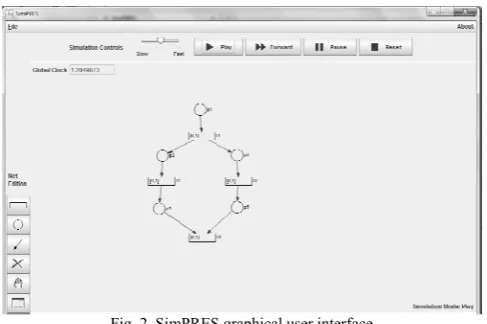
The tool SimPRES provides an intuitive and simple user interface and clear function of each icon. The tool itself is implemented as a Java application launched from a web page. However it offers only a basic simulation of Petri nets without additional analytical functions of generated nets. The simulation itself is done automatically without possibility of manually trigger transitions. The advantages include simple and intuitive controls, portability of the tool running directly from the web site, saving and re-loading the created net. But the tool has the following disadvantages: an analysis of functions is missing, the tool does not allow to trigger transitions manually and draws intricate edges. Graphical user interface of SimPRES tool is shown in Fig. 2.
C. CESim
The tool CESim is a sophisticated tool with an intuitive interface and extensive set of simulations. Simulations run automatically without any option to choose which transition will be executed. The software tool is approaching to professional tools by its complexity. The main advantage of CESim is adjusting size of the screen drawing area and a alignment created of elements in a grid. Other CESim advantages are: intuitive usability and an large number of settings. The disadvantages of CESim include: lack of net properties analysis, impossibility of choosing the triggered transition. Graphical user interface of CESim tool is shown in Fig. 3.
Each of the mentioned tools has its own field of applications. They are all designed mainly for teaching and verification of created Petri nets. They differ only by using additional functions and implementation environment. The basic functions of design and testing of Petri net models are properly implemented in all of the tools. All effective features and functionalities of the described tools were adopted and involved into a new educational tool called PNets. The proposed PNets educational tool is unique focusing directly on the educational process. More, it is simple and extendable for additional functionalities..
III. THE EDUCATIONAL TOOL PNETS
The PNets educational tool is developed by using object-oriented approach of Java programming language which ensures its portability and independence from the operating system. PNets (Petri Nets) operates in two modes. The first one is the editing mode which is used for creating a net itself and its subsequent editing. The second one is aimed to simulation. This mode starts by switching the mode selector button from the state "off" to state "on". Transition is executable only in the simulation mode. Executable transition is depicted in blue. It is possible to analyze the characteristics of the current generated net in both modes. Analysis of the properties is provided by using the reachability tree.
[image:2.595.250.539.206.388.2] [image:2.595.45.296.215.381.2]The number of settings and options from a user are minimized in order to use this tool as simple as possible. Several tools parameters have preselected default settings with the best values e.g. screen resolution are adjusted Fig. 1. PESIM graphical user interface.
Fig. 2. SimPRES graphical user interface.
[image:2.595.46.290.582.744.2]automatically. The educational tool is active only in case of an active interaction from the user otherwise it is in the "sleep" state. Only when the user clicks on the mouse a desired change occurs. Therefore this tool has a minimum hardware requirements for its execution and it is therefore well suited to run also on older computers, mobile devices and tablets. The basic window and menu of PNets are described below followed by its implementation.
A. Functions and Elements
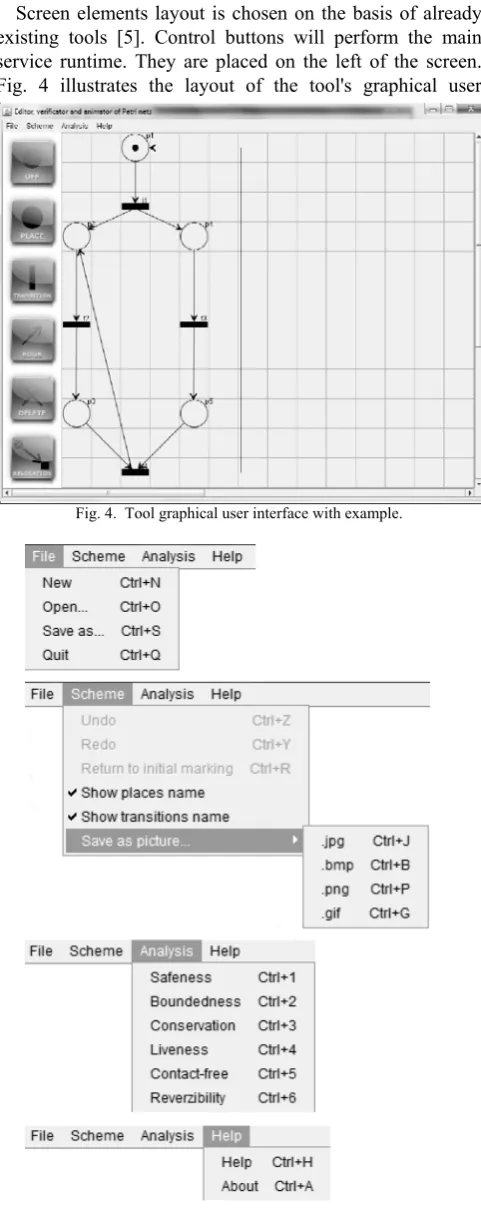
[image:3.595.49.290.167.774.2]Screen elements layout is chosen on the basis of already existing tools [5]. Control buttons will perform the main service runtime. They are placed on the left of the screen. Fig. 4 illustrates the layout of the tool's graphical user
interface. The reason for the vertical placement of the buttons is also a growing number of wide displays use for personal computers, mobile devices and tablets. The functions of buttons are explained in description of program states in sections 3.3.
Available main menu options of the educational tool with the keyboard shortcuts are shown in Fig. 5. The tool offers the following menu functions:
File - open a new scheme, save or reload a created
Petri net, close the tool.
Scheme - step forward/backward, return to the
initial marking of the net, enable/disable display names of places/transitions, save a designed net as the image.
Analysis - analyse and verify properties of a net.
Help - an user guide and tool information
B. PNets implementation
The educational tool PNets is implemented in object-oriented way thus individual source files represent classes that inherit their properties from their ancestor hierarchically.
Both objects place and transition are created by their own class which extends the common ancestor object. Current state of each created object determines its variables. Each object stores the information about its position: x and y coordinates to the grid and name which is displayed next to the rendering object. Other object properties are added by inheritance depending on the object type. Class tree.java ensures creating reachability marking tree. Main class okno.java has to contain at least one instance of class tree.java and custom variables used to store markup in the tree tops. Class for creating subtrees used for verifying liveness has the same variables. These subtrees use the same algorithms as is used in the creation of normal trees. Subtrees work only with other variables to avoid overwriting the original values of the tree.
The educational tool PNets was designed to work in individual states. The individual states and their interdependencies are represented by the state diagram shown in Fig. 6. The individual states and user options in the states are as follows:
1. Basic state (indicated in the state diagram as p1). The properties of already created elements can be changed in this state. A user can change the initial marking of places and set up maximal possible markings by mouse double-click on places. Transitions reorientation from vertical to horizontal position and vice versa is possible to do by mouse double-click on transitions. The user can change the weight of edges and routes rendering by mouse double-click on the edges. Route rendering means bypassing created net instead of direct line. This action ensures that there are no intricate net elements. This state is the default state after PNets starting.
2. The Simulation state (p2, start by OFF button) is the
one of the states when no grid is displayed. Transitions of a net that can be triggered are highlighted in blue colour. The user can trigger highlighted transition by mouse click.
Fig. 4. Tool graphical user interface with example.
3. State of creating place / transition (p3/p4, PLACE/TRANSITION button). The user can create a new place/transition by clicking on an empty square.
4. State of deleting net element (p5, DELETE button). If
the user wants to delete or move an element than he selects its location in the square grid. If user wants to delete an edge than he has to click on any part of it or a vicinity of the edge.
5. State of selecting the beginning of a new edge (p6,
EDGE button). The user is required to select the square grid with place/transition which will be beginning of a new edge.
6. State of selecting end of the new edge (p7). The user select the square grid which will be the end of the new edge.
7. State of selecting transferred object (p8,
RELOCATION button). The user selects a square grid containing a place or transition whose position he wants to change.
8. State of selecting a new position of a transferred
object (p9). The user selects the empty square where transferred object will be moved.
Hardware requirements for the educational tool PNets are given in Table I. CPU usage reached 100 % for 2-3 minutes only for liveness verification of more complex Petri net which is related to the calculation algorithm.
IV. PNETS TESTING
Basic scenarios for testing the application was divided into two parts. The first one was aimed at testing of the Petri nets editor and the second one was devoted to testing Petri nets properties. The second part was focuses on verifying the simulator properties where all possible conditions of the net could be evaluated.
Creation of a basic test scenario for Petri nets editor can be provided by drawing up a random sample types of networks in order to test the greatest number of features offered by the program. By use-case testing were verified: net creating functionality, performance and accuracy of keyboard shortcuts, export hook up in the image as well as save and reload net to/from a file.
Properties of the nets were tested by more than hundred different examples. There are shown three prime examples where the individual properties of Petri nets are valid and invalid.
One of the examples is in Fig. 4. This net is live because it's always possible to reach a marking which enable to trigger all transitions. It is not bounded because the number of token in the place p2 increases to infinity. Therefore the net is neither consistent, nor conservative, nor safe. There is no place which has set maximal number of tokens therefore the net is contact-free. Testing of the properties of this net brought the same results.
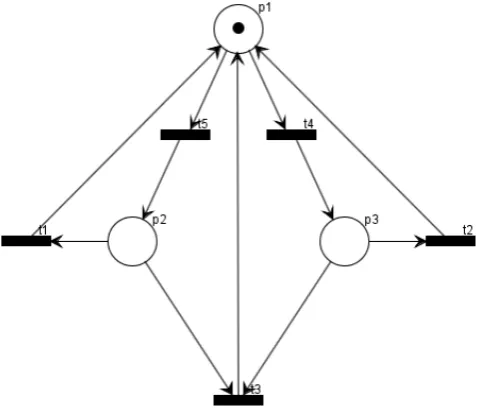
Second example is shown in Fig. 7. This net is not live because transition t3 will never be triggered. This net has only one token therefore it is safe, bounded and conservative. Also it is consistent because it always returns to its initial marking. There is no place which has set maximal number of tokens therefore the net is contact-free.
[image:4.595.56.290.56.323.2]Fig. 8 shows of a net which is not contact-free. Input place of transition t1 has sufficient number of tokens and can be triggered but place p2 has set maximum number of tokens to three. Therefore transition t1cannot be triggered and there is a contact. In addition to this the net is not live because there is not a triggered transition, is not safe but it is 5-bounded because place p1 has maximum number of tokens with five tokens. The place p1 is not source place and the place p2 is not sink place. This net is strictly Fig. 6. State diagram of educational tool.
TABLEI Max CPU usage: <2% RAM memory: <60MB Min screen resolution: 640x480 pixels
[image:4.595.306.546.450.654.2]conservative the sum of all the tokens is constant. The net is not consistent because does not exist any other marking than initial the marking.
The educational tool behaved as expected thought testing. Although there is not verified all the cases that may occur in the educational tool because of the large number of creatable networks.
V. CONCLUSION
This paper describes the design and implementation of the new educational tool called PNets. The developed educational tool is functional, usable not only for teaching issues of Petri nets but also for the design of digital systems. PNets enriches the set of existing tools in this area. The main benefits of PNets are its portability, simplicity, topicality (running on the latest operating systems) and detailed verification ability of Petri nets properties.
REFERENCES
[1] L.A. Cortés, P. Eles, Z. Peng, “Modeling and Verification of Embedded Systems using Petri Net based Methods: Application to an Industrial Case,“ SAVE Project Report, Dept. of Computer and Information Science, Linkӧping University, Linkӧping, 2001, p. 37. [2] M. Češka, “Petri nets: Introduction to the theory and tools for Petri
Nets,“ “Petriho sítě: Úvod do teorie a nástrojů pro aplikaci Petriho sítí,“ (in Czech), CERM, Brno, 1994, p. 94.
[3] M. Češka, V. Marek, P. Novosad, T. Vojnar, “Petri nets“,“Petriho sítě,“ (in Czech), PES, Faculty of information technologies, VUT Brno, 2009, p. 224.
[4] M. Češka, M. Skácel, “The Petri Net Tool PESIM and Its Application in VLSI and ASIC Design,“ in Proc. of The 7th Microcomputer School VLSI and ASIC Design, Wydawnictwo Prac Naukovych FORMAT, Wroclaw, 1995, pp. 185 - 194.
[5] L. Heitmann, D. Moldt, “Petri Nets Research Groups,“ University of Hamburg. Available:
http://www.informatik.uni-hamburg.de/TGI/PetriNets/research/ [6] K. Jelemenská, M. Siebert, D. Macko, P. Čičák, “Logic circuit design
verification support tooll - FitBoard,“ in WCETR-2011: World Conference on Educational Technology Researches, Near East Universit, Cyprus Educational Sciences Association, 05-09 July, Nicosia / Kyrenia, North Cyprus, 2011, Vol. 28, No. 1-4, pp. 305-310. [7] T. Murata, “Petri nets, properties, analysis and applications,“
Proceedings of IEEE, Vol. 77, No. 4, 1989, pp. 541-580.
[8] P. Novosad, M. Češka, “Simulation and Analysis of Condition/Event Petri Nets Using Software Tool CESim,“ in Proceedings of 21th European Simulation and Modelling Conference ESM'2007, St. Julians, Malta, MT, EUROSIS, 2007.
[image:5.595.59.290.101.140.2][9] M. Siebert, “Editor, animator and verificator of Petri nets,“ “Editor, animátor a verifikátor Petriho sietí,“ (in Slovak) Master's thesis, STU FIIT, Bratislava, 2011, p. 80.