Turbo Pascal®
Reference Guide
Version 5.0
Copyrightc 1983,1989 All rights reserved
Borland International 1800 Green Hills Road
P.O. Box 660001
R3
This manual was produced
with
SprintOP The Professional Word Processor
All Borland products are trademarks or registered trademarks of Borland International, Inc. Other brand and product names are trademarks
or registered trademarks of their respective holders. Copyrighto 1989 Borland International.
Printed in the U.S.A.
Table of Contents
Introduction 1
What's On Your Disks 0 0 0 0 0 0 0 0 0 0 0 0 0 0 0 0 0 0 0 0 0 0 0 0 0 0 0 0 0 0 0 0 0 0 0 0 0 0 0 0 0 0 0 0 1 Installing Turbo Pascal On Your System 0 0 0 0 0 0 0 0 0 0 0 0 0 0 0 0 0 0 0 0 0 0 0 0 0 0 0 4 About This Manual 0 0 0 0 0 0 0 0 0 0 0 0 0 0 0 0 0 0 0 0 0 0 0 0 0 0 0 0 0 0 0 0 0 0 0 0 0 0 0 0 0 • • 0 • 0 0 4 Typography 0 0 0 0 0 0 0 0 0 0 0 0 0 0 0 0 0 0 0 0 0 0 0 0 0 0 0 0 0 0 0 0 0 0 0 0 0 0 0 0 0 0 0 0 0 0 0 0 0 0 0 0 0 5 How to Contact Borland 0 0 0 0 0 0 0 0 0 0 0 0 0 0 0 0 0 0 0 0 0 0 0 0 0 0 0 0 0 0 0 0 0 0 0 0 • 0 0 0 0 0 5
Part 1 Programmer's Reference
Chapter 1 Tokens and Constants 9
Special Symbols and Reserved Words 0 0 0 0 0 0 0 0 0 0 0 0 0 0 0 0 0 0 0 0 0 0 0 0 0 0 0 0 0 0 0 9 Iden tifiers 0 0 0 0 0 0 0 0 0 0 0 0 0 0 0 0 0 0 0 0 0 0 0 0 0 0 0 0 0 0 0 0 0 0 0 0 0 0 0 0 0 0 0 0 0 0 0 0 • • 0 0 0 0 11 !.abels 0 0 0 0 0 0 0 0 0 0 0 0 0 0 0 0 0 0 0 0 0 0 0 0 0 0 0 0 0 0 0 0 0 0 0 0 0 0 0 • • • • • • • • 0 0 0 0 0 0 0 0 0 0 12 Numbers 0 0 0 0 0 0 0 0 0 0 0 0 0 0 0 0 0 0 0 0 0 0 0 0 0 0 0 0 0 0 0 0 0 0 0 0 0 0 0 0 0 0 0 0 0 0 0 0 0 0 0 0 0 0 0 13 Character Strings 0 0 0 0 0 0 0 0 0 0 0 0 0 0 0 0 0 0 0 0 0 0 0 0 0 0 0 0 0 0 0 0 0 0 0 0 0 0 0 0 0 0 0 0 0 0 0 0 14 Constant Declarations 0 0 0 0 0 0 0 0 0 0 0 0 0 0 0 0 0 0 0 0 0 0 0 0 0 0 0 0 0 0 0 0 0 • 0 0 0 0 0 0 0 0 0 15 Comments 0 0 0 0 0 0 0 0 0 0 0 0 0 0 0 0 0 0 0 0 0 0 0 0 0 0 0 0 0 0 0 0 0 0 0 0 0 0 0 0 0 0 0 0 0 0 0 0 0 0 0 0 0 16 Program Lines 0 0 0 0 0 0 0 0 0 0 0 0 0 0 0 0 0 0 0 0 0 0 0 0 0 0 0 0 0 0 0 0 0 0 0 0 0 0 0 0 0 0 0 0 0 0 0 0 0 0 16
Chapter 2 Blocks, Locality, and Scope 17
Syntax 0 0 0 0 0 0 0 0 0 0 0 0 0 0 0 0 0 0 0 0 0 0 0 0 0 0 0 0 0 0 0 0 0 0 0 0 0 0 0 0 0 0 0 0 0 0 0 0 0 0 0 0 0 0 0 . 0 17 Rules of Scope 0 0 0 0 0 0 0 0 0 0 0 0 0 0 0 0 0 0 0 0 0 0 0 0 0 0 0 0 0 0 0 0 0 0 0 0 0 0 0 0 0 0 0 0 0 0 0 0 0 0 19 Scope of Interface and Standard Identifiers 0 0 0 0 0 0 0 • • • 0 • 0 • • • • 0 0 0 0 0 0 0 0 19
Chapter 3 Types 21
Simple Types 0 0 0 0 0 0 • 0 • • 0 0 0 0 0 0 0 0 0 0 • 0 0 0 0 0 0 0 0 • 0 0 0 • 0 • 0 • 0 0 0 0 0 0 0 . 0 0 • • 0 22 Ordinal Types . 0 0 0 0 0 • • • 0 • 0 • 0 0 0 0 0 • 0 0 0 • 0 0 0 0 0 0 0 0 0 0 0 • 0 0 0 0 0 0 0 0 0 • 0 • • 22 Integer Types o. 0 0 0 0 0 • 0 0 0 0 0 0 0 0 0 0 0 0 0 0 0 0 0 0 0 0 0 0 0 0 0 • • • • 0 0 0 0 0 0 0 • • 0 23 Boolean Type 0 0 0 0 0 0 • 0 • 0 0 0 0 0 0 0 0 0 0 0 0 0 • 0 0 0 0 0 0 0 0 • • 0 0 0 • 0 0 0 0 0 0 0 0 o . 24
Pointer Types 0 0 0 0 0 0 0 0 0 0 0 0 0 0 0 0 0 0 0 0 0 0 0 0 0 0 0 0 0 0 0 0 0 0 0 0 0 0 0 0 0 0 0 0 0 0 0 0 0 0 0 32
Procedural Types 0 0 0 0 0 0 0 0 0 0 0 0 0 0 0 0 0 0 0 0 0 0 0 0 0 0 0 0 0 0 0 0 0 0 0 0 0 0 0 0 0 0 0 0 0 0 0 0 33
Identical and Compatible Types 0 . 0 0 . 0 0 0 0 0 0 0 0 0 0 0 0 0 0 0 0 0 0 0 0 0 0 • • 0 0 0 0 0 0 33
Type Identity 0 " 0 0 0 0 0 0 0 0 0 0 0 0 • 0 0 0 0 0 0 0 0 0 0 0 0 0 0 0 0 0 0 • 0 0 • 0 0 • 0 • 0 0 0 • 0 0 33
Type Compatibility 0 0 • 0 0 0 0 • 0 0 • 0 0 • 0 • 0 0 0 0 0 • • 0 0 0 0 • 0 0 0 • • 0 0 0 0 0 0 0 0 0 • • 34
Assignment Compatibility ... 0 . . 0 0 0 0 0 . . 0 . . 0 • • • • 0 . . . 0 0 • • 0 • • 0 34
The Type Declaration Part .. 0 0 • 0 0 0 0 • 0 • 0 0 0 0 0 • 0 0 • 0 0 0 0 0 0 • 0 • 0 0 0 0 • • • 0 • 0 35
Chapter 4 Variables 37
Variable Declarations 0 0 0 0 • • 0 0 0 • • 0 0 0 0 0 0 . 0 0 0 • • • • 0 0 0 • • 0 0 0 0 0 0 0 0 0 0 0 • • 0 37
The Data Segment 0 0 0 0 0 0 0 0 0 • 0 • 0 0 0 0 • 0 0 0 0 0 0 0 0 0 0 0 0 • 0 0 0 • 0 0 0 0 0 0 0 0 • 0 0 38
The Stack Segment 0 0 0 • • • 0 0 0 0 • 0 • 0 0 0 0 0 0 0 0 0 • 0 • 0 0 • 0 0 0 • 0 0 0 0 • 0 0 0 0 0 • • 38
Absolute Variables 0 0 0 0 0 • • • • 0 . 0 0 . 0 0 0 0 0 0 0 0 0 . 0 . 0 0 0 0 0 0 . 0 0 0 0 0 0 . 0 0 0 0 39
Variable References .. 0 • 0 0 0 0 0 0 0 • 0 0 0 0 0 0 0 0 0 0 0 0 0 0 0 0 0 • • 0 0 0 0 0 0 0 0 0 0 0 • • 0 0 39
Qu.alifiers 0 0 0 0 0 0 0 0 0 • 0 0 • 0 • 0 0 0 0 0 • 0 0 0 0 0 0 0 0 0 0 0 0 0 0 0 0 • 0 0 0 • • • 0 0 0 0 • 0 0 0 • 0 40
Arrays, Strings, and Indexes ... 0 0 0 0 • 0 0 0 0 0 • • 0 0 0 0 • 0 • 0 0 0 0 0 0 0 0 0 • 0 • • 0 41
Records and Field Designators. 0 " 0 0 " 0 . 0 0 . 0 . . 0 0 0 0 . . . 0 . . . . 0 0 0 • • 0 41
Pointers and Dynamic Variables . 0 0 0 0 0 0 0 0 0 0 • 0 0 • 0 0 0 0 0 0 0 0 0 0 0 0 • 0 0 0 0 0 42
Variable Typecasts 0 0 0 0 0 0 0 . 0 0 0 • • 0 0 . 0 . 0 0 0 0 0 0 . 0 0 . 0 ' . 0 • • • 0 0 0 0 0 0 0 • • 0 • • 42
Chapter 5 Typed Constants 45
Simple-Type Constants 0 • • 0 • 0 0 0 0 0 • 0 • 0 0 0 0 • 0 0 0 • 0 • 0 0 0 0 0 0 0 • 0 0 0 0 0 • 0 • 0 0 46
String-Type Constants 0 0 • • • 0 . 0 0 • • • 0 • 0 0 0 0 • • • • 0 • 0 0 . 0 0 0 0 0 0 0 0 0 0 0 . 0 • • • 46
Structured-Type Constants o. 0 • • • • • • 0 . 0 . 0 0 0 0 0 0 0 0 0 0 . 0 0 0 0 0 . 0 0 0 0 0 0 . 0 0 46
Array-Type Constants 0 • • 0 0 0 0 0 • 0 0 0 0 0 0 • 0 0 0 0 0 0 • 0 • 0 0 0 0 0 • 0 0 0 0 0 0 • • • 0 47
Record-Type Constants .. 0 0 0 0 0 0 . 0 0 0 0 0 0 0 0 0 0 0 0 0 0 . 0 0 0 . 0 0 • • 0 0 0 0 0 . 0 . 0 48
Set-Type Constants .. 0 0 • • 0 0 0 • • • 0 0 0 0 • 0 0 0 0 0 0 0 • 0 0 • • 0 0 0 • 0 • 0 0 0 • 0 • 0 0 "0 48
Pointer-Type Constants 0 0 0 • • 0 0 • • 0 0 • 0 • 0 0 0 0 0 0 • • 0 0 0 0 0 0 0 • 0 0 0 0 0 0 • 0 0 • 0 0 49
Chapter 6 Expressions 51
Expression Syntax 0 • • • 0 0 • • • 0 0 0 0 0 • 0 • • 0 • 0 0 0 0 • • 0 0 0 0 0 • 0 0 • • 0 • 0 0 0 0 • 0 • • • 52
Operators .. 0 0 0 0 0 0 0 • • • 0 0 • • • 0 • • • 0 0 • 0 • 0 • 0 0 • • • 0 • • 0 0 0 • 0 0 0 • • 0 0 0 0 0 • • o . 54 Arithmetic Operators 0 0 0 0 0 0 0 0 • • • 0 0 0 0 • 0 • 0 0 0 0 0 0 0 0 0 0 0 0 0 0 0 0 0 0 0 0 0 . 0 0 54
Logical Opera tors ... 0 • • • • • • • • • • • • • • • • • • • • • • • • • • 0 0 • • • • • • • 56
B<>olean Operators 0 • • 0 • • 0 0 0 0 0 0 0 . 0 0 0 . 0 • • 0 • 0 0 0 0 0 • • 0 . 0 0 0 . 0 0 . 0 0 0 0 . 0 56
String Operator . 0 • • • 0 • • 0 0 0 0 0 0 0 0 0 0 0 • 0 0 0 0 0 • 0 0 0 0 0 • 0 0 • • 0 • 0 0 0 0 • 0 • 0 0 57
Set Operators 0 0 0 0 0 • 0 • 0 0 • 0 0 0 0 0 0 0 0 0 • • 0 • 0 0 0 0 • • • • 0 0 0 0 0 0 • • 0 0 • 0 0 0 • • • 58
Relational Operators 0 0 0 • • 0 0 0 0 0 0 0 0 0 0 0 . 0 0 0 0 0 • • 0 0 0 0 0 0 0 0 0 • 0 0 0 . 0 0 • • • 58
Comparing Simple Types 0 0 0 0 0 • • 0 0 • 0 0 • • 0 0 • 0 0 0 0 0 • • 0 0 • • 0 0 0 0 0 0 • • • 59
Comparing Strings 0 0 • • 0 0 0 0 0 0 • 0 0 0 • 0 • 0 • • • • • • 0 0 • 0 0 0 • • • 0 0 0 • • • • • • 59
Comparing Packed Strings . 0 • • 0 0 0 • 0 • • 0 0 • • 0 • 0 0 • 0 0 0 • • • • 0 0 0 • 0 0 • • 60
Comparing Pointers ... 0 • • • 0 0 • • • 0 • • • • • • 0 0 0 • 0 • 0 0 • • 0 0 0 • • 0 0 • 0 60
Comparing Sets ... 0 • • • • • • 0 • • • • • • 0 • 0 • • • 0 0 • 0 0 0 • • 0 0 0 0 • • 0 0 • 0 0 0 0 0 60
Testing Set Membership .. 0 0 0 0 • • 0 • • 0 0 • • 0 0 • 0 0 0 0 0 • • • 0 0 • 0 0 • 0 0 • 0 0 0 60
The @ Operator 0 0 0 • • • • • • • 0 0 0 • • • • • • • • • 0 0 0 0 • • • • 0 0 0 0 • • • • • 0 0 • • • • • 0 61
@ with a Value Parameter ... 61
@ with a Variable Parameter ... 0 • • • • • • • • • • • • • • • • • • • • • • • • • • 62 @ with a Procedure or Function .... 0 • • • • • • • • • • • • • • • • • • • 0 • • • • • • 62 Function Calls ... 0 • • • • • • • • • • • • • • • • • • • • • 0 • • • • 62 Set Constructors ... 0 • • • • • • • • • • • • • • • • • • • 0 • • 0 0 • • 63 Value Typecasts ... 0 • • • • • • • • • • • 0 • • • • • • • • • • • • • • • • • • • 0 • 0 • • • • 64 Chapter 7 Statements 65 Simple Statements ... 0 • • • • • • • 0 • • • • 0 • • 0 • • • 0 • • • 0 • • • • • • • 0 • • 0 • • • • 65 Assignment Statements ... 0 • • • • • • • • • • • • • • • • • • • • • 0 • • • • 66 Proced.ure Statements ... 0 • • • • 66 Goto Statements ... 0 • • • • 67 Structured Statements ... 0 • • • • • • • • • • • • • • • • • • • • • • • • • • 67 Compound Statements ... 0 • • • • • • • • • • • • • • • • • 0 • • • • • • • • • • 0 • • • • 67 Conditional Statements ... 0 • • • • • • • • • • • • • • • • • • • • • 0 • • • • 68 If Statements ... 0 • • • • 68 Case Statements ... 0 • • • • • • • • • • • • • • 0 • • • • 69 Repetitive Statements ... 0 • • • • • • • • • • • 0 • • • • 70 Repeat Statements ... 0 • • • • 70 While Statements ... 0 • • • 0 ~ • • • • • • • • • 0 • • • • 71 For Statements ... 0 • • • • 72 With Statements ... 74
Chapter 8 Procedures and Functions 77 Procedure Declarations ... ' .. 0 • • • • • • • • 77 Forward Declarations ... 78
External Declarations ... 79
Inline Declarations ... 80
Function Declarations . . . .. 80
Parameters ... . Value Parameters ... . Variable Parameters ... . Untyped Variable Parameters ... . Procedural Types ... . Procedural Type Declarations ... 0 • • • • • • • • •
Procedural Variables ... o • • • • • • • • • • • • • • • • • • • • • • • • • • Procedural Type Parameters ... 0 • • • • • • • • • • • • • • • • • • •
Procedural Types in Expressions ... . Chapter 9 Programs and Units Program Syntax ... 0 0 • • • • • • • • • 0 • 0 • • • • • • • • • • • • • • • • • • • • • • • • • • • The Program Heading o. 0 • • • • • • • • • • • • • • • • • • • • • 0 • • • • • • • • • • • • • • • • The Uses Clause ... , ... 0 • • • • • • •
Unit Syntax ... . The Unit Heading ... 0 • • • • • • • • • • • • • 0 • • • • • • • • • • • • • • •
The Interface Part ... 0 • • • • • • • • • • • • • • • • 0 • • • • • • • • • • • • • • • •
The Implementation Part .. . . .. 95
The Initialization Part ... 96
Indirect Unit References . . . .. 96
Circular Unit References ... 97
Sharing Other Declarations ... 99
Chapter 10 Input and Output 101 An Introduction to I/O ... 101
Standard Procedures and Functions for All Files . . . .. 102
Procedures ... 102
Functions ... 103
Standard Procedures and Functions for Text Files ... 103
Procedures ... 104
Functions ... 104
Standard Procedures and Functions for Untyped Files. . . .. 105
The FileMode Variable. . . .. . .. . . .. . . .. . .. . .. . . ... 105
Devices in Turbo Pascal ... 106
OOS Devices ... 106
The CON Device ... 107
The LPT1, LPT2, and LPT3 Devices ... 107
The COM1 and COM2 Devices . . . .. 107
The NUL Device ... 107
Text File Devices ... 108
Chapter 11 Standard Procedures and Functions 109 Flow Control Procedures ... 109
Dynamic Allocation Procedures and Functions ... . . . .. 109
Procedures ... ' ... 110
Functions ... 110
Transfer Functions ... 110
Arithmetic Functions ... 110
Ordinal Procedures and Functions. . . .. 111
Procedures ... 111
Functions ... '. . . . .. 111
String Procedures and Functions ... 112
Procedures ... 112
Functions ... 112
Pointer and Address Functions. . . .. 112
Miscellaneous Procedures and Functions ... 112
Procedures ... 112
Functions ... 113
Chapter 12 Standard Units 115 Standard Unit Dependencies. . . .. 116
The System Unit ... 116
The Dos Unit 0 0 0 0 0 0 0 0 0 0 0 0 0 0 0 0 0 0 0 0 0 0 0 0 0 0 0 0 0 0 0 0 0 0 0 0 0 0 0 0 0 0 0 0 0 0 0 0 0 0 119
Constants, Types, and Variables 0 0 0 0 0 0 0 0 0 0 0 0 0 0 0 0 0 0 0 0 0 0 0 0 0 0 0 0 0 0 0 0 120
Flags Constants 0 0 0 0 0 0 0 0 0 0 0 0 0 0 0 0 0 0 0 0 0 0 0 0 0 0 0 0 0 0 0 0 0 0 0 0 0 0 0 0 0 0 0 0 120
File Mode Constants 0 0 0 • • • • • • • • • • • • • • • • • • • • • • • • • • • • • • • • • • • • • 120
File Record Types . 0 0 0 • 0 • 0 • • • • • • • • 0 0 • • • • 0 • • 0 • • • • 0 • • 0 • • • • • • 0 0 120
File Attribute Constants 0 0 0 0 0 0 0 • 0 0 0 0 0 0 0 0 0 0 0 0 0 0 0 0 • 0 0 0 0 0 0 0 0 0 0 0 0 121
The Registers Type 0 0 0 0 0 0 0 0 0 0 0 0 0 0 0 0 0 0 0 0 0 0 0 0 0 0 0 0 0 0 0 0 0 0 0 0 0 0 0 0 0 122
The DateTime Type 0 0 0 0 0 0 0 0 0 0 0 0 0 0 0 0 0 0 0 0 0 0 0 0 0 0 0 0 0 0 0 0 0 0 0 0 0 0 0 0 0 122
The SearchRec Type 0 0 0 0 0 0 0 0 0 0 0 0 0 0 0 0 0 0 0 0 0 0 0 0 0 0 0 0 0 0 0 0 0 0 0 0 0 0 0 0 122
The File-Handling String Types 0 0 0 0 0 0 0 0 0 0 0 0 0 0 0 0 0 0 0 0 0 0 0 0 0 0 0 0 0 0 123
The DosError Variable 0 0 0 0 0 0 0 0 0 0 0 0 0 0 0 0 0 0 0 0 0 0 0 0 0 0 0 0 0 0 0 0 0 0 0 0 0 0 123
Interrupt Support Procedures 0 0 0 0 0 0 0 0 0 0 0 0 0 0 0 0 0 0 0 0 0 0 0 0 0 0 0 0 0 0 0 0 0 0 123
Date and Time Procedures 0 0 0 0 0 0 0 0 0 0 0 0 0 0 0 0 0 0 0 0 0 0 0 0 0 0 0 0 0 0 0 0 0 0 0 0 0 124
Disk Status Functions 0 0 0 0 0 0 0 0 0 0 0 0 0 0 0 0 0 0 0 0 0 0 0 0 0 0 0 0 0 0 0 0 0 0 0 0 0 0 0 0 0 124
File-Handling Procedures and Functions 0 0 0 0 0 0 0 0 0 0 0 0 0 • 0 0 0 0 0 0 0 0 0 0 124
Procedures 0 0 0 0 0 0 0 0 0 0 0 0 0 0 0 0 0 0 0 0 0 0 0 0 0 0 0 0 0 0 0 0 0 0 0 0 0 0 0 0 0 0 0 0 0 0 124
Functions 0 0 0 0 0 0 0 0 0 0 0 0 0 0 0 0 0 0 0 0 0 0 0 0 0 0 0 0 0 0 0 0 0 0 0 0 0 . 0 0 0 0 0 0 0 0 0 125
Process-Handling Procedures and Functions 0 0 0 0 0 0 0 0 0 0 0 • 0 0 0 • • 0 0 • 0 125
Procedures 0 0 0 0 0 0 0 0 0 0 0 0 0 0 0 • • 0 0 0 0 0 0 • • 0 0 0 0 0 0 0 0 0 0 0 0 0 0 0 0 0 0 0 0 0 125
Functions 0 0 0 0 0 0 0 0 0 0 0 0 0 0 0 0 • • 0 0 0 0 0 0 0 0 0 0 0 0 0 0 0 0 0 0 0 0 0 0 0 0 0 ' 0 0 0 125
Environment-Handling Functions . 0 0 0 0 0 0 0 0 0 0 0 0 0 0 0 0 0 • • 0 0 0 0 • 0 0 0 0 0 125
Miscellaneous Procedures and Function 0 0 0 0 0 0 0 0 0 0 0 . 0 . 0 0 0 0 0 . 0 0 0 0 0 125
Procedures. 0 0 0 0 0 0 0 0 0 0 0 0 0 0 0 0 0 0 0 0 0 0 0 0 0 0 0 0 0 • • 0 0 . 0 0 0 0 . 0 0 0 0 • • 125
Function 0 0 0 0 0 0 0 0 . 0 0 0 0 0 0 0 0 0 0 0 0 0 0 0 . 0 0 0 0 0 0 0 0 0 0 0 • • 0 0 0 • • 0 0 0 0 0 126
The Crt Unit . 0 0 0 0 0 0 0 0 0 0 0 0 0 0 0 0 0 0 0 0 0 0 0 0 0 0 0 0 0 0 0 0 0 0 0 0 0 0 0 0 0 0 0 0 0 0 0 0 0 0 126
The Input and Output Files 0 0 0 0 0 0 . 0 0 0 0 0 0 0 0 0 0 0 0 0 0 0 0 0 0 0 0 0 0 0 0 0 0 0 0 0 126
Windows 0 0 0 0 0 • 0 0 0 0 0 0 0 0 0 0 0 0 0 0 0 0 0 0 0 0 0 0 0 • 0 0 0 0 0 0 0 0 0 0 0 0 0 0 0 • o. 0 0 0 126
Special Characters 0 0 0 0 0 0 0 0 0 0 0 • • 0 0 0 0 0 0 0 0 0 0 0 0 0 0 0 0 0 0 0 0 0 0 0 • o. 0 0 0 127
Line Input 0 0 0 0 0 0 0 0 0 0 0 0 0 0 0 0 0 0 0 • • 0 0 0 0 0 0 0 0 0 0 0 0 0 0 • 0 0 0 0 0 0 • 0 0 • 0 0 0 127
Constants, Types, and Variables 0 0 0 0 0 0 0 0 0 0 0 0 0 0 0 0 0 0 0 0 0 0 0 0 0 . 0 0 . 0 0 0 128
Crt Mode Constants 0 0 0 0 0 0 0 0 0 • 0 0 0 0 0 0 0 0 0 0 0 0 • 0 0 0 0 0 0 0 0 0 0 • 0 o. 0 0 0 128
Text Color Constants 0 0 0 0 0 0 0 0 0 0 0 0 0 0 0 0 0 0 0 0 0 0 0 0 • 0 0 0 0 0 0 0 • • 0 • 0 0 0 128
Crt Variables . 0 0 0 0 0 0 0 0 0 0 0 0 0 0 0 0 0 0 0 0 0 0 0 0 0 0 0 0 0 • 0 0 0 0 0 0 0 0 • 0 0 0 0 0 0 129
CheckBreak 0 0 0 0 0 0 0 0 0 0 0 0 0 0 0 0 0 0 0 0 0 0 0 0 0 0 0 0 0 0 0 0 0 • • 0 0 • 0 • 0 • 0 0 0 129
CheckEOF 0 0 0 0 0 0 • 0 0 0 0 0 0 0 0 0 0 0 0 0 0 0 0 0 0 0 0 0 0 0 0 0 0 0 0 • • 0 0 • • • 0 • 0 0 0 130
CheckSnow 0 0 0 0 • 0 • 0 0 0 • 0 0 0 0 0 0 0 0 0 0 0 0 0 0 0 0 0 0 0 0 0 • 0 0 0 0 0 • 0 0 0 0 0 0 0 130
DirectVideo 0 0 0 0 0 0 0 0 0 0 0 0 0 0 0 0 0 0 0 0 0 0 0 0 0 0 0 0 0 0 0 0 0 0 0 0 0 0 0 0 0 0 0 0 0 130
LastMode 0 0 0 0 0 0 0 0 0 0 0 0 0 0 0 0 0 0 0 0 0 0 0 0 0 0 0 0 0 0 0 0 0 0 0 0 0 0 0 . 0 0 0 0 0 0 0 131
TextAttr 0 0 0 0 0 0 0 0 0 0 0 0 0 0 0 0 0 0 0 0 0 0 0 0 0 0 0 0 0 0 0 0 0 0 0 0 0 0 0 0 0 0 0 0 0 • 0 0 0 131
WindMinand WindMax .... 0 0 0 0 0 0 0 0 . . 0 . . . . 0 0 . . 0 0 0 . . 0 . . 0 " 131
Procedures 0 0 0 0 0 0 0 0 0 0 0 0 0 0 0 0 0 0 0 0 0 0 0 0 0 0 0 0 0 0 0 0 0 0 0 0 0 0 0 0 0 0 0 0 0 0 132
Functions 0 0 0 0 0 0 0 0 0 0 0 0 0 0 0 0 0 0 0 0 0 0 0 0 0 0 0 0 0 0 0 0 0 0 0 0 0 0 0 0 • 0 0 • 0 0 0 132
The Graph Unit 0 0 0 0 0 0 0 0 0 0 0 0 0 0 0 0 0 0 0 0 0 0 0 0 0 0 0 0 0 0 0 0 0 0 0 0 0 0 0 0 0 • 0 0 • 0 0 0 133
Drivers 0 0 0 0 0 0 0 0 0 0 0 0 0 0 0 0 0 0 0 0 0 0 0 0 0 0 0 0 0 0 0 0 0 0 0 0 0 0 0 0 0 0 0 0 0 0 • 0 0 • 0 0 0 133
Coordinate System ... 135
Current Pointer ... 135
Text ... 136
Figures and Styles ... 136
Viewports and Bit Images ... 137
Paging and Colors . . . .. 137
Error-Handling ... 137
Getting Started . . . .. 138
User-Written Heap Management Routines ... 140
Graph Unit Constants, Types and Variables ... 142
Constants ... 142
Types ... 146
Variables ... 148
Procedures ... 148
Functions ... 151
The Turbo3 Unit ... 152
Interface Section ... 152
Kbd ... 153
CBreak ... 154
Procedures ... 154
Functions ... 154
The Graph3 Unit ... 155
Procedures ... 155
Chapter 13 Overlays 159 The Overlay Unit. . . .. 160
Constants and Variables ... 161
The OvrResult Variable ... 161
Result Codes ... 161
Proced.ures and Functions ... 162
OvrInit ... 162
OvrInitEMS ... 162
OvrSetBuf . . . .. 163
OvrGetBuf ... 163
OvrClearBuf . . . .. 163
Designing Overlaid Programs. . . .. 164
Overlay Code Generation ... 164
The FAR Call Requirement ... 164
Initializing the Overlay Manager ... 165
Initialization Sections in Overlaid Units ... 167
What Not to Overlay ... 168
Debugging Overlays . . . .. 169
External Routines in Overlays ... 169
Extended Range Arithmetic ... 173
Comparing Reals . . . .. 174
The 8087 Evaluation Stack . . . .. 175
Writing Reals with the 8087 . . . .. 176
Units Using the 8087 ... '" ... 176
Detecting the 8087 ... 176
Using 8087 Emulation in Assembly Language ... . .. 178
Chapter 15 Inside Turbo Pascal 179 The Heap Manager . . . .. . .. 181
Disposal Methods ...
0....
182The Free List . . . .. 185
The Heap Error Function ... . . . .. 187
Internal Data Formats ... 188
Integer Types ... . . . .. 188
Char Types . . . .. . .. 189
Boolean Types ... 189
Enumerated Types ... 189
Floating-Point Types ... 189
The Real Type ... 189
The Single Type . . . .. 190
The Double Type ... 190
The Extended Type . . . .. 191
The Comp Type . . . .. 191
Pointer Types . . . .. 192
String Types . . . .. . .. 192
Set Types. . . .. 192
Array Types ... . .. 193
Record Types ... . .. 193
File Types ... 193
Procedural Types. . . .. 194
Calling Conventions ... 195
Variable Parameters ... 195
Value Parameters ... 195
Function Results ... 196
NEAR and FAR Calls ... 197
Nested Procedures and Functions ... 197
Entry and Exit Code ... 198
Register-Saving Conventions ... 199
Linking with Assembly Language ... 199
Turbo Assembler and Turbo Pascal . . . .. 200
Examples of Assembly Language Routines ... 201
Turbo Assembler Example. . . .. 204
Inline Machine Code. . . .. 205
Inline Statements . . . .. 205
Direct Memory and Port Access ... 208
The Mem, MemW, and M~mL Arrays ... 208
The Port and PortW Arrays . . . .. . . . .. 208
Interru.pt Handling . . . .. 209
Writing Interrupt Procedures ... 209
Text File Device Drivers ... 210
The Open Function ... 211
The InOut Function. . . .. 212
The Flush Function ... 212
The Close Function ... 212
Examples of Text File Device Drivers. . . .. 212
Exit Procedures ... 216
Automatic Optimizations ... 217
Constant Folding . . . .. 218,
Constant Merging . . . .. 218
Short-Circuit Evaluation ... 218
Order of Evaluation ... 219
Range-Checking ... 219
Shift Instead of Multiply ... 219
Automatic Word Alignment ... 219
Dead Code Removal . . . .. 220
Smart Linking ... 220
Chapter 16 Turbo Pascal Reference Lookup 223 Sample procedure ... . . .. 223
Abs function . . . .. 224
Addr function ... 224
Append procedure ... 225
Arc procedure ... 226
ArcTan function . . . .. 226
Assign proced. ure ... 227
AssignCrt,procedure ... 228
Bar procedure ... 229
Bar3D procedure . . . .. 229
BlockRead procedure ... 230
BlockWrite procedure ... 232,
ChDir procedure . . . .. 233
Chr function . . . .. 233
Circle procedure ... 234
Clear Device procedure. . . .. 234
ClearViewPort procedure ... 235
Close procedure. . . .. 236
CloseGraph procedure ... 236
ClrEol procedure ... ~ . . . .. 237
C1rScr procedure ... 237
Copy function ... 239
Cos function . . . .. 239
cSeg function. . . .. 240
Dec procedure ... 240
Delay procedure ... 240
Delete procedure . . . .. 241
DeILine procedure ... 241
DetectGraph procedure ... 242
DiskFree function ... 243
DiskSize function ... 243
Dispose procedure ... 244
DosExitCode function ... 245
Dos Version function . . . .. 245
DrawPoly procedure ... 246
DSeg function ... 247
Ellipse procedure ... '... 247
, EnvCount function ... 248
EnvStr function ... 248
Eof function (text files) ... 249
Eof function (typed, untyped files) . . . .. 249
Eoln function ... 250
Erase procedure. . . .. 250
Exec procedure ... 251
Exit procedure . . . .. 253
Exp function . . . .. 253
FExpand function ... 254
FilePos function ... 254
FileSize function ... 255
FillChar procedure ... 255
FillEllipse procedure ... 256
FillPoly procedure. . . .. 257
FindFirst procedure ... 258
FindNext procedure ... 259
FloodFill procedure ... 259
Flush procedure ... 261
Frac function ... 261
FreeMem procedure ... 261
FSearch function ... 262
FSplit procedure ... 263
GetArcCoords procedure. . . .. 264
GetAspectRatio procedure. . . .. 265
GetBkColor function . . . .. 266
GetCBreak procedure . . . .. .. 267
GetColor function ... 267
GetDefaultPalette function ... 268
GetDir procedure ... 269
GetDriverName function ... 270
GetEnv function ... 270
GetF Attr procedure . . . .. 271
GetFilIPattem procedure ... 272
GetFillSettings procedure ... 273
GetFfime procedure ... -. . . . .. 274
GetGraphMode function ... 274
GetImage procedure ... 276
GetIntVec procedure. . . .. 277
GetLineSettings procedure ... 277
GetMaxColor function ... 278
GetMaxMode function ... 279
GetMaxX function . . . .. 280
GetMaxY function. . . .. 281
GetMem procedure ... 281
GetModeName function ... 282
GetModeRange procedure. . . .. 283
GetPalette procedure ... 283
GetPaletteSize function ... 284
GetPixel function . . . .. 285
GetTextSettings procedure ... 285
GetTime procedure . . . .. 287
GetVerify procedure ... 287
GetViewSettings procedure. . . .. 287
GetX function. . . .. 288
GetY function ... 289
GotoXY procedure ... 290
GraphDefaults procedure ... 291
GraphErrorMsg function ... . . . .. 291
GraphResult function ... 292
Halt procedure. . . .. 294
Hi function .... . . .. 295
High Video procedure. . . .. 295
ImageSize function ... 296
Inc procedure. . . .. 297
InitGraph procedure ... 297
Insert procedure ... 300
InsLine procedure . . . .. 300
InstallUserDriver function ... 301
InstallUserFont function ... 304
Int function . . . .. 305
Intr procedure ... 305
Keep proced.ure . . . .. 307
KeyPressed function ... 307
Length function ... : . . . .. 308
Line proced.ure ... 308
LineRel proced.ure . . . .. 309
LineTo proced.ure ... 310
Ln function . . . .. 311
Lo function . . . .. 312
LowVideo procedure ... 312
Mark procedure. . . .. 313
MaxAvail function. . . .. 313
MemAvail function ... 314
MkDir procedure ... 314
Move proced.ure ... 315
MoveRel proced.ure ... 316
MoveTo procedure ... 317
MsDos procedure ... 318
New proced.ure ... 318
NormVideo proced.ure ... 319
NoSound procedure ... 319
Odd function ... 319
OIs function ... 320
Ord function ... 320
OutText procedure ... 320
OutTextXY proced.ure . . . .. 322
OvrClearBufprocedure ... 323
OvrGetBuf function ... 324
Ovrlnit proced.ure ... 325
OvrlnitEMS procedure.. . .. .. . . .. . .. . . .. . . .. . . .. . . .. .. 325
OvrSetBuf proced.ure ... 327
PackTime proced.ure . . . .. 328
ParamCount function ... . . .. .. 328
ParamStr function . . . .. . . .. 328
Pi function ... 329
PieSlice procedure . . . .. 329
Pos function ... . . . .. 330
Pred function ... 331
Ptr function ... 331
PutImage procedure . . . .. 331
PutPixel proced.ure ... . . . .. .. 334
Random function. . . .. .. 334
Randomize procedure ... 335
Read procedure (text files) ... 335
Read procedure (typed files) ... . . . .. 337
Readln procedure ... 338
Rectangle procedure . . . .. 339
RegisterBGldriver function ... 340
RegisterBGIfont function ... 342
Release procedure ... 344
Rename procedure ... 345
Reset procedure ... 345
RestoreCrtMode procedure . . . .. 346
Rewrite procedure ... 347
RmDir procedure ... 348
Round function ... 349
RunError procedure ... 349
Sector procedure ... 350
Seek procedure ... 351
SeekEof function ... 351
SeekEoln function ... . . . .. 352
Seg function ... 352
SetActivePage procedure . . . .. 353
SetAllPalette proced.ure ... . . . .. 354
SetAspectRatio procedure ... 355
SetBkColor procedure ... 356
SetCBreak procedure ... 357
SetColor procedure ... 358
SetDate procedure ... 358
SetFAttr procedure ... 359
SetFillPattem procedure. . . .. 359
SetFillStyle procedure ... 361
SetFfime procedure ... 362
SetGraphBufSize procedure ... 362
SetGraphMode procedure ... 363
SetlntVec procedure ... 365
SetLineStyle procedure ... 366
SetPalette procedure . . . .. 367
SetRGBPalette procedure . . . .. 369
SetTextBuf procedure . . . .. 370
SetTextJustify procedure ... 372
SetTextStyle procedure ... 373
SetTime procedure ... 374
SetUserCharSize procedure . . . .. 375
SetVerify procedure ... 376
SetViewPort procooure ... 376
SetVisualPage procedure .. .. . . .. .. . .. . .. .. .. .. .. .. .. . . .. . . . ... 378
SetWriteMode procedure. . . .. 379
Sin function ... 380
Sound procedure . . . .. 381
SPtr function ... 382
Sq,r function ... 382
Sq,rt function ... 382
sSeg function . . . .. 382
Str procedure . . . .. 383
Succ function ... 383
Swap function ... 384
SwapVectors procedure ... 384
TextBack~oundprocedure ... 385
TextColor procedure . . . .. 385
TextHeight function ... 386
TextMode procedure ... 387
TextWidth function . . . .. 389
Trunc function . . . .. 390
Truncate procedure. . . .. 391
UnpackTime procedure ... 391
UpCase function ... 391
Val procedure ... 392
WhereX function . . . .. 393
Where Y function ... . . . .. 393
Window procedure . . . .. 394
Write procedure (text files) ... 395
Write procedure (typed files) ... 397
Writeln procedure . . . .. 397
Part 2 Appendices Appendix A Comparing Turbo Pascal 5.0 with ANSI Pascal 401 Exceptions to ANSI Pascal Requirements .. . . .. 401
Extensions to ANSI Pascal . . . .. 403
Implementation-Dependent Features ... 405
Treatment of Errors. . . .. 406
Appendix B Compiler Directives 407 Switch Directives. . . .. 408
Align Data ... 408
Boolean Evaluation ... 409
Debug Information ... 410
Emulation ... 410
Force FAR Calls . . . .. 411
Input/Output-Checking ... 411
LocalSymbolInformation ... 412
Numeric Processing ... 412
Overlay Code Generation ... 413
Stack-Overflow Checking ... 414
Var-String Checking . . . .. 414
Parameter Directives ... 415
Include File . . . .. 415
Link Object File ... 415
Memory Allocation Sizes ... 416
Overlay Unit Name. . . ... . . .. 416
Conditional Compilation. . . .. 416
Conditional Symbols ... 417
The DEFINE Directive ... 419
The UNDEF Directive. . . .. 419
The IFDEF Directive ... 419
The IFNDEF Directive ... 419
The IFOPT Directive . . . .. 420
The ELSE Directive . . . .. 420
The ENDIF Directive ... 420
Appendix C Reference Materials 421 ASCII Codes . . . .. 421
Extended Key Codes. . . .. 424
Keyboard Scan Codes . . . .. 425
Appendix D Error Messages and Codes 427 Compiler Error Messages. . . .. 427
Run-time Errors. . . .. 443
DOS Errors . . . .. 443
I/O Errors ... 445
Critical Errors ... 446
Fatal Errors . . . .. 447
List of Figures
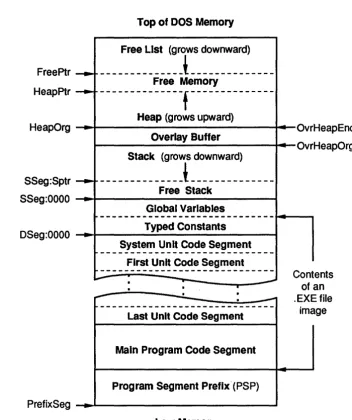
Figure 15.1: Turbo Pascal Memory Map ... 180
Figure 15.2: Disposal Method Using Mark and Release ... 182
Figure 15.3: Heap Layout with Release(P) Executed ... 183
Figure 15.4: Creating a "Hole" in the Heap ... 184
Figure 15.5: Enlarging the Free Block ... 184
List of Tables
Table 3.1: Predefined Integer Types ... 23
Table 3.2: Real Data Types ... 26
Table 6.1: Precedence of Operators ... 51
Table 6.2: Binary Arithmetic Operations ... 55
Table 6.3: Unary Arithmetic Operations ... 55
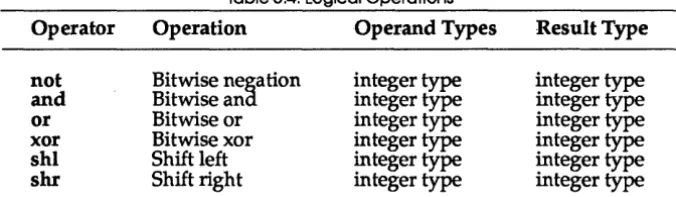
Table 6.4: Logical Operations ... 56
Table 6.5: Boolean Operations ... 56
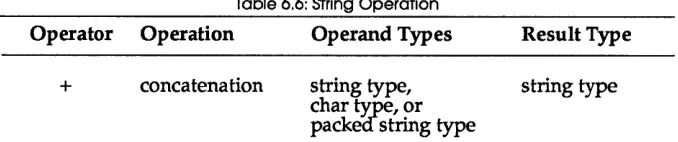
Table 6.6: String Operation ... 57
Table 6.7: Set Operations ... 58
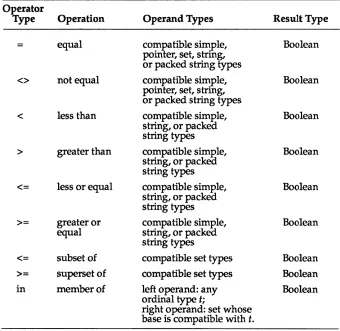
Table 6.8: Relational Operations ... 59
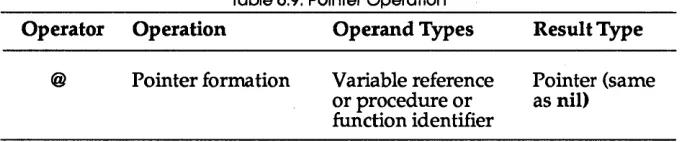
Table 6.9: Pointer Operation ... 61
Table 12.1: Standard Units ... 116
Table 16.1: Components of the Output String ... 3%
Table 16.2: Components of the Fixed-Point String ... 396
Table C.1: ASCII Table ... 422
Table C.2: Extended Key Codes ... .424
N T R
o
D uc
To
NWelcome to the second book in the Turbo Pascal 5.0 set. The first book,
Turbo Pascal User's Guide, provided you with many basics (and more) for getting started with programming in Turbo Pascal, plus guided you through using the integrated environment. Now you're ready to delve into the details of the Turbo Pascal language.
What's On Your Disks
The distribution disks that come with this manual include two different versions of the Pascal compiler: an integrated environment version and a stand-alone, command-line version.
You might not need all the files that come on your distribution disks. Use the INSTALL program and then delete the files you don't need from your working disks. (See the "Turbo Pascal Utilities" Appendix in the User's
Guide for information on INSTALL.) The README file contains a complete file list. For your reference, here's a summary of most of the files on disks and how to determine which ones to retain:
README To see any last-minute notes and corrections, type README at the system prompt. (If you have a printer, you can print it out.) Once you review this material, keep it around for future reference.
HELPME!.DOC Contains answers to many common questions about Turbo Pascal 5.0.
TURBO.EXE This is the integrated (menu-driven) environment version of Turbo Pascal. It lets you edit, compile, run, and debug your program. See Chapter 7 in the User's
Guide, "All About the Integrated Environment," for more information.
TURBO. HLP
THELP.COM
TPC.EXE
GRAPH.TPU
*.ARC files
*.BGI files *.CHRfiles *.DOC files
*.PAS files
INSTALL.EXE
and Printer-this is a must! See Chapter 12, "Standard Units," for more information on these units.
This contains the online, context-sensitive help text used by the integrated environment and the THELP utility. See the section "Online Help" in Chapter 2 of the User's Guide for details on the help feature, and Appendix C of the User's Guide, "Turbo Pascal Utilities, for information on THELP.
This is the memory-resident that provides access to Turbo Pascal's context-sensitive help system from any program. See Appendix C in the User's Guide, "Turbo Pascal Utilities."
This is the command-line version of Turbo Pascal. If you use a separate editor, make heavy use of batch files, and so on, you'll probably want to use this. Refer to Chapter 8, "Command-Line Reference," in the User's Guide for information on how to use the command-line compiler. This contains the Graph unit (the Borland Graphics Interface unit). See the section "The Graph Unit" in Chapter 12 of this manual for more information.
Packed files that contain documentation files, example programs, graphics drivers fonts, interface section listings for Turbo Pascal's units, and more. Chapter 1 of the User's Guide walks you through the dearchiving of these files with the INSTALL program.
BGI graphics device drivers.
BGI graphics stroked character fonts.
These include the interface section listings for all the standard units.
These include an overlay example and the MicroCalc source files, as well as other sample programs.
This new utility sets up Turbo Pascal on your system. Refer to Chapter 1 of the User's Guide for information on INSTALL.
TINST.EXE
TINSTXFR.EXE
MAKE.EXE
GREP.COM
TOUCH.COM
BINOBJ.EXE
TPCONFIG.EXE
UPGRADE.DTA UPGRADE.EXE
GRAPH3.TPU TURB03.TPU
README.COM
This utility allows you to customize certain features of TURBO.EXE. See Appendix D in the User's Guide,
"Customizing Turbo Pascal," for more information. This utility transfers the customized settings you created with TINST in 4.0 to 5.0. See Appendix D in the User's Guide, "Customizing Turbo Pasca1."
This is an intelligent project manager that allows you to keep your programs up-to-date and is especially useful when mixing assembler and Pascal and using the command-line compiler (TPC.EXE). See Appendix C in the User's Guide, "Turbo Pascal Utilities," for more
infor-maztion on using MAKE.
This is a fast, powerful text search utility. See Appendix C in the User's Guide, "Turbo Pascal Utilities," for more
information on using GREP.
This utility changes the date and time of one or more files to the current date and time, making it "newer" than the files that depend on it. It's generally used in conjunction with MAKE.EXE.
Use this utility to convert a binary data file to an .OBJ file.
This utility takes your integrated environment configu-ration file and converts it to work with the command-line compiler (as TPC.CFG). It's helpful if you want to use the integrated environment to set all your options, but want to compile with the command-line version. This utility will also convert a TPC.CFG file to a . TP file. This utility does a quick upgrade of Turbo Pascal ver-sion 3.0 source files, modifying them for compatibility with Turbo Pascal version 5.0. See the section on UPGRADE in Appendix A of the User's Guide for more
informa tion.
These are version 3.0 compatibility units. Refer to Appendix A in the User's Guide, "Differences Between
Turbo Pascal 3.0, 4.0, and 5.0.")
Installing Turbo Pascal On Your System
Your Turbo Pascal package includes all the files and programs necessary to run both the integrated environment and command-line versions of the compiler. A new program, INSTALL.EXE, sets up Turbo Pascal on your system. INSTALL works on both floppy-based and hard disk systems. Refer to Chapter 1 in the User's Guide for information about INSTALL.
About This Manual
This book is split into two parts: a programmer's reference and appendices. The first part of this manual, "Programmer's Reference," offers technical information on the following features of the language:
• Chapter 1: Tokens and Constants • Chapter 2: Blocks, Locality, and Scope • Chapter 3: Types
• Chapter 4: Variables • Chapter 5: Typed Constants • Chapter 6: Expressions • Chapter 7: Statements
• Chapter 8: Procedures and Functions • Chapter 9: Programs and Units • Chapter 10: Input and Output
• Chapter 11: Standard Procedures and Functions • Chapter 12: Standard Units
• Chapter 13: Overlays • Chapter 14: Using the 8087 • Chapter 15: Inside Turbo Pascal
• Chapter 16: Turbo Pascal Reference Lookup
Part two, 1/ Appendices," discusses 5.0 and ANSI Pascal, covers the
com-piler directives provided, provides some reference materials (an ASCII chart, extended key codes, and keyboard scan codes), and lists all the compiler and run-time error messages· generated by Turbo Pascal.
• Appendix A: Comparing Turbo Pascal 5.0 with ANSI Pascal • Appendix B: Compiler Directives
Typography
This manual was produced by Borland's Sprint: The Professional Word Processor on a PostScript printer. The different typefaces displayed are used for the following purposes:
Italics
Boldface
Monospace
Keycaps
In text, this typeface represents constant identifiers, field identifiers, and formal parameter identifiers, as well as unit names, labels, variables, procedures, and functions.
Turbo Pascal's reserved words are set in this typeface.
This type represents text that appears on your screen.
This typeface indicates a key on your keyboard. It is often used when describing a key you have to press to perform a particular function; for example, "Press Esc to exit from a menu."
How to Contact Borland
If, after reading this manual and using Turbo Pascal, you would like to contact Borland with comments or suggestions, we suggest the following procedures:
• The best way is to log on to Borland's forum on CompuServe: Type GO BPROGA at the main CompuServe menu and follow the menus to section 2. Leave your questions or comments here for the support staff to process . • If you prefer, write a letter detailing your problem and send it to
Technical Support Department Borland International
P.O. Box 660001 1800 Green Hills Road Scotts Valley, CA 95066-0001
• You can also telephone our Technical Support department at (408) 438-5300. To help us handle your problem as quickly as possible, have these items handy before you call:
• product name and version number • product serial number
• computer make and model number • operating system and version number
p A R T
1
The names in rectangular boxes stand for actual constructions. Those in circular boxes-reserved words, operators, and punctuation-are the actual terms to be used in the program.
letter
digit
hex digit
Special symbols and reserved words are characters that have one or more fixed meanings. These single characters are special symbols:
+
-* /
= < > [1., ( ) : ; A@ ( ) $ #These character pairs are also special symbols:
<= >= := .. (* *) (. .)
Some special symbols are also operators. A left bracket ([) is equivalent to the character pair of left parentheses and a period
«.).
Similarly, a right bracket (]) is equivalent to the character pair of a period and a right parentheses(.».
Following are Turbo Pasca1's reserved words:
absolute end inline procedure type and external interface program unit array file interrupt record until begln for label repeat uses
case forward mod set var
const function nil shl while
div goto not shr with
do if of string xor
downto !mplementation or then
c
H A p T E R1
Tokens and Constants
Tokens are the smallest meaningful units of text in a Pascal program, and
they are categorized as special symbols, identifiers, labels, numbers, and string constants.
A Pascal program is made up of tokens and separators, where a separator is either a blank or a comment. Two adjacent tokens must be separated by one or more separators if each token is a reserved word, an identifer, a label, or a number.
Separators cannot be part of tokens except in string constants.
Special Symbols and Reserved Words
Turbo Pascal uses the following subsets of the ASCII character set:
• Letters-the English alphabet, A through Z and a through z. • Digits-the Arabic numerals 0 through 9.
• Hex digits-the Arabic numerals 0 through 9, the letters A through F,
and the letters a through
f.
• Blanks-the space character (ASCII 32) and all ASCII control c.haracters (ASCII 0 to 31), including the end-of-line or return character (ASCII 13). What follows are syntax diagrams for letter, digit, and hex digit. To read a
Reserved words appear in lowercase boldface throughout this manual. Turbo Pascal isn't case sensitive, however, so you can use either uppercase or lowercase letters in your programs.
Identifiers
Identifiers denote constants, types, variables, procedures, functions, units, programs, and fields in records. An identifier can be of any length, but only the first 63 characters are significant.
An identifier must begin with a letter or an underscore character and can-not contain spaces. Letters, digits, and underscore characters (ASCII $5F) are allowed after the first character. Like reserved words, identifiers are not case sensitive.
When several instances of the same identifier exist, you may need to qualify the identifier by a unit identifier in order to select a specific instance (units are described in Chapter 4 of the User's Guide and 12 of this manual).
For example, to qualify the identifier ldent by the unit identifier UnitName,
identifier
qualified identifier
underscore ~
program identifier,
unit identifier, - -... 1 identifier
~
field identifier
~.
.1
identifier~
Yun;1 identifier
t--<.:)-J
Here are some examples of identifiers:
Writeln Exit Rea12String System.MemAvail Dos.Exec Crt.Window
In this manual, standard and user-defined identifiers are italicized when
they are referred to in text.
Labels
A label is a digit sequence in the range 0 to 9999. Leading zeros are not
significant. Labels are used with goto statements.
As an extension to standard Pascal, Turbo Pascal also allows identifiers to function as labels.
Numbers
Ordinary decimal notation is used for numbers that are constants of type integer and real. A hexadecimal integer constant uses a dollar sign ($) as a prefix. Engineering notation (E or e, followed by an exponent) is read as "times ten to the power of' in real types. For example, 7E-2 means 7 x 10⁻²;
12.25e+6 or 12.25e6 both mean 12.25 x 10+6• Syntax diagrams for writing numbers follow.
hex digit sequence hex digit
digit sequence
unsigned integer digit sequence
hex digit sequence
sign
-""'-Q5J--.t
~
-
~
unsigned real
digit sequence digit sequence
scale factor digit sequence ~
unsigned number -"I""""I~ unsigned integer
signed number unsigned number
r---.
Numbers with decimals or exponents denote real-type constants. Other decimal numbers denote integer-type constants; they must be within the range -2147483648 to 2147483647.
Hexadecimal numbers denote integer-type constants; they must be within the range $00000000 to $FFFFFFFF. The resulting value's sign is implied by the hexademical notation.
Character Strings
A character string is a sequence of zero or more characters from the extended ASCII character set (Appendix C), written on one line in the program and enclosed by apostrophes. A character string with nothing between the apostrophes is a null string. Two sequential apostrophes in a character string denote a single character, an apostrophe. The length attrib-ute of a character string is the actual number of characters within the apostrophes.
As an extension to standard Pascal, Turbo Pascal allows control characters to be embedded in character strings. The # character followed by an unsigned integer constant in the range 0 to 255 denotes a character of the corresponding ASCII value. There must be no separators between the #
character and the integer constant. Likewise, if several control characters are part of a character string, there must be no separators between them.
character string
--.a
~o-.
ti
string characterj:J
string character any char except
0
or CR ~r---"equal to 2, is compatible with any string type and with packed arrays of n characters.
Here are some examples of character strings:
'TURBO'
113110
'You"ll see' 'Line l't13'Line2'
, ,
,
,
Constant Declarations
,
.,
,, ,
t7t7'Wake up!'t7t7
A constant declaration declares an identifier that marks a constant within the block containing the declaration. A constant identifier cannot be included in its own declaration.
constant declaration
constant ----I~~I expression
As an extension to standard Pascal, Turbo Pascal allows use of constant expressions. A constant expression is an expression that can be evaluated by the compiler without actually executing the program. Examples of constant expressions follow:
100 'A'
256 - 1
(2.5 + 1) / (2.5 - 1)
'Turbo' + ' , + 'Pascal' Chr(32)
Ord('Z') - Ord('A') + 1
The simplest case of a constant expression is a simple constant, such as 100 or I A'; wherever standard Pascal allows only a simple constant, Turbo
Pascal allows a constant expression.
Since the compiler has to be able to completely evaluate a constant expres-sion at compile time, the following constructs are not allowed in constant expressions:
• references to variables and typed constants
Except for these restrictions, constant expressions follow the exact syntacti-cal rules as ordinary expressions (described in Chapter 6, IJExpressions").
The following standard functions are allowed in constant expressions:
Abs Pred
Chr Ptr
Hi Length Lo Round SizeOf Succ
Odd Swap
Ord Trunc
Here are some examples of the use of constant expressions in constant declara tions:
COJ1at
Min = 0;
Max = 100;
Center = (Max - Min) div 2; Beta
=
Chr(225);NumChars = Ord('Z') - Ord('A') + 1; Message = 'Out of memory';
ErrStr =' Error: ' + Message + '. '; ErrPos = 80 - Length(ErrorStr) div 2; Ln10
=
2.302585092994045684; Ln10R = 1 / Ln10jNumeric = ['0' •• '9'];
Alpha = ['A' •• 'Z' ,'a' •• 'z']; AlphaNum = Alpha + Numeric;
Comments
The following constructs are comments and are ignored by the compiler:
{ Any text not containing right brace }
(* Any text not containing star/right parenthesis *)
A comment that contains a dollar sign ($) immediately after the opening ( or (* is a compiler directive. A mnemonic of the compiler command follows the $ character. The compiler directives are summarized in AppendixB.
Program Lines
c
H A p T E R2
Blocks, Locality, and Scope
A block is made up of declarations, which are written and combined in any order, and statements. Each block is part of a procedure declaration, a function declaration, or a program or unit. All identifiers and labels declared in the declaration part are local to the block.
Syntax
The overall syntax of any block follows this format:
block
--+f
declaration part .... 1 ---~~I statement part ~declaration part
..
M
label declaration part I Ir-.
constant declaration part I Ir-+
type declaration part I I-+I
variable declaration part IJ
~ procedure and function declaration part
~
label declaration part
The digit sequence used for a label must be in the range 0 to 9999.
The constant declaration part consists of constant declarations local to the block.
constant declaration part )--.,...,~ constant declaration
typed constant declaration
The type declaration part includes all type declarations local to the block.
type
declara~on
part~
typedeclara~on
II
..
The variable declaration part is composed of variable declarations local to the block.
variable declaration part variable declaration
The procedure and function declaration part comprises procedure and function declarations local to the block.
procedure and function declaration part -;--r-I~ procedure declaration t----r-'"I'-i~
function declaration
The statement part defines the statements or algorithmic actions to be exe-cuted by the block.
Rules of Scope
The presence of an identifier or label in a declaration defines the identifier or label. Each time the identifier or label occurs again, it must be within the
scope of this declaration. The scope of an identifier or label encompasses its declaration to the end of the current block, including all blocks enclosed by the current block; some exceptions follow.
• Redeclaration in an enclosed block: Suppose that Exterior is a block that encloses another block, Interior. If Exterior and Interior both have an identifier with the same name, for example, j, then Interior can only access the j it declared, and similarly Exterior can only access the j it declared.
• Position of declaration within its block: Identifiers and labels cannot be used until after they are declared. An identifier or label's declaration must come before any occurrence of that identifier or label in the program text, with one exception.
The base type of a pointer type can be an identifier that has not yet been declared. However, the identifier must eventually be declared in the same type declaration part that the pointer type occurs in.
• Redeclaration within a block: An identifier or label can only be declared
once in the outer level of a given block. The only exception to this is when it is declared within a contained block or is in a record's field list.
A record field identifier is declared within a record type and is significant only in combination with a reference to a variable of that record type. So, you can redeclare a field identifier (with the same spelling) within the same block but not at the same level within the same record type. However, an identifier that has been declared can be redec1ared as a field identifier in the same block.
Scope of Interface and Standard Identifiers
Programs or units containing uses clauses have access to the identifiers belonging to the interface parts of the units in those uses clauses.
c
H A p T E R3
Types
When you declare a variable, you must state its type. A variable's type circumscribes the set of values it can have and the operations that can be performed on it. A type declaration specifies the identifier that denotes a
type.
type declaration
type -r---l~
When an identifier occurs on the left side of a type declaration, it is declared as a type identifier for the block in which the type declaration occurs. A type identifier's scope does not include itself except for pointer types.
There are five major classes of types:
Each of these classes are described in the following sections.
Simple Types
Simple types define ordered sets of values.
simple type
real type ~ real type identifier
r--.
A type real identifier is one of the standard identifiers: real, single, double, extended, or compo Refer to the sections entitled "Numbers" and "String Constants" in Chapter 1 to find out how to denote constant type integer and real values.
Ordinal
Types
Ordinal types are a subset of simple types. All simple types other than real types are ordinal types, which are set off by four characteristics:
• All possible values of a given ordinal type are an ordered set, and each possible value is associated with an ordinality, which is an integral value.
Except for type integer values, the first value of every ordinal type has ordinality 0, the next has ordinality 1, and so on for each value in that ordinal type. A type integer value's ordinality is the value itself. In any ordinal type, each value other than the first has a predecessor, and each value other than the last has a successor based on the ordering of the type.
• The standard function Ord can be applied to any ordinal-type value to
return the ordinality of the value.
• The standard function Pred can be applied to any ordinal-type value to
return the predecessor of the value. If applied to the first value in the ordinal type, Pred produces an error.
• The standard function Succ can be applied to any ordinal-type value to
return the successor of the value. If applied to the last value in the ordinal type, Succ produces an error.
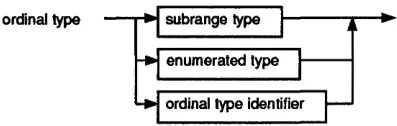
ordinal type subrange type
enumerated type
ordinal type identifier
Turbo Pascal has seven predefined ordinal types: integer, shortint, longint, byte, word, boolean, and char. In addition, there are two other classes of user-defined ordinal types: enumerated types and subrange types.
Integer Types
There are five predefined integer types: shortint, integer, longint, byte, and word. Each type denotes a specific subset of the whole numbers, according to the following table:
Type
[image:42.469.126.325.65.128.2]shortint integer longint byte word
Table 3.1: Predefined Integer Types
Range
-128 .. 127 -32768 .. 32767 -2147483648 .. 2147483647
0 .. 255
0 .. 65535
Format
Signed 8-bit Signed 16-bit Signed 32-bit Unsigned 8-bit Unsigned 16-bit
Arithmetic operations with type integer operands use 8-bit, 16-bit, or 32-bit precision, according to the following rules:
• The type of an integer constant is the predefined integer type with the smallest range that includes the value of the integer constant.
• For a binary operator (an operator that takes two operands), both oper-ands are converted to their common type before the operation. The
common type is the predefined integer type with the smallest range that includes all possible values of both types. For instance, the common type of integer and byte is integer, and the common type of integer and word is longint. The operation is performed using the precision of the common type, and the result type is the common type.
• The expression on the right of an assignment statement is evaluated independently from the size or type of the variable on the left. .
An integer type value can be explicitly converted to.another integer type through typecasting. (Typecasting is described in Chapters 4 and 6.)
Boolean Type
Type boolean values are denoted by the predefined constant identifiers false and true. Because boolean is an enumerated type, these relationships hold:
• false < true • Ord<talse)
=
0• Ord(true) = 1
• Succ<talse) = true • Pred(true) = false
Char
Type
This type's set of values are characters, ordered according to the extended ASCII character set (Appendix C). The function call Ord(Ch), where Ch is a char value, returns Ch's ordinality.
A string constant of length 1 can denote a constant character value. Any character value can be generated with the standard function Chr.
Enumerated Types
Enumerated types define ordered sets of values by enumerating the identifiers that denote these values. Their ordering follows the sequence in which the identifiers are enumerated.
enumerated type ~ identifier list
I-+G
~ identifier listWhen an identifier occurs within the identifier list of an enumerated type, it
declared becomes the constant's type. The first enumerated constant in a list has an ordinality of zero.
An example of an enumerated type follows:
type
suit = (club,diamond,heart,spade);
Given these declarations, diamond is a constant of type suit.
When the Ord function is applied to an enumerated type's value, Ord
returns an integer that shows where the value falls with respect to the other values of the enumerated type. Given the preceding declarations, Ord(club)
returns zero, Ord(diamond) returns 1, and so on.
Subrange Types
A subrange type is a range of values from an ordinal type called the host
type.
The definition of a subrange type specifies the least and the largest value in the subrange; its syntax follows:subrange type
---I
constant ~ constant ~Both constants must be of the same ordinal type. Subrange types of the form a .. b require that a is less than or equal to b.
Examples of subrange types:
o •• 99
-128 •• 127 club •• heart
A variable of a subrange type has all the properties of variables of the host type, but its run-time value must be in the specified interval.
One syntactic ambiguity arises from allowing constant expressions where Standard Pascal only allows simple constants. Consider the following declarations:
CODlt x = 50;
Y = 10;
type
color
=
(red,green,blue); scale = (x-y)*2 •• (x+y)*2;Standard Pascal syntax dictates that, if a type definition starts with a parenthesis, it is an enumerated type, such as the color type described
subrange type. The solution is to either reorganize the first subrange expression so that it does not start with a parenthesis, or to set another constant equal to the value of the expression, and then use that constant in the type definition:
type
scale = 2*{x-y) •• (x+y) *2;
Real Types
A real type has a set of values that is a subset of real numbers, which can be represented in floating-point notation with a fixed number of digits. A value's floating-point notation normally comprises three values-m, b, and e-such that m x be
=
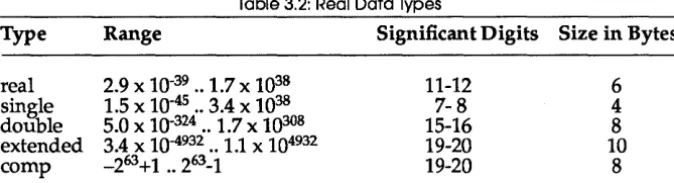
n, where b is always 2, and both m and e are integral values within the real type's range. These m and e values further prescribe the real type's range and precision.There are five kinds of real types: real, single, double, extended, and compo
[image:45.472.76.413.316.407.2]The real types differ in the range and precision of values they hold (see Table3.2).
Table 3.2: Real Data Types
Type Range Significant Digits Size in Bytes
real 2.9 x 10-39 .. 1.7 x 1038 11-12 6
single 1.5 x 10-45 .. 3.4 x 1038 7-8 4
double 5.0 x 10-324 .. 1.7 X 10308 15-16 8
extended 3.4 x 10-4932 .. 1.1 X 104932 19-20 10
comp -263+1 .. 263-1 19-20 8
Note: The comp type holds only integral values within the range -263+1 to 263-1, which is approximately -9.2 x 10¹⁸ to 9.2 X 10¹⁸.
Turbo Pascal supports two models of code generation for performing real-type operations: software floating point and 8087 floating point. The appropriate model is selected through the $N compiler directive. If no 8087 is present, enabling the {$E} compiler directive will provide full 8087 emulation in software.
Software Floating Point
real are allowed in this state. Any attempt to compile statements that operate on the single, double, extended, and comp types generates an error.
8087 Floating Point
In the {$N+} state, the code generated performs all real type calculations using 8087 instructions. This state permits the use of all five real types. Turbo Pascal includes a run-time library that will automatically emulate an
8087 in software if one is not present; the $E compiler directive is used to determine whether or not the 8087 emulator should be included in a program.
For further details on 8087 floating-point code generation and software emulation, refer to Chapter 14, #Using the 8087."
String Types
A type string value is a sequence of characters with a dynamic length at-tribute (depending on the actual character count during program execution) and a constant size attribute from 1 to 255. A string type declared without a size attribute is given the default size attribute 255. The length attribute's current value is returned by the standard function Length.
string type~ •
l.cD---.I
unsigned integer~
The ordering between any two string values is set by the ordering rela-tionship of the character values in corresponding positions. In two strings of unequal length, each character in the longer string without a corresponding character in the shorter string takes on a higher or greater-than value; for example, 'Xs' is greater than 'X'. Null strings can only be equal to other null strings, and they hold the least string values.
Structured Types
A structured type, characterized by its structuring method and by its com-ponent type(s), holds more than one value. If a component type is structured, the resulting structured type has more than one level of structuring. A structured type can have unlimited levels of structuring.
structured type ~..---... ----l"
==::::::;-'
The word packed in a structured type's declaration tells the compiler to compress data storage, even at the cost of diminished access to a compo-nent of a variable of this type. The word packed has no effect in Turbo Pascal; instead packing occurs automatically whenever possible.
Note: The maximum permitted size of any structured type in Turbo Pascal is 65520 bytes.
Array Types
Arrays have a fixed number of components of one type-the component type. In the following syntax diagram, the component type follows the word of.
array type
--c
array
~
.... _ _ i_nd-lextype...,..._~...
] . of typeJ-.
-
0
index type
--.f
ordinalty~
J---.
The index types, one for each dimension of the array, specify the number of elements. Valid index types are all ordinal types except longint and subranges of longint. The array can be indexed in each dimension by all values of the corresponding index type; the number of elements is therefore the number of values in each index type. The number of dimensions is unlimited.
The following is an example of an array type:
If an array type's component type is also an array, you can treat the result as an array of arrays or as a single multidimensional array. For instance,
array [boolean] of array[1 •• 10] of array[Size] of real is interpreted the same way by the compiler as
array[boolean,1 •• 10,Size] of real You can also express
packed array [1. .10] of packed array [1. .8] of boolean as
packed array[1 •• 10,1 •• 8] of boolean
You access an array's components by supplying the array's identifier with one or more indexes in brackets (see "Arrays, Strings, and Indexes" in Chapter 4).
An array type of the form
packed array[m •• n] of char
where m is less than n is called a packed string type (the word packed may be omitted, because it has no effect in Turbo Pascal). A packed string type has certain properties not shared by other array types (see "Identical and Compatible Types" later in this chapter).
Record Types
A record type comprises a set number of components, or fields, that can be of different types. The record type declaration specifies the type of each field and the identifier that names the field.
record~
- E ) ':
1.8+
~ field list ~
field list
t
fixed partI
~,
~r---~
variant part ~'-f,o •
t..(:)J
fixed part
The fixed part of a record type sets out the list of fixed fields, giving an identifier and a type for each. Each field contains information that is always retrieved in the same way.
The following is an example of a record type:
record
year: integer; month: 1. .12; day: 1. .31;
end
The variant part shown in the syntax diagram of a record type declaration distributes memory space for more than one list of fields, so the infor-m