Eman Daraghmi et al, International Journal of Computer Science and Mobile Applications, Vol.4 Issue. 10, October- 2016, pg. 1-8 ISSN: 2321-8363
Impact Factor: 4.123
PseudoEye: An Interactive
Augmented Reality Assistant App
for Electronic Engineering Students
Eman Daraghmi
1, Rami Yousuf
21Assistant Professor, Palestine Technical University Khadoori, Palestine, [email protected] 2
Lecturer, Palestine Technical University Khadoori, Palestine, [email protected]@hotmail.com
Abstract: In this paper, PseudoEye, an interactive technician assistant application for electronic engineering students is presented. This application meets the highest standards and provides the most rewarding environments for users seeking technical assistant when using electronic components, such as timer, microcontroller, transistor, etc. PseudoEye provides to mobile users equipped with a smart phone visual interaction, image-based visual search, augmented reality, and personal 3d technician assistant. PseudoEye shows a complete description about any electronic component scanned by a smart phone as well as it illustrates how the scanned component can be wired in a complete electronic circuit. All of these functionalities will be provided via Augmented Reality. Augmented Reality (AR) is a live, direct or indirect, view of a physical, real-world environment whose elements are augmented (or supplemented) by computer-generated sensory input such as sound, video, graphics or GPS data. Moreover, “clickable” or “touchable” property is supported by our proposed App as it allows for visual interaction with the detected component, and used for information retrieval. PseudoEye was tested in Palestine Technical University as one of the assistant technologies in basic electronic classes to be used later in an intelligent class environment.
Keywords: Augmented reality, mobile applications, electronic assistant
1. Introduction
Nowadays, the outstanding computing capabilities of smartphones as well as the new technologies, such as Augmented Reality (AR) and 3D visualization play significant role in improving the mobile personal assistant tools. Augmented Reality (AR) allows overlaying layers of virtual information on real scene with the aim of increasing the perception the user has of reality (Zarzuela, Pernas, Martínez, Ortega, & Rodríguez, 2013).
Eman Daraghmi et al, International Journal of Computer Science and Mobile Applications, Vol.4 Issue. 10, October- 2016, pg. 1-8 ISSN: 2321-8363
Impact Factor: 4.123
AR is a novel technology that can be used to enhance a physical environment by overlaying virtual content through a visual interface (Zhou, Duh, & Billinghurst, 2012). While the technology has been available since the 1990s, the rapid advances in mobile technology over the past decade have provided powerful and convenient platforms for AR applications (Shatte, Holdsworth, & Lee, 2014).The major benefit of mobile devices for AR is that the technology is ubiquitous and easily accessible to consumers. Additionally, the computing power of a mobile device can provide users with the tools to deal with large inventories of physical items, helping to reduce errors and increase performance.
Therefore, this paper presents an interactive AR assistant tool named PseudoEye for electronic students. PseudoEye via augmented reality will guide students to understand the functionality of any electronic component and select the appropriate components according to their needs. Thus, students can easily design a complete electronic circuit without much effort.
PseudoEye application recognizes any electronic component scanned by a user smart phone, and uses the detected component to provide several functionalities: 1- PseudoEye uses the content-based image retrieval (CBIR) technique to display a complete description about the detected electronic component, such as features, applications, the component functionality; 2- PseudoEye illustrates how the detected component can be wired in a complete electronic circuit. All of functionalities supported by PseudoEye app will be provided via Augmented Reality (AR). AR aims at overlaying 3D virtual objects that merge seamlessly with the scene in the scanned mode (i.e. video capture mode). Any AR virtual object is “clickable” or “touchable”, such that the user obtains information related thereupon. PseudoEye was initially developed for the University campus where the authors work. Nevertheless, the idea can be extended to any scenario without major architectural changes.
The structure of this paper follows: Section II presents the work related to PseudoEye system. Section III presents an overview of the proposed system architecture. Section IV describes with sufficient detail the main implementation aspects of the PseudoEye application. Section V addresses the evaluation of the system. Finally, Section VI brings the future prospects and conclusions.
2. Related Work
AR refers to a live and real-world image that has been enhanced or diminished by virtual content through a camera interface. AR technology aims to simplify everyday tasks by complementing the user‟s perception of and interaction with the real world (Shatte et al., 2014) (Mourtzis, Doukas, & Vandera, 2014). AR is the ability to superimpose digital media on the real world through the screen of a device such as a personal computer or a smart phone, to create and show users a world full of information which has not been possible to conceptualize until now (Wagner, 2006)(White, 2006)(Vetro & Girod, 2011). The most vital part of Augmented Reality is to acquire data from the database. The data about the objects which are used for displaying information after recognizing objects, as well as images captured in different angles are stored in the database. Thus, these information can be displayed virtually through Augmented Reality in an appropriate environment (Chen, Tsai, Hsu, Singh, & Girod, 2011) (Escobedo & Favela, 2014)(Stanimirovic & Kurz, n.d.)(Rattanarungrot & White, 2014).
Eman Daraghmi et al, International Journal of Computer Science and Mobile Applications, Vol.4 Issue. 10, October- 2016, pg. 1-8 ISSN: 2321-8363
Impact Factor: 4.123
time environment. Textbooks, flashcards and other educational reading material can contain embedded “markers” that, when scanned by an AR device, produce supplementary information to the student rendered in a multimedia format
The first versions of augmented reality are already installed on some smartphones. Smartphone owners can download an application called Layar that uses the phone's camera and GPS capabilities to gather information about the surrounding area. Layar app allows you to scan the public streets for vital information, entertainment news, or networking possibilities. The program essentially „layers‟ the information about the landmarks and businesses on a particular street. Another example is Google Sky Map4. This Android app will appeal to stargazers and astronomers of all varieties. Simply point your phone at the sky and identify a legion of constellations, stars and planets. If you move the camera around, the information will change in accordance with the coordinates.
3. System Overview
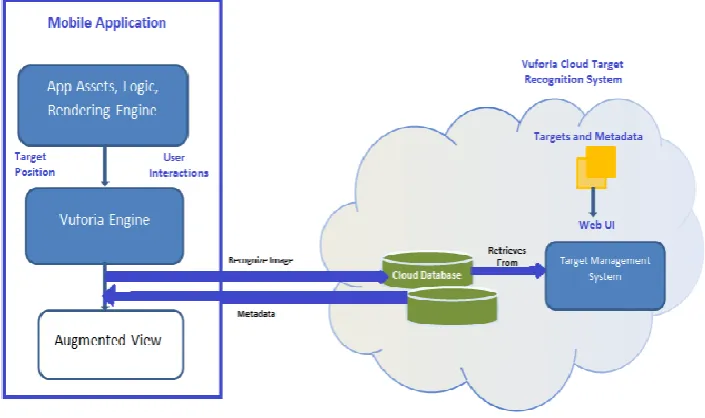
The system overview is shown in Figure.1. The PseudoEye application starts with the camera capture mode (scanning objects without taking pictures) form the camera device. The frames are analysed in real-time to detect and track well-known markers. These markers must correspond to high-contrast planar objects that are an electronic component itself or an image of electronic component, and are thus assumed to be static.
The image detection process is accomplished with Qualcomm‟s Vuforia SDK (Paredes & Simonetti, 2013), which provides functionalities for the development of augmented reality on mobile using as targets, images or objects. Image Targets represent images that the Vuforia SDK can detect and track. Unlike traditional fiducial markers, data matrix codes and QR codes, Image Targets do not need special black and white regions or codes to be recognized. The SDK detects and tracks the features that are naturally found in the image itself by comparing these natural features against a known target resource database. Once the Image Target is detected, the SDK will track the image as long as it is at least partially in the camera‟s field of view.
Eman Daraghmi et al, International Journal of Computer Science and Mobile Applications, Vol.4 Issue. 10, October- 2016, pg. 1-8 ISSN: 2321-8363
Impact Factor: 4.123
These targets are further used by the AR layer to overlay 3D virtual objects that merge seamlessly with the scene in the camera capture mode.
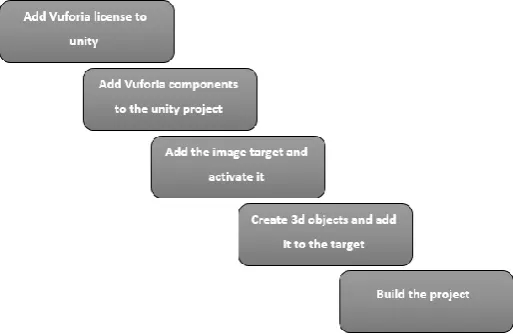
As shown in Figure.1, the system uses the client-server architecture, where the mobile application (client side) communicates with the Vuforia Cloud Target Recognition System (VCTRS) (server side). Detected image markers are sent to the VCTRS as requests and the corresponding metadata is returned as response. The steps that we followed to implement the PseudoEye application are shown in Figure 2, and Figure.3. For the development and deployment of the PseudoEye application to the mobile device Unity3D is used. Unity is a game engine and an integrated authoring tool for creating 3D video games or other interactive content such as architectural visualizations or real-time 3D animations (Sannikov et al., 2015). Integrating Unity3D with Vuforia, allowing the development of augmented reality applications (Kwik & Bahana, 2015).
Figure 2: PseudoEye implementation steps (Vuforia Cloud Target Recognition System side)
4. PseudoEye in Action
As mentioned in the introduction, several functionalities are provided by PseudoEye application. This section details these functionalities.
Eman Daraghmi et al, International Journal of Computer Science and Mobile Applications, Vol.4 Issue. 10, October- 2016, pg. 1-8 ISSN: 2321-8363
Impact Factor: 4.123
4.1. AR visual search
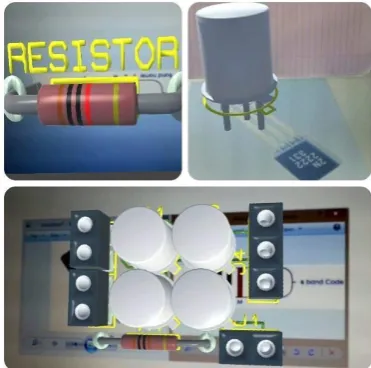
The AR visual search is implemented as an overlay on the scanned electronic component means the output of this service will be merge seamlessly with the scene in the camera scanned mode. Using Augmented Reality, one can view the details of the electronic components by scanning the image of that electronic component or by scanning the real component itself. The application would fetch the appropriate details giving out the component name, details, functionality, and description (Hartl, Schmalstieg, & Reitmayr, 1984). Extending the scope it also presents other related electronic components which the user might be interested upon (i.e. displays related electronic components similar in functionality with the scanned objects). All of these information will be displayed in 3d manner as shown in Figure.4.
Figure 4: AR visual search example
4.2 AR visual technician assistant
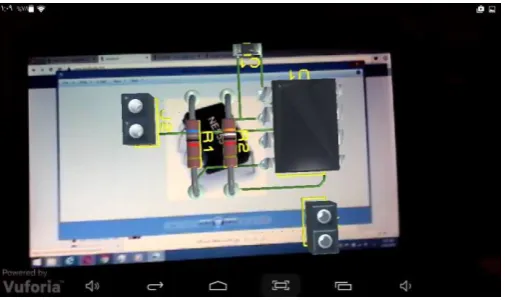
PseudoEye Application provides one unique functionality called AR technician assistant (see Figure.5). This service guides users how an electronic component can be wired in a complete electronic circuit. This service starts with the camera capture mode (scanning objects without taking pictures) form the camera device.
Figure 5: AR technician assistant example (one object recognition)
Eman Daraghmi et al, International Journal of Computer Science and Mobile Applications, Vol.4 Issue. 10, October- 2016, pg. 1-8 ISSN: 2321-8363
Impact Factor: 4.123
complete electronic circuit, which includes the recognized component, will be displayed on mobile screen. Figure.5 shows an example of AR visual technical assistant service.
Moreover, PseudoEye application has the capability to recognize two objects simultaneously, and it shows how these two components can be wired in a complete electronic circuit (see Figure.6). Additionally, “clickable” or “touchable” property, provided also by the technician function, was implemented as it allows for visual interaction with any electronic pieces appear in the electronic circuit, and used for information retrieval. The 3D object data can be downloadable, this makes the system portable and easily reconfigurable, as the 3D data is obtained on the fly.
Figure 6: AR technician assistant example (two objects recognition)
5. Evaluation
In order to evaluate our system, we compare PseudoEye with other AR assistant apps. Table 1 shows a comparison of features available in PseudoEye to other mobile applications that provide augmented reality and assistant services. The combination of features that are included in PseudoEye, such as image recognition with AR technical assistant (i.e. providing recommendation) distinguishes it from other assistant applications.
Table 1: Comparison among PseudoEye and other applications
feature PseudoEye (Delail, Weruaga, & Zemerly, 2012) (Obasa et al., 2015)
Augmented reality yes yes yes
3D AR Objects yes yes yes
Points of interest yes yes yes
Eman Daraghmi et al, International Journal of Computer Science and Mobile Applications, Vol.4 Issue. 10, October- 2016, pg. 1-8 ISSN: 2321-8363
Impact Factor: 4.123
User Profile yes yes no
Friends yes yes no
Two objects recognition yes no no
AR recommendation yes no no
6. Conclusion and Future Work
In this paper, PseudoEye, an interactive AR technician assistant application for mobile devices is presented. This application meets the highest standards and provides the most rewarding environments for users seeking technical assistant when using electronic components, such as timer, microcontroller, etc. PseudoEye provides important functionalities in order to answer two main questions, what is the description about any electronic component and how to wire that electronic component in a complete electronic circuit. All the functionalities of PseudoEye will be provided via Augmented Reality. PseudoEye App combines several features including: image-based AR visual search, 3D AR technician assistant. PseudoEye was tested in Palestine Technical University as one of the assistant technologies in electronic classes to be used later in an intelligent class environment.
In the future, we plan to address the following issues for enhancing the system and improving user experience:
• using profile data to provide user-specific customizable information and services,
• supporting more voice commands.
References
Chen, D., Tsai, S., Hsu, C., Singh, J. P., & Girod, B. (2011). MOBILE AUGMENTED REALITY FOR BOOKS ON A SHELF.
Delail, B. Al, Weruaga, L., & Zemerly, M. J. (2012). CAViAR : Context Aware Visual indoor Augmented Reality for a University Campus, 286–290. http://doi.org/10.1109/WI-IAT.2012.99
Diaz, C., Hincapié, M., & Moreno, G. (2015). How the Type of Content in Educative Augmented Reality Application Affects the Learning Experience. Procedia - Procedia Computer Science, 75(Vare), 205–212. http://doi.org/10.1016/j.procs.2015.12.239
Escobedo, L., & Favela, J. (2014). Using Augmented Reality to Help Children with Autism Stay Focused, 38–46.
Hartl, A., Schmalstieg, D., & Reitmayr, G. (1984). Client-side Mobile Visual Search.
Kwik, F., & Bahana, R. (2015). Using Augmented Reality to Enhance Aetherpet , a Prototype of a Social Game. Procedia - Procedia Computer Science, 59(Iccsci), 282–290. http://doi.org/10.1016/j.procs.2015.07.566
Mourtzis, D., Doukas, M., & Vandera, C. (2014). ScienceDirect Mobile apps for product customisation and design of manufacturing networks. Manufacturing Letters, 2(2), 30–34. http://doi.org/10.1016/j.mfglet.2014.01.002
Eman Daraghmi et al, International Journal of Computer Science and Mobile Applications, Vol.4 Issue. 10, October- 2016, pg. 1-8 ISSN: 2321-8363
Impact Factor: 4.123
Paredes, J., & Simonetti, A. (2013). Vuforia v1.5 SDK. Analysis and evaluation of capabilities.
Rattanarungrot, S., & White, M. (2014). A Service-oriented Mobile Augmented Reality Architecture for Personalized Museum Environments.
Sannikov, S., Zhdanov, F., Chebotarev, P., & Rabinovich, P. (2015). Interactive Educational Content Based on Augmented Reality and 3D Visualization. Procedia - Procedia Computer Science (Vol. 66). Elsevier Masson SAS. http://doi.org/10.1016/j.procs.2015.11.082
Shatte, A., Holdsworth, J., & Lee, I. (2014). Expert Systems with Applications Mobile augmented reality based context -aware library management system. Expert Systems With Applications, 41(5), 2174–2185. http://doi.org/10.1016/j.eswa.2013.09.016
Stanimirovic, D., & Kurz, D. (n.d.). [ Demo ] Smartwatch-Aided Handheld Augmented Reality, 373–374.
Vetro, A., & Girod, B. (2011). Industry and Standards Mobile Visual Search : Architectures , Technologies , and the Emerging MPEG Standard, 86–94.
Wagner, D. (2006). Augmented Reality Kanji Learning, 3–4.
Wei, X., Weng, D., Liu, Y., & Wang, Y. (2015). Computers & Education Teaching based on augmented reality for a technical creative design course. Computers & Education, 81, 221–234. http://doi.org/10.1016/j.compedu.2014.10.017
White, S. (2006). Virtual Vouchers : Prototyping a Mobile Augmented Reality User Interface for Botanical Species Identification, 119–127.
Zarzuela, M. M., Pernas, F. J. D., Martínez, L. B., Ortega, G., & Rodríguez, M. A. (2013). Mobile Serious Game using Augmented Reality for Supporting Children ‟ s Learning about Animals. Procedia - Procedia Computer Science, 25, 375–381. http://doi.org/10.1016/j.procs.2013.11.046
Zhou, F., Duh, H., & Billinghurst, M. (2012). Trends in augmented reality tracking, interaction and display: A review of ten years of ismar. In In 7th IEEE/ACM International Symposium on Mixed and Augmented Reality (pp. 193–202).
Biography
Eman Y. Daraghmi works as an assistant professor at the department of applied computing, Palestine Technical University Tulkarm (PTUK). She received her B.S degree in communication and information technology from Al Quds Open University in 2008, her MS degree in Computer Science from National Chiao Tung University, Taiwan in 2011, and her PhD degree in Computer Science and Engineering from National Chiao Tung University, Taiwan in 2015. Her current research interests include Cloud computing, distributed systems, internet technologies and designing algorithms.
Rami N.Yousuf works as a full-time lecturer in the College of Engineering at PTUK. He has a first
Eman Daraghmi et al, International Journal of Computer Science and Mobile Applications, Vol.4 Issue. 10, October- 2016, pg. 1-8 ISSN: 2321-8363