Solving Multi Criteria Decision Aiding (MCDA) Problems
Using Spreadsheets
T. Ganesh
*, PRS Reddy
Department of Statistics, S.V. University, Tirupati, India
Abstract
In Managerial Decision making, the problem environment will be encircled by a set of alternatives for set of criteria. The main objective is to choose the best alternative under each criterion. In this contest, the Decision Maker (DM) plays an important role in solving the hard/complex problems. This type of scenario gives raise to the concept of MCDA. In this paper, we made an attempt to provide some algorithms which are user-friendly. In this paper, we have provided some algorithms which supports in computing the concordance and discordance indices.Keywords
Multi Criteria, Concordance, Discordance, Outranking Index1. Introduction
In any environment, the main objective is to provide a set of best alternatives for given criteria. The decision maker provides some necessary and basic information about each criterion and the alternatives that helps in identifying the relation between them. The problems of this kind can be dealt with Multi Criteria Decision Making or Multi Criteria Decision Aid (MCDA) techniques.
The main aim of MCDA is to account for several views and provide some tools for the Decision Maker (DM) in solving complex decision problems. The trade-off between the criteria and DM’s preferences lies in providing compromise solutions. In each and every problem or situation, the DM, Stakeholder and Analyst play an important role.
DM is a person, who has a great impact in evaluating the situation, expressing preferences, considering solutions and approving the final result. Stakeholders are members involved in decision situation and interested in finding a solution for the problem. For the situation considered, the
Analyst is responsible in recognizing the consequences and
selecting an appropriate decision aiding method/tool for the construction of decision models.
In every MCDA problem environment, each criterion will be embedded with a set of alternatives out of which one alternative will act as the best for that particular criterion. These set of alternatives will be finite if a proper definition about all the members is given, otherwise infinite. If the number and content of alternatives are fixed and cannot be
* Corresponding author:
[email protected] (T. Ganesh)
Published online at http://journal.sapub.org/algorithms
Copyright © 2013 Scientific & Academic Publishing. All Rights Reserved
varied during the decision aiding process, then this nature is said to be stable otherwise volatile. At the final stage of the decision aiding process, if we come across a single best alternative which excludes the possibility of choosing any other alternative, it is referred as Comprehensive and if we opt for a combination of alternatives, it is fragmented. . In brief, the alternatives are estimated on a set of criteria. The criterion defines the feature and some properties of the set of alternatives.
Notations
xi :ith alternative (i=1,…,m)
X : Set of alternatives
gj :jth criterion (j=1,…,n)
G : set of criteria
Qj: jth Indifference thresholds
Pj : jth Preference thresholds
Wj: jth Weights
Vj: jth Veto thresholds
λ : Cutting level
bq : qth boundary alternative (q = 1,…,s)
B : set of boundary alternatives (b1, b2, …, bq)
lq: qth boundary class
Cj (xi, bq) and Dj (xi, bq) : partial concordance and partial
discordance of the xi and bq
Cj (bq, xi) and Dj (bq, xi) : partial concordance and partial
discordance of the bq and xi
C (xi, bq) and C (bq, xi) : overall concordance indices
Sj (xi, bq):outranking index for xi and bq
Sj (bq, xi): outranking index for bq and xi
Cq : qth category
P : strict preference
Q : weak preference
I : indifference
J : incomparability
relations existing between the alternatives and criteria. We brief out each and every relation and the nomenclature for it.
1.1. Relations
• The indifference relation between two alternatives xi and
xr, denoted as xiIxr, means that the two alternatives xi and xr
are equally preferable or equally important to the DM. This relation is reflexive and symmetric.
• The strict preference is a relation of xi over xr, denoted as
xiPxr, which gives the meaning that xi is better than the xr for
the DM. It is asymmetric and non-reflexive.
• The weak preference is a relation which hesitates to make a specific judgment about the preference or indifference between xi and xr, denoted by xiQxr. It is also
asymmetric and non-reflexive.
• If xi is not in any of the above mentioned relations with xr,
then it is referred to as incomparability relation, denoted by
xiJxr. This relation is symmetric and non-reflexive. • The outranking relation is denoted as xiSxr. It defines the
situation in which the preference (strong- xiPxr or weak-
xiQxr) or indifference relation (xiIxr) is true or not.
In order to observe a specific type of relation between alternative and criterion, there is a need to compute some indices such as partial concordance, discordance and outranking indices. over the years, many methodologies were developed of which the most familiar method is the Outranking Methodology. In outranking methodology, we have considered ELECTRE TRI method and for this we have developed spreadsheet algorithms, which support the analyst to analyze and to provide a better decision making. First we review some literature confining to ELECTRE TRI method and then a detailed algorithmic approach is given along with the results.
2. Outranking Methodology
In MCDA, the outranking methodology comes under the framework of classification problems. Basing on the same criterion, the methodology allows comparing the pairs of alternatives by considering indifference, preference and veto thresholds. This helps in determining the indifference, preference to one over the other and incomparable relation between alternatives. The seminal work on this methodology was proposed by B. Roy (1965). He developed some mathematical structures about the ELECTRE family which help in choosing the best alternative from the set of alternatives. In recent years, many state of art surveys were conducted and reported on the development of the MCDA methodologies by M.Bruen and L. Maystre (2000), B.Roy and J. Figueira (2002), J. Martel and B. Matarezzo (2005), J. Figueira, V. Mousseau and B.Roy (2005).
B. Roy (1977, 1981) proposed the Trichotomic segmentation outranking based classification method for sorting problems with three classes. Later, this method was extended to an arbitrary number of classes in N-TOMIC by R. Massagliaet (1991) and few ELECTRE methods by V.
Mousseau et al (1998) and W. Yu (1992).
2.1. ELECTRE TRI Method
ELECTRE method helps to identify the outranking relations between pairs of alternatives for each criterion. In classification problems, a given set of alternatives X with a set of criteria G are to be assigned into a set of ordered classes L by the predefined set of boundary alternatives B. Each class is considered by two (upper and lower) boundary alternatives. The upper bound bq of the class lq-1 is the lower
bound of the class lq (q=1,…,s). Changing the least one
criterion moves the boundary alternative to the neighbouring class.
For solving the classification problem the method estimates the outranking relation for each alternative xiϵ X
(i=1,…,m) which is to be classified and each boundary alternative bq between classes lq-1 and lq by calculating the
outranking index. If lq is preferred to the lower boundary
alternative lq-1 of the class, we assign the alternative xi to the
class lq and the upper boundary alternative bq of the class is
preferred to this alternative.
For calculating the outranking index, the DM should give the information about
(i) the set of alternatives to be classified
(ii) the set of criteria on which alternatives are evaluated with a scale of quantitative values for each criterion.
(iii) the number of classes as well as their order according to preference.
(iv) the upper and lower boundary alternatives for each class lq
For each criterion gj (j=1,…,n), the ELECTRE TRI
method requires to define the preference pj(.), indifference
qj(.), veto vj(.) thresholds as well as weights wj and cutting
level λ (should lie between 0.5 and 1).
(a) the preference pj(.) threshold indicates the smallest
difference between two alternatives on the criterion gj, that is
one alternative is preferred to the other.
(b) the indifference qj(.) threshold indicates the largest
difference between two alternatives on the criterion gj.
(c) the veto vj(.) threshold indicates the smallest difference
between the alternatives on the criterion gj, that says
incomparability of these two alternatives.
(d) All the above three thresholds should satisfy the constraint, vj (.) > pj (.) > qj (.)
(e) the weight wj indicates the relative importance of
criterion when compare to the other criterion in terms of votes.
(f) the cutting level λ shows the smallest value of the outranking index, which is sufficient for considering an outranking situation between two alternatives.
The outranking relation is verified by two conditions; concordance and discordance, with respect to the thresholds, weights and cutting level λ. Concordance requires preference of the alternative xi over the boundary alternative bq on the
criteria. We need to compute two partial indices for each criterion, that is partial concordance Cj (xi, bq) and Cj (bq, xi)
and partial discordance Dj (xi, bq) and Dj (bq, xi). The above
partial indices help in computing the outranking indices Sj (xi,
bq) and Sj (bq, xi). Using a specific cutting level λ, a
comparison of outranking indices is possible and turns to two types of assignment procedures namely pessimistic and optimistic.
The pessimistic procedure starts with the comparison of an alternative to the lower bound of the highest class and the optimistic procedure starts with the comparison of an alternative to the upper bound to the lowest class. In section 3, we describe the mathematical structures of outranking indices and assignment procedures.
3. Algorithm of the ELECTRE TRI
Method
The ELECTRE TRI method has been divided into two parts; part I is to compute the outranking indices and to identify the relations between the alternatives and criteria and in part II, using the obtained outranking relation and cutting level λ, we provide the final result for the MCDA problem.
Part I: To construct the outranking relation xi S bq for each
alternative xi to be classified and each boundary alternative
bq.
1. Calculate the partial concordance indices Cj (xi, bq) and
Cj (bq, xi) for each criteria gj according to the increasing
direction of preferences. The partial concordance index Cj (xi,
bq) is as follows
0,
( )
( )
( )
( , )
1,
( )
( )
( )
( )
( )
( )
,
( )
( )
( )
( )
( )
( )
( )
j q j i j q
j i q j q j i j q
j q j q j i
j q j q j i j q j q
j q j q
if g b g x p b
C x b
if g b g x q b
p b g b g x
if g b
p b
g x g b q b
p b q b
−
≥
=
−
<
−
+
−
<
≤
−
−
The partial concordance index Cj (bq, xi) is as follows
−
≤
<
−
−
+
−
<
−
≥
−
=
)
(
)
(
)
(
)
(
)
(
,
)
(
)
(
)
(
)
(
)
(
)
(
)
(
)
(
,1
)
(
)
(
)
(
,0
)
,
(
i j i j q j i j i j i j i j q j i j i j i j q j i j i j q j i j i q jx
q
x
g
b
g
x
p
x
g
if
x
q
x
p
b
g
x
g
x
p
x
q
b
g
x
g
if
x
p
b
g
x
g
if
x
b
C
2. To find the overall concordance indices C (xi, bq) and C (bq, xi) as an aggregation of partial concordance indices.
1
1
( , )
( , )
n
j j i q j
i q n
j j
W C x b
C x b
W
= ==
∑
∑
1 1( , )
( , )
nj j q i j
j q i n
j j
W C b x
C b x
W
==
=
∑
∑
3. Calculate partial discordance indices Dj (xi, bq) and Dj (bq, xi) for each criteria gj. We compute the partial discordance
−
≤
<
−
−
−
−
≥
−
<
−
=
)
(
)
(
)
(
)
(
)
(
,
)
(
)
(
)
(
)
(
)
(
)
(
)
(
)
(
,1
)
(
)
(
)
(
,0
)
,
(
q j q j i j q j q j q j q j q j i j q j q j i j q j q j i j q j q i jb
p
b
g
x
g
b
v
b
g
if
b
p
b
v
b
p
x
g
b
g
b
v
x
g
b
g
if
b
p
x
g
b
g
if
b
x
D
The partial discordance index Dj (xi, bq) is as follows
−
≤
<
−
−
−
−
≥
−
<
−
=
)
(
)
(
)
(
)
(
)
(
,
)
(
)
(
)
(
)
(
)
(
)
(
)
(
)
(
,1
)
(
)
(
)
(
,0
)
,
(
i j i j q j i j i j i j i j i j q j i j i j q j i j i j q j i j i q jx
p
x
g
b
g
x
v
x
g
if
x
p
x
v
x
p
b
g
x
g
x
q
b
g
x
g
if
x
p
b
g
x
g
if
x
b
D
4. Calculate the outranking indices S(xi, bq) and S(bq, xi), that shows outranking creditability. The creditability index of xi
over bq assuming S(xi, bq)ϵ[0,1] as follows
1
1
( , )
( , )
,
( , )
( , )
1
( , )
( , )
( , ),
nj i q
i q j i q i q
i q j
q i
i q
D x b
C x b
if D x b
C x b
C x b
S b x
C x b Otherwise
=
−
>
−
=
∏
11
( , )
( , )
,
( , )
( , )
1
( , )
( , )
( , ),
nj q i
q i j q i q i
q i j
q i
q i
D b x
C b x
if D b x
C b x
C b x
S b x
C b x Otherwise
=
−
>
−
=
∏
5. The value of outranking indices is compared to the cutting level 𝜆𝜆, which is defined by the DM and lies in the interval[0.5, 1].
• If S(xi, bq) ≥ 𝜆𝜆 and S(bq, xi) ≥ 𝜆𝜆 xiIbq, then the
alternative xi and bq are indifferent.
• If S(xi, bq) ≥ 𝜆𝜆 and S(bq, xi) < 𝜆𝜆 xiPbq or xiQbq, then
the alternative xi is strongly or weakly preferred to the
boundary alternative bq.
• If S(xi, bq) < 𝜆𝜆 and S(bq, xi) ≥ 𝜆𝜆 bqPxi or bqQxi, then
the boundary alternative bq is strongly or weakly to xi. • If S(xi, bq) < 𝜆𝜆 and S(bq, xi) < 𝜆𝜆 xiJbq, then the
alternative xi and bq are incomparable.
Part II:
On using the computed outranking indices in Part I, the DM has an option to choose either an optimistic procedure or a pessimistic procedure or both. After choosing an alternative procedure, the comparison of outranking indices for each pair of alternative xi will be classified using each
boundary alternative to the cutting level 𝜆𝜆.
3.1. The Pessimistic Procedure
In this procedure the comparison will start from alternative xi to the lower bound bq-1 of the highest class lq
(q=s,…,1) and continues in decreasing order until, a lower bound bq-1 is found, that is xiSbq-1, and for estimating the
outranking relation we calculate S(xi , bq-1). Once the
outranking relation is obtained, we calculate outranking index between xi and bq. We assign the alternative xi to the lq
if S(xi, bq-1) ≥ 𝜆𝜆 and S(xi, bq) < 𝜆𝜆.
1. Compare xi successively to bq for q= s,s-1,…,0
2. bq being the first bound such that xiSbq, assign xi to
category Cq+1 (xi →Cq+1)
In other words, the above procedure can also be expressed as follows; bq-1 and bq are upper and lower bound of category
Cq, the pessimistic procedure assigns alternative xi to the
highest category Cq such that xiSbq-1. When using this
procedure with λ =1, an alternative xi can be assign to
category Cq only if gj(xi) equals or exceeds gj(bq-1) for each
criterion. When λ decreases the pessimistic characters of this rule is weakened.
3.2. The Optimistic Procedure
Here, we begin to compare the alternative xi to the upper
bound bq of the lowest class lq (q=1,…,s) and proceed in
increasing order until we find such a upper bound bq that has strict preferences over the alternatives xi, then we calculate
S(xi, bq-1) and assign that alternative to the class lq if S(xi, bq-1)
≥ 𝜆𝜆 and S(xi, bq) < 𝜆𝜆.
1. Compare xi successively to bq for q=1,…,s.
2. bq being the first bound such that bqPxi, assign xi to Cq
(xi →Cq)
category Cq for which the upper bound bq is preferred to xi.
When using this procedure with λ = 1, an alternative xi can be
assigned to category Cq when gj(bq) exceeds gj(xi) at least for
one criterion. When λ decreases the optimistic character of this rule is weakened.
3.3. Comparison of Two Assignment Procedures
Let us suppose that an alternative xi is assigned to Cq and
Cr by the pessimistic and optimistic procedures, if the
following conditions holds good
•Cq is lower or equal to Cr (q ≤ r)
•Cq > Cr, when xiJbF for every F, r ≤ F < q.
More specifically when the evaluation of an alternative are between the two boundary alternatives of a category on each criterion, then both procedures assign this alternative to this criterion. xi divergence exists among the results of the two
assignment procedures only when an alternative is incomparable to one or several bq, in such case the
pessimistic rule assigns the alternative to lower category than the optimistic.
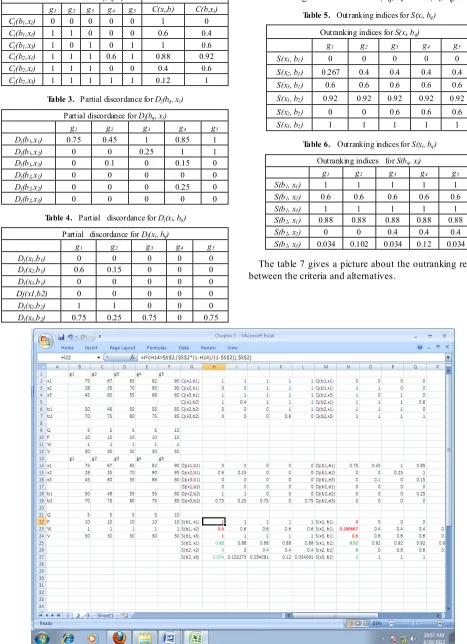
Here, we demonstrate a spreadsheet algorithm for the ELECTRE TRI method using a numerical illustration. We have programmed two algorithms, of which the first one helps in finding the values of partial concordance and discordance along with the outranking index between xi and
bq and the second algorithm provides solution for bq and xi.
Algorithm 3.1
Step 1: Enter the criteria values along with alternatives in ‘mxn’ design.
Step 2: Enter threshold values in a separate row below to the mxn design.
Step 3: To compute the partial concordance between ith
criteria and jth alternative Cj(x
i, bq) the following ‘NES TED
IF ( )’ condition has been used
=IF ((B6-B10)>=B2, 0, IF ((B6-B9)<B2,1, ((B2-B6+B10)/(B10-B9))))
Step 4: Repeat Step 3 for finding the left out concordance values.
Step 5: The overall concordance of two alternatives C(xi,
bq) can be obtained using
‘SUMPRODUCT()’function =SUMPRODUCT
(H2:L2,B11:F11)/SUM(B11:F11)
Step 6: To compute the partial discordance between ith
criteria and jth alternative Dj(x
i, bq), the following ‘NES TED
IF ( )’ condition has been used
=IF((B20-B24)<B16,0,IF((B20-B26)>=B16,1,((B20-B16 -B24)/(B26-B24))))
Step 7: To compute the out ranking index between ith
criteria and jth alternative S(x
i, bq) the following ‘IF ( )’
condition has been used
=IF(H16>$S$2,($S$2*(1-H16)/(1-$S$2)),$S$2)
Algorithm 3.2
Step 1: Enter the criteria values along with alternatives in ‘mxn’ design.
Step 2: Enter threshold values in a separate row below to the mxn design.
Step 3: To compute the partial concordance between ith criteria and jth alternative Cj(bq , xi) the following ‘NES TED
IF ( )’ condition has been used
=IF((B6+B10)<=B2,0,IF((B6+B9)>B2,1,((B6-B2+B10)/( B10-B9))))
Step 4: Repeat Step 3 for finding the left out concordance values.
Step 5: The overall concordance of two alternatives
C(bq , xi) can be obtained using
‘SUMPRODUCT()’function
=SUMPRODUCT(N2:R2,B11:F11)/SUM(B11:F11))
Step 6: To compute the partial discordance between ith criteria and jth alternative Dj(bq , xi), the following ‘NES TED
IF ( )’ condition has been used
=IF((B16-B20)<B24,0,IF((B16-B20)>=B26,1,((B16-B20 -B24)/(B26-B24))))
Step 7: To compute the out ranking index between ith criteria and jth alternative S(bq , xi) the following ‘IF ( )’
condition has been used
=IF(H16>$T$2,($T$2*(1-H16)/(1-$T$2)),$T$2)
4. Numerical Illustrations
Let us consider an MCDA problem which has five criteria and three alternatives for each criterion. The table below gives the boundary alternatives b1 and b2 and various
thresholds given by the decision maker (DM).
4.1. EXAMPLE 1
Alternatives g Criteria
1 g2 g3 g4 g5
x1 75 67 85 82 90
x2 28 35 70 90 95
x3 45 60 55 68 60
Boundary Alternatives
b1 50 48 55 55 60
b2 70 75 80 75 85
Thresholds
Q (Indifference) 5 5 5 5 10
P (Preference) 10 10 10 10 10
W (Weights) 1 1 1 1 1
V (Veto) 30 30 30 30 30
Now, using the algorithm 3.1 and 3.2, the following values are computed. Along with the partial concordance and discordance, the overall concordance is also reported in the tables 1, 2, 3 and 4.
Table 1. Partial concordance of Cj(xi, bq)
Partial Concordance of Cj(xi, bq)
Table 2. Partial concordance and overall concordance Partial Concordance for Cj(bq, xi) Overall Concordance
g1 g2 g3 g4 g5 C(xi,b) C(b,xi) Cj(b1,x1) 0 0 0 0 0 1 0 Cj(b1,x1) 1 1 0 0 0 0.6 0.4 Cj(b1,x3) 1 0 1 0 1 1 0.6 Cj(b2,x1) 1 1 1 0.6 1 0.88 0.92 Cj(b2,x1) 1 1 1 0 0 0.4 0.6 Cj(b2,x3) 1 1 1 1 1 0.12 1
Table 3. Partial discordance for Dj(bq, xi)
Partial discordance for Dj(bq, xi)
g1 g2 g3 g4 g5
Dj(b1,x1) 0.75 0.45 1 0.85 1
Dj(b1,x2) 0 0 0.25 1 1
Dj(b1,x3) 0 0.1 0 0.15 0
Dj(b2,x1) 0 0 0 0 0
Dj(b2,x2) 0 0 0 0.25 0
Dj(b2,x3) 0 0 0 0 0
Table 4. Partial discordance for Dj(xi, bq)
Partial discordance for Dj(xi, bq)
g1 g2 g3 g4 g5 Dj(x1,b1) 0 0 0 0 0 Dj(x2,b1) 0.6 0.15 0 0 0 Dj(x3,b1) 0 0 0 0 0
Dj(x1,b2) 0 0 0 0 0
Dj(x2,b2) 1 1 0 0 0 Dj(x3,b2) 0.75 0.25 0.75 0 0.75
On the basis of the above four tables, we have calculated the outranking indices for both S(bq, xi) and S(xi, bq)
Table 5. Outranking indices for S(xi, bq)
Outranking indices for S(xi, bq)
g1 g2 g3 g4 g5 S(x1, b1) 0 0 0 0 0 S(x2, b1) 0.267 0.4 0.4 0.4 0.4 S(x3, b1) 0.6 0.6 0.6 0.6 0.6 S(x1, b2) 0.92 0.92 0.92 0.92 0.92 S(x2, b2) 0 0 0.6 0.6 0.6 S(x3, b2) 1 1 1 1 1
Table 6. Outranking indices for S(xi, bq)
Outranking indices for S(bq, xi)
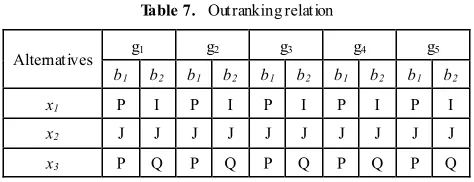
Table 7. Outranking relation
Alternatives g1 g2 g3 g4 g5
b1 b2 b1 b2 b1 b2 b1 b2 b1 b2 x1 P I P I P I P I P I x2 J J J J J J J J J J
x3 P Q P Q P Q P Q P Q
After obtaining the Outranking indices, the decision maker will decide the cutting level λ. Using this, the comparison will be done between the alternatives and criteria. Here, the cutting level λ is taken as 0.75. In this problem, we have defined two boundary alternatives that is b1 and b2. First
let us consider the boundary alternative b1 with three
alternatives for g1. The values of the indices S (x1, b1)andS
(b1, x1) hold the relation P (strictly preference), since S (x1,
b1) > λ andS (b1, x1) < λ. In similar fashion, if we compare S
(x2, b1) and S (b1, x2) with λ, an Indifference relation (I) is
noticed since these two relations are less than λ. Finally, on comparing S (x3, b1) and S (b1, x3) with λ, it is observed that
S (x3, b1) < λ and S (b1, x3) > λ, which means that the
outranking relation is of weak preference (Q). So here, we made an attempt to demonstrate all sorts of relations between the criteria and boundary alternatives using an MCDA problem. Further, let us consider another boundary alternative b2 for three alternatives to explain and observe
what sort of relations exists between them. It is observed that
S (x1, b2)andS (b2, x1) > λ, then the outranking relation is
Incomparable (I). Similarly, if we compare S (x2, b2) and S
(b2, x2) with λ, the two relations are less than λ indicating that
outranking relation is Indifference (I).Again on comparing
S (x3, b2) and S (b2, x3) with λ, it is observed that S (x3, b2) <
λ and S (b2, x3) > λ, the outranking relation is weak
preference (Q). Once the outranking relations are identified, the DM will choose any one of the assignment procedures. Here, we have briefly discussed both the procedures for the same problem.
Results of ELECTRE TRI Pessimistic procedure: •x1 is assigned to C3 because x1Sb3 does not hold but x1Sb2
holds
•x2 is assigned to C1 because x2Sb3, x2Sb2 and x2Sb2 do not
hold but x2Sb0 holds.
• x3 is assigned to C1 because x3Sb3 and x3Sb2 does not
hold but x3Sb1 holds.
Results of ELECTRE TRI Optimistic procedure: •x1 is assigned to C3 because b0Px1, b1Px1 and b2Px1 do
not holds but b3Px1 holds
•x2 is assigned to C3 because b0Px2, b1Px2 and b2Px2 do
not holds but b3Px2 holds.
•x3 is assigned to C2 because boPx3, b1Px3 does not holds
but b2Px2 holds.
It is observed that x2 is assigned to C3 by the optimistic
procedure and C1 by the pessimistic procedure. This shows
that, x2 is incomparable to both the boundary alternatives b1
and b2 which in turn gives the meaning that in spite of
different priorities, x2 alternative is the preferable one in each
and every criterion. Similar kind of interpretation can be given for the remaining criteria.g2, g3, g4 and g5.
4.2. EXAMPLE 2
Alternatives Criteria
g1 g2 g3 g4 g5
x1 75 67 85 82 90
x2 28 35 70 90 95
x3 45 60 55 68 60
Boundary
Alternative (b) 70 75 80 75 85 Thresholds
Q (Indifference) 5 5 5 5 10
P (Preference) 10 10 10 10 10
W (Weights) 1 1 1 1 1
V (Veto) 30 30 30 30 30 Partial Concordance of Cj(xi, bq)
g1 g2 g3 g4 g5
Cj(a1,b) 1 0.4 1 1 1
Cj(a2,b) 0 0 0 1 1
Cj(a3,b) 0 0 0 0.6 0
Partial Concordance for Cj(bq, xi) Overall
Concordance
g1 g2 g3 g4 g5 C(xi,b) C(b,xi)
Cj(b,x1) 1 1 1 0.6 1 0.88 0.92
Cj(b,x1) 1 1 1 0 0 0.4 0.6
Cj(b,x3) 1 1 1 1 1 0.12 1
Partial discordance for Dj(xi, bq)
g1 g2 g3 g4 g5
Dj(a1,b) 0 0 0 0 0
Dj(a2,b) 1 1 0 0 0
Dj(a3,b) 0.75 0.25 0.75 0 0.75
Partial discordance for Dj(bq, xi)
g1 g2 g3 g4 g5
Dj(b,a1) 0 0 0 0 0
Dj(b,a2) 0 0 0 0.25 0
Dj(b,a3) 0 0 0 0 0
Outranking indices for S(xi, bq)
g1 g2 g3 g4 g5
S(x1, b) 0.88 0.88 0.88 0.88 0.88 S(x2, b) 0 0 0.4 0.4 0.4 S(x3, b) 0.034 0.102 0.034 0.12 0.034
Outranking indices for S(bq, xi)
g1 g2 g3 g4 g5
S(b, x1) 0.92 0.92 0.92 0.92 0.92 S(b, x2) 0 0 0.6 0.6 0.6
5. Conclusions
In MCDA problem, the outranking methodology of ELECTRE TRI method provides a compromise solution. In this paper, we have focused on the usage of spreadsheet procedures for the MCDA problem with ELECTRE TRI method. Further, we have considered two boundary alternatives and highlighted the importance of them. Finally, with the help of the outranking indices and relations, we have interpreted that the alternative x2is considered to be the best
among three alternatives for every criterion. We have considered an MCDA problem which explains all sorts of outranking relations between the boundary alternatives and criteria. The algorithms are user friendly and flexible in handling the MCDA problem with ‘n’ boundary alternatives. The algorithm proposed is a user friendly one and allows user to handle the complex dimensioned MCDA problems very simply using the defined macro. Even though, separate software exists for ELECTRE TRI method, but it is not that easy to access and understand. However, this macro allow user to define the preferences, weights and thresholds. This macro is so handy and with a limited nested – if functions one can easily understand the anatomy of the ELECTRE TRI method.
ACKNOWLEDGEMENTS
The first author would like to acknowledge UGC-BSR for their financial support.
Macro Used for Solving MCDA
problems
Ganesh() '
' Ganesh Macro '
' Keyboard Shortcut: Ctrl+Shift+G '
Range("H2").Select
ActiveCell.FormulaR1C1 = _
"=IF((R[4]C[-6]-R[8]C[-6])>=RC[-6],0,IF((R[4]C[-6]-R[7] C[-6])<RC[-6],1,((RC[-6]-R[4]C[-6]+R[8]C[-6])/(R[8]C[-6 ]-R[7]C[-6]))))"
Range("H2").Select
Selection.AutoFill Destination:=Range("H2:L2"), Type:=xlFillDefault
Range("H2:L2").Select Range("H3").Select
ActiveCell.FormulaR1C1 = _
"=IF((R[3]C[-6]-R[7]C[-6])>=RC[-6],0,IF((R[3]C[-6]-R[6] C[-6])<RC[-6],1,((RC[-6]-R[3]C[-6]+R[7]C[-6])/(R[7]C[-6 ]-R[6]C[-6]))))"
Selection.AutoFill Destination:=Range("H3:L3"), Type:=xlFillDefault
Range("H3:L3").Select Range("H4").Select
ActiveCell.FormulaR1C1 = _
"=IF((R[2]C[-6]-R[6]C[-6])>=RC[-6],0,IF((R[2]C[-6]-R[5] C[-6])<RC[-6],1,((RC[-6]-R[2]C[-6]+R[6]C[-6])/(R[6]C[-6 ]-R[5]C[-6]))))"
Range("H4").Select
Selection.AutoFill Destination:=Range("H4:L4"), Type:=xlFillDefault
Range("H4:L4").Select Range("H5").Select
ActiveCell.FormulaR1C1 = _
"=IF((R[2]C[-6]-R[5]C[-6])>=R[-3]C[-6],0,IF((R[2]C[-6]-R[4]C[-6])<R[-3]C[-6],1,((R[-3]C[-6]-R[2]C[-6]+R[5]C[-6] )/(R[5]C[-6]-R[4]C[-6]))))"
Range("H5").Select
Selection.AutoFill Destination:=Range("H5:L5"), Type:=xlFillDefault
Range("H5:L5").Select Range("H6").Select
ActiveCell.FormulaR1C1 = _
"=IF((R[1]C[-6]-R[4]C[-6])>=R[-3]C[-6],0,IF(R[1]C[-6]-R [3]C[-6]<R[-3]C[-6],1,((R[-3]C[-6]-R[1]C[-6]+R[4]C[-6])/( R[4]C[-6]-R[3]C[-6]))))"
Range("H6").Select
Selection.AutoFill Destination:=Range("H6:L6"), Type:=xlFillDefault
Range("H6:L6").Select Range("H7").Select
ActiveCell.FormulaR1C1 = _
"=IF((RC[-6]-R[3]C[-6])>=R[-3]C[-6],0,IF((RC[-6]-R[2]C[ -6])<R[-3]C[-6],1,((R[-3]C[-6]-RC[-6]+R[3]C[-6])/(R[3]C[ -6]-R[2]C[-6]))))"
Range("H7").Select
Selection.AutoFill Destination:=Range("H7:L7"), Type:=xlFillDefault
Range("H7:L7").Select Range("N2").Select
ActiveCell.FormulaR1C1 = _
"=IF((R[4]C[-12]+R[8]C[-12])<=RC[-12],0,IF((R[4]C[-12] +R[7]C[-12])>RC[-12],1,((R[4]C[-12]-RC[-12]+R[8]C[-12 ])/(R[8]C[-12]-R[7]C[-12]))))"
Range("N3").Select
ActiveWindow.SmallScroll ToRight:=4 Range("N2").Select
Selection.AutoFill Destination:=Range("N2:R2"), Type:=xlFillDefault
Range("N2:R2").Select Range("N3").Select
ActiveWindow.ScrollColumn = 4
ActiveWindow.ScrollColumn = 3 ActiveWindow.ScrollColumn = 2 ActiveWindow.ScrollColumn = 1 ActiveCell.FormulaR1C1 = _
"=IF((R[3]C[-12]+R[7]C[-12])<=RC[-12],0,IF((R[3]C[-12] +R[6]C[-12])>RC[-12],1,((R[3]C[-12]-RC[-12]+R[7]C[-12 ])/(R[7]C[-12]-R[6]C[-12]))))"
Range("N4").Select
ActiveWindow.ScrollColumn = 2 ActiveWindow.ScrollColumn = 3 ActiveWindow.ScrollColumn = 4 ActiveWindow.ScrollColumn = 5 ActiveWindow.ScrollColumn = 6 ActiveWindow.ScrollColumn = 7 ActiveWindow.ScrollColumn = 8 ActiveWindow.ScrollColumn = 9 ActiveWindow.ScrollColumn = 10 Range("N3").Select
Selection.AutoFill Destination:=Range("N3:R3"), Type:=xlFillDefault
Range("N3:R3").Select
ActiveWindow.ScrollColumn = 9 ActiveWindow.ScrollColumn = 8 ActiveWindow.ScrollColumn = 7 ActiveWindow.ScrollColumn = 6 ActiveWindow.ScrollColumn = 5 ActiveWindow.ScrollColumn = 4 ActiveWindow.ScrollColumn = 3 ActiveWindow.ScrollColumn = 2 ActiveWindow.ScrollColumn = 1 Range("N4").Select
ActiveCell.FormulaR1C1 = _
"=IF((R[2]C[-12]+R[6]C[-12])<=RC[-12],0,IF((R[2]C[-12] +R[5]C[-12])>RC[-12],1,((R[2]C[-12]-RC[-12]+R[6]C[-12 ])/(R[6]C[-12]-R[5]C[-12]))))"
Range("N5").Select
ActiveWindow.ScrollColumn = 2 ActiveWindow.ScrollColumn = 3 ActiveWindow.ScrollColumn = 4 ActiveWindow.ScrollColumn = 5 ActiveWindow.ScrollColumn = 6 ActiveWindow.ScrollColumn = 7 ActiveWindow.ScrollColumn = 8 ActiveWindow.ScrollColumn = 9 Range("N4").Select
Selection.AutoFill Destination:=Range("N4:R4"), Type:=xlFillDefault
Range("N4:R4").Select Range("N5").Select
ActiveWindow.ScrollColumn = 2 ActiveWindow.ScrollColumn = 1 ActiveCell.FormulaR1C1 = _
"=IF((R[2]C[-12]+R[5]C[-12])<=R[-3]C[-12],0,IF((R[2]C[-12]+R[4]C[-12])>R[-3]C[-12],1,((R[2]C[-12]-R[-3]C[-12]+ R[5]C[-12])/(R[5]C[-12]-R[4]C[-12]))))"
Range("N5").Select
ActiveWindow.ScrollColumn = 2 ActiveWindow.ScrollColumn = 3 ActiveWindow.ScrollColumn = 4 ActiveWindow.ScrollColumn = 5 ActiveWindow.ScrollColumn = 6 ActiveWindow.ScrollColumn = 7 ActiveWindow.ScrollColumn = 8 ActiveWindow.ScrollColumn = 9 ActiveWindow.ScrollColumn = 10
Selection.AutoFill Destination:=Range("N5:R5"), Type:=xlFillDefault
Range("N5:R5").Select Range("N6").Select
ActiveWindow.ScrollColumn = 9 ActiveWindow.ScrollColumn = 8 ActiveWindow.ScrollColumn = 7 ActiveWindow.ScrollColumn = 6 ActiveWindow.ScrollColumn = 5 ActiveWindow.ScrollColumn = 4 ActiveWindow.ScrollColumn = 3 ActiveWindow.ScrollColumn = 2 ActiveWindow.ScrollColumn = 1 ActiveCell.FormulaR1C1 = _
"=IF((R[1]C[-12]+R[4]C[-12])<=R[-3]C[-12],0,IF((R[1]C[-12]+R[3]C[-12])>R[-3]C[-12],1,((R[1]C[-12]-R[-3]C[-12]+ R[4]C[-12])/(R[4]C[-12]-R[3]C[-12]))))"
Range("N7").Select
ActiveWindow.ScrollColumn = 2 ActiveWindow.ScrollColumn = 3 ActiveWindow.ScrollColumn = 4 ActiveWindow.ScrollColumn = 5 ActiveWindow.ScrollColumn = 6 ActiveWindow.ScrollColumn = 7 ActiveWindow.ScrollColumn = 8 Range("N6").Select
Selection.AutoFill Destination:=Range("N6:R6"), Type:=xlFillDefault
Range("N6:R6").Select Range("N7").Select
ActiveWindow.ScrollColumn = 7 ActiveWindow.ScrollColumn = 6 ActiveWindow.ScrollColumn = 5 ActiveWindow.ScrollColumn = 4 ActiveWindow.ScrollColumn = 3 ActiveWindow.ScrollColumn = 2 ActiveWindow.ScrollColumn = 1 ActiveCell.FormulaR1C1 = _
"=IF((RC[-12]+R[3]C[-12])<=R[-3]C[-12],0,IF((RC[-12]+ R[2]C[-12])>R[-3]C[-12],1,((RC[-12]-R[-3]C[-12]+R[3]C[-12])/(R[3]C[-12]-R[2]C[-12]))))"
Range("N8").Select
ActiveWindow.ScrollColumn = 2 ActiveWindow.ScrollColumn = 3 ActiveWindow.ScrollColumn = 4 ActiveWindow.ScrollColumn = 5 ActiveWindow.ScrollColumn = 6 ActiveWindow.ScrollColumn = 7 Range("N7").Select
Selection.AutoFill Destination:=Range("N7:R7"), Type:=xlFillDefault
Range("N7:R7").Select
ActiveWindow.ScrollColumn = 6 ActiveWindow.ScrollColumn = 5 ActiveWindow.ScrollColumn = 4 ActiveWindow.ScrollColumn = 3 ActiveWindow.ScrollColumn = 2 ActiveWindow.ScrollColumn = 1 Range("H16").Select
ActiveCell.FormulaR1C1 = _
"=IF((R[4]C[-6]-R[8]C[-6])<RC[-6],0,IF((R[4]C[-6]-R[10] C[-6])>=RC[-6],1,((R[4]C[-6]-RC[-6]-R[8]C[-6])/(R[10]C[ -6]-R[8]C[-6]))))"
Range("H16").Select
Selection.AutoFill Destination:=Range("H16:L16"), Type:=xlFillDefault
Range("H16:L16").Select Range("H17").Select
ActiveCell.FormulaR1C1 = _
"=IF((R[3]C[-6]-R[7]C[-6])<RC[-6],0,IF((R[3]C[-6]-R[9]C [-6])>=RC[-6],1,((R[3]C[-6]-RC[-6]-R[7]C[-6])/(R[9]C[-6] -R[7]C[-6]))))"
Range("H17").Select
Selection.AutoFill Destination:=Range("H17:L17"), Type:=xlFillDefault
Range("H17:L17").Select Range("H18").Select
ActiveCell.FormulaR1C1 = _
"=IF((R[2]C[-6]-R[6]C[-6])<RC[-6],0,IF((R[2]C[-6]-R[8]C [-6])>=RC[-6],1,((R[2]C[-6]-RC[-6]-R[6]C[-6])/(R[8]C[-6] -R[6]C[-6]))))"
Range("H18").Select
Selection.AutoFill Destination:=Range("H18:L18"), Type:=xlFillDefault
Range("H18:L18").Select Range("H19").Select
ActiveCell.FormulaR1C1 = _
Range("H19").Select
Selection.AutoFill Destination:=Range("H19:L19"), Type:=xlFillDefault
Range("H19:L19").Select Range("H20").Select
ActiveCell.FormulaR1C1 = _
"=IF((R[1]C[-6]-R[4]C[-6])<R[-3]C[-6],0,IF((R[1]C[-6]-R[ 6]C[-6])>=R[-3]C[-6],1,((R[1]C[-6]-R[-3]C[-6]-R[4]C[-6])/ (R[6]C[-6]-R[4]C[-6]))))"
Range("H20").Select
Selection.AutoFill Destination:=Range("H20:L20"), Type:=xlFillDefault
Range("H20:L20").Select Range("H21").Select
ActiveCell.FormulaR1C1 = _
"=IF((RC[-6]-R[3]C[-6])<R[-3]C[-6],0,IF((RC[-6]-R[5]C[-6])>=R[-3]C[-6],1,((RC[-6]-R[-3]C[-6]-R[3]C[-6])/(R[5]C[ -6]-R[3]C[-6]))))"
Range("H21").Select
Selection.AutoFill Destination:=Range("H21:L21"), Type:=xlFillDefault
Range("H21:L21").Select Range("N16").Select
ActiveCell.FormulaR1C1 = "=" ChDir "C:\Users\NEW\Desktop" Range("N16").Select
Selection.ClearContents ActiveCell.FormulaR1C1 = _
"=IF((RC[-12]-R[4]C[-12])<R[8]C[-12],0,IF((RC[-12]-R[4] C[-12])>=R[10]C[-12],1,((RC[-12]-R[4]C[-12]-R[8]C[-12]) /(R[10]C[-12]-R[8]C[-12]))))"
Range("N17").Select
ActiveWindow.ScrollColumn = 2 ActiveWindow.ScrollColumn = 3 ActiveWindow.ScrollColumn = 4 ActiveWindow.ScrollColumn = 5 ActiveWindow.ScrollColumn = 6 ActiveWindow.ScrollColumn = 7 ActiveWindow.ScrollColumn = 8 Range("N16").Select
Selection.AutoFill Destination:=Range("N16:R16"), Type:=xlFillDefault
Range("N16:R16").Select Range("N17").Select
ActiveWindow.ScrollColumn = 7 ActiveWindow.ScrollColumn = 6 ActiveWindow.ScrollColumn = 5 ActiveWindow.ScrollColumn = 4 ActiveWindow.ScrollColumn = 3 ActiveWindow.ScrollColumn = 2 ActiveWindow.ScrollColumn = 1 ActiveCell.FormulaR1C1 = _
"=IF((RC[-12]-R[3]C[-12])<R[7]C[-12]:R[7]C[-12],0,IF((R
C[-12]-R[3]C[-12])>=R[9]C[-12],1,((RC[-12]-R[3]C[-12]-R[7]C[-12])/(R[9]C[-12]-R[7]C[-12]))))"
Range("N18").Select
ActiveWindow.ScrollColumn = 2 ActiveWindow.ScrollColumn = 3 ActiveWindow.ScrollColumn = 4 ActiveWindow.ScrollColumn = 5 ActiveWindow.ScrollColumn = 6 ActiveWindow.ScrollColumn = 7 Range("N17").Select
Selection.AutoFill Destination:=Range("N17:R17"), Type:=xlFillDefault
Range("N17:R17").Select Range("N18").Select
ActiveWindow.ScrollColumn = 6 ActiveWindow.ScrollColumn = 5 ActiveWindow.ScrollColumn = 4 ActiveWindow.ScrollColumn = 2 ActiveWindow.ScrollColumn = 1 ActiveCell.FormulaR1C1 = _
"=IF((RC[-12]-R[2]C[-12])<R[6]C[-12],0,IF((RC[-12]-R[2] C[-12])>=R[8]C[-12],1,((RC[-12]-R[2]C[-12]-R[6]C[-12])/ (R[8]C[-12]-R[6]C[-12]))))"
Range("N19").Select
ActiveWindow.ScrollColumn = 2 ActiveWindow.ScrollColumn = 3 ActiveWindow.ScrollColumn = 4 ActiveWindow.ScrollColumn = 5 ActiveWindow.ScrollColumn = 6 ActiveWindow.ScrollColumn = 7 ActiveWindow.ScrollColumn = 8 ActiveWindow.ScrollColumn = 9 ActiveWindow.ScrollColumn = 10 ActiveWindow.ScrollColumn = 11 Range("N18").Select
Selection.AutoFill Destination:=Range("N18:R18"), Type:=xlFillDefault
Range("N18:R18").Select Range("N19").Select
ActiveWindow.ScrollColumn = 10 ActiveWindow.ScrollColumn = 9 ActiveWindow.ScrollColumn = 8 ActiveWindow.ScrollColumn = 7 ActiveWindow.ScrollColumn = 6 ActiveWindow.ScrollColumn = 5 ActiveWindow.ScrollColumn = 4 ActiveWindow.ScrollColumn = 3 ActiveWindow.ScrollColumn = 2 ActiveWindow.ScrollColumn = 1 ActiveCell.FormulaR1C1 = _
"=IF((R[-3]C[-12]-R[2]C[-12])<R[5]C[-12],0,IF((R[-3]C[-1 2]-R[2]C[-12])>=R[7]C[-12],1,((R[-3]C[-12]-R[2]C[-12]-R [5]C[-12]))))"
Range("N20").Select
ActiveWindow.ScrollColumn = 3 ActiveWindow.ScrollColumn = 4 ActiveWindow.ScrollColumn = 5 Range("N19").Select
Selection.AutoFill Destination:=Range("N19:R19"), Type:=xlFillDefault
Range("N19:R19").Select Range("N20").Select
ActiveWindow.ScrollColumn = 4 ActiveWindow.ScrollColumn = 3 ActiveWindow.ScrollColumn = 2 ActiveWindow.ScrollColumn = 1 ActiveCell.FormulaR1C1 = _
"=IF((R[-3]C[-12]-R[1]C[-12])<R[4]C[-12],0,IF((R[-3]C[-1 2]-R[1]C[-12])>=R[6]C[-12],1,((R[-3]C[-12]-R[1]C[-12]-R [4]C[-12])/(R[6]C[-12]-R[4]C[-12]))))"
Range("N21").Select
ActiveWindow.ScrollColumn = 2 ActiveWindow.ScrollColumn = 3 ActiveWindow.ScrollColumn = 4 ActiveWindow.ScrollColumn = 5 ActiveWindow.ScrollColumn = 6 ActiveWindow.ScrollColumn = 7 ActiveWindow.ScrollColumn = 8 Range("N20").Select
Selection.AutoFill Destination:=Range("N20:R20"), Type:=xlFillDefault
Range("N20:R20").Select Range("N21").Select
ActiveWindow.ScrollColumn = 7 ActiveWindow.ScrollColumn = 6 ActiveWindow.ScrollColumn = 5 ActiveWindow.ScrollColumn = 4 ActiveWindow.ScrollColumn = 3 ActiveWindow.ScrollColumn = 2 ActiveWindow.ScrollColumn = 1 ActiveCell.FormulaR1C1 = _
"=IF((R[-3]C[-12]-RC[-12])<R[3]C[-12],0,IF((R[-3]C[-12]-RC[-12])>=R[5]C[-12],1,((R[-3]C[-12]-RC[-12]-R[3]C[-12 ])/(R[5]C[-12]-R[3]C[-12]))))"
Range("N22").Select
ActiveWindow.ScrollColumn = 2 ActiveWindow.ScrollColumn = 3 ActiveWindow.ScrollColumn = 4 ActiveWindow.ScrollColumn = 5 ActiveWindow.ScrollColumn = 6 ActiveWindow.ScrollColumn = 7 ActiveWindow.ScrollColumn = 8 ActiveWindow.ScrollColumn = 9 ActiveWindow.ScrollColumn = 10 ActiveWindow.ScrollColumn = 11 Range("N21").Select
Selection.AutoFill Destination:=Range("N21:R21"), Type:=xlFillDefault
Range("N21:R21").Select
ActiveWindow.SmallScroll Down:=-15 Range("S2").Select
ActiveWindow.ScrollColumn = 10 ActiveWindow.ScrollColumn = 9 ActiveWindow.ScrollColumn = 8 ActiveWindow.ScrollColumn = 7 ActiveWindow.ScrollColumn = 6 ActiveWindow.ScrollColumn = 5 ActiveCell.FormulaR1C1 = _
"=SUMPRODUCT(RC[-11]:RC[-7],R11C2:R11C6)/SUM( R11C2:R11C6)"
Range("S2").Select
Selection.AutoFill Destination:=Range("S2:S7"), Type:=xlFillDefault
Range("S2:S7").Select Range("T2").Select
ActiveCell.FormulaR1C1 = _
"=SUMPRODUCT(RC[-6]:RC[-2],R11C2:R11C6)/SUM(R 11C2:R11C6)"
Range("T2").Select
Selection.AutoFill Destination:=Range("T2:T7") Range("T2:T7").Select
Range("T16").Select
ActiveCell.FormulaR1C1 = "if(" Range("T16").Select
ActiveCell.FormulaR1C1 = _
"=IF(RC[-12]>R2C19,(R2C19*(1-RC[-12])/(1-R2C19)),R2 C19)"
Range("T17").Select
ActiveWindow.SmallScroll ToRight:=3 Range("T16").Select
Selection.AutoFill Destination:=Range("T16:X16"), Type:=xlFillDefault
Range("T16:X16").Select Range("T17").Select
ActiveCell.FormulaR1C1 = _
"=IF(RC[-12]>R3C19,(R3C19*(1-RC[-12])/(1-R3C19)),R3 C19)"
Range("T18").Select
ActiveWindow.SmallScroll ToRight:=4 Range("T17").Select
Selection.AutoFill Destination:=Range("T17:X17"), Type:=xlFillDefault
Range("T17:X17").Select Range("T18").Select
"=IF(RC[-12]>R4C19,(R4C19*(1-RC[-12])/(1-R4C19)),R4 C19)"
Range("T19").Select
ActiveWindow.SmallScroll ToRight:=5 Range("T18").Select
Selection.AutoFill Destination:=Range("T18:X18"), Type:=xlFillDefault
Range("T18:X18").Select Range("T19").Select
ActiveWindow.ScrollColumn = 10 ActiveWindow.ScrollColumn = 9 ActiveWindow.ScrollColumn = 8 ActiveWindow.ScrollColumn = 7 ActiveWindow.ScrollColumn = 6 ActiveWindow.ScrollColumn = 5 ActiveWindow.ScrollColumn = 4 ActiveWindow.ScrollColumn = 5 ActiveWindow.ScrollColumn = 6 ActiveWindow.ScrollColumn = 7 ActiveCell.FormulaR1C1 = _
"=IF(RC[-12]>R5C19,(R5C19*(1-RC[-12])/(1-R5C19)),R5 C19)"
Range("T20").Select
ActiveWindow.ScrollColumn = 8 ActiveWindow.ScrollColumn = 9 ActiveWindow.ScrollColumn = 10 ActiveWindow.ScrollColumn = 11 Range("T19").Select
Selection.AutoFill Destination:=Range("T19:X19"), Type:=xlFillDefault
Range("T19:X19").Select Range("T20").Select
ActiveWindow.ScrollColumn = 10 ActiveWindow.ScrollColumn = 9 ActiveWindow.ScrollColumn = 8 ActiveWindow.ScrollColumn = 7 ActiveCell.FormulaR1C1 = _
"=IF(RC[-12]>R6C19,(R6C19*(1-RC[-12])/(1-R6C19)),R6 C19)"
Range("T21").Select
ActiveWindow.SmallScroll ToRight:=3 Range("T20").Select
Selection.AutoFill Destination:=Range("T20:X20"), Type:=xlFillDefault
Range("T20:X20").Select Range("T21").Select
ActiveWindow.SmallScroll ToRight:=-2 ActiveCell.FormulaR1C1 = _
"=IF(RC[-12]>R7C19,(R7C19*(1-RC[-12])/(1-R7C19)),R7 C19)"
Range("T22").Select
ActiveWindow.SmallScroll ToRight:=2 Range("T21").Select
Selection.AutoFill Destination:=Range("T21:X21"), Type:=xlFillDefault
Range("T21:X21").Select
ActiveWindow.SmallScroll ToRight:=6 Range("Z16").Select
ActiveCell.FormulaR1C1 = _
"=IF(RC[-18]>R2C20,(R2C20*(1-RC[-18])/(1-R2C20)),R2 C20)"
Range("Z16").Select
Selection.AutoFill Destination:=Range("Z16:AD16"), Type:=xlFillDefault
Range("Z16:AD16").Select Range("Z17").Select
ActiveCell.FormulaR1C1 = _
"=IF(RC[-18]>R3C20,(R3C20*(1-RC[-18])/(1-R3C20)),R3 C20)"
Range("Z17").Select
Selection.AutoFill Destination:=Range("Z17:AD17"), Type:=xlFillDefault
Range("Z17:AD17").Select Range("Z18").Select
ActiveCell.FormulaR1C1 = _
"=IF(RC[-18]>R4C20,(R4C20*(1-RC[-18])/(1-R4C20)),R4 C20)"
Range("Z18").Select
Selection.AutoFill Destination:=Range("Z18:AD18"), Type:=xlFillDefault
Range("Z18:AD18").Select Range("Z19").Select
ActiveCell.FormulaR1C1 = _
"=IF(RC[-18]>R5C20,(R5C20*(1-RC[-18])/(1-R5C20)),R5 C20)"
Range("Z19").Select
Selection.AutoFill Destination:=Range("Z19:AD19"), Type:=xlFillDefault
Range("Z19:AD19").Select Range("Z20").Select
ActiveCell.FormulaR1C1 = _
"=IF(RC[-18]>R6C20,(R6C20*(1-RC[-18])/(1-R6C20)),R6 C20)"
Range("Z20").Select
Selection.AutoFill Destination:=Range("Z20:AD20"), Type:=xlFillDefault
Range("Z20:AD20").Select Range("Z21").Select
ActiveCell.FormulaR1C1 = _
"=IF(RC[-18]>R7C20,(R7C20*(1-RC[-18])/(1-R7C20)),R7 C20)"
Range("Z21").Select
Range("Z21:AD21").Select End Sub
REFERENCES
[1] I. Brans and B. Mareschal, (2005) “PROMITHEE methods.” In Multiple Criteria Decision Analysis: State of the Art Surveys, J. Figueria, S. Greco, and M. Ehrgott, Eds. Boston: Springer-Verlag, pp.163-196.
[2] Y. Chen, Multiple Criteria Decision Analysis: Classification Problems and solutions,” (2006) Ph.D. dissertation, University of Waterloo, Waterloo, Ontario, Canada.
[3] Doumpos, M. and C. Zopounidis (2003), “A multicriteria classification approach based on pair wise comparisons, European Journal of Operations l Research, vol. 158, no 2, 378-389.
[4] J. Figueira, V. Mousseau and B. Roy, (2005), “Electre methods,” in Multiple Criteria Decision Analysis: State of the Art Surveys, J. Figueria, S. Greco, and M. Ehrgott, Eds. Boston: Springer-Verlag, , pp.133-162.
[5] V. Mousseau R. Slowinski (1999), “ ELECTRE TRI 2.0a: Methodological guide and user’s documentation,” Universite de Paris-Dauphine, Document du LAMSADE 111.
[6] A. Nago The and V. Mousseau, (2002), “ Using Assignment examples to infer category limits for the ELECTRE TRI method,” Journal of Multicriteria Decision Analysis,” vol. 11, no.1, pp.29-43.
[7] B.Roy, (1981) “A Multicriteria Analysis for trichotomic segmentation problems,” Multiple Criteria Analysis:
Operational Methods, P. Nijkamp and J. Spronk, Eds. Farnborough: Gower Press, pp. 245-257.
[8] C. Zopounidis, (2002), “MCDA methodologies for classification and sorting,” European Journal of Operations l Research, vol. 138, no 2, 227-228.
[9] A.Jaszkiewicz and A.B. Ferhat, (1990) “Solving multiple criteria choice problems by interactive trichotomy segmentation,” European Journal of Operations l Research, vol. 113, no 2, 271-280.
[10] M. Rogers, M.Bruen and L. Maystre (2000), “ Electri and Decision Support”, Dordrecht: Kluwer Academic Publishers. [11] J. Figueira, V. Mousseau and B. Roy (2005), “ELECTRI
Methods in Multi Criteria Decision Analysis: State of the Art Surveys” Boston Springer – verlag, pp 133-162.
[12] V. Mousseau, J. Figueira, J.-Ph. Naux, (2001), “Using assignment examples to infer weights for ELECTRE TRI method: Some experimental results”, European Journal of Operational Research 130, 263-275.
[13] J. Martel and B. Metarazzo (2005), “Outranking Approaches, in Multiple Criteria Decision Analysis: State of the Art Surveys”, Boston Springer – verlag, pp 197-264
[14] Iryna Yevseyeva (2007), “Solving Classification Problems with Multi Criteria Decision Aiding approaches”, Jyvaskyla University Printing house.
[15] Mousseau R. Slowinski (1998), “Inferring an ELECTRE TRI model from Assignment problems”, Journal of Global Optimization, vol.12, No. 2, pp. 157-174.