ing—A case study. AACE Journal, 12(2), 171-187.
Reaching an ITopia in Distance Learning—
A Case Study
REGGIE KWAN, JIMMY CHAN, AND ANDREW LUI The Open University of Hong Kong
Hong Kong, Hong Kong [email protected]
Formerly known as the AB Learning Institute, the University of ABC (ABCU), was established by the ABC Government in 1989. ABCU offers courses leading to numerous academic qualifications through the distance education mode using mainly print based materials that are supplemented by audio, video, computer assisted elements, and increasingly, the Internet.
Since 1994, in line with the rapid expansion of the Internet access to the ABC community, the School of Science and Technology (S&T) has progressively introduced online elements into its course presentation, particularly the use of electronic communication technologies such as bulletin boards, e-mail and more recently web-based features such as chat, electronic whiteboards as well as the electronic submis-sion of assignments. Currently, every single instructor and tutor can communicate with students through e-mail and over 60% courses offered by S&T features online support ele-ments. However, only a handful of courses have parts of the contents delivered through the web. This situation reflects a deliberate approach whereby technology is used only when a clear “value addition” is demonstrated. This article describes the experience of the School in this migration and discusses various challenges and issues associated with it.
a profound impact on education, especially open and distance learning. The marriage between the Internet and distance learning is as natural as lectures in a conventional university setting. This new technology has significantly helped increase access to education opportunities. The online environment may be divided into four areas namely, (a) enrolment, (b) teaching/learn-ing, (c) assessment, and (d) certification (Carswell, 1998). In this article, the online environment referred to deals only with teaching/learning and assessment.
The School of Science and Technology at The University of ABC offers courses (conducted in the distance learning mode) leading to sub-degree, degree, and some post-graduate qualifications in the fields of Applied Com-puting, Communications Technology, Computing and Networking, Elec-tronics, Engineering Mechanics Material and Design, Environmental Stud-ies, Mathematics, and Nursing. The school began introducing IT elements to support course presentation since 1994. The process was accelerated during the past few years in parallel with the widespread increase in access to the Internet seen in the wider ABC community.
Courses in S&T are typically year-long (10 months followed by an exam in the 11th month) and 10 or 20 credits a piece. To complete a 4-year degree,
students need 160 credits within the degree structure of their intended program. In other words, 10 ABCU credit is approximately 7.5 semester credits.
The Way We Were (pre-1994)
From 1989 to 1994, courses offered by the University of ABC were pre-sented without any online elements. Course materials were mainly print-based and supplemented by audio and/or video-tapes. Some courses also had TV programmes broadcast on Sunday mornings. Most courses were bought-in from the AB University in the United Kingdom during those early days. These materials were adapted to localize its contents and presented to students through the local communication services.
a part-time tutor who provided face-to-face and telephone mediated support, taking advantage of the prevailing free fixed-line telephone services. Com-munication between the instructors and tutors with students were delivered through the regular postal service, telephone, or fax.
Assessments were based on tutor marked assignments (TMA), computer marked assignments (CMA), and a final examination. The assignments were designed to pace a students’ learning throughout the presentation of the course. The final examination (conducted under face-to-face conditions to ensure its integrity) took place at the end of each 10-month presentation. Submission of assignments and return of marked assignments were carried out by way of the postal services. Despite a generally efficient and reliable postal system, loss of assignments represented a significant problem. Part of this might have been contributed by the miniscule size of typical mail-boxes in ABC’s crowded apartment blocks.
In-between Years (1994-1996)
Between 1994 to 1996, various online components were added to a few courses offered by the School, mainly in the Computing area. Elementary online components using the Internet such as file transfer protocol (FTP) and telnet were the first features used. FTP helped students download and upload files, applications, and programs between their PC and the server. Telnet allowed students to remote logon to the servers. There was no mo-dem pool then and only a few phone lines for students to dial in.
Accounts were created on Unix machines in computing related courses. The Information Technology Unit of the University also provided a home grown electronic bulletin board called Students Electronic Bulletin Board (SEBB). Some instructors had started to communicate with their tutors through e-mail. Unfortunately, the SEBB usage was minimal and the system never took off beyond the testing stage. This was mainly due to the awkward interface and limited phone lines.
The S&T Experiment (1996-1998)
In 1996 and 1997, two courses (one sophomore level and one junior level ) in the Applied Computing programme started to use the Internet through the use of the Web. These two “pioneer” courses started with web pages and Web Bulletin Board (WebBBS) to dispense information as well as to promote discussions asynchronously on the Web. Except for the printed course materials, all information (tutorial schedule, assignments, announce-ments, meetings, etc.) sent to students through regular mail was also posted on the web sites of these two courses. Posting of voluminous contents pages on the website was practiced as it only ended up with the students printing them using their own often printers of poor quality usually. Very little value would have been added by such a practice.
Criteria of Adopting Online Elements
Right from the beginning, the School decided that online elements would only be introduced if they could clearly add value to the student learning environment and only when minimum disruptions had to occur during the migration process. This policy was a deliberate one to prevent a culture where technology was introduced for technology sake.
Early Experiences
Based on the number of messages posted on the WebBBS, the online components of these two pioneer courses were not well-received by our students. The sophomore level programming course (MT268) had only seventy-some messages while the junior level computer simulation course (MT360) had 30.
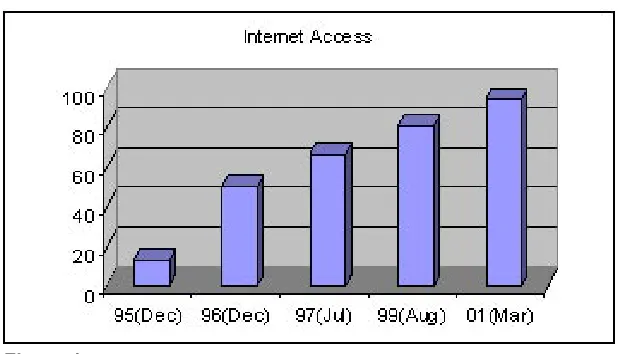
Figure 1. Percentage of OU students with Internet access from 1995 to 2001
Two years later when online elements such as news and assignments were introduced in another sophomore level programming course (MT258) as compulsory elements, the end result was very different. In MT258, stu-dents had to download assignment files from the course web pages through WebCT but all discussions or online communications were not compulsory. There were about 2400 messages in the Year 2000 and over 4000 messages in the Year 2001 while the number of students remained relatively the same at 900.
Though the use of the bulletin board was voluntary as it was in MT268, the messages posted by students and tutors increased by at least 10-fold (70 messages from 250 students in 1997, versus 2400 messages from 940 stu-dents in 2000 and over 4000 from 920 stustu-dents in 2001). While each student in MT268 posted 0.28 messages in 1997, each student in MT258 posted 4.3 messages in 2001 on average.
In the Year 2002, a post-graduate level course (MT888) with similar enrol-ment as MT268 in 1997 had over 2000 messages posted. Interestingly, a typical student read 1200 messages and posted 5 in a course. Thus, the lurk-ing and postlurk-ing ratio was roughly 220 to 1.
in 1995. The same survey was repeated almost yearly. The percentage jumped to 50% in a year. Since 1996, the increase became a steady 10% a year, reaching almost 81% in August 1999, and 94% in March 2001.
Another contributing factor was the role of the Internet. While the Internet access was compulsory for the courses MT258 and MT888, it was only a supplementary feature in both MT268 and MT360. Making the use of the Internet compulsory had forced the students to use the Internet to obtain course related information such as assignment files and stop presses (an-nouncements). Getting into the habit of using the Internet to obtain neces-sary information also promoted students to use it for communications.
During the 1996-1998 period, the School took a rather liberal approach towards the online migration. This was due to the fact that different teams (departments) within the school had different needs and expertise; a “pick-and-choose” approach provided the required flexibility. Different teams experimented with a wide range of tools and platforms, ranging from only a web page to a full-scale video on demand and materials on CDs. Various elements were experimented with as part of the online migration. They can be classified into four basic categories, namely: collaboration and discus-sion, assessment, online counseling, and content delivery.
Collaboration and discussion.In the area of collaboration and discussion to support student learning, the following elements were tried extensively by various teams within the school:
Asynchronous communications
o E-mail
o Bulletin board
Synchronous (online chat or whiteboard)
o One-to-one
o One-to-many
o Session logging
The objectives of these online elements were to:
1. to increase the effectiveness of communication between instructors, tu-tors, administration staff and students using e-mail, chat, and electronic bulletin boards;
2. to provide a collaborative learning environment for students using e-mail, newsgroups, chats, and electronic bulletin boards.
This area of enhanced communication was and still is one that we consider most important. We have had reasonable success based on the very positive feedback from our students. However, special servers had to be set up to create and support the WebBBS and chat groups.
Assessments.With the aim of eliminating the “loss in the mail” problem in assessment submission and return, we carried out trials on electronic TMA submission and electronic TMA marking. A home-grown Web-based TMA extension application was developed to help both students and instructors in tracking applications and maintaining a database for the Registry to minimize the paper work.
Electronic TMA submission was done completely through e-mail via the WebCT platform for a course presented in April 1999. Marking was done by the version control in Word whereby tutors used different color text and diagrams when marking the TMAs. Thus, comments by tutors were incorporated into the original TMA itself and the students can learn from these when they subsequently received their marked assignments. Although, documents as word files were relatively easy to handle, those assignments containing mathematical symbols and multimedia elements have proved to be more challenging. We are still studying and testing different applications before making a final decision on which one to adopt on a school wide basis to make it more convenient to our students.
received during course registrations in the months of June and December.
To make matters worse, students and potential students tended to make multiple phone calls and send multiple e-mail messages to different faculty members asking the same questions. By consolidating all e-mail accounts into a team account, team members could take turns to answer e-mail messages while all the messages stayed in one common account. This also avoided potential confusion when different advice was given by various staff members to the same enquiry. Courtesy copies of messages within each team were also reduced by this arrangement.
Also, once a pattern or a common question has emerged among the e-mail messages, they were turned into FAQs and put on the team Website. Students could then refer to these FAQs to maintain the consistency of our answer.
The interactive point-and-click forms on the Web were added in 2001 to tell students if the courses they took satisfied all the regulations for their in-tended qualification as well as a listing of all necessary courses for students to complete their degree requirements. The forms act as aids to professors to conduct academic advising. To put things in perspective, there are 10 full-time academics in the computing team (department) and over 100 part-full-time tutors but there are over 3500 part-time students with about 1600 full-time equivalents (fte).
From June 2001 to October 2002, there were over 2400 visits to the advis-ing pages. An overwhelmadvis-ing number of students commented very positively on the System.
On top of the interactive online counseling pages, the School also experi-mented on computerized adaptive testing system to help students select courses based on their abilities. This is especially crucial for ABCU where course prerequisites are not enforced. The preliminary result shows great promise (Kwan, 2002).
that the Internet is really useful for presenting the multimedia elements as well as providing the capacity to hyperlink to other useful sites to assist student learning. We tested both the use of the CD and the Web with differ-ent courses. Text and video were put on CDs as a supplemdiffer-ent to the printed materials. Text and animated learning materials with and without audio were also tested on the Web using Macromedia Flash and Authorware®. Different courseware platforms such as Learning Space and WebCT were also tested. Most students considered the animated learning materials to be useful based on the survey done in courses that used animated materials. Regarding different courseware platform, students liked the consistent look and feel. As a matter of fact, students with experience in Learning Space or WebCT tended to ask why all courses were not on them.
However, we have yet to be convinced about the usefulness and cost ef-fectiveness of these uncharted waters. Though the Computing team (depart-ment) is experimenting with “Active Learning” as described by McIntyre and Wolff (1998), different instructional tools on the Web (Gray, 1998), and the hypertextbooks (Boroni, 2001) for the Web, more research has to be done before we can subscribe to what Makkonen (2000) did when he claimed, “hypertext enables learning as a knowledge construction process, …, hypertext as a cognitive tool for knowledge construction” (p. 1057).
THE NEW ERA (1998 – 2002)
Though valuable experience was gained from 1994 to 1998 regarding vari-ous online elements in the context of the School of Science and Technology (S & T) course presentation, too many different directions were taken by the various teams. Not only did this involve a duplication of efforts, but the use of multiple platforms by different courses, sometimes within the same dis-cipline area, also caused confusion to students because of the look and feel were so dissimilar from one course to the next. This was also compounded by the time-consuming maintenance of servers and software packages. Thus, the flexible approach lasted for a few years (during which different team gained different expertise and insights in online components technical-ly and pedagogicaltechnical-ly) but it soon became clear that it was not sustainable.
environ-ment. First of all, 30 credits worth of freshman level courses and a sopho-more level course began using the WebCT as their common platform. Standard features included course “news,” discussion forum, and assign-ments, and so forth. Except for course materials, no hard copies such as stop presses, “news,” and TMA’s were sent through the regular mail. In 2001, over 20% of courses started to provide CD’s and other supplementary mul-timedia learning materials by streaming video and audio on the Web. The stringent quality assurance process (Chan & Kwan, 2002) adopted by S&T contributed to this slow pace of change.
We began to see students relying on the course Web site for information, discussion, and socialization. Students were demonstrating the skills to communicate freely on the Web. They began to conduct very extensive discussions on ideas and course content over the Internet as reflected by the quality and quantity of messages they posted on the discussion board.
Courses without the use of diagrams or special symbols in their TMAs started to include the electronic submission of TMAs together with marking and TMA extension requests.
We doubted very much that this could have happened during the earlier years when the time was not ripe as indicated in Figure 1. This recent suc-cess reflected well on our approach of only deploying those Internet com-ponents that were fully mature and acceptable to our students. As described by Carswell (1998), timing and strategy are vital in providing “the desired educational environment for the students in distance learning” (p. 46). Following the success of the pilot, many more courses in the Electronics, Communications Technology, and Computing programmes started using the WebCT platform in the Year 2000.
Using a single platform, WebCT, also alleviated some of the problems such as server maintenance. Unfortunately, there are still quite a number of inadequacies in WebCT such as its online chat, discussion board, and TMA extension, just to name a few. Several professors insisted on continuing to use their own server in those areas. As a result, they set up links from their WebCT site to their own server. Our experience has shown that the WebCT, as a platform, offers the following useful features:
hassle-free system that is up 24x7 with no server to maintain from the instructors’ point of view (as it is certainly maintained); and
minimal work to put a course on the Web for instructors who are not Internet-savvy because our Education and Technology Unit would do the posting for them.
However, it suffers from the following limitations:
primitive asynchronous communication tools such as e-mail and dis-cussion group;
poor synchronous communication tools or lack of them in some cases, for example, the online chat that only offers text with no audio or video support; and
confusing and bug-ridden electronic submission system.
OBSTACLES
During our migration to the online environment, there were many hurdles to overcome and lessons to be learned. The first relates to the readiness of the technology and infrastructure. The second relates to the readiness of all parties involved such as instructors, tutors, students, administrators and the IT personnel in the university as well as the overall IT culture of the Univer-sity and the greater ABC community. These obstacles encountered may be discussed under the following categories:
1. Timing
The experience gained in the first two courses with Web components in MT268 (1997, 70 messages) and MT360 (1996, 20 messages) indicated that prior to 1999, our students were not ready. The quality and quantity of messages in MT258 and in the first 7 months of MT888 (2001, 300 students, >1400 messages) showed that by 2001 the time was right for the school to speed up its migration onto the online environment.
2. Increase in workload
Our experience showed that supporting an online course increased the workload of a instructor by about 20% mainly due to the monitoring of the e-mail and discussion board traffic. Even if the instructor did not respond to messages posted on the electronic discussion board, s/he still had to read all messages to ensure that acceptable standard ethics were observed and incorrect answers posted by students were not perpetu-ated. As the ABCU operates under a self-financing regime and instruc-tors are already carrying optimal loading, the extra loading would have to be met by additional staffing resources if the quality is to be main-tained.
3. Server Maintenance
Univer-sity and starting from the Year 2000, more support was provided for online courses. As far as using the Web is concerned, “on-going staffing cost will not decrease” as plainly put by Casey (1998, p. 54).
4. Staff training
The initial reluctance to get on the IT bandwagon towards an “ITopia” in teaching and learning was mainly due to the lack of skills of some of the faculty members. Most of them were also embarrassed to attend training session organized by the Information Technology Unit of the University. To tackle this problem, S&T hired a full-time IT trainer in 2001. This move started to pay dividend almost immediately. The trainer spends all his time training faculty members individually in the school from effective use of e-mail, designing and constructing web pages, to helping professors to design and deploy online teaching and learning materials using, for example, Macromedia Flash and Author-ware®. The key to the success stems from the fact that the training is one-on-one from two to six hours a week per faculty member. Thus, the trainer can help six to eight members each week. Since the IT proficien-cy varies from faculty to faculty, the trainer helps about 20 members in a year with each member gets three months to a year of training time. The trainer is an experienced teacher with a master’s degree in IT and the school spends about USD 40k a year in staff training.
WHERE DO WE GO FROM HERE?
system as described by Taylor (2001) in his fifth generation distance educa-tion model. We plan to subscribe to this model when it is mature technically.
At the university level, this “random acts of innovation” in the school of S&T are considered uncoordinated and do not reach their full potential. Recent successes in S&T sparked the idea of having a virtual incubator to nurture innovations, to share ideas, and to transfer ideas into practice. A knowledge-based network has been proposed to house all projects involv-ing uncharted territory. This knowledge warehouse would include aims, pro-cess, and results of each project. This knowledge base arranges intelligent links between “what-works” “and under what situation.” To complement this knowledgebase, an intelligent data mining system is built so that users could retrieve only wanted information.
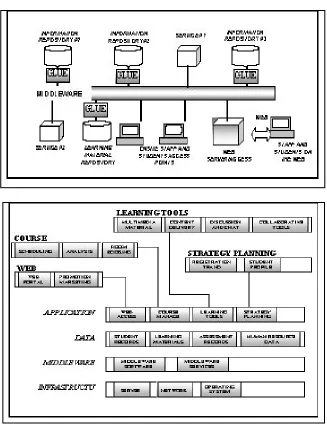
A seamless access to information owned by ABCU is an essential first step towards building a knowledge network. Various units at ABCU have invest-ed on and owninvest-ed information repositories of different shapes and sizes. This situation is perhaps inevitable: the schools and units have their own admin-istration or instructional requirements that no single peg could fit all holes. The undesirable effect is that these information repositories do not usually offer readily access nor can they talk to each other. Figure 2 illustrates our current attempt to share knowledge among schools and units:
In effect, the distributed or networked repositories will form our knowl-edgebase or Knowledge Net. Having the Knowledge Net will be the first step towards an integrated automatic tutoring system that works 24-7 to assist student learning and an integrated platform for staff to streamline the workflow. A full working system including the tools on the application layer is expected to be completed by 2005. Figure 3 shows an overview of the system. It is our belief that the Knowledge Net will help:
maintain and enhance IT provisions and infrastructure that underpins the University’s learning environment;
promote cooperation among units, academic or otherwise; and
Figure 2. The architecture of the knowledge net
Figure 3. The schema illustrating the dependency of different components
CONCLUSION
fully onto the online environment by the Year 2003 when all courses offered by the school would provide web-based student support. We understand that the IT Utopia is a virtual target that is as real as the rabbit in a grey hound race. As long as we keep chasing the rabbit, we are on the right track. We also look forward to the day when every apartment in the city is connected electronically and broadband connection comes as a standard feature of phone lines.
References
Alert, S., & Thomas, C. (2000). A new approach to computer-aided distance learning: The “Automated Tutor.” Open Learning, 15(2), 141-150.
Boroni, C., Goosey, F., Grinder, M., & Ross, J. (2001). Engaging students with active learning resources: Hypertextbooks for the Web. In Proceedings of theThirty-second SIGCSE Technical Symposium on Computer Science Edu-cation (pp. 65-69), Charlotte, NC.
Casey, D. (1998). Learning “from” or “through” the Web: Models of web-based education, Proceedings of the Sixth Conference on the Teaching of Comput-ing (pp. 51-54), Dublin City University, Ireland.
Carswell, L. (1998). The “virtual university”: Toward an Internet paradigm? In
Proceedings of the Sixth Conference on the Teaching of Computing (pp. 46-50), Dublin City University, Ireland.
Chan, S.F., & Kwan, R. (2002). Quality assurance in teaching computer-aided design through distance education. In Proceedings of the 3rd International Conference on Quality & Reliability (ICQR 2002) (pp. 66-70), RMIT Uni-versity, Melbourne, Australia.
Gray, S. (1998). Web-based instructional tools. Syllabus: Software for the cur-riculum, 12(2), 18-22.
Kwan, R. (1999). Authoring multi-media teaching and learning material on the Web. Thirteenth Annual Conference Asian Association of Open Universi-ties, Conference Proceedings, Volume 2, 119-130, Beijing, China.
Kwan, R. (2001). Using the Web to conduct computer labs, WebNet Journal,
3(4), 45–49.
Kwan, R. (Ed.) (2002). A preliminary evaluation of a computerized adaptive testing system on the Web. Web-based learning: Men & machines, (pp. 123-134). Hackensack, NJ: World Scientific Publishing.
McIntyre, D.R., & Wolff, F.G. (1998). An experiment with WWW interactive learning in university education. Computer & Education, 31, 255-264. Makkonen, P. (2000). Do WWW-based presentations support better
(construc-tivistic) learning in the basics of informatics? IEEE Proceedings of the 33rd
learning experiences into established curricula: A case study. Association for Computing Machinery: Special Interest Group on Computer Science Education, (SIGCSE) Bulletin, 32(3), 116-119.