306
Memory Use Analysis Of Live Migration Process
On Dockers Using Checkpoint/ Restore In
Userspace (CRIU)
Deden Witarsyah, Mutiara Rizka Nasution, Muhardi Saputra, Adityas Widjajarto
Abstract: There are several things that cause server down in the company, including natural disasters that cannot be predicted when they occur such as earthquakes, tsunamis and landslides and increased access to servers, especially in service providers and the Internet that result in heavy workloads on the server resulting in decreased server performance so the server can die suddenly. To overcome this problem, several solutions were made, namely to backup data and services using live migration technology. Live migration technology is one of the virtualization technologies that can move containers between servers or platforms live. But the live migration process requires a long time if the memory resource used is not suitable. In this study, testing and analysis will be conducted to improve the live migration process from platform to platform. This test uses Docker as a container for packaging applications, CRIU (Checkpoint / Restore in Userspace) as a tool for the process of live migration, NFS (Network File System) as a protocol for distributing system files over the network and using Magento services as research objects to be migrated. The results obtained from this study are that platforms use memory greater than platform1 and require less time than platform1. This is because platform2 has a RAM value greater than platform1
Index Terms: Backup, Live Migration, Docker, Magento, Memory, Checkpoint, maintenance
—————————— ——————————
1 INTRODUCTION
The The development of technology is now very rapidly developing over time. Examples of current technological developments are virtualization. The concept of virtualization is known in the computer network and information technology industry since the late 60s [1]. Virtualization provides important features including, hardware, consolidation, load balancing, live migration, and maintenance [2]. Live migration technology is a process to move a virtual machine that is running to another physical host live [3]. Live migration technology is one of the solutions for companies that provide data and internet services that are increasing in the community. Increased access to the server resulted heavy workload on the service provider's server [4]. Therefore, it can cause server performance to decrease, therefore it requires live migration to prevent if the server suddenly dies, services and data can be backed up. The time needed for the process of live migration from one server to another server will be very long if the memory usage resource used is not suitable. In this project research is carried out to improve the process of live migration from one server to another server. The author uses Docker as a container for packing applications, using CRIU (Checkpoint / Restore In Userspace) as tools for the process of live migration and NFS (Network File System) as a protocol for distributing system files over the network. using the ISO 9126 standard.
2
LITERATURE
REVIEW
2.1 Ubuntu
Ubuntu is one of the open source Linux distribution operating section [8]
2.2 Container Virtualization
The basic concept of containers is a system that makes it possible to create different services and resources by sharing on an operating system and running using different libraries, drivers and binaries. So, the container only runs and provides binary or library needs according to the application or service that is running. Therefore, this concept can reduce the amount of resources wasted during computing [5].
2.3 Docker
Docker is an open source container virtualization platform application, which functions as a container or container to be able to build, package, and run applications in full along with all the other things needed by the software to be a lightweight container [6].
2.4 Portainer
Portainer is an open source management UI software that allows users to easily manage docker containers. The porter provides a detailed overview of Docker so that users easily access the entity will be managed [7].
2.5 Live Migration
Live Migration is the process of moving a virtual machine that is running to another physical host [8]. Live migration allows service content to remain accessible during the live migration process [3].
2.6 Checkpoint / Restore in Userspace (CRIU)
CRIU (Checkpoint / restore in userspace) is software for Linux operating systems that can freeze applications that are running or partially and check them as a collection of files on disk and can then use files to restore applications and run them exactly during freezing [9].
2.7 Network File System
Network File System (NFS) is a protocol that allows to access multiple system files over a network. This protocol works with a client / server system [10].
————————————————
Deden Witarsyah, Information System Department, Telkom University, Bandung, Indonesia, [email protected] Mutiara Rizka Nasution, Information System Department, Telkom
University, Bandung, Indonesia,
Muhardi Saputra, Information System Department, Telkom University, Bandung, Indonesia, [email protected] Adityas Widjajarto, Information System Department, Telkom
2.8 Random Access Memory (RAM)
Random Access Memory (RAM) is a hardware in a computer that is volatile in which data will be lost when the power on the computer is turned off [11]. The RAM data structure is divided into four parts including Input Storage, Storage Programs, Working Storage, and Output Storage [12].
3.
L
IVEM
IGRATIONM
ECHANISM ANDT
ESTC
ASES3.1 Live Migration Mechanism
The testing mechanism in this study was conducted to describe the testing scenario. The following is a description of the testing mechanism used in this simulation:
Figure 1. Testing Mechanism
Figure 1 is a testing mechanism used in simulation. The containers on each platform consist of memory, volume and rootfs stored on the disk. On the source platform, there is a CRIU that functions as software that performs memory checkpoints on containers. The results of checkpoints carried out by CRIU will be saved to disk in the form of checkpoint files. Checkpoint files will be sent by the NFS protocol from the source platform to platform destination. CRIU, which is located on the destination platform, functions as software that restores containers by using checkpoint files obtained from the source platform.
3.2 Test Case
There are 4 test scenarios carried out in this study, including one-way platform1 Live Migration testing scenario to platform2 and vice versa, platform2 to platfom1, and testing of 2-way Live Migration for one service and several services.
1. Scenario I: One-Way Testing (Platform1 - Platform2)
Figure 2 – One-way Testing Scenario (Platform1 – Platform2)
Figure 2 is a one-way testing scenario flow from platform1 to platform2 with one service. The first thing to do is run
platform1 starts monitoring memory before doing checkpoint then do a checkpoint on platform1. Then do the memory monitoring again after the checkpoint then stop monitoring. Then monitor memory usage before and after restoring on platforms.
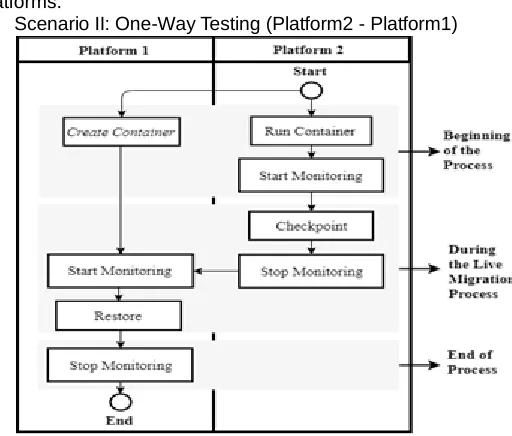
2. Scenario II: One-Way Testing (Platform2 - Platform1)
Figure 3. One-way Testing Scenario (Platform2 – Platform1)
Figure 3 is a one-way testing scenario from platform2 to platform1 with one service. The first thing to do is run container on platform2 and create container on platform1. Next the platforms start monitoring memory before doing checkpoints and then checkpoint the platforms. Then do the memory monitoring again after the checkpoint then stop monitoring. Then monitor memory usage before and after restoring on platform1.
3. Scenario III: Two-Way Test (One Service)
Figure 4. Two-Way Testing Scenario (One Service)
308 and platform2.
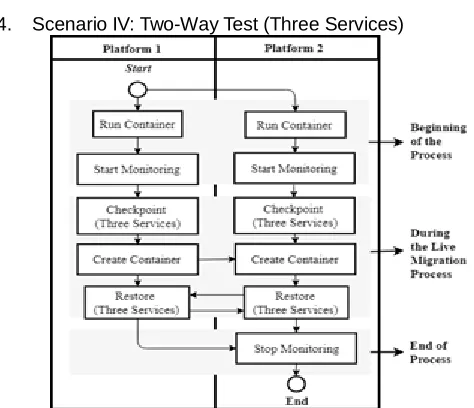
4. Scenario IV: Two-Way Test (Three Services)
Figure 5. Two-Way Testing Scenario (Three Services)
Figure 5 is a flow of two-way testing scenario between platform1 and platform2 with several services. 1. The first thing to do is run containers on each platform. Then start monitoring the memory before doing a checkpoint on both platforms. Then do a checkpoint of three services on both platforms simultaneously then create a container. Monitor memory usage before restoring on both platforms. Then platform1 restores to platform2 and vice versa. Then monitor your memory usage after restoring on platform1 and platform2.
4.
R
ESULT ANDA
NALYSISMemory measurement results using the "top" command on the shell, the purpose of this measurement is to get the results of how much memory resources are used on platform1 and platform2
1. Scenario IV: Two-Way Test (Three Services)
Figure 6. Memory Used Scenario I on Platform1
Figure 6 is the result of testing the checkpoint on platform1. From the results of these tests can be obtained a value of 1.69 GB before doing a checkpoint and 1.56 GB after a checkpoint. From the results of the above tests, it appears that the performance decrease in scenario I is 0.13 GB.
Figure 7. Memory Used Scenario I on Platform2
Figure 7 is the result of testing the restore on platform2. From the results of these tests can be obtained a value of 1.86 GB before doing a checkpoint and 2.28 GB after a checkpoint. From the results of the above tests, it appears that the performance decrease in scenario I is 0.42 GB. Figure 8 is the amount of time needed to do a checkpoint and restore. When doing a checkpoint, it takes 1.32s on platform1 while restore takes 17.963 s on platform 2.
Figure 8. Fig. 8 Time used in Scenario I
2. Scenario IV: One-Way Testing (Platform2-Platform1) Figure 9 is the result of testing the checkpoint on platform2. From the results of these tests can be obtained a value of 2.02 GB before doing a checkpoint and 1.90 GB after a checkpoint. From the results of the above tests. it appears that the performance decline in scenario II is 0.12 GB.
Figure. 9 Memory Used Scenario II on Platform2
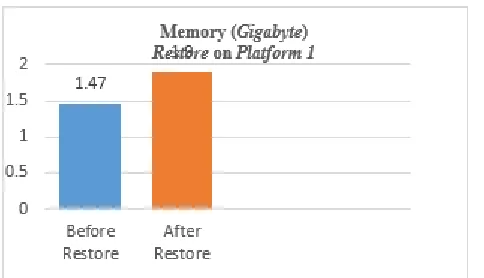
Figure. 10 Memory Used Scenario II on Platform1
In Figure 10 there are results of testing a restore on platform1. From the results of these tests can be obtained a value of 1.47 GB before restoring and 1.90 GB after restoring. From the results of the tests above, it appears that the increase in performance in scenario II is 0.43 GB.
Figure. 11 Time spent on Scenario II
3. Scenario III: Two-Way Test (One Service)
Figure 12 is the result of checkpoint and restore testing on platform1 and platform2. From the test results, we can obtain.
Figure. 12 Memory Used in Scenario III on Platform1 &
Platform2
Figure 12 is the result of checkpoint and restore testing on platform1 and platform2. From the test results, we can obtain a value of 2.09 GB before doing a checkpoint, 1.99 GB after checking, 1.97 GB before restoring and 2.70 after restoring on platform1. On platform2, the value is 2.62 GB before checking, 2.34 GB after checking, 2.34 GB before restoring and 2.76 GB after restoring. From the results of the above tests, it was seen
a decrease in performance that occurred after a checkpoint of 0.10 GB and a performance increase of 0.73 GB after a restore on platform1. On platform2, the decrease in performance that occurs after a checkpoint of 0.28 GB and a performance increase of 0.42 G after restoring
Figure. 13 Time used in Scenario III
Figure 13 is the amount of time needed to do a checkpoint and restore. When checking, it takes 0.994 s for platform1 and 1.037 s for platform2 while restore requires 44.8 s for platform1 and 18.111 s for platform2.
4. Scenario IV: Two-Way Test (Three Services)
Figure 14 is the result of checkpoint and restore testing on plafrom1 and platform2. From the test results, it can be obtained a value of 3.63 GB before performing a checkpoint, 3.27 GB after checking, 3.27 GB before restoring and 3.61 GB after restoring on platform1. On platform2, 4.12 GB is obtained before checking, 3.78 GB after checking, 3.76 GB before restoring and 4.22 GB after restoring.
Figure 14. Memory Used Scenario IV on Platform1 &
Platform2
310
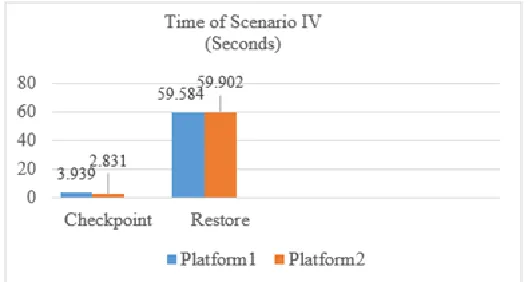
Figure. 15 Time use in Scenario IV
5.
CONCLUSSIONS
Based on the testing and analysis that has been done on the scenario of Docker Live Migration process Using the Checkpoint / Restore In Userspace (CRIU), it can be concluded that this test makes it possible to backup multiple services and produce the highest memory value of 4.22 GB in the process after restore scenario IV against platform2 with a time of 59,902 s while the lowest memory usage is 1.47 GB in the process before restoring scenario II to platform 1 with a time of 1,189 s. During the checkpoint process, there was an average memory decline of 5.83 GB on the platform, while in the restore process, there was an increase in the amount of memory averaging 0.55 GB on the platform. In scenario I, PID 1305 causes a decrease in memory usage and PID 1403 cause a increase in memory usage. In scenario II, PID 1747 and 1447 cause a decrease in memory usage and PID 1478 and 1230 cause a increase in memory usage. In scenarios III and IV, PID 1230 and 1478 cause a decrease in memory usage and PID 1478 and 1230 cause a increase in memory usage. When viewed from the test results, platforms use memory greater than platform1 and require less time than platform1. In scenario I, platform1 requires 1.69 GB of memory before checkpoint and 1.56 GB after checkpoint, while platform2 requires 1.86 GB before restoring and 2.28 GB after restoring. In scenario II, platform2 requires as much as 2.02 GB of memory before checkpoint and 1.90 GB after checkpoint, while platform1 requires 1.47 GB before restoring and 1.90 GB after restoring. In scenario III, platform1 requires 2.09 GB of memory before checkpoint, 1.99 after checkpoint, 1.97 GB before restoring and 2.70 GB after restoring, while platform2 requires 2.62 GB before checkpoint, 2.34 GB after checkpoint, 2.34 GB before restoring and 2.76 GB after restoring. In Scenario IV, platform1 requires 3.63GB of memory before checkpoint, 3.27GB after checkpoint, 3.27GB before restoring and 3.61GB after restoring, while platform2 requires 4.12GB before checkpoint, 3.78GB after checkpoint, 3.76GB before restoring and 4.22GB after restoring.
REFERENCES
[1] R. Goldberg, "Survey of virtual machine research", Computer, vol. 7, no. 6, pp. 34-45, 1974. Available: 10.1109/mc.1974.6323581. [Accessed 11 May 2019]. [2] F. Safiner, P. Troger and M. Richly, "Dependable
Estimation of Downtime for Virtual Machine Live Migration Many Hosts,” pp. 63–72.", International Journal On
Advances in Systems and Measurements, vol. 5, no. 1 & 2, pp. 70-88, 2012. [Accessed 11 May 2019].
[3] F. Clemente-Castell´o, J. Fern´andez, R. Mayo and E. Quintana-Ortí, "Adaptive Downtime for Live Migration of Virtual Machines", IEEE/ACM 7th International Conference on Utility and Cloud Computing, pp. 457-464, 2014. [Accessed 11 May 2019].
[4] B. Golden, Virtualization for dummies. Hoboken, N.J: Wiley, 2011. [Accessed 11 May 2019].
[5] R. Dua, A. Raja and D. Kakadia, "Virtualization vs Containerization to support PaaS", IEEE International Conference, pp. 610-614, 2014. [Accessed 11 May 2019]. [6] Enterprise Application Container Platform |
Docker", Docker, 2019. [Online]. Available: https://www.docker.com. [Accessed: 12- October- 2018]. [7] "Portainer Management, Docker User Interface, Container
Software - Auckland, Singapore, San Francisco | Emerging Technology Partners", Portainer.io, 2019. [Online]. Available: https://www.portainer.io. [Accessed: 28- March- 2019].
[8] L. Cui et al., "VMScatter VMScatter: Migrate Virtual Machines to Many Hosts", ACM SIGPLAN Notices, vol. 48, no. 7, p. 63, 2013. Available: 10.1145/2517326.2451528. [Accessed 11 May 2019]. [9] "CRIU", Criu.org, 2019. [Online]. Available:
https://criu.org/Main_Page. [Accessed: 12- October- 2018].
[10] D. Irtegov, I. Knyazev and J. Mallaeva, "About one approach to building low latency network file system", ACM, 2014. Available: http://dx.doi.org/10.1145/2687233.2687248. [Accessed 11 May 2019].
[11] S. C. Varmaat, Discovering Computers: Menjelajah Dunia Komputer Fundamental, 3rd ed. Jakarta: Salemba Infotek, 2007. [Accessed 11 May 2019].
[12] M. Sanusi, Storage Max. Elex Media Komputindo, 2013. [Accessed 11 May 2019].
[13] "Installation Guide for Ubuntu 18.04", Help.ubuntu.com,
2019. [Online]. Available: