DOI: https://doi.org/10.30880/ijie.2018.10.08.027
Usability Study of Integrated RULA-Kinect
TM
System for
Work Posture Assessment
Isa Halim
1*, Radin Zaid Radin Umar
1, Nadiah Ahmad
1, Mohamad Ridzuan
Jamli
1, Muhammad Syafiq Syed Mohamed
1, Tarek Mhd Moataz Albawab
1,
Muhammad Haziq Lim Abdullah
2, Vinothini Padmanathan
31Research Group of Human Machine System Optimization, Faculty of Manufacturing Engineering, Universiti Teknikal
Malaysia Melaka, Hang Tuah Jaya, 76100 Durian Tunggal, Melaka, MALAYSIA.
2Faculty of Information and Communications Technology, Universiti Teknikal Malaysia Melaka, Hang Tuah Jaya,
76100 Durian Tunggal, Melaka, MALAYSIA.
3Department of Physiotherapy, Universiti Tunku Abdul Rahman, Sg. Long Campus, Jalan Sg. Long, Bandar Sg. Long,
43000 Cheras, Selangor, MALAYSIA.
Received 12 June 2018; accepted 4 September 2018, available online 30 December 2018
1. Introduction
Everyone needs to practice a good body posture and frequent body movements no matter where they are working either in production lines, construction sites, office, laboratory, or warehouse. In ergonomics point of view, performing tasks in good work posture and frequent body movements can minimize the risk for musculoskeletal disorders. In industrial settings, sometimes the workers perform tasks in poor and static body posture due to improper designs of workstation and job tasks or if the workers did not receive any sufficient training on ergonomics. Poor work posture may expose the workers to different types of occupational sprain and strain, which one of the most reported cases of workplace injury. In 2016, the United States Bureau of Labor Statistics reported that almost 317,530 workers were suffering from different type of occupational injury such as sprains, strains and tears. Furthermore, 892,300 workers were absent from work due to occupational injuries [1]. According to the United States Centers for Disease Control and Prevention’s (CDC) National Institute for Occupational Safety and Health (NIOSH), musculoskeletal disorders such as sprain and strain have been linked to huge costs to companies’ owners such as
workers absence from work, productivity lost and worker’s medical compensation costs [2]. The 2017 Liberty Mutual Workplace Safety Index estimated that musculoskeletal disorders were associated with overexertion costs of $13.8 billion in 2014 [3]. The trend of the occupational injuries associated with sprain and strain is similar in developing countries; for example, Malaysia. According to Social Security Organization (SOCSO) of Malaysia, 20,440 sprain and strain cases were reported in the past 3 years [4-6].
In recognizing the importance of practicing good work postures at the workplaces, postural assessment tools are needed. The postural assessment tools can be classified into observational method and direct measurement method. In direct measurement method, instruments such as electrogoniometer, motion capture and surface electromyography could be used. Meanwhile the observational method includes Ovako Working posture Analyzing System (OWAS) [7-8], Rapid Entire Body Assessment (REBA) [9] and Rapid Upper Limb Assessment (RULA) [10]. The RULA is one of the common tools used by ergonomists, industrial practitioners, and occupational safety and health professionals for assessing body posture in relation to workstation and task designs. The RULA method
Abstract: A good work posture is one of vital contributors to occupational health and to increase the efficiency of industrial workers. Recently, numerous research works have developed an Integrated RULA- KinectTM system for work posture assessment; however, usability of the developed system remains unknown. The objective of this study was to develop a prototype of Integrated RULA-KinectTM system. Additionally, this study performed usability testing on the Integrated RULA-KinectTM system and RULA Employee Assessment Worksheet to determine feedbacks and reactions from the potential users. A focus group session was conducted among eight potential users, which divided into 2 groups (novice and expert). The results of the focus group session revealed that both novice and expert users agreed that the Integrated RULA-KinectTM system is easy to use compared to RULA Employee Assessment Worksheet. This study concluded that the Integrated RULA-KinectTM system is able to counter some limitations of the RULA Employee Assessment Worksheet.
produces scores which indicate the level of action required to improve the work posture.
Since its development, the RULA has undergone several phases of evolution in line with the technological advancement. The RULA has started with pen and paper-based method, whereby a user can obtain the RULA score through a worksheet form which known as RULA Employee Assessment Worksheet [10]. This is a manual method which cost effective, however, it is time consuming to process and analyze the data (especially when the number of assessments is huge). Moreover, a manual calculation of RULA grand score can lead to computational errors. In recent times, an integrated computer aided analysis and 3D digital human modelling was developed as an alternative to the manual method. The advantage of using computer aided analysis is the ability to draw a 3-dimensional (3D) view of workstation and able to handle or store big postural data. In contrast, users should undergo a training to make them familiar and able to use the software competently. Moreover, it is time consuming as the users require to draw the workstation, and at the same time the RULA input data, such as body part angles, the frequency and magnitude of the load need to be supplied. Examples of works of 3D simulation based RULA can be found in research studies of Fritzsche [11], Chang and Wang [12] and Chang [13]. In line with the advancement of mobile devices technology, a past study had developed a RULA Mobile Android Application Software to ease the computation of RULA scores [14]. Similar to RULA Employee Assessment Worksheet and 3D digital human modelling software, the RULA Mobile Android Application Software requires a user to supply the RULA input data.
Lately, numerous research studies have developed an integrated RULA-KinectTM system for work posture assessment. The system deployed the Microsoft KinectTM camera for collecting data and assessing the postural stress. A reputable study proved that the Microsoft KinectTM camera and the established 3D motion analysis systems had comparable inter-trial reliability and excellent validity [15]. Initially, the Microsoft KinectTM camera is a kind of sensor used in computer gaming technology. This camera was developed by Microsoft in 2010 to enable a gamer to interact with the video games using body postures and movements [16]. A Microsoft KinectTM camera consists of an infrared projector and an infrared camera. It works when the infrared projector projects an infrared pattern in the field of view of the Microsoft KinectTM camera. At the same time, the infrared camera senses the reflected pattern, where a depth image is created by measuring the deformation of the projected infrared pattern [17]. The validity and practicality of applying the Microsoft KinectTM camera in assessing work postures in the actual workplaces have been proved by Plantard et al [18]. Furthermore, the accuracy Microsoft KinectTM camera is comparable to the existing 3D motion capture systems and provides a low-cost solution [17], faster and required less equipment [19]. The advantage of using Microsoft KinectTM camera is its ability to perform a video recording of task activities
and detection of body movements simultaneously. Integrating the Microsoft KinectTM camera with computer codes of RULA allows an assessment of body postures at the workplaces in real time mode. Through this technique, the RULA score can be obtained by synchronizing with the change of body postures during task performance.
Several studies [17-18, 20-22] have applied Microsoft KinectTM camera to develop postural assessment system; however, usability issues of the developed systems are still unexplored. Due to unavailability of the qualitative feedbacks from the potential users, limitations and practical issues exist in the developed systems remain unknown; hence further improvement is not possible. Hence, this study developed a postural assessment system which integrates RULA and Microsoft KinectTM camera (X-Box one) to capture the real time postural behaviors, to measure the angles of body parts, and to compute the RULA score which includes the action levels and suggestions for improvement. Additionally, this study carried out a usability evaluation exercise to determine and analyze the feedbacks from the novice and expert users with regards to their experiences while using RULA Employee Assessment Worksheet and the Integrated RULA – KinectTM system which developed in this study. The information from this exercise will certainly benefit the ergonomics assessors and occupational safety and health professionals to ensure the feasibility and practicality of using the Integrated RULA – KinectTM system.
2.
Methodology
This study consists of two stages. The aim of the first stage was to develop the Integrated RULA- KinectTM system while the second stage performed a usability study of the Integrated RULA- KinectTM system. The development of Integrated RULA- KinectTM system involved several processes such as skeletal tracking, body parts angles measurement, RULA score computation, RULA score database, print the RULA results and validation of the Integrated RULA-KinectTM system.
2.1
Skeletal tracking
The Microsoft Visual Studio was used to compile the programs of Integrated RULA- KinectTM system. In addition, the Microsoft KinectTM was installed to enable the image captured by the KinectTM camera appears on the computer screen. The Kinect Software Development Kit (SDK), the local database (xampp) and the .NET Framework 4.0 were installed as a bridge for the communication between the Microsoft Visual Studio and the Microsoft KinectTM. This installation enabled this study to apply programming features from the Microsoft KinectTM library and to visualize the image of posture, traced by a form of a skeleton.
2.2
Body parts angles measurement
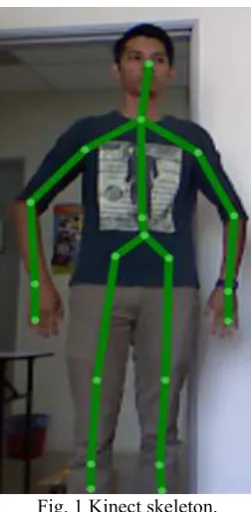
represent the skeleton of body parts. This study used the Kinect SDK because it is easy to obtain the skeletal data from the KinectTM camera X-box One once tracking starts. This camera can detect twenty body joints/ points such as head, left and right hands, left and right wrists, left and right elbows, left and right shoulders, spine, hip center, left and right hip, left and right knee, left and right ankle and both feet.
Fig. 1 Kinect skeleton.
2.3
RULA score computation
A Graphical User Interface (GUI) was designed to ease the communication between the user/ ergonomics assessor and the Integrated RULA-KinectTM system. The Integrated RULA-KinectTM system has two GUIs as shown Fig. 2 and Fig. 3 respectively. The first GUI captures the personal details, work activity and demographics of the worker to be assessed. It includes ID number, full name, department/ organization, work activity, age, gender, nationality, body weight and height. Once these information were entered in GUI one, the assessor click a button (Let’s Go) to proceed to GUI two.
A rule set based on RULA Employee Assessment Worksheet was coded using Microsoft Visual Studio. Input data (posture angle and other factors such as load, frequency, etc.) will be matched to the rule set. Based on the input data, the rule set makes decisions on the RULA score. Due to lengthy programming codes, this study provides a sample of RULA score calculation for trunk posture using else if method.
if (HCy_z >= -1 && HCy_z <= 1) {
Trunk = 1; }
else if (HCy_z > 1 && HCy_z <= 20)
{
Trunk = 2; }
else if (HCy_z > 20 && HCy_z <= 60) {
Trunk = 3; }
else {
Trunk = 4;
Fig. 2 GUI one - personal details, work activity, and demographics
Fig. 3 GUI two - RULA input data and real time results
2.4
RULA score database
A database was created to save the RULA results and images of postures corresponding to the RULA score. The advantage of this database is that the user can track which postures having a high RULA score for further analysis and improvement. Fig. 4 shows the images of the captured postures in the database.
Fig. 4 Postures which saved in the database
2.5
RULA results print
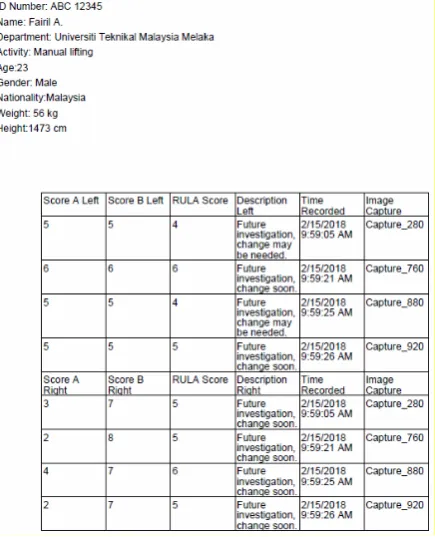
This Integrated RULA-Kinect system is equipped with ‘Print the RULA results’ which enabled users to view the RULA results in pdf and excel files that saved in the database. The results have the following information: personal details and work activity of the subject/ worker, RULA score A and RULA score B for left and right, RULA grand score, description of score (RULA action level), recording time and postures analysed. Fig. 5 shows an example of printed RULA results.
2.6
Validation of Integrated RULA-Kinect
TMSystem
The validation of RULA score generated by the Integrated RULA-KinectTM system was tested by comparing to RULA score computed by the RULA Employee Assessment Worksheet [10]. Ten novice users who having engineering educational background and fundamental knowledge of RULA application participated in the validity study. Various work postures of ten operators from nine different workstations (e.g. lathe machine, photocopy machine, car service workshop and bag printing station) were assessed by both assessment methods (Integrated RULA-KinectTM system and RULA Employee Assessment Worksheet). Statistical analysis associated with student t-test was performed to compare the mean of RULA score from the two assessment methods. Details of validation methods and results have been published in the earlier article [23].
2.7
Usability study of Integrated
RULA-Kinect
TMSystem
This study organized a focus group meeting on 1st August 2017, from 9:00 am to 12:00 noon. The venue for the focus group meeting was the Collaborative e-Learning Room located in the Faculty of Information Technology and Computers, Universiti Teknikal Malaysia Melaka. This room is conducive, relaxed and comfortable. The focus group consisted of eight participants who were divided into 2 groups (novice and expert). The participants of novice group were four females (three lecturers and one postgraduate student) who have basic knowledge on RULA method. Meanwhile the expert group comprised four male lecturers who had received extensive training in ergonomics and experienced in assessing work postures using RULA method. Prior to the focus group meeting, all participants were contacted by the researchers to explain the purposes and roles in the focus group meeting. Once the participant agreed, an official email was sent to them to ensure that they can concentrate and give a full commitment during the focus group meeting. There were five researchers involved during the focus group meeting. One of the researchers acted as a session moderator. Meanwhile the rest facilitated the progress of the focus group meeting such as demonstrating the use of the Integrated Kinect-RULA system, recording the video of the focus group activities, and taking notes of verbal feedbacks from the participants. Each group of participants was provided with one lap top, multicolor sticky notes, white board markers and eight copies of RULA Employee Assessment Worksheet which printed from the online. In the room, both novice and expert groups were separated about 6 meters away to enable them to discuss independently. In terms of language, the participants were allowed to speak in English or Bahasa Malaysia to minimize the communication barriers.
The main purpose of the focus group meeting was to obtain participants feedbacks regarding the usability in using RULA Employee Assessment Worksheet and the
Integrated RULA-KinectTM system. The focus group meeting consists of three main activities. The activities were: 1) usability study on RULA Employee Assessment Worksheet, 2) usability study on Integrated RULA-KinectTM system and 3) card sorting of both usability studies. The think-aloud protocol [24] was applied for both Activity 1 and Activity 2. The participants jotted down their usability feedbacks on the multicolor sticky notes for both activities.
In Activity 1, participants of both groups were explained on the purpose, application and procedures to use the RULA Employee Assessment Worksheet. This was carried out through a slide presentation by a researcher. Next, participants of both groups were requested to complete the RULA Employee Assessment Worksheet. One of the researchers demonstrated two different types of tasks at a stand white board (the task was adjusting the height of the whiteboard, writing and erasing the whiteboard) that requires several variations of work postures.
In Activity 2, rather than using RULA Employee Assessment Worksheet the participants were using the GUIs of the Integrated RULA-KinectTM system. The researchers informed the participants these instructions:
1) The interface we are going to test today will be the Integrated RULA-KinectTM system
2) You will be asked to perform several tasks: • Start the RULA-KinectTM system
• Input the subject’s personal information into the system
• Analyze the subject’s posture using the system 3) When performing the tasks, you need to voice out
your feelings and thinking.
4) If you face any difficulties, please describe them to us. In this session we are not allowed to help you out.
5) Remember, we are evaluating the system itself, and not you. You do not have to worry about making any mistakes or errors.
3.
Results
This section provides brief results of validity test of the Integrated RULA-KinectTM system. In addition, results of usability study are presented.
3.1
Validity of Integrated RULA-Kinect
TMSystem
Statistical analysis associated with student t-test proved that there is no significant difference in RULA scores generated by the Integrated RULA-KinectTM system and the RULA Employee Assessment Worksheet. In other words, results of validity study showed that the RULA scores produced by the Integrated RULA-KinectTM system are consistent with the scores from the RULA Employee Assessment Worksheet. Details of statistical analysis results been presented in [23].
3.2
Usability study – card sorting
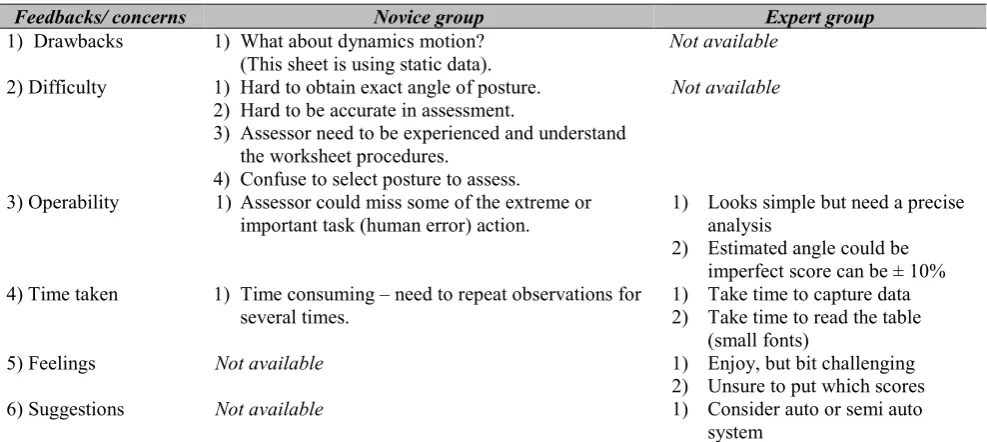
Table 1 summarizes the feedbacks from the novice and expert groups in using the RULA Employee Assessment Worksheet. The participants of the novice group pointed that the limitation of the RULA Employee Assessment Worksheet is when to assess the work postures in dynamics movements. They had a difficulty in determining accurate angles of the body parts, hence leads to inaccurate assessment. In terms of operability, they thought that assessors could miss out some of extreme postures when assessing a continuous task. The novices also found that the RULA Employee Assessment Worksheet is time consuming when assessing large samples of work postures.
The expert group found that the RULA Employee Assessment Worksheet is easy to use; however, the estimation of body angle made by the users might be inaccurate. Furthermore the RULA Employee Assessment Worksheet is time consuming. However, they enjoyed in using the RULA worksheet, but to make a decision on the RULA scores is very challenging. In addition, they also proposed to have an automated system to counter the abovementioned limitations.
On the other hand, the Integrated RULA-KinectTM system has received different feedbacks from both novice and expert groups, as tabulated in Table 2. The participants of novice group concerned more with the GUIs design. They found that one of the limitation of the GUIs was to unable to display the time of recording when the postural assessment is in progress. They also worried about the sensitivity of the Kinect camera to detect precisely the movement of body parts, for instance, the Integrated RULA-KinectTM system might capture arm abduction while the worker or subject trying to raise the hands, in fact, when there is no any arm abduction. The novice participants agreed that the Integrated RULA-KinectTM system is easy to use. In terms of operability, they pointed that the GUI two should alert users to observe the task beforehand prior to assessing the work posture. They were also concerned about the ability of the Kinect camera to detect the wrist angles when a worker or subject is performing a task that can hide the wrist view, for e.g. inserting electronics components in a carton. Furthermore, the GUI two should be equipped with a START and STOP buttons to indicate whether the recording and assessment of posture is still ongoing or stopped.
As for the expert group, they pointed two major drawbacks in the GUIs of the Integrated RULA – KinectTM system. In GUI two, the check box of ‘shoulder is raised’ is not a good enough control to represent the actual movements of body parts, for an example, raise/ or not raise of the shoulder during the cycle of task. Hence it will affect the whole duration of the assessment which can change the RULA score.
Table 2 Feedbacks from novice and expert in using Integrated RULA-KinectTM system.
Feedbacks/ concerns Novice group Expert group
1) Drawbacks 1) What about dynamics motion? (This sheet is using static data).
Not available
2) Difficulty 1) Hard to obtain exact angle of posture. 2) Hard to be accurate in assessment.
3) Assessor need to be experienced and understand the worksheet procedures.
4) Confuse to select posture to assess.
Not available
3) Operability 1) Assessor could miss some of the extreme or important task (human error) action.
1) Looks simple but need a precise analysis
2) Estimated angle could be imperfect score can be ± 10% 4) Time taken 1) Time consuming – need to repeat observations for
several times.
1) Take time to capture data 2) Take time to read the table
(small fonts)
5) Feelings Not available 1) Enjoy, but bit challenging
2) Unsure to put which scores
6) Suggestions Not available 1) Consider auto or semi auto
system
Feedbacks/ concerns Novice group Expert group
1) Drawbacks 1)GUI: couldn’t see the recording time. 2)Recording can only be from one side of
body
3)Assessment may not be accurate - some postures can’t be captured
4)It might capture arm abduction while worker trying to raise the hands, while in fact there is no arm abduction.
5) Control button seems a bit crowded.
1) Wrong setting can affect the score, option is to add setting after reviewing the capture frame. 2) Shoulder is raised option is not
sensitive (it affects the whole duration - change the RULA score).
2) Difficulty 1)Easy to use especially for user who familiar with RULA.
1) Ease of use, much easier to use
3) Operability 2)GUI: Must observe the task first before assessing work posture.
3)GUI: wrist angle can be hidden thus obscuring the posture identification by Kinect.
4)GUI: Once click “PLAY” button, need a shout box to appear to alert user that recording has started. Some goes with the “STOP” button.
5)GUI: why 40 frames per minutes? Need to be explained to the users.
6)Advantages: This is good application, have access on two side of body, so that the results more accurate.
7)RULA calculation from Kinect GUI is different with manual calculation.
1) Able to record many different postures.
2) Can detect RULA scores for variety of postures.
3) Results with picture. 4) Results more detail for each
posture.
5) Straight forward
4) Time taken Not available 1) Save time
2) Real time assessment. 5) Feelings 1) Easier than RULA Employee Assessment
Worksheet (faster)
1) User friendly vs. manual.
6) Suggestions 1. It will be easier if the GUI has a button to view data.
2. Add ‘dialog box’ – to explain to people / users definition /usage of each feature. 3. Step 13 has missing words after or /
missing in GUI.
4. Control button to adjust the score, e.g.
1) Improvement needed on graphics resolution.
3.3
Usability study – observation and verbal
feedbacks
The researchers managed to capture several important notes when the participants voice out their concerns in the focus group session. As an example, while using the RULA Employee Assessment Worksheet, the participants were confused in deciding which posture to be assessed when worker or subject is performing a continuous task. However, in the Integrated RULA-Kinect system, they faced a problem when dealing with the GUI two. They proposed that the RULA score modifiers such as ‘shoulder is raised’ and ‘neck is twisting’ need to be defined in the early stage of the assessment. The consequence may arise if they forget to tick the modifiers; means there is no adjustment of the RULA score, in fact the modifiers are necessary. This can lead to unreliable of RULA score. The participants proposed that having a menu or HELP button to explain each item in the GUI two (i.e. Modifiers) is a good idea to improve the Integrated RULA – Kinect system. This feature will certainly help the user/ assessors to understand better about the items. Besides, the existing GUIs are not very interesting, for instance, the fonts/ text colour is not contrast enough with the background. The participants were tended to refer to RULA Employee Assessment Worksheet as the fonts are clearer. The participants also expressed that the GUI two can be confusing for the first-time user. For examples, the groupings of check boxes are too close and the indicator for left and right of a body part is unclear. On the positive side, the Integrated RULA-KinectTM system offers advantages when a user is intent to perform a quick assessment of postures at the workplace. Additionally, the results generated by the system can help users to trace the user to identify which task and posture required an urgent improvement. Meanwhile the RULA Employee Assessment Worksheet will take place if the users want to make a thorough investigation on a specific posture. The participants thought that the Integrated RULA-KinectTM system is recommended if a user required rapid results.
4.
Discussion
Both methods (RULA Employee Assessment Worksheet and Integrated RULA-KinectTM system) have their own advantages and disadvantages. The RULA Employee Assessment Worksheet is low cost as it is pen and paper based; however, this method required the user to measure the angles of body posture in advance before filling into the worksheet. This worksheet may provide less accurate results due to limited data point, time consuming, and leads to computational errors as the calculation is performed manually, and of course it is not environmentally friendly due to paper oriented.
On the other hand, the Integrated RULA-KinectTM system developed by this study has offered advantages in terms of easy to use, able to record, can assess many different postures and having a huge database for compiling results of entire assessment. However, based
on focus group discussion, the Integrated RULA-KinectTM system requires further improvement, especially its sensitivity to detect trivial actions of body parts such as shoulder, upper arm, neck and trunk. The sensitivity issue can be seen when assessing work postures of a worker or a subject who is doing a continuous task with various postures. For an example, if the worker performs an assembly of car tyre with his shoulder is alternating in these two conditions: raised and relaxed. In GUI two, if the assessor clicks the check box ‘shoulder is raised’, means that the computation of RULA score will consider ‘shoulder is raised’ (should add 1 score) from the beginning until the end of the assessment. In fact, the ‘shoulder is raised’ was occasionally and it was not happening constantly in the task. This sensitivity issue might occur in other conditions of RULA score adjustment such as ‘if upper arm is abducted’, ‘if the arm is supported or person is leaning’, ‘if the arm is working across midline of the body’, ‘if the arm out to side of body’, ‘if wrist is bent from the midline’, ‘if neck is twisted’, ‘if neck is side bending’, ‘if trunk is twisted, and ‘if trunk is side bending’. A wrong selection of the adjustment (e.g. ‘if neck is twisted’) can affect the validity of final RULA scores. This indicates the check boxes of the adjustment need to be removed in the GUI two, and the algorithm and programming codes should be enhanced so that the system can intelligently detect the changes or dynamics of the work posture. A recent study which used Kinect v2 (this version two is more accurate than first version) was also unable to resolve this issue – the study just provided a simple GUI for the user to set the RULA score adjustment [20]. Another solution to estimate body parts angle due to varied movements is through application of the inertial measurement unit (IMU) and Kinect camera, as proposed by Tian [25].
Another concern on the Integrated RULA-KinectTM system is its limitation to handle workplace environmental issues such as luminance, multiple number of workers/ subjects, obstructions and absorbing or reflective materials that affect the Kinect’s IR depth sensors. The system has shown its constraint in assessing a work posture if the workplace is in a dim environment. The Kinect camera is able to visualize a skeleton image up to six workers/ subjects in one area at a time [26]; however, body occlusions might appear if too many occupants. Another issue in the Kinect camera is unable to capture image of work posture if there are any obstructions due to machines, workstations, columns, etc., but this is common in an industrial setting. To counter this issue, two Kinect cameras are required for measuring two different viewpoints of work posture. This technique has been proven effective by previous studies [27-28]. Besides that, a recent study proposed a correction framework which enables to estimate internal joint torques using inverse dynamics, which able to decrease the occlusion issues while assessing body postures at actual workplace [29].
RULA Employee Assessment Worksheet. The Integrated RULA-KinectTM system is purposely developed to perform a postural assessment at actual workstations and tasks. One of the significant advancements presented by this system is the Kinect camera itself, whereby the ability of the camera to measure the postural angles data of a worker performing his or her task at the workstation with more accurate and reliable. The data were then processed by the computer algorithms to simplify the RULA score calculation, thus minimizing the computing errors. Additionally, the Integrated RULA-KinectTM system can generate a comprehensive report whereby results of the postural assessment are described with the aid of the respective images of posture and task, corresponding to the time of assessment. This feature will certainly can help ergonomics assessors to track which posture and task that required further improvement. In contrast, the RULA Employee Assessment Worksheet uses naked eyes to measure the postural angles, perform manual calculations of RULA score and no images aid. The Integrated RULA-KinectTM system also eliminates the use of paper.
In terms of usability of the system, both novice and expert groups agreed to have a standard operating procedure (SOP) to guide potential users to operate the system correctly. Since the Integrated RULA-KinectTM system consists of a hardware (Kinect camera) and RULA software which having multiple steps have to go through, a well written SOP can minimize the memory dependency. Indeed, the availability of SOP can benefit the new user or older users (age above 55 years). Researchers used of Kinect camera to capture body posture and RULA with elderly [30] and non-elderly user [31]. For instance, for the use of Kinect camera and the computer (RULA software), cognitive capabilities such as short term memory span and information processing speed [32] may influence the efficiency - how ease the user to operate the Integrated RULA-KinectTM system.
5.
Summary
Based on the feedbacks from the novice and expert participants, this study concluded that the prototype of Integrated RULA-KinectTM system developed by this study was able to counter some limitations of the RULA Employee Assessment Worksheet such as pen and paper dependency. In addition, this prototype has provided a digital measurement of postural angle and RULA scores, however, further improvement on the system are still needed. Such improvement includes a better algorithm to detect the variation in postures involving shoulders, neck, trunk and wrists body parts, especially when these body parts involve in twisting, bending or trivial movements. If this improvement can be made together with better GUI, the Integrated RULA-KinectTM system has a potential to be a quick postural assessment tool that is easy, reliable and convenient to use.
Acknowledgements
The researchers would like to thank the Faculty of Manufacturing Engineering, Universiti Teknikal Malaysia Melaka. This study is funded by University
High Impact Short Term Grant
(PJP/2017/FKP/H19/S01527).
References
[1] Bureau of Labor Statistics US Department of Labor. Injuries, Illnesses, and Fatalities in 2016. https://www.bls.gov/iif/
[2] United States Centers for Disease Control and Prevention’s
https://www.cdc.gov/workplacehealthpromotion/heal th-strategies/musculoskeletal-disorders/index.html [3] Liberty Mutual Workplace Safety Index, The Most
Serious Workplace Injuries Cost U.S. Companies $59.9 Billion Per Year.
https://www.libertymutualgroup.com/about-liberty- mutual-site/news-site/Pages/2017-Liberty-Mutual-Workplace-Safety-Index.aspx
[4] Social Security Organization (SOCSO) of Malaysia annual report, 2014.
[5] Social Security Organization (SOCSO) of Malaysia annual report, 2015.
[6] Social Security Organization (SOCSO) of Malaysia annual report, 2016.
[7] Brandl, C., Mertens, A. and Schlick, C. Ergonomic analysis of working postures using OWAS in semi-trailer assembly, applying an individual sampling strategy. International Journal of Occupational Safety and Ergonomics, Volume 23, (2016), pp.110-117
[8] Lee, T. and Han, C. Analysis of Working Postures at a Construction Site Using the OWAS Method.
International Journal of Occupational Safety and Ergonomics, Volume 19, (2013), pp.245-250. [9] Hignett, S. and McAtamney, L. Rapid Entire Body
Assessment (REBA). Applied Ergonomics, Volume 31, (2000), pp.201-205.
[10] McAtamney, L. and Nigel Corlett, E. RULA: a survey method for the investigation of work-related upper limb disorders. Applied Ergonomics, Volume 24, (1993), pp.91-99.
[11]Fritzsche, L. Ergonomics risk assessment with digital human models in car assembly: Simulation versus real life. Human Factors and Ergonomics in Manufacturing & Service Industries, Volume 20, (2010), pp.287-299.
[12]Chang, S. and Wang, M. Digital human modeling and workplace evaluation: Using an automobile assembly task as an example. Human Factors and Ergonomics in Manufacturing, Volume 17, (2007), pp.445-455.
[14]Kadikon Y, Shafek I. M & Bahurdin M. M. RULA Mobile Android Application Software. 3rd Scientific Conference on Occupational Safety and Health: Sci- Cosh 2014.
[15]Clark, R., Pua, Y., Fortin, K., Ritchie, C., Webster, K., Denehy, L. and Bryant, A. Validity of the Microsoft Kinect for assessment of postural control.
Gait & Posture, Volume 36, (2012), pp.372-377. [16]Xu, X., Robertson, M., Chen, K., Lin, J. and
McGorry, R. Using the Microsoft Kinect™ to assess 3-D shoulder kinematics during computer use.
Applied Ergonomics, Volume 65, (2017), pp.418-423.
[17]Haggag H , Hossny M Nahavandi S & Creighton D. Real time ergonomic assessment for assembly operations using kinect. In Computer Modelling and Simulation (UKSim).15th International Conference
on (pp. 495-500) IEEE.
[18]Plantard, P., Shum, H., Le Pierres, A. and Multon, F. Validation of an ergonomic assessment method using Kinect data in real workplace conditions. Applied Ergonomics, Volume 65, (2017), pp.562-569. [19]Allahyari, T., Sahraneshin Samani, A. and Khalkhali,
H. Validity of the Microsoft Kinect for measurement of neck angle: comparison with electrogoniometry.
International Journal of Occupational Safety and Ergonomics, Volume 23, (2016), pp.524-532. [20]Manghisi, V., Uva, A., Fiorentino, M., Bevilacqua,
V., Trotta, G. and Monno, G. Real time RULA assessment using Kinect v2 sensor. Applied Ergonomics, Volume 65, (2017), pp.481-491. [21]Nahavandi, D. and Hossny, M. Skeleton-free RULA
ergonomic assessment using Kinect sensors.
Intelligent Decision Technologies, Volume 11, (2017), pp.275-284.
[22]Shengqian J., Peng L., Danni F. et al. A low-cost rapid upper limb assessment method in manual assembly line based on somatosensory interaction technology, AIP Conference Proceedings 1834, 030010-1–030010-5; doi: 10.1063/1.4981575. [23]Umar, R.Z.R., Ling, C.F., Ahmad, N., Halim, I., Lee,
F.A.M.A. and Abdullasim, N. Initial validation of RULA-Kinect system – comparing assessment
results between system and human assessors.
Proceedings of Mechanical Engineering Research Day 2018, pp.67-68.
[24]Jääskeläinen, R. Think-aloud protocol. Handbook of translation studies. 2010; 1: 371-373.
[25]Tian, Y., Meng, X., Tao, D., Liu, D. and Feng, C. Upper limb motion tracking with the integration of IMU and Kinect. Neurocomputing, Volume 159, (2015), pp.207-218.
[26]Jana, A. Kinect for Windows SDK Programming Guide (Community Experience Distilled). Packt Publishing, (2012).
[27]Gao, Z., Yu, Y., Zhou, Y. and Du, S. (2015). Leveraging Two Kinect Sensors for Accurate Full-Body Motion Capture. Sensors, Volume 15, pp.24297-24317.
[28] Asteriadis S, Chatzitofis A, Zarpalas D et al. Estimating human motion from multiple Kinect sensors. In Proceedings of the 6th international conference on computer vision/computer graphics collaboration techniques and applications. ACM. 2013.
[29]Plantard, P., Shum, H. and Multon, F. Usability of corrected Kinect measurement for ergonomic evaluation in constrained environment. International Journal of Human Factors Modelling and Simulation, Volume 5, (2017), p.338.
[30]Nizam, Y., Jamil, M. M. A., Mohd, M. N. H., Youseffi, M., & Denyer, M. C. T., “A Novel Algorithm for Human Fall Detection using Height, Velocity and Position of the Subject from Depth Maps,” International Journal of Integrated Engineering, 10(3), (2018), pp. 32-41.
[31]Ngali, Z., Jemain, N. B., Ann, W. C., Rahman, M. N. A., Kaharuddin, M. Z., & Razak, S. B. K. "Analysis of Musculoskeletal Disorder Due To Working Postures via Dual Camera Motion Capture System”
International Journal of Integrated Engineering, 10(5), (2018), pp. 164-169.