This may be the author’s version of a work that was submitted/accepted
for publication in the following source:
Rittenbruch, Markus
,
Donovan, Jared
, &
Santo, Yasuhiro
(2015)
Mini-Orb: A personal indoor climate preference feedback interface.
In Gross, T, Fetter, M, Abascal, J, Barbosa, S, Palanque, P, & Winckler, M
(Eds.)
Human-Computer Interaction - INTERACT 2015: 15th IFIP TC 13
International Conference, Proceedings, Part II [Lecture Notes in Computer
Science, Volume 9297].
Springer, Switzerland, pp. 134-149.
This file was downloaded from:
https://eprints.qut.edu.au/83097/
c
Consult author(s) regarding copyright matters
This work is covered by copyright. Unless the document is being made available under a Creative Commons Licence, you must assume that re-use is limited to personal use and that permission from the copyright owner must be obtained for all other uses. If the docu-ment is available under a Creative Commons License (or other specified license) then refer to the Licence for details of permitted re-use. It is a condition of access that users recog-nise and abide by the legal requirements associated with these rights. If you believe that this work infringes copyright please provide details by email to [email protected]
Notice
:
Please note that this document may not be the Version of Record
(i.e. published version) of the work. Author manuscript versions (as
Sub-mitted for peer review or as Accepted for publication after peer review) can
be identified by an absence of publisher branding and/or typeset
appear-ance. If there is any doubt, please refer to the published source.
Mini-Orb: A Personal Indoor Climate Preference
Feedback Interface
Author Name, Author Name, Author Name
Author Affiliation, City, Country
{a1,a2,a3}@university.edu
Abstract. The control of environmental factors in open-office environments, such as lighting and temperature is becoming increasingly automated. This de-velopment means that office inhabitants are losing the ability to manually adjust environmental conditions according to their needs. In this paper we describe the design, use and evaluation of MiniOrb, a system that employs ambient and tan-gible interaction mechanisms to allow inhabitants of office environments to maintain awareness of environmental factors, report on their own subjectively perceived office comfort levels and see how these compare to group average preferences. The system is complemented by a mobile application, which ena-bles users to see and set the same sensor values and preferences, but using a screen-based interface. We give an account of the system’s design and outline the results of an in-situ trial and user study. Our results show that devices that combine ambient and tangible interaction approaches are well suited to the task of recording indoor climate preferences and afford a rich set of possible interac-tions that can complement those enabled by more conventional screen-based in-terfaces.
Keywords: Ambient interface, Tangible interaction, Indoor Climate, Individual Control, Peripheral awareness
1
!
Introduction
Environmental controls in office environments are becoming increasingly automated. Building management systems (BMS) are being used to control lights, blinds, humidi-ty and temperature. While some of these parameters are set dynamically, based on localised sensor input, they can potentially affect larger numbers of inhabitants, in particular in open office environments. Generally, centralised systems like BMSs do not account for individual inhabitants’ preferences regarding indoor climate and envi-ronmental office conditions.
input and interaction mechanisms required to engage inhabitants in such a process and studied means of aiding inhabitants to record their personal preferences regarding a range of environmental factors. In this paper we present results of the design, im-plementation and initial evaluation of a system that uses a range of different ambient and tangible input and output modalities to display and record subjective office com-fort levels.
Our system consists of three components: a) a local Sensor Platform situated on the users’ desks that locally measures temperature, humidity, light levels and noise levels; b) an ambient and tangible interaction device, called MiniOrb, that displays the local-ly sensed environmental conditions and allows users to select and submit their prefer-ence ratings; and c) a mobile application, MobiOrb, that provides an alternative dis-play of the sensed information and input of user-preferences as precise measurements. Our research aims to address two pertinent questions. First, how can ambient and tangible interaction mechanisms support office inhabitants to record and reflect on their subjective office comfort levels, and second how do these mechanisms compare to screen-based interactions that enable users to see and set the same information with numerical accuracy?
2
!
Background
2.1! Ubiquitous computing and indoor climate
The field of indoor climate studies emerged in the 1920s to study people’s physiolog-ical response to and perception of indoor climate conditions to identify an ideal ‘com-fort zone’ for building climate regulation. This research has focussed on measurable physical parameters such as temperature, lighting levels, sound levels and humidity and has been enormously influential in the development of building standards and legislation for mandated comfort levels [1]. Recently, this idealised and de-contextualized view of what constitutes comfort has begun to be challenged by re-searchers who emphasize that measureable parameters alone are not enough to give a full picture of the reasons that people perceive the indoor climate the ways they do or account for the actual energy use of buildings [2]. As the introduction to a recent spe-cial issue puts it, there is a movement “…away from a passive and toward an active model of the person; away from purely physical or physiological paradigms toward those which emphasize meanings and social settings, and away from universalizing codes and standards … toward more flexible and more explicitly ‘adaptive’ strategies in engineering and design” [2, p307].
Buildings are also increasingly utilising ubiquitous sensing technologies to control the functioning of indoor climate systems in ‘smart’ ways [4]. This often translates into increased automation of indoor climate systems, however it has also been shown that building occupants’ satisfaction levels are strongly negatively affected by lack of control over the environment [5]. Allowing people to control the indoor environment not only improves their overall satisfaction [5] but also can be an effective way to reduce energy consumption [6].
While user engagement in this context can be achieved through a range of interaction techniques we specially consider ambient and tangible interaction mechanisms in the context of this paper.
2.2! Ambient interaction
Ambient devices are a class of interaction mechanism, commonly used to unobtru-sively relay information to users. For instance, Ishii [7] explored how to instrument office environments with an array of ambient feedback mechanisms, including lights, sounds, air flow and projected information as part of the ambientROOM environment. Ambient feedback devices have been applied and studied in a wide range of settings [e.g. 8, 9].
Ambient devices commonly rely on relatively simple output mechanisms like LED-based glowing orbs. However, despite their apparent simplicity designers have to carefully consider what information the device should display, how to implement appropriate notification intensity levels and how the device should transition between different states [10]. In addition to the role of ambient devices as pure output mecha-nisms there is an increasing trend to combine these devices with tangible and other interaction mechanisms in order to enhance people’s physical work environment and provide both input and output capabilities [e.g. 11, 12]. For instance, AuraOrb [13] enhanced a “glowing orb” display with an eye contact sensor and touch input, allow-ing users to trigger interactions by shiftallow-ing their focus to the device. Further examples for this approach can be found in the context of instant messaging and presence awareness [e.g. 12, 14, 15].
2.3! Informal awareness
Informal awareness addresses tools and mechanisms that facilitate the background awareness between work colleagues, incorporating knowledge of presence, activity and availability [16]. Initial research focused on facilitating casual interaction with the aim to support ongoing collaboration. However, more recent research has explored the notion of informal awareness in the context of domestic environments and other non-work environments [e.g. 17]. For instance Elliot, Neustaedter and Greenberg [18] investigated the contextual properties of location for awareness in the home, showing that where and when devices are deployed is a vital factor for their usefulness and uptake.
the social quality of these interactions. While the perception of indoor climate is based on individual preferences, the management of shared office environments is an inherently social problem which requires mutual awareness and consensus building across individuals and their specific preferences. As a result we consider aspects of informal awareness as part of our design process.
3
!
Design Process
The starting point for our design was a pre-existing prototype for an embedded wire-less sensing platform, which one of the authors had developed in a separate ongoing research project [19]. This platform had been developed to monitor and log indoor climate parameters in an office environment and although it had been programmed to run autonomously the platform did include the possibility for simple user input in the form of a small ‘joystick’ button. Triggered by this, we began to discuss whether it would be possible to expand the possible interactions and feedback available from the platform with a view to collecting user-preference information alongside raw sensor data and as a way of enquiring into future possibilities for collective user control of indoor climate systems.
We decided to continue our investigation in the office setting and to design an ambi-ent interaction device based on the sensor platform. We decided that the device should run off the microprocessor of the sensor platform and that it should be small and unobtrusive enough to be easily positioned on people’s desks. At the same time, we also aimed to make the feedback and interaction of the device rich enough that it would be engaging and useable, so users would actually want to contribute their pref-erence data. We had several overall goals for the design:
•! The interactions should be quick and unobtrusive
•! The device should provide an ambient awareness of a range of sensor readings •! The device should allow setting of individual preferences in relation to each sensor
reading
•! The device should allow comparison between individual and group (average) pref-erences, allowing users to maintain informal awareness of others’ preferences •! The device should allow for user feedback on their level of social connectedness
In addition to the sensed values provided by the sensor platform, we introduced a soft measure of “social connectedness”. We deliberately left the meaning of “social con-nectedness” open to interpretation by participants. Our aim was to allow people to indicate their feeling of the social atmosphere of the office alongside other office comfort factors and open this up for discussion in our interviews with participants, as discussed in the “study design” section.
on how the device could provide a small but sufficient set of interaction mechanisms that would meet our design goals, yet allowed us to use the existing sensor-platform infrastructure.
To develop the design we undertook an iterative development process, where we built working prototypes and then ‘lived with them’ ourselves in order to refine the usabil-ity, functionality and physical form. Importantly, the programmed ‘behaviour’ of the devices was something that could only be understood by spending some time to expe-rience how it was to interact with the devices over a period of time.
Through this process, several key improvements were made. First was the addition of audio output to provide feedback when setting preferences and to give users a re-minder that the device hadn’t been interacted with on any given day. We also discov-ered that there was a need to support a user in comparing between the current sensor reading and their setting, and to be able to ‘scroll’ through different sensor readings.
We also realised during this process that there was an important question around whether people would want to get a precise reading of sensor data in comparison to the more ambient display provided by the device. We therefore developed a second prototype based on a mobile-optimised web page, which reproduced the basic func-tions of the device with the ability to see and set specific sensor values.
3.1! MiniOrb system
The MiniOrb system consists of three components, a sensor platform, an ambient and tangible interaction device and a mobile application, each of which fulfil a different role. We introduce each component in turn.
Sensor platform.
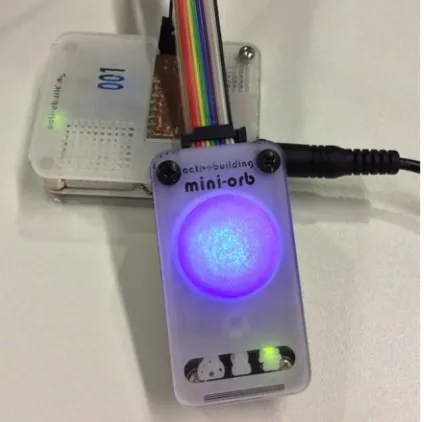
The MiniOrb sensor platform is an Arduino-based sensing device that measures tem-perature, humidity, light and sound levels via an array of digital and analogue sensors (seeFig. 1, background). Each platform communicates wirelessly across a ZigBee mesh network to a dedicated server. The sensor platforms were placed in a relatively fixed position above users’ desks in order to achieve comparability of sensor readings. The platforms run autonomously and users do not interact with them directly.
3.2! MiniOrb interaction device
The MiniOrb device is an ambient and tangible interaction device that records user’s office comfort preference values, displays both sensor reading from the user’s local sensor platform, as well as average comfort preferences across all users (see Fig. 1, foreground). The device consists of three small LED’s that indicate different states, a piezo speaker, a button and a scroll-wheel potentiometer for user input, as well as a dome-shaped “orb”, a 3D-printed plastic light diffuser which contains a bright RGB-LED and a laser-etched/cut cover.
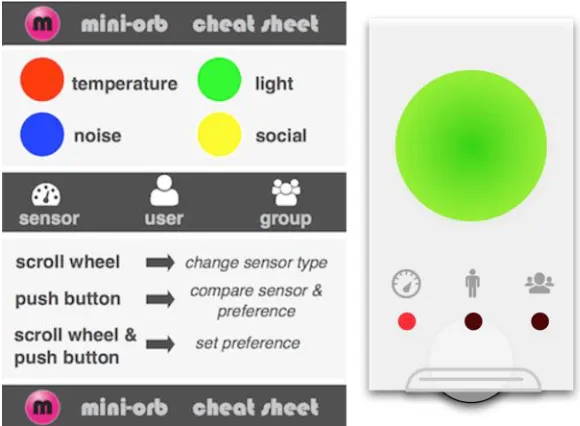
The dome-shaped “orb” LED is the main output mechanism for the device. To output information the device cycles through a series of colours, which represent different sensor categories of “temperature”, “light”, “noise” and “social” (see Fig. 2, left, for a match between colour and sensor categories). In addition three small LEDs linked to the icons for sensor, user and group respectively indicate wether the readings are a sensor value, a personal preference or a group average. Values are mapped to the colour intensity of the orb, i.e. the higher the value the more intense the colour. For instance, to display temperature-related information the device cycles through three settings. First it displays the value read by the sensor platform as a matching relative intensity of the colour red. The LED under the “sensor” icon lights up to indi-cate the state. The device then displays the last known user preference, again indicat-ed by the corresponding status LED “user”. The temperature cycle is then completindicat-ed by displaying the value for the “group” preference in a similar fashion. Each state is displayed for approximately 5 seconds. Once the temperature cycle completes, the device moves on to the “light” category using green as the output colour, and so forth. The “social” category differs from the other categories, in that it is not based on input from the sensor platform, but purely determined by user feedback (we discussed the notion of “social connectedness” in the design section). Thus, for this sensor category the “sensor” value is identical to the “group” value. Each user was given a “cheat sheet” that outlined the colour-codes, states and interactions.
value. This allows users to efficiently compare their own preference against the sensed value. 3) scroll wheel & push button: this function allows users to enter pref-erence values for any sensor category they selected. To do so they keep the button depressed and set the required orb intensity via the scroll. The preference is recorded as soon as the button is released. The device was designed so that this interaction could be easily achieved with a single hand, e.g. by pressing the button with a finger and scrolling the wheel with the thumb.
Fig. 2. MiniOrb cheat sheet (left) and conceptual device design (right)
In addition to the visual output mechanisms the device employs a small number of audio cues to enhance the interaction. The interaction with the scroll wheel is en-hanced with subtle “click” sounds that give users a sense of selecting discrete units. A slightly more pronounced sound is used when the wheel moved into the “middle” position. A separate “chirp” sound is used to notify the user that their preference has been recorded and sent of to the server. Lastly, once per day the device issues a short “remember me” “buzz” sound to encourage users to record their preferences. This sound has been specifically designed to be noticeable, but not to annoy users.
3.3! MobiOrb mobile application
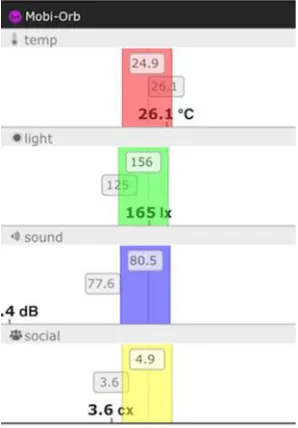
Fig. 3. MobiOrb mobile interface
The main screen consists of four sections, one for each sensor type. Each section con-tains a colour-coded slider that matches the MiniOrb sensor colour scheme. Users can move these sliders to record their preferences, which are also displayed in plain text in a grey bar in the top part of the slider. The readings in bold at the bottom of each sec-tion show the actual sensor value using a sensor-specific unit. The detached grey bar in the middle of each section depicts the group average value. The sensor and prefer-ence values exactly match the ones displayed on the MiniOrb device interface. The mobile interface allows users to more accurately assess and set sensor values, but at the same time does not provide the same ambient accessibility as the MiniOrb devices that are situated on users’ desks.
4
!
MiniOrb evaluation
The evaluation of the MiniOrb system was conducted through a series of user studies. In the context of this paper we report on the outcomes of a two-week in-situ trial of the MiniOrb system as well as the outcomes of a series of semi-structured interviews conducted following the trial.
4.1! Study design and setup
three parts: an initial questionnaire exploring existing attitudes towards indoor climate preferences; a two-week trial of the MiniOrb system; and a follow-up interview inves-tigating participants’ experience of use and their interpretation of the sensor catego-ries. Participants could choose how many of the stages to complete based on their own availability. 29 people participated in the initial questionnaire, 15 in the trials, and 11 in the follow-up interviews.
15 participants took part in one of two consecutive trials, which were each conducted over a period of two weeks. At the start of each trial a sensor platform and MiniOrb interaction device were installed on each participant’s desk. Each participant received a short introduction on how to use the device and were given a “cheat sheet” a very short manual outlining the sensor colour code, symbols and basic functions (see Fig. 2, left). Participants were not instructed to use the device at particular times, but rather encouraged to record preference settings when they felt it was appropriate to do so.
During the second week of the trial participants were offered to use the MobiOrb mobile application in addition to the MiniOrb device on their desk. Our aim was not to compare the two interfaces in an A/B test, but to add an interface that offered accu-rate numerical readings in order to gain a better understanding of how well the ambi-ent interface performed in relaying office comfort information. Out of fifteen total participants, seven used the mobile interface.
After each trial was completed we conducted a series of semi-structured interviews with the participants, which lasted between 20-30 minutes. A total of 11 participants across the two trials took part in the interviews. We used a grounded theory approach and conducted open coding to categorise the interview results.
4.2! Study results
In this section we briefly discuss the questionnaire results, but predominantly focus on the results of the trial and follow-up interviews.
Questionnaire.
The results from the questionnaire provided a baseline for the more detailed qualita-tive results of the post-trial interviews. The questionnaire results confirmed our as-sumption that the suggested environmental factors are important to the participants’ perception of office comfort. They further confirmed, that with the exception of “so-cial atmosphere” participants felt that they had very limited control over their office environment. Most participants were neither happy nor unhappy with their overall indoor climate, but were reasonably happy with the location of their desks. Generally, our participants felt that being able to change considered environmental factors would have a high impact on their office comfort levels.
Follow-up Interviews.
of using the MobiOrb mobile application. The first section was intended to enhance the data on office comfort levels, collected in the questionnaires, and provided more detail on participants’ working context and differences in attitudes between individu-als. The other two sections explored both when and how people used the devices on their desk, as well as how they perceived the usability and user experience of the re-spective device and application. We discuss the results for each section in turn.
Attitudes towards office comfort.
While many participants appreciated their office environment overall, we identified a number of diverse concerns regarding office comfort. The most commonly mentioned issue was temperature. Many of the participants felt that the overall temperature in the building was set a “little bit” too low. Some participants reported feeling cold at cer-tain parts of the day (e.g. the afternoon). Since the study was conducted in a sub-tropical environment, this generally did not mean that too little energy was used to warm the building, but rather that too much was used to cool it. The second most commonly mentioned issue related to noise. Noise was nearly exclusively interpreted as noise caused by conversations. A number of participants felt disturbed when other people nearby chatted or conducted phone conversations. About half of the partici-pants mentioned that they coped with this interruption by using headphones. Other participants’ strategy involved moving to a different (quieter) desk, a meeting room, or working in the library. Participants who reported noise issues were exclusively situated in the open office environment. Other, non conversation-related, background noise was not perceived to be an issue. Lighting, and in particular the setting of the window blinds, was reported as an issue by some participants. Depending on where their desk was located in relation to the windows, they either perceived that they re-ceived too much light, which caused issues with glare and reflection on monitors, or the opposite, that the office was too dark and they were not able to see the outside environment. However, complaints regarding lighting were overall less prevalent and intense compared to those regarding noise and temperature. Another issue that was mentioned a number of times was the notion of privacy in the open office setting. Some participants reported that they would like to have higher, more secluded, cubi-cles or offices to be able to work in a more private setting. When asked how they perceived their current level of control over their environment, the majority of partici-pants felt that their level of control was very low or even non-existent. The most re-quested control factor was being able to change the temperature, followed by control over the window blinds. Some participants mentioned that they would like control over aspects like privacy and noise, but also reflected that this would likely require changes in the physical setup of the office.
MiniOrb device experience.
their desk they commonly noticed the glowing orb and “remembered” that the device was there. Second, participants would specifically use the device when they became aware of being uncomfortable or when the local environment changed (e.g. the win-dow blinds going up and win-down). Third, participants commonly entered data when the device issued a “remember me” buzz sound. Nearly all participants perceived this mechanism very positively. They felt that it helped them to remember to provide in-put and did not feel that the interaction was intrusive or distracting. One participant also reported that they were encouraged by hearing other people send feedback from their own devices (by hearing the “feedback submitted” sound) and subsequently remembered to use the device themselves.
Overwhelmingly, participants enjoyed having the device situated on their desk and perceived that the device was very unobtrusive as well as easy to use. However, spe-cific functionalities were used at different rates as well as interpreted and applied differently. A significant difference emerged in the way people recorded preferences. Some participants used the push button feature, that allowed them directly compare the current sensor reading, for a specific category, with their user preference. These participants would then set the value a “little bit” higher or lower than the current status to indicate gradual preference change. By contrast, other participants would turn their preference value to the maximum or minimum setting to indicate their strong desire for this value to change respectively. These participants did not perceive that they were setting a specific value, but rather interpreted the interaction as “cast-ing a vote”. Participants reported that they particularly engaged in this type of vot“cast-ing when they felt strongly about their choice or wanted to communicate their displeasure (e.g. they felt annoyed because the environment was too noisy to concentrate). There were a limited number of reported uses of the “social” category. While some participants reported that they were unsure how to interpret this category, others gave examples of a use of the feature that resulted in social interaction. For instance some participants belonging to a working group would “turn up” their social preference value at the end of some working day to mutually indicate to each other that they were ready to engage in social activities.
The functionality that was reportedly used least was the “group average” feature. Only some participants reported that they actively observed the group setting after they submitted their preference in order to understand how other users felt. Many other participants however stated that they did not pay attention to the group setting, or in some cases were not sure what it meant.
A number of users pointed out that setting feedback levels made them feel like “somebody cared”. While these participants were aware that the system only recorded feedback values and did not affect change, they nevertheless valued the fact that their opinion did in some way count. One user opined: “(…) it just gave me the feeling that somebody maybe cares somewhere”.
and subsequently positioned it out of sight. However, this attitude was not shared by the large majority of participants.
MobiOrb application experience.
Out of the eleven participants we interviewed, seven had used the mobile application. The most common observation was that the mobile application was less noticed or thought of. Most participants felt that the ambient device reminded and encouraged them to use it because it was situated on people’s desk. The mobile application, by contrast, had to be remembered and used on purpose.
However, when people actually used the application they appreciated the ease with which feedback values could be set and found it generally easy to use. One participant commented that setting multiple values was quicker and easier on the mobile device. The fact that the mobile device displayed concrete values rather than relative colour hues was an obvious difference between the two interfaces. Our participants on aver-age did not seem to prefer either way of presenting values over the other. Some par-ticipants expressed that seeing the concrete values, and in particular the range within which the value could be changed, enhanced their experience: “It just felt like I knew more what I was saying with the range”. However, another participant mentioned that he liked being able to focus on setting their perceived comfort levels relative to the current sensed value, without having to think about absolute numbers.
5
!
Discussion
5.1! Discussion of interview results
The interviews provided a nuanced picture of participants’ attitude towards office comfort and their use of the different elements of the system. In the following discus-sion we will highlight five pertinent issues that warrant further discusdiscus-sion:
“Protest” vs. gradual vote
Due to the fact that the feedback mechanism of the ambient device was based on col-our intensity, the meaning of feedback values was open to interpretation. Our partici-pants used the feedback mechanisms in two significantly different ways: a) to submit
gradual changes based on the sensor value to indicate relative shifts in required com-fort levels or b) to submit a radical change by setting the value to the minimum or maximum setting.
believe that both approaches are valid in the context of providing feedback on comfort levels and should be supported. This issue requires further reflection on the design of future iterations of our system and other similar systems.
Minimal design trade-off
The minimal design of the interaction device was an important design consideration. The challenge was to build a small device that combined suitable ambient output mechanisms with a small number of tangible interaction mechanisms. The device had to support a suitable range of functionality without burdening the user with too much complexity. Based on the results of the interviews we believe that we overall suc-ceeded in achieving this goal. With regards to its “ambient quality” the device was perceived as fading into the background and being available when people wanted to interact with it. However there were signs that not all of the intended functionality was used to the same extent.
In particular, the group average reading was only used by a limited number of partici-pants. This fact is possibly related to our choice of functionality that allowed users to compare the feedback value against the sensor value, but not the group average value. This is a potentially significant design decision because as became clear from the interviews an important factor for people is that they feel that their preferences are reflected or supported by the group. This highlights that indoor comfort is as much a social phenomenon as a measurable physical phenomenon and by choosing to com-pare with the sensor values rather than the group preference, our interface emphasised the “physical” view. This presents a design trade-off when dealing with a device with limited interaction mechanisms. We suspect that rather than trying to integrate both the comparison of sensor values and group averages into a single device, an alterna-tive and potentially better design would be to remove rarely used functionality (e.g. group average) and represent this functionality on a separate device or interface (e.g. a “MaxiOrb” with the sole purpose of publicly displaying group averages to a group of users in a section of an office).
Somebody cares somewhere.
The notion that some participants felt positively about the fact that their feedback was recorded highlights the importance of aspects of office comfort that go beyond meas-urable factors, such as “being appreciated”. With regards to the design of similar sys-tems, this raises the question how systems can be designed to more actively give user the feeling of being listened to as well as finding mechanisms to affect change or reflect office comfort attitudes to other inhabitants (e.g. a “MaxiOrb” public display, mentioned above could indicate that several users felt that the workspace was getting too noisy, and thus raise the level of awareness regarding shared attitudes in office environments).
The small “remember me” buzz sound prompt, issued to encourage users to submit a preference value, had a significant impact on the usage pattern of the device. Interest-ingly, our participants did not find this interaction to be distracting, but perceived it as a welcome reminder to interact with the system. Conceptually, this interaction can be interpreted as briefly moving the device from its’ ambient state into the user’s focus, acting as a reverse notification, requesting user interaction, rather than indicating a change in the systems’ state.
Ambient vs. mobile interaction
It is too early, and beyond the scope of this paper, to conduct a conclusive comparison between the use of the ambient interaction device and the mobile application in the context of our study. However, the results of our interviews indicate that both inter-faces fulfilled different and important roles. One of the most important aspects of the interaction device was its ambient nature. The fact that the device was located on people’s desk meant that it acted as a constant reminder, a central quality when seek-ing to continuously solicit user input. The mobile device by comparison was appreci-ated for its straightforward and precise interface, which allowed users to provide spe-cific feedback and understand the range of different sensor categories. Interestingly, a number of users remarked that they would have preferred if this interface was located on their computer desktop rather then their mobile phone to provide better integration with the working environment on their desk. Generally, the mobile interface was per-ceived as an extension that provided additional functionality to the ambient interac-tion device, rather than a replacement of it.
6
!
Conclusions
In this paper we described the design, use and evaluation of MiniOrb, a system that employs ambient and tangible interaction mechanisms to allow inhabitants of office environments to report on subjectively perceived office comfort levels. One attraction of a tangible interaction approach in this context is that it gives physical presence to a phenomenon that is normally at the background of peoples’ experience. Our research addresses two pertinent questions. First, how can ambient and tangible interaction mechanisms support office inhabitants to record and reflect on their subjective office comfort levels, and second how do these mechanisms compare to more traditional approaches that enable users to see and set specific sensor values?
many nuances with regards to how people provided feedback, which functionality to integrate in a minimal interaction device, how to prompt interactions and the different ways people interpret vague and specific sensor readings.
An important contribution of our approach for ongoing research into understanding people’s responses to indoor climate conditions is that it provides a method of record-ing preferences in-situ and through time and for encouraging people to reflect on their experience of indoor climate. This supports the need for moving away from static steady-state approaches to indoor climate control to ones that take account of individ-ual variability and changes over time.
7
!
References
1.!Jaffari, S.D. and B. Matthews, From occupying to inhabiting – a change in conceptualis-ing comfort. IOP Conference Series: Earth and Environmental Science, 2009. 8(1): p. 1-14.
2.!Shove, E., et al., Comfort in a lower carbon society. Building Research & Information, 2008. 36(4): p. 307-311.
3.!Verbeek, P.-P., What Things Do: Philosophical Reflections on Technology, Agency, and Design. 2005, Pennsylvania: Pennsylvania State University Press.
4.!Liu, X. and B. Akinci, Requirements and Evaluation of Standards for Integration of Sensor Data with Building Information Models, in Computing in Civil Engineering (2009). Amer-ican Society of Civil Engineers. p. 95-104.
5.!Frontczak, M. and P. Wargocki, Literature survey on how different factors influence hu-man comfort in indoor environments. Building and Environment, 2011. 46(4): p. 922-937.
6.!Brager, G.S., G. Paliaga, and R. de Dear, Operable Windows, Personal Control, and Oc-cupant Comfort. ASHRAE Transactions, 2004. 110(2): p. 17-35.
7.!Ishii, H., et al., ambientROOM: integrating ambient media with architectural space, in CHI 98 Cconference Summary on Human Factors in Computing Systems1998, ACM: Los An-geles, California, USA. p. 173-174.
8.!Prinz, W. and T. Gross, Ubiquitous awareness of cooperative activities in a Theatre of Work. ITG Fachbericht, 2001(168): p. 135-44.
9.!Chang, A., et al., LumiTouch: an emotional communication device, in CHI '01 Extended Abstracts on Human Factors in Computing Systems2001, ACM: Seattle, Washington. p. 313-314.
10.!Matthews, T., et al., A toolkit for managing user attention in peripheral displays, in Pro-ceedings of the 17th annual ACM symposium on User interface software and technolo-gy2004, ACM: Santa Fe, NM, USA. p. 247-256.
12.!Hausen, D., et al., StaTube: facilitating state management in instant messaging systems, in Proceedings of the Sixth International Conference on Tangible, Embedded and Embodied Interaction2012, ACM: Kingston, Ontario, Canada. p. 283-290.
13.!Altosaar, M., et al., AuraOrb: social notification appliance, in CHI '06 Extended Abstracts on Human Factors in Computing Systems2006, ACM: Montréal, Québec, Canada. p. 381-386.
14.!Peek, N., D. Pitman, and R. The, Hangsters: tangible peripheral interactive avatars for in-stant messaging, in Proceedings of the 3rd International Conference on Tangible and Em-bedded Interaction2009, ACM: Cambridge, United Kingdom. p. 25-26.
15.!Greenberg, S. and H. Kuzuoka, Using digital but physical surrogates to mediate awareness, communication and privacy in media spaces. Personal Technologies, 1999. 3(4): p. 182-198.
16.!Rittenbruch, M. and G. McEwan, An Historical Reflection of Awareness in Collaboration, in Awareness Systems: Advances in Theory, Methodology and Design, P. Markopoulos, B. De Ruyter, and W. Mackay Editors. 2009, Springer Verlag: London, Berlin, Heidelberg. p. 3-48.
17.!Greenberg, S., C. Neustaedter, and K. Elliot, Awareness in the Home: The Nuances of Re-lationship, Domestic Coordination and Communication, in Awareness Systems : Advances in Theory, Methodology and Design, P. Markopoulos, B. De Ruyter, and W. Mackay, Edi-tors. 2009, Springer: New York. p. 73-96.
18.!Elliot, K., C. Neustaedter, and S. Greenberg, Time, Ownership and Awareness: The Value of Contextual Locations in the Home, in 7th International Conference on Ubiquitous Com-puting (UbiComp '05), M. Beigl, et al., Editors. 2005, Springer Verlag. p. 251-268.