Guide
Microsoft SQL Server 2012 Failover Cluster on
Cisco UCS with iSCSI-Based Storage Access
Deployment Guide
Contents
Executive Summary ... 3
Introduction ... 3
iSCSI ... 3
Cisco Data Center Virtual Machine Fabric Extender Technology ... 4
Audience ... 5
Hardware and Software Requirements ... 5
Cisco Unified Computing System Overview ... 5
Cisco Unified Computing System Components ... 6
VMware ESX 5.0 Architecture Overview ... 11
Microsoft Windows 2008 Release 2 Overview ... 12
Microsoft SQL Server 2012 Overview ... 13
Overview of Microsoft SQL Server 2012 Deployment Model on Cisco UCS ... 13
Storage Requirements for Microsoft SQL Server Database Deployment in Virtualized Environments ... 17
Advantages of iSCSI Storage Implementation on the Guest Virtual Machine and VMware ESX Host ... 17
Design Topology ... 18
Cisco UCS and iSCSI Storage Network ... 18
Microsoft SQL Data Network and Storage Network vPC Mapping ... 19
Cisco UCS Quality-of-Service System and Policy ... 21
NetApp Storage Configuration Overview ... 25
VMware ESX iSCSI Boot ... 33
Microsoft SQL Deployment Overview ... 38
Guest-Based iSCSI initiator on Cisco Data Center VM-FEX DVS ... 38
VMware ESX Host-Based iSCSI Initiator on VMware ESX vSwitch ... 54
Virtual Machine–Based iSCSI Initiator on VMware ESX vSwitch ... 62
Microsoft SQL Server Failover Cluster with Cisco Data Center VM-FEX DVS Solution ... 71
Physical and Logical Design ... 72
Installation of Microsoft Windows 2008 Failover Cluster Feature with Guest Virtual Machine–Based iSCSI Software Initiator ... 74
Installation of Microsoft SQL Server 2012 Failover Cluster Feature with Guest Virtual Machine–Based iSCSI Storage ... 79
Conclusion ... 94
Executive Summary
The document describes the Microsoft SQL Server 2012 failover cluster deployment in a virtual computing environment using the Small Computer System Interface over IP (iSCSI) protocol to communicate with storage devices. The document describes how to deploy Microsoft SQL Server on iSCSI using Cisco® Data Center Virtual Machine Fabric Extender (VM-FEX) technology in the Cisco Unified Computing System™ (Cisco UCS™). The deployment scenarios discussed in this document follow Cisco UCS best practices and recommendations to help ensure that the systems are highly available and scalable and can be efficiently consolidated and centrally managed.
Introduction
A Microsoft SQL Server 2012 database on iSCSI storage offers a cost-effective solution for enterprise-level database deployments. An inexpensive yet reliable and robust storage solution, iSCSI-based storage appliances provide an easy adaption of existing networking infrastructure to access the storage enclosures. Cisco UCS can exploit the bandwidth available to provide scalable, enterprise-class storage access through the iSCSI protocol. Cisco UCS provides up to 80 Gbps of unified bandwidth for disk and network access for a single Cisco UCS 5108 Blade Server Chassis.
To reduce the system infrastructure cost, IT departments are trying to virtualize their computing, storage, and networking infrastructure. Database server consolidation enables many companies to achieve considerable cost savings, reducing the total cost of ownership (TCO). Database server consolidation can also help companies achieve the infrastructure agility they need to stay competitive and to market their solutions. A Microsoft SQL Server database on iSCSI storage can be easily consolidated on a virtualized platform such as VMware, and with the help of Cisco Data Center VM-FEX technology, each guest virtual machine can have direct access to the iSCSI device. Cisco Data Center VM-FEX technology eliminates the software switch in the hypervisor layer. Such a deployment exactly mimics the bare-metal deployment and provides an easy migration path for Microsoft SQL Server from bare metal to a VMware virtual machine deployment.
High availability is one of the primary requirements for enterprise-level database platforms because mission-critical applications cannot afford to any downtime caused by unavailable databases at the network back end. Microsoft SQL Server 2012 integrates with the new Microsoft Windows 2008 failover cluster service to offer failover clustering, providing high availability for database applications. Coupled with iSCSI storage at the virtual machine level, a clustering-enabled Microsoft SQL Server deployed on the Cisco UCS platform provides a complete back-end solution with optimal TCO and high return on investment (ROI).
iSCSI
Small Computer Systems Interface (SCSI) is a standard client-server protocol that is used to enable computers to communicate with storage devices. The iSCSI protocol transfers the SCSI packets over a TCP/IP (Ethernet) network. The most common implementation of iSCSI is over 1 or 10 Gigabit Ethernet. The iSCSI protocol provides an interoperable solution that uses the existing TCP/IP infrastructure to transport block-level storage requests. Using the iSCSI protocol, systems can connect to remote storage and use it as a physical disk even if the remote storage provider or target actually uses virtual physical disks.
An iSCSI SAN typically consists of software or hardware initiators on the host connected to an isolated Ethernet network and storage resources. Storage resources are referred to as targets. The SCSI block commands are encapsulated into Ethernet packets for transmission over IP networks at both the ends of the network by the iSCSI stack.
Advantages of iSCSI
Here are some of the main benefits of the iSCSI protocol compared to the SCSI protocol: ● iSCSI uses the existing TCP/IP network.
● iSCSI reduces total storage costs. ● iSCSI eliminates the distance limitation. ● iSCSI reduces complexity.
● iSCSI uses 10 Gigabit Ethernet.
Cisco Data Center Virtual Machine Fabric Extender Technology
Cisco Data Center VM-FEX is a Cisco technology that addresses management and performance concerns in a data center by unifying physical and virtual switch management. Cisco Data Center VM-FEX collapses virtual and physical networking into a single infrastructure. This unified infrastructure enables data center administrators to provision, configure, manage, monitor, and diagnose virtual machine network traffic and bare-metal network traffic. Cisco Data Center VM-FEX significantly reduces the number of network management points, enabling physical and virtual network traffic to be treated in a consistent policy-based way. Cisco Data Center VM-FEX technology helps enable a consistent operating model and visibility between physical and virtual environments, and it simplifies enforcement of security and network policy when virtual machines are moved across hosts.
Cisco Data Center VM-FEX Capabilities
The Cisco Data Center VM-FEX software extends Cisco Fabric Extender Technology (FEX Technology) to the virtual machine with the following capabilities:
● Each virtual machine includes a dedicated interface on the parent switch. ● All virtual machine traffic is sent directly to the dedicated interface on the switch. ● The software-based switch in the hypervisor is eliminated.
Advantages Cisco Data Center VM-FEX ● Simplicity
◦ One infrastructure for virtual and physical resource provisioning, management, monitoring, and troubleshooting
◦ Consistent features, performance, and management for virtual and physical infrastructure ● Robustness
◦ Programmable, with capability to renumber VLANs without disruptive changes
◦ Capability to troubleshoot and perform traffic engineering for virtual machine traffic from the physical network
● Performance
◦ Near-bare-metal I/O performance with VMDirectPath with VMware vMotion
Audience
The target audience for this guide includes sales engineers, field consultants, professional services staff, IT managers, partner engineering staff, and customers who want to deploy Microsoft SQL Server on iSCSI using Cisco Data Center VM-FEX.
Hardware and Software Requirements
Cisco Unified Computing System OverviewCisco UCS is a set of preintegrated data center components, including blade servers, adapters, fabric
interconnects, and fabric extenders, that are integrated within a common embedded management system. This approach results in far fewer system components and much better manageability, operation efficiencies, and more flexibility than comparable data center platforms.
Main Differentiating Technologies
The main differentiating technologies described here are what make Cisco UCS unique and give it advantages over competing offerings. The technologies presented here are high level, and the discussions do not include the technologies (such as Fibre Channel over Ethernet [FCoE]) that support these high-level elements.
Unified Fabric
Unified fabric can dramatically reduce the number of network adapters, blade-server switches, cables, and management touch points by passing all network traffic to parent fabric interconnects, where it can be prioritized, processed, and managed centrally. This approach improves performance, agility, and efficiency and dramatically reduces the number of devices that need to be powered, cooled, secured, and managed.
Embedded Multirole Management
Cisco UCS Manager is a centralized management application that is embedded on the fabric switch. Cisco UCS Manager controls all Cisco UCS elements within a single redundant management domain. These elements include all aspects of system configuration and operation, eliminating the need to use multiple, separate element managers for each system component. Massive reduction in the number of management modules and consoles and in the proliferation of agents resident on all the hardware (which must be separately managed and updated) are important deliverables of Cisco UCS. Cisco UCS Manager, using role-based access and visibility, helps enable cross-function communication efficiency, promoting collaboration between data center roles for increased productivity. Cisco Extended Memory Technology
Significantly enhancing the available memory capacity of some Cisco UCS servers, Cisco Extended Memory Technology helps increase performance for demanding virtualization and large-data-set workloads. Data centers can now deploy very high virtual machine densities on individual servers as well as provide resident memory capacity for databases that need only two processors but can dramatically benefit from more memory. The high-memory dual in-line high-memory module (DIMM) slot count also lets users more cost-effectively scale this capacity using smaller, less costly DIMMs.
Cisco Data Center VM-FEX Virtualization Support and Virtualization Adapter
With Cisco Data Center VM-FEX, virtual machines have virtual links that allow them to be managed in the same way as physical links. Virtual links can be centrally configured and managed without the complexity of traditional systems, which interpose multiple switching layers in virtualized environments. I/O configurations and network
profiles move along with virtual machines, helping increase security and efficiency while reducing complexity. Cisco Data Center VM-FEX helps improve performance and reduce network interface card (NIC) infrastructure.
Dynamic Provisioning with Service Profiles
Cisco UCS Manager delivers service profiles, which contain abstracted server-state information, creating an environment in which everything unique about a server is stored in the fabric, and the physical server is simply another resource to be assigned. Cisco UCS Manager implements role- and policy-based management focused on service profiles and templates. These mechanisms fully provision one or many servers and their network
connectivity in minutes, rather than hours or days. Cisco UCS Manager
Cisco UCS Manager is an embedded, unified manager that provides a single point of management for Cisco UCS. Cisco UCS Manager can be accessed through an intuitive GUI, a command-line interface (CLI), or the
comprehensive open XML API. It manages the physical assets of the server and storage and LAN connectivity, and it is designed to simplify the management of virtual network connections through integration with several major hypervisor vendors. It provides IT departments with the flexibility to allow people to manage the system as a whole, or to assign specific management functions to individuals based on their roles as managers of server, storage, or network hardware assets. It simplifies operations by automatically discovering all the components available on the system and enabling a stateless model for resource use.
The elements managed by Cisco UCS Manager include:
● Cisco UCS Integrated Management Controller (IMC) firmware ● RAID controller firmware and settings
● BIOS firmware and settings, including server universal user ID (UUID) and boot order
● Converged network adapter (CNA) firmware and settings, including MAC addresses and worldwide names (WWNs) and SAN boot settings
● Virtual port groups used by virtual machines, using Cisco Data Center VM-FEX technology
● Interconnect configuration, including uplink and downlink definitions, MAC address and WWN pinning, VLANs, VSANs, quality of service (QoS), bandwidth allocations, Cisco Data Center VM-FEX settings, and EtherChannels to upstream LAN switches
Cisco Unified Computing System Components Figure 1 shows the Cisco UCS components.
Figure 1. Cisco UCS Components
Cisco UCS is designed from the start to be programmable and self-integrating. A server’s entire hardware stack, ranging from server firmware and settings to network profiles, is configured through model-based management. With Cisco virtual interface cards (VICs), even the number and type of I/O interfaces is programmed dynamically, making every server ready to power any workload at any time.
With model-based management, administrators manipulate a model of a desired system configuration and associate a model’s service profile with hardware resources, and the system configures itself to match the model. This automation accelerates provisioning and workload migration with accurate and rapid scalability. The result is increased IT staff productivity, improved compliance, and reduced risk of failures due to inconsistent
configurations.
Cisco FEX Technology reduces the number of system components that need to be purchased, configured, managed, and maintained by condensing three network layers into one. It eliminates both blade server and hypervisor-based switches by connecting fabric interconnect ports directly to individual blade servers and virtual machines. Virtual networks are now managed exactly the same way that physical networks are, but enable massive scalability. This approach represents a radical simplification compared to traditional systems, reducing
capital expenditures (CapEx) and operating expenses (OpEx) while increasing business agility, simplifying and accelerating deployment, and improving performance.
Cisco UCS Fabric Interconnects
Cisco UCS fabric interconnects create a unified network fabric throughout Cisco UCS. They provide uniform access to both networks and storage, eliminating the barriers to deployment of a fully virtualized environment based on a flexible, programmable pool of resources. Cisco fabric interconnects comprise a family of line-rate, low-latency, lossless 10 Gigabit Ethernet, IEEE Data Center Bridging (DCB), and FCoE interconnect switches. Based on the same switching technology as the Cisco Nexus® 5000 Series Switches, Cisco UCS 6100 Series Fabric Interconnects provide additional features and management capabilities that make them the central nervous system of Cisco UCS. The Cisco UCS Manager software runs inside the Cisco UCS fabric interconnects. The Cisco UCS 6100 Series Fabric Interconnects expand the Cisco UCS networking portfolio and offer higher capacity, higher port density, and lower power consumption. These interconnects provide the management and communication
backbone for the Cisco UCS B-Series Blade Servers and Cisco UCS blade server chassis. All chassis and all blades that are attached to interconnects are part of a single, highly available management domain. By supporting unified fabric, the Cisco UCS 6100 Series provides the flexibility to support LAN and SAN connectivity for all blades within its domain at configuration time. Typically deployed in redundant pairs, Cisco UCS fabric interconnects provide uniform access to both networks and storage, facilitating a fully virtualized environment.
The Cisco UCS fabric interconnect portfolio currently consists of the Cisco 6100 and 6200 Series Fabric Interconnects.
Cisco UCS 6248UP 48-Port Fabric Interconnect
The Cisco UCS 6248UP 48-Port Fabric Interconnect is a one-rack-unit (1RU) 10 Gigabit Ethernet, IEEE DCB, and FCoE interconnect providing more than 1-terabit-per-second (Tbps) throughput with low latency. It has 32 fixed ports of Fibre Channel, 10 Gigabit Ethernet, IEEE DCB, and FCoE Enhanced Small Form-Factor Pluggable (SFP+) ports.
One expansion module slot can provide up to 16 additional Fibre Channel, 10 Gigabit Ethernet, IEEE DCB, and FCoE SFP+ ports.
Cisco UCS 6120XP 20-Port Fabric Interconnect
The Cisco UCS 6120XP 20-Port Fabric Interconnect is a 1RU 10 Gigabit Ethernet, IEEE DCB, and FCoE interconnect providing more than 500-Gbps throughput with very low latency. It has 20 fixed 10 Gigabit Ethernet, IEEE DCB, and FCoE SFP+ ports.
One expansion module slot can be configured to support up to six additional 10 Gigabit Ethernet, IEEE DCB, and FCoE SFP+ ports.
Cisco UCS 6140XP 40-Port Fabric Interconnect
The Cisco UCS 6140XP 40-Port Fabric Interconnect is a 2RU 10 Gigabit Ethernet, IEEE DCB, and FCoE interconnect built to provide 1.04-Tbps throughput with very low latency. It has 40 fixed 10 Gigabit Ethernet, IEEE DCB, and FCoE SFP+ ports.
Two expansion module slots can be configured to support up to 12 additional 10 Gigabit Ethernet, IEEE DCB, and FCoE SFP+ ports.
Cisco UCS 6296UP 96-Port Fabric Interconnect
The Cisco UCS 6296UP 96-Port Fabric Interconnect is a 2RU 10 Gigabit Ethernet, FCoE, and native Fibre Channel switch offering up to 1920-Gbps throughput and up to 96 ports. The switch has 48 1/10-Gbps fixed Ethernet, FCoE, and Fibre Channel ports and three expansion slots.
One expansion module slot can provide up to 16 additional Fibre Channel, 10 Gigabit Ethernet, IEEE DCB, and FCoE SFP+ ports.
Cisco UCS 2100 and 2200 Series Fabric Extenders
The Cisco UCS 2100 and 2200 Series Fabric Extenders multiplex and forward all traffic from blade servers in a chassis to a parent Cisco UCS fabric interconnect over 10-Gbps unified fabric links. All traffic, even traffic between blades on the same chassis or virtual machines on the same blade, is forwarded to the parent interconnect, where network profiles are managed efficiently and effectively by the fabric interconnect. At the core of the Cisco UCS fabric extender are application-specific integrated circuit (ASIC) processors developed by Cisco that multiplex all traffic.
Up to two fabric extenders can be placed in a blade chassis.
● The Cisco UCS 2104XP Fabric Extender has eight 10GBASE-KR connections to the blade chassis
midplane, with one connection per fabric extender for each of the chassis’ eight half slots. This configuration gives each half-slot blade server access to each of two 10-Gbps unified fabric-based networks through SFP+ sockets for both throughput and redundancy. It has four ports connecting the fabric interconnect. ● The Cisco UCS 2204XP Fabric Extender has four 10 Gigabit Ethernet, FCoE-capable, SFP+ ports that connect the blade chassis to the fabric interconnect. Each Cisco UCS 2204XP has sixteen 10 Gigabit Ethernet ports connected through the midplane to each half-width slot in the chassis. Typically configured in pairs for redundancy, two fabric extenders provide up to 80 Gbps of I/O to the chassis.
● The Cisco UCS 2208XP Fabric Extender has eight 10 Gigabit Ethernet, FCoE-capable, SFP+ ports that connect the blade chassis to the fabric interconnect. Each Cisco UCS 2208XP has thirty-two 10 Gigabit Ethernet ports connected through the midplane to each half-width slot in the chassis. Typically configured in pairs for redundancy, two fabric extenders provide up to 160 Gbps of I/O to the chassis.
Cisco UCS M81KR Virtual Interface Card
The Cisco UCS M81KR VIC is unique to the Cisco UCS blade system. This mezzanine adapter is designed based on a custom ASIC that is specifically intended for virtualized systems based on VMware. It uses custom drivers for the virtualized host bus adapter (HBA) and the 10 Gigabit Ethernet NIC. As is the case with the other Cisco CNAs, the Cisco UCS M81KR VIC encapsulates Fibre Channel traffic within the 10 Gigabit Ethernet packets for delivery to the fabric extender and the fabric interconnect.
Cisco UCS Virtual Interface Card 1240
A Cisco innovation, the Cisco UCS VIC 1240 is a four-port 10 Gigabit Ethernet, FCoE-capable modular LAN on motherboard (mLOM) designed exclusively for the M3 generation of Cisco UCS B-Series Blade Servers. When used in combination with an optional port expander, the Cisco UCS VIC 1240 capabilities can be expanded to eight ports of 10 Gigabit Ethernet.
Cisco UCS Virtual Interface Card 1280
A Cisco innovation, the Cisco UCS VIC 1280 is an eight-port 10 Gigabit Ethernet, FCoE-capable mezzanine card designed exclusively for Cisco UCS B-Series Blade Servers.
The Cisco UCS VIC 1240 and 1280 enable a policy-based, stateless, agile server infrastructure that can present up to 256 PCI Express (PCIe) standards-compliant interfaces to the host that can be dynamically configured as either NICs or HBAs. In addition, the Cisco UCS VIC 1280 supports Cisco Data Center VM-FEX technology, which extends the Cisco UCS fabric interconnect ports to virtual machines, simplifying server virtualization deployment. Cisco UCS 5100 Series Blade Server Chassis
The Cisco UCS 5108 Blade Server Chassis is a 6RU blade chassis that accepts up to eight half-width Cisco UCS B-Series Blade Servers or up to four full-width Cisco UCS B-Series Blade Servers, or a combination of the two. The Cisco UCS 5108 can accept four redundant power supplies with automatic load sharing and failover and two Cisco UCS 2100 or 2200 Series Fabric Extenders. The chassis is managed by Cisco UCS chassis management controllers, which are mounted in the Cisco UCS fabric extenders and work in conjunction with Cisco UCS Manager to control the chassis and its components.
A single Cisco UCS managed domain can theoretically scale to up to 40 individual chassis and 320 blade servers. At this time, Cisco UCS supports up to 20 individual chassis and 160 blade servers.
Basing the I/O infrastructure on a 10-Gbps unified network fabric allows Cisco UCS to have a streamlined chassis with a simple yet comprehensive set of I/O options. The result is a chassis that has only five basic components:
● The physical chassis with passive midplane and active environmental monitoring circuitry
● Four power supply bays with power entry in the rear and hot-swappable power supply units accessible from the front panel
● Eight hot-swappable fan trays, each with two fans ● Two fabric extender slots accessible from the back panel ● Eight blade server slots accessible from the front panel
Cisco UCS B200 M2 Blade Servers
The Cisco UCS B200 M2 Blade Server is a half-slot, 2-socket blade server. The system uses two Intel Xeon p5600 series processors, up to 192 GB of double-data-rate-3 (DDR3) memory, two optional Small Form Factor (SFF) SAS/SSD disk drives, and a single CNA mezzanine slot for up to 20 Gbps of I/O throughput. The Cisco UCS B200 M2 Blade Server balances simplicity, performance, and density for production-level virtualization and other mainstream data center workloads.
Cisco UCS B250 M2 Extended Memory Blade Servers
The Cisco UCS B250 M2 Extended-Memory Blade Server is a full-slot, 2-socket blade server using Cisco Extended Memory Technology. The system supports two Intel Xeon processors 5600 series, up to 384 GB of DDR3 memory, two optional SFF SAS/SSD disk drives, and two CNA mezzanine slots for up to 40 Gbps of I/O throughput. The Cisco UCS B250 M2 blade server provides increased performance and capacity for demanding virtualization and large-data-set workloads, with greater memory capacity and throughput.
Cisco UCS B230 M2 Blade Servers
The Cisco UCS B230 M2 Blade Server is a full-slot, 2-socket blade server offering the performance and reliability of the Intel Xeon processor E7-2800 product family and up to 32 DIMM slots, which support up to 512 GB of
memory. The Cisco UCS B230 M2 supports two SSD drives and one CNA mezzanine slot for up to 20 Gbps of I/O throughput. The Cisco UCS B230 M2 Blade Server platform delivers outstanding performance, memory, and I/O capacity to meet the diverse needs of virtualized environments with advanced reliability and exceptional scalability for the most demanding applications.
Cisco UCS B440 M2 High-Performance Blade Servers
The Cisco UCS B440 M2 High-Performance Blade Server is a full-slot, 2-socket blade server offering the performance and reliability of the Intel Xeon processor E7-4800 product family and up to 512 GB of memory. The Cisco UCS B440 M2 supports four SFF SAS/SSD drives and two CNA mezzanine slots for up to 40 Gbps of I/O throughput. The Cisco UCS B440 M2 blade server extends Cisco UCS by offering increased levels of performance, scalability, and reliability for mission-critical workloads.
Cisco UCS B200 M3 Blade Servers
The Cisco UCS B200 M3 Blade Server delivers performance, versatility, and density without compromise. It addresses the broadest set of workloads, from IT and web infrastructure to distributed databases. Building on the success of the Cisco UCS B200 M2 Blade Server, the enterprise-class Cisco UCS B200 M3 Blade Server further extends the capabilities of the Cisco UCS portfolio in a half-width blade form factor. The Cisco UCS B200 M3 harnesses the power of the latest Intel Xeon processor E5-2600 product family, with up to 384 GB of RAM (using 16-GB DIMMs), two disk drives, and up to dual 4x 10 Gigabit Ethernet throughput. In addition, Cisco UCS has the architectural advantage of not having to power and cool excess switches in each blade chassis. With a larger power budget per blade server, Cisco can design uncompromised expandability and capabilities in its blade servers, as evidenced by the new Cisco UCS B200 M3, with its leading memory slot and drive capacity. VMware ESX 5.0 Architecture Overview
VMware ESX is an enterprise-level computer virtualization solution. VMware ESX is a production-proven virtualization layer that runs on physical servers that abstract processor, memory, storage, and networking resources to be provisioned to multiple virtual machines.
In the VMware ESX architecture, shown in Figure 2, the VMware Virtualization Kernel (VMkernel) is augmented by a management partition known as the console operating system or service console. The primary purpose of the console operating system is to provide a management interface with the host. Various VMware management agents are deployed in the console operating system, along with other infrastructure service agents (for example, name service, time service, and logging agents). Furthermore, individual administrative users can log in to the console operating system to run configuration and diagnostic commands and scripts.
Virtualization using VMware ESX provides an abstraction layer that decouples the physical hardware from the operating system to deliver greater IT resource utilization and flexibility. Virtualization allows multiple virtual machines with heterogeneous operating systems (for example, Microsoft Windows 2008 Server and Linux) and applications to run in isolation side by side on the same physical machine. A virtual machine is the representation of a physical machine by software. It has its own set of virtual hardware (RAM, CPU, NICs, hard disks, etc.) on which an operating system and applications are loaded. The operating system sees a consistent, normalized set of hardware regardless of the actual physical hardware components. VMware virtual machines contain advanced hardware features such as 64-bit computing and virtual symmetric multiprocessing. Figure 3 shows server virtualization with VMware ESX in which virtual machines directly access the network through Cisco Data Center VM-FEX.
Figure 3. VMware ESX 5.0 with Cisco Data Center VM-FEX
Microsoft Windows 2008 Release 2 Overview
Microsoft Windows Server 2008 Release 2 (R2) is Microsoft’s multipurpose next-generation operating system designed to increase reliability and flexibility. Microsoft Windows Server 2008 R2 introduces powerful next-generation tools, built-in virtualization technology, and security and server management enhancements to efficiently manage IT operations, reduce costs, and improve performance of business-critical systems. The main improvements offered in Microsoft Windows Server 2008 R2 are:
● Improved scalability and reliability: Microsoft Windows Server 2008 R2 is specifically designed to support increased workloads while using fewer resources.
● Technology improvements: Microsoft Windows Server 2008 R2 includes technology improvements designed with Microsoft Windows 7 enterprise users in mind, augmenting the network experience, security, and manageability.
● Improved management: Microsoft Windows Server 2008 R2 provides enhanced management consoles and automation for repetitive day-to-day administrative tasks.
● Improved web application platform: Microsoft Windows Server 2008 R2 provides the capability to deliver web-based multimedia experiences efficiently and effectively, with improved administration, diagnostic, development, and application tools and lower infrastructure costs.
● Microsoft Remote Desktop Services (RDS): Microsoft RDS enables users to access applications, data, and even an entire desktop running in the data center over the network. This capability provides both the features and the robustness of a proven solution, giving users flexible access to their data and applications. Microsoft SQL Server 2012 Overview
Microsoft SQL Server is an enterprise-class relational database management system (RDBMS) that runs on the Microsoft Windows platform and provides a wide range of data management, data integration (including data quality), and business intelligence capabilities.
Some of the main features of Microsoft SQL Server 2012 are:
● High availability, including support for active multiple secondary databases, faster failover performance, fast setup, and integrated management
● ColumnStore Index, enabling the caching of query-critical data from the data warehouse in memory-based columnar format and delivering on average 10 times the query performance of prior versions of Microsoft SQL Server
● Support for Microsoft Windows Server Core to enable better reliability and thorough cross-system security through a reduced surface area
● The new Microsoft Power View browser–based tool, along with enhancements to the Microsoft PowerPivot feature, providing rapid insight through self-service data exploration, visualization, and data mashup capabilities (users can collaborate and share these insights through Microsoft SharePoint)
● A new single business intelligence semantic model and data quality services that help provide credible, consistent data
● Support for big data through bidirectional connectors for Hadoop along with enhancements for creation of massively scalable analytics and data warehouse solutions
● Cloud-ready connectivity built with features that support hybrid IT (integrating on-premises systems with public and private clouds)
● Expanded support for unstructured data and greater interoperability with PHP, Java, and Linux Overview of Microsoft SQL Server 2012 Deployment Model on Cisco UCS
This document describes two Microsoft SQL Server deployment models: ● Microsoft SQL Server single-instance deployment model
Microsoft SQL Server Single-Instance Deployment Model
In the single-instance model, multiple applications are moved onto a single physical server with multiple Microsoft SQL Server instances. Each application is contained within its own Microsoft SQL Server instance. This model provides isolation of the Microsoft SQL Server instance binaries, allowing each application to be at a different patch level (major or minor version level). However, conflicts can potentially occur with the running application because system resources (mainly CPU, memory, and I/O) are shared, although tools such as the CPU affinity mask and max server memory settings can help provide resource isolation. Database system administration is isolated, but Microsoft Windows system administration shares the same host server. Each Microsoft SQL Server instance on the device can be enrolled within a Microsoft SQL Server control point for management. Another possible implementation is consolidation of several databases under a single Microsoft SQL Server instance to serve various applications. In this model, a single Microsoft SQL Server instance is shared across multiple applications, with each application having its own database.
With the single-instance approach, applications migrated from their physical server to a virtual machine environment can continue to have similar isolation with the Microsoft SQL Server database running on its own virtual machine. A single physical machine hosts multiple virtual machines, and each virtual machine hosts a single Microsoft SQL Server instance. Because a virtual machine can act as a dedicated physical machine, this approach provides an easier migration of the source environment to the consolidation environment. The single-instance deployment model is shown in Figure 4.
Figure 4. Microsoft SQL Server Single-Host Deployment Model
Microsoft SQL Failover Cluster Deployment Model
The Microsoft SQL cluster deployment model allows one Microsoft SQL Server to take over the tasks and responsibilities of another Microsoft SQL Server that has failed. This model helps ensure that users running mission-critical applications experience little or no downtime when such a failure occurs. Downtime can be very expensive, and the database administrator can help reduce it as much as possible. Microsoft SQL Server clustering is a high-availability technology for Microsoft SQL Server instances. It involves the sharing of server resources between one or more nodes (or servers), which have one or more shared disks grouped into logical units called resource groups. A resource group that contains at least one IP address, network name, and disk resource is called a virtual server. The cluster service arbitrates ownership of the resource groups. A single node can own a resource group and its associated resources at any given time.
The Microsoft SQL Server cluster deployment model is shown in Figure 5. Two nodes that are members of the Microsoft Windows 2008 R2 failover cluster service are deployed on VMware ESX virtual machines on two separate Cisco UCS blades. Both VMware ESX and the guest virtual machine (Microsoft Windows 2008 R2) are booted from a logical unit number (LUN) hosted on a NetApp FAS3270 with access through the iSCSI protocol.
The quorum disk for the failover cluster is also accessed through the iSCSI protocol. The database data and log files are stored on separate LUNs carved out of NetApp FAS3270. These LUNs are accessed through the iSCCI initiator originating in both the host and guest virtual machines.
This design demonstrates the flexibility of accessing storage through the iSCSI protocol with either the host-based iSCSI initiator or guest virtual machine–based iSCSI initiator. With universal passthrough (UPT) enabled on the virtual NICs (vNICs), guest virtual machines can access LUNs directly without having to go through the hypervisor layer, eliminating the additional overhead incurred while accessing critical storage resources. With UPT enabled for the iSCSI initiator, you get better response times and higher bandwidth with less CPU use on the VMware ESX host.
Storage Requirements for Microsoft SQL Server Database Deployment in Virtualized Environments Storage configuration is critical to any successful database deployment. As with any physical Microsoft SQL Server deployment, the storage in virtualized environments should be sized properly to meet the database I/O
requirements. The two important considerations for sizing the storage requirements are: ● Database size measured in GB
● Performance capacity measured by the number of I/O operations per second (IOPS) needed for the database to operate efficiently
To successfully design and deploy storage for a Microsoft SQL Server application, you need to understand the application’s I/O characteristics and the Microsoft SQL Server I/O patterns. You need to consider parameters such as the read-to-write ratio of the application and typical I/O rates to configure the I/O characteristics of the
application. The number of spindles and the speed should be configured to the maximum possible to increase storage performance. RAID 1+0 provides a better throughput for write-intensive applications. Place log files on RAID 1+0 (or RAID 1) disks for better performance and protection from hardware failures.
This validated solution uses the iSCSI protocol to access the primary database application storage.
Advantages of iSCSI Storage Implementation on the Guest Virtual Machine and VMware ESX Host The iSCSI protocol allows SCSI commands to be sent over a TCP/IP network. iSCSI uses standard IP network equipment such as Ethernet switches and standard NICs to send SCSI block commands encapsulated in IP packets.
iSCSI offers the following advantages:
● iSCSI uses the existing IP networks and components (NICs, switches, cables, etc.), and therefore a separate network is not required to create the SAN.
● An iSCSI SAN is cost effective compared to a Fibre Channel SAN.
● An iSCSI-based SAN can coexist with the current Fibre Channel–based SAN. This feature gives customers using Fibre Channel the flexibility to scale up their SANs by adding storage capacity using an iSCSI SAN. ● An iSCSI SAN does not have any distance limitation.
● iSCSI is easy to learn, deploy, and maintain because it uses common IP-based network components. ● iSCSI is well suited for implementation of SANs in virtual server environments because it supports software
initiators that make such integration easier.
● iSCSI supports the same amount of bandwidth as IP networks and therefore can provide the high bandwidth required for virtual server environments.
● iSCSI supports direct backup to tapes or disks even from virtual servers. NetApp Storage Technologies and Benefits
NetApp solutions begin with NetApp Data ONTAP 8.0.1, the fundamental software platform that runs on all NetApp storage systems. NetApp Data ONTAP 8.0.1 is a highly optimized, scalable operating system that supports mixed network-attached storage (NAS) and SAN environments and a range of protocols, including Fibre Channel, iSCSI, FCoE, Network File System (NFS), and Common Internet File System (CIFS). It also includes a patented file system and storage virtualization capabilities. Using the NetApp Data ONTAP 8.0.1 platform, the NetApp unified storage architecture offers the flexibility to manage, support, and scale business environments by using a single set of knowledge and tools. From the remote office to the data center, customers collect, distribute, and manage data
from all locations and applications at the same time, scaling their investment by standardizing processes, reducing management time, and increasing availability. Figure 6 shows the NetApp unified storage architecture platforms. Figure 6. NetApp Unified Storage Architecture
The NetApp storage hardware platform used in this solution is the NetApp FAS3270. The NetApp FAS3200 series is an excellent platform for Microsoft SQL Server 2012 deployments.
A variety of NetApp tools and enhancements are available to augment the storage platform. These tools assist in deployment, backup, recovery, replication, management, and data protection. This solution uses a subset of these tools and enhancements.
Design Topology
This section presents physical and logical high-level design considerations for Cisco UCS networking and computing with VMware ESX virtualization on NetApp storage for Microsoft SQL Server 2012 failover cluster deployments.
Cisco UCS and iSCSI Storage Network
This section explains Cisco UCS iSCSI networking and computing design considerations when deploying Microsoft SQL Server in a VMware ESX environment. In this design, the iSCSI traffic is isolated from the regular
management and application data network using the same Cisco UCS infrastructure by defining logical VLAN networks to provide better data security. This design also reduces OpEx and CapEx compared to a topology in which a separate dedicated physical switch is deployed to handle iSCSI traffic.
Figure 7 presents a detailed view of the physical topology, identifying the various levels of the architecture and some of the main components of Cisco UCS in an iSCSI network design.
Figure 7. Cisco UCS Component in iSCSI Network Design
As shown in Figure 7, a pair of Cisco UCS 6248UP fabric interconnects carries both storage and network traffic from the blades with the help Cisco Nexus 5548UP. Both the fabric interconnect and the Cisco Nexus 5548UP are clustered with the peer link between them to provide high availability. Two virtual PortChannels (vPCs) are configured to provide network and storage access paths for the blades to northbound switches. Each vPC has VLANs created for application network data, iSCSI storage data, and management data paths. There is also a dedicated VLAN for VMware vMotion data traffic for VMware ESX Server.
For more information about vPC configuration on the Cisco Nexus 5548UP Switch, see
http://www.cisco.com/en/US/prod/collateral/switches/ps9441/ps9670/configuration_guide_c07-543563.html. Microsoft SQL Data Network and Storage Network vPC Mapping
Table 1 shows the Cisco Nexus 5548UP vPC configurations with the vPC domains and corresponding vPC names and IDs for Microsoft SQL Servers. To provide Layer 2 and 3 switching, a pair of Cisco Nexus 5548UP Switches with upstream switching are deployed, providing high availability in the event of failure to Cisco UCS to handle management, application, and iSCSI storage data traffic. In the Cisco Nexus 5548UP topology, a single vPC feature is enabled to provide high availability, faster convergence in the event of a failure, and greater throughput. Table 1. vPC Mapping vPC Domain vPC Name vPC ID 100 vPC-MS SQL 1 101 100 vPC-MS SQL 2 102 100 vPC-iSCSI Storage 1 103 100 vPC-iSCSI Storage 2 104
In the vPC design table, a single vPC domain, Domain 100, is created across Cisco Nexus 5548UP member switches to define vPCs to carry specific network traffic. This topology defines four vPCs with IDs 101 through 104.
vPC IDs 101 and 102 are defined for traffic from Cisco UCS fabric interconnects, and vPC IDs 103 and 104 are defined for traffic to NetApp storage. These vPCs are managed within the Cisco Nexus 5548UP, which connects Cisco UCS fabric interconnects and the NetApp storage system.
When configuring the Cisco Nexus 5548UP with vPCs, be sure that the status for all vPCs is “Up” for connected Ethernet ports by running the commands shown in Figure 8 from the CLI on the Cisco Nexus 5548UP Switch. Figure 8. PortChannel Status on Cisco Nexus 5548UP
Table 2 shows the vPC configuration details for Cisco UCS 6248UP Fabric Interconnects A and B with the required vPC IDs, VLAN IDs, and Ethernet uplink ports for a Microsoft SQL Server data network design.
Table 2. Fabric Interconnects A and B (Microsoft SQL Server Data Network)
vPC Name vPC ID LAN Uplink Ports VLAN ID
vPC-MS SQL 1 101 Fabric Interconnect A (Eth 1/15 and 1/16) 108 (management) 109 (SQL network) 192 (iSCSI storage) 194 (VMware vMotion) vPC-MS SQL 2 102 Fabric Interconnect B (Eth 1/15 and 1/16) 108 (management) 109 (SQL network) 192 (iSCSI storage) 194 (VMware vMotion)
On Cisco UCS Fabric Interconnect A, Ethernet uplink ports 15 and 16 are connected to Cisco Nexus 5548UP Application 1 (port 13) and Cisco Nexus 5548UP Application 2 (port 13), which are part of vPC ID 101 and have access to VLAN IDs 108, 109, 192, and 194. The same configuration is replicated for vPC ID 102 on Fabric interconnect B, with ports 15 and 16 connected to port 14 of Cisco Nexus 5548UP Application 1 and Cisco Nexus 5548UP Application 2.
After configuring Cisco UCS 6248UP Fabric Interconnects A and B with vPCs, make sure that the status of all the PortChannels is “Enabled,” as shown in the Cisco UCS Manager screen in Figure 9.
Figure 9. Uplink Interfaces and PortChannel Status
On the Cisco Nexus 5548UP Switch, a separate vPC is created to access NetApp shared iSCSI storage. The vPC is created with the vPC name and corresponding vPC ID and required VLAN IDs, as shown in Table 3.
Table 3. NetApp Storage
vPC Name iSCSI Ports
(Controllers A and B)
vPC ID VLAN ID
vPC- iSCSI Storage 1 e1b and e1c (Controller A) 103 192 vPC- iSCSI Storage 2 e1b and e1c (Controller B) 104 192
On NetApp Storage Controller A, Ethernet 10-Gbps port e1b is connected to Cisco Nexus 5548UP Application 1 (port 19), and Ethernet port e1c is connected to Cisco Nexus 5548UP Application 2 (port 19), which are part of vPC-iSCSI Storage 1 with vPC ID 103 that allows traffic from VLAN ID 192. On NetApp Storage Controller B, Ethernet 10-Gbps port e1b is connected to Cisco Nexus 5548UP Application 1 (port 20), and Ethernet port e1c is connected to Cisco Nexus 5548UP Application 2 (port 20), which are part of vPC-iSCSI Storage 2 with vPC ID 104 that allows traffic from VLAN ID 192.
Cisco UCS Quality-of-Service System and Policy
Cisco UCS uses IEEE Data Center Bridging (DCB) to handle all traffic within Cisco UCS. This industry-standard enhancement to Ethernet divides the bandwidth of the Ethernet pipe into eight virtual lanes. System classes determine how the DCB bandwidth in these virtual lanes is allocated across the entire Cisco UCS platform. Each system class reserves a specific segment of the bandwidth for a specific type of traffic, providing an assured level of traffic management even in an oversubscribed system. For example, you can configure the Fibre Channel Priority system class to determine the percentage of DCB bandwidth allocated to FCoE traffic.
Table 4. System Classes
System Class Description ● Platinum Priority
● Gold Priority ● Silver Priority ● Bronze Priority
These classes set the quality of service (QoS) for all servers that include one of these system classes in the QoS definition in the service profile associated with the server. Each of these system classes manages one lane of traffic. All properties of these system classes are available for you to assign custom settings and policies.
Best-Effort Priority This class sets the QoS for the lane that is reserved for basic Ethernet traffic. Some properties of this system class are preset and cannot be modified. For example, this class has a drop policy to allow it to drop data packets if required.
Fibre Channel Priority This class sets the QoS for the lane that is reserved for FCoE traffic. Some properties of this system class are preset and cannot be modified. For example, this class has a no-drop policy to help ensure that it never drops data packets.
QoS policies assign a system class to the outgoing traffic for a vNIC or virtual HBA (vHBA). You must include a QoS policy in a vNIC policy and then include that policy in a service profile to configure the vNIC.
To provide efficient network utilization and bandwidth control in a Microsoft SQL Server environment on VMware ESX over an iSCSI network, QoS system classes and corresponding policies are defined for network traffic generated by iSCSI storage, VMware vMotion, and the Microsoft SQL Server application and guest virtual machine management network in Cisco UCS as explained here:
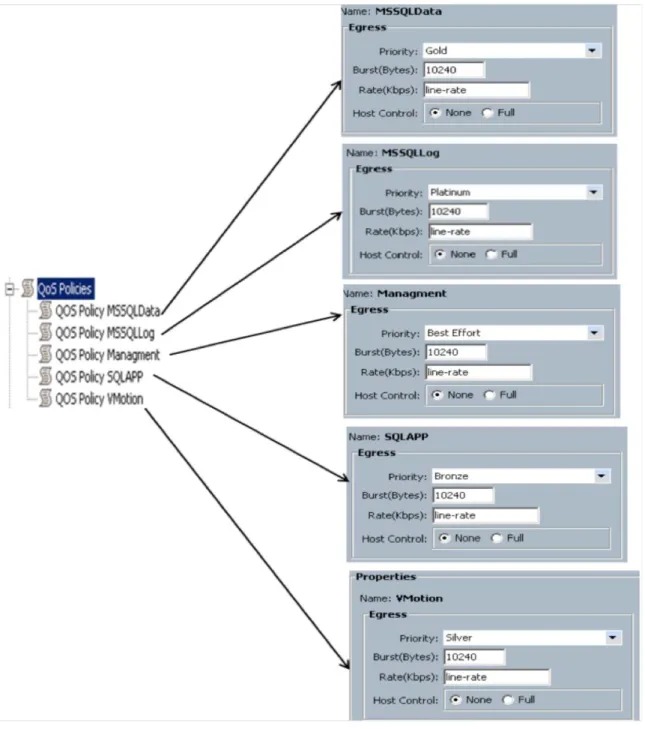
● iSCSI storage traffic requires high bandwidth and a fast response time to access Microsoft SQL Server log data in the shared storage. To meet this requirement, a SQLLog QoS policy is created and defined with the Platinum class with the highest weight (bandwidth) and a maximum transmission unit (MTU) of 9000 for handling Microsoft SQL Server log transactions, which have a sequential I/O access pattern.
● To handle Microsoft SQL Server database data traffic, which have a more random I/O pattern and are less I/O intensive than log traffic, a SQLDB QoS policy is created with the Gold class with the second highest weight (bandwidth) and an MTU of 9000 to handle iSCSI packets.
● To handle VMware vMotion kernel traffic across a VMware ESX cluster during dynamic resource scheduler or manual intervention, VMware ESX requires dedicated network bandwidth for copying virtual machine active memory data. To meet this requirement, SQLVMotion QoS policy is created and is defined with the Silver class and with the third highest weight (bandwidth) and an MTU of 9000 to handle jumbo VMkernel packets from vNICs (static) in the service profiles in which the VMware ESX host is installed, which is a part of the VMware ESX host-based iSCSI environment.
● To handle Microsoft SQL Server application data traffic from clients on the network that are not I/O intensive compared to Microsoft SQL Server database data and log traffic and VMware vMotion traffic, a Bronze QoS class with the fourth highest weight (bandwidth) is defined on Cisco UCS.
● To handle VMware ESX host and guest virtual machine network traffic for management and operations that have lower bandwidth requirements, the Best-Effort QoS class with the least weight (bandwidth) is defined on Cisco UCS.
Note: To apply QoS across the entire system, from Cisco UCS to the upstream switches (Cisco Nexus 5548UP Switches), you need to configure similar QoS class and policy types with the right class-of-service (CoS) values that match the Cisco UCS QoS classes.
For more information, refer the Cisco Nexus QoS guide available at
http://www.cisco.com/en/US/docs/switches/datacenter/nexus5000/sw/qos/Cisco_Nexus_5000_Series_NX-OS_Quality_of_Service_Configuration_Guide_chapter3.html - con_1150612.
Table 5 shows each QoS policy name with the corresponding priority, weight, and MTU value. These values are applied to static and dynamic vNICs in the Microsoft SQL Server deployment environment.
Table 5. Cisco UCS QoS Policy
Policy Name Priority Weight (Percentage) MTU
MSSQLLog Platinum 10 9000
MSSQLData Gold 9 9000
VMotion Silver 8 9000
SQLAPP Bronze 7 9000
Management Best Effort 5 1500
Figure 10 shows Cisco UCS QoS system class and QoS policy configurations defined for application on static and dynamic vNICs for accessing a Microsoft SQL Server iSCSI network.
Figure 10. Cisco UCS QoS System Class and QoS Policy Configuration Window
Figure 11. Applying Priority Classes to QoS Policy in Cisco UCS Manager
Table 6 shows Cisco UCS and Cisco Nexus 5548UP QoS mapping, with Cisco UCS QoS policy configuration values matched with Cisco Nexus 5548UP QoS policy values to achieve end-to-end QoS.
On the Cisco Nexus 5548UP, a single policy type map is defined with multiple class types, with Cisco UCS QoS matching configuration values that are applied on the global system level.
Table 6. Cisco UCS and Cisco Nexus 5548UP QoS Mapping
Cisco UCS QoS Cisco Nexus 5548UP QoS
Policy Name Priority MTU CoS Class Type: Network QoS and QoS Policy Type: Network QoS and QoS MSSQLLog Platinum 9000 5 Network QoS: MTU 9000 and CoS 5
QoS: QoS group 5
Cisco UCS Nexus 5548UP QoS
MSSQLData Gold 9000 4 Network QoS: MTU 9000 and CoS 4 QoS: QoS group 4
VMotion Silver 9000 2 Network QoS: MTU 9000 and CoS 2 QoS: QoS group 2
SQLAPP Bronze 9000 1 Network QoS: MTU 9000 and CoS 1 QoS: QoS group 1
Management Best Effort 1500 Any Network QoS: MTU 1500
For more information about configuration details, see
http://www.cisco.com/en/US/docs/switches/datacenter/nexus5000/sw/qos/Cisco_Nexus_5000_Series_NX-OS_Quality_of_Service_Configuration_Guide_chapter3.html - con_1150612.
NetApp Storage Configuration Overview
This section discusses NetApp storage layout design considerations required when deploying a Microsoft SQL Server 2012 database on a VMware ESX hypervisor on Cisco UCS in an iSCSI network environment.
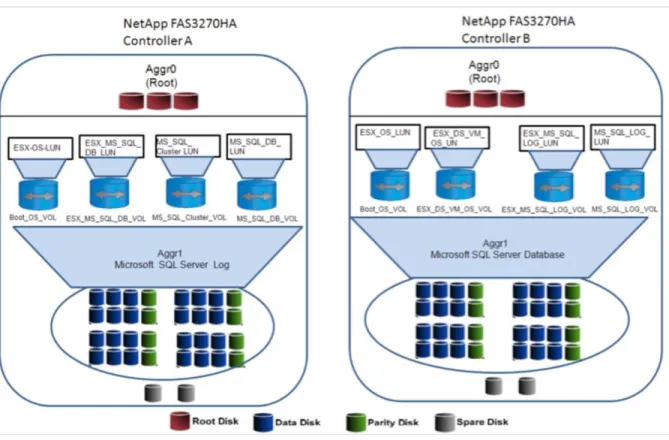
Figure 12 shows a high-level storage design overview on a NetApp FAS3270 cluster storage system. Figure 12. Design Overview on a NetApp Storage Cluster
The NetApp aggregation layer provides a large virtualized pool of storage capacity and disk IOPS to be used on demand by all the virtual machines hosted on the aggregation layer. The aggregation-layer sizing is based on the storage requirements for Microsoft SQL Server data and log files to meet the storage capacity, performance, and snapshot backup requirements of an assumed workload. When sizing your environment, you need to perform the necessary planning to determine the exact storage configuration to meet your individual requirements. Aggregation layer 0 (Aggr0) is defined for hosting root NetApp Flexible Volumes (FlexVols), which use the NetApp ONTAP operating system for handling NetApp storage configurations. For detailed NetApp storage command options, see
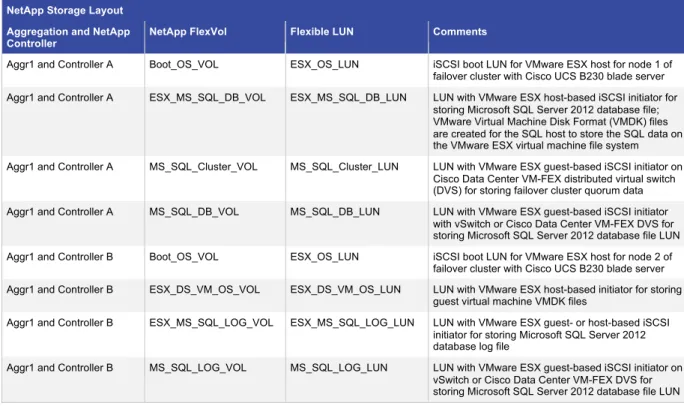
http://now.netapp.com/NOW/public/knowledge/docs/ontap/rel732/pdfs/ontap/210-04499.pdf. Table 7 shows the NetApp storage layout with volumes and LUNs created for various purposes. Table 7. NetApp Storage Layout with Volumes and LUNs
NetApp Storage Layout Aggregation and NetApp
Controller NetApp FlexVol Flexible LUN Comments
Aggr1 and Controller A Boot_OS_VOL ESX_OS_LUN iSCSI boot LUN for VMware ESX host for node 1 of failover cluster with Cisco UCS B230 blade server Aggr1 and Controller A ESX_MS_SQL_DB_VOL ESX_MS_SQL_DB_LUN LUN with VMware ESX host-based iSCSI initiator for
storing Microsoft SQL Server 2012 database file; VMware Virtual Machine Disk Format (VMDK) files are created for the SQL host to store the SQL data on the VMware ESX virtual machine file system Aggr1 and Controller A MS_SQL_Cluster_VOL MS_SQL_Cluster_LUN LUN with VMware ESX guest-based iSCSI initiator on
Cisco Data Center VM-FEX distributed virtual switch (DVS) for storing failover cluster quorum data Aggr1 and Controller A MS_SQL_DB_VOL MS_SQL_DB_LUN LUN with VMware ESX guest-based iSCSI initiator
with vSwitch or Cisco Data Center VM-FEX DVS for storing Microsoft SQL Server 2012 database file LUN Aggr1 and Controller B Boot_OS_VOL ESX_OS_LUN iSCSI boot LUN for VMware ESX host for node 2 of
failover cluster with Cisco UCS B230 blade server Aggr1 and Controller B ESX_DS_VM_OS_VOL ESX_DS_VM_OS_LUN LUN with VMware ESX host-based initiator for storing
guest virtual machine VMDK files
Aggr1 and Controller B ESX_MS_SQL_LOG_VOL ESX_MS_SQL_LOG_LUN LUN with VMware ESX guest- or host-based iSCSI initiator for storing Microsoft SQL Server 2012 database log file
Aggr1 and Controller B MS_SQL_LOG_VOL MS_SQL_LOG_LUN LUN with VMware ESX guest-based iSCSI initiator on vSwitch or Cisco Data Center VM-FEX DVS for storing Microsoft SQL Server 2012 database file LUN
Use the following commands to configure NetApp cluster storage systems on the storage controllers to implement the storage layout design described here. To run these commands, log into the storage controller through the CLI using SSH.
NetApp FAS3270HA (Controller A)
● The following command creates Aggr1 with a RAID group size of 10, 50 disks, and RAID_DP redundancy for hosting NetApp FlexVols and LUNs as shown in Table 7.
FAS3270HA-Controller A> aggr create aggr1 -t raid_dp -r 10 50
● The following commands create NetApp FlexVols on Aggr1 for hosting iSCSI LUNs as described in Table 7. These volumes are exposed to VMware ESX host and guest virtual machines for Microsoft SQL Server operations.
FAS3270HA-Controller A> vol create Boot_OS_VOL aggr1 50g
FAS3270HA-Controller A> vol create MS_SQL_Cluster_VOL aggr1 150g FAS3270HA-Controller A> vol create MS_SQL_DB_VOL aggr1 150g
● The following commands create LUNs on NetApp FlexVols for hosting Microsoft SQL Server database and log files.
FAS3270HA-Controller A> lun create –s 40g –t vmware /vol/Boot_OS_VOL/ESX_OS_LUN FAS3270HA-Controller A> lun create –s 100g –t vmware /vol/
ESX_MS_SQL_DB_VOL/ESX_MS_SQL_DB_LUN
FAS3270HA-Controller A> lun create –s 100g –t vmware /vol/MS_SQL_Cluster_VOL/MS_SQL_Cluster_LUN
FAS3270HA-Controller A> lun create –s 100g –t vmware /vol/MS_SQL_DB_VOL/MS_SQL_DB_LUN
● The following commands create an initiator group (igroup) for mapping the VMware ESX host boot LUN and Microsoft SQL Server database data and log LUNs.
FAS3270HA-Controller A> igroup create –I –t vmware iSCSI-ESX –Boot iqn.2012-01.com.vmware:ESX
FAS3270HA-Controller A> igroup create –I –t vmware ESX-MS-SQL-Node iqn.1991-05.com.microsoft:VM
● The following commands map LUNs to specific igroups to access the VMware ESX host boot LUN and Microsoft SQL Server database data and log LUNs.
FAS3270HA-Controller A>
lun map /vol/Boot_OS_VOL/ESX_OS_LUN iSCSI-ESX-Boot FAS3270HA-Controller A>
lun map /vol/ESX_MS_SQL_DB_VOL/ESX_MS_SQL_DB_LUN ESX-MS-SQL-Node FAS3270HA-Controller A>
lun map /vol/MS_SQL_Cluster_VOL/MS_SQL_Cluster_LUN ESX-MS-SQL-Node FAS3270HA-Controller B>
lun map /vol/ MS_SQ_DB_VOL/MS_SQL_DB_LUN ESX-MS-SQL-Node
After successfully running these commands, you can verify the storage configuration using the NetApp Filter view, as shown in Figure 13.
Figure 13. Verification of Storage Configuration
NetApp FAS3270HA (Controller B)
● The following command creates Aggr1 with a RAID group size of 10, 50 disks, and RAID_DP redundancy for hosting NetApp FlexVols and LUNs as shown in Table 7.
FAS3270HA-Controller B> aggr create aggr1 -t raid_dp -r 10 50
● The following commands create NetApp FlexVols on Aggr1 for hosting iSCSI LUNs as described in Table 7. These volumes are exposed to VMware ESX host and guest virtual machines for Microsoft SQL Server operations.
FAS3270HA-Controller B> vol create Boot_OS_VOL aggr1 50g FAS3270HA-Controller B> vol create ESX_DS_VM_OS_VOL aggr1 150g FAS3270HA-Controller B> vol create ESX_MS_SQL_LOG_VOL aggr1 150g FAS3270HA-Controller B> vol create MS_SQL_LOG_VOL aggr1 50g
● The following commands create LUNs on NetApp FlexVols for hosting Microsoft SQL Server database and log files.
FAS3270HA-Controller B>
lun create –s 30g –t vmware /vol/Boot_OS_VOL/ESX_OS_LUN FAS3270HA-Controller B>
lun create –s 100g –t vmware /vol/ESX_DS_VM_OS_VOL/ESX_DS_VM_OS_LUN FAS3270HA-Controller B>
lun create –s 100g –t vmware /vol/ESX_MS_SQL_LOG_VOL/ESX_MS_SQL_LOG_LUN FAS3270HA-Controller B>
lun create –s 5g –t vmware /vol/MS_SQL_LOG_VOL/MS_SQL_LOG_LUN
● The following commands create an igroup for mapping the VMware ESX host boot LUN and Microsoft SQL Server database data and log LUNs.
FAS3270HA-Controller B> igroup create –I –t vmware iSCSI-ESX –Boot iqn.2012-01.com.vmware:ESX
FAS3270HA-Controller B> igroup create –I –t vmware ESX-MS-SQL-Node iqn.1991-05.com.microsoft:VM
● The following commands map LUNs to specific igroups to access the VMware ESX host boot LUN and Microsoft SQL Server database data and log LUNs.
FAS3270HA-Controller B>
lun map /vol/Boot_OS_VOL/ESX_OS_LUN iSCSI-ESX-Boot FAS3270HA-Controller B>
lun map /vol/ESX_DS_VM_OS_VOL/ESX_DS_VM_OS_LUN iSCSI-ESX-Boot FAS3270HA-Controller B>
lun map /vol/ESX_MS_SQL_LOG_VOL/ESX_MS_SQL_LOG_LUN ESX-MS-SQL-Node FAS3270HA-Controller B>
lun map vol/ MS_SQL_LOG_VOL/MS_SQL_LOG_LUN ESX-MS-SQL-Node
After successfully running these commands, you can verify the storage configuration using the NetApp Filter view, as shown in Figure 14.
Figure 14. Verification of Storage Configuration
NetApp Multimode Virtual Interfaces
The NetApp multimode virtual interface (VIF) feature is enabled on NetApp storage systems on 10 Gigabit Ethernet ports for configuring the iSCSI target through which LUNs are exposed over the iSCSI protocol to host iSCSI initiators (VMware ESX host and guest virtual machines).
Figure 15 shows an iSCSI vPC-enabled network design on Cisco Nexus 5548UP and NetApp FAS3270HA Controllers A and B to access a Microsoft SQL Server data network.
Figure 15. iSCSI vPC Enabled on Cisco Nexus 5548UP
The vPC design layout for Cisco Nexus 5548UP Switches and corresponding NetApp cluster storage system multimode VIFs is as follows:
● Cisco Nexus 5548UP Application 1 and Cisco Nexus 5548UP Application 2 are part of the vPC domain and have two vPCs: vPC iSCSI Storage 1 and vPC iSCSI Storage 2 as described in the above.
● vPC iSCSI Storage 1 has NetApp FAS3270HA (Controller A) 10 Gigabit Ethernet Interfaces e1b and e1c as member ports and is connected to Cisco Nexus 5548UP Application 1 and Cisco Nexus 5548UP
Application 2 switches.
● vPC iSCSI Storage 2 has NetApp FAS3270HA (Controller B) 10 Gigabit Ethernet Interfaces e1b and e1c as member ports and is connected to Cisco Nexus 5548UP Application 1 and Cisco Nexus 5548UP
Application 2 vPC switches.
● On NetApp FAS3270HA (Controller A) multilevel dynamic VIF, iSCSI A is created on 10 Gigabit Ethernet Interfaces e1b and e1c and has the MTU set to 9000 with jumbo frames enabled for accessing storage using the iSCSI protocol. VIF iSCSI A is configured with cluster failover enabled on the VIF, and the iSCSI B VIF IP address is set on NetApp FAS3270HA (Controller B).
● On NetApp FAS3270HA (Controller B), multilevel dynamic VIF iSCSI B is created on 10 Gigabit Ethernet Interfaces e1b and e1c and has the MTU set to 9000 with jumbo frame enabled for accessing storage using the iSCSI protocol. VIF iSCSI B ifys configured with cluster failover enabled on the VIF, and the iSCSI A VIF IP address is set on NetApp FAS3270HA (Controller A),
● On NetApp FAS3270HA (Controllers A and B), iSCSI is enabled on e1b and e1c 10 Gigabit Ethernet interfaces for accessing storage through the iSCSI protocol from the VMware ESX host or guest virtual machine–level software initiator.
Note: Note: On the Cisco Nexus 5548UP upstream switch, ensure that the correct QoS class and MTU value with policy types are applied to the Port Channel Ports (eth19 and eth 20). Port channels are connected to the NetApp FAS3270HA (Controllers A and B), 10 Gigabit Ethernet interfaces (e1b and e1c), to allow network packets to be tagged from Nexus 5548 fabric. This is done because NetApp Storage will not tag any network packets with MTU and QoS values.
Following commands shows how to configure the COS on Nexus 5548 for untagged packets originating from storage on the Port Channels.
CiscoNexus5548UPApplication1
Switch# Configure Terminal
Switch(Conf)# Interface port channel 103 Switch(Conf-if)#untagged cos 5
Switch# sh policy-map type qos Switch# Configure Terminal
Switch(Conf)# Interface port channel 104 Switch(Conf-if)#untagged cos 4
Switch# sh policy-map type qos
CiscoNexus5548UPApplication2
Switch# Configure Terminal
Switch(Conf)# Interface port channel 103 Switch(Conf-if)#untagged cos 5
Switch# sh policy-map type qos Switch# Configure Terminal
Switch(Conf)# Interface port channel 104 Switch(Conf-if)#untagged cos 4
Switch# sh policy-map type qos
For more information, see
http://www.cisco.com/en/US/docs/switches/datacenter/nexus5000/sw/qos/Cisco_Nexus_5000_Series_NX-OS_Quality_of_Service_Configuration_Guide_chapter3.html.
NetApp VIF Configuration Details
The following are the NetApp CLI commands for configuring the multilevel dynamic VIF on NetApp FAS3270HA (Controllers A and B) cluster storage systems.
NetApp FAS3270HA (Controller A)
FAS3270HA-Controller A> iscsi start
FAS3270HA-Controller A > ifgrp create lacp iscsiA FAS3270HA-Controller A > ifgrp add iscsiA e1a e1b
FAS3270HA-Controller A > ifconfig iscsiA mtusize 9000 192.191.1.2 netmask 255.255.255.0 partner iscsiB up
NetApp FAS3270HA (Controller B)
FAS3270HA-Controller B> iscsi start
FAS3270HA-Controller B > ifgrp create lacp iscsiA FAS3270HA-Controller B > ifgrp add iscsiA e1a e1b
FAS3270HA-Controller B > ifconfig iscsiB mtusize 9000 192.191.1.3 netmask 255.255.255.0 partner iscsiA up
Make sure that the MTU is set to 9000 and that jumbo frames are enabled on the Cisco UCS static and dynamic vNICs and on the upstream Cisco Nexus 5548UP Switches.
VMware ESX iSCSI Boot
This section describes the Cisco UCS service profile design for deploying the VMware ESX iSCSI boot OS from the NetApp shared iSCSI target on the Cisco UCS B-Series server. In this deployment, the Cisco UCS M81KR VIC is used for iSCSI SAN bootup of the VMware ESX OS from the NetApp iSCSI target.
The following steps show the basic configuration on the service profile to enable VMware ESX 5.0 iSCSI SAN bootup on the Cisco UCS B230 blade server from the NetApp iSCSI target. For more information about the configuration steps for deploying VMware ESX iSCSI bootup, see the Cisco UCS CLI and GUI detailed configuration steps at
http://www.cisco.com/en/US/docs/unified_computing/ucs/sw/cli/config/guide/2.0/b_UCSM_CLI_Configuration_Guid e_2_0.pdf.
1. Create service profiles ESX-VMDirectPath-SQL and ESX-VMDirectPath-SQL1 and associate them with Cisco B230 blades using the Cisco UCS M81KR VIC to install VMware ESX 5.0 from the iSCSI target on the NetApp FAS3270. Figure 16 shows the creation of these service profiles.
Figure 16. Creating Service Profiles
2. On the Service Profiles tab for the newly created service profiles, create two static vNICs, vNIC2 and vNIC3, on Fabric A and Fabric B, respectively, with the MTU value set to 9000, without fabric failure and network VLAN access to VLAN ID 192 (iSCSI storage), as shown in Figure 17.
Figure 17. Creating Static vNICs on Fabric Interconnects
3. To access VMware ESX for management purpose, create two separate static vNICs (vNIC0 and vNIC1) with the appropriate VLAN ID. These vNICs will provide uplinks to the VMware ESX vSwitch and Cisco Data Center VM-FEX DVS, explained in the section below.
4. On the desired service profile, create two iSCSI vNICs, iscsi and iscsi0, which are required to access the NetApp storage iSCSI target during iSCSI bootup to load the VMware ESX operating system over the iSCSI network. Make sure that the iSCSI vNIC iscsi is overlaid on static vNIC vNIC2, and that iscsi0 is overlaid on static vNIC vNIC3, as shown in Figure 18.
Figure 18. iSCSI vNICs Overlaid on Static vNICs
For the Cisco UCS M81KR VIC, make sure that the MAC address is marked “Derived” and that the correct VLAN ID (192) is chosen to access the NetApp iSCSI target during VMware ESX iSCSI bootup.
5. In Cisco UCS Manager, create a new iSCSI boot policy, MSSQL-iSCSI-Boot, with iSCSI vNIC iscsi as a primary path and iscsi0 as a secondary path to provide redundancy during VMware ESX host iSCSI bootup in case of software or hardware faults. Figure 19 shows the boot policy configuration.
Figure 19. New iSCSI Boot Policy in Cisco UCS Manager
6. After the iSCSI Boot policy is created, choose a newly created boot order policy for the desired service profile. For the chosen service profile on the Cisco UCS Manager Boot Order tab, assign iscsi as the primary iSCSI vNIC and iscsi0 as the secondary iSCSI vNIC with VMware ESX iSCSI boot parameters as shown in Table 8 and Figure 20.
Table 8. iSCSI Boot Parameters iSCSI vNIC
Name iSCSI Initiator iSCSI Qualified Name (IQN) Initiator IP Address Policy Initiator IP Address iSCSI Target IQN iSCSI Port iSCSI Target IP Address LUN ID iscsi
iqn.2012-01.com.vmware.ESX5i Static 192.191.1.5 iqn.1992-08.com.netapp.sn: 1574126331
3260 192.191.1.2 0
iscsi0
iqn.2012-01.com.vmware.ESX5i Static 192.191.1.6 iqn.1992-08.com.netapp.sn: 1574126331
Figure 20. Setting iSCSI Boot Parameters
7. Associate the service profile with the desired blade (Cisco UCS B230 in this case). On Cisco UCS in the associated service profile, launch the keyboard, video, and mouse (KVM) console. Through the virtual media interface, map the VMware ESX 5.0 ISO image and install the operating system on the iSCSI boot LUN exposed over the iSCSI network.
For more information about installing the OS in the iSCSI boot LUN, see
http://www.cisco.com/en/US/products/ps10281/products_installation_and_configuration_guides_list.html. 8. After the completion of the VMware ESX 5.0 iSCSI OS boot installation and VMware ESX 5.0 iSCSI bootup,
on the VMware ESX console press the F2 key to configure the management network. Under the Network Adapters option, select static vNICs vNIC1 and vNIC2 as uplinks for the default VMware ESX vSwitch named iSCSIBoot vSwitch, as shown in Figure 21.
Figure 21. Configuring Network Management
9. Under the IP Configuration option, configure the management IP address on VLAN 108 on the VMkernel management port group. Note that by default the IP address is set to the iSCSI vNIC IP address (VLAN ID 192). Figure 22 shows the management IP address configuration details.
Figure 22. Management IP Configuration Details
With these steps, VMware ESX 5.0 installation is completed with the iSCSI boot LUN configured on the NetApp FAS3270.
Microsoft SQL Deployment Overview
This section describes various iSCSI network topologies available to deploy a Microsoft SQL Server 2012 single-host database installed on a Microsoft Windows 2008 R2 guest virtual machine on the VMware ESX 5.0 hypervisor on a Cisco UCS B-Series server connected to the NetApp iSCSI storage over an iSCSI network as described in the section Cisco UCS and Storage iSCSI Network.
This section also discusses three scenarios for accessing storage through the iSCSI protocol for Microsoft SQL Server 2012 on a Microsoft Windows 2008 R2 guest virtual machine hosted by the VMware ESX 5.0 hypervisor:
● Guest-based iSCSI initiator on Cisco Data Center VM-FEX DVS ● VMware ESX host-based iSCSI initiator on VMware ESX vSwitch ● Guest-based iSCSI initiator on VMware ESX vSwitch
Guest-Based iSCSI initiator on Cisco Data Center VM-FEX DVS
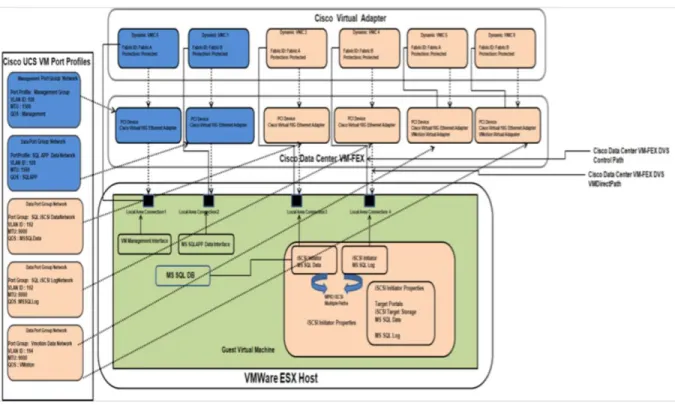
This section describes a Microsoft SQL Server single-host deployment in a VMware ESX environment using a Cisco Data Center VM-FEX DVS for accessing shared NetApp storage over the iSCSI protocol.
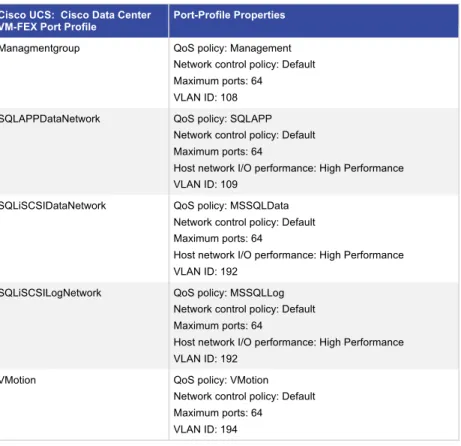
Cisco Data Center VM-FEX is a software DVS that can be used in the VMware ESX environment to provide better visibility and manageability and allow hypervisor VMware VMDirectPath I/O, which provides wire-speed 10-Gbps capability to the guest virtual machine while running I/O-intensive applications.