Aaron T. Brubaker. Faculty perceptions of the impact of student laptop use in a wireless Internet environment on the classroom learning environment and teaching. A Master’s Paper for the M.S. in I.S degree. November, 2006. 104 pages. Advisor: Deborah Barreau
This study examines faculty perceptions of the impact of wireless laptops in the higher education classroom. A survey comprising Likert-scale and open-ended questions was administered to faculty members at a large public university. Survey questions focused on faculty perceptions of the impact of wireless laptops on the classroom atmosphere and their teaching. Depending on the context of use, respondents pointed to numerous ways in which laptops have enabled them to incorporate new information sources, engage students, and add activities to enhance classroom learning. A majority of respondents, however, indicated that students are likely to become distracted when using wireless laptops and that student participation in discussions can be negatively impacted. A majority also indicated that they would make use of an option to turn off Internet access in their classrooms.
Headings:
Classroom dynamics
Wireless laptops
Multitasking
Millennial students
Faculty perceptions
ENVIRONMENT AND TEACHING
by
Aaron T. Brubaker
A Master’s paper submitted to the faculty of the School of Information and Library Science of the University of North Carolina at Chapel Hill
in partial fulfillment of the requirements for the degree of Master of Science in
Information Science.
Chapel Hill, North Carolina November 2006
Approved by
TABLE OF CONTENTS
LIST OF FIGURES ... 2
INTRODUCTION TO STUDY... 3
LITERATURE REVIEW ... 7
METHODOLOGY ... 33
RESULTS ... 36
DISCUSSION ... 77
CONCLUSION... 87
REFERENCES ... 89
APPENDIX A: SURVEY QUESTIONS... 98
LIST OF FIGURES
Figure 1. Sex of participant... 37
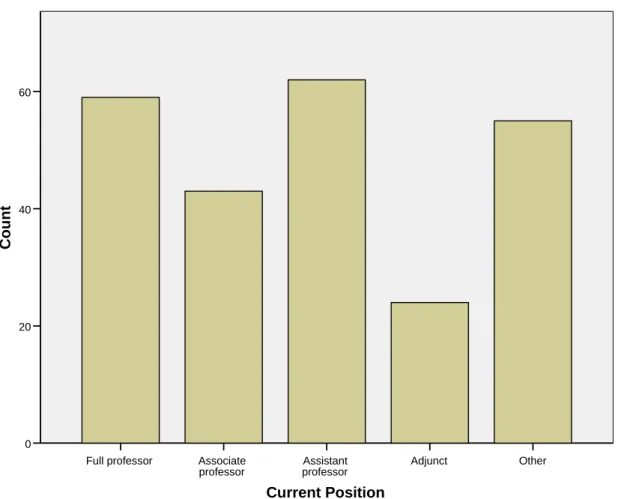
Figure 2. Current teaching position ... 38
Figure 3. Age of respondent... 39
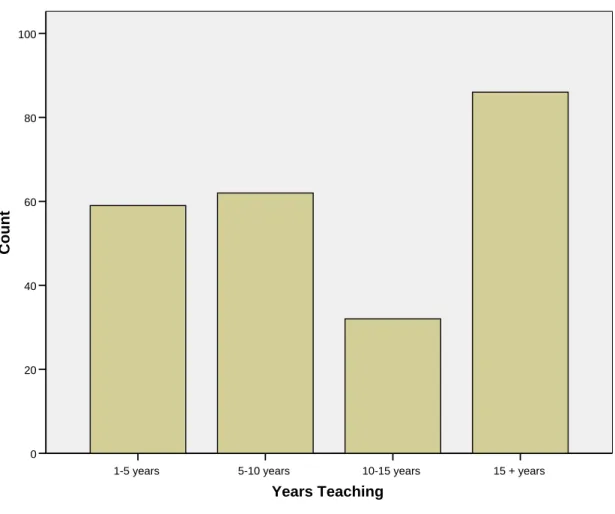
Figure 4. Years teaching in higher education ... 40
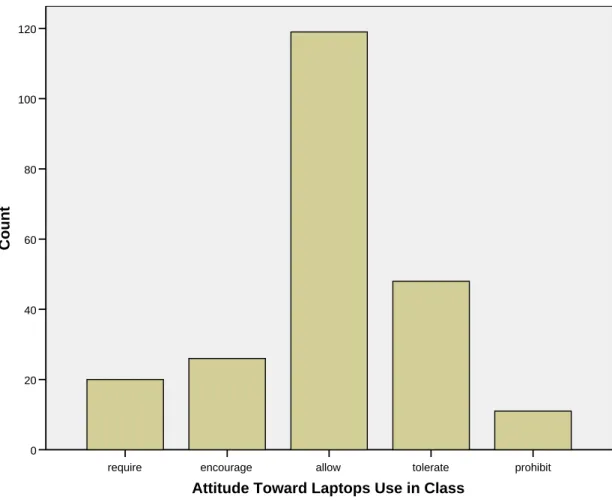
Figure 5. Approach to student use of laptops ... 41
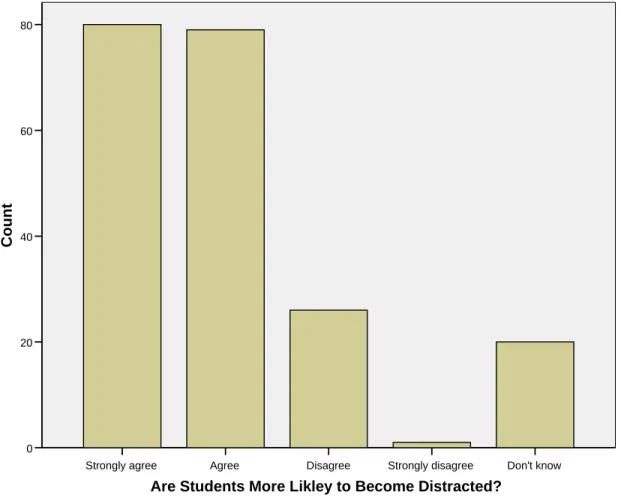
Figure 6. Are students more likely to become distracted?... 42
Figure 7. I have a good idea what students are doing... 43
Figure 8. Participation in class discussion increases ... 44
Figure 9. Instructors should have the option to prohibit laptop use... 45
Figure 10. I would make use of the ability to turn off Internet access ... 46
Figure 11. In which situations would you turn off or restrict Internet access?... 47
Figure 12. The ability to turn off Internet access would improve participation ... 48
INTRODUCTION TO STUDY
Although the professor did not say anything humorous, a broad smile appears on the face of a student in the third row. Peering at her laptop, she quickly types a reply to the instant message she just received from a friend. Behind her, another student is shopping online for an external hard drive for his computer. A few desks away, a third student toggles between the class’s PowerPoint presentation, his OneNote note-taking software, and his open email client.
This scene plays out daily in classrooms nationwide at universities that have embraced laptops and campus-wide wireless internet access. As universities continue to expand their wireless networks, many institutions, such as the University of North
Carolina at Chapel Hill, have made laptop ownership required for all students. Anecdotal information suggest that there are important benefits to laptop use and Internet access in the classroom, such as the ability to conduct a quick fact check or immediately
supplement class information with an online reference. Likewise, new note-taking software allows students to quickly and easily include class PowerPoint slides, audio recordings, drawings, and annotations in notes typed into a laptop. What is more, full-text searching of those notes can aid in later studying for exams.
Enthusiasm for wireless laptops in the classrooms has been tempered recently by a growing concern that wireless laptops distract students’ attention, diverting their focus away from class. As wireless technologies are more widely deployed in campus
engagement due to laptop use. Recent media reports describe faculty members who have banned laptops from their classrooms or departments that have installed Internet “kill switches” in classrooms in an effort to wrestle students’ attention away from the Internet and back to the instructor (Cohen, 2006; McWilliams, 2005).
In an effort to understand the impact of laptops in the higher education classroom setting, this study investigates faculty reactions to students’ use of laptops and the impact of laptops on their teaching and the classroom dynamic. An online survey consisting of multiple choice and open-ended questions was issued to all faculty at the University of North Carolina at Chapel Hill (UNC-CH). A total of 244 responses were received. The purpose of this survey was to gauge faculty reactions to and perceptions of this issue. Feedback was solicited from instructors, as their day-to-day work gives them a unique and proximal perspective on the impact of laptop use in the classroom. By focusing in on the classroom environment, this study seeks to better understand how the growing
presence of wireless laptops impacts and mediates student-instructor relationships, teaching and learning practices, and overall classroom dynamics. Results from this study may benefit administrators, staff, and faculty at other institutions considering laptop initiatives or the expansion of their wireless infrastructures.
This study focuses on the use of mobile wireless laptops in the college classroom. Mobile wireless computers, commonly called wireless laptops, are the most popular mobile wireless technologies used in higher education (Kim, Mims & Holmes, 2006). Unlike wired laptops that use an Ethernet card and cable, wireless laptops use a wireless network interface card to connect to a network. These cards typically use a low
classrooms. The WAPs are connected to the campus wired-network. While WAPs typically transmit data at a slower speeds than wired networks, they are able to support many simultaneously users (Kim et al., 2006).
Despite the technology push on campuses nation-wide, and the near universal support of laptop programs, the impact of wireless laptops in the classroom is under-investigated. A number of scholars have cited the need for further research on computer use in educational settings (Jones, 2002; Kim et al., 2006; Shim & Shim, 2001; Tao, 2003; Zucker, 2004). No published studies have specifically investigated faculty perceptions of the impact of students’ laptop use in the university classroom. In particular, the issue of student distraction caused by laptop use requires further examination. This study begins to fill this gap by gathering and reporting on faculty opinions and perspectives.
To provide a backdrop for this study, the literature review will examine the current state of laptop use on U.S. university campuses and at UNC-CH particular. Recent studies examining how students make use of computer technology will be reviewed along with previous research on the impact of laptops on academic
performance. Because there is relatively little research investigating laptop use in the college and university classroom, this study will also discuss research on related subjects, including multitasking and Millennial student learning styles.
students, known alternatively as “Millennials”, “Digital Natives” (Prensky, 2001a) or members of the “Net Generation” (Tapscott, 1998), have grow up in technology-rich environments and exhibit different technology use and information seeking behaviors as compared to previous generations. The literature review will also provide a brief
description of the laptop program at the University of North Carolina at Chapel Hill. Finally, recent firsthand accounts from faculty members nation-wide regarding their reactions to students’ use of laptops in their classroom are also examined.
Following the literature review, the study’s data collection and analysis
methodology will be discussed. Results and conclusions are then presented. From the collection and analysis of faculty responses, this study exposes important concerns to be addressed and helps paint a clearer picture of current classroom practices and perceptions of how laptops can help or hinder the educational pursuits of today’s college and
LITERATURE REVIEW
Over the last decade, advances in technology have brought significant changes to higher education classrooms. Tools used by instructors, such as overhead transparency machines and chalkboards, have largely been replaced by computers and projectors. Students who have traditionally brought pens, pencils, and notebooks are increasingly bringing their own wireless laptops to class. Whereas instructors previously had control over all of the technology in the classroom, the presence of student laptops adds a new element to the mix of classroom focal points. Expanding wireless networks and laptop ownership are changing the nature of work, study, communication, recreation,
collaboration, and knowledge sharing on college and university campuses. As the boundaries of where students can learn, research, and collaborate are dissolving, college students have quickly come to expect wireless Internet access in classrooms, dormitories, and open spaces.
This review of the literature will cover a) current trends in computer and Internet use, b) the effects of multitasking, c) characteristics of today’s Millennial students, d) a brief history of the laptop program at the University of North Carolina at Chapel Hill, and e) recent reports on the reaction of U.S. higher education faculty and administrators to students’ use of wireless laptops in the classroom.
Backdrop: Internet use by students in higher education
two-thirds (68.8%) of campuses surveyed had a strategic plan for deploying wireless networks as of fall of 2006. That figure is up from 64% in 2005, 55.5% in 2004, and 24.3% in 2001. Over one-fourth (28.9%) of campuses reported “full-campus” wireless services in 2005 (Green, 2005), up from 19.8% in 2004. In 2006 wireless networks reached 51.2% of college classrooms, up from 42.7% in 2005 and 31.1% in 2004 (Green, 2006). Private universities lead other institutions with 58.0% of classrooms equipped with wireless service. Public universities have covered approximately 56% of their classrooms with wireless access and community colleges follow at 31.7% (Green, 2006). This trend reflects a concerted effort by institutions of higher education to make their campuses competitive, and their students technology-savvy. Wireless networks save money on cabling costs and are easier than wired networks to install, operate, and maintain (Tao, 2003). Furthermore, by requiring students to purchase laptops, colleges and universities are able to save money on fixed computer labs and multimedia classrooms (Olsen, 2001). According to some counts, there are over 200 colleges and universities with some form of laptop initiative (Brown, 2005).
environment appears to be a staple of a student’s educational experience, using the Internet to research, gather information, and communicate with others. Some of the Pew study’s key findings are as follows:
Nearly four-fifths of college students (79%) agree that Internet use has had a positive impact on their college academic experience.
Almost half (46%) of college students agree that email enables them to express ideas to a professor that they would not have expressed in class, but, some interactions are still primarily face-to-face: Only 19% of students said they communicate more with their professors via email than they do face-to-face.
Nearly three-quarters (73%) of college students say they use the Internet more than the library, while only 9% said they use the library more than the Internet for information searching.
About half of all college students (48%) are required to use the Internet to contact other students in at least some of their classes.
Two-thirds (68%) of college students reported subscribing to one of more
academic-oriented mailing lists that relate to their studies. They use these lists to carry on email discussions about topics covered in their classes.
More than half (58%) of college students have used email to discuss or find out a grade from an instructor.
Nearly two-thirds (65%) of college students who email professors say they report absences via email.
Three-quarters (74%) of college students us the Internet four or more hours per week, while about one-fifth (19%) uses it 12 or more hours per week. This is somewhat higher than the amount of time most students devote to studying (Jones, p. 2).
Taken together, these figures paint a picture of college student life in which computers are common place and utilizing online sources and services is almost second nature.
activity was continually monitored and time stamped for a period of seven to nine days and the resulting log files were collated for analysis. The researchers found that across the period from midday until late evening there is, on average, almost a 60% chance that students will be making use of their computer. Using the system log files, the study authors identified significant multitasking and estimated that actual work-to-recreational use ratio for computer use was 20% to 80%. Referring to the university’s intention to increase student access to academic resources by supplying broadband Internet access, the study noted:
...the good intention may be upset by the student being too susceptible to powerful alternative pathways-once the working environment of the computer is active. It would seem that any hijacking of the study agenda has more to do with the strongly interactive affordances of those applications that overlap with or that occupy the same working space as the tools needed for studying. (Crook & Barrowcliff, 2001, p. 254)
Computer games are another common pastime for many of today’s students. Jones (2003) found that college students comprise an active gaming community. A survey of 1,162 traditional college students at 27 colleges and universities found that among self-identified computer gamers, almost half (48%) agreed that gaming keeps them from studying “some” or “a lot.” Nine percent admitted that their motivation for playing a game was to avoid studying. College student gamers, however, reported approximately the same amount of time spent studying per week as college students in general. Almost a third of students surveyed admitted to playing games that were not part of the instructional activities during classes.
problematic and unintended consequence of the wide-spread provision of Internet access. Kubey, Lavin & Barrows (2001) examined recreational-only Internet use by 576 college students at Rutgers University. The self-report study found 9.23% of the sample agreed that they might have become “a little psychologically dependent on the Internet” (p. 370). Within that group, Internet use was over twice as high as that of the total sample. In response to the question “About how often has your schoolwork been hurt because of the time you spend on the Internet,” 14% of students reported that their schoolwork had been
hurt “occasionally, frequently, or very frequently due to Internet use” (p. 374). The study authors point out, however, that “it is not entirely clear whether these students might have experienced similar or related problems without the Internet” (p. 390). Twenty percent reported that they had occasionally, frequently, or very frequently missed class because of their Internet use. Other studies on Internet dependency cited similar results with the percentage of students fitting the criteria for dependence ranging from 8% (Welsh, 1999) to 9.8% (Anderson, 2001) to 13% (Scherer, 1997).
In an effort to understand the larger impact of mobile computing on academic performance, researchers at Cornell University conducted a study (Grace-Martin & Gay, 2001) to correlate students’ semester-long use of wireless laptops with their academic performance. Students in two different courses were given laptop computers with
variable, the researchers found relatively few statistically significant correlations between browsing behavior and final grade for the two courses. The one statistically significant correlation that did emerge, however, was between students’ in-class browsing sessions and their final grade. Longer browsing sessions led to decreased academic performance (correlation coefficient = -0.284, p = .029), suggesting that prolonged inattention to the class content may lead to lower grades. A closer examination of the data also suggested that shorter and more numerous browsing sessions led to higher grades. Although this second finding was statistically less significant (correlation coefficient +0.234, p=.074), it was an early indicator that more study on laptop use was needed to better gauge the impact of laptop use on academic performance.
Multitasking
effects of multitasking in a variety of environments including the higher education classroom.
The act of multitasking may take many forms, but is commonly understood as engaging in multiple tasks simultaneously. Multitasking normally occurs when multiple demands are place on us or when we choose to engage in multiple tasks at the same time, such as driving, listening to the radio, and conversing with a passenger or sending email during a meeting. Kenyon & Lyons (2005) estimates that through multitasking, people save nearly seven hours of activity each day. While time savings are a valuable aspect of multitasking, a broader set of studies suggest that some multitasking behaviors decrease specific task performance (Armstrong & Sopory, 1997; Hewlett-Packard, 2005a; Lang, 2001; Naveh-Benjamen, Craik, Perretta & Tonev, 2000; Pool, Koolstra & Van Der Voort, 2003; Rubinstein, Meyer & Evans, 2001). Information communication technologies (ICTs), such as laptops, can dramatically increase the opportunity for multitasking and raise the potential for distraction.
group was allowed to use laptop computers with wireless Internet access to engage in browsing, search, or social computing behaviors. Students in the second group were asked to keep their laptops closed for the entire lecture. All laptop computing activities were carefully monitored through a proxy server. Through the use of Web metrics, researchers were able to gain a detailed picture of the student’s laptop use, including type of application (e-mail, discussion board, browsers etc.), URL, number of site visits, and duration of each action. Use of the proxy server to log laptop use was essential to the study and afforded a richer view of the multitasking behavior than would have been possible with in-person observations or surveys. Using these log files, researchers found that the students used their laptops to explore lecture topics in more depth, as well as for emailing and instant messaging, and browsing unrelated to class content.
on on-task material versus off-task material. The results suggest that spending a majority of time on class related content did not produce better test results. Rather the
performance decrement on the memory test was more a result of the proportion of time drawn off task or off class focus. In other words, longer browsing sessions during a class resulted in lower memory scores. Shorter browsing sessions, regardless of whether the content access was class related or not, appeared to lead to higher test scores. This study thus suggests that students need to balance their browsing behavior, regardless of topics, to avoid spending too much time away from the primary task, which should be focus on classroom content.
Problems related to multitasking, distraction, and interruptions are certainly not restricted to the classroom. These issues have also caught the attention of large
corporations seeking to improve employee productivity. While studies on the impacts of multitasking in the classroom are just beginning, there have been a number of studies by companies and researchers aimed at understanding the potential for distraction enabled by modern computing in the work place.
A survey by information technology research firm Basex in January 2006 found that interruptions take up an average of 2.1 hours of the working day for a typical
employee. It was estimated that the cost of these breaches to the US economy is $US 588 billion a year. The lost time for productivity included not only unimportant interruptions and distractions, but also the recovery time associated with getting back on the original task..
workers who over-juggled and constantly interrupt their work to respond to incoming messages experienced a 10-point decrease in IQ. Using the term “info-mania” to describe this condition, researcher Dr. Glenn Wilson said “This is a very real and widespread phenomenon. [...] We have found that this obsession with looking at messages, if unchecked, will damage a worker’s performance by reducing their mental sharpness” (Hewlett-Packard, 2005a, para. 4).
In response to the study, Hewlett-Packard released its “Guide to Avoiding Info-Mania.” The publication presents workers with tips on increasing their productivity through appropriate use of technology. Their recommendations have sections on acting proactively, appropriate email and meeting behavior, and tips on dealing with coworkers (Hewlett-Packard, 2005b). The report reminds employees that “mobile technology offers massive productivity benefits when used responsibly, but inappropriate use can be
negative” (Hewlett-Packard, 2005b, para. 1).
University of California Irvine Professor Gloria Mark channeled her frustration over “trying to do 30 things at once” into the design of a study on distractions in the office environment (Thompson, 2005, para. 1). A member of her research team spent more than 1,000 hours observing and looking over the shoulders of various office
interruptions than those who work remotely. But because co-workers have a social sense of what their neighbor is doing, they interrupt them accordingly.
Instant messaging (IM) which is designed for synchronous communications has also been the focus of research on distraction and interruptions. Microsoft engineer Mary Czerwinski has conducted research to measure the impact of IM on employee’s work rhythms and practices. Findings from her studies on work place interruptions (Cutrell, Czerwinski & Horvitz, 2001; Czerwinski, Cutrell & Horvitz, 2000)
demonstrated the disruptive effects of IM notification delivery on memory for the prior task and on the worker’s current task. Czerwinski and her research team hope that their findings will aid future software designers in creating more effective notifications systems. Part of the solution may be the creation of such systems that would include the use of graphical and linguistic summaries of the interrupted task. Such tools could remind the user of what they were doing prior to the interruption and help put them back on track more quickly after their interruption. The drive to improve employee
productivity may indeed be advanced by such applications if they are written with a better understanding of the effects of interruption and multitasking on a worker’s productivity.
Gergen (2002) and Kleinman (2004) use the term “absent presence” to describe instances in which the individual removes him or herself from the context of a group to become focused on an individual virtual environment through the use of technology. This individual use of technology and the switching back and forth between real and virtual worlds impacts group interaction and relationships. Kleinman suggests the use of “community level” as a measure to investigate how individual technology use impacts a group. Proposed research would begin with the idea that communication richness is greatest in face-to-face communications and would examine whether this richness was maintained when individuals were connected to separate virtual environments. It is hypothesized that the overall community level will decrease as people engage in
individual technology use. However, in certain circumstances the use of technology may improve decision-making and enhance learning when it is used with activities such as note taking. Further empirical evidence is necessary to assess impacts of the intervening technology on social trust, and examine the implications for collocated and virtual groups.
Former Apple and Microsoft software executive Linda Stone coined the term “continuous partial attention” (Thompson, 2005, para. 11) to describe how people cope with the modern day barrage of communications they receive by scanning their
and distractions which require their attention. On the other hand many of these interruptions and notifications tie people into relationships, and processing and
responding to such interruptions may bring a feeling of accomplishment or satisfaction when they successfully deal with the incoming barrage of messages (Thompson, 2005).
The wide-spread scope of the issue of multitasking and disruption suggests that higher education may have an important role to play in helping students be more effective computer users. Recognizing situations in which computer use may be detrimental to the task at hand may be a first step.
Millennial students
Born in the 1980s and later, “Millennials” have never known life without the Internet and make up the majority of today’s college students. They have grown up with the Internet, home computers, e-mail, cell phones, video games, instant messaging, and are accustomed to rapid technological change.
Oblinger (2005) notes that more than any other generation, Millennials are highly mobile and connected to online environments. They are used to receiving information quickly and have come to expect a certain level of immediacy in responses. Most prefer to learn by doing as opposed to being told what to do. They are participatory learners who assemble a variety of resources, often digital, to construct their own learning.
Their K-12 educations have often required group work and taught team
Even in close proximity “it is not uncommon to find students working together and still sending IMs-even though they are a few feet away” (Oblinger, 2005, p. 2.11).
Millennials are also one of the busiest and most scheduled generations yet, facing increased opportunities for involvement and time pressures. As such, they often prefer structure over ambiguity. They tend to focus more on visual sources and image-rich environments over large amounts of text. In comparison with previous generations, they are often seen as impatient and are thought to have short attention spans. Moreover, Prensky (2001b) notes that their generation craves interactivity. The rapid pace at which they are accustomed to receive information means that they often choose not to pay attention if a class is unengaging or too slow (Oblinger, 2005).
In some respects, Millennial students’ preference for interaction may be beneficial to their learning. Oblinger (2005) states that “learning science has consistently
demonstrated that students learn more when they interact-with material, with each other, and with faculty. The ‘talk, text, test’ approach to teaching is not highly effective with most learners” (p. 2.13). Ramaley & Zia (2005) suggest “for all learners, research points to the importance of learning environments which are active, social, and learner-centered. These environments might be described as interactive” (p. 8.7). Brown (2005) further emphasizes the importance of learning as an active process. Drawing from the
constructivist theory of learning, Brown argues that Millennial preferences for group activity dovetails well “with research indicating that learning is encouraged when it includes social components such as debate or direct engagement with peers and experts. Learning is strengthened through social interactions, interpersonal relations, and
This generation is also recognized for its propensity for multitasking. In this area it may be reasonable to assume that practice and experience with such tasks and settings may indeed improve their multitasking ability and performance. This is an area where more situational and age group specific studies are needed.
Teachers, scholars, and writers are divided on how and whether educational techniques should adjust for this new generation. On the one hand, Prensky sees an important disconnect between students, which he terms “digital natives” and instructors who are “digital immigrants” (2001a). Prensky contends that cognitive differences in current students require new approaches to education. He believes that many students are bored by most of today’s education, and that the new skills that these digital natives exhibit (parallel processing, graphics awareness and random access) are largely ignored by educators. Current teachers, he contends are digital immigrants “who speak an outdated language (that of the pre-digital age), are struggling to teach a population that speaks an entirely new language” (p. 2).
Richard Sweeney, university librarian at the New Jersey Institute of Technology believes that Millennial students will alter the way professor teach, the way classrooms are constructed, and the manner in which institutions of higher education deliver degrees. They expect to choose the kind of education they buy, and what, where, and how they learn. Sweeney contends that professors should try to understand that Millennials learn from a wide variety of media, often simultaneously and will take new avenues to get what they want out of education (Carlson, 2005).
Linguistics professor Naomi Baron, says that “students have a very short attention span, in part because of the media that we as teachers and parents have encouraged them to spend time with, and in part because we haven’t taught them to have longer attention spans” (Carlson, 2005, para. 43). Baron worries that as colleges increasingly cater to Millennial students, they will give up the core lesson of teaching students how to think on their own and be contemplative. Instead of overhauling educational practices, Barons feels that teachers should work with Millennials and “mold how they learn” (para. 67). Moreover, Baron contends that while students may be whizzes with their
communications devices, their communication skills, both in writing and in person, have a long way to go. “We have these new technologies coming down the pike, and we’re told, Use them! Nobody has thought through which ones work and which ones don’t” (para. 47). Former American Library Association president holds similar views on accommodating the new crop of students. “This sort of end-of-history approach is dubious to me. [...] This idea that we have reached a watershed and we have to throw everything aside and come in with new approaches” (para. 7).
students preferred a moderate amount of information technology in their classes. Moreover, Oblinger (2005) notes that Millennial students are comfortable using technology although their understanding of the technology may be shallow. Kvavik found a “significant need for further training in the use of information technology in support of learning and problem-solving skills” (p. 7.17).
Oblinger (2005) remarks that it is almost instinctive to believe that Millennials want to use information technology in their education as heavily as they do in their personal lives. However, “they don’t think in terms of technology: they think in terms of the activity technology enables” (p. 2.10). Furthermore, students’ definitions of
technology focused on the most recent advances. “For example, a cell phone with a new feature was considered technology; a cell phone with standard features was not. What we might consider “new technology,” such as blogs and wikis, are not thought of as
technology by students” (p. 2.10). These types of distinctions certainly can impact cross-generational interactions and are important considerations for “digital native” students and their “digital immigrant” instructors.
Wireless laptops at the University of North Carolina at Chapel Hill
UNC-CH is a large, highly ranked public university which offers 71 bachelor’s, 110 master’s, and 77 doctorate degree programs (News Services, 2006). In August 2000, the university became the nation's largest university and major research campus to
require undergraduates to own laptop computers. This program, known as the Carolina Computing Initiative (CCI) made UNC-CH a leader among its peers in student
specifications. The university negotiated a contract with a major hardware vendor to supply the laptops at a discounted price. Students could chose between the university-sponsored laptop models and purchasing from another outside vendor whose laptop met the university’s hardware specification. Students who chose to purchase the university-sponsored laptop models were offered two choices ranging in price between $2000 and $3000, marking a substantial increase in students’ first year costs. Grant funding and monies from central university sources provided assistance in covering the cost of new laptops for ten to twenty percent of incoming freshman. Other students were offered help in acquiring student loans to cover the cost of the laptops (Newby, 2002). At the same time, the university was pushing to expand its wireless Internet coverage across campus. Wireless networking was available in some parts of campus, but most classrooms were not covered (Newby, 2002).
In taking an early lead in public institutions, the University sought both to produce graduates with the high-tech savvy required for the 21st century by making technology more accessible (Carolina uses wireless technology to transform learning, 2001) and to reduce spending on information technology (Olsen, 2001). Anticipating generalized benefits to students, faculty, and staff UNC-CH Chancellor James Moeser remarked,
As more and more students purchase their own laptops, University administrators hoped to realize cost saving on fixed assets such as the computers currently in
laboratories, dormitories, and classrooms. Then vice chancellor for information technology Marian Moore envisioned important cost savings that could be realized by having students bring their laptops to a wireless-enabled class as opposed to having to purchase, wire, and maintain a computerized classroom (Olsen, 2001). Moreover, faculty no longer needed to schedule computer lab access for their classes. The laptop mandate did not specifically address any curricular or teaching initiative or specific pedagogical goal. Instead, proponents expected and assisted faculty with creating new ways to use laptops and wireless Internet access in the classroom.
Like most new initiatives, the wide-spread deployment of wireless access points and the simultaneous spread of laptop computers represent an experiment in higher education. Of particular interest to this study is the impact that wide-spread wireless networking and laptops are having in the classroom. UNC-CH is now entering the sixth year of its laptop requirement program. This marks an opportune time to reflect on the experience of UNC-CH faculty as a way of better understanding the perceived role and impact laptop computers are having on classroom dynamics and teaching.
Wireless backlash: Faculty objections, institutional reactions
Despite the positive aspects of classroom laptop use, the combined proliferation of laptops and wireless Internet access has created a new, and potentially negative, dynamic in the college classroom. With myriad computer programs and Web sites at students’ fingertips, their attention can easily become diverted away from the class
of online content including social networks and contacts, email, instant messaging, notification systems computer games, RSS feeds, downloadable television shows and online shopping. Indeed, with new technologies, services, and communication channels, the Internet has changed and continues to evolve in important ways. The new abundance of online tools and options is supplanting many traditional forms of communication. Moreover, these new technologies can introduce an unprecedented and enticing pull away from the classroom and the instructor, which can lead to disengagement, distraction, and potentially negatively impact student learning.
Dismayed at students’ level of distraction and reduced participation, some professors are objecting to the availability of wireless internet in their classroom. Anecdotal evidence of an emerging problem has been reported on various campuses. Professor Dennis Adams of the University of Houston remarks, “You can be in the front of the classroom and your hair could catch on fire and they'll never see it because their eyes are glued to the 14-inch screen at the end of their nose” (McWilliams, 2005, para. 3). Adams, who advocates the ability to turn off Internet access to students in classrooms says,
There may be times when access is appropriate for a particular exercise, but there are also times when I need to decrease or eliminate the number of electronic distractions. While classroom access to the Internet may be a wonderful teaching tool, it can also be a barrier to learning (Adams, 2006, p. 25).
Dr. Don Herzog, a law professor at the University of Michigan, says “One of my jokes is that I’m willing to compete with Minesweeper, but not with the entire Internet” (Cohen, 2006, para. 13). Dr. Herzog continues with this comment:
looking for an apartment to rent in San Francisco when their new job started.... And I was just stunned (Ridberg, 2006, para. 3).
Professor Ian Ayres of Yale Law School is another critic of the laptops and Internet’s introduction to the classroom. Ayres sees laptop and Internet use as negatively impacting students themselves. Unless law students are fully engaged in the class, he says, they miss out on the give and take of ideas in class discussion and do not develop the critical thinking skills that emerge from “deeply tearing apart a case” (Schwartz, 2003, p. 11). Dr. Ken Brown, Associate Professor of Business at the University of Iowa recently requested the ability to turn off Internet access in his classes, “I would never suggest we ban laptops, because we are interested in technology,” he said. “But we need to keep in mind that [technology] is just a tool” (Cropp, 2006, para. 5). Carnegie Mellon University history professor John Soluri says “The problem I have is not with the laptops,
per se, [...] The problem is that I know that some people uselaptopsto e-mail, to watch movies, to do whatever, and they're not really using them to take notes” (Sostek, 2005, para. 6).
Some faculty members have taken their own steps to reduce students’ use of laptops and wireless Internet access. June Entman, a law professor at the University of Memphis forbade students from bringing laptops to her civil-procedure class in the spring of 2005. In an email to her class she explained her rational for the ban “The wall
were being denied an up-to-date education. This complaint was dismissed, but the case gained wide-spread coverage in media.
After spending sizable sums to spread wireless Internet access to classrooms, some colleges, universities and departments have setup systems that allow professors to switch off classroom internet access at their discretion. At the University of Virginia’s Darden Business School, wireless Internet access is disabled in classrooms and
auditoriums during class time. Former Darden Dean Elliot Weiss said they “came to realize that having Internet access was like placing a big bowl of candy in front of students” and that “they’d eat, whether they were hungry or not” (Mangan, 2001, para. 9).
The University of Michigan’s law school implemented a system that allows instructors to control wireless access during class time. According to stated policy, “The decision as to how much Web access a student will have during each class session or exam is made by the professor teaching that class” (University of Michigan Law School, 2006, para. 5). Likewise, Harvard Business School has had similar control measures in place since 2001. Harvard’s implementation disables Internet access when students are in class because their individual course schedules are linked to their wireless access (Bhayani, 2006).
disabling wireless Internet access in classrooms. The debate focused on whether Internet access aids in classroom learning and highlighted disagreements among faculty and among students on the most effective and appropriate use Internet access in the
classroom. Harvard Law School professor Bruce Hay banned laptops from his classroom citing the distraction laptops can cause to the user and others in class. “Frankly, if I was in their position, I would be tempted to check my e-mail. I understand it. But when a lot of people do it, it becomes demoralizing and distracting. [...] My sense is that the quality of classroom discussion has gone down in the past five or six years. I think that more or less corresponds with the widespread introduction of laptops” (Cohen, 2006, para. 20).
In an April 2006 survey of 1,057 students at Harvard University, a 64.6% majority did not support a wireless ban. When asked how a ban on wireless in the classroom would affect their level of attention, the modal response of 38.7% stated that they would pay more attention. Almost a third (30%) stated there would be no effect because, “I usually pay close attention anyway,” and 25.9% stated there would be no effect because “I would find other ways to distract myself” (Harvard Law School Council, 2006).
block Internet access which is controlled by a PC at the instructor’s podium (Mangan, 2001; Silva, 2006). Attaining this blocking mechanism for wireless access, however, proved to be much harder than the wired network. Bentley’s principle network engineer Todd Marsh manages the system by manipulating the signal strength and antenna
configuration of each wireless access point to keep the signal confined within each room. Although the system is not 100% effective, Marsh reports “from the most recent feedback it’s working fairly well” (Young, 2006, para. 54).
Adding to the technical challenges of prohibiting Internet access are private Internet service providers such as Verizon wireless. Such services could not be interrupted by existing wireless infrastructure techniques. Moreover, college and university classrooms which are adjacent to non-campus building may bleed wireless signals into classrooms, allowing students continued Internet access. Director of Academic Technology at Bentley College, Phillip Knutel said that kill switches “would never be without their loopholes,” adding that “If a student has a commercial service, the kill switch would not affect it” (Cropp, 2006, para. 7). Alternative plans could attempt to side-step the issue of wireless signal bleed by restricting Internet access based on student identification. Such a system, however, would require an additional layer of complexity to dynamically enable and disable access to resources based on student ID, location, and time.
(Young, 2006, para. 21). Randy Picker at the University of Chicago Law School echoes this same sentiment. “Obviously the Web is something of a distraction, but there are a lot of distractions. My job is to make them want to pay more attention to me than what is on the screen” (Cohen, 2006, para. 22).
Brian Voss, chief information officer at Louisiana State University also counters the laptop ban argument stating “I’d say banning laptops or shutting off wireless on demand is like throwing the baby out with the bathwater. Both are draconian solutions to a problem that requires something a bit more diplomatic” (Young, 2006, para. 43).
Rudy McDaniel, assistant professor of digital media and English at the University of Central Florida, compares banning wireless computer from the classroom with banning pens and paper.
Much like a professional speaker will adapt her speech in response to cues from the audience and environment, so should a lecturer acknowledge those clues in the classroom. Numerous computers open to dating services and sports blogs should indicate that the lecture is not as successful as it could be. Instead of immediate disciplining, why not gather information and improve the situation for both parties? Find out what students are engaging with and assess the problem using that new data. If there is too much chat, ban only instant messaging or suggest periodic random “sharing” of screens with the class. If feckless browsing is the problem, direct students to a few of your own favorite sources and ask them to find some of their own. [ ... ] There always will be students who take advantage of technology to escape from academic engagement. The next time you spot students with glazed eyes peering into a laptop during your lecture, consider a new approach: Ask them to find an online example of a topic you’re discussing and share it with the class. Repeat as necessary with new offenders. That “distracting laptop in class” problem might just take care of itself (McDaniel, 2006, para. 5).
laptops and proper faculty development, Weaver and Nilson contend that “student behavior problems as Web surfing and e-mailing almost disappear when the laptop activities truly engage the class” (p. 4). Each chapter in their recent edited volume highlights success stories across disciplines and courses at Clemson University. Faculty workshops at Clemson continue to explore and develop more student-centered
approaches to teaching which rely on interaction, participation, collaboration and hands-on experience. Weaver and Nilshands-on believe that benefits from laptop use can be achieved without sacrificing the quality of student-instructor interaction. Specifically, they see laptops as an opportunity for instructors to make their classes more student-active and engaging through active participation in both technology and pedagogical training.
Willingness to change aspects of their teaching style and formats-in particular, to move toward a studio, master-apprentice, interactive, hands-on, discovery-based, experimental, or collaborative model of teaching and learning (obviously more challenging in a large class) [...] Willingness and ability to invest considerable time in developing pedagogically sound and student-engaging laptop assignments, exercises, and projects (p. 12).
The continued deployment of wireless networks, combined with an increasing number of students with laptops has brought issues of distraction and participation to the forefront. The questions and concerns that have been raised at these colleges and
METHODOLOGY
This study solicited the opinions and perceptions of faculty and adjunct
instructors on the impact of students’ wireless laptops on their teaching and classroom dynamics. In order to best obtain and gauge these views, an online survey was developed to assess the perceptions of a broad range of instructors including full, associate and assistant professors, adjunct and clinical instructors, and graduate fellows. To ensure that the sampled population had experience with student laptop use in their classrooms, the survey was sent to instructors at the University of North Carolina at Chapel Hill (UNC-CH), a university that has required student laptop ownership for six years. Likert-scale questions were designed to provide quantitative measures of instructor demographics, teaching experience, and broad views on the impact of wireless laptops in instructor’s classrooms. Open-ended questions were designed to allow respondents to express their viewpoints with more precision, subtlety, and depth. The responses to this combination of questions will assist in characterizing broad views and capturing nuanced feelings and opinions. The following section details the procedure and methods used to conduct this study. It describes the study’s design, implementation, respondents, and summarizes the steps used to collect and analyze the data.
Data Collection
developed using the SurveyMonkey.com online software application. The survey was approved by the Institutional Review Board of the University of North Carolina at Chapel Hill (09/22/2006), and all responses were kept completely confidential. No personal information was collected. The survey consisted of 24 questions, was open for a period of one week and received 244 responses. Possible bias may have been introduced into the survey through the sample collected. It is possible that instructors and faculty members who agreed to participate in the survey had stronger opinions and viewpoints than those who did not participate.
The survey (see Appendix A) was composed of several sections including
demographics, current teaching practices, and perceptions. The first demographic section queried instructors’ rank, school, department, sex, age, and number of years of teaching experience. Section two solicited information on respondents’ current teaching practices in relation to wireless laptop computers, including any formal policies instructors had, and the use and incorporation of laptops in their classroom. The third section sought instructors’ perceptions on a range of questions related to the impact of wireless laptops in their classrooms. These questions sought to gauge instructors’ views on the impact of wireless laptops on classroom dynamics and on students’ level of engagement in the class, instructor’s opinions on the use of classroom Internet blocking mechanisms.
Data Analysis
When the survey closed, the quantitative data was exported from SurveyMonkey, converted into a Microsoft Excel spreadsheet and imported into SPSS for further
analysis. Both quantitative and qualitative data were collected to address faculty
to elicit more comprehensive responses. Questions of an interval and ratio nature were examined using descriptive statistics. The open-ended quantitative survey responses were also exported from SurveyMonkey into Microsoft Excel and then brought into Microsoft Word for further analysis. Over 1600 responses to the nine qualitative
questions were examined using an iterative process. Coding began with an initial reading of the responses to each open-ended question. Rough descriptions, labels, and codes were written based on the respondents’ answers. Notes were also taken on patterns, deviations, contradictions, relationships, and respondent stories and ideas for further investigation. Using the initial categories and notes, a second focused coding of the data was conducted concentrating on identifying similarities and differences between
RESULTS
This section presents the results of the study, outlining the quantitative and then the qualitative results. The online survey was available for a period of one week and had 244 participants.
Quantitative Data Analysis
Questions 1-6 solicited basic demographic information. Not every question was answered by each respondent. Therefore, the number of respondents is listed for each question.
Male Female
Sex
125
100
75
50
25
0
Count
Figure 1. Sex of participant
Other Adjunct
Assistant professor Associate
professor Full professor
Current Position
60
40
20
0
Count
Figure 2. Current teaching position
A total of thirteen different schools and colleges within UNC-CH were
68 + 60-67
52-59 44-51
36-43 28-35
20-27
Age
60
50
40
30
20
10
0
Count
Figure 3. Age of respondents
15 + years 10-15 years
5-10 years 1-5 years
Years Teaching
100
80
60
40
20
0
Count
Figure 4. Years teaching in higher education
“tolerate” and 4.9% “prohibit” student use of laptops in their classrooms (figure 5).
prohibit tolerate
allow encourage
require
Attitude Toward Laptops Use in Class
120
100
80
60
40
20
0
Count
Figure 5. Approach to student use of laptops
Figure 6 shows that a wide margin of respondents (n=206) agreed that students are more likely to become distracted when using laptops with wireless Internet access in class. Over three-quarters of respondents (77.1%) indicated that they “agree” or
“strongly agree” with the statement, “Students are more likely to become distracted when using laptops with wireless Internet access in class.” Just 13.1% said “disagree or
Don't know Strongly disagree
Disagree Agree
Strongly agree
Are Students More Likley to Become Distracted?
80
60
40
20
0
Count
Figure 6. Are students more likely to become distracted?
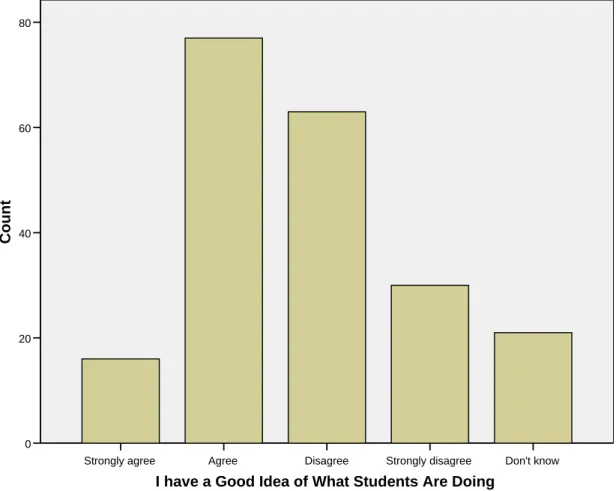
Figure 7 shows the modal response (37.2%) to question 11 (n=207), indicating that respondents did have a good idea of what their students were doing with their laptops
Don't know Strongly disagree
Disagree Agree
Strongly agree
I have a Good Idea of What Students Are Doing
80
60
40
20
0
Count
Figure 7. I have a good idea what students are doing
Don't know Strongly disagree
Disagree Agree
Strongly agree
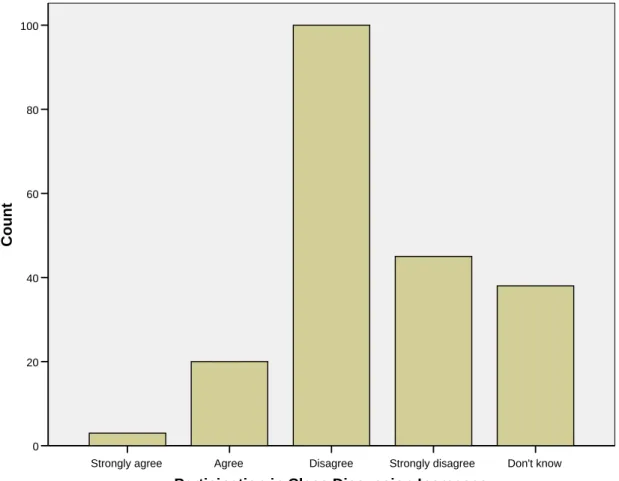
Participation in Class Discussion Increases
100
80
60
40
20
0
Count
Figure 8. Participation in class discussion increases
Don't know Strongly disagree
Disagree Agree
Strongly agree
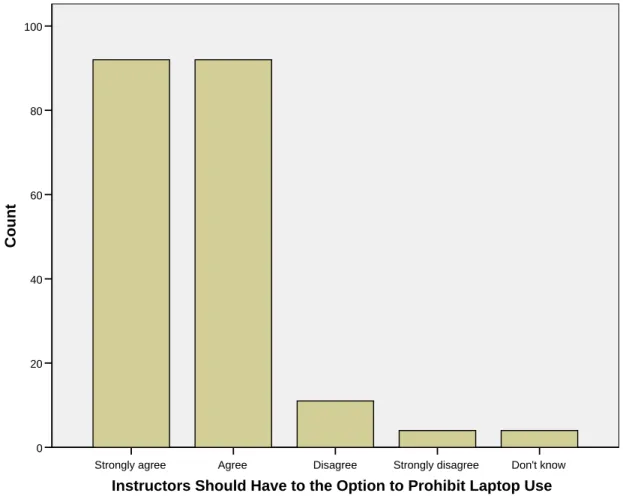
Instructors Should Have to the Option to Prohibit Laptop Use
100
80
60
40
20
0
Count
Figure 9. Instructors should have the option to prohibit laptop use
No Yes
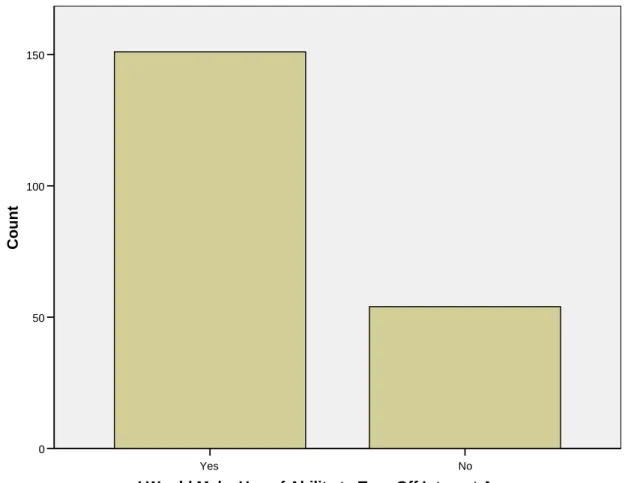
I Would Make Use of Ability to Turn Off Internet Access
150
100
50
0
Count
Figure 10. I would make use of the ability to turn off Internet access
Restrict During Other Restrict During
Group Work Restrict During
Presentations Restrict During
Lecture Restrict During
Discussion 0.6
0.5
0.4
0.3
0.2
0.1
0
Mean
In what situatons would you turn off Internet Access?
Figure 11. In which situations would you turn off or restrict Internet access?
Don't know Strongly disagree
Disagree Agree
Strongly agree
The Ability to Turn Off Internet Access Would Improve Participation
60
50
40
30
20
10
0
Count
Figure 12. The ability to turn off Internet access would improve participation
No Yes
Millennials Need to be Taught Differently Than Students 10 Years Ago
125
100
75
50
25
0
Count
Figure 13. Millennials need to be taught differently than students 10 years ago
Qualitative Data Analysis
The narrative responses to the open-ended questions provided a deeper, more personalized understanding of faculty perceptions in relation to classroom laptop use. The following section details the most important themes, types of responses, and issues expressed by faculty in response to the nine open-ended questions.
Question 8: Please explain any formal policies you have regarding student use of laptops during class. (181 responses out of 244 participants)
report no formal policy. Many other respondents either had a formal policy or had some aspects of a policy. The remaining respondents referred to existing school policies that they followed or indicated that they had no policy but were headed in the direction of creating one for their classrooms.
Respondents with some elements of a formal policy characterized their
approaches as requests, suggestions, warnings, discouragements or expectations. They cited numerous ways in which students are and are not allowed to use their laptops. For example, instructors cited the following ways in which students were allowed to use laptops during class:
note-taking
looking up past assignments
looking up information
multi-media use and oral presentation
in some lab classes
when using specific software
during breaks
after asking permission
when seated in a seat with no one behind them
while sitting in the back, with the sound muted
when using the schools’ software
when the desks are arranged so that the instructor can see all of the screens
Conversely, students were variously discouraged, forbidden or otherwise not allowed to do the following:
surf the Internet
play computer games
take excessive notes
do research
instant message
listen to music
Responses also pointed to specific contexts in which students were not allowed to use their laptops, such as during discussions, in-class exams, experiments, specific activities, in honors sections, in small groups, at the end of class when the instructor is summarizing the lesson, during a lecture, and when students otherwise go “off-topic.” In response to students who disobey classroom laptop policies or guidelines, instructors noted that they deal with such indiscretions by counting the student absent, confiscating their laptop for the day, revoking their privileges or requiring that the laptop be turned off if they are found checking emails or surfing the Internet, or by “calling them out” and asking them “not to do it again.”
Respondents with a formal policy generally fell into two categories: a) laptops are required as part of school policy or b) laptops are entirely banned in their classroom. In the instances when a respondent had a formal policy, they taught in the School of Medicine or the School of Law, as these schools have existing laptop policies and requirements. Respondents stated that laptops were required of medical students so they can take part in the Audience Response System (an electronic polling system). A School of Dentistry respondent noted that student use of computers in the classroom is now at the discretion of the instructor. The respondent added that they ask students to keep their laptops closed during class.
Question 9: In which classroom contexts (besides exams) do you ask students to close or turn off their laptops? Please explain. (188 responses out of 244 participants)
Most respondents stated that they do not ask students to close their laptops or have not experienced a need to ask students to do so. Respondents typically made statements like, “A few students use laptops for notes or to check email during breaks – I haven’t noticed at all that this causes any problem in group interaction or activities.” Another noted “I didn’t think I could ask them to turn them off, since the university encourages the use of laptops so strongly. Therefore, the only situation that laptops are forbidden is during tests.”
The minority of respondents who had already prohibited laptop use in their classroom indicated so on this question. One respondent explained his stance this way:
Laptops not allowed in any situation. They only serve to distract the students. From my experience sitting in on undergraduate classes where I can see their screens, I know that 50% or more of the students are checking email and chatting on IM during class.
For the remaining respondents, the most common situations for asking students to close their laptops included during group work, discussions, interactive activities, videos, lectures, demonstrations, presentations, guest speakers, student presentations, with patients, during field trips, in “larger” classes, in seminars, when giving instructions, if students are causing too much noise, and during “lectures and seminars that require thinking together.”
problem in a particular class with people doing other things (emailing, IMing, Facebooking) during class.” Similarly, another respondent stated that they had no occasion to have students close their laptops, “unless the student is disturbing other students with what is on his/her laptop.”
Instructors in the School of Medicine noted that laptops are even in use during exams. Special software installed on laptops blocks both Internet access and access to users’ local files during exams. Additional school software known as the “Audience Response System” is also used to solicit feedback by polling students’ responses periodically during regular class time.
Question 17: How do you think students' classroom use of laptops benefits students? Please explain. (189 responses out of 244 participants)
This question elicited more in-depth responses. A large majority cited note-taking as the chief benefit provided by laptops. The advantages of laptop note-taking were described in many facets, including the following:
saves transcription time and effort
students can type faster than they can write
counteracts bad handwriting
many students seem to be more comfortable taking notes on laptops
will not lose notes
saves ink and paper
more legible
searchable
organized
digital notes are more easily manipulated and modified
Paying attention to the PowerPoint presentations or taking notes directly in PowerPoint was commonly seen as another benefit. Additionally, respondents also identified conducting research or using Google as another advantage of laptop use in class. A host of other benefits cited included reading classmates’ blogs, conducting impromptu or instant research, finding and sharing current news and information, and accessing class source material.
Numerous benefits related to specific activities and situations were also
mentioned. These included in-class writing exercises, “enabling lab exercises,” computer programming activities, lab courses where the laptop is the primary data collection
vehicle, ability to “try things live,” running statistical applications, using Blackboard, with interactive software related to course content, answering questions, conducting in-class peer-reviews of their papers, audio or video taping the lecture for later replay, for those with poor eyesight, and use during group projects. Discussing in-class writing assignments, one instructor said,
There is also a perceptible improvement in students' writing, probably because use of the laptop allows for/encourages even minor revisions. There have been instances in class where students who were curious about something I said found some relevant information on the internet and shared it with the class. Their finds added some interest and color, but not substantially so. I have also found pairs of students with their heads together over a laptop screen during a lecture. At times this is unnerving, but when I have questioned the students involved about it, they informed me that they were checking the internet for things related to the topic of the lecture or discussion. Mainly I learned that things are not always what they appear to be, and that what I as a lecturer can construe as distracted behavior actually may be behavior motivated by interest in the subject.
somehow incorporated into the lesson. Another response noted that students have different levels of sophistication and focus with laptops and that benefits only extend to those who stay “on task” during class. Referring to the use of PowerPoint, a respondent added, “I worry that students are spending more time on the form of their content presentation - how many features of PowerPoint can they let loose - than on the
substance.” Likewise, another respondent noted that “I still like for students to take notes [handwritten] because I feel that it is one more active way to interact with the material.”
Faculty members also expressed concerns about the effectiveness of laptops as an information gathering tool and the types of sources students tend to reference:
I think it is just another way of facilitating learning. Honestly, I think it probably deters profound contemplation of questions and produces mediocre at best undergraduate research, at least in my field. I do not allow materials gathered from the net as legitimate sources, except for graphics. We have too many excellent data bases through the library system here to even consider accepting 'googled' infomation [sic] or that extracted from Wikipedia.
The following comment that was raised by another respondent reflects on how the tenor of a discussion can change when laptops are used to quote verbatim from an online source:
Sometimes students can look up additional info in class that can add to the discussion, but I have also seen it used to 'upstage' a presenter by quoting verbatim from something on the internet. It seems that we are mixing mediums inappropriately in those situations. In discussions we are not usually quoting sources verbatim, rather we are discussion ideas at a more general level.
become proficient at video games, IM, Facebook, email, and solitaire or visit
inappropriate sites. One respondent said “I think they use them to send email and ‘goof off’.” Another respondent stated, “On the whole, classroom use [of] laptops need[s] to be controlled. Reading mail, IM-ing, word-processing on papers for other classes, and the like are absolutely not desirable during class.” Similarly, another respondent said, “I don’t think it benefits them at all. It is a distraction and supports short attention spans, which is not a good preparation for the workforce.” Two other objections were expressed in this way:
I think that the use of laptops makes the classroom experience more passive for the student. Also, sometimes I sit in on my colleagues’ lectures, and I can see what is on the students’ screens – I am astonished by how many students are not even following the lecture online.
I think that it hinders their interactions- before students might have a conversation before class, but now lots of students are online as soon as they sit down and can’t spend a moment talking with someone else or daydreaming :O) Seems to be a general trend in society.
Answers in this section of the survey brought up three other important issues which reappear in subsequent responses. The first issue involves the determination of who is responsible for the perceived improper use of laptops. One respondent touched briefly on this issue in this way:
The second issue concerned a perceived difference in classroom behaviors with regard to laptops between undergraduate, graduate, and professional students. Speaking of
graduate and professional students, one respondent said,
My students seem a good deal more comfortable taking notes by typing than by writing. They may also manufacture notes that are more usable to them by
putting them on their laptops. Since I want to encourage notetaking [sic] -- I don't want them just sitting there -- I am willing to have laptop use in the room if that helps me reach that goal. Given my students (highly motivated professional and graduate students), I think they are using the laptops appropriately, but I do not go around checking their screens.
Likewise, a similar comment was made by another respondent,
I teach graduate students. Those who use laptops are taking notes. At this point students are taking classes because they want to. If they choose not to pay attention and don't get the material it is their problem, but I honestly don't see it happening (and classes are small enough that I would probably know).
The third issue is the notion that the laptop can be as distracting an influence as any other distractive influence, such as day-dreaming or doodling. Speaking of the laptop’s impact, this respondent said, “In reality, students can be distracted by any number of internal and external factors...the laptop or PDA is simply a physical representation of the potential for distraction.” All three of these issues return in subsequent responses.
Question 18: How do you think the classroom dynamic changes when students use laptops with Internet access during class? (185 responses out of 244 participants)