Enterprises’ needs are
different. Vendors’ products
are different. How do you go
about matching the two?
A
pplication acceleration and WANopti-mization is one of the hottest topics in IT today. The reason is simple: Rarely does a technology come along that can improve the user’s experience, increase productivity and save money. Application acceleration and WAN optimization does all of that.
If positive reasons are not enough to motivate you, then maybe the pain caused by the server and application group is. Server groups are currently on a consolidation trend. They are moving servers
out of the branch offices and relocating them to datacenters. It saves money because server con-solidation allows better utilization of server resources, maintenance is easier and there are fewer software licenses. Plus, it improves security since all those servers with their valuable data are now locked away in a safer environment. The only problem is that the move can make response time unacceptable, and throwing money at the problem by upgrading line speeds doesn’t always help much.
If server consolidation isn’t your pain point, then maybe it is the application group rolling out a new application, with a Web-based interface, that increases end-users’ response time to unac-ceptable levels. Or maybe it is just that data repli-cations or backups run for too long.
Robin Layland, president of Layland consulting, is a leading industry analyst with many years experience working for leading enterprises. He can be reached at [email protected] or at 860/561-4425
Buyer’s Guide To
Application Acceleration:
Ten Questions To Ask
Every Vendor
Robin Layland
WIDE AREA NETWORKS
Vendor Product Name Price Range Costs Of For Solutions Maintenance
Blue Coat Systems SG Series $2,499 to $100,000 10% to 30%
Certeon S-3000 Series $6,000 to $35,000 18%
Cisco Systems WAE & WAAS $3,750 to $135,000 0%1to 13% Citrix Systems WANScaler $5,000 to $140,000 10% to 18% Exinda Networks 6800 $1,000 to $50,000 15% to 22% Expand Networks Compass Accelerator 7940 $3,000 to $200,000 15% to 18%
and System 10000
F5 Networks WANJet $1,795 to $164,995 12% to 17%
Juniper Networks WXC 590 $1,995 to $80,000 Varies
Packeteer iShaper $11,000 to $26,000 15% to 20%
Riverbed Technologies Steelhead $3,500 to $120,000 18%
Silver Peak Systems NX $9,995 to $129,995 22%
Stampede Technologies Application Acceleration Series $40,000 to $50,000 20% 10% is for when acceleration is added to an existing ISR
The answer to all this pain is application accel-eration. It doesn’t matter if the reason is making life better or pain-avoidance, an application accel-eration and WAN optimization solution is in your future.
The good news is that all the solutions meet the goal of reducing response time and bandwidth usage. The vendors have a lot in common. For example, they all provide TCP optimization; bandwidth shaping; compression; dictionary com-pression; support for WCCP (Web Cache Com-munication Protocol); traffic statistics; and com-bining packets to create a larger, more efficient message.
However, this does not mean they are the same; which product is best for you depends on your particular environment. The goal of this buyer’s guide is to explain the key differences that will then allow you to make an intelligent selection.
Twelve vendors are profiled. With the excep-tion of Stampede and Cisco, they address the branch office in the same way: A large appliance in the datacenter supports multiple branch office appliances. Cisco has an appliance (WAE) at the datacenter and offers two options for the branch office: Either an appliance or a blade (NME), run-ning their acceleration software (WAAS) in their Integrated Services Router (ISR). Stampede’s pri-mary solution has an appliance in the datacenter and software clients installed on the users’ devices instead of an appliance at the branch office.
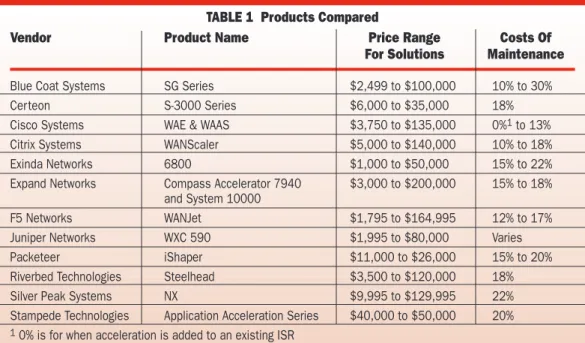
Table 1 shows product names. The vendor’s largest solution is used when referring to features, performance or equipment in this review. Table 1 also shows the cost range of the vendor’s entire product line and maintenance cost. Don’t assume because one vendor’s upper or lower price is bet-ter than another vendor’s, that they are in fact lower in cost of ownership or cost per user. There is a lot of variation between the features, level of performance, functions or number of users sup-ported between the vendors’s high and low end equipment that is not captured in this chart.
App Acceleration Or WAN Optimization?
First a note on the name. The solutions go by two names: application acceleration or WAN opti-mization. These are two sides of the same coin, and all the solutions perform both functions. For simplicity, the equipment will be referred to in this article as accelerators. This area also goes by the name “symmetrical” acceleration, since the solu-tions require equipment or software at both ends of the connection.
This is in contrast with “asymmetrical” accel-eration solutions provided by application delivery controllers or application switch vendors that reside in the datacenter. In the acceleration area, asymmetrical solutions have concentrated on Web acceleration; vendors include Cisco, Citrix, F5 Networks, Foundry Networks and Juniper.
To draw out the differences between the
ven-dors, we pose 10 questions that you should under-stand and ask the vendors:
1. How much does the solution reduce end-user
response time or reduce the time it takes to trans-fer data between two servers?
2. How much does the solution reduce the WAN
link’s utilization?
3. How do you handle the problems created by
consolidating Microsoft servers from remote loca-tions to the datacenter?
4. How are HTTP objects accelerated?
5. Can you compress the data in encrypted (SSL)
traffic?
6. What effect does the accelerator have on
quali-ty of service (QOS) and the existing securiquali-ty and monitoring devices?
7. Do you provide a software-based client solution
for mobile workers and telecommuters?
8. What are the security implications? 9. What level of throughput can be expected? 10. How easy it is to deploy and manage?
1. Reducing Response Time
The primary reason for buying an accelerator is to solve response time problems. Thus, reducing response time should be the top criterion. The good news is that any vendor’s solution will reduce response time, often significantly. So how do you determine which vendor’s solution is best? Unfortunately the only way to know for sure is to test them with the mix of traffic and protocols flowing over your network, but there are some dif-ferences that can give you insight into the vendors.
While in a general sense every vendor is using the same techniques to accelerate the traffic, ferences in their implementations can make a dif-ference in the result. While every vendor handles all the protocols in a general way, some apply spe-cial acceleration techniques to specific protocols. It is very important that you ask the vendor about the protocols that are important for in your net-work. For example, Blue Coat has built content distribution capabilities into their solution to han-dle video; Expand has special code to accelerate Citrix applications; Riverbed for Oracle and NFS; Certeon for Microsoft SharePoint applications and Stampede for Lotus Notes.
2. Reducing WAN Link Utilization
The second biggest reason to invest in a solution is reducing WAN bandwidth requirements. The ven-dors’ equipment can reduce bandwidth consump-tion by 30–95 percent depending on the mix of traffic; you can expect a reduction in the range of 70–80 percent. The lower figure applies if the traf-fic mix has a lot of VOIP, video or if the traftraf-fic is random without a lot of repeating patterns. The 90 percent-plus figure applies to traffic composed of files and Web pages that repeat often. The sav-ing on bandwidth usage is one of the best ways to justify deploying the equipment, and all the ven-dors will provide significant reductions.
The primary
reason for buying
an accelerator is
to solve response
time problems
The vendors accomplish this reduction by combining traditional data compression techniques such as GZIP and L-Z (Lempel-Ziv) compression with dictionary compression or de-duping. Dictionary compression works by learn-ing patterns, generally 100 characters long or less, that it sees in the data. When a device sees a pat-tern, or even part of a pattern in some cases, it replaces the data with a reference to the pattern. As the accelerator learns more and stores more patterns, the bandwidth savings kick into high gear.
If all the vendors provide traditional and dic-tionary compression, what is the difference? First, the accelerator can match patterns from either memory or a disk. Memory matching is the fastest, but the disk can store a significantly larger number of patterns, resulting in more matching. Currently only Expand Networks uses memory matching exclusively. The amount of memory built into the product can affect how fast accelera-tors de-dupe the data, and it should be taken into consideration when comparing vendors.
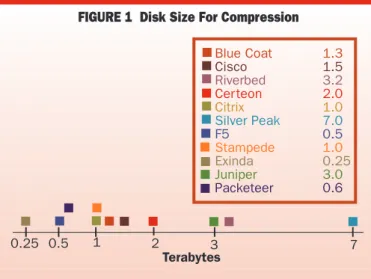
The second difference between the vendors is the size of their disk for storing the patterns. The larger the disk, the more patterns can be remem-bered. The differences are shown in Figure 1.
While bigger is generally better, an important nuance comes into play when datacenter accelera-tors support multiple remote acceleraaccelera-tors. Most vendors have a separate file of patterns for each downstream accelerator, so that if the accelerator supports 10 branch offices, then the disk is divid-ed into 10 partitions. If the same file is sent to all branch offices, then a copy of the same pattern is stored in each of the 10 partitions.
A second approach is taken by Citrix, Riverbed and Silver Peak, who keep a single file for all pat-terns used across all downstream accelerators. If a file is sent to all the downstream accelerators, only one copy of the pattern resides on the disk. So when you compare disk size, remember that a member of this latter group might have a smaller
disk but still be able to store more patterns than a competitor with a much larger disk.
3. Consolidating Microsoft Servers
Consolidating Microsoft servers to a central data-center makes maintenance easier, reduces cost, improves physical security of the servers and achieves better overall utilization of servers and storage. Without an accelerator, the end-users see the down side to the consolidation—higher response time. Resources that were once local now have to be fetched over the WAN.
The acceleration vendors focus on servers that use the CIFS protocol, primarily file servers. CIFS is not limited to Microsoft; many third-party applications running on Microsoft servers also use CIFS, and the acceleration improvements apply equally to these.
The problem with CIFS is that it is inefficient over the WAN. Microsoft has addressed some of these problems in Vista, but to gain the benefits, both the server and client must be running Vista, which is rare in enterprises. Even with the improvements in Vista, end users will still see response time improvements and a significant reduction in WAN utilization with accelerators.
Accelerators improve on CIFS by applying compression and dictionary compression, which reduces WAN utilization and response time. A second technique is CIFS acceleration, which allows the accelerator to address problems with the CIFS protocol.
Most communication protocols send several blocks of data before requiring that they receive an acknowledgement, but CIFS sends a block of data, then waits to receive an acknowledgement before sending the next block. Over a LAN this is unno-ticeable, but over the WAN it is very noticeable. CIFS acceleration overcomes this problem by having the accelerator appear like the client to the server, asking for blocks, quickly acknowledging them and then asking for another. This allows the accelerator to have blocks of data queued for the WAN, eliminating the start/stop nature of the pro-tocol. The same technique works on the client end. This allows the accelerator to come close to simu-lating the LAN environment.
0.25 0.5 1 2 3 7 Blue Coat 1.3 Cisco 1.5 Riverbed 3.2 Cer teon 2.0 Citrix 1.0 Silver Peak 7.0 F5 0.5 Stampede 1.0 Exinda 0.25 Juniper 3.0 Packeteer 0.6 Terabytes
FIGURE 1 Disk Size For Compression
Yes No
Cisco Blue Coat Systems Expand Networks Certeon
Packeteer Citrix Exinda F5 Networks Juniper Riverbed Silver Peak Stampede TABLE 2 WAFS
All the vendors compress the data and provide CIFS acceleration; the difference between the vendors comes in what they do next. This differ-ence is shown in Table 2 “WAFS”. The “No” group limits its solutions to compression and CIFS acceleration, while the “Yes” group inte-grates additional Wide Area File System (WAFS) capabilities.
The WAFS approach differs in two important ways. The first difference relates to where the sys-tem keeps files the users request. The “Yes” group has a file cache on the accelerator, and when a user requests a file, the file is retrieved and is stored on the accelerator as well as being sent to the user— i.e., the accelerator simulates the role played by the server. With the “No” group’s solutions, the file is sent directly from the server to the end-user. The file passes through the accelerator but is not stored as a file on the accelerator.
The second difference is where support func-tions for local clients are performed from. These functions include local printing, DHCP, DNS and providing directory services. The Yes group keeps these functions local while the No group moves the functions to the datacenter. An example of local printing demonstrates the difference: With the WAFS solution, the print request flows to the local accelerator, which then directs it to the local printer. The accelerator is acting like the server (which was moved to the datacenter). With the No group, the print request is sent over the WAN to a server in the datacenter which then sends the print job back to the local printer in the branch office.
What are the pluses and minuses of each approach? An advantage of the WAFS approach is that requests for files and directories that are already at the branch accelerator can be delivered faster. This can lessen the load on the datacenter servers. How big this advantage really is depends on how many of the requests are for files that are already in the accelerator’s cache.
Another positive is that the accelerator can pro-vide server functions when the WAN link is down. With many of the functions, such as DHCP, there is no down side to this, but with files, there is a possibility that the branch office could get out of sync with the copy in the datacenter.
The negative to the WAFS approach is that it adds complexity to the implementation by requir-ing the WAFS software to manage the database record locking and updating, and requires disk space to store the files. Also, when setting up the accelerator, the clients need to be configured to go to the accelerator instead of the server.
There is no right answer; it depends on how important it is to keep the functions local. Addi-tionally, vendors such as Riverbed have addressed the local print issue by adding a print server to their equipment. Certeon, also in the “No” group, keeps meta-data, and when the file is gotten with an update lock acts more like the WAFS solutions.
Remember, CIFS-based applications aren’t the
only ones whose servers are being consolidated. For example, Microsoft Exchange servers are prime candidates to be moved to the datacenter. Blue Coat, Exinda, Riverbed and Silver Peak also provide acceleration for the MAPI protocol that Exchange uses. If servers with applications that use a protocol other than CIFS are being consoli-dated, then ask the vendor what acceleration fea-tures are available for these apps.
4. HTTP Acceleration
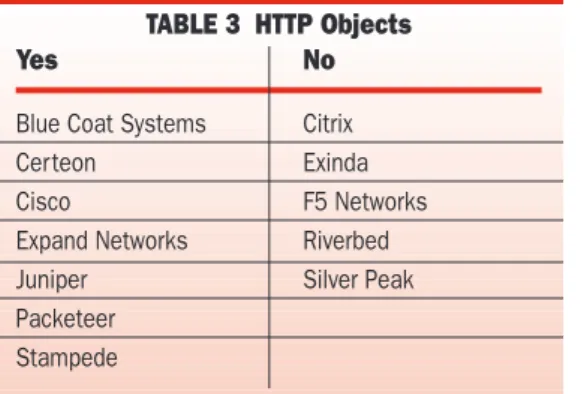
The vendors divide into two groups on how they handle HTTP objects. All accelerate objects using compression and dictionary compression, and the majority also cache the objects, as shown in Table 3. This allows them to respond to requests for an object from their cache, saving the time it takes to retrieve the object from the server.
All the “Yes” vendors cache static objects and time them out to ensure they have the latest copy, with the time-out value adjustable. Several ven-dors—Blue Coat, Cisco, Certeon and Stampede— have schemes for accelerating dynamic objects. Three of the vendors—Cisco, Certeon and Stam-pede—direct the client to use the object stored in the client’s own cache, instead of sending down a copy from the local accelerator.
On the whole, object caching is a good thing. There can be problems with very complex objects that have multiple embedded objects, so the fea-ture should be tested if complex objects are used.
Another technique for speeding up the delivery of Web pages is to pre-fetch objects. Object requests for a page are often done serially; the client asks for an object, gets it and then asks for the next. If the object isn’t already in the acceler-ator’s cache, or has timed out, then asking for objects serially is not the most efficient method. Blue Coat, Certeon and Riverbed have added a feature that overcomes this problem—they have the accelerator learn from observing requests which objects are generally asked for next, and “pre-fetch” these.
5. Compressing Encrypted (SSL) Traffic
The majority of traffic flowing over enterprise net-works is unencrypted, but encrypted traffic is growing as more applications move to Web
inter-Encryption
can clash with
compression
Yes No
Blue Coat Systems Citrix
Certeon Exinda
Cisco F5 Networks
Expand Networks Riverbed Juniper Silver Peak Packeteer
Stampede
faces and it becomes easier. A growing require-ment is that the accelerator vendor be able to compress the data within SSL traffic. Every ven-dor can apply TCP acceleration techniques to the traffic; the problem is that without decrypting the traffic, compression and dictionary compression have little or no effect.
Overcoming this problem requires that the accelerator terminate the SSL connections, decrypt the traffic, apply the compression and dic-tionary compression and then re-encrypt it. This must be done at both the datacenter and remote accelerator. In addition to the resources required, this also involves the accelerator in the key-man-agement scheme.
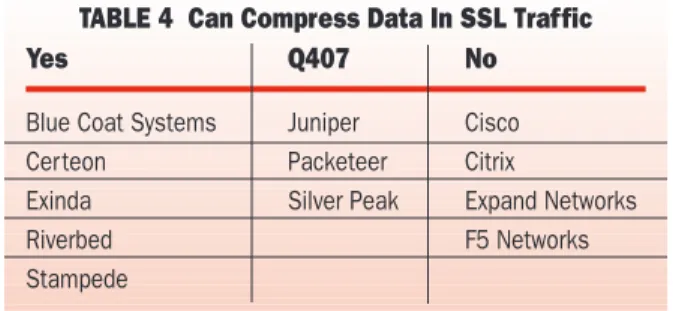
The vendors in the “Yes” group in Table 4 can perform the decryption and re-encryption. Several additional vendors plan to add this ability in 4Q07. The details to look at when examining the ven-dor’s offering include issues related to key man-agement: How do they handle the keys and does it fit within your existing security setup? Is their scheme certified by outside security groups? Is the encryption done in hardware or software, and what is the performance impact?
6. Effect On QOS And Security, Monitoring Devices
Does an accelerator require changes in the struc-ture of the network or applications? Acceleration vendors call this the “transparency” issue.
First the good news: the data arriving at the clients or servers looks the same as it did when it left the clients or servers. The accelerators are transparent to the clients and servers.
Within the network cloud, however, the first issue revolves around whether the accelerator changes the TCP/IP header. In Table 5 , the “Yes” group, with the exception of Riverbed, encapsu-lates the accelerated packet with a new header that has the accelerator’s IP address. The port number may stay the same or change, depending on how the accelerator is configured. Riverbed does not put a new header on the accelerated message but instead changes the IP address on the existing header to that of the accelerator.
The “No” group does not change the TCP/IP header, leaving the origin and destination IP address and port number unchanged. Expand appears in both groups because it supports both approaches.
What is the issue? Changing the IP address causes problems for firewalls, intrusion prevention systems, monitor probes and routers that use access list or policy based routing. All traffic appears to come from one device, the accelerator, interfering with the other devices’ ability to perform their function.
However, there is a potential drawback if you opt not to change the address: If the network has multiple routes, it is possible for the message never to pass the target accelera-tor on its way to its destination; it thus arrives with the changes made by the far-end accelerator. This is useless to the destination and must be discarded with the hope that the retransmission will pass through the local accelerator.
How important an issue is this? For many net-works this is not a big deal because there is a solu-tion: move the firewalls, IPSs and probes before the accelerator. A harder issue to solve is the WAN router issue, but in some cases it is possible to move this function to before the accelerator. If the workaround is not possible, then either select a Yes vendor or work with one of the No vendors on possible solutions.
A more important issue is created by what the accelerator does to the data, and the effect it has on security devices, scanning devices, monitoring probes and routers.
Accelerators change data they receive, substi-tute a pattern reference for parts of the message, compressing it and even combining multiple pack-ets into one packet. This is not limited to just the application and user data, but can apply to appli-cation headers such as URLs. This makes it impossible to perform deep packet inspection (DPI) on accelerated data for security, scanning, monitoring or routing. If the acceleration is done before the security devices, it will break these devices and content-based routing.
The solution is to place all security and moni-toring devices before the accelerator. This require-ment will change many network designs, so the acceleration projects should include the security and management groups within IT.
Changing the IP
address causes
problems
for firewalls
and other devices
Yes Q407 No
Blue Coat Systems Juniper Cisco Certeon Packeteer Citrix
Exinda Silver Peak Expand Networks
Riverbed F5 Networks
Stampede
TABLE 4 Can Compress Data In SSL Traffic
Yes No
Blue Coat Systems Cisco
Certeon Citrix
Expand Networks Exinda
Packeteer Expand Juniper F5 Networks Riverbed Silver Peak Stampede
Vendors understand the problems and have added features to help. The vendors produce their own traffic statistics on the un-accelerated traffic, and many can output NetFlow information. Addi-tionally, Cisco has partnered with NetQoS and F5 has teamed with Network Physics to include the management vendors’ capabilities in the network equipment. Packeteer’s solution includes their well-known monitoring capability. Blue Coat works with many security vendors by passing the traffic in its un-accelerated form to their equip-ment and providing a means to stop the traffic if a security problem is found.
Cisco has gone a step further by providing an option to turn off acceleration for the first four packets in a flow. For example, if it takes 10 pack-ets to deliver an object, Cisco will only accelerate the last six. This provides enough data for many probes, security devices and routers to perform their function. It is not guaranteed to solve all problems; for example, virus scanners need to see the entire stream. And of course not accelerating and compressing the first four packets could drive up utilization and cause slower response time. This is more of a problem if the traffic is com-posed primarily of small items.
What about QOS? The good news is that the accelerators preserve the QOS value they receive. This allows all the downstream devices to contin-ue to act on the valcontin-ue. The problem is setting QOS, for the same reason as above. Setting QOS requires deep packet inspection. The simple solu-tion is to set the QOS value before the accelerator, for example in the switch.
Many of the acceleration vendors have provid-ed a solution if there is no other device before the accelerator to set the value. Certeon, Expand, Exinda, F5, Juniper, Packeteer, Riverbed, Silver Peak and Stampede can all set the QOS value, but how deep they examine the packet in setting the QOS value does vary, and if the accelerator is set-ting the QOS values, then you should closely question the vendors to ensure they meet your par-ticular requirements.
7. Software-based Client
Telecommuters, mobile workers and very small offices also need the benefits of application accel-eration, maybe even more than the people at the branch office. The way to bring the benefits to these groups is with a software client.
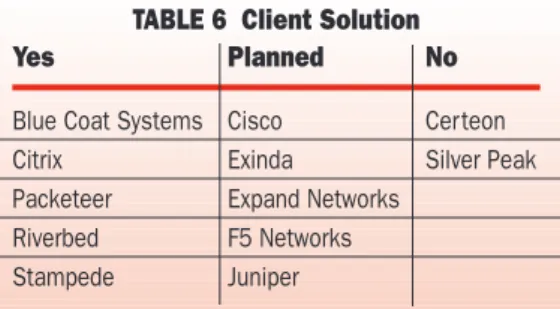
Clients can provide most of the features found in the appliances, as seen in Table 6. It is impor-tant to note that the functions included in the client do vary: Riverbed’s and Citrix’s clients each sup-port their full range of acceleration features; Stam-pede only supports Web/HTTP, Winsock and CIFS applications, while Packeteer’s client only provides CIFS acceleration and automatic file dif-ferencing.
Blue Coat’s client software costs $20–$85 per client, Citrix’s is $170, Packeteer’s $37–$104 and Stampede’s $35. Riverbed does not charge for each client installed in a PC, but charges instead on how many concurrent clients their accelerator supports. The cost of a concurrent client is $433. For example, if for every four clients only one is active then the comparable cost is a fourth of the $433, or $108.
One of the biggest complaints with the client solution is that it is another client that has to be supported. Blue Coat is addressing this problem by building their acceleration client into their VPN client. The reality is that if an acceleration solution is needed, managers will just have to put up with another client, as no vendor has an alternative solution. Managers need to remember that for users coming from the Internet, the client’s data will be hidden from security at the Internet border if it is not de-accelerated there.
8. Security Implications
There are two new security issues when deploying accelerators. The first implication was discussed in section 6 above. The second security implica-tion is from the data stored on the disk.
All the vendors have a disk for either storing patterns used in dictionary compression, caching files for servers or both. Most everything sent to a site is in the pattern database. If someone hacked into the equipment or ran out of the building with the box it is conceivable that they could recon-struct the traffic and see everything. The issue is how accessible is the data on the disk?
First, it is not easy to put together the data from the disk. The patterns are not stored in any format related to the message; the patterns are taken from—and the same patterns could occur in— many unrelated messages. Additionally, each ven-dor has its own proprietary file system with its own access control, making it hard for anyone to get to the data. That does not mean that someone with enough time and energy couldn’t crack it, but it would require some effort.
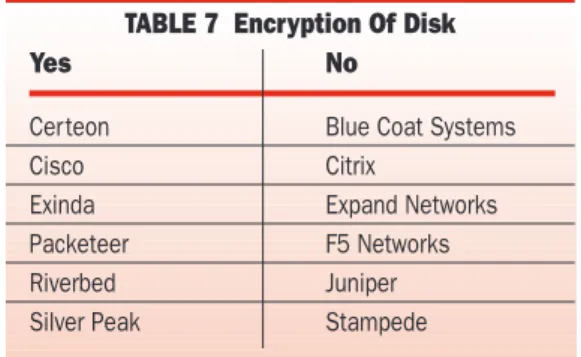
How the vendors address this issue can be bro-ken down into two camps, shown in Table 7. The most secure solution is to encrypt the disk, as the “Yes” group does. The downside is that because the patterns are encrypted, it could take extra time to retrieve them while the device is carrying out its normal operations. The “No” group depends on the fact that they use a proprietary file system combined with the small size of the pattern to
pro-Another security
issue is the need
to protect data
on the disk
Yes Planned No
Blue Coat Systems Cisco Certeon Citrix Exinda Silver Peak Packeteer Expand Networks
Riverbed F5 Networks Stampede Juniper
vide protection. The importance of this issue depends on your own corporate standards and how concerned you are someone will run out with the equipment. Cisco, a member of the encryption camp, has taken it a step further by also getting Common Criteria EAL4 certification and receiv-ing PCI 1.1 compliance certification for its encryption.
9. Throughput
When comparing accelerators make sure you are comparing the same numbers. Throughput can be stated as either the amount of un-accelerated data they can take in on the LAN side, or how much accelerated data they can output on the WAN side. Additionally, make sure you understand what fea-tures are turned on when throughput is measured.
For example, a vendor can quote a higher num-ber by turning off disk-based dictionary sion, but still be able to say dictionary compres-sion is on by just turning on memory-based dic-tionary compression. The memory number will be higher than the disk based number.
The actual throughput will vary not just on what is turned on but on the protocols and traffic mix running through it. This makes any general number only a rough guide.
With most network equipment, latency will increase as the equipment reaches its maximum throughput. But accelerators are not like most equipment. When they reach their maximum throughput, the accelerator will slow down the amount of traffic reaching it. This is possible since all accelerators include TCP optimization which gives them control over the rate end-stations are sending traffic into the network.
Generally you can expect an accelerator to out-put 10–500 Mbps over the WAN with everything turned on. If more throughput is needed, a load balancing solution, either provided by the vendor (in the case of Riverbed) or a third-party load bal-ancer can be used to increase the overall through-put.
The number of connections an accelerator can support is an important issue, but most vendors support a large number of connections and the accelerator will more than likely hit a throughput limitation before approaching the maximum num-ber of connections allowed.
10. Ease Of Deployment/Management
The vendors understand the importance of deploy-ment and managing the solution and have added several features to make life easier. They all have some form of auto-discovery, or they make cloning boxes easy. All work with leading net-work management platforms and provide their own solutions. This does not mean that all the solutions are equal; just that they have all addressed the basics. You need to question them closely to understand how they fit into your par-ticular management scheme.
One area in which the vendors do differ is how flexible they are in building a high-availability configuration at the datacenter. All the vendors allow for a passive accelerator to be in standby mode, and all vendors except for Expand and Cit-rix allow the backup accelerator to be active, pro-cessing its own traffic. The rest of the vendors, except Exinda and Juniper, support the next step up—a single appliance providing backup for a group of accelerators, a cluster or N+1 arrange-ment (Packeteer will have this feature in 4Q07).
Selecting An Accelerator
One very important question missing from the list is: How much will a solution cost? All the vendors provide a range of solutions from low to high end. How much a solution costs depends on whether you need every feature, how much throughput is needed, the number of locations, number of users it supports and if a client solution is required.
How do you select the right vendor? First decide which questions are important for your net-work. Not all the questions listed here are impor-tant for every network. Next determine which side of the answers best fits your environment. Using the tables you can quickly see which vendors line up with your needs, allowing you to create a short list
Vendors’
solutions for high
availability
in the datacenter
vary
Companies Mentioned In This Article
Blue Coat Systems (www.bluecoat.com) Expand Networks (www.expand.com) Certeon (www.certeon.com)
Cisco (www.cisco.com) Citrix (www.citrix.com)
Exinda Networks (www.exinda.com) F5 Networks (www.f5.com)
Juniper (www.juniper.net) Microsoft (www.microsoft.com) Packeteer (www.packeteer.com)
Riverbed Technologies (www.riverbed.com) Silver Peak Systems (www.silver-peak.com) Stampede Technologies
(www.stampede.com)
Yes No
Certeon Blue Coat Systems
Cisco Citrix
Exinda Expand Networks Packeteer F5 Networks
Riverbed Juniper
Silver Peak Stampede