51
An Open Source Freeware E-Mail To SMS
Alert System for Mobile Platforms
1 O. Iyaniwura University of Ibadan, Ibadan, Nigeria. [email protected] 2
O.B. Longe & 3F. Wada Fulbright Fellow & Research Scholar Southern University and A & M College
Baton Rouge, LA 70813 2
[email protected] [email protected] `
ABSTRACT
The rate at which people use SMS messages is increasing at so fast a pace that they may exceed the rate at which E-mails are transmitted through the internet in the nearest future. E-mail to SMS is also becoming increasingly popular due to the mobility provided by new ubiquitous systems. Unfortunately present method for sending E-mail to SMS using available software does not allow for flexibility since proprietary software used for this purpose are not made available to subscribers. It has therefore become imperative to develop open freeware software that can be made available to users interested in tailoring the software functionalities to suit their purpose. We developed a web-based gateway system that for sending E-mail to SMS. Bulk SMS was purchased and HTTP is employed as middleware. The system works by receiving E-mails through SMTP server and the POP3/ IMAP for onward transmission to the MAIL-BOX. The software automatically receives the mail; compare the E-mail address with those already stored in a database. If the address exists, the SMTP server passed the parsed E-mail to a URL specified in a form post. HTTP protocol is used to accessing MAIL-BOX. The HTTP defines how messages are formatted and transmitted and what action web servers and browsers should take in response to the various commands. Preliminary results showed that the system is promising.
Keywords: Gateway Software, SMS, E-mail, SMTP, HTTP, SMSC
1. INTRODUCTION
Effective communication is an essential part of business strategy in companies. To keep in touch with employees, customers and business partners is very important. Industries benefits immensely from email to SMS Companies with employees who are always out and about, e.g. electricians, plumbers, and other professions are open up by this channel as they can be contacted without the need to be glued to computer [1][4]. In order to be competitive there is need for a well working and stable communication system. There is need to avoid problems such as delivery delays, wrongly sent e-mails, failed delivery because there is no internet connection in the office [6].
African Journal of Computing & ICT Reference Format:
O. Iyaniwura, O.B. Longe & Wada, F (2012). An Open Source Freeware E-Mail To SMS Alert System for Mobile Platforms. Afr J. of Comp & ICTs. Vol 5, No. 2. pp 51-60.
© African Journal of Computing & ICT March, 2012 - ISSN 2006-1781
Many companies are realising that email alerts may not always be the ideal method of communicating, especially out of hours system monitoring. This is where email to SMS comes in. Each time an email is sent, an SMS will be received thereby covering all bases [30]. The number of short message services is growing very rapidly, and existing cellular networks have to support a large number of SMS and signalling messages. The rate of SMS messages has already exceeded the rate of E-mail messages transmitted through internet and their number keeps on growing [27].
If an organization uses the method of getting information across to her teeming customers through e-mail to SMS, firstly it will reach almost everybody. Secondly, all the texts can be sent without paying for the priviledge. Sending SMS directly is expensive, but most of this cost is pure profit for the phone companies, who are able to deliver text messages for nearly nothing by piggybacking them on other transmission. The bill can be brought down to earth. The key is to use SMS gateways. These are backdoors that transform other (usually less expensive) types of communications such as e-mail and instant messages, into text messages.
52 Many texts can be sent without paying. If reply is given to a text message sent by e-mail, the reply will come in the format it was initially sent in, and reading it won’t cost a thing. Bill can be cut even further by asking most- texted customers or employees to program one e-mail address into their address books. Even if they insist on using SMS, sending a text message to the e-mail address will cause it to appear in the e-mail inbox. Getting the habit of using mobile phones to get information would certainly play an important role in mobile internet adoption [19].
If short message services functionality is added to IT system with powerful SMS gateway software, it will make it possible to send SMS out through the e-mail. The gateway software makes it possible to send and receive SMS messages in the IT environment. SMS extension can be added to the mail client (Outlook Express or Windows Mail) in order to be more effective. This allows for a two-way e-mail to SMS gateway service in the system. Colleagues or employees can compose a message as an e-mail in their windows mail client (Outlook Express or Window Mail). They now send their messages to mobile phones. The recipients will receive this message as a SMS text message on their phones. If it is an urgent message, this will prompt the recipient to check his box as soon as practicable [32][25][26]
The SMS gateway software offers rock-solid mobile network connectivity. The gateway provides mobile network connectivity through a GSM phone or GSM modem attached to the computer with data cable or through the internet by using a SMS provider account. It serves several application and users simultaneously in real-time to prevent delays. It can be used for sending and receiving SMS messages, support SMS delivery to networks, to handsets, and error reports delivery [33].
To make use of gateway in sending SMS requires the need to register with the SMS gateway provider on line. The purchase of SMS in cash or on credit is from the provider. If the SMS is paid for, each sent SMS will cost the same amount irrespective of the destination. If on credit, the cost differs per SMS. If the SMS gateway software is purchased, what can be done with the software is limited since it is a package [24][13]. The software is not scalable. For any new development, if patches are available, there is need to buy for update. If there is none, SMS gateway software has to be bought. The subscriber is always at the mercy of the software developer. What is mostly available now is proprietary gateway software that is kept to the chest of the developers. 2. MATERIALS AND METHODS
E-Mail Client
Messages travelled through computers that are not visible or known to the sender or recipient. The store and forward model is critical to the robustness of email, because it permitted secondary routes for mail to get from one place to another and for technical practices that cope with failures by
taking alternate parts or retrying to create a connection when a problem was encountered. E-mail client is an application, (e.g. Outlook Express, Yahoo) that runs on a personal computer through which e-mail is sent or received or organized. It is called a client because e-mail systems are based on client/server architecture. Mail is sent from many clients to a server which re-routes the mail to intended destination [27][28].
Mail Server
A mail server is the computerized equivalent of the friendly neighbourhood mailman. Every e-mail that is sent passed through a series of mail servers along its way to its intended recipient. Without these series of mail servers, mail will be sent to people whose e-mail address domains matched. For example messages can be sent from example.com account to another example.com account [9][10][11]. When the mail is sent, the Mail Transfer Agent (MTA) accepted it after checking the trustworthiness of it.(Most of the necessary checking will be with the information supplied during the creation of the user account, both username and password are stored in MUA file). The network process is accomplished using SMTP, and made sure the sender was trustworthy. This is called authenticated SMTP [29][31][32].
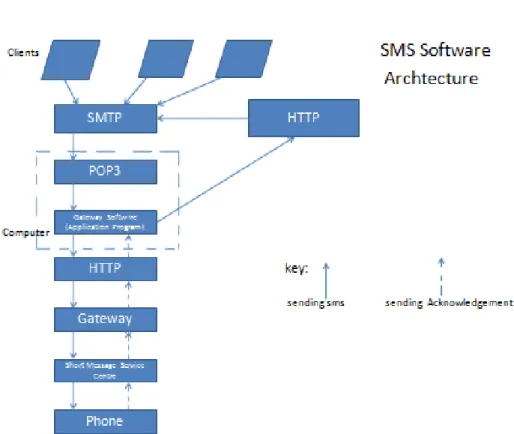
SMS Software Architecture
Key:
Sending SMS Sending Acknowledgement
Client Client Client
SMTP
POP3
Gateway Software
HTTP
Gateway
Short Message Service Centre
Phone
HTTP
Fig 1: E-mail to SMS Gateway Software Architecture. Process of Sending an E-Mail
53 1 The message was composed with e-mail client,
Microsoft Outlook. Through the M S-Outlook, connection was made to the sender’s domain’s SMTP Server. Let the server be smtp.example.com. 2 The mail client communicated with the SMTP server, giving it the sender e-mail address, the recipient’s e-mail address, the message body and any attachment.
3. The SMTP processes the recipient’s e-mail address especially its domain. (Sending mail involves communicating with the Domain part of the e-mail address and delivering to the user before @ in the address e.g. if a mail was sent to iyaniwura@ yahoo.com, an SMTP connection was made to yahoo and mail was delivered to user “iyaniwura”). If the domain was the same as the server’s, the message was routed directly over the domain’s POP3 or IMAP server. No routing through the server was needed. If the domain was different, the SMTP server will have to communicate with the other domain’s server[3][5]
4. To find the recipient server, the sender’s SMTP server communicated with the DNS. The DNS took the recipient’s e-mail domain name and translated it to an IP address. The sender’s SMTP server cannot route properly with a domain name alone, an IP address was a unique number that was assigned to every computer that was connected to the internet. By knowing this information, an outgoing mail server performed its work more efficiently.
The sender SMTP server had recipient’s IP address; it connected to its SMTP server. The recipient’s SMTP server scanned the incoming message. Recognizing the domain and user name, it forwarded the message to POP3 server. From there, it was placed in a sendmail queue until the recipient’s e-mail client allowed it to be downloaded. Sendmail listened to the network for incoming mails, transport mail messages to other machines, and handed local mail to a local program file [6][7][8].
Process of Receiving an E-Mail
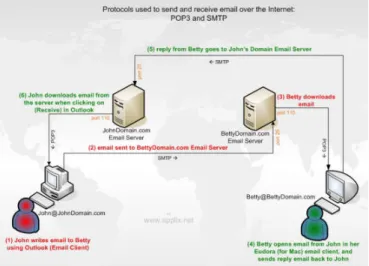
POP3 is the most recent version of a standard protocol for receiving e-mails. It is a client/server protocol in which a mail is received and held for the user by the internet server. Periodically, the user or the client e-mail receiver checked the mail-box on the server and down load any mail using POP3.
Fig. 2: E-mail over the internet: POP3 and SMTP.
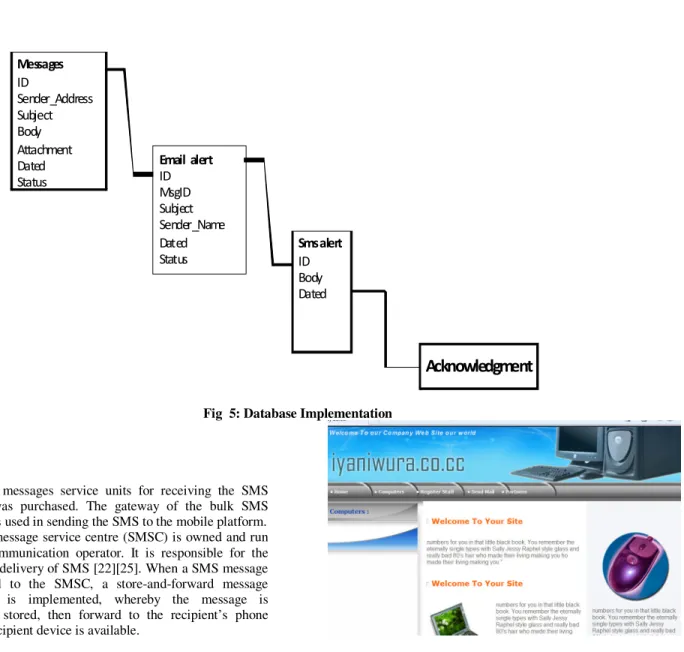
The standard protocol is built into e-mail products such as Eudora, Outlook Express, Internet Explorer and Netscape. The POP3 was used to handle e-mail between e-mail server and local e-mail client. It authenticated the credential of the user and downloaded e-mail that it came across on the internet [1][2]. The use of POP3 was activated when ‘RECEIVED’ button in the e-mail client was clicked. Until this happened, the e-mail stayed on the e-mail server. The Database Tables that were involved in the project and their attributes are: Message table: •I. D. •Sender Address •Subject •Body •Attachment •Time •Status. Alert table: •I. D •MsgID •Subject •Sender Name •Time •Status Acknowledgement table: • I. D • AlertID • Body • Time.
54 Fig 3: Relationships for message
The database was used to store incoming e-mail records e.g. telephone number, e-mail address, and other relevant data needed for the operation of the system. It checked if there was any pending e-mail to be sent out. There was only the need to insert records into database to send out e-mail and retrieve record from database to read e-mail. In summary:
1 A server database was built.
2 All outgoing emails were kept in the server database.
3 If GSM Modem received a message, server read it according to its history, forwarded it to LAN user. Hypertext Transfer Protocol (HTTP)
HTTP is the protocol that the web browsers and web servers use to communicate with each other over the internet. It is an application level protocol because it sat on top of the TCP layer in the protocol stack and is used by specific application to talk to one another. In this case the applications were web browsers and web servers. HTTP is the set of rules for transferring files (graphics, images. sound, video and other multimedia files) on the World Wide Web. As soon as the web browser is opened, the HTTP is indirectly in use. The operation of HTTP involved only the HTTP client, usually the web browser on a client machine, and an HTTP server, more commonly known as a web server. The SMTP server passed parsed e-mail to a URL specified in form of a form post. HTTP protocol was not a protocol dedicated for e-mail communication, but it can be used for accessing mailbox.[1][2][15][21].
HTTP defined how messages are formatted and transmitted and what actions web servers and browsers should take in response to various commands (when URL was entered in a browser, it was sending HTTP command to web server, directing it to fetch and transmit the requested web page). HTTP was a stateless protocol because each command was executed independently, without any knowledge of the command that came before it.[12][13][14]
The Transport Control Protocol (TCP) was used to exchange data between the client and the server. HTTP browser used TCP to connect to the web server and fetch resources from it. SMTP used TCP in transmitting e-mails. The POP3 used TCP to fetch the e-mail. In using the TCP in this application, the IP address and the port number connected to, was supplied After a TCP connection had been created, the two steps taken in communication were as follow:
Client Request:
The HTTP client sent a request message formatted according to the rules of HTTP standard – an HTTP Request. The message specified the resource that the client retrieved or included information provided to the server.
Server Response
The server read and interpreted the request. It took action relevant to the request and created an HTTP Response message which was sent back to the client. The response message indicated whether the request was successful, and also contained the content of the resource that the client requested if approved. It was obvious that communication between devices using HTTP took place via HTTP messages of which there were only two types: request and response. Clients usually sent requests and received responses while servers received requests and sent responses.
Intermediate devices such as gateways were used in sending and receiving both types of messages in this project.
Client
Response Request
Client Server
55 The computer was connected to the internet through the unique Internet Protocol (IP) derived by the Domain Name Server. The message was transmitted over the modem connected to the computer to the internet. The message was translated from alphabetic text into electronic signals, over the internet, and translated back into alphabetic text through the use of TCP/IP protocol stack [17[18].
Converting E-Mail To SMS
Gateways work on all the OSI layers. The main job of a gateway is to convert protocols among communication networks. A router by itself transferred, accepted and relayed packets only across networks using similar protocols. A gateway on the other hand accepted a packet formatted for one protocol and converted it to a packet formatted for another protocol (e.g. TCP/IP) before forwarding it. The gateway was implemented in software within a router. A gateway understood the protocol used by each network linked into the router.
The SMS gateway only bridged the connection between an external Short Message Entities (SME was an entity that received or sent short messages) and SMSC. SMS gateway works simply by connecting server to the client database. The SMSC provided storage, routing, and confirmed delivery of SMS. The cell tower transmitted data between the mobile device and the Mobile Switching Centre (MSC). (The MSC is a computer controlled switch that manages routing between mobile phones in a given area.).
The messages were stored in SMSC until the mobile device was available to receive messages. SMSC used the Gateway Mobile Switching Centre (GMSC) to communicate with TCP/IP network and determined the routing information for the messages. The GMSC forwarded the messages to the receiver’s service provider MSC, where it was sent to the receiving mobile device’s corresponding cell tower and finally delivered to the receiving mobile device.
A link was established between the computer on a wireless communication network and GMSC. The computer then directly communicates with the GMSC to send the message to a mobile device through the MSC and the corresponding tower without having to go through its own cell tower and MSC. The gateway connected directly to a mobile operator’s SMSC via the internet. The gateway converted the message format into a format understood by the SMSC; typically this was the Short Message Peer to Peer (SMPP) protocol. The SMS gateway software was integrated into email client.
This was much more convenient and it offered a number of functions. It was able to send automatic alerts and also allowed two-way communication. Similarly, emails were sent and received as SMS from or to computer. System was monitored and set to send alert automatically. Email messages were automatically converted into SMS format by the E-mail-to-MS Engine and delivered to mobile phone. Even the simplest and oldest mobile phone ha a screen that can display emails transformed into SMS message.
Alert Acknowledgement
As soon as the SMS was delivered to the mobile phone inbox, an automatic acknowledgement was sent to the sender Mailbox informing him of the deliverance of the e-mail message. The journey taken for the delivery of the acknowledgement was in the reverse order of the conversion of the e-mail message to SMS with the bypassing of POP3 protocol.
3. RESULTS AND DISCUSSION
In order to implement an open source freeware E-mail to SMS alert system for mobile platform, there are hardware and software requirements. A main computer is needed to house the software, to receive the client E-mail to be converted to SMS, to provide point of contact for the GSM modem. A GSM modem with in-built Subscriber Identification Module (SIM) card that works with a GSM wireless network is required.
A wireless or internet connection is required to establish connections with either the GMSC or the SMSC. This is done by subscribing to a Wireless carrier. The gateway of this wireless carrier is made use of as to sending the converted E-mail to the mobile phone informs of SMS A mobile device on the receiving end is necessary so that a designated subscriber can receive the messages. A database containing at minimum the receiving mobile device's phone information is essential. [20][23] The E-mail address, the name and other relevant information are expected to be added. The freeware system consists of three major aspects: the message, the alert feature and the acknowledgement feature as can been seen in Figure 5 below.
56 Messages ID Sender_Address Subject Body Attachment Dated Status Email alert ID MsgID Subject Sender_Name Dated Status Smsalert ID Body Dated
Acknowledgment
Fig 5: Database Implementation
Bulk Short messages service units for receiving the SMS messages was purchased. The gateway of the bulk SMS supplier was used in sending the SMS to the mobile platform. The Short message service centre (SMSC) is owned and run by a telecommunication operator. It is responsible for the routing and delivery of SMS [22][25]. When a SMS message is delivered to the SMSC, a store-and-forward message mechanism is implemented, whereby the message is temporarily stored, then forward to the recipient’s phone when the recipient device is available.
Converting E-Mail To SMS
To convert E-mail to SMS, the following are needed: There is need to set up an account with an SMS gateway provider. The following will be done after logging into the website of the gateway provider:
Fig 6: Home page of iyaniwura.co.cc
57 1. User name (selected during registration).
2. Password (selected during registration).
3. 3. API-ID (issued at the end of registration). This is the SMTP API account issued to the person who registers.
Mobile number in international format to which the message is sent e.g. 2348034542054. Similarly IMAP API account is issued to the person registering after the User name and Password had been submitted. There is need to create E-mail user account in SMS gateway that will periodically download incoming e-mail message that SMS notification messages will be required. The notification message will include the sender and the subject line of the E-mail message. Periodically, the client e-mail receiver checks the mail-box on the server and downloads any mail using POP3 or IMAP4. The SMS is purchased from the gateway provider who provided the service above for the sending of the SMS messages.
The PHP is used as the middleware in the development of the Open Source Freeware. The software is installed on the computer which is serving as client/server.
Creating Staff Database.
The company or institution involved populates its database with the following information about the staff:
Staff Registration
Fig. 8: Database Creation
The recipient address is created using the Internet Service Provider for this purpose. This is necessary since its gateway is being used in sending the e-mail to SMS
Receiving the E-Mail
E-mail messages are sent through the SMTP server which resides on the recipient computer. The messages are transferred and the pictorial representation of the movement of the message within the freeware system is depicted in Fig 9.
58
Fig.9: Movements of messages within the freeware System.
Sending E-Mail
NB: 160 characters of this email will be sent to the receiver of the mail as SMS automatically into the message form created by the gateway software installed on the recipient computer.
As the message hits the inbox of the recipient email address, the data extraction will be done. The e-mail address will be located in the database. This address will be linked to the recipient’s telephone number. With this, the email will be sent through the SMS-gateway through which the conversion to SMS will be done. The software takes care of the maximum 160 characters that can be sent to the mobile phone as its message while other necessary information as to the source of message is included.
Message Acknowledgement
The acknowledgement of the message is automatic as soon as the message is delivered. If the message is delivered successfully, the sender will see a message stating the condition of the message sent whether it was delivered or not.
59 Fig 12: Message alert.
4. CONCLUSION
The software had been tested and found functioning. Electronic mails were sent to recipients. The source code for this software will be put online for modification by users.
REFERENCES
[1] Ayla, E. S. Dec. 2004. Trusted Mail Gateway. Retrieved
on Feb. 18, 2011 from
http://etd.lib.metu.tr/upload/12605753/index.pdf. [2] Bells, M. 1971. History of E-mail and Ray Tomlinson.
Retrieved on Dec. 14, 2010 from
http://www.inventors.about.com/od/istartinventions /a/internet.htm.
[3] Behrang, P., Mohammad, S. A., Abdulbasit, M. A. A. , Anand, R. , ujata, N.. Aug. 2010. Pc 2 pc phone event announcer. Retrieved on Feb. 23, 2011 from http://sites.google.com/site/ijcsis/vol-8-no-5-aug-2010.
[4] Brown, J., Shipman, B., Vetter, R.. Dec. 17, 2007. The short message service. Retrieved on Feb. 21, 2011 from http//www.computer,org/portal/web/csdl/doc. Vol. 40 issue 12 pages 106-110.
[5] Crocker, D.. Jul. 2008, Internet Mail Architecture. Retrieved on Jan. 07, 2011 from http://www.rfc.editor.
[6] Gennai, F. M., Buzzi, M., Laura, A.. Experience in Implementing an E-mail/Web Gateway. Retrieved
on Jan. 19, 2011 from
http://citeseerx.ist.psu.edu/viewdoc/summary?doi =10.1.1.1026906.
[7] Girish , V.. 2007. E-mail Architecture Part 1 Retrieved on
Feb. 04, 2011 from
http://www.linuxforums.org/articles/e-mail-architecture-part-i_277.html .
[8] Gode, Y. Jan. 16, 2010. History of E-mail. Retrieved on
Dec. 18, 2010 from
http://www.buzzle.com/articles/history-of- [9] Halse, G. A., Wells, G. 2002. A bi-directional SOAP /
SMS gateway service. Retrieved on Dec. 19, 2010 from http://www.satnac.org.za/proceedings/2002/. [10] Ibrahiem M. M, El E., Husain, K. S.. 2010. On the
Design of Simulation Package for GPRS Network.
Retrieved on Jan. 04, 2011 from
http://www.enggjournals.com/ijcse/doc/IJSCE10-02-03-120.pdf ( IJCSE Vol 02, No, 03:2010, 880-888).
[11] Jack Authors, E-mail to SMS Marketing – the Future of Communication, http:// www.artcleSnatch.com. [12] Javvin Technologies. SMTP. Retrieved on Feb. 27, 2011
from http://www.javvin.com/protocol/rfc2821pdf [13] Katankar, V. K., Thakare, V. M.. 2010. Short Message
Service Using SMS Gateway, Retrieved on Jan. 04,
2011 from
http://www.enggjournals.com/ijcse/doc/IJSCE10-02-05-38.pdf. IJSCE Vol. 02, No. 04 2010, 1487-1491.
[14] Kenny, J.. June 20, 2007. What is an SMS gateway.
Retrieved on Feb. 16, 2011 from
www.kennyjacob,com.
[15] Koumpis, k., Cvetkovic, S., Peersman, G.. 1998. Performance Evaluation of an SMS-based E-mail and Voicemail Notification Architecture. Retrieved on Feb. 22, 2011 from http://server.quid5.net/-koumpis/pubs/pdf/bayona.pdf.
[16] Kundrat, J.. 2009 IMAP E-mail Client. Retrieved on
Jan. 06, 2011 from
http://trojita.flaska.net/thesis.pdf.
[17] Macon, J.. Dec. 05, 2005. How to Convert E-mail to SMS Retrieved on Dec. 10, 2010 from http:// www.biovisualtech.com/email-to-SMShtm. [18] Myers, J., Mellon, C., Rose, M.. 1996. Post Office
Protocol – Version 3. Retrieved on Jan. 16, 2011 from http://www.javvin.com/protocol/rfc1939.pdf. [19] Nakate, S.. Advantages and disadvantages of e-mail.
Retrieve on Feb. 24, 2011 from
http://www.buzzle.com
[20] Naor, Z.. 2004. An efficient short message transmission.
Retrieved on Feb. 23, 2011 from
http://techion.ac.il/clubnet/archives/ClubNet/pres_s pr_04/zohar.pdf.
SMS ALERT
60 [21] Novak, L., Svensson, M. Mar. 2001. MMS—Building
on the success of SMS Retrieved on Dec. 19,
2010 from
http://www.ericsson.com/about/publications/review /2003_03.
[22] Oliver, E, A. 2008. Exploiting the Short Message Service as a Control Channel in Challenged Network Environments. Retrieved on Jan. 02, 2011 from http://portal.acm.org/citation.
[23] Patil, P.. Routers. Retrieved 30. Kundrat, J.. 2009 IMAP E-mail Client. Retrieved on Jan. 06, 2011 from http://trojita.flaska.net/thesis.pdf.
[24] Partridge, C. Jun. 2008. The Technical Development of Internet E-mail. IEEE Annals of the history of computing. Retrieved on Jan. 30, 2010. From http://www.ir.bbn.com/..craig.
[25] Publishers. Retrieved on Feb. 26, 2011 from http:// www.hallogram.com/vb/.
Retrieved on Feb. 26, 2011 from http:// www.ucertify.com/.
[26] Schindler, E. Jan 07, 2008. E-mail Technology Definition and Solution. Retrieved on Dec. 18, 2010 from http://www.cio.com/authors/4142/8/. [27] Smith, S.. Nov., 2004, Wireless Access and Mobile
Technologies Guide. Retrieved on Feb15, 2011
from http://
www.cambridgeconsultants.com/corp_library_arch ives/html/.
[28] Syafiq, F. B. , 2007. The Development of Driving School Web-Based System with Appointment Notification. Retrieved on Dec. 18, 2010 from http://www.e-prints.ptar.uitm.edu.my/801/. [29] The Government of the Hong Kong Special
Administrative Region. Feb. 2008. Email and Web Security: computer security lecture 14. Retrieved
on Jan. 17, 2011 from
http://www.infoces.gov.ht/english/technical/files/sh orts.pdf.
[30] Wilkinson, A.. The business advantages of sending SMS via email and method of integrating. Retrieved on
Feb. 22, 2011 from
http://ezinearttide.com/?exprtt=AnnWiilkinson. [31] www.developershome.com
[32] Xu, P., Ercs, H., Cox, S. J.. 2003. Short Message Service in a Grid-enabled Computing Environment.
Retrieved on Jan. 04, 2011 from
http://eprints.soton.ac.uk/35492/1/eres_05.pdf. [33] Yahya, Y., Mahamood, N. M. N.. 2006. Study of
Techniques of Class Schedules/Time Table Retrieval via SMS for Student Convenience.
Retrieved Feb. 12, 2011 from