HI-TECH C
®
for PIC10/12/16
User’s Guide
Information contained in this publication regarding device applications and the like is provided only for your convenience and may be superseded by updates. It is your responsibility to ensure that your application meets with your specifications. MICROCHIP MAKES NO REPRESENTATIONS OR WARRANTIES OF ANY KIND WHETHER EXPRESS OR IMPLIED, WRITTEN OR ORAL, STATUTORY OR OTHERWISE, RELATED TO THE INFORMATION, INCLUDING BUT NOT LIMITED TO ITS CONDITION, QUALITY, PERFORMANCE, MERCHANTABILITY OR FITNESS FOR PURPOSE. Microchip disclaims all liability arising from this information and its use. Use of Microchip devices in life support and/or safety applications is entirely at the buyer’s risk, and the buyer agrees to defend, indemnify and hold harmless Microchip from any and all damages, claims, suits, or expenses resulting from such use. No licenses are conveyed, implicitly or otherwise, under any Microchip intellectual property rights.
Trademarks
The Microchip name and logo, the Microchip logo, dsPIC, KEELOQ, KEELOQ logo, MPLAB, PIC, PICmicro, PICSTART, rfPIC and UNI/O are registered trademarks of Microchip Technology Incorporated in the U.S.A. and other countries. FilterLab, Hampshire, HI-TECH C, Linear Active Thermistor, MXDEV, MXLAB, SEEVAL and The Embedded Control Solutions Company are registered trademarks of Microchip Technology Incorporated in the U.S.A.
Analog-for-the-Digital Age, Application Maestro, CodeGuard, dsPICDEM, dsPICDEM.net, dsPICworks, dsSPEAK, ECAN, ECONOMONITOR, FanSense, HI-TIDE, In-Circuit Serial Programming, ICSP, Mindi, MiWi, MPASM, MPLAB Certified logo, MPLIB, MPLINK, mTouch, Octopus, Omniscient Code Generation, PICC, PICC-18, PICDEM, PICDEM.net, PICkit, PICtail, PIC32 logo, REAL ICE, rfLAB, Select Mode, Total Endurance, TSHARC, UniWinDriver, WiperLock and ZENA are trademarks of Microchip Technology Incorporated in the U.S.A. and other countries.
SQTP is a service mark of Microchip Technology Incorporated in the U.S.A.
All other trademarks mentioned herein are property of their respective companies.
© 2009, Microchip Technology Incorporated, Printed in the U.S.A., All Rights Reserved.
Printed on recycled paper.
• Microchip believes that its family of products is one of the most secure families of its kind on the market today, when used in the intended manner and under normal conditions.
• There are dishonest and possibly illegal methods used to breach the code protection feature. All of these methods, to our knowledge, require using the Microchip products in a manner outside the operating specifications contained in Microchip’s Data Sheets. Most likely, the person doing so is engaged in theft of intellectual property.
• Microchip is willing to work with the customer who is concerned about the integrity of their code.
• Neither Microchip nor any other semiconductor manufacturer can guarantee the security of their code. Code protection does not mean that we are guaranteeing the product as “unbreakable.”
Code protection is constantly evolving. We at Microchip are committed to continuously improving the code protection features of our products. Attempts to break Microchip’s code protection feature may be a violation of the Digital Millennium Copyright Act. If such acts allow unauthorized access to your software or other copyrighted work, you may have a right to sue for relief under that Act.
HI-TECH C
®
FOR PIC10/12/16
USER’S GUIDE
Table of Contents
Chapter 1. HI-TECH C Compiler for PIC10/12/16 MCUs
1.1 Overview ... 5
1.2 Conventions ... 5
Chapter 2. PICC Command-line Driver
2.1 Overview ... 7
2.2 Invoking the Compiler ... 7
2.3 The Compilation Sequence ... 9
2.4 Runtime Files ... 15
2.5 Debugging Information ... 20
2.6 Compiler Messages ... 21
2.7 PICC Driver Option Descriptions ... 25
2.8 MPLAB IDE Universal Toolsuite Equivalents ... 46
Chapter 3. C Language Features
3.1 ANSI Standard Issues ... 51
3.2 Processor-related Features ... 51
3.3 Supported Data Types and Variables ... 58
3.4 Storage Class and Object Placement ... 72
3.5 Functions ... 78
3.6 Operators ... 81
3.7 Psects ... 83
3.8 Interrupt Handling in C ... 86
3.9 Mixing C and Assembler Code ... 89
3.10 Preprocessing ... 96
3.11 Linking Programs ... 104
Chapter 4. Macro Assembler
4.1 Assembler Usage ... 107
4.2 Options ... 108
4.3 HI-TECH C Assembly Language ... 111
4.4 Assembly List Files ... 131
Chapter 5. Linker
5.1 Introduction ... 135
Chapter 6. Utilities
6.1 Introduction ... 149
6.2 Librarian ... 149
6.3 Objtohex ... 152
6.4 Cref ... 153
6.5 Cromwell ... 156
6.6 HEXMATE ... 159
Chapter 7. Library Functions
Chapter 8. Error and Warning Messages ...235
Index ...331
HI-TECH C
®
FOR PIC10/12/16
USER’S GUIDE
Chapter 1. HI-TECH C Compiler for PIC10/12/16 MCUs
1.1
OVERVIEW
This manual describes the usage and operation of the HI-TECH C Compiler for PIC10/12/16 MCUs.
The HI-TECH C Compiler for PIC10/12/16 MCUs is a free-standing, optimizing ANSI C compiler. It supports all PIC10, PIC12 and PIC16 series devices, as well as the PIC14000 device and the enhanced Mid-Range PIC® MCU architecture.
The compiler is available for several popular operating systems, including 32 and 64-bit Windows®, Linux and Apple OS X.
As well as being a stand-alone console application, it is fully compatible with Micro-chip’s MPLAB IDE, allowing source-level debugging with the MPLAB ICE in-circuit emulator, the MPLAB ICD 2 in-circuit debugger or the MPLAB SIM simulator. The compiler also integrates into HI-TIDE. This is an IDE based on Eclipse, and is available for Windows, Linux and Mac OS X platforms.
1.2
CONVENTIONS
Throughout this manual, the term “the compiler” is often used. It can refer to either all, or some subset of, the collection of applications that form the HI-TECH C Compiler for PIC10/12/16 MCUs. Often it is not important to know, for example, whether an action is performed by the parser or code generator application, and it is sufficient to say it was performed by “the compiler”.
It is also reasonable for “the compiler” to refer to the command-line driver (or just driver) as this is the application that is always executed to invoke the compilation process. The driver for the HI-TECH C Compiler for PIC10/12/16 MCUs package is called PICC. The driver and its options are discussed in Chapter 1. “HI-TECH C Compiler for
PIC10/12/16 MCUs”. Following this view, “compiler options” should be considered command-line driver options, unless otherwise specified in this manual.
Similarly “compilation” refers to all, or some part of, the steps involved in generating source code into an executable binary image.
HI-TECH C
®
FOR PIC10/12/16
USER’S GUIDE
Chapter 2. PICC Command-line Driver
2.1
OVERVIEW
The command-line driver is called PICC™ and is the application that can be invoked to perform all aspects of compilation, including C code generation, assembly and link steps. Even if you use an IDE to assist with compilation, the IDE will ultimately call PICC.
Although the compiler applications can be called explicitly from the command line, using PICC is the recommended way to use the compiler as it hides the complexity of all the internal applications used and provides a consistent interface for all compilation steps.
This chapter describes the steps the driver takes during compilation, files that the driver can accept and produce, as well as the command-line options that control the com-piler’s operation. It also shows the relationship between these command-line options and the controls in the MPLAB IDE Build Options dialog.
2.2
INVOKING THE COMPILER
This section looks at how to use PICC as well as the tasks that it, and the internal appli-cations, perform during compilation.
PICC has the following basic command format. PICC [options] files [libraries]
It is assumed in this manual that the compiler applications are either in the console’s search path, or the full path is specified when executing any application. The compiler’s location can be added to the search path when installing the compiler by selecting the Add to environment checkbox in the install program.
It is conventional to supply options (identified by a leading dash “-” or double dash “–”) before the filenames, although this is not mandatory.
The formats of the options are discussed in Section 2.7 “PICC Driver Option Descriptions”, and a detailed description of each option follows.
The files may be any mixture of C and assembler source files, and precompiled inter-mediate files, such as relocatable object (.obj) files or p-code (.p1) files. The order of the files is not important, except that it may affect the order in which code or data appears in memory, and may affect the name of some of the output files.
Libraries is a list of used-defined object code or p-code library files that will be searched by the linker in addition to the standard C libraries. The order of these files will determine the order in which they are searched. They are typically placed after the source filename, but this is not mandatory.
PICC distinguishes source files, intermediate files and library files solely by the file type, or extension. Recognized file types are listed in Table 2-1. Alphabetic case of the extension is not important from the compiler’s point of view, but most operating system shells are case sensitive.
This means, for example, that a C source file must have a .c extension. Assembler files can use either .as or .asm extensions.
The terms “source file” and “module” are often used when talking about computer programs. They are often used interchangeably, but they refer to the source code at different points in the compilation sequence.
A source file is a file that contains all or part of a program. Source files are initially passed to the preprocessor by the driver. A module is the output of the preprocessor, for a given source file, after inclusion of any header files (or other source files) which are specified by #include preprocessor directives. These modules are then passed to the remainder of the compiler applications. Thus, a module may consist of several source and header files. A module is also often referred to as a translation unit. These terms can also be applied to assembly files, as they too can include other header and source files.
2.2.1
Output Files
There are many files created by the compiler during the compilation. A large number of these are intermediate files and are usually deleted after compilation is complete, but several remain and are used for programming the device, or for debugging purposes. The main output file that will contain the machine code encoding of the original C pro-gram will default to a particular type, but this can be controlled by compiler options, e.g. the --OUTPUT option. The extensions used by these files are fixed and are listed together with this option’s description in Section 2.7.44 “--OUTPUT= type: Specify Output File Type”.
The names of many output files use the same base name as the source file from which they were derived. For example the source file input.c will create a p-code file called
input.p1. However some of the output files contain project-wide information and are not directly associated with any one particular input file, e.g. the map file. If the names of these output files are not specified by a compiler option, their base name is derived from the first C source file listed on the command line. If there are no files of this type specified, the name is based on the first input file (regardless of type) on the command line.
TABLE 2-1: PICC™ INPUT FILE TYPES
File Type Meaning
.c C source file
.p1 p-code file
.lpp p-code library file
.as or .asm Assembler source file .obj Relocatable object code file .lib Relocatable object library file
PICC Command-line Driver
If you are using an IDE, such as MPLAB® IDE, to specify options to the compiler, there is typically a project file that is created for each application. The name of this project is used as the base name for project-wide output files, unless otherwise specified by the user. However check the manual for the IDE you are using for more details.
2.2.2
Long Command Lines
The PICC driver is capable of processing command lines exceeding any operating sys-tem limitation. To do this, the driver may be passed options via a command file. The command file is specified by using the @ symbol which should be immediately followed (i.e. no intermediate space character) by the name of the file containing the command line arguments intended for the driver.
Each command-line argument must be separated by one or more spaces and may be placed over several lines by using a space and backslash character to separate lines. The file may contain blank lines, which are simply skipped by the driver.
The use of a command file means that compiler options and project filenames can be stored along with the project, making them more easily accessible and permanently recorded for future use., but without involving the complexity of creating a make utility. For example a command file xyz.cmd is constructed any text editor and contains both the options and file names that are required to compile your project as follows. --chip=16F877A -m \
--opt=all -g \ main.c isr.c
After it is saved, the compiler may be invoked with the command: PICC @xyz.cmd
2.3
THE COMPILATION SEQUENCE
The main compiler applications and files are illustrated in Figure 2-2.
Note: Throughout this manual, the term project name will refer to either the name of the project created in the IDE, or the base name (file name without extension) of the first C source file specified on the command line.
FIGURE 2-1: COMPILER APPLICATIONS AND FILES
You can consider the large underlying box to represent the whole compiler, which is controlled by the command line driver, PICC. You may be satisfied just knowing that C source files (shown on the far left) are passed to the compiler, and the resulting output files (shown here as a HEX and COFF debug file on the far right) are produced, how-ever internally there are many applications and temporary files being produced. An understanding of the internal operation of the compiler, while not necessary, does assist with using the tool.
The driver will call the required compiler applications. These applications are shown as the smaller boxed inside the large driver box. The temporary file produce by each appli-cation can also be seen in this diagram.
.as
preprocessor parser code
generator assembler
.c
.pre .p1 .obj
processed
files (module) p-code files assembly file
relocatable object file C source files or p linker objtohex cromwell hexmate parser code generator assembler linker objtohex cromwell .obj absolute object file .hex hex file .cof debug file .hex hex file .c .h Command-line driver .lpp p-code libraries .as assembly source files .obj relocatable
object files .hex
hex files .lib object libraries .p1 p-code files
PICC Command-line Driver
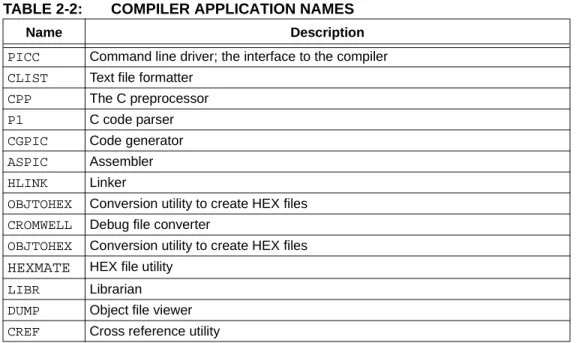
Table 2-2 lists the compiler applications. The names shown are the names of the exe-cutables, which can be found in the bin directory under the compiler’s installation directory.
For example, C source files (.c files) are first passed to the C preprocessor, CPP. The output of this application are .pre files. These files are then passed to the parser appli-cation, P1, which produces a p-code file output with extension .p1. The applications are executed in the order specified and temporary files are used to pass the output of one application to the next.
The compiler can accept more than just C source files. Table 2-1 lists all the possible input file types, and these files can be seen in this diagram, on the top and bottom, being passed to different compilation applications. They are processed by these applications and then the application output joins the normal flow indicated in the diagram.
For example, assembly source files are passed straight to the assembler application1 and are not processed at all by the code generator. The output of the assembler (an object file with .obj extension) is passed to the linker in the usual way. You can see that any p-code files (.p1 extension) or p-code libraries (.lpp extension) that are supplied on the command line are initially passed to the code generator.
Other examples of input files include object files (.obj extension) and object libraries (.lib extension), both of which are passed initially to the linker, and even HEX files (.hex extension), which are passed to one of the utility applications, called HEXMATE, which is run right at the end of the compilation sequence.
Some of the temporary files shown in this diagram are actually preserved and can be inspected after compilation has concluded. There are also driver options to request that the compilation sequence stop after a particular application and the output of that application becomes the final output.
TABLE 2-2: COMPILER APPLICATION NAMES
Name Description
PICC Command line driver; the interface to the compiler CLIST Text file formatter
CPP The C preprocessor P1 C code parser CGPIC Code generator ASPIC Assembler
HLINK Linker
OBJTOHEX Conversion utility to create HEX files CROMWELL Debug file converter
OBJTOHEX Conversion utility to create HEX files
HEXMATE HEX file utility LIBR Librarian DUMP Object file viewer CREF Cross reference utility
FIGURE 2-2: MULTI-FILE COMPILATION
2.3.1
Single-step Compilation
Figure 2-1 showed us the files that are generated by each application and the order in which these applications are executed. However this does not indicate how these appli-cations are executed when there is more than one source file being compiled.
Consider the case when there are two C source files that form a complete project and that are to be compiled, as is the case shown in Figure 2-2. If these files are called
main.c and io.c, these could be compiled with a single command, such as:
PICC --chip=16F877A main.c io.c
This command will compile the two source files all the way to the final output, but inter-nally we can consider this compilation as consisting of two stages.
The first stage involves processing of each source file separately, and generating some sort of intermediate file for each source file. The second stage involves combining all these intermediate files and further processing to form the final output. An intermediate file is a particular temporary file that is produced and marks the mid point between the first and second stage of compilation.
The intermediate file used by PICC is the p-code (.p1 extension) file output by the parser, so there will be one p-code file produced for each C source file. As indicated in the diagram, CPP and then P1 are executed to form this intermediate file. (For clarity the CPP and P1 applications have been represented by the same block in the dia-gram.)
In the second stage, the code generator reads in all the intermediate p-code files an produces a single assembly file output, which is then passed to the subsequent appli-cations that produce the final output.
The desirable attribute of this method of compilation is that the code generator, which is the main application that transforms from the C to the assembly domain, sees the entire project source code via the intermediate files.
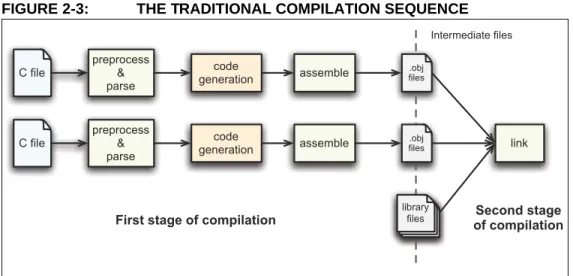
Traditional compilers have always use intermediate files that are object files output by the assembler. These intermediate object files are then combined by the linker and fur-ther processed to form the final output. This method of compilation is shown in Figure 2-3 and shows that the code generator is executed once for each source file.
C file C file library files preprocess & parse p-code code generation preprocess & parse
p-code assemble link
First stage of compilation Second stage of compilation Intermediate files
PICC Command-line Driver
FIGURE 2-3: THE TRADITIONAL COMPILATION SEQUENCE
When compiling files of mixed types, this can still be achieved with just one invocation of the compiler driver. As discussed in Section 2.3 “The Compilation Sequence”, the driver will pass each input file to the appropriate compiler application.
For example, the files, main.c, io.c, mdef.as and c_sb.lpp are to be compiled. To perform this in a single step, the following command line could be used.
PICC --chip=16F877A main.c io.c mdef.as c_sb.lpp
As shown in Figure 2-1 and Figure 2-2, the two C files (main.c and io.c) will be com-piled to intermediate p-code files; these, along with the p-code library file (c_sb.lpp) will be passed to the code generator. The output of the code generator, as well as the assembly source file (mdef.as), will be passed to the assembler.
The driver will re-compile all source files regardless of whether they have changed since the last build. IDEs, such as MPLAB IDE or HI-TIDE, and make utilities must be employed to achieve incremental builds, if desired. See also
Section 2.3.2 “Generating Intermediate Files”.
Unless otherwise specified, a HEX file and Microchip COFF file are produced as the final output. All intermediate files remain after compilation has completed, but most other temporary files are deleted, unless you use the --NODEL option (see
Section 2.7.39 “--NODEL: Do not remove temporary files”) which preserves all generated files except the run-time start-up file. Note that some generated files may be in a different directory to your project source files. See Section 2.7.43 “--OUTDIR: Specify a directory for output files” and Section 2.7.41 “--OBJDIR: Specify a directory for intermediate files” which can both control the destination for some output files.
2.3.2
Generating Intermediate Files
Make utilities and IDEs, such as MPLAB IDE and HI-TIDE, allow for an incremental build of projects that contain multiple source files. When building a project, they take note of which source files have changed since the last build and use this information to speed up compilation.
For example, if compiling two source files, but only one has changed since the last C file C file library files preprocess & parse .obj files preprocess & parse .obj files link assemble
First stage of compilation of compilationSecond stage
Intermediate files
code generation
code
If the compiler is being invoked using a make utility, it will need to be configured to recognized the different intermediate file format and the options used to generate the intermediate files. Make utilities typically call the compiler multiple times: once for each source file to generate an intermediate file, and once to perform the second stage compilation.
You may also wish to generate intermediate files to construct your own library files, although PICC is capable of constructing libraries in a single step, so this is typically not necessary. See Section 2.7.44 “--OUTPUT= type: Specify Output File Type” for more information on library creation.
The option --PASS1 (Section 2.7.45 “--PASS1: Compile to P-code”) is used to tell the compiler that compilation should stop after the parser has executed. This will leave the p-code intermediate file behind on successful completion.
For example, the files main.c and io.c are to be compiled using a make utility. The command lines that the make utility should use to compile these files might be some-thing like:
PICC --chip=16F877A --pass1 main.c PICC --chip=16F877A --pass1 io.c PICC --chip=16F877A main.p1 io.p1
If is important to note that the code generator needs to compile all p-code or p-code library files associated with the project in the one step. When using the --PASS1 option the code generator is not being invoked, so the above command lines do not violate this requirement.
2.3.2.1 INTERMEDIATE FILES AND ASSEMBLY SOURCE
The intermediate file format associated with assembly source files is the same as that used in traditional compilers, i.e. an object file (.obj extension). Assembly files are never passed to the code generator and so the code generator technology does not alter the way these files are compiled.
The -C option (see Section 2.7.1 “-C: Compile to Object File”) is used to generate object files and halt compilation after the assembly step.
2.3.3
Compilation of Assembly Source
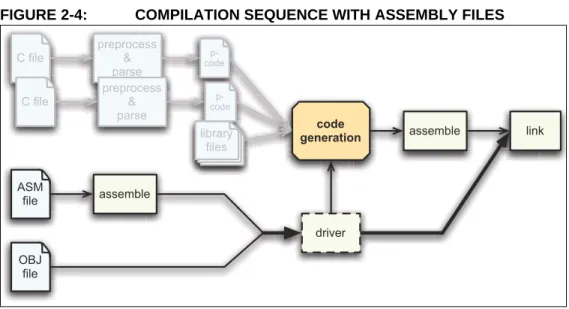
Since the code generator performs many tasks that were traditionally performed by the linker, there can be complications when assembly source is present in a project. Assembly files are traditionally processed after C code, but it is necessary to have this performed first so that specific information contained in the assembly code can be con-veyed to the code generator.
The specific information passed to the code generator is discussed in more detail in
Section 3.9.4 “Interaction between Assembly and C Code”.
PICC Command-line Driver
FIGURE 2-4: COMPILATION SEQUENCE WITH ASSEMBLY FILES
Any assembly source files are first assembled to form object files. These files, along with any other objects files that are part of the project, are then scanned by the com-mand-line driver and information is then passed to the code generator when it subsequently builds the C files, as has been described earlier.
2.4
RUNTIME FILES
In addition to the C and assembly source files specified on the command line, there are also compiler-generated source files and pre-compiled library files which might be compiled into the project by the driver. These files contain:
• C Standard library routines • Implicitly called arithmetic routines • User-defined library routines • The runtime startup code • The powerup routine • The printf routine.
Strictly speaking the power-up routine is neither compiler-generated source, nor a library routine. It is fully defined by the user, however as it is very closely associated with the runtime startup module, it is discussed with the other runtime files in the following sections.
2.4.1
Library Files
The names of the C standard library files appropriate for the selected target device, and other driver options, are determined by the driver and passed to the code generator and linker. P-code libraries (.lpp libraries) are used by the code generator, and object code libraries (.lib files) are used by the linker. Most library routines are derived from p-code libraries.
By default, PICC will search the lib directory under the compiler installation directory for library files that are required during compilation.
C file C file library files preprocess & parse p-code code generation assemble preprocess & parse p-code ASM file OBJ file link assemble driver
Your program will require declarations for any functions or symbols used from libraries. These are contained in the standard C header (.h) files. Header files are not library files and the two files types should not be confused. Library files contain precompiled code, typically functions and variable definitions; the header files provide declarations (as opposed to definitions) for functions, variables and types in the library files, as well as other preprocessor macros.
#include <math.h> // declare function prototype for sqrt void main(void)
{
double i;
// sqrt referenced; sqrt will be linked in from library file i = sqrt(23.5);
}
2.4.1.2 STANDARD LIBRARIES
The C standard libraries contain a standardised collection of functions, such as string, math and input/output routines. The range of these functions are described in
Chapter 7. “Library Functions”.
These libraries also contain C routines that are implicitly called by the output code of the code generator. These are routines that perform tasks such as floating point oper-ations, integer division and type conversions, and that may not directly correspond to a C function call in the source code.
The general form of the standard library names is htpic-dc.ext. The meaning of each field is described by:
• The processor type is always pic.
• The double type, d, is "-"for 24-bit doubles, and "d" for 32-bit doubles. • Library Type is always "c".
• The extension is .lpp for p-code libraries, or .lib for relocatable object libraries. 2.4.1.3 USER-DEFINED LIBRARIES
User-defined libraries may be created and linked in with programs as required. Library files are more easy to manage and may result in faster compilation times, but must be compatible with the target device and options for a particular project. Several versions of a library may need to be created to allow it to be used for different projects.
Libraries can be created manually using the compiler and the librarian, LIBR. See
Section 6.2 “Librarian” for more information on the librarian and creating library files using this application. Alternatively, library files can be created directly from the com-piler by specifying a library output using the --OUTPUT option, see
Section 2.7.44 “--OUTPUT= type: Specify Output File Type”.
User-created libraries that should be searched when building a project can be listed on the command line along with the source files.
As with Standard C library functions, any functions contained in user-defined libraries should have a declaration added to a header file. It is common practise to create one or more header files that are packaged with the library file. These header files can then be included into source code when required.
PICC Command-line Driver
2.4.2
Runtime Startup Code
A C program requires certain objects to be initialized and the processor to be in a particular state before it can begin execution of its function main(). It is the job of the runtime startup code to perform these tasks, specifically:
• Initialization of global variables assigned a value when defined • Clearing of non-initialized global variables
• General setup of registers or processor state
Rather than the traditional method of linking in a generic, precompiled routine, HI-TECH C Compiler for PIC10/12/16 MCUs uses a more efficient method which actually determines what runtime startup code is required from the user’s program. Both the driver and code generator are involved in generating the runtime startup code. The driver takes care of device setup and this code is placed into a separate assembly startup module. The code generator handles initialization of the C environment, such as clearing uninitialized C variables and copying initialized C variables. This code is output along with the rest of the C program.
The runtime startup code is generated automatically every time you build a project. The file created by the driver may be deleted after compilation and this operation can be controlled with the keep suboption to the --RUNTIME option. The default operation of the driver is to keep the start up module, however if using MPLAB IDE to build, it requests that the file be deleted unless you indicate otherwise.
If the startup module is kept, it will be called startup.as and will be located in the current working directory. If you are using an IDE to perform the compilation the destination directory may be dictated by the IDE itself.
Generation of the runtime startup code is an automatic process which does not require any user interaction, however some aspects of the runtime code can be controlled, if required, using the --RUNTIME option. Section 2.7.50 “--RUNTIME: Specify Run-time Environment” describes the use of this option, and the following sections describes the functional aspects of the code contained in this module and its effect on program operation.
The runtime startup code is executed before main(), but If you require any special ini-tialization to be performed immediately after reset, you should use power-up feature described later in Section 2.4.3 “The Powerup Routine”.
2.4.2.1 INITIALIZATION OF OBJECTS
One task of the runtime startup code is to ensure that any initialized variables contain their initial value before the program begins execution. Initialized variables are those which are not auto objects and which are assigned an initial value in their definition, for example input in the following example.
int input = 88; void main(void) { ...
Such initialized objects have two components: their initial value (0x0088 in the above example) stored in program memory (i.e. placed in the HEX file), and space for the variable reserved in RAM it will reside and be accessed during program execution (runtime).
Since auto objects are dynamically created, they require code to be positioned in the function in which they are defined to perform their initialization. It is possible that the initial value of an auto object may change on each instance of the function and so the initial values cannot be stored in program memory and copied. As a result, initialized
auto objects are not considered by the runtime startup code but are instead initialized by assembly code in each function output.
Variables whose contents should be preserved over a reset, or even power off, should be qualified with the persistent qualifier, see Section 3.3.11.1 “Persistent Type Qualifier”. Such variables are linked at a different area of memory and are not altered by the runtime startup code in any way.
2.4.2.2 CLEARING OBJECTS
Those non-auto objects which are not initialized must be cleared before execution of the program begins. This task is also performed by the runtime startup code.
Uninitialized variables are those which are not auto objects and which are not assigned a value in their definition, for example output in the following example. int output;
void main(void) { ...
Such uninitialized objects will only require space to be reserved in RAM where they will reside and be accessed during program execution (runtime).
The psects used for storing these components are described in
Section 3.7.1 “Compiler-generated Psects” and typically have a name based on the initialism "bss" (Block Started by Symbol).
The runtime startup code will clear all the memory location occupied by uninitialized variables so they will contain zero before main() is executed.
Variables whose contents should be preserved over a reset should be qualified with
persistent. See Section 3.3.11.1 “Persistent Type Qualifier” for more informa-tion. Such variables are linked at a different area of memory and are not altered by the runtime startup code in any way.
2.4.2.3 STATUS REGISTER PRESERVATION
The resetbits suboption of the --RUNTIME option (see 2.7.50 “--RUNTIME: Spec-ify Runtime Environment”) preserves some of the bits in the STATUS register before being clobbered by the remainder of the runtime startup code. The state of these bits can be examined after recovering from a reset condition to determine the cause of the reset.
The entire STATUS register is saved to an assembly variable ___resetbits. This variable can be accessed from C code using the declaration:
extern unsigned char __resetbits;
The assembly equates ___powerdown and ___timeout represent the bit address of the powerdown and timeout bits within the STATUS register and can be used if required. These can be accessed from C code using the declarations:
Note: Initialized auto variables can impact on code performance, particularly if the objects are large in size. Consider using global or static objects instead.
PICC Command-line Driver
2.4.3
The Powerup Routine
Some hardware configurations require special initialization, often within the first few instruction cycles after reset. To achieve this there is a hook to the reset vector provided via the powerup routine.
This routine can be supplied in a user-defined assembler module that will be executed immediately after reset. An template powerup routine is provided in the file pow-erup.as which is located in the sources directory of your compiler distribution. Refer to comments in this file for more details.
The file should be copied to your working directory, modified and included into your project as a source file. No special linker options or other code is required. The compiler will detect if you have defined a powerup routine and will automatically use it, provided the code in this routine is contained in a psect called powerup.
For correct operation (when using the default compiler-generated runtime startup code), the code must end with a GOTO instruction to the label called start. As with all user-defined assembly code, it must take into consideration program memory paging and/or data memory banking, as well as any applicable errata issues for the device you are using. The program’s entry point is already defined by the runtime startup code, so this should not be specified in the power-up routine with the END directive (if used). See
Section 4.3.9.2 “END” for more information on this assembler directive.
2.4.4
The
printf
Routine
The code associated with the printf function is not found in the library files. The
printf() function is generated from a special C template file that is customized after analysis of the user’s C code. See Section “PRINTF, VPRINTF” for more information on the printf library function.
The template file is found in the lib directory of the compiler distribution and is called
doprnt.c. It contains a minimal implementation of the printf() function, but with the more advanced features included as conditional code which can be utilized via preprocessor macros that are defined when it is compiled.
The parser and code generator analyze the C source code, searching for calls to the
printf function. For all calls, the placeholders that were specified in the printf()
format strings are collated to produce a list of the desired functionality of the final func-tion. The doprnt.c file is then preprocessed with the those macros specified by the preliminary analysis, thus creating a custom printf() function for the project being compiled. After parsing, the p-code output derived from doprnt.c is then combined with the remainder of the C program in the final code generation step.
For example, if a program contains one call to printf(), which looks like: printf(”input is: %d”);
The compiler will note that only the %d placeholder is used and the doprnt.c module that is linked into the program will only contain code that handles printing of decimal integers.
Consider now that the code is changed and another call to printf() is added. The new call looks like:
If the format string in a call to printf() is not a string literal as above, but is rather a pointer to a string, then the compiler will not be able to reliably predict the printf()
usage, and so it forces a more complete version of printf() to be generated. However, even without being able to scan printf() placeholders, the compiler can still make certain assumptions regarding the usage of the function. In particular, the compiler can look at the number and type of the additional arguments to printf () (those following the format string expression) to determine which placeholders could be valid. This enables the size and complexity of the generated printf() routine to be kept to a minimum even in this case.
For example, if printf() was called as follows: printf(myFormatString, 4, 6);
the compiler could determine that, for example, no floating point placeholders are required and omit these from being included in the printf() function output. As the arguments after the format string are non-prototyped parameters, their type must match that of the placeholders.
No aspect of this operation is user-controllable (other than by adjusting the calls to
printf() ), however the actual printf() code used by a program can be observed. If compiling a program using printf(), the driver will leave behind the pre-processed version of doprnt.c. This module, called doprnt.pre in your working directory, will show the C code that will actually be contained in the printf routine. As this code has been pre-processed, indentation and comments will have been stripped out as part of the normal actions taken by the C pre-processor.
2.5
DEBUGGING INFORMATION
Several driver options and output files assist with code development and allow source-level debugging of the output code. These are described in the following sections.
2.5.1
Output File Formats
The compiler is able to directly produce a number of the output file formats which are used by PIC10/12/16 development tools.
The default behavior of PICC is to produce a, Microchip format COFF and Intel HEX output. Unless changed by a driver option, the base names of these files will be the project name. See Section 2.2.1 “Output Files” for more information on how this base name is derived.
The COFF file is used by debuggers to obtain debugging information about the project. Table 2-13 shows all output format options available with PICC using the --OUTPUT
option. The File Type column lists the filename extension which will be used for the output file.
2.5.1.1 SYMBOL FILES
PICC creates two symbol files which are used to generate the debug output files, such as COFF and ELF files. These are the SYM file (.sym extension), produced by the linker, and the SDB file (.sdb extension) produced by the code generator.
informa-PICC Command-line Driver
2.5.2
Support Files
Two valuable files produced by the compiler are the assembly list file, produced by the assembler, and the map file, produced by the linker.
The compiler options --ASMLIST (Section 2.7.17 “--ASMLIST: Generate Assem-bler List Files”) generates a list files, and the -M option (Section 2.7.8 “-M: Generate Map File”) specifies generation of a map file.
The assembly list file contains the mapping between the original source code and the generated assembly code. It is useful for information such as how C source was encoded, or how assembly source may have been optimized. It is essential when con-firming if compiler-produced code that accesses objects is atomic, and shows the psects in which all objects and code are placed. See Section 4.4 “Assembly List Files” for more information on the contents of this file.
The map file shows information relating to where objects were positioned in memory. It is useful for confirming if user-defined linker options were correctly processed, and for determining the exact placement of objects and functions. It also shows all the unused memory areas in a devices and memory fragmentation. See Section 5.4 “Map Files”
for complete information on the contents of this file.
2.6
COMPILER MESSAGES
All compiler applications, including the command-line driver, PICC, use textual mes-sages to report feedback during the compilation process. A centralized messaging sys-tem is used to produce the messages which allows consistency during all stages of the compilation process.
2.6.1
Messaging Overview
A message is referenced by a unique number which is passed to the messaging sys-tem by the compiler application that needs to convey the information. The message string corresponding to this number is obtained from Message Description Files (MDF) which are stored in the dat directory in the compiler’s installation directory.
When a message is requested by a compiler application, its number is looked up in the MDF that corresponds to the currently selected language. The language of messages can be altered as discussed in Section 2.6.2 “Message Language”.
Once found, the alert system can read the message type and the string to be displayed from the MDF. There are several different message types which are described in
Section 2.6.3 “Message Type” and the type can be overridden by the user, as described in the same section.
The user is also able to set a threshold for warning message importance, so that only those which the user considers significant will be displayed. In addition, messages with a particular number can be disabled. A pragma can also be used to disabled a partic-ular message number within specific lines of code. These methods are explained in
Section 2.6.5.1 “Disabling Messages”.
Provided the message is enabled and it is not a warning messages whose level is below the current warning threshold, the message string will be displayed.
see Section 2.7.28 “--ERRORS: Maximum Number of Errors”. This counter is reset for each compiler application, thus specifying a maximum of five errors will allow up to five errors from the parser, five from the code generator, five from the linker, five from the driver, etc.
Although the information in the MDF can be modified with any text editor, this is not rec-ommended. Message behavior should only be altered using the options and pragmas described in the following sections.
2.6.2
Message Language
PICC Supports more than one language for displayed messages. There is one MDF for each language supported.
Under Windows, the default language can be specified when installing the compiler. The default language may be changed on the command line using the --LANG option, see Section 2.7.34 “--LANG: Specify the Language for Messages”. Alternatively it may be changed permanently by using the --LANG option together with the --SETUP
option which will store the default language in either the registry, under Windows, or in a configuration file on other systems. On subsequent builds the default language used will be that specified.
Table shows the MDF applicable for the currently supported languages.
If a language other than English is selected, and the message cannot be found in the appropriate non-English MDF, the alert system tries to find the message in the English MDF. If an English message string is not present, a message similar to:
error/warning (*) generated, but no description available
where * indicates the message number that was generated that will be printed; otherwise, the message in the requested language will be displayed.
2.6.3
Message Type
There are four types of message. These are described below along with the compiler’s behavior when encountering a message of each type.
Advisory Messages convey information regarding a situation the compiler has en-countered or some action the compiler is about to take. The information is being displayed “for your interest” and typically require no action to be taken. Compilation will continue as normal after such a message is issued.
Warning Messages indicate source code or some other situation that can be com-piled, but is unusual and may lead to runtime failure of the code. The code or situation that triggered the warning should be investigated; however, com-pilation of the current module will continue, as will comcom-pilation of any remain-ing modules.
TABLE 2-3: SUPPORTED LANGUAGES
Language MDF name
English en_msgs.txt
German de_msgs.txt
PICC Command-line Driver
Fatal Error Messages indicate a situation that cannot allow compilation to proceed and which required the compilation process to stop immediately.
2.6.4
Message Format
By default, messages are printed in a human-readable format. This format can vary from one compiler application to another, since each application reports information about different file formats.
Some applications, for example the parser, are typically able to pinpoint the area of interest down to a position on a particular line of C source code, whereas other appli-cations, such as the linker, can at best only indicate a module name and record number, which is less directly associated with any particular line of code. Some messages relate to issues in driver options which are in no way associated with any source code. There are several ways of changing the format in which message are displayed, which are discussed below.
The driver option -E (with or without a filename) alters the format of all displayed mes-sages. See Section 2.7.3 “-E: Redirect Compiler Errors to a File”. Using this option produces messages that are better suited to machine parsing, and are less
user-friendly. Typically each message is displayed on a single line. The general form of messages produced when using the -E option is:
filename line: (message number) message string (type)
The -E option also has another effect. When used the driver first checks to see if spe-cial environment variables have been set. If so, the format dictated by these variables are used as a template for all messages produced by all compiler applications. The names of these environment variables are given in Table 2-4.
The value of these environment variables are strings that are used as templates for the message format. Printf-like placeholders can be placed within the string to allow the message format to be customized. The placeholders and what they represent are indicated in Table 2-5.
TABLE 2-4: MESSAGING ENVIRONMENT VARIABLES
Variable Effect
HTC_MSG_FORMAT All advisory messages
HTC_WARN_FORMAT All warning messages
HTC_ERR_FORMAT All error and fatal error messages
TABLE 2-5: MESSAGING PLACEHOLDERS
Placeholder Replacement %a application name %c column number %f filename %l line number %n message number
Environment variables, in turn, may be overridden by the driver options: --MSGFOR-MAT, --WARNFORMAT and --ERRFORMAT, see Section 2.7.27 “--ERRFORMAT: Define Format for Compiler Messages”. These options take a string as their argu-ment. The option strings are formatted, and can use the same placeholders, as their variable counterparts.
For example, a project is compiled, but, as shown, produces a warning from the parser and an error from the linker (numbered 362 and 492 respectively).
main.c: main() 17: ip = &b;
^ (362) redundant "&" applied to array (warning) (492) attempt to position absolute psect "text" is illegal
Notice that the parser message format identifies the particular line and position of the offending source code.
If the -E option is now used and the compiler issues the same messages, the compiler will output.
main.c: 12: (362) redundant "&" applied to array (warning) (492) attempt to position absolute psect "text" is illegal (error) The user now uses the --WARNFORMAT in the following fashion.
--WARNFORMAT="%a %n %l %f %s"
When recompiled, the following output will be displayed. parser 362 12 main.c redundant "&" applied to array
(492) attempt to position absolute psect "text" is illegal (error) Notice that the format of the warning was changed, but that of the error message was not. The warning format now follows the specification of the environment variable. The application name (parser) was substituted for the %a placeholder, the message number (362) substituted the %n placeholder, etc.
2.6.5
Changing Message Behavior
Both the attributes of individual messages and general settings for the messaging sys-tem can be modified during compilation. There are both driver options and C pragmas that can be used to achieve this.
2.6.5.1 DISABLING MESSAGES
Each warning message has a default number indicating a level of importance. This number is specified in the MDF and ranges from -9 to 9. The higher the number, the more important the warning.
Warning messages can be disabled by adjusting the warning level threshold using the
--WARN driver option, see Section 2.7.59 “--WARN: Set Warning Level”. Any warn-ings whose level is below that of the current threshold are not displayed.
The default threshold is 0 which implies that only warnings with a warning level of 0 or higher will be displayed by default. The information in this option is propagated to all compiler applications, so its effect will be observed during all stages of the compilation process.
Warnings may also be disabled by using the --MSGDISABLE option, see
PICC Command-line Driver
Some warning messages can also be disabled by using the warning pragma. This pragma will only affect warnings that are produced by either the parser or the code gen-erator, i.e. errors directly associated with C code. See Section 3.10.3.9 “The #pragma warning Directive” for more information on this pragma.
Error messages can also be disabled, however a more verbose form of the command is required to confirm the action. To specify an error message number in the --MSG-DISABLE command, the number must be followed by :off to ensure that it is disabled. For example: --MSGDISABLE=195:off will disable error number 195.
2.6.5.2 CHANGING MESSAGE TYPES
It is also possible to change the type of some messages. This can only be done for messages generated by the parser or code generator. See Section 3.10.3.9 “The #pragma warning Directive” for more information on this pragma.
2.7
PICC DRIVER OPTION DESCRIPTIONS
Most aspects of the compilation can be controlled using the command-line driver, PICC. The driver will configure and execute all required applications, such as the code generator, assembler and linker.
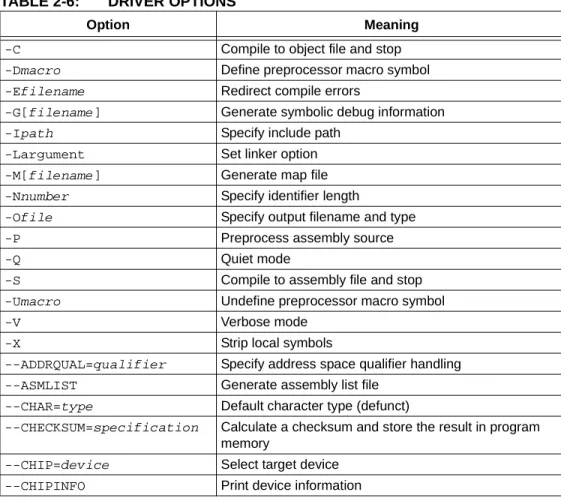
PICC recognizes the compiler options which are tabled below and explained in detail in the following sections. The case of the options is not important, however command shells in most operating systems are case sensitive when it comes to names of files.
Note: Disabling error or warning messages in no way fixes the condition which triggered the message. Always use extreme caution when exercising these options.
TABLE 2-6: DRIVER OPTIONS
Option Meaning
-C Compile to object file and stop
-Dmacro Define preprocessor macro symbol
-Efilename Redirect compile errors
-G[filename] Generate symbolic debug information
-Ipath Specify include path
-Largument Set linker option
-M[filename] Generate map file
-Nnumber Specify identifier length
-Ofile Specify output filename and type -P Preprocess assembly source
-Q Quiet mode
-S Compile to assembly file and stop
-Umacro Undefine preprocessor macro symbol
-V Verbose mode
--CODEOFFSET=value Specify ROM offset address
--CR=file Generate cross reference file
--DEBUGGER=type Set debugger environment
--DOUBLE=size Size of double type
--ECHO Echo command line
--ERRFORMAT=format Set error format
--ERRORS=number Set maximum number of errors
--FILL=specification Specify a ROM-fill value for unused memory
--FLOAT=size Size of float type
--GETOPTION=argument Get advanced options
--HELP=option Help
--IDE=name Set development environment
--LANG=language Specify language
--MEMMAP=type Display memory map
--MODE=mode Choose operating mode
--MSGDISABLE=list Disable warning messages --MSGFORMAT=specification Set advisory message format
--NODEL Do not remove temporary files
--NOEXEC Do not execute compiler applications
--OBJDIR=path Set object files directory --OPT=optimizations Control optimization --OUTDIR=path Set output directory
--OUTPUT=path Set output formats
--PASS1 Produce HI-TECH intermediate p-code file and stop
--PRE Produce preprocessed source files and stop
--PROTO Generate function prototypes
--RAM=ranges Adjust RAM ranges
--ROM=ranges Adjust ROM ranges
--RUNTIME=options Specify runtime options
--SCANDEP Scan for dependencies
--SERIAL=specification Insert a hexadecimal code or serial number --SETOPTION=argument Set advanced options
--SETUP=specification Setup the compiler
--SHROUD Shroud (obfuscate) generated p-code files
--STRICT Use strict ANSI keywords
--SUMMARY=type Summary options
--TIME Report compilation times
--VER Show version information
--WARN=number Set warning threshold level --WARNFORMAT=specifica- Set warning format
TABLE 2-6: DRIVER OPTIONS (CONTINUED)
PICC Command-line Driver
2.7.0.1 OPTION FORMATS
All single letter options are identified by a leading dash character, “-”, e.g. -C. Some single letter options specify an additional data field which follows the option name immediately and without any whitespace, e.g. -Ddebug. In this manual options are written in upper case and suboptions are in lower case.
Multi-letter, or word, options have two leading dash characters, e.g. --ASMLIST. (Because of the double dash, the driver can determine that the option --DOUBLE, for example, is not a -D option followed by the argument OUBLE.)
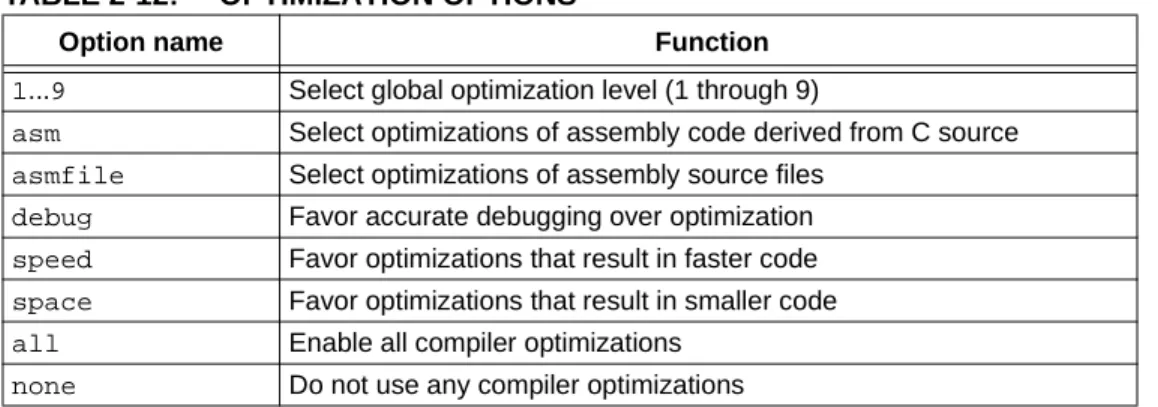
Some of these word options use suboptions which typically appear as a comma -sep-arated list following an equal character, =, e.g. --OUTPUT=hex,cof. The exact format of the options varies and are described in detail in the following sections.
Some commonly used suboptions include default, which represent the default spec-ification that would be used if this option was absent altogether; all, which indicates that all the available suboptions should be enabled as if they had each been listed; and
none, which indicates that all suboptions should be disabled. For example: --OPT=none
will turn off all optimizers.
Some suboptions may be prefixed with a plus character, +, to indicate that they are in addition to the other suboptions present, or a minus character “-”, to indicate that they should be excluded. For example:
--OPT=default,-asm
indicates that the default optimization be used, but that the assembler optimizer should be disabled. If the first character after the equal sign is + or -, then the default keyword is implied. For example:
--OPT=-asm
is the same as the previous example.
See the –-HELP option, Section 2.7.32 “--HELP: Display Help”, for more information about options and suboptions.
2.7.1
-C: Compile to Object File
The -C option is used to halt compilation after executing the assembler, leaving a relo-catable object file as the output. It is frequently used when compiling assembly source files using a make utility.
See Section 2.3.2 “Generating Intermediate Files” for more information on generat-ing and usgenerat-ing intermediate files.
2.7.2
-D: Define Macro
The -D option is used to define a preprocessor macro on the command line, exactly as if it had been defined using a #define directive in the source code. This option may take one of two forms, -Dmacro which is equivalent to:
#define macro 1
placed at the top of each module compiled using this option, or -Dmacro=text which is equivalent to:
#define macro text
where text is the textual substitution required. Thus, the command: PICC --CHIP=16F877AA -Ddebug -Dbuffers=10 test.c
will compile test.c with macros defined exactly as if the C source code had included the directives:
#define debug 1 #define buffers 10
Defining macros as C string literals requires bypassing any interpretation issues in the operating system that is being used. To pass the C string, "hello world", (including the quote characters) in the Windows environment, use: "-DMY_STRING=\\\"hello world\\\"" (you must include the quote characters around the entire option as there is a space character in the macro definition). Under Linux or Mac OS X, use:
-DMY_STRING=\"hello\ world\".
See Section 2.8 “MPLAB IDE Universal Toolsuite Equivalents” for use of this option in MPLAB IDE.
2.7.3
-E: Redirect Compiler Errors to a File
This option has two purposes. The first is to change the format of displayed messages. The second is to optionally allow messages to be directed to a file as some editors do not allow the standard command line redirection facilities to be used when invoking the compiler.
The general form of messages produced with the -E option in force is:
filename line_number: (message number) message string (type) If a filename is specified immediately after -E, it is treated as the name of a file to which all messages (errors, warnings etc) will be printed. For example, to compile x.c and redirect all errors to x.err, use the command:
PICC --CHIP=16F877AA -Ex.err x.c
The -E option also allows errors to be appended to an existing file by specifying an addition character, +, at the start of the error filename, for example:
PICC --CHIP=16F877AA -E+x.err y.c
If you wish to compile several files and combine all of the errors generated into a single text file, use the -E option to create the file then use -E+ when compiling all the other source files. For example, to compile a number of files with all errors combined into a file called project.err, you could use the - E option as follows:
PICC --CHIP=16F877AA -Eproject.err -O --PASS1 main.c PICC --CHIP=16F877AA -E+project.err -O --PASS1 part1.c PICC --CHIP=16F877AA -E+project.err -C asmcode.as
PICC Command-line Driver
2.7.4
-G: Generate Source-level Symbol File
The -G option allows specification of the filename used for the source-level symbol file (.sym extension) for use with supported debuggers and simulators such as HI-TIDE™ and MPLAB IDE. See also Section 2.5 “Debugging Information”.
If no filename is given, the symbol file will have the same base name as the project name (see Section 2.2 “Invoking the Compiler”), and an extension of .sym. For example the option -Gtest.sym generates a symbol file called test.sym. Symbol files generated using the -G option include source-level information for use with source-level debuggers.
2.7.5
-I: Include Search Path
Use -I to specify an additional directory to search for header files which have been included using the #include directive. The directory can either be an absolute or rel-ative path. The -I option can be used more than once if multiple directories are to be searched.
The compiler’s include directory containing all standard header files is always searched, even if no -I option is present. If header filenames are specified using quote characters rather than angle brackets, as in #include "lcd.h", then the current working directory is searched in addition to the compiler’s include directory. Note that if compiling within MPLAB IDE, the search path is relative to the output directory, not the project directory.
These default search paths are searched after any user-specified directories have been searched. For example:
PICC --CHIP=16F877AA -C -Ic:\include -Id:\myapp\include test.c
will search the directories c:\include and d:\myapp\include for any header files included into the source code, then search the default include directory.
This option has no effect for files that are included into assembly source using the assembly INCLUDE directive. See Section 4.3.10.3 “INCLUDE”.
See Section 2.8 “MPLAB IDE Universal Toolsuite Equivalents” for use of this option in MPLAB IDE.
2.7.6
-L: Scan Library
The -L option is used to specify additional libraries which are to be scanned by the linker. Libraries specified using the -L option are scanned before the standard C library, allowing additional versions of standard library functions to be accessed.
The argument to -L is a library keyword to which the prefix pic ; numbers representing the processor range, number of ROM pages and the number of RAM banks; and the suffix .lib are added.
Thus the option -Ll when compiling for a 16F877A will, for example, scan the library
pic42c-l.lib and the option -Lxx will scan a library called pic42c-xx.lib. All libraries must be located in the lib directory of the compiler installation directory. As indicated, the argument to the -L option is not a complete library filename. If you wish the linker to scan libraries whose names do not follow the above naming
conven-2.7.7
-L-: Adjust Linker Options Directly
The -L driver option can be used to specify an option which will be passed directly to the linker. If -L is followed immediately by text starting with a dash character “-”, the text will be passed directly to the linker without being interpreted by PICC. If the -L
option is not followed immediately by a dash character, it is assumed the option is the library scan option, Section 2.7.6 “-L: Scan Library”.
For example, if the option -L-N is specified, the -N option will be passed on to the linker without any subsequent interpretation by the driver. The linker will then process this option, when, and if, it is invoked, and perform the appropriate operation.
Take care with command-line options. The linker cannot interpret command-line driver options; similarly the driver cannot interpret linker options. In most situations, it is always the command-line driver, PICC, that is being executed. If you need to add alter-nate linker settings in the Linker tab in the Project>MPLAB Build options... dialogue, you must add driver options (not linker options). These driver options will be used by the driver to generate the appropriate linker options during the linking process. The -L
option is a means of allowing a linker option to be specified via a driver option. The -L option is especially useful when linking code which contains non-standard pro-gram sections (or psects), as may be the case if the propro-gram contains hand-written assembly code which contains user-defined psects (see 4.3.9.3 “PSECT”), or C code which uses the #pragma psect directive (see 3.10.3.6 “The #pragma psect Direc-tive”). Without this -L option, it would be necessary to invoke the linker manually to allow the linker options to be adjusted.
This option can also be used to replace default linker options. If the string starting from the first character after the -L up to the first equal character, "=", matches a psect or class name in the default options, then (the reference to the psect or class name in the default option, and the remainder of that option, are deleted) that default linker option is replaced by the option specified by the -L. For example, if a default linker option was:
-preset_vec=00h,intentry,init,end_init
the driver option -L-pinit=100h would result in the following options being passed to the linker: -pinit=100h -preset_vec=00h. Note the end_init linker option has been removed entirely. If there are no characters following the first equal character in the -L option, then no replacement will be made for the default linker options that will be deleted. For example, the driver option -L-pinit= will adjust the default options passed to the linker, as above, but the -pinit linker option would be removed entirely. No warning is generated if such a default linker option cannot be found. The default option that you are deleting or replacing must contain an equal character.
2.7.8
-M: Generate Map File
The -M option is used to request the generation of a map file. The map is generated by the linker and includes detailed information about where objects are located in memory. See Section 5.4 “Map Files” for information regarding the content of these files. If no filename is specified with the option, then the name of the map file will have the project name (see Section 2.2.1 “Output Files”), with the extension .map.
This option is on by default when compiling from within MPLAB IDE and using the HI-TECH Universal Toolsuite.