The software described in this book is furnished under a license agreement and may be used only in accordance with the terms of the agreement.
Documentation version 5.2
Legal Notice
Copyright © 2008 Symantec Corporation. All rights reserved.
Symantec, the Symantec Logo are trademarks or registered trademarks of Symantec Corporation or its affiliates in the U.S. and other countries. Other names may be trademarks of their respective owners.
The product described in this document is distributed under licenses restricting its use, copying, distribution, and decompilation/reverse engineering. No part of this document may be reproduced in any form by any means without prior written authorization of Symantec Corporation and its licensors, if any.
THE DOCUMENTATION IS PROVIDED "AS IS" AND ALL EXPRESS OR IMPLIED CONDITIONS, REPRESENTATIONS AND WARRANTIES, INCLUDING ANY IMPLIED WARRANTY OF MERCHANTABILITY, FITNESS FOR A PARTICULAR PURPOSE OR NON-INFRINGEMENT, ARE DISCLAIMED, EXCEPT TO THE EXTENT THAT SUCH DISCLAIMERS ARE HELD TO BE LEGALLY INVALID. SYMANTEC CORPORATION SHALL NOT BE LIABLE FOR INCIDENTAL OR CONSEQUENTIAL DAMAGES IN CONNECTION WITH THE FURNISHING,
PERFORMANCE, OR USE OF THIS DOCUMENTATION. THE INFORMATION CONTAINED IN THIS DOCUMENTATION IS SUBJECT TO CHANGE WITHOUT NOTICE.
The Licensed Software and Documentation are deemed to be commercial computer software as defined in FAR 12.212 and subject to restricted rights as defined in FAR Section 52.227-19 "Commercial Computer Software - Restricted Rights" and DFARS 227.7202, "Rights in Commercial Computer Software or Commercial Computer Software Documentation", as applicable, and any successor regulations. Any use, modification, reproduction release, performance, display or disclosure of the Licensed Software and Documentation by the U.S. Government shall be solely in accordance with the terms of this Agreement.
Symantec Technical Support maintains support centers globally. Technical Support’s primary role is to respond to specific queries about product feature and function. The Technical Support group also authors content for our online Knowledge Base. The Technical Support group works collaboratively with the other functional areas within Symantec to answer your questions in a timely fashion. For example, the Technical Support group works with Product Engineering and Symantec Security Response to provide alerting services and virus definition updates.
Symantec’s maintenance offerings include the following:
■ A range of support options that give you the flexibility to select the right amount of service for any size organization
■ A telephone and web-based support that provides rapid response and up-to-the-minute information
■ Upgrade assurance that delivers automatic software upgrade protection ■ Global support that is available 24 hours a day, 7 days a week
■ Advanced features, including Account Management Services
For information about Symantec’s Maintenance Programs, you can visit our Web site at the following URL:
www.symantec.com/techsupp/
Contacting Technical Support
Customers with a current maintenance agreement may access Technical Support information at the following URL:
www.symantec.com/techsupp/
Before contacting Technical Support, make sure you have satisfied the system requirements that are listed in your product documentation. Also, you should be at the computer on which the problem occurred, in case it is necessary to recreate the problem.
When you contact Technical Support, please have the following information available:
■ Product release level ■ Hardware information
■ Available memory, disk space, and NIC information ■ Operating system
■ Router, gateway, and IP address information ■ Problem description:
■ Error messages and log files
■ Troubleshooting that was performed before contacting Symantec ■ Recent software configuration changes and network changes
Licensing and registration
If your Symantec product requires registration or a license key, access our technical support Web page at the following URL:
www.symantec.com/techsupp/
Customer service
Customer service information is available at the following URL: www.symantec.com/techsupp/
Customer Service is available to assist with the following types of issues: ■ Questions regarding product licensing or serialization
■ Product registration updates such as address or name changes
■ General product information (features, language availability, local dealers) ■ Latest information about product updates and upgrades
■ Information about upgrade assurance and maintenance contracts ■ Information about the Symantec Buying Programs
■ Advice about Symantec's technical support options ■ Nontechnical presales questions
please contact the maintenance agreement administration team for your region as follows:
■ Asia-Pacific and Japan:[email protected] ■ Europe, Middle-East, and Africa:[email protected]
■ North America and Latin America:[email protected]
Additional enterprise services
Symantec offers a comprehensive set of services that allow you to maximize your investment in Symantec products and to develop your knowledge, expertise, and global insight, which enable you to manage your business risks proactively. Enterprise services that are available include the following:
These solutions provide early warning of cyber attacks, comprehensive threat analysis, and countermeasures to prevent attacks before they occur.
Symantec Early Warning Solutions
These services remove the burden of managing and monitoring security devices and events, ensuring rapid response to real threats.
Managed Security Services
Symantec Consulting Services provide on-site technical expertise from Symantec and its trusted partners. Symantec Consulting Services offer a variety of prepackaged and customizable options that include assessment, design, implementation, monitoring and management capabilities, each focused on establishing and maintaining the integrity and availability of your IT resources. Consulting Services
Educational Services provide a full array of technical training, security education, security certification, and awareness communication programs. Educational Services
To access more information about Enterprise services, please visit our Web site at the following URL:
www.symantec.com
Technical Support
... 4Chapter 1
Getting started
... 11About Symantec Scan Engine ... 11
About the software developer’s guide ... 11
What’s new ... 12
About integrating with Symantec Scan Engine ... 13
About ICAP ... 13
About the C API ... 13
About licensing ... 14
Considerations for implementation ... 14
How to implement scanning ... 15
How to maximizing performance ... 15
About Symantec Scan Engine API load balancing ... 16
Where to start ... 16
Chapter 2
Configuring Symantec Scan Engine for custom
integrations
... 19Considerations for custom integration ... 19
About configuring Symantec Scan Engine ... 20
Changing the ICAP response ... 21
Chapter 3
Constructing clients using ICAP 1.0
... 23How ICAP works ... 23
About ICAP messages ... 24
About ICAP requests ... 24
About ICAP methods ... 26
About ICAP services ... 27
About ICAP responses ... 29
About encapsulated messages ... 34
Where to find more information on ICAP ... 36
About the scanning process ... 36
About scanning URLs ... 37
About non-viral threat category responses ... 39
How to determine which services are supported (OPTIONS) ... 41
About using the OPTIONS request to determine if the server is overloaded ... 41
About querying antivirus-only services ... 42
About querying content-filtering services ... 43
About querying antivirus and content-filtering services ... 44
OPTIONS examples ... 44
Scanning HTTP requests (REQMOD) ... 55
REQMOD examples ... 55
Scanning HTTP responses (RESPMOD) ... 59
RESPMOD examples ... 59
Scanning non-HTTP data (RESPMOD and FILEMOD) ... 63
About network scanning (RESPMOD) ... 63
Local file scanning (FILEMOD) ... 64
Chapter 4
Constructing clients using the antivirus client-side
API library
... 69General procedure for scanning ... 69
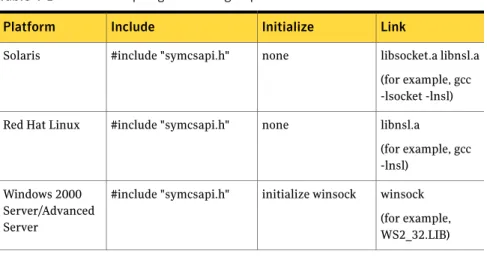
Compiling and linking ... 70
Compiling on Windows 2000 Server/Advanced Server ... 70
Solaris ... 71
Red Hat Linux ... 72
Exceptions and error handling ... 72
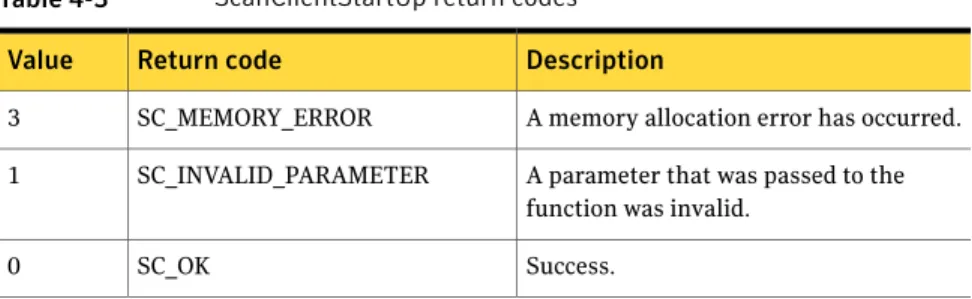
API functions ... 72 File-based scanning ... 73 Stream-based scanning ... 73 ScanClientStartUp ... 74 ScanClientScanFile ... 76 ScanResultGetNumProblems ... 80 ScanResultGetProblem ... 81 SC_DECODE_DISPOSITION ... 83 ScanResultsFree ... 84 ScanClientShutDown ... 84 ScanClientStreamStart ... 85 ScanClientStreamSendBytes ... 86 ScanClientStreamFinish ... 87 ScanClientStreamAbort ... 90
Appendix A
Using the antivirus API
... 91About the sample code ... 91
Getting started
This chapter includes the following topics: ■ About Symantec Scan Engine
■ About the software developer’s guide ■ What’s new
■ About integrating with Symantec Scan Engine ■ About licensing
■ Considerations for implementation ■ Where to start
About Symantec Scan Engine
Symantec Scan Engine, formerly marketed as Symantec AntiVirus™ Scan Engine, is a carrier-class, network-accessible, content-scanning engine. Symantec Scan Engine provides content scanning capabilities to any application on an IP network, regardless of platform.
Symantec Scan Engine features all of the key content-scanning technologies that are available in the complete line of Symantec products. Symantec Scan Engine is one of the most effective solutions available for protecting your network against a variety of undesirable content.
For more information, see the Symantec Scan Engine Implementation Guide.
About the software developer’s guide
Software developers can use the information that is provided in the Symantec Scan Engine Software Developer’s Guide to create client applications that let
1
Chapter
third-party applications integrate with Symantec Scan Engine for a variety of content scanning services. You can configure client applications to communicate with Symantec Scan Engine using one of several supported protocols. However, the only protocol that is supported in the software developer’s guide is the Internet Content Adaptation Protocol (ICAP) version 1.0, as presented in RFC 3507 (April 2003).
What’s new
If you have constructed your own ICAP 1.0 client for Symantec Scan Engine, you can take advantage of the following new features:
If your environment has Java, you can use the Java API plug-in (SymJavaAPI.jar) to integrate with Symantec Scan Engine. The Java API provides client antivirus scanning and repair services using the ICAP protocol. The Java API supports the FILEMOD and RESPMOD scanning modes, and it contains the built-in ability to stream files.
For more information, see
Scan_Engine_SDK/Java/Docs/SymJavaAPIDocs.jar on the product CD.
Ability to construct an ICAP client connector using Java API
If your environment has .NET Framework, you can use the .NET API plug-in (symcsmsnetapi.dll) to integrate with Scan Engine. The .NET API provides client antivirus scanning and repair services using the ICAP protocol. The .NET API supports the FILEMOD and RESPMOD scanning modes, and it contains the built-in ability to stream files.
For more information, see
Scan_Engine_SDK/C#/Docs/SymCSharpAPIDocs.chm on the product CD.
Ability to construct an ICAP client connector using .NET API
Symantec Scan Engine software developer's kit now provides support for gcc-3.4.6 for SPARC Solaris 10 and Red Hat Enterprise Linux 3. Support for gcc 3.4.6
About integrating with Symantec Scan Engine
Software developers can create client applications (connectors) that let third-party applications integrate with Symantec Scan Engine for content scanning services using ICAP as the communication protocol.
You can create a custom integration using any of the following methods: If you plan to integrate antivirus scanning only, you can use the basic antivirus API. URL filtering is not available using the antivirus API. The antivirus API includes 12 libraries which includes static and dynamic libraries for each supported platform. The API library consists of 10 functions that provide scanning and repair services to client applications.
Use the basic client-side antivirus application program interface (API) C library.
If you construct your own ICAP client, you can specify whether to perform antivirus scanning and URL filtering for outgoing and incoming requests.
Construct your own ICAP 1.0 client for the Symantec Scan Engine.
About ICAP
ICAP is a lightweight protocol that was originally created to execute a remote procedure call on HTTP messages. ICAP is part of an evolving architecture that lets corporations, data communication companies, and Internet service providers (ISPs) dynamically scan, change, and augment data as it flows through ICAP servers. The protocol lets ICAP clients pass data to ICAP servers for adaptation (some type of transformation or other processing, such as virus or URL filtering). The server executes its transformation service on the data and responds to the client, possibly with modified content.
In a typical integration for processing HTTP traffic, a caching proxy server retrieves the requested information from the Web. At the same time, it caches the information (stores a copy on disk) and, where possible, serves multiple requests for the same Web content from the cache. A caching proxy server can use ICAP to communicate with Symantec Scan Engine and request that content that is retrieved from the Web be scanned and repaired, if necessary.
About the C API
You can use the client-side API C library to configure an application to pass files to Symantec Scan Engine for scanning. The API includes 16 libraries, which includes static and dynamic libraries for each supported platform. The API library
consists of 12 functions that provide scanning and repair services to client applications.
The Symantec Scan Engine API C library is available for the following platforms: ■ Red Hat Linux 7.2 and later (using either gcc 2.95.2 or 3.2)
■ Red Hat Enterprise Linux 3 (using gcc 3.4.6) ■ Solaris 7 and later (using either gcc 2.95.2 or 3.2) ■ Solaris 10 (using gcc 3.4.6)
■ Windows 2000 Server/Advanced Server (using either Microsoft Visual Studio 6 or 7)
A C header file is included.
About licensing
Key features for Symantec Scan Engine are activated by license. After you install Symantec Scan Engine, you install licenses through the Symantec Scan Engine administrative interface.
The content scanning features, including antivirus and URL filtering, are activated by product licenses. Subscription licenses let you obtain updates to virus definitions and URL filtering content updates. When a license expires, a new license must be installed.
When no product license is installed, Symantec Scan Engine is not operational. After you install a product license, you can access the relevant portions of the administrative interface, and Symantec Scan Engine is operational. For example, if you activate a product license for antivirus scanning only (with no URL filtering), you are not able to access those portions of the administrative interface that relate to URL filtering.
When no subscription license is installed or a subscription license expires, Symantec Scan Engine is operational, but updates are not permitted. New virus definitions updates are not downloaded to keep protection current, and URL-filtering updates to the URL lists and DDR dictionaries are not permitted. For more information about licensing, see the Symantec Scan Engine
Implementation Guide.
Considerations for implementation
Symantec Scan Engine can be easily implemented in an existing infrastructure. Symantec Scan Engine runs on Sun Solaris, Red Hat Linux, SuSE Linux, and
Windows Server platforms. You can run Symantec Scan Engine on the same computer or a different computer than the client application.
For more information about Symantec Scan Engine system requirements, see the Symantec Scan Engine Implementation Guide.
How to implement scanning
You can create a custom integration in any of the following ways using ICAP: If you plan to integrate antivirus scanning only, you can use the basic antivirus API. URL filtering is not available using the antivirus API. The antivirus API includes 12 libraries, which includes static and dynamic libraries for each supported platform. The API library consists of 10 functions that provide scanning and repair services to client applications.
The Symantec Scan Engine API supports both file-based and stream-based scanning. See“File-based scanning”on page 73. See“Stream-based scanning”on page 73. Use the basic client-side antivirus
application program interface (API) C library.
If you construct your own ICAP client, you can specify whether to perform antivirus scanning and URL filtering for outgoing and incoming requests.
Construct your own ICAP 1.0 client for Symantec Scan Engine.
How to maximizing performance
In a typical configuration, files are passed to Symantec Scan Engine through a socket over the network because Symantec Scan Engine is running on a separate computer. Depending on the network setup, client applications (applications that are configured to pass files to Symantec Scan Engine for scanning) can pass a full path rather than the actual file to Symantec Scan Engine for improved
performance. For example, files to be scanned might be located on a drive that can be mounted over the network, such as a shared drive in Windows or a network file system (NFS) drive. If the client application and Symantec Scan Engine have access to a shared directory, the client application can place the file in the shared directory and pass the full path to Symantec Scan Engine.
For cases in which the client application is running on the same computer as Symantec Scan Engine, the client application can pass the file name to Symantec
Scan Engine, and Symantec Scan Engine can open the file and scan it in place on the computer.
See“Local file scanning (FILEMOD)”on page 64.
About Symantec Scan Engine API load balancing
The Symantec Scan Engine API provides scheduling across any number of computers that are running Symantec Scan Engine. Client applications that pass files to Symantec Scan Engine benefit from load-balanced virus scanning without any additional effort. When multiple scan engines are used, the API determines the appropriate scan engine to receive the next file to be scanned. The
determination is based on the scheduling algorithm.
Another scan engine is called when any of the following events occur: ■ A scan engine is unreachable
■ A scan engine stops responding during a scan
■ If you use ICAP and the queued requests threshold is reached
When the threshold is reached, Symantec Scan Engine rejects the scan request. The faulty scan engine is taken out of rotation for a period of time (30 seconds is the default). If all of Symantec Scan Engines are out of rotation, the faulty scan engines are called again. The API does not stop trying to contact Symantec Scan Engines unless five engines do not respond. Or it appears that a file that is being scanned might have caused more than one engine to stop responding.
Where to start
Configuring client applications to use ICAP 1.0 to pass files to Symantec Scan Engine for scanning involves the following process:
■ Become familiar with the design and features of the software. See also the Symantec Scan Engine Implementation Guide. ■ Decide how to deploy Symantec Scan Engine to meet your specific
requirements.
See“Considerations for custom integration”on page 19.
■ Install and configure Symantec Scan Engine to use ICAP as the communication protocol.
For more information, see the Symantec Scan Engine Implementation Guide. ■ Install the API libraries.
■ Configure the client applications that will send files to Symantec Scan Engine for scanning.
Configuring Symantec Scan
Engine for custom
integrations
This chapter includes the following topics: ■ Considerations for custom integration ■ About configuring Symantec Scan Engine ■ Changing the ICAP response
Considerations for custom integration
Symantec Scan Engine is designed to be integrated into any environment to provide content scanning for any application. Client applications are configured to pass files to Symantec Scan Engine. Symantec Scan Engines performs the required functions and returns the request with the necessary changes. Symantec Scan Engine supports custom integrations in which the software developer creates a client application (connector) to provide content scanning services for a third-party application. The client application communicates with Symantec Scan Engine using ICAP 1.0.
You must configure Symantec Scan Engine to support the custom integration as follows:
■ Selecting ICAP as the communication protocol ■ Configuring ICAP-specific options
■ Configuring the scanning parameters
2
Chapter
You must decide how to configure the client application and Symantec Scan Engine to ensure that scanning is handled appropriately. This decision can depend on the capabilities of the third-party application.
For example, for antivirus scanning, the client application can decide which file types to scan and pass only the appropriate files to Symantec Scan Engine. In other cases, you can configure the client application to pass all files to Symantec Scan Engine. Then configure Symantec Scan Engine to scan those file types that are likely to contain viruses.
You must configure the client application to communicate with Symantec Scan Engine and to handle the results that are returned from Symantec Scan Engine. How the application is configured to handle the results that are returned from Symantec Scan Engine can also depend on the capabilities of the third-party application, which includes, but is not limited to, the following:
■ Blocking access to infected files or files that violate other configured policies ■ Quarantining unrepairable files
For example, for content scanning, Symantec Scan Engine returns only the lookup results when you use audit mode. The client application applies the blocking policy based on the results. You can obtain information about configuring the client application to work with Symantec Scan Engine in audit mode by contacting Symantec Service and Support.
About configuring Symantec Scan Engine
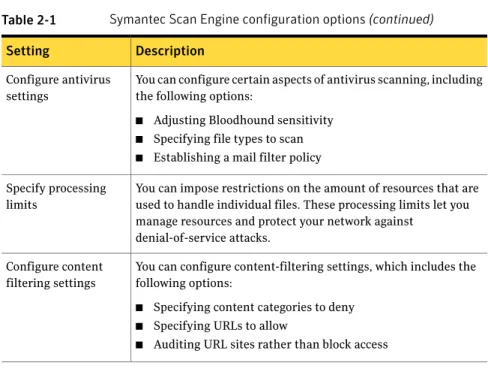
Table 2-1describes the minimum settings that you must configure for Symantec Scan Engine to perform scanning services.
Table 2-1 Symantec Scan Engine configuration options
Description Setting
You must configure Symantec Scan Engine to use ICAP to communicate with clients that are running the proprietary version 1.0 of ICAP (RFC 3507, April 2003). Any appropriate client can use ICAP to communicate with Symantec Scan Engine to request scanning and repairing of files.
You can configure multiple client applications that use different versions of ICAP to pass files to a single scan engine.
If you select ICAP as the protocol to be used by Symantec Scan Engine, you must configure several ICAP-specific options. You must also configure the ICAP client to work with Symantec Scan Engine.
Select the ICAP protocol and configure protocol options
Table 2-1 Symantec Scan Engine configuration options(continued)
Description Setting
You can configure certain aspects of antivirus scanning, including the following options:
■ Adjusting Bloodhound sensitivity
■ Specifying file types to scan
■ Establishing a mail filter policy Configure antivirus
settings
You can impose restrictions on the amount of resources that are used to handle individual files. These processing limits let you manage resources and protect your network against
denial-of-service attacks. Specify processing
limits
You can configure content-filtering settings, which includes the following options:
■ Specifying content categories to deny
■ Specifying URLs to allow
■ Auditing URL sites rather than block access Configure content
filtering settings
For more information about how to configure these options, see the Symantec Scan Engine Implementation Guide.
Changing the ICAP response
In its default configuration, when ICAP is the communication protocol, Symantec Scan Engine sends a 201 Created response in the following scenarios:
■ A virus was detected, but the file could not be repaired.
■ A virus was detected and Symantec Scan Engine is configured for scan-only mode.
If a virus is detected and the file cannot be repaired or Symantec Scan Engine is configured for scan-only mode, Symantec Scan Engine includes a replacement file in the body of the response message. The replacement file is configurable through the Symantec Scan Engine administrative interface. The message informs users that access to a file is being denied because it contains a virus or content violation.
Symantec Scan Engine default behavior deviates from the ICAP 1.0 standard, which does not support automatically sending a replacement file. In the ICAP 1.0 standard, this type of context-sensitive behavior is performed by the client rather than by Symantec Scan Engine.
If your client application closely follows the ICAP 1.0 standard, you might need to change Symantec Scan Engine default ICAP response setting to receive an ICAP 403 response instead of a replacement file. Symantec Scan Engine sends a 403 response if the file is denied based on Symantec Scan Engine policy setting. If the file is acceptable, Symantec Scan Engine returns a 200 OK response. You should change the default ICAP response setting only if you are sure that the client application supports this behavior.
To make this change, you must edit the configuration.xml file using the XML modifier tool. The XML modifier tool is provided on the Symantec Scan Engine product CD. This tool is automatically installed when you install the product. For more information, see the Symantec Scan Engine Implementation Guide. To change the ICAP response
1
In the XML modifier tool, at the command line, type the following command:java -jar xmlmodifier.jar
2
Type the following XPath:/configuration/protocol/ICAP/ICAPResponse/@value
where @value is any of the following: Send an ICAP 403 response 0
Send a replacement file. This is the default setting. 1
Constructing clients using
ICAP 1.0
This chapter includes the following topics: ■ How ICAP works
■ About the scanning process
■ About non-viral threat category responses
■ How to determine which services are supported (OPTIONS) ■ Scanning HTTP requests (REQMOD)
■ Scanning HTTP responses (RESPMOD)
■ Scanning non-HTTP data (RESPMOD and FILEMOD)
How ICAP works
The Internet Content Adaptation Protocol (ICAP) is a request/response-based protocol that lets ICAP clients pass messages to ICAP servers for processing or adaptation. The client initiates the session by sending request messages over a TCP/IP connection to a passively waiting ICAP server on a designated port. (Port 1344 is the default ICAP port.)
The server then does the following:
■ Runs the service that was requested, such as antivirus scanning
■ Performs any transformations that are necessary, such as repairing an infected file
■ Sends a response back to the client with any modified data
3
Chapter
A single transport can be used for multiple request/response pairs. Requests are matched with responses by allowing only one outstanding request on a connection at a time. Multiple connections can be used.
About ICAP messages
ICAP clients and servers communicate through messages, which are similar in format to HTTP. ICAP messages consist of client requests and server responses. All ICAP messages consist of a start line, which includes a client request or server response (depending on the type of message), header fields, and the message body. A blank line precedes the message body to distinguish the headers from the message body.
Multiple HTTP message sections can be encapsulated in a single ICAP message for vectoring of requests, responses, and request/response pairs on an ICAP server. Encapsulated messages must include an encapsulated header, which offsets the start of each encapsulated section from the start of the message body.
See“About encapsulated messages”on page 34.
Although request and response messages have unique headers, some headers are common to both requests and responses.
Table 3-1lists the request/response headers that Symantec Scan Engine uses. Table 3-1 Request/response headers
Description Header
Specifies options that the message sender wants to use only for that connection and not for proxies over other connections.
For example: Connection: close Connection
Provides the date and time that the message was created using standard HTTP date and time format.
For example:
Date: Tue, 5 July 2005 14:29:31 GMT Date
About ICAP requests
All ICAP client requests must start with a request line that includes the following components:
ICAP command or operation to perform (for example, REQMOD)
Method
Complete host name of the ICAP server and the path of the resource that is being requested
Uniform Resource Identifier (URI)
Version string for the current version of ICAP using the format ICAP/version number (for example ICAP/1.0)
ICAP version
The URI consists of the following components: ICAP_URI = Scheme ":" Net_Path [ "?" Query ] Scheme = "icap"
Net_Path = "//" Authority [ Abs_Path ]
Authority = [ userinfo "@" ] host [ ":" port ]
The request line specifies the ICAP resource that is being requested. Header fields follow with information, such as cache control and preview size. The header fields end with a blank line followed by the message body. The message body contains the encapsulated HTTP message sections that are being sent for scanning and modification.
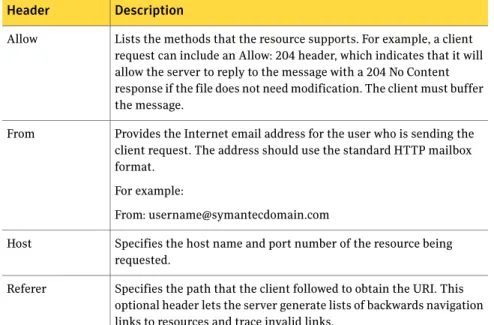
Table 3-2lists the request headers that are allowed in ICAP requests. Table 3-2 Request headers
Description Header
Lists the methods that the resource supports. For example, a client request can include an Allow: 204 header, which indicates that it will allow the server to reply to the message with a 204 No Content response if the file does not need modification. The client must buffer the message.
Allow
Provides the Internet email address for the user who is sending the client request. The address should use the standard HTTP mailbox format.
For example:
From: [email protected] From
Specifies the host name and port number of the resource being requested.
Host
Specifies the path that the client followed to obtain the URI. This optional header lets the server generate lists of backwards navigation links to resources and trace invalid links.
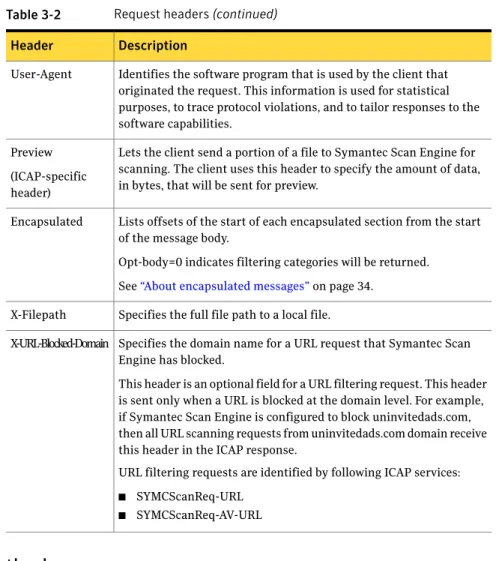
Table 3-2 Request headers(continued)
Description Header
Identifies the software program that is used by the client that originated the request. This information is used for statistical purposes, to trace protocol violations, and to tailor responses to the software capabilities.
User-Agent
Lets the client send a portion of a file to Symantec Scan Engine for scanning. The client uses this header to specify the amount of data, in bytes, that will be sent for preview.
Preview (ICAP-specific header)
Lists offsets of the start of each encapsulated section from the start of the message body.
Opt-body=0 indicates filtering categories will be returned. See“About encapsulated messages”on page 34.
Encapsulated
Specifies the full file path to a local file. X-Filepath
Specifies the domain name for a URL request that Symantec Scan Engine has blocked.
This header is an optional field for a URL filtering request. This header is sent only when a URL is blocked at the domain level. For example, if Symantec Scan Engine is configured to block uninvitedads.com, then all URL scanning requests from uninvitedads.com domain receive this header in the ICAP response.
URL filtering requests are identified by following ICAP services:
■ SYMCScanReq-URL
■ SYMCScanReq-AV-URL X-URL-Blocked-Domain
About ICAP methods
Symantec Scan Engine supports the following ICAP methods:
Lets the client obtain information from an ICAP server about available services.
See“How to determine which services are supported (OPTIONS)”on page 41. OPTIONS (options mode)
Lets the client send URLs to Symantec Scan Engine for scanning services.
In request modification mode, the ICAP client receives a request from a user, usually a Web-browser. The client passes the data to Symantec Scan Engine for evaluation and processing.
See“Scanning HTTP requests (REQMOD)” on page 55.
REQMOD (request modification mode)
Lets the client send files to Symantec Scan Engine for scanning services.
In response modification mode, the ICAP client receives a data response from an origin server. The client passes the data to Symantec Scan Engine for evaluation and post-processing. See“Scanning HTTP responses (RESPMOD)” on page 59.
RESPMOD (response modification mode)
Lets the client pass a file name and path to Symantec Scan Engine so that Symantec Scan Engine can scan the file in place (rather than streaming the file to Symantec Scan Engine for scanning).
Note:File modification mode deviates from the ICAP 1.0 specification that is presented in RFC 3507 (April 2003).
See“Scanning non-HTTP data (RESPMOD and FILEMOD)”on page 63.
FILEMOD (file modification mode)
About ICAP services
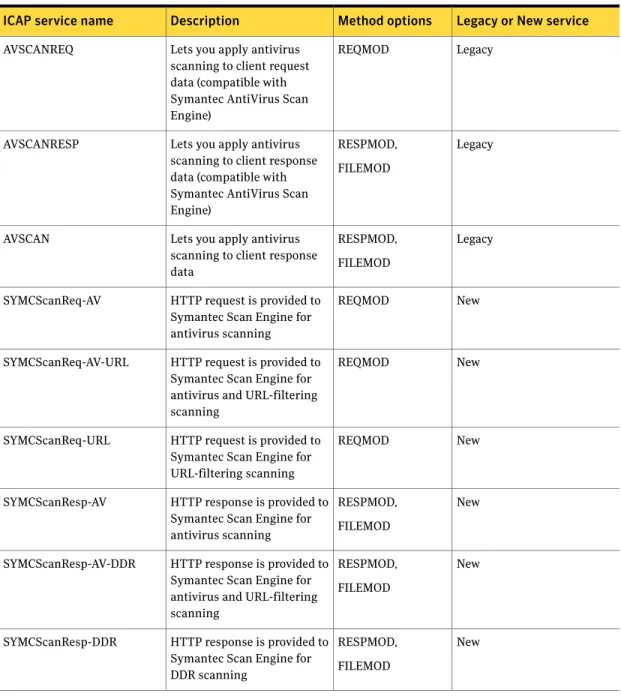
Symantec Scan Engine supports antivirus and URL content-filtering scanning. You must include an ICAP service name in the ICAP URI to specify the type of scanning that you want Symantec Scan Engine to perform. Previous versions of Symantec AntiVirus Scan Engine used a different ICAP service naming convention. These services are supported for backward compatibility. New clients should use the new services, which include enhancements over the previous services. Table 3-3describes the ICAP services, descriptions, and the supported methods.
Table 3-3 ICAP services
Legacy or New service Method options
Description ICAP service name
Legacy REQMOD
Lets you apply antivirus scanning to client request data (compatible with Symantec AntiVirus Scan Engine)
AVSCANREQ
Legacy RESPMOD,
FILEMOD Lets you apply antivirus
scanning to client response data (compatible with Symantec AntiVirus Scan Engine)
AVSCANRESP
Legacy RESPMOD,
FILEMOD Lets you apply antivirus
scanning to client response data
AVSCAN
New REQMOD
HTTP request is provided to Symantec Scan Engine for antivirus scanning SYMCScanReq-AV
New REQMOD
HTTP request is provided to Symantec Scan Engine for antivirus and URL-filtering scanning
SYMCScanReq-AV-URL
New REQMOD
HTTP request is provided to Symantec Scan Engine for URL-filtering scanning SYMCScanReq-URL New RESPMOD, FILEMOD HTTP response is provided to
Symantec Scan Engine for antivirus scanning SYMCScanResp-AV New RESPMOD, FILEMOD HTTP response is provided to
Symantec Scan Engine for antivirus and URL-filtering scanning SYMCScanResp-AV-DDR New RESPMOD, FILEMOD HTTP response is provided to
Symantec Scan Engine for DDR scanning
SYMCScanResp-DDR
The ICAP service argument is used to specify the antivirus scanning policy. The action=repairpolicy argument can override the antivirus scanning repair policy for Symantec Scan Engine. For services that do not perform antivirus scanning,
SYMCScanReq-URL and SYMCScanResp-DDR, the argument is ignored. The ICAP service argument is as follows:
action=repairpolicy
where repair policy consists of any of the following: ■ scanrepairdelete
■ scanrepair ■ scandelete ■ scan
You can append the argument to the service name by adding a question mark and then the argument. For example:
SYMCSCANRESP-AV?action=scanrepairdelete
About ICAP responses
ICAP client responses start with a status line, which includes the ICAP version and a status or response code. For example:
ICAP/1.0 200 OK
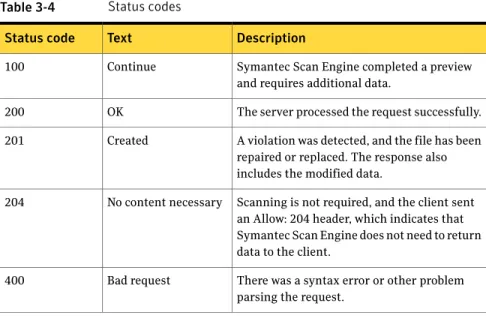
Table 3-4lists the response codes that Symantec Scan Engine uses (response codes vary depending on the type of request).
Table 3-4 Status codes
Description Text
Status code
Symantec Scan Engine completed a preview and requires additional data.
Continue 100
The server processed the request successfully. OK
200
A violation was detected, and the file has been repaired or replaced. The response also includes the modified data.
Created 201
Scanning is not required, and the client sent an Allow: 204 header, which indicates that Symantec Scan Engine does not need to return data to the client.
No content necessary 204
There was a syntax error or other problem parsing the request.
Bad request 400
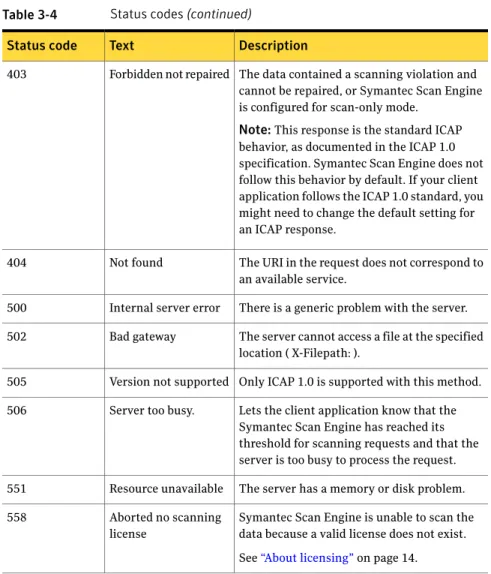
Table 3-4 Status codes(continued)
Description Text
Status code
The data contained a scanning violation and cannot be repaired, or Symantec Scan Engine is configured for scan-only mode.
Note:This response is the standard ICAP behavior, as documented in the ICAP 1.0 specification. Symantec Scan Engine does not follow this behavior by default. If your client application follows the ICAP 1.0 standard, you might need to change the default setting for an ICAP response.
Forbidden not repaired 403
The URI in the request does not correspond to an available service.
Not found 404
There is a generic problem with the server. Internal server error
500
The server cannot access a file at the specified location ( X-Filepath: ).
Bad gateway 502
Only ICAP 1.0 is supported with this method. Version not supported
505
Lets the client application know that the Symantec Scan Engine has reached its threshold for scanning requests and that the server is too busy to process the request. Server too busy.
506
The server has a memory or disk problem. Resource unavailable
551
Symantec Scan Engine is unable to scan the data because a valid license does not exist. See“About licensing”on page 14. Aborted no scanning
license 558
The status line is followed by one or more response headers that let the server pass additional information (for example, information that cannot be placed in the status line) to the client.
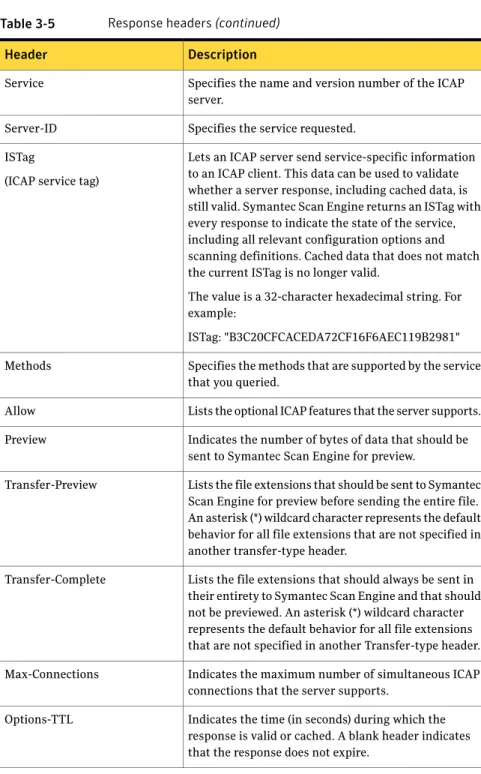
Table 3-5lists the response headers that Symantec Scan Engine uses (response headers vary depending on the type of request).
Table 3-5 Response headers
Description Header
Specifies the date and time as set on the server clock. Date
Table 3-5 Response headers(continued)
Description Header
Specifies the name and version number of the ICAP server.
Service
Specifies the service requested. Server-ID
Lets an ICAP server send service-specific information to an ICAP client. This data can be used to validate whether a server response, including cached data, is still valid. Symantec Scan Engine returns an ISTag with every response to indicate the state of the service, including all relevant configuration options and scanning definitions. Cached data that does not match the current ISTag is no longer valid.
The value is a 32-character hexadecimal string. For example:
ISTag: "B3C20CFCACEDA72CF16F6AEC119B2981" ISTag
(ICAP service tag)
Specifies the methods that are supported by the service that you queried.
Methods
Lists the optional ICAP features that the server supports. Allow
Indicates the number of bytes of data that should be sent to Symantec Scan Engine for preview.
Preview
Lists the file extensions that should be sent to Symantec Scan Engine for preview before sending the entire file. An asterisk (*) wildcard character represents the default behavior for all file extensions that are not specified in another transfer-type header.
Transfer-Preview
Lists the file extensions that should always be sent in their entirety to Symantec Scan Engine and that should not be previewed. An asterisk (*) wildcard character represents the default behavior for all file extensions that are not specified in another Transfer-type header. Transfer-Complete
Indicates the maximum number of simultaneous ICAP connections that the server supports.
Max-Connections
Indicates the time (in seconds) during which the response is valid or cached. A blank header indicates that the response does not expire.
Table 3-5 Response headers(continued)
Description Header
Lists offsets of the start of each encapsulated section from the start of the message body.
Encapsulated
Indicates whether a valid antivirus scanning license is installed on Symantec Scan Engine, where 1 indicates a valid antivirus scanning license and 0 indicates no valid antivirus scanning license. The X-AV-License header does not include whether a content-filtering license is installed or valid.
X-AV-License
Indicates the custom X-headers that are returned in responses from Symantec Scan Engine.
X-Allow-Out
Indicates the date and revision number of the virus definitions in the following format:
YYYYMMDD.RRR
where YYYY is the four-digit year, MM is the month, DD is the day, and RRR is the revision number. X-Definition-Info
Indicates opt-body will be an attribute list. The attribute list begins with the following: X-ICAP-Attribute-<serviceid>
This tag indicates that the start of the category list begins after this CRLF delimited header. The list contains the valid categories for the requested Service-ID. A semi-colon (;) followed by a blank line indicates the end of the list.
Opt-Body-Type
(Optional header) An integer value that indicates whether the outer container is a valid MIME container. A client application can use this information to reject content that does not meet this criteria. Zero (0) indicates that the outer container is not a valid MIME container, and one (1) indicates that the outer container is a valid MIME container.
Table 3-5 Response headers(continued)
Description Header
Provides information about an infection that is found. Only one violation is reported, regardless of the number of violations found.
The header provides the following information regarding the infection:
■ Violation type
An integer value for the violation. Zero (0) indicates a virus, one (1) indicates a mail policy violation, and two (2) indicates a container violation or malformity.
■ Resolution
An integer value that indicates what action was taken on the file. Zero (0) indicates that the file was not fixed, one (1) indicates that the file was repaired, and two (2) indicates that access to the file was blocked.
■ Threat value
String that describes the virus or violation that was found.
This header applies to legacy services only. See“About ICAP services”on page 27. X-Infection-Found
Table 3-5 Response headers(continued)
Description Header
Indicates the total number of violations (either an infection or a policy violation) that were found in the scanned data.
If violations were detected, the header is followed by a series of indented lines that provide the following information for each violation:
■ File name
The name of the scanned file or the name of a nested component within the scanned file. Each component name is separated by a forward slash mark (/).
■ Violation name
The English-readable name of the violation.
■ Violation ID
A numeric code for the violation.
■ Disposition
An integer value that indicates what action was taken to fix the file. Zero (0) indicates that the file was not fixed, one (1) indicates that the file was repaired, and two (2) indicates that the file was deleted.
X-Violations-Found
Specifies the domain name for a URL request that Symantec Scan Engine has blocked.
This header is an optional field for a URL filtering request. This header is sent only when a URL is blocked at the domain level. For example, if Symantec Scan Engine is configured to block uninvitedads.com, then all URL scanning requests from uninvitedads.com domain receive this header in the ICAP response. URL filtering requests are identified by following ICAP services:
■ SYMCScanReq-URL
■ SYMCScanReq-AV-URL X-URL-Blocked-Domain
About encapsulated messages
The ICAP encapsulation model provides a lightweight means of packaging multiple HTTP message sections into a single ICAP message for vectoring of requests,
responses, and request/response pairs on an ICAP server. An encapsulated section can consist of HTTP message headers and bodies.
Encapsulated HTTP message bodies must be transferred using chunked transfer encoding. This keeps the transport-layer connection between the client and server open for later use and lets the server send incremental responses to reduce the latency that is perceived by users. Encapsulated HTTP headers are not chunked. This lets the ICAP client copy the header directly from the HTTP client to the ICAP server without having to reprocess it.
Note:The chunked transfer encoding modifies the body of a message so that it can be transferred as a series of chunks, each with its own (hexadecimal) size indicator, followed by an optional footer that contains entity-header fields. For more information, see the HTTP/1.1 specification (RFC 2616, section 3.6.1). The encapsulated header must be included in every ICAP message, except for OPTIONS requests. This header provides information about where each encapsulated section and message body starts and ends.
For example:
Encapsulated: req-hdr=0, res-hdr=45, res-body=100
This example indicates that the message encapsulates a group of request headers, response headers, and a response body at 0, 45, and 100 byte offsets. Byte offsets use a decimal format. Chunk sizes within an encapsulated body use a hexadecimal format. If no message body is sent, a null-body entity is used.
Encapsulated headers use the following syntax:
encapsulated_header: "Encapsulated: " encapsulated_list encapsulated_list: encapsulated_entity |
encapsulated_entity ", " encapsulated_list
encapsulated_entity: reqhdr | reshdr | reqbody | resbody | optbody reqhdr = "req-hdr" "=" (decimal integer)
reshdr = "res-hdr" "=" (decimal integer)
reqbody = { "req-body" | "null-body" } "=" (decimal integer) resbody = { "res-body" | "null-body" } "=" (decimal integer) optbody = { "opt-body" | "null-body" } "=" (decimal integer) Encapsulated headers must end with a blank line to make them readable and to terminate line-by-line HTTP parsers.
Where to find more information on ICAP
Symantec Scan Engine supports the ICAP 1.0 specification that is presented in RFC 3507 (April 2003). Much of the information in the Symantec Scan Engine Software Developer’s Guide is obtained directly from the specification. However, the specification contains more extensive examples and additional information. Developers are encouraged to consult the specification, as well as other sources. For more information about ICAP specifications, go the following URL:
www.i-cap.org
The content filtering feature was implemented using the ICAP Extensions Internet Draft, section 5.2.
About the scanning process
Symantec Scan Engine provides antivirus and URL-filtering scanning services to ICAP clients.
The scanning services are provided for non-HTTP scanning, such as email and FTP traffic, and the following user scenarios:
■ A user requests a file from a Web site ■ A user posts a file to a Web site ■ A user receives a file from a Web site
When an ICAP client receives an HTTP request, it is encapsulated into an ICAP REQMOD request and sent to a scan engine ICAP service. The service that is specified in the URI must support the REQMOD method. This is a simple request with HTTP request headers and no body. Because there is no data to scan for viruses, there is no value added by an antivirus-only service like SYMCScanReq-AV. The other REQMOD services, SYMCScanReq-URL and SYMCScanReq-AV-URL, will do the same.
If an HTTP request contains a file, such as a posting to a Web site, there is value to antivirus scanning. Symantec Scan Engine can either repair the file (return a modified HTTP request ) or notify the user (return an HTTP response ), but not both. Therefore, for REQMOD antivirus scanning, the file is never repaired (scanpolicy = scan ). The user receives a Web page that states that the post failed because the file was infected or triggered another violation.
When an ICAP client receives an HTTP response from an origin server, it is encapsulated into an ICAP RESPMOD request and sent to Symantec Scan Engine. The service specified must support RESPMOD. The service specified determines the kind of scanning that is performed on the HTTP body: antivirus, URL content filtering, or both. Because Symantec Scan Engine has an option to ignore the URL
content-filtering results based on the URL, Symantec Scan Engine must also scan the URL in the HTTP request headers.
The ICAP RFC specifies that these headers are optional for a response modification request, but for clients that use Symantec Scan Engine, they are required. It is possible to get URL filtering on a RESPMOD request, but it is more efficient to block URLs during the request before expending resources to retrieve the data. Symantec Scan Engine can be used to scan non-HTTP data, such as files on disk, email messages, and FTP traffic. You can scan non-HTTP data by creating an ICAP RESPMOD request with a minimal set of fabricated HTTP request headers and HTTP response headers. Typically the HTTP request headers include an HTTP request line that contains the file name (Symantec Scan Engine provides features based on file name, so this is required) and a Host header. The HTTP response headers contain an HTTP response line: HTTP/1.1 200 OK.
Symantec Scan Engine also supports an extension to ICAP (FILEMOD), which lets the client send a request to have a file scanned on-disk to avoid sending the file across the network. An ICAP client requests on-disk scanning by sending an ICAP FILEMOD request to Symantec Scan Engine. This request is composed of ICAP headers only and no ICAP body (Encapsulated: null-body=0). Included in the headers is the path that Symantec Scan Engine can use to access the file. The ICAP response will be similar to a network scan, except that no data will be returned. Any modification is done on the actual file.
Before sending ICAP requests, the client can query the ICAP server by using the OPTIONS method to determine which services are supported.
See“How to determine which services are supported (OPTIONS)”on page 41.
About scanning URLs
When scanning URLs, the URL can be constructed in the following ways: GET/directory/file.exe HTTP/1.1 Host: client.symantecdomain.com The URL is
client.symantecdomain.com/directory/file.exe When the HTTP request line contains
only the path information, it is combined with the host name that is provided in the Host header to create the full URL.
POST
http://client.symantecdomain.com/directory/file.exe HTTP/1.1
Host: client.symantecdomain.com
The URL is extracted from the request line and the Host header is ignored.
The URL can also be sent completely in the HTTP request line. This is typically the case for HTTP POST requests.
About sending files for scanning
Symantec Scan Engine supports multiple URIs for scanning services. The URI uses the following format:
icap://server.name:port/servicename
where server.name is the name of the server on which Symantec Scan Engine is running. The port number is optional if Symantec Scan Engine is running on port 1344, which is the default ICAP port. Servicename is one of the ICAP services. See“About ICAP services”on page 27.
About sending portions of files for preview
Symantec Scan Engine can preview data to determine whether it needs to be scanned based on known virus behavior. For example, .gif files are typically not scanned because they generally do not contain executable code. The rules for which types of files are suitable for preview are determined by the exclusion lists that are configured in the Symantec Scan Engine administrative interface. Before a file is sent for scanning, the client should send an OPTIONS request to determine whether a file type is suitable for preview and how much data should be sent.
Symantec Scan Engine provides this information in the following headers of the OPTIONS response message:
Indicates the preferred number of bytes of data that can be sent Preview
Indicates which file types should be sent in their entirety Transfer-Complete
Indicates which file types should be sent for preview Transfer-Preview
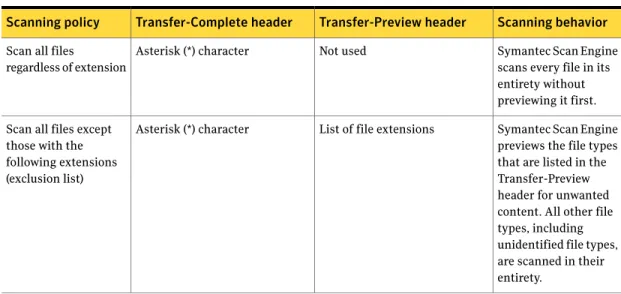
See“How to determine which services are supported (OPTIONS)”on page 41. Table 3-6details Symantec Scan Engine scanning behavior that is based on the scanning policies that you configure.
Table 3-6 Scanning behavior
Scanning behavior Transfer-Preview header
Transfer-Complete header Scanning policy
All files are previewed for unwanted content. Asterisk (*) character
Not used Previews all files
Table 3-6 Scanning behavior(continued)
Scanning behavior Transfer-Preview header
Transfer-Complete header Scanning policy
Symantec Scan Engine scans every file in its entirety without previewing it first. Not used
Asterisk (*) character Scan all files
regardless of extension
Symantec Scan Engine previews the file types that are listed in the Transfer-Preview header for unwanted content. All other file types, including unidentified file types, are scanned in their entirety.
List of file extensions Asterisk (*) character
Scan all files except those with the following extensions (exclusion list)
For more information, see the Symantec Scan Engine Implementation Guide. If an OPTIONS response indicates that a file is suitable for preview, the client should include a Preview header in the request message that indicates the portion of data, in bytes, that is being sent for preview. Symantec Scan Engine evaluates the initial chunk of data to determine whether a full scan is required. If so, Symantec Scan Engine requests the remainder of the data. Scan results are returned in the RESPMOD response message.
About allowing No Content responses
The Allow: 204 header is an optional request header that lets Symantec Scan Engine return a 204 No Content response code if the message does not require modification. This can optimize server performance because Symantec Scan Engine can determine whether a file is uninfected without having to receive the entire message, and Symantec Scan Engine does not have to return a message. The processing burden is placed on the client, which must buffer the entire message during the scan. Symantec Scan Engine returns a 204 No Content response outside of a preview only if the client request includes an Allow: 204 header.
About non-viral threat category responses
When Symantec Scan Engine detects a non-viral threat during a scan, the ICAP X-Violations-Found response header includes the threat category name (NonViralThreat) in the ThreatDescription field. The threat category name is
appended to the virus name with a delimiter pipe. For example, ThreatDescription = <VirusName> | NonViralThreat=<CategoryName>.
The following is a list of all the values currently supported for categories for non-viral threats: ■ Adware ■ Spyware ■ Reserved Malicious ■ Malicious ■ Heuristic ■ Hack Tools ■ Trackware ■ Dialers ■ Joke Programs ■ Remote Access ■ Security Risks
By default, Symantec Scan Engine does not send the threat category name in the header. To configure Symantec Scan Engine to send the threat category name, you must change the EnableNonViralThreatCategoryResp value in the configuration.xml file to true. For more information about how to modify the configuration.xml file using the XML modifier command-line tool, see the Symantec Scan Engine Implementation Guide.
An example of an X-Violations-Found response header with a NonViralTreat category is as follows:
C: RESPMOD icap://127.0.0.1:1344/SYMCScanResp-AV ICAP/1.0 C: Host: 127.0.0.1:1344
C: Connection: close
C: Encapsulated: req-hdr=0, res-hdr=44, res-body=63 C: C: get / HTTP/1.1 C: Host:icheck.symantec.com C: C: HTTP/1.1 200 OK C: S: ICAP/1.0 201 Created ISTag: "C5D8B6B34BC2785CE5017A242480E9C2"
Date: Mon Jan 21 05:10:32 2008 GMT Service: Symantec Scan Engine/5.2.0.12 Service-ID: SYMCSCANRESP-AV X-Violations-Found: 1 index.html Adware.Unknown| NonViralThreat=Adware 4294909841 2 X-Outer-Container-Is-Mime: 0
Encapsulated: res-hdr=0, res-body=83 See“About ICAP responses”on page 29.
How to determine which services are supported
(OPTIONS)
The OPTIONS method lets a client application query an ICAP server for information about supported services and commands and preferred file handling methods. The client application should perform this query before sending files for scanning. The OPTIONS method consists of a request line that contains the URI for the Symantec Scan Engine service that you want to query.
When Symantec Scan Engine receives an OPTIONS request from a client application, it sends a response that includes the following information: ■ Maximum number of simultaneous connections allowed
■ Preferred data preview size ■ Preferred file handling methods
■ Supported methods (REQMOD, RESPMOD, FILEMOD)
■ For content-filtering services (-URL, -DDR), the list of content categories that are available is returned in an encapsulated opt-body section
See“About licensing”on page 14. See“About ICAP responses”on page 29.
About using the OPTIONS request to determine if the server is
overloaded
If you use ICAP, the ICAP threshold client notification feature is enabled by default. When the number of queued requests for a Symantec Scan Engine exceeds its threshold, Symantec Scan Engine rejects the scan request. It notifies the client
that the server has reached the queued request threshold. The client can then adjust the load balancing, which prevents the server from being overloaded with scan requests. This feature lets the client applications that pass files to Symantec Scan Engine benefit from load-balanced scanning without any additional effort. You can use the OPTIONS request to determine if Symantec Scan Engine is overloaded. Send an OPTIONS request to the Symantec Scan Engine. If Symantec Scan Engine is not busy, it will send the standard OPTIONS response to the connector and will keep the connection open. If Symantec Scan Engine is too busy to process the request, it will reply with 506 response “Server too busy” and will close the connection. In this case, the load balancing decision should be made by the connector.
A sample ICAP response body for code 506 is as follows: ICAP/1.0 506 Server too busy
ISTag: "638FC09D7F7CCFD3DCF0E659FFEAD53F" Date: Tue Jun 26 05:52:14 2007 GMT Service: Symantec Scan Engine/5.2.0.1 Service-ID: Respmod AV Scan
About querying antivirus-only services
The antivirus-only services include the following:
Provides antivirus scanning for HTTP requests.
The request must include a file (uploading) and use the HTTP POST method. Otherwise, an ICAP 200 OK response is returned. This is a legacy service and should not be used by new clients. AVSCAN
Provides antivirus scanning for HTTP requests.
The request must include a file (uploading) and use the HTTP POST method. Otherwise, an ICAP 200 OK response is returned. This is a legacy service and should not be used by new clients. AVSCANREQ
Provides antivirus scanning for HTTP requests.
The request must include a file (uploading) and use the HTTP POST method. Otherwise, an ICAP 200 OK response is returned. This is a legacy service and should not be used by new clients. AVSCANRESP
Provides antivirus scanning for HTTP requests.
The request must include a file (uploading) and use the HTTP POST method. Otherwise, an ICAP 200 OK response is returned. SYMScanReq-AV
Provides antivirus scanning for content that is downloaded from the Internet.
SYMCScanResp-AV
An OPTIONS request to an antivirus-only service provides the validity of the antivirus license, the antivirus definitions version, and an ISTag, which indicates the state of the configuration settings.
See“About licensing”on page 14.
Table 3-3lists the services that you can use for scan, repair, and delete functions. You specify the scanning preferences through the Symantec Scan Engine administrative user interface. You must have a valid license installed to perform scanning functions.
Examples of OPTIONS requests for antivirus scanning are as follows: /* AV is only performed on POST requests */
OPTIONS icap://icapclient.sse.com/symcscanreq-url ICAP/1.0 Host: icapclient.sse.com
OPTIONS icap://icapclient.sse.com/symcscanresp-ddr ICAP/1.0 Host: icapclient.sse.com
About querying content-filtering services
The content-filtering services include the following:
Blocks requests to sites based on the URL.
This includes comparing the requested URL to Symantec's URL category lists and optionally to use Dynamic Document Review (DDR) technology to infer the content of the site based on the words that are used in the URL.
SYMCScanReq-URL
Used to categorize and possibly block content that is retrieved from a site by using DDR technology.
A list of categories that the content can be identified as belonging to is returned.
This service will also examine the URL if the optional HTTP request headers are included in the ICAP request. To enhance performance, URLs should be scanned by the
SYMCScanReq-URL service before retrieving the content from the origin server.
For more information about how URL and DDR filtering work, see the Symantec Scan Engine Implementation Guide.
Examples of OPTIONS requests for URL filtering are as follows: OPTIONS icap://sse.com/symcscanreq-url ICAP/1.0 Host: icapclient.sse.com
OPTIONS icap://sse.com/symcscanresp-ddr ICAP/1.0 Host: icapclient.sse.com
About querying antivirus and content-filtering services
The antivirus and content filtering scanning services include the following: Performs content filtering on HTTP requests and scans HTTP bodies (files) for malicious content.
SYMCScanReq-AV-URL
Combines content filtering and antivirus scanning. SYMCScanResp-AV-DDR
Examples of OPTIONS requests for antivirus and content filtering are as follows: /* AV is only performed on POST requests */
OPTIONS icap://sse.com/symcscanreq-av-url ICAP/1.0 Host: icapclient.sse.com
OPTIONS icap://sse.com/symcscanresp-av-ddr ICAP/1.0 Host: icapclient.sse.com
OPTIONS examples
Examples of OPTIONS services are as follows: ■ OPTIONS antivirus-scanning example ■ OPTIONS content-filtering scanning example
■ OPTIONS antivirus and content-filtering scanning example
OPTIONS antivirus-scanning example
The antivirus scanning services perform scanning, repair, and delete functions by using the scanning preferences that you specify through the Symantec Scan Engine administrative user interface. Use the following format to specify the URI: icap://<Server>/<service>
A sample OPTIONS request on SYMCScanReq-AV is as follows: C: OPTIONS icap://172.16.11.19:1344/SYMCScanReq-AV ICAP/1.0 C: Host: 172.16.11.19:1344
C: Connection: close
C: Encapsulated: null-body=0 C:
S: ICAP/1.0 200 OK
S: Date: Mon Jun 27 11:50:14 2005 GMT S: Methods: REQMOD
S: Service: Symantec Scan Engine/5.0.0.23 S: Service-ID: SYMCSCANREQ-AV
S: ISTag: "B3C20CFCACEDA72CF16F6AEC119B2981" S: X-Definition-Info: 20050622.017
S: Max-Connections: 128
S: X-Allow-Out: X-Outer-Container-Is-Mime, X-Infection-Found S: X-Allow-Out: X-Definition-Info, X-AV-License
S: X-Allow-Out: X-Violations-Found S: Allow: 204 S: Options-TTL: 3600 S: Preview: 4 S: Transfer-Preview: * S: X-AV-License: 1 S: Encapsulated: null-body=0 S:
This response informs the client of the following:
■ Besides the OPTIONS method, the only supported method is REQMOD. ■ The optional 204 shortcut is supported.
■ Four bytes of preview information are preferred. ■ All files should be sent for preview.
■ The data in the response can be cached up to one hour.
■ The server supports a maximum of 128 simultaneous connections. The maximum number of simultaneous connections that Symantec Scan Engine supports varies on the operating environment.
A sample OPTIONS response on SYMCScanResp-AV is as follows: C: OPTIONS icap://172.16.11.19:1344/SYMCScanResp-AV ICAP/1.0 C: Host: 172.16.11.19:1344
C: Connection: close
C:
S: ICAP/1.0 200 OK
S: Date: Mon Jun 27 11:50:34 2005 GMT S: Methods: RESPMOD, FILEMOD
S: Service: Symantec Scan Engine/5.0.0.23 S: Service-ID: SYMCSCANRESP-AV
S: ISTag: "B3C20CFCACEDA72CF16F6AEC119B2981" S: X-Definition-Info: 20050622.017
S: Max-Connections: 128
S: X-Allow-Out: X-Outer-Container-Is-Mime, X-Infection-Found S: X-Allow-Out: X-Definition-Info, X-AV-License
S: X-Allow-Out: X-Violations-Found S: Allow: 204 S: Options-TTL: 3600 S: Preview: 4 S: Transfer-Preview: * S: X-AV-License: 1 S: Encapsulated: null-body=0 S:
This response informs the client of the following:
■ Besides the OPTIONS method, the only supported methods are RESPMOD and FILEMOD.
■ The optional 204 shortcut is supported.
■ Four bytes of preview information are preferred. ■ All files should be sent for preview.
■ The data in this response can be cached up to one hour.
■ The server supports a maximum of 128 simultaneous connections. The maximum number of simultaneous connections that Symantec Scan Engine supports varies on the operating environment.
OPTIONS content-filtering scanning example
The content-filtering scanning services perform content filtering based on the options that you specify through the Symantec Scan Engine user interface. Use the following format to specify the URI:
icap://<Server>/<service>
C: OPTIONS icap://172.16.11.19:1344/SYMCScanReq-URL ICAP/1.0 C: Host: 172.16.11.19:1344 C: Connection: close C: Encapsulated: null-body=0 C: S: ICAP/1.0 200 OK
S: Date: Mon Jun 27 11:50:28 2005 GMT S: Methods: REQMOD
S: Service: Symantec Scan Engine/5.0.0.23 S: Service-ID: SYMCSCANREQ-URL
S: ISTag: "91D1448B9843D9D5CB0850736024EE90" S: X-Definition-Info: 20050622.017
S: Max-Connections: 128
S: X-Allow-Out: X-Outer-Container-Is-Mime, X-Infection-Found S: X-Allow-Out: X-Definition-Info, X-AV-License
S: X-Allow-Out: X-Violations-Found S: Allow: 204 S: Options-TTL: 3600 S: Preview: 4 S: Transfer-Preview: * S: X-AV-License: 1 S: Encapsulated: opt-body=0 S: X-Allow-Out: X-Attribute S: Opt-Body-Type: Attribute-List S: S: 20d S: X-ICAP-Attribute-SYMCSCANREQ-URL S: Adult Humor S: Alcohol-Tobacco S: Anonymous Proxies S: Crime S: Drugs/Advocacy S: Drugs/Non-medical S: Entertainment/Games S: Entertainment/Sports S: Finance S: Gambling S: Humor S: Interactive/Chat S: Interactive/Mail S: Intolerance S: Job Search S: News
S: Occult/New Age S: Prescription Medicine S: Real Estate S: Religion S: Sex/Acts S: Sex/Attire S: Sex/Nudity S: Sex/Personals S: Sex Education/Advanced S: Sex Education/Basic S: Sex Education/Sexuality S: Travel S: Vehicles S: Violence S: Weapons S: AllowURLsCategory S: AllowURLsWithDDRCategory S: ; S: S: 0 S:
This response informs the client of the following:
■ Besides the OPTIONS method, the only supported method is REQMOD. ■ The optional 204 shortcut is supported.
■ Four bytes of preview information are preferred. ■ All files should be sent for preview.
■ The data in this response can be cached up to one hour.
■ The server supports a maximum of 128 simultaneous connections. The maximum number of simultaneous connections that Symantec Scan Engine supports varies depending on the operating environment.
You will see new information that starts with Encapsulated: opt-body=0. When scanning for content, an opt-body header is returned that indicates a list of categories that are supported by Symantec Scan Engine. X-Allow-Out contains an addition of X-Attribute and the Opt-Body-Type is Attribute-List.
A sample OPTIONS response on SYMCScanResp-DDR is as follows: C: OPTIONS icap://172.16.11.19:1344/SYMCScanResp-DDR ICAP/1.0 C: Host: 172.16.11.19:1344
C: Encapsulated: null-body=0 C:
S: ICAP/1.0 200 OK
S: Date: Mon Jun 27 11:50:43 2005 GMT S: Methods: RESPMOD, FILEMOD
S: Service: Symantec Scan Engine/5.0.0.23 S: Service-ID: SYMCSCANRESP-DDR
S: ISTag: "E67C87BA7D981353864B63F6001E8D53" S: X-Definition-Info: 20050622.017
S: Max-Connections: 128
S: X-Allow-Out: X-Outer-Container-Is-Mime, X-Infection-Found S: X-Allow-Out: X-Definition-Info, X-AV-License
S: X-Allow-Out: X-Violations-Found S: Allow: 204 S: Options-TTL: 3600 S: Preview: 4 S: Transfer-Preview: * S: X-AV-License: 1 S: Encapsulated: opt-body=0 S: X-Allow-Out: X-Attribute S: Opt-Body-Type: Attribute-List S: S: 20e S: X-ICAP-Attribute-SYMCSCANRESP-DDR S: Adult Humor S: Alcohol-Tobacco S: Anonymous Proxies S: Crime S: Drugs/Advocacy S: Drugs/Non-medical S: Entertainment/Games S: Entertainment/Sports S: Finance S: Gambling S: Humor S: Interactive/Chat S: Interactive/Mail S: Intolerance S: Job Search S: News S: Occult/New Age S: Prescription Medicine S: Real Estate