TECHNOLOGY AUDIT
Shavlik Security Suite
Shavlik Technologies
BUTLER GROUP VIEW
ABSTRACT
Shavlik Security Suite incorporates a broad scope of protection management including automated discovery, scanning, and patching of servers and desktops; virus and spyware detection; application execution blocking; automated assessment of security controls configuration (of servers and desktops) against regulations and best practices frameworks; and role-based reporting, trending, and alerting, with a particular focus on regulatory compliance. Patch and security configuration management require a greater level of automation than freely available tools provide, particularly given the increasing volume of patches and regulatory demands. Shavlik Security Suite can patch online and offline virtual machines; works both with an agent-based or agentless approach; supports legacy Windows platforms and a wide range of Microsoft and third-party applications; and furthermore provides strong control of scanning options, and a level of automated remediation that is impressive. Although we note that support for patch management of mobile devices is one enterprise requirement that it does not yet cater for, this is in other respects a very strong solution from a vendor with excellent credentials.
KEY FINDINGS
Simultaneous endpoint protection against viruses, spyware, and rootkits, and incorporates application blocking.
Supports common Windows-based Microsoft and non-Microsoft applications, and legacy Microsoft products.
Patch management for online and offline virtual images.
Offers a mix of agent-based and agent-less approaches to suit needs.
Supports a far greater range of needs than standard Windows Update.
Strongly compliance-oriented and policy-driven functionality.
Automated scanning and remediation for patch and configuration problems.
Lacks support for patch management of mobile devices (i.e. phones and PDAs).
LOOK AHEAD
Shavlik plans the release of enhanced discovery and management relating to virtual machines later in 2009. Following this, it plans to enhance asset management capabilities, and proactively report machines in which problems may be encountered when implementing patches..
FUNCTIONALITY
Product Analysis
In recent years, patch management and security controls configuration are two essential tasks for systems/ security administrators that have become particularly arduous. Several factors are responsible for this: the volume of patches and service packs has increased; the range of threats has expanded; the importance of security controls as part of a structured risk management process is more widely understood; and the increasing impact of regulations is not abating. Significant automation is highly desirable to make these tasks manageable and more efficient, and many IT organisations prefer taking the “cost-free” manual mode of Microsoft’s Windows Server Update Services (WSUS) in order to patch the operating system and Windows applications. However, most organisations with complex environments require a higher level of automation, better reporting, and support for legacy Microsoft applications and third-party applications.
Shavlik has a long history in the field of patch management in Microsoft environments, and provides Shavlik Security Suite: a family of tools that incorporates patch management, virus and spyware detection, application execution blocking, security configuration management, and security status reporting tools – a range of functionality that is delivered in three separately licensable, modules:
Shavlik NetChk Protect, which has been significantly enhanced to offer both anti-virus and spyware detection, and ‘Active Protection’ (background protection against execution of blocked applications), as well as Shavlik’s core capability of patch management. NetChk Protect enables automated discovery of assets, and scanning of physical and virtual servers and desktops for patch status, reporting, and automated remediation. It offers the choice of an agent-based or agentless approach, and enables flexible management of the scanning processes through scheduling and logical grouping of the Windows infrastructure, where it removes potentially malicious applications.
Shavlik NetChk Configure, Shavlik’s security configuration management tool, scans security
configurations against a defined baseline, which could be based on a regulatory standard, on a custom configuration, or on the sample configuration of a standard machine (‘gold standard’). Deviations against the baseline are reported, and the scanned machine can be reconfigured automatically. NetChk Configure can be used to provide comprehensive reports against audit and common regulatory or other compliance requirements.
Shavlik Security Intelligence provides reporting on overall security status via a Web-based
dashboard that summarises the policy compliance states of security configuration settings, the patch status, and the incidence of spyware and unauthorised applications. It can be integrated with Shavlik’s scanning and remediation solutions, and is configurable to provide role-based views. Its standard features include drill-down capabilities, configuration of alerts, compliance reporting against specific policies, and metrics trending graphs.
The combination of agent-based and agentless approaches within the architecture of Shavlik Security Suite is of particular value. While an agentless architecture is typically more flexible than having to install and maintain thousands of individual software agents, agent-based patch management approaches are of greater significance when bandwidth is limited or inconsistent, or when machines are intermittently offline.
Similarly notable in terms of the breadth and depth of the suite is its support for virtual machines and offline images–NetChk Protect can scan for missing patches and remediate online and offline virtual machines, just as it can assess and patch physical servers and desktops. This caters for the problem caused by virtual machines (VMs) that are brought online infrequently, and the potential for this to conflict with the imperative to ensure that the latest security patches have been applied to the VMs. VMs can be discovered and scanned for missing patches while offline, and any patches to be installed are copied to the VM image so that they will be installed immediately when the VM is brought online.
The advantage provided over WSUS, in the comprehensive support for legacy Microsoft products and third-party Windows-based applications, should not be underestimated, and again reflects in-depth coverage of real-world requirements. Shavlik NetChk Protect supports legacy versions of the Windows operating system (OS), as well as all common Microsoft applications (including many legacy versions that are still widely deployed), and thousands of non-Microsoft applications. For example, the list of common applications and OS platforms that Shavlik NetChk Protect supports, and WSUS does not, includes Internet Explorer version 5.5 SP1 and SP2, Office 2000, Windows NT version 4.0, Exchange Server 2000, and BizTalk Server, as well as many others. However, administrators can also use its Custom Patch File Editor to manage custom patch XML files, which can patch custom and legacy applications for which Shavlik does not provide coverage. Shavlik NetChk Configure also offers support for custom configuration settings or a sample configuration, in addition to a strong compliance adherence based on ISO 17799/27002 as the recommended baseline for configuration settings, and provision of out-of-the-box templates for sector-specific standards such as Payment Card Industry Data Security Standard (PCI-DSS) 1.2, National Institute of Standards & Technology (NIST) 853, Sarbanes-Oxley (SOX), and Federal Desktop Core Configuration (FDCC).
Overall, Butler Group believes that the Shavlik Security Suite is a comprehensive patch management and security configuration management system, with impressive credentials such as the range of applications supported, support for virtual environments, and the level of automated discovery, scanning, and remediation provided. However, it provides no support for mobile devices, and none is planned, on the basis that mobile platform diversity is significant, and that Shavlik has had few requests for mobile device support. However, Butler Group believes that this is an area of configuration management which, in too many organisations, is currently inadequate and ad hoc, and hence facilities such as those offered by Shavlik Security Suite would be particularly valuable (particularly as mobile devices are increasingly being used for application and service access).
Product Operation
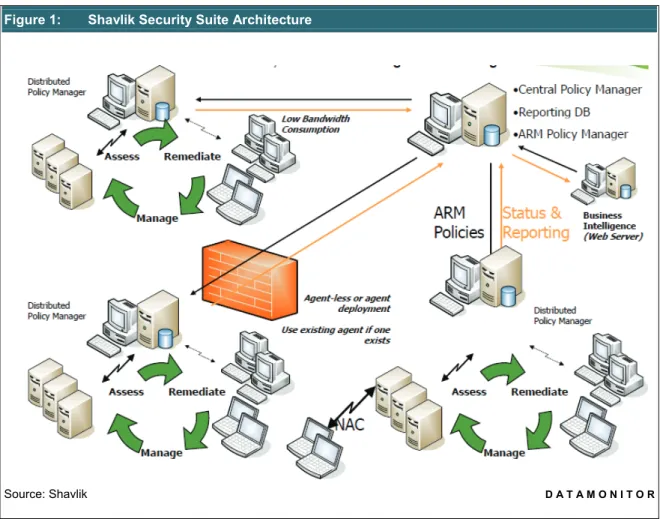
Figure 1 shows a schematic illustration of the Shavlik Security Suite architecture, and illustrates how data from each client machine is retrieved to a centralised database via Shavlik Central Policy Manager. All the components of the suite integrate with Shavlik’s automated Assessment, Remediation, and Management (ARM) Policy Manager, which controls all policy settings and delegates these to all distributed devices. Shavlik NetChk Protect supports role-based administration, limiting users to perform only certain functions based on their assigned role. It can scan the Microsoft and third-party programs on all machines in the network, in order to assess their patch status and deploy any required patches. Its core is the Shavlik NetChk Engine, which provides an XML file that describes in detail the security hot-fixes available for each product. The identifying details of fixes include security bulletin name and title, file name and version details, corresponding registry keys, related Microsoft Knowledge Base article numbers, links to additional information from Bugtraq (BugtraqID), and cross-references to the Common Vulnerabilities and Exposures (CVE)
Scanning can be specified by machine groups, based on domain, organisational unit, machine name, IP address, or IP address ranges, and information from Microsoft Active Directory can be imported, and groups saved as favourites. Patch installations can be scheduled, and even highly granular definitions of reboot schedules can be specified. An Auto Deploy option can be used to ensure that all missing patches identified during the scan may be installed automatically. Patch scanning and patch deployment templates can be created to control the activities, and reports can be produced and viewed for full visibility. Virtual images of desktop environments are included in assessments and if any are offline then appropriate patch installation schedules can be specified, or the patch can be automatically installed when the offline image comes online.
Figure 1: Shavlik Security Suite Architecture
Source: Shavlik D A T A M O N I T O R
NetChk Protect also provides details of all registry information and files that are associated with spyware or virus signatures, and provides alerts based on the severity of the material found. A single endpoint agent implements these capabilities, as well as controlling patch management, and blocking disallowed applications (a feature which is known as ‘Active Protection’).
Shavlik NetChk Configure (formerly known as Shavlik NetChk Compliance) enables organisations to automate management of critical system and security configurations, while ensuring that these settings adhere to internal and industry-standard compliance objectives. It is similar to Shavlik NetChk Protect in that administrators can create machine groups, schedule scans, and continuously monitor all physical and virtual machines, both online and offline, from a single console.
Security control configuration and reporting using Shavlik NetChk Configure is a three-step process. The first step involves administrators defining machine groups for scanning. The second involves the user defining a set of baseline policies against which the machine groups will be assessed. The product has pre-defined baseline policies, which can be used to customise organisation-specific policies. It incorporates Shavlik NetChk SCAP Processor, which is capable of converting Security Content Automation Protocol (SCAP) profiles into policies which can be directly imported onto the product. SCAP profiles are defined as part of the Information Security Content Automation Program (ISCAP), a standard developed by multiple US government agencies which is aimed at standardising compliance reporting and automated vulnerability detection and management. The ISCAP initiative seeks to establish a standard way of executing and reporting all technical security-related operations.
Custom compliance checks can be created using the product’s Custom Check Wizard, which can provide the basis for security and compliance policies based on the ISO 17799/27002 and NIST 800-53 standards, and a foundation for addressing compliance with regulations such as PCI, SOX, Gramm-Leach-Bliley Act (GLBA) Health Insurance Portability and Accountability Act (HIPAA), FDCC, and Federal Information Security Management Act (FISMA). The final step involves scanning of the network based on the above rules and policies, which produces a graphical and dashboard view of the complete compliance status of all the machines scanned, as well as reports relevant to regulations such as PCI and SOX, and stating whether appropriate configuration controls are in place and are operational.
Shavlik Security Intelligence provides a role-based, customisable Web dashboard that delivers visibility into the risk levels and policy compliance status that arise from the configuration settings, patches, spyware, malware, and un-approved applications within the organisational network. The assessment and remediation data of Shavlik NetChk Protect and Shavlik NetChk Compliance both underpin this reporting, and the information can be analysed in consideration of specific regulations, policies, and standards such as Sarbanes-Oxley, FISMA, ISO 27002, NIST and so on. IT administrators and managers can use Shavlik Security Intelligence to generate compliance reports, review problem areas, and make technical recommendations.
Shavlik can provide documentation of large-scale implementation cases involving 60,000 workstations, which serves to highlight the distributed management console capability. Groups of systems (which can include both physical and virtual machines) can be managed via distributed consoles, each of which can manage both agentless and agent-based systems. Collectively the architecture allows a lot of flexibility in determining the right deployment approach, based on the nature and distribution of servers and desktops, their geographical distribution, and the client organisation’s governance structure.
Product Emphasis
Shavlik Security Suite implements a compliance-oriented, policy-driven approach to controlling the status of machines in the organisational network. It provides patch management to proactively remediate systems, and control of virus or spyware material, and unauthorised applications, to resolve situations where real risk already exists. It enables an automated approach to scanning, discovery, and remediation, with strong support for the needs arising from virtual environments, and which incorporates wide coverage of Microsoft and third-party Windows applications and in particular many areas which are vital and yet beyond the scope of WSUS. A fully automated approach to configuration and remediation of security controls, and good reporting against regulatory requirements, can strongly contribute to efficient achievement of these essential but onerous management responsibilities.
DEPLOYMENT
Typically, the Shavlik Security Suite is simple to implement and requires only a systems engineer who is familiar with SQL 2005 or SQL 2008 databases and management tools, Microsoft IIS and user administration, and Web Services. According to Shavlik, installations take a maximum of two days (including testing), and most are completed in one day or less.
The three key modules are separately licensable and deployment can be phased. Shavlik Security Intelligence is completely dependent on the scan results from Shavlik NetChk Protect and Shavlik NetChk Configure (which each run with separate consoles). Shavlik NetChk Protect ships with Microsoft SQL Express, while Shavlik NetChk Configure ships with Microsoft Access, and Shavlik Security Intelligence requires Microsoft SQL 2005 or SQL 2008. It should be noted that this varied database infrastructure is not yet optimised, but post-implementation maintenance overheads are generally minimal. Typically, an IT administrator would test and approve patches, schedule scans and patch installations, and browse reports. Shavlik provides training options including self-paced evaluation guides, beginner-level and advanced Web-based training which is held every month, customised Web-Web-based training, on-site customer training, and regional classroom training sessions. Customer support options include live e-mail and telephone support from 7am to 7pm Central Standard Time (CST) from Monday to Friday, or 24-hour enterprise support which is available for additional fees. The company also provides an online support forum and knowledge base that is available 24x7.
Shavlik requires that physical machines be powered on in order to run the software agentlessly, so if an organisation’s policy is to turn off all machines after working hours this would have an impact on the coverage of scheduled scans and deployments. In order to overcome this, the company offers a third-party application integration for Wake on LAN, while virtual machines (as mentioned earlier) can be patched when they are offline.
PRODUCT STRATEGY
The suite and its individual components have been designed to be applicable to Microsoft infrastructures with between 500 and 10,000 systems. Companies with between 3,000 and 5,000 employees form Shavlik’s core market, and while it targets all industry it has been particularly successful across the Financial, Medical, Utilities, Retail, Hospitality, Government, and Higher Education Sectors, and High-end Manufacturing Industries.
Return in Investment (ROI) accrues primarily from enhanced IT staff productivity. Shavlik’s route to market is via a direct sales team, and with channel partners, Managed Service Providers (MSPs), and through OEM partnerships. Shavlik has key business partnerships with several MSPs including BlueLock, LPI, Virteva, Excel, and DELTEC. The company’s technology partners include more than 20 leading security and technology companies such as BMC, Juniper, Sophos, Symantec, Criston, and VMware.
Shavlik Security Suite is offered with a perpetual licence model with annual maintenance for technical support, and patch and configuration data. The perpetual licence cost is estimated to be 70-80% of the total implementation cost. Standard annual maintenance is priced at 25% of the licence cost, while Enterprise annual maintenance is 30% of the license cost. Shavlik also charges separately for training and implementation services which are optional.
Shavlik’s release strategy encompasses one major version with new features and capabilities at the beginning of the calendar year, and a minor version comprising enhancements to major functional components around the year’s third quarter. The company has plans to further enhance the capabilities related to virtual machines, and extend its enterprise-focused management capabilities to include asset management.
COMPANY PROFILE
Founded in 1993, Shavlik Technologies was among the pioneering patch management companies. Its CEO Mark Shavlik worked with Microsoft in 1999 to create the patch engine for Microsoft Base Security Analyzer (MBSA) – the technology still used by Microsoft’s installed base of many millions of users across the globe. The company is headquartered in St. Paul, Minnesota, and it has EMEA headquarters in Amsterdam, Netherlands, with regional sales personnel throughout the US and in Sweden.
Shavlik is a privately held company with a total of 105 employees, of whom 40 are engaged with the research and development function, while 48 handle sales and marketing, and 17 handle the support and administration function. Shavlik has over 10,000 customers worldwide and some of the referenceable clients include Barclays Bank, University of York, Herrington & Carmichael, Miller Brewing, Accor North America, CDW, Manitowoc, and Fidelity.
SUMMARY
Shavlik occupies a prominent place in a patch management market dominated by two types of vendors: those providers focused on Windows environments, and those focused on lifecycle management of assets (i.e. servers and PCs). It is now distinguished also by the inclusion of protection against viruses, spyware, and the execution of disallowed applications, on client machines. Butler Group believes that Shavlik is among the leading Microsoft-focused patch management vendors, and its capabilities are certainly equivalent to the best patch management tools of the current crop of asset lifecycle management vendors. Shavlik patch management is OEM’d by two of the ‘big four’ IT management vendors.
Overall, Shavlik Security Suite is applicable to any company where the scale and performance of operations, and the profile of applications in use, leads to the need to look beyond the relatively limited WSUS-based patch management approach, and where the need for efficient patch management in the Windows environment outscores the benefits to be gained from a multi-platform patch management system. Shavlik as a company has impeccable patch management credentials, and Butler Group believes that in terms of functional capabilities and market presence, the company is certainly among the best.
Table 1: Contact Details Corporate Headquarters
Shavlik Technologies, LLC 2665 Long Lake Road Suite 400, Roseville MN 55113, USA Tel: +1 (651) 426 6624 Fax: +1 (651) 426 3345 www.shavlik.com EMEA Headquarters
World Trade Center Amsterdam Strawinskylaan 1003 1077 XX Amsterdam Netherlands Tel: +31 (0) 20 5752642 Source: Shavlik D A T A M O N I T O R Headquarters Shirethorn House, 37/43 Prospect Street, Kingston upon Hull, HU2 8PX, UK
Tel: +44 (0)1482 586149 Fax: +44 (0)1482 323577
Butler Direct Pty Ltd.
Level 46, Citigroup Building, 2 Park Street, Sydney, NSW, 2000, Australia Tel: + 61 (02) 8705 6960 Fax: + 61 (02) 8705 6961 Butler Group 245 Fifth Avenue, 4th Floor, New York, NY 10016,
USA
Tel: +1 212 652 5302 Fax: +1 212 202 4684
Important Notice
This report contains data and information up-to-date and correct to the best of our knowledge at the time of preparation. The data and information comes from a variety of sources outside our direct control, therefore Butler Direct Limited cannot give any guarantees relating to the content of this report. Ultimate responsibility for all interpretations of, and use of, data, information and commentary in this report remains with you. Butler Direct