www.coremedia.com
Table of Contents
Executive Summary ... 4
The Challenge ... 5
Legacy Infrastructure ... 5
Content Silos and Multiple User Interfaces ... 5
The Limitations of “All-in-One” Suites ... 5
Page-Based Approaches Limits Integration Options ... 6
Looking Forward ... 6
The CoreMedia Approach ... 7
CoreMedia Integration Patterns ... 8
Content Aggregation ... 8
Import-full Integration ... 8
Import-less Integration ... 9
Syndication ... 9
The Content Repository Listener ... 10
The Content Feeder ... 10
Repositories ... 10
CoreMedia Repository ... 10
CoreMedia Elastic Core ... 12
CoreMedia Integration Points ... 14
CoreMedia Studio ... 14
Integrated Previews ... 14
Flexible and Extensible ... 14
Accessing Content Via CoreMedia Studio ... 14
Personalization ... 16
Analytics Integration ... 17
Content Application Engine (CAE) ... 18
Business Logic Layer ... 20
Presentation Layer ... 20
CoreMedia Importer ... 21
CoreMedia APIs ... 22
Conclusion ... 22
Table of Figures
Figure 1: CoreMedia hierarchical repository structure ... 12
Figure 2: Browsing an external video asset management system from within CoreMedia
Studio ... 15
Figure 3: Integrated Analytics ... 18
Figure 4: Overview of the CAE Architecture ... 19
Executive Summary
Not too long ago, a website was merely a combination of static HTML pages that supported the most common Web browsers. This paradigm was adopted by the first generation of Web Content Management (WCM) systems, which stored content entirely within native
repositories. The benefit of this approach was simplicity. The system was able to deliver Web pages dynamically and present the business user with easy to learn interfaces that allowed them to drag-and-drop editorial content from a single digital asset repository onto a created page.
While this was sufficient for the challenges of that time, the new era demands a new generation of products with the ability to manage any type of digital asset – whether it resides within the built-in repository or comes from an external source.
This requirement is equally important to all points of interaction with the system:
à Business users of WCM systems need to be able to access content from across their corporate ecosystem
à Web visitors demand a consistent, personalized, and integrated approach across all channels
à IT Organizations want a varied set of flexible tools to make the initial incorporation and the ongoing support of content straightforward and logical. With a multitude of possible delivery channels (mobile, tablet and all the major distributions) and usages of these assets it is not clear from the beginning where the content will be placed, perform best, dynamically be included, or simply demanded by the audience.
In order to master this challenge, WCM vendors and their customers must shift from a page-based paradigm to an information and content-page-based approach that enables users to optimize the way content is accessed, interpreted, and represented on any channel or device.
This document explains how CoreMedia’s flexible object-based architecture, multi-tier cache, and extensible integration framework can help customers achieve deep, real-time
The Challenge
Legacy Infrastructure
Large enterprises have an already existing corporate ecosystem in place they hesitate to abandon. Reasons for that are many: These systems are often mission-critical to the business and have been proven to work. Furthermore large investments went into those solutions and even more important the related business processes are widely understood by the staff and even harder to change than the technology itself. Despite all these benefits, entrenched enterprise systems can present a range of expensive and complicated numerous integration challenges.
Content Silos and Multiple User Interfaces
In most enterprises, mission-critical content is spread across various specialized systems and repositories such as product catalogues, digital asset management systems, or
document management systems. Each system comes with their own unique user interface, forcing business users to learn and work with a variety of different UI paradigms in parallel. Organizations cannot afford to create isolated content silos within their organizations. They need to combine all relevant information in order to provide a best possible experience to both business users and Web visitors. Business users need to be empowered to orchestrate content originating from a variety of sources from within one single user interface rather than forcing them to learn – and switch between – several different UIs concepts. A single, integrated user interface enables them to provide a superior visitor experience and not be limited by learning a new product or user metaphor. In order to achieve this, flow of information across systems is key, as is the ability to re-use content within new contexts across various touchpoints.
The Limitations of “All-in-One” Suites
Many Content Management vendors have decided that the best way to mitigate the ever-present problem of integration is to provide an all-in-one enterprise software suite. At first glance, many of these solutions seem to have compelling WCM functionalities, but a more thorough evaluation typically reveals a focus somewhere other than WCM. Many of these suites were not developed organically but were the result of acquisitions – often driven by business imperatives rather than technical compatibility. While all-in-one suites may often work for small to medium size businesses, at enterprise scale, it is often easy to recognize the poorly integrated character of these “corporate roll-ups”. It is well understood that just because a company claims to own a functionality, doesn’t mean it works well together.
The two biggest challenges of this approach are:
à The promised “simple” solution that solves all integration challenges often requires customers to purchase expensive additional modules to reduce actual integration effort with existing systems, as well as the implied disruptive changes to existing IT infrastructure and investments.
à Business users have to navigate through pieced-together user interfaces that are no better than the original disconnected approach.
Page-Based Approaches Limits Integration Options
On a technical level, many solutions emphasize a page-based approach to simplify the content creation process for casual users. While it allows people to quickly get started editing Web pages, it completely ignores the fact that integration sources are not designed for Web pages without interpretation. Using a page-based approach creates, at best, convoluted structures that make the integration process more difficult.
Page-based systems assume that the Web property is the most important system, rather then one system working in concert with others. Conversely, data required by external system has to be made available through placeholder pages, which are not only hard to manage from an end-user perspective but also clutter up the content repository. Finally, page-based systems completely ignore the fact that the Web of the future (and increasingly today) might not be limited to pages. New consuming endpoints, such as devices, services, and applications emerge on a daily basis. Assuming that we can press all these into the superannuated page model is only possible by completely ignoring and excluding ourselves from a world of new possibilities.
Looking Forward
No single standalone system can provide support for all business use cases, while providing standardized integrations for all associated technologies. Moreover, is it impossible to deliver a single ideal platform for customer experience management (CXM), which is defined by the sum of all experiences a customer has with a website.
In order to solve the dilemma, a solution has to play well with already existing products by offering generic integration mechanisms. These have to enable content-based integration but also allow for business users to maintain a holistic view at all times. This integrated business user experience should ideally cover the entire content production chain from access, integrated editing with preview and real-live experimentation of consumer-oriented variants.
The CoreMedia Approach
CoreMedia has understood and anticipated these challenges since its inception and has designed its entire product line to leverage object-based design principles – from the digital asset repository and the CoreMedia Content Management Server, all the way to Content Application Engine, CoreMedia’s dynamic delivery framework.
CoreMedia believes that Web content management must be at the heart of any Web based information ecosystem – providing an integrated, best-in-class approach. This is made possible through our object-based design, which allows us to aggregate content from 3rd
-party systems and combining it with assets stored natively in the CoreMedia repository. The approach converges at CoreMedia’s browser-based editorial UI, the CoreMedia Studio. The Studio leverages the information coming from disparate repositories and allows
business users to manage the entire customer experience from within one single interface. This philosophy is based on the understanding that no single approach will work for all the different integration points required to make Web properties seamlessly fit in with other corporate IT/business assets. Consequently, CoreMedia utilizes multiple techniques to facilitate the most straightforward integration for any requirement possible. The following section will provide additional details on these techniques and how are implemented.
CoreMedia Integration Patterns
In order to facilitate integrations at any level, CoreMedia provides specific content
integration patterns to address the following use cases: content aggregation, syndication, feedback, and optimization. These patterns are most commonly used, when integrating with a variety of technologies, including: Customer Relations Management, Enterprise Resource Planning, Social, E-Commerce.
Content Aggregation
Content aggregation is the process by which external content is gathered together so that it can be centrally managed and combined with native content to assemble dynamic Web properties.
There are essentially two ways to approach this scenario. Each approach comes with its benefits and drawbacks and, as such, CoreMedia supports both.
Import-full Integration
Most products catering for a Content Aggregation integration scenario will champion an approach where external content is first copied/imported (import-full) into a primary Web repository so it can be treated with the same mechanisms as native content. Import-full integration includes the migration of both small portions of documents or entire datasets into the WCM repositories. In the latter case, the term “bulk ingest” is commonly used. An example use case where import-full integration is the preferred way is migrating assets from an old content repository that has reached end of life into CoreMedia. The import would be triggered manually for selected datasets with the goal to migrate the entire repository. Another common scenario is the subscription to external news sources. Here the import happens continuously over time in an automated way, pushing new content
immediately to the CoreMedia repository whenever it becomes available.
Since an additional copy of content is created in the CoreMedia repository during import, synchronization use cases require special care. It is good practice to declare one of the repositories (usually the 3rd party system) as the master, overriding any changes on the slave. A feedback channel back to the 3rd party system is also possible, allowing changes on top of the imported content being pushed back to the original repository.
Despite its apparent simplicity, an approach based solely on content duplication comes with major limitations. The content itself may reside in two repositories, but the data, error and logic checking structures are still maintained in the original system. Using this approach creates duplicate systems that required major, unneeded and redundant expansions of the CMS, or require frequent synchronizations of the core IT systems and the Web property. This style of “import-full” integration is especially limiting when integrating the CMS with IT back end systems like an organization’s CRM systems, the Product Catalog and the ERP environment.
CoreMedia addresses import-full use cases at two integration points: the CoreMedia Importer framework for importing from XML sources and the CoreMedia APIs for highly customized importing.
Import-less Integration
Another, less common, approach to content aggregation is to allow external content to reside outside of the importing system but to store a reference natively, with possible additional metadata. CoreMedia refers to this approach as “import-less integration.”
In contrast to import-full integration, where assets are imported into the internal repository, import-less integration only stores proxy-documents in the CoreMedia repository that reference back to source asset. The asset data stays in the original system and is not copied. The actual integration and content retrieval is conducted on demand on the business or presentation layer during delivery.
Once aggregated, assets can be enriched with arbitrary metadata. Since residing in different repositories decouples metadata and the actual asset, updates can be carried out
separately.
In content aggregation scenarios, offering the flexibility of an “import-less” alternative not only makes the initial integration more straightforward, it also greatly reduces the ongoing maintenance and support as the originating systems are responsible for keeping the data current and providing it on an as needed basis.
This truly emphasizes the best-of-class approach: it leaves special content with specialized systems and solutions but makes use of it. This way, business users familiar with the specialized 3rd-party systems can still produce and manage content natively, where experienced managers can leverage this data and reuse it within the CoreMedia Studio.
Syndication
Content syndication is the provision of content managed in the CoreMedia repository to other services. CoreMedia provides a set of pro-active components that can be plugged into the new Web site’s syndication logic components. These components send notification events of changed content in the repositories. Custom syndication logic can then react to these events and push updates and notifications to the content receivers.
CoreMedia supports the following syndication use cases:
à Event-based or manual export to static files (XML, aggregated formats a la ZIP, transformed a la PDF, SMS gateway, E-MAIL Newsletter)
à Synchronization of content
à Dynamic, on-request delivery of content feeds suing technologies such as XML, JSON and REST
Syndication solutions can be realized using either of these components:
The Content Repository Listener
The Repository Listener is a lightweight, transient content change notification engine. When active, it will notify of content change events (content being created, updated or deleted). Custom content syndication logic can process, transform and propagate updates to the receivers. This lightweight solution suits best the syndication of non-aggregated content. If required, the repository listener can be made persistent, so content change events do not get lost when the component is down.
The Content Feeder
The Content Feeder is a persistent content change notification engine. This pro-active feeder extends the repository listener functionality by allowing business logic to express complex content update dependencies. When a content element is changed, the feeder can
automatically propagate changes to dependent content and content aggregations. This solution is designed for syndication of aggregated content. The feeder reliably resumes processing content change notifications after a component downtime.
Repositories
Powerful integrations in diverse solution landscapes demand the right data store for the each use case. Some content – including editorial content, customer data, and long tail content - needs to be integrated and stored for long term reuse. Other kinds of content – such as weather data, election results, stock quotes, and school closing updates - have a much shorter shelf life, but need to be as up-to-the-minute as possible. CoreMedia provides two different repositories for content storage to specifically address both content strategies:
à Stable Content
à More static
à Long lifecycle,
à Managed by editorial staff
à Versioned
à Volatile Content
à High peaks in content stream
à Short lifecycle
à User generated or cached 3rd party data
à Un-versioned
CoreMedia can address both types of content and offers two different approaches.
CoreMedia Repository
The standard CoreMedia repository is based on a relational database system. Content must be stored in a raw format (i.e. without layout or formatting information) in order to be able
to be rendered into any conceivable target format. The CoreMedia CMS organizes content in an object-oriented fashion and manages it using freely-configurable “documents.” These documents aggregate all of the important properties of a content object. They range from containing only a single piece of information, such as a picture, to storing the entire data owned by a content object. In addition to managing pure content, the CoreMedia CMS also stores navigational and layout data in its repository.
Since the type and format of a document are dependent on the application itself, document types are not preset by the CoreMedia CMS, but can be designed by the user in accordance with the appropriate business requirements. Document types are defined in terms of their document fields, using XML format. A “Press Release” document type can be used by way of example.
This document can contain a number of fields, such as:
à Author
à Title
à Text
à Accompanying images
On the other hand, a simple image document itself requires fields, storing additional properties such as image size, format and the binary image data itself. The more detailed the division of a document into fields, the more flexible the output templates can be that access this data — such as the templates that generate pages for the Web, for example. Document fields can also be used as search parameters.
The CoreMedia CMS supports the following data formats for document fields:
à Integer: for the storage of integer data
à String: for the storage of simple text strings
à Date: for the storage of dates
à XML: for the storage of rich text in XML format
à BLOB (Binary Large Object): for the storage of data in binary format with a defined MIME type.
à Link: for the storage of references to other CoreMedia documents. Links are automatically checked for consistency on publication.
As well as properties defined by the user, the system also automatically assigns metadata to documents. Examples of this metadata include “Creation Date,” “Author” or “Status.”
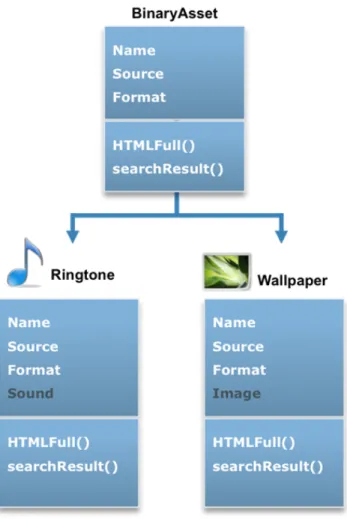
Figure 1: CoreMedia hierarchical repository structure
The object-oriented approach also implies that a document can inherit properties from a “super-document,” which can also be declared as abstract. A further example is that a link list may contain documents of differing types that are specializations of a (n abstract) super type, if this super type has been defined as a link target type.
On initialization, the Content Server creates the relevant database schema in a relational database automatically, using the content type definition. No manual intervention is required.
CoreMedia Elastic Core
Volatile content is best addressed with CoreMedia Elastic Core. Elastic Core is an optional component providing a comprehensive API to leverage a NoSQL, or non-relational database and is optimized to handle high write-loads. CoreMedia’s Elastic Social software module is based on the Elastic Core.
Based on the same proven NoSQL technology that powers social applications such as Facebook, Twitter, Amazon, and Google, CoreMedia’s Elastic Core repository supports large numbers of social content contributors writing in parallel while maintaining extremely high performance delivery. The component is fully integrated into the CoreMedia Studio editorial interface – and fully extensible to grow with a company’s community ambitions.
NoSQL technology is based on a very different set of principles than relational databases and is designed to solve a very different set of problems. It welcomes redundancy, isn’t trying to provide perfect consistency of data for all visitors and is all about speed, efficiency, and affordability.
NoSQL systems are “flat” rather than “normalized.” This means that they make no effort to build structured relationships between their records. In addition, NoSQL systems are not designed to respond to any arbitrary query. They are designed to answer a predefined set of queries. Rather than waiting for someone to pose a question, they are continually working in the background, using networks of parallel servers, to pre-calculate the results. That way, when a user visits a website and the system needs to display the latest content updates, the answer is available within milliseconds, no matter how much social content is stored in the system.
With the Elastic Core, customers can add dynamic content (user generated content or transient data such as stock quotes) to create fully dynamic, contextualized pages, without pushing the total page delivery time beyond half a second (500 milliseconds). Web
properties built and delivered by relational database technology would experience significant performance problems when content items begin to exceed half a million. Elastic Core can manage tens of millions of contributors with tens of millions of content items by default with the ability to scale much higher if necessary.
And, unlike relational systems, NoSQL is designed to run on affordable, commodity hardware as well as virtualized, elastic cloud systems. Adding new hardware will provide linear improvements in performance. So, if an administrator doubles their hardware, they will double their performance time (>99% to be exact). Not only do relational systems cost much more to scale, but the performance improvements are typically far from linear. With the Elastic Core architecture, companies can scale horizontally by adding new servers using inexpensive commodity hardware, plug in a cloud service running on virtual machines to scale elastically on demand, store the same data in multiple locations for redundancy and high availability, and manage everything using a set of easy to use, integrated tools.
CoreMedia Integration Points
CoreMedia implements these different integration patters via six different integration points. The remainder of this document describes each integration point as well as the types of integration supported by each.
CoreMedia Studio
CoreMedia Studio is the central user interface allowing non-technical users to manage content from various repositories and sources to create engaging online visitor experiences across multiple digital touchpoints. One can think of the Studio as a cockpit that combines all the capabilities needed to create, access, manage, preview and publish any content asset, distributed over various repositories, via a single, intuitive and zero-install user interface. CoreMedia Studio goes way beyond basic content authoring and enables business users to arrange, structure and contextualize blended content from mixed systems to address different touchpoints such as Web sites, mobile channels, Mobile In-App content, Social Media Pages, SMS, E-Mail newsletters.
Integrated Previews
CoreMedia Studio provides a sophisticated real-time preview of multiple output channels. Test user profiles can be defined to preview entire websites or detail views of content items as they would appear to a visitor falling into one of the predefined segments.
A central concept of the Studio preview consists of not only showing the final website but also providing multiple, customized views for an individual piece of content. This is possible since CoreMedia follows an object-oriented paradigm and strictly separates content, business logic and presentation.
For example, the CoreMedia Studio provides a collection of pre-configured preview options to show how an article would appear to the visitor in detail, as a teaser box, as a list item or on a mobile device – all conveniently displayed on a single preview page and updated in real-time as the content is altered. CoreMedia’s preview pane is based on Responsive Web principles and can be instantly adjusted via a slider to see how a page (or a content item) will look on different device for display formats. How content is previewed and which view fragments are attached to it can be configured for each content type individually.
Flexible and Extensible
CoreMedia Studio has been architected to be easy to extend, allowing customers to not only adjust their editorial habits and workflows but also for easy integration with external
systems. By communicating directly with 3rd party repositories and content sources such as digital asset systems, remote content can be searched, browsed, previewed and even remotely managed – all from within Studio – without the need to leave the central interface and switch to other management consoles. Once an external asset has been selected, the business user can access it with a single mouse click.
Accessing Content Via CoreMedia Studio
As described above under Content Aggregation, CoreMedia provides two import approaches that are as transparent are possible. Per configuration, the selected asset is either entirely
copied into the CoreMedia repository or stored as a shallow copy containing only reference information such as an external system ID or an URI pointing to the external asset. In both cases, business users can enrich the asset with additional metadata or marketing copy to add value for a more engaging presentation to the audience. Moreover, it doesn’t make any difference from an editorial perspective which of the two access methods (import-full or import-less) has been utilized. No matter where the content resides or how it is access, the business user is offered a totally transparent content management experience.
CoreMedia Studio can also be used to add new content by dragging and dropping digital media files from an external location (preserving metadata) and uploading them to the external repository. See Figure 2 below.
Studio provides the ability to access content by search, using a variety of customizable filters such as document type, media asset metadata or subject taxonomies. Filters based on visitor feedback (e.g. “most-clicked” or “top-rated”) can be added by integrating with Web analytics systems or social community solutions respectively. CoreMedia provides many of these integrations out of the box.
Given the ability to quickly and effectively access documents, business users can make use of the content by arranging it along navigation structures that represent the various end user touchpoints. It is important to stress that only one single instance of an asset stored in a presentation-independent format exists in the system and therefore can be reused and repurposed in various ways and channels simply by referring to it via drag and drop. This greatly reduces the effort to keep content up-to-date since there is only a single instance the business user has to worry about.
Mixed content from all repositories can be blended and grouped together in containers. An example would be a blended image gallery containing both native pictures and
user-generated images. Alternatively, automatic content lists can be populated by search results from the entire set of repositories.
Personalization
Studio allows non-technical users to engage their audience with a contextualized experience. In a first step, user segments representing the relevant categories do
differentiate users. Based on these segments, business users can create business rules to select between different content variants, or to define personalized search lists.
These rules can be composed based on data coming from external context sources. Custom context sources can be added and extended to deliver:
à Profile data from external CRM systems
à Demographic data from behavioral targeting providers such as Nugg.ad
à Historic transactions from e-Commerce backend systems, including IBM WebSphere Commerce
à Social activity from community solutions such as CoreMedia Elastic Social
à Behavioral data such as the user’s click path, in-site search terms and external search referrers
à Explicit interests set by user
à User’s current time zone, device category, geo-location
Analytics Integration
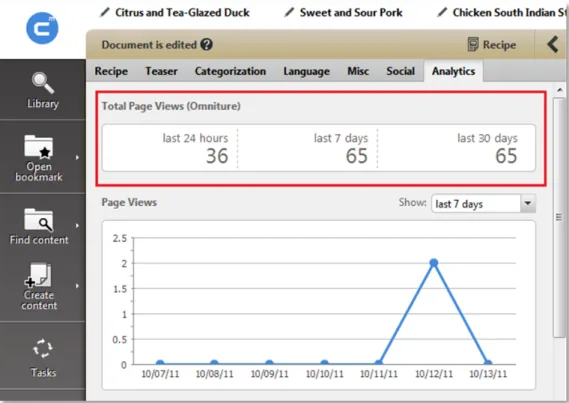
Working and integrating with external content is an important feature of CoreMedia Studio, but today’s business reality requires business users to be able to measure effectiveness and relevance as well. CoreMedia was designed with a unique integration approach to 3rd-party Web analytics systems that supports the creation of allow contextualized Web experiences. CoreMedia Studio supports an out-of-the-box integration of popular Web analytics solutions such as Google Analytics, Adobe Sitecatalyst, Webtrends and Webtrekk Analytics and provides business users with real time analytics intelligence covering all the digital channels. Studio pulls in detailed measurements from the external analytics systems and displays them as overlays next to the corresponding items on the integrated site preview. In addition, user segments defined by business users can be tracked when delivering personalized Web views allowing traffic to be monitored according to these segments to measure their effectiveness.
Website optimization is another important aspect that can be set up automatically
leveraging Web analytics data. In this use case, business users create and manage dynamic components, based on certain criteria (e.g. most clicked). These intelligent content objects are automatically composed in real-time during delivery, based on live analytics information.
Figure 3: Integrated Analytics
Content Application Engine (CAE)
The Content Application Engine is CoreMedia’s visitor-facing delivery engine, which is responsible for retrieving content from CoreMedia’s repository as well as external sources, running customer-specific business logic on top of and dynamically assembling, rendering and delivering the cross-channel visitor experience.
The declarative nature of this engine and the independence of its layers ensure fast development and maintainable application design – while providing uncompromising performance due to a well-architected caching facility in order to reach nearly unlimited scalability.
Figure 4: Overview of the CAE Architecture
The CAE has an architecturally clear separation of functional layers with a strong focus on object-orientation and fully emphasizes the model-view-controller pattern (a software design principle that separates representation of information from the way in which it is presented to the site visitor). This layered approach provides the advantage of a strict separation of content, business logic and presentation aiming at rapid extension and maintainable application design by addressing each of these three separately and independently.
All webpages and views are assembled and rendered dynamically by the CAE as follows: Incoming requests are handed over to request-specific controllers, which pass it onto the Business Logic Layer. At this layer, content from the CoreMedia repository as well as from any other external sources is aggregated, processed by customizable business logic and cached for faster retrieval. Finally the presentation layer is responsible for dynamically rendering and delivering all the different views such as HTML websites, RSS Feeds, JSON representations, in order to create targeted experiences across various digital channels.
Business Logic Layer
On the business object layer, the CAE does not distinguish between objects that are loaded from the CMS repository or from 3rd party repositories. Both data streams can be
aggregated and combined. Additional business logic can be attached to those objects to enrich, manipulate or transform the content in order to prepare it for visualization and target it to the user’s context. The logic dealing with client side interactions such as form handling and user authentication is also part of this layer.
A crucial feature of the CAE is its out-of-the-box caching facility, which not only allows it to cache content properties from CoreMedia’s own repository, but can also be used to cache business objects pulled in from external sources or the result of possibly costly calculations. Sophisticated cache-invalidation mechanisms on the object level – triggered by content updates or, in the case of external sources, by explicit notifications or time-based constraints, make sure that the CAE can assemble and deliver dynamic views in an uncompromising, high performance manner while keeping the time-to-Web down to a minimum.
An example use case would be an e-Commerce scenario in which a product is stored in CoreMedia’s repository including marketing information such as title, description and imagery, but the actual price and stock availability, which may vary on a daily basis, is pulled in from an ERP system.
The logic to fetch and combine the external content with the product asset grabbed from CoreMedia’s repository would be expressed within the logic layer of the CAE. One could even take it further and deploy additional business rules such as calculating the end user’s final price by applying a possible discount based on the user’s transaction history that in turn is fetched on demand from the CRM backend.
In order to increase performance of the Web application and to reduce the workload on the backend systems, all data relevant for this use case can be effectively cached by applying different cache strategies. Editorial content such as a product is relatively static and gets evicted from the cache only on change notification. The pricing data has to be more flexible and might be cached for half a day before the CAE asks for price updates. The stock
availability is the most dynamic information and could be either cached for a few seconds or not at all, resulting in live queries for each user request.
Presentation Layer
The presentation layer is responsible for rendering of objects in the required presentation format and delivering them to the end user or 3rd party systems, spanning the various touch points. It does that by accessing the objects and their properties from the business layer by either triggering a re-computation or taking it directly from the cache.
Views are dynamically rendered by a sophisticated view dispatcher, which applies matching templates on a per-object level. The templates themselves are fully object-oriented thus allowing for inheritance and reuse of widgets and UI fragments across pages.
Multiple formats can be rendered to satisfy different kinds of endpoints such as Desktop HTML webpages, mobile Web views or machine-readable formats such as RSS feeds. In addition, programmatic views can be expressed to generate more structured, machine-readable data presentations, e.g. JSON objects or XML representations to power mobile apps or to satisfy any other pull-based content syndication use cases.
The presentation layer is typically used for Ad Server integration or integration of external Analytics or Marketing Automation tools. The business user can maintain base URLs, simple HTML snippets and additional configuration from within the Studio. The final view is
rendered as a combination of explicit parameters and context dependent parameters that are added automatically by the CAE at runtime. Social media widgets or the presentation of digital assets (e.g. Images from an external Image Library, embedded video players) are integrated in a similar manner.
CoreMedia Importer
The CoreMedia importer tool uses a familiar inbox metaphor to manage content workflows. Applications provide content to be imported into the importer’s inbox folder and trigger an importer run; the importer will try and import the content into the Content Repository; it will move content that could not be imported (e.g., due to malformed XML or missing
references) to an error folder, where the client can inspect the content, update it and re-run the importer. The importer is the tool of choice when importing large content sets with multiple points of cross-content references.
The CoreMedia platform comes with an exporter tool that can be used to export the most recent version of (a subset of) content from a content repository. In combination with optional content transformers and filters, clients can use the exporter and importer tools to implement an “extract, transform and load” process to propagate content from a source repository to a target repository.
Typical usage scenarios of the importer tool are:
à Importing pre-created (sub-)site content into the content repository
à Transferring content from a source repository into a target repository The Importer has out of the box support for handling XML content specified in the
CoreMedia XML dialect, Cascading Style Sheets (CSS) and JavaScript. In order to deal with any XML format, custom XSLT (Extensible Stylesheet Language Transformations) filters can be applied to transform incoming content from the source format into the CoreMedia XML dialect before ingesting automatically.
CoreMedia APIs
For automated and continuous import scenarios such as subscription to external content sources, the use of CoreMedia APIs to craft highly customized ingest tools is the preferred method. This provides the flexibility to pre-process, filter, transform and consolidate incoming data before the actual ingest happens. At the same time, it protects the investment of customer integration through stable upgrade paths.
The CoreMedia CMS was developed in Java and is based on open standards such as XML, UML, Unicode, Java, Java Beans, WebDAV, REST, HTTP and Spring. All CoreMedia CMS functions can be controlled using open, Java-based interfaces.
For all of the CoreMedia CMS components, an API is provided in order to implement customer specific extensions to the core product.
Conclusion
Organizations have realized that the current business reality demands a new generation of WCM systems to satisfy the needs of their visitors by providing consistent, personalized experience across all digital channels. Content can be created, updated and reused in a CMS, and it must be easily integrated from other corporate and third party systems.
To create compelling online experiences, business users need to reuse information scattered across their corporate ecosystem. In order to make that happen, WCM solutions must provide extensive integration capabilities to perform content aggregation and syndication, while allowing business users to leverage that information and manage the visitor
experience from within a simple-to-use and consistent interface.
For a WCM system to be effective, content should be personalized, compelling and relevant. Strong and flexible integration tools in the WCM allow for cross-platform usage of
About CoreMedia
CoreMedia is a leading provider of Web Content Management (WCM) software to
organizations demanding engaging, context-driven online experiences for their customers regardless of channel or touchpoint. The company’s WCM suite offers unique business value by seamlessly integrating digital and social media assets, increasing editorial productivity and accelerating time to market in complex environments. As a result, businesses can more effectively execute their online strategies to engage users, build customer loyalty and ultimately drive greater revenue and profitability.
Established in 1996, CoreMedia is headquartered in Hamburg, Germany, with offices in San Francisco, Washington, London and Singapore. CoreMedia’s clients include global brands, such as the Association of American Medical Colleges (AAMC), Australian
Broadcasting Corporation (ABC), Bertelsmann, BILD, CLAAS, Continental, EPCOS, Deutsche Telekom, Internet Broadcasting, JD Group, Tchibo, Telefónica Germany and ZDF.
Germany, Switzerland, Austria CoreMedia AG Ludwig-Erhard-Straße 18 20459 Hamburg Germany Tel +49 .40.32 55 87 .0 The Americas CoreMedia Corporation 118 Second Street, 5th Floor San Francisco CA 94105 USA Tel +1 .415 .371 .0400 CoreMedia Corporation 1001 N. 19th Street, Suite 1200 Arlington VA 22209 USA Tel +1 .703 .945 .1079
Europe, Middle East and Africa
CoreMedia Ltd. 90 Long Acre Covent Garden London WC2E 9RZ United Kingdom Tel +44 .207 .849 .3317 Asia Pacific
CoreMedia Asia Pacific Pte. Ltd. 25 International Business Park #0–106 German Centre Singapore 609916 Tel +65 .6562 .8866