Constructing a gazebo: supporting
teamwork in a tightly coupled, distributed
task in virtual reality
Roberts, DJ, Wolff, R, Otto, O and Steed, AP
http://dx.doi.org/10.1162/105474603322955932
Title
Constructing a gazebo: supporting teamwork in a tightly coupled,
distributed task in virtual reality
Authors
Roberts, DJ, Wolff, R, Otto, O and Steed, AP
Type
Article
URL
This version is available at: http://usir.salford.ac.uk/928/
Published Date
2003
USIR is a digital collection of the research output of the University of Salford. Where copyright
permits, full text material held in the repository is made freely available online and can be read,
downloaded and copied for noncommercial private study or research purposes. Please check the
manuscript for any further copyright restrictions.
David Roberts
Department of Computer
Science
The University of Reading
United Kingdom
[email protected]
Robin Wolff
Department of Computer
Science
The University of Reading
United Kingdom
[email protected]
Oliver Otto
Department of Computer
Science
The University of Reading
United Kingdom
[email protected]
Anthony Steed
Department of Computer
Science
University College London
United Kingdom
Constructing a Gazebo:
Supporting team work in a tightly
coupled, distributed task in virtual
reality
Abstract
Many tasks require teamwork. Team members may work concurrently but there must be some occasions of coming together. Collaborative Virtual Environments (CVE) allow distributed teams to come together across distance to share a task. Studies of CVE system have tended to look at the sense of presence or co-presence with other people. They have avoided studying close interaction between users, such as the shared manipulation of objects, because CVEs suffer from inherent network delays and often have cumbersome user interfaces. Little is known about the effectiveness of collaboration in tasks
requiring various forms of object sharing and, in particular, the concurrent manipulation of objects.
This paper investigates the effectiveness of supporting teamwork between a geographically distributed group, in a task requiring the shared manipulation of objects. In order to complete the task, users must share objects through concurrent manipulation of both, the same, and distinct attributes. The effectiveness of teamwork is measured in terms of time taken to achieve each step, as well as the impression of users. The effect of interface is examined by comparing various combinations of walk-in cubic Immersive Projection Technology (IPT) displays and desktop devices.
1. Introduction
Many team related tasks in the real world centre around the shared manipulation of objects. A group of geographically remote users can be brought into social proximity to interactively share virtual objects within a Collaborative Virtual Environment(CVE). CVEs are
extensively used to support applications as diverse as military training, online games, and social meeting places
(Roberts, 2003)
.Advances in immersive display devices are ensuring their acceptance in industry as well as research (Brooks, 1999). Natural body and head movement may be used to view an object from every angle within an immersive display. The object may be reached for and manipulated with the outstretched hand, usually through holding some input device. The feeling of presence, and particularly the naturalness of interaction with obje cts, may be improved when the user can see his own body in the context of the virtual environment. Immersive Projection
interactive stereo images, thus placing his body in a natural spatial context within the environment.
By linking walk-in immersive displays through a CVE infrastructure, a user may be physically situated within a virtual scene representing a group of remote users congregated around a shared object. This allows each team member to use their body within the space to interact with other members of the team and virtual objects. The spoken word is supplemented by non-verbal
communication in the form of pointing to, manipulating and interacting with the objects as well as turning to people, gesturing and other forms of body language. This offers unprecedented naturalness of in teraction and remote collaboration. As described in the related work section below, for several years, CVEs have successfully supported representation of remote users and shared observation of interactive environments. For example, one person can manipulate an object while others observe. However, generally, they do not support closely-coupled tasks, such as two people concurrently interacting with the same object.
This paper investigates concurrent interaction with shared objects by users of a variety of display system configurations. We describe two ways of sharing the manipulation of objects, that is, through the same and distinct attributes. An example application, requiring both these forms of concurrent manipulation, is introduced. Collaboration is measured within this application, both in terms of team performance and user perception.
1.1 Principles of Distribution in
Collaborative Virtual Environments
A key requirement of Virtual Reality (VR) is the responsiveness of the local system. For example, delays in representing a perspective change following a head movement can lead to disorientation and feelings of nausea. A CVE system supports a
potentially unlimited environment across a number of resource-bounded computers interconnected by a network which induces perceptible delays. In order to make a CVE attractive and productive to use, it must support interaction that is sufficiently intuitive, reactive, responsive, detailed and consistent. A virtual environment is composed of objects, which may be brought to life through their behaviour and
interaction. Some objects will be static and have no behaviour. Some will have behaviour driven from the real world, for example users. Alternatively, object behaviour may be procedurally defined in some computer program. Key goals of a CVE are to maximise responsiveness and scalability while minimising latency. This is achieved through localisation and scaling (Roberts, 2003).
Localisation replicates objects on machines local to users. Early systems replicated object states but not their behaviour. Each state change to any object is sent across the network to every replica of that object. In more advanced systems the load on the network may be reduced by communicating parametric behaviour definitions from which states may be derived. Scaling limits the number and complexity of objects held on each machine and is generally driven by user interest (Greenhalgh, 1999).
1.2 Related Work
Various forms of interaction with shared objects have been considered. Four classes of shared behaviour: autonomous behaviours, synchronised behaviours, inde pendent interactions and shared interaction are introduced (Broll, 1997). A special case of shared interaction is the concurrent
manipulation of a shared object which was found not to be possible with CVE technology available in 1995 (Broll, 1995). Advances in this technology, driven by applications such as games and military traiing, have addressed some of the shortcomings. These allow today’s CVEs to support limited real time sharing of objects. A virtual tennis game was played (Molet et al., 1999) where the position attribute of the ball was shared sequentially between two sites. Prediction was shown to overcome the effect of network delays in a simple ball game between UK and Germany (Roberts, Strassner, Worthington, & Sharkey, 1999). This included advanced ownership transfer to allowed
instantaneous exchange of a ball between players in competitive scenarios. The simulation
Interoperability Standard (IEEE1516.2, 2000) defined concurrency control that allows concurrent
(Roberts, Richardson, Sharkey, & Lake, 1998) allowed control of an attribute to be passed to a remote user with little or no delay. The importance of haptic interfaces for collaborative tasks in virtual
environments was investigated in (Basdogan, Ho, Srinivasan, & Slater, 2000). The authors state that finding a general solution to supporting various collaborative haptic tasks over a network may be “too hard”. The authors made a distinction between concurrent and sequential interaction with shared objects but this is not discussed further. As with (Choi, Choi, & Ryew, 1997) a spring model is used to
overcome network latencies to support concurrent manipulation of a shared object. Causal surface manipulation allows two users to carry a shared object while hiding the effects of latency through gradual deformation (Ryan & Sharkey, 1998). For example, a wooden beam held between two users would bend as the local user moves and then straighten as the remote user is seen to follow.
The DIVE system is an established testbed for experimentation of collaboration in virtual
environments and, after three major revisions, remains an effective benchmark. The COVEN project (Frécon, Smith, Steed, Stenius, & Stahl, 2001) undertook network trials of large scale collaborative applications run over the DIVE (Frécon & Stenius, 1998) CVE infrastructure. This produced a detailed analysis of network induced behaviour in CVE applicatio ns (Greenhalgh, Bullock, Frécon, Lloyd, & Steed, 2001). DIVE was ported to cave-like display systems (Steed, Mortensen, & Frécon, 2001) and consequently an experiment on a non-coupled interaction task with two users in different walk-in displays was found to be very successful (Schroeder et al., 2001). A stretcher
application was implemented above DIVE, that investigated the carrying of a stretcher by allowing the material to follow the handles (Mortensen et al., 2002). The work concludes that, although the Internet-2 has sufficient bandwidth and levels of latency to support joint manipulation of shared objects, the CVE did not adequately address the consistency issues arising from the network characteristics.
Several studies have investigated the effect of linking various combinations of display system on collaboration. It was found that immersed users naturally adopted dominant roles (Slater, Sadagic, Usoh, & Schroeder, 2000). A recent study by Schoeder (Schroeder et al., 2001), again using DIVE, investigated the effect of display type on collaboration of a distributed team. This work extended the concept of a Rubik’s cube by splitting the composite cube
such that two people could concurrently interact with individual component cubes while observing each other’s actions. The study compared three conditions based on display combinations: two linked walk-in displays; face-to-face; and a walk-in display linked to a desktop. An important finding was that the asymmetry between users of the different systems affects their collaboration and that the co-presence of one’s partner increases the experience of the virtual environment (VE) as a place.
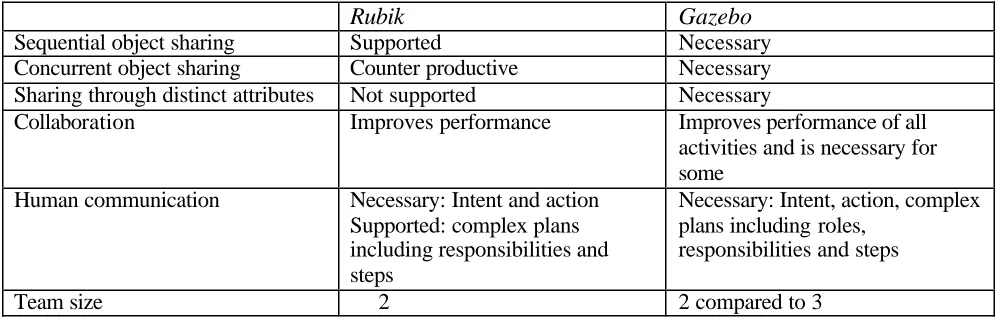
[image:4.612.56.558.93.253.2]To aid comparison to previous studies (Frécon et al., 2001; Frécon & Stenius, 1998; Greenhalgh et al., 2001; Mortensen et al., 2002; Schroeder et al., 2001; Steed et al., 2001) we have adopted the same CVE, Table 1. Comparison to Schoeder’s Rubik study
Rubik
Gazebo
Sequential object sharing Supported Necessary
Concurrent object sharing Counter productive Necessary Sharing through distinct attributes Not supported Necessary
Collaboration Improves performance Improves performance of all activities and is necessary for some
Human communication Necessary: Intent and action Supported: complex plans including responsibilities and steps
Necessary: Intent, action, complex plans including roles,
responsibilities and steps
that is DIVE. We extend Schoeder’s Rubik study in a number of ways, table 1.
2 Experiment
In order to examine distinct scenarios of sharing the manipulation of an object, we have designed the structured task of building a gazebo. This section starts by describing the Gazebo application. We then reduce the task to remove redundancy, and break it down into sub-tasks that provide various collaboration scenarios requiring shared manipulation of an object. Various device configurations used throughout the experiment are detailed.
The methodology for evaluating the task is explained both for team performance and subject perception. Team performance measures the time taken to complete the task and each component sub-task. User evaluation details the responses to a questionnaire on the perception of collaboration.
2.1 Gazebo
holes, tighten screws and hammer nails. Although some aspects of the construction can be undertaken independently, the simulation of gravity ensures that collaboration is necessary
for others. For example, a single person can place a metallic foot on the ground or drill a hole in a beam while it is lies on the ground, whereas two people are required to carry or fix a beam.
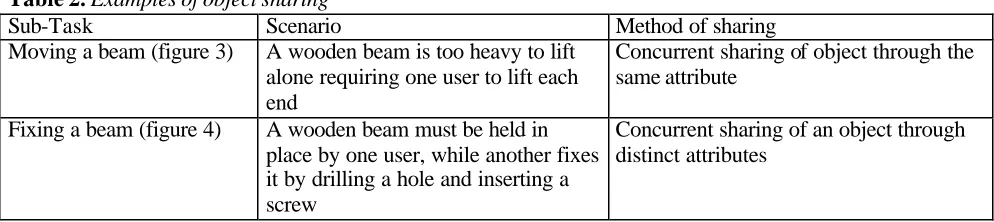
To complete the Gazebo, tools and materials must be shared in various scenarios of shared object manipulation, some of which are distinct in the method of sharing attributes, figures 3, 4 and (table 2). A pair of carry tools are used to pick up a beam. When lifted by two carry tools, one at each end, the end of the beam is attracted towards the closest carry tool, as if by magnetism. This solution overcomes the issue of multiple parenting in the scenegraph and helps users to conceptualise the effects of network delays as magnetic attraction and inertia.
2.1.1 Task breakdown. Variations of the gazebo have been built during several collaborative
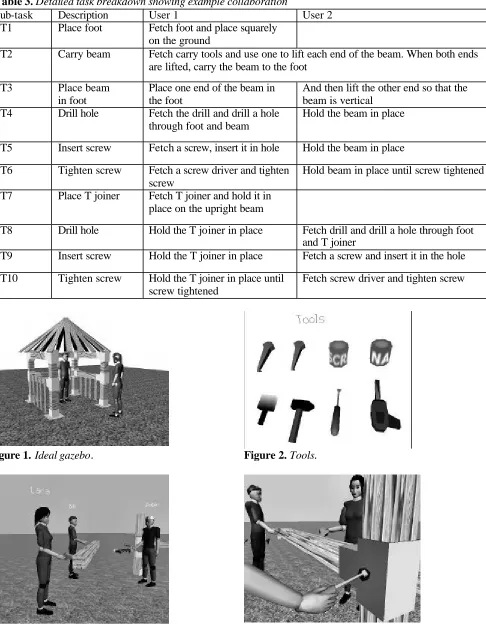
sessions involving walk-in displays at Reading and London in the UK and Linz in Austria, fig ure 5. As in the real world, building a gazebo can take several hours of often repetitive work. Thus, for detailed evaluation we reduced the task to constructing a simpler structure, removing unnecessary repetition but still requiring both forms of object sharing along with varied human communication, figure 6. The detailed breakdown of the new task is given in table 3, where we show an example of how two users might
construct the simple structure. A third user may assist by, for example, fetching a tool while two others are carrying the beam or helping with task planning and execution.
[image:5.612.59.556.87.198.2]2.1.2 Display configurations. The tests involved distinct display configurations, all different in their ability to facilitate interaction with the other two participants as shown in table 4. Two basic display types were used, a walk-in cubic IPT, and a desktop. All of the configurations restricted the user to one-handed interaction but within our application. Collaboration would still have been necessary for Table 2.Examples of object sharing
Sub-Task Scenario Method of sharing
Moving a beam (figure 3) A wooden beam is too heavy to lift alone requiring one user to lift each end
Concurrent sharing of object through the same attribute
Fixing a beam (figure 4) A wooden beam must be held in place by one user, while another fixes it by drilling a hole and inserting a screw
Concurrent sharing of an object through distinct attributes
Table 3.Detailed task breakdown showing example collaboration
Sub-task Description User 1 User 2
ST1 Place foot Fetch foot and place squarely on the ground
ST2 Carry beam Fetch carry tools and use one to lift each end of the beam. When both ends are lifted, carry the beam to the foot
ST3 Place beam in foot
Place one end of the beam in the foot
And then lift the other end so that the beam is vertical
ST4 Drill hole Fetch the drill and drill a hole through foot and beam
Hold the beam in place
ST5 Insert screw Fetch a screw, insert it in hole Hold the beam in place
ST6 Tighten screw Fetch a screw driver and tighten screw
Hold beam in place until screw tightened
ST7 Place T joiner Fetch T joiner and hold it in place on the upright beam
ST8 Drill hole Hold the T joiner in place Fetch drill and drill a hole through foot and T joiner
ST9 Insert screw Hold the T joiner in place Fetch a screw and insert it in the hole
ST10 Tighten screw Hold the T joiner in place until screw tightened
[image:6.612.74.560.76.700.2]Fetch screw driver and tighten screw
Figure 1.Ideal gazebo. Figure 2. Tools.
Figure 3.Concurrent sharing of object through the same attribute.
two-handed input because of the effect of gravity on “heavy” beams.
2.1.3 CVE. The DIVE CVE was used for experimentation as it is an established benchmark (Frécon et al., 2001; Frécon & Stenius, 1998; Greenhalgh et al., 2001; Mortensen et al., 2002; Schroeder et al., 2001; Steed et al., 2001). DIVE version 3.3.5 was used on all devices. We extended this DIVE version with an event monitoring plugin and an event filter. The event monitor timed event callbacks with synchronised clocks (Anthes, 2002). Event filtering reduced the frequency of events generated by the tracking system. Throughout our tests, the tracking system was filtered to only produce events for movements greater than one centimetre. In extensive testing, this level of filtering was found to produce the optimal balance between system performance and usability.
2.1.4 Network conditions. Tests were undertaken over a six month period. Typical network latencies during this period were:
Reading to London: 19ms
Reading to Reading: 17ms (through slow switch to simulate national Internet latency)
Reading to Linz: 43ms
2.2 Team Performance
Team performance was measured both in terms of time taken to complete the task and each component sub-task, in order to gauge the support for collaboration offered by various display configurations. Multiple test-runs compared the performance of both expert and novice teams across the display configurations IPT1, DT1 and DT2, table
4. The teams were left to determine their own organisation of roles in a natural way as the task progressed. The only constraint was the order of the sub-tasks ST1 to ST10 as described in table 3.
[image:7.612.56.556.99.207.2]2.2.1 Collaboration between novice subjects. We started our trials with a set of 12 novice users, each of whom undertook the trials voluntarily and where students of undergraduate programmes in computer science and cybernetics. None had previous experience of working in an immersive display or of the gazebo application. Teams of three subjects performed the task in three test-runs using IPT1, DT1, DT2. All of these display systems were at Reading. By changing places between test runs, each subject interacted through the entire set of Table 4.Display configurations
Name Display Type View Input Audio Avatar* Location
IPT1 Reading
IPT2 Walk-in Stereo
Tracked head & hand
Yes Medium realism,
dynamic body London
DT1 Yes Low realism,
static body Reading
DT2
Desktop Mono Mouse & keyboard
No Medium realism,
static body Reading
*
[image:7.612.64.281.575.746.2]Avatar: The remote representation of the local user.
Figure 5.Completed work after 1h collaboration of two IPT’s.
[image:7.612.332.541.579.743.2]display configurations in the same geographical location.
2.2.2 Effect of display configuration on expert users. Performance measurements for novice subjects vary greatly. Consequently, to better gauge the effect of device combinations we repeated the test-runs between pairs of expert subjects. The set of expert subjects had three members, each with several months of regular experience of both the Gazebo application and the interface. We first compared display
configurations as before and then repeated the runs constraining subject roles. The latter was done to gain a clearer understanding of the effect of role on subject performance for a given display. The constrained roles were divided into primary and supporting, the former undertaking the more difficult parts of subtasks, such as fixing, while the latter held material in place. Table 5 distinguishes the test runs undertaken by expert teams.
Table 5.
Overview of roles in expert users test
runs.
Test-run
IPT1 DT1 DT2
TRA Unconstrained Unconstrained -
TRB - Unconstrained Unconstrained TRC Primary Supporting -
TRD Supporting Primary -
2.3 User Evaluation
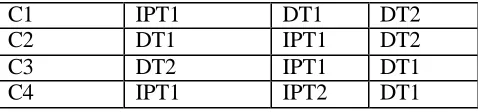
[image:8.612.320.559.80.136.2]The perceived effectiveness of collaboration involving shared objects and the perceived effect of display type were investigated, using a user evaluation questionnaire. Fifty six volunteers were split into teams of three for each test. Within every task, each user interacted through a distinct display device and was questioned on his perception of the effectiveness of teamwork. Various test conditions defined both device combination and perspective, table 6. For example, condition C1 questioned how the user of IPT1 perceived the effectiveness of collaboration with the users of DT1 and DT2.
Table 6.
Test conditions
Condition Questioned user
User 2 User 3
C1 IPT1 DT1 DT2
C2 DT1 IPT1 DT2
C3 DT2 IPT1 DT1
C4 IPT1 IPT2 DT1
2.3.1 Questio nnaire. The questionnaire was aimed at ascertaining the user’s subjective
perception of collaboration, both generally and for each specific task. Questions were based on those of Usoh and colleagues (Usoh, Catena, Arman, & Slater, 2000). Answers could be given on a scale of 1-7, where 7 represents total agreement and 1 total disagreement. Errors arising from a user’s
misinterpretation of a question were reduced by asking sets of related questions. For example, “to what extent did the two of you collaborate” was contrasted with “to what extent did each user hinder the task”. The entire questionnaire of more than 30 questions is too long to reproduce here, as are the detailed responses to each question. The summary findings are given in the next section, where we describe those answers relating directly to the shared manipulation of objects that were found to be statistically significant.
3 Results
This section first examines the results of the team performance tests and then the user evaluation.
3.1 Team Performance Results
The effect of interface on team performance is given below, firstly for novice and secondly for expert users. Performance is measured in terms of the time taken to complete each subtask.
3.1.1 Collaboration of novice users
resulting in a doubling of performance by the third attempt.
Figure 7. Timing of novice teams.
[image:9.612.316.558.78.251.2]3.1.2 Effect of display configuration on
expert users.
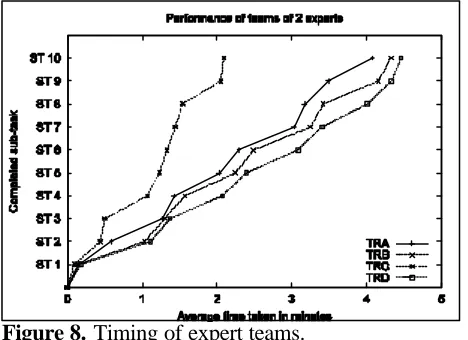
Figure 8 shows the timing of the team of expert users. For unconstrained roles, the expert teams took about half of the time of the average of the novice teams. [image:9.612.63.292.118.280.2]Figure 8. Timing of expert teams.
Table 7.
Performance increase IPT/DT
Sub-task
Descriptio
n
Predominan
t
activity
%
Performanc
e increase
IPT/DT
ST1
Place foot
Moving
48
ST2
Carry
beam
Moving
35
ST3
Place
beam
Positioning
73
ST4
drill hole
Use tool
44
ST5
Insert
screw
Positioning
53
ST6
fix beam
Use tool
65
ST7
Place T
joiner
Positioning
64
ST8
drill hole
Use tool
55
ST9
Insert
screw
Positioning
65
ST1
0
fix T
joiner
Use tool
65
Graphs TRA and TRB in figure 8, reveal that the type of display does not make a clear difference when the organisation of role is unconstrained. However, giving the primary role to the walk-in display user, results in a considerable performance increase, TRC and TRD in figure 8.
[image:9.612.62.296.403.573.2]comparing ST3, ST5, ST7 and ST9 to ST1 and ST2 over TRC and TRD in figure 9. In contrast, the average improvement gained is equal when sharing an object through the same, or distinct, attributes:
Average(ST2, ST3) == Average(ST4, ST5, ST6). Table 7 summarises the performance increase during TRC and reviews the predominant activity of each sub-task. Over the whole task, a cumulative
performance increase of 55% was measured for the walk-in display against the desktop.
3.2 User Evaluation
We now summarise the responses to the questionnaire.
3.2.1 Contributions to carrying a beam.
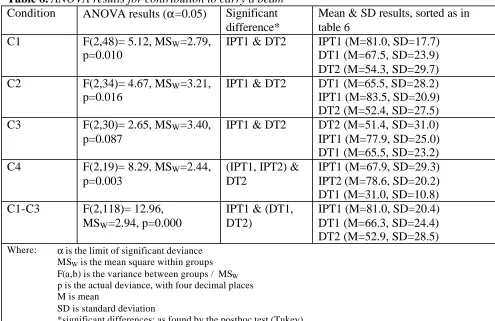
For the response to the first question, “To what extent did each person contribute to the task while carrying a beam?” an analysis of variance (ANOVA) showed that there was a significant difference between the conditions, table 8. Conditions C1, C2 and C4 all showed a clear statistical significance, while C3 showed a close statistical significance. An ANOVA across the combined questions, forconditions one to three, showed that all users held an objective impression of the effectiveness of
collaboration (F(2,41)= 0.18, MSW=14.9, p=0.840).
[image:10.612.56.551.89.410.2]Thus the answers may be united, across conditions C1 to C3, to gain a better statistical certainty of device importance. The ANOVA for this showed that there is a significant difference and a posthoc test showed that the difference lies between all three devices. These results show that asymmetry in
Table 8.
ANOVA results for contribution to carry a beam
Condition
ANOVA results (
α
=0.05)
Significant
difference*
Mean & SD results, sorted as in
table 6
C1
F(2,48)= 5.12, MS
W=2.79,
p=0.010
IPT1 & DT2
IPT1 (M=81.0, SD=17.7)
DT1 (M=67.5, SD=23.9)
DT2 (M=54.3, SD=29.7)
C2
F(2,34)= 4.67, MS
W=3.21,
p=0.016
IPT1 & DT2
DT1 (M=65.5, SD=28.2)
IPT1 (M=83.5, SD=20.9)
DT2 (M=52.4, SD=27.5)
C3
F(2,30)= 2.65, MS
W=3.40,
p=0.087
IPT1 & DT2
DT2 (M=51.4, SD=31.0)
IPT1 (M=77.9, SD=25.0)
DT1 (M=65.5, SD=23.2)
C4
F(2,19)= 8.29, MS
W=2.44,
p=0.003
(IPT1, IPT2) &
DT2
IPT1 (M=67.9, SD=29.3)
IPT2 (M=78.6, SD=20.2)
DT1 (M=31.0, SD=10.8)
C1-C3
F(2,118)= 12.96,
MS
W=2.94, p=0.000
IPT1 & (DT1,
DT2)
IPT1 (M=81.0, SD=20.4)
DT1 (M=66.3, SD=24.4)
DT2 (M=52.9, SD=28.5)
Where: α is the limit of significant deviance MSW is the mean square within groups
F(a,b) is the variance between groups / MSW
p is the actual deviance, with four decimal places M is mean
SD is standard deviation
linked devices affects perceived contribution. Immersive users are considered by all to contribute more than desktop users. Furthermore, where a team comprised of two immersed and one desktop user, the latter was left out of most of the activity. The
significance of this finding is demonstrated through the ANOVA of C4 that returned an actual deviance of 0.003.
3.2.2 Contributions to fixing a beam.
We asked the same question for the task of fixing a beam, table 9.An ANOVA across the combined questions (F(2,40)= 0.92, MSW=14.1, p=0.405), of the
[image:11.612.57.557.91.335.2]conditions one to three, showed that all users held an objective impression of the effectiveness of
Table 9.
ANOVA results for contribution to fix a beam
Condition
ANOVA results (
α
=0.05)
Significant
difference*
[image:11.612.56.555.94.366.2]Mean & SD results, sorted as in
table 6
C1
F(2,50)= 2.05, MS
W=2.66,
p=0.140
None
IPT1 (M=78.2, SD=17.6)
DT1 (M=64.7, SD=25.4)
DT2 (M=63.9, SD=25.8)
C2
F(2,33)= 0.97, MS
W=2.78,
p=0.389
None
DT1 (M=73.8, SD=24.2)
IPT1 (M=77.4, SD=18.7)
DT2 (M=64.3, SD=27.6)
C3
F(2,32)= 0.25, MS
W=2.05,
p=0.777
None
DT2 (M=61.9, SD=26.8)
IPT1 (M=64.9, SD=17.3)
DT1 (M=67.9, SD=15.1)
C4
F(2,13)= 4.30, MS
W=2.69,
p=0.037
IPT1 & DT1
IPT1 (M=76.2, SD=14.8)
IPT2 (M=54.8, SD=30.5)
DT1 (M=32.1, SD=21.4)
C1-C3
F(2,121)= 2.38,
MS
W=2.48, p=0.097
IPT1 &
DT2
IPT1 (M=74.3, SD=18.4)
DT1 (M=68.1, SD=22.4)
DT2 (M=63.4, SD=26.0)
*significant differences: as found by the posthoc test (Tukey)
81.0
78.2
76.2 83.5
77.4 77.9 78.6
67.9 61.9
51.4 73.8
65.5
54.8 64.9
64.7 67.5
32.1 31.0
67.9 65.5
64.3
52.4 63.9
54.3
0.0 10.0 20.0 30.0 40.0 50.0 60.0 70.0 80.0 90.0 100.0
carrying fixing carrying fixing carrying fixing carrying fixing
Mean VAlue (%)
IPT1 DT1 DT2 IPT2
C1 C2 C3 C4
[image:11.612.69.500.370.566.2]collaboration. Thus to gain a better statistical certainty of device importance, the answers may again be united across conditions C1 to C3. The ANOVA for this showed that there is only a close significant difference and a posthoc test showed that the
difference lies between IPT1 and DT2. These results show that the effect of asymmetric devices is
perceived to play considerably less of a role in the level of contribution, in fixing a beam than in carrying
it. The actual deviance for fixing is 0.097 compared to zero for carrying.
3.2.3 Comparison of perceived contribution
for carrying and fixing.
The difference of the effect of asymmetric devices observed when carryingas opposed to fixing the beam is confirmed in figure 10, which combines the above results.
3.2.4 User hindrance of the task.
In answer to the question “To what extent did each user hinder the task?” an ANOVA unveiled that there is no significant difference between the conditions, p=0.699 forcarrying a beam and p=0.846 for fixing a beam. Therefore, we can accept the null hypothesis. The results for carrying a beam M=44.9, SD=23.4 and for fixing a beam M=46.2, SD=21.1 show clearly that the participants did not excessively hinder each other.
3.2.5 Collaboration between users.
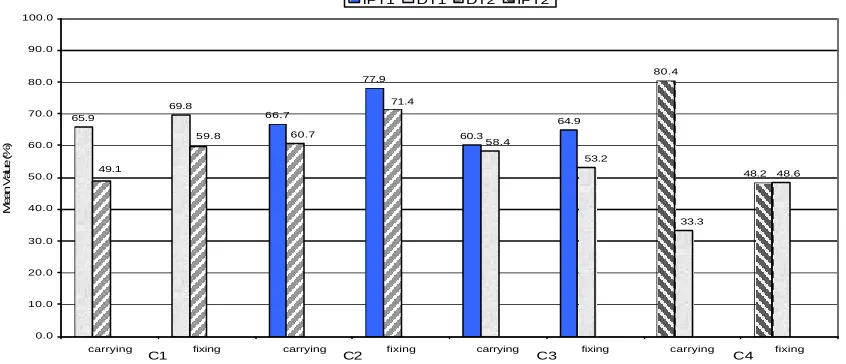
Carrying and fixing a beam requires collaboration between two users. When it comes to the evaluation of “To what extent did the two of you collaborate?” and “How welldid you and the other person together performed the task?” an ANOVA showed only a significant difference (p=0.002) in C4 for carrying the beam (M=80.4, SD=25.3), while there was no significant difference in one of the other trials, neither for carrying nor for fixing a beam, figure 11. These results show that from the perspective of immersed users, collaboration is considerably easier with a symmetric user. However, desktop users found the type of remote display to play little part in the level of collaboration.
4 Conclusion
A degree of co-presence has long been supported by CVEs, however, the realism of shared object manipulation has, in the past, been hampered by interface and network delays. We have shown that a task requiring various forms of shared object manipulation is achievable with today’s technology. This task has been undertaken successfully between remote sites on many occasions, sometimes linking up to three remote walk-in displays and multiple desktops. Detailed analysis has focussed on team performance and user evaluation.
4.1 Team Performance
Using the gazebo application, novice users adapt quickly to remoteness of peers and the interface. Typically after three sessions their performance
65.9
69.8
66.7
77.9
60.3
64.9
80.4
48.2 49.1
59.8 60.7
71.4
58.4
53.2
33.3
48.6
0.0 10.0 20.0 30.0 40.0 50.0 60.0 70.0 80.0 90.0 100.0
carrying fixing carrying fixing carrying fixing carrying fixing
Mean Value (%)
IPT1 DT1 DT2 IPT2
[image:12.612.70.493.88.270.2]C1 C2 C3 C4
doubles, approaching that of expert users. Immersive users can undertake most parts of the task far more efficiently than their desktop counterparts. The gazebo task requires collaboration at numerous points. This means that a faster user must often wait for the slower one to catch up before beginning the next step. Schroeder et al. (Schroeder et al., 2001) found that the perception of collaboration is affected by asymmetry between users of the different systems. Our results show that the time taken to complete a collaborative task is also affected. When roles in the gazebo task are ill-defined, the performance of the team approaches that of the weakest member. However, the
performance is greatly increased when the immersed user undertakes the more difficult part of every task.
4.2 User evaluation
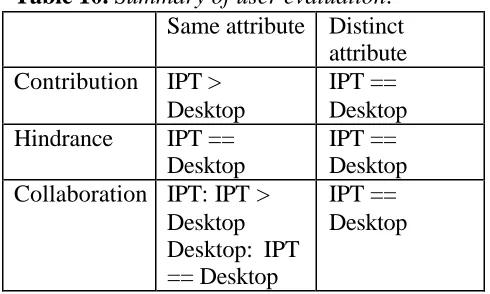
[image:13.612.56.301.344.491.2]The user evaluation is summarised in table 10.
Table 10.
Summary of user evaluation
.
Same attribute Distinct
attribute
Contribution
IPT >
Desktop
IPT ==
Desktop
Hindrance
IPT ==
Desktop
IPT ==
Desktop
Collaboration IPT: IPT >
Desktop
Desktop: IPT
== Desktop
IPT ==
Desktop
The findings of our questionnaire confirm that the perception of contribution is affected by asymmetry of linked displays when carrying a beam. However, this is clearly not the case when fixing a beam. This suggests that the interface plays a major role during the sharing of an object’s attribute and a minor role when sharing an object through distinct attributes. Surprisingly, neither the interface, nor the form of object sharing, is perceived to affect the level to which the remote user hindered the task. This appears to contradict the results of the performance analysis above. From the perspective of immersed users, collaboration is considerably easier with a symmetric user. However, a desktop user found the type of remote display to play little part in the level of collaboration.
4.3 Further work
We are now progressing this work on a number of fronts:
Alternative platform: Implementing the same experiment above CAVERNsoft
Other display configurations: Linking workbench, walk-in and desktop displays.
Consistency management: Managing the reliability, ordering and timeliness of event communication.
Social human communication: Mapping
fundamental principles from psychology into avatar design.
Shared manipulation of volumetric data: Supporting real time shared interaction of large volumetric models between remote walk-in display.
Acknowledgements
We wish to thank Christoph Anthes for helping with developmental trials between the UK and Austria and Dieter Kranzlmüller and Vassil Alexandrov for facilitating collaboration between the Universit y of Reading and the Johannes Kepler Universität Linz.