Technical evaluation of a low-bandwidth,
Internet-based system for teleconsultations
E D Lemaire*, Y Boudrias
{and G Greene
{*Institute for Rehabilitation Research and Development;{Terry Fox Mobile Clinic, The Rehabilitation Centre, Ottawa, Canada
Summary
A low-bandwidth telemedicine system was evaluated in eight community hospitals connected to a central hospital via the Internet. PCs were used with videoconferencing software and modem connections to the telephone network. The average data connection rates, still-image transfer times and live-video transmission rates were determined. The time to send 6406480, 3206240 and 1606120 pixel, 24-bit still images ranged from 29 s to 411 s. The average file transfer times for a 10 s MPEG video-clip was 8.6 min. The average live video frame rate was 1 frame/s (at the best image quality), with an average latency of 3 s. The results suggest that Internet-based videoconferencing is acceptable for certain telemedicine applications.
Introduction
...
Telemedicine applications often involve high-performance communication equipment and specialized data lines. While this may be essential in time-critical situations, it may not be necessary in all health-care applications. Advances in PCs and the growth of the Internet and its capabilities have led to low-cost technology that operates with existing telecommunications. Especially in areas like physical rehabilitation, a low-bandwidth telemedicine approach can be used for both clinical purposes and education1–4.
However, little supporting information has been published about the technical performance of low-bandwidth telemedicine systems.
Malagodiet al.5compared videoconferencing using
conventional telephone lines and ISDN lines. Over six months, an occupational therapist completed
evaluations for four subjects using an ISDN connection at 128 kbit/s and a telephone connection at 16.8 kbit/s. The subject’s primary condition and major problem were correctly identified in all four cases. While the results were the same, the evaluations using the telephone connection took longer to complete. The slower data rate of the telephone connection produced
smaller and jerkier video than the ISDN connection. Neither system could detect a 4–7 Hz tremor in one subject’s hands.
Workers from the Laboratory for Biomaterials Technology (Italy) and the National Research Centre for Environment and Health (Germany)6–9have also
examined the performance of ISDN videoconferencing systems. A telemedicine benchmark was developed for testing the effectiveness of data exchange in computer conferencing. The tests involved exchanging a predefined set of radiology images and medical reports. The evaluation included file transfer, use of a shared whiteboard, application sharing, volume data analysis and compression. Using the telemedicine benchmark, the Intel Proshare 200 system (128 kbit/s ISDN connection) was evaluated by comparing image visualization times between centres. The research team found no significant difference in image viewing time between TIFF and JPEG files. Application sharing was considered the most effective way to share lossless image files, if the images were already loaded.
In most Canadian rural health facilities, the only telecommunication option is the ordinary telephone network. Fortunately, health-care facilities in these regions can usually make a 33 kbit/s modem connection to the Internet. Since the Internet has become a ubiquitous medium, baseline data on system performance would be useful for many proposed telemedicine applications. The present study assessed the technical aspects of using Internet-based, low-bandwidth videoconferencing to connect rural
...
"
Accepted 9 February 2000
Correspondence: Edward Lemaire, The Rehabilitation Centre, 505 Smyth Road, Ottawa, Ontario K1H 8M2, Canada (Fax: +1 613 737 4260; Email: [email protected])
community hospitals with an urban physical rehabilitation centre.
Methods
...
Eight rural community sites in the eastern and north-eastern regions of Ontario in south-east Canada participated in the study. These communities were within 800 km of the central site in Ottawa (Fig 1). Each site was equipped with a PC and dial-up, V.90, modem access to the Internet. The computer configuration is shown in Table 1 lower-performance PCs were not found to be satisfactory. The computer was able to perform motion video capture at 3206240 pixels, 15-bit resolution and 30 frames/s. Video-clips were captured without dropped frames and could usually be compressed and saved within 3 min.
Most sites used different Internet service providers. The three most northern sites were also served by a different telecommunications company. Other than these differences, staff at each site received the same training and technical support to ensure that the systems were running properly.
A separate telephone line was used for all audio communication (via the speaker phone). Previous work with 33 kbit/s Internet communications had shown that this limited bandwidth could not support reliable and concurrent audio, video and data conferencing during a teleconsultation2.
Tests
The tests, which were designed to simulate real-life conditions, included measuring the average data connection rates, still-image transfer times and live video transmission rates. Transfer times were calculated by sending a set of test images between sites and recording the time taken. The test data comprised three still images and a stored video-clip.
The 24-bit still test images were created from a Windows bitmap file (Fig 2). The bitmap file was loaded into an image-processing package (PhotoPaint, Corel) and resampled at three resolutions: low, 1606120
pixels; medium, 3206240 pixels; and high, 6406480 pixels. The three images were saved as JPEG files.
The stored clip was an MPEG file. A 10 s video-clip was captured as an uncompressed AVI file and converted to MPEG format using the Xing MPEG Encoder10.
During live video transmission, the frame rate was measured by counting the number of frames in the
Fig 1 Location of the trial sites in Ontario.
Fig 2 A still image (3206240 pixels, original in 24-bit colour) for the measurement of image transfer time.
Table 1Videoconferencing system components
Item Description
Computer Pentium III, 450 MHz, 12 GByte hard drive, 128 MByte RAM, 326CDROM, 56 kbit/s modem, 43 cm monitor Video capture card Bigpicture Video (3COM, Santa Clara, California, USA)
Desktop conferencing software Microsoft NetMeeting 2.11 (Microsoft, Redmond, WA, USA)
Video capture and editing software PictureWorks Live (PictureWorks Technology Inc., Danville, California, USA) Speaker phone Conference-quality speaker phone
video window over 10 s. The person at the remote site waved a hand in front of the camera to ensure that each frame could be easily identified. While this procedure worked well at low frame rates, a software-based technique would be required to calculate frame rates greater than 10 frames/s. Video-latency, the time between sending a frame and receiving it at the other site, was calculated by having the remote clinician hold up a hand in front of the screen and, on verbal instruction from the timer, drop it. The time was calculated from the verbal command to the instant when the timer could see the remote clinician’s hand dropping from the screen.
The test protocol is shown in the Appendix. This was repeated three times for each site (each test session on a separate day) and the three test results were averaged. The time of day of the test depended on the
community health-care professional’s workload.
Results
...
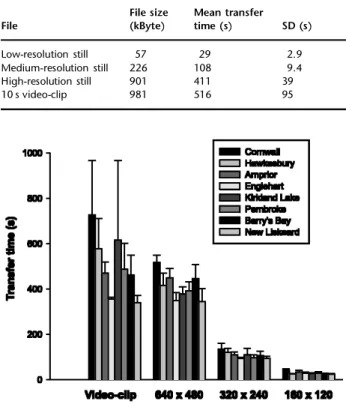
The average time required to transfer each test file is shown in Table 2. The time required to transmit the files varied between the sites. Although transfer times varied between the tests, the rankings for the four test files were usually consistent between sites (Fig 3).
Table 2File transfer times measured at eight sites on three occasions File File size (kByte) Mean transfer time (s) SD (s) Low-resolution still 57 29 2.9 Medium-resolution still 226 108 9.4 High-resolution still 901 411 39 10 s video-clip 981 516 95
Fig 3Mean (SD) image transfer times.
Fig 4Mean (SD) Internet connection speeds.
Fig 5Mean (SD) video frame rates.
Fig 6Mean (SD) video latencies (values not available for Cornwall).
The Internet connection speeds were higher and more consistent at the central site than at the remote sites (Fig 4). The connection rates averaged 43 kbit/s (SD 3.1) at the central site and 33 kbit/s (SD 6.6) at the remote sites. Internet connection speed was not a reliable measure of system performance. For example, some of the fastest image transfer times occurred with Internet connection rates less than 33 kbit/s.
The average video frame rate at all sites was 1.12 frames/s (SD 0.33) (Fig 5). Live video images were delayed by an average of 3.0 s (SD 1.5) before being displayed at the other site (Fig 6).
Discussion
...
Internet-based telemedicine is an effective means of providing selected clinical and educational services2.
The technical restrictions of low-bandwidth connections, however, must be considered before initiating a new service. The results from the present study provide information to help make planning decisions.
When comparing different sites, it was not surprising that different levels of videoconferencing performance were observed. Possible reasons for these differences include the quality of the telecommunications infrastructure, the quality of the local Internet service providers and the quality of the telephone system within the hospital concerned. Day-to-day differences could have been due to environmental factors (e.g. storms) or to Internet congestion. Since all trials were carried out with the same hardware and software, the between-site differences were probably not related to the equipment. Similar variations in data line quality were found by Malagodiet al.5
While the Internet connection rate was useful in a general sense, it did not necessarily reflect system performance. Internet connection rates are most useful when installing a new system and evaluating Internet data transfer capabilities. The clinical staff felt that the performance of the communication system was usually best in the morning, although sufficient data were not collected to confirm this. Internet usage generally could be expected to be higher at lunchtime and during the late afternoon, which might explain the perceived performance degradation. The outreach team tried to schedule telemedicine consultations in the morning.
The measurements showed that the north-eastern Ontario facilities had better system performance than the others. This result demonstrates that remote facilities do not necessarily have the poorest data connection capabilities. Technical tests should
therefore be run at every site to verify the tele-communications capabilities.
In the present study, the modem connection to the Internet provided an acceptable means of transferring images and video between sites. The average difference in transfer time between the high- and the medium-resolution still images was 5.1 min. Since the medium-resolution of the latter was acceptable for clinical use, it was recommended for clinical purposes. Use of the low-resolution images further reduced the transfer time, by an average of 1.3 min, but was considered
inappropriate for most clinical discussions. Clinical staff were able to organize their consultations to make the best use of the 1–2 min wait for still images to appear on their systems. However, stored video-clips were routinely forwarded to the central site before the consultation.
Live video quality was considered acceptable, when set at best quality. Although the image quality at this video rate was very good, the small frame size was inappropriate for some clinical purposes. In these cases, a 3206240 pixel still image or a video-clip could be captured and used to resolve the clinical issue. A frame rate of approximately 1 frames/s did not allow the completion of some psychological or speech pathology assessments. However, live video was useful for establishing rapport, for monitoring procedures, for camera positioning and for assisting with explanations.
Live video latency is an important variable that influences any on-line assessment. In the present study, based on a low-bandwidth connection, the user could experience a delay of 4.5 s between an action at the remote site and the video images arriving on the screen (i.e. a 3.0 s average latency plus 1.5 s SD). If the system was being used to monitor a potentially dangerous activity, the specialist might not be able to instruct people in the other community to stop before an accident occurred. Latencies of less than 0.1 s would be required before a videoconferencing system would be useful for monitoring all clinical activities.
While clinical staff were able to work within the system’s bandwidth constraints, new Internet access options (e.g. cable and xDSL) are likely to improve system efficiency by almost eliminating the wait for viewing 3206240 pixel still images5,7. Similarly,
improved Internet access in the future should allow the transmission of larger, live video pictures at faster frame rates (e.g. 3206240 pixels at 20–30 frames/s).
The telemedicine set-up described in the present study is being used to provide effective physical rehabilitation consultation services. This implies that, if the Internet infrastructure in a region can support the same level of function as reported in this study, health-care workers in many areas of the world should be able to access selected consultation and educational
services without requiring high-performance equipment. One advantage of using TCP/IP-based videoconferencing equipment is that the systems can take advantage of improved connection rates as they become available, without additional equipment investment. On a regional level, the results from these functional tests can be used to help with long-term planning with regard to data connection capabilities and system improvements.
Acknowledgements: We thank the staff from Arnprior and District Memorial Hospital, Cornwall General Hospital, Hawkesbury and District Memorial Hospital, Englehart and District Hospital, Kirkland and District Hospital, Pembroke General Hospital, St Francis Memorial Hospital (Barry’s Bay), and Temiskaming Hospital (New Liskeard). We also thank Marcel Desrosiers, Christine Rochefort, Mary Pole, Graham Curryer and Lorraine Smith for their clinical
contributions. The project was funded by the Change Foundation, Telecommunications Access Partnerships (Ontario Ministry of Energy, Science and Technology), the Harold Crabtree Foundation and the Labatt’s Relay Research Fund.
References
1 Lemaire ED, Greene G. The evolution of a physical rehabilitation outreach program.Saudi Journal of Disability and Rehabilitation 1999;5:43–9
2 Lemaire ED, Jeffreys Y. Low-bandwidth telemedicine for remote orthotic assessment.Prosthetics and Orthotics International 1988;22:155–67
3 Temkin AJ, Ulicny GR, Vesmarovich SH. Telerehab. A perspective of the way technology is going to change the future of patient treatment.Rehab Management1996;9:28–30
4 Phillips VL, Temkin AJ, Vesmarovich SH, Burns R. A feasibility study of video-based home telecare for clients with spinal cord injuries.Journal of Telemedicine and Telecare1998;4:219–23 5 Malagodi M, Schmeler MR, Shapcott NG, Pelleschi T. The use of
telemedicine in assistive technology service delivery: results of a pilot study.Technology: Special Interest Section Quarterly1998;8:1–4 6 Klutke PJ, Mattioli P, Baruffaldi F, Toni A, Englmeier KH. The
telemedicine benchmark a general tool to measure and compare the performance of video conferencing equipment in the telemedicine area.Computer Methods and Programs in Biomedicine 1999;60:133–41
7 Mattioli P, Klutke PJ, Baruffaldi F, Viceconti M, Toni A, Englmeier KH. A study of the application sharing capabilities in telemedicine. Computer Methods and Programs in Biomedicine1999;58:89–97 8 Baruffaldi F, Mattioli P, Toni A, Klutke PJ, Viceconti M, Englmeier
KH. Low-cost ISDN videoconferencing equipment for orthopaedic second opinions.Journal of Telemedicine and Telecare1999;5(suppl. 1):37–8
9 Klutke PJ, Gostomzyk JG, Mattioli P,et al. Practical evaluation of standard-based low-cost video conferencing in telemedicine and epidemiological applications.Medical Informatics and the Internet in Medicine1999;24:135–45
10 See http://www.xingtech.com
Appendix. Test protocol
...
Set-up
(1) Connect to the Internet and note the connection rate, date and time on the data-sheet (the rate can be obtained from the Windows 98 taskbar). (2) Start NetMeeting and disable the local audio. (3) Connect to the remote site using NetMeeting. (4) Make sure that audio and video are deactivated at
the remote site.
(5) Record the remote site’s Internet connection rate on the data-sheet.
Still-image transfer
(6) Start the NetMeeting whiteboard and start Corel PhotoPaint.
(7) Open the 6406480 bitmap in PhotoPaint. (8) Use the ‘select area’ tool in the whiteboard to
outline the image in PhotoPaint.
(9) Count 1, 2, 3, and then release the mouse button. Following release, start timing with a stopwatch. (10) When the image appears on the remote
whiteboard and the remote person says okay, stop the timer. Record the time on the data-sheet. (11) Open a new page in the whiteboard and then
repeat steps 7–10 with the 3206240 bitmap. (12) Open a new page in the whiteboard and then
repeat steps 7–10 with the 1606120 bitmap. (13) Close the whiteboards at each site.
Video-clip transfer
(14) Select ‘file transfer’ in NetMeeting.
(15) Prepare to send the 10 s MPEG file, but wait before pressing the send button.
(16) Count 1, 2, 3, and then click the send button. Upon sending, start timing with a stopwatch. (17) When the file transfer is complete and the remote
person says okay, stop the timer. Record the time on the data-sheet.
(18) The person at the remote site can delete the file and close all file transfer windows at both sites.
Live video
(19) Start Live Video at each site (reactivate audio and video).
(20) Ensure that the Live Video quality is set to best. (21) Ask the person at the remote site to wave a hand in
front of the camera. While waving, count the number of frames in a 10 s interval (you will be able to see each frame owing to the slow refresh rate). (22) Repeat step 21 three times and record each value