UC Irvine
UC Irvine Electronic Theses and Dissertations
Title
Exploring How Novice Programmers Pick Debugging Tactics When Debugging: A Student’s Perspective
Permalink
https://escholarship.org/uc/item/52z546jsAuthor
Lee, FelixPublication Date
2019 Peer reviewed|Thesis/dissertationUNIVERSITY OF CALIFORNIA, IRVINE
Exploring How Novice Programmers Pick Debugging Tactics When Debugging: A Student’s Perspective
THESIS
submitted in partial satisfaction of the requirements for the degree of
MASTER OF SCIENCE in Software Engineering
by Felix Chan Lee
Thesis Committee: Professor James A. Jones, Chair Professor André van der Hoek Professor Cristina Lopes
Table of Contents
LIST OF FIGURES ... IV LIST OF TABLES ... V ACKNOWLEDGEMENTS ... VI ABSTRACT OF THE THESIS ... VII
CHAPTER 1:INTRODUCTION ... 1
CHAPTER 2:LITERATURE REVIEW ... 3
Debugging tactics ... 4
Selecting debugging tactics ... 6
Chapter Summary ... 7
CHAPTER 3:METHODOLOGY ... 8
Rationale for Qualitative Design ... 8
Research Sample ... 9 Information Needed ... 11 Research Procedures ... 12 Data Collection ... 15 Data Analysis ... 17 Issues of Trustworthiness ... 18
Limitations of the Study ... 19
Chapter Summary ... 20
CHAPTER 4:RESULTS ... 21
Research Question 1 ... 22
Research Question 2 ... 34
Employing tactics across environments ... 51
Making decisions across time ... 53
CHAPTER 6:CONCLUSION ... 56
List of Figures
FIGURE 3.1:FLOWCHART OF THE RESEARCH PROCEDURES FROM INITIAL PREPARATIONS TO DATA ANALYSIS ... 15 FIGURE 4.1:CODES AND EXAMPLES OF DEBUGGING TACTICS FALLING UNDER THE “TESTING CODE”
THEME ... 23 FIGURE 4.2:CODES AND EXAMPLES OF DEBUGGING TACTICS FALLING UNDER THE “SEARCHING FOR
HELP” THEME ... 27 FIGURE 4.3:CODES AND EXAMPLES OF DEBUGGING TACTICS FALLING UNDER THE “TAKING NOTES”
THEME ... 31 FIGURE 4.4:CODES AND EXAMPLES OF ACTIVITIES IN SELECTING DEBUGGING TACTICS THAT FALL
UNDER THE “LEVERAGING PAST EXPERIENCES” THEME ... 35 FIGURE 4.5:CODES AND EXAMPLES OF ACTIVITIES IN SELECTING DEBUGGING TACTICS THAT FALL
UNDER THE “ADAPTING TO THE TASK ENVIRONMENT” THEME ... 39 FIGURE 4.6:CODES AND EXAMPLES OF ACTIVITIES IN SELECTING DEBUGGING TACTICS THAT FALL
List of Tables
TABLE 3.1:PARTICIPANT DEMOGRAPHICS ... 10 TABLE 3.2:OVERVIEW OF INFORMATION NEEDED ... 11 TABLE 4.1:COMPARISON OF THE DEBUGGING TACTICS FOUND IN THE DEBUGGING AND IFT
Acknowledgements
I would like to express my appreciation to my committee chair and advisor, Professor Jim Jones, for guiding me throughout my years as a Master’s student. Thank you for giving me the freedom to pursue different interesting debugging topics and for encouraging my curiosity no matter how strange the subject.
I would also like to thank my committee members, Professor Crista Lopes and André van der Hoek for taking the time to review my thesis and provide feedback. Thank you to the Spider Lab for creating a great atmosphere that motivated me completing this thesis.
Lastly, I would like to thank my mom and sister for all that they have done to help me reach this point in life.
Abstract of the Thesis
Exploring How Novice Programmers Pick Debugging Tactics When Debugging: A Student’s Perspective
By Felix Chan Lee
Master of Science in Software Engineering University of California, Irvine, 2019
Professor James A. Jones, Chair
Novice developers use a variety of debugging tactics to debug. However, how they select a tactic still remains unclear. Many studies in Software Engineering describe programmers using tactics like adding print statements, but only a few studies hint at factors such as
knowledge and habits, social environment, and experience that may influence these decisions. To help us understand how novice programmers select debugging tactics, we turned to
Information Foraging Theory (IFT) to analyze this decision-making process through the lens of a cost-benefit analysis. We conducted a qualitative study that explored how novice programmers describe their decision-making process when deciding which debugging tactics to use when debugging. We found that novice programmers use a variety of debugging tactics including testing code, searching for help, and taking notes on paper. Furthermore, we reported activities where novices leverage their past experiences, adapt to their task environments, and anticipate future risks and rewards to decide among a variety of tactics to pursue. From our results, we offer suggestions to educators to explicitly teach the value and costs of using certain tactics so that novice programmers may select the optimal tactic in any debugging situation. Furthermore, we suggest future research to explore novice debugging behaviors within non-computing
Chapter 1: Introduction
University students taking introductory software programming courses grapple with the difficulties of learning to program and debugging their programs [19]. In parallel, programming educators face difficulties in teaching debugging effectively [15]. Important literature in the debugging education field dating as far back as the 1970’s have provided a wealth of knowledge on the debugging processes that programming students follow [15]. Within these models of the debugging process lie an often overlooked subprocess that describes how novice programmers select debugging tactics. Among the many debugging studies that explore programmers’
debugging processes, Gould’s model explicitly highlights the selection of a debugging tactic as an initial step in the process [8]. In contrast, other studies focus on other aspects of the debugging process and take our understanding of how programmers select their debugging tactics for granted [10][21]. Likewise, subsequent studies that explore the debugging tactics that novice developers use fail to explain why they pick those tactics in the first place. This gap in our understanding contributes to findings where researchers and educators are puzzled by debugging behaviors that novice programmers exhibit, such as when they stubbornly pursue debugging tactics without success and use sub-optimal tactics [5][16]. Without understanding why novice developers use the debugging tactics that they do, educators lack the context to teach debugging tactics effectively to students such that these skills persist long after they complete their courses.
Accordingly, we were interested in how novice developers describe their decision-making process when deciding which debugging tactics to use when debugging. To study this
phenomenon and expand on previous studies that have studied the debugging tactics that novice programmers use, we focused on the following two research questions:
• How do novice programmers describe the activities involved in selecting a debugging tactic?
Chapter 2: Literature Review
This chapter discusses literature in two areas of Software Engineering that informs our understanding of how novice programmers pick their debugging tactics: the debugging
education and Information Foraging Theory (IFT) literatures. Because the debugging education literature is sparse in descriptions of how novice programmers select debugging tactics, we leverage IFT as a possible framework for understanding how novice programmers decide among various debugging tactics to use. Pirolli and Card first conceptualized this theory based on Optimal Foraging Theory, which describes how wild animals forage for food in their
environments by weighing the cost of foraging in exchange for the value of consuming the food source [18]. While Pirolli and Card use this theory to predict end-user behavior navigating the World Wide Web, others have operationalized the theory to study debugging behaviors
successfully [13][17]. We leverage both of these research efforts since they describe and explain the debugging tactics that novice programmers use.
The same debugging tactics that novice programmers use in their Software Development Environments (SDE) appear as enrichment strategies in IFT. These enrichment strategies are a subset of foraging strategies that specifically describe actions where the programmer or
“information seeker can deliberately modify the environment to either improve the density of useful material in a patch or speed travel between patches” [13]. Accordingly, debugging tactics where programmers execute programs with added print statements and comments to generate program output are effectively enrichment strategies that create additional useful information in the environment. Rearranging windows closer together in the SDE to facilitate efficient access to different information sources would also be considered an enrichment strategy. That both debugging tactics and enrichment strategies describe the same behaviors motivate us to leverage both subfields of Software Engineering to understand decision-making process novice
subfields, we justify the need for a study to explore how novice programmers make decisions to pick their debugging tactics.
Debugging tactics
In reviewing the debugging education literature, we find that novice programmers use a variety of debugging strategies. These studies describe debugging strategies in two distinct ways: (1) high-level plans that describe how novice developers’ approach debugging and (2) debugging tactics or low-level actions within their debugging environments that facilitate their high-level debugging strategies. For example, Katz and Anderson’s work describing the process novice programmers use to debug exemplifies the first kind of high-level debugging strategies. They describe novice programmers approaching their debugging problems by using forward and backward reasoning where programmers either simulate their program’s execution or work backwards from their program’s output to reason the cause of a bug [10]. While this and other similar studies are useful to understand the general approaches that novice programmers follow when debugging, our study focuses on the low-level debugging tactics that facilitate these high-level approaches. For example, we are interested in Benander and Benander’s description of how novice programmers produce diagnostic program output, read error messages, and hand trace in their COBOL development environments to debug [1]. Other studies like Romero et al.’s explore both high-level debugging strategies and low-level debugging tactics [20]. However, we focus on debugging tactics, since we can leverage the IFT literature to understand these tactics as a form of enrichment strategies and thereby make sense of how novice programmers use these strategies [13].
Many studies in the debugging education and IFT literatures describe a number of debugging tactics that novice programmers use to debug. In an early study of novice developers’ debugging tactics, Benander and Benander report five tactics used to debug COBOL programs:
reading error messages, (4) tracing by hand, and (5) asking other programmers for assistance [1]. This study is unique in its reporting of asking other programmers as a debugging tactic and suggesting that collaboration, or lack thereof, between students could influence the choice of debugging tactic that students select.
As SDE’s evolved into sophisticated systems, newer tactics that leverage the new features in the SDE emerged. Fitzgerald et al. describe how novice developers use tracing in several ways, including mentally tracing the code, tracing on paper, tracing with print statements, and tracing with the breakpoint debugger. Their study also reports novice programmers using external resources like JavaDocs, rewriting code, and testing their code with sample input [5]. In
addition to these same tactics, Murphy et al.’s study also report tactics where novice developers add comments and apply the undo button in their SDE’s to debug [16]. We find similar
debugging tactics from the IFT literature in the four domains of enrichment strategies that Piorkowski et al. report: (1) searching for information using the SDE’s code searching features; (2) writing a to-do list on a piece of paper; (3) using an online search engine to look for
information; and (4) testing, which involves manipulating the code and running it to create new sources of information in the environment to facilitate debugging [17].
Below, we give an overview of the low-level debugging tactics found in the existing literature that our debugging study focuses on:
• generate program output (i.e. print statements) [1] [5] [7]
• tracing by hand [1] [5]
• asking other programmers for help [1]
• searching for external resources (i.e. documentation) [5][7]
• rewriting code [5]
• testing code with sample input [5]
• searching for code with SDE [7]
• writing a to-do list on paper [7]
Selecting debugging tactics
In addition to exploring debugging tactics, we also leverage both fields of Software Engineering to gain a broader understanding of the decision-making process that novice
programmers apply when selecting debugging tactics. Both fields are saturated with studies that describe debugging tactics novice programmers use within their SDE’s. Yet, the rationale behind why novice programmers employ those tactics or how they come to select those tactics remain unclear. As McCauley et al.’s literature review of the debugging education literature shows, the debugging education landscape does not adequately address how novice programmers pick their debugging tactics—hardly any studies explore the decision-making process explicitly [15]. Furthermore, the few studies that suggest factors that may influence debugging tactic selection focus on experienced programmers rather than novices. In his study of two professional
programmers, Gould assumes that programmers select tactics according to factors such as their knowledge, habits, and experiences during the debugging experiment [8]. In another similar study, Gould and Drongowski suggest several additional factors that influence the debugging strategies programmers use such as the information available to the programmer, the time available to complete the debugging task, and the programmers’ own motivation [9]. While thesestudies incorporate experienced programmers rather than novices, they offer possible implications for how novices may select their debugging tactics as well. Benander and Benander’s study focuses on novice programmers and they point to social factors in the
environment, such as the difference between a classroom and a non-academic setting as possible influences for whether novice programmers will decide to ask other programmers for help when debugging [1]. From another perspective, studies within the IFT field leverage the theory’s
meet the constraints of their environments. By following scent, programmers choose actions that will maximize the ratio of value gained from consuming a piece of information and the cost of foraging for it [13]. Thus, IFT provides another possible explanation of how novice
programmers pick debugging tactics: they perform cost-benefit analyses to determine which tactic to deploy given the conditions in their current task environments.
Chapter Summary
Both the debugging education and IFT literatures provide ample evidence of the debugging tactics that novice programmers use, but a limited number of explanations for how they select them. Those few studies that do attempt to describe the decision-making process that programmers follow often lack the descriptive power to provide concrete evidence of the
activities involved in making these decisions. Furthermore, these studies primarily use quantitative methods and only employ the occasional use of interviews and observations to confirm their quantitative results. Consequently, this motivates us to follow a qualitative design to provide the depth and richness necessary to describe how novice programmers pick their debugging tactics from the student’s perspective.
Chapter 3: Methodology
The purpose of this qualitative study is to explore how novice developers at UCI decide on which debugging tactics to use when debugging. Literature on software debugging education and information foraging theory describe novice developers using these debugging tactics to gather information to locate and fix bugs. Yet, it remains unclear how novices decide on which strategies to pursue. Thus, we conducted this study to gain insight on their decision-making process and to inform future studies on the possible factors involved. Our study addresses two research questions to understand this decision-making process: (1) What debugging tactics do novice programmers describe using to debug? and (2) How do novice programmers describe the activities involved in selecting a debugging tactic?
The rest of this chapter describes our research methodology, including the following topics: (1) rationale for choosing a qualitative research design, (2) research sample, (3) overview of the information needed, (4) research procedures, (5) data collection process, (6) data analysis process, (7) issues of trustworthiness, (8) limitations of the study, and (9) summary of this chapter.
Rationale for Qualitative Design
While both qualitative and quantitative approaches have been applied successfully in Software Engineering research, our study adopts a predominantly qualitative approach.
Quantitative methods test hypotheses by understanding the relationships between well-defined, quantifiable variables. Our approach differs from their quantitative counterparts in that the goal in qualitative studies is not to test specific hypotheses, but to understand and provide a holistic and rich account of complex social phenomena [14]. Since our study seeks to uncover the possible variables involved with selecting debugging tactics rather than test these unknown variables, a qualitative approach is most fitting. Furthermore, the exploratory nature of our
study lends itself to the interpretivist stance we adopt, as our study seeks to capture and
understand our participants’ unique experiences when choosing their debugging tactics. Rather than generalizing and abstracting these experiences, we leverage each student’s perspective to elicit a detailed account of how novice programmers pick debugging tactics.
Research Sample
We recruited twelve UCI students with programming experience through a mixture of homogeneous and snowball sampling procedures. These purposeful sampling methods are appropriate for qualitative studies, because they allow us to “identify our participants and sites […] based on places and people that can best help us understand our central phenomenon” (Creswell, 2012). The flexibility and variability in purposeful sampling techniques allowed us to pick a heterogeneous group of students with varying skill levels and experience, but at the same time have all taken the introductory Python programming courses at UCI. As a result, we distributed recruitment flyers to professors teaching first- and second-year programming courses covering different programming languages like C++, Java, or Python.
Purposeful sampling also allowed us to target students with programming experience outside the classroom. For example, we leveraged social media and posted on the university’s Facebook group page for the Association of Computing and Machinery (ACM). Snowball
sampling filled the gaps where homogenous sampling either did not generate enough recruits or if we felt a participant sparked interesting insights that we wanted to hear more about. In these
situations, we would ask participants who completed the study to refer their friends and peers who might be interested in the study.Our inclusion criteria included the following:
• A first- or second-year UCI student studying Software Engineering, Computer Science, or a related field where they obtained experience coding and debugging software.
• Participants must have experience writing small- to medium-sized programs in Python or a similar high-level language
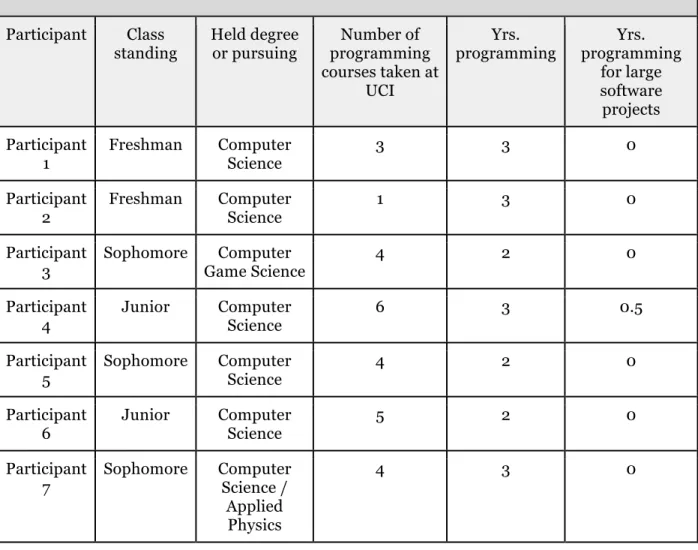
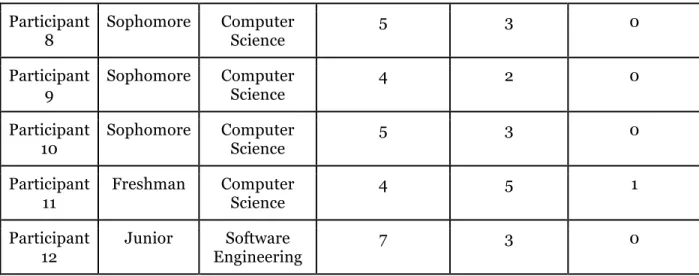
Of the twelve participants we recruited, eight had freshman or sophomore standing, while the other four had junior standing despite being second-year students. All participants had at least two years of programming experience from UCI or another education institution or from programming on their own. We also ensured that participants were at least comfortable programming with Python and had experience in integrated development environments (IDE’s), since our study procedures relied on Python and the Eclipse IDE. The demographics of our participants are summarized in Table 3.1 below.
Table 3.1: Participant Demographics
Participant Class
standing Held degree or pursuing programming Number of courses taken at
UCI
Yrs.
programming programming Yrs. for large software projects Participant
1 Freshman Computer Science 3 3 0
Participant
2 Freshman Computer Science 1 3 0
Participant
3 Sophomore Game ScienceComputer 4 2 0 Participant
4 Junior Computer Science 6 3 0.5
Participant
5 Sophomore Computer Science 4 2 0
Participant
6 Junior Computer Science 5 2 0
Participant
7 Sophomore Computer Science / Applied Physics
Participant
8 Sophomore Computer Science 5 3 0
Participant
9 Sophomore Computer Science 4 2 0
Participant
10 Sophomore Computer Science 5 3 0
Participant
11 Freshman Computer Science 4 5 1
Participant
12 Junior EngineeringSoftware 7 3 0
Information Needed
To answer our two research questions, we collected participants’ demographic information and perceptions of their decision-making process through questionnaires and interview questions that included inquiries into class standing, pursued, and academic and technical experiences. To collect perceptual information, we used direct observation and interviews to elicit the debugging tactics that novices use when debugging. We asked them directly why they chose certain strategies over others. This breakdown of the information we needed are summarized in Table 3.2 below.
Table 3.2: Overview of Information Needed
Type of Information Description of Requirements Method Demographic Information regarding
participant’s academic background and technical experience.
Questionnaire, interview Perceptual Descriptive Information of
participants’ experiences choosing different debugging tactics.
Observation, interview
Research Question 1: What debugging tactics do novice programmers describe using to debug?
Descriptions of debugging tactics participants used during the study and in the past
Observation, interview
Research Question 2: How do novice programmers describe the activities involved in selecting a debugging tactic?
Descriptions of the activities that participants describe taking place when selecting debugging tactics
Interview
Research Procedures
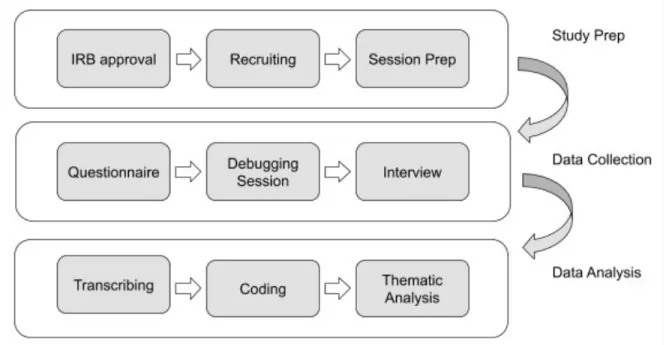
Prior to data collection, we submitted an IRB application for human subject research and obtained IRB approval. This ensured that our research procedures would protect our
participants’ data and well-being.
After the IRB process, we began recruiting. We contacted professors teaching
introductory programming courses and asked them to forward our recruitment flyers to their students. During the latter half of the research study, we modified this recruitment procedure to include social media outreach and direct referrals from participants. We modified our approach to gain access to students that may provide us with different perspectives from those that had already completed the study. We screened potential participants, and those who passed were given informed consent forms to sign and return to us before officially taking part of the study. Shortly after receiving their informed consent, we scheduled one-on-one sessions with
participants on campus in a quiet conference room, where all study procedures would proceed. In preparation for the meeting on campus, we installed the necessary software on two MacOS laptops, one for the participant and the other for the researcher. On the participant’s laptop, we installed the latest version of Python (v3.7.2), Eclipse (64-bit (v4.10.0)), and PyDev plugin (v7.1.0), so that participants could debug their Python tasks on Eclipse. On both laptops, we installed the latest version of Slack to provide audio and text chat capabilities between
session. All other software used in the study, such as Screen Sharing and QuickTime Player, were already available and came pre-installed on both Macs. We set up Screen Sharing between the two laptops before the participant’s arrival and began recording the participant’s screen when they began their debugging sessions.
Participants received their laptops shortly after arriving to the study location, and we welcomed them with a short presentation about the study and the day’s agenda. We briefed each participant that they would complete a preliminary questionnaire; a debugging session; and a retroactive, semi-structured interview to conclude. After answering any clarifying questions, we asked them to complete the online questionnaire.
Upon completing the questionnaire, we gave a brief overview of the debugging tasks they would be completing. This high-level overview included going over the instructions, namely that nothing would be off-limits and that participants were encouraged to speak aloud while
debugging. We also gave a walkthrough demonstrating how to run the Python programs and explained to participants how to interpret the test cases included with the programs. After answering any questions participants raised, we initiated a Slack audio call between both laptops, and we exited to the room next door. Our participants would begin debugging for the next 50 minutes while we observed their screens through our laptops and noted any interesting observations in a log.
We would occasionally remind participants to speak aloud if they remained quiet for more than five minutes; however, we ceased the reminders if participants remained quiet after the initial reminder. We interpreted this behavior as a display of discomfort, and we opted to allow participants to debug however they felt most comfortable. Such observations and
conversations during the interviews, where several participants mentioned the awkwardness of “thinking aloud” while debugging, motivated us to modify our procedures. With future
environment over having them debug while feeling awkward about speaking out their thoughts. As interviews would serve as our primary mode of data collection, we justified losing the ability the hear participants’ thoughts as a tradeoff that would yield more interesting and accurate observations.
After the debugging sessions, we reentered the room and ended the Slack call. We did not give prior warning before ending the debugging sessions so that participants would not feel the need to alter their behavior to accommodate for time pressures. Participants were given an optional 10-minute break before we began the retrospective interviews. The majority of the participants, however, opted to skip the break. All interviews lasted approximately 50 minutes or until the total time allocated for the study was spent. We wrapped up the interviews by thanking the participants and compensating them with $50 Amazon gift cards.
After each session with a participant, we would write a one-page summary of our first impressions and highlights that stood out from the session. This summary was a form of
preliminary data analysis, and these notes would be useful during the actual coding and analysis phases. We manually transcribed each interview to allow us to further familiarize ourselves with the data and perform some initial note taking and analysis. After we transcribed all the
Figure 3.1: Flowchart of the research procedures from initial preparations to data analysis
Data Collection
Questionnaire
We distributed a preliminary questionnaire to collect demographic and other background information about our participants. We incorporated Feigenspan et al.’s
questionnaire, which measures programming experience among undergraduate students, since the demographics of our participants were similar to those the questionnaire was intended for [4]. While borrowing pre-designed instruments is not typical in qualitative studies, the
measures gave us a glimpse of the technical makeup of our participants and helped us understand their interview responses with respect to their technical backgrounds [3]. We
included an open-ended question more typical of qualitative studies that asked about debugging tools they have used in the past. This question would help us triangulate any debugging tools or
Observation
We observed participants debugging five versions of the same Python program written by previous first-year UCI programming students. We borrowed these student programs from a UCI professor who teaches one of the first-year programming courses. Since these programs contained real bugs introduced by other first-year students, we would be observing students debugging programs containing bugs that their peers and students like themselves would make. Furthermore, because the Python program was the product of an “in-lab” assignment given to first-year programming students to complete and submit in class, it fitted well with our time-constrained study. It was a challenging and yet doable exercise for the majority of our
participants.
Of the 264 student programs that we received from the professor, we had to exclude 70 due to them not containing any bugs. From the remaining 194 programs, we randomly sampled five to include in the study. We picked five to ensure there was ample work for participants to utilize the full 50 minutes. This also gave us the freedom to randomly assign a different starting task to each participant and generate enough variability and overlap among our twelve
participants. We debugged these programs ourselves to record the location of the bugs and the source of their failures. This preliminary analysis also helped us determine that the five
randomly sampled programs were well-varied in the type and number of bugs, which ranged from one to four.
We did not make any modifications to the programs except to rename them such that we could include them all within the same Eclipse project for our participants to run. The
debugging assignment itself involved implementing a class that models a list of dictionaries, and that contained various rules on how its operations should function. The assignment included a class file for participants to write their implementations, a driver program to run the program, a text file called the “self-batch test” to test the driver program, and some helper module files to
We did not expect participants to finish debugging all five programs, since we aimed to observe their debugging behaviors for as long as possible. We recorded our participants' screens and logged live notes in a spreadsheet as participants debugged.
Semi-Structured Interviews
While we created an interview guide to structure our interviews, the actual questions we asked were formed over the course of the study in iterative fashion. Interviews with participants were conversational and we would first venture into interesting topics that arose from observing the debugging sessions. We would then branch out into topics that participants’ themselves brought up. To ensure our research questions were answered, we also tailored questions around the motivation of participants’ choice of strategies. Since we were interested in uncovering participants’ motivations for using certain debugging tactics, we incorporated an interview laddering technique that serves just this purpose [12]. As we interviewed more participants, the interview questions homogenized around topics that were interesting and consistently brought up during conversation. Thus, question formulation was iteratively refined with more and more interviews being conducted.
Data Analysis
We coded our interview transcripts to make sense of the large volume of data, and our choice of thematic analysis as the preferred method of data analysis influenced the manner in which we coded. For instance, to code our interviews to answer our first research question regarding the debugging tactics that novice developers use, we followed a “codebook” approach as defined in Braun et al.’s conceptualization of thematic analysis [2]. For coding our interviews to answer our second research question asking how novice developers describe their experiences deciding between debugging tactics, we adopted a “reflexive” approach. Unlike the codebook
are typically conceptualized as domain summaries,” in the reflexive approach “coding is an organic and open iterative process; it is not ‘fixed’ at the start of the process (e.g., through the use of a codebook or coding frame)” [2]. Since the literature has already defined certain
categories of debugging tactics, we could leverage this using a codebook approach to summarize and extend the known categories that define debugging tactics. The literature, however, does not clearly define the patterns that describe how novice developers pick debugging tactics. Thus, it was more appropriate to adopt a reflexive approach to analyze our data and “provide a coherent and compelling interpretation of the data, grounded in the data” [2]. For both processes, coding was an interactive activity involving email and in-person discussions surrounding our
interpretations of the data.
Issues of Trustworthiness
This section discusses the degree to which our qualitative study establishes trustworthiness by addressing issues of credibility, transferability, dependability, and
confirmability. These four criteria are analogous to the issues present in quantitative studies, which include internal and external validity, reliability, and objectivity. Due to the qualitative nature of our study, the former is the more appropriate criteria to establish trustworthiness [14].
Credibility
Credibility is the degree to which our study’s findings are found to be credible and accurate. We addressed issues of credibility by conducting the following activities that increase the likelihood of our findings and interpretations to be credible: triangulation and member checks [14]. For example, we collected data using both interviews and observations to
triangulate our data by comparing observations from participants’ debugging sessions with the responses they gave during the interviews. In addition to the multiple methods we used to
collect data, we also performed member checks during the interviews by “playing back” participants’ answers and actions recorded on video and confirming if our interpretations accurately captured their actions and responses. These two activities served to increase the credibility of our study.
Transferability
The issue of transferability in qualitative studies and external validity in quantitative studies differ significantly between these two research approaches. While in quantitative studies the researcher uses confidence intervals and statistics to determine whether a study’s findings can be generalized to other populations and contexts, in qualitative studies the responsibility of determining whether a study’s findings can transfer to a different context lies with the reader aiming to make use of a study's findings [14]. Nevertheless, the qualitative researcher must address their study’s degree of transferability through thick descriptions and by “providing the widest possible range of information for inclusion in the thick description” [14]. We increased the degree of transferability in our study by using purposeful sampling to cast a wide net for capturing different student perspectives. Furthermore, we included detailed information about our research procedures, data, and discussion of the data.
Limitations of the Study
Procedural issues affected several areas of the study, including its degree of
transferability, dependability, and confirmability of our findings. While we picked a debugging task that typical introductory programming students at UCI complete, the specific structure of the program limits the extent to which our findings could transfer to another context. Because the test cases that were included with the program are very specific to the style that the
The setting in which participants debugged also limits our degree of transferability. Because participants debugged in an environment in which they described as similar to a testing environment, our findings may not apply to contexts where students are debugging without testing pressures.
Lastly, our study addressed limitations to its degree of dependability and confirmability by ensuring that our coding and data analysis procedures were well-documented. Furthermore, we used Google Docs version control system ensure transparency in how our codes and themes evolved over time. We also kept memos and notes explaining updates to the coding schemes and our rationale for our interpretation of the themes. Thus, we left a transparent audit trail to provide evidence of our thought processes when coding and analyzing our data despite not conducting an audit ourselves.
Chapter Summary
This chapter described our research methodology, including a discussion of our research design, a detailed description of the procedures, and a discussion of the study’s trustworthiness and limitations. We selected a qualitative design due to the nature of our research questions, which sought to explore novice developers’ experiences picking debugging tactics to debug. We utilized questionnaires, observations, and interviews to collect data in understanding this phenomenon. We interpreted our data using a reflexive, thematic analysis approach. We discussed how we addressed issues of credibility and transferability by applying member checking, triangulation techniques and providing rich, detailed descriptions of our study whenever possible. Lastly, we concluded with a discussion of the limitations of our study,
namely that the study’s superficial setting restricted the types of debugging tactics and behaviors that we could study. Furthermore, while we left an audit trail for others to judge the
Chapter 4: Results
In this chapter, we present our findings on how novice developers pick their debugging tactics when debugging. We answer our first research question by detailing the debugging tactics that participants described using during their debugging sessions and throughout their
academic careers. To answer our second research question, we describe the activities involved in selecting these debugging tactics. Our results derive primarily from interviewing our
participants about their debugging processes. We leverage our direct observation of participants debugging to design our semi-structured interview protocol and support the results that we captured from them.
For our first research question, we determined three types of debugging tactics that novice developers use to debug:
1. Participants ran code in their IDE’s to generate new sources of information.
2. Participants sought help from external sources by searching on the Internet or asking people in their social networks.
3. Participants took notes or sketched on scratch paper to trace their code.
For our second research question, three themes emerged that describe the activities novice developers perform when selecting debugging tactics to pursue:
1. Participants leveraged their past experiences to determine which tactic to use or avoid. 2. Participants adapted to their task environments and chose tactics they believed were
most suitable for those environments.
This chapter is organized by the research question and themes that emerged. We include key quotations from participants that capture the underlying concept that each theme
encapsulates. Furthermore, whenever necessary we augment these quotations with additional context to offer rich descriptions of the phenomena.
Research Question 1
We explored the debugging tactics that novice developers use in our first research question. These debugging tactics focused on the enrichment strategies that the IFT literature describes. Thus, in all of the debugging tactics described below, the participant acted within the task environment with the intent to gain more information from their environments or to make finding information in that environment more efficient.
Generating information by testing code
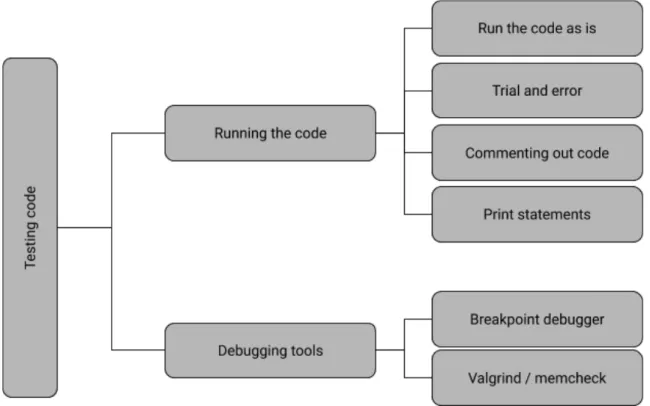
The first theme that emerged involves debugging tactics where participants ran code to generate more information in their IDE’s. As demonstrated in Figure 4.1, participants would test their code in different ways to generate useful debugging information about the program, such as running their code with and without modifications and running debugging tools. Below, we describe participants performing the following debugging tactics: (1) running the code and (2) using debugging tools.
Figure 4.1: Codes and examples of debugging tactics falling under the “Testing code” theme
Running the code.
A strategy that participants used involved running the code to create program output that they could then process and gain valuable information. For instance, when asked about their general approach with tackling the study’s Python program, Participant 9 thought to first “[run] the batch self-check and see what the errors were.” This participant leveraged the test code in the study’s program to verify if expected and actual outputs matched. Other participants described using similar strategies even when debugging programs outside of this study.
Participant 1, for example, mentioned the following when asked how they would debug under normal circumstances not specific to the study: “I'll run it, and then if I see the error […] I go to the line and see what's wrong.” Thus, participants described running the code as a means to check if the program produced any specific errors.
Other participants described strategies involving adding test code or test inputs before running the program to observe how their programs would behave. Participant 6 described his approach to finding inconsistencies in the program by running the code with modifications:
“I probably don't have the best method. Basically, trial and error. See if […] I can figure it out. But I try to reason. I try to look and see what it would produce and if that doesn't align with what I think it should then I try to just change it and see what happened [sic] […] how it responds.
Participant 1 described using a similar strategy involving trial and error: “I put a bunch of random inputs and then I see which one doesn't have the right output.” Like Participant 1, Participant 8 too described running the code with their own test code to check for errors and other information that the IDE generates:“I would write my own unit tests and if something is going wrong I will literally initialize the class and give it some test values like maybe an edge case, some edge cases,and then check individual [...] [a]ttributes.”
To produce program output to compare with actual output, participants also added diagnostic print statements to their code before executing it. For instance, Participant 9 stated, “I'll see at what point what went wrong. So, I'll probably do some print statements of... inside that function. See what the variables are. [sic]” Alternatively, Participant 4 used print statements to gain an understanding of the program itself:
“I went printing out everything that those two functions used. Like set item, I kind of went and put print statements, because every chunk of code you kind of know what it's doing. Like this code, this chunk right here 46 through 52, it's adding something to the assert list. I don't know what it was adding but it was
adding something. So, I printed out just to see what happened. Like, why did it do that?”
To Participant 5, print statements helped them visualize and understand the code better: “I feel like just me personally I have a really hard time visualizing what's happening unless I print every single thing out and I write it myself.”
In addition to adding test code before running the program, participants also ran the code after using comments to remove code to gain insight into the state of the program.
Participant 6 stated, “I just didn't understand the purpose of those [changes]. That's why I was like what is it doing? So, I commented it out hoping it would fix it.” Similarly, Participant 2 described their approach when dealing with code they did not understand: "I'll just delete it or I'll comment it out and try to rewrite it if I don't really understand what's going on."
Using debugging tools.
While participants described using print statements as a debugging tool to diagnose symptoms in their code, these built-in language constructs do not apply to the “using debugging tools” category. This category refers to standalone tools like built in breakpoint debuggers in IDE’s that the user can run to diagnose their code. Nevertheless, participants used debugging tools in a similar fashion to print statements; they used the debugging tools to generate output that detailed the program’s internal state and inspected that information for errors and other specific information.
Participants described using different types of debugging tools depending on the
environment they were in. The majority of participants described using breakpoint, step-by-step debuggers commonly found in IDE’s such as Eclipse. In Participant 9’s case, they used MIPS, an IDE for assembly language. In describing their debugger usage, Participant 9 said, “Well, I'm still being introduced into assembly. So, I'm not really sure how other people debug. But yeah
Participants also used other versions of the breakpoint debugger like gdb. Participant 8 describes their general workflow with gdb as so:
“Here's the GDB workflow in my opinion. You go and see your code in the line, so you can get the line number or you can just memorize the line number and then set a breakpoint there. And then you run the code. And then when you get to that breakpoint you say, oh now it's time to run one at a time, and one at a time, and like that is all overhead to me”
For debugging memory leaks in a C++ environment, Participant 7 indicated that they would turn to tools like Valgrind and memcheck, which were specific to the problem.
While similar in purpose as the print statements, using debugging tools like the breakpoint debugger was not a universal strategy. Eleven participants indicated that they had experience using breakpoint debuggers due to course requirements. However, many
participants expressed that they did not use breakpoint debuggers frequently in their workflow but, rather, reserved them as a last resort. For instance, comments like those below highlight the distinct differences in usage between print statements and breakpoint debuggers.
Participant 6:
On print statements: “I use those [print statements] a lot.”
On breakpoint debuggers: “Back when I was in class I would sometimes use the built-in debugger.”
And for Participant 8:
On print statements: “I used to just print statements all the time. Just print. That would be my quote, unquote breakpoints stuff for it's like okay I got here.”
Searching for help
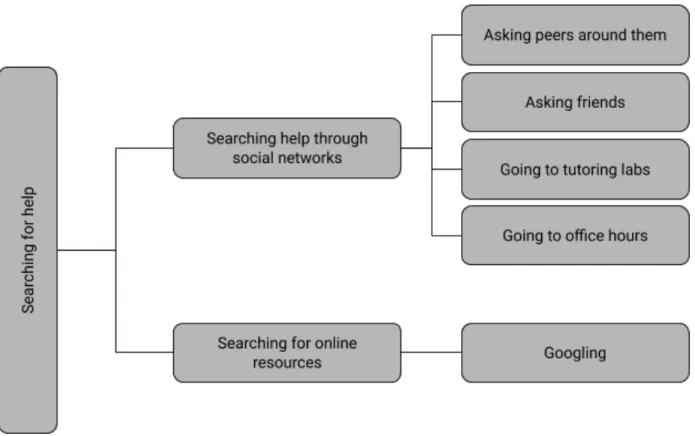
The second theme involves strategies where participants sought help from external sources rather than trying to solve the problem on their own. As shown in Figure 4.2, participants sought help through online search engines like Google and from people in their social networks. To gain access to these repositories of information and elicit useful information from them, participants filtered the information they received by narrowing down their search queries or the questions they asked to generate meaningful results. We described these
two debugging tactics below: (1) searching for online resources and (2) seeking help through social networks.
Figure 4.2: Codes and examples of debugging tactics falling under the “Searching for help” theme
Searching for online resources.
Participants searched for information online whenever they were unsure about particular concepts. When searching online, participants described using search engines like Google and continually searching until they found relevant and useful information. For example, when describing their online searching strategies Participant 7 said the following:
"[I] f I get really stuck, I try out a lot of different things involves [sic] a lot of Googling obviously. I usually for like minor problems that I just don't know because of my lack of skills or whatever [sic]. I just go to StackOverflow and sooner or later I will find something that's similar or at least will give me an idea of what I want to do.”
Participant 12 described relying on the internet heavily for certain types of problems. For instance, they mentioned that they would online if they were “getting errors that [they didn’t] understand” or if they were “looking up legal syntax or just general C++ or programming knowledge.”
Elaborating on how they search for information online, Participant 11 highlighted the importance of narrowing down searches:
“Going online is actually the most useful resource I think for debugging […] But if you're able to narrow down your search as well, well then I think online is generally the best option for debugging.”
Seeking help through social networks.
While participants described searching online for help, they also indicated that they would seek out other people to help them debug. For Participant 5, they would seek help from an array of people and responded with a list when questioned about their debugging options:
“Asking other people who didn't write it. Maybe they have [a] better perspective […] So first I try it myself, then I go online then I ask […] someone who's sitting near me, and then I ask for help from the person who wrote it or some authority kind of like a tutor.”
Like Participant 5, Participant 7 also leveraged access to authority figures in their institutions to ask them for help: “I go to office hours. That happens very rarely, but I did go to office hours once when I was really, really stuck… Worse case I go to lab even worse case I go to the office hours.”For Participant 11, asking teachers and those around them was a strategy that started during high school. When asked about how their current debugging approaches evolved, Participant 11 stated the following:
“In high school I was one of those people who would constantly pester other people, asking them [...] how to solve the recent lab problem. Most people in my high school were pretty unhelpful if I'm being honest. And then when I asked the teacher, the teacher was actually pretty good. But the thing is, I would ask them too many questions, which, as you know, is pretty annoying.”
Asking friends through social media was another strategy that participants described. They mentioned they would ask their friends for help and suggested the type of questions they would ask:
“I always have a group chat with me... [S]ometimes if I've been stuck on
something for days and nothing is working, I'd ask a friend and I tell them, hey, have you tried this? And what happens if this? And usually they'll help. They'll usually take the time to help me to figure out what's going on.”
A couple of participants also delved into the process they used to ask questions. For example, Participant 5 stated the following with regards to how they ask authors of the original code for help:
“Well, I mean first I see if I can figure out what I'm doing. And then otherwise I'll be like, hey. I would just tell them to run through the whole thing. Like what they were intending to do and then I’ll tell them where the error is at.”
This approach is similar to how Participant 4 debugged code with the benefit of being able to ask the original author; both participants would leverage having the original author’s knowledge of the program to elicit information that would help them comprehend parts of or the program. Participant 4 worked as a tutor at UCI and had to frequently debug other students’ code. When asked about their debugging process while helping their tutees debug their own code, they described the following process:
“It's almost unfeasible for me to read everything on the spot and just figure [the code out]. I just can't know everything just by reading the code. Just like
sometimes on my own code I can't just read it and […] know what’s happening. Because that's often not the case. I would have to tell them, ‘hey, what does this do?’ I'll ask him, ‘what does this line do? What do you think it does?’ And I'll tell them, ‘hey, print it out. Is it really what you think it was doing?’ And oftentimes that's the problem.”
Participants asked a variety of people for help when debugging, including original authors of the code they were debugging, friends or peers working on the same project, people not associated with the project, and authority figures like tutors and professors. With regards to the questions they formed when asking others for help, each described a different questioning
Taking notes on paper
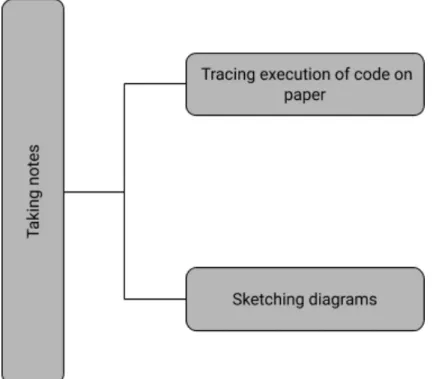
The third theme captured strategies where participants wrote notes on paper to create new sources of information that would reveal more fruitful information to aid in debugging. As pictured in Figure 4.3, participants traced code and sketched diagrams on paper. Essentially, all participants who used paper did so to visualize the program in a non-digital medium way.
Figure 4.3: Codes and examples of debugging tactics falling under the “Taking notes” theme
Participant 9 described using paper in the following manner to execute the program by hand: “I drew out what was in the batch self-check and went along. [I] kind of did the program on paper.”Other participants like Participant 3 and Participant 1 leveraged paper, because it helped their mental state when debugging. For Participant 3, when asked if using paper helped them understand complex code, they gave the
following response: “Either that or when I feel lost [...] to just clear out my mind.” For Participant 1, they described using paper to as a means of staying focused on the
anything then I’ll be like oh gosh I actually have to work. And then I’ll pull out a piece of paper and actually go line by line.”Participant 3, also stated the following with regard to using paper to debug:
“If the program tells me nothing, I'm going to trace the program on paper. […] Because […] sometimes [when] we write a program I can draw diagrams. [A]nd those I feel like those diagrams really help me understand […] because we can cross reference and stuff. And for object oriented programming I think it’s pretty helpful.”
Like Participant 3, Participant 9 relied on drawing diagrams extensively to visualize the program better. They described their process and motivation using paper in the following quotation:
“I'm a really visual learner [sic]. So, I think it helps a lot when I actually trace it on paper, because then I can get a better understanding of exactly what the method is supposed to do. So, for example, this one was like you're supposed to update the most recent dictionary. So, to do it by hand like I saw it [...] I trace. I look for ‘b.’ Not here. Not here. I don't want there. So, when you do it by hand [...] it helps me a lot.”
Participants described using paper to debug as a strategy that helped them mentally visualize and understand the code by representing it in a more accessible medium. Thus, by using paper, participants create new sources of information that they can consume while debugging.
Section Summary
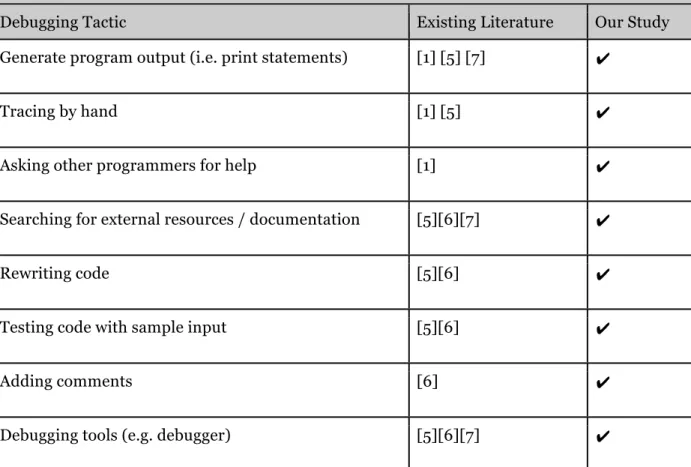
Participants described using debugging tactics that previous literature have reported. Table 4.1 below compares the debugging tactics that we saw and those in the literature. In
describing instances when they ran the code to help them debug, participants demonstrated how modifying code and running code were highly coupled activities that ultimately allowed
participants to gain valuable information from the generated program output. When seeking help through search engines or their social network, participants described tactics where they narrowed down their search queries or formulated and structured their questions to elicit the most useful responses. Lastly, in describing how they use paper when debugging, participants described the usefulness of creating new representations of the program on paper to visualize and understand the code.
Table 4.1: Comparison of the debugging tactics found in the debugging and IFT literature and our study
Debugging Tactic Existing Literature Our Study Generate program output (i.e. print statements) [1] [5] [7] ✔
Tracing by hand [1] [5] ✔
Asking other programmers for help [1] ✔
Searching for external resources / documentation [5][6][7] ✔
Rewriting code [5][6] ✔
Testing code with sample input [5][6] ✔
Searching for code with SDE [7]
Writing a to-do list [7]
Applying undo button in SDE [6]
Research Question 2
To better understand novice developers’ thought processes when making decisions about their debugging tactics, we asked what kind of activities they perform leading up to these
decisions.
Leveraging past experience
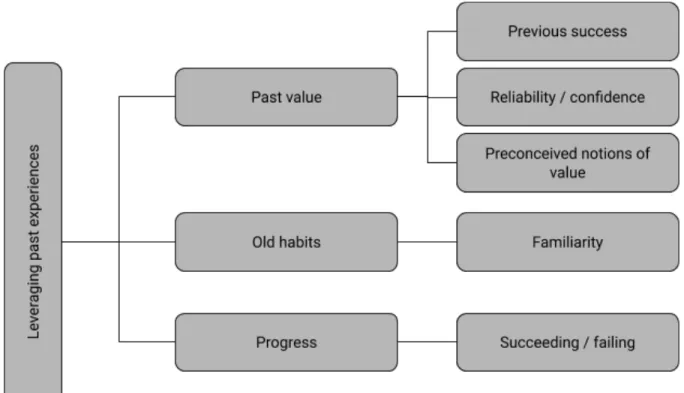
Participants made decisions about their debugging tactics by accounting for information gained from past experiences with these strategies. Figure 4.4 shows the following activities that were involved in their decision making: (1) past value gained by using a strategy, (2) old
debugging habits they have formed, and (3) progress they have made on the current debugging task.
Figure 4.4: Codes and examples of activities in selecting debugging tactics that fall under the “leveraging past experiences” theme
Past value.
When considering which debugging tactics to use, participants leveraged their past experiences using the particular strategies and the value they gained from using them. For instance, Participant 10 described using debuggers on complex problems due to their previous success with it in their classes. They said:
“It was a concept I thought of myself. It worked. I mean I passed all my classes with it. I did fine with all my classes with it and I still learned the material. There's nothing specifically bad about doing that, it’s just mainly time-wise that's debatable.”
Participant 6 even acknowledged that their trial and error strategy was only sometimes effective. Yet, they continued using it, making the argument that “it's got [them] this far” in their
Other participants also indicated a sense of confidence when using certain strategies, especially when they knew they could retrieve certain information using the strategy. For example, Participant 1 described their confidence in using debuggers to find the line number of the bug:
“If I didn't know how it was doing that or what line it was doing that I wouldn't be able to [...] that's why I went to the debugger because then once it screwed up, I'd be like, oh it messed up in that line.”
Likewise, for Participant 12, when asked about their preference in using the internet and print statements to fix bugs, they hinted at the strategy’s reliability in solving very easy
problems: “[I]t's easy. [...] [I]t's reliable [...] If it's a very easy problem and error, then I can fix it right away.” Participant 3 gave a similar answer, explaining why they choose to use adding test inputs as their first debugging strategy: “I feel like most problems can be solved by try inputs.”
Yet, another reason that participants gave for why they choose certain strategies over others involves preconceived notions of value they may gain from using those strategies. These preconceptions built up throughout their academic careers, as Participant 3 described about their usage of debuggers: “I feel like a lot of people use it. People say it’s a great tool. Maybe I should try to use it more to save more of my time.”
For Participant 8, despite having learnt the strategy in class, they did not think they would need it until personally witnessing their friend using it:
“So [Professor Z] teaches debugger [sic] and then I decide I don't need that. I'm just going to go through all of [Informatics & Computer Science] 45 without a debugger and do print statements all the time. Then [Informatics & Computer Science] 46 comes along and [...] it's the first project and friend shows me that he or his friend hasa problem and he uses GDB [sic]. And I’m like oh holy crap
Old Habits.
Participants described mixed experiences concerning using strategies that they were taught in class. Participant 8 did not initially use the debugger despite being taught it, while other participants did use what they learned in the classroom and stuck to the debugging habits they had developed. For instance, Participant 9 indicated preferences for strategies that they learned early on in their academic careers: “Yeah, I mean printing is just like that's taught to you [...] the first day you program hello world, and using print statements to debug. It's like I have the tools so I use.”
For instance, Participant 9 indicated preferences for strategies that they learned early on in their academic careers: “Printing is taught to you [...] the first day you program Hello World and [so is] using print statements to debug. It's like I have the tools so I use [them]”
“I think it may be because I didn't learn the debugger at first. Because in [Informatics & Computer Science] 32, I think we learned to write unit tests, but we didn't learn that much about debugger. [...] We didn't even use Eclipse. We used IDLE. In [Professor Y’s class], we didn't learn about debugger that early too [sic]. We used it later in the quarter. We learned later in the quarter. Maybe because I was introduced to it later, that's why I feel more distant to it. And when I was learning debugger I was already [...] using those print statements for a long time. That's why I feel like oh, those are going to help me more.”
When discussing why they did not use debuggers, Participant 7 discussed similar problems of familiarity as Participant 9:
“I do want to use it, because I think it's useful. But I don't think they got us really into that kind of method. [...] Nobody ever showed us why is this super useful
know how to use it. It's definitely going to take up a lot more time for me to use. And, if they had a demo of it or something, that would have been great.”
For Participant 12, their old habits ultimately determined which strategies they used: “I was taught it, but it's just the old habits die hard. For me it's like I've been printing so why not just keep doing it?”
Progress.
More recent experiences also motivated participants to choose certain strategies over others, especially when they were not making progress using certain strategies.For example, many participants indicated switching strategies when their original strategy fails. For
Participant 8, they described switching to the debugger when they could not understand the bug from using print statements alone:
“So that would be the [...] ultimate reason I would pull out GDB – the print statement is giving me something that's [...] not deceptive, but if the print is [...] giving me something wrong and I don't know why. [For example,] I have no clue why and I can't figure it out with print statements.”
Similarly, Participant 4 also indicated switching strategies when not making progress:
“I guess at some point I wouldn’t say I would give up, but at some point maybe I'll stop and maybe try something else. Because there's often different ways to go at it [sic]. Maybe I'm trying to implement something that's kind of
A majority of participants stated that debuggers were their last resort when all else failed.
Adapting to the task environment
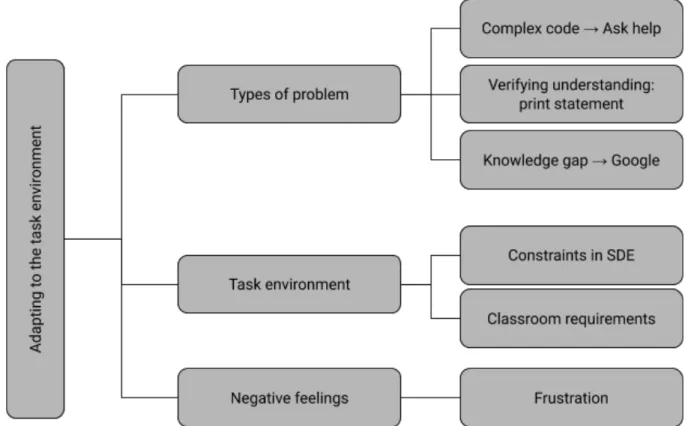
Novices also considered information about the current task environment to decide on the tactics that they thought would be most appropriate to use. Figure 4.5 conceptualized this activity and described some information in the environment that participants considered while deciding which debugging tactic to use: (1) the type of debugging problem they were trying to solve, (2) the requirements or constraints in their task environment, and (3) how negatively they were feeling at the moment.
Figure 4.5: Codes and examples of activities in selecting debugging tactics that fall under the “adapting to the task environment” theme
Type of problem.
described their preference for asking other people: “If [...] the code is too convoluted and
messed up, and I feel like asking someone so that I understand the code would be better than me just using the debugger [sic].” In comparison, Participant 1 described using print statements when they believed they already had a good understanding of the code:
“Maybe it’s more of me trying to understand what the line is supposed to be doing, and then print statement is I already understand and it's for me to verify if it's doing what it's supposed to be doing. That's why I go to print statements first, because I believe that I already understand what is going on.”
For other information goals, such as trying to bridge some conceptual knowledge gap, novice developers like Participant 7 described using online resources: “If I have somemissing knowledge, I'm trying to fill in that gap with Geeks for Geeks, for example, or StackOverflow.”
Task environment.
The environment in which participants debug also contributed to tendencies to use certain strategies over others. For example, Participant 12’s strategy depended on the
programming language they were debugging in. When asked about what differences between Python and C++ motivated them to use print statements more often in C++, they gave the following answer:
“Just the fact that C++ is static or [in] C++ you have to deal with memory and also clean up. Just those two mainly. [...] I think I did use print statements in Python, but it was like you said. It wasn't that big of a deal for me compared to C++, because I didn't have to deal with dynamic memory.”
Participant 9 also mentioned having to specifically use a certain strategy when
use print, but if we're talking about assembly then I have to use the debugger [...] because [...] printing [is] a pain.”
While participants picked certain strategies based on the programming language and IDE, their social environments also determine what strategies they used. In particular, the class requirements that participants felt compelled to abide by motivated their choice of strategies. Participant 11 described their experience using strategies for their school assignments:
“Because the way schools designed their assignments, it's done so to force you to [...] do it in a specific way. And also, the answer isn't readily available most of the time. So, [...] that's why I normally rely on print statements and debuggers for school assignments, because the teacher wants you to do it a specific way and it's not online often.”
These class requirements varied according to the class participants were in. Participant 7 mentioned this point when asked when they used the debugger:
“I'll say that [Professor Y] was the only one who asked us to use that. So in all of the rest of my courses it either wasn't even allowed or [...] because [Informatics & Computer Science] 45C and stuff like that you're not really allowed to use any outside debuggers. We only have what's provided to us.”
Similarly, Participant 3 described how they had to practice and use the debugger often due to the testing environment of their lab courses: “Because there are some programs that we have to go to lab tests and debug part of the program. And that's when I use debugger the most, because we have to learn about that. Because I try to practice it.”