NEC Storage Software
Data Replication
User’s Manual
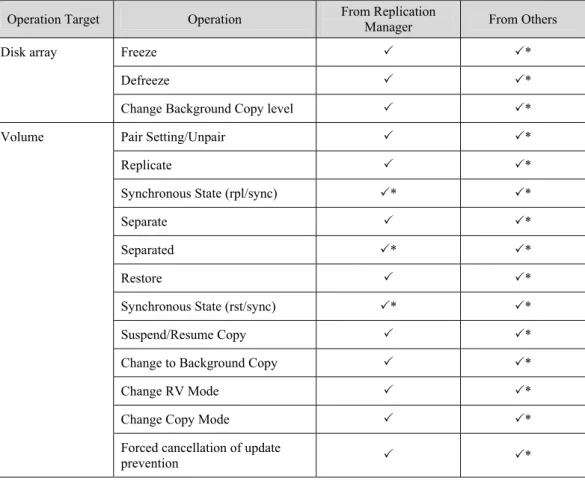
(Function Guide)
© NEC Corporation 2003-2010
No part of the contents of this book may be reproduced or transmitted in any form without permission of NEC Corporation. The contents of this book may be modified without notice in the future.
Preface
This manual describes how to use the data replication function provided by NEC Storage DynamicDataReplication, NEC Storage RemoteDataReplication, and NEC Storage RemoteDataReplication Asynchronous.
The data replication function consists of the replication volume creation function provided in NEC Storage series disk array subsystem and software to manage and operate it. The function utilizes replication volumes for more efficiency of business operation.
Refer to the “NEC Storage Software Manual Guide” (IS901) for the overview of NEC Storage and the related manuals. Refer to the “NEC Storage Software Data Replication User’s Manual (Disaster Recovery System Installation and Operation Guide)” (IS027) for the usage of the disaster recovery function of data replication provided by NEC Storage RemoteDataReplication/DisasterRecovery.
Remarks 1. This manual explains functions implemented by the following program products:
• NEC Storage Manager and NEC Storage BaseProduct
• NEC Storage ControlCommand
• NEC Storage DynamicDataReplication
• NEC Storage RemoteDataReplication
• NEC Storage RemoteDataReplication Asynchronous
2. This manual is applicable to the program products of the following versions:
• NEC Storage Manager Ver6.2
• NEC Storage BaseProduct Ver6.2
• NEC Storage ControlCommand Ver6.2
3. The NEC Storage Manager is referred to as iSM or Storage Manager in this manual unless clearly specified. Also, the following terms refer to the corresponding NEC Storage software products:
Note: NEC Storage ControlCommand is a program product in which the following five functions are Term NEC Storage Software Product AccessControl NEC Storage AccessControl
ControlCommand NEC Storage ControlCommand (*) DynamicDataReplication or DDR NEC Storage DynamicDataReplication DynamicDataReplication Lite NEC Storage DynamicDataReplication Lite RemoteDataReplication or RDR NEC Storage RemoteDataReplication
RemoteDataReplication Asynchronous NEC Storage RemoteDataReplication Asynchronous RemoteDataReplication/DisasterRecovery NEC Storage RemoteDataReplication/DisasterRecovery VirtualStoragePartitioning NEC Storage VirtualStoragePartitioning
• SnapControl
• ReplicationControl/DisasterRecovery
• ProtectControl
• PowerControl
4. The NEC Storage series disk array subsystem is referred to as a disk array in this manual unless clearly specified. Also, the following terms refer to the corresponding NEC Storage hardware products:
*
xxx and xxxx represent the model number.
5. The following terms in this manual refer to the NEC Storage software manuals:
Term NEC Storage Software Manual Configuration Setting Tool User’s Manual
(GUI)
NEC Storage Software Configuration Setting Tool User’s Manual (GUI) (IS007)
Data Replication User’s Manual (Installation and Operation Guide)
NEC Storage Software Data Replication User’s Manual (Installation and Operation Guide for Windows) (IS016)
NEC Storage Software Data Replication User’s Manual (Installation and Operation Guide for Linux) (IS020) Data Replication User’s Manual (Disaster
Recovery System Installation and Operation Guide)
NEC Storage Software Data Replication User’s Manual (Disaster Recovery System Installation and Operation Guide) (IS027)
Snapshot User’s Manual (Function Guide) NEC Storage Software Snapshot User’s Manual (Function Guide) (IS030)
LD Administrator User’s Manual NEC Storage Software LD Administrator User’s Manual (IS037)
Data Retention User’s Manual NEC Storage Software Data Retention User’s Manual (IS040)
ControlCommand Command Reference NEC Storage Software ControlCommand Command Reference (IS041)
Power Saving User’s Manual NEC Storage Software Power Saving User’s Manual (IS042)
Partitioning User’s Manual NEC Storage Software Partitioning User’s Manual (IS043)
6. The description of “RemoteDataReplication” also applies to the “RemoteDataReplication Asynchronous” unless clearly specified.
7. Trademarks and registered trademarks
• Microsoft®, Windows®, Windows Server®, Windows Vista®, and Hyper-VTM are trademarks or registered trademarks of Microsoft Corporation in the United States and other countries.
Term NEC Storage Hardware Product D series NEC Storage D series
D3 series NEC Storage D3 series D4 series NEC Storage D4 series D8 series NEC Storage D8 series
xxx series or xxxx series NEC Storage xxx series or NEC Storage xxxx series Sxxx or Sxxxx NEC Storage Sxxx or NEC Storage Sxxxx
United States and other countries.
• Linux is a trademark or registered trademark of Mr. Linus Torvalds in the United States and other countries.
• AIX is a trademark of IBM Corporation.
Other product names and company names, etc. are trademarks or registered trademarks of the associated companies.
8. This product includes the OSSs below. For details on the licenses, refer to Appendix B in this manual.
• Apache log4j (http://logging.apache.org/)
• flex (http://flex.sourceforge.net/)
• OpenSSL (http://www.openssl.org/)
9. In this document, capacities are calculated based on units of 1024 (for example 1 KB = 1024 bytes) unless otherwise specified.
10. In this document, “system volume” means “storage system volume” unless otherwise specified. 11. In this document, “Hyper-V” means Windows Server 2008 Hyper-V or later.
12. In this document, matters to which careful attention needs to be paid will be described as follows: Be sure to observe the instructions.
If the indications are ignored and the system is improperly operated, settings which have been already made may be affected.
Type of Indication
Type Description Describes contents which require users to pay special attention for operation.
1st Edition in March 2003 23rd Edition in January 2010
Contents
Chapter 1 Data Replication Overview...1
1.1 Data Replication...1
1.2 Examples of Applying Data Replication...2
1.2.1 Backup...2
1.2.2 Creating Test Environment ...4
1.2.3 Performing Search in Parallel ...5
1.3 System Configuration ...6
Chapter 2 Data Replication Function...8
2.1 Volume Type...8
2.2 Replication Operations...10
2.2.1 Replicate...10
2.2.2 Separate ...10
2.2.3 Restore...11
2.3 Replication Operations and State Transitions...12
2.3.1 Replicate and State Transitions...13
2.3.2 Separate and State Transitions ...14
2.3.3 Restore and State Transitions...15
2.3.4 Activity and Synchronous State ...16
2.4 Copy Control...18
2.5 Relationship between Copy Performance and Copy Control ...25
2.6 Access Restriction for RV...26
2.7 Copy Failures and State Transitions ...27
2.8 Freeze of Disk Arrays ...28
2.9 Pair Configuration...29
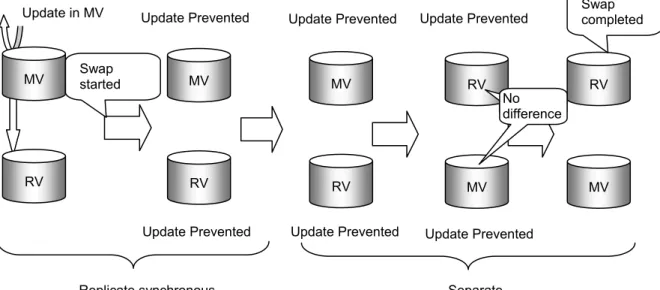
2.10 Swap Function for RDR Pair ...30
2.10.1 Swap Operation for RDR Pair...30
2.10.2 Cancellation of Update Prevention ...30
2.10.3 Swap in RDR Pair and State Transition ...31
2.11 Large-capacity Volume Larger Than 2 TB...32
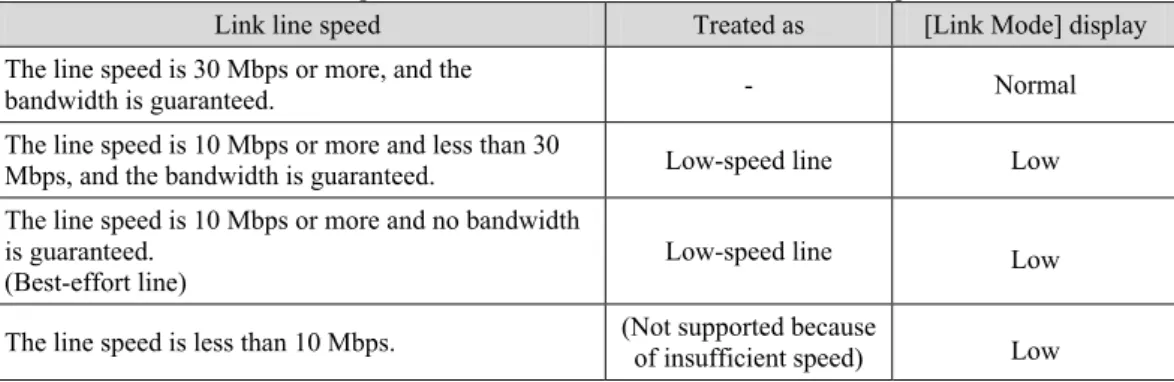
2.12 Low-speed Line...33
2.12.1 Using Low-speed Line ...33
2.12.2 Notes on Using Best-effort Line ...34
2.13 RemoteDataReplication Asynchronous ...36
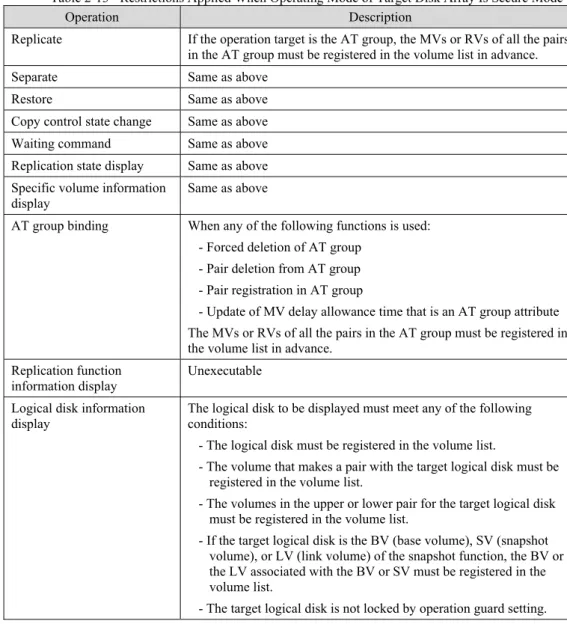
2.14 Restrictions on Operation...37
2.14.1 Restrictions by Configuration Setting Operation Guard ...37
2.14.2 Restrictions by Data Retention Function ...37
2.14.3 Restrictions by Power Saving Function ...39
2.14.4 Operation of Partitioning Function ...40
2.14.5 Use of iSCSI...41
2.14.6 Restrictions by Thin Provisioning Function ...42
2.14.7 Restrictions on Secure Mode ...43
Chapter 3 Replication Manager...44
3.1 Replication Manager Overview ...44
3.1.1 Operations and Authority Levels ...44
3.1.2 Event Detection and Operation Message Output ...46
3.1.3 Notes on Operation ...48
3.2 Replication Manager Screen ...49
3.2.1 Replication Manager Screen ...49
3.2.2 Configuration Display Area ...50
3.2.3 Replication Information Screen ...52
3.2.4 Disk Array LINK Information Screen ...60
3.3.2 Replicate...76
3.3.3 Separate ...82
3.3.4 Restore...88
3.3.5 Suspend/Resume Copy...96
3.3.6 Change to Background Copy ...102
3.3.7 RV Mode Change...106
3.3.8 Forced Separate...112
3.3.9 Forced Unpair...118
3.3.10 Forced Cancellation of Update Prevention ...122
3.3.11 Freeze/Defreeze...124
3.3.12 Background Copy Level Change ...126
3.3.13 Displaying Connection Screen ...128
3.3.14 CSV Output of Information List ...140
3.3.15 Save Pair Setting Information ...143
3.3.16 Environment Setting...146
3.3.17 Refresh ...148
3.3.18 Record Screen Information ...148
3.3.19 Displaying Disk Array Properties ...149
3.3.20 Displaying Link Properties ...151
3.3.21 Displaying Copy Fault List ...153
Chapter 4 Functions of ReplicationControl...155
4.1 Command List...156
4.2 Operation Types...158
4.2.1 Direct Operation to Disk Array...160
4.2.2 Using ReplicationControl with iSM...162
4.3 Serially Configured Pair and Remote Operation ...164
4.4 Volume Types ...167
4.5 Replication Operation File ...168
4.6 Displaying/Creating Volume List ...169
4.6.1 Command Operations (Windows)...169
4.6.2 Command Operations (UNIX) ...175
4.6.3 GUI Operations (Windows) ...182
4.7 Replication Operations...200
4.7.1 Replicate Command ...200
4.7.2 Separate Command ...206
4.7.3 Restore Command ...212
4.7.4 Copy Control Change Command ...219
4.7.5 Wait Command ...223
4.7.6 Replication State Display Command ...227
4.7.7 Specific Volume Information Display Command...230
4.7.8 RV Access Restriction Change Command...237
4.7.9 Command for Canceling Update Prevention ...240
4.8 Pair Operations...242
4.8.1 Logical Disk Information Display Command...242
4.8.2 Pair/Unpair Command...246
4.8.3 Pair Swap Command...249
4.9 Disk Array Operations ...252
4.9.1 Command for Displaying Information on Replication Function ...252
4.10 Disk Management/Operations...255
4.10.1 File System Flush Command ...255
4.10.2 Volume Mount Command...257
4.10.3 Volume Unmount Command ...259
4.10.4 Disk Signature Operation Command ...261
4.10.5 Devices Scan Command...263
Appendix A Pair Information File Output Command...264
A.1 Pair Information File Output Command ...264
A.1.1 Start/Termination ...264
A.1.2 Options ...265
A.1.3 Execution of Command...265
Appendix B Command for Displaying Enabled/Disabled States of SCSI Pass Through I/O Issuances for Hyper-V
Virtual Machine ...268
B.1 Command for Displaying Enabled/Disabled States of SCSI Pass Through I/O Issuances for Hyper-V Virtual Machine...268
B.1.1 Start/Termination ...268
B.1.2 Options ...269
B.1.3 Execution of Command...269
Appendix C License...271
C.1 Apache log4j License...271
C.2 Flex License ...277
C.3 OpenSSL License...278
Chapter 1 Data Replication Overview
Chapter 1 Data Replication Overview
To allow the unified management of an enormous amount of accumulated business information for using it more efficiently, a storage system with high performance, large capacity and high reliability is required. Data Replication provides functions to build and manage such a storage system.
This chapter provides an overview of Data Replication and hardware and software configurations.
1
1
1
.
.
.
1
1
1
D
D
D
a
a
a
t
t
t
a
a
a
R
R
R
e
e
e
p
p
p
l
l
l
i
i
i
c
c
c
a
a
a
t
t
t
i
i
i
o
o
o
n
n
n
Data Replication installed in the disk array creates Replication Volumes (RV) of Master Volume (MV). Replication volumes can be connected to or separated from the master volume at any time. Such connection and separation can be performed from the application server or iSM Client.
There are the following two methods to create replication volumes:
(1) Creating replication volumes within the same disk array (DDR: DynamicDataReplication) (2) Creating replication volumes in different disk arrays (RDR: RemoteDataReplication)
Figure 1-1 Data Replication
Replication (RV) Replication (RV) Master (MV) Master (MV) DynamicDataReplication RemoteDataReplication Production Task (Online) Master Server Synchronize/Separate Operations Parallel Processing (Backup/Search)
Chapter 1 Data Replication Overview
1
1
1
.
.
.
2
2
2
E
E
E
x
x
x
a
a
a
m
m
m
p
p
p
l
l
l
e
e
e
s
s
s
o
o
o
f
f
f
A
A
A
p
p
p
p
p
p
l
l
l
y
y
y
i
i
i
n
n
n
g
g
g
D
D
D
a
a
a
t
t
t
a
a
a
R
R
R
e
e
e
p
p
p
l
l
l
i
i
i
c
c
c
a
a
a
t
t
t
i
i
i
o
o
o
n
n
n
Introducing Data Replication to use separatable replication volumes enables the following:
• Substantially reducing system down time due to data backup and preventing the performance of access to the application database from being degraded during data backup performed while the system is running • Simplifying the creation of test environment where actual application data is used
• Processing data update and data reference in parallel for more efficiency
In this way, Data Replication makes system construction and system management easier and more effective. The following sections describe some examples of applying Data Replication.
1
1
1
.
.
.
2
2
2
.
.
.
1
1
1
B
B
B
a
a
a
c
c
c
k
k
k
u
u
u
p
p
p
This section describes how to apply Data Replication for backup using replication volumes.
Backup from Replication Volume to Magnetic Tape Media
With this method, you can perform backup from a replication volume to a magnetic tape media.With this type of backup, operation stops only while a replication volume is separated from the master volume, resulting in substantial reduction of operation downtime.
Because backup is performed from a replication volume, the master volume is not affected.
Figure 1-2 Backup from Replication Volume Master Server Backup Server
Master (MV)
Replication (RV)
Production
Task Connect Separate Backup
Chapter 1 Data Replication Overview
The procedure for backup from a replication volume is as follows:
(1) While the system is running, keep the MV (master volume) and RV (replication volume) connected.
(2) Suspend production tasks to separate the RV (replication volume). After the separation is completed, resume the tasks.
(3) Use the separated RV (replication volume) to perform backup in parallel with the tasks. After backup is completed, reconnect the RV (replication volume). (Reconnection is completed in a short time because only what has been updated in the master volume is reflected in the RV (replication volume)).
Using Replication Volume for Disk Backup
With this method, you can use a replication volume for backup of the master volume. Because magnetic tapes are not used as storage media, complicated magnetic-tape management is not required.
When restoration instruction is completed, backup data will become available even if the actual data replication has not been completed. If data to be accessed is not restored in the master volume, the data in the replication volume will be accessed. The volume being used remains transparent to the user.
This reduces the data restoration time substantially.
Figure 1-3 Using Replication Volume for Backup The procedure for using a replication volume for backup is as follows:
(1) Connect the replication volume 1 (RV1) to the master volume.
(2) Suspend the production task to separate the RV1 (replication volume 1) and then connect the RV2 (replication volume 2). After the connection is completed, resume the task.
(3) Then use the replication volume 1 (RV1) and replication volume 2 (RV2) alternately to perform backup. Master (MV) Replication 1 (RV1) Replication 2 (RV2) Separate Connect Master (MV) Replication 1 (RV1) Replication 2 (RV2) Connect Separate
Chapter 1 Data Replication Overview
1
1
1
.
.
.
2
2
2
.
.
.
2
2
2
C
C
C
r
r
r
e
e
e
a
a
a
t
t
t
i
i
i
n
n
n
g
g
g
T
T
T
e
e
e
s
s
s
t
t
t
E
E
E
n
n
n
v
v
v
i
i
i
r
r
r
o
o
o
n
n
n
m
m
m
e
e
e
n
n
n
t
t
t
You can easily create the same environment as the production task environment by using the Data
Replication function to create replication volumes. The data to be used in the production task is available for evaluating an application program, allowing far more efficient application-program evaluation.
Operation stops only when a replication volume is separated from the master volume during the test environment creation. This allows operation downtime to be reduced substantially.
Figure 1-4 Test Environment Setting
The procedure for using a replication volume as a test environment is as follows:
(1) Connect the master volume (MV) and replication volume (RV).
(2) Suspend the production task to separate the RV (replication volume), and then resume the task.
(3) Use the separated RV (replication volume) to perform evaluation of the application program.
Test Production Task Master (MV) Replication (RV) Connect Production Task Master (MV) Replication (RV) Separate
Chapter 1 Data Replication Overview
1
1
1
.
.
.
2
2
2
.
.
.
3
3
3
P
P
P
e
e
e
r
r
r
f
f
f
o
o
o
r
r
r
m
m
m
i
i
i
n
n
n
g
g
g
S
S
S
e
e
e
a
a
a
r
r
r
c
c
c
h
h
h
i
i
i
n
n
n
P
P
P
a
a
a
r
r
r
a
a
a
l
l
l
l
l
l
e
e
e
l
l
l
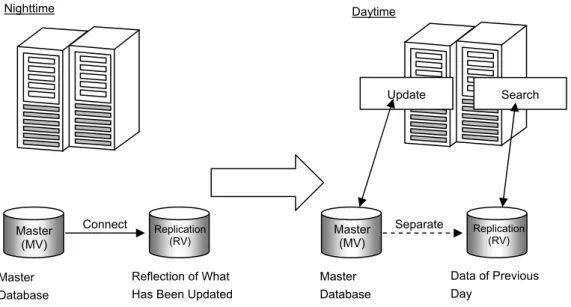
By creating replication volumes of the master database, you can separate the database to allocate volumes respectively for update and search operations. This allows you to update the database without affecting database search operations.
Figure 1-5 Performing Search in Parallel
The procedure for performing search operation in parallel is as follows:
(1) In the nighttime, suspend search operation to connect the MV (master volume) and RV (replication volume).
(2) In the daytime, separate the master volume (MV) and replication volume (RV). Then perform update and search operations in parallel (RV contains data of the previous day).
Master Database
Reflection of What Has Been Updated
Master Database Daytime Nighttime Data of Previous Day Update Replication (RV) Separate Search Master (MV) Replication (RV) Connect Master (MV)
Chapter 1 Data Replication Overview
1
1
1
.
.
.
3
3
3
S
S
S
y
y
y
s
s
s
t
t
t
e
e
e
m
m
m
C
C
C
o
o
o
n
n
n
f
f
f
i
i
i
g
g
g
u
u
u
r
r
r
a
a
a
t
t
t
i
i
i
o
o
o
n
n
n
Figure 1-6 System Configuration
To install the Data Replication function, the following hardware devices are required:
• Disk array
Disk arrays with the data replication functions provided by either DynamicDataReplication or RemoteDataReplication are required.
• Management server
This server monitors disk arrays of the iStorage series using the installed iStorage Manager and also controls disk arrays and data replication functions.
• Application server/backup server
These servers perform Data Replication or backup operation in tandem with tasks. Disk Array • AccessControl • DynamicDataReplication • RemoteDataReplication DB Replication Backup Software ReplicationControl ReplicationControl
Application Server Backup Server
Management Server
LAN
Tape Drive
Chapter 1 Data Replication Overview
Software to run Data Replication consists of the following components.
• Storage Manager
Provides the disk array configuration and state display functions.
Installing DynamicDataReplication and/or RemoteDataReplication allows the replication management function (hereinafter, referred to as Replication Manager) incorporated in iSM. The Replication Manager provides setting and operation functions such as state display, pair setting, and replication operations for DynamicDataReplication or RemoteDataReplication.
• ReplicationControl
Provides commands for checking replication operations and replication states in the application server.
• AccessControl
Provides functions to set logical disks that can be accessed for each application server r.
• DynamicDataReplication
Provides functions to allow data replication to be performed within the same disk array.
• RemoteDataReplication
Chapter 2 Data Replication Function
Chapter 2 Data Replication Function
This chapter describes types and state transitions of volumes that are required to use Data Replication functions for operation.
2
2
2
.
.
.
1
1
1
V
V
V
o
o
o
l
l
l
u
u
u
m
m
m
e
e
e
T
T
T
y
y
y
p
p
p
e
e
e
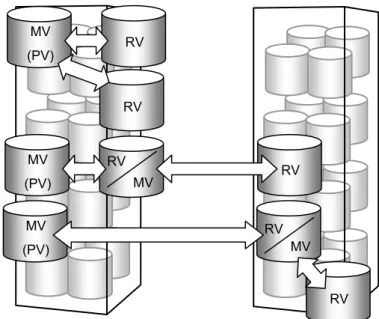
To use the Data Replication function for creating replication volumes, you must set the relation between the source volume and destination volume (replication volume) first. In replication control, the source volume is called Master Volume (MV) and the replication volume is called Replication Volume (RV). Furthermore, MV and RV are set as a pair.
For a disk array with the Data Replication function installed, the volume types used in the disk array are categorized into the three types described below. Figure 2-1 describes an example of combining volume types.
• Isolated Volume (IV) Volume with no pair setting.
By setting a pair to IV, you can set it as MV or RV.
• Master Volume (MV)
Volume with pair setting and from which copy is performed to the other volume of the pair (source volume). In general, set a volume used in tasks as MV.
When multiple pairs are set in series hierarchically, the uppermost MV is called Primary Volume (PV) in order to distinguish it from other MVs.
• Replication Volume (RV)
Volume with pair setting and to which copy will be made in the pair (destination volume). In general, set a volume used for backup or test operation as RV.
Pair can be set between volumes within the same disk array or between volumes in different disk arrays. To distinguish those settings, the former is called Dynamic Replication Volume (dRV) and the latter is called Remote Replication Volume (rRV).
Chapter 2 Data Replication Function
Figure 2-1 Example of Combining Volume Types
There are other related volumes (BV, SV, and LV) used for snapshot.
A Base Volume (BV) can be set as MV or RV for pair setting and used together with data replication and snapshot.
For details on volumes used for the snapshot, refer to the “Snapshot User’s Manual (Function Guide)”. Volume A1/A2/B1: IV
Volume A3: MV (PV) of pair A3/A4
Volume A4: RV (dRV) of the pair A3/A4, and MV of the pair A4/B2 Volume B2: RV (rRV) of pair A4/B2
Disk Array A
Disk Array B
MV (PV) A3 RV/MV (dRV) A4 RV (rRV) B2
Pair Setting
FC
IV A1 IV A2 IV B1Chapter 2 Data Replication Function
2
2
2
.
.
.
2
2
2
R
R
R
e
e
e
p
p
p
l
l
l
i
i
i
c
c
c
a
a
a
t
t
t
i
i
i
o
o
o
n
n
n
O
O
O
p
p
p
e
e
e
r
r
r
a
a
a
t
t
t
i
i
i
o
o
o
n
n
n
s
s
s
Replication operations include “Replicate” that copies data from MV to RV, “Separate” that separates MV and RV, and “Restore” that copies data from RV to MV.
2
2
2
.
.2
.
2
2
.
.1
.
1
1
R
R
R
e
e
e
p
p
p
l
l
l
i
i
i
c
c
c
a
a
a
t
t
t
e
e
e
With this operation, you can copy data from MV to RV.
Use this operation to copy the latest data to a replication volume that will be used in a test environment or for search task. When Replicate is performed, data in MV is copied to RV. In addition, any update made in MV after Replicate is performed is reflected in RV.
2
2
2
.
.2
.
2
2
.
.
.
2
2
2
S
S
S
e
e
e
p
p
p
a
a
a
r
r
r
a
a
a
t
t
t
e
e
e
With this operation, you can separate MV and RV.
Use this operation to suspend data copy between MV and RV to use the RV in a test environment or for search.
When Separate is started, all the differences between MV and RV by then is reflected in the RV, data copy is suspended and then the RV is separated. Updates made in the MV after the start of Separate are not reflected in the RV. Instead the update data is stored in a disk array as differences made by the update.
Before performing Separate, you can choose when to start using RV, from the following:
• Separate for making RV available after separation is completed: Separate (completion)
Reflects all the differences between MV and RV in the RV to make the RV available after separation is completed.
Even if Separate is performed immediately after Replicate starts, RV cannot be used while the difference between MV and RV is reflected into the RV. RV becomes available upon completion of separation.
• Separate for immediately making RV available: Separate(immediate)
Makes an RV available even while the difference between MV and RV are reflected into the RV or MV and RV are separated. By performing Separate (immediate), you can create an available RV immediately. This function is available only when data replication is performed in the same disk array. To use this function, "DynamicDataReplication Ver.2" or later is required.
Chapter 2 Data Replication Function
2
2
2
.
.
.
2
2
2
.
.
.
3
3
3
R
R
R
e
es
e
s
s
t
t
t
o
o
o
r
re
r
e
e
With this operation, you can copy data from RV to MV.
Use this operation to restore data from a backup volume (RV) when a failure occurs in MV. When Restore is performed, data stored in RV by the time Restore is started is copied to MV. When performing Restore, you can choose whether to reflect data update made in the MV into the RV.
• Restore with RV update: Restore (update)
Restores MV while automatically reflecting the data update made in the MV into RV. Even after the difference between MV and RV disappear and Restore is completed, data update made in the MV will be reflected into the RV.
• Restore without RV update: Restore (protect)
Restores MV without reflecting the data update made in the MV into RV. After the difference between MV and RV disappear and Restore is completed, Separate is automatically performed. By using the Restore (protect) function, you can protect data in RV to save the data as it was before Restore is performed.
To use this function, “DynamicDataReplication Ver2” or later, “RemoteDataReplication Ver2” or later, or “RemoteDataReplication Asynchronous” is required.
Chapter 2 Data Replication Function
2
2
2
.
.
.
3
3
3
R
R
R
e
e
e
p
p
p
l
l
l
i
i
i
c
c
c
a
a
a
t
t
t
i
i
i
o
o
o
n
n
n
O
O
O
p
p
p
e
e
e
r
r
r
a
a
a
t
t
t
i
i
i
o
o
o
n
n
n
s
s
s
a
a
a
n
n
n
d
d
d
S
S
S
t
t
t
a
a
a
t
t
t
e
e
e
T
T
T
r
r
r
a
a
a
n
n
n
s
s
s
i
i
i
t
t
t
i
i
i
o
o
o
n
n
n
s
s
s
This section describes replication operations and state transitions.
Pair setting is specified but MV and RV are separated.
sep/preparing, sep/exec
Difference between MV and
RV is being reflected. Pair setting is specified and synchronization has been established.
preparing: Replicate, Separate, or Restore preparing exec : Replicate, Separate, or Restore execution sync : Replicate or Restore sync state
rpl : replicate (Replicate)
rpl/preparing ... Sync preparing rpl/exec ... Sync execution rpl/sync ... Sync state sep : separate (Separate)
sep/preparing... Separate preparing sep/exec ... Separate execution separated ... Separated
rst : restore (Restore)
rst/preparing... Restore preparing rst/exec ... Restore execution rst/sync ... Sync state
MV RV rpl/preparing, rpl/exec MV RV separated sync rst/preparing, rst/exec • MV and RV can be updated. Replicate • RV cannot be updated. Restore • RV cannot be updated. Separate • As a rule, RV cannot be updated.
• When Restore(protect) is executed, Sync State (rst/sync) is placed and then automatically changed to Separated State (separated).
MV RV
rpl/sync
rst/sync
• Updates made in MV are reflected into RV.
• As a rule, access to RV is not allowed.
MV RV
• When Restore (update) is performed, updates made in MV are reflected into RV.
• When Restore (protect) is performed, updates made in MV are not reflected into RV.
• As a rule, access to RV is not allowed.
Chapter 2 Data Replication Function
2
2
2
.
.
.
3
3
3
.
.
.
1
1
1
R
R
R
e
ep
e
p
p
l
li
l
i
ic
c
c
a
a
a
t
t
t
e
e
e
a
a
a
n
n
n
d
d
d
S
S
St
t
ta
a
a
t
t
t
e
e
e
T
T
T
r
r
r
a
a
a
n
n
n
s
s
s
i
i
i
t
t
t
i
i
i
o
o
o
n
n
n
s
s
s
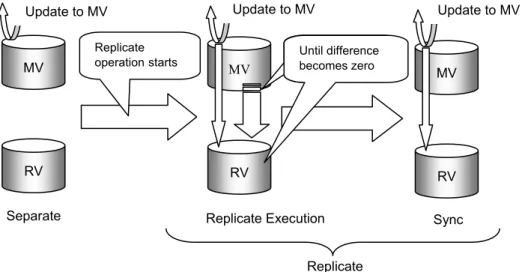
When Replicate starts, data copy from MV to RV starts to reflect the content of the MV into the RV. Updates made in the MV after Replicate is performed are also reflected into the RV.
After Replicate starts, the difference between MV and RV is gradually reduced and eventually all the data stored in the MV at the start of the Replicate is reflected into the RV (no differences). The state from the beginning of Replicate to the moment data in MV is completely reflected into RV is called "Replicate execution". The state where there is no difference between MV and RV is called “Synchronized by Replicate” or simply “Synchronized (sync)”. When a large-capacity volume or low-speed line is used, the state of "Replicate preparing" temporarily appears before “Replicate execution” appears. The states of “Replicate preparing”, “Replicate execution” and “Synchronized by Replicate” are collectively called “Replicate”.
Replicate Execution Replicate
Figure 2-3 Replicate and State Transitions
MV RV Separate MV RV MV RV Sync Replicate operationstarts
Update to MV Update to MV Update to MV
Until difference becomes zero
Chapter 2 Data Replication Function
2
2
2
.
.
.
3
3
3
.
.
.
2
2
2
S
S
S
e
e
e
p
p
p
a
a
a
r
ra
r
a
at
t
te
e
e
a
a
a
n
n
n
d
d
d
S
S
St
t
ta
a
at
t
t
e
e
e
T
T
T
r
r
r
a
a
a
n
n
n
s
s
s
i
i
i
t
t
t
i
i
i
o
o
o
n
n
n
s
s
s
When Separate is performed, the difference between MV and RV at the start of Separate is reflected into the RV to separate it. No updates made in MV after Separate is performed are reflected in RV.
If there is any differences between MV at the start of Separate and RV after the Separate, data will be copied to the RV to reflect all the updates made in the MV before the start of the Separate into the RV. The state from the beginning of Separate until all the data stored in MV at the beginning of the Separate is completely reflected into RV is called “Separate execution”. The state where all the updates made in MV are reflected into RV is called the state of “Separated by Separate” or “Separated (separated)”. When a large-capacity volume or low-speed line is used, the Separate preparing state temporarily appears before the Separate execution state. The states of “Separate preparing”, “Separate execution” and “Separated” are collectively called “Separate”.
When Separate is performed with immediate use of RV specified (Separate (immediate)), the data in RV can be referred to or updated immediately after the Separate start, even if all the data in MV is not reflected into the RV. This feature is implemented by the following copy control function:
If an update/reference request is given for an RV area where the difference between MV and RV is not completely copied yet, the copying will be completed before the access to the area is permitted.
In RV, data updated in MV before the start of Separate is reflected. Though updates made in MV after the start of Separate will not be reflected in RV, the data will be managed as differences made in the update. While under the state of “Separate”, the update states of MV and RV are managed so that differences made during Replicate/Restore will be reflected.
Figure 2-4 Separate and State Transitions
MV
RV
MV
RV
MV
Update to MV Update to MV Update to MV
Sync
RV
Separate Execution Separated
Separate
Separate operation starts
Until the difference between MV and RV is fully reflected into RV
Chapter 2 Data Replication Function
2
2
2
.
.
.
3
3
3
.
.
.
3
3
3
R
R
R
e
es
e
s
s
t
t
t
o
o
o
r
re
r
e
e
a
a
a
n
n
n
d
d
d
S
S
S
t
t
t
a
a
a
t
t
t
e
e
e
T
T
T
r
r
r
a
a
a
n
n
n
s
s
s
i
i
i
t
t
t
i
i
i
o
o
o
n
n
n
s
s
s
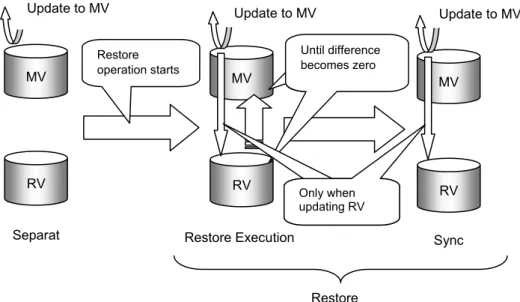
When Restore starts, data copy from RV to MV starts to reflect the data stored in the RV at the start of Restore into the MV. When Restore (update) is performed, updates made in MV after Restore are reflected in RV.
After Restore starts, the difference between MV and RV is gradually reduced and eventually all the data stored in the RV at the start of the Restore is reflected into the MV (no differences). The state from the beginning of Restore until the data in RV is completely reflected into MV is called “Restore execution”. The state where the difference between MV and RV is zero is called the state synchronized by Restore, or simply the “sync” (sync). When a large-capacity volume or low-speed line is used, the Restore preparing state temporarily appears before the Restore execution state. The states of “Restore preparing”, “Restore execution” and “Synchronized by Restore” are collectively called “Restore”.
When Restore (protect) is performed, updates made in MV are not reflected into RV. In this case, the information about updates made in MV is managed as the difference between MV and RV so that the difference will be reflected at subsequent Replicate/Restore. After Restore (protect) is performed, the state of “Synchronized (sync)” automatically changes to “Separated (separated)”.
When referring to the data in MV with Restore performed, the user can refer to RV data immediately after the start of Restore even if all the RV data is not reflected into the MV. This feature is implemented by obtaining data from RV when an area where the difference between RV and MV is not completely copied needs to be accessed upon request for reference to the MV.
Restore
Figure 2-5 Restore and State Transitions
MV MV RV Separat MV RV Restore Execution
Update to MV Update to MV Update to MV
RV Sync Restore operation starts Until difference becomes zero Only when updating RV
Chapter 2 Data Replication Function
2
2
2
.
.
.
3
3
3
.
.
.
4
4
4
A
A
A
c
c
c
t
t
t
i
iv
i
v
vi
i
it
t
t
y
y
y
a
a
an
n
n
d
d
d
S
S
S
y
y
y
n
n
n
c
c
c
h
h
h
r
r
r
o
o
o
n
n
n
o
o
o
u
u
u
s
s
s
S
S
S
t
t
t
a
a
a
t
t
t
e
e
e
In data replication, states such as Replicate, Restore, and Separate are called “Activity State” or simply "activity".
Also, states such as “execution” indicating state transition and "state transition completed" are called “synchronous state (Sync State)”.
Table 2-1 lists the activity and synchronous states which transit when each replication operation is performed. For information about how to handle access to MV and RV under each activity state, see 2.6 “Access Restriction for RV”.
Table 2-1 Activity and Sync states
Activity Sync Description Separate Preparing
(sep/preparing) • • State in which Separate is prepared This state temporarily appears on MV when a large-capacity volume or low-speed line is used.
• In principle, read and write in RV are not allowed. Separate Execution
(sep/exec) • Temporary state until the difference between MV and RV become zero after Separate is performed
• As a rule, read and write to RV are not allowed. Separated(separated) • Data copy between MV and RV is not performed. This
state occurs immediately after a pair is set.
• In general, read and write in RV are allowed.
Forced Separate(cancel) • MV and RV are forcibly separated by Forced Separate.
• Read and write in RV are allowed. Separate
Failure Separation (fault) • MV and RV are forcibly separated in a disk array due to a copy failure.
• Read and write to RV are allowed. Replicate Preparing
(rpl/preparing) • • State in which preparations for Replicate are being madeThis state temporarily appears on MV when a large-capacity volume or low-speed line is used.
• As a rule, read and write to RV are not allowed. Replicate Execution
(rpl/exec) • Difference between MV/RV at the start of Replicate is not completely reflected (the difference is reflected from MV to RV).
• Updates in MV are reflected into RV.
• As a rule, read and write to RV are not allowed. Replicate State
sync (rpl/sync) • Difference between MV/RV at the start of Replicate is completely reflected.
• Updates to MV is reflected to RV.
Chapter 2 Data Replication Function
Activity Sync Description Restore Preparing
(rst/preparing) • • State in which preparations for Restore are being madeThis state temporarily appears on MV when a large-capacity volume or low-speed line is used.
• As a rule, read and write to RV are not allowed. Restore Execution(rst/exec) • Reflection of the difference between MV and RV at
Restore has not been completed. (The difference is being reflected from RV to MV).
• When Restore (update) is performed, the updates made in MV are reflected into RV.
• When Restore (update) is performed, the updates made in MV are not reflected into RV.
• As a rule, read and write to RV are not allowed. Restore State
sync (rst/sync) • Reflection of the difference between MV and RV at Restore has been completed.
• When Restore(update) is executed, the updated data of the MV is reflected into the RV.
• When Restore (protect) is performed, the state
automatically changes to “Separated” without reflecting updates in MV into RV.
Chapter 2 Data Replication Function
2
2
2
.
.
.
4
4
4
C
C
C
o
o
o
p
p
p
y
y
y
C
C
C
o
o
o
n
n
n
t
t
t
r
r
r
o
o
o
l
l
l
If an activity between volumes set as a pair is Replicate or Restore, you can change the method for copying data between MV and RV according to the status of the load on the disk array. A state that changes on the instruction to change a copy method is called “Copy Control State”.
There are the following two types of copy between MV and RV under the Replicate or Restore state:
• Copy for reflecting difference
Copy to reflect data in MV at the start of Replicate (or RV at the start of Restore) into RV (MV for Restore).
• Copy for reflecting updates made in MV into RV
Copy to reflect updates made in MV into RV after Replicate or Restore is performed. However, if Restore (protect) is performed, updates made in MV are not reflected into RV.
You can change a copy method and state by changing the copy control state. The following Table 2-2 lists the copy states included in copy control states:
Table 2-2 Copy Control State
Copy Control State Copy State Synchronous Copy
Mode • • Copy for reflecting difference is performed. Updates made in MV are reflected into RV sequentially.
Figure 2-6 shows an overview of foreground copy (synchronous copy mode).
Foreground Copy
Semi-synchronous Copy
Mode • • Copy for reflecting difference is performed. The I/O of updates made in MV is completed when the data is written into the MV. Immediately after that, the data is copied to RV.
• Can be set for a RemoteDataReplication pair. Figure 2-7 shows an overview of foreground copy (semi-synchronous copy mode).
Background Copy - • Copy for reflecting difference is performed.
• The I/O of updates made in MV is completed when the data is written into the MV. The data is copied to RV asynchronously with updating into the MV.
The interval of the copy to RV (background copy level) can be set on a disk array basis.
Figure 2-8 shows an overview of background copy mode.
Suspend Suspend • Copy for reflecting difference is not performed.
• The I/O of updates made in MV is completed when the data are written into the MV. The data is accumulated
Chapter 2 Data Replication Function
Copy Control State Copy State
Suspend due to Failure • Forcibly suspended in a disk array due to a copy failure.
• Copy for reflecting difference is not performed.
• The I/O of updates made in MV is completed when the data are written into the MV. The data is accumulated as the difference information. Reflection in RV is not performed.
Chapter 2 Data Replication Function
Figure 2-6 shows an overview of foreground copy (synchronous copy mode).
When MV and RV Are in the Same Disk Array
(i) Writes the updated data for MV into the cache reserved for the MV.
(ii) Writes the difference data to be copied from the cache reserved for the MV to RV into the cache reserved for the RV.
(iii) Notifies that I/O is completed.
(iv) Sends the updated data written into the cache to the MV and the RV.
When MV and RV Are in Different Disk Arrays
(i) Writes the updated data for MV into the cache A.
(ii) Writes the difference data to be copied from the cache A to RV into the cache B. (iii) Notifies that I/O is completed.
(iv) Sends the updated data written into the cache to the MV and the RV. Disk Array B (i) (iii) RV Cache B Updated Data (iv) Disk Array A MV Cache A Updated Data (ii) (iv) Disk Array A Cache (i) (iii) RV MV (ii) (iv) (iv)
Chapter 2 Data Replication Function
Figure 2-7 shows an overview of foreground copy (semi synchronous copy mode).
(i) Writes the updated data for MV into the cache A. (ii) Notifies that I/O is completed.
(iii) Writes the difference data to be copied from the cache A to RV into the cache B. (iv) Reflects the updated data written in the caches of MV and RV into the MV and the RV.
Figure 2-7 Overview of Foreground Copy (Semi-synchronous Copy Mode)
The difference information is copied from the cache A to B. The data updated in MV is copied to RV.
Figure 2-8 shows an overview of background copy mode.
The I/O of updates made in MV is completed at the same time as the data is written into the MV and the difference information is accumulated. The accumulated difference information is copied to the RV in the background asynchronously with the updating of the MV, according to the interval of the copy to the RV (background copy level).
Disk Array B (i) (ii) RV Cache B Updated Data (iv) Disk Array A MV Cache A Updated Data (iii) (iv)
Chapter 2 Data Replication Function
When MV and RV Are in the Same Disk Array
(i) Writes the updated data for MV into the cache reserved for the MV. (ii) Notifies that I/O is completed.
(iii) Writes into MV. The data is accumulated as the difference information.
(iv) Reads the accumulated information from the MV and writes the information into the cache reserved for the MV.
(v) Copies the difference information from the cache reserved for the MV to the cache reserved for the RV. (vi) Copies the data updated in the MV into the RV.
When MV and RV Are in Different Disk Arrays
(i) Writes the updated data to MV on cache A. The data is accumulated as the difference information. (ii) Notifies that I/O is completed.
(iii) Writes into MV.
(iv) Reads the accumulated difference information from the MV and writes the information into the cache A. (v) Copies the difference information from the cache A to the cache B.
Disk Array Cache (i) (ii) RV MV Updated Data (v) Updated Data
(iii) (iv) (vi)
Disk Array B (i) (ii) RV Cache B Updated Data (vi) Disk Array A MV Cache A Updated Data (v) (iv) (iii)
Chapter 2 Data Replication Function
An interval of copy to RV (background copy level) is indicated by a numerical value between 1 and 5. A larger value has a higher priority for copy processing. The recommended value for disk arrays is level 3.
Table 2-3 Background Copy Level Level Description
1 Even when the load on a disk array is low or no I/O occurs, copy will have the lowest priority level. Note that when you set this level, it may take time to complete copy under this level.
2 to 4 The priority for copy is automatically adjusted depending on the load on disk arrays or the influence on I/O. If the load on a disk array is high or the amount of I/O data per unit time is large, the priority for copy will be lowered to the level 1 or equivalent. Conversely, if the load on a disk array is low or the amount of I/O data per unit time is small, the priority for copy will be raised to the level 5 or equivalent.
5 Copy has the highest priority regardless of the load on a disk array or the influence on I/O. Note that when you set this level, it may degrade the I/O performance.
Copy control can be specified when Replicate or Restore is performed. The copy control specified at Replicate or Restore can be changed as required.
When Restore with RV protection specified is performed, only copy for reflecting difference is performed, while updates in MV is not reflected in RV. Therefore, specifying or changing a copy control (Synchronous Copy Mode, Semi-synchronous Copy Mode, or Background Copy) has no effect.
There are the following five instructions to change a copy control:
• Synchronous Copy instruction
• Semi-synchronous Copy instruction
• Resume instruction
• Background Copy instruction
• Suspend instruction
Giving the Resume instruction changes Background Copy or Suspend to a specified copy control (Synchronous Copy Mode, Semi-synchronous Copy Mode, or Background Copy).
Chapter 2 Data Replication Function
Figure 2-9 State Transition Diagram of Copy Controls
Foreground Copy
* Semi-synchronous Copy Mode can only be used for a RemoteDataReplication pair Suspend Instruction Background Copy or Resume Instruction Suspend Synchronous Copy or Semi-synchronous Copy or Resume Synchronous Copy or Semi-synchronous Copy or Resume Instruction Suspend Instruction Background Copy Semi- synchronous Copy Mode* Synchronous Copy Mode normal abnormal Copy Failure Background Copy Instruction
Chapter 2 Data Replication Function
2
2
2
.
.
.
5
5
5
R
R
R
e
e
e
l
l
l
a
a
a
t
t
t
i
i
i
o
o
o
n
n
n
s
s
s
h
h
h
i
i
i
p
p
p
b
b
b
e
e
e
t
t
t
w
w
w
e
e
e
e
e
e
n
n
n
C
C
C
o
o
o
p
p
p
y
y
y
P
P
P
e
e
e
r
r
r
f
f
f
o
o
o
r
r
r
m
m
m
a
a
a
n
n
n
c
c
c
e
e
e
a
a
a
n
n
n
d
d
d
C
C
C
o
o
o
p
p
p
y
y
y
C
C
C
o
o
o
n
n
n
t
t
t
r
r
r
o
o
o
l
l
l
If the state of copy control is set to Synchronized Copy, the difference between MV and RV will not be accumulated because updates made in the MV are immediately sent to RV. However, it takes extra time to write into the MV because it waits for reflection of the updates to RV.
If the state of copy control is set to Suspend, the difference between MV and RV will be accumulated because the updates made in the MV will not be reflected in the RV. The time to write into the MV is the same as normal I/O.
As described above, states of copy control are related to the amount of the accumulated differences between MV and RV and writing performance. Table 2-4 shows how copy controls are related to the difference between MV and RV and writing performance.
Table 2-4 Relations in Each Copy Control
Copy Control Difference between MV and RV Writing Overhead for MV Foreground (Synchronous) Small High
Foreground (Semi-synchronous)
Background
Suspend Large Low
If the difference between MV and RV is large under the state of Replicate, the processing time required for Separate will be increased. Therefore, it is recommended to select a copy control which makes the difference between MV and RV smaller for a system where business operations cannot be interrupted for a long period of time. Also, for a system where the performance of writing into MV needs to be maintained or improved, it is recommended to select a copy control that requires no writing overhead for MV.
Chapter 2 Data Replication Function
2
2
2
.
.
.
6
6
6
A
A
A
c
c
c
c
c
c
e
e
e
s
s
s
s
s
s
R
R
R
e
e
e
s
s
s
t
t
t
r
r
r
i
i
i
c
c
c
t
t
t
i
i
i
o
o
o
n
n
n
f
f
f
o
o
o
r
r
r
R
R
R
V
V
V
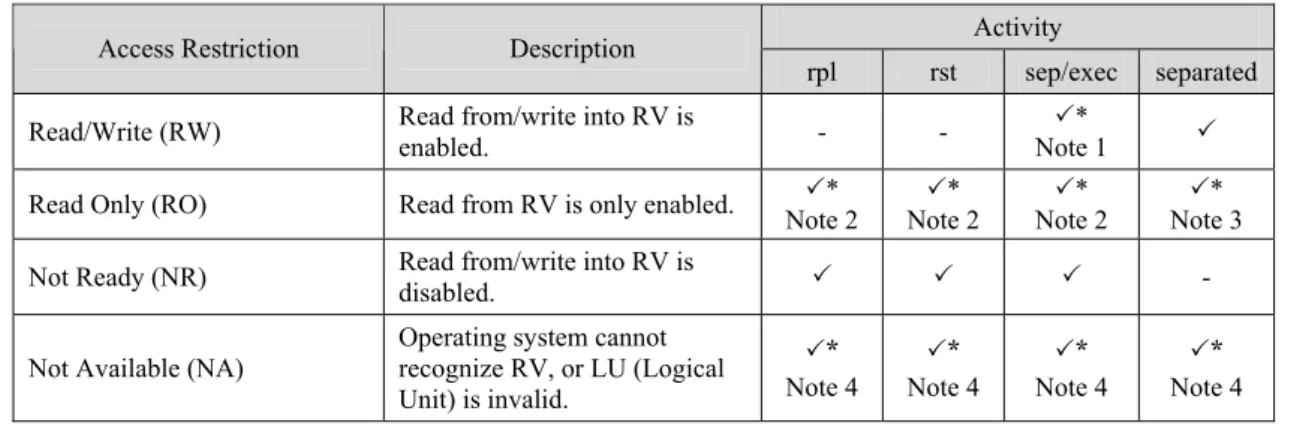
Under the state of Replicate or Restore, MV is synchronized with RV to allow the data in the MV to be consistent with the data in the RV. However, RV may become inconsistent with others because the reflection of the difference between MV and RV is performed in a disk array independently of the operating system or file system. Therefore, the data replication function has no restrictions on access to MV so that MV can always be referred or updated. On the contrary, access restrictions can be set for each activity state for RV to prevent malfunctions.
Table 2-5 lists the states which can be specified as access restrictions for RV. Table 2-5 Access Restriction for RV
Activity Access Restriction Description
rpl rst sep/exec separated Read/Write (RW) Read from/write into RV is enabled. - - Note 1 3* 3
Read Only (RO) Read from RV is only enabled. Note 2 3* Note 2 3* Note 2 3* Note 3 3* Not Ready (NR) Read from/write into RV is disabled. 3 3 3 - Not Available (NA) Operating system cannot recognize RV, or LU (Logical
Unit) is invalid. 3* Note 4 3* Note 4 3* Note 4 3* Note 4
3: Available 3*: Available with administrative restrictions -: Unavailable rpl: Replicate state RW: Read/Write
rst: Restore state RO: Read Only sep/exec: Separate execution NR: Not Ready separated: Separated state NA: Not Available
Note 1: When Separate(immediate) is performed, “Read/Write (RW)” is set even if Separate is performed. In this case, note the following:
1. Because data is copied from MV to RV while Separate is performed, the I/O performance may be degraded if I/O load on the RV is high.
Note 2: You can set “Read Only (RO)” for RV under the state of Replicate, Restore, or Separate execution. In this case, note the following.
1. Before referring to RV under the state of Replicate or Restore, make sure that no updates are made in MV.
2. While an update is made in MV, I/O processing is performed in a disk through the operating system control such as file system. Even if the application has completed the update in the disk,