Neural Network Toolbox
A Tutorial for the Course
Computational Intelligence
http://www.igi.tugraz.at/lehre/CI
Stefan H¨ausler
Institute for Theoretical Computer Science
Inffeldgasse 16b/I
Abstract
This tutorial gives an introduction to the Matlab Neural Network Toolbox. The elements of matlab and the neural network toolbox are more easily understood when explained by an example. First a neural network will be used for a classification task. The second example will be a simple logical problem.
0.1
Matlab Files for SS07
Here you can find the .m files for the first practical lesson : Introduction to NNT.zip1
Usage
To make full use of this tutorial you have 1. to download the file
nnt intro.zip2 which contains this tutorial and the accompanying Matlab programs.
2. Unzipnnt intro.zipwhich will generate a subdirectory named
nnt intro where you can find all the Matlab programs.
3. Add the pathnnt introto the matlab search path with a command like
addpath(’C:\Work\nnt intro’)
if you are using a Windows machine or
addpath(’/home/jack/nnt intro’)
if you are using a Unix/Linux machine.
1
The Neural Network Toolbox
The neural network toolbox makes it easier to use neural networks in matlab. The toolbox consists of a set of functions and structures that handle neural networks, so we do not need to write code for all activation functions, training algorithms, etc. that we want to use!
The Neural Network Toolbox is contained in a directory called nnet. Typehelp nnet for a listing of help topics.
A number of demonstrations are included in the toolbox. Each example states a problem, shows 1Introduction_to_NNT.zip
the network used to solve the problem, and presents the final results. Lists of the demos and applications scripts that are discussed in this guide can be found withhelp nndemos/.
2
The Structure of the Neural Network Toolbox
The toolbox is based on the network object. This object contains information about everything that concern the neural network, e.g. the number and structure of its layers, the conectivity between the layers, etc. Matlab provides high-level network creation functions, likenewlin (create a linear layer), newp (create a perceptron) or newff (create a feed-forward backpropagation network) to allow an easy construction of. As an example we construct a perceptron with two inputs ranging from -2 to 2:
>> net = newp([-2 2;-2 2],1)
First thearchitecture parameters and thesubobject structures
subobject structures:
inputs: {1x1 cell} of inputs layers: {1x1 cell} of layers
outputs: {1x1 cell} containing 1 output targets: {1x1 cell} containing 1 target
biases: {1x1 cell} containing 1 bias
inputWeights: {1x1 cell} containing 1 input weight layerWeights: {1x1 cell} containing no layer weights
are shown. The latter contains information about the individual objects of the network. Each layer consists of neurons with the same transfer function net.transferFcn and net input function
net.netInputFcn, which are in the case of perceptronshardlimandnetsum. If neurons should have different transfer functions then they have to be arranged in different layers. The parameters
net.inputWeights and net.layerWeights specify among other things the applied learning functions and their parameters. The next paragraph contains the training, initialization and performance functions. functions: adaptFcn: ’trains’ initFcn: ’initlay’ performFcn: ’mae’ trainFcn: ’trainc’
The trainFcn and adaptFcn are used for the two different learning types batch learning and in-cremental or on-line learning. By setting the trainFcnparameter you tell Matlab which training algorithm should be used, which is in our case the cyclical order incremental training/learning functiontrainc. The ANN toolbox include almost 20 training functions. The performance func-tion is the funcfunc-tion that determines how well the ANN is doing it’s task. For a perceptron it is the mean absolute error performance function mae. For linear regression usually the mean squared error performance functionmseis used. TheinitFcnis the function that initialized the weights and biases of the network. To get a list of the functions that are available type help nnet. To change one of these functions to another one in the toolbox or one that you have created, just assign the name of the function to the parameter, e.g.
>> net.trainFcn = ’mytrainingfun’;
parameters:
adaptParam: .passes initParam: (none) performParam: (none)
trainParam: .epochs, .goal, .show, .time
By changing these parameters you can change the default behavior of the functions mentioned above. The parameters you will use the most are probably the components oftrainParam. The most used of these arenet.trainParam.epochs which tells the algorithm the maximum number of epochs to train, and net.trainParam.showthat tells the algorithm how many epochs there should be between each presentation of the performance. Typehelp trainfor more information.
The weights and biases are also stored in the network structure:
weight and bias values:
IW: {1x1 cell} containing 1 input weight matrix LW: {1x1 cell} containing no layer weight matrices
b: {1x1 cell} containing 1 bias vector
The.IW(i,j)component is a two dimensional cell matrix that holds the weights of the connection between the inputj and the network layeri. The.LW(i,j)component holds the weight matrix for the connection from the network layerj to the layer i. The cell array b contains the bias vector for each layer.
3
A Classification Task
As example our task is to create and train a perceptron that correctly classifies points sets belonging to three different classes. First we load the data from the filewinedata.mat
>> load winedata X C
Each row of X represents a sample point whose class is specified by the corresponding element (row) in C. Further the data is transformed into the input/output format used by the Neural Network Toolbox
>> P=X’;
whereP(:,i) is theith point. Since we want to classify three different classes we use 3 perceptrons, each for the classification of one class. The corresponding target function is generated by
>> T=ind2vec(C);
To create the perceptron layer with correct input range type
>> net=newp(minmax(P),size(T,1));
The difference between train and adapt
Both functions,trainandadapt, are used for training a neural network, and most of the time both can be used for the same network. The most important difference has to do with incremental training (updating the weights after the presentation of each single training sample) versus batch training (updating the weights after each presenting the complete data set).
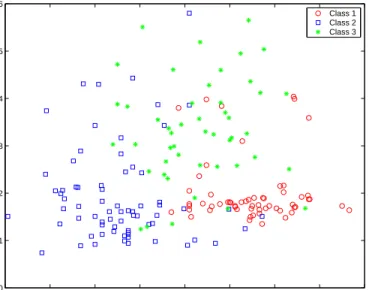
11 11.5 12 12.5 13 13.5 14 14.5 15 0 1 2 3 4 5 6 Feature 1 Feature 2 Data Set Class 1 Class 2 Class 3
Figure 1: Data set X projected to two dimensions.
Adapt
First, setnet.adaptFcnto the desired adaptation function. We’ll use adaptwb (from ’adapt weights and biases’), which allows for a separate update algorithm for each layer. Again, check the Matlab documentation for a complete overview of possible update algorithms.
>> net.adaptFcn = ’trains’;
Next, since we’re usingtrains, we’ll have to set the learning function for all weights and biases:
>> net.inputWeights{1,1}.learnFcn = ’learnp’; >> net.biases{1}.learnFcn = ’learnp’;
wherelearnpis the Perceptron learning rule. Finally, a useful parameter is net.adaptParam.passes, which is the maximum number of times the complete training set may be used for updating the network:
>> net.adaptParam.passes = 1;
When using adapt, both incremental and batch training can be used. Which one is actually used depends on the format of your training set. If it consists of two matrices of input and target vectors, like
>> [net,y,e] = adapt(net,P,T);
the network will be updated using batch training. Note that all elements of the matrixyare one, because the weights are not updated until all of the trainings set had been presented.
If the training set is given in the form of a cell array
>> for i = 1:length(P), P2{i} = P(:,i); T2{i}= T(:,i); end >> net = init(net);
>> [net,y2,e2] = adapt(net,P2,T2);
then incremental training will be used. Notice that the weights had to be initialized before the network adaption was started. Since adapt takes a lot more time then train we continue our analysis with second algorithm.
Train
When using train on the other hand, only batch training will be used, regardless of the format of the data (you can use both). The advantage of train is that it provides a lot more choice in training functions (gradient descent, gradient descent w/ momentum, Levenberg-Marquardt, etc.) which are implemented very efficiently. So for static networks (no tapped delay lines) usually train is the better choice.
We set
>> net.trainFcn = ’trainb’;
for batch learning and
>> net.trainFcn = ’trainc’;
for on-line learning. Which training parameters are present depends in general on your choice for the training function. In our case two useful parameters are net.trainParam.epochs, which is the maximum number of times the complete data set may be used for training, andnet.trainParam.show, which is the time between status reports of the training function. For example,
>> net.trainParam.epochs = 1000; >> net.trainParam.show = 100;
We initialize and simulate the network with
>> net = init(net);
>> [net,tr] = train(net,P,T);
The trainings error is calculated with
>> Y=sim(net,P);
>> train_error=mae(Y-T) train_error =
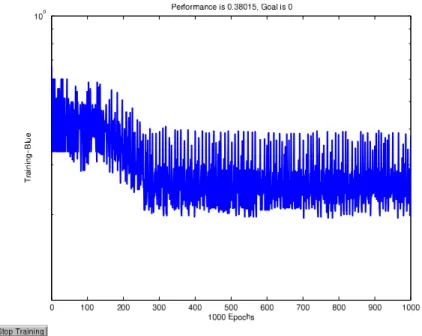
0.3801
So we see that the three classes of the data set were not linear seperable. The best time to stop learning would have been
>> [min_perf,min_epoch]=min(tr.perf) min_perf =
0.1948 min_epoch =
703
Figure 2: Performance of the learning algorithmtrainover 1000 epochs.
4
A Simple logical problem
The task is to create and train a neural network that solves the XOR problem. XOR is a function that returns 1 when the two inputs are not equal,
Construct a Feed-Forward Network
To solve this we will need a feedforward neural network with two input neurons, and one output neuron. Because that the problem is not linearly separable it will also need a hidden layer with two neurons.To create a new feed forward neural network use the command newff. You have to enter the max and min of the input values, the number of neurons in each layer and optionally the activation functions.
>> net = newff([0 1; 0 1],[2 1],{’logsig’,’logsig’});
The variable net will now contain an untrained feedforward neural network with two neurons in the input layer, two neurons in the hidden layer and one output neuron, exactly as we want it. The [0 1; 0 1] tells matlab that the input values ranges between 0 and 1. The ’logsig’,’logsig’ tells matlab that we want to use the logsig function as activation function in all layers. The first parameter tells the network how many nodes there should be in the input layer, hence you do not have to specify this in the second parameter. You have to specify at least as many transfer functions as there are layers, not counting the input layer. If you do not specify any transfer function Matlab will use the default settings.
First we construct a matrix of the inputs. The input to the network is always in the columns of the matrix. To create a matrix with the inputs ”1 1”, ”1 0”, ”0 1” and ”0 0” we enter:
>> input = [1 1 0 0; 1 0 1 0] input =
1 1 0 0
1 0 1 0
Further we construct the target vector:
>> target = [0 1 1 0] target =
0 1 1 0
Train the Network via Backpropagation
In this example we do not need all the information that the training algorithms shows, so we turn it of by entering:
>> net.trainParam.show=NaN;
Let us apply the default training algorithm Levenberg-Marquardt backpropagationtrainlmto our network. An additional training parameters is.min grad. If the gradient of the performance is less than.min gradthe training is ended. To train the network enter:
>> net = train(net,input,target);
Because of the small size of the network, the training is done in only a second or two. Now we simulate the network, to see how it reacts to the inputs:
>> output = sim(net,input) output =
0.0000 1.0000 1.0000 0.0000
That was exactly what we wanted the network to output! Now examine the weights that the training algorithm has set
>> net.IW{1,1} ans = 11.0358 -9.5595 16.8909 -17.5570 >> net.LW{2,1} ans = 25.9797 -25.7624
5
Graphical User Interface
A graphical user interface has been added to the toolbox. This interface allows you to:
• Creat networks
• Enter data into the GUI
• Initialize, train, and simulate networks
• Export the training results from the GUI to the command line workspace
• Import data from the command line workspace to the GUI To open the Network/Data Manager window typenntool.