(will be inserted by the editor)
Transparent Orchestration of Task-based Parallel
Applications in Containers Platforms
Cristian Ramon-Cortes · Albert Serven · Jorge Ejarque · Daniele Lezzi · Rosa M. Badia
Received: date / Accepted: date
Abstract This paper presents a framework to easily build and execute paral-lel applications in container-based distributed computing platforms in a user-transparent way. The proposed framework is a combination of the COMP Su-perscalar (COMPSs) programming model and runtime, which provides a straight-forward way to develop task-based parallel applications from sequential codes, and containers management platforms that ease the deployment of applications in computing environments (as Docker, Mesos or Singularity). This framework pro-vides scientists and developers with an easy way to implement parallel distributed applications and deploy them in a one-click fashion. We have built a prototype which integrates COMPSs with different containers engines in different scenarios: i) a Docker cluster, ii) a Mesos cluster, and iii) Singularity in an HPC cluster. We have evaluated the overhead in the building phase, deployment and execution of two benchmark applications compared to a Cloud testbed based on KVM and OpenStack and to the usage of bare metal nodes. We have observed an important gain in comparison to cloud environments during the building and deployment phases. This enables better adaptation of resources with respect to the compu-tational load. In contrast, we detected an extra overhead during the execution, which is mainly due to the multi-host Docker networking.
Keywords Cloud Computing, Containers Orchestration, Linux Containers, Distributed Systems, Parallel Programming Models
Cristian Ramon-Cortes, Albert Serven, Jorge Ejarque, Daniele Lezzi Barcelona Supercomputing Center (BSC), Barcelona, Spain
E-mail:{cristian.ramoncortes, albert.serven, jorge.ejarque, daniele.lezzi}@bsc.es Rosa M. Badia
Barcelona Supercomputing Center (BSC) and Artificial Intelligence Research Institute - Span-ish National Research Council (IIIA-CSIC), Barcelona, Spain
E-mail: [email protected]
This is a post-peer-review, pre-copyedit version of an article published in Journal of Grid Computing. The final authenticated version is available online at: https://link.springer.com/article/10.1007/s10723-017-9425-z]
1 Introduction
Cloud Computing [24] has emerged as a paradigm where a large amount of capac-ity is offered on demand and only paying for what is consumed. This paradigm relies on virtualization technologies which offer isolated and portable computing environments called Virtual Machines (VMs). These VMs are managed by hy-pervisors, such as Xen [27], KVM [38] or VMWare [18], which are in charge of managing and coordinating the execution of the computations performed in the different VMs on top of the bare-metal.
Beyond the multiple advantages offered by these technologies and the over-head introduced during operation, the main drawback of these technologies in terms of usability is the management of the VM images. To build an image for an application, users have to deploy a VM with a base image which includes the operating system kernel and libraries, to install the application specific software and to create an image snapshot, which will be used for further deployments. This process, which can take from several minutes to hours, even for experienced devel-opers, turns to be a complex and tedious work for scientist or developers without a strong technological background.
To deal with these issues, a new trend in the Cloud Computing research has recently appeared [44]. It proposes to substitute VMs managed by hypervisors with containers managed by container engines, also called containerizers, such as Docker [8]. They provide a more efficient layer-based image mechanism, such as AUFS [1], that simplifies the image creation, reduce the disk usage and accelerates the container deployment. The main difference between VM and containers relies on the fact that VM images include the whole OS and software stack, and the hy-pervisor has to load every time a VM is deployed. As opposed, containers running on the same machine share the OS kernel and common layers, which reduces the amount of work to be done by container engines.
In any case, either container and VM images are very convenient for packaging applications which are going to run on a single node, because the user just needs to deploy one VM or one container with the customized image. The complexity mainly relies on the application developer when creating the customized image. However, in the case of distributed applications, the process is more complicated since the user has to deploy multiple containers and configure them to properly coordinate the execution of the application. Therefore, to facilitate this process, there is a need for an extra component which must coordinate the deployment, configuration, and execution of the application in the different computing nodes. Our proposal is that this tasks can be managed by the programming model run-time.
The main contribution of this paper is a proposal of a methodology for smooth integration of container engines with parallel programming models and runtimes, facilitating the development, execution, and portability of parallel distributed ap-plications. We have defined two software packages which are in charge of managing the interaction of the programming model tools with the container platforms in a static or dynamic way. Although the integration has been implemented in the COMP Superscalar (COMPSs) [26] framework, other task-based programming models and frameworks can benefit from these container management packages to handle different container platforms. The combination of COMPSs with the container management capabilities proposed in this paper provides an easy way to
create parallel distributed applications and to transparently deploy and execute them in container-based distributed platforms, such as Docker or Singularity.
The approach considered in this paper is based on the use of COMPSs to de-velop applications. With COMPSs, dede-velopers can benefit from a straightforward programming model to parallelize applications based on sequential codes and de-coupling the applications from the underlying computing infrastructure. Once the application is implemented, the COMPSs framework makes use of the specific fea-tures proposed in this paper to automatically create the container image for the COMPSs application, to deploy the required containers and to execute the ap-plication in the deployed containers. Moreover, COMPSs monitors the computing load generated during the execution detecting the need for additional resources or the possibility to release unused ones. The proposed contributions of this paper extend COMPSs to enable the runtime to adapt the number of containers in the same way as for Cloud resources [40].
The paper is structured as follows: Section 2 describes previous work done in the field. Section 3 presents an overview of COMPSs and the platforms targeted in this work. Section 4 provides an overview of the proposed solution. Section 5 is focused on how COMPSs transparently creates the application images and or-chestrates the deployment and execution of task-based parallel applications in container engines. In Section 6, we present the details about how COMPSs is in-tegrated with the different types of container platforms. Next, Section 7 presents the experiments performed to validate the framework. Finally, Section 8 concludes the paper and gives some guidelines for future work.
2 Related Work
Some previous work has been performed to facilitate the portability of applications to different distributed platforms. For what relates to clouds, software stacks as OpenNebula [47] or OpenStack [46] provide basic services for image management and contextualization of VMs. Contextualization services typically include the networking and security configuration. For the image management, these platforms expose APIs that provide methods to import customized images as well as to create snapshots once the user has manually modified the base image. However, as introduced in the previous section, these manual image modifications can be a tedious work for complex applications.
Some recent work has focused on automating this process by adding new tools or services on top of the basic services offered by providers. CloudInit [19] is one of the most used tools to automate the VM image creation. It consists of a package installed in the base image which can be configured with a set of scripts that will be executed during the VM boot time. Another extended way to configure and customize VM images is based on DevOps tools development like Puppet [14] or Chef [4] where aPuppet manifestor aChef receiptis deployed, instead of executing a set of configuration scripts. Some examples of these solutions can be found in [25], [28] or [37]. However, these solutions have a drawback: customizing the image at deployment time (installing a set of packages downloading files, etc.) can take some minutes. It can be assumable in the first deployment but not for adaptation where new VMs must be deployed in seconds. To solve this issue, some
services like [31] have been proposed to perform offline image modifications, in order to reduce the installation and configurations performed at deployment time. In the case of containers, most of the container platforms already include sim-ilar features to easily customize container images. In the case of Docker, we can write aDockerfile to describe an application container image. In this file, we have to indicate a parent image and the necessary customization commands to install and run the application. Due to the layered-based image system, parent and cus-tomized images can be reused and extended by applications, achieving better de-ployment times. This is one of the main reasons why several users are porting their application frameworks to support Docker containers. Cloud Providers have started to provide services for deploying containers such as the Google Container Engine [39] and cloud management stacks have implemented drivers to support Docker containers as another type of VM, such as the Nova-Docker-driver [20] for OpenStack or OneDoc [21], a Docker driver for Open Nebula. Apart from Docker, different container platforms have appeared recently. Section 3.2 provides more details about the different available container engines.
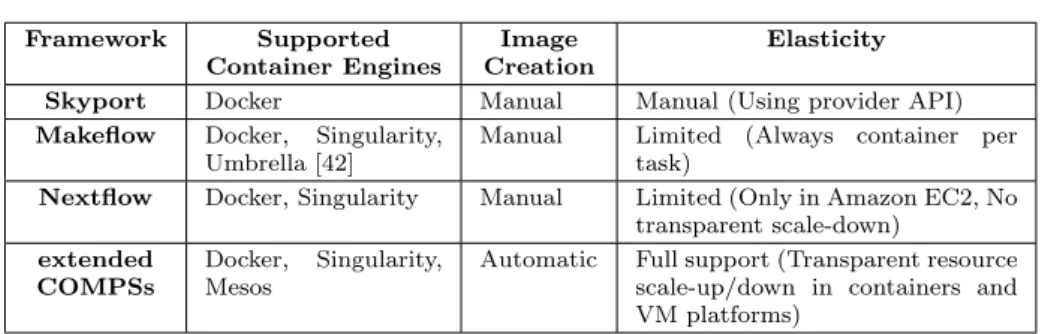
Also, some work has been produced to integrate application frameworks, such as workflow management systems, with container engines. Skyport [35] is an exten-sion to an existing framework to support containers for the execution of scientific workflows. This framework differs from our proposal in the definition of the appli-cation which requires to explicitly write the workflows’ tasks in the form of JSON documents where the input/output of each block has to be specified along with the executable. In COMPSs applications, the programming model is pure sequential with annotations that identify the parts of the code (tasks) to be executed by the runtime. Skyport uses Docker as containers technology, but it lets the users the responsibility to create the application images and to establish scalability proce-dures using the available infrastructure tools, while in this work we propose a way to transparently manage the image creation and resource scalability. Moreover, we also provide extensions to COMPSs for Docker, Singularity, and Mesos clusters. In [48], authors describe the integration of another workflow system, Makeflow, with Docker. As in Skyport, the main difference with the COMPSs framework is in the programming model, which in Makeflow is represented by chained calls to executables in the form of Makefiles and is tailored to bioinformatics applica-tions; it does not provide any tool to build container images from the workflow code and the supported elasticity is done per task. For each task in the work-flow, Makeflow creates a new container thus not reusing existing containers for different tasks. Nextflow [30] is another option which proposes a DSL language that extends the Unix pipes model for the composition of workflows. Both Docker and Singularity engines are supported in Nextflow, but it has similar limitations to other frameworks, such as the manual image creation, a limited programming model that resembles command line executions of scripts and a limited elasticity provided only for Amazon EC2.
Table 1 summarizes the comparison between our proposal and existing solu-tions. We propose to integrate container engines with parallel programming model runtimes, such as COMPSs, to provide a framework where users can easily port a sequential application to distributed environment automatically parallelizing its execution. The proposed extensions to COMPSs provide the features to automat-ically create the application container images and to transparently deploy and execute the application in container-based distributed platforms.
Framework Supported Container Engines
Image Creation
Elasticity
Skyport Docker Manual Manual (Using provider API)
Makeflow Docker, Singularity, Umbrella [42]
Manual Limited (Always container per task)
Nextflow Docker, Singularity Manual Limited (Only in Amazon EC2, No transparent scale-down)
extended COMPSs
Docker, Singularity, Mesos
Automatic Full support (Transparent resource scale-up/down in containers and VM platforms)
Table 1 Frameworks comparison
In a previous work [23], we tested the integration of Docker as a static resource pool. In this paper, we generalize this integration to other container platforms (Mesos and Singularity) and extend it to use containers as a dynamic pool of resources. On the one hand, we consider necessary to generalize the support to different container platforms because, although they behave similarly, each of them provides different features covering different needs and targeting various types of organizations. On the other hand, we believe that adaptation is a must have feature for the runtimes to take full profit of container platforms, allowing to dynamically create and destroy resources during the application’s execution.
3 Background
3.1 COMPSs Overview
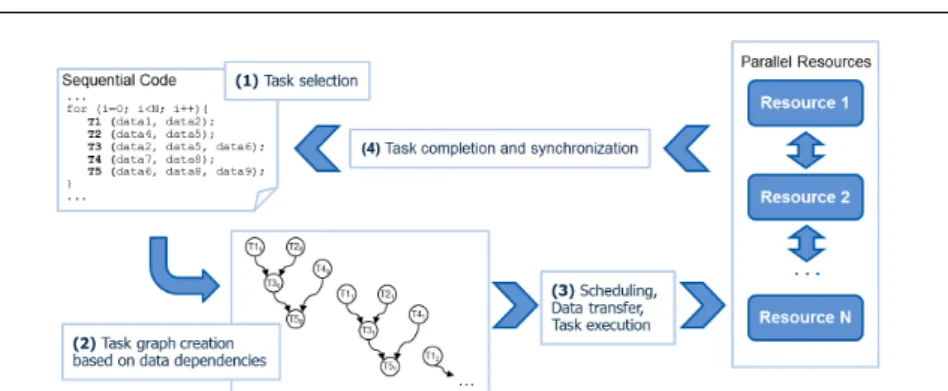
COMP Superscalar (COMPSs) is a task-based programming model which aims to ease the development of parallel applications for distributed infrastructures. Its native language is Java but provides bindings for C/C++ and Python (Py-COMPSs) [32]. The framework is based on the idea that, in order to create paral-lel applications, the programmer does not need to be aware of all the underlying computer infrastructure details and does not need to deal with the intricacies of parallel paradigms. The programmer just needs to specify which are the meth-ods and functions that may be considered tasks and to provide details on the parameters of the tasks. Then, the sequential code is automatically instrumented by the COMPSs runtime to detect the defined tasks and to build a task graph which includes the data dependencies between them, thus producing a workflow of the application at execution time. Besides, COMPSs is responsible for scheduling and executing the application tasks in the available computing nodes as well as handling data dependencies, data locality and transfers.
Finally, thanks to the abstraction layer that COMPSs provides, the same ap-plication can be executed either in Clusters, Grids or Clouds. More details about COMPSs and how to develop parallel applications with COMPSs can be found at the COMPSs website [6].
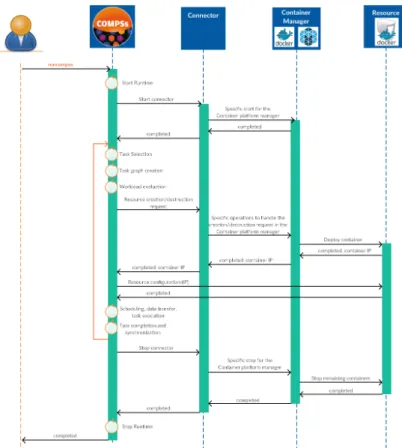
Figure 1 depicts how the COMPSs runtime internally works. When running the code, it detects the invocations of the methods previously defined as tasks. Instead of executing the code of those methods, it creates a node in a task-dependency graph and analyzes the data dependencies between previous tasks. Those tasks
Fig. 1 COMP Superscalar application execution phases
that do not have dependencies are scheduled and executed in the available com-puting resources (Worker nodes), and once a task is completed, the runtime re-moves the dependencies produced by the task data results and synchronizes it if a data access is requested.
COMPSs is used in production at MareNostrum supercomputer and has been used to implement different real world applications, specially in the area of BioIn-formatics and Computational Genomics [10] [13] [17], Big Data analytics [29] and as building block for several scientific cyber-infrastructures [45] [22]. Other exam-ples of applications developed with COMPSs can be found in [7].
3.2 Containers Platforms Overview
Different Containers platforms have been developed during last years. These plat-forms can be organized into three categories. The first category includes full-stack container platforms, which allow building PaaS and IaaS offering based on con-tainer engines (i.e. the Docker framework or Kubernetes [11]) instead of virtual machines. As mentioned before, one of the main advantages of containers is that they provide a lightweight environment customization and isolation between users’ processes. However, platforms of the first category require to run the container engines in privileged mode (root), and this is an important drawback applying containers in shared computational resources like HPC. The second category in-cludes container-based resource managers such as Apache Mesos [36]. Finally, the third group includes containers platforms, such as Singularity [16] or Shifter [15], designed for HPC environments; these platforms are focused on providing cus-tomizable and portable environments which can be used with non-privileged users but without support for I/O and networking virtualization .
The following sections provide more details about the technologies we have selected in each group.
3.2.1 Docker Framework
Docker is an open platform for developing, shipping, and running applications. It provides a way to run applications securely isolated in a container. The difference between Docker and usual VMs is that Docker does not need the extra load of a
hypervisor to run the containers and it uses an efficient read-only layered image system achieving lighter deployments [43]. To improve Docker experience, several services and tools have been created. The relevant ones for this paper are Docker-Swarm, Docker-Compose, and DockerHub.
The first one, Docker-Swarm, is a cluster management tool for Docker. It merges a pool of Docker hosts enabling the deployment of containers in the differ-ent hosts with the same Docker API giving to the user the impression that it has a single, virtual Docker host. Docker-Swarm is in charge of transparently managing the inter-host networking and storage. It also allows defining scheduling policies to manage where the containers must be placed in the cluster.
Docker-Compose is a tool to easily define complex applications which require deploying multiple Docker containers. It provides a simple schema to allow users to define the different containers required by their application. Once the user has defined the application, Docker-Compose is in charge of automatically deploying and configuring the different containers.
Finally, DockerHub is a public cloud-based image registry service which enables users to store and share their application docker images. The Docker framework also offers the Docker-Registry which is an open source service with the same API as DockerHub which can be installed on the provider premises in order to store and share users’ images in a local, private and controlled way. This Docker-registry can be also used as a cache of DockerHub in order to minimize the effect of performance degradations an downtimes of the DockerHub service.
3.2.2 Mesos
Mesos is a resource manager designed to provide efficient resource isolation and sharing across distributed applications. It consists of a master daemon that man-ages agent daemons (slaves) running on each cluster node, and frameworks that run tasks on these agents. The slaves register with the master and offer resources i.e. capacity to run tasks. Mesos uses the concept of frameworks to encapsulate processing engines whose creation is triggered by the schedulers registered in the system. Frameworks reserve resources for the execution of tasks while the master can reallocate resources to frameworks dynamically.
Mesos supports two types of containerizers, the Mesos native containerizer, and the Docker containerizer. Mesos containerizer uses native OS features directly to provide isolation between containers, while Docker containerizer delegates con-tainer management to the Docker engine. Mesos native concon-tainerizer provides in-teroperability with Docker images, thus making possible to reuse the same appli-cation image transparently with regards to the specific Mesos deployment.
3.2.3 Singularity
Singularity is another container engine which focuses on providing users a cus-tomizable, portable and reproducible environment for executing their applications. As other container engines, Singularity is based on images where users have full control to install the required software stack to run their applications (OS, library versions, etc.). Then, it provides the capability to be executed on different host
Operating Systems. The main difference with Docker is that it allows to run con-tainers in a non-privileged user space and to access special host resources such as GPUs, and high-speed networks like Infiniband.
Another important difference with frameworks like Docker or Kubernetes is that Singularity does not tackle shared virtual networking and multi-container orchestration, which has several benefits and drawbacks. On the one hand, it does not introduce a big networking virtualization overhead. On the other hand, services running in containers hosted on the same node share the network interface, hostname, IP, etc. and they can not use the same port. Thus, due to this lack of isolation and orchestration, container engines like Singularity are usually combined with other resource managers or queue systems like SLURM which provide this features at host level. Moreover, Singularity is also capable of working with Docker images, which allows users to run their containerized applications in an HPC environment.
4 Application-Containers integration overview
In the previous sections, we have introduced the different container frameworks highlighting the benefits of using containers for packaging and porting applications in several computing infrastructures. We have also identified some missing features to support transparent and automatic packaging, deployment and execution of distributed applications in container platforms, where the user has to manually perform individual steps to have a distributed application running in a set of containers. In this section, we discuss how to enable those missing features, how we have implemented them for the COMPSs framework and we provide some guidelines in order to reuse the same procedure for other task-based programming models.
Fig. 2 Application container integration use cases
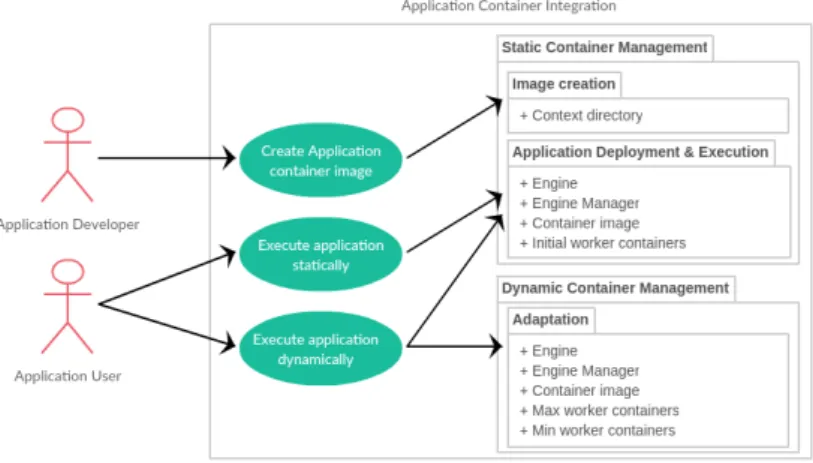
Figure 2 shows an overview of the proposed application-container integration framework and how the different user’s roles interact with it. Due to the
het-erogeneity of the capabilities of the different container platforms, we have split the proposed application-container integration into two generic packages; (i) the Static Container Management, which provides the automatic image creation fea-tures and the application deployment and execution in a static container pool; (ii) the Dynamic Container Management, which provides the adaptation features to integrate the application with container platforms that are then considered as dynamic pools of resource that can be added and removed at execution time. Regarding how the different users interact with the package, once the Applica-tion Developer has completed the applicaApplica-tion implementaApplica-tion, it interacts with the system to create the application container image and to make it available for the Application User. Then, depending on the infrastructure capabilities, the Application User can execute it with a static or dynamic number of containers.
The next subsections provide more details about the proposed packages and how they are used in combination with the COMPSs framework. Although the packages have been implemented on top of COMPSs, the same interactions per-formed by the COMPSs scripts and runtime can be carried out by other program-ming model tools to achieve similar results.
4.1 Static Container Management Integration
The combination of COMPSs with container engines brings several benefits for the developers. On the one side, the COMPSs programming model provides a straightforward methodology to parallelize applications from sequential codes and decoupling the application from the underlying computing infrastructure. On the other side, containers provide an efficient image management and application de-ployment tools which facilitate the packaging and distribution of applications. The integration of both frameworks allows developers to easily port, distribute and scale their applications into parallel distributed computing platforms. As a use case, developers can start from a sequential code, identify the methods which can be defined as tasks and annotate them. With theruncompss command, they can debug the application on a single node. Once the application implementa-tion has been tested in the local environment, developers can proceed with the deployment in a container environment with the runcompss container command. When invoking the command, the application is transparently prepared to run in a container-based infrastructure using as many worker resources it may need.
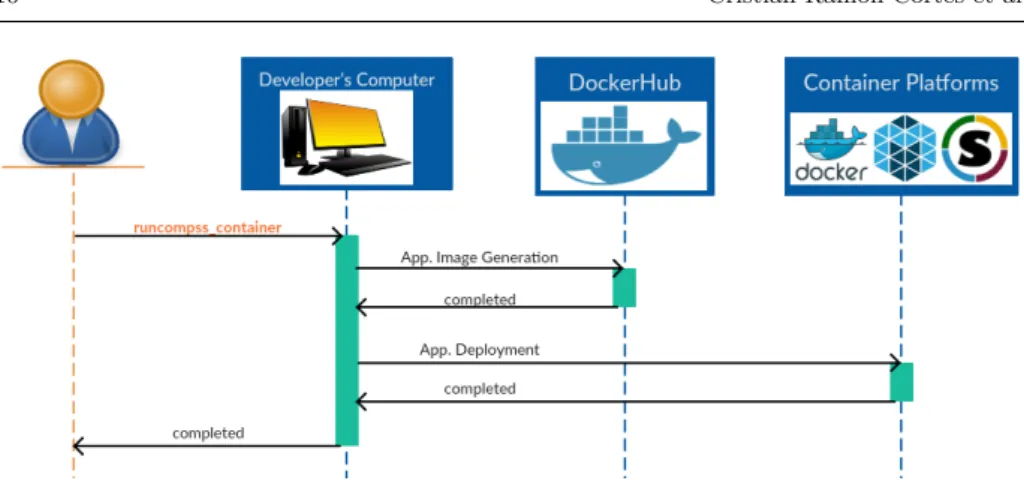
Figure 3 provides an overview of the main actions carried out during the execu-tion of theruncompss container command. This command starts an orchestration process that encapsulates all the required steps to run the application in a container infrastructure that include the creation of the container image of the application and the application execution in the container engines. The first step is done only once for each application, and the second step runs every time an application is executed.
As commented before, the majority of container engines are capable of im-porting, converting or directly running containers with a Docker image format. However, every container uses its own API and deployment model to execute the containers. For this reason, the first part of the process is common to all the container platforms (see Section 5 for further details), and the deployment and execution part depends on the type of container platform we are deploying and
Fig. 3 Integration of COMPSs with containers platforms
running the application into (Sections 5 and 6 describe the details of the different phases for each type of container platform). Notice that, although the steps may vary among the different container platforms, theruncompss container orchestra-tion process abstracts the final user from the underlying container platform.
# Normal e x e c u t i o n runcompss −−c l a s s p a t h =/home/ j o h n /matmul/matmul . j a r matmul . o b j e c t s . Matmul 16 4 # Docker e x e c u t i o n r u n c o m p s s c o n t a i n e r −−e n g i n e=d o c k e r −−e n g i n e−manager = ’ 1 2 9 . 1 1 4 . 1 0 8 . 8 : 4 0 0 0 ’ −−i n i t i a l−worker−c o n t a i n e r s =5 −−c o n t a i n e r i m a g e =’ j o h n 1 2 3 /matmul−example ’ −−c l a s s p a t h =/home/ j o h n /matmul/matmul . j a r matmul . o b j e c t s . Matmul 16 4
Fig. 4 Normal and Container Execution Comparison
From the users’ point of view, the only difference between running the ap-plication on the local machine or in the Docker infrastructure is the submission command. In a normal COMPSs application execution, users have to invoke the runcompss command followed by the application main class and arguments (see Figure 4). This command loads the COMPSs runtime and starts the application execution.
In the case that users want to run the application in a container platform, they have to invoke theruncompss containercommand as depicted in Figure 4, similarly to theruncompss case, but adding some extra arguments to specify the application container image, the container-engine, the engine manager IP address and port, and the number of containers that have to initially deployed as computing re-sources. This command creates the image with the original COMPSs application,
deploys it in the containers infrastructure and executes the application. Note that COMPSs assumes that the container platform is available to deploy the application containers and that the developer’s computer has installed the container platform client to execute the application as well as to create and share the application images across the cluster.
4.2 Dynamic Container Management Integration
One of the main benefits of Cloud computing platforms is elasticity [34] [41]. Users can request more or less resources according to their needs. COMPSs has a built-in adaptation mechanism to dynamically increase or decrease the number of resources during the application’s execution depending on the actual workload. COMPSs estimates the workload by profiling the previous executions of each task, measures the resource creation time, and compares both values to order the creation or the destruction of a resource. Since many container platforms can request and dispose containers, we have extended this mechanism to handle container platforms. To this aim, we have designed a commonConnector API in Java that starts and stops the container engine, and requests the creation or the destruction of a container.
As depicted in Figure 5, the COMPSs runtime keeps the logic of deciding whether to create or destroy a container, and the Connector API abstracts the framework from the underlying container platform. At execution time, COMPSs loads, by reflection, the Connector implementation (that is specific to each con-tainer manager) from its configuration files. During the application’s execution, the Connector may be asked to create or destroy containers depending on the runtime policies and, finally, COMPSs terminates the connector before shutting down the whole framework.
Notice that, although the integration is done with the COMPSs runtime logic, theConnector API is general enough to fit any other framework with adaptation mechanisms. In fact, theConnectorimplementation is used to translate the generic requests to the container platform specificities and is not COMPSs dependent. As stated in Section 6, our work providesConnector implementations for Docker and Mesos that are extensible for other high-level abstraction frameworks.
From the users’ point of view, the COMPSs applications can run in a dis-tributed way on top of a container platform without modifying a single line of code. It is sufficient to modify the COMPSs configuration files by adding the Connector path (provided in the COMPSs installation), the platform manager endpoint, the container image, and the initial, the minimum and the maximum number of containers.
5 Application Container Image creation
As introduced in Section 4, the first step of the static orchestration process includes the creation of the application image, being this a common process for all the container platforms.
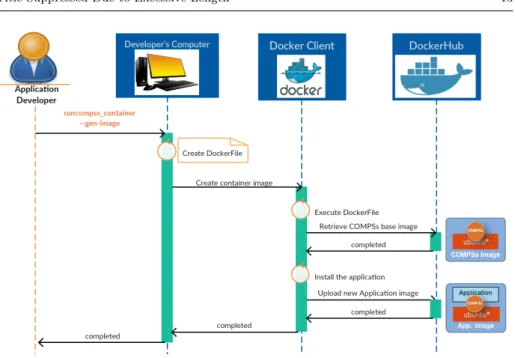
Figure 6 describes the overall workflow to generate a Docker image for a COMPSs application transparently. Notice that this is a generic process that any other framework could use to create an application container image transparently. As an overview, COMPSs creates the application container image and uploads it to DockerHub in order to make it available to whatever container platform. To do so, we have included an utility in COMPSs that creates aDockerFile de-scribing how to create the application Docker image. Specifically, it describes how to install the application context directory (the directory where application files are located) and the required dependencies on top of the COMPSs base image as a separate layer. This COMPSs base image is a public Docker image located at DockerHub which already contains a ready to use COMPSs runtime and its required dependencies. The image creation is performed by executing the Dock-erFile with the Docker client which automatically pulls the COMPSs base image, installs the application on the base image as a new layer and uploads it to the DockerHub.
In this way, different COMPSs applications deployed in Docker share the same COMPSs base layer, and thus, the deployment of a new COMPSs application only requires to download the new application layer. Moreover, the deployment of several instances of the same application on new worker nodes does not require any new installation. So, taking advantage of the Docker layer system, COMPSs can increase the deployment speed and can perform better adaptations.
Fig. 6 Step 1. Image Generation Phase
6 Application Deployment and Execution in container-based frameworks
As introduced in Section 4, the second step of the static orchestration process and the dynamic integration depend on the type of container platform that the user wants to use. In both steps, COMPSs has to create and configure the contain-ers and to execute the application in the different environments. The following paragraphs present how these phases are implemented for the different container platforms.
6.1 COMPSs integration with Docker
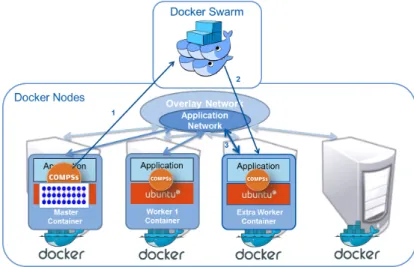
Regarding the static process, Figure 7 depicts how COMPSs orchestrates the de-ployment and execution of an application in the Docker container platform. In this phase, COMPSs defines a Docker-Compose application by creating a docker-compose.yml file which describes a Master container (where to execute the main application) and a set of initial Worker containers (where to execute the tasks). Despite the fact that the containers execute different parts of the application, both type of containers boot the same application image the only difference be-ing the command executed once the container is deployed. In the case of the Master container, it executes the COMPSs runtime that orchestrates the tasks of the application using the deployed Worker containers. On the other side, the Worker containers start a daemon waiting for the messages of the master that specify requests for task executions. Once the application is defined, COMPSs uses Docker-Compose to deploy the containers in the Docker cluster managed by Docker-Swarm. In this phase, an application network is also created across the
Fig. 7 Step 2. Deployment Phase
containers on top of the overlay network which interconnects the Docker hosts, as depicted in Figure 8.
Fig. 8 Integration of COMPSs with Docker at Runtime.
Regarding the dynamic integration, as explained in Section 3.1, the COMPSs runtime detects the application tasks and analyzes data dependencies between them creating a task-dependency graph. With this graph, the runtime knows which tasks can be executed in parallel and manages the workers where to execute the
application tasks. The COMPSs runtime includes a resource manager with adap-tation mechanisms. This means that it continuously estimates if the application requires more resources or if is better to reuse existing ones. This analysis is based on the information of the execution time of the previous runs of the same types of tasks, compared to the expected container deployment time. In the same way, containers can be destroyed by the runtime if the computational load decreases or if their existence does not improve the global performance of the application.
The integration with Docker includes a pluggable Connector implementation which connects the COMPSs resource manager with Docker-Swarm and allows it to deploy or destroy containers according to the decisions taken by the COMPSs runtime. If the runtime decides that an additional container is needed, it contacts the Docker-Swarm manager to request the creation of a container using the ap-plication image and the apap-plication network. Then, the Docker-Swarm manager deploys the extra Worker container, starting the worker daemons and connecting the new container to the application network that exists across the containers. This plug-in is included in the COMPSs base image and is automatically configured by theruncompss container script.
When the application is finished, the results are copied back to the user’s machine, and the running containers are shut down and removed.
The separation of image creation and application execution enables devel-opers with an easy way to distribute their applications and makes other scien-tists able to reproduce the results produced by a COMPSs application. The run-compss container script is used both to create the application image and upload it to the DockerHub repository and then to run the application providing the docker image identifier, the arguments to run the application, the number of containers used as workers and the endpoint of the Docker-swarm as arguments as indicated in Figure 9. # Image g e n e r a t i o n r u n c o m p s s c o n t a i n e r \ −−gen−image \ −−c o n t e x t d i r =/home/ j o h n /matmul/ # E x e c u t i o n r u n c o m p s s c o n t a i n e r \ −−e n g i n e=d o c k e r \ −−e n g i n e−manager = ’ 1 2 9 . 1 1 4 . 1 0 8 . 8 : 4 0 0 0 ’ \ −−i n i t i a l−worker−c o n t a i n e r s =5 \ −−c o n t a i n e r i m a g e =’ j o h n 1 2 3 /matmul−example ’ \ −−c l a s s p a t h =/home/ j o h n /matmul/matmul . j a r \ matmul . o b j e c t s . Matmul 16 4
6.2 COMPSs integration with Apache Mesos
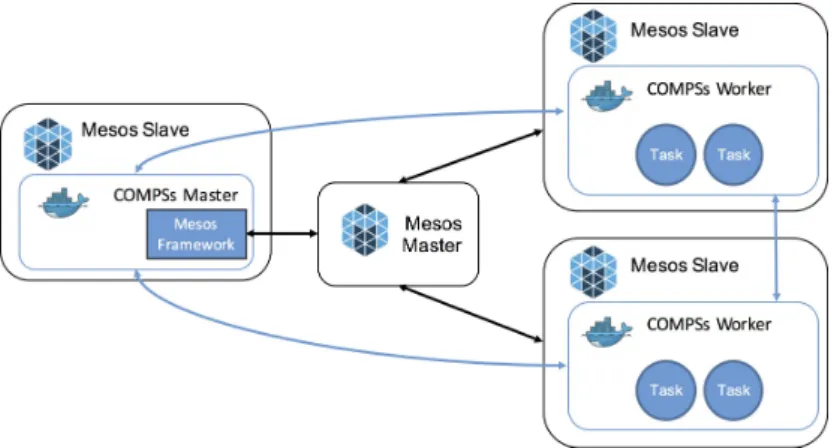
Figure 10 depicts the implementation of COMPSs on top of Mesos. A Framework running on top of Mesos consists of two components: a scheduler and an executor. The scheduler registers with the Mesos master and receives resource offerings from the master. The scheduler decides what to do with resources offered by the master within the framework. The executor is launched on slave nodes and runs framework tasks.
Fig. 10 Integration of COMPSs with Mesos
In the case of COMPSs, the scheduler is integrated with the runtime, and the negotiation of resources is performed through a specific Connector (Mesos Framework in the Figure) that registers a new framework in Mesos. Once the resources are offered to COMPSs, it deploys the workers on the nodes creating a direct connection between the COMPSs master and the workers (blue arrows in the Figure). In this implementation, COMPSs uses the default Mesos executor to spawn the containers.
Then, each task is executed on an available node by the COMPSs runtime. In this way, the behavior of the COMPSs runtime is not changed. As depicted in the Figure, both the COMPSs runtime and the workers are executed in Mesos slaves within Docker containers. The adoption of containers allows easy and transparent deployments of applications, without the need of installing COMPSs and the de-veloped applications in the cluster, and it also enables to configure each container without the need of modifying the base instance. It is worth highlighting again that the integration of Mesos is completely transparent to the application devel-opers who are not requested to provide any information related to the resources in the definition of the COMPSs tasks. To make direct connections, an overlay network must be created on the Mesos cluster.
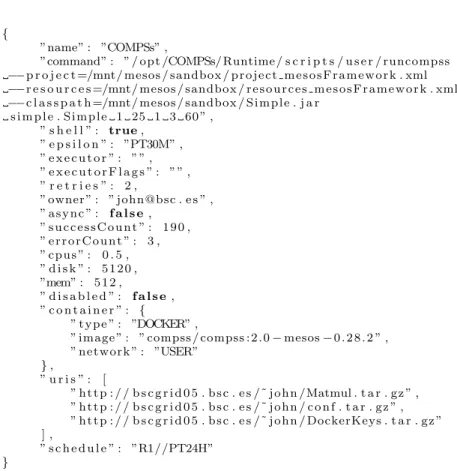
A COMPSs application can be submitted to a Mesos cluster using Chronos [5] passing a JSON file with the description of the command to be executed once the specified container is deployed. The next listing (Figure 11) contains the
descrip-tion of a Simple COMPSs applicadescrip-tion with the definidescrip-tion of the Docker image to be deployed and the URIs of the files to be copied in the sandbox of each worker.
{
”name” : ”COMPSs” ,
”command” : ” / o p t /COMPSs/ Runtime / s c r i p t s / u s e r / runcompss −−p r o j e c t =/mnt/ mesos / sandbox / p r o j e c t m e s o s F r a m e w o r k . xml −−r e s o u r c e s =/mnt/ mesos / sandbox / r e s o u r c e s m e s o s F r a m e w o r k . xml −−c l a s s p a t h =/mnt/ mesos / sandbox / S i m p l e . j a r s i m p l e . S i m p l e 1 25 1 3 60 ” , ” s h e l l ” : true, ” e p s i l o n ” : ”PT30M” , ” e x e c u t o r ” : ” ” , ” e x e c u t o r F l a g s ” : ” ” , ” r e t r i e s ” : 2 , ” owner ” : ” john@bsc . e s ” , ” a s y n c ” : f a l s e, ” s u c c e s s C o u n t ” : 1 9 0 , ” e r r o r C o u n t ” : 3 , ” c p u s ” : 0 . 5 , ” d i s k ” : 5 1 2 0 , ”mem” : 5 1 2 , ” d i s a b l e d ” : f a l s e, ” c o n t a i n e r ” : { ” t y p e ” : ”DOCKER” ,
” image ” : ” compss / compss : 2 . 0−mesos−0 . 2 8 . 2 ” , ” n e t w o r k ” : ”USER” }, ” u r i s ” : [ ” h t t p : / / b s c g r i d 0 5 . b s c . e s /˜ j o h n /Matmul . t a r . g z ” , ” h t t p : / / b s c g r i d 0 5 . b s c . e s /˜ j o h n / c o n f . t a r . g z ” , ” h t t p : / / b s c g r i d 0 5 . b s c . e s /˜ j o h n / DockerKeys . t a r . g z ” ] , ” s c h e d u l e ” : ”R1//PT24H” }
Fig. 11 Definition of COMPSs application execution with Chronos
This example shows an interesting feature of COMPSs to deploy the applica-tion at execuapplica-tion time dynamically. The user has to provide the package of the COMPSs application in a .tar.gz file and list it in the URIs section of the JSON document; Chronos will copy it in the sandbox of the container of the COMPSs runtime; the COMPSs configuration files also need to be provided as a separate file. The application package will be then transferred to the worker containers by the runtime. This mechanism is particularly useful for testing purposes, al-lowing to use the COMPSs base Docker image without creating a new layer and uploading it in the Hub; leaving this step only for the final version of the applica-tion, as explained in the previous section. In this work, we used the same image (COMPSs+Application) also for the Mesos evaluation.
6.3 COMPSs integration with Singularity
The case of singularity is significantly different from the case of Docker or Mesos because the Singularity framework does not provide networking virtualization. Singularity is mainly aimed at HPC, so it is normally used in combination with Queue and Resource managers. Due to this fact, Singularity can only be integrated with COMPSs at the static container management level.
In addition to theruncompsscommand, COMPSs also provides anenqueue compss command to interact with queue managers (such as SLURM, LSF, etc.) to trans-parently submit and execute a COMPSs application in a set of nodes of an HPC cluster.
To support the execution of COMPSs in HPC clusters with Singularity, the container imageflag is introduced to allow users to indicate that the system must execute the application with Singularity and to specify the id of the image that contains the application, which has been generated as explained in Section 5. The differences between running the application with a normal cluster mode or with Singularity are shown in Figure 12.
# Normal c l u s t e r e x e c u t i o n e n q u e u e c o m p s s \ −−e x e c t i m e =30 \ −−num nodes=5 \ −−c l a s s p a t h =/ c l u s t e r /home/ j o h n /matmul/matmul . j a r \ matmul . o b j e c t s . Matmul 16 4 # S i n g u l a r i t y c l u s t e r e x e c u t i o n e n q u e u e c o m p s s \ −−e x e c t i m e =30 \ −−num nodes=5 \ −−c o n t a i n e r i m a g e =’ j o h n 1 2 3 /matmul−example ’ \ −−c l a s s p a t h =/home/ j o h n /matmul/matmul . j a r \ matmul . o b j e c t s . Matmul 16 4
Fig. 12 Comparison of submission of COMPSs for a normal cluster and Singularity cluster
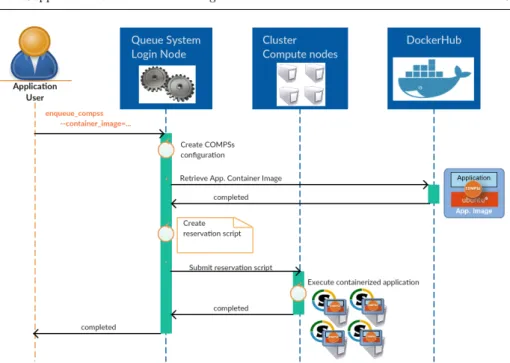
Figure 13 shows how COMPSs interacts with the HPC system with Singularity to deploy and execute the containerized application.
The enqueue compss command generates a submission script which generates the queue system directives to perform the reservation of the nodes, and the con-figuration of the COMPSs runtime to use the assigned resources. Next, it spawns the COMPSs Master and Worker processes in the different nodes.
When the–container imageflag is activated it imports the image from Docker-Hub and creates a Singularity image by invoking thesingularity import< container-image >. Then, the command generates the same queue system directives and COMPSs runtime configuration files. However, instead of starting directly the COMPSs Master and Worker processes, it starts a container in each node that runs the COMPSs Master or Worker process according to the node configuration.
Fig. 13 Application Deployment with Singularity
7 Experimentation
We have defined two sets of experiments to evaluate the integration of COMPSs with the different container platforms. The first set evaluates the deploying time and the adaptation capabilities. On the other hand, the second set evaluates the performance of running two benchmark applications on top of the different con-tainer platforms in comparison to normal executions in bare metal, in a Cloud Infrastructure, or in an HPC cluster. This second set aims at evaluating if there is any performance degradation caused by the use of containers.
7.1 Testbed set-up
Experiments have been done using different infrastructures depending on the type of container platform to be evaluated. The evaluation with Singularity has been done in the MareNostrum III supercomputer [12] because it focuses on the sup-port to HPC environments. Each MareNostrum node is composed of 2x Intel SandyBridge-EP E5-2670/1600 20M 8-core at 2.6 GHz with 8x16 GB DDR3-1600 DIMMS of RAM.
For the Docker and Mesos experiments, we have used the Chameleon Cloud infrastructure [2]. Chameleon is an NSF funded project which provides a config-urable experimental environment for large-scale cloud research. The Chameleon Cloud provides two types of infrastructure services: a traditional cloud managed by OpenStack over KVM and a bare-metal reconfiguration, where the user can reserve a set of bare-metal nodes flavored with the image that the user selects.
(a) Bare-metal Configuration
(b) Docker-Swarm Configuration
(c) KVM-Openstack Configuration
(d) Mesos Configuration
For the Docker evaluation, we have set up three different environments as depicted in Figure 14: Bare-metal, Docker-Cluster, and KVM-OpenStack. The first scenario consists of a set of bare-metal flavored nodes where we directly run COMPSs applications. The second scenario consists of a Docker-Swarm cluster built on top of a set of bare-metal instances. In this case, each bare-metal node hosts a Docker Engine, which deploys the COMPSs applications’ containers. Fi-nally, the third scenario consists of a Cloud where OpenStack manages a set of nodes virtualized by KVM. Each scenario uses up to 9 bare-metal nodes provided by Chameleon with exactly the same configuration (2 x Intel Xeon CPU E5-2670 v3 with 12 cores each and 128GB of RAM). When running a COMPSs applica-tion one node, container or VM, runs as a master (which manages the applicaapplica-tion execution) while other nodes act as workers (which execute the application tasks). In all the environments, nodes, containers, and VMs are defined to use the whole physical node (24 VCPUs and 128 GB of RAM) and deploy the same software stack (Ubuntu-14.04 with COMPSs installed). However, depending on the envi-ronment the image size varies. The qcow2 image size for cloud envienvi-ronment is about 1GB and the compressed docker image size is about 800MB. Regarding the OpenStack services to manage images and create instances, we have used the installation provided by Chameleon described in [3].
For the Mesos evaluation, we have set-up an additional environment where we have installed Mesos on top of a set of bare-metal nodes. In particular, we have deployed a Mesos cluster using the DC/OS platform that includes a virtual network feature that provides an IP-per-Container for Mesos and Docker containers. These virtual networks allow containers launched through the Docker Containerizer to co-exist on the same IP network, allocating each container its own unique IP address. This is a requirement for COMPSs because each worker is deployed in a container and the COMPSs runtime needs to connect to each worker directly. As in the Docker evaluation, we have deployed the cluster on bare-metal instances. Specifically, we have used one node as Mesos Master and eight Mesos Slaves, each one using the whole compute node and deploying the same image than the Docker tests.
7.2 Benchmark Applications
The experimentation includes the deployment and execution of two benchmark ap-plications in the different environments. The first application consists of a blocks multiplication of two big matrices (Matmul). This application presents a large number of data dependencies between tasks. Specifically, each matrix of the ex-periment contains 228 floating-point elements (214 x 214). In order to share the workload, they have been divided into 256 square blocks (16 x 16), each of them containing 220 elements. It is quite I/O intensive because the data dependencies between tasks require transferring the matrix blocks through the network as well as some disk utilization.
In contrast, the second experiment is an embarrassingly parallel application without data dependencies. This benchmark simply performs a series of trigono-metric computations in parallel without exchanging any data. In this case, the I/O utilization is mainly used by the messages exchanged by COMPSs to run the parallel computations.
All the measured values shown in the following subsections have been obtained by repeating the experiments 5 times and calculating the mean of the results. We observed that the variance between repetitions was not significant for the objective of this paper, which is aimed at evaluating how the COMPSs runtime behaves in different deployments and how the overhead of the specific adopted technology impacts the overall application execution, instead of obtaining very precise measurements.
7.3 Docker Experiments’ Results 7.3.1 Deployment evaluation
In the case of the deployment evaluation, we have measured the time to perform the deployment of the applications into the considered environments in differ-ent scenarios (when the image is already in the infrastructure, or not, etc.). The measurements for the KVM-OpenStack and Docker scenarios are summarized in Table 2. Since both benchmark applications have the same size and the deploy-ment times of the Embarrassingly Parallel benchmark are very similar, we only present the Matrix Multiplication times. Moreover, for this experiment, we have not considered the bare metal scenario since the computing nodes are already con-figured and the deployment of the COMPSs framework and the applications must be performed manually copying and installing the required files on all the nodes.
Cloud (KVM/OpenStack) Docker
Phase Action Time Action Time
w/o Image Image Cached w/o Images w Ubuntu w COMPSs w App.
Build
Base VM deployment 33.58 s. N/A Image Creation 73.87 s. 68.88 s. 15.48 s. N/A App. Installation 15.45 s. N/A
Image upload 8.66 s. N/A
Image Snapshot 60.36 s. N/A
Total Construction 109.39 s. N/A 82.53 s. 77.54 s. 24.14 s. N/A
Deployment VM deployment 83.68 s. 18.18 s. Image Download 12.39 s. N/A
VM boot 15.09 s. Container deployment 4.75 s.
Total Deployment 98.77 s. 33.27 s. 17.28 s. 4.75 s.
Total Construction & Deployment 208.16 s. 33.27 s. 99.67 s. 94.68 s. 41.28 s. 4.75 s.
Table 2 Application Deployment
In the construction phase, the creation of a customized image includes the deployment of a VM with the COMPSs base image, the time to install the appli-cation and to create the snapshot which is the most expensive phase and whose duration depends on the image size. In this case, the creation time takes 109 sec-onds. In contrast, the creation of the application in Docker depends on which layer we already have in the Docker infrastructure because the new image is a layer on top of previous ones. In this case, the Docker image creation takes from 24 seconds, when the COMPSs base image is in the Docker engines, up to 82 seconds when no images are available.
Then, at deployment phase, both cases (Cloud and Docker) are quite similar if the node has the image locally cached or must be downloaded from a central image store. In the best case for the cloud environment, the deployment and boot are
completed in around 30 seconds. However, if the image must be downloaded the deployment can take up to around 98 seconds. So the total creation and deployment time in the case of a Cloud can take from 33 seconds up to 208 seconds. In contrast, the container deployment in the best case takes around 5 seconds, when all the layers are in the Docker engines, while in the worst case it takes 17 seconds. So, the total creation and deployment time in Docker can take from 5 seconds up to 99 seconds, significantly improving the deployment. This is very relevant when we want to adapt the number of resources to the computational load, as described in Section 4. The faster the resource deployment is, the finer the adjustment of the resources can be done, which implies a faster application execution and reducing the underutilization of computational resources.
7.3.2 Performance evaluation
To evaluate the performance, we have measured the execution time of both ap-plications using a different number of nodes in the different environments. The values of the measurements for the Embarrassingly Parallel benchmark are de-picted in Figures 15 and 16, and the values of the measurements for the Matrix Multiplication are depicted in Figures 17 and 18.
Fig. 15 Scalability evaluation of the Embarrassingly Parallel application (without data de-pendencies)
In the case of the Embarrassingly Parallel benchmark, all are performing very similarly (overheads are between 1 and 10%). This is because the overhead intro-duced by Docker and KVM in terms of CPU and memory management is relatively small. The difference is basically due to the multi-host networking used by the run-time to send the messages to execute tasks in the workers remotely. The default overlay network of Docker is performing worse than thebridge network of KVM. The relative overhead increases with the number of nodes used, mainly because the computation time is reduced due to the increased parallelism available, but the number of transfers required to run the tasks is still the same because the number of tasks is the same.
Fig. 16 Overhead evaluation of the Embarrassingly Parallel application (without data depen-dencies) with respect to the bare-metal
Fig. 17 Scalability evaluation of the Matrix Multiplication (with data dependencies)
Different results can be observed in the Matrix Multiplication case. This appli-cation makes use of disk and network I/O in order to transfer and load the matrix blocks required to compute the partial multiplications. In this case, we can see that Docker and bare-metal are performing similarly in this case of a single node, and KVM is performing a bit slower than Bare-metal (around 14%). This is be-cause KVM has more overhead when managing disk I/O than Docker, as observed in previous comparisons [33]. However, when we increase the distribution of the computation (2, 4, and 8 nodes), the computation and the disk I/O overhead is also distributed across the nodes, and the networking usage is increased because the more resources we have, the more matrix blocks transfers are required. So, the multi-host networking overhead increases and becomes the most important source of overhead. For two nodes, the overhead is almost the same in KVM and Docker cases and for four and eight nodes, KVM performing better than Docker.
Fig. 18 Overhead evaluation of the Matrix Multiplication (with data dependencies) with respect to the bare-metal
To verify this assumption, we have performed a small network performance experiment. In the same infrastructure than previous tests, we have transferred a file of 1.2GB. First, between two bare-metal nodes, then between two VMs deployed with OpenStack/KVM and finally, between two Docker containers using the overlay network. Results of this experiment are summarized in Table 3, where we can see the networking overhead in the Docker overlay network is significantly bigger than other approaches.
Scenario Tranfer Time (s)
Baremetal 6.54
KVM/OpenStack 6.97
Docker Overlay 8.50
Table 3 Networking experiment
7.3.3 Adaptation evaluation
To validate how the deployment time influences the adaptation of the application execution, we have executed the same Matrix Multiplication without any initial worker container in order to see how the runtime adapts the number of resources to the application load with different deployment times.
Figure 19 shows the execution time, and the number of VM/Containers created during the application execution in the Docker cluster and the OpenStack/KVM cloud environments. In both environments, we have run the same application twice. In the first run, the images were not stored in the computing nodes so, in both envi-ronments, the images had to be downloaded from the DockerHub or the OpenStack image repository. In the second run, images were already cached in the computing nodes, so the total deployment time only considers the deployment and boot times
Fig. 19 Deployment time effect in the Matrix Multiplication resource adaptation
of VMs or containers. In both cases, the Docker scenario exhibits faster adapta-tion because the runtime detects earlier that having extra resources speeds up the execution since the resources are available earlier for execution.
7.4 Mesos Experiments’ Results 7.4.1 Deployment evaluation
Since we are using the same image as in the Docker experiments, we have not evaluated the image construction phase. Moreover, for the deployment phase, we used the Mesos default Docker executor to spawn the containers in the slave nodes obtaining the same times, with no significant overhead compared to the Docker experiments listed in Table 2.
7.4.2 Performance evaluation
To evaluate the performance of the COMPSs extensions to support Mesos, we have measured the execution time of the Matrix Multiplication application using a different number of nodes.
Figure 20 depicts the average values of the Mesos experiments compared to the average values of Docker that were presented in the previous subsection. Notice that the computation times are higher than in all the previous experiments still providing a good scalability. Looking at the overhead figure, it can be argued that the overhead is caused by the heavy usage of the overlay network and of the disk I/O to transfer the blocks of the matrix. In particular, we had to deploy a DC/OS virtual network for Mesosphere that adds network agents in each node to
(a) Scalability
(b) Overhead with respect of bare-metal
Fig. 20 Matrix Multiplication application evaluation in Mesos
enable the connections across the containers. Anyway, the results demonstrate that the COMPSs runtime properly adapts the tasks distribution to the availability of resources and benefits from the resources abstraction provided by Mesos.
As future work, we aim to continue improving the Mesos implementation for COMPSs also looking at solutions to reduce the overhead.
7.5 Singularity Experiments’ Results
Similar experiments have been performed to evaluate the integration of COMPSs with Singularity. In this case, we have not evaluated the adaptation since Sin-gularity is usually combined with other resource managers or queue systems like SLURM.
7.5.1 Deployment evaluation
In the case of container deployment, Table 4 shows the time to deploy a Singularity container in different scenarios, and it is compared with the Docker case.
The application image construction phase is the same than the Docker scenarios because Singularity can import Docker images. However, to run the application
Singularity Docker
Phase Action Time Action Time
w/o Image Image Cached w/o Images w Ubuntu w COMPSs w App.
Deployment Image import 79.80 s. N/A Image Download 75.68 s. 63.47 s. 17.35 s. N/A
Container deployment 0.45 s. Container deployment 4.75 s.
Total Deployment 80.25 s. 0.45 s. 80.43 s. 68.22 s. 22.10 s. 4.75 s.
Table 4 Application Deployment with Singularity
in Singularity containers, the Docker image of the application must be imported and converted to Singularity as explained in Section 6.3. This process includes the download of the application image and bootstraps the Docker image in a Singularity image. The main drawback of this conversion is that Singularity does not cache the previously downloaded layers. So, it can not take advantage of the layered-based feature of the Docker images to reuse the already cached layers and, every time we need to convert an application image because it is not in the compute cluster, Singularity has to download all the application image layers. In contrast, the deployment of a container once the image has been converted is considerably faster than Docker.
7.5.2 Performance evaluation
In this case, we have executed the Matrix Multiplication benchmark in the MareNos-trum supercomputer with Singularity and without it. Figure 21 shows the com-parison of the average execution time in both configurations. We can see that both runs perform similarly and the overhead at runtime is very low.
8 Conclusion and Future Work
In this paper, we have presented a methodology to integrate the different capa-bilities of the container platforms, such as Docker, with task-based parallel pro-gramming models, such as COMP Superscalar (COMPSs). The combination of programming models with container platforms brings several benefits for devel-opers. For instance the COMPSs programming model provides a straightforward methodology to parallelize applications from sequential codes and decoupling the application from the underlying computing infrastructure. On the other side, con-tainers provide an efficient image management and application deployment tools which facilitate the packaging and distribution of applications. So the integration of both frameworks enables developers to easily, port, distribute and scale their applications to parallel distributed computing platforms.
The proposed Application-Containers integration is mainly done in two steps. The first step focuses on the creation of a Docker image which includes the tion software and the programming model runtime. After the creation, the applica-tion image is uploaded to the DockerHub repository to make it available to other users. The second step implements a mechanism to orchestrate the deployment and execution of the application in the container platforms. This orchestration is mainly achieved by two packages: i) Static Container Management which uses con-tainer platforms to deploy and execute applications in a static resource pool and ii) Dynamic Container Management which implements the resource adaptation mechanisms to execute applications in a dynamic pool of resources.
A prototype of the proposed application-container integration frameworks has been implemented on top of COMPSs and three different container platforms (Docker, Singularity and Mesos) which are representatives of the different scenarios where containers can be applied. For each implementation, we have evaluated how the system behaves in the application building and deployment phases as well as the overhead introduced at execution in comparison to other alternatives such as bare-metal and KVM/OpenStack cloud.
As result of this evaluation, we have seen that for the integration of COMPSs with the Docker framework, the application execution performs similarly to bare-metal and KVM for applications with small data dependencies. However, the draw-back of the Docker framework implementation appears with the intensive usage of multi-host networking. In this situation, Docker has a bigger overhead than KVM. Regarding the deployment, we have seen that the time to deploy containers is reduced significantly compared with VM deployment, thus enabling the COMPSs runtime to better adapt the resources to the computational load, creating more containers when a large parallel region is reached and destroying containers when a sequential or small parallel region is reached.
In the Mesos integration case, the experiments show that COMPSs keeps the scalability in the execution of the applications but exhibiting a bigger overhead than in the Docker-Swarm implementation. Nevertheless, the adoption of Mesos is very convenient because it makes completely transparent the deployment phase saving the user to deal with intricacies of interacting directly with Docker.
Finally, in the case of a container platform for HPC (e.g. Singularity or Shifter), we have extended the integration of COMPSs with Cluster’s Resource and Queue Managers to support the deployment and execution of containerized application. The experimentation shows that the execution overhead is extremely low, and we
have not detected the same scalability issues in the container networking. This is mainly because Singularity does not virtualize I/O and uses the host resources directly. As a consequence, it always requires working in coordination with a re-source manager which is in charge to manage the way the cluster users use the shared resources.
8.1 Future Work
As future work, we plan to evaluate experimental alternatives for Docker multi-host networking [9] to evaluate if the COMPSs with Docker implementation can perform better than KVM in all situations. For what relates to the Mesos support, we plan to perform bigger tests to evaluate the scalability, to test the adaptation capabilities with dynamically added slave nodes, and to analyze the networking issues to understand the source of overhead.
Acknowledgment
This work is partly supported by the Spanish Government through Programa Severo Ochoa (SEV-2015-0493), by the Spanish Ministry of Science and Tech-nology through TIN2015-65316 project, by the Generalitat de Catalunya un-der contracts 2014-SGR-1051 and 2014-SGR-1272, and by the European Union through the Horizon 2020 research and innovation programme under grant 690116 (EUBra-BIGSEA Project). Results presented in this paper were obtained using the Chameleon testbed supported by the National Science Foundation.
References
1. Advanced Multi-layered unification filesystem. Web page at https://aufs.sourceforge.net/ ((Date of last access: 11th April, 2017))
2. Chameleon Cloud Project. Web page at https://www.chameleoncloud.org ((Date of last access: 11th April, 2017))
3. Chameleon Cloud Project. Web page at https://www.chameleoncloud.org/about/hardware-description/ ((Date of last access: 11th April, 2017))
4. Chef. Web page at https://www.chef.io/ ((Date of last access: 11th April, 2017)) 5. Chronos Scheduler for Mesos. Web page at https://mesos.github.io/chronos/ ((Date of
last access: 11th April, 2017))
6. COMP Superscalar . Web page at http://compss.bsc.es/ ((Date of last access: 11th April, 2017))
7. COMPSs Application Repository. Web page at http://compss.bsc.es/projects/bar ((Date of last access: 11th April, 2017))
8. Docker. Web page at https://www.docker.com/ ((Date of last access: 11th April, 2017)) 9. Docker Plug-ins. Web page at https://docs.docker.com/engine/extend/legacy plugins/
((Date of last access: 11th April, 2017))
10. GUIDANCE: An Integrated Framework for Large-scale Genome and Phenome-Wide Asso-ciation Studies on Parallel Computing Platforms. Web page at http://cg.bsc.es/guidance/ ((Date of last access: 11th April, 2017))
11. Kubernetes. Web page at https://kubernetes.io/ ((Date of last access: 11th April, 2017)) 12. MareNostrum supercomputer. Web page at https://www.bsc.es/innovation-and-services/supercomputers-and-facilities/marenostrum ((Date of last access: 11th April, 2017))
13. Multiscale Genomics Project. Web page at https://www.multiscalegenomics.eu/ ((Date of last access: 11th April, 2017))
14. Puppet. Web page at https://puppet.com/ ((Date of last access: 11th April, 2017)) 15. Shifter. Web page at
http://www.nersc.gov/research-and-development/user-defined-images/ ((Date of last access: 11th April, 2017))
16. Singularity. Web page at http://singularity.lbl.gov/ ((Date of last access: 11th April, 2017))
17. transPLANT Project. Web page at http://www.transplantdb.eu/ ((Date of last access: 11th April, 2017))
18. VM Ware . Web page at http://www.vmware.com/ ((Date of last access: 11th April, 2017))
19. Cloud-init . Web page at https://launchpad.net/cloud-init ((Date of last access: 15th November, 2016))
20. Nova-Docker driver for OpenStack . Web page at https://github.com/openstack/nova-docker ((Date of last access: 15th November, 2016))
21. OneDock: Docker driver for Open Nebula . Web page at https://github.com/indigo-dc/onedock/ ((Date of last access: 15th November, 2016))
22. Amaral, R., Badia, R.M., Blanquer, I., Braga-Neto, R., Candela, L., Castelli, D., Flann, C., De Giovanni, R., Gray, W.A., Jones, A., Lezzi, D., Pagano, P., Perez-Canhos, V., Quevedo, F., Rafanell, R., Rebello, V., Sousa-Baena, M.S., Torres, E.: Supporting bio-diversity studies with the eubrazilopenbio hybrid data infrastructure. Concurrency and Computation: Practice and Experience27(2), 376–394 (2015). DOI 10.1002/cpe.3238. URL http://dx.doi.org/10.1002/cpe.3238
23. Anton, V., Ramon-Cortes, C., Ejarque, J., Badia, R.M.: Transparent execution of task-based parallel applications in docker with comp superscalar. pp. 463–467. IEEE (2017). URL https://doi.org/10.1109/PDP.2017.26
24. Armbrust, M., Fox, A., Griffith, R., Joseph, A., Katz, R., Konwinski, A., Lee, G., Patter-son, D., Rabkin, A., Stoica, I., et al.: Above the clouds: A berkeley view of cloud computing. EECS Department, University of California, Berkeley, Tech. Rep. UCB/EECS-2009-28 (2009)
25. Armstrong, D., Espling, D., Tordsson, J., Djemame, K., Elmroth, E.: Contextualization: dynamic configuration of virtual machines. Journal of Cloud Computing4(1), 1 (2015) 26. Badia, R.M., Conejero, J., Diaz, C., Ejarque, J., Lezzi, D., Lordan, F., Ramon-Cortes, C.,
Sirvent, R.: Comp superscalar, an interoperable programming framework. SoftwareX3, 32–36 (2015). URL http://dx.doi.org/10.1016/j.softx.2015.10.004
27. Barham, P., Dragovic, B., Fraser, K., Hand, S., Harris, T., Ho, A., Neugebauer, R., Pratt, I., Warfield, A.: Xen and the art of virtualization. In: ACM SIGOPS Operating Systems Review, vol. 37, pp. 164–177. ACM (2003)
28. Bruneo, D., Fritz, T., Keidar-Barner, S., Leitner, P., Longo, F., Marquezan, C., Metzger, A., Pohl, K., Puliafito, A., Raz, D., et al.: Cloudwave: Where adaptive cloud management meets devops. In: 2014 IEEE Symposium on Computers and Communications (ISCC), pp. 1–6. IEEE (2014)
29. Conejero, J., Corella, S., Badia, R.M., Labarta, J.: Task-based programming in compss to converge from hpc to big data. The International Journal of High Performance Com-puting Applications0(0), 1094342017701,278 (0). DOI 10.1177/1094342017701278. URL http://dx.doi.org/10.1177/1094342017701278
30. Di Tommaso, P., Palumbo, E., Chatzou, M., Prieto, P., Heuer, M.L., Notredame, C.: The impact of Docker containers on the performance of ge-nomic pipelines. PeerJ 3, e1273 (2015). DOI 10.7717/peerj.1273. URL http://www.ncbi.nlm.nih.gov/pmc/articles/PMC4586803/
31. Ejarque, J., Sulistio, A., Lordan, F., Gilet, P., Sirvent, R., Badia, R.M.: Service construc-tion tools for easy cloud deployment. In: 7th IBERIAN Grid Infrastructure Conference Proceedings, p. 119
32. Enric Tejedor Rosa M. Badia, J.L.e.a.: Pycompss: Parallel computational workflows in python. The International Journal of High Performance Computing Applications (IJH-PCA)31, 66–82 (2017). URL http://dx.doi.org/10.1177/1094342015594678
33. Felter, W., Ferreira, A., Rajamony, R., Rubio, J.: An updated performance comparison of virtual machines and linux containers. In: Performance Analysis of Systems and Software (ISPASS), 2015 IEEE International Symposium On, pp. 171–172. IEEE (2015)