Weir, G.R.S. and Zonidis, N. (2005) Desktop security as a three-dimensional
problem. KMITL Science and Technology Journal, 5 (1). pp. 292-302.
ISSN 1905-2367
http://eprints.cdlr.strath.ac.uk/2
742
/
This is an author-produced version of a paper published in
KMITL Science
and Technology Journal
. This version has been peer-reviewed, but does
not include the final publisher proof corrections, published layout, or pagination.
Strathprints is designed to allow users to access the research
output of the University of Strathclyde. Copyright © and Moral
Rights for the papers on this site are retained by the individual
authors and/or other copyright owners. Users may download
and/or print one copy of any article(s) in Strathprints to facilitate
their private study or for non-commercial research. You may not
engage in further distribution of the material or use it for any
profitmaking activities or any commercial gain. You may freely
distribute the url (
http://eprints.cdlr.strath.ac.uk
) of the Strathprints
website.
1
DESKTOP SECURITY AS A THREE-DIMENSIONAL
PROBLEM
George R S Weir* & Nikolaos Zonidis
Department of Computer and Information Sciences University of Strathclyde, Glasgow G1 1XH
UK
ABSTRACT
In this paper we argue against viewing computer desktop security solely as a technical issue. Instead, we propose a perspective that combines three related dimensions: technical infrastructure, usability and user engagement. In this light, we suggest that a viable approach to desktop security should embrace these three key dimensions of the end-user context. An example desktop application is described that has been engineered to embody these dimensions in support of the desktop user.
KEYWORDS:
Desktop security, security applications, usability, user engagement.
2
1.
INTRODUCTION
Despite the reasonable view that end-users play a vital role in establishing and maintaining
desktop security, the major focus of most security texts falls upon technical aspects such as
perimeter defences, firewalls, intrusion detection, system vulnerabilities, and security exploits.
Along the way, we commonly meet issues such as malware, public key encryption, privacy
enhanced email, secure sockets layer and virtual private networks. For instance, such topics
form the bulk of Bishop’s ‘Computer Security: Art and Science’ [1], which runs to over one
thousand pages. Notably, Pfleeger’s ‘Security in Computing’ [2], moves straight from an
introductory chapter entitled ‘Is there a security problem in computing?’ to a second chapter
entitled ‘Basic Encryption and Decryption’. Encryption engages a further two chapters in
Pfleeger’s text before we meet malware, operating system issues, database security and
security in a distributed environment.
This focus on technical aspects is evident across many publications, whether their
purpose is reference, education or practice and we can readily understand this focus. Security
is analogous to health. Many ailments can be cured by use of appropriate remedies but there is
considerable benefit in adopting preventative measures. The common emphasis on perimeter
security reasonably identifies the organisation’s boundary as a locus of attack and seeks to
defend against potential hazards by installing strong defences. Since network-based attacks
are technical in nature, the defensive measures are accordingly software and hardware based;
hence, the perceived importance of firewalls, intrusion detection and content filtering.
Even where the locus of security concern moves from network perimeter to computer
desktop, we generally find an emphasis upon system configuration and software applications.
The following advice on security improvement is given by the Computer Emergency
Response Team (CERT): ‘Securing desktop workstations should be a significant part of your
network and information-security strategy because of the sensitive information often stored on
3
can be avoided if the workstations and network are appropriately configured. Default
hardware and software configurations, however, are set by vendors who tend to emphasize
features and functions more than security. Since vendors are not aware of your security needs,
you must configure new workstations to reflect your security requirements and reconfigure
them as your requirements change’ [3].
The application of such advice is evident, for example, in the ‘four basic steps’ to
desktop security promoted by University College Dublin: (1). Create a strong password for all
accounts on your computer; (2). Ensure the anti-virus software is loaded onto your machine;
(3). Accept the Auto Updates from Microsoft or your software supplier; (4). Visit the UCD
Desktop Security page regularly [4]. Note how these ‘basic steps’ focus on system
configuration and software updates.
Such narrow focus is itself risky. The degree of success for any technical solution is
affected by its installation and subsequent management. These are subject to the reliability and
understanding of security administrators or end-users. Furthermore, many organisations learn
to their cost that local users are a greater source of security issues than external threats. While
clearly critical as determinants of security success, the compliance and performance of local
users (including administrators) is not a technical consideration. Nor does control of factors
lend itself to technical solution.
A final example emphasises the vulnerability of technical measures to user
perturbation. Individual users may deploy personal firewalls as a desktop protection against
intrusion and other exploits. In the absence of full comprehension, users are often innocently
guilty of subverting such security measures. Figure 1 illustrates that a user’s desktop firewall
facility has been disabled. The firewall was intentionally switched off by the user in order to
print a document to a local network printer. By default the required network print
communication was blocked by the personal firewall. After printing, the user re-enabled the
4
Figure 1 Firewall turned off to facilitate local network printing
Most organisations recognise the importance of user participation in security matters and this
is often reflected in the establishment of company security policies and conditions of use.
Such non-technical measures aim to engage the social and personal involvement of the local
user community as a component in network and computer security.
An over-reliance on technical solutions may lead to a false confidence in local security
measures, especially if individual users presume that all aspects of security are solely
addressed at the network level by security administrators. In contrast, we propose that a
balanced approach to desktop security requires not only software and hardware solutions, but
needs equal attention to user engagement. Finally, any end-user facilities must be easily
accommodated by the users themselves. In consequence, this broader perspective embraces
security from three aspects: (i) technical infrastructure, (ii) usability; and (iii) user
engagement. We refer to this combination as three-dimensional desktop security.
2.
SECURITY DIMENSIONS
The idea of a multi-dimensional, multi-faceted or multi-layered approach to security is not
new. Several authors rail against overly narrow views of security requirements, e.g. ‘a
one-dimensional security approach is no longer adequate; today, a multione-dimensional approach is
mandatory to control and monitor the ever more-sophisticated network threats’ [5, p. 16] and
5
adequate. These approaches can create a false sense of security and create problems as they
attempt to address’ [6, p. 35].
This apparent agreement conceals differences on the nature of the important security
dimensions, facets or layers. For instance, Avolio (op. cit.) contrasts ‘layer,
single-dimensional security’ with multi-layer, single single-dimensional security’. In his terms, a security
layer, such as a firewall, affords a protective measure against security threats. Multiple layers
can be established by embedding further protective measures ‘behind’ the initial layer. For
example, an internal sub-network may be separated by an additional internal firewall from the
parent network which is in turn protected by a firewall from the external world. Relative to the
external world, the sub-network has a multi-layered defences (two firewalls) while the parent
network has a single layer defence (one firewall). In Avolio’s view, multi-dimensional
security requires ‘steps in security management, types of security and platforms for
deployment’ (op. cit., p.18). In turn, these are expanded as follows:
Security management: planning, policy and procedures.
Types of security: prevention, detection and response.
Platform for deployment: perimeter, server, and desktop.
Given this elaboration of Avolio’s security dimensions we find that for the most part they are
simply aspects of what we term ‘technical infrastructure’ (taken to include software
components). The exception to this is his initial security management dimension, which
embraces planning, policy and procedures. In terms of desktop security, this facet falls under
our third dimension, user engagement.
The need for user engagement is apparent when one realises that local users have
enormous impact on local security issues. Usually, such users have greater privileges than
external network users and are often the source of security compromises or deliberate security
breaches. For example, careful password management depends largely upon user commitment
toward local security concerns. In turn, this is determined by the degree to which users
6
‘buy in’ to organisational security concerns is a crucial determinant of successful security
measures. This is the dimension we term ‘user engagement’ and reflects the importance of
user comprehension with respect to the risks and implications of their own behaviour.
To a large degree, this depends upon user education, awareness and sensitivity to
their role in the institutional security context. This dimension is especially critical at a time
when many network exploits rely upon ‘social engineering’ as a means of compromising
computer and network resources (e.g., phishing, Trojans, and worms).
Our third dimension (usability) is closely allied to user engagement. Given that users
of desktop computers have (at least) part responsibility for their own security, software
applications specifically assigned to this purpose must be accessible to the average user. This
is the requirement described by Zurko & Simon as ‘applying usability to secure systems’ [7,
p.28]. If computer users are faced with desktop security applications that prove obscure and
difficult to understand, this becomes an obstacle to optimal use and reduces the prospect of
user engagement.
3. SELECTING DESKTOP SECURITY COMPONENTS
To illustrate our view that desktop security should be treated as a three-dimensional issue, we
offer an example to explicitly address all three dimensions of technical aspects, usability and
user comprehension. This takes the form of a desktop application that serves as a user
interface to several existing security software programs. Through selection and analysis of
existing desktop security programs, we developed a graphical user interface which acts as a
control panel and integrates a set of commercial and shareware components. This approach
enabled us to address technical issues in desktop security, by providing the functionality of the
existing applications, usability issues, by re-engineering a composite user-interface, and the
user engagement issue, by affording clearer guidance and information on the purpose,
application and relevance of the security applications.
The selected software applications were (1) The cleaner; (2) Who’s there?; (3)
Retrospect Backup; (4) GFI LAN Guard; and (5) X-setup. These particular components were
7
Trojans), following a series of experiments on a range of potential security applications with
viruses and simulated malware activity.
1. The Cleaner
The Cleaner is a Trojan detector (available from http://www.moosoft.com/products/cleaner/)
that incorporates two utilities ‘TC Monitor’ and ‘TC Active!’. ‘TC Monitor’ is designed to
guard Window’s system registry and key system files against malware. (A common ploy of
malware software is to make changes to system registry so as to start automatically when the
computer is turned on). TC Monitor allows for manual inspection and configuration of
registry entries and system folders as a means of providing the user with better means to
protect data and files. If the computer has many shared folders TC Monitor can be set to guard
these folders too. In the event of any change affecting the files, folders or registry keys under
surveillance, the program will generate an alarm to warn the user.
The second component of ‘The Cleaner’ is ‘TC Active!’ which performs a similar
role to Windows’ task manager but with increased functionality. This program reveals
information on processes running on a system. Such information, including loaded dynamic
linked libraries (DLLs) for each process, may not be useful for the inexperienced user but the
‘healthy’ state of the system can be outlined and may serve as a comparison against future
states.
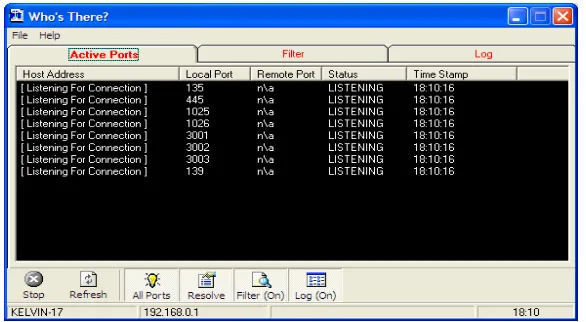
2. ‘Who’s there?’
‘Who’s there?’ is a freeware utility (available at http://www.it-mate.co.uk/) that monitors
ports on the user’s computer - checking for ports that are passively listening for incoming
connections. This small component is very effective for revealing the behaviour of ‘unknown
code’ (potential malware), since worms and Trojans usually open a port to communicate with
the originator machine or to self-propagate across a network. Such ‘backdoor’ port operation
is usually conducted without the knowledge of the user but is revealed by ‘Who’s there?’.
[image:8.595.152.445.555.716.2]This utility is illustrated in Figure 2.
8 3. Retrospect Backup
Retrospect backup is a commercial backup and restore facility (available from
http://www.dantz.com). This program allows for system roll back in the event of changes or
damage caused by infected files and enables the user to restore their computer to the most
recent ‘healthy’ state.
4. GFI LAN Guard
LAN Guard is a further commercial component that scans for possible threats, based on
known vulnerabilities (see http://www.gfi.com/lannetscan/). Remedial actions to cover any
security holes are also provided by LAN Guard. These include open ports, missing security
patches, open shares, key registry entries and services/applications active on the computer. if
used by malicious software. “Trojan Ports” scanning performs the same kind of scan only for
ports that are known targets of Trojan malware.
5. X-setup
This small freeware program provides users the opportunity to make better use of system
resources and change default settings in order to make their system more effective. This
component is especially useful when the system registry file is locked by the action of a
malware program. In this case, via the X-setup wizard, the user can reset the key that prevents
access to the registry editor.
4. A DESKTOP SECURITY SANDBOX
In developing our three-dimensional desktop security application we aimed to unify all the
components under one control panel which would also afford extra user functionality. Since
our concern lay with protection against malware, we conceived our application as a ‘Sandbox’
facility that would afford testing of potentially suspect code (malware) in a recoverable
setting.
The individual software components described above each have a contribution to
make toward malware protection, detection or recovery. The Sandbox application builds upon
these features to afford our three dimensions of desktop security. Through the single interface
of the Sandbox application, the user can start individual components as required for specific
tasks. Since the differing software components address different conditions, each can be
separately co-ordinated via the Sandbox interface. Thereby, Retrospect back-up need not be
open at the same time as ‘TC Monitor’ or ‘Who’s There?’.
For appropriate operation, the users must have an adequate understanding of the
services offered by each component application. The Sandbox interface aims to assist in this
by structuring its information to reflect the interplay of these components. The Sandbox
9
API in order to indirectly start the applications. Each software module retains its own controls.
The Sandbox assists the user by maintaining a record of when each application was last
deployed.
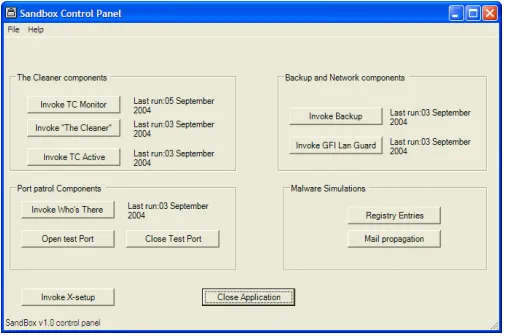
The grouping of control buttons on the Sandbox interface assist users in
understanding the purpose and relationship of each component. ‘The Cleaner’ components
form one group followed by ‘Who’s There?’, the back-up and LAN Guard elements. Since the
Sandbox aims both to protect and enlighten the user on malware issues we provide a set of
port control buttons, to permit easy simulation of worm activity, while a fourth group of
buttons affords access to our malware simulations. Figure 3 illustrates the Sandbox control
[image:10.595.172.425.280.448.2]panel.
Figure 3: The Sandbox Control panel
The button that invokes X-setup is separate to reflect that its operational role is distinct from
the other components. This feature is invoked only in the event that malware prevents the user
from running the registry editor.
The homogeneous user interface afforded by the Sandbox application aids users in
component selection and also shows a timestamp for the last run of each component. In the
Sandbox tracking of component operation, a critical period has been set at thirty days. If thirty
days have elapsed since a component was invoked, a warning message appears next to the
corresponding button (displaying the word ‘CAUTION!!’). To add functionality and usability
(to encourage correct usage of the software components), the button groups are positioned to
reflect which programs are called first, second and so on.
The Sandbox control panel and its utilities integrate and enhance the stand-alone
10
without an appropriate controlling module would place considerably greater burden on the
user. The utility and convenience of the individual applications is boosted and their role
becomes clearer as stand alone modules as well as parts of an integrated security solution.
4. SUMMARY AND CONCLUSIONS
In this paper, our emphasis lies with desktop security. We elaborate the requirements for such
security and describe a sample desktop application that seeks to embody our critical
three-dimensions. Network or organisational security are larger issues and plausibly merit further
dimensions to achieve adequate measures. Our concentration on the desktop limits security
considerations to aspects within the remit and control of the end-user. Thereby, usability and
user engagement match the importance of technical infrastructure as a basis for desktop
security. This leads us to view desktop security as a three-dimensional issue encapsulating
technical infrastructure, usability and user engagement. Our Sandbox application exhibits
these three dimensions by affording a set of technical components, enhanced usability and
greater user engagement.
REFERENCES
[1] Bishop, M. 2002 Computer Security: Art and Science. Boston, Pearson Education.
[2] Pfleeger, C.P, 2002 Security in Computing. Boston, Prentice Hall.
[3] www. http://www.cert.org/security-improvement/modules/m04.html
[4] www. http://www.ucd.ie/computing/desktopsecurity/
[5] Avolio, F.M. 1998 A multidimensional approach to Internet security, ACM NetWorker
Magazine,15-22.
[6] Liu, S., Sullivan, J. and Ormaner, J. 2001 A Practical Approach to Enterprise IT Security,
IT Pro, September/October,35-42.
[7] Zurko, M.E. and Simon, R.T. 1997 User-Centered Security. Proceedings of ACM