Enhancing the Usability of Real-Time Speech
Recognition Captioning through Personalised Displays
and Real-Time Multiple Speaker Editing and Annotation
Mike Wald1, Keith Bain2
1Learning Technologies Group, School of Electronics and Computer Science, University of
Southampton, Southampton SO171BJ, United Kingdom, [email protected]
2
Liberated Learning, Saint Mary’s University, Halifax, NS B3H 3C3, Canada, [email protected]
Abstract. Text transcriptions of the spoken word can benefit deaf people and also anyone who needs to review what has been said (e.g. at lectures, presentations, meetings etc.) Real time captioning (i.e. creating a live verbatim transcript of what is being spoken) using phonetic keyboards can provide an accurate live transcription for deaf people but is often not available because of the cost and shortage of highly skilled and trained stenographers. This paper describes the development of a system that can provide an automatic text transcription of multiple speakers using speech recognition (SR), with the names of speakers identified in the transcription and corrections of SR errors made in real-time by a human ‘editor’.
Keywords: Real time, captioning, speech recognition, editing, multiple speakers, transcription
1 Introduction
2 Visual Indication of Pauses
Standard speech recognition (SR) software (e.g. Dragon, ViaVoice [3]) was found to be unsuitable for live transcription of speech as without the dictation of punctuation it produced a continuous unbroken stream of text that was very difficult to read and comprehend. IBM and Liberated Learning (LL) therefore developed ViaScribe [4] [5] as an SR application that automatically formats real-time text captions from live speech with a visual indication of pauses. Detailed feedback from students with a wide range of physical, sensory and cognitive disabilities and interviews with lecturers [6] showed that both students and teachers felt this approach improved teaching and learning as long as the text was reasonably accurate (e.g. >85%).
3 Personalised and Customisable Display
While projecting the text onto a large screen in the classroom has been used successfully in LL classrooms it is clear that in many situations an individual personalised and customisable display (e.g. font size, formatting, colour etc.) would be preferable or essential and so a personalised server and client was developed to enable users to customise their displays on their own networked computer [7].
4 Real-Time Editing
SR accuracy may be reduced where the original speech is not of sufficient volume/quality (e.g. poor microphone position, telephone, internet, television, indistinct speaker) or when the system is not trained (e.g. multiple speakers, meetings, panels, audience questions). An experienced trained ‘re-voicer’ repeating what has been said can sometimes improve SR readability in these situations by correcting ASR errors if the accuracy is high and the speaking rate low and summarising what is being said if the speaking rates are fast [8] [9]. Summarisation however requires the re-voicer to actually understand and ‘interpret’ what is being said and therefore to have a good knowledge of the subject.
real-time stenographer is not available. Up to eleven corrections per minute were achieved by untrained users of an initial prototype of RTE and a theoretical analysis suggested experienced touch typists could be trained to achieve over 15 corrections per minute. Analysis of an ASR transcript with a 22% error rate also suggested that correction of less than 20% of the ‘critical’ errors may be required to understanding the meaning of all the captions [11]. Somebody talking at 150 words per minute with a 22% error rate produces an average of 33 errors per minute and if correction of only 20% of these errors were ‘critical’ to understanding then the editor would have to correct on average only about 7 errors per minute. This would suggest that even if 100% accuracy was not achievable, 100% understanding might be. Judging which words were critical to understanding might be an easier task than the summarisation task faced by the re-voicer.
5
Multiple Speaker Transcriptions
Fig. 1. Four Instances of ViaScribe showing the ASR text captions with errors for four separate speakers
[image:4.595.179.431.416.591.2]Fig. 3. RealTimeMerge Input setup window
Fig. 4. The four speakers’ names and Server IP addresses and Port numbers have been added to RealTimeMerge
[image:5.595.153.451.426.537.2]Fig. 6. RealTimeEdit displaying the captions after correction
Fig. 7. Personalised Display Client displaying the corrected captions sent by RealTimeEdit
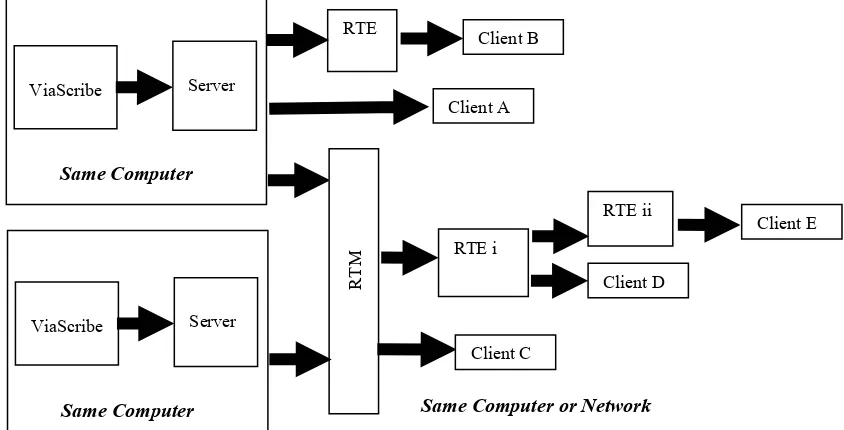
Figure 8 shows some of the many possible configurations while the following bullet points provide some further details:
• The RTEs and RTM and PDC can be on the same computer as the Server or each other OR on a different computer that is on the same network but the Server must be on the same computer as ViaScribe;
• One Client (A) can be connected to the Server to show the unedited ViaScribe display without a delay while another Client (B) can be connected to RTE to show the edited display with an editing delay. Another client (e.g. C) can be connected to RTM to show the unedited merged displays of multiple speakers while another client (e.g. D) can be connected to RTE to show the edited merged display with an editing delay;
• RTEs can be ‘daisy chained’ to allow a 2nd operator to correct errors that a 1st operator didn’t have time to correct). For example a Client (E) (e.g. for a user who required greater accuracy because they were profoundly deaf) could be connected to RTE (ii) that takes as its input the output of RTE (i); • Each RTE can have either one ‘operator’ to find and correct errors OR the
• The unedited outputs of ViaScribe can be merged and then edited as shown in figure 8 or if preferred, each instance of ViaScribe can have its output edited using RTE and then all the edited RTE outputs can be merged;
Fig. 8. Diagram showing how ViaScribe, Server, RTE, RTM and PDC can be configured
6
Further Work
Trials of the system in a variety of settings are being conducted to investigate in practice the effect of error rates, number of speakers, editing operator skill requirements etc.
7
Conclusion
A range of applications have been developed to enhance the useability, readability and accessibility of SR for real-time speech to text transcription. The combinations of the Server, PDC, RTE and RTM provide a very flexible approach for many different requirements and trials of the system are being conducted to determine how well the system can cope with the complexities of real environments.
ViaScribe Server
RTE i
Client D
Same Computer
ViaScribe Server
Same Computer
R
T
M
Client A
Client C
RTE ii
Same Computer or Network
Client E Client B
References
1. Wald, M. An exploration of the potential of Automatic Speech Recognition to assist and enable receptive communication in higher education. ALT-J, Research in Learning Technology 14(1) 2006 pp. 9-20.
2. Wald, M., Bain, K. Using Automatic Speech Recognition to Assist Communication and Learning. In: Proceedings of HCI International 2005: 11th International Conference on Human-Computer Interaction, Las Vegas USA. Volume 8, 2005
3. Nuance (2006) Retrieved February 7, 2007, from http://www.nuance.co.uk/
4. Bain, K., Basson, S., Wald, M. Speech recognition in university classrooms. In: Proceedings of the Fifth International ACM SIGCAPH Conference on Assistive Technologies. ACM Press, 2002 pp. 192-196.
5. IBM (2005) Retrieved February 7, 2007, from http://www-306.ibm.com/able/solution_offerings/ViaScribe.html
6. Leitch, D., MacMillan, T. (2003). Liberated Learning Initiative Innovative Technology and Inclusion: Current Issues and Future Directions for Liberated Learning Research. Saint Mary's University, Nova Scotia. Retrieved February 7, 2007, from http://www.liberatedlearning.com/
7 Wald, M. Personalised Displays. In: Speech Technologies: Captioning, Transcription and Beyond IBM T.J. Watson Research Center New York USA, 2005, Retrieved February 7, 2007, from http://www.nynj.avios.org/Proceedings.htm
8. Lambourne, A., Hewitt, J., Lyon, C., Warren, S. Speech-Based Real-Time Subtitling Service,
International Journal of Speech Technology, 7, 2004, pp 269-279.
9. Francis, P.M. Stinson, M. “The C-Print Speech-to-Text System for Communication Access and Learning”. In: Proceedings of CSUN Conference Technology and Persons with Disabilities. California State University Northridge 2003
10. Wald, M. Creating Accessible Educational Multimedia through Editing Automatic Speech Recognition Captioning in Real Time. International Journal of Interactive Technology and Smart Education: Smarter Use of Technology in Education 3(2) 2006 pp. 131-142