Rochester Institute of Technology
RIT Scholar Works
Theses
Thesis/Dissertation Collections
2004
The Design of interface and function of cellular
phones for old people
Yusuke Oda
Follow this and additional works at:
http://scholarworks.rit.edu/theses
This Thesis is brought to you for free and open access by the Thesis/Dissertation Collections at RIT Scholar Works. It has been accepted for inclusion in Theses by an authorized administrator of RIT Scholar Works. For more information, please [email protected].
Recommended Citation
The Design
of
Interface
and
Function
of
Cellular
Phones for Old
People
By
Yusuke
Oda
Thesis
submittedin
partialfulfillment
ofthe
requirementsfor
the
degree
ofMaster
ofScience in Information
Technology
Rochester Institute
ofTechnology
B.
Thomas
Golisano College
of
Computing
andInformation
Sciences
Thesis Reproduction Permission Form
Rochester Institute of Technology
B. Thomas Golisano College
of
Computing and Information Sciences
Master of Science in Information Technology
The Design of Interface and Function of Cellular
Phones for Old People
I, Yusuke Oda, hereby grant permission to the Wallace Library of the Rochester
Institute of Technology to reproduce my thesis in whole or in part. Any
reproduction
must not be for commercial use or profit.
Acknowledgments
I am grateful to chair Professor Elouise R.
Oyzon,
committee member ProfessorAnneHaake,
and committee member Professor Charlie Border for giving me valuable advice. Inaddition,I am grateful to cooperators ofthe surveyabout cellularphones, and testerswho ran the
TableofContents
Abstract 1
Chapter 1 Introduction 2
Chapter 2 The problem ofthe present cellular phones 5
2-1 Theanalysis aboutthe
present state of cellular phones 6
2-1-1 Hardware interface design 6
2-1-2 Software Interface 9
2-1-3 Function 12
2-1-4Concept 13
2-2 Thequestionnaire survey 16
2-2-1 Results ofthesurvey 18
Chapter 3 Results ofthe usabilitytest anddiscussion aboutthecellular phone 26
3-1 Interface 26
3-1-1 Software Interface 26
3-1-1-1 The Menu 28
3-1-1-2TheTelephonefunction 30
3-1-1-3 The E-Mail function 31
3-1-1-4The various
Set-up
functions 323-1-1-5The function of personalinformation 33
3-1-2Theusabilitytest 34
3-1-2-1 Methods 34
3-1-3 Hardware Interface 36
3-2Function 39
3-2-1 The voice function 39
3-2-2Medical treatment
by
cellular phones 413-2-3 Theguidance ofchangingtrains
and payment ofthe trainfare
by
cellular phones 44Chapter 4Conclusion 49
Table 1 The Comparison Percentagesofindividual over60 in 2000 vs. 2050 5
Figure 1 An interface of
"i-mode"
2
Figure 2 Avideogame of cellular phones 3
Figure 3 Theposition ofbuttons
(Panasonic)
8Figure 4 Ageneral interfaceofcellular phones 10
Figure 5 A badand goodexample ofinterface 11
Figure 6 The situation ofusingcellularphonesin Japan 2001 14
Figure 7 Cellularphones ofFinland 15
Figure 8-1 Percentagesofownershipofcellularphones 18
Figure 8-2 Thepercentages ofthereasons 19
Figure 8-3 Thepercentages of usage of cellular phones 19
Figure 8-4 Thepercentages ofthereason 22
Figure 10The comparisonofthe sizeof characters 28
Figure 10-1 The menuscreen oftheprototypeinterface 29
Figure 10-2 The menu screen ofthe telephonefunction 30
Figure 10-3 Themenu screen ofthee-mail function 31
Figure 10-4 Themenu screen ofthe various setup function 32
Figure 10-5 Themenu screen ofthe functionof personal information 33
Figure 11 Jog-Dial ofcellularphones 29
Figure 12Theexampleofthemedical treatment
by
cellular phones 43Figure 13 Thepercentage of
family
structureregardingolder peoplewhoare over65 yearsold 45
Figure 14 The two-dimensional barcode 48
Figure 15 Guidance for changingtrains
Abstract:
Acellular phoneis hardto handleforolder people in terms ofinterface andfunction. In
this thesis, the word
"interface"
stands forhardware and software interface and the word "older
people"
refers to Japanese people who are over 60 years old.
Fundamentally,
the interface mustbe easy to handle and convenient. In addition, it must be easyto access all ofthe functions that
the user needs.
However,
it is questionable whether the interface and function of the presentcellular phones are
taking
olderpeopleintoconsideration.Thus,
the purpose of this thesis is to consider new interface design and function ofcellular phones forolder people. This paperwill focus on an interface design andfunction foran
old person whose eyesight and
hearing
arebeginning
to weaken and an old person who is notdexterousandcannot
freely
move his/her hands likeayoungperson.Firstof all, currentstate of affairs of cellularphones willbe examined andthe problems
older people have with the present designs and functions of cellular phones will be considered.
Therefore,
a Web site that explains a hardwareinterface,
a softwareinterface,
and function ofcellular phoneis shown.
Moreover,
will be clarifiedthe problems thatcellularphones present toolder people onthe basis of a survey.
Finally,
basedon the results ofthe survey ofolderpeople,the interface design andfunctions that must be equipped with cellular phones using figures will
1. Introduction:
Many
people have been using cellular phones as a means of communication in manycountries since
they
appeared on the market globally. For the past three or four years, cellularphones have made remarkable progress since the "i-mode" service, which is a packet-based
information serviceforcellularphones, startedin 1999. Figure 1 shows an
"i-mode"
[image:9.542.143.418.205.314.2]interface.
Figure 1: An interfaceof
"i-mode"
The "i-mode" provides Web
browsing,
e-mail, calendar, chat, games, online shopping andbanking,
ticket reservation, and customized news, and"i-mode"
uses a proprietary system that
uses a subset of
HTML,
known as Compact HTML (CHTML). Asaresult, cellularphones havebeen used not only astelephones butalso as amulti-functional devices.
However,
functions andinterfaces forolder people were not considered important. Forexample, thefunction represented
by
"i-mode" targets mainly younger people, and"i-mode"
is an important part of the realm of
mobile multimedia
(Enoki,
2001).Therefore,
fromthe standpoint of olderpeople, afunctionlike"i-mode"
isnotimportant.
In addition, a portable device like a cellular phone, which is easy to carry, must be
designedsothat itcan be easily handled
by
anyone.However,
inthe current stateofaffairs,mostcompanies'
target is younger people. For example, a web site that cellular phone users can
download music has only music foryounger people with theircellularphones, and a video game
is installed in cellular phones as standard. For example, a popular video game among younger
people in Japan thatis "Final Fantasy"
and "Dragon Quest"
are installed in acellular phone (as
[image:10.542.49.497.197.380.2]shown in Figure 2).
Figure 2: Avideo gameofcellularphones
Theses examples suggest that the main target of cellular phones is younger people. In
addition, as forthe design of
interface,
the cellular phone companies target younger people too.The interface influences a
handling
of all of cellular phone's functions because these are runthrough theinterface.
Therefore,
thedesignofinterfaceis important.As forasoftware interface design of cellularphones, although theinterface thatis based
on Graphical User Interface
(GUI)
likedesktop
computers is not useful for a person who haspoor sight
by
thelimitedsize ofdisplay,
mostinterfaces areusedGUI interface. The size ofLCDis from 176x198 to 240x320pixels.
no-good. Forexample, aresearchertalks that "Incomparisonto
desktop
systems, mobile andwearable devicesthathave limitedscreen are generallyrestricted.
Therefore,
it is hardtodesignpurelygraphical orvisual interfacesthatwork well underthesemobile
circumstances."
(Joanna,
2003). Onthe other
hand,
myopinionthat GUI interface isnot usefulis similarto otherresearchers'
inthat the GUI interface isnot useful because a
display
is toosmall but becauseaninterface isnotimproved inorderto suit.
Asforahardware
interface,
thisis restrictedby
the limitedbody
size, andmanyfunctions mustbeassignedto the samebuttons. This factormakesoperation complicatedfora
person who isnotdexterous.
Therefore,
some researcherstalkaboutvarioushardware interfacesthatare much easiertohandleanddifferent fromcurrenthardware interface. Forexample, a
researchertalks that"Unlike
desktop
computers,input devices formobile computers areoftenrestricted
by
the limitedsize.Therefore,
theresearcherproposes anewinputdevice formobiledevices,
calledPreSense."
(Jun,
2003).However,
myapproach is differentfrom otherresearchers'
in thataformofhardware interface is not changed.
My
approach is not to change the form but to change the balance of button size andbuttons'
spacing in orderto improvecellular
phones'
handling.
Currently,
thereis adigital dividein cellular phones between a person who can use them and a person who cannot, especially,
between younger and older people.
However,
according to areport, which was publishedby
theUnited Nations
(UN)
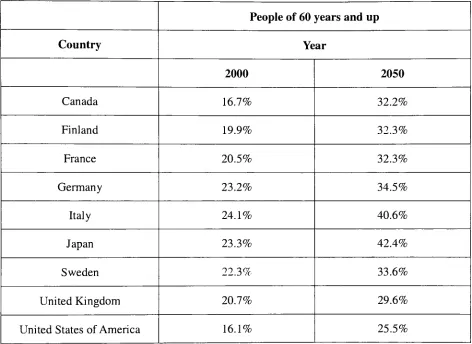
in Table 1(UN Population Division2002),
in most advanced countries,such as
Japan,
the UnitedStates,
and West European countries, there will be anincreasingly
aging society.
Accordingly,
the consideration of older people will become more important.Judging
from the features ofcellularphones thatare carriedeasilyby
even olderpeople, there isThus a cellular phone must be equipped with the interface and functions that are designed for
them.
Consequently,
the interface and function will lead to an opportunity for a solutionregarding thedigital divide ofcellular phones.
Peopleof60 years andup
Country
Year2000 2050
Canada 16.7% 32.2%
Finland 19.9% 32.3%
France 20.5% 32.3%
Germany
23.2% 34.5%Italy
24.1% 40.6%Japan 23.3% 42.4%
Sweden 22.3% 33.6%
United Kingdom 20.7% 29.6%
[image:12.542.35.507.154.498.2]UnitedStatesofAmerica 16.1% 25.5%
Table 1: TheComparison Percentagesofindividual over60 in 2000vs. 2050.
2. Theproblem ofthepresent cellular phones:
The question wehave toask here is to whatdegree olderpeoplein Japan are considered
in the design of cellularphones.
Basically,
the target audience of products influences the designand features ofthat product.
Therefore,
in this chapterfirst considers the current state of affairsof the hardware
interface,
the softwareinterface,
thefunctions,
and the differences betweenJapanese andFinnish regarding the targetbrackets of cellular phones. In addition,Iwouldlike to
clarifythe problems of older people on thebasisoftheresultsof a survey.
2-1. Theanalysis about thepresent state of cellular phones
2-1-1. Hardware interface design
The hardware features of cellular phone, interfaces are to provide a digital camera, to
enlarge aLiquid Crystal
Display
(LCD),
andalarge number ofbuttons. J-phone(Vodafone)
wasthe first companythat equipped cellular phones with adigital camerain order tobegin theirnew
service that was called "Sya mail". The service was started in 2001. The service was to attach a
photograph, which was taken using the digital camera of cellular phones, toe-mail. The service
was a great success; as a result, Vodafone expanded the market share of cellular phone sales in
Japan.
Inevitably,
other companies began to equiptheircellularphones with adigital camera. Atfirstthe digital camera was only able to take a photograph.
However,
the present digital camerahas made progress, so thatitcan also record video animation;
besides,
somedigital cameras canfunction as apart of aTV-phone. Almostall ofthe cellularphoneson salein Japan atthe present
are equipped with a digital camera; some of them are mega-pixel.
Judging
from the fact thatabout 93% cellular phones that were sold from 2002 to 2003 areequipped with digital cameras,
the
tendency
toequipcellular phones with digitalcameras will continue to grow.As for the
LCD,
the present biggestdisplay
is 2.4 inches (a length of diagonal). ThisLCD size is about one-and-one-half times as large as its size of two or three years ago. In
enlargement of it is a good improvement for not only younger people but also older people.
Similarly,
it is a good improvement for the LCD to becomehighly
efficient because it candisplay
larger and clearer characters and pictures. In addition, the larger displays support thesolutionofusability issues. As aconsequence, everyone can lookatcharacters and pictures more
easily.
On the other
hand,
regarding the digital camerait isnot always a goodimprovementforolder people. Certainly, people can do a larger variety ofthings withcellular phones that have a
digital camera; for
instance,
people can send and take pictures and videoby
only carryingcellular phones. To takean example, peoplewho cannot often meet with eachotherbecause
they
live at a distance can geta visual confirmationiftheircontacts havea digital camera. This usage
mustbe ofgreat value to olderparents and grown-up children because most families donot live
with their parents in
Japan,
a so-called "nuclearfamily."
This is a term used in cultural
anthropology, anditmeans theimmediate
family
ofhusband,
wife, andchildren only.It is necessaryto handle many buttons when people wantto usethe various functionsof
cellular phones.
Moreover,
it is noteasy to make thebody
of cellularphones larger becausethey
are
basically
designed with the premisethatthey
are portable devices and can be usedwith onlyone hand.
Certainly,
some people use cellular phones with both hands.However,
the width ofcellular phones haschangedfrom 46 to51 mm, andit isnot enough widthto use withboth hands.
Ifcellular phones are designed to use both
hands,
the width of cellularphones should be widerthan present's like portable game machines. As a consequence, there is a
tendency
to increaseboth the
handling
andthe numbers ofbuttons. To take an exampleregarding thebuttons,
FigureFigure 3: Theposition ofbuttons
(Panasonic)
That
is,
people need to use both the front and the side buttons in order to use their phonesefficiently.
Therefore,
there is not much merit for older people because those who are notgenerally manually dexterous cannot efficiently use various functions
including
the digitalcamera. In addition, it is
likely
that to equip a cellular phone with a digital camera does notbenefit them considering an increase in cost and weight. In
Japan,
the income of almost peopleover 60 years old is mainly their pension
(Ministry
ofHealth,
Labor andWelfare,
1997).Therefore, they
tend to avoid all unnecessarycosts.Up
to this point, it is clear that there is some merit for older people to used advancedLCDs because
they
can clearly see a picture and characters easierby
enlarging LCD. On thecamerafortheelderly because ofcost, weight, and
handling
consideration.2-1-2.Software Interface:
Almost all ofthe present main-menu interface of cellularphones usedis Graphical User
Interface (GUI). Because ofusing
icons,
the GUIgives the impression thatit is easyto handle atthe
beginning
compared with an interface using characters.However,
the present LCD size ofcellular phones that are on sale is mostly 2.1 inches. Forthat reason, information usingthe GUI
that is displayed on the LCD at the same time is decreased
by
restriction of the LCD size.Therefore, it is necessary forpeople tochoose icons andmenus on theLCD overand overagain
in order to access the function that the user needs. Also present cellular phones have many
functions. On the other
hand,
suppose that more information simultaneously is displayed on theLCD. Iconsmustbecomesmallerand, as aresult, difficultto see. This is noteasyto useforolder
people considering their physical disabilities. The
following
lists commonphysical problems ofolder people(The physicalabilityof olderpeopel;
Masaka,
2004).>
Weakening
eyesight and/orhearing.
r-Thedeclineofdiscernmentbetweencolors.
'r- Thedeterioration of memory.
> Lossofmovementinhands andfingers.
> The deterioration of input speed and the increased likelihood oferrors on
pushbutton handling.
The physical ability gets worse with their
increasing
years. As for thehandling
ofbuttons, mistakes tend toincrease ifthe buttonsizebecomes smallerand/orthe spaceis narrower
Figure 4 shows a general interface of cellular phones, and the left sideis the actual size
oftheinterfaceon the LCD. It is
likely
that the characters andiconsoftheinterface aretoo smallforolder people toread.
I
Ml! .,m i*:-*.a
'tf*
-<-".,.! W5orm
Profit-hl n / b wsustm mm.
SSL
4*
J*
4,
FunctionJ^
NavfiviBt
Ll'ii
[9TXj-Realsize Expansion
Figure 4:Ageneral interface ofcellular phones
It is said that a person's eyesight begins to fail after 40 years old, and again especially,
rapidly over 60 years old. The eyesight weakens about0.3
(20/60)
visionby
the age of80 (Thelab of older people). In addition, it is difficult for older people to see material that is a short
distance away because of farsightedness due to old age. It is necessary not only to make the
characters and icons ofthe interface larger but also to decrease the number ofthem displayed at
the sametime tocompensateforthe
failing
eyesightof older people.As forthecolor ofthe
interface,
some oftheinterface uses a combination of colors thatis easy to distinguish for everyone. For example, if a background of an interface is
black,
acharacteris white andifabackground is
blue,
a character isorange.The arrangement of colors isis,
the lens oftheireyes become clouded(Cataract).Therefore,
whateverthey
seeis reddish andout of focus. In other words, there is some possibility that
they
cannot see distinguish betweenthe arrangement of colors. Figure 5 shows both good and bad examples of the combination of
colors. The bad example is not clear because of a lack of the contrast of colors between
background andcharacters, orbecause the characters ofthe interface aretoo small. Onthe other
hand,
the good exampleis cleardue to thecontrast colors.Therefore,
it islikely
thatnotonly oldbut also partially color-blind people can more easily see an interface with a greater contrast
between colors.
Partially
color-blind people cannot distinguish colors according to thecombination of colors, for example, the combination of cream-colored and yellow and colors
between yellow and green
(Masaka,
2004).Certainly,
some of the software interface has well-arranged colors.However,
it is notevident whether the interface considers older people. In addition, it is
likely
that the size ofcharacters is not suitable forolderpeople.
Judging
fromthe present softwareinterface,
it clearlydoesnotalwaysconsider older people's needs.
s+
1-Y.iUEJa is*
t& f&t <#
>
%
j0Ba1lB(fl)1E:37
basf , LrWs M
<^;> .
wk
I^Till
Hi
MENU<m% <&
&
| MrttitZ ( I"'
i'M lib
"StZ.3.-m
,i
7*?
iwm
msi
3~M'-t/-)U 2.-T BOX f-9
[image:18.542.48.505.459.620.2]Bad Good
2-l-3.Function:
The present functions of cellular phones can be classified into two types. One is a
supporting function as a tool forcommunicatingand theotheris afunction as used foratool for
enjoyment. The tool forcommunicating function provides an address
book,
e-mail, read e-mailsaloud, an answer-phone, voice memo, and calling. The enjoyment function offers information
service represented
by
"i-mode"
and
"i-appli",
checking one's positionby
GlobalPositioning
System
(GPS),
playing the videogames,downloading
music, watchingTV,
listening
to the FMradio, editing a picture, and
taking
a picture with a digital camera. It is nottoo much to saythatall ofthe cellular phones that arenow on sale can function as a toolforenjoyment, and that is a
substantial consideration. In addition, people can get a function that is not installed in their
cellular phones
by installing
corresponding software using the Universal Serial Bus(USB)
froma PC or
downloading
from the Internet at any time.However,
the function that people candownload isnot as atool for
talking
but as an enjoyment. From the standpoint of olderpeople, itis more important for them that the function is not as a tool for enjoyment but as a tool for
talking.
Certainly,
people can do various things using only cellular phones that have manyfunctionsas atool forenjoyment; forthatpurposeitis necessarythat people can usethe phone's
functionsefficiently.
To take an example, will people who wanttotake apicture
buy
acellular phonethathasa digital camera? If
they
can use the function of not only telephone and e-mail but alsotaking
and editing a picture efficiently,
they
may purchase the cellular phones. On the otherhand,
ifthey
cannot usethe functions as atool oftalking
oras atool forenjoymentefficiently,they
willnot
buy
them. Inotherwords, even ifcellular phones have manyattractive functionsliketaking
aHowever,
almost all cellular phones that are now on sale have the functions of a tool forenjoyment more advanced than ever
before,
assuming everyone could use all of the functionsefficiently. Of 109 models of cellular phones that
were sold from 2002 to
2003,
and 101 out ofthese 109 models (93 percent) had a digital camera. On the other
hand,
the cellular phone thathas afunction ofreading e-mails aloud as standardis included in onlyone model.
The function of reading aloud is very important for older people because
they
havedifficulty
obtaining all oftheir information from only their eyesight.Nevertheless,
almost noneof the cellular phones have that function. The fact that there is a great difference regarding the
numberofthe cellular phonesthathave adigital cameras orthe function ofreadinge-mails aloud
suggests that people the supporting function as text reading for groups such as older people, is
notconsideredimportant.
2-l-4.Concept:
In
Japan,
the total number of subscribers of cellular phones was 79,281,000 as ofNovember
30,
2003 andthe diffusion of cellularphones is62.4%,
anumber derivedby dividing
the total population ofJapan
by
the total number of subscriber of cellular phones (Mobile NewLetter,
2003).However,
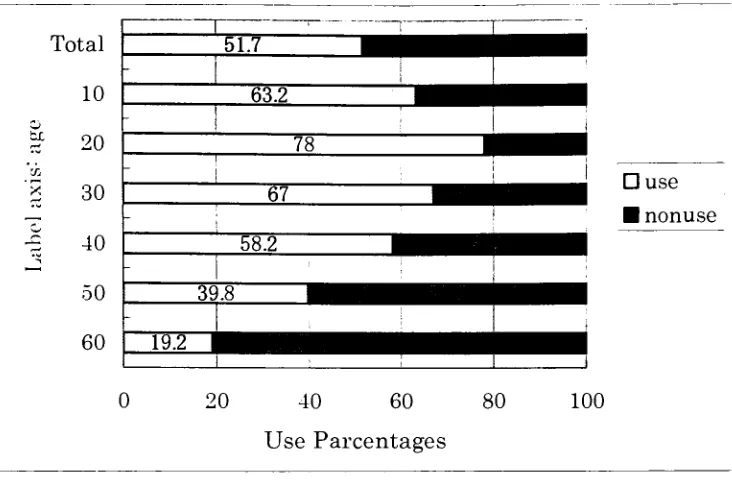
a glance at Figure 6 will reveal that the use of cellular phones has not10
bo
20
CO
30
40
50
60
?use
nonuse
0 20 40 60
Use Parcentages
[image:21.542.98.464.45.286.2]80 100
Figure 6: Thesituation ofusingcellularphonesinJapan 2001
In addition, the diffusion ofcellular phones forpeople who are over60 years oldis 16.3% as of
March 2003 (Nikkei market yearbook about IT 2003). This fact clearly shows that the use of
cellular phones has not spread amongolderpeople. To take an example, the diffusion ofcellular
phones in Finland is about 93% as ofOctober
2003,
and as for older people in their sixties, thediffusion was about 55% in 1999 (The world news; The Japan
Ministry
of Posts andTelecommunication,
2001). In the same way, the diffusion of cellular phones was over 80% inSweden in
2002,
andthe diffusion regardingolder peoplein theirsixtieswas about60% in 1999(The Japan
Ministry
of Posts and Telecommunication, 2001). The fact suggests that cellularphones have spreadirrespectiveof age in Finland and
Sweden,
which is different from in Japan.Ofcourse,it is difficult tocompare simply Japan andFinlandor Sweden regarding the diffusion
ofcellularphones because there is a great difference in population and life style between these
countries.
However,
from the standpoint ofefficiency ofthe LCD and thefunctions ofand
"i-appli",
cellular phones of Japan are more advanced than Finland's or Sweden's. For allthat, there is a great difference in the diffusion of cellular phones between them.
Well,
why isthere such a greatdifference?
One of thereasons is how farcellular phone designers have considered olderpeople. In
Finland,
there is a conceptthat is called "designforall"thatpermeatesdesigners. The conceptis
thatnotonlycellular phones butalso other productsmustbe designedsothateveryonecaneasily
handle them. In other words, products are designedwithconsideration forolderpeople. Figure 7
[image:22.542.188.367.275.456.2]shows a cellular phonefrom Finland.
Figure 7: CellularphonesofFinland
It is
likely
that the cellular phoneiseasiertohandle thanonesfrom Japan becausethe buttonsarebig
compared to ones from Japan. In addition, in Nokia mobile phones, the concept shows"design for all"
(Aaron,
1998). On the otherhand,
Japan has atendency
to design products sothat not everyone can handle easilythem but to instead focus on how to getthe people who are
the targetofcompaniesto purchase theirproducts.
Necessarily,
the cellular phone manufacturerswho range from the older teens to people in their thirties. As a result, it is conceivable that
cellular phones are considerably widespread among the targetpeople. On theother
hand,
cellularphones are not widespread among older people who are not the target of the manufacturers.
Moreover,
there is little possibility that the cellularphones that are considerate of older peoplewill appear as
long
asthecellular phone manufacturers continueto design future.Up
to thispoint, I have presentedmy research on how farthepresent cellular phones aredesigned with consideration of older people from four standpoints: the hardware
interface,
thesoftware
interface,
thefunction,
and the concept.Judging
from these four points, even if theresult was not led
by
considering ofolderpeople, thereare some good points of cellular phonesfor also older people, for example, enlargement of
display
and the arrangement of colors.However,
there are many not-so-good points, on the whole. It follows from this that presentcellular phones are not sufficiently considerate of older people and there is still room for
improvement.
2-2. Thequestionnaire survey:
The author conducted a questionnaire survey about cellularphones on Japanese people
who are over 60 years old and received the reply from 38 out of 44 respondents. As for the
survey, therespondents were interviewedabout cellular phones, andtheirresponses were written
down. Those who conducted the survey asked the respondents and collected theiropinions, and
theytoldthe authorabouttheresults ofthe survey.
years old, and nine respondents are from 81 to 90 years old. Selected respondents had specific
requirements: tobe over 60 years old, spry, and not senile. As for the condition ofrespondents,
my friends judged. The
following
questions were posed to them in order to clarify the problemthat many elderly have with cellular phone usage.
1. Do youhaveacellular phone?
2. Ifyes,
>
Why
do you chooseto haveone?> What is themain purpose you useitfor?
r-What has becomeconvenientforyou since you used a cellular phone?
> What kind of problems or complaints do you have with cellular
phones?
3. Ifnot,
>
Why
do youchoose nottohaveone?4. What kindofinterface orfunction do you expect cellularphones to have in the
future?
As forolderpeople, the survey is performedusing the above questions in anon-random
survey in cooperation with my friends. Two of them have their cellular phones and work at a
home for the aged as nurses, andothers who have theirpersonal computers and cellular phones
and livewiththeirgrandparents orareincontact withtheirgrandparents. Even ifrespondents did
not have a cellular phone, my friends asked their opinions after
demonstrating
their cellular2-2-1. Resultsofthesurvey:
The result of this survey of older people, regarding cellular phones usage, was
performedin November2003. The
following
resultwas summarized.1. Do youhave a cellularphone?
Figure 8-1 showsthatwhetherrespondentshaveacellular phone or not.
^^H .. 23.60%
IJ
? YesNo
76.40%^^^m%^^
Figure 8-1: Percentagesofownership of cellular phones
/- Yes I haveone. - 9
persons, 23.6%
>
No,
I donothaveone. 29persons,76.4%2. Ifyes,
2-1.
Why
do you choose tohaveone? [image:25.542.149.412.231.389.2]11.10%
22.20% ? Reason 1
Reason 2
? Reason 3
[image:26.542.91.398.44.232.2]66.70%
Figure 8-2: Thepercentages ofthereasons
Reason 1:
My
son ordaughtergaveme acellularphone. 6persons.Reason 2:
My
friend recommended me to get a cellular phone. -2persons.
Reason 3: Iwon a cellular phonein a raffle. 1 person.
[image:26.542.86.392.471.661.2]2-2. What isthe main purposeyouuseit for?
Figure 8-3 showsthepercentages ofusage of cellular phones.
11.20%
44.40%
44.40% ?Reason 1 Reason 2
?Reason 3
Reason 1: I have used a cellular phone for sending e-mail to my
grandchildren andmy family. - 4persons
Reason 2: I have used a cellular phone for calling my friends. 4
persons.
Reason 3:
Actually,
I seldomuseacellular phone. 1 person.2-3. What has become convenientforyousinceyou usedacellular phone?
> I can make a telephone call
by
using a cellular phone even if there isnot a payphone nearby.
r-I can
keep
in touch with my grandchildren and children who live at adistancemore
frequently
andcheaplyby
usinge-mail.> Even if Igetseparated from my companionsin crowdedplace, such as
a department store, a shopping mall, or an amusement park, I can get
themtocomefindme
by
callingthemon mycellularphonetoletthemknowwhere Iam.
> Icancarry a cellular phoneeasily because it is very light.
> There is asenseofsecurity from carrying withacellularphone.
> It is easyto stay in touch,notonly for mebut alsothe person who has
business with meas
long
asI carrya cellularphone.> Aperson who worries aboutme caninquire my health anytime without
As for the survey, my friends asked questions face to face with interviewee.
Therefore,
even ifintervieweedid not know a word like "icon "or
"information",
the interviewer was abletoexplainthese words to them.
2-4. What kindof problems or complaints doyouhavewith cellular phones?
r The characters on e-mail and the menu are too small for older people
toread.
'r-It is difficult for some older people to understand the meanings of
icons because
they
areunfamiliarto us.r The buttons are so small that some older people cannot always push
them
right,
andit is difficult to push them.Therefore, they
sometimesmake amistake
by
pushingthewrong buttons.> It is difficult for older people to check the channel or the level of
battery
power remaining because that information is shownby
smallbarthatis hardto see.
r-Cellularphones have somany functions thatit is hard forolder people
tofindthe functionthat
they
wantto choose.> Thepriceofacellular phoneandthemonthly billare expensive.
r Theoperation manualforcellular phonesis thick,thereforesome older
peopledonotfeel like reading it.
> I cannot easily master how to use a cellular phone because the
procedure iscomplicatedto learn.
> Cellular phones do not have a function of voice instruction or
Sometimes it is hard for older people to see a
display
because of thearrangement of colors on the
icons,
for example yellow and orange printed on a lightbackground.Some older people cannot use a digital camera feature on cellular
phones becauseitsusageis complicated.
Someolder people cannot operate theircellularphones without seeing
the display. 3. Ifnot.
[image:29.542.94.439.349.579.2]3-1.
Why
do youchoosenotto haveone?Figure 8-4 shows the percentages ofthe reason why
they
do not have one.The numberin thegraph correspondsto thenumberin parenthesis.6.907c
20.70%
\ 44. 80%
?Reason 1
Reason 2
?Reason 3
?Reason 4
27.60%
Figure 8-4: Thepercentages ofthereason
Reason 1: It isnotnecessarytohaveacellularphone. - 13
persons.
Reason 2: Acellular phone seems to be complicated to learn to use. -8
Reason 3: Theprice is high.- 6
persons.
Reason 4: Iamnot interested incellularphones.- 2persons.
4. What kind of interface or function do you expect cellular phones to have in the
future?
4-1. As forthe searchfunctionoftelephonenumbers.
r-This function can
identify
the place where the person is now and tosearch the telephone numbers of the nearest public
facilities,
such aslibrary,
acityhall,
atrain station, orahospitalby
usingtheGPS.4-2. As forthefunctionof voice recognition.
r-If I only haveto push the talk buttonto saya name that I wantto call,
thecellularphone callsthatperson.
> Guidanceand explanation ofthefunctionsand
handling
areby
voice.> Iwantthecellular phoneto read aloudthename andtelephonenumber
of the person who is calling when the cellular phone receives a
telephone call.
r
They
want the cellular phone to read aloud the condition of the totalbattery
powerremainingandthechannel.4-3. As forthehardwareinterface.
> The design of the present cellular phone is almost always a
folding
type;
however,
that form is unfamiliar and disagreeable for older
r-The form of the present cellular phone is linear and the surface is
smooth,so it is easyto
drop
itby
mistake.Therefore,
I wantto changethedesign of cellular phones.
r-I like theold-styletelephonereceivers (as shownin Figure9).
y Some of older people want bigger buttons on cellular phonesbecause
thepresent buttonsare small forthem touse accurately.
> Some of older people wantthe LCD to be enlarged and easier to see
than thepresent models have.
Figure9: Theold-style telephonein Japan
4-4. Other opinionsregarding
function, interface,
anddesign suggestthatolderpeople wantthefollowing:
> A function that
they
can call forhelp
to the police or an ambulanceby
pushing onlyonebuttonin an emergency.
> A diagnosis of their medical condition or
injury by
using the digitalcamera ofcellular phones withoutgoingto ahospital.
[image:31.542.71.450.274.420.2]people usepublictransportation on a
daily
basis in Japan.> In
Japan,
the construction of somebig
train stations is very complex;therefore,
they
want cellular phonesto guidethem to theirdestinationsand a change of trains and buses announced
by
voice andby
displaying
charactersonthe LCD.
>-They
would like cellular phones to be able to read information aboutproducts from scanning the Universal Product Code
(UPC)
on theseitems.
>
They
want to be able to write on the LCD like aTablet PC becausethey
aremore usedtowritingcharactersthaninputting
keystrokes.>
They
hopethatcellular phone usage willbesimplifiedsothatall ofthefunctionscan be handled easily
by
older people.>
They
hope thatthey
will be able to list a telephone number and aperson's namein apersonal telephone
directory
by
voice.
r-They
hope that a purchase price and monthly service bill will becheaperthanit currently is.
r-They
hope that the number of functions of cellular phones will bereducedbecausethepresent ones aretoo complicatedto use.
Inthis chapter, I havepresented thecurrent state of affairs regarding how farthepresent
cellular phones are viewed
by
older people. Based on thisinformation,
we see that many olderpeople do not have a cellular phone or are discontented with their present cellular phones,
because the target market of present cellular phones is not older people, and cellular phones
companies do not consider them. On the other
hand,
from the standpoint offunctionality,
certainly a cellular phone is a convenient device not only for younger people but also older
people. No matter how excellent a cellular phone's functions are to younger people,
they
aremeaningless to older people.
Consequently,
present cellular phones are nottaking
older peopleintoconsideration andarethereforenotauseful device forolder people.
3. Results oftheusabilitytestanddiscussionaboutthecellular phone:
In this chapter, I would like to consider the hardware
interface,
the softwareinterface,
and functions of cellular phones for older people based on the results of the above survey in
order to reflect their opinions. Details of the survey are explained in chapter 2. Based on the
results of the survey, older people seem to have a lot of opinions about the present cellular
phones, especially many negative opinions. In other words, the most important findings is that
olderpeople are
definitely
not satisfied with the present cellularphones.Therefore,
I would liketo show a new concept of hardware
interface,
a prototype software interface and functions ofcellularphones thatarereflected in surveyedopinionsfromolder people.
3-1. Interface:
3-1-1. Software Interface:
A summary of the majority of older people's opinions about the present software
> Thecharacters of e-mail and menu listingsare toosmall to read.
> It is difficult to understand the meaning of
icons,
which areunfamiliartoolder people.
> Thecellular phoneshavetoo many functions forolderpeople toeasily
understand orlearn.
r Sometimes it is hard to see a
display
because of the juxtaposition orarrangementofcolors.
r-It is difficult to view the channel or to check the total
battery
powerremaining because that information is displayed
by
small barsthat arehard forolderpeopleto read.
The prototype software interface is designedforolder people.
Therefore,
myprototypeis basedon the above opinionsin ordertobesuitedtoolderpeoplebecause Dan Hawthorn
arguedthat"designers neededtoinvolveolderusersinthe designprocess when
designing
forolder
users"
(Dan,
2003). Thefollowing
isthe mainconcept oftheprototype softwareinterfacedesign.
> Characters are enlarged as much as possible in order to be easily seen
by
older people. A comparison of the size of characters appears inFigure 10.
> The interface of icons is unpopular with olderpeople; therefore I use
only characters instead of icons. GUI depends on icons whether the
interface is easy to understand. That
is,
icons that are not wellabstracted of matters make the meaning difficultinsteadofmaking the
are not familiar to older people are used in GUI. It is
likely
that thesefactors make iconsunpopularwith older people.
r-As for colors, the contrast is the most important element.
Therefore,
colorcombinations chosen fortheircontrastingqualities arewhite and
black,
black andblue,
andblackandorange.
r-Olderpeople consider that the present cellular phones have too many
functions.
Therefore,
I will install only the basic functions of cellularphonesintheprototypeinterface.
> Information displayed on the screen is summarized and reduced as
much as possiblein orderto increase usability forolder people.
> Thewindow size ofthe prototype is adjusted to actual size of cellular
phones and the screen size is adjusted to actual one's in order to
simplify to compare the prototype to the actual cellular phones for
older people.
JVyzr*J Sal S
*
wwm
i# rMWk
;ks
)/sm
[image:35.542.157.381.466.614.2]Prototype Arealinterface
3-1-1-1.TheMenu:
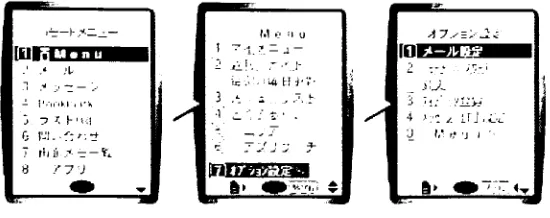
Figure 10-1 is a menu screen ofthe prototype interface thatincludes the considerations
listedabove.We seefrom Figure 8 that thenumber offunctionsofthe prototype cellularphoneis
reduced, as compared with the present cellular phones on the market, in order to make basic functions as simple as possible.
Therefore,
the functions ofthe prototype mainly consist offourfunctions: voice calls, e-mail, various set-up
functions,
and storage/access of personalinformation. In addition, I eliminated all functions thatseem to be unnecessary forolder people
to simplify the cellular phone and facilitate its use for them. As for the way of
input,
theprototype software interface was designed on the assumption that users use a
"Jog-Dial"
(as
shown in Figure 11). This is installed in Sony's cellularphones and PCs. 'The
Jog
Dial controlenables you to access and retrieve information one-handed because a simple click and turn lets
you scroll through the menu of applications and
information,
selecting what youneed"
[image:36.542.57.475.392.652.2](Jog-Dial).
jbixj pIk _.njx
-|D|x| bh,,'llffWlWggf
aMail function
.
- ". ;, >
-rus :
-*
id
;
0
[image:37.542.26.519.40.445.2]-31
il
!
;
-.: s.;
7I=UX(E)| JStb Norton AnbY 7(HOWS)
|
}#$, NortonAntivirusGo
gle-[_
J
g7KW()
|
fl8*S Norton AntjV Gogle-|
g - 71=l/A
]
iJ#* NortonAnbYrus Gogie-|~
"3
e"3
6" Go gle-|2}
eg.IS$5Ht
j -|D|x| J
twai
7KL/7.(i Sfifiiie J n?T>)m\ci BaS/E
. *Sr&&
K wz
J
bWWffllffSBtU
d 77-fJKF) ism SS(Y) fe-i"
,
x
-1
7h"U7(D;| JfSSb Norton Antffi
Go gk>
|~
rus j-
-feffittfg
J
Wz
t]*- J7-fX-fci-S t] j7-fI/tL-s
|VA
j
-H 33^ <lMSN...
|
.35fH...[
@]4g^...|gjMam...|
e_"Telep..|
g^Matf...j
jotter...||g]Myin_ fj * SS tf 0 H"A21:36
Figure 10-1: Themenu screen oftheprototype interface
3-1-1-2. The Telephone function:
Figure 10-2 is a menu screen of the telephone function
including
accessing an addressbook,
adjusting the volume on phonecalls, andofferingthecallhistory
thatinforms an ownerofwho has called and when. As for the address
book,
people can call a person up and check thepersonal information anytime
by
making a selection from the list of names in the address book.cellular phones. As for the record
function,
an owner can not onlycheckwho called and at whattimebutcan also returnthe call easily
by
selecting thatinformation.PFUAfD)JHit) Norton AntivirusQ . Goglc-P
-3
d /\-J Mmt JflJjsJ I ** , 1< El > jPFL-AfB)JfM* Norton Antivirus y
-Go gle-
f
d
d
H
n|xj Djxj
J*
Li L~J .
0
U lEJTFIMQ)2'*** Norton Antivirus Q -
Google-j~
T]
PPl/XtD)J8it> NortonAntivirus Q * Go gle- f
d M3*7=0 TF\7zW . Sff&gii . nam ; iM-S ^3 JS|xJ I = :
o
. x'"! i.Zj I Gogle-im Norton Antivirus s - i
d
1"3
/NSr^'J
WhMm
d ! j^XrtTa-5
"3
7b isns.lit.
13:23 1/08
1
d; f? .JSl*lam
;
7PUA(B)
3
%*rj Norton AntivirusQ-Go gle-
3
090-1234-5678
abcOef.com
ESS
a i "3WZDtfx-F "3
[image:38.542.17.524.128.506.2]d
3-1-1-3.The E-Mail function:
Figure 10-3 is the menu screen ofthe e-mail
function,
including
composing, receiving,sending and reading or re-reading e-mail messages. When people write e-mail, first of all
they
choose a name from their address book and then select the person's e-mail address.
Secondly,
they
writetheirmessage andtitleofthee-mail.Finally, they
checktheir message, makeanyeditsor addition, then complete the transmission of the e-mail
by
pushing the button to send themessage.
BEES
Jsjxjnmsass
jsj*jj> -* . 0* 7FlrA( Go g _ * >> Z>
-1 \m/\ f|
-o
-*,
n
i
D)jftb Norton Antivirus __,* 7l=l>A(
Go g
D)J?B) Norton AnoVrrusQ
-
c-[ J
e-| J
d d
~J ll MrcK
T'h'b^lfi . ^-Jl/jMi! 'hffl*5r ftifftHil
Si
MESffiHT'- --<*<teli& -lnl*J77-OKB SBm 3ct(v) "
if '?._;
"
1?
.... .El
7KI/A~%8fo Norton Antivirus Q
-'
L5J LEJ v\
7l5bAffl)
3
S4t Norton Antivirus 3-Go
gle-|
Go g!e-p
J d d M*5='J /\3-7-'J y-iljAis j-)imiR 5-Th;U:| 'hffl*Svr13:01 1/10 j-J
SBiria d
cci:y^1z--y r7jf1g'"ElJS
?. d
WZ> ^ih iMfS ]3
njxj
:r ii<b iSj :T!' >.
0K5 lt# I ! LEI i"*
7PUAJ1ib Norton AntrVrus Q ' Gogle
r d
-y\3r7=U
TFb7.il!S
'i Go gle
-|~ racSrfi^. 090-1234-5678 ^-JU7h"L/X: abc0ef.com Ms jnjxj OKE sK{ xi s
7Kl/A(nJ
3
UB) Norton Antivirus 3-~d
~H mtA-.l
im%z>y 13.231/03 zi mA *x n|xj71=L/A_3^ Norton ArtiVrus 3
-Gogle-
p
d_
~D
Mj/tU
^ Vt2
-VS ATlUTTcLi.
d
M5 Q-tZyh ail
JnJxJ .... ' -" ..J " _*] Lej
7F1/Aj?lf* Norton Antivirus
Go gle-
[
3
MS^U ^-Jl/ftH TJ SBAfr6 y 7t2-i/ZP :^5
"3
3-1-1-4.
ThevariousSet-up
functions:
Figure 10-4 is the menu screen of the various set-up functions: the set-up music that
sounds when someone calls an owner, theset-upofthe
display,
andtheset-up ofthe total chargesandtime ofthe call. As for the set-up ofmusic, an owner can change the music and its volume.
Asforthe set-up ofthe
display,
an owner can adjustbrightness ofthescreen. As fortheset-upof
the charges and time, an owner can check the total charges and time or can reset and clearthat
information.
gnas
.inlxl,,
P\ -|D|x|
gi gjyaaaijMiiiJ
-inlxl il; -inixi
T
-r >, 'i.iKE Sl: ?t_ K| # KB gSffi RS(V) *
3
8 \i'
p
"--V": ". ! "
0
"3
lEJ_ j
-'
J
*
J*J le!
*
7H UA(D)
J
Si* Norton AntiVird Go
g
D)
3
Sb Norton Antivirus _____- 71=l/A
J
SS) Norton Antivirus a- 7PI/A3
Si* NortonAntivirus 3 *Go gle-
P
le-|~
_-J
Go gle-
|
d" ;Go gle-|
_J | /vy^'j "Q-'fSDXjiE d i d d
d
dd
M3-7^1 M->7"U n^^'J
m1sB 5XJE
6000H
JR&Bffi]:
14B$^035iv
Wb H3 w% s^
d
-inlxl
CD SB Siffl | ,.' s . 4\- vl 5"l ">
>>!
^ ;*j
Ifc-j __;
-SJ i7-fX/tfa-5 41. !3WHi/tfa-S 7PI/A3^83
|
NortonAnBVtus g- i Go gle-[~ jj : d (3u oux. w&
3-1-1-5.
Thefunctionof personalinformation:
Figure 10-5 is the menu screen of the function of personal information: owner information
including
name,cellular phone number,and e-mail address;the telephone numbertobecalled anemergency; andthe owner's present location. As forthe function ofthe telephone numberin an
emergency, the cellular phone determines the present location information
by
GPS anddownloads the telephone number of the nearest police station, the nearest fire station, and the
nearest hospital from the database when the ownerjudges it to need emergency call. As forthe
function of the owner's present
location,
the ownercan find his orherpresent, detailedpositionon amapthatpinpoints the location
by
using GPS. In addition, the detail information ofowner'spresentlocation is pinpointed
by
characters.*J _jajxj
*
m
^m*i\Em jnjxj'is ^Y^t^?^ " jnjxj 7R Go /'
3 : ;-';/
. $
*I sD
MS)2'*** NortonAntrVrrusQ
-gle-| ^J
QgK,
-I)
x] 2j ^ i j'
'
9
'L*3 :J?1 ;
-7r=
1X10)^iiiil Norton AntiVnS -d"
PFl-ACD)3ffifil NortonAntivirus'_____ - ' Go
gle-| d "
7 lvB)__}Hth Norton AntrViru
d"
Go
gle-|_
Gogle- |. *Atf*S
IHSfJiB
ms
d
d 1 g 63
=giiu:Lljffl;*:&|]
090-8765-4321
. M~JU7KL/X:
[email protected] d -J d d d *jsisi j. i^W^f . *<D;Bp75* J^3
JK.-;fi
rt&iiff_d M-5wt, MS y~j.
ES33S
9*
8S *&-*-% &i 7i(V) " 8
.-'
* 2Li LEJ
*
71=1/?,0}_j|?*(] Norton AntiW
.,.1
9
-d
<& l7"!XrlTl-i \JWX'tfa--'j ^jifii i^-fx/Ci-s L~
d
r.
g
<i i ii MS
"
[image:41.542.43.508.321.648.2]
3-1-2.The usabilitytest:
3-1-2-1. Methods:
I ran a usabilityteston the prototype software interfaceforolderJapanesepeople, and I
receivedten responses. As forthe usability test, I instructedtesters through cooperators
by
usingtelephone how
they
ran the test. All of the usability test was run withcooperators'
PC
by
downloading
dataoftheprototype interface. None oftherespondents have had a cellular phone.Theage groupings of older people who participatedin theusabilitytestasfollows: sexagenarian,
twopersons; septuagenarians, fourpersons; octogenarians, three persons; andone nonagenarian.
The point of the evaluation was to determine optimal qualities in the size of characters, the
arrangement ofcolors, ease of
handling,
the number offunctions,
and all opinions regardingtheprototype interface. In addition, there was difference in
feeling
in actualhandling
the cellularphones because the older people who were testers needed to use a mouse when
they
ran theusabilitytestoftheprototypeinterface.
However,
hardware interface isnotpoint ofevaluationinthispart.
3-1-2-2. Results:
The
following
are the results ofthe usability test that was run with ten elderly subjectswho were
testing
theprototype softwareinterface:1. Sizeofcharacters.
r Thesize of characters isalegible sizeforolderpeople.
> E-mail charactersaretoo small forolder peopletoeasilyread.
2. Arrangementofcolors.
olderpeople toeasilyread.
> The combination ofthe color about the prototype that is
black,
white,blue,
and orangeis easy to see anddistinguish other colors.3.
Handling
ofthe prototype.
r-The interfaceofcharactersis easierto handleforolderpeoplethan the
interface oficons.
> When
they
choose afunction,
they
want the interface to explain thatfunctionto them.
4. Numberoffunctions.
r-The reduced number of functions of the prototype is satisfactory to
olderpeople.
5. All opinions abouttheprototypeinterface
> It is difficult for older people to see the map because it is confusing
and gives toomuchinformation.
> Theexplanationofthepresent position
by
charactersis useful.6. Doyou wanttoget acellular phone whoseinterface is thisprototype?
6-1. Yes. fourpersons.Why?
r Thisprototypeinterfaceisuseful forolderpeople.
6-2. No. - three persons.Why?
r-The prototype is much different from cellular phones that are sold to
young people.
Therefore,
the prototype does not make a goodimpression on some older people who feel that
they
arebeing
6-3. I donotknow.
-threepersons. Why?
> Dependson theprice.
Basedon the resultsofthis usability test, fourout oftenpersons saidthat
they
mightgeta cellularphone, andthree out often persons might not get a cellularphonethat has the software
interface as inthe prototype, which suggests that the software interface design of cellular phones
is one oftheimportant factorsforolder people when
they
choose whetherthey
will geta cellularphone or not.
However,
it is natural that the software interface is one of the important factorsbecause none of the functions are carried out without using the software interface. To put it
briefly,
a cellular phone that does not have a useful software interface is not a useful device.Naturally, the reverse is also true. As a consequence, older people who do not have a cellular
phone aremore
likely
togetoneif it includedamoreusefully designedsoftware interface.3-1-3. Hardware Interface:
The nine respondents had their cellular phones and other respondents were showed
cooperators'
cellular phones in orderto grasp what cellularphone was.
Therefore,
not everyonebut some respondents had good and bad opinions about hardware interface. The
following
is asummary ofthe
respondents' opinionsofthepresenthardware interface:
> It is very
light;
therefore, it is easy for older people to carry acellular phone.
> The buttons are so small that they cannot always push the right
ones and endup makingamistake.
>
They
cannot master easily how to use the functions of cellularhave to learntoo manythings.
r The form ofthe present cellular phone is linear andthe surface is
smooth and easy to drop.
Therefore, they
want to change theexteriordesignof cellularphones.
r
They
wanttheLCD tobe moreenlarged andeasierto see thanthepresent models have.
Based on these opinions from olderpeople, the buttons areespecially problematic. The
hardware interface design
directly
influences thehandling
of cellular phones.Therefore,
it isessential to consider the physical
dexterity
of older people when the author redesigns thehardware interface design.
Accordingly,
Iwould like to refer to an experiment conductedby
theResearch Institute ofHuman
Engineering
forQuality
Life(HQL)
in 1998 regardingthe physicalability of older people (Human
Engineering
forQuality
Life,
1998). The study investigatedregardingthe ease of
handling
andthe ease ofmaking mistakes when pushing buttonsby
usingthe four sizes of buttons: 7 millimeters wide
(mm), 12mm, 17mm,
and 20mm in width. Thestudy's resultfollow:
> As for ease of
handling,
the estimate of the smallest button(7mm)
islowcompared with other sizes
buttons,
which weremore convenient.>
Comparing
the same button size, it seems that there is an optimumspace between buttons that makes it easier for older people to handle
the buttons.
However,
even ifthe spacebetween buttons is too narrowor too wide, the tester feels that the
handling
of 7mm and 12mmbuttonswas poor.
handling
between the 7mm andthe 12mm buttons. On theotherhand,
there is a great
difference
regarding the percentage ofusers who made
mistakes. To put it concretely, in the case of the 12mm button the
number of users who made mistakes is higher than those who used
with7mm buttons.
r When the space between buttons is
30mm,
theease of
handling
isgood, asthe buttonsizebecome larger.
> The ratio of the person who made mistakes gets higher as the space
between buttons becomes narrow.
From the above result of the experimentation, there is a correlation between the button
size and the space between buttons regarding the
feeling
ofthe button's handling. Basedon theresult of experimentation, cellular phones can
ideally
be designed. On the otherhand,
actuallyboth the button's size and the space in between are willy-nilly restricted
by
the premise that acellular phone is a portable device and used with only one hand.
Therefore,
I have to take thewidth of present cellular phones, ranging from 48 to
51mm,
when I consider the hardwareinterface design. Based on the results of the aforementioned research, the
following
is anexample ofa good hardware interface design of cellular phones. Each button is 7mm wide, the
spacebetween buttons is
10.5mm,
andthespace ofbothto theedge ofthecellular phoneis 3mm.The research found that
basically
the widerthe button's spacingbecomes,
the more older peopledo not make amistake aboutbuttons handling. Ofcourse, theLCD is betteras itbecomes bigger.
In addition, someolder people saidthat
they
droppedtheircellular phonesby
mistake.Therefore,
The hardware interface design greatly influences the
feeling
ofhandling
and the firstimpression of appearance, and the software interface design greatly influences how people can
easilyuse a cellular phone. Ifthehardware interface is not a good
design,
cellular phones are noteasy to
handle,
and ifthe software interface isnot a gooddesign,
cellular phones aredifficult touse. In
brief,
cellular phones that are not useful ifthey
lack a goodinterface,
which makes thecellular phoneeasytohandle and providesall offunctionsthat the user needs.
Therefore,
cellularphones should have a good interface so that everyone can easily use
it;
otherwise it ismeaningless if cellular phones with however excellentfunctions are notuseful. In addition, it is
clearthat these considerationspositively impactthe usability ofcellular phones forolderpeople.
In otherwords, cellular phone usage will increase amongolder peopleif
they
aredesignedwith agoodinterface. Ofcourse,agoodinterface designmeans suitingeveryoneirrespectiveofage.
3-2. Function:
Currently,
cellular phones have alot ofvarious functions.However,
all of the functionsare not always useful for olderpeople because who have differentneeds and abilities the target
market forcellular phones is youngerpeople, therefore, even ifa function isnot useful forolder
people, cellularphones are equipped with it.
Judging
fromthe standpointofmarketing,theabovesituation may be valid.
However,
providingolder people with thefunctions thatthey
needis alsoimportant and would open up a new targetmarket forcellular phones.
Therefore,
I would like to3-2-1.Thevoice function
Asforthe functions ofcellularphones, aprimaryrequirementforolder peopleis related
to voice operation, for example, a voice explanation of all ofthe
functions,
aregistration in thetelephone
book,
an ability to search a telephone numbersfrom the telephonebook,
and to writeby
voice, or announce thecondition ofthe totalbattery
powerremaining and the state ofreceiving a radio cannel.
Judging
from their opinions, older people want to handle cellularphones easily and to get information not only visually but also
by
voice.Indeed,
older peoplewanttobe able tohandle all ofthe functionsofcellular phoneswith voicecommands.
Currently,
there are two ways that voicerecognitionis realized at cellularphones. One isthe application of
PCs'
voice recognition tocellular phones. As forthe voice recognition of
PCs,
users can "dictatememos, reports, and other
documents;
enterdata;
fill-informs;
send e-mailby
using voicerecognition"
(The voice recognitionofPC's). PCsarenot restricted
by
machine power comparedto cellular phones.
Therefore,
from the standpoint ofmachine power, software ofPCs is easytodevelop
compared to cellular phones'. Thatis,
cellular phones will have voice recognitionby
improving
its performance. The other is development of original voice recognition for cellularphones. In thecurrent state ofaffairs, although afunction is restricted, there is acellularphone
that realizes voice operation is called "Xelibri
3"
(Siemens Information and Communication
Mobile Group). Userscan handleitwithonly voicecommand. The voice recognition of"Xelibri
3"
realizes
by
using a technology that is called "smARTspeakNG"
(Advanced Recognition
Technologies,
Inc). This is developed for cellular phones.Certainly,
"Xelibri3"
does not have
many functions like present cellular phones.
However,
it shows apossibility ofone of the futureofcellular phones.
older people because theireyesight and
hearing
arebeginning
to weaken and their hands do notmove
freely
anymore.Therefore,
it is easier for older people to handle cellularphones and getinformation though a combination of voice, eyesight, and hearing. In addition, most user
manuals contain between 300-500 pages,
increasing
in proportion to thenumber offunctions ofthe model ofthe cellular phone. As aresult, cellular phones givethe impression thatpeople have
to learn manythings aboutfunctionsbefore
they
canusethemsuccessfully.This is one ofthe reasons why some older people do not want to have cellular phones.
On the other
hand,
if people could use all of the cellular phone's function without reading themanual, cellular phones would be veryuseful d