This work is made available under
a Creative Commons Attribution 4.0 International licence.
Transforming exams - how IT works for BYOD e-Exams
Mathew Hillier
Monash University
Andrew Fluck
University of Tasmania
This paper focuses on the 'IT' side of a bring-your-own-device (BYOD) based e-Exam system developed
as part of an Australian government funded project. In short, students in the exam room boot their own
laptops using a specially crafted USB stick that contains a standardised operating system and application
suite. By giving teachers and students access to contemporary software tools we are providing the
opportunity to greatly expand the pedagogical landscape of the exam room encouraging more authentic
assessment practices. The roles for the 'Us' (organisations) and 'Me' individuals within the process of
running an e-exam are also outlined in order to provide a richer description on the approach.
Introduction
This paper is about the e-Exam solution that has been developed as part of a three year Australian government innovation and development grant (OLT, 2015). The project aims to develop a comprehensive approach to doing 'authentic' e-exams using bring-your-own-device (BYOD). The context for the use of our e-Exam solution is the supervised space of the exam room. A key element of the work is to enable authentic forms of assessment. To this end we have designed the solution to allow complex constructed problems that can be addressed using a range of contemporary 'e-tools of the trade'. We focus the majority of our discussion on the 'how' of our solution, however we will touch on the multi-faceted elements that need to be in place including that all stakeholders, including students, teachers, policy makers, leaders and institutional support must be equipped, trained and resourced, But first a little on the 'why' of the solution.
The need to computerise examinations
Paper based testing is no longer fit for purpose in many disciplines where a wide range of software tools and information resources are now commonly part of problem solving. We argue that current testing practices and the inertia of current education systems may be hampering the efforts bring about change. Educational research has shown that the concept of 'teaching-to-the-test' (TTTT) (Phelps 2011) plays a role in shaping the designed and taught curriculum. The format and nature of testing has consequences for what teachers and students do and don't do. This impact is known as 'washback' (Anderson, 2007, Longo 2010). Ripley (2007, p.10) argues that paper-based exams are a major barrier to curriculum change due to their limited affordances. While TTTT due to pedagogically narrow paper-based testing can limit the
curriculum taught in the classroom, TTTT can equally be used to prompt positive reform if the characteristics of the test align with desired curriculum change (Anderson 2007). By designing a technological facility that serves to greatly expand the 'pedagogical landscape' in the exam room, we have elsewhere argued (Fluck & Hillier 2014, 2016) that such innovative, technology enhanced forms of high stakes assessment have the potential to 'unblock' and encourage curriculum transformation through a form positive of washback. In other words by expanding the 'pedagogical landscape' in the exam room through the provision of additional technological affordances the formative and summative parts of the course could be bought into better alignment with each other and the needs to contemporary twenty first century education and society.
If this paper were taken alone it may appear that the choice of deployment approach and the reasons of dropping computers into the exam room may at first seem cobbled together. The contrary is the case. We have argued over the past couple of years a rationale for using a 'whole computer' approach in the exam room (Hillier & Fluck 2013, Fluck & Hillier 2014). A sophisticated e-exam platform needs to offer contemporary text processing (such as office suites), rich media, discipline relevant software applications and interactive virtual
findings of the student experience of using the e-Exam system in Australian university courses (Hillier 2015).
Taking multiple perspectives on our
e-Exam solution
The approach to this paper is to describe how the system works from the point of view of IT and to a lesser extent, Me and Us, in that order. This triad fits well with Harold Linstone's ideas around looking as complex systems from the multiple perspectives in the technical, organisational and personal (Linstone 1999). Linstone's framework builds on the common approach where an analyst looks at a situation from a technological perspective, or what Peter Checkland (1999) would call the traditional 'hard systems' approach. This builds up a description where technology artefacts and engineering thinking come to the fore. Both Checkland (ibid) and Linstone separately acknowledge that there needs to be more to the vision than just the technical view. They advocate taking into consideration the organisational groups and people who work and jostle in the operation of a complex system. Courtney (2001) would describe such situations as 'messy', while Rittel and Webber (1973) use the term 'wicked problem'. The e-Exam system project can certainly be descried as such with indications of this complexity presented early in the project in Hillier (2013). However, by taking the three elements of IT, Us and Me into consideration, a richer description of the complex system can be presented. Notably, it can be difficult to disentangle the multiple views once they have been obtained due to the 'cross-cuing' (Linstone 2003) that occurs in between them.
IT (technology view)
The technology used as the basis of the system is
intended to provide flexibility, openness and compatibility with a range of other technologies commonly found in the hands of students and in universities. The provision of equipment for student examinations at a large scale is potentially a challenge for universities. Institutions currently run exams during defined periods each year with highly intensive but short periods of utilisation meaning that computer equipment purchased for use in exams would likely be idle for the majority of each year. The use of BYO laptops that students already own is a solution to this provision. However this then raises the matter of how to provide an equivalent and secure software environment for each exam candidate. The solution selected was to utilise Linux Live USB sticks that have been customised for exam use. This provides a whole operating system and suite of software applications that can run on the majority of laptops owned by students providing a consistent and controlled software environment. The customisation serves to improve security, usability and robustness of the software tool set. The use of bootable USBs also allows the
personal property of students to be temporarily 'taken
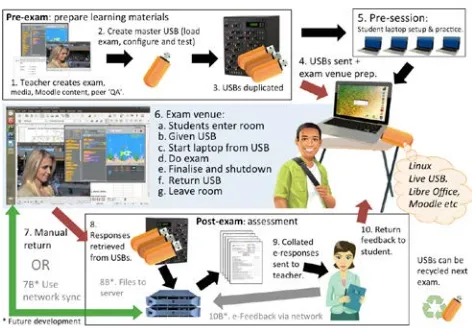
[image:2.595.315.551.264.428.2]over' for use in an exam in a way that leaves the device completely untouched. There are no invasive 'lock down' root kits or browsers required that is typical of other solutions in the market place. Therefore the solution provides a more ethical approach to 'borrowing' a student's personal device for university business. The process of running an e-Exam is outlined in Figure 1. It involves preparing exam materials and USB sticks containing a customised Linux operating system. In the exam room students boot their laptop using the live Linux USB stick. Following the exam, responses are retrieved, collated and sent to academics for marking or merged to a learning management system for automated marking.
Figure 1: e-exam workflow using offline BYOD and bootable USBs
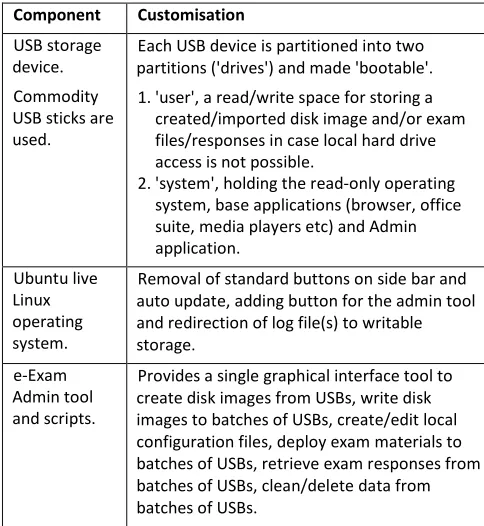
The e-Exam USB based system is made up of several elements. The Ubuntu Linux operating system forms the base with several customisations. The live bootable system comprises number of subcomponents. Some of the customisations made to create a student e-Exam USB system are listed in table 1. Details of an administrative helper tool are provided in table 2. The student portion of the e-exam system is able to run on very minimal
computer hardware as low as 2GB of RAM, although 4GB is recommended. The Admin tool has higher
Table 1: Bootable student e-Exam system components and customisations
Component Customisation USB storage
device.
Commodity USB sticks.
Note: USB-C adapters can be used.
Each USB device is partitioned into four 'drives' and made 'bootable'.
1.'answers': a read/write space for student responses.
2.'system': holds the read-only operating system, boot loaders and base applications (browser, office suite, media players etc). 3.'eexam': containing read-only exam
source/questions, resources, 3rd party apps, exam specific configuration file and unique wallpaper image.
4. 'db': Inaccessible to users. Only system
writable for sensitive user and application data, e.g. Moodle database, logs, backups. Grub boot
manager. This directs the early handover from firmware BIOS/EFI to the operating system.
Customised to remove maintenance access options and to skip menu selection (the menu doesn't appear as it would for a standard live USB system). The EFI 64bit loader is secure boot compatible and supplemented by a 32bit loader for older EFI machines (but is not 'secure boot' compliant). Booting via legacy BIOS is also possible on older computers but they must have a 64bit processor as of e-Exam v6.
An
initialisation system hands over to Ubuntu proper.
Remove access to maintenance options and 'root' user set with strong hashed password that would otherwise give the user admin access to what is a micro Linux system early in the boot sequence. A custom e-Exam boot logo added.
Ubuntu live Linux operating system (currently 16.04). Note: future Ubuntu versions will be adopted as they are released to increase hardware compatibility.
Removed user access to 'system', 'db' drives, local hard drive and secondary storage. Read-only access to 'eexam' drive. Removed root access as were Terminal applications and short cut access to the command line. A custom shut down routine added to facilitate
'self-cleaning/reset' during training scenarios. Depending on the system configuration; removal of networking and/or spell check files. Additional features include: start up checks, logging of hardware specifications, re-direction of system logs to writable storage, detection of high definition screens, extra response file backup and recovery, optional user monitoring (screen capture, web cam capture), the ability to disable network, Bluetooth, IR, virtual terminal switching, prevention of running in a virtual machine, whitelist IP space for online mode.
Desktop interface and controls.
Tool bars customised with exam specific buttons used and generic items removed to minimise distractions. A custom 'e-Exam Starter' collects the student ID/name information and directs the automatic launch of the teacher selected exam file. E.g. office document (doc, spreadsheet, etc), other local file (provided it has a default application installed), web browser to URL (local Moodle instance, or network location). Additional modes can be added in the future. Applications:
Libre office suite, media players, browsers etc.
Libre office customised to remove side bar, always enable save, improve 'autosave' frequency and redirect paths to writable storage. Upon close of a word processing document a PDF can be automatically created as a 'final' submission. This is significant where formatting, fonts and language settings are critical (e.g. language translation, complex table layouts and mathematical formulae). Web
applications (e.g. Moodle) running 'off-line'. Note: on-board Moodle is a work-in-progress.
[image:3.595.315.557.451.714.2]Local host web applications can be installed to run without a network connection. Moodle LMS with minimal theme, as quiz engine. The student's user account is created on-the-fly based on their student ID number as a unique identifier. Local backup to the 'db' partition is done transparently each time the data base changes. Moodle course content can be automatically imported by placing a '.mbz' (Moodle course backup) file on the eexam drive. Future work: collate/merge databases. Table 2: Bootable e-Exam Admin tool customisations
Component Customisation USB storage
device. Commodity USB sticks are used.
Each USB device is partitioned into two partitions ('drives') and made 'bootable'. 1.'user', a read/write space for storing a
created/imported disk image and/or exam files/responses in case local hard drive access is not possible.
2.'system', holding the read-only operating system, base applications (browser, office suite, media players etc) and Admin application.
Ubuntu live Linux operating system.
Removal of standard buttons on side bar and auto update, adding button for the admin tool and redirection of log file(s) to writable storage.
e-Exam Admin tool and scripts.
Provides a single graphical interface tool to create disk images from USBs, write disk images to batches of USBs, create/edit local configuration files, deploy exam materials to batches of USBs, retrieve exam responses from batches of USBs, clean/delete data from batches of USBs.
Me (personal view)
assessment and technology. Their ability to adopt a new paradigm of authentic e-exams will depend on their capacity to learn, access to professional development, technology support and so on. In larger institutions there will likely be several departments responsible for the smooth operation of the exam. When adding the complexity of information technology to the mix of already time pressured, high stakes assessment events the criticality of collaboration is heightened. By
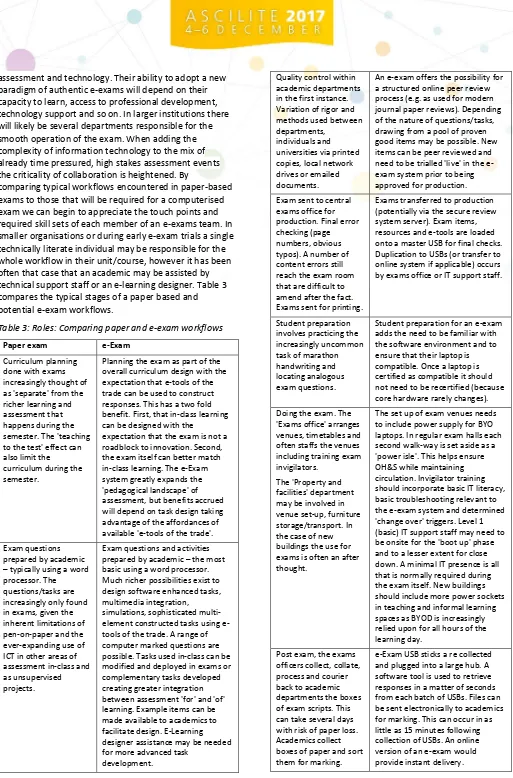
[image:4.595.45.558.14.792.2]comparing typical workflows encountered in paper-based exams to those that will be required for a computerised exam we can begin to appreciate the touch points and required skill sets of each member of an e-exams team. In smaller organisations or during early e-exam trials a single technically literate individual may be responsible for the whole workflow in their unit/course, however it has been often that case that an academic may be assisted by technical support staff or an e-learning designer. Table 3 compares the typical stages of a paper based and potential e-exam workflows.
Table 3: Roles: Comparing paper and e-exam workflows
Paper exam e-Exam
Curriculum planning done with exams increasingly thought of as 'separate' from the richer learning and assessment that happens during the semester. The 'teaching to the test' effect can also limit the curriculum during the semester.
Planning the exam as part of the overall curriculum design with the expectation that e-tools of the trade can be used to construct responses. This has a two fold benefit. First, that in-class learning can be designed with the
expectation that the exam is not a roadblock to innovation. Second, the exam itself can better match in-class learning. The e-Exam system greatly expands the 'pedagogical landscape' of assessment, but benefits accrued will depend on task design taking advantage of the affordances of available 'e-tools of the trade'. Exam questions
prepared by academic – typically using a word processor. The questions/tasks are increasingly only found in exams, given the inherent limitations of pen-on-paper and the ever-expanding use of ICT in other areas of assessment in-class and as unsupervised projects.
Exam questions and activities prepared by academic – the most basic using a word processor. Much richer possibilities exist to design software enhanced tasks, multimedia integration, simulations, sophisticated multi-element constructed tasks using e-tools of the trade. A range of computer marked questions are possible. Tasks used in-class can be modified and deployed in exams or complementary tasks developed creating greater integration between assessment 'for' and 'of' learning. Example items can be made available to academics to facilitate design. E-Learning designer assistance may be needed for more advanced task
development.
Quality control within academic departments in the first instance. Variation of rigor and methods used between departments,
individuals and universities via printed copies, local network drives or emailed documents.
An e-exam offers the possibility for a structured online peer review process (e.g. as used for modern journal paper reviews). Depending of the nature of questions/tasks, drawing from a pool of proven good items may be possible. New items can be peer reviewed and need to be trialled 'live' in the e-exam system prior to being approved for production. Exam sent to central
exams office for production. Final error checking (page numbers, obvious typos). A number of content errors still reach the exam room that are difficult to amend after the fact. Exams sent for printing.
Exams transferred to production (potentially via the secure review system server). Exam items, resources and e-tools are loaded onto a master USB for final checks. Duplication to USBs (or transfer to online system if applicable) occurs by exams office or IT support staff.
Student preparation involves practicing the increasingly uncommon task of marathon handwriting and locating analogous exam questions.
Student preparation for an e-exam adds the need to be familiar with the software environment and to ensure that their laptop is compatible. Once a laptop is certified as compatible it should not need to be recertified (because core hardware rarely changes). Doing the exam. The
'Exams office' arranges venues, timetables and often staffs the venues including training exam invigilators.
The 'Property and facilities' department may be involved in venue set-up, furniture storage/transport. In the case of new buildings the use for exams is often an after thought.
The set up of exam venues needs to include power supply for BYO laptops. In regular exam halls each second walk-way is set aside as a 'power isle'. This helps ensure OH&S while maintaining circulation. Invigilator training should incorporate basic IT literacy, basic troubleshooting relevant to the e-exam system and determined 'change over' triggers. Level 1 (basic) IT support staff may need to be onsite for the 'boot up' phase and to a lesser extent for close down. A minimal IT presence is all that is normally required during the exam itself. New buildings should include more power sockets in teaching and informal learning spaces as BYOD is increasingly relied upon for all hours of the learning day.
Post exam, the exams officers collect, collate, process and courier back to academic departments the boxes of exam scripts. This can take several days with risk of paper loss. Academics collect boxes of paper and sort them for marking.
Us (organisational view)
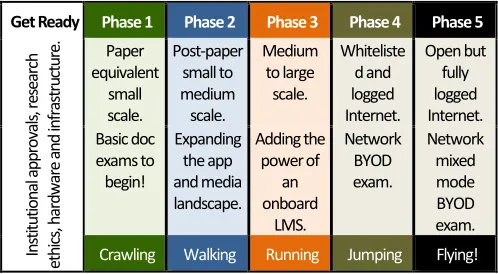
Adoption of new technology is a change process. In organisations, change takes time and learning on the part of individuals and organisations to occur (Kenny 2006). Jumping in at the deep end may be good of innovation in small bites, but rarely does this scale across an institution without immense resources, focus and planning on the part of the receiving organisation. The constraints on complex project management (Atkinson, 1999) paraphrased as "Good, quick, cheap – pick two" apply. Instead a stepwise approach to adoption along a path from 'now to the future' (Hillier & Fluck 2015) is recommended. This gives time for the multitude of interconnected organisational systems and processes to adjust to the change and is much less resource intensive. The system development process also takes time to occur and given the scale of the development team a gradual phased development program is required. Having both constraints of receiving organisations and the
development team in mind a phased development and adoption strategy has been developed (See figure 2). In the case of organisations adopting the e-Exam system, the rate of progress along the stages depends on how quickly they are able to build capacity in the design and deployment of e-exams. The complex machinery of educational institutions includes strategies, policy, professional development, technology systems, educational practices and traditions. How quickly stakeholders and systems can adjust to facilitate the change will impact progress along the timeline. To assist in this area a loose community of practice (Wenger, 1998) is building around the project with shared network drive (AARNET Cloudstor), a website, user guides, and workshops run for project participants.
Get Ready Phase 1 Phase 2 Phase 3 Phase 4 Phase 5
In
sti
tu
tio
na
l a
pp
ro
va
ls,
resea
rc
h
eth
ics
, h
ar
dw
ar
e a
nd
in
fra
str
uc
tu
re
. Paper equivalent
small scale.
Post-paper small to medium scale.
Medium to large
scale.
Whiteliste d and logged Internet.
Open but fully logged Internet. Basic doc
exams to begin!
Expanding the app and media landscape.
Adding the power of
an onboard
LMS.
Network BYOD exam.
Network mixed mode BYOD exam.
[image:5.595.43.292.517.654.2]Crawling Walking Running Jumping Flying!
Figure 2: Roadmap to adopting e-exam system features
There are risks associated with the change and the rate of change. For example, if stakeholders are not adequately resourced and trained then they may resort to coping strategies such as using lower order multiple-choice questions. Similarly if the adoption process takes too long then changes in the broader technology environment may overtake the selected tool set. Utilising an open
architecture for the e-exam system and ensuring it is kept up-to-date by drawing on the resources of other open
source work will mean that changes such as the move from USB-A to USB-C will not derail the adoption program.
Conclusion
This paper has briefly overviewed the technical (IT) solution developed for a BYO laptop based e-Exam system. While the primary aim of the system was to develop a tool for authentic assessment, matters of scalability and fit within existing university exams processes (Us) and the roles and place of individuals (Me-s) were considered in its development.
References
Alfredsson, F. (2014). Bring-Your-Own-Device Exam System for Campuses. Nordunet presentation. Anderson, T.R (2007) Bridging the Educational
Research-Teaching Practice Gap, The power of assessment,
Biochemistry and Molecular Biology Education, 35(6): 471-477.
Atkinson, R. (1999). Project management: cost, time and quality, two best guesses and a phenomenon, its time to accept other success criteria. International Journal of Project Management. 17(6): 337–342. Checkland, P.B. (1999) Soft system methodology - a 30
year retrospective, in Checkland, P.B. & Scholes, J.
Soft systems methodology in action, Wiley, Chichester, UK, pp. A1-A65.
Courtney, J.F. (2001) Decision making and knowledge management in inquiring organizations: toward a new decision-making paradigm for DSS, Decision Support Systems, 31(1): 17-38.
Fluck, A. & Hillier, M. (2014) eExams Transforming Curriculum, 26th Australian Computers in Education Conference, 30 September - 3 October, Adelaide.
Fluck. A. & Hillier, M. (2016) Innovative assessment with eExams, Australian Council for Computers in Education Conference, Brisbane, 29 Sep to 2 Oct. Hillier, M (2013) Arguing for e-Exams, Transforming
Assessment in the Digital Era, Melbourne.
http://www.transformingexams.com/files/Arguing _for_e-exams_slides.pdf
Hillier, M. & Fluck, A. (2013) Arguing again for e-Exams for high examinations, ASCILITE conference, 1-4 December, Sydney.
Hillier, M. & Fluck, A. (2015) A pedagogical end game for exams: a look 10 years into the future of high stakes assessment, ASCILITE Conference, 29 Nov - 2 Dec, Perth.
Kenny, J. (2006) Strategy and the learning organization: a maturity model for the formation of strategy,
Learning Organization, 13(4): 353-368 Linstone, H.A. (1999) Decision making for technology
executives: using multiple perspectives to improve performance, Artech House Publishers, Boston, MA, USA.
Linstone, H.A. (2003) Technology, terrorism, and the multiple perspective approach, technology management for reshaping the world, in
Proceedings of thePortland International Conference on Management of Engineering and Technology, 20-24 July, Portland, Oregon, USA, pp. 14-21
Llamas-Nistal, M., Fernandez-Iglesias, M. J., Gonzalez-Tato, J., & Mikic-Fonte, F. A. (2013). Blended e-assessment: Migrating classical exams to the digital world. Computers & Education, 62: 72–87.
Longo C. (2010) Fostering Creativity or Teaching to the Test? Implications of State Testing on the Delivery of Science Instruction, The Clearing House: A Journal of Educational Strategies, Issues and Ideas, 83(2): 54-57
Office of Learning and Teaching (2015) [OLT]. Successful Grants Round 1.
http://www.olt.gov.au/system/files/Grants%20list %20R1%202015%20final%20version%20for%20we bsite_0.pdf
Phelps, R. P. (2011) Teach to the Test? The Wilson Quarterly 35(4): 38-42.
Ripley, M. (2007) E-assessment – an update on research, policy and practice. FutureLab: Bristol.
Rittel, H. & Webber, M.M. (1973) Dilemmas in a general theory of planning, Policy Sciences, 4(2): 155-169. Tamm, M., Lattu, M. & Lavonen, J. (2016). A new ICT
based matriculation examination enables the use of ICT natural to science subjects. Electronic
Proceedings of theESERA 2015 Conference. pp. 652-659.
Wenger, E. (1998). Communities of Practice: Learning, Meaning, and Identity. Cambridge: Cambridge University Press.
Note: All published papers are refereed, having undergone a double-blind peer-review process.
Contact author: Mathew Hillier,
Please cite as: Hillier, M. & Fluck, A. (2017).
Transforming Exams - How IT works for BYOD e-Exams. In H. Partridge, K. Davis, & J. Thomas. (Eds.), Me, Us, IT! Proceedings ASCILITE2017: 34th International
Conference on Innovation, Practice and Research in the Use of Educational Technologies in Tertiary Education