
One fine day during my vacation I was preaching my mom on passwords & she gave me a genuine excuse on why she writes the password down. We always asked people to keep a complex password and most of the time they are difficult to remember. Hence in this issue we'll see how we can create strong passwords which are easy to remember
By the way! during the launch of our CHMag in Goa, I met Raoul Chiesa from Italy who is an old time hacker and now works for UNICRI(United Nations Interregional Crime & Justice Research Institute) as a Senior Advisor on Cybercrime and manager for Strategic Alliances. In this
issue, we have a special feature on UNICRI's "Hackers Profiling Project". Thanks to Raoul for sharing reports and information about HPP.
Steganography
What is Steganography?
Steganography is the art of hiding information in images. In Greek, Steganography means “covered writing”. In steganography, confidential data is hidden in images to protect it from unauthorized users. So basically it means, hiding a secret message within a cover-medium in such a way that others cannot detect the presence of the hidden message. In contemporary terms, steganography has evolved into a digital strategy of hiding a file in some form of multimedia, such as an image, an audio file (like a .wav or mp3) or even a video file.
Steganography vs. Cryptography
Steganography and cryptography are two important techniques to secure data. It has gained importance post World War II. It is now widely used by Law Enforcement Agencies, terrorists etc.Steganography‟s goal is to hide the presence of a message .
Cryptogtaphy‟s goal is to obscure a message or communication so that it cannot be understood.
Methods of Steganography
Embedding messages in media, like Plain Text
Audio/Video
Image
Plain Text
Steganography with plain text can be done in number of ways, as mentioned below:
Using selected characters or words from a specially-crafted cover-text. (Consider this sentence – “Since Everyone Can Read, Encoding Text In Neutral Sentences Is Doubtfully Effective”. Here, if you observe, first letter of each word is used to convey a message - Secret Inside!!)
Introducing white-space characters (line spaces and tabs) that a text view won‟t display.
For demonstration purpose we will
illustrate SNOW (Steganographic nature of Whitespace).
Snow:-
Fig. 1.1
Snow is a program for concealing and extracting messages in ASCII text files.This method conceals messages by appending tabs and spaces (known as whitespace) at
the end of lines. Tabs and spaces are invisible to most text viewers, hence depicting steganographic nature of this encoding scheme.
Fig. 1.1 shows all the available options in snow. They are described as below:
-C = use compression during concealing, uncompress during extraction
-Q = quite mode. Used to turn off verbose messages while program runs
-S = Show approximate space available in cover file
-p = password option is used for encryption/decryption
- l = snow will create lines sorter than this optional line length parameter
-f = this is the secret file
-m = this is the secret message string infile = this is the input cover file outfile = this is the output file
For this example, we will use following file :- insnow.txt = this is the secret file to conceal
hide.txt = this is the infile (cover file) outsnow.txt = this is the outfile (cover file + secret file)
p@ssword = this is the password used for encryption/decryption Note:- All the above specified examples need appropriate substitution for practical purposes..
Now to hide the file – insnow.txt within hide.txt using encryption with the output of snow, the command is as follows:
Fig. 1.2
[image:5.612.69.313.39.224.2]Now to extract the hidden message following command is used:
Fig. 1.3
And the contents of the secret file are revealed:-
“meet me at dawn”
Image Steganography
Data can be hidden in images also. In fact images are most widely used in steganography.
Tools:
Many tools are available to do image steganography like Camouflage, JPEG-JSTEG. For demonstration we will use Camouflage.
Camouflage:
Camouflage allows you to hide files by scrambling them and then attaching them to the file of your choice. This camouflaged file then looks and behaves like a normal file, and can be stored or emailed without attracting attention.
Camouflage software is easy to install, user-friendlyand a very versatile steganography tool that is free of cost and readily available for downloading .
For example following files will be used:- Sunflower.jpg = cover medium Secret.jpg = file to be hidden Kiss = passphrase
Camouflaging Files:
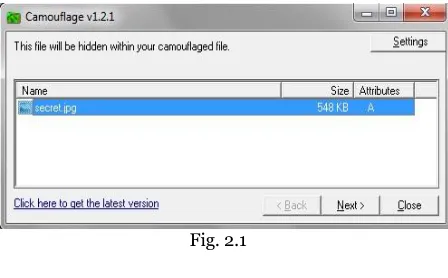
You can camouflage a file or several files at a time by right-clicking them and choosing “Camouflage” from the menu.
Following window will appear.
Fig. 2.1
Now, in the first window, you can view/edit the files by double clickin them or by right clicking them and choosing „Open‟. Selectin “Properties‟ will give information about the file.
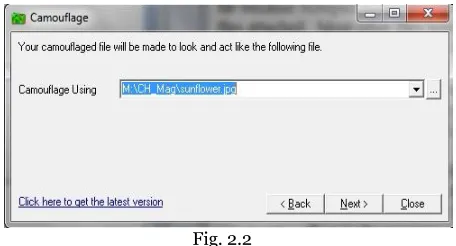
[image:5.612.323.547.433.572.2]Fig. 2.2
[image:6.612.321.565.267.391.2]Here, in the second window, it will ask for the cover medium (file). Select a file with which you want to cover your secret file. This file can be of any type, but in this example we are using a .JPG file.
Fig. 2.3
In the next window, give the location and filename for the camouflaged file. Check „Read-only‟ to create camouflaged file with its „Read-only‟ attribute. This is recommended because it makes the file safer, and prevents other applications from modifying it and destroying the camouflaged section.
Fig. 2.4
In the final window you can type a password.We will use “kiss” as password for demonstration purpose. If you do not wish to add password then just click „Finish‟. This will create the camouflaged file and then exit.
Uncamouflaging Files:
To extract the files hidden within a comuflaged file, right-click the camouflaged file and choose „Uncamouflage‟ from the menu.
Fig. 2.5
[image:6.612.70.297.288.407.2]A password prompt appears. Enter the password, if any. Once you entered the correct password (if applicable), click „Next‟
Fig. 2.6
[image:6.612.321.566.452.585.2]Fig. 2.7
Here give the location where you want the file to be extracted.
Now you can view your secret file!!!
Audio Steganography
In Audio steganography,secret messages are embedded in digital sound. The secret message is embedded by slightly altering the binary sequence of a sound file. Existing audio steganography software can embed messages in WAV, AU, and even MP3 sound files.
Embedding secret messages in digital sound is usually a more difficult process than embedding messages in other media, such as digital images.
S-Tools:
For example following files will be used:- Cover.wav = this is the cover medium file
Secret.wav = this is the hidden data file
Out.wav = output file (cover_medium + hidden_file) p@ssw0rd = this is the passphrase Open S-Tools (S-Tools.exe).
Drag the cover_medium, in this case cover.wav, into the S-Tools window
Fig. 3.1
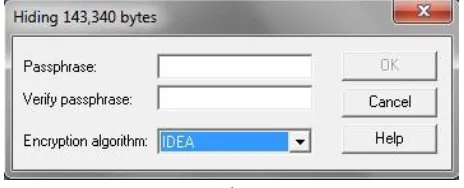
Now, to hide the secret file, drag secret.wav into S-tools window and drop it onto the cover medium. Immediately you will be prompted for a passphrase. The passphrase is used in generating the pseudo-random number which is used to insert the bits into the cover file. IDEA, DES, TripleDES, and MDC are the encryption algorithms provided by S-Tools.
Fig. 3.2
After choosing appropriate passphrase and Encryption Algorithm, right click on the secret file and save it.
The passphrase and encryption algorithm used must be remembered in order to extract the secret file.
Steganography, the easy way…
No steganography software
required!!!
Yes you read it right - No steganography software
So here is a quick how-to on doing image steganography with common tools, without anyspecializedsoftware.
1: Compress the file you want to secure( I tried both rar & zip), say secure.zip 2: Take the image file which you want to use, say image.jpg
3: run the following command copy /b image.jpg + secure.zip hidden.jpg
4: Double click hidden.jpg & you'll see the original image
5: Open the file in archiving utility ( tried winzip & winrar)
6: It will open the content of original secure.zip
Analysis
copy command copies the content of both the files into a third file. The third file starts with the header of an image & even the extension is of image, so the OS (tried KDE & GNOME in case of Linux) interprets it like an image & shows the image, that too without any distortion or
noise in the image.
/b option indicates binary operation & takes care of any possible goof up. PoC
Download the image from
http://bit.ly/stegano-demo which looks like one on the right & try opening it in any archiving software.
Fig. 4.1 [original at http://bit.ly/stegano-demo]
Abhijeet Patil
[image:8.612.334.548.96.295.2]Need for Cyber
Law
The first question that a student of cyber law will ask is whether there is a need for a separate field of law to cover cyberspace. Isn‟t conventional law adequate to cover cyberspace?
Let us consider cases where so called conventional crimes are carried out using computers or the Internet as a tool. Consider cases of spread of pornographic material, criminal threats delivered via email, websites that defame someone or spread racial hatred etc. In all these cases, the computer is merely incidental to the crime. Distributing pamphlets promoting racial enmity is in essence similar to putting up a website promoting such ill feelings.
Of course it can be argued that when technology is used to commit such crimes, the effect and spread of the crime increases enormously. Printing and distributing pamphlets even in one locality is a time consuming and expensive task while putting up a globally accessible website is very easy.
In such cases it can be argued that conventional law can handle cyber cases. The Government can simply impose a stricter liability (by way of imprisonment and fines) if the crime is committed using certain specified technologies. A simplified example would be stating that spreading pornography by electronic means should be punished more severely than spreading pornography by conventional means1.
1
As long as we are dealing with such issues, conventional law would be adequate. The challenges emerge when we deal with more complex issues such as „theft‟ of data. Under conventional law, theft relates to “movable property being taken out of the possession of someone”2.
Movable property is defined by the General Clauses Act, 1897 as “property of every description, except immovable property”. The same law defines immovable property as “land, benefits to arise out of land, and things attached to the earth, or permanently fastened to anything attached to the earth. Using these definitions, we can say that the computer is movable property.
Let us examine how such a law would apply to a scenario where data is „stolen‟. Consider my personal computer on which I have stored some information. Let us presume that some unauthorised person picks up my computer and takes it away without my permission. Has he committed theft? The elements to consider are whether some movable property has been taken out of the possession of someone. The computer is a movable property and I am the legal owner On the other hand, section 67 of the Information Technology Act, 2000 penalizes transmitting, publishing etc of lascivious material by electronic means. The punishment provided under this section is imprisonment upto 5 years and fine upto Rs 1 lakh [on first conviction] and imprisonment upto 10 years and fine upto Rs 2 lakh [on subsequent conviction].
2
Section 378 of the Indian Penal Code defines theft as “Whoever intending to take dishonestly any moveable property out of the possession of any person without that person's consent, moves that property in order to such taking, is said to commit theft.”
entitled to possess it. The thief has dishonestly taken this movable property out of my possession. It is theft.
Now consider that some unauthorised person simply copies the data from my computer onto his pen drive. Would this be theft? Presuming that the intangible data is movable property, the concept of theft would still not apply as the possession of the data has not been taken from me. I still have the „original‟ data on the computer under my control. The „thief‟ simply has a „copy‟ of that data. In the digital world, the copy and the original are indistinguishable in almost every case.
Consider another illustration on the issue of „possession‟ of data. I use the email account [email protected] for personal communication. Naturally a lot of emails, images, documents etc are sent and received by me using this account. The first question is, who „possesses‟ this email account? Is it me because I have the username and password needed to „login‟ and view the emails? Or is it Google Inc, because the emails are stored on their computers?
Another question would arise if some unauthorised person obtains my password can it be said that now that person is also in possession of my emails, because he has the password to „login‟ and view the emails?
from a factory in China, uses the steel to manufacture nails in a factory in India and then sells the nails to a trader in USA. The various Governments can easily regulate and impose taxes at various stages of this business process.
Now consider that Sameer has shifted to an „online‟ business. He sits in his house in Pune (India) and uses his computer to create pirated versions of expensive software. He then sells this pirated software through a website (hosted on a server located in Russia). People from all over the world can visit Sameer‟s website and purchase the pirated software. Sameer collects the money using a Paypal account that is linked to his bank account in a tax haven country like the Cayman Islands.
It would be extremely difficult for any Government to trace Sameer‟s activities.
Note: The Act, rules, regulations, orders etc referred to in this section are discussed in more detail in Chapter 3 titled “Introduction to Indian Cyber Law”.
Jurisprudence of
Indian Cyber Law
The primary source of cyber law in India is the Information Technology Act, 2000 (IT Act) which came into force on 17 October 2000.
The primary purpose of the Act is to provide legal recognition to electronic commerce and to facilitate filing of electronic records with the Government.
The IT Act also penalizes various cyber crimes and provides strict punishments (imprisonment terms upto 10 years and compensation up to Rs 1 crore).
An Executive Order dated 12 September 2002 contained instructions relating to provisions of the Act with regard to protected systems and application for the issue of a Digital Signature Certificate.
Minor errors in the Act were
rectified by the
Information Technology (Removal of Difficulties) Order, 2002 which was passed on 19 September 2002.
The IT Act was amended by the Negotiable Instruments
(Amendments and Miscellaneous
Provisions) Act, 2002. This introduced the concept of electronic cheques and truncated cheques.
Information Technology (Use of Electronic Records and Digital Signatures) Rules, 2004 has provided the necessary legal framework for filing of documents with the Government as well as issue of licenses by the Government.
It also provides for payment and receipt of fees in relation to the Government bodies.
These rules prescribe the eligibility, appointment and working of Certifying Authorities (CAs). These rules also lay down the technical standards, procedures and security methods to be used by a CA.
These rules were amended in 2003, 2004 and 2006.
Information Technology (Certifying Authority) Regulations, 2001 came into force on 9 July 2001. They provide further technical standards and procedures to be used by a CA.
Two important guidelines relating to CAs were issued. The first are the Guidelines for submission of application for license to operate as a Certifying Authority under the IT Act. These guidelines were issued on 9 July 2001.
Next were the Guidelines for submission of certificates and certification revocation lists to the Controller of Certifying Authorities for publishing in the National Repository of Digital Certificates. These were issued on 16 December 2002.
The Cyber Regulations Appellate Tribunal (Procedure) Rules, 2000 also came into force on 17 October 2000.
These rules prescribe the appointment and working of the Cyber Regulations Appellate Tribunal (CRAT) whose primary role is to hear appeals against orders of the Adjudicating Officers.
The Cyber Regulations Appellate Tribunal (Salary, Allowances and other terms and conditions of service of Presiding Officer) Rules, 2003 prescribe the salary, allowances and other terms for the Presiding Officer of the CRAT.
Information Technology (Other powers of Civil Court vested in Cyber Appellate Tribunal) Rules 2003 provided some additional powers to the CRAT.
On 17 March 2003, the Information Technology (Qualification and Experience of Adjudicating Officers and Manner of Holding Enquiry) Rules, 2003 were passed.
Adjudicating Officers. Their chief responsibility under the IT Act is to adjudicate on cases such as unauthorized access, unauthorized copying of data, spread of viruses, denial of service attacks, disruption of computers, computer manipulation etc.
These rules also prescribe the manner and mode of inquiry and adjudication by these officers.
The appointment of adjudicating officers to decide the fate of multi-crore cyber crime cases in India was the result of the public interest litigation filed by students of Asian School of Cyber Laws (ASCL).
The Government had not appointed the Adjudicating Officers or the Cyber Regulations Appellate Tribunal for almost 2 years after the IT Act had come into force. This prompted ASCL students to file a Public Interest Litigation (PIL) in the Bombay High Court asking for speedy appointment of Adjudicating officers. The Bombay High Court, in its order dated 9 October 2002, directed the Central Government to announce the appointment of adjudicating officers in the public media to make people aware of the appointments. The division bench of the Mumbai High Court consisting of Hon‟ble Justice A.P. Shah and Hon‟ble Justice Ranjana Desai also ordered that the Cyber Regulations Appellate Tribunal be constituted within a reasonable time frame.
Following this the Central Government passed an order dated 23 March 2003 appointing the “Secretary of Department of Information Technology of each of the States or of Union Territories” of India as the adjudicating officer for that State or Union Territory.
The Information Technology (Security Procedure) Rules, 2004 came into force on 29 October 2004. They prescribe provisions relating to secure digital signatures and secure electronic records.
Also relevant are the Information Technology (Other Standards) Rules, 2003.
An important order relating to blocking of websites was passed on 27 February, 2003.
Computer Emergency Response Team (CERT-IND) can instruct Department of Telecommunications (DoT) to block a website.
Digital evidence is to be collected and proven in court as per the provisions of the Indian Evidence Act (as amended by the IT Act).
In case of bank records, the provisions of the Bankers‟ Book Evidence Act (as amended by the IT Act) are relevant.
Investigation and adjudication of cyber crimes is done in accordance with the provisions of the Code of Criminal Procedure and the IT Act. The Reserve Bank of India Act was also amended by the IT Act.
The Information Technology (Amendment) Act, 2008, which came into force on 27th October, 2009 has made sweeping changes to the Information Technology Act, 2000.
The following rules have also come into force on the same day: (1) Information Technology (Procedure and Safeguards for Interception, Monitoring and Decryption of Information) Rules, 2009 (2) Information Technology (Procedure and Safeguard for Monitoring and Collecting Traffic Data or Information) Rules, 2009 (3) Information Technology (Procedure and Safeguards for Blocking for Access of Information by Public) Rules, 2009 (4) The Cyber Appellate Tribunal (Salary, Allowances and Other Terms and Conditions of Service of Chairperson and Members) Rules, 2009 (5) Cyber Appellate Tribunal (Procedure for Investigation of Misbehavior or Incapacity of Chairperson and Members) Rules, 2009.
net
cat
Netcat, often referred to as “Swiss
army-knife for TCP/IP”, is a simple utility
which can do a lot of wonders on any
Linux machine and with ported version
on Windows too. It can make and accept
data across network connection using
TCP-UDP protocol. It does not have an
attractive GUI. It can be used as a port
scanner, a port redirector, a port
listener. It is designed to be a reliable
“back end” tool that can be easily driven
by other programs and scripts. Any type
of connection can be created using this.
Isn‟t it the “Swiss Army Knife”?!
Netcat
was voted the second most
functional network security tool and is
still maintaining its s position in the top
10 tools at
http://insecure.org
Go ahead and download a copy from
https://nc110.sourceforge.net
and start
the exploration with us.
NETCAT INSTALLATION
On Ubuntu:-
apt-get install netcat
For Machines understanding RPMs:-
rpm -Uvh netcat-version.rpm
On Windows:-
Download and unzip windows binary in
any PATH folder.
Feature List.
According to http://nc110.sourceforge.net some of NETCAT‟s major features are as follows:-
Outbound or inbound connections, TCP or UDP, to or from any ports. Full DNS forward/reverse checking,
with appropriate warnings
Ability to use any local source port Ability to use any locally-configured
network source address
Built-in port-scanning capabilities, with randomization
Built-in loose source-routing capability
Can read command line arguments from standard input
Slow-send mode, one line every N second
Hex dump of transmitted and received data
Alternativel it has the ability to let another program service establish connections
Alternatively it can act as(?) telnet-options responder
Featured tunneling mode which also allows special tunneling such as UDP to TCP, with the possibility of specifying all network parameters (source port/interface, listening port/interface, and the remote host allowed to connect to the tunnel.
But this list can surely be impoverished
with the help of creative ideas of people.
As there are many features of netcat, in
the examples in this article we will be
discussing only few features like:-
1.
Simple TCP or UDP connection.
2.
Using netcat as a sample chat
application.
3.
Transferring file using netcat.
4.
Port Scanning.
5.
Proxying.
6.
Tunneling output of executables on
another machine.
7.
Spoofing IP Address
For more features visit
http://nc110.sf.net
Examples
Chat window using netcat
On machine 1
nc –l –p 4444
We are using the
-l
switch, so netcat
would be in listen mode i.e. listen to a
specified port. Using
–p 4444
we are
able to specify that we are using port
4444.
On machine 2
nc 192.168.0.6 4444
(on machine 1)
(on machine 2)
Now we are able to have two way
communication like chat window, in
window 1:
Transferring files using Netcat
First we start netcat in listening mode
and redirect the output into a file.
nc –l –p 5555 > chmag.txt
(for file transfer 1)
On the sending machine we simply feed
the file into netcat connecting to the
client machine.
(for file transfer 2)
Port scanning
Let‟s see how to scan ports using netcat.
We all know the best tool to do port
scanning in NMAP but let‟s see how
netcat can do the same. For the below
example we had taken 192.168.1.x
network and our target machine is
192.168.1.4 and we‟ll scan for open ports
ranging from 1 to 80.
nc 192.168.1.12 5555 <chmag.txt
Netcat will try to connect to port in
between 1 to 80 in reverse order.
The
–z
switch prevent sending any data
to a TCP connection.
The
–v
switch will put netcat in verbose
mode
The
–w[n]
switch will specify the
timeout to be used
Proxying
Another useful behavior is using netcat
as a proxy. Both ports and hosts can be
redirected. Look at this example:
nc -l –p 1324 | nc chmag.in 80
This starts a netcat server on port 1324
and all the connections get redirected to
chmag.in:80. If a web browser makes a
request to nc, the request will be sent to
chmag.in but the response will not be
sent to the web browser. That is
because pipes are unidirectional.
This can be worked around with
a named pipe to redirect the input and
output.
On the Linux box, also can use “-c”
option for back piping the response into
the browser.
nc -l -p 12345 -c 'nc chmag.in 80'
Pipe a commands output to a
netcat request
Create a listening port on a machine by
nc -l -p 12345
From the sending machine pipe the command output to the listening machine
Remember the chat window in the
example above. This command will
show the output of ipconfig as text in the
shell.
Spoof source IP address
nc -s 192.168.1.1 192.168.1.12 1232
Note –
We have used IPv4 version and
examples in this article. If you are using
IPv6 then use netcat6 or nc6.
Command Cheat Sheet
nc –l –p
[port]
will create a simple listning
tcp port. Add –u to put into
UDP mode.
nc-e
[program]
To redirect stdin/stdout from
program.
Nc –w
[timeout]
To set a timeout before netcat
automatically quits. (Used
within a loop usually )
Program
|nc
To pipe output of program to
netcat.
nc |
program
To pipe output of netcat to
program.
nc –h
Help sheet
nc –v
To put into verbose mode, or
use –v –v to put into
ultra-verbose mode!
nc –g or
nc-G
Source routing flags
nc –t
Use telnet neogotiation (If
connecting to a telnet or
acting as a telnet for telnet
clients).
nc –o
[file]
Hex dump traffic to file.
nc –z
No I/O (Used for scanning
ports).
Final Thoughts
We haven‟t seen a tool as powerful as
netcat. We would surely like to write and
love to know about any such tool which
can even stand close to netcat.
Look who is hacking!
HPP – The Hackers Profiling Project
By Raoul “Nobody” Chiesa
How many times did we listen to
stereotypes on hackers? How many times did we hear sentences such as “he‟s a teenager, myope, fat and dirty”: probably, he‟s hacker” ?
And, how long did we hear that hackers are criminals, stealing credit cards and ruin the whole cyberworld ?
On the other side, all the times I‟m consulting some big firms and I‟m asking themselves “Who are you scared by, script-kiddies running known exploits, or
industrial espionage attackers?” the answer basically is “We don‟t know”, no matter if you are speaking at huge banks, industry or whatever.
Well, these are just a few facts that lead myself, back in 2005, to start HPP, the Hackers Profiling Project. Our goal was to fight those cliché‟ and wrong stereotypes regarding hackers, trying to identify the real hackers categories, working on profiles and behaviors, performing a real screenshot of nowaday‟s hackers underground.
In order to accomplish this, we tried to learn if it was possible to apply the Criminal Profiling science to the world of Hacking. What I mean is adapting profiling to a new and innovative project, in order to trace the psychological, behavioral and motivational
profile of those who practice hacking in its various forms, such as:
• Evolution of the Science of Criminal Profiling
• Criminal Profiling and Hacking • Hacking and Cybercrime
• Hacking: roots, evolution, the typologies of attack, the players
Criminal Profiling VS Hacking: a first comparision
While dealing with these really interesting issues and aspects, I‟ve found a few similar links between Criminal Profiling and Hacking, while I‟ve found a lot of different aspects as well.
Common aspects
Seriality: both IT attacks and serial crimes are “serial”.
Different aspects
It is difficult to find a hacker‟s modus operandi because behaviors are standardized, used by different individuals and thus do not reflect the the subject‟s personality, since hackers‟ attack techniques must be tailored to the characteristics of the system they want to explore and exploit.
The attack strategies and methodologies are different and they mirror the offenders‟ differing motivations.
hacking PC and the hacked PC (victim) is relative in cyberspace. Hacking is a broad term: it doesn‟t
refer exclusively to a crime; on the contrary, it refers to a wide world.
We should also add to the above how “cybercrime” is not a brand new approach to crime itself: hacking and the so-called “White-Collar crime”, in fact, is something studied and analyzed since the past.
White collar crime: Sutherland – American criminologist (1939) → a crime committed by a respectable person with a high social status within its profession, which therefore implies the abuse of trust. (see also:
http://en.wikipedia.org/wiki/White-collar_crime)
►Crimes committed in the realm of the productive activities and business;
►Crimes committed by abusing of that type of trust that springs from social status and in virtue of the activity carried out;
►Complex and clever crimes are very difficult to discover without specific competencies;
► Overlapping between the business world and crime in which companies are no longer the victims, but perpetrators
themselves, involved in market
manipulation, fiscal frauds, etc because they are driven by the need for competitiveness.
Talking about Hacking and Cybercrime today, we can state that cybercrime is a crime committed through the use or assistance of computer systems and
telecommunications networks → cyber criminal.
We can find some differences, tough: Crime weapon → PC
Crime scene → inside the PC and in Cyberspace (national and international data networks,
therefore becoming a
transnational crime)
Discovery by the victim (owner of the property) → it is complex because the “subtracted virtual property" (ex: file) is not a "physical property" and, because it is copied, it remains in the system of the attacked computer.
Analyzing the hacking history at an high level, we may categorize different
developments and behaviors into three different eras:
1980: while computer viruses had only destructive purposes, since there was no interest to snatch the information in a computer system (but only to make them useless), hacking experiences its explorative approach, where the primary objective is to satiate “the curiosity” and the hunger for learning IT systems and networks.
1990: digital crimes start taking advantage of the diffusion of intelligent and self-replicating viruses; the attacker‟s purpose is fame and visibility (ex: viruses like “I love you" or "Veronika"). X.25 Data Networks, toll-free numbers, calling cards and PBX systems are the preferred targets.
CyberCrime‟s goal is to use tools that exploit the vulnerabilities of operating systems and software applications, with the purpose of stealing information.
Victims → individuals: virus, worm, phishing, spamming, spyware, bots, etc.
Victims → companies: theft of sensitive information, attacks to critical national infrastructures, mining the continuity and reliability of the software applications, theft of banking credentials in economic and financial services, identity theft, blackmail and extortion, attacks by competitors in the business environments, cyber-terrorism.
Hacking: what is it ?
Hacking has to do with “a technical attitude and pleasure in solving problems and exceeding limits.Hacking involves planning, organization, wit and intelligence”
The “hacker culture” is a subculture, based on voluntary participation, developed in the Sixties in the United States in computer and academic environments (Laboratory of Artificial Intelligence of the Massachusetts Institute of Technology MIT, University of Berkeley in California, Carnegie Mellon University) working on minicomputers and on the early experiments with ARPAnet. In the Seventies, this culture merges with the
technical culture of the Internet pioneers, and in the Eighties with the Unix culture. From the mid-Nineties it started basically coinciding with the Open Source movement.
The above lead us to the following “Assumptions”:
Great value attributed to the freedom of information
Information Sharing
Defending the right to use a project‟s code to develop another one, independent and parallel (project fork)
Tendency of taking humorously the serious things and of taking their humor seriously
TABLE: Hacking‟s evolution
MIT: Fifties hacking is experienced as something fun, creative and harmless
MIT:
Mid-Fifties More rebellious connotation: in this competitive climate, hacking is a reaction to it (tunnel hacking =
unauthorized raids in the undergrounds, from which phone hacking will later be born = same raids but in the campus‟ telephone system) MIT: End of
the Fifties Computer hacking = students keen of railway modeling, working on managing the system of electronic circuits of miniature railways. The affinity with sophisticated electronic systems and the aversion towards the
them to put their hands on the TX-0 (one of the first models of computers) with the same spirit of creative game
Between Fifties and Sixties
Hacking = putting together various programs regardless of the procedures used in writing the “official”
software, with the objective of increasing its efficiency and speed. The term is also indicates making programs with the only purpose of having good time and to entertain
Early Sixties The hackers of the MIT give birth to Spacewar, the first free interactive videogame. The Sixties Concepts like innovation,
collectivity and shared ownership of the software become the watershed between computer hacking, tunnel hacking and phone hacking. Computers hackers based their own activity on collaboration and open recognition of innovation. Tunnel and phone hacking was characterized by the secretiveness of their
activities, conducted alone or in small groups.
Mid Sixties The term “hacker” describes an elite of programmers and the term also becomes used as an adjective for an esteemed colleague.
Late Sixties To be called a hacker, writing a good software was no longer enough, you had to belong and contribute to a hacking culture. The hackers in élite institutions (MIT and Stanford) began talking
about ethics. Early
Eighties Great diffusion of computers: “common” programmers keep in touch with high-level hackers through ARPAnet. Such proximity allows these programmers to take over some of the hackers‟
"anarchist" philosophies and the cultural taboo originated from MIT of avoiding
intentionally harmful behaviors, is partially lost. From
Eighties until
present day
Younger programmers begin testing their own abilities with malevolent ends and the term “hacker” takes on a negative connotation. To differentiate themselves from this other type of
programmers, hackers coin the term cracker.
Hackers categorization: a very first list of actors
It‟s assumed that the very first hacker‟s categorization ever, works on the following actors:
Black-hat: those who violate information systems, with or without personal
Grey-hat: those who don't want to be labeled as "black or white" and can consider themselves "ethical hackers." They often could have performed intrusions in
information systems, but they have decided not to use this approach.
White-hat: also defined "hunters", they have the necessary skill to be a black-hat, but they have decided to side with “the good guys”. They collaborate with the Authorities and the Police, they are in the first row in anti computer-crime operations, they are advisors for governments and companies; in their life they don't usually violate computer systems, or if they do, it is never for criminal purposes or for economic gain.
HPP – The Hackers Profiling Project
HPP started back in September 2004, when I decided to work on hacker‟s profiling, along with Dr. Stefania Ducci, Mr. Alessio L.R. “mayhem” Pennasilico and Dr. Elisa Bortolani.
Among our key goals, we‟ve identified the following objectives:
Analysing the phenomenon – technological, social and economic – of hacking its multiple facets, through a psychological, sociologic and criminological approach
Understanding hackers‟ different motivations and discovering the actors involved
Observing “in the field” (real) criminal actions
Applying the profiling methodology to the data collected
Learning from the acquired knowledge and sharing it (awareness)
Going straight to the “source”
Talking about resources, everything since then has been a voluntary work carried out by HPP‟s Core Team; here‟s the project phases:
1. Theoretical Data Collection: plan and distribute different forms of questionnaires to different target.
2. Observation: participate to “IT underground security” events (EU, Asia, USA, Australia)
3. Archiving: create a database to classify and process the data collected during Phase 1
4. “Live” Data Collection: design and start producing new generation, highly customized honey-net systems
5. G&C Analysis – Gap Analysis: correlation between the data
collected through the
6. HPP “Live” Assessment (24/7): constant assessments of profiles and correlations of the modus operandi, through the data coming from Phase 4
7. Final Profiling: revision, redefinition and fine-tuning of the different hacker profilesused as standard de-facto
8. Dissemination of the model: final elaboration of the results, drafting and publication of the methodology, followed by awareness raising and training
More info on HPP may be found at:
http://www.unicri.it/wwd/cyber_crime/hp p.php
Hackers: the 9 emerged profiles
After years of research, the Core Team identified the following hacker‟s categories, well resumed in the following graph, then detailed in the next text.
Wannabe Lamer: subjects with a low-competence profile who solicite anyone, even in public spaces, various types of help: “Yo! Whatz da best way 2 hack www.nasa.gov? C‟mon, tell me man!!!!!”
Script kiddie: they aim at weak systems with specific vulnerabilities (known or presumed). They are not endowed with great experience or technical skills, so their specialty is to use tools made by others to carry out violations, which they tend to immediately boast about.
Cracker: "hackers" create, "crackers" destroy. Subjects with the know-how who commit really harmful actions. They remain in the system as long as they can and, when they think they are losing control, "they annul" it (erasing files, logs, etc).
Ethical Hacker: subjects with a 360 knowledge of operational systems, endowed with great curiosity; they explore other‟s PCs, discovering their vulnerabilities and informing the owner. They don't act for profit or for fame, but for passion.
Quiet, paranoid and skilled hacker: a hacker who is taciturn, paranoid and specialized, who is therefore difficult to detect or find. He explores operating systems for a long period, without leaving trace or signature. What motivates him is the desire to increase his own know-how.
Cyber-warrior: a mercenary who sells himself to the best offer, whose abilities have evolved in time. Both him and his targets share a low profile: he prefers to attack an Internet Service Provider instead of a multinational company. He is not interested in who he hits or why: he acts for money or for an ideal. He doesn't usually leave traces. He's smart, but not convinced of what he‟s doing, so he "feels dirty.“
Industrial Spy: he acts for money, he is highly skilled, with a lot of experience, and can be dangerous if he's looking for confidential
material. Many insiders fall in this category.
Government Agent: subjects with a solid hacking background who act for "political and economic objectives." They are secret agents who operate in the underground world.
Military hacker: hackers serving the Armed Forces (literature and direct knowledge of cases from the Core Team during the meetings).
These two final tables supply, along with a description of each profile, their preferences while hacking, their targets and
Special
Feature
About the Author
Playing with
system shutdown
Windows
To shutdown a windows box (remember we aren‟t talking pre XP machines) the command line option is “shutdown”
C:\> shutdown /?
Usage: shutdown [-i | -l | -s | -r | -a] [-f] [-m\\computername] [-t xx] [-c "comment"] [-d
up:xx:yy]
No args Display this message (same as -?)
-i Display GUI interface, must be the first option
-l Log off (cannot be used with -m option)
-s Shutdown the computer -r Shutdown and restart the computer
-a Abort a system shutdown -m \\computername Remote computer to
shutdown/restart/abort
-t xx Set timeout for shutdown to xx seconds
-c "comment" Shutdown comment (maximum of 127
characters)
-f Forces running
-d [u][p]:xx:yy The reason code for the shutdown
u is the user code p is a planned shutdown code
xx is the major reason code (positive integer less than 256) yy is the minor reason code (positive integer less than 65536)
To simply shutdown a machine
C:\> shutdown -s -t 30
-s = shutdown -t = time to wait 30 = seconds
This command will shutdown the machine in 30 seconds. The system will show a warning message like the figure blow.
To Show a message in the dialog box you can go ahead with
where -c = comments To restart the machine
C:\> shutdown -r -t 30
To log off a machine
C:\> shutdown -l -t 30
But most importantly to ABORT a shutdown in progress use
C:\> shutdown –a
-a = abort
-a switch doesn‟t require any more parameter. But remember shutdown –a
has to run before lsass.exe or services.exe is terminated.
Linux
This time the command in Linux is very much similar to Windows.
To shutdown instantaneously
# shutdown
To reboot in 1 min
# shutdown -r +1
To abort the shutdown
# shutdown -c
To reboot at a specific time
# shutdown -r 16:30
Shutdown and reboot at 4:30pm
How to make
easy-to-remember yet
strong passwords
We all need passwords but when we create passwords we should take care to choose a difficult password, especially for important accounts like bank accounts. Here are a few ways to create passwords on the fly just with little effort but which are easy to remember and difficult to guess.1. Do not use something which is static like your name, birthdate, pet‟s name! When using numbers, it's best not to use numbers related to your Social Security number or your birthday as passwords because these numbers are recorded in many places over which you have no control.
For eg: If your name is Rajat, never use a password that says rajat123$$ or even
MeloveTommi (assuming the pet‟s name
is Tommi)
2. Do not use numbers which you might forget like current date etc.
3. Password should use information which should be dynamic i.e. which might tend to change with time like your favorite holiday destination. For eg: You can use the password YelagiriFeb2010. (No one knows that you went to Yelagiri in Feb 2010 and you liked it so much that you will keep it as a password).
4. Combine 2-3 things. If you make your password a combination of unrelated words, such as a food and the name of a street, it becomes
more secure.
For eg: OliverStHilfiger, 7UpperAvenue, etc
5. To make a password easy to remember, you can base it on something familiar – like the name of a long lost friend, the name of a painting, a quote, a location that may have special meaning to you, vegetables or other foods, cars, birds, habits, etc., etc. For Example:
b. Son‟s name - Rohit, birthday on 11/11 asked for cycle in gift. So R-11-11-cycle
6. If you want a password that's based on a number, you can change the number into words or letters this way:
a. 1014 = "tenfourteen" (Many situations limit you to eight characters or use only the first eight characters of your password. If limited to eight characters, this password would be "tenfourt".)
b. 1014 = "tenf.our" (Using interruptions in unusual places makes a password more secure. In almost all cases, spaces are not allowed in passwords; so a good alternative is to use a punctuation mark; notice that I dropped "teen" to limit the password to eight characters.)
c. 1014 = "oneoone4" (Mixing words and numbers makes a stronger password; this password and the following passwords all have eight or less characters.)
d. 1014 = "wnOwn4" (Mixing consonant sounds and a capitalized vowel with a number makes a very strong password.)
e. 1014 = "tN.fr.tN" (Using only the consonant sounds of the number "1014" along
with upper- and lower-case characters, and punctuation makes a very good password.)
f. "tnfrteen" (I'm using a consonant-only part "tnfr" with a consonant and vowel part "teen".)
g. "tnfrtn24" (I'm using only consonant sounds and a condensed form of the number 1014 (10+14=24).)
7. You can change the way the words are pronounced or spelt:
a. You can take Jayam101 as jymoneoone
b. Jeevan67 : G1sixT7 c. vinu90 : Vnu9T
d. Coffee with Karan : CoughEwithKaran
8. Focus on each letter of the password. A way to remember a randomized, assigned difficult password, can be simple and fun. Think of a sentence where there is one word beginning with each letter of the password, for example, "Witpt!@10" could be "Where is the party tonight!" (at 10pm)
capitalization to make a secure pass phrase that complies with common
password rules.
For eg: Instead of just a jan122009 you can use Jan122009$$
10. Phrases are easy to memorize. The length of a pass phrase has several advantages
a. The length can provide security even if special symbols are not used. This can help with sites that prevent the use of symbols.
For eg:
WhereThereisaWillthere isaway
b. The phrase itself does not need to be geeky, coolness can be fun to remember.
For eg:
Wherethereisawillthere are500relatives
11. Same goes for ATM PIN numbers. Using the Telephone pad trick: Think of a movie name. Type that name using the numbers located on the telephone number pad. The letters have now turned into numbers. It will make it more secure to add a random letter or symbol as well.
For eg: RAAZ can be written as 7119 or My Name is khan(MNIK) can be written as 6645
Hope these methods will help you remember the passwords more easily
![Fig. 4.1 [original at http://bit.ly/stegano-demo]](https://thumb-us.123doks.com/thumbv2/123dok_us/8207604.262444/8.612.334.548.96.295/fig-original-at-http-bit-ly-stegano-demo.webp)
