Usable Adaptive Hypermedia Systems
Theophanis Tsandilas Dept. of Computer Science
University of Toronto Toronto, Canada [email protected]
m.c. schraefel
Dept. of Electronics and Computer Science University of Southampton
Southampton, UK [email protected]
Abstract
Adaptive interfaces have received a lot of criticism as adaptation and automatic assistance contradict with the principles of direct-manipulation interfaces. In addition to this, their success highly depends on the ability of user models to capture the goals and needs of the users. Since the construction of user models is often based on poor evidence, even the most advanced learning algorithms may fail to accurately predict the user goals. Previous research has not put much effort on investigating the usability problems that adaptive systems engage and developing interaction techniques that could resolve these problems.
This paper presents an interaction model for Adaptive Hypermedia which merges adaptive support and direct manipulation. This approach is build upon a new content adaptation technique which derives from fisheye views. This adaptation technique supports incremental and continuous adjustments of the adaptive views of hypermedia documents and balances between focus and context. By combining this technique with visual representations and controllers of user models, we formed a twofold interaction model which enables users to quickly move between adaptation and direct control.
Keywords: Adaptive systems, usability, predictability, user control, focus+context, fisheye views.
1
Introduction
- What did you come in to look at?
- If you have any order to give me it's my duty to carry it out, he answered, after another silent pause, with a slow, measured lisp, raising his eyebrows and calmly twisting his head from one side to another, all this with exasperating composure.
Notes from the Underground, Fyodor Dostoyevsky
Research in HCI has paid little attention on investigating how such assistive tools could be incorporated into existing user interfaces and developing techniques that could combine direct manipulation and adaptive support. Similarly, there is little research on Adaptive Hypermedia (AH) systems aiming at studying and resolving the usability problems that adaptation involves. Previous work has not tried to examine how adaptation techniques could help in addressing these problems.
This paper proposes a new interaction model for AH, which merges adaptive support with direct manipulation. Goals of this interaction model are to make the system’s adaptive behaviour transparent and predictable and endow the user with quick and powerful controls over adaptation. Our approach is based on a new content adaptation technique [36] influenced by fisheye views [13]. This technique permits subtle variations in the adaptive views of hypermedia documents. We exploit this property to tightly couple the adaptation process with the controlling part of the user interface and support the task of a user with continuous and incremental visual feedback. The new adaptation technique balances between focus and context by adjusting the size of the visual elements in a document. The paper discusses the role of focus and context in adaptation techniques and suggests that the use of context could counterbalance the cost of inaccurate adaptation. It also suggests that adaptation techniques could be examined and compared in terms of the level of focus and context that they provide.
The structure of this paper is as follows. Section 2 identifies the main problems that adaptive systems engage. It examines different aspects of these problems and overviews previous work that has tried to tackle them. Section 3 introduces the fisheye-like content adaptation technique and contrasts it with other adaptation techniques. Section 4 concentrates on the issue of transparency of user models and presents our approach on this issue. The problem of controllability is examined in Section 5. In this section, we demonstrate how direct manipulation and adaptive support can be constructively integrated into the same AH system. Finally, Section 6 concludes the paper and discusses future directions.
2
Problems Concerning Adaptation
We can identify three major problems that adaptive systems engage:
1. They depend on the construction of user models which are incomplete and usually erroneous. 2. They result in complex conceptual models which cannot be conceived by users.
3. They may disable the user from having the control of the system’s actions.
Although research in the areas of User Modelling and Machine Learning tries to address the first problem by applying new user modelling techniques and new learning algorithms, it is commonly acknowledged that no user model can accurately describe a user. It is also hard to believe that future intelligent system will be able to precisely predict what users want as even human experts may fail to do so. The second problem derives from the fact that the way that adaptive system make decisions and act may not be clear to users. Adaptive systems build and maintain user models which are hidden from the user. As a result of this, the responses of the system may seem inconsistent and unpredictable. The third problem becomes essential when the system cannot accurately infer the user needs. User goals may change rapidly. In this case, unless the user gives direct feedback, the system will not have enough evidence to capture any shift of the user’s goals.
disorientation. In the rest of the section, we survey how existing approaches have tried to address the above problems and identify their main limitations.
2.1
Coping with the Uncertainty
Recognizing the fact that user goals cannot be predicted with certainty, some approaches formulate the problem of adapting a user interface as a decision-theoretic problem [40]. In this case, the parameters of a user model are estimated with some probability. The decision on which action to be taken by the system is determined by its expected utility in comparison to the expected utility of other possible actions. In general, the expected utility of an action depends on the level of uncertainty in the user model as well as individual costs and rewards of actions taken under known conditions. The most representative work towards this direction is Microsoft’s Lumière project [19], which used Bayesian networks to infer user goals and decide on which actions to be taken in assistance to the user.
The major advantage of the above approaches is that the system’s adaptive behaviour is manifested only when its expected utility is large enough, for example, the user needs assistance with a high probability or the cost of adaptation is low even if the user does not need any help. However, costs and rewards of adaptive actions depend on several factors and cannot easily be quantified. They may even vary among different users. In a recent work [21], Horvitz and Apacible proposed a framework for inferring the cost of interrupting users based on Bayesian models. This framework, though, was applied to a specific application domain. Existing research on adaptive system and AH systems, in particular, has not investigated the effect of different adaptation techniques on the costs or utilities of a system’s adaptive behaviour; neither has it examined how adaptation techniques should be designed so that adaptation costs can be eliminated.
2.2
Transparency and Predictability
Mental models are dynamic representations of the real world constructed by users to predict and explain the operation of a target system. Norman states that mental models are incomplete, unstable, unscientific and parsimonious, while humans’ abilities to run them are limited [29]. He also distinguishes between mental models and conceptual models, models invented by teachers, designers, scientists and engineers, which aim at being accurate, complete and consistent representations of the target system. Making a system transparent can help users to build adequate mental models that correctly match a system’s conceptual model.
As Höök observes [18], transparency is an issue that applies not only to adaptive systems but to other systems as well. She states that transparency does not necessarily mean that the system has to explain the internal parts of the system in all their details. People can be good drivers without having a complete model of how the engine of a car works. We could argue that transparency mainly refers to the visibility of the system’s runtime behaviour and the context in which this behaviour is demonstrated rather than the visibility of the internal parts of the system. People can efficiently drive cars as long as they have good knowledge of the car’s running behaviour and reactions. A car provides direct feedback about its runtime state so that the driver has adequate knowledge of the context in which the driving interaction takes place. For example, the car informs the driver about the speed of the car and the level of the fuel so that the driver can predict the car’s reactions as response to his or her driving actions.
interactive hierarchical structures. Different shapes were used to indicate the type of each node in the hierarchy, e.g., crosses represented user characteristics and diamonds represented user beliefs. The user could click on the nodes to unfold them and uncover their details. Such views of user models can be rather complex and hard to assimilate. Furthermore, they are decoupled from the main user interface and not directly associated with the interaction model of the application. Consequently, although the details of such user models are viewable, the process of their construction may not be transparent.
Höök [18] observes that depending on the application domain and the individual user’s experience, it may be difficult to provide comprehensible views of user models. In this case, it may be appropriate to hide complex inference mechanisms from the user and show, instead, simplified views of the user model that provide a sense of predictability. Several learning systems have used “skillometers” to give an indication of a student model [24]. Skillometers enable the learners to see how the system models their progress. Other approaches [1, 20, 25] have suggested the use of anthropomorphic agents that imitate human-human communication. These agents are gifted with facial expressions which provide a sort of transparency of what the agent believes about a user’s goals. As stated by Shneiderman [33], the main argument against anthropomorphic agents is that they give false expectations about their intelligence and their ability to communicate with the user.
2.3
Controllability
Researchers usually distinguish between adaptive and adaptable user interfaces [11]. In contrast to adaptive systems, adaptation in adaptable systems is determined mainly by the user and less by the system itself. The main advantage of adaptable systems against adaptive systems is that they give the users control over the process of adaptation and reduce the effect of incorrect system decisions. The cost of the increased controllability is the additional effort required from the user. The user may need to learn the adaptation component before being able to manipulate it.
[image:4.612.181.421.496.652.2]The distinction between adaptability and adaptivity is usually theoretical as an adaptive system may incorporate adaptable characteristics and allow for some level of user control. User control may have different forms and affect different levels of the system’s adaptive behaviour. An empirical study conducted by Jameson and Schwarzkopf [23] indicated that some users may like to have control over the system’s actions, while others may prefer automatic assistance. On the other hand, some users may be willing to switch between more or less controllable versions of an interface depending on how their task evolves over time.
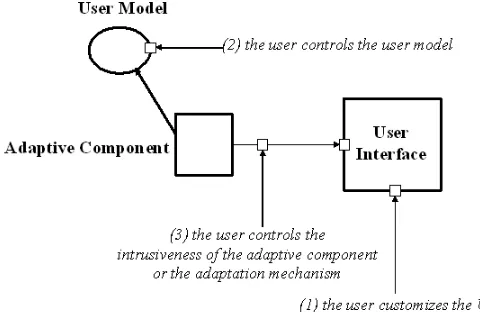
Figure 1 exhibits three different types of controllability in adaptive or adaptable systems:
1. Users customize the interface by selecting the view which best satisfies their needs or select which functionality appears in the interface. The system does not provide any automatic assistance to support this task.
2. Users do not have direct control over the actual interface but they rather control the user model on which the system bases its adaptive behaviour.
3. Users control the level of the system’s intrusiveness or the adaptation method. 2.3.1 Customizing the User Interface
Comparing different versions of the commercial word processor Microsoft Word, McGrenere et al. [26] showed that customizable user interfaces may have advantages over interfaces which include adaptive features. However, their evaluation tested a specific adaptation mechanism and its results cannot generalize to other domains. Customizable interfaces often require the users to have advanced knowledge of the system, e.g., the user may need to set numerous parameters in a configuration file, while they cannot dynamically change as the needs of the users evolve over time. A recent study on customizable menus [7] indicated that novice users may have problems customizing an interface and that adaptive support could assist the customization process.
2.3.2 Controlling the User Model
The second type of adaptable interaction does not support direct control over the elements of the user interface. Customization is performed indirectly as the user controls the parameters of the user model. Controllability of user models has been mainly investigated in the context of intelligent tutoring systems. Kay states that as opposed to early tutoring systems which viewed users as students, the term learner is now favoured [24]. This implies that the role of the users is not passive, but they are responsible for their own learning, participating in the construction of their model and the selection of teaching strategies.
Kay has introduced the notion of scrutable adaptive systems. Scrutable adaptive systems enable the user to investigate and review the way that the system has been adapted. Tutor [9] is a scrutable AH system which has been developed within this framework. At the beginning of each session, Tutor constructs a student model based on the answers of the student to a small set of profile questions. Based on this model, parts of the content may be excluded from a page. At the bottom of each adapted page, there is a link to an explanation section. The explanation section explains how adaptation is performed and what content has been excluded from a page. Users can revise their answers to the profile questions by clicking on an icon on the top of the adapted pages. Tutor does not separate between user feedback, which is received by the system in order to build the user model, and user control over the system’s adaptive behaviour. Both types of interaction are performed by the user by answering a small set of predefined questions. For this reason, this approach cannot be applied to systems in which the construction of user models depends on extensive or implicit user feedback.
2.3.3 Controlling the Adaptation Method and the System’s Intrusiveness
specify utilities and threshold probabilities that affect the system’s intrusiveness and adaptation strategy [20]. Users, however, do not get a direct picture of how the control of these parameters affects the behaviour of the intelligent interface. The underlying adaptation model is not transparent to the user, and as a result of this, the system’s behaviour may appear as inconsistent and unpredictable.
3
Content Adaptation Supporting Focus and Context
Previous research has not studied how adaptation techniques cope with the problems presented in Section 2. Adaptation techniques employed by AH systems are usually classified into two main categories: techniques that provide adaptive navigation support and techniques that provide content adaptation [6]. Although a variety of different adaptation techniques have been employed by existing AH systems, it is not clear whether and how these techniques affect the utility of adaptation. Ideally, an adaptation technique should be able facilitate the task of a user without having negative effects when the adaptation is imprecise. Moreover, an adaptation technique should provide some level of control and transparency and minimize the danger of disrupting the user’s mental model by removing landmarks.
In the case of information exploration tasks, an adaptation technique should be able to reduce the information overload and at the same time eliminate the cost of inaccurate guesses of the user’s information needs. Based on the previous discussion, we define adaptation as the process of adapting the focus of a task while preserving its context. The role of context is to (1) help the user to “contextualize” and therefore better explain the system’s adaptive behaviour, (2) preserve distinctive elements that may act as landmarks, and (3) facilitate the switch of the user’s current focus. Under this perspective, adaptation techniques can be studied in terms of the level of focus and context that they provide. In this paper, we concentrate on content adaptation.
3.1
Focus, Context and Fisheye Views
Supporting context and focus has been the goal of several techniques in the HCI community. Most techniques are based on fisheye views [13], which provide both local detail and global context in a single display. Fisheye views have been applied to visualize information in several domains. Furnas [13] applied fisheye views to program code, tree structures and calendars. Fisheye techniques were used by Sarkar and Brown [32] to support viewing and browsing graphs. Bederson [4] applied fisheye zooming to pull-down menus with the goal to reduce the cognitive load caused by long lists of choices. Greenberg et al. [14] introduced fisheye views to support group awareness when multiple people work within a single window.
Techniques based on fisheye views have also been applied to hypertext applications [16, 28]. These techniques provide fisheye views of collections of web pages or hypertext networks rather than fisheye views of the content within pages. On the other hand, Bederson et al. [3] developed the Multi-Scale Markup Language (MSML), a markup language implemented using the HTML <Meta> tag to enable multiple levels of zooming within a single web page. Their goal, however, was to produce interactive web pages which can be zoomed-in and zoomed-out rather than adapt the content of the pages according to user goals or interests.
out. Fisheye-view techniques usually assume that there is a single focal point, and the value of the DOI function decreases with distance to this point. However, several fisheye approaches [14, 32] support multiple focal points at the same time.
3.2
Fisheye-Like Content Adaptation
Here, we explain how fisheye-view techniques can be applied to content adaptation. Limiting our attention on information exploration tasks, we assume that a user model captures the current interests of the user. In this case, the DOI function is determined by the relevance between the interests of the user and the individual pieces of information. Each page of the hypermedia content is assumed to be segmented into smaller fragments such as sections or paragraphs. If I represents the user interests, the DOI value for a fragment f is:
(3.1) where relevance(f, I) is a measure of similarity between _ and f. If f and I are represented by two feature vectorsfrandIr, respectively, the DOI function can be expressed as the cosine similarity between the two vectors [31]:
) , cos( )
(f f I
DOI = r r (3.2)
[image:7.612.156.475.413.594.2]According to this definition, the value of DOI for a particular fragment of a page grows as the user's interests become relevant to the content of the fragment. This definition differentiates from the original conception of fisheye views. Proximity is not measured in terms of geometrical distance, but it refers to the semantic distance between the content of the different segments in the page. Furthermore, the focal point is determined by the focus of the user’s interests rather than the user’s current focus of attention. Since multiple segments in a page may be relevant to the current interests of the user, multiple focal points are supported.
Figure 2. Fisheye view of a web page1
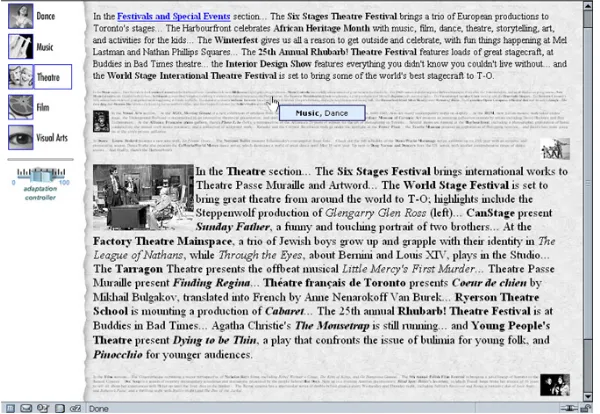
Figure 2 presents a distorted version of a web page where the DOI function determines the size of the visible elements of each paragraph. In the example that the figure presents, the user’s interests are on music events. Therefore, paragraphs that relate to music are shown with larger fonts whereas irrelevant paragraphs
1 The material used in our prototype has been taken from an online guide about cultural events in
are minimized. The size of images is also adapted based on the container paragraph. In general, if lmax and lmin
are the maximum and minimum size, respectively, of a visual element within a fragment f, adaptation is achieved by setting the size of the element to , where the range of values of the DOI function has been normalized between 0 and 1.
An advantage of fisheye views over other visualization techniques is that they preserve landmarks of the information that appears as context. As shown in Figure 2, distinct structural elements of the page such as pictures, layout and number of paragraphs are maintained; they are, though, distorted. Two experimental studies conducted by Skopik and Gutwin [34] on distortion-based fisheye views of graphs revealed that distortion may not injury the spatial memory of the users as long as the users can identify and trust landmarks such as distinctive nodes in the visualized space. In addition to the fact that the above adaptation technique preserves features of page’s layout which may act as landmarks, it allows readers to get direct feedback about the quantity and structure of the material within the minimized paragraphs.
3.3
User Control
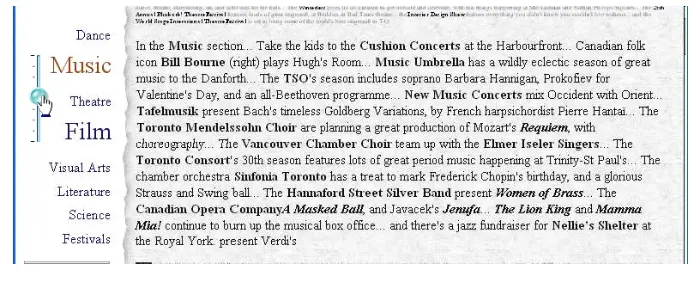
[image:8.612.166.466.465.672.2]Although the fisheye-like adaptation technique preserves information about fragments that are out of the focus of the user interests, the actual content of minimized fragments may not be legible. Therefore, users may not be able to examine the subject of a fragment and verify its connection to their information needs. To address this problem, we enhanced the fisheye technique with a set of interaction techniques that increase the user’s control over the result of adaptation. Figure 3 exhibits the use of glosses, which provide hints about the content of the underlie paragraphs when the user hovers the mouse over the paragraph. In addition to the use of glosses, we incorporated a mechanism that allows fluid transitions of individual paragraphs form context to focus. This mechanism resembles to Fluid Links [39]. More precisely, by double-clicking on a paragraph that is out of focus, the user can zoom in the text of the paragraph together with its containing images. Animation is used to smoothly change the zooming level. If the user double-clicks again, the paragraph is zoomed-out to its initial size. This mechanism can be considered as a local rather than a global change of focus. The global adaptation of the page is not affected when a paragraph is double-clicked. Temporary changes in the user’s attention are not translated into switches of the user’s current interests.
The left portion of the page shown in Figure 3 contains widgets which give the user additional control over the adaptation process. A menu of icons and titles correspond to a small set of stereotypes of user interests, which show the current focus of navigation on which adaptation at the right part of the page is based. Any anticipated switch on the user’s focus of interests is immediately reflected to the visualization of this menu. In Sections 4-5, we show how such menus can represent more subtle variations of user interests and how they can be used as controllers of the user model. The left part of the page also contains a slider, which adjusts the level of context by modifying the minimum size lmin of the visual elements. When the value
of the slider is zero, adaptation has no effect on the appearance of the pages. On the other hand, when the value of the slider is maximum, non-relevant fragments disappear, which means that no context is provided. In other words, the slider allows the user to zoom in (zoom out) to more (less) adaptive versions of a hypermedia system. The controllers and their connection to the main frame of the page have been implemented by mixing JavaScript code with Flash MX components.
3.4
Context and Uncertainty
As discussed in Section 2.1, the expected utility of an adaptive action is determined by (1) the rewards or costs of taking the action given specific user goals, and (2) the uncertainty about the goals of the user. Focus and context compete with each other by affecting the cost or reward of the adaptive actions. For example, assume that a user is interested in information about theatre. Adapting the pages so that music only events are highlighted has a cost as the user may be distracted from his or her initial task. If the adaptation technique does not provide any context, e.g., paragraphs about theatre are hidden, the cost is high, whereas if context is provided the cost may be lower. On the other hand, context implies additional information. If adaptation satisfies the needs of the user, extra non-relevant information causes additional information overload, which may reduce the utility of the adaptation. In conclusion, context should be viewed as an adaptation parameter, which can be used to maximize the utility of a system’s adaptive behaviour given the uncertainty about the information needs of the user. An essential strength of the fisheye adaptation technique is that it enables continuous and smooth transitions between subsequent levels of context. This allows for subtle adjustments of the costs and rewards that are associated with the level of context that adapted pages provide.
3.5
Comparing Content Adaptation Techniques
The fisheye adaptation technique presented above can be considered as a new technique for adapting canned text. Brusilovsky [4] identifies five techniques for adapting canned text: (1) inserting or removing fragments, (2) altering fragments, (3) stretchtext, (4) sorting fragments, and (5) dimming fragments. Variations of above techniques have been used by different systems in various domains. However, no previous study has tried to examine and compare the above techniques. Past evaluations of AH systems have only focused on comparing the adaptive system against its non-adaptive version. We are not aware of any evaluation comparing two or more content adaptation techniques applied on the same system.
3.5.1 Focus and Context Support in Content Adaptation Techniques
Stretchtext enables users to expand and collapse additional text within a page. MetaDoc [5] was the first system that employed stretchtext as an adaptation technique. It provided different views of hypertext documents for users with different expertise. PUSH [17] also used stretchtext to adapt the content of hypertext documents to different information tasks. The advantage of the above approaches is that although text that is judged as irrelevant or redundant is hidden, the user can open it by clicking on a hot-word, which can be text or a representative icon. The amount of context that is provided by this approach depends on the ability of the hot-word to inform the user about the content of the hidden fragment. Stretchtext adaptation could be viewed as a filtering fisheye-like technique where content is hidden when its DOI value is below a certain threshold. Compared to the distorting technique, the main disadvantages of stretchtext are: (1) it does not provide any feedback about the quantity and layout of the hidden information; (2) support of context depends on the selection of a representative text or icon for the adaptable fragment, which is a procedure that needs special design considerations from the author of the hypertext content; and (3) it can visualize only two states of adaptation for each fragment, i.e., fragments are either visible or hidden.
Rich context is supported by the dimming approach [22]. Fragments containing information that is out of the user's focus are shaded instead of being hidden or zoomed-out. Information in context, in this case, is rich and directly accessible. However, accessing information which appears in either focus or context involves additional scrolling in comparison to the other adaptation techniques, as the amount of information in the adapted pages is not reduced.
3.5.2 Pilot Study and Observations
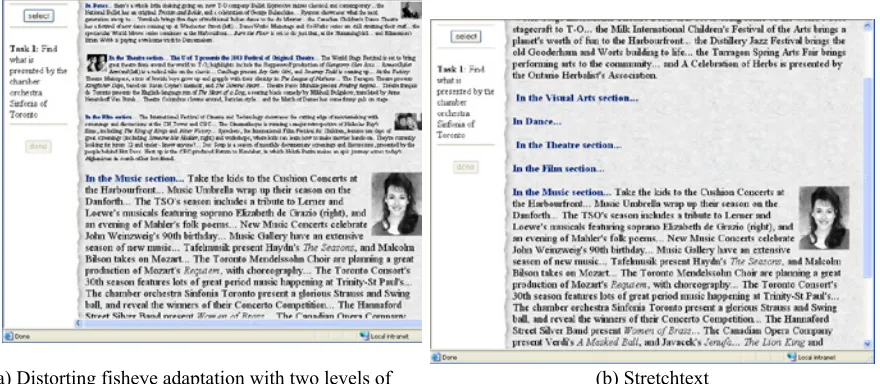
As a first step of getting feedback about the fisheye-like adaptation technique, we conducted a preliminary experiment [36] comparing it against stretchtext adaptation. In order to simplify the evaluation procedure and avoid biased conclusions in favour of one technique against the other, we tried to eliminate the differences between the implementations of the two techniques. Thus, we focused on a single variation of the two techniques, which is the way that out-of-focus paragraphs are visualized. In the case of the fisheye adaptation technique, we used a single level of zooming to present paragraphs in context. The fonts were selected to be legible. The stretchtext version was based on the same implementation. The font size of out-of-focus paragraphs was set to zero. However, each paragraph had a representative title or introductory sentence whose font size was never zoomed-out. The interaction model was exactly the same for both techniques. The user could double-click on the body of the minimized paragraph or the paragraph's title to zoom in or expand, respectively, the paragraph. In a similar fashion, the user could minimize or collapse the paragraph. Animation was used in both cases to smooth these transitions. Figure 4 shows two versions of the same page corresponding to the two different techniques that we tested.
(a) Distorting fisheye adaptation with two levels of zooming
[image:11.612.95.535.110.302.2](b) Stretchtext
Figure 4. A page adapted by the two tested techniques
Although the small number of subjects did not allow for generating significant results and making general claims, the experiment revealed some interesting issues. The results did not show any clear advantage of any of the two techniques in terms of task-completion times. There was, though, an interaction effect between the size of the pages and the technique used. The fisheye adaptation technique performed better than the stretchtext technique in the case of the two smaller pages. On the other hand, the stretchtext technique outperformed the fisheye technique in the case of the large page. This advantage was clearer for tasks that involved out-of-focus information. This outcome can be justified by the fact that the size of the stretchtext pages was significantly smaller than the size of the fisheye pages. This means that stretchtext adaptation involves less scrolling and searching time. This issue becomes significant when the adapted document is relatively large and the user has to scan multiple screens before discovering a particular piece of information. As one subject observed, the text of the hot-words in the stretchtext pages provided concise summarization of the hidden paragraphs’ content. Consequently, the user did not have to read the actual text of the paragraph in order to decide on its relevance to his or her task. On the other hand, 4 out of the 6 subjects gave a higher overall score to the fisheye technique as they felt that it provided richer information about the content of the out-of-focus paragraphs. This is also manifested by the number of double-click actions, which was clearly lower in the case of the fisheye pages. The subjects often read the content of the minimized paragraphs without zooming in. This practice, however, may have delayed the reading task. The experiment did not measure the cost that is associated with reading small font sizes. Some subjects noted that reading the small fonts required additional effort. Sometimes, they had to move closer to the monitor to read the text.
3.5.3 Conclusions
of the fisheye technique in supporting additional context about the layout of the out-of-focus information and preserving page elements which could act as landmarks.
The two techniques can be integrated into a single technique, where both the tile and the minimized content of each out-of-focus paragraph are shown. The hybrid technique can support multiple levels of summarization which can be adjusted based on the size of the adapted pages.
4
Transparency of User Models
As mentioned in the previous section, the left frame of the page displayed in Figure 3 provides feedback about the focus of adaptation by highlighting an icon and textual description that correspond to a particular topic. In a real situation, a simple stereotype of user interests such as “music” may not be able to completely describe a user model. User interests are usually fuzzier; for example, they may be 60% relevant to music and 20% relevant to cinema, and 20% relevant to dance. Here, we assume that a user model, as estimated at time t, is represented by a vector . We also assume that this vector can be expressed as a linear combination of the vectors of a set of |I| stereotyped user interests:
∑
==
| | 1 , I i i i tt
w
v
u
(4.1)where
v
r
iis the vector of the ith stereotype and wt,i is a weight that shows how relevant to the interests of the
user this stereotype is. Weights are normalized so that:
∑
==
| | 1 ,1
I i i tw
(4.2)This section primarily focuses on showing how these weights are visualized so that users can get immediate feedback about the user model that the adaptive system maintains. In order to exhibit the importance of making the user model transparent, we first describe a simple adaptation mechanism, which is used to build the user model.
4.1
Adaptation Mechanism
An adaptive system would evaluate and update a user model based on explicit or implicit feedback from the user. Instead of building global user models, several AH systems [2, 10, 15, 30] try to capture the local “context” of the user’s navigation task. In the simplest case, this context is simply determined by the content of the page that the user currently views [30]. More sophisticated approaches [2, 15] capture the whole navigation history when estimating the underlie context.
In order to directly describe the content of a paragraph in terms of stereotypes of user interests, we assume that the vectorprjof the jth paragraph can be expressed as a linear combination of the vectors that represent the stereotypes2:
∑
=⋅
=
| | 1 I i i jij
w
v
p
r
r
(4.3)where the weights wji are normalized to sum up to 1. Now, if is the user model at the moment t, and the
user zooms in a paragraphprj, the user model is updated as follows:
t j
t
a
p
a
u
u
r
+1=
(
1
−
)
⋅
r
+
⋅
r
(4.4)where a is a constant between 0 and 1, which discounts the contribution of the interaction history to the calculation of the user model. By combining Equations (4.1), (4.3), and (4.4), we derive the following expression, which evaluates the new user model as a linear combination of the vectors that represent the stereotyped user interests:
∑
= +=
−
⋅
+
⋅
⋅
| | 1 ,1
((
1
)
)
I i i i t ji
t
a
w
a
w
v
u
r
(4.5)When a=1, the zooming actions do not affect the user model, which means that no automatic adaptation is performed. On the other hand, when a=0, the history has no effect on the calculation of the user model. In this case, adaptation is entirely based on the content of the manipulated paragraph. As the user zooms in a paragraph, the page is adapted so that other paragraphs with related content are displayed with large fonts, whereas irrelevant paragraphs are shown with small fonts. In other words, the local focus of the user’s interaction coincides with the global focus of adaptation. Finally, in the general case, when the value of a is between 0 and 1, the user model changes progressively as the user interacts with the paragraphs in the adapted pages.
4.2
Visualizing the User Model
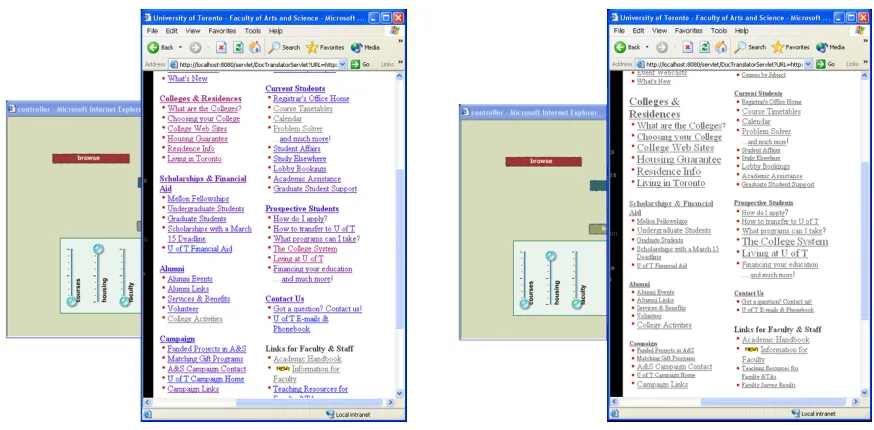
As discussed earlier, the system’s adaptive behaviour may be the outcome of several user actions, and the way that these actions can be interpreted by the system is not unique. As a result of this, users may not be able to anticipate the current state of their interaction with the system and understand the adaptation result. The problem can be fixed by making the user model transparent. Figure 5 shows two different views of the same page corresponding two different instances of the user model. Each instance of the user model is visualized on the left frame of the page. The visualization of the user model is based on adjusting the font sizes of the labels that describe the eight stereotypes of user interests. The font size of each label varies between a minimum and a maximum value proportionally to the weight of the corresponding vector in the user model. For instance, the user model that defines the first view of the page in Figure 5 has weights 0.5 for music, 0.3 for festivals, 0.2 for dance, and all the other weights are 0. The user model that corresponds to the second instance of the page has weights 0.5 for music and 0.5 for film. Any change in the user model is immediately reflected to the size of the labels in the left frame of the page. Again, animation is used to smooth transitions between subsequent changes in the font sizes of the labels.
We should note that the above approach makes the system’s adaptation behaviour transparent without revealing the actual adaptation mechanism. The user may not know the details of how the system translates his or her actions to infer the user model and how this user model is used to adapt the content of a page. However, at every moment, the user is aware of the system’s state as the user model is visible. The user
2 If we assume that the vectors
i
receives direct feedback about the effect of every single interaction. Thus, as long as the inference and adaptation mechanisms are reasonable, i.e., paragraphs are associated with the correct stereotypes of user interests, the user can understand the adaptation mechanism and predict the outcome of his or her actions.
Figure 5. The same page under two different instances of the user model
[image:14.612.86.523.372.587.2]5
Direct-Manipulation of Content Adaptation
In previous work [37], we introduced a system, which allows the users to directly manipulate link adaptation. The users can specify their interests by means of sliders that appear in a small window as shown in Figure 6. Each slider controls the weight of a distinct dimension in the user model. As a slider moves up or down, link adaptation in the pages that the user views is incrementally adjusted to reflect the evolving user model. Link adaptation is performed by modifying the font size or the colour of the links. Depending on the technique used, relevant links are visualized either with larger fonts or with a colour whose hue is closer to red as opposed to blue which is used to visualize unrelated links. This approach allows for smooth variations of a link’s visual appearance and helps the user to receive continuous feedback about how the linking information in a page is associated with the variables of the user model.
Since the fisheye content adaptation technique provides continuous variations in the adaptive view of a document, a similar approach can be applied to support a direct-manipulation interaction model for content adaptation. Figure 7 demonstrates how, in our prototype, a user can adjust the weights of the individual vectors of user interests. When the user clicks the mouse on a label displayed in the left frame of the page, a slider pops up close to the label, which allows the user to adjust the weight of the corresponding vector in the user model. The colour of the label changes so that the slider is visually associated with the label. As the user manipulates the slider, the size of the labels smoothly changes to reflect the new weights in the user model. At the same time, the sizes of the paragraphs in the main page also incrementally change in accordance to the changing user model. When the user clicks on the label again, the slider disappears. As the weights in Equation (4.1) are normalized, when a slider moves, all the weights are affected. If w is a weight whose value is directly controlled by a slider and Δw is a change in its value caused by this slider, then, each other weight wi should change proportionally as follows:
(5.1)
[image:15.612.131.480.528.669.2]The above mechanism of controlling the variables of a user model has been influenced by FaST Sliders [27]. FaST Sliders are sliders that pop up when the user performs a specific quick gesture over an object of the user interface and are used to control continuous parameters of the object. The use of pop-up sliders eliminates the need of preserving continuously visible controllers whose presence is redundant in a regular interaction mode. The activation of a pop-up slider is quick and requires minimal screen space. Therefore, switching between the adaptive and the adaptable mode of interaction does not require the users to shift their attention, for example, to a different window, and does not disrupt their main task.
6
Conclusions and Future Directions
This paper presented a transparent and controllable interaction model for adaptive hypermedia. According to this model, transparency is achieved by providing direct and continuous visual feedback, which, at any time, informs the user about the system’s runtime state. The model also provides quick mechanisms for controlling the adaptation process. Control is achieved by controlling pop-up sliders whose effect on adaptation is incremental and continuously visualized. In contrast to other approaches [8, 9, 17, 20] in which transparency and controllers are separated from the main user interface and interaction model, our approach tightly couples the adaptive and adaptable parts of the user interface. This implies that a user can interact with hypertext pages in two complementary forms: (1) by reading and manipulating the pieces of information within the pages, and (2) by manipulating the elements of the user model that are visualized at the left part of each page. The effect of the first form of interaction is immediately reflected to the visualization of the user model. Similarly, the effect of the second type of interaction is immediately reflected to the visualization of the page’s content. The cost of switching between these two forms of interaction is minimal as it only requires simple clicks of the mouse’s button and does not affect the user’s working view. We are considering other types of controllers such as pie and tracking menus [12, 35], which could make the above cost even smaller. Such control widgets would allow users to control various parameters of the adaptation by quick gestures without moving their focus to a different part of the adapted page.
Our approach is build upon a new content adaptation technique, which is based on distorting fisheye views. This fisheye adaptation technique allows for multiple and continuous adaptive views of documents. It also allows for smooth transitions between focus and context. As we discussed earlier, by balancing between focus and context, adaptation techniques could decrease the costs of inaccurate adaptation decisions made by an adaptive system. The role of context is also important in preserving distinctive visual elements within the adapted page which could act as landmarks. We argued that adaptation techniques could be studied and compared in terms of the amount of focus and context that they provide. A preliminary study that we conducted indicated that the utility of the context that a content adaptation technique provides may depend on several factors such as the size of the adapted pages. In future work, we plan to investigate the role of context in adaptation and its connection with information overload and the accuracy of adaptation in a more formal setting.
References
1. André, E. and T. Rist, From Adaptive Hypertext to Personalized Web Companions. Communications of the ACM, 2002. 45(5): p. 43-46.
2. Bauer, T. and D.B. Leake. WordSieve: A Method for Real-Time Context Extraction. In 3rd International and Interdisciplinary Conference, Context. 2001. Dundee, Scotland, Springer Verlag. 3. Bederson, B.B., et al., A Zooming Web Browser, In Human Factors and Web Development, N.J.L. Erlbaum, Editor. 1998. p. 255-266.
4. Bederson, B.B. Fisheye menus. In 13th Annual ACM Symposium on User Interface Software and Technology, UIST. 2000. San Diego, California, United States, ACM Press.
5. Boyle, C. and A.O. Encarnacion, MetaDoc: An Adaptive Hypertext Reading System. User Modeling and User-Adapted Interaction, 1994. 4(1): p. 1-19.
6. Brusilovsky, P., Adaptive Hypermedia. Modeling and User Adapted Interaction, 2001. Ten Year Anniversary Issue 11(1/2): p. 87-110.
7. Bunt, A., C. Conati, and J. McGrenere. What role can adaptive support play in and adaptable system? In ACM International Conference Intelligent User Interfaces. 2004. Island of Madeira, Portugal. 8. Cook, R. and J. Kay. The justified user model: a viewable, explained user model. In 4th International Conference on User Modeling. 1994. Hyannis, MA.
9. Czarkowski, M. and J. Kay. How to give the user a sense of control over the personalization of AH? In Workshop on Adaptive Hypermedia and Adaptive Web-Based Systems, AH2003, User Modeling Session. 2003.
10. El-Beltagy, S.R., W. Hall, D.D. Roure, and L. Carr. Linking in Context. In 12th ACM conference on Hypertext and Hypermedia. 2001. _rhus, Denmark, ACM Press.
11. Fischer, G., User Modeling in Human-Computer Interaction. User Modeling and User-Adapted Interaction, 2001. 11(1&2): p. 65-86.
12. Fitzmaurice, G., A. Khan, B. Buxton, and G. Kurtenbach. Tracking Menus. In 16th Annual ACM Symposium on User Interface Software and Technology, UIST. 2003. Vancouver, Canada.
13. Furnas, G.W. Generalized Fisheye Views. In CHI '86. 1986. Boston, Massachussetts, USA, ACM Press.
14. Greenberg, S., C. Gutwin, and A. Cockburn. Using Distortion-Oriented Displays to Support Workspace Awareness. In People and Computers XI (Proceedings of HCI '96). 1996, Springer-Verlag.
15. Hirashima, T., N. Matsuda, T. Nomoto, and J. Toyoda. Context-sensitive filtering for browsing in hypertext. In 3rd International Conference on Intelligent User Interfaces. 1998. San Francisco, California, US, ACM Press.
16. Holmquist, L.E. Focus+Context Visualization with Flip Zooming and the Zoom Browser. In Proceedings of ACM CHI '97 Conference on Human Factors in Computing Systems - Extended Abstracts. 1997, ACM Press.
17. Hook, K., et al., A Glass Box Approach to Adaptive Hypermedia. User Modeling and User-Adapted Interaction, 1996. 6(2-3): p. 157-184.
19. Horvitz, E., J. Breese, D. Heckerman, D. Hovel, and K. Rommelse. The Lumiere Project: Bayesian User Modeling for Inferring the Goals and Needs of Software Users. In 14th Conference on Uncertainty in Artificial Intelligence. 1998. Madison, WI, USA.
20. Horvitz, E. Principles of Mixed-Initiative User Interfaces. In ACM SIGCHI Conference on Human Factors in Computing Systems. 1999. Pittsburgh, PA.
21. Horvitz, E. and J. Apacible. Learning and Reasoning about Interruption. In ICMI 2003, ACM International Conference on Multimodal Interfaces. 2003. Vancouver, Canada.
22. Hothi, J.K., W. Hall, and T. Sly. A Study Comparing the Use of Shaded Text and Adaptive Navigational Support in Adaptive Hypermedia. In International Conference of Adaptive Hypermedia and Adaptive Web-Based Systems, AH 2000. 2000. Trento, Italy.
23. Jameson, A. and E. Schwarzkopf. Pros and Cons of Controllability: An Empirical Study. In Adaptive Hypermedia and Adaptive Web-Based Systems. Second International Conference, AH2002. 2002. Malaga, Spain, Springer.
24. Kay, J., Learner Control. User Modelig and User-Adapted Interaction, 2001. 11(1/2): p. 111-127. 25. Koda, T. and P. Maes. Agents with Faces: The Effects of Personification of Agents. In HCI'96. 1996. London, UK.
26. McGrenere, J., R.M. Baecker, and K.S. Booth. An evaluation of a multiple interface design solution for bloated software. In ACM CHI 2002 Conference on Human Factors in Computing Systems. 2002. Minneapolis, Minnesota, USA, ACM CHI Letters.
27. McGuffin, M., N. Burtnyk, and G. Kurtenbach. FaST sliders: Integrating marking menus and the adjustment of continuous values. In Graphics Interface. 2002. Calgary, Alberta, Canada.
28. Noik, E.G. Exploring large hyperdocuments: fisheye views of nested networks. In Proceedings of the 5th ACM conference on Hypertext. 1993. Seattle, Washington, United States, ACM Press.
29. Norman, D.A., Some Observations on Mental Models. Mental Models, ed. D. Gentner and A.L. Stevens. 1986: Hillsdale, New Jersey: Lawrence Erlbaum Associates.
30. Rhodes, B.J. Margin Notes: Building a Contextually Aware Associative Memory. In 4th International Conference on Intelligent User Interfaces. 2000. New Orleans, LA USA, ACM Press.
31. Salton, G., Developments in automatic text retrieval. Science, 1991. 253: p. 974-979.
32. Sarkar, M. and M.H. Brown. Graphical Fisheye Views of Graphs. In CHI '92 Conference. 1992. Monterey, CA United States, ACM Press.
33. Shneiderman, B. and P. Maes, Direct manipulation vs. interface agents. Interactions, ACM, 1997. 4(6): p. 42-61.
34. Skopik, A. and C. Gutwin. Finding Things In Fisheyes: Memorability in Distorted Spaces. In Conference on Graphics Interface GI'03. 2003. Halifax, Canada.
35. Tinz, J., RadialContext, http://www.radialthinking.de/radialcontext/.
36. Tsandilas, T. and m.c. schraefel. Adaptive Presentation Supporting Focus and Context. In Workshop on Adaptive Hypermedia and Adaptive Web-Based Systems, AH2003. 2003. Nottingham, UK.
37. Tsandilas, T. and m.c. schraefel. User-Controlled Link Adaptation. In the 14th ACM Conference on Hypertext and Hypermedia, HT'03. 2003. Nottingham, UK, ACM Press.
39. Zellweger, P.T., B.-W. Chang, and J.D. Mackinlay. Fluid links for informed and incremental link transitions. In Proceedings of the 9th ACM Conference on Hypertext and Hypermedia : links, objects, time and space-structure in hypermedia systems. 1998. Pittsburgh, Pennsylvania, United States, ACM Press.