INTERNATIONAL CONFERENCE ON ENGINEERING AND PRODUCT DESIGN EDUCATION 8 & 9 SEPTEMBER 2016, AALBORG UNIVERSITY, DENMARK
RECOMMENDATIONS FOR THE USE OF SOCIAL
NETWORK SITES AND MOBILE DEVICES IN A
COLLABORATIVE ENGINEERING DESIGN PROJECT
Ross BRISCO, Robert Ian WHITFIELD and Hilary GRIERSON
Department of Design, Manufacture and Engineering Management, University of Strathclyde, Glasgow, United Kingdom
ABSTRACT
This paper investigates how mobile devices and online social networks are used in the context of a collaborative and cross-disciplinary distributed design project. The global design project is undertaken by students from four Universities in the collaboration of an aeroplane seatbelt product. It was observed that students have begun to make a change toward using social network sites and mobile devices for collaborative design and communication needs. This paper documents this change in student behavior and investigates the reasons for this change. Through structured and unstructured interviews, it was found that students have a natural preference towards the software they use for personal communication over prescribed unfamiliar software. Students in global teams are expected to be accessible at all times and mobile technology supports this need. In addition, students did not naturally adopt professional practices which lead to lost information and miscommunication. From these findings, a set of recommendations were created to assist those involved in a global design project.
Keywords: Social network site, mobile device, collaborative design, engineering design, project based learning
1 INTRODUCTION AND LITERATURE REVIEW
Social network sites have become common place for personal and professional communication. Pektas, Knutas, Gopsill and Mamo [1-4] all report the successful use of social network sites in student design projects. This study differs from the former studies in that it aims to make recommendations on how to best conduct a global design project based on communication issues. Studies by Mamo [4] and Gopsill [3] report that social networks on their own are not sufficient to support engineering design communication. Mamo [4] reported that students require three tools (social network site, cloud storage and video conferencing) to be able to effectively communicate in a global design project. Furthermore, Gopsill [3] has shown that there are more similarities between social network sites and engineering design communication when compared to email. Therefore, social network sites in theory are better tools for engineering communication. Students are not alone in their use of social network sites. Margaryan [5] and Sarka [6] report that companies are using social network sites successfully in professional communication.
1.1 THE GLOBAL DESIGN PROJECT
The global design project 2015 was undertaken by students from the University of Strathclyde, City University London, University of Malta and University of Budapest. Students from cross-disciplinary backgrounds were required to collaborate on the development of an aeroplane seatbelt product. Six teams took part in the project. Teams consisted of students with backgrounds in: product design engineering, mechanical engineering and innovation management. Teams varied depending on student numbers available at each University, however, a typical team consisted of 5 students from Strathclyde, two students from London, two students from Malta and a student from Budapest. The global design project introduces the problems associated with globally distributed teamwork preparing students for future careers [9]. It was observed that students of the global design project have made a switch from using prescribed software in the form of a wiki style environment [9], to utilising social network sites [4]. In addition, students are utilising more mobile devices and less desktop and laptop devices for communicating and collaborating in the global design project. This paper will investigate why these changes have occurred.
2 RESEARCH METHODOLOGY
This study was conducted from October 2015 to December 2015 during the global design project. The aim of this study was to create a set of recommendations on how to best conduct a global design project when using social network sites and mobile devices. This was achieved by analysing student’s use of computer supported communication tools as part of the global design project. Data was collected from participants of the global design project via interview sessions. Informal interviews took place weekly and a team diary was kept by the interviewer. The diary was a recording of the software and device usage of the team along with collaboration and communication issues they encountered. Issues were recorded as use (student’s choice of software or device and how it was used) or problem (communication difficulties). To clarify these issues, formal interviews were setup with team and individuals. Formal interviews included pre-defined questions to collect information about individuals and teams social network and device usage. Questions encouraged conversation about participant’s and team’s communications behaviour, for example, not only asking which social networks were used during the project but how they were used and why they were used. Mind maps and tables were used to visualise the findings of each team and to group findings by problem and use. Findings were grouped into five topics areas and seven recommendations on how to conduct a global design project were created based on the findings.
3 RESULTS AND DISCUSION
The results of this study reveal findings categorised into five topics. These are, choice of social network or device, Fragmentation between social networks and devices, misuse of data storage, lack of professional practices and incompatibility between social networks and devices. The following sections documents the reasons behind the selection of these five areas and discussion on how they influenced team communication behaviours.
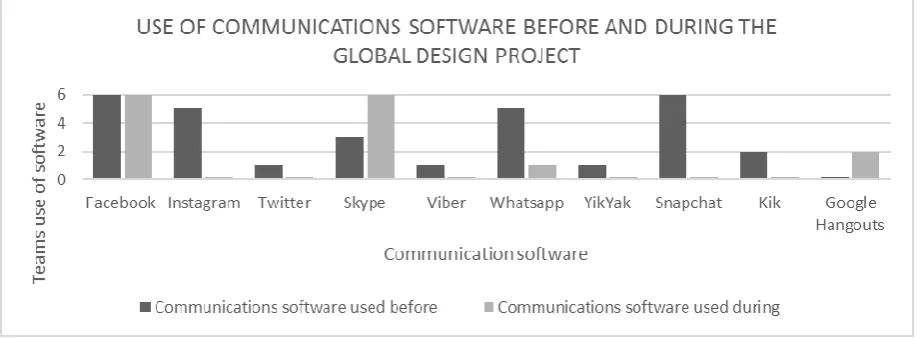
3.1 SOCIAL NETWORK PLATFORMS AND DEVICES STUDENTS CHOOSE TO USE Students show a preference towards software that they have used in the past or use regularly for personal communication needs. Figure 1 displays the use of communication software (social network, video conference and messenger software) used by the six teams before and during the global design project for communication. Data was collected during formal interviews. If one member of a team regularly used a piece of communications software, then the team were all considered to be using the communications software. It is important to note that some software was prescribed to students as part of the global design project. A cloud storage space was created on Box.com and email addresses of team members were supplied to students which may have influenced their software choice.
project, however, as problems arose with Skype software, some teams searched for an alternative. Problems with Skype included a limited number of participants per call and little support for mobile devices. Skype offers support for up to five participants in comparison to Google Hangouts which offers support for up to nine. Skype does not allow participants using mobile devices to send or receive video during group calls. In comparison, Google Hangouts supports mobile users by displaying the call in a more mobile friendly way, only displaying one participant at a time on the screen (the participant who is speaking). Note: As of May 2016, Skype has added additional group video calling functionality for mobile devices which will be explored in future studies.
Figure 1. Student use of communication software before and during the project
Instagram, WhatsApp and Snapchat are social network platforms which were very popular with students before the project but were not used during the project (with the exception of one team’s brief use of WhatsApp). Students reported that they had no need to use these social network platforms as Facebook already offered the same functionality. This was further analysed in Table 1 by comparing the functionality of these popular communication platforms. Facebook is the only platform which satisfies the needs of device support, communication channel support and group communication support. Popularity and ubiquity has much influence over the selection of communication platforms.
Table 1. Comparison of popular communication platforms
Facebook Instagram WhatsApp Snapchat
Official Device
Support Mobile and Desktop Mobile and Desktop Mobile Mobile
Native
Communication Channels
Text, Image, Video, Audio, Messenger &
Sharing
Text, Image and Video
Text, Image, Video, Audio, Messenger &
Sharing
Text, Image, Video, Audio &
Messenger. Group
Communication Support
Comment, Text
Messenger, Tagging Comment & Tagging Text Messenger None
Facebook offers a shared and secure group space with: text, image, video and document sharing. Users are able to tag specific team members to get a response faster without disturbing other team members. In addition to the group space there is a Facebook messenger client that offers instant messenger functionality. Questions asked by students on Facebook had a tendency to be broad and require further learning, for example, one student asked what was meant by a PDS, to which another team member responded with a link to a Wikipedia article on Product Design Specification (PDS). Facebook was used for organisational and administration questions, such as, to ask if a meeting would take place or to ask where a file was located on the teams shared cloud storage.
3.2 FRAGMENTATION ON SOCIAL NETWORK PLATFORMS
[image:3.595.69.531.476.584.2]convenient and suitable for the message they are sending at the time, however, these are not clearly defined. When a post is made on a Facebook page a notification is sent to all members. It is probable that the post will be viewed immediately similar to that of synchronous information communication. If the post is not seen it remains in the user’s notifications to be viewed at a later time similar to asynchronous information communication, therefore, it could be defined as both. This caused problems as students were unaware if a distributed team member had viewed or not viewed their Facebook post. This resulted in student’s questioning their distributed team member’s commitment to the project and caused tension between team members. Mamo [4] also made this finding. If teams had established how they would use social network tools, at the beginning of the project they may have mitigated tension between distributed team members. No team reported discussing their communications software needs for the project or testing the software before engaging in a design task. This is difficult to discuss as teams often do not know what is required of communication tools before they encounter a problem. When problems arose towards the end of the project only two teams sought alternative software.
3.3 STUDENTS ILL USE OF DATA STORAGE
Students reported not having access to all created documents due to human error in uploading. Teams reported that documents would often be uploaded to the wrong folder on cloud storage or on the social network group page instead of cloud storage. This behaviour caused confusion in teams where they could not locate a file or were using an older version of a file because a newer version was located in an unusual location. Some teams attempted to mitigate the issue by implementing a rule that all documents must be located in two locations: a social network site and cloud storage platform. Meaning that one document existed in two place and caused confusion in teams as to which document was the most up to date and the official document. This rule is not an efficient solution to the problem. With the aim to solve the issues created by this first rule, three teams created a further rule that the social network document must only be used for reference and version and that any editing must be done using the file stored on the cloud storage platform. This additional rule did not solve the issue as team members were confused and ultimately used the file which was most convenient for them. Social media is based around the idea of being able to easily share information between online platforms. The URL system which is employed throughout the web allows for easy sharing and is a method of mitigating issues with duplication in document storage. When a student is completing a document they should ask themselves if the file is easy to find in the future by any team member and if they have notified their team members that the work is complete. If this is accomplished, then the students will be efficiently communicating using a social network platform.
3.4 STUDENTS DO NOT ADOPT PROFESSIONAL PRACTICES NATURALLY
Within this project, team roles were not assigned by academic staff. Students were taught and encouraged to explore personality traits of their team members to establish natural leaders. However, this resulted in teams not assigning formal team roles and essential administration tasks not being completed resulting in infrequent team meetings. Although much of the team’s conversation happens on social network sites, all teams reported that there is still a need for video conference tools for face-to-face communication. When video conference meeting took place team members did not record the decisions made in an accessible and simple way. It would be beneficial for teams to establish a communications’ secretary role (to handle the arrangement of team meetings) and a minute secretary role (to document the team’s conversations and decisions). These two roles could be combined into one role for smaller teams.
3.5 INCOMPATIBILITY OF SOCIAL NETWORKS PLATFORMS AND DEVICES
applications and websites are able to offer solutions to global design communication problems but there is still ample fragmentation between platforms and in the support of mobile devices.
4 RECOMMENDATIONS FOR FUTURE GLOBAL DESIGN PROJECTS
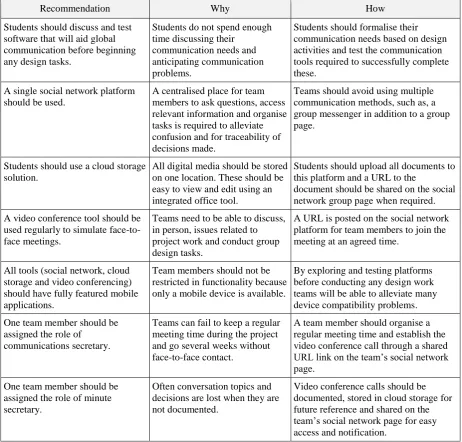
[image:5.595.67.530.197.639.2]From the experience of observing students conduct a global design project and interviews to understand the reasons behind student’s behaviour, a set of recommendations (Table 2) were created for communicating in a global design project. These recommendations were created early in 2016 and it is advised that as technology improves some of the recommendations will develop. The reasons behind the recommendations are listed so that the reader can make an informed decision.
Table 2. Recommendations for conducting a future global design project
Recommendation Why How
Students should discuss and test software that will aid global communication before beginning any design tasks.
Students do not spend enough time discussing their
communication needs and anticipating communication problems.
Students should formalise their communication needs based on design activities and test the communication tools required to successfully complete these.
A single social network platform should be used.
A centralised place for team members to ask questions, access relevant information and organise tasks is required to alleviate confusion and for traceability of decisions made.
Teams should avoid using multiple communication methods, such as, a group messenger in addition to a group page.
Students should use a cloud storage solution.
All digital media should be stored on one location. These should be easy to view and edit using an integrated office tool.
Students should upload all documents to this platform and a URL to the
document should be shared on the social network group page when required. A video conference tool should be
used regularly to simulate face-to-face meetings.
Teams need to be able to discuss, in person, issues related to project work and conduct group design tasks.
A URL is posted on the social network platform for team members to join the meeting at an agreed time.
All tools (social network, cloud storage and video conferencing) should have fully featured mobile applications.
Team members should not be restricted in functionality because only a mobile device is available.
By exploring and testing platforms before conducting any design work teams will be able to alleviate many device compatibility problems. One team member should be
assigned the role of communications secretary.
Teams can fail to keep a regular meeting time during the project and go several weeks without face-to-face contact.
A team member should organise a regular meeting time and establish the video conference call through a shared URL link on the team’s social network page.
One team member should be assigned the role of minute secretary.
Often conversation topics and decisions are lost when they are not documented.
Video conference calls should be documented, stored in cloud storage for future reference and shared on the team’s social network page for easy access and notification.
6 LIMITATIONS AND FUTURE WORK
Additionally, mobile devices were popular during this study to conduct collaborative design tasks. Although there are still limitations, future work could consider how the use of a mobile device for a design task may influence the outcomes.
7 CONCLUSIONS
This paper has identified how students use social network sites and mobile devices during a global design project. This study confirms that student behaviour has begun to change when participating in a global design project and has documented the current problems with social network sites and mobile device use. Seven recommendations were created to inform those conducting a global design class the best practices for communication and professionalism. Students spent limited time at the beginning of the design project discussing, planning and testing communication tools. As a result, they resort to using popular software that they were familiar with for social communication. Popular and pervasive software may not always be the best solution. Mobile devices allow students to be connected at all times, whilst studying, during a lecture or whilst on a train. This is particularly beneficial for giving immediate opinion and answering questions promptly in a distributed team but can cause problems when a student does not answer quickly. Students did not adopt professional practices which resulted in lost information. Establishing team roles and adopting superior social software would make teams more efficient collaborators. Students today thrive in the online environment and have become efficient digital multitaskers. Industry will benefit by ensuring they are taking full advantage of student’s skills in social networking and adopting mobile working tools. To do this, human interactions with online social networks and mobile devices must be understood and optimised through developing technologies.
ACKNOWLEDGEMENTS
I would like to thank Andrew Wodehouse, Ahmed Kovacevic, Philip Farrugia, Jonathan Borg and Balazs Vidovics for their contribution to the global design project and for facilitating the study. This study was conducted as part of a PhD funded by the EPSRC and University of Strathclyde.
REFERENCES
[1] Pektaş, Ş.T. The virtual design studio on the cloud: A blended and distributed approach for technology-mediated design education. Architectural Science Review, 2015, 58(3), 255-265. [2] Knutas, A., Ikonen, J., and Porras, J. Communication patterns in collaborative software
engineering courses: A case for computer-supported collaboration. In 13th Koli Calling International Conference on Computing Education Research, Koli Calling ’13 ,Koli, November 2013, pp.169-177 (ACM, New York).
[3] Gopsill, J. A Social Media Approach to Support Engineering Design Communication. May 2014 (Doctoral Thesis, University of Bath).
[4] Mamo, J., Farrugia, P., Borg, J., Wodehouse, A., Grierson, H., and Kovacevic, A. Using engineering design tools in multidisciplinary distributed student teams. In 17th International Conference on Engineering and Product Design Education, E&PDE15, Loughbourgh, September 2015, pp.99-104 (The Design Society, Glasgow).
[5] Margaryan, A., Boursinou, E., Lukic, D., and Zwart, H. De. Narrating Your Work: an approach to supporting knowledge sharing in virtual teams. Knowledge Management Research & Practice,
2014, 13(4), 391-400.
[6] Sarka, P., Ipsen, C., Heisig, P., & Maier, A. M. Engineers Are Using Social Media for Work Purposes. In 13th International Design Conference, DESIGN 2014, Dubrovnik, May 2014, pp.19-22 (Faculty of Mechanical Engineering and Naval Architecture, University of Zagreb and The Design Society, Glasgow).
[7] Johri, A., Teo, H. J., Lo, J., Dufour, M., & Schram, A. Millennial engineers: Digital media and information ecology of engineering students. Computers in Human Behavior, 2014, 33, 286-103. [8] Bohemia, E., & Ghassan, A. Globally networked collaborative learning in industrial design.
American Journal of Distance Education, 2012, 26(2), 110-125.