This is a preprint of a chapter whose final and definitive form has been published in Son, J.-B. (Ed.). (2014). Computer-assisted language learning: Learners, teachers and tools (pp. 173-186). APACALL Book Series Volume 3. Newcastle upon Tyne, UK: Cambridge Scholars Publishing.
Chapter Eight
Learning about Computer-Assisted
Language Learning: Online Tools and
Professional Development
Jeong-Bae Son
University of Southern Queensland, Australia
Abstract
for CALL.
Keywords:
Computer-assisted language learning, online tools, professional development, Internet literacy, teacher trainingIntroduction
With the rapid development of technologies, the number of online tools for teachers to use for computer-assisted language learning (CALL) and the number of opportunities for teachers to learn about CALL have been greatly increased over the past few years. In line with this, an increased amount of attention has been giving to the issue of the selection of online tools for language teaching (e.g., Chapelle & Jamieson, 2008; Garrett, 2009; Godwin-Jones, 2009, 2010; Meskill & Anthony, 2010; Son, 2011) and the implementation of autonomous professional development in CALL (e.g., Lewis, 2006; Robb, 2006; Stockwell, 2009). Coupled with the attention, there is a need to look into CALL practitioners’ experiences with the online tools and professional development activities in order to understand and improve CALL practice and offer better CALL teacher training. This chapter responds to the need and explores CALL practitioners’ use of online tools and their ways of keeping up with new developments in CALL.
Literature review
CALL proficiency” (p. 280). This point brings up the question of self-directed professional development of teachers in CALL. In a discussion on the development of professional competence, Pettis (2002) said that “commitment to professional development must be ongoing and personal” (p. 394). Thus, teachers need to improve their knowledge and instructional skills for CALL continuously and autonomously.
Robb (2006) explored the importance of autonomy in professional development for CALL and emphasised the need for CALL teacher preparation programs to ensure that teachers can be autonomous with three basic components: “a solid knowledge base”; “the confidence to attempt to use new technology”; and “an awareness of available resources” (p. 340). He also argued that post-course support (e.g., encouraging continuing education and networking) should be provided to teachers not only by CALL teacher trainers but also by language program administrators in the workplace for the successful implementation of CALL. Based on his own experience in learning to teach online, in a different study, Lewis (2006) described how he was able to develop e-teaching skills in a multimodal environment, particularly through critical reflection using a teaching journal and observation by a critical friend. He pointed out that “both an understanding of autonomy and an awareness of some of the established means of professional teacher development are necessary for focused, effective teacher learning” (p. 598) and recommended novice online teachers to keep a journal and ask an experienced colleague to observe their e-teaching and provide feedback on it.
taught themselves to use CALL in their teaching situations after a 2-hour introductory seminar on CALL outlining these self-direction strategies, he reported that the teachers experienced a range of difficulties in locating resources, finding appropriate materials and getting feedback from other experienced CALL users. He recommended CALL novices working in a self-directed environment to get involved in communities of practice where they can learn from the experiences of others and to make continuous efforts to increase their knowledge and skills for the use of CALL with the self-direction strategies. Hanson-Smith (2006) and Sharp (2011) also supported the idea of teacher communities of practice, which encourage the implementation of CALL. In addition, Curwood (2011) investigated the influence of learning communities on secondary English teachers’ use of digital tools through a year-long ethnographic case study, which collected data from multiple sources such as video recordings of meetings, field notes of observations, audio recordings of interviews and participants’ written reflections. She argued that features making technology-focused professional development effective include: “a sustained dialogue around teachers’ curricular goals and students’ learning outcomes; hands-on learning with digital tools; the ongoing analysis of student work; and a view of knowledge as a social construction” (p. 74). Regarding the role of online tools in teacher development, specifically, Wilden (2013) stated that, by using online tools, teachers can avoid professional isolation and enhance creativity, collaboration, communication and critical thinking.
A variety of online tools are used not only for language education but also for language teacher professional development. A survey of two previously edited books of the Asia-Pacific Association for Computer-Assisted Language Learning (APACALL), for example, shows that online tools were employed for various purposes. The tools included CMC tools, computer-based marking systems, learning management systems, web editors, blog and wikis (see Son, 2004a, 2009). To look into the use of online tools and ways of professional development in the field of CALL further, a small-scale study was conducted with a group of CALL practitioners. The results of the study are reported in this chapter.
The study
The study aimed to investigate the frequency of CALL practitioners’ use of online tools for language teaching and ways of developing their professionalism in the field of CALL. It attempted to answer the following research questions: Which online tools CALL practitioners use most? How frequently do they use the online tools? How do they keep up date with what is happening in the field of CALL? How do CALL practitioners acquire new knowledge and skills for the use of CALL?
Participants
Participants were members of an international association for CALL. A total of 45 members (28 males and 17 females) completed a consent form and an online questionnaire on a voluntary basis. The range of their age was: 20-29 years – 6 members; 30-39 years – 10 members; 40-49 years – 13 members; 50-59 years – 10 members; over 59 years – 6 members. At the time of the survey, they were school teachers or university lecturers/professors: 37 participants were working at universities; 5 at technical colleges; and 3 at secondary schools. They indicated that they have been using computers for an average of 20 years (ranging from 5 to 39 years) and they have been using CALL for an average of 11 years (ranging from 1 to 35 years). They rated the level of their computer literacy as excellent (19 responses – 42%), good (16 responses – 36%) or adequate (10 responses – 22%) in order. Similarly, they considered themselves as excellent (22 responses – 49%), good (18 responses – 40%), adequate (4 responses – 9%) or poor (1 response – 2%) users of the Internet.
Data collection
Results
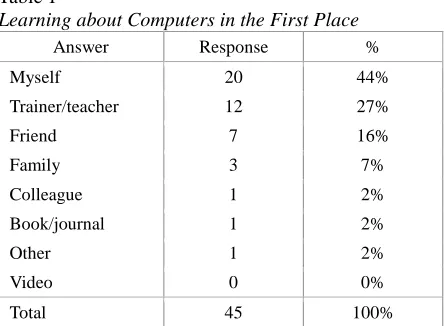
[image:6.420.61.284.210.373.2]Table 1 shows the participants’ responses to the question of who taught them how to use the computer in the first place. Most of them indicated that they learnt about computers themselves (44%), from trainers/teachers (27%) or friends (16%). In the case of the “Other” response, the 1 respondent simply stated that he/she has grown up with the computer.
Table 1
Learning about Computers in the First Place
Answer Response %
Myself 20 44%
Trainer/teacher 12 27%
Friend 7 16%
Family 3 7%
Colleague 1 2% Book/journal 1 2%
Other 1 2%
Video 0 0%
Total 45 100%
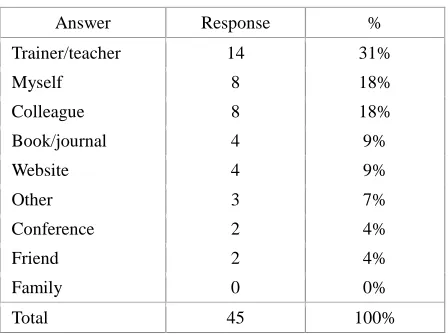
Table 2 shows the participants’ responses to the question of who taught them what CALL is in the first place. It was found that the majority of the participants were introduced to CALL by trainers/teachers (31%), themselves (18%) or colleagues (18%). In the case of the “Other” response, the 3 respondents stated they learnt about CALL because of their job requirements.
Table 2
Answer Response % Trainer/teacher 14 31%
Myself 8 18%
Colleague 8 18% Book/journal 4 9%
Website 4 9%
Other 3 7%
Conference 2 4%
Friend 2 4%
Family 0 0%
[image:7.420.60.284.68.235.2]Total 45 100%
Table 3 shows the frequency of the participants’ use of online tools in each category in detail. Their responses indicate that most participants use communication tools and web search engines almost every day while they rarely use live and virtual worlds, website creation tools and web exercise creation tools. In response to the question of which particular tool they use most frequently, they mentioned the following tools in each category: learning/content management systems – Moodle; communication tools – Gmail; live and virtual worlds – Second Life; social networking and bookmarking tools – Facebook; blogs and wikis – Blogger; presentation tools – Prezi; resource sharing tools – YouTube; website creation tools – Google Sites; web exercise creation tools – Hot Potatoes; web search engines – Google; dictionaries and concordancers – Merriam-Webster Online; and utilities – Google Earth.
Table 3
# Question A lm o st ev er y d ay 3 -4 t im es p er w eek 1 -2 t im es p er w eek 1 -2 t im es p er m o n th 2 -4 t im es p er y ear R ar el y H ea rd a b o u t b u t n ev er u sed N ev er h ear d 1 Learning/Content Management Systems (e.g., Blackboard, Drupal, Joomla, Moodle, Sakai)
20 3 5 5 1 7 4 0
2
Communication tools (e.g., Gmail, Skype, Windows Live Messenger, Yahoo! Messenger, ooVoo, TokBox, Jabberwacky, Verbot, MyBB, phpBB, Tangler, Voxopop)
33 2 2 3 0 5 0 0
3
Live and virtual worlds (e.g., Elluminate, Livestream, OpenSimulator, ActiveWorlds, Second Life, Ustream, Wimba Classroom, WiZiQ)
2 2 6 3 7 13 11 1
4
Social networking and bookmarking sites (e.g., Delicious, Diigo, Elgg, Facebook, Grouply, MySpace, Ning, SocialGo, LinkedIn, Twitter, italki, Lang-8, Livemocha)
26 7 3 1 2 4 2 0
5
Blogs and wikis (e.g., Blogger, Edmodo, Edublogs, LiveJournal, WordPress.com, PBWorks, Wikispaces, Penzu)
16 10 3 5 2 6 3 0
6
Presentation tools (e.g., 280 Slides, Animoto, Empresser, Prezi, SlideRocket,
Zoho Show)
7
Resource sharing tools (Google Docs, TitanPad, Zoho Writer, Box.net, Dropbox, VoiceThread, Xtranormal, Flickr, Picasa, MyPodcast, PodOmatic, Glogster, Screenr, Slideshare, PhotoPeach, Dipity, OurStory, Jing, SchoolTube, TeacherTube, VideoPress, Vimeo, WatchKnow, YouTube)
19 7 9 6 0 1 2 1
8
Website creation tools (e.g., Google Sites, Jimdo, KompoZer, Mahara, Movable Type, SnapPages, Weebly, Webnode, Webs, Wix)
4 4 3 6 2 13 12 1
9
Web exercise creation tools (e.g.,
ContentGenerator, SMILE, ESL Video, JClic, Hot Potatoes, Quia, Lingt, Listen and Write)
1 5 4 9 5 13 6 2
10
Web search engines (e.g., Ask.com, Bing, Google, Yahoo! Search)
38 2 2 0 1 0 2 0
11
Dictionaries and concordancers (e.g., Dictionary.com, Merriam-Webster Online,
YourDictionary.com, Compleat Lexical Tutor, Forvo, Howjsay, Memrise, Visuwords, OneLook Dictionary Search, VLC Web Concordancer)
12
Utilities (e.g., CalculateMe, CalendarFly, Doodle, ClustrMaps, Currency Converter, Dvolver Moviemaker, Google Earth, Lesson Writer, Storybird, Cacoo, Mindmeister, Mindomo, Remember the milk,
SurveyMonkey, Qwiki, Voki, Time and Date, TinyURL.com, W3C Link Checker, Wallwisher, Wayback Machine, Wordle)
13 5 5 7 2 7 4 2
Note: N=45
[image:10.420.60.367.68.239.2]The participants were also asked to indicate their ways of professional development in CALL. Table 4 shows how often they use certain ways to keep up to date with the development of CALL. The results indicate that many participants read journal articles or books, check email list messages and connect with others in social networks while they rarely attend online conferences.
Table 4
# Question
1 2 3 4 5 6 7
Mean D aily Week ly M ont hl y 2 -4 time s a y ear Y ear ly R ar el y N ev er 1
Go to face-to-face conferences
2 1 5 15 13 7 2 4.44
2 Attend online conferences 0 1 8 6 7 16 7 5.11
3 Watch videos 7 15 10 5 2 3 3 3.02 4 Listen to audios 9 8 10 5 1 8 4 3.47
5
View presentation slides
7 19 7 4 3 4 1 2.84
6
Read professional newsletters
6 17 9 8 1 4 0 2.84
7 Read journal articles/books 8 22 11 2 0 1 1 2.36 8 Read blog posts 11 17 7 3 0 6 1 2.69
9 Read email list messages 19 12 5 2 1 6 0 2.38
10
Visit professional association's websites
5 14 15 5 1 5 0 2.96
11
Connect with others in educational institutions
9 10 10 7 2 7 0 3.09
12
Connect with others in social networks
18 13 3 3 2 5 1 2.49
Note: N=45
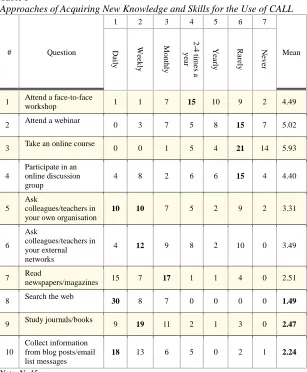
Table 5
Approaches of Acquiring New Knowledge and Skills for the Use of CALL
# Question
1 2 3 4 5 6 7
Mean
D
ai
ly
W
eek
ly
M
on
th
ly
2
-4
t
im
es
a
y
ear
Y
ear
ly
R
ar
el
y
N
ev
er
1 Attend a face-to-face workshop 1 1 7 15 10 9 2 4.49
2 Attend a webinar 0 3 7 5 8 15 7 5.02
3 Take an online course 0 0 1 5 4 21 14 5.93
4
Participate in an online discussion group
4 8 2 6 6 15 4 4.40
5 Ask
colleagues/teachers in your own organisation
10 10 7 5 2 9 2 3.31
6 Ask
colleagues/teachers in your external networks
4 12 9 8 2 10 0 3.49
7 Read newspapers/magazines 15 7 17 1 1 4 0 2.51
8 Search the web 30 8 7 0 0 0 0 1.49
9 Study journals/books 9 19 11 2 1 3 0 2.47
10
Collect information from blog posts/email list messages
18 13 6 5 0 2 1 2.24
Note: N=45
Discussion and conclusion
tools and social networking sites most frequently among the twelve categorised online tools while most participants consider themselves as good or excellent users of the Internet. Many participants often read journal articles or books, read email list messages or connect with others in social networks to learn about new developments in CALL. They regularly search the web, collect information from blog posts/email list messages or study journals/books to update their knowledge and skills for the use of CALL. For this particular group of participants, informal learning activities such as self-exploration and connection with social networks seem to be more important ways of learning than formal training initiatives such as taking online courses or attending webinars. These results indicate that most participants appear to be autonomous and social learners (cf. Hart, 2012).
The study supports the importance of self-direction strategies and the use of online tools for teacher professional development in CALL. Although it is difficult to make any generalisations about the relationship between online tools and professional development in learning about CALL due to the small size of the survey, the results of the study suggest that CALL training programs should provide teachers with guidance on the effective implementation of CALL using online tools and focus more on supporting teachers’ personal learning strategies and social and collaborative activities for autonomous professional development in CALL. They also imply that ongoing support through teachers’ networks is needed not only for those who have limitations in the use of CALL in the classroom but also for those who have been able to integrate CALL into the classroom. For self-directed CALL education, at the same time, teachers are recommended to make efforts to participate in formal training and/or informal learning whenever possible.
References
Chapelle, A. C., & Jamieson, J. (2008). Tips for teaching with CALL: Practical approaches to computer-assisted language learning. White Plains, NY: Pearson Education.
Curwood, J. S. (2011). Teachers as learners: What makes technology-focused professional development effective? English in Australia, 46(3), 68-75.
Garrett, N. (2009). Computer-assisted language learning trends and issues revisited: Integrating innovation. The Modern Language Journal, 93(Focus Issue), 719-740.
Godwin-Jones, R. (2009). Personal learning environments. Language Learning & Technology, 13(2), 3-9. Retrieved from
http://llt.msu.edu/vol13num2/emerging.pdf
Godwin-Jones, R. (2010). Literacies and technologies revisited. Language Learning & Technology, 14(3), 2-9. Retrieved from
http://llt.msu.edu/issues/october2010/emerging.pdf
Hanson-Smith, E. (2006). Communities of practice for pre- and in-service teacher education. In P. Hubbard & M. Levy (Eds.), Teacher education in CALL (pp. 301-315). Amsterdam, The Netherlands: John Benjamins.
Hart, J. (2012). Learning in the social workplace: Only 14% think that company training is an essential way for them to learn in the workplace. Retrieved from
http://www.c4lpt.co.uk/blog/2012/04/16/only-12-think-that- company-training-is-an-essential-way-for-them-to-learn-in-the-workplace/
Hubbard, P. (2007). Critical issues: Professional development. In J. Egbert & E. Hanson-Smith (Eds.), CALL environments: Research, practice and critical issues (2nd ed.) (pp. 276-292). Alexandria, VA: TESOL.
Hubbard, P. (2008). CALL and the future of language teacher education. CALICO Journal 25(2), 175-188.
Lewis, T. (2006). When teaching is learning: A practical account of learning to teach online. CALICO Journal, 23(3), 581-600. Meskill, C., & Anthony, N. (2010). Teaching languages online. Bristol:
Multilingual Matters.
Pettis, J. (2002). Developing our professional competence: Some
393-396). Cambridge: Cambridge University Press.
Robb, T. (2006). Helping teachers to help themselves In P. Hubbard & M. Levy (Eds.), Teacher education in CALL (pp. 335-347).
Amsterdam, The Netherlands: John Benjamins.
Sharp, K. S. (2011). Teachers acquisition of CALL expertise. International Journal of Computer-Assisted Language Learning, 1(4), 1-16. Son, J.-B. (Ed.). (2004a). Computer-assisted language learning: Concepts,
contexts and practices. APACALL Book Series Volume 1. Lincoln, NE: iUniverse.
Son, J.-B. (2004b). Teacher development in e-learning environments. In Son, J.-B. (Ed.), Computer-assisted language learning: Concepts, contexts and practices (pp. 107-122). APACALL Book Series Volume 1. Lincoln, NE: iUniverse.
Son, J.-B. (Ed.). (2009). Internet-based language learning: Pedagogies and technologies. APACALL Book Series Volume 2. Raleigh, NC: Lulu.
Son, J.-B. (2011). Online tools for language teaching. TESL-EJ, 15(1). Retrieved from
http://www.tesl-ej.org/wordpress/issues/volume15/ej57/ej57int/
Stockwell, G. (2007). A review of technology choice for teaching language skills and areas in the CALL literature. ReCALL, 19(2), 105-120. Stockwell, G. (2009). Teacher education in CALL: Teaching teachers to
educate themselves. Innovation in Language Learning and Teaching, 3(1), 99-112.
Wilden, S. (2013, October). The role of online tools in teacher
development. Talk at the first joint online conference of TESOL CALL-IS and IATEFL LTSIG. Retrieved from