This is a repository copy of Code and its image: the functions of text and visualisation in a
code-based design studio.
White Rose Research Online URL for this paper:
http://eprints.whiterose.ac.uk/86330/
Version: Accepted Version
Article:
Meagher, M., Huang, J., Zuelzke, N. et al. (3 more authors) (2015) Code and its image: the
functions of text and visualisation in a code-based design studio. Digital Creativity, 26 (2).
pp. 92-109. ISSN 1462-6268
https://doi.org/10.1080/14626268.2015.1045620
Reuse
Unless indicated otherwise, fulltext items are protected by copyright with all rights reserved. The copyright exception in section 29 of the Copyright, Designs and Patents Act 1988 allows the making of a single copy solely for the purpose of non-commercial research or private study within the limits of fair dealing. The publisher or other rights-holder may allow further reproduction and re-use of this version - refer to the White Rose Research Online record for this item. Where records identify the publisher as the copyright holder, users can verify any specific terms of use on the publisher’s website.
Takedown
If you consider content in White Rose Research Online to be in breach of UK law, please notify us by
Code and its Image: the functions of text and
visualization in a code-based design studio
Mark Meagher, Jeffrey Huang, Nathaniel Zuelzke, Trevor Patt,
Guillaume Labelle, Julien Nembrini
Abstract
Traditionally, design learning in the architecture studio has taken place through a combination of individual work and joint projects. The intro-duction of code-based design practices in the design studio has altered this balance, introducing new models of joint authorship and new ways for individuals to contribute to co-authored projects. This paper presents a case study describing four design studios in a higher education setting that used code as a tool for generating architectural geometry. The for-mat of the studios encouraged the students to reflect critically on their role as authors and to creatively address the multiple opportunities for shared authorship available with code-based production. The research question addressed in this study involved the role of code-based practices in altering the model of architectural education in the design studio, in particular the role of visual representations of a code-based design process in the production of shared knowledge.
Key words: [design studio, architectural education, code-based design, ver-sioning software, visualization.]
1
Introduction
Much has changed in design practices around the world as a result of the broad introduction of digital design tools. The use of design software has facilitated sharing of documents with collaborators in remote locations and the integra-tion of analytical tools at multiple stages of the design process[1][2]. Code-based/algorithmic approaches to the design process have introduced methods for precisely controlling the outcomes of design and automating elements of the design process. Innovative construction processes have been enabled through the establishment of a direct link between digital data and the computer-controlled fabrication process[3].
Despite such transformative changes in the practice of architecture, the methods of design teaching have in most places been largely unaffected. Follow-ing a formative period in the early 20th
drawing with computer-aided design software, there have been few attempts to question the underlying presuppositions of design education in light of changes resulting from digital design practices.
The code-based design studio differs from a traditional studio in the use of text instructions to the computer as a primary tool for design development. In the studios considered here code was used alongside hand-drawing and standard 3D modeling software. The educational benefits of code include the necessity for the student to understand geometric principles and logical structures which are concealed from the user of most 3D modeling and CAAD software[4]. In addition, the software used in the code-based design studios described here (Processing) provides considerable capacity for modular expansion through the addition of software libraries that provide specific functionality such as physics simulation or energy simulation. Certain aspects of working with code can be used to support collaborative work: the modularity of well-structured code makes it relatively easy for students to share functional blocks of code, and the ability to embed comments and other forms of metadata result in a rich and searchable database of information recording design intent.[5] Although Processing was used as a development environment in these studios, the concepts discussed in this paper apply to any coding tool applied in a spatial design context.
The case study described here presents a three-year investigation of the po-tential for transformation of the design studio based on digital innovations in architectural practice. The project, known as ’Superstudio’ involved partici-pants from three Swiss schools of architecture: the EPF Lausanne (EPFL), ETH Zurich (ETHZ) and USI Mendrisio. Between 2008 and 2010, four design studios were offered in the Media and Design Lab at EPFL as a means of testing hypotheses developed by the Superstudio initiative. Students in the four studios were encouraged to work with code-based design processes, using computer pro-gramming to advance design ideas and to make constraint-based (parametric) simulation and fabrication a part of their design process. Each studio in this series was organized as a means of testing the implications of integrating code-based design methods in the studio. Among the implications considered were forms of communication enabled by the digital design process; the integration of bespoke parametric tools as an integral part of the design process; and the implications for design authorship of using code-based design methods.
1.1
The design studio: Conceptual background
The studio method of education is widely acknowledged as the primary means of transmitting knowledge in the design professions. Many of the studio’s defin-ing characteristics are inherited from one of two historical sources: the ‘atelier’ tradition of the 19th century Ecole des Beaux Arts in Paris and the workshops of the Bauhaus introduced in the 1920’s. The design education of the Ecole des Beaux Arts centered on the ’ateliers’ or studios, rented spaces outside the formal context of the Ecole in which a group of students would conduct their design work assisted by an instructor or ‘maitre’ who provided regular critiques of work in progress[6]. The intellectual life of the ateliers consisted of constant interaction around design ideas. Over the course of the 20th century the atelier model emerged as the preferred method of design education in schools through-out the world, overtaking in most places the problem-solving method of the scientific disciplines.
A significant evolutionary step in the history of the studio was introduced with the workshop-based teaching method of the Bauhaus in Weimar and the Vhutemas in Moscow. New techniques introduced by industrialization fed a growing separation between the methods of the craftsman and techniques avail-able through industrial production; the Bauhaus proposed to fill this gap through the reintroduction of a cultural practice within industrial development, combin-ing both fine arts and the industrial practices. The Bauhaus workshop aimed to re-create the conditions of practice by according less importance to theoretical teaching than to the method of resolving a problem.
Although often based on ’real’ problems and complexities, the design studio as a pedagogical instrument remains in most schools of architecture purposefully distinct from the practice of architecture and the other design professions[7]. The studio provides a risk-free environment in which students can safely try out ideas, learn the vocabulary and working methods of their profession, and learn design thinking through hands-on work and trial and error. The design studio introduces students to the processes, materials and theory of design: students learn to design by confronting complex problems using the tools, thought pro-cesses and practices specific to their profession. The studio master provides a model of professional and artistic excellence that students are encouraged to emulate, while much of the actual learning and refinement of skills takes place through peer-to-peer interaction. As Donald Sch¨on pointed out in a series of seminal essays, the design studio combines scientific problem solving with a pro-cess of ’problem setting’ that requires artistry, ingenuity and creativity[8]. As such, it can serve as a model for all professions that involve elements of both problem solving and creativity, or making.
1.2
Constructionism and code as artifact
Constructionism was used in the studios described in the case studies as a model for the integration of computer programming in the design process.
Papert’s Constructionism is based on the Constructivism of educational the-orists such as Jean Piaget, who emphasized the role of interaction with the world and with objects in the child’s acquisition of knowledge:
To Piaget, knowledge is not information to be delivered at one end, and encoded, memorized, retrieved, and applied at the other end. Instead, knowledge is experience that is acquired through interaction with the world, people and things.1
Constructivism presents itself as an alternative to the model of learning as a pipeline between instructor and student, a model in which the most important factor in learning is the quality of instruction. In the Constructivist model, the emphasis is more on setting up environments that promote learning through in-teraction. To this Constructivist concept of learning, Papert added the concept that learning happens best when it involves the construction of public artifacts of some personal significance. In other words, children (and adults) learn best according to Papert when working on self-directed projects that involve the con-struction of objects and/or concepts that can be appropriated and engaged with by their peers. Inherent to this approach to learning is a decentralized structure in which it is understood that the instructor does not have all the answers; and a definition of learning as progression toward a recognition that every student contributes in their own way to the project of shared knowledge[10].
Specific aspects of Constructionism have been developed further by other researchers. Marlene Scardamalia has explored the “social structures and dy-namics required for progressive, communal knowledge building”[11], developing a model of primary and secondary level education modeled on the practice of scientific research. In her proposal for ‘knowledge communities’, students be-come experts in particular areas of knowledge that they choose and which are of particular individual interest. Other research has emphasized Constructionism’s opportunistic collaboration, which involves “small teams forming and disband-ing under the volition of community members, based on emergent goals”[12].
1.3
The code-based design studio
In the case of the code-based design studio, the medium for interacting with the world and with ’real’ problems of immediate relevance to students is code itself and the capabilities it offers to model the building and its physical behavior. The computational design studio differs from a traditional studio in the use of code as one of the primary tools in design development. In the studios considered here code was used alongside hand-drawing and standard computer-aided design software, although code was prioritized and encouraged over other types of digital design tools.
Code consists of a sequence of text-based instructions that are both computer-readable and human-computer-readable; when ’run’ on a computer these instructions pro-duce outputs in one or more structured formats such as images, 3D geometry or tabular data. Through the use of dynamic parameters, code-based design facilitates the generation of variations based on a set of constraints in a process of parametric design. Code also provides access to tools of analysis and form generation such as libraries for environmental and physics simulation and al-gorithmic design methods such as generative design. Through this integration of powerful simulation techniques with generative design models, code has the potential to enable a shift in the role of the designer toward the control of an iterative design process in which automated generative mechanisms are used to achieve a meaningful interplay of form and function[5]. In such a design con-text the product of design is the code itself, more than any particular design outcome: this is due to the fact that the designer is fully in control of the code, but not necessarily in control of the designs produced using code[13].
In the design studio described in this paper it was understood that the code was a form of artefact produced by the students, one which served the role of Piaget and Papert’s object in allowing the student to engage in learning about the world through a process of making. The code produced by the students also represented a condensed expression of design intent. The code contained in-structions for the production of a range of possible geometries based on specific parameters set while the code is running. And, the code contained metadata describing attributes of the building (materials, construction types) and com-ments (human-readable but not interpreted as instructions by the computer). All these elements make the kind of parametric code used in these design studios a valuable source of information about the designer’s intentions and the process followed to reach a given design outcome.
1.4
Version tracking in the code-based design studio
Another way in which the use of code-based design techniques can have signif-icant implications for understanding the dynamics of the design studio is the capacity they introduce for detailed tracking of design decisions. Because text files can be read using a range of open source tools for comparing file versions, the use of text-based data files allows the integration of detailed version track-ing in the design process. Data collected durtrack-ing the process of design can be mined using quantitative analytical tools or visualized as a means of qualita-tively identifying patterns of collaboration during the design process. Even in situations where group work is not part of the design process, version tracking can provide valuable feedback to the individual designer about the stages in their own process of design. Finally, version tracking tools such as Subversion or SVN (the platform chosen in the EPFL studios) provide a means of remotely backing up each stage in a design process. SVN has been used by designers as a means to work together on a shared parametric model[14] and as a transparent record of authorship within a collaborative design process[15].
in this paper were 1) to allow students to publish their work in a forum that is monitored by their peers and an audience beyond the studio; 2) to keep track of individual contributions to jointly-authored code, or to track the stages in a sole-authored design process; and 3) to maintain a repository of the code itself alongside the files (images, 3D geometry, data) produced by the code.
First, the SVN repository provided a visual interface for students to actively ’publish’ their code and design ideas. Students were encouraged to publish their work as frequently and as compellingly as possible using the online forum: this act of publication was both a record of authorship, a ’proof’ of the origin of a particular idea with a given author or group of authors, and a means of soliciting feedback from peers and instructors. Essential to this ’explicit’ form of information gathering were the comments students wrote to accompany their submissions to the online repository and the images they chose to represent their work.
The second purpose of the SVN repository was to capture information about authorship. The version control software maintains a detailed record of the differences between each version of a given piece of code (hereafter referred to as a ‘script’), and in cases where there is shared authorship stores a record of the author responsible for contributing each line of the script to the repository. This information is recorded tacitly in the sense that once a line of code had been submitted to the repository by a given author that line could then be tracked if it was re-used by others in their scripts. This mechanism for keeping track of individual contributions to group projects was an effective motivator for students to give time to the group work in the knowledge that their effort would be recognized by the studio community.
The third purpose of the SVN repository was to maintain a record of the files associated with each script at every stage in its development. As mentioned previously, the output of a script in the code-based design studio is typically a file such as an image, a 3D model and/or a set of tabular data. These files are an essential key to understanding the code itself, and provide a shorthand under-standing of the design intentions behind a given script. Often these associated files are used to provide the designer with essential feedback about the aesthetic and performative aspects of their design, allowing the designer to develop their idea through a series of design iterations. These associated files also can provide a visual analog to development in code.
1.5
Information visualization in the code-based design
stu-dio
visualiza-tion by Card et al.[16] by its preoccupavisualiza-tion with “abstract, nonphysically based data”. Finally, information visualization is based on the use of computation to support data analysis, the generation of graphic output, and interactivity.
In the code-based design studio, the visual representation of the design pro-cess is particularly important because code is not a visual medium and in itself offers only a highly abstracted representation of the design. Physical artifacts such as drawings and models can be produced using code, but these may not be present at all stages of the design process. The purpose of visualization is to present data produced by the code in a way that can easily be understood and put to use; and to provide a format for presenting the visual outputs of code as a browsable and searchable database. The data extracted from the code could relate to information about script authorship from the SVN repos-itory, or simulation results based on the geometry and metadata produced as an outcome of the code-based design process. In addition, the visual represen-tation of information describing the digital design process has the potential to encourage participation in collaborative design exercises and to facilitate the understanding of changing models of interaction within design teams[17].
Information visualization of the code-based design process offers the follow-ing potential benefits in the design studio:
• The designs are visible to all: once work has been committed to the SVN repository it is public and available for all members of the studio to view and appropriate.
• The history of the design process is visually represented: data from the SVN repository is presented as a record of stages in the development of a design using code.
• Information about authorship is visually represented: when scripts have multiple authors the contribution of each designer can be recognized.
• Images and data can be presented alongside the code: associated files such as images or simulation results can be viewed alongside the code used to produce them.
the code-based design process developed at ETH Zurich and Harvard Design School.
1.5.1 ETH Zurich – Phase(x)
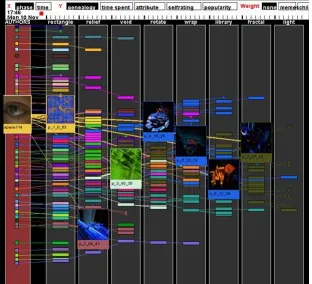
Phase(x) was an experiment in the visualization of digital design activity in large CAAD classes at ETH Zurich[19]. Students were asked to begin each week’s assignment with the files from another student’s work in the previous week as a starting point: in this way students could focus their energy on adapting and learning from the work of their peers. This model of shared authorship based on the appropriation of another’s work was reinforced by the online interface, which provided students with the ability to publish their work online, comment on the work of others, and trace the chronology of design ideas (figure 1). By making it easier to identify the specific contribution of each individual, the visualization aimed to create an improved understanding of the collaborative design process, an understanding that can lead to the identification of shared interests within a large group of designers thereby encouraging joint projects[20]. The connections drawn between projects are in Phase(x) based entirely on each individual author’s choice to give credit for their use of another student’s design material. The nature of the connection between the works is not automatically captured; it may be captured if the author indicates in a comment the extent to which they re-used the code from the previous work in their own submission.
1.5.2 OpenD
OpenD is a visualization of activity in an online shared workspace that focuses on presenting a global overview of interaction among the members of a design team; the software was developed at the Harvard Design School where it was tested in several classes[17]. The platform represents submissions to the online shared workspace as nodes which are connected based on an affiliation expressed by the author at the time of submitting the work to the shared database. The content of a single ‘node’ was left completely indeterminate in the design of this system: the node could represent a single file or collection of files, with or without a text description.
was used was a class in Information Visualization at the Harvard Design School, a context where the software was used to store code, data, and associated visual representations of data.
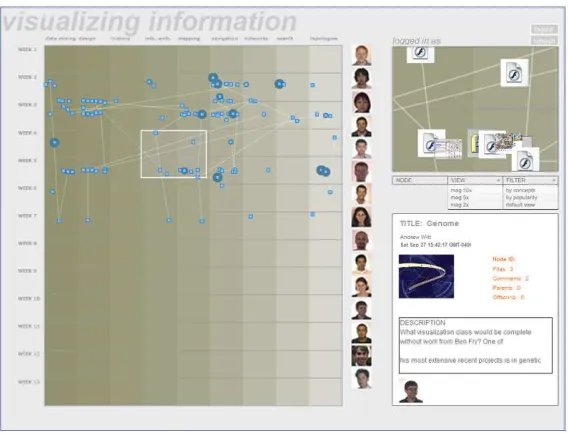
[image:11.612.164.448.279.496.2]There are three basic visualization options in OpenD: nodes organized by time (chronological genealogy of ideas), by people (who contributed what), and by keywords (as specified by contributors)[21]. The time organization provides a chronology of the emerging knowledge repository; the people view is a graphic representation that clearly identifies the contributions of each individual; and the keywords organization structures the knowledge base according to topics specified by contributors. At any stage in the design process it is evident from the visualization who has contributed what to a given design output, and which ideas have been most influential in the shared knowledge base (figure 2).
Figure 2: The OpenD visual browser of student work during the semester, ar-ranged chronologically (y-axis) and according to themes (x-axis). Image: Mark Meagher.
2
A studio case study: Superstudio at EPFL
Between 2008 and 2010, a series of four architectural design studios were offered by the Media x Design Lab at the Ecole Polytechnique F´ed´erale de Lausanne (EPFL) as an experiment in the integration of digital design methods in the design studio and as a tool for studying the changes taking place in the structure of the studio as a result of this integration. In particular, these studios have been used a means of investigating the models of authorship in the design studio and the ways in which these models are changing in response to a code-based design process.
2.1
Bespoke digital tools in the design process
A new coding library for architects, ‘anar+’, was developed by Guillaume La-belle and Julien Nembrini with the goal of creating a parametric design tool sufficiently powerful for expert use while forgiving enough for introduction to beginners[4]. The anar+ library for Processing was introduced to students in each of the four EPFL design studios, and was used to address specific design questions, enabling users to create their own tools to address particular design questions at discrete moments in the design process.
The anar+ library supports the parametric definition of 3D geometry us-ing constraints based on geometry, simulated environmental performance, or other factors defined by the user. Once the geometry has been created, the anar+ graphical interface allows continuous variation of parameters using slid-ers. anar+ is designed to be used in conjunction with software for 3D modeling, 2D drafting, and rendering, and includes export capability to common design software file formats such as OBJ, RhinoRhino, Sketchup, and DXF.
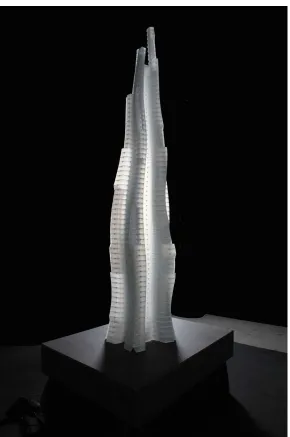
In the Superstudio spring 2009 studio the anar+ library was used in the early stage of design to generate concepts for massing and interior plan organization of a skyscraper. The building envelope and floor plans were generated based on a range of programme-related and environmental performance criteria which were researched and implemented as geometric constraints by the students. Following the development of these overall concepts for the massing and interior the model was exported and the detail design stage was later carried out using standard 3D modeling software packages for eventual rendering and export for fabrication of physical models (figure 3).
groups for the completion of a particular task or for the production of a partic-ular design concept.
In addition to this emphasis on group work, an ’open source’ ethos of shar-ing one’s work and learnshar-ing from the work of others was promoted in all the Superstudio studios. Students were encouraged to post their code online at mul-tiple stages in the design process, and to download and use code produced by their peers. This borrowing of code was tracked using a version control software which logged the ’use’ of any given file in the online repository and kept track of the authorship of code on a line-by-line basis, providing a detailed record of who had contributed to a jointly-authored work. In this way, a record of individual authorship was preserved within the collaborative design process.
2.2
Methods for capturing design data
In addition to its utility as a tool for communication in the studio, the Super-studio online interface was also used as a means of collecting data relevant to understanding the digital design process. The students interacted with the SVN server through a client application: students on Windows were recommended to use TortoiseSVN, a software that integrates SVN functions directly into the Windows explorer window; RapidSVN and Versions are equivalent packages for the Mac OS. Using the client software, students were able to interact with the SVN repository in several ways using the following commands:
• Checkout: This downloads the current state of the selected directories from the SVN repository. Each student in Superstudio had their own directory within the studio directory, and students would typically check out only those files that were directly relevant for their work although it was also possible to check out the entire studio repository at once.
• Commit: This is the action for uploading edited files to the database, along with an explanatory text commenting on the changes. The name is apt: this is the moment of commitment when your changes become public and replace the previous version of the files, resulting in a new version of the section of the repository that you have been working on. A commit can involve a single file or hundreds of files; SVN keeps track of which files have changed in relation to the versions in the repository and uploads only the changed files. The text output from a sample commit is shown in figure 6: each commit corresponds to a new version number for the repository and records the files that have edited/added/removed, the author of the commit, a timestamp, and a comment. Because all commits were immediately published in the online interface, the text was often used to ask for a quick response in the form of help with a coding question or an announcement of changed functionality or other updates to the code.
committing one’s files to assure that someone else hasn’t changed the file while you were working on it.
• Status: Gives a list of files in your working directory with an indication of which files have been edited/added/removed in relation to the versions in the shared repository.
• SVN Copy: The ’svn copy’ command allows users of the repository to create a new version of a file or directory: this is called ‘branching’ and results in an alternate path of development for the original code. The svn copy command assures that the ‘genealogy’ of the files is retained. The act of branching represents one of the most powerful functions of a version control system: the ability to track multiple parallel developments with a common starting point.
• Merge: This command is used to reconcile a branch back with the main stream of development, called the ‘trunk’. Merging allows alternative development paths to have a broad influence, even to determine the path of future development.
In the Superstudio project we used the SVN repository as a way to support a distributed, non-hierarchical approach to coordination of design teams that allowed (in principle) for anyone in the studio to borrow the work of anyone else and develop their own version, with complete transparency of the history of authorship. In reality, students did not make extensive use of branching, perhaps because the concept of version control was difficult for students to grasp and students tended to continue familiar methods of file management rather than adapting their practice based on the capacities of version control. For example, students would often rename their files with each commit (‘myFile1’, ‘myFile2’, ‘myFile3’), not realizing that the software would automatically retain a record of changes and previous versions if they kept the name constant. Similarly, the logic of branching and merging was difficult for students to understand, and the conflicts that sometimes resulted when they tried to merge their work discouraged students from making extensive use of this function.
Figure 6: SVN log showing the result from one commit. In this commit four files were modified including one image. The comment explains the motivation for the changes made to the files.
3
Discussion
We observed three primary functions of visualizations of data from the Super-studio online repository: 1) for communication with teachers and students in the studio; 2) to persuade other students to join in a project or to use their code; and 3) to for analysis of the design process itself, and of individual submissions to the shared repository.
First, the online repository provided a visual interface for students to ’pub-lish’ their code and design ideas to a shared blog site where anyone could browse the latest work from the studio (figure 5). Students were encouraged to publish their work as frequently and as compellingly as possible using the online forum: this act of publication was both a record of authorship, a ’proof’ of the origin of a particular idea with a given author or group of authors, and a means of soliciting feedback from peers and instructors. Essential to this ’explicit’ form of information gathering were the comments students wrote to accompany their submissions to the online repository and the images they chose to represent their work. This communication function of the blog and SVN repository was frequently used by students to ask for help with technical and design questions. In addition to the blog, a wiki was also implemented by Guillaume Labelle on which SVN activity was automatically published, providing a visual online record of changes to the shared repository. Students could browse and download individual files from within this interface.
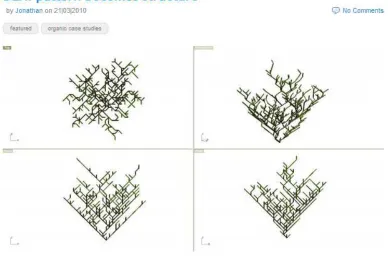
The second goal of these Superstudio online environments was for persuasion. Students were free to form and dissolve teams as needed to accomplish specific design goals, and one tool for recruiting other students to join in a project was the use of persuasive images and accompanying text (figure 4). The code itself, which requires some time and effort to understand and use, was not as compelling a representation of the project and its ideas as a single iconic image, even though in many cases the design projects were realized primarily though code. Another motivation for presenting one’s code compellingly was the wish to have as many people as possible using your code and adding functionality that could become valuable to the original author.
code, data and images.
A primary limitation of the versioning approach used in the studios was the fact that not all files used by the students could be ’understood’ by the version tracking software. While the authorship of a text file was recorded at the level of individual lines of text, any binary file such as images or proprietary CAD formats could only be stored as a monolithic block of content. Changes to binary files were recorded with the identity of the author(s) responsible, but it was not possible using the SVN software to automate the process of identifying which changes had been made. Students were discouraged from submitting images and other binary files to the SVN repository, and used online file server instead for this purpose. The limitation of version tracking to text files underlines the value of integrating the creation of text-based metadata into the design process as a basis for the automated extraction of information about the history of the design process.
Another potential limitation of a version tracking approach is the difficulty of automating the identification of ’important’ contributions of code, i.e. those lines which are particularly valued by the community of designers. It is possible in our version tracking setup to measure the frequency with which a given line of code or entire script has been copied by others for use in their code: providing a rough measure of the value placed by others on this contribution to the shared repository. But, in the future a more robust system of peer review to identify code that is useful and free of errors will be an important addition to this version tracking infrastructure.
Although the examples described in this paper are all in an educational context, there are clear applications of version tracking in design practice as a tool supporting increased transparency and accountability. In design processes that invite public participation version tracking could provide a public record of stages in the design process and accountability through a record of the people in-volved in each decision. Version tracking tools have been used for many years in the software development community to support large, distributed open source projects and has the potential for use on public architectural projects that invite community participation.
4
Conclusion and future work
The three online interfaces employed in the Superstudio project were designed to establish a persistent link between the code produced by the students and the outputs of the code in images, 3D model geometry and data. These online interfaces were important to the studio as a public venue for ‘publishing’ design work, as a place for conversation about work in progress, and as a visualization of data collected about the design process. By providing a format in which mul-tiple types of metadata were stored with the code, the SVN repository offered functionality associated with a building information modeling (BIM) design process, using a light open source infrastructure. Because the software infras-tructure used is far more flexible and adaptable than commercial BIM, it will be interesting in future work to investigate the application of this versioning system to the early stage design process.
In future implementations of the Superstudio online repository it will be important to gather data related to the influence of the visualization itself on the students and their own understanding of the digital design process. In the studios discussed here the visualization was used to present students with a visual representation of certain aspects of their own digital design process, and it will be important in future work to evaluate the extent to which the availability of this visual representation has an impact on the students and their own understanding of the design process.
Among the primary challenges in the visualization of the digital design ac-tivity is the capture of meaningful information during the design process. Tacit methods of information capture such as data mining of server logs, version con-trol software logs, email logs and chat transcripts can be quite effective and reliable, and this has been the preferred method in the examples cited above. The limitation of tacit methods is the nature of the information captured in logs, which seldom provides insight into the motivation and thought process behind a given design idea. For this reason tacit methods can sometimes lead to misleading or overly simplistic conclusions due to the absence of a context for interpreting results. Among the challenges to be addressed in future studies is the development of a better method for collecting meaningful information about the design process through a combination of tacit and explicit data collection methods.
pro-grammers most designers have a low tolerance for working in a purely text-based interface for long periods of time, and need to work constantly between text and image in order to understand the consequences of decisions made in code on de-sign. There is also the issue of the time needed to ’understand’ text vs. the image, which provides an immediately comprehensible summary of the code’s content, one that is particularly legible to the visual designer.
Donald Sch¨on has addressed the potential conceptual benefits for designers of learning the highly constrained language of computer programming, propos-ing that the latter can become a link between design thinkpropos-ing and the kind of ’rational thinking’ that one engages in as a scientific researcher. As such, code is a form of expression that is ideally suited for design students whose mindset and way of approaching problems is also related to the practices of the sciences. Code has a strong intuitive and creative dimension, but also requires a strict adherence to rules of syntax and logical structures. This allows it to function in some instances as a bridge between design thinking and scientific thinking: ”Might it be possible to help students make the sort of crossover this student made for himself [i.e. between architectural design and computer programming]? If it were possible, there might be important consequences for broadening studio education and bridging between it and education in physical and social science. Certainly it will be important, in pursuing this question, to explore new ways of helping students reflect on their designing. There may be some particular merit in exploring computer programming as a transitional activity linking ar-chitectural design to verbal argumentation.“2
In a context of practice in which architecture is increasingly an activity requiring the coordination of multiple disciplines in the applied sciences, there are significant advantages in learning a design method such as code that bridges between the thought processes and working methods of architectural design and the applied sciences.
5
Acknowledgments
The authors would like to thank the Superstudio project members, who con-tributed in many ways to the development of the concepts presented in this paper: Professor Laurent Stalder (ETH Zurich), Professor Dieter Dietz (EPFL) and Professor Pau Sola-Morales (USI Mendrisio). This work was supported by the Swiss National Science Foundation under Grant number 581844.
References
[1] J. Nembrini, G. Labelle, and C. Nytsch-Geusen. Parametric scripting for early design building simulation. In Proceedings of the CISBAT Interna-tional Conference, Lausanne, Switzerland, September 2013, 2011.
[2] Rivka Oxman. Digital architecture as a challenge for design pedagogy: theory, knowledge, models and medium. Design Studies, 29:99–120, 2008.
[3] J Shah and M M¨antyl¨a. Parametric and feature-based CAD/CAM: Con-cepts, techniques, and applications. Wiley, November 1995.
[4] Guillaume LaBelle, Julien Nembrini, and Jeffrey Huang. Programming framework for architectural design [anar+]. Proc CAAD Futures, 2009.
[5] J. Nembrini, S. Samberger, A. Sternitzke, and G. LaBelle. The potential of scripting interfaces for form and performance systemic co-design. Pro-ceedings of Design Modeling Symposium, 2011.
[6] A Drexler. The architecture of the ecole des beaux-arts. MIT, 1977.
[7] A Findeli. Rethinking design education for the 21st century: Theoretical, methodological, and ethical discussion. Design Issues, 17(1):5–17, 2001.
[8] Donald A. Sch¨on. The architectural studio as an exemplar of education for reflection-in-action. Journal of Architectural Education, 38(1):2–9, 1984.
[9] Edith Ackermann. Piagets constructivism, paperts constructionism: Whats the difference?, 2008.
[10] Seymour Papert and Idit Harel. Situating constructionism. In Idit Harel and Seymour Papert, editors, Constructionism, chapter Situating Con-structionism. Ablex Publishing, 1991.
[11] Marlene Scardamalia and Carl Bereiter. Computer support for knowledge-building communities.Journal of the Learning Sciences, 3(3):265–283, July 1994.
[12] Jianwei Zhang, Marlene Scardamalia, Richard Reeve, and Richard Messina. Designs for collective cognitive responsibility in knowledge-building com-munities. Journal of the Learning Sciences, 18(1):7–44, 2009.
[13] Nathaniel Zuelzke, Trevor Patt, and Jeffrey Huang. Computation as an ideological practice. Proceedings of ACSA 100th Annual Meeting: Digital Aptitudes +Other Openings, 2012. Marc Goulthorpe and Amy Murphy, eds.
[14] Jane Burry and Dominik Holzer. Sharing design space: Remote concurrent shared parametric modeling. Proceedings of eCAADe, pages 333–340, 2009.
[15] Ingeborg M. Rocker. Versioning: Evolving architectures-dissolving iden-tities: nothing is as persistent as change. Architectural Design, 72(5):10, 2002.
[17] Mark Meagher, Kate Bielaczyc, and Jeffrey Huang. Opend: Supporting parallel development of digital designs. InProc. Designing User Experience (DUX ’05), 2005.
[18] Urs Hirschberg. Transparency in information architecture enabling large scale creative collaboration over internet in architectural education. Pro-ceedings of eCAADe 20, pages 174–179, 2002.
[19] U. Hirschberg and F. Wenz. Phase (x) memetic engineering for archi-tecture. Automation in Construction, 9:387–392, 2000. Elsevier Science BV.
[20] D.E. Spicer and J. Huang. Of gurus and godfathers: Learning design in the networked age. Education, Communication & Information, 1(3), 2001.
[21] J. Huang, K. Bielaczyc, and M. Meagher. Liquid ontologies, metaper-spectives, and dynamic viewing of shared knowledge. In Proceedings of I-KNOW 2006 6th International conference on Knowledge Management, pages 560–567, 2006.
[22] Julien Nembrini, Mark Meagher, and Adam Park. Usage patterns of script-ing interfaces for buildscript-ing performance assessment at early design stage. In
Proc. of 13th Conference of International Building Performance Simulation Association, Chambery, France, August 26-28, pages 1144–1151, August 26-28 2013. Chambry, France.
[23] Mark Meagher, Adam Park, and Julien Nembrini. Analyzing the performance-based computational design process: A data study. In Christoph Gengnagel, Axel Kilian, Julien Nembrini, and Fabian Scheurer, editors,Rethinking Prototyping: Proceedings of the Design Modelling Sym-posium, Berlin, Germany, September 28 - October 02 2013. epubli GmbH, 2013.