3-1964
1401 multiple utility program with simultaneous
input-output processing
Karolyn Edwards
Iowa State UniversityDavid E. McFarland
Iowa State UniversityFollow this and additional works at:
http://lib.dr.iastate.edu/ameslab_isreports
Part of the
Computer Sciences Commons
This Report is brought to you for free and open access by the Ames Laboratory at Iowa State University Digital Repository. It has been accepted for inclusion in Ames Laboratory Technical Reports by an authorized administrator of Iowa State University Digital Repository. For more information, please [email protected].
Recommended Citation
Edwards, Karolyn and McFarland, David E., "1401 multiple utility program with simultaneous input-output processing" (1964).Ames Laboratory Technical Reports. 67.
Abstract
The purpose of this report is to describe POGINOUT, a simultaneous input-output utility program for the IBM 1401 computer. The procedure is given for writing any 1401 program with simultaneous input-output. The description and procedure can be used in writing similar utility programs for 1401's used as peripheral equipment to a larger computer. The report contains comments on procedures not used in POGINOUT but which might be appropriate under slightly different conditions. Familiarity with this program aids in optimum use of the POGO executive system. The normal user will find those sections pertaining to code words and carriage control the most useful.
Disciplines
Computer Sciences | Physical Sciences and Mathematics
AL
JtDR
.:r:s-tSI
IO
WA
1401 MULTIPLE UTILITY PROGRAM WITH SIMULTANEOUS INPUT-OUTPUT
PROCESSING
by
Karolyn Edwards and David E. McFarland
RESEARCH AND
DEVELOPMENT
REPORT
TID 4500, April 1, 1964
UNITED STATES ATOMIC ENERGY COMMISSION Research and Development Report
1401 MULTIPLE UTILITY PROGRAM WITH SIMULTANEOUS INPUT -OUTPUT
PROCESSING
. by
Karolyn Edwards and David E. McFarland
March, 1964
Ames Laboratory at
Iowa State University of Science and Technology
IS-851
This report is distributed according to the category Mathematics and Computers (UC -32) as listed in TID-4500, April 1, 1964.
Legal Notice
This report was prepared as an account of Government sponsored work. Neither the United States, nor the Commission, nor any person acting on behalf of the Commission:
A,. Makes any warranty or representation, expressed or implied, with respect to the accuracy, completeness, or usefulness of the information contained in this report, or that the use of any information, apparatus, method, or process disclosed in this report may not infringe privately owned rights; or
B. Assumes any liabilities with respect to the use of, or for damages resulting from the use of any information, apparatus, method, or process disclosed in this report.
As used in the above, "person acting on behalf of the Commission" includes any employee or contractor of the Commission, or employee of such contractor, to the extent that such employee or contractor of the Commission, or employee of such contractor prepares, dissemi-nates, or provides access to, any information pursuant to his employ-ment or contract with the Commission, or his employemploy-ment with such contractor.
Printed in USA. Price $ . 75 . Available from the
Office of Technical Services U. S. Department of Commerce
CONTENTS
ABSTRACT •.•..
INTRODUCTION
SECTION
I.
INFORMATION SPECIFIC TO P<;l>GIN<;l>UT FORUSE WITH P<;l>G<;l>, PROGRAMMER ORIENTED GENERALIZED OPERATOR ••••••••••••••••
Minimum Machine Requirements ••••••
Input Specifications ••••••••••••••••••
Specifications for all operations Tape-to-printer/punch operation Card-to-tape operation ..•..•••.
Code Words ••••• Sense Switches .•• Operating Speeds
SECTION II. INFORMATION APPLICABLE TO ANY 1401 SIMULTANEOUS UTILITY PROGRAM FOR PERIPHERAL TAPE PROCESSING ••...•••
Carriage Control
Timing . . . . . . .. • • .
General . . . .
Card Read Cycle Card Punch Cycle
Print Cycle .•••••....•..
IBM 729 Magnetic Tape Timings 729 II Tape Write Timing •. 729 IV Tape Read Timing
Discussion of Possibilities
...
Page
5
5
6
6 6
6 7 8
9
12 13
15
15
16
16
18
19
20 21 22 22
IS- 851
1401 MULTIPLE UTILITY PROGRAM WITH SIMULTANEOUS
INPUT-OUTPUT PROCESSING
Karolyn Edwards and David E. McFarland
Abstract
The purpose of this report is to describe P(/JGIN(/JUT, a simultane-ous input-output utility program for the IBM 1401 computer. The pro-cedure is given for writing any 1401 program with simultaneous input-output. The description and procedure can be used in writing similar utility programs for 1401's used as peripheral equipment to a larger computer. The report contains comments on procedures not used in P(,l>GIN(/JUT but which might be appropriate under slightly different con-ditions. Familiarity with this program aids in optimum use of the P(/JG(/J executive system. The normal user will find those sections pertaining to code words and carriage control the most useful.
INTRODUCTION
The Simultaneous Utility Program for the IBM 1401, POGINOUT,
performs both card-to-tape and tape-to-printer/punch operations
near-maximum speed. This is done to prepare magnetic tape input for
the IBM 7074 and to process magnetic tape output.
The operation to be performed depends on the setting of sense
switches. The program was written as a utility program for the POGO
system and as a card-to-tape processor for the FLAG system. It could
SECTION I. INFORMATION SPECIFIC TO P<;l>GIN(,l)UT FOR USE WITH P(,l)G(,l), PROGRAMMER ORIENTED
GENERALIZED OPERATOR
Minimum Machine Requirements
The 1401 system necessary to operate this program includes:
1. IBM 1401 Model C3 (tape system with 4000 storage positions}
2. IBM 1402 Card Read-Punch 'unit
3\ IBM 1403 Printer, Model 2
4. 2 Magnetic tape units: IBM 729 II and IBM 729 IV; or 2 IBM
7330 units.
5. Six additional sense switches
6. Advanced Programming Feature
7. High-Low-Equal Compare Feature
8. Print Storage Feature
9. Early Card Read Feature
10. Read-Punch Release Feature
Input Specifications
1. Specifications for all operations
The object deck of POGINOUT must be immediately followed by a
date card. Columns 1-6 are punched with the date. This supplies the
date for account cards and header lines. If the date card is blank, no
header line will be written when a new page is begun. Also, if the date
card is blank one tape mark will signify the end of the reel.
turned on at any point to stop the curr~nt operation. The program will
halt normally immediately after being loaded. Sense switch E should be
turned on to halt operations rather than pressing STOP. A halt under
control of switch E waits until the current operation is finished.
Pres-sing the STOP button does not do this.
2. Tape-to-printer/punch operation
Sense switch G must be on to indicate this operation. The 7074
out-put tape must be mounted on tape unit# 1. Four tape marks sensed on tape
normally terminate the operation. Multiple files per reel will be
proc-essed as they are reached.
Code words may be used to control processing. The first character
of each printed line acts as forms control unless the code word indicates
otherwise. See page 9 for more information on code words and forms
control characters.
The maximum block length is 1200 characters. The maximum length
record is 132 characters for printing, 80 for punching. The records
may be of fixed or variable length and may be blocked. Variable length
records require record marks. The output will be processed with one
record per card br line. Whether the record is printed or punched
depends on the code word preceding the file.
When overflow suppress is not being used and page headings are not
being omitted, a segment mark or a tape mark on tape will cause a new
page to be printed. "SEGMENT MARK" or "TAPE MARK" is printed on
code -word conditions and looks for a new code word.
All cards punched from the output tape are selected into the 8/2 stacker. This includes account cards and card output. They may be separated later by a special option.
3. Card-to:..tape operation
Sense switch F must be on for this operation. The cards to be put on tape must immediately follow the date card. Each card will be put on tape as a card image. The cards read are selected into stacker 1. Each POGO or control car.d is numbered and a duplicate punched, which is then selected into stacker 4.
The POGO cards are written on tape in card image as well.as being punched. Each POGO card is sequentially numbered in columns 71-75 first. Other control cards, FORF, 'FORN~ WTM, and WSM are not written on tape in card image. The WTM and WSM cards cause a tape mark or segment mark respectively to be written on tape. A WTM or WSM card also causes the cards following to be written in alphameric mode. A FORF card causes following cards to be written on tape in alphameric mode until a FORN is encountered. A FORN causes following cards to be written in numeric mode until a FORF or WTM is encountered.
Input cards for the FLAG system may also be taped using this
pro-gram. Both FLAG and POGO may be put on the same tape. When a
<-character is encountered in column 1 only, the card is both punched as
a log card and written on tape. When this character is encountered in
both columns 1 and 2 a tape mark is written on tape.
When the last card or the first POGO card is sensed, a stop signal
is written on tape to tell FLAG that the input tape is finished.
Code Words
Code words are used to indicate to P~GIN~UT the form of the
fol-lowing output tape. A code word is effective until the next tape mark is
encountered. The code words and their effect are as indicated:
none: Single records will be printed with forms control. A record may
or may not be terminated by a record mark. Variable length blocked
records, each terminated by a record mark will be deblocked and
printed with forms control. F~RTRAN punched output will be processed.
This is a record starting with five dollar signs,
$$$$$.
The dollar signswill be deleted and the following 80 characters (or fewer) will be punched.
FPXXX: Single records with or without record marks will be printed
with forms control. The carriage control character will be printed as a
blank. Fixed length blocked records without record marks will be
deblocked and printed with forms control in lengths of XXX characters
characters for each line.
FP : Single records with or without record marks will be printed with
forms control. The carriage control character will be printed as a
blank. Variable-length blocked records, each terminated by a record
mark, will be deblocked and printed with forms control.
FP
+:
Single or variable -length blocked records will be processed aswith the FPbbb code word. All alphameric records will be printed with
forms control, printing the carriage control character as a blank. All
numeric records will be punched, If a numeric record is longer than 80
characters, only the first 80 will be punched.
PRXXX: Single records with or without record marks will be printed
with single spacing. Fixed-length blocked _records will be de blocked and
printed single spaced. Each record, whether single or blocked, must
contain XXX characters per record where XXX is the three -digit integer
in the code word.
PR : Single records with or without record marks will be printed with
single spacing. Variable -length blocked records, each terminated by a
record mark, will be deblocked and printed single spaced.
PR
+:
Single or variable-length blocked records will be processed aswith the PRbbb code word. All alphameric records will be printed
sin-gle spaced. Numeric records will be deblocked, punching the first 80
,
KOXXX: Single records with or without record marks and blocked
fixed-length records without record marks will be processed. Each
record will be printed with forms control and overflow suppression.
Overflow suppression occurs when sensing the end of a page does not
cause a new page to be started. Printing continues right over the end
of a page.
KO : Single records with or without record marks and blocked
variable-length records with record marks are processed, deblocking
when necessary. Records are printed with forms control and overflow
suppression.
KO
+:
Single records and blocked variable -length records with recordmarks are processed. Deblocking is done where necessary.
Alpha-meric records are printed with forms control and overflow suppression.
Numeric records are punched.
PUXXX: Single records and fixed-length blocked records without record
marks are processed, deblocking the blocked records. All records are
punched; record length must not exceed 80 characters.
PU : Single records and variable -length blocked records with record
marks are processed, deblocking where needed. All records are
punched and must not exceed 80 characters.
A printed record must not exceed 132 characters due to the width of the
Sense Switches
Each time the program is loaded into core it halts to allow checking
of sense switch settings. These settings determine the operation to be
performed. Whenever a change in operations-is desired, setting switch
E will cause this same halt. Turning off E and pressing START will
resume operations. The settings and the operations caused are as
listed.
A - always up. This switch causes the last card read to be sensed.
B - double space output. When this is up all output from tape is double
spaced. This is useful when many incorrect carriage controls are
being processed.
C - listing. Cards may be placed in the card reader and a list printed
as the cards are read.
D - separate output. All punched output from an output tape is selected
into a single stacker. Placing this output in the reader and cards of
a different color in the punch allows this output to be separated by
account. Each time an account card is read it is selected into a
dif-ferent stacker and a blank card is punched in its place in the stacker
with the rest of the output. In this way punched output can be
manu-ally separated to go to the correct user.
E - normal halt. Used as a stop to change operations or correct a
phys-ical condition.
F - input. Whenever this switch is on, cards will be read from the card
G - output. Whenever this switch is on, the output tape will be
processed. If G is turned off while an output tape is
beingproc-essed, the computer will halt at the end of the current account.
F & G - simultaneous input and output. When both F and G are on, cards
will be written on tape at the same time an output tape is being
processed. All this is done at near-maximum speed.
none - log listing. When no switches are on, the POGO or FLAG cards
will be numbered and listed. This log listing is used by the
7074 operators.
Operating Speeds
When POGINOUT is performing both input and output functions
simultaneously, it operates at nearly the maximum speed of the 1403
printer. Under ideal conditions, the two operations are performed at
the maximum of 600 lines of printed output and 600 cards read per
minute.
There are several conditions which slow this down to an average of
about 565 cards or lines per minute each way. Any forms control other
than single spacing causes a delay in the cycle. This occurs normally
at least once for every new page. More extensive forms movement
takes place under control of the first character of a line. This may be
very time consuming as in the case of a full-page skip. The
skip-after-print controls are buffered so that they take no extra time. This is done
print instruction. Because no extra processing time is needed, the
write instruction may take place during the 21 ms between the start read
feed instruction and the read instruction as it may when there is no forms
control. When forms control is before the print, the print instruction
may not be placed between the start read feed instruction and the read
instruction. The time for forms control exceeds the 21 ms maximum
allowed.
The reading of a very large block from tape causes a reduction in
processing speed. A single record of 132 characters or fewer can be
completely contained in the basic loop. However, any block composed
of several logical records takes longer. This causes a pause in the
cycle each time a block is read from tape and, hence, reduces speed.
The punching of cards causes a considerable delay in the whole
cycle. Each punch requires 240 ms of machine time. A small amount
of this may be used for processing. In most cases the first part of the
card read time is overlapped onto the last 22 ms of the punch cycle.
Punching occurs both in the card-to-tape operation and the
tape-to-printer/punch operation. Each time a control card is sensed when
read-ing cards it is punched for later use as a log. Various codes and code
words indicate that certain records of the output tape are to be punched
rather than printed.
In case that only the output is being processed (no card-to-tape
oper-ation), speed is increased very little. The only time saved is the time
omitting it saves very little time on th~ print cycle. However, if the processing of the output tape is omitted, the card-to-tape operation is
speeded up considerably. In this case the basic cycle is 75 ms. Cards
can be processed at the rate of 800 cards per minute maximum.
The punching of control cards cuts this rate a little.
For more explicit timing information see the timing diagrams,
Figs. 2-10.
SECTION II. INFORMATION APPLICABLE TO ANY 1401 SIMULTANEOUS UTILITY PROGRAM FOR
PERIPHERAL TAPE PROCESSING
Carriage Control
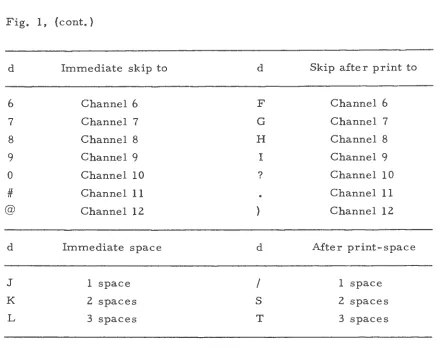
Certain characters located in position 1 of a print line cause
speci-fied carriage movement. A digit causes an immediate skip to a specispeci-fied
channel in the 1403 carriage tape. An alphabetic character with a
12-zone causes a skip to a specified channel after the line is printed. An
alphabetic character with an 11-zone causes immediate spacing and one
with a zero-zone causes spacing after the line is printed. The forms
control for each character is shown in Fig. 1.
d Immediate skip to d Skip after print to
1 Channel 1 A Channel 1
2 Channel 2 B Channel 2
3 Channel 3
c
Channel 34 Channel 4 D Channel 4
d Immediate skip to d Skip after print to
6 Channel 6 F Channel 6
7 Channel 7 G Channel 7
8 Channel 8 H Channel 8
9
Channel9
I Channel9
0 Channel 10 ? Channel 10
#
Channel11
Channel11
@ Channel 12 Channel 12
d Immediate space d Mter print-space
J 1 space
I
1 spaceK 2 spaces
s
2 spaces\
L 3 spaces T 3 spaces
Fig. 1. 1401 Carriage control characters.
Timing
General
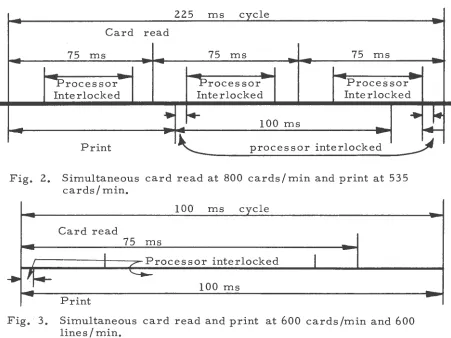
When attacking the problem of simultaneous input-output processing
on the 1401, it appears that there are two solutions. Without the
process-overlap feature a program cannot be written that will run at maximum
card read speed (800 cards/min) and maximum printer speed (600 cards/
min) simultaneously. One has the choice of 800-535 {cards -lines) or
[image:19.583.72.510.90.442.2]as in Fig. 2, three cards per two lin~s. Using this method there are
89 ms available in the cycle for housekeeping or 17. 8 ms per logical
record processed. This housekeeping must include the tape reads and
writes (see Fig. 4 for times). The second one appears to be a better
one since most installations are print bound; not card bound. The second
choice overlaps the print and read cycles as in Fig. 3, one card per one
line. Using this method there are 54 ms available in the cycle for
housekeeping or 27 ms per logical record processed. This method has
considerably more time per logical record processed, 27 ms as
com-pared to 17.8 ms •.
225
ms cycle-Card read
75
ms75
ms..
75
ms--..
-
--processor "Frocessor
Processor-Interlocked Interlocked Interlocked
•
•
+
100 ms
..
...
l
...
..
-Pnnt
~---~p~r_o_c_e_s_s
__ o_r __ ln __ te __ r_l_o_c_k_e_d _____~-Fig. 2. Simultaneous card read at 800 cards/ min and print at 535 cards/min.
100 ms cycle
Card read
75
msI
Processor interlocked
I
I I /
..
~
~100 ms
-
PrintFig.· 3. Simultaneous card read and print at 600 cards/min and 600
lines/min.
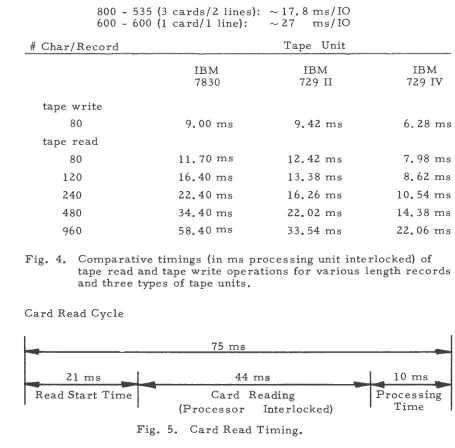
[image:20.599.81.532.366.704.2]-800 - 535 (3 cards/2 lines): ..., 17.8 ms/IO 600 - 600 (1 card/1 line): ..., 27 ms/IO
#Char/Record Tape Unit
IBM IBM IBM
7830 729 II 729 IV
tape write
80 9. 00 ms 9. 42 ms 6. 28 ms
tape read
80 11. 70 ms 12.42 ms 7. 98 ms
120 16.40ms 13. 38 ms 8. 62 ms
240 22.40 ms 16. 26 ms 10.54 ms
480 34.40 ms 22.02 ms 14.38 ms
960 58.40 ms 33. 54 ms 22.06 ms
Fig. 4. Comparative timings (in ms processing unit interlocked) of tape read and tape write operations for various length records and three types of tape units.
Card Read Cycle
-21 ms •
-
-Read Start Time
--75 ms
44 ms
Card Reading
(Processor Interlocked)
Fig. 5. Card Read Timing.
--_!Oms __
-
Processing-
--
(18)Time
With the read-punch release feature, 31 ms of the 75 ms cycle may
be used for other processing. The 44 ms of card reading time locks the
processor so that no other instructions may be executed during this time.
Giving a start read feed instruction (SRF) at point A causes the next
[image:21.595.61.516.97.545.2]21 ms may then be used for other processing. The read card
instruc-tion (R) must come before point B or a reader stop will occur on the
1402 card reader. Mter the read instruction is given, the processor
will be interlocked for the remainder of the 21 ms plus the 44 ms of
card read time. For example, if the SRF is given at A and the read at
'
B , 5 ms before the point B, the processor will be interlocked from the
point B' to C, a total of 49 ms.
Another consideration in planning the read cycle is the timing of the
clutch points of the 1402 card reader. These are the points in time when
a start read feed may be physically initiated. Any read will interlock
the processor from the time it is encountered, but will not actually
begin to read a card until the next clutch point is reached. Clutchpoints
come regularly at intervals of 75 ms on a standard 1402. With the early
card read feature a clutch point is reached every 25 ms. A start read
feed will become active at the first clutch point immediately after the
instruction is encountered. The asterisks indicate the points at which
the clutch points occur.
Card Punch Cycle
With the punch release feature, 181 ms of the 240 -ms cycle are
interlocked such that no other instructions may be executed. The 37 ms
at the front of the cycle are released for processing by use of the start
punch feed instruction. The use of the start punch feed instruction is
Card Punch Cycle
--
37ms
Punch Start Time
I
.
I
240 ms
181 ms Punching
(Processor Interlocked)
Fig.
6.
Card Punch Timing.I
22 ms ..Vroces sing
Time
Clutch points occur
60
ms apart in the punch cycle. A start punch feed or a punch instruction without start punch feed does not becomephysically effective until the next clutch point is reached. However, a
\
punch instruction interlocks the processor just as a read instructiondoes.
A punch not preceeded by a start punch feed and that is executed 30 ms
before the next clutch point will interlock the processor for a total of
248 ms.
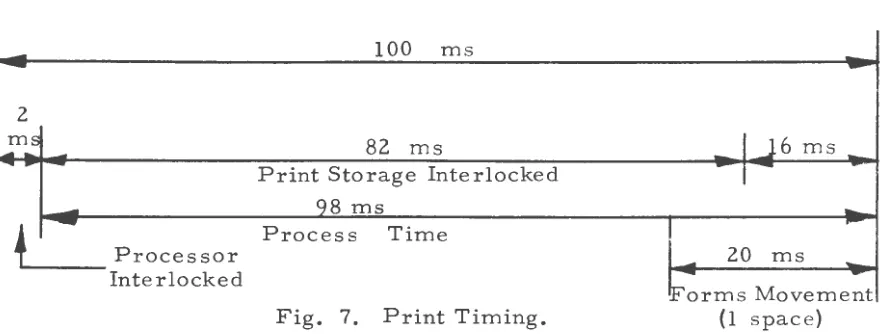
Print Cycle
100 ms
-
.
2
.... m .. :: 82 ms
I
J
6
ms _ _.,Print Storage Interlocked
I
--
98 ms...
+
._
Process Time
Processor
-
20 ms...
Interlocked
F'orms Movement
[image:23.595.82.530.171.323.2] [image:23.595.84.524.539.706.2]Normally the processor is interlo_cked during 84 ms of the 100 ms cycle. However, with the print storage feature, the processor is
inter-locked for only 2 ms. This is the time during which the print line is
transferred into a special print storage area. The 98 ms at the end is
free for any instruction except another print instruction. This would
lock up the processor until the entire cycle was completed.
A total of 20 ms at the end of the cycle is used to move the printer
carriage one line in order to be ready for the next line. Any extra
after-print forms movement is added on to the end but the processor
remains available except for a print instruction. A
branch-on-carriage-busy instruction must be executed to test for the completion of the forms
movement. Any before -print forms movements occur before the cycle
starts.
Each additional space of forms movement requires an added 5 ms up
to and including seven extra spaces. Each extra space over seven
requires an additional 2. 3 ms for models B, C, D. Model A requires
5 ms for each space after the first.
There are no clutch points associated with the print cycle. A print
instruction is executed as soon as it is encountered provided the
previ-ous print and forms movement is completed.
IBM 729 Magnetic Tape Timings
Detailed information is given below for a 729 II used for the tape
write operation and a 729 IV used for the tape read operation. The
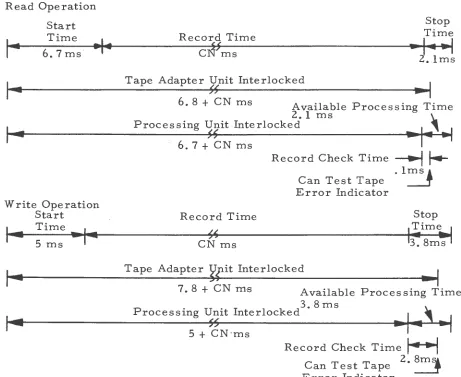
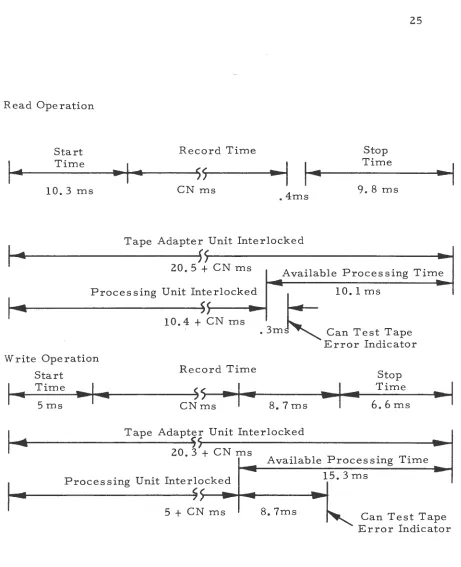
concerning the 729 II read time, 729 IV write time and IBM 7330 timings is included in diagram form, accompanying the diagrams of the 729 II write and the 729 IV read.
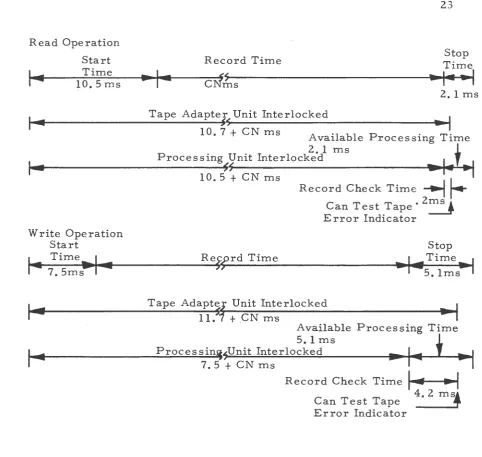
729 II Tape Write Timing
A 729 II write operation interlocks the processor during the start time and the actual record-write time. Record-write time can be com-puted as equal to • 024 N ms where N equals the number of characters to be written. The tape adapter unit (TAU) is interlocked for an addi-tiona! 4. 2 ms. No tape instruction may be given during this time. An
'
error test given during the 4. 2 ms will interlock the processor until the record check time is completed. However, it is available for other processing.
729 IV Tape Read Timing
The processor is interlocked on this operation during the start time and the record-read time. The tape adapter unit (TAU) is interlocked for an additional 0. 1 ms. A tape or error check instruction given dur-ing this time will not be executed until the time is completed. The remaining 2. 0 ms, the stop time, is available for normal processing.
Read Operation Start
.
1--I~
Time 10.5ms
Record T-ime
Tape Adapter Unit Interlocked
~-s
10. 7
+
CN msAvailable
2. 1 ms Processing Unit Interlocked
~~
Stop Time
... 1 . .
•1
2. 1 ms
.. I
Processing Time
... 1.+ ..
1
10. 5+
CN msRecord Check Time
~
f.-Can Test Tape· 2 ms. Error Indicator
Tape Adapt~f Unit Interlocked
11.
+
.CN m·sAvailable Processing Time
5. 1 ms
Proces sinijsUnit Interlocked
... 1.
+ ...
1
7. 5
+
CN msRecord Check Time
I
~
..,,
4. 2 ms!
Can Test Tape ~
Error Indicator
[image:26.600.61.544.82.539.2]Read Operation
Start
1 ...
I~
Time
6.7ms
•I•
Write Operation Start
Time,..~
5 ms
Record Time
cJ!ms
Stop Time
.. , ... 1
z.
1 msTape Adapter Unit Interlocked
55
•I
6.
8
+
CN m-s Available2. 1 ms
Processing Unit Interlocked 5~
Processing Time
--1--'-i
6.
7+
CNms
Record Time
CN ms
Record Check Time
--..j
j.-.1ms~
Can Test Tape Error Indicator
Stop
~~im~
3. 8ms
Tape Adapter ¥fit Interlocked
7.8+CNm-s Available Processing Time
3. 8 ms
Processing Unit Interlocked
s~ 5 + CN·ms
Record Check Time
r----1
Can Test Tape 2 • 8mJ Error Indicator
[image:27.593.71.532.190.567.2]Read Operation
Start Record Time Stop
1 . .
Time
·I·
ss
--I
14
Time10. 3 ms CN ms
• 4ms 9. 8 ms
~I
I _
Tape Adapter Unit Interlocked~-~-~---45~~---~.~
20. 5
+
CN ms Available Processing Time-
~I~
Processing Unit Interlocked5~
-
~
10. 1 msWrite Operation
Start
10.4
+
CN msRecord Time
....
, ... 1--T_i_m_e~_. . . . , .... .._ _ _ _ _ ~ss ~
,
...
5 ms CN ms
. 3m Can Test Tape
8. 7 ms
Error Indicator
Stop Time
6. 6
msI
-4 Tape Adapte; Unit Interlocked~-~
..
---4s~,---~---~-~
20. 3
+
CN ms •Available Processing Time
..
-
15.3ms-I
~ Processing Unit Interlocked _~--~----~---~5~~~~--
..
~-~---~,.~
5
+
CN ms 8. 7ms~
Can Test Tape Error Indicator
[image:28.599.84.545.70.637.2]The start time is the time necessary for the tape unit to accelerate
to operating speed, Stop time is the time necessary for the tape to
decelerate and stop. Record check time is the time necessary to read
or write the check character. N is the number of characters in a record,
and C is the character rate of transfer in milliseconds. This is based
on the density at which the tape is being operated.
Figure 11 shows the character rate, C, of the different units at
either density.
729 II at 200 cpi
=
• 067 ms at 556 cpi=
. 024 ms 729 IV at 200 cpi=
. 044 ms at 556 cpi=
. 016 ms 7330 at 200 cpi=
• 139 ms at 556 cpi=
. 050 msFig. 11. Character rate, C, for tape operations.
Discussion of Possibilities
While POGINOUT is written specifically to be used with the POGO
and FLAG systems in use at the I. S. U. Computation Center, the idea
behind the program could be readily used in a variety of situations.
There is one basic section of the program which controls all the
other sections. The other sections are particular in that they have to do
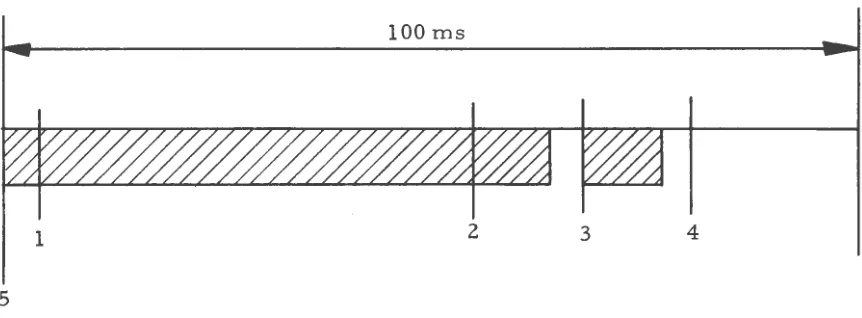
with options found on the POGO or FLAG systems. The main 100-ms
1. Read a card 2. Write it on tape 3. Read a tape record
4. Start read feed for next card 5. Print the tape record
Back to the top
The following diagram illustrates the timing of this loop.
Diagram for Discussion of Possibilities: lOOms
1 2 3 4
5
Fig. 12. Timing of the basic loop.
This order is followed if both the card-to-tape and the tape to printer operations are being done. If the end of a tape or the last card is reached, the other part of the operation continues until it, too, is finished.
[image:30.599.87.518.331.490.2]converts the output tape to
a
printed page using a 1401. Options whichoz 03
01 ••••••A2••••••••••• •••••A3••••••••••
••••A1••••••••• • •READ OATt: CARD • :MOVE DATE CARD :
BEGIN *••••••••X •••••••• X• TO •
• •ICARD REAUF.Rl• OAT~ AREAS
. .
...
..
.
.
...
.
...
.
... .
• 61 • •• X
.
....
.
X Olt...
.
.
•AA • •
. .
Bl••••••Ill••••· ••••• RESET ALL
INUICATORS
--HALT--
.
•X • • • • • • •.
WA IT FOR
• PRESS START •
...
• X.
c 1 • • 05
LIOUSL E • • •.
06
•••••C2••••••• •••
.
.
..
.
.
SENS<SWITCH 0 ' • • •· •YES •• •• •• x• CONSET FTROORL FMS OR
.• • t>OUOLE SPACE
SPACING•· •• ON
..
:X • • • • • • • • • •:
.. X. • X.
Ll1 •. 07 02 *• OH !jQ-80 LIST •. •* •.
RUUTINE TO CHECK SENS£
SWITCHES TO OETERMINF THE
lJPI::RhTIUN TU GE: PtRFURMEO
oq
• •• • • •1)3••• ••••••••
.
.
•. YES .• PREVIOUS •. NU •HOUSEKEEPING
10
• ••••04•••• ••••••
.
• MUVt THE CARU.
• • 11 ••••• •115• ••••••••••..
SENSESWITCH C .• •••••••• x•.CARD THE. LAST.• •••••••• X IH.AD A CARD • ••••••• X• TO fHI:: *••••••••X PRI"4T THt LINt:
OF CARDS· ••
..
ON..
• • X *• CARU.
.
• NO• X.
Ll • 0 12
SFPARt,fE.• •·
....
.
• 02.
•.
....
.
.
.
...
.
.
• YES
....
.
. .
• • X• Ill •
l3
••••••E 2••••••• ••••
• PRI~T ARtA
.
•. ... .
....
.
• E2.
•X ••NU
E3·•·.. 14 •••••E4••••••••!~ t:5·•· •. lb
.
.
.
.
.
.
(lUTPUT.• SE,'lS£ •· YES • • • CARD READ •. Nu • St:LI:C 1 OUTPUT • •* PKEV IUUS • •
SWITCH D •*••••••••.< REAU A CARO •••••••• x•. Al\J i\CCUUi~T .• •••••••• X• CARlJ TO • •••••••• X•oCAP.IJ THE LAST.•
D Y' •. ON • • X •. CA~W • STACKt:R 2 • I{ • . CARD •*
,\(COUNTS •·
.
.
•• o*• NU
• E2 •
. .
0
.
.
X 11
• • • • •F .3••••• • • • • •
.
•SfllCT ACCOUIH.
•CAKn Tll
5 TACKI::K l
X 1 ~ • 19
•••••G3•••••••••• •• • •••G4••• ••• •• •••
• X.
H1 *• 20 HZ
0. • 0 ••
.
.
21
.
• MOVl ACCOUf\1 IC AKD TU
PRINT ARE/\ *• • • • • • • • X
n
** • ••HJ• * ••• • ** • •
.
.
LAKD
Til IA\J(
• • St:NS~ •. YES • • '• NU •SET tNOlCATOKS • •. SW 1 TCH 1- • • •••••••• .( •. •*••••••••X* FrJR CII.RO TfJ *••••
•. ON • •
• 0
.
.
..
•••• l'lU
• X.
J1 PRIJC[S~
..
UUTPUT. • SENSE
.
.
.
.
.
.
.
.
• YLS
.
.
o. X•AO • • A2•
24 23 •••••J2•···
*• YES •SI::T INUILATORS •
IAPE •. S ... ITCH G • • •••••••• X• FOR PRUC£SS • •••• •.
..
ON..
.
.
.
• NO
x 2s
• • •••K 1••• •• ••• ••
.
• St:T INDICATOR.
•• TO LIST
LOG CARDS
...
.
. .
• • X•
. .
02 •.
...
• TAPE ONLY
...
•AC •• A1
..
•!'API: ONLY' •
...
•AB •• 1)2•
PRI"IIT
...
LIN[ PUNCH BLANKCARD TO
S TACKI::R 2
.
.
.
.
• Yt:S
...
•AB •• A2• 26
• •· :•••••z•••••••••:
• • WRITEA •
••••••• .(• NEW PAGE
...
•AB •• 82•
. .
HEADEK
.
• ....
. .
.
: 82
:·x·
x 21
••••••82••···
;,,,,,,K• REAO A CARD
c2'X. •• 2s
.
.
.
.
CARO REAO ANO TAP( ROUTINE
2•
••••••C3•••••••••••
,• CARRIAGE •· YES
•C~~TR~k~~¥Fo~; • . . . K •PRINT A LINl
..
..
.
.
.
.
• NO
:x .•...•...•... :
.X. 31 ••• . 33
02 • . .30 ••••••03••··· 04 • . 32 •••••05••···
•* *• • • • • • PERFORM OPTN. •
.f:R~R~Vl8~tRa~·.!~~
... x•
PUNCH CONTROL • •••••••• x•:*cA58NlR~bGa•:.~~••••••x:F~~~~i~~~~~~~lt!•• CARD • • • CARD LOG • •. CARD •* •WTM-TM ON rAPE •
*•
.. ..
•*...
*•..
.
.
•* •WSM-SM ON TAPE •. ... .
• NCJ
-
• YES.
.
.
• x •••••••••••••••••••••••••••••••••••••••••••••••••••
E2.X. •• 34 •••••u••••••••~~
.
. .
.
.
.
•* CARD-TO- •· YES • •
•TAPE UPEKArJON *••• •• ••• X•START l{tAO F-EE II•
• •
.
. .
ONLY.
• • • •..
• NU.
.
.
.
... x.x •..••••••••••••••••..•••••
x .ib
••••••F2•••••••••••
, NO
Gl•*• •· 37 G2.X. •• 3tf
.
. .
.
.
.
.
.
• :·co.~s~~~nve·:.x ••••. !~!.:• ~~~~t ·:.
*•
.
tRRURS. .
..
.
.~ •·..
ERROK..
•*.
.
.
...
• Y~ S • NO
:x ... :
x H
••••UL•••••••••
.
. .
H2.X. ••.
itO.
.
H3•*• ••.
.
41 • HA~T FOR •OP RATOR • AT ENfiON ·
•* PREVIOUS •• YES ,• 'ARO-TO- •· YES •· •• CA~~RbAST •• •*••••••••x•r:~r g~f~ATI~~ *•••••••x
...
..
..
.
.
.
.
..
.
...
.
.
• NO • NO
....
.
.
• • X•AC • • Al•
• X.
....
J2 •• 42
..
.
.
• :·
s~f¥~~t\ ·:.~~~...
•,
.. ..
ON , •.
... .
X.
.
•NU..
.
.. .
•Rl•
..
K2'X'•, 43 K3'*'•, 44
.
•AA •....
• 81•
. .
.
....
.. ..
.
. .
.
• • YES ,• tARO-TO- •• NO •• IN MJ~OL~ •· YES
• B2 •x •••• •TAPE OPERATION *••••••••X•U~ DEBLO KING A••••• •
....
• *•.
. .
ONLY.
• • •,..
HLO K.
.
, • •..
•.
.
.
...
• NU.
. .
,.x•AC • • Hl•
....
x
...
..
,
.
x 45
TAPE RUO ROUTINE
••••••Al•••••••••••
•• x
.
. .
•AC .• :.~i:
• READ A • TAPE RtCURD •
...
~u
• )li, • • •
D 1 •, 40 82 •, 4 7 48
, • · •· •* •• ••••Bl•••••••••
.:·
~m ·:.~~~...
x.:·coNs~E~me·:.~~~... x:
~~~~A~8~ *•..
ERROR.
.
,e • ·.
ERRORS.
.
.
•* •. ... .
AT~ENTION •..
.
.
..
.
.
• NU
.
• X. 5o • •. • ••
Cl •, 49 ••••••CZ••••••••••• C3 •· 51 C4 *• ~2
.
. ..
.
. .
.
. ..
.
.
.
• :rAPt MARK ON•:.~~! ••••• A•PRINT ~~~ PAGt- *,,,,,,,,xe:•cON~~~~TIVt•:.~!~ ••••• x•:*ou~~S~Ei~Pt:•:.!~~.
e,
.
. .
TAPE.
•* • TAPE MARK • *•..
TM S.
.
•* *•.. ..
ONLY ,•..
.
.
.... ...
..
.
.
.
.. .
• NU • NO • NO
....
:J(,,, ••••••••••••••••••••••••••••••••••••••••••••••• :
• X.
Ul •· 53
.
.
.
.
54••••••DZ•• •••••••••
. ...
•• •· VES •PRINT NEh t'AGE • • ••SEGMtNT MARK ON*•••••• •• x AND •••• .<• 41 •
•·
..
TAPE.
.
.• •SEGMENT ~ARK • • •..
.
.
• NO• x.
(1 •• 5~
..
..
• ' PKtV lOU~ •· YES
.
, , X•AB.
• • 82•....
•• X•.Rt-CURU A TAPE.•. ••.
..
•AC • • El•
...
'•
..
MAKK.
.
• •..
.
.
• NO
...
•AE • • 41•
..
• •• ~ 7
~-f-1 •· 56. •••••f-2•••••••••• ••••••F3•••••••••••
• • • ' I ISIS ' • •· YC.~ :toWVE Rt=Cu~ll TO : •
•• IN CULUMNS • ' • •• ••• •• A• •• ••• •••• .11 PUr1CH fP+t Cf.i<O
*•
.
. .
l - ~.
.• • PUNCH Aktl\ • • •..
.
.
• NO
• X. • ••
\t1 '• 59 G2 •· hO
.
. .
.
.
. .
.
• • PUNCH *• Yt:S •* DEBLOCK • • NO
' • ALL KECOROS
..
.
.
•*• ••••• ,,.l(e,HJKMl RC.CUA.DS.•. ••,.
.
.
.
.
. .
..
.
.
.
.
.
.
.
• NU
X 61
•••••Hl••••••••••
.
,
•S£1 U~ DEBLOCK •
.
...
• Yl S....
.
•• x•An •.
:.:;·
...
•A() •
• /14•
• .x• •
. .
•AC •
• Hl•
...
• FOR A PRINT
...
. J1·.x. •• b2
.
.
.
.
• tiiRMu~bkmRus· .~~~ •••••
*•
.
. .
. .
• •....
X*• • • •NU •AO • •Bl• x
...
•AD • • B4•
..
..
...
IAt·. I• r·£•
.
•AO • •••• Al•
....
i 63•••••Al••••••••••
.
..
•StT UP DEBLOCK • • FORM l •
• FOR PUNCH
DEBLOCK FORM I BLOCKED RECORDS IFIXtD L~NGTHI
. i. 65
01 *• bit ••••••SZ•••••••••••
.
.
.
.
...
• A4•
i 6~
• ••••A4••• ••••• ••
.
•SET UP OfDLOCK.
•• FOKM 2 •
FOR PUNCH
PROC~SS ~ll'lGLE RtCURDS
ANIJ
llESLOCK HJI<M 2
BLUCKEU KtCDKUS
:A~4: .X. 71
• • 84 • • 70 •••• •Ll5 ••••••••••
•• x•:* CH:~:~lt:R •:.!:~ ... x• PRINT NEW
: •• ·coMBINED•• •• YES : Stf FOR PUNCH:
•• ••• •• X•. PRlNT A~D • X• • • ••• ~UNCH •• • •••••••• :NUMERIC RECORDS:
..
•AD •
• Sl•
...
•·
.
.
A l.
.
• • •PAGE HEAIHNG •..
.
.
. ... .
• NO
.
...
• NO.
... .
• X : ••••••••••••••••••••••••••••••••••••••••
.x...
. ... .
i 66
•••••C 1••••• •••••
.
.
•MOVE RECORD TU •
.
• OUTPUT AREA
• io
Ut •· 6 7
.
.
..
.
•••••02••··· 60.
• • tNO OF •· YtS • RESff • *o BLOCK . • . o• ••••• X•INOIChTURS AND • •· .• • LOCAT101"4S •*o
.. 0.
•• • NO.X.
C4 72
73
•••• •C5• ••• • • ••••
.
.
.
.
• • END • . Yf.S • Rt:StT •
•• OF CURRENT •••••••••• x•JNDICATOKS Al-40 •·•• • •· OLOCK .• LGCA T101'4S :
• 0 0 .
...
• NO
.i. 75
D4 •• 74 •• ••••D5••••···
o* ••
• • FIRST •· YES •WRITL Nt:W PAGI:: • •. CHAH.AC TER • •· ••• o • • • X
•o A 1 .• HEADING
• 0
.
...
• •• NO
:x
...
0 • • 0 0 . 0 0 . 0 • • 0 • • 0 • • • • • :x 76 •••••f4••• •••••••
.
.
•MOVE TilE R((UKO•
.
•TU IJUTPUT AR~A.
•.
. . ...
.
.
... ...
....
. i. 7B
~4 •· 71 •••••F5••••••••••
.• o* CNO •· •· YES : RESI:T :
*o OF •\UJCK . • •• ooooooX•IN:JICAfORS AND •
o • lOCAl lONS
..
.
.
•o •• • "41J
i . .
• • • • • • • • • • • • • • • • • • • • • • • • • • • • • • • 0 . 0 • • • • • • • • • • • • • • • • • • 0 • • • • 0 • • • • • • • 0 • • • • • • • • • • • • • • • • • • • • • • • • • • • 0 • • • • • • • • • • • x •••••••••••
CARR I AGE CONTROL
ROUT IN< • : • r~U • • • • • o • • • • • • • • • • • • ••••••• o ••• o •••••• o •••••••• o •••••••••••••••••
HloXo•• 79 H2•*• •• 8U M3•*••. 81 H4•*• •• 82 •••••H5••••••••:!
.:•"Ct~~t:8t
•· •.
YES •• ·• LEGAL •· •• YES •• •(.c BEFUR[· •• NO ••·cc
1\FTER•· •• NO i : NO CARRIAGE : •·.
•• •*••••••••X•·:: CHARACTE~•o*••••••••x• ••• PRINT •• •*••••••••X• ••• Plf.INT •• ·•••••••••x:Res~¥NT~8\C.ATOR:.
..
.
.
.
.
.
. .
.
.
..
.
..
.
. .
.
.
.
.
. .
.
. .
.
.
.
. ...
.
.
• NU • • YES • YES
i 84
•••••J3••···
.
• SET CARRIAC~.
• CONTROL INDICATOR
.
...
...
X e5
•••••J4••···
.
•RESET CARRIAGE •.
• CONTROL •
• I NO ICATOR •
. ... .
:X. • • • • • • • •. • •• • ••••••• ,. • • • • • • • • • • • • • •••• • • •, • • • • •. ~ ••••••••••••• • • o • • • • • . • • • : X •••••• o •• • :
• X. B 7 • • • 89
Kl *• 86 •••••K2•••••••••• K3 e, BH ••••••K4•••••••••••
.
.
• AA •X ••
• Ol•
•••• • YCS
K5 • *• •. ,.0
.
.
.
.
•* PROCESS *o
PRINr •• ·•PROC~ss•· •• NO ! ! .. ·Nu CC OK•·., Yt::S •
A •· •• ~~rv .,•*••••••••x:START READ FEEO:•·•eiox••X• •• ~FTER PRIN~··'••••••••X 1WRITf A LINE ••••••••)(•. TAPf •*
LINE •·
..
.
.
• •...
• • •,.
.. .
• •. ... .
~ YES • NO
X •.
.
. .
ONLY.
.
...
• NO
.
.
..
•• X•AB •
• 82•
.
•AE • ••, ACCOUNT ROUTINE
• Al•
....
• X. qz • • • 94Al •• *• 91 :••••AZ•••••••••: • • A3 *• *• 93 :••••A4•••••••••:
•* •* I I I( ( *• YES •MOVt: RECORD TO • , • •. Yt-S •MOVE Rt-CDR.O TO •
*• OR •*••••••••X• *••••••••X•. 111(1 •*••••••••X• •
•·
..
IIIII.
.
•* • PRINT ARt:A • •· ;.... • ._.UNCH AREA.
.
.
.
• NO
i •s
•••••D 1• •••• •••••
.
INITIALIZE.
•INDICATORS
.
.
.
...
.
.
• NOi 96
••••••S3•••••••••••
• WRlff ACCOUNT • l l Nt
i 97
••••••H4•••••• •• •••
WRITE ANO
•PUNCH RECORD •
....
.
.
.
.
CuOt WORD ROUT l~t ,,X•A~ • • AC •X. ,
• B2• • Al•
•••• •••• NO
tl'X"•, '}S (..]· • · •• 99 •••••C4••••••••!2'0 cs'*'•, 10.1
.
.
.
.
.
.
.
.
.
.
.
.
.
•* *• YtS •* *• VES SET UP FOR • . • *•
•.FP CODE WURO •*•••••••••••••••••• ••••• •••••••••••X•FPBO COnE wliRD *••••••••X• *•• ,,,,,,X•FPSB+ CODE WORO•
*•
.
.
.
.
•* 1. *• , • •FUKM 2 RECORDS • •, •*..
.
.
• NO
• X. 10.5
El •· 10.4
.
.
..
•••••E.
Z•• ••••• •••.
, • •. YCS •
*• P~
.
.
CODE WUR()..
, *• •• , •••• x•..
.
. .
.
.
.
• NU
SET UP ,.UR
NO CARRIAGE
CUNTROL
.
.
• • • • • A •
.
.
. i. 10.7
f-1 *• lO.b •••••~2••••••••••
.
.
.
.
.
.
,• *• YES • SET lH' FOR • • •.KO CODE wtJRO • • · . , . , •• ,;(• OVERFLO~ • •••• ..<.
• •
.
. .
.
• •.
I SlJPPR.tSS •..
.
.
.
... .
• NO
.
x.
1 o ••Gl •· lO.ti •••••G2••••••••••
.
.
..
.
.
•* *• YES • SET UP fUR
t,PU COUE WORD •*••••••••X• PUNCH ALL *••••••
•,
.
.
.
.
• • R EClJHUS •..
•.
.
NOx 11. o
•••••t-H •••••••• I.
.
• SE I UP FOR.
•!F-0~''\.,fr~EE~ROS !
.
.
...
x
...
•AC ·•• £ 1•
.
.
.
.
.
...
.
.
. .... L)
X IQ, Z
•••• •03••••• •••••
.
SET UP FOk
.
•~ORM l RtCJ~OS.
•.
..
..
... .. ...
..
.
.
.
, • X•AC •
• 1\l•
....
.
.
..
.
.
x 10.3
•••••D5••••••••••
.
StT UP FOR• ~RlNT AlPHA • • PU~CH "'4UMER1C •
.
.
...
.
...
.
. .
• • X •AC •
• Al•