UNIVERSITI TEKNIKAL MALAYSIA MELAKA
FACTORY 1 MAPPING USING ANDROID FOR FTK
COMMUNITY
This report is submitted in accordance with the requirement of the Universiti Teknikal Malaysia Melaka (UTeM) for the Bachelor‟s of Electronics Engineering
Technology (Telecommunications) with Honours.
by
MOHD SHAHIRUL AIZAD BIN MOHD TOHID B071310260
910603-14-6061
i
DECLARATION
I hereby, declared this report entitled “Factory 1 Mapping FTK Community Using Android (MIT Inventor)” is the result of my own research and except as cited in references.
Signature : ……….
Author‟s Name : ……….
ii
APPROVAL
This report is submitted to the Faculty of Engineering Technology of UTeM as a partial fulfilment of the requirements for the degree of Bachelor of Electronics Engineering Technology (Telecommunications) with Honours. The member of the supervisory is a follow:
iii
ABSTRAK
iv
ABSTRACT
v
DEDICATION
vi
ACKNOWLEDGEMENT
All the praise to all mighty ALLAH SWT. For his bestowing with the courage, knowledge, health and wisdom to carry out this project. I would like to express my gratitude and appreciation to all those who gave me the possibility to complete this report. A special thank to my parents, without endless moral support, patience and prayers the very idea of this project was impossible.
I would like to pay our humble gratitude to our supervisor Madam Aziean Bt Azizie and my co- supervisor En Annuar B Adip. His encouragement was the main source and strength to drive me to complete the project.
vii
TABLE OF CONTENT
Declaration i
Approval ii
Abstrak iii
Abstract iv
Dedication v
Acknowledgement vi
Table of Content vii
List of Tables x
List of Figures xi
CHAPTER TITLE PAGE
1 INTRODUCTION
1.1 Background 1
1.2 Problem statement 2
1.3 Objectives 2
1.4 Scope 2
1.5 Report Structure 3
2 LITERATURE REVIEW
2.0 Introduction 4
2.1 Android 4
2.2 Previous Project 5
2.2.1 Design and Implementation of mobile phone
Based attendance marking system 5 2.2.2 A Web based on Android Application
viii 2.2.3 Android Application for event management
And information propagation 7 2.2.4 An event driven-campus navigation system
On Android platform 7
2.2.5 Campus assistant Application on android
Platform 8
2.3 Android Studio 9
2.4 Android Software and Application. 10
2.5 Basic Parts of Android Application 10
2.5.1 Activities 11
2.5.2 Services 11
2.5.3 Content Providers 12
2.5.4 Android Intents and Broadcast 12 2.5.5 Android Widget and Application 13 2.6 MIT inventor/App inventor for Android 14
3 METHODOLOGY
3.1 Introduction 16
3.2 Flow Chart for Information Gathering 16
3.3 Flow for Android Project 18
3.3.1 Observation and Information Gathering 19 3.3.2 Design the interface for the apps 19
3.3.3 Design the block and coding 20
3.3.4 Create the Application using Smartphone 21
3.4 Report Writing and Proofreading 22
4 RESULT AND DISCUSSION
4.1 Introduction 24
4.2 interface for application 24
ix
4.4 Application in Smartphone 30
4.5 Analysis for this project 32
4.6 Survey graph for project 34
5 CONCLUSION AND FUTURE WORK
5.0 Introduction 36
5.1 Conclusion 36
5.3 Future Work 37
REFERENCES 38
x
LIST OF TABLES
NO. NAME OF TABLE PAGE
xi
LIST OF FIGURES
NO. NAME OF FIGURE PAGE
1 Global Platform based Smartphone Market Share 5
2 shows campus map 8
3 Software of android studio 9
4 Design in android studio 10
5 Principle ingredient of android application 11
6 Type of widgets 14
7 MIT apps of Android software 15
8 Flow chart for information and gathering 16
9 Flow chat for android project 18
10 design interface in MIT Inventor 19
11 block and coding MIT 20
12 interface for block MIT 20
13 Creating for phone application in android studio software 21
14 main interface of FTK mapping 25
15 interface for choose the lab 26
16 map for factory 1 FTK,UTEM 27
17 details and message interface 27
18 block for lab button 28
19 block for details and message button 29
20 main interface and chose lab button 30
21 interface for map and details 31
22 mapping for factory 1 FTK, UTEM 32
23 graph for question 1 and 2 34
24 graph of question 3 34
1
CHAPTER 1
INTRODUCTION
1.1Background
Nowadays, the gadgets are rolling the world. Many people cannot imagine even one day without their favorite mobile device. We use them for everything: find information, stay connected with our friends and families, find the way around, decide what to do, and many other things. But very often we come to the point when we would like to have an application for particular situation or for certain need, but there is no such one. This project is about the android application, in this project using the android. Android is an integrated development environment (IDE) for the Android platform. Android Studio provides integrated Android developer tools for development and debugging.
2 1.2 Problem Statement
This project was made because we know the new students and also the seniors do not recognize the location of the existing laboratories in the FTK. Other than that limited mapping and not overall factory. As we can see, we can only find the map of factory 1 in certain place or location only. It also takes time for student to attend lab session and cause delay.
1.3 Objectives
The main of this project is:
To study and understand the function of Android. To design an android mapping system application.
To create a mapping system application for factory 1 FTK.
1.4 Scope
3 1.5Report Structure
This thesis contains of five chapters. Chapter one will describe about introduction of The Study on android for mapping , problem statement of the project, objective of the project that describe the reason for developing this project, scope of the project and the report structure.
Chapter two is literature review about the android studio and android application and device system that available to capture the information this chapter review on previous research of the device and journal about the topic related to the project. Various methods and approaches that related to the project is discussed and reviewed.
Chapter three explains the methodology of this project. This project methodology includes all the information that gathered from all the sources such as journal, research and other theory that related to this project. In this chapter, it also will introduce the method used to gather the data, processing method and data analysis. For example, the model, flow chart and other diagram that related.
Chapter four explains the expected result and analysis of this project. This project will used all the research that being done to get all the result. The analysis from the information is very important to produce the data that needed and related to the topic of this project. The flow chart of the project and the diagram use to explain in this chapter.
4
CHAPTER 2
LITERATURE REVIEW
2.0 Introduction
This chapter will provide the review of previous research that is related to this final year project. There are previous researches understanding on android studio, basic part of android and also about the android application.
2.1 Android
As we know android is a mobile operating system (OS) currently developed by Google, based on the Linux kernel and designed primarily for touch screen mobile devices such as smart phones and tablets. Android's user interface is mainly based on direct manipulation, using touch gestures that loosely correspond to real-world actions, such as swiping, tapping and pinching, to manipulate on-screen objects, along with a virtual keyboard for text input. In addition to touch screen devices, Google has further developed Android TV for televisions, Android Auto for cars, and android Wear for wrist watches, each with a specialized user interface. Android devices boot to the home screen, the primary navigation and information "hub" on Android devices that is analogous to the desktop found on personal computers. (Android also runs on regular personal computers, as described below).
5 user can swipe back and forth, though Android's home screen interface is heavily customizable, allowing users to adjust the look and feel of the devices to their tastes. Lastly Third-party apps available on Google Play and other app stores can extensively re-theme the home screen, and even mimic the look of other operating systems, such as Windows Phone.
2.2.1 Design and Implementation of Mobile Phones based Attendance Marking System.
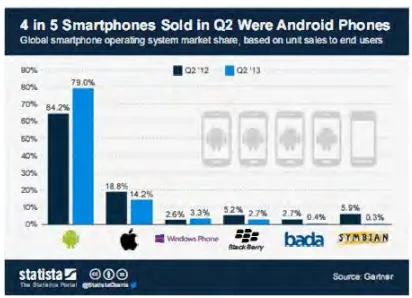
[image:17.612.224.430.435.584.2]Based on Mohammad Ausaf Anwar (2015) [1] reported that The use of android phones for such purposes can ease them to do work quicker. Usage of mobile phones for applications like attendance marking system shows enhanced utility of Smart phones. Moreover smart phones are gaining more popularity and attraction because of its broad application areas and increased capacity in terms of computational power, sensors and communication quality. Despite being open source; Android based Smart phones provide advanced connectivity and computational capability as compared to other mobile as.
Fig. 1: Global Platform based Smartphone Market Share
6 They have made a comparison of popular runtime environments which clarifies with the various options available for developing applications that run on resource constrained mobile devices. Furthermore there are many applications developed for various utilities in the sector of education, but a very few have done work for attendance purposes. Eventually have made an implementation of mobile learning platform over mobile phones. The various other applications based on android, had been developed so far are based on Google doc and thus require network connectivity for its work.
2.2.2 A Web Base Android Application Development System.
Wen-Pinn Fang1,Sheng-Hsuan Lu2, Ming-Hao Liu3, Ting-Hung Lai4, Shan-Chun Hung5, Yin-Feng Huang6,Chii-Jen Chen7 (2014) [2] reported that cloud system, web based development tool, and on line help. The cloud system is a type of Paas. It has backup support, redundant support, load balance support, online compiler support, storage support, database support ,web site support and auto deploy support. In development tool, it provides users to design their android application by a browser. In online help, there are electronic books to teach users how to use the system. There are four levels in the system.
7 2.2.3 Android Application for Event Management and Information Propagation.
Phanuphong Hathaiwichian, Lapas Siriwittayacharoen Apinat Wongwachirawanich, and Chaiyong Ragkhitwetsagul (2014) [3] proposed that this application focuses on solving problems of event registration and management by using QR code, and also providing news, information of events, and project ideas which are the given senior project topics for university students. First of all, users will be able to reserve and manage their event participation via this application, also receive the QR code to participate in each event after reservation.
Additionally, this application provides significant information and news of many interesting events from the event provider. Moreover, the topics for senior projects will be provided as one of this application features. Students who are interested in any topic will be able to get the brief information and project provider's contact information from this application. In conclusion, this application will help the event providers by using QR code in verification. Moreover, it will provide significant information of each event and project topics to users to be able to reach from anywhere, any time. These are the main features of this application which will improve the event management and registration for event providers and event participants.
2.2.4 An event-driven university campus navigation system on android platform
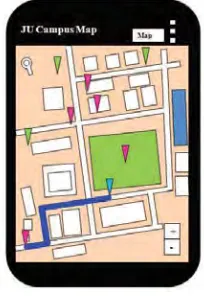
8 hours later in the university campus with its proper location and shortest path from current location. The figure 2 shows the design campus map. Google map API V2 has been taken as a temple to shows campus map.
Figure 2 shows campus map
Nowadays, most of the students, faculty members and staff use android phone for personal purpose. A Global Positioning System (GPS) based map application will be most helpful to locate desired place and shortest path from current location and to get updates of events on map with its location. Thus, it will reduce frustration and confusion of anybody inside the campus. This paper presents the architecture and design of a Google Map based application on Android Platform. The application has been implemented using Android SDK and has been tested for two campuses of Jadavpur University (Main campus and Salt Lake campus).
2.2.5 Campus Assistant Application on an Android Platform
9 indispensable in recent years, with vast amounts of users relying on them for directions, but their capabilities have not yet been fully applied to university campuses. Directions within campuses are not available using the Google maps application. Taking for example the Boca Raton campus at Florida Atlantic University (FAU),when the Engineering East Building, which is the home of the Computer and Electrical Engineering and Computer Science Department, is entered as the Destination no complete directions are provided. The directions lead to the FAU campus, but not to the building. In addition, not all the buildings and parking lots are shown on Google Maps.
2.3 Android Studio
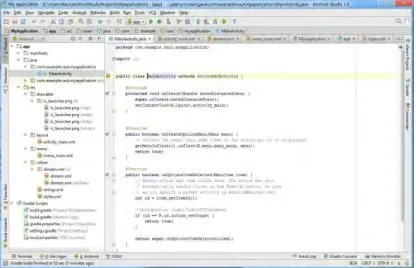
[image:21.612.225.433.448.582.2]Android Studio is an integrated development environment (IDE) for the Android platform. The Android Studio also provides integrated Android developer tools for development and debugging. Furthermore Android software development is the process by which new applications are created for the Android operating system. New features are expected to be rolled out with each release of Android Studio. Figure 3 show the software android studio.
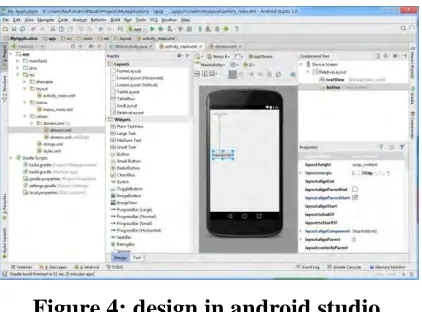
10 Figure 4: design in android studio
In figure 4 shows that how to design the application in android studio software. The following features are provided in the current stable version is the grade-based build support, android-specific refactoring and quick fixes and Lint tools to catch performance, usability, version compatibility and other problems. Android studio contains all the Android SDK tools to design, test, debug and profile your app.
2.4 Android software development and Application.
11 2.5 Basic Parts of Android Application
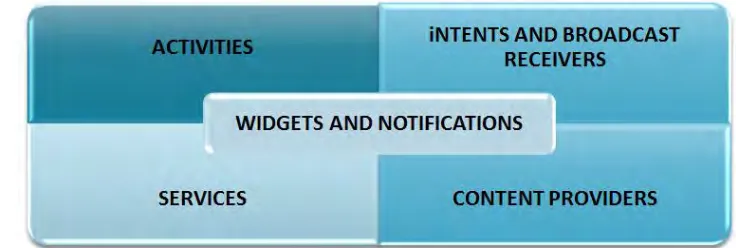
In this android application have four basic components. The basic components of any android application are the following:
Activities
Intent and broadcast receivers Services
Content Providers
[image:23.612.139.507.277.401.2] Widgets and Notifications
Figure 5: principle ingredient of android application
2.5.1 Activities
12 2.5.2 Services
Another important component of an android application is service. It does not provide user interface. It does long running operations in background. Service doesn‟t terminate even if the component which initiated it got terminated or switched to another application. A service can be connected to a component which can even do inter process communication (IPC). For example, when you receive your email updates in inbox it is a service. You get the notification of new e-mail even if you are not using the e-mail app or doing something else.
2.5.3 Content Providers