Rochester Institute of Technology
RIT Scholar Works
Theses
Thesis/Dissertation Collections
2008
The road ahead: a dynamic, interactive, and
multidimensional Flash website
Hung-Ju Hsia
Follow this and additional works at:
http://scholarworks.rit.edu/theses
This Thesis is brought to you for free and open access by the Thesis/Dissertation Collections at RIT Scholar Works. It has been accepted for inclusion in Theses by an authorized administrator of RIT Scholar Works. For more information, please [email protected].
Recommended Citation
A Thesis submitted to the Faculty of the
College of Imaging Arts and Sciences
In candidacy for the degree of
Master of Fine Arts
The Road Ahead: A Dynamic, Interactive, and Multidimensional Flash Website
By Hung-Ju Hsia
Approvals
Chief Advisor: Chris Jackson, Associate Professor, Computer Graphics Design
Signature of Chief Advisor Date
Associate Advisor: Jim Ver Hague, Professor, Computer Graphics Design
Signature of Associate Advisor Date
Associate Advisor: Marla Schweppe, Professor, Computer Graphics Design
Signature of Associate Advisor Date
School of Design Chairperson:
Patti Lachance, Associate Professor, School of Design
Signature of Administrative Chairperson Date
Reproduction Granted:
I, _________________________________, additionally grant to Rochester Institute of Technology Digital Media Library the non-exclusive license to archive and provide electronic access to my thesis in whole or in part in all forms of media in perpetuity. I understand that my work, in addition to its bibliographic record and abstract, will be available to the worldwide community of scholars and researchers through the RIT DML. I retain all other ownership rights to the copyright of the thesis. I also retain the right to use in future works (such as articles and books) all or part of this thesis. I am aware that Rochester Institute of Technology dose not require registration of copyright for ETDs. I hereby certify that, if appropriate, I have obtained and attached written permission statements from owners of each third party copyrighted matter to be included in my thesis. I certify that the version I submit is the same as that approved by my committee.
Table of Contents
0. Abstract
1. Introduction
1.1 Problem Statement 1.2 Subject
1.3 Target Audience 1.4The End Product
1.5 Expected Software Used
2. Review of Literature
2.1 Immigrant Psychology – The structure of my story
2.2Digital Storytelling – How I tell my stories
2.2.1 A Point of View 2.2.2 A Dramatic Question 2.2.3 Emotional Content 2.2.4 Economy
2.2.5 Pacing
3. Process
3.1 Architecture of The Road Ahead 3.1.1 Flowchart
3.1.2 Splash Page
3.1.3 Splash Page for Each Section (5 pages) 3.1.4 Interface for each story
3.2 Preface
3.2.1 Sweet Home 3.2.2 About Me 3.2.3 United Air
3.3 Landing 3.3.1 A Big World
3.3.2 Lonely 3.3.3 A Free City
3.4 Melting 3.4.1 Friendship
3.4.2 Fast Food 3.4.3 Ice World
3.5 Confusion 3.5.1 Chinatown
3.5.2 Steps
3.6 Trip
4. Problem Solving
4.1Creating High Contrast Images
4.2Creating the Easing Transition Effect
5. Conclusion
6. Reference
0. Abstract
1. Introduction
1.1 Problem Statement
Each medium is a unique form. In a specific context, a medium follows its own syntax and grammar conveying information to the masses. For example, painting is a form of media and painters use the syntax of proportion, lines, colors, brushes, and strokes within the two-dimensional context which is created with paper (or any other materials) and pens to communicate with the public.
Along with the development and popularity of new technologies, new media, simply defined here as newly developed media forms related to computers and the Internet, gradually occupy the dominant position of all kinds of media. Yes, to be a computer graphics designer, we do have the power to encode what we want to convey and decide how our audiences should decode the messages; nevertheless, be aware that it is called “New Media” and it stands for a whole new era of communication. Unlike the “Old Media”, new media provide more interactivities and dynamic contents. It means, now, through the interfaces and other components, audiences also have the power to decide what they want to see and how they receive the information (for example, the Internet users can choose the contents that they want to see without any order by randomly clicking different links on the web pages). We are all getting involved in such a media revolution!
In the modern Internet’s world the communication is no longer one-way. Instead, it is interactive and the audiences receive information with a jump-style but in sequence. By using new media, audiences can communicate with the artists and decode the information in their own words. Then, a new issue pops up: what would be the proper syntax to convey our information within a digital context and it meets both designers’ and audience’s needs?
1.2 Subject
To figure out what could be the proper syntax for digital communication and to explore how much a computer graphics designer can offer for encoding the information within the digital context are tough and enormous tasks. However, in my thesis, I will try to look for a proper syntax in the Internet’s world for myself.
This thesis is about creating a dynamic, interactive, and multidimensional digital diary recording my life in the USA in which users can explore and experience my life via experimental interface design. I will divide the project into several sections and each section has its own story construction and motif; also, I will combine the movie element “Montage” with still images and short animations in order to find out a proper way for digital story telling. By creating such a website, I wish to develop my own syntax for the Internet communication.
1.3 Target Audience
This project is for everyone but the main target audiences are supposed to be those who have had the experience living abroad and people who are interested in multimedia design field.
z Gender : Both male and female
z Age : 18-35
z Education Level : High School or above
z Computer Experience : Intermediate
z Language Considerations : English
1.4 The End Product
The Road Ahead, a dynamic, interactive, and multidimensional FLASH website.
1.5Expected Software Used
z Macromedia Flash 8
z Adobe Photoshop CS
2. Review of Literature
The primary object of my thesis project is to experiment with different ways of telling stories about my life in the United States. I wish my users will not only read my stories with their eyes but also feel me with their hearts by visiting such a FLASH multimedia website. In order to accomplish this goal, I did some research in immigrant psychology, traditional movie techniques, and digital storytelling. By combining these different area of studies in my project, my audience will be able to receive and experience the information in a logical and clear aspect when they are browsing through.
2.1 Immigrant Psychology – The structure of my story
The first and the most difficult problem that I faced was how to organize pieces of my life and make them become a complete story. Other than that, there were two things that I had to take into consideration. The first thing is that the story of my life does not have an end yet and the second thing is that every little piece of my life can be an independent event itself.
I had a difficult time developing a proper structure to organize these stories. In the beginning, I tried to write down everything that I could remember and reviewed every picture I took in the past few years; however, I found out it would be a very long and boring story if I wanted to present everything to my users. Also, I noticed that the main purpose of this project is to share my feelings and life experience instead of telling my audience exactly what I have done in the United States. So, I decided to think in reverse. I tried to find out how others would observe an international student like me and how I fit into their society. After doing some research in immigrant psychology, I realized that all my experiences are about the process of getting used to another culture and a different value of life.
From my studies, generally there are three distinctive steps for aliens to fit in a new culture. In the first period, when we just arrive, we take everything as a fresh and wonderful experience and love to be situated in such an exciting environment. Next, after we stay in the new environment longer, we would go through a period called “Culture Shock”. In this period, we start complaining about the inconvenience from the new culture. We start to know a different culture from the other side of a coin. People realize that the new culture is not always enjoyable. Finally, the third step, people would fit themselves into a big frame of a different culture with their own value of life.
came from and who I am. 2. Landing: expressing the “honeymoon” period when I just arrived. 3. Melting: describing the “Culture Shock” period and the process that I tried to fit in American culture. 4. Confusion: telling my audience about some conflicts in my mind and how I feel after I have been living here for several years. 5. Trip: my photo album, which shows some pictures that I took in the past few years and lets people see my world through a camera lens. Besides, I picked three little stories for each main section except for the Trip section to explain my feelings and experiences better. Basically, I organized my stories according to the time manner but my users can read through my stories in any order they want as well. Imagining you are playing a puzzle game, my audience would see the whole picture of my life by going through these pieces of my stories.
2.2 Digital Storytelling – How I tell my stories
Before I start deconstructing my project in detail, I think it is a good idea to have a simple description of what digital storytelling is about. Here is a short but easy to understand description that I found on the Internet. “Digital Storytelling is the modern expression of the ancient art of storytelling. Digital stories derive their power by weaving images, music, narrative and voice together, thereby giving deep dimension and vivid color to characters, situations, experiences, and insights. - Leslie Rule, Digital Storytelling Association. (http://www.dsaweb.org/index.html)”
Also, the Center for Digital Storytelling has identified seven elements of Digital Storytelling which are:
1.A Point of View,.
2.A dramatic Question.
3.Emotional Content.
4.The gift of your Voice.
5.The power of the Soundtrack.
6.Economy.
7.Pacing.
Other than the two sound elements, I applied other five elements in my project and I’ll explain these elements in the following paragraphs to deconstruct my project.
2.2.1 A Point of View
In digital storytelling, a point of view means the main idea or the most important information that we would like to convey to our audience and all events or dramatic elements are built around this central idea.
In order to give my audience the idea that this project is about: “A foreigner’s life in the United States” at first glance, I used Chinese characters and a feather as two most important design elements throughout the whole project. Chinese characters represent my culture background. I think this will definitely give my audience a rough idea that the author is from a completely different culture and seeing American life in another point of view. A feather can be the metaphor of “floating”. I, an international student, am like a feather floating in a totally unknown environment where I had never been to. With the help of these two graphical elements and the project title, it builds up a point of view for my audiences of what this project is about when they first visit the splash page (Please see figure 2.21 as an example).
2.2.2 A Dramatic Question
Simply just setting up a central idea for my project is not enough to keep my audience’s attention throughout the whole project. A good story sets up a tension from the beginning that holds your attention until the story is over. So, I need to start fulfilling their desires. People want to know “How does his world look like?” and “How does he feel about United States?”.
I created total twelve little stories to keep the tension. Every one of them is an independent event but at the same time, they are parts of my entire life experience. They are linked by me, the author. Once my audience reads one of my stories, they get a piece of the answer of their questions. They will be interested in finding other answers. As I mentioned above, the whole project is a puzzle. People would keep their attention until the game is over.
Figure 2.2.2
2.2.3 Emotional Content
I need more interesting elements to hold people’s attention after they start paying attention to the project. Also, it is a good idea to keep the elements consistent with the emotion of the moment.
As what you can see in the project, I used a lot of pictures to show the environment that I was in and short paragraphs of text to describe the moods I had. I try to keep my audience busy, hence I created some animations, FLASH Actionscript effects for every story. My users will use their eyes, brains, and hands to experience this project. All these interesting elements lend to contributing emotion to the project and people can always see something new in the consistent format.
2.2.4 Economy
A neat digital story will contain only those elements necessary to move the audience from beginning to end. My audience will fill in details from the clues that they have found in the stories with their own experiences.
By applying this concept, I decided three is the maximum number of pictures for each story. Although I may miss a lot of details, I can still have my audience understand the stories. Moreover, with the help of text, animation or FLASH interactive effects, I think my audience is able to fill in the missing details and have more room for their imagination. Another important reason to use only three pictures maximum is to keep the file sizes down. Since this project will only be seen online, it is essential to keep the file size small and make sure everything will be loaded fast enough before my audience lose their patience .
2.2.5 Pacing
3. Process
3.1 Architecture of The Road Ahead
3.1.1 Flowchart
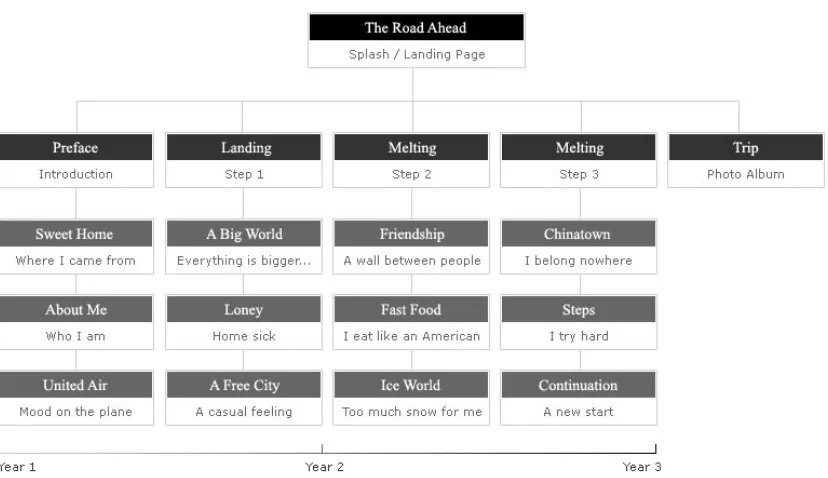
[image:15.612.102.516.336.575.2]Here is the flow chart of my project which clearly illustrates the structure of this project. Basically, I divided this project into five main sections and picked three most memorable feelings or thought to present these topics.
3.1.2 Splash Page
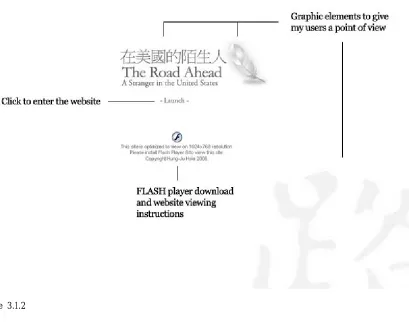
[image:16.612.113.522.284.612.2]This is the first page of the whole project. By using the graphical elements and the project title, this page provides basic information for the audience of what this website is about. Also, this page provides a FLASH player download link for people who don’t have FLASH player installed.
3.1.3 Splash Page for Each Section (5 pages)
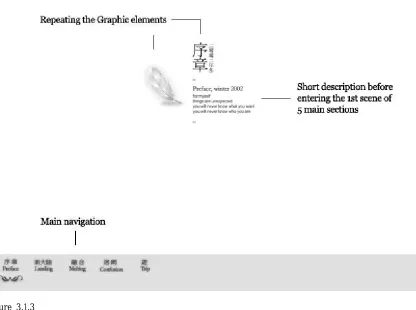
[image:17.612.104.520.254.564.2]This is the splash page for each of the five main sections. Main navigation starts showing on the screen on this page. This page also describes when these stories happened and what will be included in this section while people are waiting for downloading the content.
3.1.4 Interface for each story
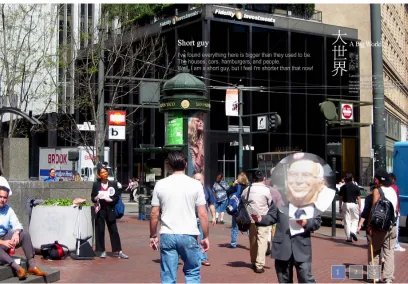
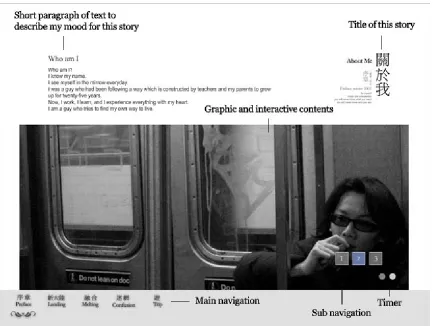
[image:18.612.92.526.218.544.2]This is the interface for the twelve stories in this project. This page contains the title of each story, a short paragraph of text to describe my feeling, and pictures (Could be animated or Actionscript effects depending on the mood that I want to show to my audience. Please see Figure 3.1.4).
3.2 Preface
This section gives my audience some ideas about myself. People will see my hometown – Taipei through a beautiful picture and how I answer the question “Who I am?”; also, they can feel my nerve while I was flying to the U.S..
3.2.1 Sweet Home
The Story:
Having both new and old things, Taipei is always a lovely place for me. Located in the north of Taiwan, just like all big cities in the world, people are always busy and moving in an incredible fast path. This city is full of passion and energy but sometimes, we have too much of them. Anyways, Taipei is my home, sweet home.
3.2.2 About Me
The Story: Who am I? I know my name.
I see myself in the mirror everyday.
I was a guy who had been following a way which is constructed by teachers and my parents to grow up for twenty-five years.
Now, I work, I learn, and I experience everything with my heart. I am a guy who tries to find my own way to live.
3.2.3 United Air
The Story:
I feel I am having a pair of wings, huge metal ones.
Taking me to the highest mountain, across the deepest ocean, entering a new world.
I feel I am a clock. After constantly running for 25 years, I am reset to zero. The thick clouds in the sky block my eyes but I can see the road ahead with my mind.
With complicated emotions going on. The journey begins.
3.3 Landing
3.3.1 A Big World
The Story:
I've found everything here is bigger than it used to be. The houses, cars, hamburgers, and people.
Well, I am a short guy, but I feel I'm shorter than that now!
3.3.2 Lonely
The Story:
When the darkness comes, I feel lonely. I miss my family, my friends, and my bed.
Lights are shining in this city, but no one is for me. I light a cigarette. I feel he is accompanying me.
3.3.3 A Free City
The Story:
The pace here is slow but graceful. Unlike Taipei, you don't see any busy.
It seems that time just found a place to rest a while. The smell of free is everywhere.
In the streets, in the air and in everyone's face
3.4 Melting
During this period of time, I tried to live like an American and speak like one. Well, the result is that I found out I would never be one. I like a lot of things here in the U.S. but eventually, they could not replace everything that I grew up with. I knew I had to start a new life here but still miss my home.
3.4.1 Friendship
The Story:
I never knew that having friends is such a luxurious thing. Sometimes, I feel there is an invisible wall between everyone.
Just like the two sides of a magnet, the more you want to get close the further they would run.
3.4.2 Fast Food
The Story:
To be honest, I think Chinese food tastes better than fast food. But there is an exception.
I like to eat burgers.
In the US., you can find burgers everywhere. From east to west, from city to rural side.
Whenever I eat a burger, I feel I become more" American".
The Story:
I had never seen snow before I came to Rochester. At beginning, I felt so excited about it.
Everything is white. Everything is so beautiful.
Well, after a two week non-stop snow, I started to hate it. 3.5 Confusion
As time goes by, I felt confused. When I am here, I do not think I am really an American, even my passport says I am from Taiwan; however, when I visited my home, I felt I am different from them. I don’t know how to explain this but it happened. I don’ t know what would happen next, but I know I’ve grown up and ready to take all challenges in the future.
3.5.1 Chinatown
The Story:
Chinatown, which has all the things that I used to be familiar with. The food, the people, and the neon signs.
I don't know since when I started to feel I don't belong here. I belong to a place across the pacific ocean.
No, maybe I belong to this new world. I am so confused.
3.5.2 Steps
The Story:
When I first stepped on this new land, I knew I couldn't go back.
This is the way I chose. This is my way. Now, I am glad I am here.
I am heading to a whole new life.
3.5.3 Continuation
The Story:
Time is always running fast.
I spend twenty-eight years to make a dream come true. But this is not the end. It is another beginning.
From this moment my new life starts.
3.6 Trip
4. Problem Solving
4.1 Creating High Contrast Images
As what you can see from above paragraphs, generally all my interface designs are using light colors. The most important reason why I did this is because I wanted my users to put their focus on the content. In order to accomplish this goal, I chose to give my images more contrast and color. Also, using high contrast images would make my project more interesting. So, I did some research of how to create the dreamy effects for my images in Photoshop and here is how I did it.
Step 1
Open and duplicate the image you want to modify in Photoshop. After duplicate the image, give it a layer mask.
Step 2
Step 3
Press Ctrl+V to paste the copied image on the layer mask and apply some Gaussian blur depends on the quality of the image. I used amount 3 for this example.
Step 4
Step 5
Now, create a new layer and fill it with white color below the masked image. Next, duplicate the masked image and change the new image blending mode to Multiply and lower the opacity to your choice.
Step 6
Step 7
Merge all layers including the adjustment layer. Now, create a new layer and fill it with any color you like. I used a bright blue color for this example in order to match the cold feeling theme. Finally, change the blending mode of the new layer to color and lower the opacity to your choice.
Step 8
4.2 Creating the Easing Transition Effect
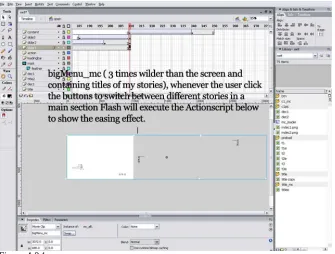
Transitions between different sections could control the pace of a digital storytelling project. Based on my design concepts, I wanted my project to have a slow but smooth pace. So, I used some Actionscript to create the easing transition effect for my users when they switch to a different story in every main section.
[image:26.612.136.471.333.587.2]On every main section Flash file (preface.swf, land.swf, melt.swf, and confuse.swf), I created a very wide (three times wider than the stage ) movie clip to contain the titles of the stories and named it “bigMenu_mc” in Actionscript. Whenever the user click the buttons to switch between different stories in each main section Flash will execute the Actionscript below to show the easing transition effect(Please see Figure 4.2.1). To make this effect more interesting, I created another 2 big movie clips which contain the English titles and small decoration text on the screen (Named bigMenu2_mc and bigMenu3_mc in Actionscript code below). I put them on different X position and applied the same Actionscript on them. The result is when the users switch between different stories, they will see three easing parts moving to different directions with different speed on the screen.
Here is the Actionscript code which controls the easing transition effect and you can find them on every main section Flash file in the action layer . First, we need to create some variables to contain the initial values.
//Tell Flash we have a big movie clip three times //wilder than the stage which will be moving on the //stage and let Flash calculate how big the size is. pieces = 3;
largePieceWidth = bigMenu_mc._width/pieces;
//Set up the easing speed for each big movie clip. The //bigger number it is the slower it moves.
moveRate = 8; moveRate2 = 7; moveRate = 10;
Second, we need to tell Flash the starting location of my big movie clips before the easing effect applies. Also, we need to have variables to store the destinations for each big menu.
// set the start location of the big menus bigStartLoc = bigMenu_mc._x;
bigStartLoc2 = bigMenu2_mc._x; bigStartLoc3 = bigMenu3_mc._x;
// initialize the starting target locations bigMenuTargetLoc = bigMenu_mc._x;
bigMenuTargetLoc2 = bigMenu2_mc._x; bigMenuTargetLoc3 = bigMenu3_mc._x;
Third, after we set up variables to store the destination, we write a function which will determine the final X position value of each big menu whenever user decide to go to different stories.
function moveTo(thePiece) {
//calculate target location of the big menu
bigMenuTargetLoc=bigStartLoc-(thePiece*largePieceWidth)+largePieceWidth; }
function moveTo2(thePiece) {
//calculate target location of the big menu
bigMenuTargetLoc2=bigStartLoc2-(thePiece*largePieceWidth)+largePieceWidth; }
function moveTo3(thePiece) {
//calculate target location of the big menu
bigMenuTargetLoc3=bigStartLoc3+(thePiece*largePiec eWidth)-largePieceWidth;
}
Now, we use the script below to update how far the movie clips should move close to the final X position(we use a temporary variable dx to store the value ) whenever the onEnterFrame even happens.
bigMenu_mc.onEnterFrame = function() { // calculate a new dx
// update the location of the big menu bigMenu_mc._x = bigMenu_mc._x+dx; };
bigMenu2_mc.onEnterFrame = function() { // calculate a new dx
dx = (bigMenuTargetLoc2-this._x)/ moveRate2; // update the location of the big menu
this._x = this._x+dx; };
bigMenu3_mc.onEnterFrame = function() { // calculate a new dx
dx = (bigMenuTargetLoc3-this._x)/ moveRate3; // update the location of the big menu
this._x = this._x+dx; };
Finally, the code below is to tell Flash if the users select a story different from they are viewing now, all big movie clips should start moving to its designated locations or stay at where they are.
_root.onEnterFrame = function() {
//trace(_root.loader_mc.container.startMove) if (_root.loader_mc.container.startMove == "move1") { moveTo3(1);
moveTo2(1); moveTo(1); }
if (_root.loader_mc.container.startMove == "move2") { moveTo3(2);
moveTo2(2); moveTo(2); }
if (_root.loader_mc.container.startMove == "move3") { moveTo3(3);
moveTo2(3); moveTo(3); }
5. Conclusion
First of all, I would like to thank Professor Chris, Jim, and Arnie for all your help and patience. I spent a lot of time to design, organize, and rewrite the short paragraphs during the production process; however, everything is worthy and the most important thing is that I finally find a combination I am satisfied with and get the project done. This project takes a very long time span to finish. I think this project really means a lot to me. It is not only sharpening my design and FLASH skills but also bringing all the great memories back to me again. This is not only a website but also a true and vivid life story.
I published this website on the Internet and used it for my job interviews. I am glad that the results and feedbacks are positive. Almost all the people who have reviewed this project tell me that they really like the simple layout design, well digitally processed pictures, and the interesting interactive parts in this project. They really try to understand and enjoy my story. I think this is a successful experience for me to experiment digital story telling. Of course, this is not a prefect experiment. Because I have to take all these pictures by myself, so some sections are lack of my interaction with the environment. It makes the project less interesting and sense of life. The other thing is that I used smaller font sizes through the whole project in order to keep the simple and clean design style but unfortunately, I noticed that some of the viewers had some difficulties to read all of them. I think the balance of design and accessibility would be another important part for my future projects.
So as to the technical part, I had a hard time to figure out some of the Actionscript for transitions and some interactive parts in this project but thanks to the Internet, I found a lot of useful examples and free resources. It is also a big challenge for myself to modify these unfamiliar codes to fit my needs. Now, I am proud of myself that I solved all the coding problems. Moreover, I learn some new Photoshop techniques of digital photography process. I understand how important the hue, saturation, contrast, and brightness are for a nice looking picture. Also, I read a lot of story telling related books and documents online. They are really a big help for me to develop my story line and divided all my life memories into smaller but easy understanding parts.
Over all, it is a successful project. I did not find my users have problems either with the navigation or understanding my main story line and topics for each section. Now, after leaving school for a while, whenever I review this project, I still can feel the way I looked at the world and how hard I tried to get used to a completely a different world even thought I’ve been here for five years. The last thing I would like to say is that I finally finish my whole thesis and start moving on to a new stage in my life!
6. Reference
1. http://www.kirupa.com/
2. http://www.actionscript.org/
3. http://www.inms.umn.edu/elements/
4. http://www.dsaweb.org/index.html
5. http://www.adobe.com/cfusion/webforums/forum/index.cfm?forumid=15
6. Culture Shock
By Esther Wanning
Publisher: Times Editions Pte Ltd. ISBN: 957-9556-53-9
7. Understanding Movies By Louis D. Giannetti Publisher: Prentice Hall ISBN: 957-32-3457-2
8. Digital Storytelling: A Creator's Guide to Interactive Entertainment
7. Appendix
The Road Ahead User Testing Survey and Analysis By Hung-Ju Hsia
Section A: Please select a degree between 1 to 5:
1.Strongly Disagree 2.Disagree 3.Neutral 4.Agree 5.Strongly Agree
Questions 1 2 3 4 5
Q01: Do you understand the subject for this project? 0% 0% 0% 5% 95%
Observation from this question, we can find out that almost all my users can understand the subject of this project. I think I did a good job on defining the main story line. As I mentioned in above paragraph, I tried to find out how others would observe an international student like me and use this as a starting point to tell my story. Based on the comments and the feedback, my users would know what kind of website they are viewing at very beginning.
Q02: Do you like the structure of telling a story? 0% 0% 20% 35% 45%
Q03: Is the interface well designed and easy to navigate? 0% 0% 0% 30% 70%
Analysis for the above two questions, about 80% of my users like the way that I present my life. They told me that it is really easy to navigate through my stories and they could feel and understand the changes of my thoughts in different time period. However, there are still 20% of my users think I should allow them to jump between different stories anytime instead of forcing them go to the main sections only on the main navigation. I think I forgot the economy principle from my studies when I designed this structure.
Q04: Do you really feel the emotions from each section? 0% 10% 30% 40% 20%
From this question, I found out only about 60% of my uses could really feel my emotions. Some of them told me that they feel interesting in those parts with Actionscript effects and would like to spend more time on reading through those stories. But for stories without interactive effects, they spent less time on reading or even skipped those stories. This result proves that many people expect having interaction contents when viewing a Flash website.
Q05: Is the text easy to read and understand? 0% 15% 50% 25% 10%
0% Q06: Do you think the color theme fitting this project
well? 5% 10% 65% 20%
There are 25% of my users think the color skin for my project is too simple. They would like to see more color on the screen and make the project more interesting. I guess this result shows we all have different point of views. The reason I use only simple color is try to eliminate anything that might interrupt their viewing experience. But I will definitely take into consideration next time to have more color in my projects. Maybe it would also be a help to keep my users’ interest.
Q07: Does the pace of transition setting properly? 0% 0% 20% 50% 30%
We can tell that 80% of my users like the pace of my project. One of them even told me that “Your life apparent is not an action movie but I know it is still a great experience. ”.
Q08: Does the pace of animation setting properly? 0% 0% 30% 45% 25%
Q09: I have no technical problem viewing this website. 0% 0% 10% 70% 20%
About 10% of my users told me that they had some problems loading the pictures in the photo album section. I looked online to check if my Actionscript code is wrong but I did not find any problems for the code. I assume it is because the internet connection speed. I will keep digging into this and see if I can find a better solution.
Q10: The website makes you know more about the
author. 0% 0% 20% 20% 60%
Q11: Would you like to have soundtracks for this project? 0% 20% 40% 30% 10%
Q12: Would you like to have voiceover for this project? 0% 5% 50% 25% 20%
This two questions are the most controversial parts in this project. Although none of my users think it is necessary to have sound tracks in this project, still, 60% of them think it would be better to have some sound effects or a simple sound loop. I admit it is a one hundred percent positive feedback for me. Adding some simple sound effects would not enlarge the file size too much but could create more emotional results and fun. I think I will try to add some sound effect in this project when I have more stories to put in this project and see how it works.
The other fact from this question is that there are 40% of my users think it is a very
Q13: I would recommend this site to my friends. 0% 5% 50% 30% 15%
Q14: Does the subject attract you? 0% 15% 30% 35% 20%
0% Q15: I know how to play the interactive parts of this
website. 10% 20% 60% 10%
Based on the feedback, almost all my users know how to play the interactive effects in my project but this only means half of my goal succeed. The main reason I put these interactive parts in this project is to help my users feel my emotions. Apparently, I need more detail and
instructions to explain it.
Section B: (Please circle all applicable answers)
Q17: Which element(s) of this website that you like most?
Graphics Animation Interactivity Color All
3/20 6/20 7/20 2/20 2/20
Q18: Which element(s) of this website that needs to improve?
Graphics Animation Interactivity Color Other
3/20 3/20 4/20 4/20 6/20
Some people think the black and white only interface in too boring and suggested me to add more color; however, many people think the black and white color interface looks elegant and makes them concentrate on reading the content.
As what I predicted, some people told me that the only thing really needs to be improved is music. But after I told them the reason why I did not use any sound, most of them agreed with my point.
Q19: Which section that you like the most?
Preface Landing Melting Confusion Trip
3/20 5/20 6/20 4/20 2/20
A lot people select Landing or Melting section is because they think these parts have more emotional conflicts and I created some very interesting Actionscript effects which express my feelings very well. In addition, few people like my pictures very much and they choose Trip section.
Q20: Feedback and comments.