The Java™ Web
Services Tutorial
For Java Web Services Developer’s Pack, v1.6
ments.
This distribution may include materials developed by third parties.
Sun, Sun Microsystems, the Sun logo, Java, J2EE, JavaServer Pages, Enterprise JavaBeans, Java Naming and Directory Interface, EJB, JSP, J2EE, J2SE and the Java Coffee Cup logo are trademarks or registered trademarks of Sun Microsystems, Inc. in the U.S. and other countries.
Unless otherwise licensed, software code in all technical materials herein (including articles, FAQs, sam-ples) is provided under this License.
Products covered by and information contained in this service manual are controlled by U.S. Export Con-trol laws and may be subject to the export or import laws in other countries. Nuclear, missile, chemical biological weapons or nuclear maritime end uses or end users, whether direct or indirect, are strictly pro-hibited. Export or reexport to countries subject to U.S. embargo or to entities identified on U.S. export exclusion lists, including, but not limited to, the denied persons and specially designated nationals lists is strictly prohibited.
DOCUMENTATION IS PROVIDED "AS IS" AND ALL EXPRESS OR IMPLIED CONDITIONS, REPRESENTATIONS AND WARRANTIES, INCLUDING ANY IMPLIED WARRANTY OF MER-CHANTABILITY, FITNESS FOR A PARTICULAR PURPOSE OR NON-INFRINGEMENT, ARE DISCLAIMED, EXCEPT TO THE EXTENT THAT SUCH DISCLAIMERS ARE HELD TO BE LEGALLY INVALID.
Copyright © 2005 Sun Microsystems, Inc., 4150 Network Circle, Santa Clara, California 95054, États-Unis. Tous droits réservés.
Droits du gouvernement américain, utlisateurs gouvernmentaux - logiciel commercial. Les utilisateurs gouvernmentaux sont soumis au contrat de licence standard de Sun Microsystems, Inc., ainsi qu aux dis-positions en vigueur de la FAR [ (Federal Acquisition Regulations) et des suppléments à celles-ci. Cette distribution peut comprendre des composants développés pardes tierces parties.
Sun, Sun Microsystems, le logo Sun, Java, JavaServer Pages, Enterprise JavaBeans, Java Naming and Directory Interface, EJB, JSP, J2EE, J2SE et le logo Java Coffee Cup sont des marques de fabrique ou des marques déposées de Sun Microsystems, Inc. aux États-Unis et dans d’autres pays.
A moins qu’autrement autorisé, le code de logiciel en tous les matériaux techniques dans le présent (arti-cles y compris, FAQs, échantillons) est fourni sous ce permis.
Les produits qui font l’objet de ce manuel d’entretien et les informations qu’il contient sont régis par la législation américaine en matière de contrôle des exportations et peuvent être soumis au droit d’autres pays dans le domaine des exportations et importations. Les utilisations finales, ou utilisateurs finaux, pour des armes nucléaires, des missiles, des armes biologiques et chimiques ou du nucléaire maritime, directe-ment ou indirectedirecte-ment, sont strictedirecte-ment interdites. Les exportations ou réexportations vers des pays sous embargo des États-Unis, ou vers des entités figurant sur les listes d’exclusion d’exportation américaines, y compris, mais de manière non exclusive, la liste de personnes qui font objet d’un ordre de ne pas partic-iper, d’une façon directe ou indirecte, aux exportations des produits ou des services qui sont régi par la législation américaine en matière de contrôle des exportations ("U .S. Commerce Department’s Table of Denial Orders "et la liste de ressortissants spécifiquement désignés ("U.S. Treasury Department of Spe-cially Designated Nationals and Blocked Persons "),, sont rigoureusement interdites.
iii
About This Tutorial. . . .xi
Who Should Use This Tutorial xi
Prerequisites xi
How to Use This Tutorial xii
About the Examples xiii
Required Software xiv Building the Examples xiv
Further Information xv
How to Print This Tutorial xv
Typographical Conventions xvi
Feedback xvi
Chapter 1:
Binding XML Schema to Java Classes with JAXB . . 1
JAXB Architecture 2
Architectural Overview 2
The JAXB Binding Process 5
JAXB Binding Framework 6
More About javax.xml.bind 7
More About Unmarshalling 8
More About Marshalling 9
More About Validation 11
XML Schemas 13
Representing XML Content 17
Binding XML Names to Java Identifiers 17
Java Representation of XML Schema 17
Binding XML Schemas 18
Simple Type Definitions 18
Default Data Type Bindings 19
Default Binding Rules Summary 20
Customizing JAXB Bindings 21
Scope 22
Scope Inheritance 22
What is Not Supported 23
JAXB APIs and Tools 23
Chapter 2:
Using JAXB . . . .25
General Usage Instructions 26
Description 26
Using the Examples 28
Configuring and Running the Samples 28
JAXB Compiler Options 30
About the Schema-to-Java Bindings 32
Schema-Derived JAXB Classes 35
Basic Examples 43
Unmarshal Read Example 43
Modify Marshal Example 45
Create Marshal Example 47
Unmarshal Validate Example 51
Validate-On-Demand Example 52
Customizing JAXB Bindings 54
Why Customize? 55
Customization Overview 56
Customize Inline Example 69
Datatype Converter Example 74
External Customize Example 75
Fix Collides Example 79
Bind Choice Example 83
Chapter 3:
Streaming API for XML . . . .87
Why StAX? 87
Streaming Versus DOM 88
Pull Parsing Versus Push Parsing 89
StAX Use Cases 89
Comparing StAX to Other JAXP APIs 90
StAX API 91
Cursor API 91
Iterator API 92
Using StAX 99
StAX Factory Classes 99
Resources, Namespaces, and Errors 101
Reading XML Streams 102
Writing XML Streams 105
Sun’s Streaming Parser Implementation 107
SJSXP JAR Files 107
Reporting CDATA Events 108
SJSXP Factories Implementation 108
Sample Code 109
Configuring Your Environment for Running the Samples 109
Running the Samples 110
Sample XML Document 111
CursorParse.java 112
CursorApproachEventObject.java 114
EventParse.java 115
CursorWriter.java 118
MyStreamFilter.java 119
EventProducerConsumer.java 122
Further Information 125
Chapter 4:
Introduction to XML and Web Services Security . 127
Overview 128
Does XWS-Security Implement Any Specifications? 130 On Which Technologies Is XWS-Security Based? 132
Interoperability with Other Web Services 133
What is the XWS-Security Framework? 134
Configuring Security Configuration Files 135
Understanding Security Configuration Files 135
XWS-Security Configuration File Schema 139
Semantics of Security Configuration File Elements 145 How Do I Specify the Security Configuration for the Build Files? 171 Are There Any Sample Applications Demonstrating XWS-Security? 174
Writing SecurityEnvironmentHandlers 177
Using the SubjectAccessor API 196
Useful XWS-Security Command-Line Tools 197
pkcs12import 197
keyexport 199
wscompile 200
Further Information 202
Chapter 5:
Understanding and Running the XWS-Security
Sam-ple Applications205
Setting Up To Use XWS-Security With the Sample Applications 206
Setting System Properties 207
Configuring a JCE Provider 207
Setting Up the Application Server For the Examples 209
Setting Build Properties 210
Simple Security Configurations Sample Application 211
Plugging in Security Configurations 212
Simple Sample Security Configuration Files 213
Running the Simple Sample Application 225
JAAS Sample Application 226
JAAS Sample Security Configuration Files 227
Setting Up For the JAAS-Sample 229
Running the JAAS-Sample Application 230
XWS-Security APIs Sample Application 232
The XWSSProcessor Interface 233
API-Sample Client Code 234
The API Sample Security Configuration Files 236 Building and Running the API Sample Application 241
Soap With Attachments Sample Application 242
The SwA Interop Scenarios 242
SwA Sample Configuration Files 244
Running the SwA Sample Application 247
SAML Sample Application 249
SAML Interop Scenarios 249
SAML Interop Sample Configuration Files 251
Running the SAML Interop Sample 254
Dynamic Policy Sample Application 255
Security Configuration Files for Enabling Dynamic Policy 256
Setting Security Policies at Runtime 257
Running the Dynamic Policy Sample Application 258
Dynamic Response Sample Application 260
Security Configuration Files for Enabling Dynamic Response 260 Using the CallbackHandler to Enable Dynamic Response 261 Running the Dynamic Response Sample Application 262
Chapter 6:
Java XML Digital Signature API . . . 265
How XWS-Security and XML Digital Signature API Are Related 266XML Security Stack 267
Package Hierarchy 268
Service Providers 269
Introduction to XML Signatures 270
Example of an XML Signature 270
XML Digital Signature API Examples 273
validate Example 273
genenveloped Example 278
Chapter 7:
Using the Service Registry Web Console . . . 283
Getting Started With the Web Console 283
Starting the Web Console 284
Changing the Default Language 284
Searching the Registry 286
Using the Search Menu 286
Selecting a Query 287
Searching by Object Type 287
Searching by Name and Description 288
Searching by Classification 288
Viewing Search Results 291
Viewing Object Details 291
Using the Explore Menu 293
Publishing and Managing Registry Objects 294
Publishing Objects 294
Adding a Classification to an Object 295
Adding an External Identifier to an Object 296
Adding an External Link to an Object 296
Adding Custom Information to an Object Using Slots 297 Adding a Postal Address to an Organization or User 298 Adding a Telephone Number to an Organization or User 298 Adding an Email Address to an Organization or User 299
Adding a User to an Organization 299
Adding a Child Organization to an Organization 300
Adding a Service Binding to a Service 301
Adding a Specification Link to a Service Binding 301 Adding a Child Concept to a Classification Scheme or Concept 302
Changing the State of Objects 302
Creating Relationships Between Objects 303
Chapter 8:
Developing Clients for the Service Registry . . . .1
Overview of JAXR 1
About Registries and Repositories 1
About JAXR 2
JAXR Architecture 3
About the Examples 5
Setting Up a JAXR Client 7
Starting the Registry 7
Getting Access to the Registry 7
Establishing a Connection to the Registry 7
Obtaining and Using a RegistryService Object 9
Querying a Registry 10
Basic Query Methods 10
JAXR Information Model Interfaces 11
Finding Objects by Name 14
Finding Objects by Type 16
Finding Objects by Classification 17
Finding Objects by External Identifier 20
Finding Objects by External Link 21
Finding Objects by Unique Identifier 22
Finding Objects You Published 22
Retrieving Information About an Object 24
Using Declarative Queries 35
Using Iterative Queries 36
Invoking Stored Queries 38
Querying a Registry Federation 39
Publishing Objects to the Registry 41
Creating Objects 42
Saving Objects in the Registry 56
Managing Objects in the Registry 57
Creating Relationships Between Objects: Associations 57
Storing Items in the Repository 60
Organizing Objects Within Registry Packages 64
Changing the State of Objects in the Registry 65 Removing Objects From the Registry and Repository 67
Chapter 9:
Administering the Service Registry . . . 69
About the Admin Tool 69
Starting the Admin Tool 70
Batch Mode 70
Interactive Mode 71
Admin Tool Command-line Options 71
Using the Admin Tool 73
Permissions 73
Displaying Exceptions 74
Identifying Registry Objects 74
The Effect of Locale on Specifying Names 75
Case Sensitivity 75
Using Admin Tool Commands 75
add association 76
add user 78
cd 86
chown 87
cp 88
echo 90
help 91
lcd 92
ls 92
pwd 94
quit 94
rm 95
select 97
set 97
show 99
users 100
Other Administration Tasks 101
Backing Up and Restoring the Database 101
Appendix A: A
XWS-Security Formal Schema Definition103
Formal Schema Definition 103
Appendix B: SJSXP JAR Files . . . 115
sjsxp.jar 115
xi
About This Tutorial
T
HEJava™ Web Services Tutorial is a guide to developing Web applications with the Java Web Services Developer Pack (Java WSDP). The Java WSDP is an all-in-one download containing key technologies to simplify building of Web services using the Java 2 Platform. This tutorial requires a full installation (Typi-cal, not Custom) of the Java WSDP, v1.6 with the Sun Java System Application Server Platform Edition 8.1 2005Q2 UR2 (hereafter called the Application Server). Here we cover all the things you need to know to make the best use of this tutorial.Who Should Use This Tutorial
This tutorial is intended for programmers who are interested in developing and deploying Web services and Web applications on the Sun Java System Applica-tion Server Platform EdiApplica-tion 8.1.
Prerequisites
with relational database and security features described in the trails listed in Table 1.
How to Use This Tutorial
The Java Web Services Tutorial is an adjunct to the J2EE 1.4 Tutorial, which you can download from the following location:
http://java.sun.com/j2ee/1.4/download.html#tutorial
The Java Web Services Tutorial addresses the following technology areas, which are not covered in the J2EE 1.4 Tutorial:
• The Java Architecture for XML Binding (JAXB)
• The StAX APIs and the Sun Java Streaming XML Parser implementation • XML and Web Services Security (XWS Security)
• XML Digital Signature • Service Registry
All of the examples for this tutorial are installed with the Java WSDP 1.6 bundle and can be found in the subdirectories of the <JWSDP_HOME>/< technol-ogy>/samplesdirectory, whereJWSDP_HOMEis the directory where you installed the Java WSDP 1.6 bundle.
The J2EE 1.4 Tutorial opens with three introductory chapters that you should read before proceeding to any specific technology area. Java WSDP users should look at Chapters 2 and 3, which cover XML basics and getting started with Web applications.
Table 1 Prerequisite Trails in The Java™ Tutorial
Trail URL
JDBC http://java.sun.com/docs/books/tutorial/jdbc
When you have digested the basics, you can delve into one or more of the fol-lowing main XML technology areas:
• The Java XML chapters cover the technologies for developing applications that process XML documents and implement Web services components: • The Java API for XML Processing (JAXP)
• The Java API for XML-based RPC (JAX-RPC) • SOAP with Attachments API for Java (SAAJ) • The Java API for XML Registries (JAXR)
• The Web-tier technology chapters cover the components used in develop-ing the presentation layer of a J2EE or stand-alone Web application: • Java Servlet
• JavaServer Pages (JSP)
• JavaServer Pages Standard Tag Library (JSTL) • JavaServer Faces
• Web application internationalization and localization
• The platform services chapters cover system services used by all the J2EE component technologies. Java WSDP users should look at the Web-tier section of the Security chapter.
After you have become familiar with some of the technology areas, you are ready to tackle a case study, which ties together several of the technologies dis-cussed in the tutorial. The Coffee Break Application (Chapter 35) describes an application that uses the Web application and Web services APIs.
Finally, the following appendixes contain auxiliary information helpful to the Web Services application developer:
• Java encoding schemes (Appendix A) • XML Standards (Appendix B) • HTTP overview (Appendix C)
About the Examples
Required Software
Java WSDP 1.6 Bundle
The example source for the technologies in this tutorial is contained in the Java WSDP 1.6 bundle. If you are viewing this online, you need to download the Java WSDP 1.6 bundle from:
http://java.sun.com/webservices/download/webservicespack.html
After you have installed the Java WSDP 1.6 bundle, the example source code is in the subdirectories of the<JWSDP_HOME>/<technology>/samples/ directory. For example, the examples for JAXB are included in the Java WSDP in the sub-directories of the<JWSDP_HOME>/jaxb/samples directory.
Application Server
Sun Java System Application Server Platform Edition 8.1 2005Q2 UR2 is the build and runtime environment for the tutorial examples. To build, deploy, and run the examples, you need a copy of the Application Server and the Java 2 Soft-ware Development Kit, Standard Edition (J2SE SDK) 1.4.2 or higher (J2SE 5.0 is recommended). The Application Server and J2SE SDK are contained in the J2EE 1.4 SDK. If you already have a copy of the J2SE SDK, you can download the Application Server from:
http://java.sun.com/j2ee/1.4/download.html#sdk
You can also download the J2EE 1.4 SDK—which contains the Application Server and the J2SE SDK—from the same site.
Building the Examples
contains additional tasks that invoke the Application Server administration util-ityasadmin. Directions for building the examples are provided in each chapter. In order to run the Ant scripts, you must configure your environment and proper-ties files as follows:
• Add thebindirectory of your J2SE SDK installation to the front of your path.
• Add <JWSDP_HOME>/jwsdp-shared/bin to the front of your path so the Java WSDP 1.6 scripts that are shared by multiple components override other installations.
• Add<JWSDP_HOME>/apache-ant/binto the front of your path so that the Java WSDP 1.6 Ant script overrides other installations.
Further Information
This tutorial includes the basic information that you need to deploy applications on and administer the Application Server.
For reference information on the tools distributed with the Application Server, see the man pages at http://docs.sun.com/db/doc/819-0082.
See the Sun Java™ System Application Server Platform Edition 8.1 2005Q1
Developer’s Guide at http://docs.sun.com/db/doc/819-0079 for informa-tion about developer features of the Applicainforma-tion Server.
See the Sun Java™ System Application Server Platform Edition 8.1 2005Q1
Administration Guide athttp://docs.sun.com/db/doc/819-0076for informa-tion about administering the Applicainforma-tion Server.
For information about the PointBase database included with the Application Server, see the PointBase Web site atwww.pointbase.com.
How to Print This Tutorial
To print this tutorial, follow these steps:
1. Ensure that Adobe Acrobat Reader is installed on your system. 2. Open the PDF version of this book.
Typographical Conventions
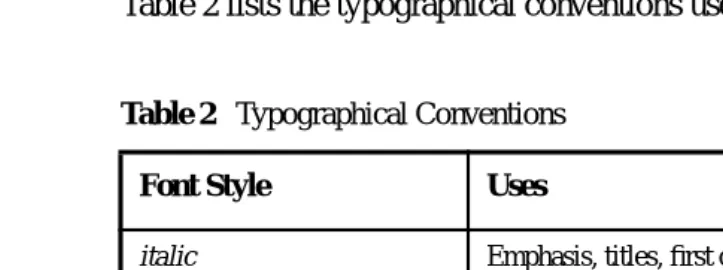
Table 2 lists the typographical conventions used in this tutorial.
Feedback
[image:16.792.109.471.145.280.2]Please send comments, broken link reports, errors, suggestions, and questions about this tutorial to the tutorial team [email protected].
Table 2 Typographical Conventions
Font Style Uses
italic Emphasis, titles, first occurrence of terms
monospace
URLs, code examples, file names, path names, tool names, application names, programming language keywords, tag, interface, class, method, and field names, properties
italic monospace Variables in code, file paths, and URLs
1
1
Binding XML Schema
to Java Classes with
JAXB
T
HEJava™ Architecture for XML Binding (JAXB) provides a fast and conve-nient way to bind XML schemas to Java representations, making it easy for Java developers to incorporate XML data and processing functions in Java applica-tions. As part of this process, JAXB provides methods for unmarshalling XML instance documents into Java content trees, and then marshalling Java content trees back into XML instance documents.What this all means is that you can leverage the flexibility of platform-neutral XML data in Java applications without having to deal with or even know XML programming techniques. Moreover, you can take advantage of XML strengths without having to rely on heavyweight, complex XML processing models like SAX or DOM. JAXB hides the details and gets rid of the extraneous ships in SAX and DOM—generated JAXB classes describe only the relation-ships actually defined in the source schemas. The result is highly portable XML data joined with highly portable Java code that can be used to create flexible, lightweight applications and Web services.
JAXB Architecture
This section describes the components and interactions in the JAXB processing model. After providing a general overview, this section goes into more detail about core JAXB features. The topics in this section include:
• Architectural Overview • The JAXB Binding Process • JAXB Binding Framework • More About javax.xml.bind • More About Unmarshalling • More About Marshalling • More About Validation
Architectural Overview
Figure 1–1 shows the components that make up a JAXB implementation.
As shown in Figure 1–1, a JAXB implementation comprises the following eight core components.
Table 1–1 Core Components in a JAXB Implementation Component Description
XML Schema An XML schema uses XML syntax to describe the relationships among elements, attributes and entities in an XML document. The purpose of an XML schema is to define a class of XML documents that must adhere to a particular set of structural rules and data constraints. For example, you may want to define separate schemas for chapter-oriented books, for an online purchase order system, or for a personnel database. In the context of JAXB, an XML document containing data that is constrained by an XML schema is referred to as a document instance, and the structure and data within a document instance is referred to as a content tree.
Binding Customizations
By default, the JAXB binding compiler binds Java classes and packages to a source XML schema based on rules defined in Section 5, “Binding XML Schema to Java Representations,” in the JAXB Specification. In most cases, the default binding rules are sufficient to generate a robust set of schema-derived classes from a wide range of schemas. There may be times, however, when the default binding rules are not sufficient for your needs. JAXB supports customizations and overrides to the default binding rules by means of binding customizations made either inline as annotations in a source schema, or as statements in an external binding customization file that is passed to the JAXB binding compiler. Note that custom JAXB binding customizations also allow you to customize your generated JAXB classes beyond the XML-specific constraints in an XML schema to include Java-specific refinements such as class and package name mappings.
Binding Compiler
The JAXB binding compiler is the core of the JAXB processing model. Its function is to transform, or bind, a source XML schema to a set of JAXB content classes in the Java programming language. Basically, you run the JAXB binding compiler using an XML schema (optionally with custom binding declarations) as input, and the binding compiler gener-ates Java classes that map to constraints in the source XML schema.
Implementation of
javax.xml.bind
The JAXB binding framework implementation is a runtime API that pro-vides interfaces for unmarshalling, marshalling, and validating XML content in a Java application. The binding framework comprises inter-faces in thejavax.xml.bind package.
Schema-Derived Classes
Java Application
In the context of JAXB, a Java application is a client application that uses the JAXB binding framework to unmarshal XML data, validate and mod-ify Java content objects, and marshal Java content back to XML data. Typically, the JAXB binding framework is wrapped in a larger Java application that may provide UI features, XML transformation functions, data processing, or whatever else is desired.
XML Input Documents
XML content that is unmarshalled as input to the JAXB binding frame-work -- that is, an XML instance document, from which a Java represen-tation in the form of a content tree is generated. In practice, the term “document” may not have the conventional meaning, as an XML instance document does not have to be a completely formed, selfstanding document file; it can instead take the form of streams of data passed between applications, or of sets of database fields, or of XML infosets, in which blocks of information contain just enough information to describe where they fit in the schema structure.
In JAXB, the unmarshalling process supports validation of the XML input document against the constraints defined in the source schema. This validation process is optional, however, and there may be cases in which you know by other means that an input document is valid and so you may choose for performance reasons to skip validation during unmarshalling. In any case, validation before (by means of a third-party application) or during unmarshalling is important, because it assures that an XML document generated during marshalling will also be valid with respect to the source schema. Validation is discussed more later in this chapter.
XML Output Documents
XML content that is marshalled out to an XML document. In JAXB, marshalling involves parsing an XML content object tree and writing out an XML document that is an accurate representation of the original XML document, and is valid with respect the source schema. JAXB can mar-shal XML data to XML documents, SAX content handlers, and DOM nodes.
The JAXB Binding Process
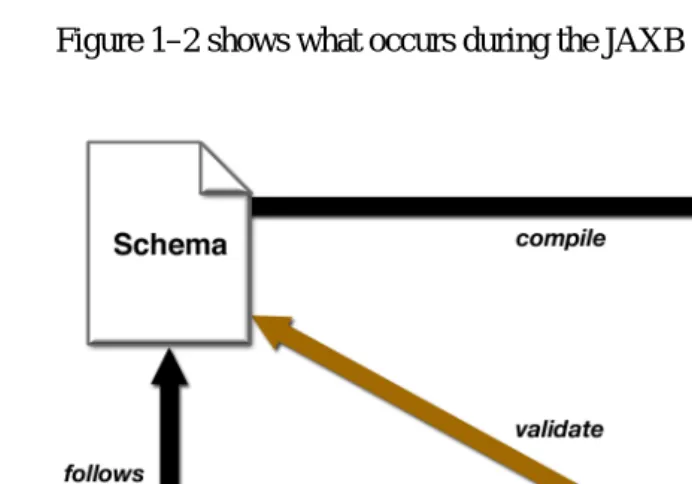
Figure 1–2 shows what occurs during the JAXB binding process.
Figure 1–2 Steps in the JAXB Binding Process
The general steps in the JAXB data binding process are:
1. Generate classes. An XML schema is used as input to the JAXB binding compiler to generate JAXB classes based on that schema.
2. Compile classes. All of the generated classes, source files, and application code must be compiled.
3. Unmarshal. XML documents written according to the constraints in the source schema are unmarshalled by the JAXB binding framework. Note that JAXB also supports unmarshalling XML data from sources other than files/documents, such as DOM nodes, string buffers, SAX Sources, and so forth.
5. Validate (optional). The unmarshalling process optionally involves valida-tion of the source XML documents before generating the content tree. Note that if you modify the content tree in Step 6, below, you can also use the JAXB Validate operation to validate the changes before marshalling the content back to an XML document.
6. Process content. The client application can modify the XML data repre-sented by the Java content tree by means of interfaces generated by the binding compiler.
7. Marshal. The processed content tree is marshalled out to one or more XML output documents. The content may be validated before marshalling. To summarize, using JAXB involves two discrete sets of activities:
• Generate and compile JAXB classes from a source schema, and build an application that implements these classes
• Run the application to unmarshal, process, validate, and marshal XML content through the JAXB binding framework
These two steps are usually performed at separate times in two distinct phases. Typically, for example, there is an application development phase in which JAXB classes are generated and compiled, and a binding implementation is built, followed by a deployment phase in which the generated JAXB classes are used to process XML content in an ongoing “live” production setting.
Note: Unmarshalling is not the only means by which a content tree may be created. Schema-derived content classes also support the programmatic construction of con-tent trees by direct invocation of the appropriate factory methods. Once created, a content tree may be revalidated, either in whole or in part, at any time. See Create Marshal Example (page 47) for an example of using theObjectFactoryclass to directly add content to a content tree.
JAXB Binding Framework
The JAXB binding framework is implemented in three Java packages:
• Thejavax.xml.bindpackage defines abstract classes and interfaces that are used directly with content classes.
TheJAXBContext class is the entry point for a Java application into the JAXB framework. AJAXBContextinstance manages the binding relation-ship between XML element names to Java content interfaces for a JAXB implementation to be used by the unmarshal, marshal and validation oper-ations.
Thejavax.xml.bindpackage also defines a rich hierarchy of validation event and exception classes for use when marshalling or unmarshalling errors occur, when constraints are violated, and when other types of errors are detected.
• Thejavax.xml.bind.util package contains utility classes that may be used by client applications to manage marshalling, unmarshalling, and val-idation events.
• Thejavax.xml.bind.helperpackage provides partial default implemen-tations for some of the javax.xml.bind interfaces. Implemenimplemen-tations of JAXB can extend these classes and implement the abstract methods. These APIs are not intended to be directly used by applications using JAXB architecture.
The main package in the JAXB binding framework, javax.xml.bind, is described in more detail below.
More About javax.xml.bind
The three core functions provided by the primary binding framework package,
javax.xml.bind, are marshalling, unmarshalling, and validation. The main cli-ent cli-entry point into the binding framework is theJAXBContext class.
JAXBContextprovides an abstraction for managing the XML/Java binding infor-mation necessary to implement the unmarshal, marshal and validate operations. A client application obtains new instances of this class by means of the
newInstance(contextPath) method; for example:
JAXBContext jc = JAXBContext.newInstance( "com.acme.foo:com.acme.bar" );
provider implementation must supply an implementation class containing a method with the following signature:
public static JAXBContext createContext( String contextPath, ClassLoader classLoader )
throws JAXBException;
Note: The JAXB provider implementation must generate a jaxb.propertiesfile in each package containing schema-derived classes. This property file must contain a property namedjavax.xml.bind.context.factorywhose value is the name of the class that implements thecreateContext API.
The class supplied by the provider does not have to be assignable to
javax.xml.bind.JAXBContext, it simply has to provide a class that implements the
createContextAPI. By allowing for multiple Java packages to be specified, the
JAXBContextinstance allows for the management of multiple schemas at one time.
More About Unmarshalling
The Unmarshaller class in the javax.xml.bind package provides the client application the ability to convert XML data into a tree of Java content objects. Theunmarshalmethod for a schema (within a namespace) allows for any global XML element declared in the schema to be unmarshalled as the root of an instance document. TheJAXBContext object allows the merging of global ele-ments across a set of schemas (listed in thecontextPath). Since each schema in the schema set can belong to distinct namespaces, the unification of schemas to an unmarshalling context should be namespace-independent. This means that a client application is able to unmarshal XML documents that are instances of any of the schemas listed in thecontextPath; for example:
JAXBContext jc = JAXBContext.newInstance( "com.acme.foo:com.acme.bar" );
Unmarshaller u = jc.createUnmarshaller();
FooObject fooObj =
(FooObject)u.unmarshal( new File( "foo.xml" ) ); // ok
BarObject barObj =
BazObject bazObj =
(BazObject)u.unmarshal( new File( "baz.xml" ) ); // error, "com.acme.baz" not in contextPath
A client application may also generate Java content trees explicitly rather than unmarshalling existing XML data. To do so, the application needs to have access and knowledge about each of the schema-derived ObjectFactory classes that exist in each of Java packages contained in thecontextPath. For each schema-derived Java class, there will be a static factory method that produces objects of that type. For example, assume that after compiling a schema, you have a pack-age com.acme.foothat contains a schema-derived interface named Purchase-Order. To create objects of that type, the client application would use the following factory method:
ObjectFactory objFactory = new ObjectFactory();
com.acme.foo.PurchaseOrder po = objFactory.createPurchaseOrder();
Note: Because multipleObjectFactoryclasses are generated when there are mul-tiple packages on thecontextPath, if you have multiple packages on the contex-tPath, you should use the complete package name when referencing an
ObjectFactory class in one of those packages.
Once the client application has an instance of the schema-derived object, it can use the mutator methods to set content on it.
Note: The JAXB provider implementation must generate a class in each package that contains all of the necessary object factory methods for that package named
ObjectFactory as well as thenewInstance(javaContentInterface) method.
More About Marshalling
java.io.OutputStream or a java.io.Writer. The marshalling process can alternatively produce SAX2 event streams to a registered ContentHandler or produce a DOMNode object.
A simple example that unmarshals an XML document and then marshals it back out is a follows:
JAXBContext jc = JAXBContext.newInstance( "com.acme.foo" );
// unmarshal from foo.xml
Unmarshaller u = jc.createUnmarshaller(); FooObject fooObj =
(FooObject)u.unmarshal( new File( "foo.xml" ) );
// marshal to System.out
Marshaller m = jc.createMarshaller(); m.marshal( fooObj, System.out );
By default, theMarshalleruses UTF-8 encoding when generating XML data to ajava.io.OutputStreamor a java.io.Writer. Use thesetProperty API to change the output encoding used during these marshal operations. Client appli-cations are expected to supply a valid character encoding name as defined in the W3C XML 1.0 Recommendation ( http://www.w3.org/TR/2000/REC-xml-20001006#charencoding) and supported by your Java Platform.
Table 1–2 shows the properties that theMarshaller class supports.
More About Validation
TheValidatorclass in thejavax.xml.bindpackage is responsible for control-ling the validation of content trees during runtime. When the unmarshalcontrol-ling pro-cess incorporates validation and it sucpro-cessfully completes without any validation errors, both the input document and the resulting content tree are guaranteed to be valid. By contrast, the marshalling process does not actually perform valida-tion. If only validated content trees are marshalled, this guarantees that generated XML documents are always valid with respect to the source schema.
Table 1–2 Marshaller Properties
Property Description
jaxb.encoding Value must be ajava.lang.String; the output encoding to use when marshalling the XML data. TheMarshaller will use “UTF-8” by default if this property is not specified.
jaxb.formatted.output Value must be ajava.lang.Boolean; controls whether or not theMarshaller will format the resulting XML data with line breaks and indenta-tion. Atrue value for this property indicates human readable indented XML data, while a
falsevalue indicates unformatted XML data. The
Marshaller defaults tofalse (unformatted) if this property is not specified.
jaxb.schemaLocation Value must be ajava.lang.String; allows the client application to specify an xsi:schemaLoca-tion attribute in the generated XML data. The for-mat of theschemaLocation attribute value is discussed in an easy to understand, non-normative form in Section 5.6 of the W3C XML Schema Part
0: Primer and specified in Section 2.6 of the W3C XML Schema Part 1: Structures.
Some XML parsers, like SAX and DOM, allow schema validation to be dis-abled, and there are cases in which you may want to disable schema validation to improve processing speed and/or to process documents containing invalid or incomplete content. JAXB supports these processing scenarios by means of the exception handling you choose implement in your JAXB-enabled application. In general, if a JAXB implementation cannot unambiguously complete unmarshal-ling or marshalunmarshal-ling, it will terminate processing with an exception.
Note: The Validatorclass is responsible for managing On-Demand Validation (see below). TheUnmarshallerclass is responsible for managing Unmarshal-Time Validation during the unmarshal operations. Although there is no formal method of enabling validation during the marshal operations, the Marshaller may detect errors, which will be reported to theValidationEventHandler registered on it.
A JAXB client can perform two types of validation:
• Unmarshal-Time validationenables a client application to receive informa-tion about validainforma-tion errors and warnings detected while unmarshalling XML data into a Java content tree, and is completely orthogonal to the other types of validation. To enable or disable it, use the Unmar-shaller.setValidating method. All JAXB Providers are required to support this operation.
• On-Demand validationenables a client application to receive information about validation errors and warnings detected in the Java content tree. At any point, client applications can call theValidator.validatemethod on the Java content tree (or any sub-tree of it). All JAXB Providers are required to support this operation.
If the client application does not set an event handler on itsValidator, Unmar-shaller, or Marshaller prior to calling the validate, unmarshal, or marshal methods, then a default event handler will receive notification of any errors or warnings encountered. The default event handler will cause the current operation to halt after encountering the first error or fatal error (but will attempt to continue after receiving warnings).
There are three ways to handle events encountered during the unmarshal, vali-date, and marshal operations:
The default event handler will be used if you do not specify one via the
setEventHandler APIs onValidator,Unmarshaller, orMarshaller. • Implement and register a custom event handler.
Client applications that require sophisticated event processing can imple-ment the ValidationEventHandler interface and register it with the
Unmarshaller and/orValidator.
• Use theValidationEventCollector utility.
For convenience, a specialized event handler is provided that simply col-lects any ValidationEvent objects created during the unmarshal, vali-date, and marshal operations and returns them to the client application as ajava.util.Collection.
Validation events are handled differently, depending on how the client applica-tion is configured to process them. However, there are certain cases where a JAXB Provider indicates that it is no longer able to reliably detect and report errors. In these cases, the JAXB Provider will set the severity of the Valida-tionEvent toFATAL_ERROR to indicate that the unmarshal, validate, or marshal operations should be terminated. The default event handler and Validation-EventCollectorutility class must terminate processing after being notified of a fatal error. Client applications that supply their ownValidationEventHandler
should also terminate processing after being notified of a fatal error. If not, unex-pected behavior may occur.
XML Schemas
Because XML schemas are such an important component of the JAXB process-ing model—and because other data bindprocess-ing facilities like JAXP work with DTDs instead of schemas—it is useful to review here some basics about what XML schemas are and how they work.
Note: In practice, the term “document” is not always accurate, as an XML instance document does not have to be a completely formed, selfstanding document file; it can instead take the form of streams of data passed between applications, or of sets of database fields, or of XML infosets in which blocks of information contain just enough information to describe where they fit in the schema structure.
The following sample code is taken from the W3C's Schema Part 0: Primer (http://www.w3.org/TR/2001/REC-xmlschema-0-20010502/), and illustrates an XML document,po.xml, for a simple purchase order.
<?xml version="1.0"?>
<purchaseOrder orderDate="1999-10-20"> <shipTo country="US">
<name>Alice Smith</name>
<street>123 Maple Street</street> <city>Mill Valley</city>
<state>CA</state> <zip>90952</zip> </shipTo>
<billTo country="US">
<name>Robert Smith</name> <street>8 Oak Avenue</street> <city>Old Town</city>
<state>PA</state> <zip>95819</zip> </billTo>
<comment>Hurry, my lawn is going wild!</comment> <items>
<item partNum="872-AA">
<productName>Lawnmower</productName> <quantity>1</quantity>
<USPrice>148.95</USPrice>
<comment>Confirm this is electric</comment> </item>
<item partNum="926-AA">
<productName>Baby Monitor</productName> <quantity>1</quantity>
<USPrice>39.98</USPrice>
<shipDate>1999-05-21</shipDate> </item>
</items> </purchaseOrder>
The root element,purchaseOrder, contains the child elementsshipTo,billTo,
child elements. The leaves of the tree are the child elements likename,street,
city, andstate, which do not contain any further child elements. Elements that contain other child elements or can accept attributes are referred to as complex
types. Elements that contain onlyPCDATAand no child elements are referred to as
simple types.
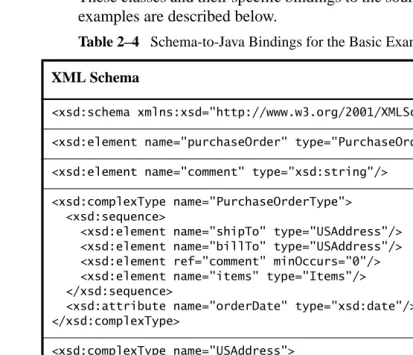
The complex types and some of the simple types in po.xml are defined in the purchase order schema below. Again, this example schema, po.xsd, is derived from the W3C's Schema Part 0: Primer ( http://www.w3.org/TR/2001/REC-xmlschema-0-20010502/).
<xsd:schema xmlns:xsd="http://www.w3.org/2001/XMLSchema"> <xsd:element name="purchaseOrder" type="PurchaseOrderType"/> <xsd:element name="comment" type="xsd:string"/>
<xsd:complexType name="PurchaseOrderType"> <xsd:sequence>
<xsd:element name="shipTo" type="USAddress"/> <xsd:element name="billTo" type="USAddress"/> <xsd:element ref="comment" minOccurs="0"/> <xsd:element name="items" type="Items"/> </xsd:sequence>
<xsd:attribute name="orderDate" type="xsd:date"/> </xsd:complexType>
<xsd:complexType name="USAddress"> <xsd:sequence>
<xsd:element name="name" type="xsd:string"/> <xsd:element name="street" type="xsd:string"/> <xsd:element name="city" type="xsd:string"/> <xsd:element name="state" type="xsd:string"/> <xsd:element name="zip" type="xsd:decimal"/> </xsd:sequence>
<xsd:attribute name="country" type="xsd:NMTOKEN" fixed="US"/>
</xsd:complexType>
<xsd:complexType name="Items"> <xsd:sequence>
<xsd:element name="item" minOccurs="1" maxOccurs="unbounded"> <xsd:complexType>
<xsd:sequence>
<xsd:element name="productName" type="xsd:string"/> <xsd:element name="quantity">
<xsd:simpleType>
<xsd:maxExclusive value="100"/> </xsd:restriction>
</xsd:simpleType> </xsd:element>
<xsd:element name="USPrice" type="xsd:decimal"/> <xsd:element ref="comment" minOccurs="0"/> <xsd:element name="shipDate" type="xsd:date"
minOccurs="0"/> </xsd:sequence>
<xsd:attribute name="partNum" type="SKU" use="required"/>
</xsd:complexType> </xsd:element>
</xsd:sequence> </xsd:complexType>
<!-- Stock Keeping Unit, a code for identifying products --> <xsd:simpleType name="SKU">
<xsd:restriction base="xsd:string"> <xsd:pattern value="\d{3}-[A-Z]{2}"/> </xsd:restriction>
</xsd:simpleType>
</xsd:schema>
In this example, the schema comprises, similar to a DTD, a main or rootschema
element and several child elements,element, complexType, and simpleType. Unlike a DTD, this schema also specifies as attributes data types likedecimal,
date, fixed, and string. The schema also specifies constraints like pattern value, minOccurs, and positiveInteger, among others. In DTDs, you can only specify data types for textual data (PCDATAandCDATA); XML schema sup-ports more complex textual and numeric data types and constraints, all of which have direct analogs in the Java language.
Note that every element in this schema has the prefixxsd:, which is associated with the W3C XML Schema namespace. To this end, the namespace declaration,
xmlns:xsd="http://www.w3.org/2001/XMLSchema", is declared as an attribute to theschema element.
namespaces in your schema, you can differentiate between, say, foo:address
andbar:address.
Representing XML Content
This section describes how JAXB represents XML content as Java objects. Spe-cifically, the topics in this section are as follows:
• Binding XML Names to Java Identifiers • Java Representation of XML Schema
Binding XML Names to Java Identifiers
XML schema languages use XML names—strings that match the Name produc-tion defined in XML 1.0 (Second Ediproduc-tion) (http://www.w3.org/XML/) to label schema components. This set of strings is much larger than the set of valid Java class, method, and constant identifiers. To resolve this discrepancy, JAXB uses several name-mapping algorithms.
The JAXB name-mapping algorithm maps XML names to Java identifiers in a way that adheres to standard Java API design guidelines, generates identifiers that retain obvious connections to the corresponding schema, and is unlikely to result in many collisions.
Refer to Chapter 2 for information about changing default XML name map-pings. See Appendix C in the JAXB Specification for complete details about the JAXB naming algorithm.
Java Representation of XML Schema
JAXB supports the grouping of generated classes and interfaces in Java pack-ages. A package comprises:
• A name, which is either derived directly from the XML namespace URI, or specified by a binding customization of the XML namespace URI • A set of Java content interfaces representing the content models declared
within the schema
• AnObjectFactory class containing:
• An instance factory method for each Java content interface and Java ele-ment interface within the package; for example, given a Java content interface namedFoo, the derived factory method would be:
public Foo createFoo() throws JAXBException;
• Dynamic instance factory allocator; creates an instance of the specified Java content interface; for example:
public Object newInstance(Class javaContentInterface) throws JAXBException;
• getProperty and setProperty APIs that allow the manipulation of provider-specified properties
• Set of typesafe enum classes • Package javadoc
Binding XML Schemas
This section describes the default XML-to-Java bindings used by JAXB. All of these bindings can be overridden on global or case-by-case levels by means of a custom binding declaration. The topics in this section are as follows:
• Simple Type Definitions • Default Data Type Bindings • Default Binding Rules Summary
See the JAXB Specification for complete information about the default JAXB bindings.
Simple Type Definitions
A schema component using a simple type definition typically binds to a Java property. Since there are different kinds of such schema components, the follow-ing Java property attributes (common to the schema components) include:
• Base type
• Predicate
The rest of the Java property attributes are specified in the schema component using thesimple type definition.
Default Data Type Bindings
The Java language provides a richer set of data type than XML schema. Table 1– 3 lists the mapping of XML data types to Java data types in JAXB.
Table 1–3 JAXB Mapping of XML Schema Built-in Data Types XML Schema Type Java Data Type
xsd:string java.lang.String
xsd:integer java.math.BigInteger
xsd:int int
xsd.long long
xsd:short short
xsd:decimal java.math.BigDecimal
xsd:float float
xsd:double double
xsd:boolean boolean
xsd:byte byte
xsd:QName javax.xml.namespace.QName
xsd:dateTime java.util.Calendar
xsd:base64Binary byte[]
xsd:hexBinary byte[]
xsd:unsignedInt long
xsd:unsignedShort int
Default Binding Rules Summary
The JAXB binding model follows the default binding rules summarized below: • Bind the following to Java package:
• XML Namespace URI
• Bind the following XML Schema components to Java content interface: • Named complex type
• Anonymous inlined type definition of an element declaration • Bind to typesafe enum class:
• A named simple type definition with a basetype that derives from “xsd:NCName” and has enumeration facets.
• Bind the following XML Schema components to a Java Element interface: • A global element declaration to a Element interface.
• Local element declaration that can be inserted into a general content list. • Bind to Java property:
• Attribute use
• Particle with a term that is an element reference or local element decla-ration.
• Bind model group with a repeating occurrence and complex type defini-tions with mixed{content type} to:
• A general content property; a List content-property that holds Java instances representing element information items and character data items.
xsd:time java.util.Calendar
xsd:date java.util.Calendar
xsd:anySimpleType java.lang.String
Customizing JAXB Bindings
The default JAXB bindings can be overridden at a global scope or on a case-by-case basis as needed by using custom binding declarations. As described previ-ously, JAXB uses default binding rules that can be customized by means of bind-ing declarations made in either of two ways:
• As inline annotations in a source XML schema
• As declarations in an external binding customizations file that is passed to the JAXB binding compiler
Custom JAXB binding declarations also allow you to customize your generated JAXB classes beyond the XML-specific constraints in an XML schema to include Java-specific refinements such as class and package name mappings. You do not need to provide a binding instruction for every declaration in your schema to generate Java classes. For example, the binding compiler uses a gen-eral name-mapping algorithm to bind XML names to names that are acceptable in the Java programming language. However, if you want to use a different nam-ing scheme for your classes, you can specify custom bindnam-ing declarations to make the binding compiler generate different names. There are many other cus-tomizations you can make with the binding declaration, including:
• Name the package, derived classes, and methods • Assign types to the methods within the derived classes • Choose which elements to bind to classes
• Decide how to bind each attribute and element declaration to a property in the appropriate content class
• Choose the type of each attribute-value or content specification
Note: Relying on the default JAXB binding behavior rather than requiring a binding declaration for each XML Schema component bound to a Java representation makes it easier to keep pace with changes in the source schema. In most cases, the default rules are robust enough that a usable binding can be produced with no custom bind-ing declaration at all.
Scope
When a customization value is defined in a binding declaration, it is associated with a scope. A scope of a customization value is the set of schema elements to which it applies. If a customization value applies to a schema element, then the schema element is said to be covered by the scope of the customization value. Table 1–4 lists the four scopes for custom bindings.
Scope Inheritance
The different scopes form a taxonomy. The taxonomy defines both the inherit-ance and overriding semantics of customization values. A customization value defined in one scope is inherited for use in a binding declaration covered by another scope as shown by the following inheritance hierarchy:
• A schema element in schema scope inherits a customization value defined in global scope.
• A schema element in definition scope inherits a customization value defined in schema or global scope.
• A schema element in component scope inherits a customization value defined in definition, schema or global scope.
Table 1–4 Custom Binding Scopes Scope Description
Global A customization value defined in<globalBindings> has global scope. A global scope covers all the schema elements in the source schema and (recur-sively) any schemas that are included or imported by the source schema.
Schema A customization value defined in<schemaBindings> has schema scope. A schema scope covers all the schema elements in the target name space of a schema.
Definition A customization value in binding declarations of a type definition and global declaration has definition scope. A definition scope covers all schema elements that reference the type definition or the global declaration.
Similarly, a customization value defined in one scope can override a customiza-tion value inherited from another scope as shown below:
• Value in schema scope overrides a value inherited from global scope. • Value in definition scope overrides a value inherited from schema scope or
global scope.
• Value in component scope overrides a value inherited from definition, schema or global scope.
What is Not Supported
See Section E.2, “Not Required XML Schema Concepts,” in the JAXB
Specifica-tion for the latest informaSpecifica-tion about unsupported or non-required schema
con-cepts.
JAXB APIs and Tools
25
2
Using JAXB
T
HISchapter provides instructions for using several of the sample Java appli-cations that were included in the Java WSDP. These examples demonstrate and build upon key JAXB features and concepts. It is recommended that you follow these procedures in the order presented.After reading this chapter, you should feel comfortable enough with JAXB that you can:
• Generate JAXB Java classes from an XML schema
• Use schema-derived JAXB classes to unmarshal and marshal XML con-tent in a Java application
• Create a Java content tree from scratch using schema-derived JAXB classes
• Validate XML content during unmarshalling and at runtime • Customize JAXB schema-to-Java bindings
The primary goals of the basic examples are to highlight the core set of JAXB functions using default settings and bindings. After familiarizing yourself with these core features and functions, you may wish to continue with Customizing JAXB Bindings (page 54) for instructions on using five additional examples that demonstrate how to modify the default JAXB bindings.
Note: The Purchase Order schema, po.xsd, and the Purchase Order XML file,
General Usage Instructions
This section provides general usage instructions for the examples used in this chapter, including how to build and run the applications using the Ant build tool, and provides details about the default schema-to-JAXB bindings used in these examples.
Description
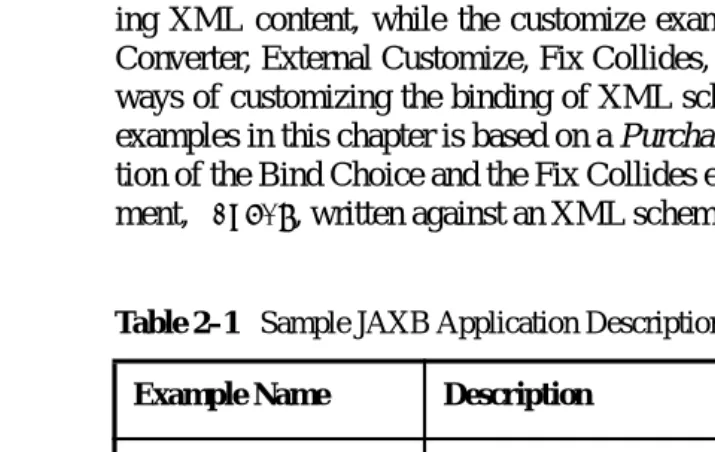
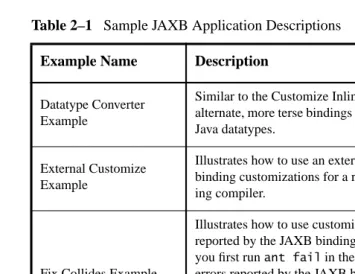
[image:42.792.112.470.348.574.2]This chapter describes ten examples; the basic examples (Unmarshal Read, Modify Marshal, Create Marshal, Unmarshal Validate, Validate-On-Demand) demonstrate basic JAXB concepts like ummarshalling, marshalling, and validat-ing XML content, while the customize examples (Customize Inline, Datatype Converter, External Customize, Fix Collides, Bind Choice) demonstrate various ways of customizing the binding of XML schemas to Java objects. Each of the examples in this chapter is based on a Purchase Order scenario. With the excep-tion of the Bind Choice and the Fix Collides examples, each uses an XML docu-ment,po.xml, written against an XML schema,po.xsd.
Table 2–1 Sample JAXB Application Descriptions Example Name Description
Unmarshal Read Exam-ple
Demonstrates how to unmarshal an XML document into a Java content tree and access the data contained within it.
Modify Marshal
Exam-ple Demonstrates how to modify a Java content tree.
Create Marshal Example Demonstrates how to use theObjectFactory class to create a Java content tree from scratch and then marshal it to XML data.
Unmarshal Validate
Example Demonstrates how to enable validation during unmarshalling.
Validate-On-Demand
Example Demonstrates how to validate a Java content tree at runtime.
Customize Inline Exam-ple
Note: These examples are all located in the$JWSDP_HOME/jaxb/samples direc-tory.
Each example directory contains several base files:
• po.xsd is the XML schema you will use as input to the JAXB binding compiler, and from which schema-derived JAXB Java classes will be gen-erated. For the Customize Inline and Datatype Converter examples, this file contains inline binding customizations. Note that the Bind Choice and Fix Collides examples useexample.xsd rather thanpo.xsd.
• po.xmlis the Purchase Order XML file containing sample XML content, and is the file you will unmarshal into a Java content tree in each example. This file is almost exactly the same in each example, with minor content
Datatype Converter Example
Similar to the Customize Inline example, this example illustrates alternate, more terse bindings of XMLsimpleTypedefinitions to Java datatypes.
External Customize Example
Illustrates how to use an external binding declarations file to pass binding customizations for a read-only schema to the JAXB bind-ing compiler.
Fix Collides Example
Illustrates how to use customizations to resolve name conflicts reported by the JAXB binding compiler. It is recommended that you first runant fail in the application directory to see the errors reported by the JAXB binding compiler, and then look at
binding.xjb to see how the errors were resolved. Runningant
alone uses the binding customizations to resolve the name con-flicts while compiling the schema.
[image:43.792.62.418.74.349.2]Bind Choice Example Illustrates how to bind achoice model group to a Java interface.
differences to highlight different JAXB concepts. Note that the Bind Choice and Fix Collides examples useexample.xml rather than po.xml. • Main.java is the main Java class for each example.
• build.xmlis an Ant project file provided for your convenience. Use Ant to generate, compile, and run the schema-derived JAXB classes automati-cally. Thebuild.xml file varies across the examples.
• MyDatatypeConverter.javain theinline-customizeexample is a Java class used to provide custom datatype conversions.
• binding.xjb in the External Customize, Bind Choice, and Fix Collides examples is an external binding declarations file that is passed to the JAXB binding compiler to customize the default JAXB bindings.
• example.xsdin the Fix Collides example is a short schema file that con-tains deliberate naming conflicts, to show how to resolve such conflicts with custom JAXB bindings.
Using the Examples
As with all applications that implement schema-derived JAXB classes, as described above, there are two distinct phases in using JAXB:
1. Generating and compiling JAXB Java classes from an XML source schema
2. Unmarshalling, validating, processing, and marshalling XML content In the case of these examples, you perform these steps by using Ant with the
build.xml project file included in each example directory.
Configuring and Running the Samples
Thebuild.xmlfile included in each example directory is an Ant project file that, when run, automatically performs the following steps:
1. Updates yourCLASSPATHto include the necessary schema-derived JAXB classes.
2. Runs the JAXB binding compiler to generate JAXB Java classes from the XML source schema, po.xsd, and puts the classes in a package named
primer.po.
4. Compiles the schema-derived JAXB classes. 5. Runs theMain class for the example.
Solaris/Linux
1. Set the following environment variables:
export JAVA_HOME=<your J2SE installation directory> export JWSDP_HOME=<your JWSDP installation directory>
2. Change to the desired example directory.
For example, to run the Unmarshal Read example:
cd <JWSDP_HOME>/jaxb/samples/unmarshal-read
(<JWSDP_HOME>is the directory where you installed the Java WSDP bun-dle.)
3. Run ant:
$JWSDP_HOME/apache-ant/bin/ant -emacs
4. Repeat these steps for each example.
Windows NT/2000/XP
1. Set the following environment variables:
set JAVA_HOME=<your J2SE installation directory> set JWSDP_HOME=<your JWSDP installation directory>
2. Change to the desired example directory.
For example, to run the Unmarshal Read example:
cd <JWSDP_HOME>\jaxb\samples\unmarshal-read
(<JWSDP_HOME>is the directory where you installed the Java WSDP bun-dle.)
3. Run ant:
%JWSDP_HOME%\apache-ant\bin\ant -emacs
4. Repeat these steps for each example.
JAXB Compiler Options
The JAXB schema binding compiler is located in the<JWSDP_HOME>/jaxb/bin
directory. There are two scripts in this directory: xjc.sh (Solaris/Linux) and
xjc.bat (Windows).
Bothxjc.shandxjc.battake the same command-line options. You can display quick usage instructions by invoking the scripts without any options, or with the
-help switch. The syntax is as follows:
xjc [-options ...] <schema>
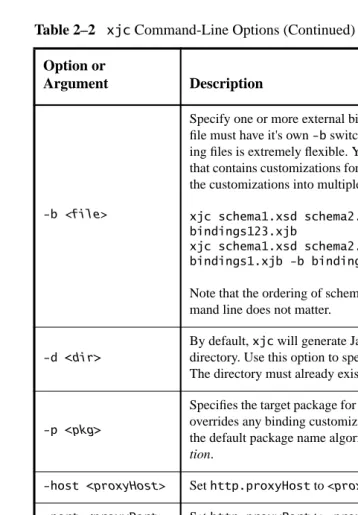
Thexjc command-line options are listed in Table 2–2.
Table 2–2 xjc Command-Line Options Option or
Argument Description
<schema> One or more schema files to compile.
-nv
Do not perform strict validation of the input schema(s). By default,
xjc performs strict validation of the source schema before process-ing. Note that this does not mean the binding compiler will not per-form any validation; it simply means that it will perper-form less-strict validation.
-extension
-b <file>
Specify one or more external binding files to process (each binding file must have it's own-b switch). The syntax of the external bind-ing files is extremely flexible. You may have a sbind-ingle bindbind-ing file that contains customizations for multiple schemas, or you can break the customizations into multiple bindings files; for example:
xjc schema1.xsd schema2.xsd schema3.xsd -b bindings123.xjb
xjc schema1.xsd schema2.xsd schema3.xsd -b bindings1.xjb -b bindings2.xjb -b bindings3.xjb
Note that the ordering of schema files and binding files on the com-mand line does not matter.
-d <dir>
By default,xjc will generate Java content classes in the current directory. Use this option to specify an alternate output directory. The directory must already exist;xjc will not create it for you.
-p <pkg>
Specifies the target package for schema-derived classes. This option overrides any binding customization for package name as well as the default package name algorithm defined in the JAXB
Specifica-tion.
-host <proxyHost> Sethttp.proxyHost to<proxyHost>.
-port <proxyPort> Sethttp.proxyPort to<proxyPort>.
-classpath <arg> Specify where to find client application class files used by the <jxb:javaType> and<xjc:superClass> customizations.
-catalog <file> Specify catalog files to resolve external entity references.Supports
TR9401, XCatalog, and OASIS XML Catalog format.
-readOnly Generated source files will be marked read-only. By default,xjc
does not write-protect the schema-derived source files it generates.
-use-runtime <pkg>
Suppress the generation of theimpl.runtimepackage and refer to another existing runtime in the specified package. This option is useful when you are compiling multiple independent schemas. Because the generated impl.runtime packages are identical, except for their package declarations, you can reduce the size of your gen-erated codebase by telling the compiler to reuse an existing
[image:47.792.59.418.70.585.2]impl.runtime package.
Table 2–2 xjc Command-Line Options (Continued) Option or
The command invoked by thexjc.shand xjc.batscripts is equivalent to the Java command:
$JAVA_HOME/bin/java -jar $JAXB_HOME/lib/jaxb-xjc.jar
About the Schema-to-Java Bindings
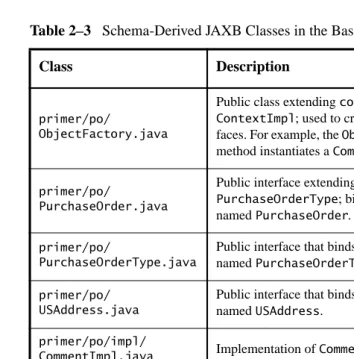
When you run the JAXB binding compiler against the po.xsd XML schema used in the basic examples (Unmarshal Read, Modify Marshal, Create Marshal, Unmarshal Validate, Validate-On-Demand), the JAXB binding compiler gener-ates a Java package namedprimer.pocontaining eleven classes, making a total of twelve classes in each of the basic examples:
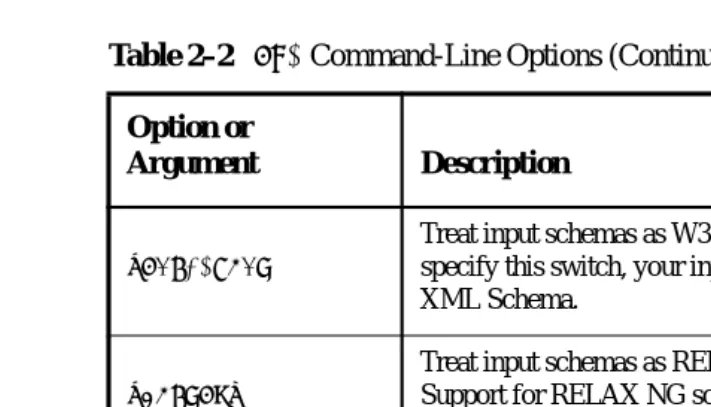
-xmlschema
Treat input schemas as W3C XML Schema (default). If you do not specify this switch, your input schemas will be treated as W3C XML Schema.
-relaxng
Treat input schemas as RELAX NG (experimental, unsupported). Support for RELAX NG schemas is provided as a JAXB Vendor Extension.
-dtd
Treat input schemas as XML DTD (experimental, unsupported). Support for RELAX NG schemas is provided as a JAXB Vendor Extension.
[image:48.792.115.471.71.275.2]-help Display this help message.
Table 2–3 Schema-Derived JAXB Classes in the Basic Examples
Class Description
primer/po/ Comment.java
Public interface extendingjavax.xml.bind.Element; binds to the global schemaelement namedcomment. Note that JAXB generates element interfaces for all global element declarations.
primer/po/ Items.java
Public interface that binds to the schemacomplexType
namedItems.
Table 2–2 xjc Command-Line Options (Continued) Option or