Supporting semi-remote web-based learners
using a Peer-to-Peer collaborative tool
Debbie Evans, Will Simpson & lain Low
Technology Innovation Centre, at the Faculty of Engineering & Computer Technology at UCE group, Millennium Point Curzon Street, Digbeth Birmingham B4 7XG
Rob Eley
LTSN Engineering Loughborough University Leicester LE11 3TU
Mark Stiles
The Learning Development Centre Staffordshire University The Octagon Beaconside Stafford ST18 OAD
'---'-
Abstract
This paper describes a trial use of Groove, a peer-to-peer collaboration tool, in providing remote support to workplace learners on our Flip project. We describe
what happened, referencing to learner support theory and then provide an analysis of the results. The mainfindings and issues are discussed and highlighted.
Introduction
J
The FLIP Project (Flexible Learning In-Company Postgraduate Programme) focuses on the delivery of flexible work-based learning to postgraduate engineering students studying part-time whilst in full-time employment. The project aims to identify good practice and critical success factors and to help prevent implementers making
mistakes. We undertook a pilot module using a problem-based approach based upon a virtual learning environment (VLE) with mixed-mode delivery on an MSc Logistics programme. Remote support for the six part-time students taking this pilot module was handled using Groove (Groove, 2002). This paper describes the use of Groove, a peer-to-peer collaboration application that uses the Internet for communication between groups of people who need to interact closely. We set out to answer the question: 'Does Groove fulfil our requirements for online support?'
Learner support theory
For students studying independently in a technology supported learning environment, a number of skills and cognitive abilities are identified as essential by a number of writers (e.g. Scardamalia & Bereiter, 1994; Grabinger & Dunlap, 1994; Vygotsky,
1978; Shuell, 1992; Vermunt & Verloop, 1999, as cited in McLoughlin (2000)).
.
Articulation: being an aware learner; being aware of one's own thinking and h0W one comes to conclusions..
Self-regulation: being able to plan one's own study and adjust one's strategies in order to achieve a goal or complete a task.30
...
f
! ,~
'"'
.
Learning skills: being able to plan and implement a flexible range of learning strategies (note taking, analytical reading, critical processing, attention to tasks, concentration and self-motivation)..
Self-assessment / self-evaluation: being able to anticipate problems and areasin need of improvement, have the capacity to seek help when needed.
These are not necessarily intuitive and are likely to need developing, although there is normally an assumption that at Masters level students have a fair amount of shared tacit and/or codified knowledge, and can re-apply this in novel situations (Alexander,
1988), (Stiles, 2001). It is the role of the tutor to help individuals develop these skills and share understanding so that they may become more autonomous learners. To help students develop such skills, the following needs to be provided in the design of the
online course: :, "... ,',
. Course induction (Stubbs, 1999)- to clarify expectations and provide orientation to the skills and communication protocols required
"--"
.
Multi-sensory approach to learning (McLough1in , 2000) - presenting information in multiple domains to support comprehension.
Learner control and autonomy (McLoughlin, 2000) - providing structures, tools and methods that empower students through the technology.
Peer support and communication (McLoughlin, 2000) - enabling students to work in groups, offering suggestions, advice and feedback to each other.
Prompt relevant feedback (McLoughlin, 2000) - from tutors to provide support and to challenge students to develop new skills.
Scaffolding (Winnips, 2001) - engaging the learner at his/her current level of understanding until the point where the support is no longer required.J
Suitably timed assistance from tutors, using both asynchronous and synchronous communications, is an important element of any student support strategy. We believed that a tool such as Groove could help cover these requirements and offered the possibility of enhancing student support whilst learning in the workplace.
Groove - a tool to support learning?
The two VLEs that we used in the MSc programme contained some of the
functionality that we wanted, chat and whiteboard, but we were prohibited from using these by our central IT department as they required the opening of special ports in the firewall. Groove gets around this IT firewall issue by using the http port. Groove additionally has voice capability, so we decided to trial it in our Flip project. As Groove is not designed to be a VLE, it was used in conjunction with our VLEs.
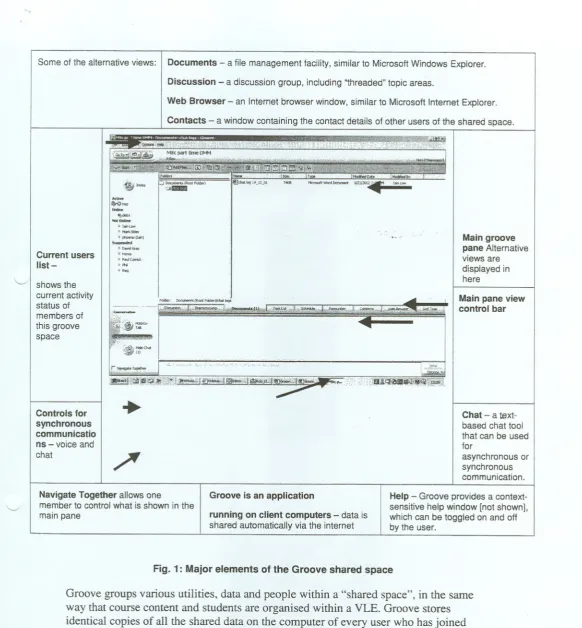
The,Groove application consists of a number of functions and display windows (see fig. 1), that when used together can enhance the ability to explain a point by
demonstration and involve the peer group in discussion.
[image:2.609.0.598.25.792.2]Some of the alternative views: Documents - a file management facility, similar to Microsoft Windows Explorer.
Discussion - a discussion group, including "threaded" topic areas.
Web Browser - an Internet browser window, similar to Microsoft Internet Explorer.
Contacts - a window containing the contact details of other users of the shared space.
[image:3.609.7.590.24.653.2]'.~... Current users list-11<'" .~He' ... ~"", No<on... > IO"l~ * """,,", °""'_("") S "d.d Z D,,,,""',, ._, " ,.wc","" "hi , '" Main groove pane Alternative views are displayed in here '-/ I shows the
current activity status of members of this groove space
Foid~, """",,""(ROO<F."")!<"'''';' . ..~
=
~~""'''I
~
i
~
n.. """".""', 'Main pane view control bar ',', , !::~;.,g~ip~;;I;!ri#i0ij~i!Oi~.' Controls for synchronous communicatio ns
-
voice and chat..
Chat - atext-based chat tool that can be used for
asynchronous or synchronous communication.
/"~
"-../ Navigate Together allows onemember to control what is shown in the main pane
Groove is an application
running on client computers-data is
shared automatically via the intern et
Help - Groove provides a context-sensitive help window [not shown], which can be toggled on and off by the user.
Fig. 1: Major elements of the Groove shared space
Groove groups various utilities, data and people within a "shared space", in the same way that course content and students are organised within a VLE. Groove stores identical copies of all the shared data on the computer of every user who has joined the shared space and synchronises all shared spaces automatically as changes are made.
There are two limitations and constraints with the free version of Groove that we used: the contents of the windows cannot easily be saved to a file; any user may delete or change any shared data.
In theory, the tools provided within Groove would give us the opportunity to duplicate a normal face-to-face tutorial in an on1ineenvironment.
" i l
32
..
,
So what happened when we tried to use Groove?
'-../
' /
33
.
.
Getting started.The studentsweregiven a GrooveCD-ROMat the startofthe course, and a brief induction into its use and facilities. The course tutor created a shared space for the course in Groove, copied some materials into the Documents window, and sent an invitation to all the students, by email, to join the shared space. As these students already had bad experiences of using a VLE, their initial reaction towards using more new software was somewhat negative.
.
Using Groove. Not much use had been made of Groov~ during the course, soin week 8 a timetabled online tutorial was atTangedwith .gtud{~iitsand staff either at work or at home. Three of the six students "attended" the session, one was unavailable and two did not participate. One student had technical
problems accessing the Groove shared space and this had to be corrected during the session.
.
The plan. The intention was to discuss the Materials Management Assessmenton Warehouse Design. The synchronous voice, navigation and shared updating facilities were to be used to develop understanding through visiting relevant websites together, and building a shared planning spreadsheet.
The reality. There were a number of technical and procedural difficulties during the session and 'social chat' interfered with the desired aims. The tutor had to exert control by regularly highlighting the intended area of study and giving advice on how to access the information. Bringing distracted learners back on track was particularly difficult.
.
.
Technical difficulties. Voice-over IP communication was a significantproblem in this trial session. One user inadvertently locked the microphone control button, preventing talk for about ten minutes. He had to restart his computer to rectify the problem. Time delays in voice transmission meant that it was difficult to understand what was being said. Those on dial-up lines either could barely make out what was being said. Voice communication only
worked well on the broadband connection. Time delays in navigating from window to window and in opening the spreadsheet in Microsoft Excel resulted in serious difficulties from the outset. Connection speeds of most PCs were just not fast enough to cope with the demands of synchronous communication. Even dialogue in the Chat window, the most reliable tool of the session, was
difficultto followbecauseas messagesbecameunsynchronised. .
.
Other problems. Different levels of techni~al (ICT) ability, e.g. typing speed, slowed and inhibited progress. Lack of confidence with Groove led to many technical questions being asked, regularly disrupting the session. This was the d first real use of Groove and there had been no gradual build up in experiencenon-productive activities, so after attempting synchronous communications for 45 minutes, the tutor abandoned the online lesson.
.
The atmosphere. One of the major complaints about studying on onlinecourses is the sense of isolation and lack of community within learning groups. This session despite its problems, or perhaps because of them, did generate a genuinely communal atmosphere
-
there were even jokes about the sound quality of voices over the internet. The atmosphere was not traditionally academic and formal, but was a community communicating in an informal environment. Sometimes however, this informal atmosphere was distracting, causing loss of train of thought and digression onto irrelevant matters. At the end of the session, all participants agreed that whilst the attempt atsynchronous voice over IF did not work as planned, the session did create a
friendlyandjovial atmosphereand it was a bondingexperienee.' .
~
Analysis of the Trial
A number of issues became apparent to us as a result of this trial:
1. Planning and preparation:
.
We needed to have contingency plans. When problems occurred with the synchronous technology, the session was abandoned but could have been reorganised..
The induction programme needed to cover how we were to use Groove in an academic and learner support context - we were not clear enough about the significance of the different learning process.2. Practical issues:
\ /
l
.
.
We needed to test Groove out early on and build up our experience in use ofGroove before this 'big bang' synchronous session. We should have developed the asynchronous aspects of Groove with the group from the start - we were already using Groove successfully asynchronously in our Flip project.
The tutor did well maintaining any control over the online group, as technical issues and limited understanding of the process made it very difficult.
Strategies to promote real and relevant conversation and limit 'banter' needed to be developed. Although we recognise that with time and experience, keeping everyone 'on task' and preventing conversations straying towards irrelevant and distracting issues should improve.
.
\
.
An analysis of the hardware being used within the group should have beencarried out to establish whether their computers were capable of handling .~ynchronouscommunications.
Bonding and a sense of community was a very positive outcome of the session, and this should be built upon and developed.
.
Buy-in and commitment to this approach, from both students and staff, is necessary to make it work effectively..
34
--~"
3. Support strategies:
\ /
. A collaborative approach appeared to be the right one - students were supportive of one another, providing pointers when needed. It is important, however, to strike a balance between fostering a sense of community and a encouraging a productive working environment. (Ewing, 2002)
Using Groove synchronously with the whole, albeit small, group could not be supported by the available technology, so we did not manage to provide prompt, relevant feedback. This would have been much more likely if we had taken an asynchronous approach, or had used Groove as part of a one-to-one support strategy.
.
.
Technology issues dogged our attempts at a multi-sensof,yapp'roach.tolearning. We needed to develop a greater understanding of how Groove works with different levels of technology before we developed its use further. We needed to try it out in our fast intranet environment before taking it out to the workplace.
.
We needed to spend much more time on clarifying roles and expectations forlearners and staff. This approach is so different from everyone's experiences and expectations that we needed to handle the change process in a much more rigorous manner. Induction and then gradual build up of experience was necessary
.
.
Scaffolding the process of developing learner control and autonomy is possiblethrough the use of a tool such as Groove, but we needed to have a better
understanding of the software, the approach and associated protocols.as a pre- -" requisite.
Conclusions
Supportfor part-timeremotelearnerscouldbe providedusingsystemssuchas .
Groove. There is nothing in our findings that suggest that, as a tool, Groove is incapable of providing synchronous or asynchronous support to online distance learners. However, to make it work effectively we need to have:
'-J
35
.
.
computer technology capable of providing adequate performance;a good understanding of what we are trying to do and how we should do it;
.
.
a comprehensive induction and orientation programme for staff and students;a strong commitment to this approach for remote online support.
.
Only one trial using the Groove tool in our support strategies was undertaken, as confidence was lost during this trial. Taking what we have learnt from this
., experience, we believe that a second trial will be far more successful, provided we
References
Alexander, P. A. and Judy, J. E. (1988). 'The Interaction of Domain-Specific and Strategic Knowledge in Academic Performance', Review of Educational Research Winter 1998, Vol. 58, No 4, pp 375-404
Ewing, J. and Miller, D (2002) 'A framework for evaluating computer supported collaborative learning', Educational Technology & Society 5(1) 2002 ISSN 1436-4522. http://ifets.gmd.de/periodical/vol 1 2002/ewim:.pdf
Groove website (2002) can be found at http://www.groove.net
McLoughlin, C. and Marshall, L. (2000). Scaffolding: A model for learner support in an online teaching environment. In A. Herrmann and M.M. Kulski (Eds.), Flexible
Futures in Tertiary Teaching. Proceedings of the 9th Annual Teaching Learning
Forum, 2-4 February 2000. Perth: Curtin University of Technology. http://cea.curtin.edu.au/tlf/tlf2000/mcl oughl in2.html
Stiles, M., 'Developing Tacit and Codified Knowledge and Subject Culture within a Virtual Learning Environment', IJEEE, 37, No.1 (January 2000) pp 13-25
Stubbs, N. (1999) Online Support Systems to facilitate Learners and
Teachers/Trainers in an Online Environment. CBTS (Australia) Pty Ltd.
http://www.nw99.net.au/papers/stubbs.html
Winnips, J. c., 'Scaffolding by design: a model for www-based learner support', PhD thesis (2001) http://www.ub.utwente.nl/webdocs/to/l/tOOOOOOe.pdf