AUSPEX
Copyright
Copyright ©1998, Auspex Systems, Inc. All rights reserved. Printed in the United States of America. Part Number 850476-001.
No part of this publication may be reproduced, in any form or by any means, without the prior written consent of Auspex Systems, Inc. Auspex Systems, Inc., reserves the right to revise this publication and make changes in content from time to time without obligation on the part of Auspex Systems to provide prior notification of such revision or change. U.S. GOVERNMENT RIGHTS: As specified in 48 C.F.R.12.212 of the FAR and in 48.C.F.R 227-7202-1 of the DFARS, the use, duplication or disclosure of licensed commercial software and documentation is subject to the Auspex System's license. Such rights and restrictions are similar to those set forth in FAR 52.227-19(c)(1)&(c)(2).
Trademarks
Auspex, Auspex logo design, Functional Multiprocessor, Functional Multi-processor, Functional Multi-processing, Functional Multiprocessing Kernel, FMK, and FMP are registered trademarks of Auspex Systems, Inc. NS 7000, NS 6000, NS 6002, NS 5500, NS 5502, NS 5000, NS 3000, NetServer, DataGuard, ServerGuard, Functional
Multiprocessing, NeTservices, and Thrive Carefully are trademarks of Auspex Systems, Inc.
AT&T is a registered trademark of AT&T Corporation. Microsoft, MS, MS-DOS, Windows, Windows NT, and Backoffice are either registered trademarks or trademarks of Microsoft Corporation. Sun, Sun Microsystems, the Sun Logo, Solaris, SunOS, ONC, ONC/NFS, and NFS are trademarks or registered trademarks of Sun Microsystems, Inc. All SPARC trademarks are used under license and are the trademarks or registered trademarks of SPARC International, Inc. in the United States and other countries. UNIX is a registered trademark in the United States and other countries of The Open Group. VMEbus is a trademark of VMEbus Manufacturers Group. DEC and VT 510 are trademarks of Digital Equipment Corp. ForeRunner is a trademark of FORE Systems, Inc. Acrobat is a trademark of Adobe Systems, Inc.
Auspex NetServer System Software is derived from UNIX® licensed from The Santa Cruz Operation, Inc. and SunOs™ 4.1.4 and ONC/NFS 4.1 licensed from Sun
Microsystems, Inc. Auspex NetServer System Software Version 1.10 incorporates AT&T’s Advanced Server for UNIX Systems. Auspex Optional Products Premier Software Series for NeTservices incorporates AT&T’s Advanced Server for UNIX Systems and
NETBIOS/ix. NETBIOS/ix is a registered U.S. trademark of Micro Computer Systems, Inc.
Microsoft may have patents or pending patent applications, trademarks, copyrights, or other intellectual property rights covering subject matter in this document. The furnishing of this document does not give you any license to these patents, trademarks, copyrights, or other intellectual property rights except as expressly provided in any written license agreement from Microsoft.
Auspex Systems, Inc. 2300 Central Expressway Santa Clara, California 95050 Phone: (408) 566-2000
Fax: (408) 566-2020
Internet: [email protected]
Protection Against Electrostatic Discharge
To prevent damage to the system due to electrostatic discharge, always wear the antistatic wrist strap provided with your network server when you come in contact with the system.
Publication Change Record
The following table records all revisions to this publication. The first entry is always the publication’s initial release. Each entry indicates the date of the release and the number of the system release to which the revision corresponds.
Part Number Date Description
Contents ▲ v Preliminary and Confidential
USPEX
A
Contents
Chapter 1 Overview of DataGuard Features
About This Chapter . . . 1-1 Overview . . . 1-2 DataGuard Software Architecture . . . 1-3 System Initialization . . . 1-4 Conditions Under Which DataGuard Is Activated . . . 1-5 UNIX Failure Isolation . . . 1-5 Operator-Initiated HP Reboot . . . 1-5 System and Processor Board Recovery . . . 1-6 DataGuard Limitations. . . 1-8 Common Questions About DataGuard . . . 1-9
Chapter 2 Configuring and Installing DataGuard
About This Chapter . . . 2-1 Installation Planning . . . 2-2 Obtaining a Software License Key . . . 2-2 Using Package Tools. . . 2-4 Software Installation . . . 2-5
Chapter 3 Rebooting and Shutting Down the Host Processor
About This Chapter . . . 3-1 DataGuard Commands . . . 3-2 Rebooting the Host Processor . . . 3-3 Rebooting the Host Processor from Single- or Multiuser Mode . . . 3-3 Booting the Host Processor from PROM Monitor Mode . . . 3-3 Shutting Down or Halting the Host Processor . . . 3-5 Shutting Down the HP to Single-User Mode . . . 3-5 Halting the HP Operating System. . . 3-5 DataGuard Boot Messages. . . 3-6 DataGuard Halt Messages . . . 3-9
Chapter 4 Maintenance and Troubleshooting
Preface ▲ vii
USPEX
A
Preface
About This Guide
This guide provides information on how to operate and manage DataGuard software. It offers procedures and recommendations on how to run the DataGuard software efficiently to enhance the availability of the NetServer at your site.
Applicable Documentation
The following is a list of documents you will find useful when installing or operating DataGuard:
▲ Software Release Note, Auspex Systems, Inc.
▲ System Manager’s Guide, Auspex Systems, Inc.
Typographical Conventions
In this guide, different typefaces indicate different kinds of information. The following table explains these typographical conventions.
Hexadecimal values in the text are preceded with “0x,” and leading zeros are not always shown. For example, the notation 0x68 is used to indicate the hexadecimal address 00000068.
Font Meaning
Typewriter Indicates a literal screen message.
Bold In a command line, indicates information to be entered exactly as shown. In text, indicates a command name or device name.
USPEX
A
Special Messages
The following special messages are used in this guide:
Warning: Warnings alert you to the danger of personal injury and call attention to instructions you must follow for your personal safety.
Caution: Cautions call attention to instructions you must follow to prevent damage to system hardware or software or loss of system data.
Note: Notes call attention to important information you should be aware of as you follow the procedures described in this guide.
Recommendation: Recommendations call attention to an item or procedure that is not required but might help improve performance, ease of use, and ease of installation or configuration.
Tools
Overview of DataGuard Features ▲ 1-9
USPEX
A
1
Overview of DataGuard
Features
About This Chapter
This chapter provides an overview of DataGuard, summarizes its features and benefits, briefly describes the DataGuard software architecture, and presents some commonly asked questions about DataGuard.
The following topics are covered:
▲ Overview
▲ DataGuard Software Architecture
▲ System Initialization
▲ Conditions Under Which DataGuard Is Activated
▲ System and Processor Board Recovery
▲ DataGuard Limitations
▲ Common Questions About DataGuard
USPEX
A
Overview
DataGuard is an Auspex optional product that enables the Host Processor (HP) board to be rebooted, either manually or automatically, without affecting the operation of the other boards in the system. DataGuard is specifically designed to improve the availability of your NetServer by reducing system downtime due to UNIX crashes or HP reboots. DataGuard builds on Auspex’s Functional Multiprocessing™ (FMP®) architecture by protecting the Network Processors (NPs), Storage Processors (SPs), and File Processors (FPs) from the effects of UNIX or application failure.
[image:10.842.57.473.293.552.2]Without DataGuard, any NetServer reboot causes the entire system to reset, losing client network file system (NFS) service. With DataGuard, a majority of operating system failures are isolated to the HP and to those services provided by the HP. HP failure isolation makes NetServer reliability independent of the reliability of the operating system running on the HP. Failure isolation improves reliability and maintainability.
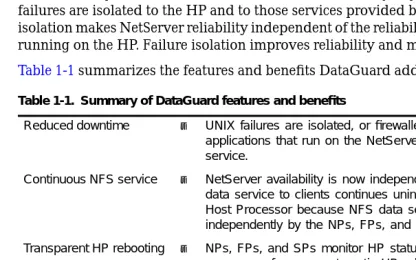
Table 1-1 summarizes the features and benefits DataGuard adds to the NetServer.
Table 1-1. Summary of DataGuard features and benefits
Reduced downtime ▲ UNIX failures are isolated, or firewalled, using DataGuard. UNIX applications that run on the NetServer’s HP do not affect NFS service.
Continuous NFS service ▲ NetServer availability is now independent of UNIX reliability. NFS data service to clients continues uninterrupted while rebooting the Host Processor because NFS data services are handled
independently by the NPs, FPs, and SPs.
Transparent HP rebooting ▲ NPs, FPs, and SPs monitor HP status. If the HP is hung, these processors force an automatic HP reboot. In the event of a UNIX crash, the HP reboots itself automatically.
Quick full-service reactivation
▲ Critical operating, file system state, and mount information is preserved by NPs, SPs, and FPs during an HP reboot. The system can restore full services generally within two to five minutes. Online system
maintenance
▲ System Administrators can install new HP kernels or UNIX software without affecting clients. Additionally, host-connected SCSI devices can be attached or detached by halting the HP, adding or removing the device, and then rebooting the HP.
DataGuard Software Architecture ▲ 1-11
USPEX
A
[image:11.842.138.548.233.518.2]DataGuard Software Architecture
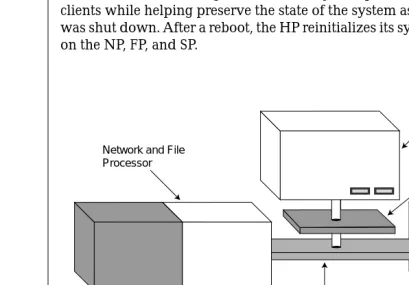
Figure 1-1 shows the relationship of DataGuard to Auspex’s patented FMP software architecture. Represented as a firewall between the UNIX operating system (running on the HP) and the Network and Storage Processors in the server, DataGuard isolates UNIX operating system failures on the HP from the rest of the system. In the event of an HP crash, panic, or user-initiated HP shutdown, an enhanced Functional Multiprocessing Kernel® (FMK®) running on each of the system processors maintains NFS file service to clients while helping preserve the state of the system as it was before the HP crashed or was shut down. After a reboot, the HP reinitializes its system tables from information kept on the NP, FP, and SP.
Figure 1-1. DataGuard with Functional Multiprocessing architecture
DataGuard modifies the NetServer’s software architecture in three primary areas:
▲ Low-level kernel processes ▲ System initialization at boot time ▲ System and processor board recovery
How the NetServer handles low-level software is beyond the scope of this document and is transparent to DataGuard’s operation. How DataGuard influences the system
initialization at boot time and how the system recovers from an HP reboot are described in more detail in this document. DataGuard software does have certain limitations, which are summarized at the end of this section.
Network and File Processor
Host Processor
DataGuard Software
Storage Processor
Drives VME Bus
USPEX
A
System Initialization
Without DataGuard, an operating system crash on the HP or a shutdown initiated by the user results in a reset of all NetServer processors. This is the default boot behavior of the system—all processors are reset, system hardware is checked, operating system software is downloaded to each of the processor boards, daemon processes are started, UFS and LFS file systems are checked and mounted, and (in a system panic) core images are saved for all processors.
With DataGuard, you can choose to shut down and reboot only the HP. DataGuard modifies the boot behavior of the NetServer so only the HP is reset. Following the reset, the HP hardware is checked, processes running on the HP are started, HP UFS file systems are checked and mounted, and (in the event of an HP panic or hang) HP core images are saved. The results of this modified behavior are no interruption of NFS service and faster system reboot. In addition to initializing the HP, the system startup scripts (rc.boot, rc.shutdown, and rc.auspex) detect that other processor boards are already operating and act to avoid interrupting their operation in the following ways:
Caution: Just as with a full system reboot, any change made to /etc/vpartab is effective following the HP reboot.
Shutdown scripts and commands
In default boot operations, the /etc/rc.shutdown command halts NFS service and unmounts all file systems. With DataGuard, the shutdown script was modified so LFS file systems remain mounted and NFS service continues normally.
System panics and core dumps
With DataGuard, all processor boards are notified of an HP crash and only the HP UNIX core dump is taken. If the system crashes because of a timeout on a processor other than the HP, the entire system is reset, and core dumps are taken from all boards.
Error logging Because the HP cannot log error messages from the various processor boards while it is out of service, DataGuard downloads buffered error messages from the system processor boards to the system error daemon (syslogd(8)), which updates files such as /var/adm/messages after the HP is rebooted.
File system management DataGuard has two functions to manage file system information while the HP is rebooting:
During an HP reboot, only UFS-mounted file systems are checked by fsck; LFS file systems are not checked.
DataGuard restores the system mount table and exported file system table to the state that existed before the HP failure or reboot.
Network management DataGuard has two functions to manage network information while the HP is rebooting:
DataGuard restores the state of the network interfaces. Host-attached network interfaces are restarted by rc.boot.
As long as the HP is offline, Host Processor route caches are not updated and can get out of date. HP route caches are flushed upon reboot and then reconstructed from Network Processor routing tables.
Virtual partition management
DataGuard has two functions that manage virtual partition state information while the HP is rebooting:
DataGuard polls the SPs to determine whether virtual partition state information has changed since the HP was offline and updates the virtual partition state table, /etc/vpar_state, if necessary.
Conditions Under Which DataGuard Is Activated ▲ 1-13
USPEX
A
Conditions Under Which DataGuard Is Activated
The conditions under which DataGuard is activated include UNIX failure isolation and system administrator intervention, providing access through several different paths:▲ Automatically, through the kernel panic mechanism.
▲ Automatically, when another board detects the HP is not responding when probed. ▲ Through the new systems administration commands: hpreboot, hphalt,
hpshutdown, and hpboot.
UNIX Failure Isolation
DataGuard is primarily used for isolating UNIX failures, which could be caused by the following events:
▲ HP panic caused by faults in the UNIX kernel. In this case, the HP is rebooted automatically after dumping the UNIX core image.
▲ HP hang caused by the UNIX kernel. In this case, DataGuard can be used to reboot the HP without affecting NFS services to the client. Usually, another NetServer board detects the HP is not responding to its probe requests after timeout occurs. This causes the board to send a nonmaskable interrupt (NMI) to the HP, which causes a vmunix panic.
Operator-Initiated HP Reboot
DataGuard offers the system administrator the flexibility to initiate an HP reboot under the following conditions:
▲ System administration
System administrators can install new HP kernels, patches, and UNIX software without affecting NFS clients. Additionally, HP-connected SCSI devices can be attached or detached by halting the HP, adding or removing the device, and then rebooting the HP.
USPEX
A
System and Processor Board Recovery
The HP provides a number of important services to the system and acts as the repository of many types of global information. An HP failure requires that other boards in the system do without those services and information until the HP is back online. Additionally, the system processor boards must maintain enough information locally (on the specific processor board) to bring the HP up to date when it comes online, so services operate properly after recovery.
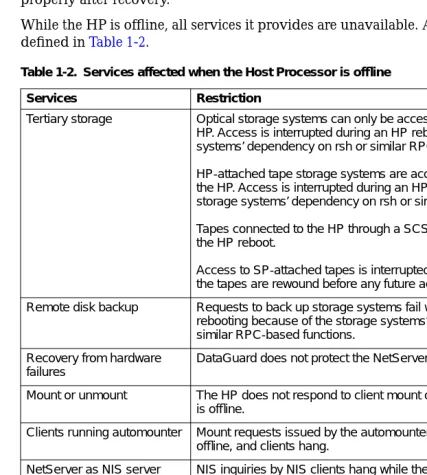
[image:14.842.54.482.227.702.2]While the HP is offline, all services it provides are unavailable. Affected services are defined in Table 1-2.
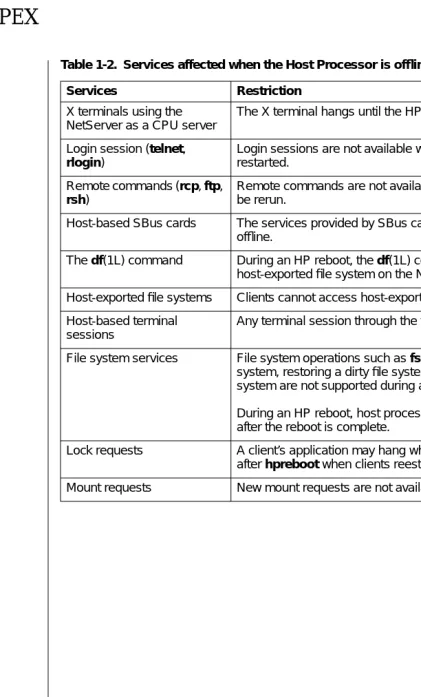
Table 1-2. Services affected when the Host Processor is offline
Services Restriction
Tertiary storage Optical storage systems can only be accessed by device drivers on the HP. Access is interrupted during an HP reboot because of the storage systems’ dependency on rsh or similar RPC-based functions.
HP-attached tape storage systems are accessed by device drivers in the HP. Access is interrupted during an HP reboot because of the storage systems’ dependency on rsh or similar RPC-based functions.
Tapes connected to the HP through a SCSI port are rewound following the HP reboot.
Access to SP-attached tapes is interrupted during an HP reboot, and the tapes are rewound before any future access.
Remote disk backup Requests to back up storage systems fail while the HP is offline or rebooting because of the storage systems’ dependency on rsh or similar RPC-based functions.
Recovery from hardware failures
DataGuard does not protect the NetServer from HP hardware failures.
Mount or unmount The HP does not respond to client mount or unmount requests while it is offline.
Clients running automounter Mount requests issued by the automounter are ignored while the HP is offline, and clients hang.
NetServer as NIS server NIS inquiries by NIS clients hang while the HP is offline.
NetServer as DNS server DNS inquiries by BIND clients hang for a few minutes and then abort while the HP is offline. These processes must be restarted after the HP reboot is complete.
NetServer as print server Clients queue print jobs locally until the print daemon is started on the HP.
NetServer as mail server While the HP is offline, client workstations queue mail. After the HP reboots, clients wait for up to 30 minutes before forwarding mail to the server.
NetServer as license daemon manager
Applications that require network license daemons hang while the HP is offline.
NetServer as non-LFS server
Clients that require access to file systems mounted from devices attached to the HP SCSI port, such as HSFS file systems mounted from CD-ROM, hang while the HP is offline or rebooting.
System and Processor Board Recovery ▲ 1-15
USPEX
A
X terminals using the NetServer as a CPU server
The X terminal hangs until the HP reboot completes.
Login session (telnet,
rlogin)
Login sessions are not available while the HP is offline and must be restarted.
Remote commands (rcp, ftp,
rsh)
Remote commands are not available while the HP is offline and must be rerun.
Host-based SBus cards The services provided by SBus cards are interrupted while the HP is offline.
The df(1L) command During an HP reboot, the df(1L) command hangs if the client mounts a host-exported file system on the NetServer.
Host-exported file systems Clients cannot access host-exported file systems. Host-based terminal
sessions
Any terminal session through the tty port on the HP is interrupted.
File system services File system operations such as fsck(8), releasing an isolated file system, restoring a dirty file system mirror, cloning, or expanding a file system are not supported during a reboot.
During an HP reboot, host processes are killed and must be restarted after the reboot is complete.
[image:15.842.138.559.39.735.2]Lock requests A client’s application may hang while the HP is offline, but it continues after hpreboot when clients reestablish file locks with the server. Mount requests New mount requests are not available while the HP is offline.
Table 1-2. Services affected when the Host Processor is offline (Continued)
USPEX
A
DataGuard Limitations
Certain situations cannot be resolved by an HP reboot. Table 1-3 lists such situations.
Table 1-3. Situations that cannot be resolved by an HP reboot
Situation Limitation or restriction
Install a completely new software release
An HP reboot does not download the NP, FP, and SP M16 images as is needed with a completely new software release. For instance, an upgrade from Auspex System Software 1.7 to 1.8 is not supported. For the same reason, do not introduce software version mismatches when replacing the vmunix kernel.
[image:16.842.54.481.133.387.2]When replacing the root disk with a backup disk, all configuration tables, including /etc/vpartab, /etc/mtab, and fstab, must be identical to the tables at the time of the HP reboot or shutdown.
Permanent HP hardware failure
DataGuard does not protect the NetServer from HP hardware failures.
System-wide problems Problems involving the HP and other boards (for example, a locked inode on the FP) cannot be resolved by DataGuard.
File system isolations An HP reboot restores the system state, which does not fix mount or file system isolation problems.
Isolated file systems and
fsck(8)
Common Questions About DataGuard ▲ 1-17
USPEX
A
Common Questions About DataGuard
The following questions about DataGuard’s operation assist you in understanding DataGuard’s impact on your server’s environment. The list includes questions about DataGuard’s effect on other devices or on the system, as well as information regarding its use and operation.
▲ Does DataGuard run under all conditions?
If an NP, FP, or SP has caused a system crash, DataGuard is ineffective. DataGuard is effective only when the UNIX kernel or HP board cause a system crash or hang.
▲ Does DataGuard operate automatically until turned off?
Yes. DataGuard continues to operate while the UNIX kernel and HP are running. If UNIX or the HP crashes, DataGuard automatically attempts to reboot the HP.
▲ Is the NetServer’s WarmStart feature affected by DataGuard? DataGuard does not affect the NetServer’s WarmStart feature.
▲ Does DataGuard affect fsck or cylinder group fsck?
DataGuard does not affect fsck. After DataGuard reboots the HP, file systems of type LFS that are exported by the FP are not checked; only host-mounted (UFS) file systems are checked.
▲ How does DataGuard affect other processors in the NetServer?
All processors continue to operate normally when DataGuard is installed and running.
▲ How do I order DataGuard?
DataGuard is an optional, separately priced product. A software license key is required to install the software. A separate key is required for each HP on which you plan to run DataGuard. Refer to “Software Installation” on page 2-23 for additional information.
▲ Does DataGuard affect the virtual partitions?
Virtual partitions remain available to clients while the HP is offline.
▲ How do I start DataGuard after installation?
The installation process starts DataGuard unless specifically told not to. If you need to start DataGuard later, use the ax_enable(8) command.
▲ In what situations is a system reboot required when using DataGuard?
You need to perform a full system reboot for any number of reasons; for example: – Updating other processor (NP, FP, or SP) software
– Adding a new SBus card to the HP
– Adding memory modules to any processor – Other boards in the system cause a reboot
– A hardware failure (other than peripherals) occurs in the system
Configuring and Installing DataGuard ▲ 2-19
USPEX
A
2
Configuring and Installing
DataGuard
About This Chapter
This chapter explains how to configure and install DataGuard for your environment. The procedures in this chapter assume that your NetServer is installed at your site and that you are familiar with the information in the System Manager’s Guide and in your NetServer hardware documentation.
The instructions in this chapter assume the NetServer hardware is configured for use with Version 1.10 software. To display your system configuration, enter the ax_config command at the system prompt:
# ax_config -d
Information about your NetServer’s configuration appears. This chapter covers the following topic:
▲ Installation Planning
USPEX
A
Installation Planning
This section reviews information you need to know before installing DataGuard on the NetServer.
Obtaining a Software License Key
DataGuard requires a software license key before installation on the server. A separate license key is required for each NetServer on which you plan to install DataGuard. A license key can be either a demonstration or a purchase license. A demonstration license allows full use of DataGuard until the demonstration license expires and the system is rebooted. The expiration date is included in the license key that is returned to you. A purchase license key requires Auspex purchase order and sales order numbers and does not have an expiration date. Contact your Auspex sales representative or distributor for sales order and purchase order numbers.
You can obtain a key with the ax_request_key(8) command. ax_request_key prompts you for order information and sends email to Auspex with the appropriate NetServer
information. An automatic email response returns the key text to you. If you do not have email or Internet access, ax_request_key can save the information in a file that you can then print and fax to Auspex. The U.S. fax number is (408) 566-2359. A fax sent early in the day Monday through Friday generates a return the same day. Fax requests at other times generate a return in the next business day. If your site cannot communicate with Auspex through email or fax, call Auspex Technical Support, who can generate a key for you if you already have sales and purchase order numbers.
You must run ax_request_key for each NetServer on which you plan to install DataGuard. Because the license is mailed to the userid that invokes ax_request_key, do not run it as root.
To obtain a software license key
1. Type ax_request_key at the prompt:
# ax_request_key
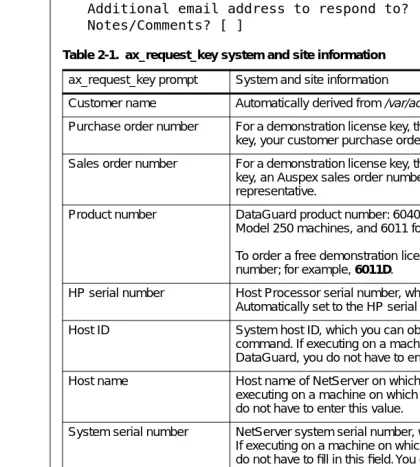
ax_request_key then prompts you for system and site information. All default information in the prompts comes from the local NetServer. Be sure to replace the defaults with correct information if the license is for another NetServer. Table 2-1 describes the system and site information entries in the following example:
You will be asked questions to obtain information required to request a key. Some of the questions have a default value obtained from your system enclosed in [square brackets]. If the default value is correct, just press <RETURN>
Customer Name? ABC Company Purchase Order Number? 99999 Sales Order Number? 999
Installation Planning ▲ 2-21
USPEX
A
Product Number? 6011 HP Serial Number? [4321] Host Id? [0x1a001234] Host Name? [host1]
System Serial Number? [M0123]
Additional email address to respond to? [ ] Notes/Comments? [ ]
2. Enter the appropriate information for your site.
The system displays the information you provide; for example: These are the values you have entered
---Customer: ABC Company
P.O. #: 99999 S.O. #: 999 Product #: 6011 HP Serial: 4321 Hostid: 0x1a001234 Hostname: host1
[image:21.842.136.556.178.645.2]System Serial #: M0123
Table 2-1. ax_request_key system and site information
ax_request_key prompt System and site information
Customer name Automatically derived from /var/adm/config.report
Purchase order number For a demonstration license key, the word demo. For a purchase license key, your customer purchase order number.
Sales order number For a demonstration license key, the word demo. For a purchase license key, an Auspex sales order number. Contact your Auspex sales representative.
Product number DataGuard product number: 6040 for Model 150 machines, 6010 for Model 250 machines, and 6011 for Model 600, 700, and 800 machines.
To order a free demonstration license, add ‘D’ to the end of the product number; for example, 6011D.
HP serial number Host Processor serial number, which you can obtain from ax_config. Automatically set to the HP serial number of the current system. Host ID System host ID, which you can obtain from the system hostid
command. If executing on a machine on which you intend to install DataGuard, you do not have to enter this value.
Host name Host name of NetServer on which you intend to run DataGuard. If executing on a machine on which you intend to install DataGuard, you do not have to enter this value.
System serial number NetServer system serial number, which you can obtain from ax_config. If executing on a machine on which you intend to install DataGuard, you do not have to fill in this field. You can find the value either in the /var/adm/config.report file or the top left corner of the back of the NetServer cabinet.
Email address to respond to Responds to the sender’s user ID automatically. This entry specifies others to whom you want to send mail regarding the key request. Notes/comments If sending a fax, enter the fax number to which you want key information
USPEX
A
Respond To: [email protected] Notes: none
---Mail to Auspex, Edit, Save, or Quit? [MESQ]
3. Type M to mail the information, E to change the information, or S to save the information to a file.
When you type M, the system responds with: The above form has been mailed to Auspex
If you save the information to a file, you can email the file to [email protected] or print and fax the information (along with your fax number) to Auspex. If you email the file, you must include “OPF key request” as the subject line to receive a response. If you fax the file, Auspex verifies the information and returns a fax containing the key. The U.S. fax number is (408) 566-2359.
This completes the procedure for obtaining a key. After receiving a response, follow the installation instructions included with the key to install the license key.
Using Package Tools
The package tools allow you to install DataGuard from the Auspex Premier Software Series CD-ROM shipped with your system. Package tools are the standard SVR4 package utilities, which are shipped as part of the Auspex system software. The tools allow you to add, check, remove, and display information about DataGuard. The basic commands are:
▲ pkgadd(1M) – Transfers the contents of a software package from the distribution medium, and installs it onto a system. Messages from this command display on the console and are written to the file /var/log/pkgadd.log on the target drive and
/tmp/pkgadd.log on the current root drive.
Note: pkgadd(1M) sets userid to install, if it exists; otherwise, it sets userid to
root. If you have a userid of install set up, it must have superuser permission or
the pkgadd will fail. Either remove or rename the install userid, or give the
install userid superuser permissions.
▲ pkgchk(1M) – Checks the accuracy of installed files or, by using the -l option, displays information about package files.
▲ pkgrm(1M) – Removes a previously or partially installed package from the system. Messages from this command display on the console and are written to the file
/var/log/pkgrm.log on the target drive and /tmp/pkgrm.log on the current root drive.
Software Installation ▲ 2-23
USPEX
A
Software Installation
This section describes how to install the DataGuard software key and license. Before installing DataGuard software, verify that you have the required configuration.
Recommendation: After completing the installation, test the new software to verify that the updated root drive is usable (for example, it boots, runs, and the newly added features work). If everything works correctly, clone the entire root disk to an alternate root disk using the ax_sputil(8) command with the copy option. Alternatively, copy each file system on the root disk to an alternate root disk using the ax_clonefs(8) command on each file system.
To install the softwrae key and licsense
1. Install the software key and license. The mail that was returned to you after using the ax_request_key(8) command includes a script that installs the key and license. Here is an example of that script. Delete the message header and the “Cut Here” line, then execute the file with the sh(1) command.
# ---Cut Here---# This message installs a key and license.
# All you have to do is save the mail to a file, # delete the header, and sh the resulting file. #
# Product: AXdguard # hostname: host1 # hostid: 0x1a001234
echo installing AXdguard key
echo AXdguard 0xaaaf3fc /etc/install/AXdguard.lic > /tmp/ax_keys grep -v AXdguard /etc/install/ax_keys >> /tmp/ax_keys 2> /dev/null cp /tmp/ax_keys /etc/install/ax_keys
rm /tmp/ax_keys
echo installing AXdguard license
echo begin 644 /etc/install/AXdguard.lic > /tmp/license.$$ cat <<\LICENSE >> /tmp/license.$$
M3T+J8J:,^!W]E:W?RAMI%GO((KGDUP74G!Y@+^*@ZO8Q " ['D%T!':D<G)P *EFQB=J"+77"6(*W?
end LICENSE
uudecode /tmp/license.$$ rm /tmp/license.$$
echo "Completed installation of AXdguard key and license" echo "Checking AXdguard license"
ax_checklicense AXdguard
The license and key shown, 0xaaaf3fc, are examples. The license and key you receive are unique values for your system.
Mount the Premier Software Series CD-ROM; for example: # mount -rt hsfs /dev/acd1 /cdrom
USPEX
A
# mount -o remount,rw /usr
3. Add the software package to the server by entering the following command:
# pkgadd -d /cdrom
The system prompts you to select a software package from a list similar to the following.
pkgadd session started on Tue Jan 14 15:28:47 PST 1998 The following packages are available:
1 AXatm2 ATM 2
(HP-VII,HP-VIII) 1.10 2 AXbackup FastBackup
(HP-VII,HP-VIII) 1.10 3 AXdguard DataGuard
(HP-VII,HP-VIII) 1.10
4 AXdocs Auspex System Documentation (HP-VII,HP-VIII) 1.10
5 AXdrvgrd DriveGuard
(HP-VII,HP-VIII) 1.10 6 AXftp NP Resident FTP
(HP-VII,HP-VIII) 1.10 7 AXsrvgrd ServerGuard
(HP-VII,HP-VIII) 1.10 8 AXEC1 EtherChannel
(HP-VII,HP-VIII) 1.10 9 AXNeTsrv NeTservices Products
(HP-VII,HP-VIII) 1.10 10 AXNTadmin NeTservices Administration
(HP-VII,HP-VIII) 1.10
11 AXNTBios NeTservices Concepts and Planning (HP-VII,HP-VIII) 1.10
Select package(s) you wish to process (or 'all' to process all packages). (default: all) [?,??,q]:
where ? is a one-digit entry, and ?? is a two-digit entry. 4. Enter the number 3 for the DataGuard package.
Note: If you are installing the optional products document package only, you do not need a key.
The system responds with:
Processing package instance <AXdguard> from </cdrom> AXdguard DataGuard
(HP-VII,HP-VIII) 1.10
pkgadd installs the selected package on the NetServer.
5. Enter y to start DataGuard after installation. Use ax_enable to start DataGuard if the product is installed but not activated immediately after installation. The installation process then continues with these messages:
Software Installation ▲ 2-25
USPEX
A
## Processing system information. ## Verifying package dependencies. WARNING:
The <AXbase> package "Auspex Base Release" is a prerequisite package and should be installed. Allowable instances include (in order of preference:)
1.10
Do you want to continue with the installation of this package [y,n,?]
6. Enter y to continue with the installation. The system responds with:
## Verifying disk space requirements.
## Checking for conflicts with packages already installed. ## Checking for setuid/setgid programs.
This package contains scripts which will be executed with super-user permission during the process of installing this package.
Do you want to continue with the installation of this package [y,n,?]
7. Enter y to continue with the installation.
Installing DataGuard as <AXdguard>
## Installation of part 1 of 1 is complete. ## Executing postinstall script.
Installation of <AXdguard> was successful.
The following packages are available:
1 AXatm2 ATM 2
(HP-VII,HP-VIII) 1.10 2 AXbackup FastBackup
(HP-VII,HP-VIII) 1.10 3 AXdguard DataGuard
(HP-VII,HP-VIII) 1.10
4 AXdocs Auspex System Documentation (HP-VII,HP-VIII) 1.10
5 AXdrvgrd DriveGuard
(HP-VII,HP-VIII) 1.10 6 AXftp NP Resident FTP
(HP-VII,HP-VIII) 1.10 7 AXsrvgrd ServerGuard
(HP-VII,HP-VIII) 1.10 8 AXEC1 EtherChannel
(HP-VII,HP-VIII) 1.10 9 AXNeTsrv NeTservices Products
(HP-VII,HP-VIII) 1.10 10 AXNTadmin NeTservices Administration
(HP-VII,HP-VIII) 1.10
11 AXNTBios NeTservices Concepts and Planning (HP-VII,HP-VIII) 1.10
Select package(s) you wish to process (or 'all' to process all packages). (default: all) [?,??,q]:
pkgadd session finished on Tue Jan 14 15:28:50 PST 1998
A log of this session of pkgadd is at /tmp/pkgadd.log on the current root disk, and at /var/log/pkgadd.log on the target disk.
9. Verify the installation using chroot with the pkgchk command:
# /usr/bin/pkgchk -l AXdguard
10. Unmount the Premier Software Series CD-ROM and the disks:
# umount /cdrom
Rebooting and Shutting Down the Host Processor ▲ 3-27
USPEX
A
3
Rebooting and Shutting
Down the Host Processor
About This Chapter
This chapter provides the procedures and commands for rebooting the Host Processor with DataGuard. This chapter also describes the commands that shut down a server and standard messages that are displayed as part of a normal reboot process.
Before you reboot the server, familiarize yourself with the boot(8s), reboot(8), halt(8), and shutdown(8) commands for single- and multiuser mode described in the System Manager’s
Guide. Versions of these commands for use with DataGuard are described in “DataGuard
Commands.”
This chapter covers the following information:
▲ DataGuard Commands
▲ Rebooting the Host Processor
▲ Shutting Down or Halting the Host Processor
▲ DataGuard Boot Messages
USPEX
A
DataGuard Commands
The commands for DataGuard are:▲ hpreboot
▲ hpshutdown
▲ hphalt
▲ hpboot
The DataGuard commands have the same function as the boot(8s), reboot(8), halt(8), and shutdown(8) commands, except the DataGuard commands apply only to the HP. Invoking the DataGuard commands when DataGuard is not active gives an error message directing you to use the non-DataGuard equivalent commands.
If you want to reboot the HP operating system from single- or multiuser mode without affecting the rest of the system, use the hpreboot command.
Note: If you want to get crash dumps from all processors, then all processors must be rebooted. Use the <Break> key to get to the PROM monitor prompt, and then give the following command, which gives crash dumps and reboots all processors:
HP> go 0
If you want to shut down or halt the HP operating system without affecting the rest of the system, use the hpshutdown or hphalt command.
To boot only the HP from the PROM monitor, use the hpboot command.
Alternatively, you can use the -p option with the existing reboot, shutdown, or halt commands to invoke DataGuard features. Refer to the following procedures.
Rebooting the Host Processor ▲ 3-29
USPEX
A
Rebooting the Host Processor
These procedures explain rebooting the HP from single- or multiuser mode or from PROM monitor mode.
Rebooting the Host Processor from Single- or Multiuser Mode
This procedure explains commands you enter and shows system responses.If you are in multiuser mode, enter the hpshutdown command; for example:
# hpshutdown -lr +5 “Planned Host Processor shutdown in 5 minutes”
where -l sends a message only to users who are logged in, -r specifies the reboot option,
+5 is the time in minutes before operating system shutdown, and the text string is a
message to users regarding the operating system shutdown.
If you are in single-user mode, enter the hpreboot command as follows:
# hpreboot
The NetServer displays the following:
Aug 25 10:48:07 host1 hpreboot: hpreboot invoked by root Aug 25 10:48:08 host1 syslogd: going down on signal 15 Aug 25 10:48:08 ax_nfsd: Got SIGTERM. Ignoring.
Aug 25 10:48:08 AX_STATD: Got SIGTERM. Exiting. Aug 25 10:48:08 ax_statd2: Got SIGTERM. Exiting. Aug 25 10:48:08 ax_isolated: Got SIGTERM. Ignoring. syncing file systems... done
rebooting host processor...
The reboot process checks and verifies the condition of boards, files, drives, and overall network configuration. When the hpreboot completes successfully, the host login prompt displays. For a complete example of an hpreboot message, refer to “DataGuard Boot Messages.”
Note: Only the HP is rebooted. The remainder of the system continues to operate and is not reset.
Booting the Host Processor from PROM Monitor Mode
To boot the HP from PROM monitor mode, use the hpshutdown -h or hphalt -d command to enter PROM monitor mode. At the PROM monitor prompt, enter the hpboot command:
HP> hpboot
Caution: Do not use the hpboot command if you used the halt command to enter PROM monitor mode. The halt command halts all processor boards in the server, not just in the HP; therefore, hpboot does not start the system. Use the boot command instead.
USPEX
A
Shutting Down or Halting the Host Processor ▲ 3-31
USPEX
A
Shutting Down or Halting the Host Processor
This section includes the procedures for shutting down or halting the HP using DataGuard.Shutting Down the HP to Single-User Mode
Enter the shutdown command as follows:# hpshutdown -l +5 “Planned Host Processor shutdown to single-user
mode in 5 minutes”
where -l sends a message only to users who are logged in, +5 is the time in minutes before
operating system shutdown, and the last string is a message to users regarding the operating system shutdown. This command takes the operating system to single-user mode.
Halting the HP Operating System
Caution: Do not issue a “go 0” command following the hphalt command. This sequence causes the HP to panic.
To halt the HP operating system from multiuser mode, enter the hpshutdown command with the appropriate options and a message at the system prompt; for example:
# hpshutdown -lh +5 “Planned shutdown at 12:00 to test new kernel”
where -l sends a message only to users who are logged in, -h is the halt option, +5 is the time in minutes before operating system shutdown, and the last string is a message to users regarding the operating system shutdown.
To halt the operating system from single-user mode, enter the hphalt command at the system prompt:
# hphalt
USPEX
A
DataGuard Boot Messages
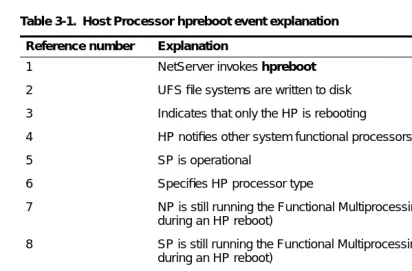
The messages returned by the NetServer following an HP reboot (hpreboot) are displayed as part of a normal reboot process. The following example is for a NetServer with an HP VIII and indicates that all of the boards except the HP board are functioning. In this example, the NetServer name is “host1.” The reboot sequence is annotated with circled numbers that refer to the hpreboot event explanations in Table 3-1.
host1# hpreboot
Aug 25 10:48:07 host1 hpreboot: hpreboot invoked by root Aug 25 10:48:08 host1 syslogd: going down on signal 15 Aug 25 10:48:08 AX_STATD: Got SIGTERM. Exiting.
Aug 25 10:48:08 ax_statd2: Got SIGTERM. Exiting. Aug 25 10:48:08 ax_isolated: Got SIGTERM. Ignoring. syncing file systems... done
rebooting host processor... sending iam_down to vslot 3 sending iam_down to vslot 7 sending iam_down to vslot 19
EEPROM boot device...ad(0,0,0) sp - status f0
skipping SP loopback test sp found in slot = 7
Boot device: /mvic/vme/asp@6d,10e0/ad@0,0:0 File and args: 0x4000
bootblock loaded sp - status f0
skipping SP loopback test sp - status f0
skipping SP loopback test root on ad0a fstype 4.2 Boot: vmunix
Size: 1236992+254776+619152 bytes m16u_npages_dvma = 588
m16u_net_interfaces = 30 VAC ENABLED in COPYBACK mode
Auspex 1.9.2/SunOS 4.1.4 (AUSPEX1) #3: Thu Nov 13 03:18:56 PST 1997 Copyright 1989-1997 Auspex Systems, Inc.
Copyright 1983-1994 Sun Microsystems, Inc. cpu = ASPX,Auspex SPARC Processor
mod0 = Ross,RT625 (mid = 2) mem = 32768K (0x2000000) avail mem = 22687744
dma0 at SBus slot 1 0x400000
esp0 at SBus slot 1 0x800000 pri 3 zs0 at obio 0x200000 pri 12
IOP0 at Auspex VME slot 3 VME address 0x10000000 memory 128 MB IOP0 is UP
SP0 at Auspex VME slot 12 VME address 0x0
DataGuard Boot Messages ▲ 3-33
USPEX
A
SP0 is UP
ASPX,buf-e unit 0 at iop0 SBus slot 1 ASPX,buf-e unit 1 at iop0 SBus slot 2 ASPX,buf-e unit 2 at iop0 SBus slot 3 ASPX,net-acc unit 0 at iop0 SBus slot 4 ad0: <HP 2.0GB cyl 3818 alt 2 hd 16 sec 64> root on ad0a fstype 4.2
swap on ad0b fstype spec size 102400K dump on ad0b fstype spec size 102388K checking root and /usr filesystems
/dev/rad0a: 7031 files, 10493 used, 4882 free
/dev/rad0a: (50 frags, 604 blocks, 0.3% fragmentation) /dev/rad0g: is stable.
rc.auspex: Running ax_startup (download boards and start daemons). ax_write_cache: SP0 write cache is 'ON', INIT ignored.
ax_write_cache: SP0 write cache is 'ON'. /usr/auspex/ax_enable: AXdguard enabled
rc.auspex: Running from rc.boot (start virtual partitions). checking other filesystems
/dev/rad0f: is stable.
Automatic reboot in progress... Wed Nov 26 10:49:28 PST 1997
rc: mounting 4.2 and lfs file systems. Host reboot: skipping quota checks.
rc.auspex: Running from rc (start more auspex daemons).
NIS domainname is ABC.com starting rpc port mapper. starting RPC key server. starting Auspex key daemon. network interface configuration:
ifconfig: setting values to match running NP; parameters ignored. Flushing routing tables:
running routing daemon in quiet mode. starting additional services: biod. starting system logger
starting local daemons: auditd sendmail ax_lfsd rarpd bootparamd starting NFS daemons: nfsd ax_nfsd mountd
mount -vat nfs
host2:/usr/local mounted on /usr/local host2:/home/build mounted on /home/build
checking for crash dump... preserving editor files clearing /tmp
standard daemons: update cron uucp. starting network daemons: inetd printer. Wed Nov 26 1997
USPEX
A
Table 3-1. Host Processor hpreboot event explanation
Reference number Explanation
1 NetServer invokes hpreboot 2 UFS file systems are written to disk 3 Indicates that only the HP is rebooting
4 HP notifies other system functional processors that it is offline 5 SP is operational
6 Specifies HP processor type
7 NP is still running the Functional Multiprocessing kernel (this occurs only during an HP reboot)
8 SP is still running the Functional Multiprocessing kernel (this occurs only during an HP reboot)
9 At this point, ax_startup synchronizes the HP with the other processors in the NetServer
10 LFS file systems are not checked 11 Routing tables are flushed on the HPs
DataGuard Halt Messages ▲ 3-35
USPEX
A
DataGuard Halt Messages
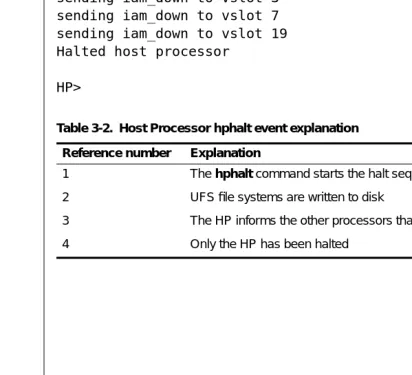
The hphalt messages returned by the NetServer are displayed as part of a normal halt process. The halt sequence is annotated with circled numbers that refer to the hphalt event explanations in Table 3-2.
host1# hphalt
Jun 27 11:47:48 host1 hphalt: hphalt invoked by root Jun 27 11:47:49 host1 syslogd: going down on signal 15 Jun 27 11:47:49 AX_STATD: Got SIGTERM. Exiting.
Jun 27 11:47:49 ax_isolated: Got SIGTERM. Ignoring. Jun 27 11:47:49 ax_nfsd: Got SIGTERM. Ignoring. Jun 27 11:47:49 ax_statd2: Got SIGTERM. Exiting. syncing file systems... done
sending iam_down to vslot 3 sending iam_down to vslot 7 sending iam_down to vslot 19 Halted host processor
[image:35.842.142.554.363.737.2]HP>
Table 3-2. Host Processor hphalt event explanation
Reference number Explanation
1 The hphalt command starts the halt sequence 2 UFS file systems are written to disk
3 The HP informs the other processors that it is halting 4 Only the HP has been halted
1
2
3
Maintenance and Troubleshooting ▲ 4-37
USPEX
A
4
Maintenance and
Troubleshooting
About This Chapter
This chapter includes procedures for maintaining operating system software such as installing a new vmunix software upgrade. This chapter also includes information about how to recover from an operating system or HP panic or crash and system messages particular to using DataGuard.
This chapter covers the following information:
▲ Host Processor or Operating System Maintenance with DataGuard
▲ Troubleshooting
USPEX
A
Host Processor or Operating System
Maintenance with DataGuard
Some of the maintenance procedures you may want to perform with DataGuard on your NetServer include rebooting the HP, adding a SCSI device on the HP, or installing software upgrades. Note that the hpreboot, hpshutdown, hphalt, and hpboot commands function only when DataGuard is active.
Rebooting the Host Processor
The system administration commands, hpreboot, hphalt, and hpshutdown, permit the administrator to reboot the HP without disrupting NFS service. This is useful for installing a new UNIX kernel or recovering from HP errors such as a hung console or memory leaks. A PROM command, hpboot, allows rebooting even in situations when the HP is hung to the point of not being able to execute an hpreboot command. The administrator can use the following commands for host reboot or shutdown:
▲ From a UNIX console or shell, run hpreboot (if no UNIX dump is necessary) or run hpreboot -d (if a UNIX dump is needed).
▲ To shut down or halt the HP, enter the hpshutdown or hphalt commands with appropriate options. After a shutdown, the system administrator must use hpboot from PROM monitor mode to reboot the host only.
▲ If the UNIX console is not available or the HP is not responding, the operator must break into PROM monitor mode and run hpboot -d.
Caution: Do not use the hpboot command if you used the halt command to enter PROM monitor mode. Use the boot command instead.
Adding a SCSI Device on the Host Processor
Refer to your hardware manual for specific Host Processor SCSI IDs and device names. To add a device:
1. Stop activity on the HP by entering the command:
# hphalt
2. Attach the device.
3. Reboot the HP by entering the command: HP> hpboot
This completes the procedure for rebooting the Host Processor.
Installing Host Processor Software
This procedure assumes you have a new vmunix file called vmunix.new. To install it, follow this procedure:
Host Processor or Operating System Maintenance with DataGuard ▲ 4-39
USPEX
A
# cd /
2. Use the hpshutdown command to shut down the HP:
# hpshutdown -l +5 “Host shutdown to install new vmunix”
where -l sends a message only to users who are logged in, +5 is the time in minutes before operating system shutdown, and the text string is a message to users regarding the operating system shutdown.
3. After the system enters single-user mode, rename your existing vmunix file; for example:
# cp vmunix vmunix.old
4. Move your new vmunix file to vmunix. # mv vmunix.new vmunix
5. Reboot the HP using the hpreboot command. # hpreboot
USPEX
A
Troubleshooting
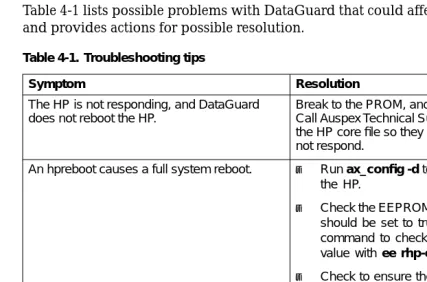
Table 4-1 lists possible problems with DataGuard that could affect system performance and provides actions for possible resolution.
Additionally, ax_enable(8) runs each time the HP reboots. If DataGuard is not installed properly, messages are displayed on the system console and are logged in
[image:40.842.52.480.130.412.2]/var/adm/messages. You can also use ax_enable to verify DataGuard installation. The utility ax_checklicense(8) reports on the license status, including expiration date, if the license is a demonstration license.
Table 4-1. Troubleshooting tips
Symptom Resolution
The HP is not responding, and DataGuard does not reboot the HP.
Break to the PROM, and type hpboot -d.
Call Auspex Technical Support and provide them with the HP core file so they can find out why the HP did not respond.
An hpreboot causes a full system reboot. ▲ Run ax_config -d to examine the PROM level of the HP.
▲ Check the EEPROM variable rhp-enabled, which should be set to true. Use the eeprom(8S) command to check the current value. Set the value with ee rhp-enabled true.
▲ Check to ensure the HP PROM revision level is at least 2.5 or later.
Typing the hpreboot, hpshutdown, or hphalt command results in the message “Command: not found.”
▲ Run pkgchk.
▲ If DataGuard is not installed, use pkgadd to install it.
After typing the hpreboot command, and while the HP is rebooting, the system panics with the message “Inconsistent system state” and continues with a full system reboot.
Removing DataGuard ▲ 4-41
USPEX
A
Removing DataGuard
Use the pkgrm and ax_enable commands to remove DataGuard from the NetServer. Refer to the pkgrm(1M) and ax_enable(8) man pages for additional information on how to use the commands.
1. Type the pkgrm command at the prompt: # pkgrm
The system responds with:
pkgrm session started on Tue Jan 14 15:28:47 PST 1998
The following packages are available:
1 AXatm2 ATM 2
(HP-VII,HP-VIII) 1.10 2 AXbackup FastBackup
(HP-VII,HP-VIII) 1.10 3 AXdguard DataGuard
(HP-VII,HP-VIII) 1.10
4 AXdocs Auspex System Documentation (HP-VII,HP-VIII) 1.10
5 AXdrvgrd DriveGuard
(HP-VII,HP-VIII) 1.10 6 AXftp NP Resident FTP
(HP-VII,HP-VIII) 1.10 7 AXsrvgrd ServerGuard
(HP-VII,HP-VIII) 1.10 8 AXEC1 EtherChannel
(HP-VII,HP-VIII) 1.10 9 AXNeTsrv NeTservices Products
(HP-VII,HP-VIII) 1.10 10 AXNTadmin NeTservices Administration
(HP-VII,HP-VIII) 1.10
11 AXNTBios NeTservices Concepts and Planning (HP-VII,HP-VIII) 1.10
Select package(s) you wish to process (or 'all' to process all packages). (default: all) [?,??,q]:
2. Type the number of the package you want to remove. Enter 4 for DataGuard. The system responds with:
The following package is currently installed: AXdguard DataGuard
(HP-VII,HP-VIII) 1.10
Do you want to remove this package?
3. Enter y to remove DataGuard.
## Removing installed package instance <AXdguard>
USPEX
A
Do you want to continue with the removal of this package [y,n,?,q]
4. Enter y to continue removing DataGuard. The system responds with:
## Verifying package dependencies. ## Processing package information. ## Executing preremove script.
## Removing pathnames in class <none> /usr/etc/hpshutdown
/usr/etc/hpreboot /usr/etc/hphalt
## Executing postremove script. ## Updating system information.
Removal of <AXdguard> was successful. The following packages are available:
1 AXatm2 ATM 2
(HP-VII,HP-VIII) 1.10 2 AXbackup FastBackup
(HP-VII,HP-VIII) 1.10 3 AXdguard DataGuard
(HP-VII,HP-VIII) 1.10
4 AXdocs Auspex System Documentation (HP-VII,HP-VIII) 1.10
5 AXdrvgrd DriveGuard
(HP-VII,HP-VIII) 1.10 6 AXftp NP Resident FTP
(HP-VII,HP-VIII) 1.10 7 AXsrvgrd ServerGuard
(HP-VII,HP-VIII) 1.10 8 AXEC1 EtherChannel
(HP-VII,HP-VIII) 1.10 9 AXNeTsrv NeTservices Products
(HP-VII,HP-VIII) 1.10 10 AXNTadmin NeTservices Administration
(HP-VII,HP-VIII) 1.10
11 AXNTBios NeTservices Concepts and Planning (HP-VII,HP-VIII) 1.10
Select package(s) you wish to process (or 'all' to process all packages). (default: all) [?,??,q]:
5. Type q to leave the package menu.
pkgrm session finished on Tue Jan 14 15:28:50 PST 1998
A log of this session of pkgrm is at /tmp/pkgrm.log on the current root disk, and at /var/log/pkgrm.log on the target disk.
6. Turn off DataGuard with the ax_enable command: # ax_enable -AXdguard
USPEX
A
Index ▲ Index-43
A
Applications, protection from failures 1-2 ax_request_key command 2-2
B
Boot messages 3-6 to 3-8
Booting from PROM monitor mode 3-2
D
DataGuard
boot messages 3-6 to 3-8 commands 3-2
features and capabilities 1-2 halt messages 3-9
Host Processor Maintenance 4-2 managing with SVR4 package
utilities 2-4
operational considerations 1-9 removing 4-5
services available, Host Processor offline 1-6
starting up 1-9
F
Failure isolation, to the Host Processor 1-2
Faxing key request to Auspex 2-2 Functional Multiprocessing architecture
application failure, protection from 1-2
UNIX failure, protection from 1-2
H
Halt messages 3-9
Halting Host Processor 3-5 Host Processor
adding a SCSI device 4-2
failure isolation 1-2 halting 3-5
installing new software 4-2 maintenance with DataGuard 4-2 offline, DataGuard services available
1-6
rebooting in multiuser mode 3-3 rebooting in PROM monitor mode
3-3
recovery 1-6
shutting down to single-user mode 3-5
I
Installation
obtaining a software key license 2-2 root drive 2-5
software 2-5
software on Host Processor 4-2
K
Key request
faxing to Auspex 2-2 printing 2-2
site information 2-2
system and site information 2-3
O
Operational considerations, DataGuard 1-9
P
Package utilities pkgadd 2-4 pkgchk 2-4 pkginfo 2-4 pkgrm 2-4USPEX
A
pkgchk package utility 2-4 pkginfo package utility 2-4 pkgrm package utility 2-4
pkgrm utility, removing DataGuard 4-5 Printing
key request 2-2
Processor boards, impact of start-up scripts on operation 1-4
R
Rebooting Host Processor multiuser mode 3-2, 3-3 PROM monitor mode 3-3 single-user mode 3-2, 3-3 Recovery of
Host Processor 1-6 system 1-6
Removing DataGuard 4-5 Requesting a key 2-2
S
SCSI device, adding to Host Processor 4-2
Shutting down Host Processor 3-5 Site information, entering for key
request 2-2 Software
installation 2-5
installing new on Host Processor 4-2 key license, obtaining 2-2
SVR4 package utilities, managing DataGuard 2-4
System
recovery 1-6
site information for key request 2-3 start-up scripts, impact on operating
processor boards 1-4
U
UNIX, protection from failure 1-2 Utilities