This is a repository copy of Creating a Virtual Museum: Final Report.
White Rose Research Online URL for this paper: http://eprints.whiterose.ac.uk/114817/
Article:
Ewart, I. and Harty, C. (2016) Creating a Virtual Museum: Final Report. Working Papers of the Communities & Culture Network+, 7. ISSN 2052-7268
[email protected] https://eprints.whiterose.ac.uk/ Reuse
Unless indicated otherwise, fulltext items are protected by copyright with all rights reserved. The copyright exception in section 29 of the Copyright, Designs and Patents Act 1988 allows the making of a single copy solely for the purpose of non-commercial research or private study within the limits of fair dealing. The publisher or other rights-holder may allow further reproduction and re-use of this version - refer to the White Rose Research Online record for this item. Where records identify the publisher as the copyright holder, users can verify any specific terms of use on the publisher’s website.
Takedown
If you consider content in White Rose Research Online to be in breach of UK law, please notify us by
Creating a Virtual Museum
CCN+ Final Report
Ian Ewart
Chris Harty December 2015
Executive Summary
The ‘Creating a Virtual Museum’ project produced a virtual reality (VR) model of the Museum of English Rural Life (MERL), including a number of objects from the museum collections with additional information accessible from within the model. The digital technologies employed were restricted to relatively user-friendly and cost-effective software and hardware to investigate the feasibility of this process for non-experts such as museum staff.
Three key techniques were used to create the shape of the model (known as its mesh): photogrammetry using digital cameras; laser measurement photogrammetry using an iPad and a Structure Sensor; and architectural drawing. The majority of the MERL buildings were modelled along with nine objects. These ranged in size, shape and materials to test the digital scanning technologies, and were chosen for their appeal to school age children. Several compromises had to be made to accommodate the limitations of the software and hardware used, which had the effect of reducing the realism and flexibility of the model, but the final workflow resulted in a good quality, navigable rendering of MERL and nine objects, each with additional text and pictures.
The finished model was demonstrated at two events, one for museum staff and volunteers, and another to groups of children at a local school. At each of these events, three formats of the model were available to experience: iPad, PC monitor, and Oculus Rift headset, alongside four of the objects scanned into the model and brought from MERL. This allowed us to investigate a range of responses to the model from a small screen to fully immersive headset, and a comparison between the experience of VR spaces and objects, and the same spaces and objects in reality. Users were observed during their experience, asked to complete a short
questionnaire, and engaged in conversation during their time at the demonstration.
the role of a virtual model as a complement to the world it represents. One
suggestion from the museum staff was the benefit of familiarisation and orientation prior to visiting a complex building, which could result in tailored route planning or help disabled visitors such as autistic children.
The project has had immediate impact: in teaching, as the example for an MSc module in advanced visualisation at the University of Reading; in software
development, used by the publisher (Revizto) as a case study for the re-purposing of their editing and viewing software; in gaining research funding, by adding
credibility to an AHRC project to create a VR Roman house (IE as PI, starting March 2016, £80k FEC), and in supporting a successful AHRC Doctoral award in
1: Background
Efforts to enhance community engagement with local and specialist museums are key to the work of modern museum professionals. Museums, especially specialist or smaller, local museums are evolving their purpose away from the traditional
hallowed repository, to becoming a relevant community resource. Archives and collections are becoming more readily available, and the communities the museum seeks to serve are extending beyond the local, to include specialist groups and interested non-locals. Museums such as the Museum of English Rural Life (MERL) as part of the University of Reading, aim to encompass a wider remit than academic research, and have been developing a series of schemes to engage with the
community and encourage a more diverse the use of their spaces.
This work is happening against a backdrop of general austerity and a significant squeeze on public funds. Work at local museums is dependent on the dedication and originality of the staff to develop new ways of thinking about their collections
without the need for substantial financial resources. Many in the museum sector have been experimenting with the idea of digital archiving, and it has been left to the larger institutions to lead the way in how this might be done. Typically this involves techniques for high quality reproductions of documents and objects, collected
together in a digital database, which is then made accessible to the wider public (e.g. the Petrie Museum, which has created a digital archive that allows web-visitors to manipulate 3D virtual objects in abstract space1). With collections running into the
tens if not hundreds of thousands of objects, such an undertaking is of course prohibitive for all but the upper echelons of the heritage world, and for museums such as MERL, this activity is carried out piecemeal, relying on limited funds and the efforts of volunteers.
Most recently, as well as efforts to digitize their collections, some institutions are experimenting with new ways of experiencing objects in situ, by creating virtual tours that can be explored on line. Examples include the British Museum, which uses themed photographs to form an on-line tour2, and the Louvre, which has a series of
360° panoramic images linked to form a path of exploration3. In 2013, in a first for a
UK museum, the Science Museum announced the complete recreation of a display space and its objects, recorded in its entirety before being dismantled as part of a major gallery reorganisation. This is now available as a pre-set guided tour on their website4. Unlike these large and national museums, for smaller museums a lack of
funding and technical skills prevents them from attempting such projects. However, developments in digital technologies open up the possibility of wide-scale virtual access, enabling museums to increase engagement with communities who might otherwise not be able or inclined to visit.
Creating a Virtual Museum in a way that is practical for smaller museums, and bringing the resulting representations to communities at the fringes of existing
1http://www.ucl.ac.uk/3dpetriemuseum
2http://www.britishmuseum.org/explore/online_tours.aspx.
Also seehttp://www.britishmuseum.org/whats_on/museumcraft.aspxwhere the BM has very recently instigated a project to recreate the Museum digitally using the on-line virtual building community ‘Minecraft’.
3http://www.louvre.fr/en/visites-en-ligne
outreach activities is the basis of this project. We were able to take advantage of a rare opportunity at the University of Reading’s ‘Museum of English Rural Life’ (MERL5), which closed temporarily to undergo a major redevelopment, providing
unencumbered access to the interior space and key objects in the collection6. Using a
novel mix of proprietary and emerging digital technologies, we created a prototype virtual museum and explored the possibilities for enhanced interactivity. The prototype was imported into a 3D gaming headset, a PC and an iPad, and used to interrogate the experience of a virtual recreation of a real world, with different potential audiences including the museum staff and school-age children.
2: Aims and Objectives
The ‘Creating a Virtual Museum’ project had at its core, two primary aims: to
produce a model of the Museum of English Rural Life (MERL), using consumer-level digital technology (hardware and software); and to interrogate the experience of the VR model as a substitute for, or an extension of, the real place and objects.
The first package of work involved steps to identify the level of sophistication of hardware and software that might be reasonable for a museum such as MERL, and to use those technologies in the creation of a VR model of MERL. The skill sets and workloads of museum professionals are such that our focus has been on digital technologies that are essentially readily available and straightforward to use. This required some compromise in the quality of the outputs, but as we discovered, the rate of change of the technologies is such that we would expect there to be
significant improvements in the next few years to allow this level of digital hardware and software to be able to handle greater complexity with greater precision.
The second package of work has been accomplished with help from members of staff at MERL, and the close involvement of a Reading secondary school. We organised two half day events, one for the staff and volunteers at MERL, and one at the school, at which participants were able to experience the VR models, and provide feedback, thoughts and comments on their experience. This is discussed in more detail below. Each of these two events has allowed us to consider how the VR museum is
experienced and how it might be made more useful, interesting and engaging.
3: Model Creation
Architectural Data Capture
Creating the VR museum required the capture of essentially two sets of digital data: one for the buildings and architecture, and the second for a range of objects within the MERL collections.
Beginning with the University of Reading’s Faro laser scanner (as used in CCN+ project “3D Cultural Heritage Visualisations”), we were able to produce a point cloud dataset for a series of rooms. While the scanner itself is reasonably
5http://www.reading.ac.uk/merl/
straightforward to use, there are a number of difficulties. Most obviously is the cost to buy or rent this type of equipment (typically several tens of thousands of pounds to buy new). Secondly is the difficulty of handling ‘point cloud’ data, as produced by the laser scanner. At present there is no simple software that joins the millions of coloured dots (the point cloud) into a mesh of surfaces that can be represented as solid. The resulting effect is a ghostly transparency, rather than a solid surface. Software developers are working on this (e.g. Cloudworx), but these are currently aimed at high end professional users such as building surveyors, and depend on technically challenging software. Autodesk’s Memento software, used as our primary means of mesh editing is expected to include this feature quite soon.
However, new consumer-level hardware is bridging the gap, and we have successfully tested one such device – the Structure Sensor. This is a mini laser scanner (around £400), which attaches to an iPad, and combines laser measuring with data from the iPad camera (position, orientation, colour etc.) to produce a laser/photo scan hybrid. Although this is aimed at 3D printing, results appear convincing enough for VR, and formed part of our final model.
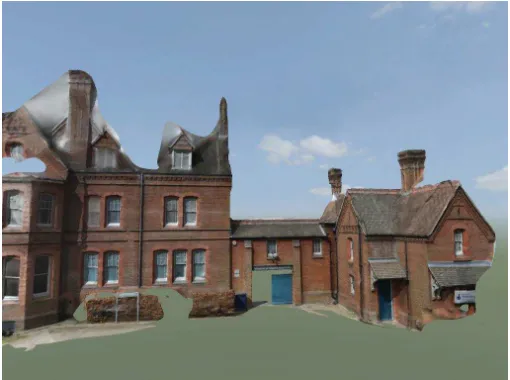
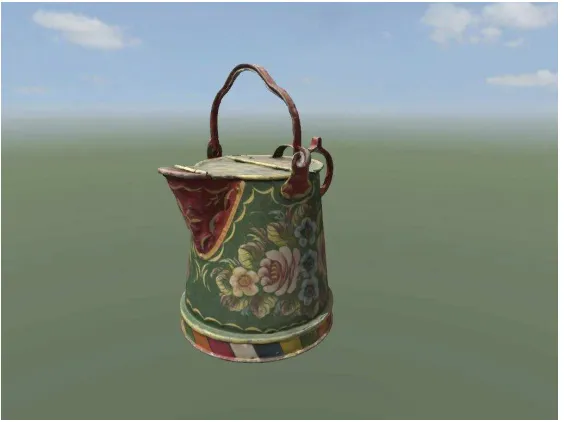
[image:7.595.170.425.552.742.2]The other commonly used method for reconstructing objects and spaces in VR is photogrammetry. This is now a fairly mature technology, but is nonetheless being continually developed in line with new hardware and software. Photogrammetry relies on computer algorithms stitching together multiple photographs of the same object from different angles to create a fully 3D photo-realistic version. Figure 5 shows an object from MERL - a decorated jug used on narrow boats – created using photogrammetry software and around 150 photographs. We have also applied this technique to architectural brickwork, with equally impressive results (figures 1&2). Photogrammetry relies on standard hardware – a reasonable quality camera – and simple to use, low-cost software (more discussion of the role of software is given below when discussing processing). Some practice is required for good results, but this does not need to be particularly technical. A typical modern ‘point and shoot’ digital camera can achieve good results if lighting conditions are right, and with a mid-range DSLR camera it is possible to achieve very good results especially if lighting can be controlled.
Figure 2: Photogrammetry model of MERL entrance courtyard
There are some issues with photogrammetry, but these will probably largely disappear in the next year or two. As it stands, the software (we used Autodesk ReCap360) depends on significant overlap between photographs, which means a typical small object would need around 50-100 photographs, while a large or complex object, such as a building façade, would require several hundred. Since processing is done remotely, there is a limit on the volume of data and hence number of photographs that can be uploaded. For ReCap360, this stands at 250. To produce the photogrammetry model of the entrance façade to MERL and the inner courtyard (see figs. 1&2 above) we carried out a series of photographic surveys at different heights, resulting in over 600 photos. Reducing the number to 250 to allow processing did not produce a useable model, so it was split into two: ‘façade’ and ‘courtyard’, and photos reduced to 250 for each. When processed, these two models could then be manually put together to produce one architectural VR model of the MERL exterior. However, it is worth noting that even since the start of this project the limitation on photos numbers has increased, and Autodesk have stated their intention to remove the limit altogether in the near future. The issue then becomes one of computing hardware being able to support larger and more complex models. As well as the continual development of computer processing power, we would also expect that new forms of less processing hungry hardware, such as the Structure Sensor mentioned above, will continue to be developed, and this may well shift the balance away from computing hardware and back on to software, in line with ambitions for more sophistication and detailed realism.
Whereas the relatively ornate brickwork façades of the entrance and the inner courtyard lent themselves well to being represented though photographic imagery, the interiors are almost universally white and plain, without the complexity required to identify common points in overlapping photographs in photogrammetry
and widely used drawing package that can produce good results very easily, and excellent results with practice and skill. Using drawings produced by the architects for the MERL redevelopment, we produced a basic model of almost the entire interior of the gallery spaces. Most of this work was done with a group of students as a class exercise, developing it into a more sophisticated model, which offers a realistic immersive experience.
Figure 3: SketchUp model of MERL main galleries (exterior)
[image:9.595.73.526.492.725.2]Object Scanning
One of the project objectives was to attempt to scan a number of different objects to ascertain the best workflow and feasibility for an organisation such as MERL to scan objects into 3D models. Even a small museum such as MERL would typically hold tens of thousands of objects in storage as well as many more documents,
photographs and recordings. In keeping with this as a pilot project, our aim was to produce 3D models of 10 objects. These were chosen according to a number of criteria to test the process:
Different materials – some materials, especially metal and glass are
notoriously difficult to model. Variations in reflection causes problems for the software, which is trying to match up visual images.
Different sizes – larger objects are difficult due to the limitations in image numbers, whilst smaller objects are difficult to photograph with a consistently deep focus. Hence there is a compromise to be made between the quality of the photographs, their detail, and the technical competence of the
photographer.
Complexity of shape – it is more difficult to acquire images of all surfaces if those surfaces are complex with spaces or occlusions. A good example was our failed attempts to image a wooden farm cart, as the complexity of its wheels and suspension created an indistinct blur.
Availability of additional information - to satisfy our aim to use the objects to test the process for including additional information, in collaboration with curators and archivists at MERL, objects were chosen which were relatively well-known, with interesting stories or easily available additional
information.
Appeal to school-age children – since we also aimed to test the experience for school-age children, we tried to include objects that would appeal to the younger mind, following discussions with teachers at two Reading schools (such as the rather vicious-looking Mantrap, used to capture and disable poachers by breaking their leg).
The 10 objects chosen (with their MERL object number) were:
Mantrap 62/403
Painted metal, 1.5m long, complex shape with many occlusions. Polehead 55/1180
Unpainted metal, reflective, 1m high, simple shape. Corn Dolly 86/148
Corn, 1.5m high, high degree of detail.
Sheep Dip 60/134
Wooden, 3m x 1.5m x 1.5m, simple shape, highly detailed.
0.3m high, painted metal, reflective, highly detailed, simple shape. Butter Churn 78/25/1-5
1.3m x 1m x 1m, painted wood, very complex shape, highly detailed Milk Churn 97/63
1m high, slightly reflective bronze, very simple shape.
Plough 52/67
1m long, wooden, complex shape, little detail Glastonbury Wellies (new acquisition)
0.3m high, rubber and mud, simple shape, very little detail. Clockwork Gun 99/27
0.3m high, galvanised metal, complex shape, highly detailed
We were able to try two methods of scanning: traditional photogrammetry, and laser measurement photogrammetry. The latter uses technology released in 2014 linking a laser measuring device to an iPad and its camera. As discussed below, our first effort was with the decorated jug using photogrammetry, with the assistance of the
University’s photographer. The result was very successful and highly realistic (see figure 8). This method worked best for the larger and more complex objects. The iPad/laser system was used for 4 objects (wellies, plough, polehead, milkchurn) with a fair degree of success, but failed on the larger and more complex objects (such as the mantrap). Both systems failed on one object - a clockwork gun, probably because the galvanized surface created a complex but repetitive pattern, which is difficult for the software to handle, and the metal walls were thin enough to prevent the software from determining inside/outside distances, creating transparencies. However, the remaining 9 objects were successfully incorporated into the model, along with associated text and an additional picture, which could be accessed through the Revizto ‘issue tracker’ icon (examples of the additional information provided in the model for each object are given in Appendix A). This was a
limitation of the package, as it was intended for comprehensive data management, rather than easy access of simple information. It required several clicks in the right place to see the information and then move on, which caused some problems in our user trials.
Data Processing
printing, and is a powerful but simpler version of other software packages. Perhaps the most commonly used is ‘Meshlab’ – an open source mesh editing package, which has been developed over the last 10 years or so by academics and enthusiasts, to the point that it includes a wide range of specialist options. The results from Meshlab were in some ways superior to Memento, with more sophisticated mesh
[image:12.595.139.458.221.470.2]simplification options and multiple mesh alignment for example, but require reasonable technical expertise. Memento is intuitive and easy to use for the non-specialist, and still returns very good results. We also expect that, as part of the Autodesk family and currently in development, improvements to some of the issues we discovered will be addressed in the immediate future.
Figure 5: Decorated canal boat jug, untouched photogrammetry file.
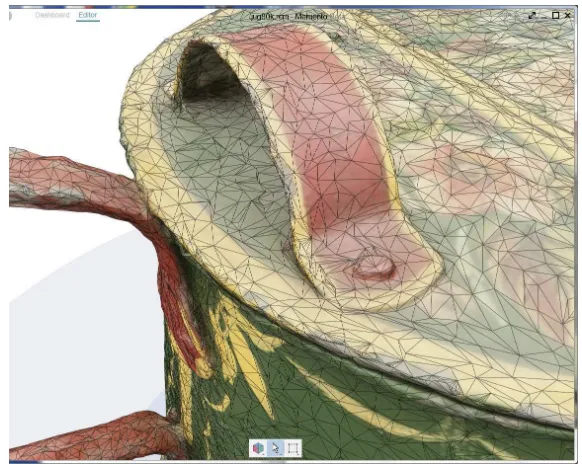
Figure 6: Detail of jug with undecimated mesh (1.6 million polys)
Figure 7: Detail of same jug, decimated by 90% (80K polys)
[image:13.595.151.442.355.587.2]resolution of the textures, and the processing capacity of typical PCs and their ability to handle the best models.
Figure 8: Final model of MERL jug, with 20k polys
Visualisation
The dominance of gaming environments in the creation of VR means that the
software necessary for visualising models is essentially aimed at satisfying the needs of game developers. We have experience at the University of Reading in using one of the most popular and powerful gaming engines – Unity - that provides a wide range of possibilities for importing and merging meshes, altering the lighting and
Figure 9: Combined model, incorporating the MERL entrance façade, the inner courtyard (both photogrammetry), and the main galleries (SketchUp)
Revizto also includes first-person navigation and a simple output for the Oculus Rift, and so meets our needs quite closely. Where it falls short is in its limited ability to include additional information for the objects (photographs, documents and audio files). We have been able to overcome to a limited extent using the Revizto ‘issue tracker’, that allows us to add in other documents and photographs but in a way that could be more user-friendly. However, the balance of functionality to ease of use is heavily in favour of Revizto. As with other points noted in this report, this is a fluid situation. There seems to be a demand for interfaces based on gaming engines that offer selected functionality, but tailored to specific applications. Architectural
visualisations are likely to become more important and we would expect there to be developments that would also suit the VR recreation of public spaces such as
museums, schools, open areas, hospitals etc.
Having created a combined model of buildings and objects in Revizto, our original aim was to focus on the new Oculus Rift (‘OR’) VR headsets – the leading brand of a new breed of VR visualization technologies. At present these are available as
worth noting that although the OR is currently the leading VR headset, purchased by Facebook for $2bn in 2014, there are a number of other significant new players in this space, including Google/Mattel Viewmaster, Microsoft Hololens, Sony Project Morpheus, HTC, Carl Zeiss/Apple, Razr/Android and others.
Running the model on a standard screen (or high end iPad) is still perfectly feasible without having to resort specialist gaming hardware, although of course this does not give the same immersive experience. Whether that is significant in the
experience of a VR world is a moot point, and one that we investigated in the demonstrations. Our other options include iPad, which Revizto supports with a custom navigation control system, and standard PC or large scale projected screens, each of which could be controlled with an Xbox type controller. So despite the current limitations that we see with the OR, it formed an important part of the user experience that allowed us to interrogate some of the basic ideas about VR worlds.
Workflow
Having considered a number of possible solutions to the technical challenges this has required, we have fixed on a workflow that satisfies our objectives of low-cost and non-specialist hardware, and user-friendly software and visual outputs (see diagram below). This is the result of a balancing act between issues of resources (finances and labour) and quality (realism and complexity), in what is undoubtedly a dynamic arena. Even in the course of the few months of this project we have seen several new developments (such as updates to Autodesk Memento and new apps for the Structure Sensor), and more promised (such as Autodesk Recap promising to remove the upper limit of 250 photos for their photogrammetry software). For our purposes, this has led to a relatively conservative approach, attempting to simplify the workflow by using market leading names rather than some of the less well
known, even superior products. We expect that in the immediate future there will be further developments in software and hardware, which are likely to become more user-friendly and yet more sophisticated, thus making this type of project easier to carry out.
For the present, we have fixed a point in the Creating a Virtual Museum project where ease-of-use is our key criteria, costly hardware is limited to a high end laptop to run the Oculus Rift headset, and other visual outputs are achieved through essentially standard current PC technology. This part of the project shows that it is becoming easier to produce VR worlds without the need for extensive specialist knowledge, and thus feasible for local institutions such as MERL to incorporate into their community engagement portfolio. The final model was loaded into three output systems: a standard large (27”) PC monitor (which gave a reasonable
experience of immersion, especially when seated close to the screen); an Oculus Rift (which was surprisingly tricky and temperamental); and an iPad (the latest, most powerful model, the Air2 was just about able to handle the model). It was an advantage of Revizto that all of these formats were supported, and after some
ReCap360 SketchUp
Memento
Revizto Editor
Revizto Viewer Photographs Scan
s
Site Survey
Skanect Pro / Itseez3D
Data
Acquisition
Data Processing
Mesh Editing
DSLR Camera
Model Creation
Visualization
Structure Sensor / iPad Data Source
High end laptop/ Oculus Rift
iPad VDU / Projector
Xbox controller
Output
.JPG
.OBJ
.FBX
.FBX .RCM
DSLR Camera
Memento Photographs
File Type .FBX Hardware
Software Data
4: Interrogating the Digital Experience
Demonstrations and Responses
Two events were organized where a number of participants were invited to
experience the VR model of MERL. This included three VR formats: iPad; PC screen; Oculus Rift; as well as a selection of some of the objects included in the model, taken from the MERL collection and arranged on tables for close inspection and handling. The participants were invited to complete a questionnaire after their experience (see Appendix B), which was done by around 80% of those attending. The questions were designed to elicit information about the use of the technologies and the experience of virtual space, with a simple 1-5 scale of response. This was
supplemented by free form comments at the end of the question sheet, observations carried out by the researcher, and discussions with some of the participants before they left.
The questions, and response scale used, were:
1: Have you been to the museum before? (1 - Never : 5 - Many times) 2: Using the technology was: (1 - Easy : 5 - Difficult)
3: Finding my way around the virtual museum was: (1 - Easy : 5 - Difficult)
4: Did you feel you were actually in the museum or still in this room? (1 - Museum : 5 - Room) 5: Did your other senses (apart from vision) affect your experience (1 - Very Much : 5 - Not at All)
6: Do you think of your experience as images you saw, or somewhere you visited? (1 - I Saw : 5 - I Visited) 7: Were the real life objects the same as the virtual ones? (1 - Same : 5 - Different)
i, MERL
An event was organised with the assistance of the staff at MERL, where the three systems were set up (Monitor, iPad and Oculus Rift), an area of the room was screened off and four of the objects in the model set up on tables (Mantrap,
Polehead, Decorated Jug, and Milk Churn). Different users experienced the model in some or all of these formats (including the real objects), while being observed and notes taken. They were then asked to complete the response questionnaire (18 were completed), and many engaged in informal discussions either with the researcher or other users, during which time further notes were taken. The users were a mix of staff members and volunteers, totalling around 30 over the course of an afternoon. This group was chosen for its familiarity with the building, and for some attendees knowledge of the specific objects used in the model. Our objective was to gain
greater insights into the relative experiences of a VR encounter with the building and objects and a real-life encounter with the same spaces and things, from users who were familiar with both.
ii, Local School
A second half-day event was organized with a local school, which included a class of children aged 11-12 and various others who stopped by for a short time. The
children to look at and touch. They were asked to describe the objects and to suggest their function, with only limited information from the museum staff. They were then divided into groups to experience the three VR models (iPad, monitor and Oculus Rift) and set the task of finding those objects and noting any others they
encountered. As part of the class exercise, the pupils were asked to interview each other, rather than being interviewed by the researcher as in the MERL
demonstration. Prior to the exercise they were given guidance about how to
interview and the sort of questions to ask. This did result in some differences in the type of responses recorded, but those differences were in themselves enlightening. 38 response forms were completed.
Results
The results are summarized in Table 1 below, and represented graphicallyin the following sequence of diagrams. Responses were averaged for each question according to both the participant (museum staff or volunteer vs school pupil) and the experience format (iPad, Monitor, Oculus Rift).
Q1 Q2 Q3 Q4 Q5 Q6 Q7
Average 2.26 2.63 2.81 2.82 3.46 2.19 2.44
Avg. Oc. Rift 2.48 2.04 2.52 1.72 3.04 2.84 2.12 Avg. Monitor 2.05 2.58 2.47 3.32 3.47 1.84 2.79
Avg. iPad 2.15 3.85 3.85 4.23 4.23 1.46 2.54 Avg. Museum 4.61 2.33 2.50 3.11 3.33 2.72 2.78 Avg. Pupil 1.18 2.77 2.95 2.69 3.51 1.95 2.28
Response Summary Graphics Key:
Question 1: Have you been to MERL before?
Never Many Times
Question 2: Using the technology was…
Easy Difficult
Question 3: Finding my way around the virtual museum was…
Easy Difficult
Oculus Rift
Monitor
iPad
School Pupil
Question 4: Did you feel you were actually in the museum, or still in this room?
Museum Room
Question 5: Did your other senses (apart from vision) affect your experience?
Very Much Not at All
Question 6: Do you think of your experience as images you saw, or somewhere you visited?
I Saw I Visited
Question 7: Were the real objects the same as the virtual objects?
5: Discussion
Familiarity
The two groups were chosen for their relative experience of MERL, with the museum staff and volunteers very familiar with the space and to some extent the physical objects, whereas virtually none of the school children had ever been to MERL (see Q1). Of course, this was not the only difference between the two groups: the age profile was very different; the relative experience with the technology used; and the context in which the experience was happening. The pupils were being taught, whereas there was a sense that the museum workers were advising on a product, and how it could be improved. Despite this, there is remarkably little to separate the average responses by user. Q1 is, not surprisingly, the most significant, but the responses to use of the technology (Q2 and 3) suggest that the museum workers found it easier than the pupils. If there is a trade-off between familiarity with the space and familiarity with the experience format, then it seems to favour the space. A lack of familiarity may also explain the apparent contradiction between the pupils’ results of Q6, in which there was a stronger sense of ‘viewing an image’ as opposed to ‘visiting a place’ and Q4 where the pupils felt more like they were in a different place (i.e. the museum and not the classroom).
Sense of being there
The three technologies drew very different responses from the users, coloured slightly by the lack of processing power in the iPad creating a slow and sometimes unsatisfactory experience. In general the immersion created by the Oculus Rift seemed to transport the user away from the space they currently inhabited (Q4), although where they were transported to is a matter of debate. In response to Q6 it seems clear that the users did not feel as though they had physically been to a different place, which suggests that this VR experience was not a successful
transplantation of MERL into the conference room or classroom. Surprisingly, this was not affected by confusion or interaction with other senses. A working
hypothesis before the trials was that the smells and sounds of the VR location would affect and reduce the sensation of leaving the room you were in. However, the responses to Q5 suggest this is not the case. This might be a reflection of the
limitations of this study, since there is significant variation between the experience formats, where the Oculus Rift was more likely to have been affected by extraneous sounds and smells, although this was not reported as a strong sensation. A general observation by several users was that visual limits were important, in effect the bigger the screen, the more realistic, which disadvantaged the iPad in particular. An important note to make as a major disadvantage of the Oculus Rift in taking you to a different place, which is that it makes a significant number of users nauseous,
Quality of the model
One of the aims of this project was to experiment with consumer-level technologies to investigate the possibility for this to be developed and used by non-specialist organisations, such as small museums. As discussed above this has resulted in a number of compromises in hardware and software, such that the detail and possibly ‘realism’ was reduced, and the flexibility of the model and speed of interaction also had to be balanced against the chosen technologies. The iPad was particularly unsatisfactory, mainly due to the use of photogrammetry for some of the
architecture, which represented about 50% of the model size for about 10% of the model (the remainder being the nine objects and the buildings drawn in architectural software). Initial impressions of the model were generally very positive, probably due in part to technological novelty, especially the Oculus Rift. The comparison between the objects in the model and the real objects available to see and touch was also quite positive (Q7), which is slightly surprising bearing in mind some of the other thoughts and responses to the experience (Q6 implies it was imagery rather than a multi-sensory experience; Q4 suggests the experience was not the same as being in the museum). There were comments made about the relative realism of the objects, with the plough and mantrap in particular receiving slightly negative comments. Interestingly, the plough was the longest object we could scan with the iPad system, and was at its limit of size, and the mantrap was the most complex shape with numerous different surfaces, orientations and occlusions. These objects could be defined as at the limits of the consumer technology we used, a fact which became apparent in the quality of the model created. Overall, the virtual museum we produced could be said to be ‘not quite real enough’ to achieve the experience of visiting the museum, but this does not seem to be simply due to the shortcomings of the model itself.
Future Directions
It seems likely that even if the digital museum could be created with a high degree of visual accuracy, which would be possible with more sophisticated digital
reconstructions using commercial technology and gaming engines, it would still offer a very different experience to the real MERL. A fundamental conclusion that has come from this research would be that to use VR as a proxy for reality fails in both directions. First, the virtual will never be the same as the real, however good the technology, even with an enormous expenditure of time and money; the
We are hinting here at how the model could be used, but more interesting thoughts came from the museum workers. They recognized this as a means to overcoming a perennial problem – short and conservative visits, where the visitor will not know where to go and tend to head for the ‘star attractions’, missing the majority of the displays. Many museums try to overcome this by offering fixed routes, suggesting where the visitor should go and what they should look at. A virtual model offers the chance to tailor a route, and prepare the visitor for their experience (length of walk, places to sit, location of interesting objects etc.). This idea of familiarization and orientation would be widely useful but particularly attractive to groups such as autistic children. More work could be done to investigate how well these ideas would work, and further discussions with MERL will hopefully form the basis of future research.
6: Impact
Teaching
The MERL model and the techniques used to create it were used as the main teaching example in a one week module for MSc students from the School of the Built Environment at the University of Reading – ‘Advanced visualization and interactive technologies’. Twelve students produced their own 3D models using photogrammetry, and four students have taken this research as the starting point for their individual projects. The feedback was universally positive, especially the new ‘hands-on’ approach this project allowed.
Software Development
Revizto, the software used to bring together the various parts of the model
(architecture, objects and additional information) and make it navigable, heard of the project through Twitter and contacted IE to write a case study and suggest ways the software could be developed to suit this type of application. The context for the case study was the re-purposing of the software from a building information
management tool, to a visitor experience. This went live on their website
(https://revizto.com/en/blog/entry/university-of-reading-merl) in October 2015.
Further Funding
An AHRC grant was awarded to IE for a new 12 month project: ‘Sensations of Roman Life’ beginning March 2016. This will build on this project to create a VR Roman house, but including sounds and smells, to be displayed at Chedworth House – a National Trust managed Roman villa complex.
An AHRC PhD studentship was awarded to IE/CH for a project devised in association with Historic England, to start in October 2016. This will use a highly accurate 3D model as the basis for a data management system to allow heritage professionals to document and manage their built assets, and provide visitors with a more informed experience.
Appendix A: Two examples of additional object information
Mantrap MERL object number: 62/403
Sheep Dip MERL object number: 60/134
This is a sheep dipping trough, made of oak with iron fittings and with stocks at one end to hold the sheep by the neck. It was made by Dorset craftsman in the early-nineteenth century or earlier. It was last used by the donor’s grandfather around 1890, and was used as a mobile unit within a thirty-mile radius of Gillingham, Kent by a team of four men. The donor’s family were famous for sheep dipping for many generations.
Appendix B: Demonstration feedback questionnaire
CREATING A VIRTUAL MUSEUM - User Feedback
User:Volunteer / Pupil / Teacher / Museum Staff
Viewing experience:Oculus Rift / Large Screen / iPad
1. Have you been to the museum before?
Never 1 2 3 4 5 Many Times
2. Using the technology was:
Easy 1 2 3 4 5 Difficult
3. Finding my way around the virtual museum was:
Easy 1 2 3 4 5 Difficult
4. Did you feel as if you were actually in the museum or still in this room?
Museum 1 2 3 4 5 Room
5. Did your other senses (apart from vision) affect your experience?
Very Much 1 2 3 4 5 Not at All
6. Do you think of your experience as images you saw, or somewhere you visited?
I Saw 1 2 3 4 5 I Visited
7. Were the real life objects the same as the virtual ones?
Same 1 2 3 4 5 Different