ePrints Soton
Copyright © and Moral Rights for this thesis are retained by the author and/or other
copyright owners. A copy can be downloaded for personal non-commercial
research or study, without prior permission or charge. This thesis cannot be
reproduced or quoted extensively from without first obtaining permission in writing
from the copyright holder/s. The content must not be changed in any way or sold
commercially in any format or medium without the formal permission of the
copyright holders.
When referring to this work, full bibliographic details including the author, title,
awarding institution and date of the thesis must be given e.g.
AUTHOR (year of submission) "Full thesis title", University of Southampton, name
of the University School or Department, PhD Thesis, pagination
Tools for Associative Writing
Chapter 4 explored the technical challenges of publishing integrated hypertexts in the World-Wide Web. This chapter introduces a further user challenge: supporting the
writer in carrying out the various activities involved in Associative Writing. To help
address this challenge, a model of Associative Writing is first derived from the correla-tions observed between a number of existing writing models, and then used as the basis
of a critical evaluation of a number of existing hypertext tools designed specifically to
support writing tasks.
6.1
Extracting a model of Associative Writing
Popular tools for writing new Web documents, such as Microsoft’sFrontpage andWord,
Netscape and Mozilla’s Composer, Macromedia’s Dreamweaver, and the World-Wide Web Consortium’s Amaya, typically take the form of word processors with additional
features allowing writers to anchor (associative) links in the written text, and perhaps
manage a collection of documents forming a Web site. User interaction in each of these tools is usually similar; for example, to create a link the writer typically selects a link
anchor and then chooses a “Create Link” action from a menu or toolbar — the URL
of the target document may then be entered manually (Figure 6.1). In order to answer the question of whether these tools support Associative Writing, the Associative Writing
process itself must first be explored in more detail.
Cognitive psychologists Hayes and Flower proposed a working model for the linear writ-ing process in 1980, collectwrit-ing together the growwrit-ing body of research up to that point.
Their model consisted of three interacting sub-process: prewriting (planning what to
write and how to write it), writing (turning plans into written text), and rewriting (re-vising what has been written) (Hayes and Flower, 1980). Rather than occurring in any
fixed or linear order, these sub-process are recursive, with one often interrupting the
Figure 6.1:Creating an associative link in Microsoft Frontpage.
Figure 6.2:Timeframe analysis of hypertext writing (Pohl and Purgathofer, 2000).
other. Writers might be writing at one moment, moving their discourse forward; at the
next they backtrack, reread and digest what has been written. A more recent study by (Pohl and Purgathofer, 2000) neatly illustrates this. The study analysed the kinds of
activities authors of hypertext documents concentrate on, by analysing empirical data
from student’s use of a hypertext writing tool in the production of 96 hypertexts. Five classes of observed actions were reported: text editing (writing and deleting text),node
actions (creating and deleting nodes),moving (positioning nodes in the hypertext),link
actions (creating and deleting links), and other (any other activity). Visualisation of time spent on each of these activities during writing showed just how intertwined these
activities are (Figure 6.2).
However, as later refinements showed, the writing process proved to be considerably more complex than Hayes and Flower’s original model can capture (Hayes and Flower,
1986). (Smith et al., 1987) and (Streitz et al., 1989) describe hypertext systems which
specific hypertext mechanisms for supporting the several kinds of thinking (orcognitive modes) involved in writing.
Smithet al’s system,Writing Environment, provided the writer with four main working
areas corresponding to each of the major cognitive modes in the writing process, with operations available in each area reflecting the rules underlying each mode:
1. Network modesupports the early exploratory phases of writing, allowing the writer
to build a hypertext structure by clustering related ideas into groups,
interconnect-ing ideas usinterconnect-ing links, and arranginterconnect-ing ideas into simple hierarchical structures.
2. Writers build a single, integrated hierarchical structure for the document in tree
mode.
3. Text is attached to each node of the tree mode hierarchy inedit mode.
4. Writers view the final form of the document in text mode.
Streitz et al’s system, Structured Elicitation and Processing of Ideas for Authoring
(SEPIA), also provides writers with four main working areas (activity spaces), but
em-phasises support for representing argumentation structures in writing:
1. Writers generate and structure ideas in thecontent space, grouping ideas according
to topic-related clusters and creating relationships between ideas to form simple semantic networks.
2. Theargumentation space allows writers to elaborate arguments by generating
sup-port or objections on different levels, and by formulating contradictions and argu-mentation chains.
3. The rhetorical space is where the writer creates the reader-oriented, final
hyper-text by imposing a document structure on the ideas and arguments created and
elaborated in the content and argumentation spaces.
4. Writers create overall goal structures and plans for writing in the planning space,
in order to co-ordinate the activities of the other spaces.
Hayes and Flower suggested that writing could be seen, above all, as a “goal-directed,
problem-solving process” (Hayes and Flower, 1980, pg. 4), and both Writing Environ-ment and SEPIA seem to embody this approach in supporting the writing process from
conception through to final linear (Writing Environment) or hypertext (SEPIA) form.
(Neuwirth and Kaufer, 1989), however, suggest that it is perhaps fruitful to consider writing as an “open-ended design task”, where the primary intention of designers
Writing Environment SEPIA Neuwirth & Kaufer Associative Writing
planning space goal tree† planning network mode content space selection & aggregation context building tree mode argumentation space hierarchy-building structure building edit & text modes rhetorical space generation integrated writing
†Although not explicitly part of their writing model, Neuwirth & Kaufer describe a Goal Tree tool to help guide
writers through a synthesis writing task.
Table 6.1:Correlating writing models to infer potential cognitive activities involved in the Associative Writing process.
Kaufer go on to describe their model of synthesis writing, based on observations of a
number of writers’ performances in writing tasks and supported by an extensive survey of the cognitive science literature:
1. A selection process identifies important information in individual source texts.
2. Anaggregation process groups authors of source texts according to
similarities/d-ifferences.
3. Ahierarchy-buildingprocess organises authors according to degree of similarity/d-ifference and provides an analysis of the causes of those dsimilarity/d-ifferences.
4. A generation process produces a written synthesis.
Table 6.1 shows the correlations between the document-oriented writing models
em-bodied by both Writing Environment and SEPIA and the task-oriented writing model
proposed by Neuwirth and Kaufer. Similarities between the three models seem strongly apparent, so an attempt to extrapolate some of the cognitive activities involved in the
Associative Writing process from these combined models seems reasonable.
Planning Both the SEPIA and Neuwirth and Kaufer writing models describe a planning activity in which writers construct goal structures to guide other activities. In terms
of Associative Writing, we can deduce that such a planning activity may also guide the
writing task.
Context building Each model describes a content generation activity, which may include
selecting existing content from source texts (Neuwirth and Kaufer), brainstorming new
ideas (Writing Environment, SEPIA), and exploring relationships (Writing Environ-ment, SEPIA, Neuwirth and Kaufer). In terms of Associative Writing, we can deduce
that this activity would involve the writer identifying and exploring the global context
of the new hypertext (although the writer may not initially have a clear idea of the form the contribution will take).
The writer may identify existing Web content (ideas, concepts, data, examples,
browsing and reading, using any number of Information Retrieval applications (Brown, 2002), possibly retrieving specific knowledge from long term memory (for example, a
theory) and searching the Web to identify the original source (“where has this theory
been published in the Web?”). Such “information gathering” activities are often iter-ative (O’Day and Jeffries, 1993) — new information may change the expectations of
what might be found in the future, or the understanding of the topic in hand, leading
to searching or browsing with a new topic in mind. Writers may also generate new con-tent, perhaps in response to existing materials (for example, interpretations, summaries,
evaluations, “how can I build on existing work?”), or as an incentive for further
brows-ing (“how can I show the reliability and innovation of this new idea?”). Relationships between content (both existing and new) would be identified by the writer as they are
uncovered through careful and creative analysis of the texts (Figure 6.3a).
Structure building Each model describes a process in which writers elaborate on the content and structures generated and identified in the context building process to apply
an overall structure to the context. This structure may take the form of multiple levels of
argument (SEPIA), a similarity/difference hierarchy (Neuwirth and Kaufer), or a simple tree (Writing Environment). In Associative Writing, we can therefore deduce that this
activity would involve the writer applying a local context (or coherence (Moulthrop,
1992)) to the new contributions and interpretations, corresponding to the structure of the new hypertext (Figure 6.3b).
Integrated writing1Each model describes a process in which writers generate new content
according to the organisation created in the structure building activity. In Associative Writing, we can deduce that this activity involves the writer’s new contributions being
elaborated into a coherent hypertext, which integrates with the underlying global context
identified in the context building activity using associative links (Figure 6.3c).
As a simple example, Figure 6.4 illustrates how the Associative Writing strategy used
by the authors of the Astronomy Picture of the Day Web site (reported in Chapter 3)
could fit into the Associative Writing model.
6.1.1 The Challenge
Conventional word processing programs, and hence word-processor based tools for the
Web, tend to support best Hayes and Flowers’ original oversimplified and end-product
oriented model of the writing process (prewriting,writing,rewriting), offering good com-posing and editing facilities but little support for the more complex cognitive activities
involved in Associative Writing. In Section 3.2, it was suggested that Associative Writing
may be sufficiently at odds with writer’s normal practice of literacy as to explain why so
1Note on terminology: Associative Writing is the process of creating anintegrated hypertext;
(a) Context building (b) Structure building
(c) Integrated writing
Figure 6.3: Conceptual overview of Associative Writing activities.
Massive stars -- upwards of tens of times the mass of the Sun - profoundly affect their galactic environment. Churning and mixing the clouds of gas and dust between the stars, they leave their mark on the compositions and locations of future generations of stars and star systems. Dramatic evidence of this is illustrated in our neighboring galaxy, the Large Magellanic Cloud (LMC), by the above ring shaped nebula, Henize 70 (also known as N70 and DEM301)….
Planning: What should today’s picture be? (latest telescope images, recent astronomic events).
Context Building: Background knowledge of astronomy resources (previously written APODs, NASA resources, external sites), supplemented by search engine. Previous APOD pages
External sites
Structure Building: Simple paragraph structure.
Integrated Writing:Skeleton abstract of today’s picture linked to wider context for readers to “flesh in” details as required.
Planning Managing goals and plans for the writing task.
Context building Identifying and exploring existing content relevant to the writing task, and the connections implicit between them. Structure building Applying a coherent overall structure to the context.
Integrated writing Elaborating the structure into a coherent hypertext which integrates the underlying context.
Table 6.2:Summary of Associative Writing model.
little evidence of integrated hypertext was found in the Web. However, in describing and correlating models of the writing process it has become apparent that the kind of
“asso-ciative thinking” embodied by Writing Environment’s network mode, SEPIA’s content
space, and Neuwirth and Kaufer’s selection and aggregation processes) is an important aspect of writing. Perhaps then, Associative Writing is not so different from writer’s
“normal” (linear) experience of literacy, but current computer-based tools for writing in the Web do not support such exploratory activities well enough to help writers create
integrated hypertexts.
The challenge then, seems to be to not only enrich the Web’s hypertext model to support
the publication of integrated hypertexts (as discussed in Chapter 4), but also to help the user carry out the various activities involved in Associative Writing. The next section
describes the results of an investigation of a number of hypertext tools designed
specifi-cally to support writing tasks, with the purpose of critispecifi-cally reviewing each approach in terms of the Associative Writing model presented here (summarised in Table 6.2).
6.2
Tools for Hypertext Writing
Table 6.3 lists the hypertext writing tools investigated; the tools have been grouped
according to a spectrum of approaches to constraining hypertext writing used by
(Mar-shall et al., 1994), in order that tools embodying a similar approach may be discussed together. Each of the four main points on the spectrum is further divided into
document-based tools (where the user interacts with the hypertext one document at a time) and
map-based tools (where the user interacts with the hypertext through a visual network map).
Table 6.4 lists the set of significant hypertext writing approaches selected from the
investigation to form the focus of this section, with each tool listed according to the Associative Writing activities which seem closest to the writing support the tool provides
— these correlations will provide the context for a brief discussion of the features of each
Prescriptive Descriptive Emergent Permissive
Most Constrained - Least Constrained
Map-based Document-based
Prescriptive SEPIA, Writing Environment, Synthesis Writing Toolkit, gIBIS
PHIDIAS
Descriptive Aquanet, MacWeb Oval Emergent VIKI, Visual Knowledge Builder,
ART, Web Squirrel, Tinderbox
Hyper-Object Substrate
Permissive Storyspace World-Wide Web, Wiki, Connec-tion Muse, Hunter Gatherer, We-bVise
Table 6.3:Spectrum of approaches to constraining hypertext authoring (Shipman and
Marshall, 1999).
Planning Context Building Structure Building Integrated Writing
Writing Environment SEPIA
Synthesis Writing Toolkit
gIBIS MacWeb Aquanet VIKI
VKB ART Tinderbox
Wiki Storyspace
Connection Muse
Hunter Gatherer Hunter Gatherer
Table 6.4: Summary of hypertext writing systems examined in this chapter.
6.2.1 Prescriptive Tools
Prescriptive tools impose constraints that embody a particular methodology or cognitive
model of process; accordingly, the types of links and actions available to writers are the result of careful analysis and are embedded in the systems themselves. Writing
Envi-ronment, SEPIA, and Neuwirth and Kaufer’s tools for synthesis writing (subsequently referred to as the Synthesis Writing Toolkit) are examples of map-based prescriptive
tools (note that although the cognitive models embodied by these systems have already
been discussed, the specific tools provided by each system bear a brief examination in this context). gIBIS (Conklin and Begeman, 1988) is a map-based tool based on the
prescriptive IBIS schema; PHIDIAS (McCall et al., 1990) provides equivalent
de-Planning Context Building Structure Building Integrated Writing
WE · ·closed • ·linear
SEPIA • ◦closed? • ◦ closed?
SWT •Goal Tree • • ·
gIBIS · ·closed • ·
· Approach seems to provide no support for this activity
◦ Approach could potentially provide some support for this activity, although with limitations/restrictions
• Approach could potentially support this activity well
Table 6.5: Correlation of prescriptive hypertext writing tools to Associative Writing activities.
scribed in the following sections.
6.2.1.1 Writing Environment (Revisited)
Writing Environment uses hypertext structures to promote exploratory thinking in the
early stages of writing (Smith et al., 1987), but targets a linear document so these networks are not preserved. The four working areas (modes) help the writer to create
and structure ideas (network mode), define an overall document structure (tree mode),
and create a linear representation of it (edit & text modes). These modes were used to help infer the context building, structure building, and integrated writing activities of
Associative Writing (Table 6.1).
Network mode supports content generation and structuring (Figure 6.5a), but does not allow writers to integrate existing content with these exploratory hyperstructures. Tree
Mode supports the building of a single hierarchical structure for the document
(Fig-ure 6.5b). Edit mode and text mode provide access to a standard text editor and a lin-ear preview of the document (constructed by stepping through the tree mode hierarchy)
respectively. Although the working areas are well integrated — for example, structures
of ideas can be freely moved between network mode and tree mode (non-hierarchical networks will have hierarchical structures imposed on them and network cycles will be
broken where links cross the hierarchy) — the ‘closed’ nature of network mode (note Writing Environment was pre-Web) and the linearisation of the tree structure in text
mode preclude any potential support for the context building and integrated writing
activities.
6.2.1.2 SEPIA (Revisited)
SEPIA was designed to support the writing of argumentative hypertexts (Streitz et al., 1989, 1992; Haake and Wilson, 1992), through four different “activity spaces”. These
activity spaces help the writer generate and structure ideas for the content domain
(a) (b)
Figure 6.5:Writing Environment network and tree modes (Smith et al., 1987)
for the type/structure of the target document (rhetorical space). A fourth activity space,
the planning space, guides the overall creation of the hypertext. The designers use the
theory of “cognitive compatibility” to map each of these activity spaces to a particular type of thinking that occurs during writing. As Table 6.1 shows, these activity spaces
were used to help infer the context building, structure building, integrated writing, and planning activities of Associative Writing.
Although the content space supports the generation of new content and exploring of
relationships between nodes, it is unclear whether writers can reference existing content
in the SEPIA docuverse. Although the designers state that existing source materials
can be brought into the content space, and that parts of these materials can be used as
nodes in the activity spaces, it is not clear whether content is simply ‘imported’ (copied) or whether references to original source materials are maintained.
The argumentation space provides specific support for structuring content from the
content space according to a multi-level argument structure (in contrast to Writing
Environment’s more generic tree mode). Nodes can be typed as eitherpositions,datum, orclaims, and can be connected usingsupport,object to,justify, andnegate operations.
Generalise and specialise operations allow micro argument structures to be connected to form multiple levels of argument structure: writers may start with a global argument
and gradually refine it into specific instances, or start with several sub-arguments and
draw a more general position by summarising their claims.
Two forms of hypertext that may emerge from the rhetorical space are a guided tour
through the argumentation network or a dual hypertext containing both a “surface”
presentation of the factual information about the argument and access to the author’s
argumentation structure for exploring the argument at a deeper level. Again it is not clear whether the new hypertext is integrated with existing material in the SEPIA
docuverse.
Figure 6.6: Taking notes on source texts with Notes (Neuwirth and Kaufer, 1989).
of smooth, ad-hoc transition between activity spaces. A typical example is the flow of information from the planning space to the other three spaces: issues created in
the planning space set topics for brainstorming and exploration in the content space, direct structuring in the argumentation space, and are transformed into an outline in
the rhetorical space. Operations in each of these spaces may then lead to information
flow back to the planning space as new insights that arise necessitate the formulation of new goals.
6.2.1.3 Synthesis Writing Toolkit (Revisited)
Neuwirth and Kaufer (Neuwirth and Kaufer, 1989) describe a set of tools for supporting
synthesis writing, developed in accordance with their model of the cognitive activities
involved in a synthesis writing task: the selection/aggregation, hierarchy-building, and
generation activities were respectively used to help infer the context building, structure
building, and integrated writing activities of Associative Writing (Table 6.1).
TheNotes tool supports the selection activity by allowing writers to take notes on source texts (Figure 6.6). The Summary Graph tool also supports the selection activity by
helping writer summarise the arguments presented in each source text using a predefined
network structure (Figure 6.7). The main path of the graph represents the position of the author of the source text; faulty paths represent the positions they oppose, and
return paths represent the reasons for rejecting the opposed positions. Notes made on
the source text can be routed into the nodes of the summary graph for that text.
The Synthesis Grid tool supports the aggregation activity by helping the writer group
authors of source texts according to similarities/differences (Figure 6.8a). The first
col-umn of the grid lists the names of the authors of the source texts, and the remaining columns represent each author’s response to positions — discovering these dimensions
is the goal of the writer in building a synthesis grid. Summary graph nodes can
Figure 6.7:Summarising source texts with the Summary Graph (Neuwirth and
Kaufer, 1989).
(a) (b)
Figure 6.8:Exploring similarities and differences between source texts with the
Syn-thesis Grid and SynSyn-thesis Tree (Neuwirth and Kaufer, 1989).
issues.
In terms of the context building activity of Associative Writing, the Notes, Summary Graph, and Synthesis Grid approaches could help the writer identify existing relevant
content in the docuverse (Notes), support the generation of new content to some extent
(writer’s notes could be interpretative or summary comments), and allow a (perhaps restricted) exploration of the relationships surrounding the selected content (Summary
Graph,Synthesis Grid).
Support for Neuwirth & Kaufer’s hierarchy-building activity is provided by theSynthesis Tree tool, which helps the writer index the authors of source texts within a structure
that represents hierarchies of overall agreement and disagreement (Figure 6.8b). Nodes
of the Synthesis grid can be used to construct the tree.
Whenever the writer makes a note on a source text, the Notes tool creates a link between
the passage in the source text and the note. As the information in the note is routed
to and altered in the Summary Graph, Synthesis Grid, and Synthesis Tree, the toolkit maintains links between the different states; therefore the writer can request at any time
to see the representation of a particular node as it appears in other tools. Although the
recording and management of links to specific passages in source texts suggests the possibility of integrated writing, Neuwirth & Kaufer do not go on to propose a tool
to support the generation process (actual text editing), choosing instead to focus on
Node Type Allowable Link Types Node Type
(Source) (Destination)
issue replaces, questions, is suggested by issue issue is suggested by, questions position issue is suggested by, questions argument
position responds to issue
argument objects to, supports position
Table 6.6:Enforced node and link structure in IBIS (Kunz and Rittel, 1970).
6.2.1.4 gIBIS
Issue Based Information Systems (IBIS) (Kunz and Rittel, 1970) was a framework for
collaborative understanding of the major issues and implications surrounding difficult
problems (problems lacking a definitive formulation). Similar to the SEPIA’s argumen-tation space approach, the gIBIS (graphical IBIS) tool (Conklin and Begeman, 1988)
helped writers achieve understanding by using hypertext components to create
multi-level arguments surrounding the problem issues.
The hypertext model of IBIS consists of three node types — issues, positions and
ar-guments — with link types representing the allowable connections between nodes
(Ta-ble 6.6). gIBIS extended the model to allow an other type for nodes and links (to allow writers to ‘escape’ the constraints of the IBIS framework), an external type for nodes
containing external material (in the form of copied content rather than references to
ex-isting content), andgeneralise/specialise types for creating multi-level arguments. More recent evolutions of the gIBIS approach include Questmap and Compendium2 (Conklin
et al., 2001). The gIBIS approach seems most suited to the structure building activity
of Associative Writing.
6.2.2 Descriptive Tools
In descriptive tools, writers characterise their domains of interest, and use (or re-use)
these abstractions to constrain and structure the writing process. MacWeb (Nanard
and Nanard, 1991) and Aquanet (Marshall et al., 1991) are examples of descriptive, map-based tools. In MacWeb, writers built a “web of types” which constrained the
construction of the hypertext. Aquanet allowed authors to construct type schemas,
which formed the basis for representation. Oval (Malone et al., 1995), a document-based descriptive tool, provided a sophisticated rule-document-based knowledge representation
facility for structuring hypertext nodes according to their textual content. Maloneet al
have demonstrated how Oval can be used to define and build templates of documents
and links based on the IBIS schema. Table 6.7 summarises the potential contributions
2
Planning Context Building Structure Building Integrated Writing
MacWeb · · closed ◦ semantic network ·
Aquanet · · closed • ·
Table 6.7:Correlation of descriptive hypertext writing tools to Associative Writing
activities.
MacWeb and Aquanet make to the challenge of supporting Associative Writing in the Web.
6.2.2.1 MacWeb
Hypertext writing in MacWeb (Nanard and Nanard, 1991) relied on a two-layered
organ-isation: the first layer, a “web of types”, defined the hypertext data model as a semantic
network of nodes and links. The second layer, the “main web”, contains instances built according to the data model.
The formalisation of knowledge structures before construction of the main web suggests
that the MacWeb approach is best suited to the structure building activity of Associa-tive Writing, although the structure takes the form of a single-layered semantic network
rather than multi-layered argumentation (SEPIA, Synthesis Writing Toolkit, gIBIS) or
hierarchical (Writing Environment) structure. The MacWeb approach seems unsuit-able to supporting the context building and integrated writing activities, since the tool
is closed (although a user-configurable document generation facility can traverse the
network and create a “virtual” linear document).
Figure 6.9 shows a typical MacWeb workspace. Most of the workspace is taken up with
the specification of the web of types, which includes the use of multiple inheritance
(Painter and Scientist inherits from both Painter and Scientist) and inheritance rules for link types (Has CarvedandHas Painted both inherit fromHas Produced). The main
web (to the left of the workspace) describes the relationships surroundingLeonardo Da
Vinci using semantics defined in the web of types.
6.2.2.2 Aquanet
The development of Aquanet (Marshall et al., 1991) was influenced by observations of the use of NoteCards (Halasz et al., 1987). Although the “Browser” notecard was
regarded by many writers as clumsy and slow, they frequently chose to use it when faced with large information structuring tasks. In addition, a drawback with systems
like NoteCards and MacWeb was the difficulty in building coherent composite structures
Figure 6.9:MacWeb workspace (Nanard and Nanard, 1991).
linking models as their understanding of the task developed (Newman and Marshall, 1991).
Every node in Aquanet is an instance of some type. A type’s definition specifies the
named content (slots) that a node may have, the type of each slot (e.g. text, images, numbers, strings, dates), and the graphical appearance of the object. Figure 6.10 shows
the editing of a composite “Argument” type. The graphical appearance of the Argument
type will display the values of three slots - Grounds,Rationale, and Conclusion. In the workspace, composite structures can be chained (for example, the Conclusion of one
Argument is the Grounds of another) or connected using links (Figure 6.11). Schemas
define the available types for a specific task.
As with MacWeb, the formalisation of knowledge structures before the construction of the hypertext suggests that the Aquanet approach is best suited to the structure
building activity of Associative Writing. The Aquanet approach is also closed; providing no opportunities for context building or integrated writing.
6.2.3 Emergent Tools
As the representational capabilities of prescriptive and descriptive systems become
1111
are recached, resulting in an up-to-date view of the discussion. The default polling interval is set, somewhat arbitrarily, at 30 seconds.
The implementation uses a data / view architecture; the discussion is stored in a data object and multiple views are created to display the knowledge structure. A user, by interacting with one of the views, edits the knowledge structure which broadcasts the change to all of its views. Each view responds, updating its appearance to match the new state of the discussion. This facilitates viewing and interacting with different representations of the discussion while preserving consis-tency across these views.
7. Early Experiences with Aquanet
[image:17.596.172.460.78.348.2]The aerosol version of Aquanet was released for use within our laboratory during May, 1991. Our experiences are drawn both from our own collaborations and from the experiences of some early users. Already we have accumulated a diverse collection of schemas that reflect the varying repre-sentational needs of the initial set of tasks. We have also noticed some important patterns in these early experiences and have noted some additional requirements central to using the tool for its intended purposes.
Figure 7: Editing a type
Figure 6.10: Aquanet type editor (Marshall et al., 1991).Draft of: August 28, 1991 10:21 am
9
Aquanet: a hypertext tool to hold your knowledge in place
9
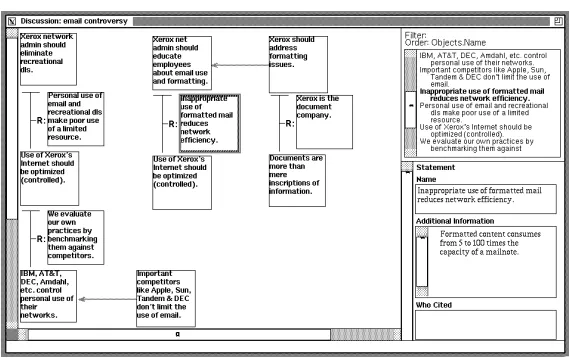
thus creating a new relation, or they can create a new relation and fill its slots with new or existing objects. Figure 5 shows an example of how a structure grows through chaining. In Figure 5a, the selected Statement “Use of Xerox’s Internet should be optimized,” which is already Grounds for one argument, is being used as the basis for creating a new Argument relation. In the new relation, the Statement will fill the Conclusion slot; the other two slots will be empty. Figure 5b shows the results of this operation.
Users develop and modify schemas with a schema editor as shown in Figure 6. The types that are included in the schema may be selected from the list on the left side of the window. The schema “Simple Arg” shown in the figure includes four types, a Statement basic object, an Argument rela-tion, a CounterArg relarela-tion, and a Note basic object. The Argument relation has been selected for editing.
Users edit types with a separate type editor. The type editor allows users to name a type, list its supertypes, define its slots, and specify its graphic appearance. Figure 7 shows the type editor invoked on the Argument relation. It has no supertypes beyond the system types of Relation and Basic Object. It contains three entity-valued slots, Grounds, Conclusion, and Rationale. Its graphic appearance is shown in the editing pane on the right hand side of the window. In Figure 7, one of the lines has been selected; a user is changing its color to red and its width to 2.
6. Implementation Notes
Aquanet runs on Unix workstations and can be used from any workstation or personal computer that supports X Windows. A color monitor is useful but not required. Aquanet is written in CLASS, a single inheritance object extension to “C”, and built on the Andrew Toolkit [Pala88]. A relational database server is used to store the knowledge structures and the user-defined schemas.
Figure 4: An Aquanet window.
Figure 6.11:Aquanet workspace (Marshall et al., 1991).
on the predefined library of network structures; instead they tried to define their own
schemas for hypertext structures, and were consequently frustrated by a system unable
to support flexible schema modification (Marshall et al., 1994). Similarly, (Isenmann and Reuter, 1997) reported frustrations with the structures and methodology enforced
by IBIS-based systems like gIBIS.
Aquanet users got around this problem by using the main workspace as a “drawing board”, in which developing relationships between nodes were expressed spatially by
placing similar objects in piles (Marshall and Rogers, 1992). The use of spatial and
[image:17.596.174.459.381.560.2]map-Planning Context Building Structure Building Integrated Writing
VIKI · ◦URL slots • ·
VKB · ◦URL slots • ◦global links
ART · · ◦linear ·
Tinderbox · ◦URL attributes • ◦Web site builder
Table 6.8: Correlation of emergent hypertext writing tools to Associative Writing
activities.
based hypertext systems, but also to traditional hypertext systems and in the physical arrangement of paper and notecards (Marshall and Shipman, III, 1993), leading to
the introduction of emergent tools which support free-form expression and the gradual emergence of structure.
SEPIA’s content space and Writing Environment’s network mode are early examples
of emergent tools, since they allowed writers to express relationships between ideas by
placing them in piles. More recent tools have more sophisticated features. Map-based “spatial hypertext” tools such as VIKI (Marshall et al., 1994) and the Visual Knowledge
Builder (VKB) (Shipman III et al., 2001) allow authors to represent and explore
rela-tionships by colouring, shaping and arranging visual objects in the workspace, widening the conventional node-link hypertext model by taking advantage of spatial proximity
and visual cues. Spatial hypertext tools allow writers to take advantage of visual and spatial recognition (remembering the location of a node in a visual workspace as
op-posed to remembering the navigational path leading to it) and construct ambiguous
links (node placement can imply some indecision or potential for a relationship) (Ship-man and Marshall, 1999). Visual languages (for example, colour-coded nodes) emerge
or evolve as the writer’s understanding of a task evolves (Marshall and Shipman, III,
1997a), indicating that users adapt their solution strategies as they gain more insight into their task. Systems with predefined link types and relations make the overhead
for making such changes mid-task overwhelming; spatial hypertext therefore lowers the
writer’s effort of expression (Shipman III et al., 2001). Indeed, spatial hypertext tools such as Web Squirrel (Simpson, 2001) and Tinderbox (Eastgate Systems Inc., 2002) have
become popular for Web foraging and personal information management.
ART (Yamamoto et al., 2002) uses spatial positioning to support the early stages of linear information authoring. The Hyper-Object Substrate (HOS) (Shipman, III and
McCall, 1994) was a document-based system that used textual analysis to support
emer-gent structures by suggesting new formalisations for addition to the writer’s information space. While the writer created pages with text and graphics, HOS looked for textual
cross-references between information chunks, making suggestions for attributes and
rela-tions based on these cross-references. Table 6.8 summarises the potential contriburela-tions selected emergent tools make to the challenge of supporting Associative Writing in the
6.2.3.1 VIKI
VIKI (Marshall et al., 1994) was designed to support the new interface requirements
arising from observations of the use of Aquanet (Marshall and Rogers, 1992) in support-ing “information triage” (Marshall and Shipman, III, 1997b) — the process of sortsupport-ing
through materials and organising them to meet the needs of a particular task.
VIKI’s hypertext data model provided three kinds of elements for representing emergent structure: objects, collections, and composites. Objects held content, and were
repre-sented by one or more visual symbols in the workspace, each of which could have different
size, shape, colour, line thickness, and font characteristics. New objects could be cre-ated quickly — Aquanet users were frustrcre-ated by the need to specify what type of node
they were creating before entering any text. Like Aquanet, VIKI objects held content
in a number of slots, but these slots could be created in an ad-hoc fashion. Collections contained spatial arrangements of objects (and other nested collections). Composites
were lightweight structures that consist of particular visual/spatial configurations of a
combination of two or more objects or collections. In order to express relationships or categories in VIKI, symbols are simply placed near one another in piles or lists, or placed
in a collection.
As with Aquanet, VIKI also had a typing mechanism. However, VIKI type specifications were not rigid, and only intended to combine semantic information about objects (for
example, default slot values) and visual information about the symbols (for example,
default colour and shape). An integrated spatial parser assists writers in a variety of ways by recognising implicit structure in the spatial and visual attributes of the symbols
and suggesting collections and composites.
The VIKI approach seems particularly suitable to the context building and structure building activities of Associative Writing. However, although VIKI objects could refer
to existing Web pages — URLs could be manually entered in content slots, enabling
externally referenced material to be viewed by activating a Web browser (Shipman, III et al., 1997) — specific content from pages must be copied into a separate content slot and
(unlike Synthesis Writing Toolkit) the location of the content in the source document is
not recorded. Structure building could be supported through VIKI’s nested collections.
6.2.3.2 Visual Knowledge Builder
The Visual Knowledge Builder (VKB) system built on the successes of VIKI — for example, the “Suggestion Manager” extends VIKI’s spatial parser (Shipman et al., 2002)
— and attempted to address its issues and limitations (Shipman III et al., 2001). In
not support integrated writing in the Web). Typically, the readers and writers of the hypertext are the same group of people, so there is less emphasis on the presentation
of information and little support provided to allow others to understand the hypertext.
This limited the applicability of such spatial hypertext systems. VKB attempted to enable the more general use of spatial hypertext by addressing four major problems:
1. Interpreting changing visualisations — as visual languages evolve, prior encodings may become ambiguous. A navigable history mechanism enables the
construc-tion of the hypertext to be witnessed by moving through the prior states of the
workspace, thus helping users to understand and interpret a writer’s work practices and disambiguate specific actions.
2. Interference between visualisation and visual materials — VIKI could only display text in the workspace. Although (Robertson et al., 1998) have demonstrated that
the display of images, video, and 3D renderings in a spatial workspace is technically
possible, the challenge is to display visual materials in such a way that they can be also be visually interpreted as part of the spatial hypertext. In VKB image
objects retain borders and backgrounds so the same methods and visual languages can be used for interpreting images as for interpreting text.
3. Cross-space relationships — to express relationships between objects in a spatial hypertext, they must either have related visual attributes or placement. However,
an object may have different relationships in different contexts. VIKI allowed each
object to have multiple visual symbols, but this proved unintuitive for many users. VKB reintroduces explicit links to allow the expression of relationships between
objects that are placed far away from each other. Local links connect objects in
the same workspace, and may also transport the user “through time” to previous states of the hypertext. By linking to prior states, a hypertext can discuss its own
evolution, promote the exploration of prior states, and direct readers to important
periods of the hypertext’s emergence.
4. Publishing Spatial Hypertexts on the Web VIKI allowed content objects to point to Web pages, but external documents cannot link to the spatial hypertexts. VKB’s
global links are pointers to objects in other spatial hypertexts on the Web.
As would be expected from a tool that builds on VIKI, the VKB approach also seems
suitable for the context building and structure building activities of Associative Writing.
Integration in context building is still limited in the VKB approach however; although drag-drop capabilities have been added (writers can drag URLs, content, and
docu-ments into the workspace to create new nodes) references to original sources are still not
recorded. Like VIKI, the structure building activity could be supported through nested collections (Figure 6.12). VKB’s global links may support integrated writing within the
Figure 6.12: Nested collections provide an overall structure to a Visual Knowledge
Builder workspace (Shipman et al., 1999).
the Web), but the workspace is not closed to other tools — the representation can be
exported in different encodings, including HTML and XML (Shipman et al., 1999).
6.2.3.3 ART
(Yamamoto et al., 2002) described a series of spatial hypertext systems that support
the early stages of linear information authoring, such as writing and movie editing. The ART (Amplifying Representational Talkback) series used spatial positioning of objects
as a means to interact with linear information being composed. Users generate a “part”,
and then specify where to put it in the linear composition by arranging the part in 2D space. Positioned parts are serialised (from left to right or top to bottom) to construct
the linear composition. The user does not interact directly with the linear information
being authored, but composes it by interacting with the spatial representation.
Figure 6.13 shows an ART tool for writing. The writer generates chunks of text in the
Element Editor (EE), which appear as nodes in the Element Space (ES). The writer
then specifies where to insert the nodes in the linear document by positioning the node in the Element Space — the corresponding view in the Document Viewer (DV) is
up-dated accordingly. In the context of Associative Writing, the ART approach only really
Chapter 6 Tools for Associative Writing 107 (3) “be quiet” not offering disturbing services.
We have so far applied the model and conducted interaction design based on the ART principle for four different linear-information authoring domains: for writing (ART#001), for notes-summarization (ART#002), for multimedia-data analysis (ART#003), and for movie editing (ART#004). Using ART as a design principle has resulted in a set of design features that characterize the ART systems, such as how to represent objects in the space, how to allow users to manipulate objects in the space, and how to allow users to change the size of the space. The next section takes ART#001 as exemplary and describes in detail how such design decisions features support linear-information authoring using the spatial hypertext representation.
3. ART#001 FOR WRITING
3.1 A System Overview
[image:22.596.174.455.81.302.2]Before describing detailed interaction design decisions with our systems, we first give an overview of how a user interacts with the ART#001 system. Figure 3 shows a screen image of the ART#001 system.
Figure 3: The ART#001 System for Early Stages of Writing
With ART#001 for text editing, a user generates a chunk of text (words, sentences, or paragraphs) in EE, and then clicks the
Accept button. Then, the edited text appears in DV and becomes an element in ES. Elements are represented with segmented sidebars in DV and are also represented as thumbnails in ES (a certain amount of a part of the text is shown in a thumbnail by default). The user specifies where to insert the text chunk in the currently composed linear information in DV by dragging the element in ES changing the vertical relationship with the other elements in ES.
ART#001 uses a notion of “selection” of elements. Elements are either selected or not selected, specified by mouse clicking. If a single element is selected, the content of the element is shown in EE and becomes editable. Selected elements are visually
element shown in EE represents a focused part of the currently composed linear information. DV shows the entire linear document in a scrollable window, which provides a detailed view of the whole. ES shows an overview of the whole document by showing all the elements. Thus, DV and ES together shows a unified whole of the linear information being authored.
The ART principle emphasizes the importance of visual feedback. A user’s particular action in one part of the system needs to be appropriately reflected in other parts of the system as visual feedback, which would then give the user a feeling of an integrated behavior among the three components. Table 1 in Appendix A summarizes what the user does in order to achieve a goal, and how ART#001 reacts to the user’s action in each of the three components.
The most critical aspect of integrating the three components is that the positioning of elements in DV is dynamically manipulated through dragging elements in ES. This needs to hold even during the user dragging an element in ES wondering where to put it. In ART#001, the vertical relationships among elements in ES is reflected in the content of DV (i.e., serialized contents of the elements in ES) in a real-time manner. Selecting an element in ES by clicking makes DV scroll so that the content of the selected element is visible in the DV window. Selecting text in DV also results in the selection of the element in ES. These interactions allow the user to focus on an element both from the linear representation (in DV) and from the spatial representation (in ES).
3.2 Design Decisions and Rationale for
Implemented Design Features
This subsection gives a detailed explanation of a major part of the design decisions that have been made for ART#001. We describe a list of design features and their underlying rationale.
3.2.1 EE as an Individual Component
Existing spatial hypertext systems mostly allow a user to edit a chunk of text within a space. This requires the user first to specify where to put an object in a space, then to start editing the object.
In contrast, our decision is that we provide the EE component where the user generates and edits each element and that we do not allow the user to edit an element within ES. This decision has been made because of the two following reasons.
First, we argue that in supporting linear-information authoring, it is important that the user can first generate a part, and then decide where to put it. Using EE, the user is allowed to start typing text in EE without deciding where this text would be placed in the existing linear information. As soon as the user starts editing the content in EE, the color of the Accept button changes darker to remind the user that the change has not been accepted and thereby not reflected in the linear information being authored. When the user feels that he/she has externalized a certain chunk of information, he/she clicks the Accept button, then the chunk appears as a text in DV and as a floating thumbnail in ES.
By dragging the element in ES, the user can decide where to put it in the linear document by comparing with existing elements both in DV and in ES, seeing how the text contents flow with the newly edited element. In one of our earlier user studies, we have
38
Figure 6.13: ART#001 workspace (Yamamoto et al., 2002).
6.2.3.4 Tinderbox
Tinderbox (Eastgate Systems Inc., 2002) combined elements of StorySpace, VIKI, Visual Knowledge Builder, and ART into a lightweight tool chiefly aimed at personal content
management and organisation. Tinderbox provided a number of different views of the
nodes in the workspace. Map view, most similar to VIKI and VKB’s workspace, showed content nodes (notes) as visual symbols, each of which could have different visual
charac-teristics. In Map view, as with VIKI, VKB, and ART, developing relationships between
notes in the Tinderbox workspace could be expressed spatially by placing similar notes in clusters or piles. Tinderbox also allowed explicit links (with arbitrary types) between
notes to be created (displayed using StorySpace style arrows — Figure 6.14). Other
views of the information space include Outline, Chart and Treemap, which showed the hierarchical structure of notes, but not links, as an indented outline, tree chart, and as
boxes within boxes (similar to VIKI and VKB’s ‘collections’). Although VIKI’s
mecha-nism for allowing each note to have multiple visual symbols proved unintuitive, and was later replaced by cross-space relationships in VKB (Shipman III et al., 2001), Tinderbox
retains this mechanism in the form ofaliases.
The Tinderbox approach seems best suited to the context building (Map view) and structure building (Outline, Chart, and Treemap views) activities of Associative Writing.
However, integration with source documents still remains limited — although content
can be dragged and dropped to form new nodes in the workspace, URLs of source documents must be manually specified using note ‘attributes’ (analogous to VIKI and
VKB’s “slot” mechanisms — Figure 6.15).
Figure 6.14: Tinderbox workspace (Eastgate Systems Inc., 2002).
Figure 6.15:Setting a URL attribute in a Tinderbox note (Eastgate Systems Inc., 2002).
and VKB), AutoFetch notes (notes in which the content is periodically fetched from a specified URL, for example a “today’s headlines” note) and programmable agents.
Tinderbox also provided some sophisticated mechanisms for turning notes into a Web
site, including specifying layout and design, and selecting what will be published and
what will be kept private. Notes are combined with XML or HTML based export
templates which describe which parts (attributes) of the note to share, and how they
should appear on the Web page (for example making URL attributes into HTML links). Compound pages can be built from the combined content of several notes, including
those created by user-programmed agents, for example, a researcher’s home page which lists interests (extracted from a note), and links to publications (built by gathering the
titles of all the publication notes and sorting them by date). Tinderbox workspaces may
Planning Context Building Structure Building Integrated Writing
Wiki · · · ◦ WikiWords
StorySpace · ·closed • · closed
Connection Muse · · ◦text components ·
Hunter Gatherer · ◦select/collect · ◦ Collection View
Table 6.9: Correlation of permissive hypertext writing tools to Associative Writing
activities.
6.2.4 Permissive Tools
In permissive tools, connections are unconstrained and intimately tied to the writer’s
perceptions of relationships between nodes. The Web hypertext model (Berners-Lee et al., 1992) supports simple, unconstrained linking; the popular Web editing tools listed
at the beginning of this chapter (Microsoft Frontpage, Mozilla/Netscape Composer, Amayaetc.) are therefore examples of document-based permissive writing tools. Other
hypertext writing tools in this space include Wiki (Leuf and Cunningham, 2001), a
document-based Web page writing environment and Hunter Gatherer (schraefel et al., 2002), a document-based tool for harvesting information from the Web. Although this
work focuses on integrated non-fictional hypertexts, the (permissive) hypertext fiction
tools StorySpace (Bernstein, 2002) and Connection Muse (Kendall and R´ety, 2000) bear some examination in this context. Table 6.9 summarises the potential contributions these
tools make to the challenge of supporting Associative Writing in the Web.
6.2.4.1 Wiki
A wiki is a Web-based tool for collaborative idea exchange and writing in the Web,
designed to be informal, quick and accessible (Leuf and Cunningham, 2001)3. Wikis are freely expandable collections of interlinked pages which are easily editable by any
user with a forms-capable Web browser. Indeed, wikis are not carefully crafted sites for
casual visitors; instead they seek to involve the visitor in an ongoing process of creation and collaboration that constantly changes the landscape of the site. Each wiki invites
all users to edit any page or to create new pages within the site, and does so on a
democratic basis — every user has exactly the same capabilities as any other user and accounts and passwords are not required. Writing takes place in a text environment
using simple markup conventions (Figure 6.16). Hypertext links in wikis are designed to
be as simple to create as possible: every page has a title consisting of joined capitalised words (for example “WikiWikiWeb”), called “WikiWords”. To create a link in edit
mode, the author just types a WikiWord. The WikiWord approach seems applicable to the integrated writing activity of Associative Writing, since it helps writers to easily
integrate a number of existing resources (provided they exist on the same wiki site).
3
(a)
(b)
Figure 6.16: Browsing and editing a page from the WikiWikiWeb.
Figure 6.17:Part of the Storyspace map from Victory Garden (Moulthrop, 1991).
6.2.4.2 Storyspace
The main interaction with the StorySpace tool (Bernstein et al., 1991; Bernstein, 2002)
is through a graphical workspace, in which small rectangular symbols (writing spaces)
representing nodes are visually connected by link arrows (Figure 6.17), although note symbols may also be arranged spatially and coloured. Each writing space has two roles:
it contains text (including images) and it occupies a place in the evolving structure of
the hypertext; each writing space therefore contains a textual component (the content of which is edited and viewed through an integrated document viewer), and a structural
component in which further writing spaces may be nested.
As with other map-based writing tools such as gIBIS, MacWeb, and Aquanet, users manipulate the structure of the hypertext directly by arranging, opening, and closing
writing spaces — links between spaces are not disrupted by reorganisation. However,
StorySpace differs from these tools (and hence is distinguished as a permissive tool) in that links can be assigned semantic types by the addition of an arbitrary text label; link
behaviour can also be specified to change during the course of reading (for example,
in-cludingafternoon, a story (Joyce, 1990) and Victory Garden (Moulthrop, 1991). Being designed with hypertext fiction in mind, StorySpace provides no mechanism for
identi-fying or ‘importing’ existing content, and therefore the StorySpace approach is not well
suited to supporting the context building activity of Associative Writing. However, as we have seen with VIKI and VKB, nested collections provide writers with a mechanism
for imposing an overall structure on the hypertext. Although StorySpace hypertexts
may be exported as a set of interconnected Web pages, the otherwise closed nature of the system means that this approach is unsuitable for supporting the integrated writing
activity.
6.2.4.3 Connection Muse
Connection Muse is a toolkit for writing adaptive hypertext poetry and fiction for the
Web (Kendall and R´ety, 2000). In creating such hypertexts, the writer is faced with the challenge of creating opportunities for structural growth which successfully guide
the readers understanding of the text. Only the writer knows the text intimately, and
understands the long-range implications of different structural possibilities: Connection Muse is therefore designed to help the writer to capture this knowledge and define how
structure should emerge from the reading of the hypertext.
Similar to StorySpace, writers can specify links which only become available when some prerequisite criteria has been fulfilled (conditional links), and also links which have
a dynamically selected destination (multilinks). Nodes can also grouped into ordered
or unordered sets called text components. Nodes in an ordered text component have a progressive relationship to one another, such as a narrative thread. Nodes in an
unordered text component have an associative relationship to one another, such as a
particular character, locale, object or event.
Large-scale structural relationships within the hypertext can be expressed by using text
components as link destinations. Entry behaviours can be specified for destination
text components, including the random selection of a node from an unordered text component, or the selection of the first unvisited node in an ordered text component.
As examples, Figure 6.18a specifies a conditional link which targets node1.htm unless
it has already been visited, in which case it targetsnode2.htm; Figure 6.18b specifies a multilink that targets the first unvisited node in the ordered text componentsubplot1.
In terms of Associative Writing, therefore, the Connection Muse approach seems best suited to the structure building activity.
During subsequent reading, Connection Muse models the reader’s growing knowledge of
the structural components of the hypertext, and adapts the navigational elements of the
hypertext according to the writer-defined behaviours. For example, the hypertext poem
(a) (b)
Figure 6.18:Creating a conditional link (a) and multilink (b) in Connection
Muse (Kendall and R´ety, 2000).
dark green for unvisited nodes, light green for nodes previously visited in a different
context, and white for nodes previously visited in a similar context.
6.2.4.4 Hunter Gatherer
Hunter Gatherer (schraefel et al., 2002) allows writers to harvest information from within Web pages into editable collections. Collecting information from the Web with Hunter
Gatherer is straightforward: users select the required information, and then press a key
to add it to their collection. The system automatically gives the information compo-nent a title, adds the URL as a link back to the source document, and renders the
location of the selected information as an XPointer (part of the XML Linking standard
— Section 4.3). This approach seems to map best to the context building activity of Associative Writing, in that it allows writers to gather relevant existing content into a
series of named collections (although relationships cannot be captured explicitly, gather-ing related material into the same collection could imply the relationship). The browser
integration and subsequent transparency of the select/add process means that users can
focus their main attention on the information gathering task rather than continually shift that focus to other applications, for example Compendium or Visual Knowledge
Builder. Hunter Gatherer therefore minimises the “forced divided attention” introduced
Planning Context Building Structure Building Integrated Writing
WE · · • ·
SEPIA • ◦ • ◦
SWT • • • ·
gIBIS · · • ·
ScholOnto · ◦ · ·
MacWeb · · ◦ ·
Aquanet · · • ·
VIKI · ◦ • ·
VKB · ◦ • ◦
ART · · ◦ ·
Tinderbox · ◦ • ◦
Wiki · · · ◦
StorySpace · · • ·
Conn. Muse · · ◦ ·
H. Gatherer · ◦ · ◦
WebVise · • · ·
Frontpage ◦ · ◦ ◦
• Strength
◦ l
· Potential weakness
Table 6.10:Correlation of all hypertext writing tools to Associative Writing activities.
A separate List/Edit window displays a list of the collected information. Users can
rename, sort and delete components, and give the collection a title. The user can also select a “Collection View”, where the content of each component is retrieved (there is no
copying of content, only referencing of content addresses via an XPointer) and displayed
in the browser as a linear list. Each component appears in the list with the source page URL as a link. In an Associative Writing context, the Collection View approach may
help the writer create a hypertext which integrates the collected material.
6.3
Discussion: Introducing a More Specific Focus
Table 6.10 collates each of the hypertext writing approaches reviewed in this
chap-ter according to the potential contributions each approach makes to the challenge of supporting Associative Writing in the Web. The table also attempts to position work
discussed in previous chapters in relation to the hypertext writing approaches discussed
here.
WebVise (Grønbæk et al., 1999), introduced in the survey of “augmented Web” work reported in Chapter 4, is a document-based permissive tool (although note that the
suitable to the context building activity: writers can apply annotations to Web pages, and connect related ideas in pages usinganchored links.
ScholOnto (Buckingham-Shum et al., 2000), introduced as a Semantic Web initiative in
Chapter 5, is a prescriptive tool (links are constrained according to an ontology) which facilitates both document-based (Web based forms for creating concepts and claims)
and map-based (Questmap-based interface for creating concepts and claims, generated
visualisations) interactions. The ScholOnto approach (which focuses supporting human understanding using Semantic Web technologies, rather than explicitly on supporting
writing) seems closest to the context building activity of associative writing: users
de-scribe source documents using one or more concepts, and then contribute to an under-standing of how these concepts relate to the literature by expressing their individual
interpretations usingclaim links).
The permissive word-processor based Microsoft Frontpage Web composition tool is also included in the summary, since it offers some features beyond a the straightforward
text-editing environment typical of other popular tools. Frontpage’s ‘Task’ view approach
(Figure 6.19a) for example, although perhaps less complex than the SEPIA’s planning space and Neuwirth & Kaufer’s Goal Tree, could provide some support for the planning
activity. The ‘Navigation’ view (Figure 6.19b) helps the writer define an overall structure
— or local coherence (Moulthrop, 1992) — for a set of Web pages. The text-editing environment itself allows writers to anchor links to existing material (although these
links are subject to the limitations of the Web’s hypertext model, and are less easy to
specify than WikiWords), and thus create the kind of integrated hypertexts uncovered in Chapter 3.
Overall, this chapter has seen a trend away from early ‘complete’ solutions for supporting
the writing process such as Writing Environment, SEPIA, and the Synthesis Writing Toolkit (1980s), towards tools more specific and specialised to a particular writing task
or activity where an end product may not necessarily be in traditional written hypertext
form (for example, spatial hypertext for information triage in the 1990s) — cf. Neuwirth and Kaufer’s early indications that writing should be considered as an “open-ended
design task” (Neuwirth and Kaufer, 1989). As a result there seems to be no ‘complete
solution’ to the challenge of supporting Associative Writing in the Web (the SEPIA approach seems to come closest, but this early system is not Web-based). Addressing the
challenge will therefore require a combination of elements from more recent approaches.
A number of approaches which could support the structure building activity provide a good foundation for extension. These approaches help the writer create a
hierarchi-cal (Writing Environment, VIKI, Visual Knowledge Builder, Tinderbox, StorySpace) or
argument-based (SEPIA, Synthesis Writing Toolkit, gIBIS, Aquanet) document struc-ture (note that although the descriptive tool Aquanet is used to create an
(a)
(b)
Figure 6.19: Task and Navigation views in Microsoft Frontpage.
creation of a hierarchy or other more specialised structure). Some of these tools al-ready have impressive features, for example VKB’s navigable history mechanism and
Suggestion Manager, and Tinderbox’s Web site building mechanisms.
Foundations for supporting the context building and integrated writing activities, how-ever, are less stable. These activities are closely tied; in order to produce a written
hypertext which integrates existing Web content (integrated writing), writers must be
supported in selecting (or otherwise identifying) and exploring that content in the con-text building activity. Table 6.10 shows that the SEPIA, Visual Knowledge Builder,
Tinderbox, and Hunter Gatherer approaches (highlighted) could come close to
support-ing both activities: SEPIA’s content space may include existsupport-ing materials, which are then integrated into the final hypertext form (although it is not clear whether existing
material is referenced or copied); Visual Knowledge Builder offers some Web integration
through URL slots, andglobal links provide opportunities for creating integratedspatial
hypertexts; Tinderbox also offers some integration though URL attributes, which can
be used to create links to other Web pages using Tinderbox’s Web site builder tools;
Hunter Gatherer allows users to select existing content from Web pages directly, and then generate an integrated “Collection View”, but lacks many other features (such as
allowing the writer to contribute new content and to explore the relationships between
collected content).
Clues as to how to build on these systems may be obtained from other approaches which
could support context building well (but not integrated writing). WebVise and Synthesis