Object Design Considerations for Tangible Musical Interfaces
Martin Kaltenbrunner
?Music Technology GroupAudiovisual Institute - Universitat Pompeu Fabra Ocata 1, 08003 Barcelona, Spain
Sile O’Modhrain
†
Palpable Machines Group Media Lab Europe Sugar House Lane, Dublin 8, Ireland
Enrico Costanza
‡
Liminal Devices Group Media Lab Europe Sugar House Lane, Dublin 8, Ireland
Abstract
In this paper we describe object design considerations for the reacTable* project, a novel tangible musical instrument, developed at the Audiovisual Institute at the Universiat Pompeu Fabra. The work presented in this paper is the result of a collaboration with the Palpable Machines Group at Media Lab Europe, which focussed on haptic design aspects of the reacTable* instrument. We present a simple haptic encoding scheme for the mapping of abstract sound synthesis objects onto tangible proxy objects.
1
Introduction
The reacTable* is an electro-acoustic musical instrument in the tradition of Jord`a’s FMOL synthesizer (Jord`a, 2002). The aim is to create a tangible electronic mu-sical instrument that allows expressive collaborative live performances for professional musicians without the lim-its of many screen-based interfaces for electronic music. Many of these interfaces have very limited control possi-bilities and provide little feedback on the creative process for both the performer and the audience. As suggested by its name, the reacTable* is a table-based instrument, allowing direct manipulation of any object in the synthe-sis chain. By arranging a set of objects that are available on the table surface, the performer constructs and plays the instrument at the same time. Each of the objects has a dedicated function for the generation, modification or control of sound flow, and reacts with compatible objects near it. While the table itself is equipped with sensors for the identification and tracking of the objects’ position and state, the performers do not need to wear any con-troller devices or sensors. In addition to the sound which is obviously produced while playing, the reacTable* also provides visual feedback by projecting a graphical rep-resentation of the sound and control flow onto the table surface. In order to create a truly multi-modal interface experience particular effort has been spent on the haptic design of the object and table properties. This paper re-flects the current state of the instrument, which still dif-fers in various aspects from the final design; especially its size will be significantly bigger than the current pro-totype. For a more detailed description of the original reacTable* concept see (Jord`a, 2003).
2
Instrument Components
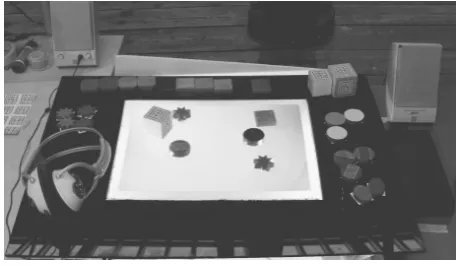
During the initial project phase we have been develop-ing the basic reacTable* concepts within a software pro-totype only, simulating the tangible user interface compo-nent with a graphical interface. This approach allowed the rapid prototyping and the introduction of new syn-thesizer and interaction elements without worrying about sensor and hardware problems. At a second stage we added the d-touch computer vision framework (Costanza et al., 2003a), which allowed the construction of a first stage tangible prototype including a set of reacTable* ob-jects.
bot-tlenecks since each of these modules requires significant computational resources. In this paper though, we will focus on the tangible controller, which is comprised of a transparent Perspex panel and a set of hand crafted ob-jects, which will be discussed in detail below.
3
Synthesis Object Types
The reacTable* objects can be generally categorized into seven different functional groups: Generators, Audio Fil-ters, Controllers, Control FilFil-ters, Mixers, Clock synchro-nizers and Containers. There are also some exceptions that do not fit within any of these categories.
• Generators are sound sources that can produce
var-ious types of synthesized or sample based sound. They have an audio output and various control in-puts. We are currently considering adding a sound input port to generator objects as well in order to al-low FM synthesis.
• Audio Filters can modify incoming sound based on
their internal algorithms, which can range from a simple band-pass filter to any possible sound effect. Filters have generally one or two sound inputs and a sound output as well as several inputs for control.
Control inputs permit the constant modification of the ob-ject parameters that can be controlled either by changing the spatial object properties (e.g. position, orientation, distance to the next object, angle to the next object, dis-tance to the center, angle to the center, etc.), in some cases even its morphological properties (e.g. bending, shape), or by connecting control data flows to their control inputs. These data flows are generated by a third object type, the Controllers.
• Controllers generally produce their control data by
algorithmic generation which can include from sim-ple low frequency oscillators to comsim-plex chaotic or fractal generators. Like in any other object, their respective parameters (e.g. frequency and range in a low frequency oscillator) depend also on the spa-tial properties of the object, and can be permanently modified. Controllers do not yet have inputs but we plan to implement this feature soon. With some exceptions, controller output is generally adimen-sional, which means that the effect of a controller depends on the control input it connects to.
Con-trol Filters process conCon-trol data. They have a conCon-trol
input and a control output, and unlike regular con-trollers, their output can sometimes be dimensional; the output values of a harmonizer or a chord genera-tor, for example, are always mapped to pitch.
• The Mixer object can take various sound streams as an input and produces a single output stream. In-verted Mixers (Splitters) can split a single sound into multiple output streams.
• Clock synchronisers introduce a higher hierarchy;
they can influence several objects in their proximity at once and in several ways, like sending them syn-chronised triggers or correcting their low frequencies in order to match a given pulsation. Clock synchro-nisers have one fundamental parameter, tempo (they also have tempo subdivision), which can be modified by repeatedly hitting the object several times.
• High-level Container Objects can virtually contain any pre-built set of sub-patches, allowing the con-struction of more complex sound structures.
The objects do not need to be connected explicitly: a set of basic connection rules automatically connects com-patible objects in respect to their activation, distance or availability. This of course does not exclude the possibil-ity of an explicit connection gesture. See (Kaltenbrunner et al., 2004) for a more detailed description of the Dy-namic Patching concept.
4
Object Handling
The objects available on the table can be manipulated by the players in various ways, when placed on the table, an object is identified and activated, moving it on the ta-ble surface, its position is tracked as well as its rotation angle. Based on this position and orientation data, inter-object relations such as relative distance and angles are calculated.
Most reacTable* objects are plain and passive, mean-ing that they do not come with any cables, switches, but-tons whatsoever. The user also does not have to wear spe-cial sensors or controller equipment for the object han-dling: plain hands are the only necessary controller. This, of course, does not rule out the possibility of smart objects that incorporate additional internal electronics in order to retrieve some additional sensor data coming from squeez-ing, bending or bouncing them, like in the case of the Squeezables (Weinberg and Gan, 2002). In any case, this has to be achieved in a completely transparent way, using wireless technology for example, so that the performer can treat all objects in an equal way. A simple rubber hose is an example suggesting some of these additional con-trol possibilities, whose state could be either determined by the computer vision or by using some bending sen-sors like in the Sonic Banana (Singer, 2003), can serve as a bending controller producing multi-dimensional control data.
5
Tangible Object Types
As already stated above, the reacTable* objects are plain and passive objects, meaning that they generally do not come with any embedded electronics. This implies that we do not have access to any active or computer con-trolled haptic feedback (vibration, force feedback, etc.), and therefore we can only provide passive haptic feed-back as defined by the physical object properties only.
The reacTable* objects act as physical and tangible rep-resentation of the various virtual synthesis components. They are proxy objects, or phycons (Ishii and Ullmer, 1997), which allow the direct manipulation of any of these synthesizer components as required by the performer. Since most synthesizer objects are of rather abstract na-ture, we decided to reflect this in a more abstract object design as well. Complex everyday objects are used, but have some special functions as discussed below.
We have considered the various haptic dimensions such as shape, size, and material (including texture, weight, density, temperature) to create a suitable haptic encoding scheme for the various abstract object types and their vari-ations, in order to allow rapid and accurate object identi-fication by simply grasping them with the hand. We have been especially concentrating on haptic properties of the object’s top surface, but this was mainly due to the lack of available material variations.
5.1
Haptic Encoding
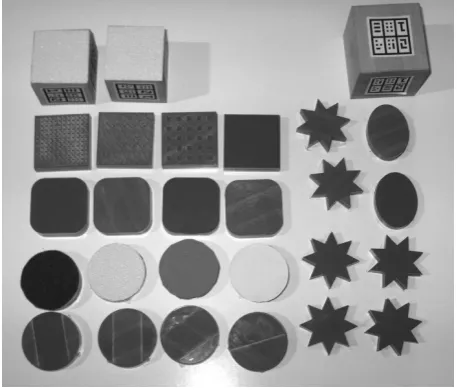
Shape defines the various generic object types, such as
generators (square), processors (circle), controllers (star) and mixers (triangle). Simple shapes are easily accessible both visually and haptically, and provide a suitable encod-ing for the abstract object types. Color would meet similar requirements but is only accessible in the visual domain. Simple geometric shapes can be identified quite easily with a grasp or hand enclosure. More complex shapes would require time consuming contour following with the hand (Lederman et al., 1996) and cannot always be iden-tified completely. Therefore we only defined a small set of easily distinguishable geometric shapes.
Size was not chosen as an encoding dimension,
be-cause, in traditional instruments, size often correlates to pitch (tuba – trumpet). Nevertheless we evaluated three different sizes: 4,6, and 9 cm diameter, which can be held and manipulated with three, four, or five fingers, at least by an average adult player. Both 2D (flat) and 3D (cubic) objects were constructed, although this feature is not used for encoding. We are using a wooden cube as a sample player; for example, where each of the six sides repre-sents a different sound sample.
Surface texture was chosen for encoding of the object
subsets. We are using two methods to create haptic sur-face cues. The first is laser engraving onto plastic sursur-faces to encode abstract haptic feedback, while attaching vari-ous materials such as felt or sanding paper onto the
ob-jects top surface can represent certain timbral properties of the sounding object. A simple clean sine wave, for ex-ample, can be represented with a clean surface; whereas a saw-tooth generator would come with a rough surface. Noise generators have a completely irregular texture and different types of sanding paper can represent a granular synthesizer. Further formal testing will evaluate the cor-rect mapping between the perceived surface and the sonic experience provided by the corresponding synthesis ob-ject.
Material We are using both natural and synthetic
ma-terial with different weight, density, thermal, and tex-ture properties. For each functional object, we are trying to choose a material which haptically represents a close match to the sonic properties of the virtual sounding ob-ject. For synthetic sounds, for example, we choose syn-thetic materials, such as plastic. A sound sampler there-fore, is best represented using organic materials such as wood. This early symbolic mapping needs to be evualated in later testing.
[image:3.595.313.542.540.735.2]Some examples: A sine-wave oscillator is a syn-thetic sound source with a smooth sonic appearance. According to our haptic encoding scheme, this can be represented by a plastic square with a smooth surface. A simple band-pass filter therefore results in a round plastic disk with a deep engraving through its centre. One of the sound effect filters was constructed by attaching felt on top of a round plastic disk. Furthermore, a wooden cube would be a sample source, while a cube made of a synthetic grainy material represents a granular synthesizer. This scheme was used to encode current reacTable* objects in the most meaningful way to the authors. In the future informal subject test will refine these mappings. Figure 1 shows the first set of re-acTable* objects as used in the current tangible prototype.
5.2
Everyday Objects
Ready made everyday objects are considered rather for the symbolic meaning and mechanical properties rather than matching them into the haptic encoding scheme. Within the reacTable*, these objects basically have three different functions:
• Containers are known and tagged objects that are
part of the provided object set, and can be used as sub-patch containers. Due to their highly symbolic meaning, sub-patch containers should be easily iden-tified and remembered by the player. They can in-clude any possible everyday object such as coffee mugs, chocolate bars or rubber ducks.
• Super-Controllers Ready made toys such as a
(flex-ible) wooden snake, can be introduced as a multi-dimensional super controller. This of course requires the previous programming of the behavior of such an object, as well as the mapping of the various control parameters. The object state should be tracked com-pletely by computer vision without any changes to the object itself. Only in special cases invisible and wireless sensor technology should be added.
• Visitor objects In the context of a public installation
one can expect visitors will place their own objects onto the table surface expecting them as well to in-teract with the intrument. Since one can anticipate somehow what visitors will carry (mobile phones, keys, glasses, ) these objects should be identified and integrated into the table: e.g. a mobile phone starts to play an annoying melody, or keys a rattling sound.
5.3
Further haptic design considerations
Haptic orientation cues The table edges are marked with a simple tape, which provides a haptic cue for the ta-ble dimensions, because, moving an object over this edge can be felt easily. The same principle was used to mark the table centre by applying a symbol made of transparent tape. This is both haptically and visually accessable, but does not interfere with the computer vision sensor. The localization of the table centre is important for the overall dynamic patch system.
Magnetic objects We also have been experimenting with magnets in order to provide a simple connection or compatibility cue. This idea produces a nice haptic ef-fect, but is unfortunately not very flexible. Ordinary mag-nets can produce three object classes: positive, negative and neutral. This problem could be overcome with elec-tromagnets that can be switched on or off, and even can change their strength, but this would require significant electrical power, which is not likely to meet our require-ments for plain object design.
6
Design Constraints
The current prototype is based on computer vision. This has the advantage of simplicity and low cost, requiring only an off-the-shelf USB web-cam. The d-touch frame-work is based on the localization and recognition of fidu-cial markers, namely black & white graphical symbols that can be printed on labels and simply attached onto the objects. This system is quite robust thanks to the concurrent design of the markers and detection algorithm (Costanza and Robinson, 2003). The obvious downside of this approach is the need for tagging the objects with visible labels, which is partly overcome by attaching the markers onto the object’s bottom side. The choice to place the camera below the transparent table also prevents oc-clusion of the objects by the player’s hand and body dur-ing the performance.
The label size, and thus the object size is constrained by the system resolution. This depends not only on the opti-cal resolution of the camera, but more significantly, on the available processing power. The lower the image resolu-tion, the bigger the objects have to be for correct recogni-tion. However, the image processing algorithm’s compu-tational cost has been observed to be approximately linear with the number of pixels. In fact, increasing the image resolution over 640 by 480 pixels would result in an un-acceptable temporal resolution, which is around 7Hz on our test system based on a 1 GHz Intel Pentium III pro-cessor. As discussed in (Costanza and Robinson, 2003), the marker size is also related to the maximum number of different objects supported by the system. We are using a marker set of 120 different symbols, which is currently sufficient, but could be easily exceeded by a larger collec-tion of objects, although it is unlikely that these would be used within a single session.
Currently the label size is around 3 by 3 cm on an inter-action surface of around A3. This is acceptable compared to the desired object’s size, based on our ergonomic con-siderations. Additionally, the topological approach used for the recognition (Costanza and Robinson, 2003) allows the design of labels of different shapes allowing more ob-ject and symbol variations, such as circles.
Computer vision generally has some considerable per-formance limitations, such as visual and temporal resolu-tion, as well as some side effects that are degrading recog-nition performance, such as poor lighting or motion blur. Even scratches on the table surface or dirt on the symbol markers affect the performance significantly.
7
Observations on related tangible
musical interfaces
Audio d-touch (Costanza et al., 2003b) is a collec-tion of three tangible interfaces for music composicollec-tion and performance: the Augmented Musical Stave, the
Tan-gible Drum Machine and the Physical Sequencer. Like
the current implementation of reacTable, it is based on the d-touch framework. In the layout chosen for audio d-touch a web cam observes the interactive surface from above so the fiducial labels are clearly visible to the user. This approach suffers from the occlusion problems men-tioned above, but permits a simpler system setup. Audio d-touch was conceived as a desktop instrument that can be used on any table; for example, in a house or a school. By arranging the interactive objects on the interactive surface the user can play notes and understand the musical score notation, create drum beats, or record and arrange audio samples in a loop. The interactive area is covered with a printed piece of paper where visual cues give hints about the mapping between the block position and the sound generation parameters.
The design of the interactive objects’ shapes has been mainly driven by ease of construction, leading to the use of simple rectangular blocks. These blocks are marked with machine-readable fiducial symbols as well as human-readable cues related to the object function. The musical notes used in the augmented stave have ob-vious meaning. The tangible drum machine blocks are as small as the system resolution allows them to be: in this case there are only two types of blocks (loud and quiet), so they are differentiated by the color of the sides.
Clearly, the cues currently used are merely visual. Sev-eral possibilities to improve the simple block design and make them distinguishable by touch are under considera-tion. For example, the block’s physical size can be related to the note length or to the drum sample volume. In the sequencer application, different block types can be associ-ated to different geometrical shapes. Functional areas on the interactive surface can be carved with different tactile textures.
The Audiopad (Patten et al., 2002) was primarily de-signed as a tangible instrument controller, the physical objects are mainly used to control a projected graphical user interface. Therefore, the objects, in this case mainly circular pucks, have the basic function of knobs like in a standard MIDI interface, mimicking their tactile and vi-sual appearance. An additional object, the Selector, is shaped in a different functional way, which adds direc-tional cues to make it easier to point to the desired selec-tion areas. Both object types have a simple push button on their top side, which allows the triggering of certain actions associated to each object. The Audiopad is using two RF tags for each object to track position and rotation. Due to physical limitations the current system can only track up to nine different objects.
The Music Table (Berry et al., 2003) uses the AR Toolkit (Kato and Billinghurst, 1999) computer vision en-gine, and reduces the tangible object design to a minimum by attaching the necessary symbols for the vision system onto simple cards. These card symbols are readable both by the user and the computer vision system. Rather than crafting physical objects, the Music Table places virtual 3D objects onto the card surface; a common augmented reality technique. While the physical table contains the set of tangible proxy objects, the player is actually con-trolling a screen based instrument representation. The system defines an interesting set of musical objects, and also tries to overcome the object-container problem as discussed in (Kaltenbrunner et al., 2004), by defining a manipulation card for virtual objects.
The Musical Trinkets (Paradiso and Hsiao, 1999) are a collection of tiny plastic toys equipped with wire-less magnetic ID tags. These objects are pre-loaded (by mapping sounds to their ID) with a certain musical be-havior, ”such as bird calls, shakers and percussive things” which is activated when an object is placed or moved to-wards a reader device. Distance to the sensor and speed of movement control the object’s sound. Other objects are modifiers, such as pitch-shifters or sound effects in-cluding vibrato. The Musical Trinkets also generate vi-sual feedback, which is projected onto the instrument’s surface.
[image:5.595.312.541.591.724.2]BlockJam (Newton-Dunn et al., 2003) uses, unlike the previously listed instruments, a set of sophisticated synthesis objects, which in this case aren’t simply proxies for virtual processing elements, but do actually carry the necessary circuits for sound processing within. Basically, they are square boxes with simple plugs on the edges, which allow the assembling of physical sound processing patches. The boxes also come with a small LED display array to provide visual feedback on the object’s state, and a touch-sensitive controller to program the object’s behavior using a dial gesture.
8
Future Work
In continuation of this work, we are planning to adapt the tangible reacTable* interface as a test platform for a for-mal evaluation of strategies for object-to-sound mappings in tangible musical instrument interfaces. We are plan-ning to use this platform for the further development and evaluation of our haptic encoding scheme; especially fo-cussing on the tactile surface and material properties and their mapping to sound timbre.
In the near future though we will continue to work on the completion of the sound synthesizer functionality as well as on the integration and refinement of the visual feedback. The final prototype will then also be subject to informal user tests and will be explored within first ex-perimental musical performances. We are also planning to focus on the various aspects of collaborative musical performance.
9
Acknowledgments
The authors would like to thank the following people who have contributed to this work: The reacTable* team: S. Jord`a, G. Geiger, and I. Casasnovas at the Pompeu Fabra University. D-touch framework: S. B. Shelley and J. Robinson at the University of York. Media Lab Europe for providing the facilities and materials for object man-ufacturing, and Sam Inverso for his proof reading. This work was partially supported by a European Commission Cost287-ConGAS action grant for a short term scientific mission.
References
R. Berry, M. Makino, N. Hikawa, and M. Suzuki. The augmented composer project: The music table. In
.Proceedings of the 2003 International Symposium on Mixed and Augmented Reality, Tokyo, Japan, 2003.
E. Costanza and J. Robinson. A region adjacency tree approach to the detection and design of fiducials. In
Proceedings of Vision, Video and Graphics, Bath, UK,
2003.
E. Costanza, S. B. Shelley, and J. Robinson. D-touch: A consumer-grade tangible interface module and musical applications. In Proceedings of Conference on
Human-Computer Interaction (HCI03), Bath, UK, 2003a.
E. Costanza, S. B. Shelley, and J. Robinson. Introduc-ing audio d-touch: A tangible user interface for mu-sic composition and performance. In Proceedings of
the 2003 International Conference on Digital Audio Ef-fects, London, UK, September 8-11 2003b.
H. Ishii and B. Ullmer. Tangible bits: Towards seamless interfaces between people, bits and atoms. In
Proceed-ings of CHI 97 Conference on Human Factors in Com-puting systems, Atlanta, USA, 22-27 March 1997.
S. Jord`a. Fmol: Toward user-friendly, sophisticated new musical instrument. Computer Music Journal, 26(3): 23–39, 2002.
S. Jord`a. Sonigraphical instruments: From fmol to the reactable*. In Proceedings of the 3rd Conference on
New Instruments for Musical Expression (NIME 03),
Montreal, Canada, 2003.
M. Kaltenbrunner, G. Geiger, and S. Jord`a. Dynamic patches for live musical performance. (submitted to NIME04), 2004.
H. Kato and M. Billinghurst. Marker tracking and hmd calibration for a video-based augmented reality confer-encing system. In Proceedings of the 2nd International
Workshop on Augmented Reality (IWAR 99), San
Fran-cisco, USA, October 1999.
S. J. Lederman, C. Summers, and R.L. Klatzky. Cognitive salience of haptic object properties: Role of modality encoding bias. Perception, 25:983–998, 1996.
H. Newton-Dunn, H. Nakao, and J. Gibson. Block jam: A tangible interface for interactive music. In Proceedings
of the 2003 International Conference on New Inter-faces for Musical Expression, Montreal, Canada, May
22-24 2003.
J. Paradiso and K. Hsiao. A new continuous multimodal musical controller using wireless magnetic tags. In
Proceedings of the 1999 International Computer Mu-sic Conference, pages 24–27, Beijing, China, October
22-28 1999.
J. Patten, B. Recht, and H. Ishii. Audiopad: A tag-based interface for musical performance. In Proceedings of
the 2002 International Conference on New Interfaces for Musical Expression, Dublin, Ireland, May 24-26
2002.
M. Puckette. Pure data. In Proceedings of the
Inter-national Computer Music Conference, San Francisco,
USA, 1996. International Computer Music Associa-tion.
E. Singer. Sonic banana: A novel bend-sensor-based midi controller. In Proceedings of the 3rd Conference on
New Instruments for Musical Expression (NIME 03),
Montreal, Canada, 2003.
G. Weinberg and S. Gan. The squeezables: Toward an expressive and interdependent multi-player musi-cal instrument. Computer Music Journal, 25(2):37–45, 2002.
M. Wright, A. Freed, and Momeni A. Opensound con-trol: State of the art 2003. In Proceedings of the 3rd