2
Simple Graphics
• Graphics • Point • Dimension • Shape • Rectangle • Polygon • Image
• MediaTracker
This chapter digs into the meat of the AWT classes. After completing this chapter,
you will be able to draw strings, images, and shapes via theGraphicsclass in your
Java programs. We discuss geometry-related classes—Polygon, Rectangle, Point,
and Dimension, and the Shape inter face—you will see these throughout the remaining AWT objects. You will also learn several ways to do smooth animation by
using double buffering and theMediaTracker.
After reading this chapter, you should be able to do simple animation and image manipulation with AWT. For most applications, this should be sufficient. If you want to look at AWT’s more advanced graphics capabilities, be sure to take a look
at Chapter 12,Image Processing.
2.1 Graphics
TheGraphicsclass is an abstract class that provides the means to access different graphics devices. It is the class that lets you draw on the screen, display images, and
so forth. Graphics is an abstract class because working with graphics requires
detailed knowledge of the platform on which the program runs. The actual work is done by concrete classes that are closely tied to a particular platform. Your Java Vir-tual Machine vendor provides the necessary concrete classes for your environment. You never need to worry about the platform-specific classes; once you have a
Graphicsobject, you can call all the methods of theGraphicsclass, confident that the platform-specific classes will work correctly wherever your program runs.
You rarely need to create aGraphics object yourself; its constructor is protected
Graphicsobject to work with? The sole parameter of theComponent.paint()and
Component.update()methods is the current graphics context. Therefore, a
Graph-ics object is always available when you override a component’s paint() and
update()methods. You can ask for the graphics context of aComponentby calling
Component.getGraphics(). However, many components do not have a drawable
graphics context. Canvas and Container objects return a valid Graphics object;
whether or not any other component has a drawable graphics context depends on the run-time environment. (The latest versions of Netscape Navigator provide a drawable graphics context for any component, but you shouldn’t get used to writ-ing platform-specific code.) This restriction isn’t as harsh as it sounds. For most components, a drawable graphics context doesn’t make much sense; for example,
why would you want to draw on aList? If you want to draw on a component, you
probably can’t. The notable exception isButton, and that may be fixed in future
versions of AWT.
2.1.1 Graphics Methods
Constructors
protected Graphics ()
BecauseGraphicsis an abstract class, it doesn’t have a visible constructor. The
way to get aGraphicsobject is to ask for one by callinggetGraphics()or to
use the one given to you by theComponent.paint() or Component.update()
method.
The abstract methods of theGraphicsclass are implemented by some windowing
system–specific class. You rarely need to know which subclass ofGraphicsyou are
using, but the classes you actually get (if you are using the JDK) are
sun.awt.win32.Win32Graphics ( JDK1.0), sun.awt.window.WGraphics ( JDK1.1),
sun.awt.motif.X11Graphics, orsun.awt.macos.MacGraphics.
Pseudo -constructors
In addition to using the graphics contexts given to you by getGraphics()or in
Component.paint(), you can get aGraphicsobject by creating a copy of another
Graphics object. Creating new graphics contexts has resource implications. Cer-tain platforms have a limited number of graphics contexts that can be active. For instance, on Windows 95 you cannot have more than four in use at one time.
Therefore, it’s a good idea to calldispose()as soon as you are done with a
Graph-icsobject. Do not rely on the garbage collector to clean up for you.
public abstract Graphics create ()
public Graphics create (int x, int y, int width, int height)
This method creates a second reference to a subset of the drawing area of the
graphics context. The newGraphics object covers the rectangle from (x,y)
through (x+width-1,y+height-1) in the original object. The coordinate space
of the newGraphicscontext is translated so that the upper left corner is (0, 0)
and the lower right corner is (width,height). Shifting the coordinate system
of the new object makes it easier to work within a portion of the drawing area without using offsets.
Drawing strings
These methods let you draw text strings on the screen. The coordinates refer to the left end of the text’s baseline.
public abstract void drawString (String text, int x, int y)
ThedrawString()method drawstexton the screen in the current font and
color, starting at position (x,y). The starting coordinates specify the left end
of theString’s baseline.
public void drawChars (char text[], int offset, int length, int x, int y)
ThedrawChars()method creates aStringfrom the char arraytextstarting at
text[offset] and continuing for length characters. The newly created
Stringis then drawn on the screen in the current font and color, starting at
position (x,y). The starting coordinates specify the left end of theString’s
baseline.
public void drawBytes (byte text[], int offset, int length, int x, int y)
The drawBytes()method creates aString from the byte arraytextstarting at text[offset] and continuing forlength characters. This String is then
drawn on the screen in the current font and color, starting at position (x,y).
The starting coordinates specify the left end of theString’s baseline.
public abstract Font getFont ()
ThegetFont()method returns the currentFontof the graphics context. See
Chapter 3,Fonts and Colors, for more on what you can do with fonts. You
can-not get meaningful results with getFont()until the applet or application is
displayed on the screen (generally, not ininit()of an applet ormain()of an
application).
public abstract void setFont (Font font)
ThesetFont()method changes the currentFonttofont. Iffontis not avail-able on the current platform, the system chooses a default. To change the cur-rent font to 12 point bold TimesRoman:
public FontMetrics getFontMetrics ()
ThegetFontMetrics()method returns the currentFontMetricsobject of the
graphics context. You useFontMetricsto reveal sizing properties of the
cur-rentFont—for example, how wide the “Hello World” string will be in pixels
when displayed on the screen.
public abstract FontMetrics getFontMetrics (Font font)
This version ofgetFontMetrics()returns theFontMetricsfor theFont font
instead of the current font. You might use this method to see how much space a new font requires to draw text.
For more information aboutFontandFontMetrics, see Chapter 3.
Painting
public abstract Color getColor ()
ThegetColor()method returns the current foregroundColorof the
Graph-ics object. All future drawing operations will use this color. Chapter 3
describes theColorclass.
public abstract void setColor (Color color)
ThesetColor()method changes the current drawing color tocolor. As you
will see in the next chapter, theColorclass defines some common colors for
you. If you can’t use one of the predefined colors, you can create a color from its RGB values. To change the current color to red, use any of the following:
setColor (Color.red);
setColor (new Color (255, 0, 0)); setColor (new Color (0xff0000));
public abstract void clearRect (int x, int y, int width, int height)
The clearRect() method sets the rectangular drawing area from (x, y) to (x+width-1,y+height-1) to the current background color. Keep in mind that the second pair of parameters is not the opposite corner of the rectangle, but the width and height of the area to clear.
public abstract void clipRect (int x, int y, int width, int height)
TheclipRect() method reduces the drawing area to the intersection of the
current drawing area and the rectangular area from (x, y) to (x+width-1,
y+height-1). Any future drawing operations outside this clipped area will have no effect. Once you clip a drawing area, you cannot increase its size with
clipRect(); the drawing area can only get smaller. (However, if the
clipRect() call is inpaint(), the size of the drawing area will be reset to its
original size on subsequent calls topaint().) If you want the ability to draw to
the entire area, you must create a secondGraphicsobject that contains a copy
of the drawing area before callingclipRect()or usesetClip(). The following
import java.awt.*;
public class clipping extends java.applet.Applet { public void paint (Graphics g) {
g.setColor (Color.red);
Graphics clippedGraphics = g.create(); clippedGraphics.drawRect (0,0,100,100); clippedGraphics.clipRect (25, 25, 50, 50); clippedGraphics.drawLine (0,0,100,100); clippedGraphics.dispose();
clippedGraphics=null; g.drawLine (0,100,100,0); }
}
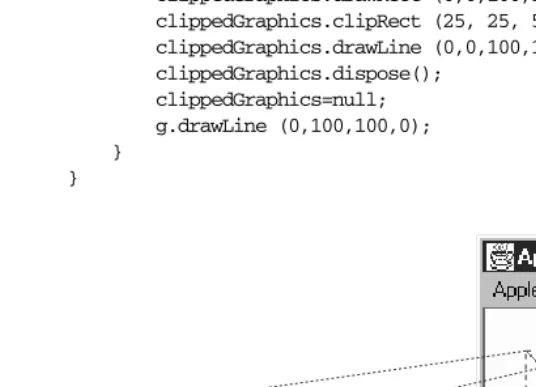
[image:5.612.84.352.161.355.2]clipping area
Figure 2–1: Clipping restricts the drawing area
Thepaint()method for this applet starts by setting the foreground color to
red. It then creates a copy of the Graphics context for clipping, saving the
original object so it can draw on the entire screen later. The applet then draws a rectangle, sets the clipping area to a smaller region, and draws a diagonal line across the rectangle from upper left to lower right. Because clipping is in effect, only part of the line is displayed. The applet then discards the clipped
Graphics object and draws an unclipped line from lower left to upper right
using the original objectg.
public abstract void setClip(int x, int y, int width, int height)★
ThissetClip()method allows you to change the current clipping area based
on the parameters provided. setClip()is similar toclipRect(), except that it
is not limited to shrinking the clipping area. The current drawing area
becomes the rectangular area from (x, y) to (x+width-1, y+height-1); this
public abstract void setClip(Shape clip)★
ThissetClip()method allows you to change the current clipping area based
on the clipparameter, which may be any object that implements the Shape
inter face. Unfortunately, practice is not as good as theory, and in practice,
clip must be a Rectangle; if you pass setClip() a Polygon, it throws an
IllegalArgumentException.* (The Shape inter face is discussed later in this chapter.)
public abstract Rectangle getClipBounds ()★ public abstract Rectangle getClipRect ()✩
The getClipBounds() methods returns a Rectangle that describes the
clip-ping area of aGraphicsobject. TheRectanglegives you the (x,y) coordinates
of the top left corner of the clipping area along with its width and height. (Rectangleobjects are discussed later in this chapter.)
getClipRect()is the Java 1.0 name for this method.
public abstract Shape getClip ()★
ThegetClip()method returns aShapethat describes the clipping area of a
Graphicsobject. That is, it returns the same thing asgetClipBounds()but as a
Shape, instead of as aRectangle. By callingShape.getBounds(), you can get
the (x,y) coordinates of the top left corner of the clipping area along with its
width and height. In the near future, it is hard to imagine the actual object thatgetClip()returns being anything other than aRectangle.
public abstract void copyArea (int x, int y, int width, int height, int delta_x, int delta_y) ThecopyArea()method copies the rectangular area from (x,y) to (x+width,
y+height) to the area with an upper left corner of (x+delta_x,y+delta_y). The delta_xand delta_yparameters are not the coordinates of the second
point but an offset from the first coordinate pair (x,y). The area copied may
fall outside of the clipping region. This method is often used to tile an area of
the graphics context. copyArea() does not save the contents of the area
copied.
Painting mode
There are two painting or drawing modes for the Graphics class: paint (the
default) and XOR mode. In paint mode, anything you draw replaces whatever is already on the screen. If you draw a red square, you get a red square, no matter what was underneath; this is what most programmers have learned to expect.
The behavior of XOR mode is rather strange, at least to people accustomed to modern programming environments. XOR mode is short for eXclusive-OR mode.
The idea behind XOR mode is that drawing the same object twice returns the screen to its original state. This technique was commonly used for simple anima-tions prior to the development of more sophisticated methods and cheaper hard-ware.
The side effect of XOR mode is that painting operations don’t necessarily get the color you request. Instead of replacing the original pixel with the new value, XOR mode merges the original color, the painting color, and an XOR color (usually the background color) to form a new color. The new color is chosen so that if you repaint the pixel with the same color, you get the original pixel back. For example, if you paint a red square in XOR mode, you get a square of some other color on the screen. Painting the same red square again returns the screen to its original state.
public abstract void setXORMode (Color xorColor)
ThesetXORMode()method changes the drawing mode to XOR mode. In XOR
mode, the system uses thexorColorcolor to determine an alternate color for
anything drawn such that drawing the same item twice restores the screen to
its original condition. The xorColoris usually the current background color
but can be any color. For each pixel, the new color is determined by an
exclu-sive-or of the old pixel color, the painting color, and thexorColor.
For example, if the old pixel is red, the XOR color is blue, and the drawing color is green, the end result would be white. To see why, it is necessar y to look at the RGB values of the three colors. Red is (255, 0, 0). Blue is (0, 0, 255). Green is (0, 255, 0). The exclusive-or of these three values is (255, 255, 255), which is white. Drawing another green pixel with a blue XOR color yields red,
the pixel’s original color, since (255, 255, 255)ˆ(0, 0, 255)ˆ(0, 255, 0) yields
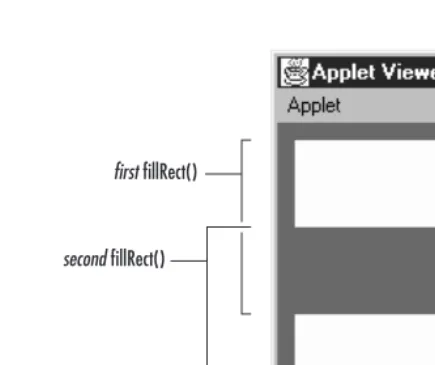
(255, 0, 0).*The following code generates the display shown in Figure 2-2.
import java.awt.*;
public class xor extends java.applet.Applet { public void init () {
setBackground (Color.red); }
public void paint (Graphics g) { g.setColor (Color.green); g.setXORMode (Color.blue); g.fillRect (10, 10, 100, 100); g.fillRect (10, 60, 100, 100); }
}
Although it’s hard to visualize what color XOR mode will pick, there is one impor-tant special case. Let’s say that there are only two colors: a background color (the
first fillRect()
[image:8.612.104.322.73.255.2]second fillRect()
Figure 2–2: Drawing in XOR mode
XOR color) and a foreground color (the painting color). Each pixel must be in one color or the other. Painting “flips” each pixel to the other color. Foreground pixels become background, and vice versa.
public abstract void setPaintMode ()
ThesetPaintMode()method puts the system into paint mode. When in paint
mode, any drawing operation replaces whatever is underneath it. Call
set-PaintMode()to return to normal painting when finished with XOR mode.
Drawing shapes
Most of the drawing methods require you to specify a bounding rectangle for the object you want to draw: the location of the object’s upper left corner, plus its width and height. The two exceptions are lines and polygons. For lines, you supply two endpoints; for polygons, you provide a set of points.
Versions 1.0.2 and 1.1 of AWT always draw solid lines that are one pixel wide; there is no support for line width or fill patterns. A future version should support lines with variable widths and patterns.
public abstract void drawLine (int x1, int y1, int x2, int y2)
g.drawLine (5, 5, 50, 75); // line g.drawLine (5, 75, 5, 75); // point g.drawLine (50, 5, 50, 5); // point
[image:9.612.95.317.68.249.2]points
Figure 2–3: Drawing lines and points with drawLine()
public void drawRect (int x, int y, int width, int height)
ThedrawRect()method draws a rectangle on the drawing area in the current
color from (x,y) to (x+width,y+height). Ifwidthorheightis negative,
noth-ing is drawn.
public abstract void fillRect (int x, int y, int width, int height)
The fillRect()method draws a filled rectangle on the drawing area in the
current color from (x,y) to (x+width-1, y+height-1). Notice that the filled
rectangle is one pixel smaller to the right and bottom than requested. If
widthorheightis negative, nothing is drawn.
public abstract void drawRoundRect (int x, int y, int width, int height, int arcWidth, int arcHeight)
The drawRoundRect()method draws a rectangle on the drawing area in the
current color from (x,y) to (x+width,y+height). However, instead of
perpen-dicular corners, the corners are rounded with a horizontal diameter of
arcWidthand a vertical diameter ofarcHeight. Ifwidthorheightis a
nega-tive number, nothing is drawn. Ifwidth,height,arcWidth, andarcHeightare
all equal, you get a circle.
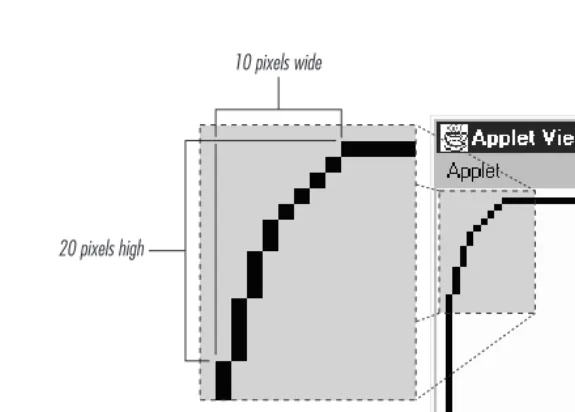
To help you visualize thearcWidthandarcHeightof a rounded rectangle,
Fig-ure 2-4 shows one corner of a rectangle drawn with anarcWidthof 20 and a
arcHeightof 40.
public abstract void fillRoundRect (int x, int y, int width, int height, int arcWidth, int arcHeight)
ThefillRoundRect()method draws a filled rectangle on the drawing area in
the current color from (x,y) to (x+width-1,y+height-1). However, instead of
20 pixels high
[image:10.612.72.360.74.280.2]10 pixels wide
Figure 2–4: Drawing rounded corners
diameter ofarcWidth and a vertical diameter ofarcHeightfor the four
cor-ners. Notice that the filled rectangle is one pixel smaller to the right and
bot-tom than requested. Ifwidthorheightis a negative number, nothing is filled.
Ifwidth,height,arcWidth, andarcHeightare all equal, you get a filled circle.
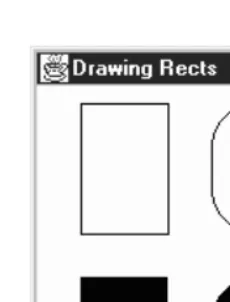
Figure 2-4 shows how AWT generates rounded corners. Figure 2-5 shows the collection of rectangles created by the following code. The rectangles in Fig-ure 2-5 are filled and unfilled, with rounded and square corners.
g.drawRect (25, 10, 50, 75); g.fillRect (25, 110, 50, 75);
g.drawRoundRect (100, 10, 50, 75, 60, 50); g.fillRoundRect (100, 110, 50, 75, 60, 50);
public void draw3DRect (int x, int y, int width, int height, boolean raised)
Thedraw3DRect()method draws a rectangle in the current color from (x,y) to (x+width,y+height); a shadow effect makes the rectangle appear to float
slightly above or below the screen. Theraisedparameter has an effect only if
the current color is not black. Ifraisedistrue, the rectangle looks like a
but-ton waiting to be pushed. If raised is false, the rectangle looks like a
depressed button. If width or height is negative, the shadow appears from
another direction.
public void fill3DRect (int x, int y, int width, int height, boolean raised)
Thefill3DRect()method draws a filled rectangle in the current color from
(x,y) to (x+width,y+height); a shadow effect makes the rectangle appear to
Figure 2–5: Varieties of rectangles
only if the current color is not black. Ifraisedistrue, the rectangle looks like
a button waiting to be pushed. Ifraised isfalse, the rectangle looks like a
depressed button. To enhance the shadow effect, the depressed area is given a
slightly deeper shade of the drawing color. Ifwidthorheightis negative, the
shadow appears from another direction, and the rectangle isn’t filled. (Differ-ent platforms could deal with this differ(Differ-ently. Try to ensure the parameters have positive values.)
Figure 2-6 shows the collection of three-dimensional rectangles created by the following code. The rectangles in the figure are raised and depressed, filled and unfilled.
g.setColor (Color.gray);
g.draw3DRect (25, 10, 50, 75, true); g.draw3DRect (25, 110, 50, 75, false); g.fill3DRect (100, 10, 50, 75, true); g.fill3DRect (100, 110, 50, 75, false);
public abstract void drawOval (int x, int y, int width, int height)
ThedrawOval()method draws an oval in the current color within an invisible
bounding rectangle from (x, y) to (x+width,y+height). You cannot specify
the oval’s center point and radii. Ifwidthandheightare equal, you get a
cir-cle. Ifwidthorheightis negative, nothing is drawn.
public abstract void fillOval (int x, int y, int width, int height)
The fillOval() method draws a filled oval in the current color within an
invisible bounding rectangle from (x,y) to (x+width-1,y+height-1). You
can-not specify the oval’s center point and radii. Notice that the filled oval is one
pixel smaller to the right and bottom than requested. Ifwidthor heightis
Figure 2–6: Filled and unfilled 3D rectangles
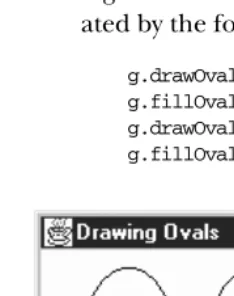
Figure 2-7 shows the collection of ovals, filled and unfilled, that were gener-ated by the following code:
[image:12.612.54.171.344.492.2]g.drawOval (25, 10, 50, 75); g.fillOval (25, 110, 50, 75); g.drawOval (100, 10, 50, 50); g.fillOval (100, 110, 50, 50);
Figure 2–7: Filled and unfilled ovals
public abstract void drawArc (int x, int y, int width, int height, int startAngle, int arcAngle) The drawArc()method draws an arc in the current color within an invisible
bounding rectangle from (x, y) to (x+width, y+height). The arc starts at
arcAngleis negative, drawing is in a clockwise direction. Ifwidthandheight
are equal andarcAngle is 360 degrees,drawArc()draws a circle. If widthor
heightis negative, nothing is drawn.
public abstract void fillArc (int x, int y, int width, int height, int startAngle, int arcAngle) ThefillArc()method draws a filled arc in the current color within an
invisi-ble bounding rectangle from (x,y) to (x+width-1,y+height-1). The arc starts
atstartAngledegrees and goes tostartAngle+arcAngledegrees. An angle of 0 degrees is at the 3 o’clock position; angles increase counter-clockwise. If
arcAngleis negative, drawing is in a clockwise direction. The arc fills like a pie (to the origin), not from arc endpoint to arc endpoint. This makes creating
pie charts easier. Ifwidthandheightare equal andarcAngleis 360 degrees,
fillArc() draws a filled circle. If width or height is negative, nothing is drawn.
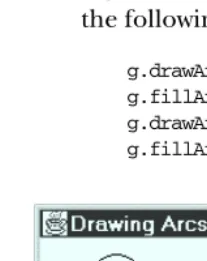
Figure 2-8 shows a collection of filled and unfilled arcs that were generated by the following code:
[image:13.612.54.158.335.466.2]g.drawArc (25, 10, 50, 75, 0, 360); g.fillArc (25, 110, 50, 75, 0, 360); g.drawArc (100, 10, 50, 75, 45, 215); g.fillArc (100, 110, 50, 75, 45, 215);
Figure 2–8: Filled and unfilled arcs
public void drawPolygon (Polygon p)
The drawPolygon()method draws a path for the points in polygonpin the
current color. Section 2.6 discusses thePolygonclass in detail.
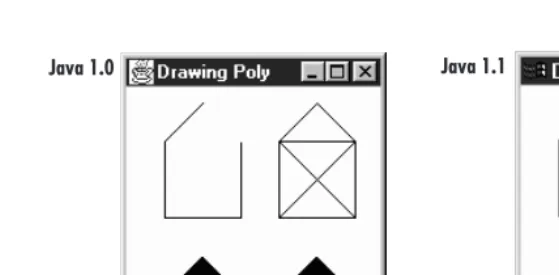
The behavior ofdrawPolygon() changes slightly between Java 1.0.2 and 1.1.
With version 1.0.2, if the first and last points of aPolygonare not the same, a
call todrawPolygon()results in an open polygon, since the endpoints are not
public abstract void drawPolygon (int xPoints[], int yPoints[], int numPoints)
ThedrawPolygon()method draws a path ofnumPointsnodes by plucking one
element at a time out ofxPointsandyPointsto make each point. The path is
drawn in the current color. If eitherxPointsoryPointsdoes not have
num-Points elements,drawPolygon() throws a run-time exception. In 1.0.2, this
exception is anIllegalArgumentException; in 1.1, it is an
ArrayIndexOutOf-BoundsException. This change shouldn’t break older programs, since you are not required to catch run-time exceptions.
public abstract void drawPolyline (int xPoints[], int yPoints[], int numPoints)★
ThedrawPolyline()method functions like the 1.0 version ofdrawPolygon().
It plays connect the dots with the points in the xPointsand yPointsarrays
and does not connect the endpoints. If eitherxPointsor yPoints does not
have numPoints elements, drawPolygon() throws the run-time exception,
ArrayIndexOutOfBoundsException.
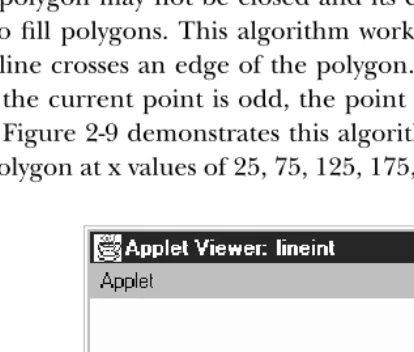
Filling polygons is a complex topic. It is not as easy as filling rectangles or ovals because a polygon may not be closed and its edges may cross. AWT uses an even-odd rule to fill polygons. This algorithm works by counting the number of times each scan line crosses an edge of the polygon. If the total number of crossings to the left of the current point is odd, the point is colored. If it is even, the point is left alone. Figure 2-9 demonstrates this algorithm for a single scan line that inter-sects the polygon at x values of 25, 75, 125, 175, 225, and 275.
[image:14.612.132.339.366.542.2]x=25 x=75 x=125 x=175 x=225 x=275
Figure 2–9: Polygon fill algorithm
any crossings, so the pixels are left untouched. The scan line reaches the first crossing when x equals 25. Here, the total number of crossings to the left is one, so the scan line is inside the polygon, and the pixels are colored. At 75, the scan line crosses again; the total number of crossings is two, so coloring stops.
public void fillPolygon (Polygon p)
ThefillPolygon()method draws a filled polygon for the points inPolygon p
in the current color. If the polygon is not closed,fillPolygon()adds a
seg-ment connecting the endpoints. Section 2.6 discusses the Polygon class in
detail.
public abstract void fillPolygon (int xPoints[], int yPoints[], int nPoints)
ThefillPolygon()method draws a polygon ofnumPointsnodes by plucking
one element at a time out ofxPointsandyPointsto make each point. The
polygon is drawn in the current color. If eitherxPointsor yPointsdoes not
havenumPointselements,fillPolygon()throws the run-time exception Ille-galArgumentException. If the polygon is not closed, fillPolygon() adds a
[image:15.612.69.352.325.456.2]segment connecting the endpoints.*
Figure 2-10 shows several polygons created by the following code, containing
dif-ferent versions ofdrawPolygon()andfillPolygon():
int[] xPoints[] = {{50, 25, 25, 75, 75}, {50, 25, 25, 75, 75},
{100, 100, 150, 100, 150, 150, 125, 100, 150}, {100, 100, 150, 100, 150, 150, 125, 100, 150}}; int[] yPoints[] = {{10, 35, 85, 85, 35, 10},
{110, 135, 185, 185, 135},
{85, 35, 35, 85, 85, 35, 10, 35, 85},
{185, 135, 135, 185, 185, 135, 110, 135, 185}}; int nPoints[] = {5, 5, 9, 9};
g.drawPolygon (xPoints[0], yPoints[0], nPoints[0]); g.fillPolygon (xPoints[1], yPoints[1], nPoints[1]);
g.drawPolygon (new Polygon(xPoints[2], yPoints[2], nPoints[2])); g.fillPolygon (new Polygon(xPoints[3], yPoints[3], nPoints[3]));
Drawing images
AnImageis a displayable object maintained in memory. To get an image on the
screen, you must draw it onto a graphics context, using thedrawImage()method
of the Graphics class. For example, within a paint() method, you would call
g.drawImage(image, . . . , this)to display some image on the screen. In other
situations, you might use the createImage() method to generate an offscreen
Graphicsobject, then usedrawImage()to draw an image onto this object, for dis-play later.
Java 1.0 Java 1.1
Figure 2–10: Filled and unfilled polygons
This begs the question: where do images come from? We will have more to say
about theImageclass later in this chapter. For now, it’s enough to say that you can
callgetImage()to load an image from disk or across the Net. There are versions of
getImage()in theAppletandToolkitclasses; the latter is for use in applications.
You can also callcreateImage(), a method of theComponentclass, to generate an
image in memory.
What about the last argument todrawImage()? What is this for? The last
argu-ment of drawImage()is always an image observer — that is, an object that
imple-ments theImageObserverinter face. This interface is discussed in detail in Chapter
12. For the time being, it’s enough to say that the call todrawImage()starts a new
thread that loads the requested image. An image observer monitors the process of loading an image; the thread that is loading the image notifies the image observer
whenever new data has arrived. The Component class implements the
ImageOb-server inter face; when you’re writing apaint()method, you’re almost certainly
overriding some component’spaint()method; therefore, it’s safe to usethisas
the image observer in a call to drawImage(). More simply, we could say that any
component can serve as an image observer for images that are drawn on it.
public abstract boolean drawImage (Image image, int x, int y, ImageObser ver obser ver) ThedrawImage()method drawsimageonto the screen with its upper left
cor-ner at (x,y), usingobserveras itsImageObserver. Returnstrueif the object is
fully drawn,falseother wise.
public abstract boolean drawImage (Image image, int x, int y, int width, int height, ImageObser ver obser ver)
ThedrawImage()method drawsimage onto the screen with its upper left
cor-ner at (x,y), usingobserveras itsImageObserver. The system scalesimageto
fit into awidth heightarea. The scaling may take time. This method returns
With Java 1.1, you don’t need to usedrawImage()for scaling; you can prescale
the image with theImage.getScaledInstance()method, then use the
previ-ous version ofdrawImage().
public abstract boolean drawImage (Image image, int x, int y, Color backgroundColor, ImageObser ver obser ver)
ThedrawImage()method drawsimageonto the screen with its upper left
cor-ner at (x, y), using observer as its ImageObserver. backgroundColor is the
color of the background seen through the transparent parts of the image. If
no part of the image is transparent, you will not see backgroundColor.
Returnstrueif the object is fully drawn,falseother wise.
public abstract boolean drawImage (Image image, int x, int y, int width, int height, Color backgroundColor, ImageObser ver obser ver)
ThedrawImage()method drawsimageonto the screen with its upper left
cor-ner at (x, y), using observer as its ImageObserver. backgroundColor is the
color of the background seen through the transparent parts of the image. The
system scales image to fit into awidth x height area. The scaling may take
time. This method returnstrueif the image is fully drawn,falseother wise.
With Java 1.1, you can prescale the image with theAreaAveragingScaleFilter
orReplicateScaleFilterdescribed in Chapter 12, then use the previous
ver-sion ofdrawImage()to display it.
The following code generated the images in Figure 2-11. The images on the left come from a standard JPEG file. The images on the right come from a file in GIF89a format, in which the white pixel is “transparent.” Therefore, the gray back-ground shows through this pair of images.
import java.awt.*; import java.applet.*;
public class drawingImages extends Applet { Image i, j;
public void init () {
i = getImage (getDocumentBase(), "rosey.jpg"); j = getImage (getDocumentBase(), "rosey.gif"); }
public void paint (Graphics g) { g.drawImage (i, 10, 10, this);
g.drawImage (i, 10, 85, 150, 200, this);
g.drawImage (j, 270, 10, Color.lightGray, this);
g.drawImage (j, 270, 85, 150, 200, Color.lightGray, this); }
}
public abstract boolean drawImage(Image img, int dx1, int dy1, int dx2, int dy2, int sx1, int sy1, int sx2, int sy2, ImageObserver observer)★
The drawImage()method draws a portion ofimageonto the screen. It takes
Figure 2–11: Scaled and unscaled images
rectangular
snippet on the screen with one corner at (dx1,dy1) and another at (dx2,dy2),
usingobserveras itsImageObserver. (Think ofdfor destination location and
s for source image.) This method returns true if the object is fully drawn,
falseother wise.
drawImage()flips the image if source and destination endpoints are not the same corners, crops the image if the destination is smaller than the original size, and scales the image if the destination is larger than the original size. It does not do rotations, only flips (i.e., it can produce a mirror image or an image rotated 180 degrees but not an image rotated 90 or 270 degrees).
public abstract boolean drawImage(Image img, int dx1, int dy1, int dx2, int dy2, int sx1, int sy1, int sx2, int sy2, Color backgroundColor, ImageObser ver obser ver)★
The drawImage()method draws a portion ofimageonto the screen. It takes
the part of the image with corners at (sx1,sy1) and (sx2,sy2); it places this
rectangular snippet on the screen with one corner at (dx1,dy1) and another
at (dx2,dy2), usingobserveras itsImageObserver. (Think ofdfor destination
location andsfor source image.)backgroundColoris the color of the
back-ground seen through the transparent parts of the image. If no part of the
image is transparent, you will not seebackgroundColor. This method returns
trueif the object is fully drawn,falseother wise.
Like the previous version ofdrawImage(), this method flips the image if source
destination is smaller than the original size, and scales the image if the destina-tion is larger than the original size. It does not do rotadestina-tions, only flips (i.e., it can produce a mirror image or an image rotated 180 degrees but not an image rotated 90 or 270 degrees).
The following code demonstrates the newdrawImage()methods in Java 1.1. They
allow you to scale, flip, and crop images without the use of image filters. The results are shown in Figure 2-12.
// Java 1.1 only import java.awt.*; import java.applet.*;
public class drawingImages11 extends Applet { Image i, j;
public void init () {
i = getImage (getDocumentBase(), "rosey.gif"); }
public void paint (Graphics g) { g.drawImage (i, 10, 10, this); g.drawImage (i, 10, 85,
i.getWidth(this)+10, i.getHeight(this)+85, i.getWidth(this), i.getHeight(this), 0, 0, this); g.drawImage (i, 270, 10,
i.getWidth(this)+270, i.getHeight(this)*2+10, 0, 0, i.getWidth(this), i.getHeight(this), Color.gray, this); g.drawImage (i, 10, 170,
i.getWidth(this)*2+10, i.getHeight(this)+170, 0, i.getHeight(this)/2, i.getWidth(this)/2, 0, this); }
}
Miscellaneous methods
public abstract void translate (int x, int y)
Thetranslate()method sets how the system translates the coordinate space
for you. The point at the (x,y) coordinates becomes the origin of this
graph-ics context. Any future drawing will be relative to this location. Multiple lations are cumulative. The following code leaves the coordinate system trans-lated by (100, 50).
translate (100, 0); translate (0, 50);
Note that each call topaint()provides an entirely newGraphicscontext with
its origin in the upper left corner. Therefore, don’t expect translations to
Figure 2–12: Flipped, mirrored, and cropped images
public abstract void dispose ()
Thedispose()method frees any system resources used by theGraphics
con-text. It’s a good idea to calldispose()whenever you are finished with a
Graph-icsobject, rather than waiting for the garbage collector to call it automatically
(through finalize()). Disposing of the Graphics object yourself will help
your programs on systems with limited resources. However, you should not
dis-pose theGraphicsparameter toComponent.paint()orComponent.update().
public void finalize ()
The garbage collector callsfinalize()when it determines that theGraphics
object is no longer needed. finalize() calls dispose(), which frees any
resources that theGraphicsobject has used.
public String toString ()
ThetoString()method ofGraphicsreturns a string showing the current font
and color. However, Graphics is an abstract class, and classes that extend
Graphics usually override toString(). For example, on a Windows 95
machine, sun.awt.win32.Win32Graphics is the concrete class that extends
Graphics. The class’stoString() method displays the current origin of the
Graphicsobject, relative to the original coordinate system:
2.2 Point
ThePointclass encapsulates x and y coordinates within a single object. It is proba-bly one of the most underused classes within Java. Although there are numerous
places within AWT where you would expect to see aPoint, its appearances are
sur-prisingly rare. Java 1.1 is starting to usePointmore heavily. ThePointclass is most
often used when a method needs to return a pair of coordinates; it lets the method
return both x and y as a single object. Unfortunately, Pointusually is not used
when a method requires x and y coordinates as arguments; for example, you
would expect the Graphics class to have a version of translate() that takes a
point as an argument, but there isn’t one.
ThePointclass doesnotrepresent a point on the screen. It is not a visual object;
there is nodrawPoint()method.
2.2.1 Point Methods
VariablesThe two public variables ofPointrepresent a pair of coordinates. They are
accessi-ble directly or use thegetLocation()method. There is no predefined origin for
the coordinate space.
public int x
The coordinate that represents the horizontal position.
public int y
The coordinate that represents the vertical position.
Constructors
public Point ()
The first constructor creates an instance ofPointwith an initial x value of 0
and an initial y value of 0.
public Point (int x, int y)
The next constructor creates an instance ofPointwith an initial x value ofx
and an initial y value ofy.
public Point (Point p)
The last constructor creates an instance of Pointfrom another point, the x
Locations
public Point getLocation ()★
The getLocation() method retrieves the current location of this point as a newPoint.
public void setLocation (int x, int y)★ public void move (int x, int y)✩
ThesetLocation()method changes the point’s location to (x,y).
move()is the Java 1.0 name for this method.
public void setLocation (Point p)★
ThissetLocation()method changes the point’s location to (p.x,p.y).
public void translate (int x, int y)
Thetranslate()method moves the point’s location by adding the parameters
(x,y) to the corresponding fields of thePoint. If the originalPoint pis (3, 4)
and you callp.translate(4, -5), the new value ofpis (7, -1).
Miscellaneous methods
public int hashCode ()
The hashCode()method returns a hash code for the point. The system calls
this method when aPointis used as the key for a hash table.
public boolean equals (Object object)
Theequals()method overrides theObject.equals()method to define
equal-ity for points. TwoPointobjects are equal if their x and y values are equal.
public String toString ()
The toString()method of Pointdisplays the current values of the x and y variables. For example:
java.awt.Point[x=100,y=200]
2.3 Dimension
TheDimensionclass is similar to thePointclass, except it encapsulates a width and
height in a single object. LikePoint,Dimensionis somewhat underused; it is used
primarily by methods that need to return a width and a height as a single object;
2.3.1 Dimension Methods
Variables
ADimensioninstance has two variables, one for width and one for height. They are
accessible directly or through use of thegetSize()method.
public int width
The width variable represents the size of an object along the x axis (left to right). Width should not be negative; however, there is nothing within the class to prevent this from happening.
public int height
The height variable represents the size of an object along the y axis (top to bottom). Height should not be negative; however, there is nothing within the class to prevent this from happening.
Constructors
public Dimension ()
This constructor creates aDimensioninstance with a width and height of 0.
public Dimension (Dimension dim)
This constructor creates a copy ofdim. The initial width isdim.width. The
ini-tial height isdim.height.
public Dimension (int width, int height)
This constructor creates aDimensionwith an initial width ofwidthand an
ini-tial height ofheight.
Sizing
public Dimension getSize ()★
The getSize() method retrieves the current size as a new Dimension, even though the instance variables are public.
public void setSize (int width, int height)★
ThesetSize()method changes the dimension’s size towidth height.
public void setSize (Dimension d)★
ThesetSize()method changes the dimension’s size tod.width d.height.
Miscellaneous methods
public boolean equals (Object object)
Theequals()method overrides theObject.equals()method to define
equal-ity for dimensions. TwoDimensionobjects are equal if their width and height
public String toString ()
The toString() method of Dimension returns a string showing the current width and height settings. For example:
java.awt.Dimension[width=0,height=0]
2.4 Shape
The newShapeinter face defines a single method; it requires a geometric object to
be able to report its bounding box. Currently, theRectangleandPolygonclasses
implementShape; one would expect other geometric classes to implementShape
in the future. Although Componenthas the single method defined by the Shape
inter face, it does not implement the interface.
2.4.1 Shape Method
public abstract Rectangle getBounds()★
ThegetBounds()method returns the shape’s boundingRectangle. Once you
have the bounding area, you can use methods like Graphics.copyArea()to
copy the shape.
2.5 Rectangle
TheRectangleclass encapsulates x and y coordinates and width and height (Point
andDimensioninformation) within a single object. It is often used by methods that
return a rectangular boundary as a single object: for example,
Polygon.get-Bounds(), Component.getBounds(), and Graphics.getClipBounds(). Like Point, theRectangleclass is not a visual object and does not represent a rectangle on the
screen; ironically, drawRect() and fillRect() don’t take Rectangle as an
argu-ment.
2.5.1 Rectangle Methods
Variables
The four public variables available forRectanglehave the same names as the
pub-lic instance variables ofPoint andDimension. They are all accessible directly or
through use of thegetBounds()method.
public int x
public int y
The y coordinate of the upper left corner.
public int width
The width variable represents the size of theRectanglealong the horizontal
axis (left to right). Width should not be negative; however, there is nothing within the class to prevent this from happening.
public int height
The height variable represents the size of theRectanglealong the vertical axis
(top to bottom). Height should not be negative; however, there is nothing within the class to prevent this from happening.
Constructors
The following seven constructors create Rectangle objects. When you create a
Rectangle, you provide the location of the top left corner, along with the
Rectan-gle’s width and height. ARectanglelocated at (0,0) with a width and height of
100 has its bottom right corner at (99, 99). ThePoint(100, 100) lies outside the
Rectangle, since that would require a width and height of 101.
public Rectangle ()
ThisRectangle constructor creates a Rectangleobject in which x, y, width, and height are all 0.
public Rectangle (int width, int height)
This Rectangle constructor creates a Rectangle with (x, y) coordinates of
(0,0) and the specified width and height. Notice that there is no
Rectan-gle(int x, int y)constructor because that would have the same method sig-nature as this one, and the compiler would have no means to differentiate them.
public Rectangle (int x, int y, int width, int height)
TheRectangleconstructor creates aRectangleobject with an initial x
coordi-nate ofx, y coordinate ofy, width ofwidth, and height ofheight. Height and
width should be positive, but the constructor does not check for this.
public Rectangle (Rectangle r)
ThisRectangleconstructor creates aRectanglematching the original. The (x,
y) coordinates are (r.x, r.y), with a width of r.width and a height of
public Rectangle (Point p, Dimension d)
This Rectangle constructor creates a Rectangle with (x, y) coordinates of
(p.x,p.y), a width ofd.width, and a height ofd.height.
public Rectangle (Point p)
This Rectangle constructor creates a Rectangle with (x, y) coordinates of
(p.x,p.y). The width and height are both zero.
public Rectangle (Dimension d)
The lastRectangleconstructor creates aRectanglewith (x,y) coordinates of
(0, 0). The initialRectanglewidth isd.widthand height isd.height.
Shaping and sizing
public Rectangle getBounds()★
ThegetBounds()method returns a copy of the originalRectangle.
public void setBounds (int x, int y, int width, int height)★ public void reshape (int x, int y, int width, int height)✩
ThesetBounds()method changes the origin of the Rectangleto (x,y) and
changes the dimensions towidthbyheight.
reshape()is the Java 1.0 name for this method.
public void setBounds (Rectangle r)★
ThesetBounds()method changes the origin of theRectangleto (r.x,r.y)
and changes the dimensions tor.widthbyr.height.
public Point getLocation()★
ThegetLocation()retrieves the current origin of this rectangle as aPoint.
public void setLocation (int x, int y) ★ public void move (int x, int y)✩
ThesetLocation()method changes the origin of theRectangleto (x,y).
move()is the Java 1.0 name for this method.
public void setLocation (Point p) ★
ThesetLocation()method changes theRectangle’s origin to (p.x,p.y).
public void translate (int x, int y)
Thetranslate()method moves theRectangle’s origin by the amount (x,y).
If the originalRectangle’s location (r) is (3, 4) and you callr.translate (4,
5), then r’s location becomes (7, 9). x and y may be negative.translate()has
public Dimension getSize ()★
ThegetSize()method retrieves the current size of the rectangle as a Dimen-sion.
public void setSize() (int width, int height)★ public void resize (int width, int height)✩
The setSize() method changes the Rectangle’s dimensions to width x
height.
resize()is the Java 1.0 name for this method.
public void setSize() (Dimension d) ★
The setSize() method changes the Rectangle’s dimensions to d.width x
d.height.
public void grow (int horizontal, int vertical)
The grow() method increases the Rectangle’s dimensions by adding the
amounthorizontalon the left and the right and adding the amount
verti-cal on the top and bottom. Therefore, all four of the rectangle’s variables
change. If the original location is (x,y), the new location will be (x-
horizon-tal, y-vertical) (moving left and up if both values are positive); if the original
size is (width, height), the new size will be (width+2*horizontal,
height+2*vertical). Either horizontal or vertical can be negative to decrease
the size of theRectangle. The following code demonstrates the changes:
import java.awt.Rectangle; public class rect {
public static void main (String[] args) {
Rectangle r = new Rectangle (100, 100, 200, 200); System.out.println (r);
r.grow (50, 75); System.out.println (r); r.grow (-25, -50); System.out.println (r); }
}
This program produces the following output:
java.awt.Rectangle[x=100,y=100,width=200,height=200] java.awt.Rectangle[x=50,y=25,width=300,height=350] java.awt.Rectangle[x=75,y=75,width=250,height=250]
public void add (int newX, int newY)
Theadd()method incorporates the point (newX,newY) into theRectangle. If
this point is already in theRectangle, there is no change. Otherwise, the size
public void add (Point p)
Thisadd()method incorporates the point (p.x, p.y) into theRectangle. If
this point is already in theRectangle, there is no change. Otherwise, the size
of theRectangleincreases to include (p.x,p.y) within itself.
public void add (Rectangle r)
This add() method incorporates another Rectangle r into this Rectangle.
This transforms the current rectangle into the union of the twoRectangles.
This method might be useful in a drawing program that lets you select multi-ple objects on the screen and create a rectangular area from them.
We will soon encounter a method called union() that is almost identical.
add()andunion()differ in thatadd()modifies the currentRectangle, while
union()returns a newRectangle. The resulting rectangles are identical.
Intersections
public boolean contains (int x, int y)★ public boolean inside (int x, int y)✩
Thecontains()method determines if the point (x,y) is within this
Rectan-gle. If so,trueis returned. If not,falseis returned.
inside()is the Java 1.0 name for this method.
public boolean contains (Point p)★
Thecontains()method determines if the point (p.x,p.y) is within this Rect-angle. If so,trueis returned. If not,falseis returned.
public boolean intersects (Rectangle r)
Theintersects()method checks whetherRectangle rcrosses thisRectangle
at any point. If it does,trueis returned. If not,falseis returned.
public Rectangle intersection (Rectangle r)
Theintersection()method returns a newRectangleconsisting of all points
that are in both the currentRectangleandRectangle r. For example, ifr =
new Rectangle (50, 50, 100, 100)andr1 = new Rectangle (100, 100,
75, 75), thenr.intersection (r1)is theRectangle (100, 100, 50, 50), as shown in Figure 2-13.
public Rectangle union (Rectangle r)
The union() method combines the current Rectangle and Rectangle r to
form a newRectangle. For example, ifr = new Rectangle (50, 50, 100,
100)andr1 = new Rectangle (100, 100, 75, 75), thenr.union (r1)is the
Rectangle (50, 50, 125, 125). The original rectangle is unchanged. Figure
and height-1, the rectangle drawn appears slightly smaller than you would expect. However, that’s an artifact of how rectangles are drawn; the returned rectangle contains all the points within both.
Figure 2–13: Rectangle intersection
Figure 2–14: Rectangle union
Miscellaneous methods
public boolean isEmpty ()
TheisEmpty()method checks whether there are any points within the Rect-angle. If the width and height of theRectangleare both 0 (or less), the
Rect-angle is empty, and this method returns true. If either width or height is
greater than zero, isEmpty() returns false. This method could be used to
[image:29.612.52.201.296.444.2]public int hashCode ()
The hashCode() method returns a hash code for the rectangle. The system
calls this method when aRectangleis used as the key for a hash table.
public boolean equals (Object object)
Theequals()method overrides theObject’sequals()method to define what
equality means forRectangleobjects. TwoRectangleobjects are equal if their
x,y, width, and height values are equal.
public String toString ()
ThetoString()method ofRectangledisplays the current values of thex,y, width, and height variables. For example:
java.awt.Rectangle[x=100,y=200,width=300,height=400]
2.6 Polygon
APolygonis a collection of points used to create a series of line segments. Its pri-mar y purpose is to draw arbitrary shapes like triangles or pentagons. If the points
are sufficiently close, you can create a curve. To display thePolygon, call
draw-Polygon()orfillPolygon().
2.6.1 Polygon Methods
Variables
The collection of points maintained byPolygonare stored in three variables:
public int npoints
Thenpointsvariable stores the number of points.
public int xpoints[]
Thexpointsarray holds the x component of each point.
public int ypoints[]
Theypointsarray holds the y component of each point.
You might expect thePolygonclass to use an array of points, rather than separate
arrays of integers. More important, you might expect the instance variables to be private or protected, which would prevent them from being modified directly. Since the three instance variables are public, there is no guarantee that the array
sizes are in sync with each other or withnpoints. To avoid trouble, always use
Constructors
public Polygon ()
This constructor creates an emptyPolygon.
public Polygon (int xPoints[], int yPoints[], int numPoints)
This constructor creates aPolygon that consists of numPoints points. Those
points are formed from the first numPoints elements of the xPoints and
yPointsarrays. If thexPointsoryPointsarrays are larger thannumPoints, the
additional entries are ignored. If thexPointsoryPointsarrays do not contain
at least numPoints elements, the constructor throws the run-time exception
ArrayIndexOutOfBoundsException.
Miscellaneous methods
public void addPoint (int x, int y)
TheaddPoint()method adds the point (x,y) to thePolygonas its last point.
If you alter thexpoints,ypoints, andnpointsinstance variables directly,
add-Point()could add the new point at a place other than the end, or it could
throw the run-time exception ArrayIndexOutOfBoundsExceptionwith a
mes-sage showing the position at which it tried to add the point. Again, for safety,
don’t modify aPolygon’s instance variables yourself; always useaddPoint().
public Rectangle getBounds ()★ public Rectangle getBoundingBox ()✩
ThegetBounds()method returns thePolygon’s boundingRectangle(i.e., the smallest rectangle that contains all the points within the polygon). Once you
have the bounding box, it’s easy to use methods likecopyArea()to copy the
Polygon.
getBoundingBox()is the Java 1.0 name for this method.
public boolean contains (int x, int y)★ public boolean inside (int x, int y)✩
Thecontains()method checks to see if the (x,y) point is within an area that
would be filled if the Polygon was drawn with Graphics.fillPolygon(). A
point may be within the bounding rectangle of the polygon, butcontains()
can still returnfalseif not within a closed part of the polygon.
inside()is the Java 1.0 name for this method.
public boolean contains (Point p)★
The contains() method checks to see if the pointp is within an area that
public void translate (int x, int y)★
Thetranslate()method moves all thePolygon’s points by the amount (x,y).
This allows you to alter the location of thePolygonby shifting the points.
2.7 Image
AnImageis a displayable object maintained in memory. AWT has built-in support
for reading files in GIF and JPEG format, including GIF89a animation. Netscape
Navigator, Internet Explorer, HotJava, and Sun’s JDK also understand the XBM
image format. Images are loaded from the filesystem or network by the
getIm-age()method of eitherComponentorToolkit, drawn onto the screen with
draw-Image() from Graphics, and manipulated by several objects within the
[image:32.612.55.389.251.355.2]java.awt.imagepackage. Figure 2-15 shows anImage.
Figure 2–15: An Image
Imageis an abstract class implemented by many different platform-specific classes. The system that runs your program will provide an appropriate implementation; you do not need to know anything about the platform-specific classes, because the
Imageclass completely defines the API for working with images. If you’re curious, the platform-specific packages used by the JDK are:
• sun.awt.win32.Win32Imageon Java 1.0 Windows NT/95 platforms
• sun.awt.windows.WImageon Java 1.1 Windows NT/95 platforms
• sun.awt.motif.X11ImageonUNIX/Motif platforms
• sun.awt.macos.MacImageon the Macintosh
This section covers only the Image object itself. AWT also includes a package
named java.awt.image that includes more advanced image processing utilities.
2.7.1 Image Methods
Constants
public static final Object UndefinedProperty
In Java 1.0, the sole constant of ImageisUndefinedProperty. It is used as a
return value from thegetProperty()method to indicate that the requested
property is unavailable.
Java 1.1 introduces thegetScaledInstance()method. The final parameter to the
method is a set of hints to tell the method how best to scale the image. The follow-ing constants provide possible values for this parameter.
public static final int SCALE_DEFAULT★
TheSCALE_DEFAULThint should be used alone to tellgetScaledInstance()to use the default scaling algorithm.
public static final int SCALE_FAST★
TheSCALE_FASThint tellsgetScaledInstance()that speed takes priority over smoothness.
public static final int SCALE_SMOOTH★
TheSCALE_SMOOTH hint tellsgetScaledInstance()that smoothness takes pri-ority over speed.
public static final int SCALE_REPLICATE★
TheSCALE_REPLICATEhint tellsgetScaledInstance()to use ReplicateScale-Filter or a reasonable alternative provided by the toolkit.
ReplicateScale-Filteris discussed in Chapter 12.
public static final int SCALE_AREA_AVERAGING★
TheSCALE_AREA_AVERAGING hint tellsgetScaledInstance()to use AreaAver-agingScaleFilteror a reasonable alternative provided by the toolkit.
AreaAv-eragingScaleFilteris discussed in Chapter 12.
Constructors
There are no constructors forImage. You get anImageobject to work with by using
thegetImage()method ofApplet(in an applet),Toolkit(in an application), or thecreateImage()method ofComponentor Toolkit.getImage()uses a separate
thread to fetch the image. The thread starts when you call drawImage(),
pre-pareImage(), or any other method that requires image information.getImage()
returns immediately. You can also use theMediaTrackerclass to force an image to
Characteristics
public abstract int getWidth (ImageObserver observer)
ThegetWidth()method returns the width of the image object. The width may
not be available if the image has not started loading; in this case,getWidth()
returns –1. An image’s size is available long before loading is complete, so it is
often useful to callgetWidth()while the image is loading.
public abstract int getHeight (ImageObserver observer)
ThegetHeight()method returns the height of the image object. The height may not be available if the image has not started loading; in this case, the
getHeight()method returns –1. An image’s size is available long before
load-ing is complete, so it is often useful to call getHeight() while the image is
loading.
Miscellaneous methods
public Image getScaledInstance (int width, int height, int hints)★
ThegetScaledInstance()method enables you to generate scaled versions of images before they are needed. Prior to Java 1.1, it was necessary to tell the
drawImage()method to do the scaling. However, this meant that scaling didn’t take place until you actually tried to draw the image. Since scaling takes time, drawing the image required more time; the net result was degraded appear-ance. With Java 1.1, you can generate scaled copies of images before drawing
them; then you can use a version ofdrawImage()that does not do scaling, and
therefore is much quicker.
Thewidthparameter ofgetScaledInstance()is the new width of the image. Theheightparameter is the new height of the image. If either is –1, the scal-ing retains the aspect ratio of the original image. For instance, if the original
image size was 241 by 72 pixels, andwidthandheightwere 100 and –1, the
new image size would be 100 by 29 pixels. If both width and height are –1, the
getScaledInstance() method retains the image’s original size. The hints
parameter is one of theImageclass constants.
Image i = getImage (getDocumentBase(), "rosey.jpg"); Image j = i.getScaledInstance (100, -1, Image.SCALE_FAST);
public abstract ImageProducer getSource ()
ThegetSource()method returns the image’s producer, which is an object of type ImageProducer. This object represents the image’s source. Once you
have theImageProducer, you can use it to do additional image processing; for
example, you could create a modified version of the original image by using a
public abstract Graphics getGraphics ()
The getGraphics() method returns the image’s graphics context. The
methodgetGraphics()works only forImageobjects created in memory with
Component.createImage (int, int). If the image came from a URL or a file
(i.e., fromgetImage()),getGraphics()throws the run-time exception
Class-CastException.
public abstract Object getProperty (String name, ImageObserver observer)
ThegetProperty()method interacts with the image’s property list. An object
representing the requested property name will be returned for observer.
observer represents the Component on which the image is rendered. If the
propertynameexists but is not available yet,getProperty()returnsnull. If the
property name does not exist, the getProperty() method returns the
Image.UndefinedPropertyobject.
Each image type has its own property list. A property namedcommentstores a
commentStringfrom the image’s creator. TheCropImageFilteradds a
prop-erty namedcroprect. If you askgetProperty()for an image’scroprect
prop-erty, you get aRectanglethat shows how the original image was cropped.
public abstract void flush()
Theflush()method resets an image to its initial state. Assume you acquire an
image over the network withgetImage(). The first time you display the image,
it will be loaded over the network. If you redisplay the image, AWT normally
reuses the original image. However, if you callflush()before redisplaying the
image, AWT fetches the image again from its source. (Images created with
createImage() aren’t affected.) The flush()method is useful if you expect images to change while your program is running. The following program
demonstratesflush(). It reloads and displays the fileflush.gifever y time you
click the mouse. If you change the file flush.gif and click on the mouse, you
will see the new file.
import java.awt.*;
public class flushMe extends Frame { Image im;
flushMe () {
super ("Flushing");
im = Toolkit.getDefaultToolkit().getImage ("flush.gif"); resize (175, 225);
}
public void paint (Graphics g) {
g.drawImage (im, 0, 0, 175, 225, this); }
public boolean mouseDown (Event e, int x, int y) { im.flush();
public static void main (String [] args) { Frame f = new flushMe ();
f.show(); }
}
2.7.2 Simple Animation
Creating simple animation sequences in Java is easy. Load a series of images, then display the images one at a time. Example 2-1 is an application that displays a sim-ple animation sequence. Examsim-ple 2-2 is an apsim-plet that uses a thread to run the application. These programs are far from ideal. If you try them, you’ll probably notice some flickering or missing images. We discuss how to fix these problems shortly.
Example 2–1: Animation Application
import java.awt.*;
public class Animate extends Frame { static Image im[];
static int numImages = 12; static int counter=0; Animate () {
super ("Animate"); }
public static void main (String[] args) { Frame f = new Animate();
f.resize (225, 225); f.show();
im = new Image[numImages]; for (int i=0;i<numImages;i++) {
im[i] = Toolkit.getDefaultToolkit().getImage ("clock"+i+".jpg"); }
}
public synchronized void paint (Graphics g) { g.translate (insets().left, insets().top); g.drawImage (im[counter], 0, 0, this); counter++;
if (counter == numImages) counter = 0;
repaint (200); }
}
This application displays images with the name clockn.jpg, where n is a number
between 0 and 11. It fetches the images using the getImage() method of the
Toolkit class — hence, the call to Toolkit.getDefaultToolkit(), which gets a
Toolkitobject to work with. Thepaint()method displays the images in sequence,
using drawImage(). paint() ends with a call to repaint(200), which schedules
The AnimateApplet, whose code is shown in Example 2-2, does more or less the
same thing. It is able to use theApplet.getImage() method. A more significant
difference is that the applet creates a new thread to control the animation. This
thread callssleep(200), followed byrepaint(), to display a new image every 200
milliseconds.
Example 2–2: Multithreaded Animation Applet
import java.awt.*; import java.applet.*;
public class AnimateApplet extends Applet implements Runnable { static Image im[];
static int numImages = 12; static int counter=0; Thread animator; public void init () {
im = new Image[numImages]; for (int i=0;i<numImages;i++)
im[i] = getImage (getDocumentBase(), "clock"+i+".jpg"); }
public void start() { if (animator == null) {
animator = new Thread (this); animator.start ();
} }
public void stop() {
if ((animator != null) && (animator.isAlive())) { animator.stop();
animator = null; }
}
public void run () {
while (animator != null) { try {
animator.sleep(200); repaint ();
counter++;
if (counter==numImages) counter=0;
} catch (Exception e) { e.printStackTrace (); }
} }
public void paint (Graphics g) {
g.drawImage (im[counter], 0, 0, this); }
}
update() method (which is inherited from the Componentclass) normally clears
the drawing area and callspaint(). In our examples, clearing the drawing area is
unnecessar y and, worse, results in endless flickering; on slow machines, you’ll see
update() restore the background color between each image. It’s a simple matter
to overrideupdate()so that it doesn’t clear the drawing area first. Add the
follow-ing method to both of the previous examples:
public void update (Graphics g) { paint (g);
}
Overridingupdate()helps, but the real solution to our problem is double
buffer-ing, which we’ll turn to next.
2.7.3 Double Buffering
Double buffering means drawing to an offscreen graphics context and then dis-playing this graphics context to the screen in a single operation. So far, we have done all our drawing directly on the screen—that is, to the graphics context
pro-vided by thepaint()method. As your programs grow more complex,paint()gets
bigger and bigger, and it takes more time and resources to update the entire draw-ing area. On a slow machine, the user will see the individual drawdraw-ing operations take place, which will make your program look slow and clunky. By using the dou-ble buffering technique, you can take your time drawing to another graphics con-text that isn’t displayed. When you are ready, you tell the system to display the completely new image at once. Doing so eliminates the possibility of seeing partial screen updates and flickering.
The first thing you need to do is create an image as your drawing canvas. To get an
image object, call thecreateImage()method.createImage()is a method of the
Component class, which we will discuss in Chapter 5, Components. Since Applet
extendsComponent, you can callcreateImage()within an applet. When creating
an application and extendingFrame,createImage()returnsnulluntil theFrame’s
peer exists. To make sure that the peer exists, calladdNotify()in the constructor,
or make sure you callshow()before callingcreateImage(). Here’s the call to the
createImage()method that we’ll use to get anImageobject:
Image im = createImage (300, 300); // width and height
Once you have anImageobject, you have an area you can draw on. But how do you
draw on it? There are no drawing methods associated withImage; they’re all in the