Software Manual
This manual has been developed by NEC Unified Solutions, Inc. It is intended for the use of its customers and service personnel, and should be read in its entirety before attempting to install or program the system. Any comments or suggestions for improving this manual would be appreciated. Forward your remarks to:
NEC Unified Solutions, Inc. 4 Forest Parkway Shelton, CT 06484 necunifiedsolutions.com
Nothing contained in this manual shall be deemed to be, and this manual does not constitute, a warranty of, or representation with respect to, any of the equipment covered. This manual is subject to change without notice and NEC Unified Solutions, Inc. has no obligation to provide any updates or corrections to this manual. Further, NEC Unified Solutions, Inc. also reserves the right, without prior notice, to make changes in equipment design or components as it deems appropriate. No representation is made that this manual is complete or accurate in all respects and NEC Unified Solutions, Inc. shall not be liable for any errors or omissions. In no event shall NEC Unified Solutions, Inc. be liable for any incidental or consequential damages in connection with the use of this manual. This document contains proprietary information that is protected by copyright. All rights are reserved. No part of this document may be photocopied or reproduced without prior written consent of NEC Unified Solutions, Inc.
Table of Contents
Features . . . 1
About This Manual . . . 3
Charts and Illustrations . . . 5
Abbreviated Dialing . . . 73
Account Codes . . . 79
Alarm . . . 85
Alarm Reports . . . 87
Alphanumeric Display . . . 88
Analog Communications Interface (ACI) . . . 89
Aspire Wireless . . . 94
Aspire XL . . . 109
Attendant Call Queuing . . . 113
Automatic Call Distribution (ACD) . . . 114
Automatic Route Selection . . . 138
Background Music . . . 147
Barge In . . . 148
Call Coverage . . . 151
Call Duration Timer . . . 152
Call Forwarding . . . 153
Call Forwarding, Fixed . . . 158
Call Forwarding, Off-Premise . . . 161
Call Forwarding with Follow Me . . . 169
Call Forwarding/Do Not Disturb Override . . . 171
Call Pickup Group . . . 172
Call Redirect . . . 173
Call Waiting / Camp On . . . 175
Callback . . . 177
Caller ID . . . 179
Center Telephone Book . . . 193
Central Office Calls, Answering . . . 208
Central Office Calls, Placing . . . 218
Class of Service . . . 224
Computer Telephony Integration (CTI) Applications . . . 239
Conference . . . 240
Conference, Voice Call/Privacy Release . . . 247
Continued Dialing . . . 249
Cordless II/Cordless Lite II Telephones . . . 251
Department Calling . . . 265
Department Step Calling . . . 273
Dial Number Preview . . . 275
Table of Contents
Direct Inward Dialing (DID) . . . 279
Direct Inward Line (DIL) . . . 289
Direct Inward System Access (DISA) . . . 293
Direct Station Selection (DSS) Console . . . 305
Directed Call Pickup . . . 313
Directory Dialing . . . 315
Display Messaging, Selectable . . . 317
Distinctive Ringing, Tones and Flash Patterns . . . 318
Do Not Disturb . . . 320
Door Box . . . 323
Dual Line Appearance . . . 326
E911 Compatibility . . . 327
External Alarm Sensors . . . 331
Flash . . . 332
Flexible System Numbering . . . 334
Forced Trunk Disconnect . . . 337
Group Call Pickup . . . 339
Group Listen . . . 342
Handsfree and Monitor . . . 344
Handsfree Answerback/Forced Intercom Ringing . . . 346
Headset Operation . . . 348
Hold . . . 352
Hotline . . . 357
Hotline, External . . . 360
i-Series Telephones . . . 361
inDepth and inDepth+ . . . 364
Intercom . . . 366
Intercom Abandoned Call Display . . . 369
ISDN Compatibility . . . 370
Last Number Redial . . . 380
Line Preference . . . 383
Long Conversation Cutoff . . . 386
Loop Keys . . . 388
Maintenance . . . 391
Meet Me Conference . . . 402
Meet Me Paging . . . 405
Meet Me Paging Transfer . . . 408
Memo Dial . . . 411
Message Waiting . . . 413
Microphone Cutoff . . . 417
Multiple Directory Numbers / Call Coverage . . . 419
Table of Contents
Name Storing . . . 432
Networking . . . 436
Night Service . . . 443
Off Hook Signaling . . . 448
One-Touch Calling . . . 451
Operator . . . 458
OPX (Off Premise Extension) . . . 459
Paging, External . . . 460
Paging, Internal . . . 463
Paging, Privacy Release . . . 466
Park . . . 467
PBX Compatibility . . . 473
Prime Line Selection . . . 476
Privacy Release . . . 479
Private Line . . . 480
Programmable Function Keys . . . 482
Pulse to Tone Conversion . . . 484
Repeat Redial . . . 485
Reverse Voice Over . . . 487
Ring Groups . . . 490
Ring Tones, Selectable . . . 493
Ringdown Extension, Internal/External . . . 494
Room Monitor . . . 496
Save Number Dialed . . . 501
Secretary Call (Buzzer) . . . 504
Secretary Call Pickup . . . 506
Secure Set Relocation . . . 508
Selectable Display Messaging . . . 509
Selectable Ring Tones . . . 512
Serial Call . . . 514
Single Line Telephones, Analog 500/2500 Sets . . . 515
Soft Keys . . . 518
Station Message Detail Recording . . . 519
T1 Trunking (with ANI/DNIS Compatibility) . . . 537
Tandem Ringing . . . 542
Tandem Trunking (Unsupervised Conference) . . . 544
TAPI Compatibility . . . 557
Tie Lines . . . 561
Time and Date . . . 568
Toll Restriction . . . 571
Table of Contents
Traffic Reports . . . 585
Transfer . . . 587
Trunk Group Routing . . . 595
Trunk Groups . . . 598
Trunk Queuing/Camp On . . . 601
Universal Answer . . . 603
Voice Mail . . . 604
Voice Over . . . 623
Voice Response System (VRS) . . . 626
VoIP . . . 643
Volume Controls . . . 700
Warning Tone For Long Conversation . . . 702
Programming. . . 705
Introduction to Programming . . . 707
Before You Start Programming . . . 707
Program 10 : System Configuration Setup . . . 721
10-01 : Time and Date . . . 721
10-02 : Location Setup . . . 723
10-03 : PCB Setup . . . 725
10-04 : Music on Hold Setup . . . 735
10-05 : General Purpose Relay Setup . . . 737
10-06 : ISDN BRI Setup . . . 739
10-07 : Conversation Record Circuits . . . 741
10-08 : Pre-Ringing Setup . . . 743
10-09 : DTMF and Dial Tone Circuit Setup . . . 745
10-12 : NTCPU Network Setup . . . 747
10-13 : In-DHCP Server Setup . . . 750
10-14 : Managed Network Setup . . . 752
10-15 : Client Information Setup . . . 754
10-16 : Option Information Setup . . . 756
10-17 : H.323 Gatekeeper Setup . . . 758
10-18 : H.323 Alias Address Setup . . . 760
10-19 : VOIPU DSP Resource Selection . . . 762
10-20 : LAN Setup for External Equipment . . . 764
10-21 : NTCPU Hardware Setup . . . 766
10-22 : Setting the Wake On LAN for APSU . . . 768
10-23 : H.323 System Interconnection . . . 770
Table of Contents
10-25 : H.323 Gateway Prefix Setup . . . 774
10-26 : IP System Operation Setup . . . 775
10-27 : IP System ID . . . 777
10-28 : SIP Trunk Basic Setup . . . 779
10-29 : SIP Proxy Setup . . . 781
10-30 : SIP Authentication Information . . . 783
10-33 : SIP Registrar/Proxy Setup . . . 785
10-31 : Networking Keep Alive Setup . . . 787
10-32 : PRI Networking Channel Limitation . . . 789
10-36 : SIP Trunk Registration Information Setup . . . 791
10-37 : UPnP Setup . . . 793
Program 11 : System Numbering . . . 795
11-01 : System Numbering . . . 795
11-02 : Extension Numbering . . . 804
11-04 : Virtual Extension Numbering . . . 806
11-06 : ACI Extension Numbering . . . 808
11-07 : Department Group Pilot Numbers . . . 810
11-08 : ACI Group Pilot Number . . . 812
11-09 : Trunk Access Code . . . 814
11-10 : Service Code Setup (for System Administrator) . . . 816
11-11 : Service Code Setup (for Setup/Entry Operation) . . . 819
11-12 : Service Code Setup (for Service Access) . . . 823
11-13 : Service Code Setup (for ACD) . . . 827
11-14 : Service Code Setup (for Hotel) . . . 829
11-15 : Service Code Setup, Administrative (for Special Access) . . . 831
11-16 : Single Digit Service Code Setup . . . 833
11-17 : ACD Group Pilot Number . . . 835
Program 12 : Night Mode Setup . . . 837
12-01 : Night Mode Function Setup . . . 837
12-02 : Automatic Night Service Patterns . . . 839
12-03 : Weekly Night Service Switching . . . 842
12-04 : Holiday Night Service Switching . . . 844
12-05 : Night Mode Group Assignment for Extensions . . . 846
12-06 : Night Mode Group Assignment for Trunks . . . 848
12-07 : Text Data for Night Mode . . . 850
Table of Contents
Program 13 : Abbreviated Dialing . . . 855
13-01 : Abbreviated Dialing Function Setup . . . 855
13-02 : Group Abbreviated Dialing Bins . . . 857
13-03 : Abbreviated Dialing Group Assignment for Extensions . . . 859
13-04 : Abbreviated Dialing Number and Name . . . 861
13-05 : Abbreviated Dialing Trunk Group . . . 863
13-07 : Telephone Book Number and Name . . . 865
13-08 : Telephone Book System Name . . . 867
13-09 : Telephone Book Group Name . . . 869
13-10 : Telephone Book Routing . . . 871
Program 14 : Trunk, Basic Setup . . . 873
14-01 : Basic Trunk Data Setup . . . 873
14-02 : Analog Trunk Data Setup . . . 878
14-04 : Behind PBX Setup . . . 881
14-05 : Trunk Group . . . 883
14-06 : Trunk Group Routing . . . 885
14-07 : Trunk Access Map Setup . . . 887
14-08 : Music on Hold Source for Trunks . . . 889
14-09 : ACI Conversation Recording Destination for Trunks . . . 891
14-10 : Power Failure Telephone for Trunks . . . 893
14-11 : ID Setup for IP Trunk . . . 894
14-12 : SIP Register ID Setup for IP Trunk . . . 896
Program 15 : Extension, Basic Setup . . . 899
15-01 : Basic Extension Data Setup . . . 899
15-02 : Multi-Line Telephone Basic Data Setup . . . 901
15-03 : Single Line Telephone Basic Data Setup . . . 907
15-05 : IP Phone Terminal Basic Data Setup . . . 911
15-06 : Trunk Access Map for Extensions . . . 915
15-07 : Programmable Function Keys . . . 917
15-08 : Incoming Virtual Extension Ring Tone Setup . . . 925
15-09 : Virtual Extension Ring Assignment . . . 927
15-10 : Incoming Virtual Extension Ring Tone Order Setup . . . 929
15-11 : Virtual Extension Delayed Ring Assignment . . . 931
15-12 : Conversation Recording Destination for Extensions . . . 933
15-13 : Loop Keys . . . 935
15-14 : Programmable One-Touch Keys . . . 937
15-15 :Aspire Wireless Terminal Basic Data Setup . . . 939
15-16 : SIP Register ID Setup for Extension . . . 942
Table of Contents
Program 16 : Department Group Setup . . . 947
16-01 : Department Group Basic Data Setup . . . 947
16-02 : Department Group Assignment for Extensions . . . 950
16-03 : Secondary Department Group . . . 952
Program 20 : System Option Setup . . . 955
20-01 : System Options . . . 955
20-02 : System Options for Multi-Line Telephones . . . 957
20-03 : System Options for Single Line Telephones . . . 960
20-04 : System Options for Virtual Extensions . . . 963
20-05 : Charging Cost Service . . . 965
20-06 : Class of Service for Extensions . . . 966
20-07 : Class of Service Options (Administrator Level) . . . 968
20-08 : Class of Service Options (Outgoing Call Service) . . . 971
20-09 : Class of Service Options (Incoming Call Service) . . . 974
20-10 : Class of Service Options (Answer Service) . . . 976
20-11 : Class of Service Options (Hold/Transfer Service) . . . 978
20-12 : Class of Service Options (Charging Cost Service) . . . 981
20-13 : Class of Service Options (Supplementary Service) . . . 982
20-14 : Class of Service Options for DISA/E&M . . . 986
20-15 : Ring Cycle Setup . . . 988
20-16 : Selectable Display Messages . . . 990
20-17 : Operator’s Extension . . . 994
20-18 : Service Tone Timers . . . 996
20-19 : System Options for Caller ID . . . 998
20-20 : Message Setup for Non-Caller ID Data . . . 1000
20-21 : System Options for Long Conversation . . . 1001
20-22 : System Options for Aspire Wireless Service . . . 1003
20-23 : System Options for CTI . . . 1005
20-25 : ISDN Options . . . 1007
20-28 : System Option for Trunk to Trunk Conversations . . . 1009
Program 21 : Outgoing Call Setup . . . 1011
21-01 : System Options for Outgoing Calls . . . 1011
21-02 : Trunk Group Routing for Extensions . . . 1014
21-03 : Trunk Group Routing for Trunks . . . 1016
21-04 : Toll Restriction Class for Extensions . . . 1018
21-05 : Toll Restriction Class . . . 1020
21-06 : Toll Restriction Table Data Setup . . . 1023
21-07 : Toll Restriction Override Password Setup . . . 1026
21-08 : Repeat Dial Setup . . . 1028
Table of Contents
21-11 : Extension Ringdown (Hotline) Assignment . . . 1034
21-12 : ISDN Calling Party Number Setup for Trunks . . . 1036
21-13 : ISDN Calling Party Number Setup for Extensions . . . 1038
21-14 : Walking Toll Restriction Password Setup . . . 1040
21-15 : Individual Trunk Group Routing for Extensions . . . 1042
21-16 : Trunk Group Routing for Networks . . . 1044
21-17 : IP (H.323/SIP) Trunk Calling Party Number Setup for Trunks . . . 1046
21-18 : IP (H.323) Trunk Calling Party Number Setup for Extensions . . . 1048
21-19 : IP (SIP) Trunk Calling Party Number Setup for Extensions . . . 1050
21-20 : SIP Trunk Call Discernment Setup for Extension . . . 1052
Program 22 : Incoming Call Setup . . . 1053
22-01 : System Options for Incoming Calls . . . 1053
22-02 : Incoming Call Trunk Setup . . . 1055
22-03 : Trunk Ring Tone Range . . . 1057
22-04 : Incoming Extension Ring Group Assignment . . . 1059
22-05 : Incoming Trunk Ring Group Assignment . . . 1061
22-06 : Normal Incoming Ring Mode . . . 1063
22-07 : DIL Assignment . . . 1065
22-08 : DIL/IRG No Answer Destination . . . 1067
22-09 : DID Basic Data Setup . . . 1069
22-10 : DID Translation Table Setup . . . 1071
22-11 : DID Translation Number Conversion . . . 1073
22-12 : DID Intercept Ring Group . . . 1076
22-13 : DID Trunk Group to Translation Table Assignment . . . 1078
22-14 : VRS Delayed Message for IRG . . . 1080
22-15 : VRS Waiting Message for Department Group . . . 1082
22-17 : DID Conversion Table Area Setup for Time Pattern Mode . . . 1084
22-18 : Private Call Assignment . . . 1086
22-16 : Private Call Refuse Target Area Setup . . . 1088
Program 23 : Answer Features Setup . . . 1091
23-01 : System Options for Group Call Pickup . . . 1091
23-02 : Call Pickup Groups . . . 1092
23-03 : Universal Answer/Auto Answer . . . 1094
Table of Contents
Program 24 : Hold/Transfer Setup . . . 1099
24-01 : System Options for Hold . . . 1099
24-02 : System Options for Transfer . . . 1101
24-03 : Park Group . . . 1104
24-04 : Automatic Trunk-to-Trunk Transfer Target Setup . . . 1106
24-05 : Department Group Transfer Target Setup . . . 1108
24-06 : Fixed Call Forwarding . . . 1110
24-07 : Fixed Call Forwarding Off-Premise . . . 1112
Program 25 : VRS/DISA Setup . . . 1115
25-01 : VRS/DISA Line Basic Data Setup . . . 1115
25-02 : VRS/DISA VRS Message . . . 1117
25-03 : VRS/DISA Transfer Ring Group With Incorrect Dialing . . . 1119
25-04 : VRS/DISA Transfer Ring Group With No Answer/Busy . . . 1121
25-05 : VRS/DISA Error Message Assignment . . . 1123
25-06 : VRS/DISA One-Digit Code Attendant Setup . . . 1125
25-07 : System Timers for VRS/DISA . . . 1127
25-08 : DISA User ID Setup . . . 1130
25-09 : Class of Service for DISA Users . . . 1131
25-10 : Trunk Group Routing for DISA . . . 1133
25-11 : DISA Toll Restriction Class . . . 1135
25-12 : Alternate Trunk Group Routing for DISA . . . 1137
25-13 : System Option for DISA . . . 1139
Program 26 : ARS Service . . . 1141
26-01 : Automatic Route Selection Service . . . 1141
26-02 : Dial Analysis Table for ARS/LCR . . . 1143
26-03 : ARS Dial Treatments . . . 1145
26-04 : ARS Class of Service . . . 1147
26-05 : LCR Carrier Table . . . 1148
26-06 : LCR Authorization Table . . . 1149
26-07 : LCR Cost Center Code Table . . . 1150
26-08 : LCR Manual Override Access Code Table . . . 1151
26-09 : LCR Manual Override Exemption Table . . . 1152
26-11 : Transit Network ID Table . . . 1153
Program 30 : DSS/DLS Console Setup . . . 1155
30-01 : DSS Console Operating Mode . . . 1155
30-02 : DSS Console Extension Assignment . . . 1157
30-03 : DSS Console Key Assignment . . . 1159
30-04 : Alternate DSS Console Extension Assignment . . . 1166
Table of Contents
Program 31 : Paging Setup . . . 1171
31-01 : System Options for Internal/External Paging . . . 1171
31-02 : Internal Paging Group Assignment . . . 1173
31-03 : Internal Paging Group Settings . . . 1175
31-04 : External Paging Zone Group . . . 1178
31-05 : Universal Night Answer/Ring Over Page . . . 1180
31-06 : External Speaker Control . . . 1182
31-07 : Combined Paging Assignments . . . 1184
31-08 : BGM on External Paging . . . 1186
Program 32 : Door Box and Sensor Setup . . . 1189
32-01 : Door Box Timers . . . 1189
32-02 : Door Box Ring Assignment . . . 1191
32-03 : Door Box Basic Setup . . . 1193
Program 33 : CTA and ACI Setup . . . 1195
33-01 : ACI Port Type Setup . . . 1195
33-02 : ACI Department Calling Group . . . 1197
Program 34 : Tie Line Setup . . . 1199
34-01 : E&M Tie Line Basic Setup . . . 1199
34-02 : E&M Tie Line Class of Service . . . 1201
34-03 : Trunk Group Routing for E&M Tie Lines . . . 1203
34-04 : E&M Tie Line Toll Restriction Class . . . 1205
34-05 : Tie Line Outgoing Call Restriction . . . 1207
34-06 : Add / Delete Digit for E&M Tie Line . . . 1210
34-07 : E&M Tie Line Timer . . . 1212
34-08 : Toll Restriction Data for E&M Tie Lines . . . 1214
34-09 : ANI/DNIS Service Options . . . 1216
Program 35 : SMDR and Account Code Setup . . . 1219
35-01 : SMDR Options . . . 1219
35-02 : SMDR Output Options . . . 1221
35-03 : SMDR Port Assignment for Trunk Group . . . 1224
35-04 : SMDR Port Assignment for Department Groups . . . 1226
35-05 : Account Code Setup . . . 1228
35-06 : Verified Account Code Table . . . 1230
Program 40 : Voice Mail Setup . . . 1233
40-01 : Voice Mail Basic Setup . . . 1233
40-02 : Mailbox Setup . . . 1235
40-03 : Message Recording Setup . . . 1237
40-04 : Live Recording Setup . . . 1239
Table of Contents
40-06 : Voice Mail Automated Attendant Data Setup . . . 1243
40-07 : Voice Prompt Language Assignment for VRS . . . 1245
40-08 : Voice Prompt Language Assignment for Mailboxes . . . 1247
40-09 : Voice Mail Multiple Address Group Setup . . . 1249
40-10 : Voice Announcement Service Option . . . 1250
40-11 : Pre-Amble Message Assignment . . . 1252
Program 41 : ACD Setup . . . 1253
41-01 : System Options for ACD . . . 1253
41-02 : ACD Group and Agent Assignments . . . 1255
41-03 : Incoming Ring Group Assignment for ACD Group . . . 1257
41-04 : ACD Group Supervisor . . . 1259
41-05 : ACD Agent Work Schedules . . . 1261
41-06 : Trunk Work Schedules . . . 1263
41-07 : ACD Weekly Schedule Setup . . . 1265
41-08 : ACD Overflow Options . . . 1267
41-09 : ACD Overflow Table Setting . . . 1269
41-10 : PGDAD Delay Announcement . . . 1271
41-11 : VRS Delay Announcement . . . 1273
41-12 : Night Announcement Setup . . . 1275
41-13 : VRS Message Number for Night Announcement . . . 1277
41-14 : ACD Options . . . 1279
41-15 : ACD Queue Alarm Information . . . 1281
41-16 : ACD Threshold Overflow . . . 1283
41-17 : ACD Login Mode Setup . . . 1285
41-18 : ACD Agent Identity Code Setup . . . 1287
41-19 : Voice Mail Delay Announcement . . . 1289
41-20 : ACD Queue Display Settings . . . 1291
Program 42 : Hotel Setup . . . 1293
42-01 : System Options for Hotel/Motel . . . 1293
42-02 : Hotel/Motel Telephone Setup . . . 1295
42-03 : Class of Service Options (Hotel/Motel) . . . 1297
42-04 : Hotel Mode One-Digit Service Codes . . . 1299
Table of Contents
Program 44 : ARS/F-Route Setup . . . 1303
44-01 : System Options for ARS/F-Route . . . 1303
44-02 : Dial Analysis Table for ARS/F-Route Access . . . 1304
44-03 : Dial Analysis Extension Table . . . 1307
44-04 : ARS/F-Route Selection for Time Schedule . . . 1309
44-05 : ARS/F-Route Table . . . 1310
44-06 : Additional Dial Table . . . 1312
44-07 : Gain Table for ARS/F-Route Access . . . 1313
44-08 : Time Schedule for ARS/F-Route . . . 1315
44-09 : Weekly Schedule for ARS/F-Route . . . 1317
44-10 : Holiday Schedule for ARS/F-Route . . . 1319
Program 45 : Voice Mail Integration . . . 1321
45-01 : Voice Mail Integration Options . . . 1321
45-02 : NSL Option Setup . . . 1324
45-03 : NSL Timer Setup . . . 1326
Program 47 : IntraMail . . . 1329
47-01 : IntraMail System Options . . . 1329
47-02: IntraMail Station Mailbox Options . . . 1335
47-03: IntraMail Master Mailbox Options . . . 1339
47-04: Master Call Routing Mailbox Options . . . 1341
47-05: Master Announcement Mailbox Options . . . 1343
47-06: Master Subscriber Mailbox Options . . . 1345
47-07: IntraMail Routing Mailbox Options . . . 1349
47-08: Call Routing Mailbox Options . . . 1351
47-09: Announcement Mailbox Options . . . 1353
47-10: IntraMail Trunk Options . . . 1355
47-11: IntraMail Answer Table Options . . . 1357
47-12: IntraMail Answer Schedules . . . 1360
47-13: IntraMail Dial Action Tables . . . 1367
47-14 : Master Directory Mailbox Options . . . 1374
47-15 : Routing Directory Mailbox Options . . . 1377
Program 80 : Basic Hardware Setup for System . . . 1381
80-01 : Service Tone Setup . . . 1381
80-02 : DTMF Tone Setup . . . 1388
80-03 : DTMF Tone Receiver Setup . . . 1390
80-04 : Call Progress Tone Detector Setup . . . 1392
Table of Contents
Program 81 : Basic Hardware Setup for Trunk . . . 1397
81-01 : COIU Initial Data Setup . . . 1397
81-02 : DIOPU Initial Data Setup . . . 1400
81-03 : 4TLIU Initial Data Setup . . . 1402
81-04 : ISDN BRI Layer 1 (T-Point) Initial Data Setup . . . 1404
81-05 : ISDN BRI & PRI Layer 2 (T-Point) Initial Data Setup . . . 1405
81-06 : ISDN BRI & PRI Layer 3 (T-Point) Timer Setup . . . 1407
81-07 : CODEC Filter Setup for Analog Trunk Ports . . . 1409
81-08 : T1 Trunk Timer Setup . . . 1411
81-09 : COIU CODEC Filter Data Setup . . . 1415
Program 82 : Basic Hardware Setup for Extension . . . 1417
82-01 : Incoming Ring Tone . . . 1417
82-03 : DSS Console LED Pattern Setup . . . 1420
82-04 : SLIU Initial Data Setup . . . 1422
82-05 : ISDN BRI & PRI Layer 2 (S-Point) Initial Data Setup . . . 1424
82-06 : ISDN BRI & PRI Layer 3 (S-Point) Timer Setup . . . 1426
82-07 : CODEC Filter Setup for Analog Station Ports . . . 1428
82-08 : Sidetone Volume Setup . . . 1430
82-09 : SLIU CODEC Filter Data Setup . . . 1432
Program 83: Hardware Setup for Aspire Wireless . . . 1435
83-11 : Aspire Wireless Configuration . . . 1435
83-12 : Aspire Wireless Measurement . . . 1437
Program 84 : Hardware Setup for VoIP . . . 1439
84-01 : CODEC Information Basic Setup . . . 1439
84-02 : H.225, H.245 Information Basic Setup . . . 1445
84-03 : NGT Information Basic Setup . . . 1448
84-04 : VOIPU PCB DHCP Server Mode Setup . . . 1450
84-05 : VOIPU IP Address Setup . . . 1452
84-06 : VOIPU Setup . . . 1454
84-07 : Firmware Download Setup . . . 1456
84-08 : Firmware Name Setup . . . 1458
84-09 : VLAN Setup . . . 1460
84-10 : ToS Setup . . . 1461
84-11 : Dterm IP CODEC Information Basic Setup . . . 1463
84-12 : H.323 Phone CODEC Information Basic Setup . . . 1467
84-13 : SIP Trunk CODEC Information Basic Setup . . . 1471
84-14 : SIP Trunk Basic Information Setup . . . 1475
Table of Contents
84-16 : VOIPU Limiter Control Gain Setup . . . 1478
84-17 : VOIPU Echo Canceller Control Setup . . . 1480
84-18 : VOIPU Echo Canceller Control Setup . . . 1482
84-19 : SIP Extension CODEC Information Basic Setup . . . 1484
84-20 : SIP Extension Basic Information Setup . . . 1488
Program 85 : SHUBU LAN . . . 1491
85-01 : SHUBU LAN Setup . . . 1491
85-02 : VLAN Setup . . . 1493
85-03 : Priority Setup . . . 1495
85-04 : Port Mirroring Setup . . . 1497
85-05 : SHUBU VLAN Group Settings . . . 1499
Program 90 : Maintenance Program . . . 1501
90-01 : Installation Date . . . 1501
90-02 : Setting the Programming Password . . . 1502
90-03 : Save Data . . . 1505
90-04 : Load Data . . . 1506
90-05 : Slot Control . . . 1508
90-06 : Trunk Control . . . 1510
90-07 : Extension Control . . . 1512
90-08 : System Reset . . . 1513
90-09 : Automatic System Reset Time . . . 1514
90-10 : System Alarm Setup . . . 1516
90-11 : System Alarm Report . . . 1520
90-12 : System Alarm Output . . . 1522
90-13 : System Information Output . . . 1524
90-16 : Main Software Information . . . 1526
90-17 : Firmware Information . . . 1527
90-18 : Password Initialization for Japanese Character Telephone . . . 1529
90-19 : Dial Block Release . . . 1530
90-20 : Traffic Report Data Setup . . . 1531
90-21 : Traffic Report Output . . . 1533
90-22 : NGT Terminal Version Information . . . 1534
90-23 : Deleting Registration of IP Telephones . . . 1536
90-24 : System Alarm Report Notification Time Setup . . . 1537
90-25 : System Alarm Report CC Mail Setup . . . 1539
90-26 : Program Access Level Setup . . . 1540
90-27 : Aspire Wireless System ID . . . 1542
90-30 : VOIPU Firmware Information . . . 1543
Table of Contents
Program 91 : Aspire Wireless Subscription . . . 1547
91-06 : Aspire Wireless Subscription, New . . . 1547
91-07 : Aspire Wireless Subscription, Delete . . . 1549
Program 92 : Copy Program . . . 1551
92-01 : Copy by Extension Number . . . 1551
92-03 : Copy by Port Number . . . 1555
92-04 : Extension Data Swap . . . 1558
92-05 : Data Swap Password . . . 1561
92-06 : Fill Extension Data . . . 1564
92-07 : Delete Port Data . . . 1566
Program 99 : MF Options . . . 1569
About This Manual
About This Manual
Section 1 - Features
Before Reading This Section
This section provides detailed information on the system’s features. If you don’t know what the var-ious features are, review the Table of Contents for this section and the manual’s Index. After reviewing, turn back to this section for the specifics.
Using This Section
The features in this section are in alphabetical order, like a dictionary. This section subdivides each feature definition into headings as follows:
Description tells what the feature is and describes its benefits. Along with the Description are the
Conditions and Default Setting. Conditions provides the feature’s operational limits (if any).
Default Setting outlines how the feature works with the default programming. When initially installed, the system uses the default setting. For specific default settings on each program, refer to the chart at the end of this book.
Programming explains the system programming that lets you customize the feature. Some features require programming; other’s don’t. If you decide to customize a feature, use Section 2 to enter the change into the system.
Related Features presents the feature interaction.
Operation consists of instructions on how to use each feature.
◆
Read These Notes◆
Simplifying Keyset Operation with One-Touch Keys...
A keyset user can access many features through Service Codes (e.g., Service Code *16 leaves a Message Waiting for a co-worker). To streamline the operation of their phone, a keyset user can store these codes under One-Touch Keys. This provides one-button operation for almost any fea-ture. To find out more, turn to the One-Touch Calling and One-Touch Serial Operation features.
Programmable Keys...
When reading an instruction using programmable keys, you will see a notation similar to (PGM 15-07 or SC 89nn). This means that the key requires function code nnn, and you can program this code through Program 15-07 or by dialing Service Code 851 or 852. Refer to the Programmable Func-tion Keys feature for more informaFunc-tion.
Using Handsfree...
The manual assumes each extension has Automatic Handsfree. This lets a user just press a line key or CALL key to answer or place a call. For extensions without Automatic Handsfree, the user must:
● Lift the handset or press SPK for Intercom dial tone
Port Assignments: How the System Assigns Ports to the PCBs
Port Calculation for Trunks:
With the 4COIU-LS1, 8 COIU-LS1, 4COIU-LG1, 8COIU-LG1, 4DIOPU-A1, 8DIOPU-A1, 2BRIU, 4BRIU, and 8BRIU PCBs, the system detects the type of PCB (trunk or extension) and assigns the required extension or trunk ports to the slot. The system will use the next available port numbers - it will not reserve any ports.
The T1/PRI PCB assigns the first 24 consecutive trunk ports.
The VoIP PCBs (4VOIPU, 4VOIPDB, 16VOIPU, and 16VOIPDB) are assigned trunks ports appropriate to the PCB. For example, the 4VOIPU uses 4 trunk ports - the 16VOIPU uses 16 trunk ports. If all the ports for the PCB will not be used, they can be undefined in Program 10-03-01, but the ports are still reserved for use by the VoIP PCB.
Port Calculation for Extensions:
Charts and Illustrations
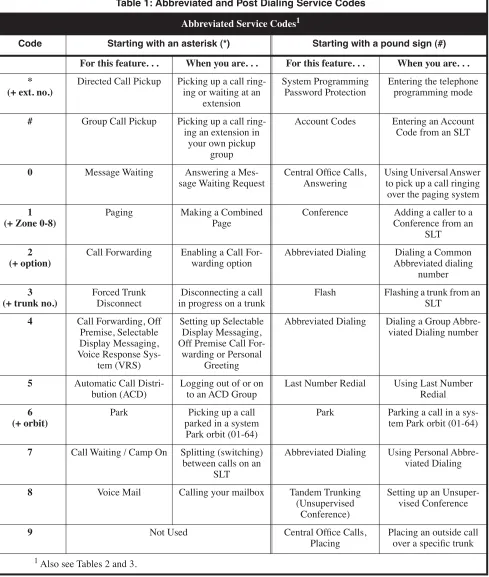
Table 1: Abbreviated and Post Dialing Service Codes
Abbreviated Service Codes1
Code Starting with an asterisk (*) Starting with a pound sign (#)
For this feature. . . When you are. . . For this feature. . . When you are. . .
* (+ ext. no.)
Directed Call Pickup Picking up a call ring-ing or waitring-ing at an
extension
System Programming Password Protection
Entering the telephone programming mode
# Group Call Pickup Picking up a call ring-ing an extension in
your own pickup group
Account Codes Entering an Account Code from an SLT
0 Message Waiting Answering a Mes-sage Waiting Request
Central Office Calls, Answering
Using Universal Answer to pick up a call ringing over the paging system
1 (+ Zone 0-8)
Paging Making a Combined Page
Conference Adding a caller to a Conference from an
SLT
2 (+ option)
Call Forwarding Enabling a Call For-warding option
Abbreviated Dialing Dialing a Common Abbreviated dialing
number
3 (+ trunk no.)
Forced Trunk Disconnect
Disconnecting a call in progress on a trunk
Flash Flashing a trunk from an SLT
4 Call Forwarding, Off Premise, Selectable Display Messaging, Voice Response
Sys-tem (VRS)
Setting up Selectable Display Messaging, Off Premise Call For-warding or Personal
Greeting
Abbreviated Dialing Dialing a Group Abbre-viated Dialing number
5 Automatic Call Distri-bution (ACD)
Logging out of or on to an ACD Group
Last Number Redial Using Last Number Redial
6 (+ orbit)
Park Picking up a call parked in a system
Park orbit (01-64)
Park Parking a call in a sys-tem Park orbit (01-64)
7 Call Waiting / Camp On Splitting (switching) between calls on an
SLT
Abbreviated Dialing Using Personal Abbre-viated Dialing
8 Voice Mail Calling your mailbox Tandem Trunking (Unsupervised
Conference)
Setting up an Unsuper-vised Conference
9 Not Used Central Office Calls,
Placing
Placing an outside call over a specific trunk
Table 2: Abbreviated and Post Dialing Service Codes
Single Digit Post Dialing Codes
For this feature. . . When you are. . .
1 Handsfree Answerback / Forced intercom Ringing
Changing the signaling mode of your outgoing Intercom call
2 Call Waiting / Camp On / Callback / Trunk Queuing
Camping on to or leaving a Callback at a busy extension or trunk
3-5 Not used
6 Voice Over Sending a Voice Over to a busy extension after hearing Busy/Ring tone
7 Off Hook Signaling Sending off-hook signal tones to a busy extension
8 Voice Mail Leaving a message in a co-worker’s mailbox after calling their busy or unanswered extension
0 Message Waiting Leaving a Message Waiting at a co-worker’s busy or unanswered extension
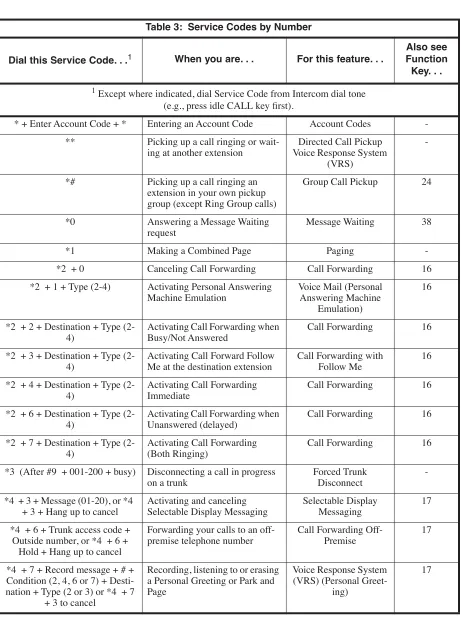
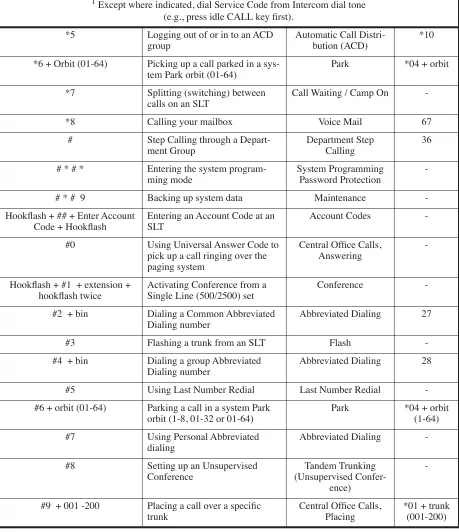
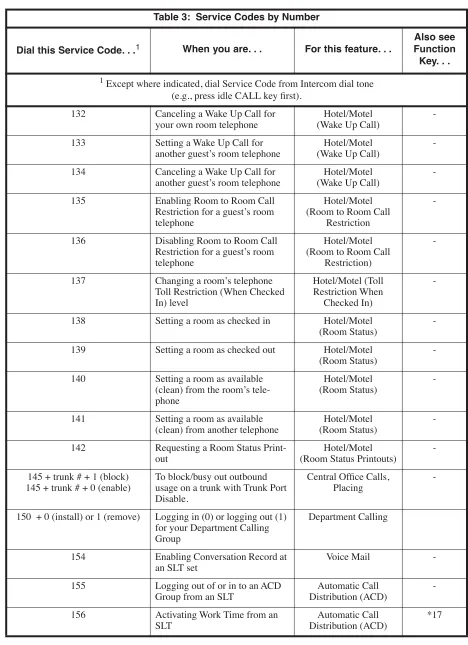
Table 3: Service Codes by Number
Dial this Service Code. . .1 When you are. . . For this feature. . .
Also see Function
Key. . .
1 Except where indicated, dial Service Code from Intercom dial tone
(e.g., press idle CALL key first).
* + Enter Account Code + * Entering an Account Code Account Codes
-** Picking up a call ringing or wait-ing at another extension
Directed Call Pickup Voice Response System
(VRS)
-*# Picking up a call ringing an extension in your own pickup group (except Ring Group calls)
Group Call Pickup 24
*0 Answering a Message Waiting request
Message Waiting 38
*1 Making a Combined Page Paging
-*2 + 0 Canceling Call Forwarding Call Forwarding 16
*2 + 1 + Type (2-4) Activating Personal Answering Machine Emulation
Voice Mail (Personal Answering Machine
Emulation)
16
*2 + 2 + Destination + Type (2-4)
Activating Call Forwarding when Busy/Not Answered
Call Forwarding 16
*2 + 3 + Destination + Type (2-4)
Activating Call Forward Follow Me at the destination extension
Call Forwarding with Follow Me
16
*2 + 4 + Destination + Type (2-4)
Activating Call Forwarding Immediate
Call Forwarding 16
*2 + 6 + Destination + Type (2-4)
Activating Call Forwarding when Unanswered (delayed)
Call Forwarding 16
*2 + 7 + Destination + Type (2-4)
Activating Call Forwarding (Both Ringing)
Call Forwarding 16
*3 (After #9 + 001-200 + busy) Disconnecting a call in progress on a trunk
Forced Trunk Disconnect
-*4 + 3 + Message (01-20), or -*4 + 3 + Hang up to cancel
Activating and canceling Selectable Display Messaging
Selectable Display Messaging
17
*4 + 6 + Trunk access code + Outside number, or *4 + 6 +
Hold + Hang up to cancel
Forwarding your calls to an off-premise telephone number
Call Forwarding Off-Premise
17
*4 + 7 + Record message + # + Condition (2, 4, 6 or 7) + Desti-nation + Type (2 or 3) or *4 + 7
+ 3 to cancel
Recording, listening to or erasing a Personal Greeting or Park and Page
Voice Response System (VRS) (Personal
Greet-ing)
*5 Logging out of or in to an ACD group
Automatic Call Distri-bution (ACD)
*10
*6 + Orbit (01-64) Picking up a call parked in a sys-tem Park orbit (01-64)
Park *04 + orbit
*7 Splitting (switching) between calls on an SLT
Call Waiting / Camp On
-*8 Calling your mailbox Voice Mail 67
# Step Calling through a Depart-ment Group
Department Step Calling
36
# * # * Entering the system program-ming mode
System Programming Password Protection
-# * -# 9 Backing up system data Maintenance
-Hookflash + ## + Enter Account Code + Hookflash
Entering an Account Code at an SLT
Account Codes
-#0 Using Universal Answer Code to pick up a call ringing over the paging system
Central Office Calls, Answering
-Hookflash + #1 + extension + hookflash twice
Activating Conference from a Single Line (500/2500) set
Conference
-#2 + bin Dialing a Common Abbreviated Dialing number
Abbreviated Dialing 27
#3 Flashing a trunk from an SLT Flash
-#4 + bin Dialing a group Abbreviated Dialing number
Abbreviated Dialing 28
#5 Using Last Number Redial Last Number Redial
-#6 + orbit (01-64) Parking a call in a system Park orbit (1-8, 01-32 or 01-64)
Park *04 + orbit (1-64)
#7 Using Personal Abbreviated dialing
Abbreviated Dialing
-#8 Setting up an Unsupervised Conference
Tandem Trunking (Unsupervised
Confer-ence)
-#9 + 001 -200 Placing a call over a specific trunk
Central Office Calls, Placing
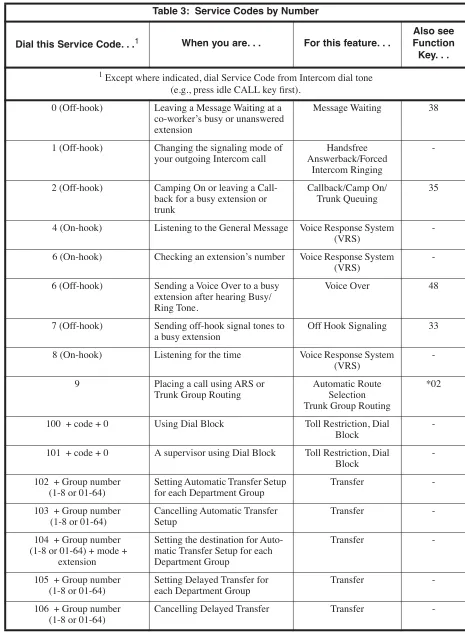
*01 + trunk (001-200) Table 3: Service Codes by Number
Dial this Service Code. . .1 When you are. . . For this feature. . .
Also see Function
Key. . .
1 Except where indicated, dial Service Code from Intercom dial tone
0 (Off-hook) Leaving a Message Waiting at a co-worker’s busy or unanswered extension
Message Waiting 38
1 (Off-hook) Changing the signaling mode of your outgoing Intercom call
Handsfree Answerback/Forced
Intercom Ringing
-2 (Off-hook) Camping On or leaving a Call-back for a busy extension or trunk
Callback/Camp On/ Trunk Queuing
35
4 (On-hook) Listening to the General Message Voice Response System (VRS)
-6 (On-hook) Checking an extension’s number Voice Response System (VRS)
-6 (Off-hook) Sending a Voice Over to a busy extension after hearing Busy/ Ring Tone.
Voice Over 48
7 (Off-hook) Sending off-hook signal tones to a busy extension
Off Hook Signaling 33
8 (On-hook) Listening for the time Voice Response System (VRS)
-9 Placing a call using ARS or Trunk Group Routing
Automatic Route Selection Trunk Group Routing
*02
100 + code + 0 Using Dial Block Toll Restriction, Dial Block
-101 + code + 0 A supervisor using Dial Block Toll Restriction, Dial Block
-102 + Group number (1-8 or 01-64)
Setting Automatic Transfer Setup for each Department Group
Transfer
-103 + Group number (1-8 or 01-64)
Cancelling Automatic Transfer Setup
Transfer
-104 + Group number (1-8 or 01-64) + mode +
extension
Setting the destination for Auto-matic Transfer Setup for each Department Group
Transfer
-105 + Group number (1-8 or 01-64)
Setting Delayed Transfer for each Department Group
Transfer
-106 + Group number (1-8 or 01-64)
Cancelling Delayed Transfer Transfer -Table 3: Service Codes by Number
Dial this Service Code. . .1 When you are. . . For this feature. . .
Also see Function
Key. . .
1 Except where indicated, dial Service Code from Intercom dial tone
107 + Group number (1-8 or 01-64)
Setting up DND for each Depart-ment Group
Transfer
-108 + Group number (1-8 or 01-64)
Cancelling DND for each Department Group
Transfer
-111 SLT Listening to the General Message
Voice Response System (VRS)
-112 + 3 to erase, 5 to listen or 7 to record
Recording, listening to or erasing the General Message
Voice Response System (VRS)
-116 + 3 to erase, 5 to listen or 7 to record
Recording, listening to or erasing a VRS Message
Voice Response System (VRS)
-118 Night Mode Switching for other group
Night Answer
120 Common Cancelling Service Code
TBD
-121 Print the SMDR Extension Accu-mulated printout
Station Message Detail Recording (SMDR)
-122 Print the SMDR Group Accumu-lated printout
Station Message Detail Recording (SMDR)
-123 Print the SMDR Account Code Accumulated printout
Station Message Detail Recording (SMDR)
-882 Transferring a call to the VRS. This can also be used for routing ANI/DNIS to the VRS.
Transfer
-126 Leaving a message at an exten-sion, without first calling that extension
Hotel/Motel (Message Waiting)
-127 Enabling DND at a room telephone
Hotel/Motel (Do Not Disturb)
-128 Canceling DND at a room telephone
Hotel/Motel (Do Not Disturb)
-129 Enabling DND for another room telephone
Hotel/Motel (Do Not Disturb)
-130 Canceling DND at another room telephone
Hotel/Motel (Wake Up Call)
-131 Setting up a Wake Up call for your own room telephone
Hotel/Motel (Wake Up Call)
-Table 3: Service Codes by Number
Dial this Service Code. . .1 When you are. . . For this feature. . .
Also see Function
Key. . .
1 Except where indicated, dial Service Code from Intercom dial tone
132 Canceling a Wake Up Call for your own room telephone
Hotel/Motel (Wake Up Call)
-133 Setting a Wake Up Call for another guest’s room telephone
Hotel/Motel (Wake Up Call)
-134 Canceling a Wake Up Call for another guest’s room telephone
Hotel/Motel (Wake Up Call)
-135 Enabling Room to Room Call Restriction for a guest’s room telephone
Hotel/Motel (Room to Room Call
Restriction
-136 Disabling Room to Room Call Restriction for a guest’s room telephone
Hotel/Motel (Room to Room Call
Restriction)
-137 Changing a room’s telephone Toll Restriction (When Checked In) level
Hotel/Motel (Toll Restriction When
Checked In)
-138 Setting a room as checked in Hotel/Motel (Room Status)
-139 Setting a room as checked out Hotel/Motel (Room Status)
-140 Setting a room as available (clean) from the room’s tele-phone
Hotel/Motel (Room Status)
-141 Setting a room as available (clean) from another telephone
Hotel/Motel (Room Status)
-142 Requesting a Room Status Print-out
Hotel/Motel (Room Status Printouts)
-145 + trunk # + 1 (block) 145 + trunk # + 0 (enable)
To block/busy out outbound usage on a trunk with Trunk Port Disable.
Central Office Calls, Placing
-150 + 0 (install) or 1 (remove) Logging in (0) or logging out (1) for your Department Calling Group
Department Calling
154 Enabling Conversation Record at an SLT set
Voice Mail
-155 Logging out of or in to an ACD Group from an SLT
Automatic Call Distribution (ACD)
-156 Activating Work Time from an SLT
Automatic Call Distribution (ACD)
*17 Table 3: Service Codes by Number
Dial this Service Code. . .1 When you are. . . For this feature. . .
Also see Function
Key. . .
1 Except where indicated, dial Service Code from Intercom dial tone
157 Canceling Work Time from an SLT
Automatic Call Distribution (ACD
*17
158 Activating Rest Mode from an SLT
Automatic Call Distribution (ACD)
*13
159 Canceling Rest Mode from an SLT
Automatic Call Distribution (ACD)
*13
Hookflash + 160 ACD Recording for SLT Automatic Call Distribution (ACD)
-163 + 6-digit code + line + phone number
Overriding Toll Restriction Toll Restriction
-166 Changing Toll Restriction for a checked in room
Hotel/Motel (Toll Restriction [Checked in])
-167 Logging an agent into their ACD Group
Automatic Call Distribution (ACD
-168 Logging an agent out of their ACD Group
Automatic Call Distribution (ACD
-169 Supervisor assigning an agent into another ACD Group or changing an agent’s status
Automatic Call Distribution (ACD
-170 + ACD Group Changing your ACD Group assignment
Automatic Call Distribution (ACD)
-172 + Line number (001-200) Answering a call on a specific trunk
Central Office Calls, Answering
Hold
175 Monitoring a room’s phone Hotel/Motel (Room Monitor)
-177 Changing the COS of another extension. Must be allowed in Program 20-13-28.
Class of Service
-178 + 0-9 Changing the language of a dis-play phone.
Alphanumeric Display / Maintenance
-179 + 1 (set) or 0 (cancel) Changing the ability for a second call with DID/DISA/DIL
Central Office Calls, Answering
-189 Transferring an Aspire Wireless call when out of range
Aspire Wireless
-800 + extension # + enter name + HOLD
Programming extension names Name Storing 55 Table 3: Service Codes by Number
Dial this Service Code. . .1 When you are. . . For this feature. . .
Also see Function
Key. . .
1 Except where indicated, dial Service Code from Intercom dial tone
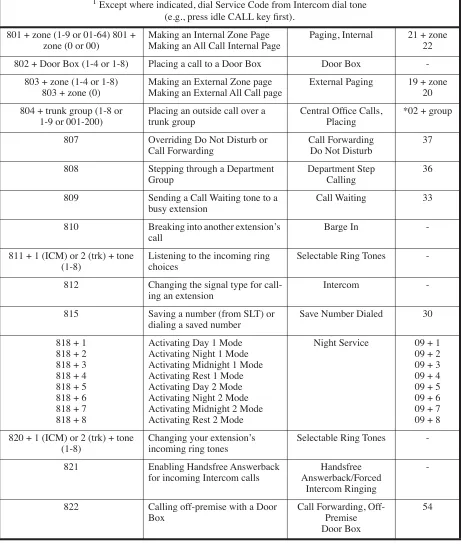
801 + zone (1-9 or 01-64) 801 + zone (0 or 00)
Making an Internal Zone Page Making an All Call Internal Page
Paging, Internal 21 + zone 22
802 + Door Box (1-4 or 1-8) Placing a call to a Door Box Door Box
-803 + zone (1-4 or 1-8) 803 + zone (0)
Making an External Zone page Making an External All Call page
External Paging 19 + zone 20
804 + trunk group (1-8 or 1-9 or 001-200)
Placing an outside call over a trunk group
Central Office Calls, Placing
*02 + group
807 Overriding Do Not Disturb or Call Forwarding
Call Forwarding Do Not Disturb
37
808 Stepping through a Department Group
Department Step Calling
36
809 Sending a Call Waiting tone to a busy extension
Call Waiting 33
810 Breaking into another extension’s call
Barge In
-811 + 1 (ICM) or 2 (trk) + tone (1-8)
Listening to the incoming ring choices
Selectable Ring Tones
-812 Changing the signal type for call-ing an extension
Intercom
-815 Saving a number (from SLT) or dialing a saved number
Save Number Dialed 30
818 + 1 818 + 2 818 + 3 818 + 4 818 + 5 818 + 6 818 + 7 818 + 8
Activating Day 1 Mode Activating Night 1 Mode Activating Midnight 1 Mode Activating Rest 1 Mode Activating Day 2 Mode Activating Night 2 Mode Activating Midnight 2 Mode Activating Rest 2 Mode
Night Service 09 + 1 09 + 2 09 + 3 09 + 4 09 + 5 09 + 6 09 + 7 09 + 8
820 + 1 (ICM) or 2 (trk) + tone (1-8)
Changing your extension’s incoming ring tones
Selectable Ring Tones
-821 Enabling Handsfree Answerback for incoming Intercom calls
Handsfree Answerback/Forced
Intercom Ringing
-822 Calling off-premise with a Door Box
Call Forwarding, Off-Premise Door Box
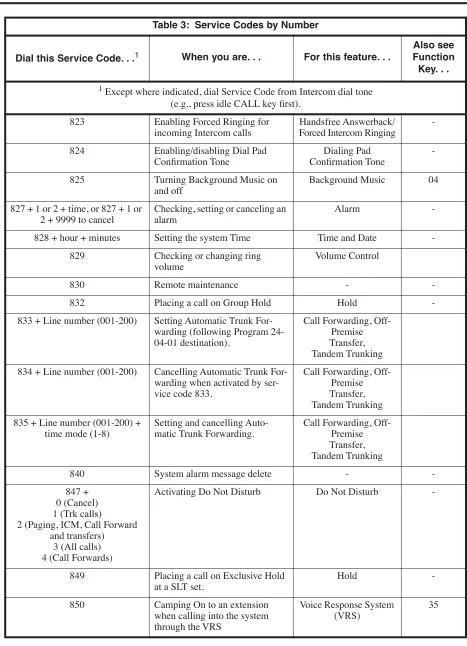
54 Table 3: Service Codes by Number
Dial this Service Code. . .1 When you are. . . For this feature. . .
Also see Function
Key. . .
1 Except where indicated, dial Service Code from Intercom dial tone
823 Enabling Forced Ringing for incoming Intercom calls
Handsfree Answerback/ Forced Intercom Ringing
-824 Enabling/disabling Dial Pad Confirmation Tone
Dialing Pad Confirmation Tone
-825 Turning Background Music on and off
Background Music 04
827 + 1 or 2 + time, or 827 + 1 or 2 + 9999 to cancel
Checking, setting or canceling an alarm
Alarm
-828 + hour + minutes Setting the system Time Time and Date
-829 Checking or changing ring volume
Volume Control
830 Remote maintenance -
-832 Placing a call on Group Hold Hold
-833 + Line number (001-200) Setting Automatic Trunk For-warding (following Program 24-04-01 destination).
Call Forwarding, Off-Premise Transfer, Tandem Trunking
834 + Line number (001-200) Cancelling Automatic Trunk For-warding when activated by ser-vice code 833.
Call Forwarding, Off-Premise Transfer, Tandem Trunking
835 + Line number (001-200) + time mode (1-8)
Setting and cancelling Auto-matic Trunk Forwarding.
Call Forwarding, Off-Premise Transfer, Tandem Trunking
840 System alarm message delete -
-847 + 0 (Cancel) 1 (Trk calls)
2 (Paging, ICM, Call Forward and transfers)
3 (All calls) 4 (Call Forwards)
Activating Do Not Disturb Do Not Disturb
-849 Placing a call on Exclusive Hold at a SLT set.
Hold
-850 Camping On to an extension when calling into the system through the VRS
Voice Response System (VRS)
35 Table 3: Service Codes by Number
Dial this Service Code. . .1 When you are. . . For this feature. . .
Also see Function
Key. . .
1 Except where indicated, dial Service Code from Intercom dial tone
851 + key + code Changing the function of a pro-grammable key using 851 service codes
Programmable Function Keys
-852 + key + code Changing the function of a pro-grammable key using 852 service codes
One-Touch Serial Operation
-853 + bin + number + HOLD + Name + HOLD to store
Storing Common Abbreviated Dialing numbers
Abbreviated Dialing
-854 + bin + number + HOLD + Name + HOLD to store
Storing Group Abbreviated Dialing numbers
Abbreviated Dialing
-855 + One Touch key + code Programming a One-Touch Key or Personal Speed Dial
One-Touch Dialing
-856 Answering a call ringing a phone in your pickup group (except Ring Group calls)
Group Call Pickup
-857 Parking a call or picking up a parked call at an extension
Park
-859 Retrieving a call from Exclusive Hold at a SLT set.
Hold
-860 DID ACD Access Code Automatic Call Distribution (ACD)
-862 Picking up a call from Group Hold
Hold
-863 Joining a Meet Me Conference or Meet Me Page on an Internal Paging Zone (if your extension is in the group called)
Meet Me Conference Meet Me Paging
23 or 32
864 + zone paged (0-9 or 00-64)
Joining a Meet Me Conference or Meet Me Page if your extension is not in the group paged
Meet Me Paging 23 or 32
865 + zone (0-8) Joining a Meet Me Conference or Meet Me Page on an External Paging Zone
Meet Me Conference Meet Me Paging
23 or 32
866 Using Network Message Lamp Control
Networking
-868 + pickup group (1-8 or 1-9 or 01-64)
Answering a call ringing a phone in another pickup group (except Ring Group calls)
Group Call Pickup 26 + group Table 3: Service Codes by Number
Dial this Service Code. . .1 When you are. . . For this feature. . .
Also see Function
Key. . .
1 Except where indicated, dial Service Code from Intercom dial tone
869 Answering a call ringing a phone in another pickup group if you don’t know the group’s number (except Ring Group Calls)
Group Call Pickup 25
870 Canceling a Callback request Callback
-871 + ext Canceling Messages Waiting you have left at a specific extension
Message Waiting
-873 Canceling all Messages Waiting you have left at other extensions
Message Waiting
-875 + pswd (0000) + place outside call
Temporarily overriding an extension’s Toll Restriction
Toll Restriction Override
-876 Clearing number saved by Last Number Redial
Last Number Redial
-880 + Relay (0-8) Using the General Purpose Relay Paging, External Night Service
51
881 + 00 (no tone), 01 (general) or 02 (holiday)
Changing the Music on Hold Tone
Music on Hold
-882 Routing ANI/DNIS to the VRS. It can also be used when transfer-ring to VRS.
Transfer Voice Response Service
(VRS)
883 Enabling the data communica-tion auto-answer mode
Data Communications
-884 Accessing the VRS Voice Response Service (VRS)
-885 Clearing the number saved by Save Number Redial
Save Number Redial
-886 Turning off the E911 alarm. E911
890 Using Voice Over after calling a busy extension
Voice Over 48
894 Splitting between two calls on an SLT
Call Waiting
899 Testing Callback operation for SLT
Callback
-Table 3: Service Codes by Number
Dial this Service Code. . .1 When you are. . . For this feature. . .
Also see Function
Key. . .
1 Except where indicated, dial Service Code from Intercom dial tone
Table 4: Service Codes by Feature
For this feature... Dial this Service Code...1 When you are... Also see Function Key...
1 Except where indicated, dial Service code form Intercom dial tone (e.g., press idle CALL key first).
Abbreviated Dialing 853 + bin + number + HOLD + Name + HOLD to store
Storing Common Abbreviated Dialing numbers
-854 + bin + number + HOLD + Name + HOLD to store
Storing Group Abbreviated Dialing numbers
-#2 + bin Dialing a Common Abbreviated Dialing number
27
#4 + bin Dialing a Group Abbreviated Dialing number
28
#7 + bin Using Personal Abbreviated Dialing
-Account Codes * + Enter Account code + * Entering an Account Code
-Hookflash + ## + Enter account code + Hookflash
Entering an Account Code at an SLT
-Alarm 827 + 1 or 2 + time, or 827 + 1 or 2 + 9999 to cancel
Checking, setting or canceling an alarm
-Alphanumeric Display 178 + 0-9 Selecting the language to be used on dis-play keysets.
-Aspire Wireless 189 Transferring an Aspire Wireless call when out of range
-Automatic Call Distribution (ACD)
*5 Logging out of or in to an ACD Group *10
155 Logging out of or in to an ACD Group from an SLT
156 Activating Work Time from an SLT *17
157 Canceling Work Time from an SLT *17
158 Activating Rest Mode from an SLT *13
159 Canceling Rest Mode from an SLT *13
Hookflash + 160 ACD Recording for SLT
-167 Allowing ACD Agent to log into a group
168 Allowing ACD Agent to log out of a group
169 Allowing supervisor to change agent’s status
170 + ACD Group Changing your ACD Group assignment
-860 DID ACD Access Code
-Automatic Route Selection or Trunk
Group Routing
9 Placing an call using Trunk Group Routing or Automatic Route Selection
Background Music 825 Turning Background Music on and off 04
Barge In 810 Barging in on a busy co-worker’s extension 34
Call Forwarding *2 + 0 Canceling Call Forwarding 16
*2 + 7 + Destination + Type (2-4)
Activating Call Forwarding (Both Ringing)
16
*2 + 6 + Destination + Type (2-4)
Activating Call Forwarding when Busy 16
*2 + 2 + Destination + Type (2-4)
Activating Call Forwarding when Busy/ Not Answered
16
*2 + 6 + Destination + Type (2-4)
Activating Call Forwarding when Unanswered (delayed)
16
*2 + 7 + Destination + Type (2-4)
Activating Call Forwarding Follow Me 16
*2 + 4 + Destination + Type (2-4)
Activating Call Forwarding Immediate 16
Call Forwarding Off-Premise
*4 + 6 + Trunk access code + Outside number, or *4 + 6 + Hold + Hang up to
cancel
Forwarding your calls to an off-premise telephone number
17
833 + Line number (001-200) Setting Automatic Trunk Forwarding (fol-lowing Program 24-04-01 destination).
-834 + Line number (001-200) Cancelling Automatic Trunk Forwarding when activated by service code 833.
-835 + Line number (001-200) + time mode (1-8)
Setting and cancelling Automatic Trunk Forwarding.
-Call Forwarding, Off-Premise Door Box
822 Calling off-premise with a Door Box 54
Call Forwarding/Do Not Disturb Override
807 Overriding an extension’s Call Forward or DND setting.
37
Call Forwarding with Follow Me
*2 + 3 + Destination + Type (2-4)
Activating Call Forward Follow Me at the destination extension
16
Call Waiting / Camp On *7 or 894 Splitting (switching) between calls on an SLT
-Callback / Camp On / Trunk Queuing
2 Camping On or leaving a Callback for a busy extension or trunk
35
870 Canceling a Callback request
-899 Testing Callback operation for SLT -Table 4: Service Codes by Feature
For this feature... Dial this Service Code...1 When you are... Also see Function Key...
Central Office Calls, Answering /
Hold
#0 Using Universal Answer to pick up a call ringing over the paging system
-172 + Line number (001-200) Answering a call on a specific trunk
-179 + 1 (set) or 0 (cancel)
Changing the ability for a second call with DID/DISA/DIL
Central Office Calls, Placing
#9 + 001-200 Placing a call over a specific trunk *01 + trunk (100-200)
145 + trunk # + 1 (block) 145 + trunk # + 0 (enable)
To block/busy out outbound usage on a trunk with Trunk Port Disable.
-804 + trunk group (1-9 or 001-200)
Placing an outside call over a trunk group *02 + group
Class of Service 177 Changing the COS of another extension. Must be allowed in Program 20-13-28.
-Conference Hookflash + #1 + extension + hookflash twice
Activating Conference from a Single Line (500/2500) set
1016
Data Communications 883 Enabling the data connection auto-answer mode
-884 Disconnecting an active data call
-Department Calling 150 + 0 (install) or 1 (remove)
Logging in (0) or logging out (1) for your Department Calling Group
46
Department Step Calling
# Step Calling through a Department Group 36
Dial Pad Confirmation Tone
824 Enabling/disabling Dial Pad Confirmation Tone
-Directed Call Pickup ** + ext. Picking up a call ringing or waiting at an extension
-Do Not Disturb 847 + 0 (Cancel) 1 (Trk calls) 2 (Paging, ICM, Call Forwards, and Transfers)
3 (All calls) 4 (Call Forwards)
Activating Do Not Disturb
-Door Box 802 + Door Box (1-4 or 1-8) Placing a call to a door Box
-822 A Door Box is forwarded off-premise
-E911 886 Turning off the E911 alarm
-Flash #3 Flashing a trunk from an SLT
-Table 4: Service Codes by Feature
For this feature... Dial this Service Code...1 When you are... Also see Function Key...
Forced Trunk Disconnect
* 3 (after #9 + 1-8 or 001-200 + busy)
Disconnecting a call in progress on a trunk
-Group Call Pickup *# Picking up a call ringing an extension in your own pickup group (except Ring Group calls)
24
868 + pickup group (1-8 or 1-9 or 01-64)
Answering a call ringing a phone in another pickup group
26 + group
869 Answering a call ringing a phone in another pickup group if you don’t know the group’s number (except Ring Group calls)
25
Handsfree Answerback/Forced
Intercom Ringing
1 (Off-hook) Changing the signaling mode of your outgoing Intercom call
-821 Enabling Handsfree Answerback for incoming Intercom calls
-823 Enabling Forced Ringing for incoming Intercom calls
-Hold 832 Placing a call on Group Hold
-849 Placing a call on Exclusive Hold at a SLT set
-859 Retrieving a call from Exclusive Hold at a 2-Button telephone
-862 Picking up a call from Group Hold
-Hotel/Motel (Message Waiting)
126 Leaving a message at an extension, without first calling that extension
-Hotel/Motel (Do Not Disturb)
127 Enabling DND at a room telephone
-Hotel/Motel (Do Not Disturb)
128 Canceling DND at a room telephone
-Hotel/Motel (Do Not Disturb)
129 Enabling DND for another room telephone
-Hotel/Motel (Do Not disturb)
130 Canceling DND at another room telephone
-Hotel/Motel 175 Monitoring a room’s phone
-Hotel/Motel (Wake Up Call)
131 Setting a Wake Up Call or your own room telephone
-Hotel/Motel (Wake Up Call)
132 Canceling a Wake Up Call for your own room telephone
-Table 4: Service Codes by Feature
For this feature... Dial this Service Code...1 When you are... Also see Function Key...
Hotel/Motel (Wake Up Call)
133 Setting a Wake Up Call for another guest’s room telephone
-Hotel/Motel (Wake Up Call)
134 Canceling a wake Up Call for another guest’s room telephone
-Hotel/Motel (Room to Room Call
Restriction)
135 Enabling Room to Room Call Restriction for a guest’s room telephone
-Hotel/Motel (Room to Room Call
Restriction)
136 Disabling Room to Room Call Restriction for a guest’s room
-Hotel/Motel (Toll restriction [When Checked In])
137 Changing a room’s telephone Toll Restriction (When Checked In) level
-Hotel/Motel (Room Status)
138 Setting a room as checked in
-Hotel/Motel (Room Status)
139 Setting room as checked out
-Hotel/Motel (Room Status)
140 Setting a room as available (clean) from the room’s telephone
-Hotel/Motel (Room Status)
141 Setting a room as available (clean) from another telephone
-Hotel/Motel (Room Status
Printouts)
142 Requesting a Room Status Printout
-Hotel/Motel (Toll Restriction [When
Checked In])
166 Changing a room’s telephone Toll Restric-tion level (when checked in)
-Intercom 812 Changing the signal type for calling an extension
-Last Number Redial #5 Using Last Number Redial
-876 Clearing number saved by Last Number Redial
-Maintenance # * # 9 Backing up system data
-178 + 0-9 Displaying the language the phone is using
-Table 4: Service Codes by Feature
For this feature... Dial this Service Code...1 When you are... Also see Function Key...