ISSN (Print) : 2320 – 3765 ISSN (Online): 2278 – 8875
I
nternational
J
ournal of
A
dvanced
R
esearch in
E
lectrical,
E
lectronics and
I
nstrumentation
E
ngineering
(An UGC Approved Journal)
Website: www.ijareeie.com
Vol. 6, Issue 8, August 2017
Real Time Touch Gesture Controlled Virtual
Keyboard for Physically Disabled
Erukonda Sravya1, Rakesh Ranjan2, Mohammad Jabirullah3
Assistant Professor, Dept. of ECE, CMR Engineering College, Hyderabad, India 1, 2, 3
ABSTRACT: Apart from food, cloth and shelter, communication is also one of the important human needs. All
humans have ability to interact with the others. Thousands of people worldwide suffer from such physical disabilities that they cannot even able to communicate. In our society, people with motor impairments are oftentimes socially excluded from their environment. This is unfortunate because every human being should have the possibility to obtain the necessary conditions to live a normal life. Although there is technology to assist people with motor impairments, few systems are targeted for programming environments. In our proposed system, we are going to implement a virtual keyboard using touch gesture control. Here we are using the hand movements of the physically disabled person. In case a patient cannot move his hands efficiently, high sensitivity touch switch is provided. Three switches are provided on the hand of the subject. Using these switches patients can communicate and convey few important messages along with few simple answering messages like YES or NO to the caretaker or third person. We have successfully implemented and verified the results of the system using few trials.
KEYWORDS: Virtual Keyboard, Physically Disabled, Microcontroller, Gesture Control, Resistive Touch Switch.
I. INTRODUCTION
Communication is the ability to interact with the environment which is one of the basic human needs. Millions of people worldwide suffer from such severe physical disabilities that they cannot even meet these basic needs. Even though they may have no motor mobility, however, the sensory and cognitive functions of the physically disabled are usually intact [1]. This makes them good candidates for gesture controlled virtual keyboard technology, which provides a direct electronic interface and can convey messages and commands directly from the human to others. It has the potential to enable the physically disabled to perform many activities, thus improving their quality of life and productivity, allowing them more independence and reducing social costs.
In our society, people with motor impairments are oftentimes socially excluded from their environment. This is unfortunate because every human being should have the possibility to obtain the necessary conditions to live a normal life. Although there is technology to assist people with motor impairments, few systems are targeted for programming environments. We have created a system, called virtual keyboard using gesture control [2, 9, 11, 12, 14]. Here we are using the hand movements of the physically disabled person. In case a patient cannot move his hands efficiently, high sensitivity touch switch is used for operation. Three switches are provided on the hand of the subject i.e. Switch A, switch B, switch C. The patient has to lightly press switch A to select the number corresponding to the messages from the previously stored database. There are 16 different messages which we are providing to the patient. He/she can press the switch A to select the desired number corresponding to the message and thereafter presses switch B to select the message. Patient can go back to main menu or reset by pressing switch C. By pressing switch B and C the user can communicate with third person by conveying simple message YES or NO.
II. LITERATURE SURVEY
ISSN (Print) : 2320 – 3765 ISSN (Online): 2278 – 8875
I
nternational
J
ournal of
A
dvanced
R
esearch in
E
lectrical,
E
lectronics and
I
nstrumentation
E
ngineering
(An UGC Approved Journal)
Website: www.ijareeie.com
Vol. 6, Issue 8, August 2017
becoming an increasingly crucial factor in development for the ever more powerful embedded market. While this interface is come to age, it survived because of its many positive aspects. Yet it is not feasible for the ever-smaller computing devices that house ever-more advanced functionalities [2]. Great amount of information human can output through the medium of a pen is limited by motor skills rather than by cognitive skills. The brain can learn much quicker and better how to control body parts than the human physique takes to adapt to new requirements.
Over the past 20 years, research that can provide communication and control to individuals with severe motor impairment has increased almost exponentially [10]. While considerable effort has been dedicated to offline analysis for improving signal detection and translation, online studies with the target populations are far less common, there remains a great need for translational studies. Our target while searching and understanding the topic aimed that it must be simple to operate, need minimal expert oversight, be usable by people who are extremely disabled, and provide reliable, long-term performance in complex environments.
2.1. Gesture Control
Humans naturally use gesture to communicate. It has been demonstrated that young children can readily learn to communicate with gesture before they learn to talk. A gesture is non-verbal communication made with a part of the body. Today’s world comprises of a large variety of people. Some of them depend on others for their living. But in today’s fast world, everyone is busy and there are less people to care for the increasing number of elderly and the physically challenged people. Also these people find it tough to even navigate inside the home without external aids.
Gesture means a movement of part of the body, esp. a hand or the head, to express an idea or meaning. Here the project is implemented based on hand gesture [7]. Based on the hand movement key can be selected and used for various operations. Hence gesture movements can be used by both the elderly and the physically challenged people in a user friendly manner for their benefits. The number of research has shown clear signs that gesture controlled technologies are now in the interest of the people. Though there are different aspects and many points to mention from the research, it has been about 30 years of research and researchers have been working continuously on gesture based system.
The different types of gesture are hand gesture; touch gesture, body gesture, Finger point gestures and gestures with voice. Most of the research of the survey use or target the general users of any age [3, 7, 9]. Initially it was mostly for computer users to work on the objects or presentation. Wheelchair users are also highly considered for accelerometer based gesture controlled system. Most of the last 5 years investigations are focused on elderly and disable people. Researches show that gesture based applications can be used for many different things like entertainment, Controlling home appliance, Tele-care, Tele-health, Elderly or Disable care etc.
2.2. Virtual Keyboard
Input to small devices is becoming an increasingly crucial factor in development for the ever more powerful embedded market. Speech input promises to become a feasible alternative to tiny keypads, yet its limited reliability, robustness, and flexibility render it unsuitable for certain tasks and/or environments. Various attempts have been made to provide the common keyboard metaphor without the physical keyboard, to build “virtual keyboards” [4, 6, 10, 12]. This promises to leverage our familiarity with the device without incurring the constraints of the bulky physics.
ISSN (Print) : 2320 – 3765 ISSN (Online): 2278 – 8875
I
nternational
J
ournal of
A
dvanced
R
esearch in
E
lectrical,
E
lectronics and
I
nstrumentation
E
ngineering
(An UGC Approved Journal)
Website: www.ijareeie.com
Vol. 6, Issue 8, August 2017
interface is not restricted to communicating through a single pen. A seemingly related yet orthogonal benefit derives from the fact that each button generates only one bit of information [2, 10]. So in a sense, a keyboard is an input device with one degree of freedom (1 DOF) 1, a pen or a mouse has 2 DOF (a 2-dimensional surface), and SL operates in 4 DOF (3-dimensional space plus time).
III. BLOCK DIAGRAM
The system contains touch switches, microcontroller, LCD display, Buzzer, relay driver and external circuitry. Microcontroller (89S52) is the heart of system. The system works on the operating voltage 3.5V to 5V and maximum current operating range 100 mA. Fig. 1 shows the block diagram of the system.
Fig. 1 Block Diagram of the system
The block diagram descriptions of the blocks are following:-
A. Microcontroller:-
Microcontroller is used as the heart of the system. The touch switches are connected to uc using the transistor switch driver circuit. We are using 89s52 microcontroller. The AT89S52 is a low-power, high-performance CMOS 8-bit microcontroller with 8K bytes of in-system programmable Flash memory. All microcontroller pins are connected with external pull up resistors for current sourcing. The microcontroller continuously reads the status of touch switches. If any one of the switch is pressed then respective action is done.
B. Touch Switch:-
ISSN (Print) : 2320 – 3765 ISSN (Online): 2278 – 8875
I
nternational
J
ournal of
A
dvanced
R
esearch in
E
lectrical,
E
lectronics and
I
nstrumentation
E
ngineering
(An UGC Approved Journal)
Website: www.ijareeie.com
Vol. 6, Issue 8, August 2017
Fig. 2 Resistance touch switch [15]
This is the most basic type of touch switch, in its simplest form. A transistor is used as a switch. The RB resistor keeps the base to ground when no electrode is touched, so it does not float. The RP resistor is for protection, in case that the electrodes are short-circuited, and it prevents an over current that will probably toast the transistor. If one of the electrodes is touched, nothing will happen. But if both electrodes are touched together, then a small amount of current will flow through the skin to the base of the transistor. The transistor will then go from cut-off to saturation, and current will flow from the CE region to the LOAD. This method is straight forward and no more info is needed. There are numerous different ways to implement a resistance touch switch, with transistors, 555, 741, CMOS etc. Super simple, super reliable are the advantages of it. Not very flexible in design and two electrodes required are the disadvantages of it.
C. LCD Display:-
LCD display is used to display the message allocated to respective key of virtual keyboard. We are using 16*2 LCD display.
D. Buzzer:-
Buzzer is an audio signalling device which may be mechanical, electromechanical, or piezoelectric. After pressing any key of virtual keyboard, the buzzer gets till the reset switch is pressed. It basically used by the physically disabled person to give the command or request for help when required.
E. Relay:-
Relay is an electrically operated switch. It is basically used for the A.C operating devices or circuits. To control the A.C devices relay act as a switch. We are using ice cube relay for controlling the door, light, fan, doorbell etc. in our project.
IV. SYSTEM IMPLEMENTATION AND WORKING
4.1. Circuit Diagram
ISSN (Print) : 2320 – 3765 ISSN (Online): 2278 – 8875
I
nternational
J
ournal of
A
dvanced
R
esearch in
E
lectrical,
E
lectronics and
I
nstrumentation
E
ngineering
(An UGC Approved Journal)
Website: www.ijareeie.com
Vol. 6, Issue 8, August 2017
Fig. 3 Circuit Diagram of the system
4.2. Working of the System
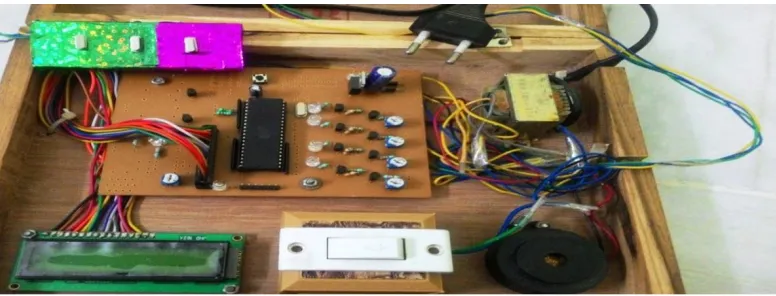
The switch box being used to control the messages for displaying them is placed on the bed of the patient or any accessible area within his bed where he can touch the switch. The patient can access the switch with his fingers and even his toes. By switching on the system we get a default message- “Virtual Keyboard”. By lightly pressing switch A the patient can select the number corresponding to the desired message which he wants to convey the second person. Once the desired number from 1 to 16 is selected by pressing switch B, the message will be displayed on the LCD. Fig 4 presents the complete implemented system.
Fig. 4 Complete Implemented System
ISSN (Print) : 2320 – 3765 ISSN (Online): 2278 – 8875
I
nternational
J
ournal of
A
dvanced
R
esearch in
E
lectrical,
E
lectronics and
I
nstrumentation
E
ngineering
(An UGC Approved Journal)
Website: www.ijareeie.com
Vol. 6, Issue 8, August 2017
Fig. 5 LCD displaying “Virtual Keyboard Display”
After that the user is asked to “ENTER NEW MESSAGE”. The patient is provided with three switches. He looks at the serial number of the message which he wants to display. The patient presses switch A until that serial number is reached. Fig 6 is displaying the ““ENTER NEW MESSAGE”.
Fig. 6 LCD displaying “Enter new message”
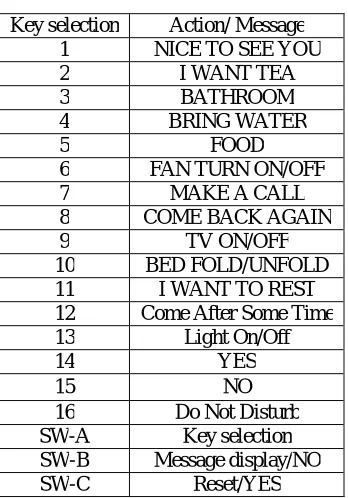
The user can press switch B to select the message. The message is displayed on the LCD screen. After that the buzzer starts ringing .The third person listens the buzzer and will be alerted. This message is also displayed to the patient. If a wrong message has been displayed, the patient can press the reset switch i.e. switch C. The user can again select the message by this method. The patient can also get into a conversation with the third party using this system. He can reply by pressing switch B for ‘NO’. The user can reply “YES” by pressing switch C. Patient can fulfil his basic needs by using this system. He can ask for water, Food, T.V on/off, Bathroom and Bed fold/unfold etc. with the help of this system. Table 1 is depicting the key and the corresponding messages.
Table 1.Results
Key selection Action/ Message
1 NICE TO SEE YOU
2 I WANT TEA
3 BATHROOM
4 BRING WATER
5 FOOD
6 FAN TURN ON/OFF
7 MAKE A CALL
8 COME BACK AGAIN
9 TV ON/OFF
10 BED FOLD/UNFOLD
11 I WANT TO REST
12 Come After Some Time
13 Light On/Off
14 YES
15 NO
ISSN (Print) : 2320 – 3765 ISSN (Online): 2278 – 8875
I
nternational
J
ournal of
A
dvanced
R
esearch in
E
lectrical,
E
lectronics and
I
nstrumentation
E
ngineering
(An UGC Approved Journal)
Website: www.ijareeie.com
Vol. 6, Issue 8, August 2017
4.3. Work Flow of the System
A. Algorithm:
Start
System displays the message ‘Virtual Keyboard’.
Patient is provided with an earlier stored message database.
He/she looks at the serial number of the message which he wants to display. Then he selects the numbers by pressing Switch ‘A’.
After he gets the number, he presses Switch ‘B’. The desired message is displayed on the LCD screen. After the message is displayed, a buzzer will start ringing. The third person will hear the buzzer and will be alerted.
He will stop the buzzer and sees the message displayed on the LCD. He will perform the required action.
The user can also get into conversation with a person.
He can reply by pressing Switch ‘B’ for NO and Switch ‘C’ for YES.
If a wrong serial number is selected the message displayed will be different from the desired message. The user can go back to home by pressing Switch ‘C’ and select the number again.
Stop
B. Flow Chart:
ISSN (Print) : 2320 – 3765 ISSN (Online): 2278 – 8875
I
nternational
J
ournal of
A
dvanced
R
esearch in
E
lectrical,
E
lectronics and
I
nstrumentation
E
ngineering
(An UGC Approved Journal)
Website: www.ijareeie.com
Vol. 6, Issue 8, August 2017
Fig. 7 Flow chart of the working of the system
V. RESULT AND DISCUSSION
5.1. Results
ISSN (Print) : 2320 – 3765 ISSN (Online): 2278 – 8875
I
nternational
J
ournal of
A
dvanced
R
esearch in
E
lectrical,
E
lectronics and
I
nstrumentation
E
ngineering
(An UGC Approved Journal)
Website: www.ijareeie.com
Vol. 6, Issue 8, August 2017
Table 2.Results
Selected Key Display
5.2. Discussion
ISSN (Print) : 2320 – 3765 ISSN (Online): 2278 – 8875
I
nternational
J
ournal of
A
dvanced
R
esearch in
E
lectrical,
E
lectronics and
I
nstrumentation
E
ngineering
(An UGC Approved Journal)
Website: www.ijareeie.com
Vol. 6, Issue 8, August 2017
weapons. Hence, we can say that by using this system physically challenged people find ease of operation as the system is user friendly and portable.
VI. CONCLUSION
Hence we can conclude that with the help of hand gestures we have developed a virtual keyboard. The system developed can be used for communication purpose. Earlier stored messages are selected by these control signals and displayed on LCD screen. By using this system physically challenged people find ease of operation as the system is user friendly and size is small. In this proposed system we used different hand gesture for multiple applications .We placed three switches on the patient’s hand. Patient is asked to scroll the switch to the desired number to select the earlier stored message database .After that he/she is asked to confirm it by pressing another switch .Patient can return back to the main menu by pressing the switch ‘C’. Further improvement in the implemented system can be done with the addition of few more communication modules like GPS and GPRS for wireless connectivity of the system. For continuous surveillance video camera can be added to the system. It will give us live streaming of the physically disabled person. In near future computer with biological sensor and thought recognition software will come, just as keyboard and mouse.
REFERENCES
[1] P. A. Condado, P. F. Miquelina, S. Norte, N. Castilho, F. G. Lobo, and H. R. Shahbazkia, ” Information and communication technologies for people with disabilities”. In Interactive Computer Aided Learning, International Conference, Carinthia Technology Institute, Villach, Austria, 2004.
[2] Cagdas¸ Karatas and Marco Gruteser “Printing Multi-Key Touch Interfaces” in ACM International Joint Conference on Pervasive and Ubiquitous Computing (UbiComp 2015), Osaka, Japan on pp. 169-179, Sep. 7-11, 2015.
[3] Wei Quan, Xin Liu and Xin Liu, “A wearable human gesture sensor with environmental universality” in 25th IEEE Canadian Conference on Electrical and Computer Engineering (CCECE), 2012, DOI: 10.1109/CCECE.2012.6334932
[4] Ayesha Shaikh, AntaraKanade, et al., “Review of Virtual Keyboard” in International Journal of Engineering and Techniques - Volume 1 Issue 5, pp- 75-79, October 2015.
[5] Jun Hu, Guolin Li, Xiang Xie, ZhongLv, and Zhihua Wang “Bare-fingers Touch Detection by the Button’s Distortion in a Projector–Camera System”, IEEE Xplore, APRIL 2014.
[6] SumitSrivastava and Ramesh Chandra Tripathi “Real time mono-vision based customizable virtual keyboard using fingertip speed analysis”, In Masaaki Kurosu, editor, Human-Computer Interaction. Interaction Modalities and Techniques, volume 8007 of Lecture Notes in Computer Science, page 497 to 505, Springer Berlin Heidelberg, 2013.
[7] MonuriHemantha and M.V.Srikanth, “Simulation of Real Time Hand Gesture recognition for Physically Impaired” in International Journal of Advanced Research in Computer and Communication Engineering, Vol. 2, Issue 11, pp. 4402-4407, November 2013
[8] H. Du, T. Oggier, F. Lustenberger and E. Charbon, “A virtual keyboard based on true3D optical ranging,” Proc. British Machine Vision Conference (BMVC), Oxford, pp. 220-229, Sept. 2013
[9] E.Psner, N.Starzicki, &E.Katz. “A single camera based floating virtual keyboard with improved touch detection”, In Electrical Electronics Engineers in Israel(IEEEI), 2012 IEEE 27th Convention of, Page 1 to 5, 2012.
[10] Mathias Kölsch, CA Matthew Turk, et al. “Keyboards without Keyboards: A Survey of Virtual Keyboards” in Proceedings of Sensing and Input for Media-centric Systems, July 2012.
[11] M.-G. Cho,” A new gesture recognition algorithm and segmentation method of Korean scripts for gesture allowed ink editor”, Inform. Sci. 176 (9) (2006) 1290–1303.
[12] S. Zhai, M. Hunter, and B. A. Smith, “The metropolis keyboard - an exploration of quantitative techniques for virtual keyboard design”, In UIST ’00: Proceedings of the 13th annual ACM symposium on User Interface Software and Technology, pages 119–128, New York, USA, 2000, ACM Press
[13] “The 8051 Microcontroller and Embedded Systems” 2nd Edition by Muhammad Ali Mazidi, Janice GillispieMazidi & RolinD.Mckinlay. [14] “The Technology And Applications Of Gesture-Based Control”, Grant R. McMillan Air Force Research Laboratory (AFRL/HECP) 2255 H

![Fig. 2 Resistance touch switch [15]](https://thumb-us.123doks.com/thumbv2/123dok_us/7767586.1277658/4.595.117.487.154.307/fig-resistance-touch-switch.webp)