Container support in Vac
Andrew McNab11School of Physics and Astronomy, University of Manchester, Manchester, United Kingdom
Abstract. During 2017 support for Docker and Singularity containers was added to the Vac system, in addition to its long standing support for virtual machines. All three types of "logical machine" can now be run in parallel on the same pool of hypervisors, using container or virtual machine definitions published by experiments. We explain how CernVM-FS is provided to containers by the hypervisors, to avoid any need to operate the containers in privileged modes. Finally we describe how LHCb Docker containers use this model and have been used to validate the Vac implementation.
1 Introduction
Vac [1] was developed as a system for managing the lifecycles of virtual machines (VMs), by the University of Manchester for GridPP. It is currently managing resources at seven WLCG sites in the UK, for ALICE, ATLAS, LHCb and the large number of experiments supported by the GridPP DIRAC Service [2]. Vac allows worker node class machines to operate as autonomous hypervisors (“factories”), creating VMs for particular experiments in response to the observed demand for work they currently have. During 2017 support for Docker [3] and Singularity [4] containers were added to Vac, which now allows individual Vac factory machines to run a mixture of VMs and containers according the experiments’ preferences.
In this model we view containers as self-contained, opaque objects with a well-defined and simple API (“black boxes”) which are in effect lightweight VMs, rather than running multiple single-purpose containers which work together in multiple ways to provide a service.
2 Vacuum Containers
In a previous CHEP paper [5] and HSF technical note [6] we presented the Vacuum Platform specification, which Vac, and its cloud-based sibling Vcycle [7], follow. This platform defines the interfaces between virtual machines and the Vac or Vcycle systems which manage them. This includes existing standards such as OpenStack/EC2 metadata [8] and the Machine/Job Features interface [9], and new ones such as the Vacuum Pipe JSON files with which experiments can publish the details of how to create and manage their VMs. Using the specification, the designer of a virtual machine knows what interfaces can be relied on and how to use them.
implementations. From the point of view of the container, all the additions concern volumes which are made available via bind mounts created by the host when the container is instantiated.
The two read-only Machine/Job Features directories are available as within the container at /etc/machinefeatures and /etc/jobfeatures, containing the usual key/value files, named after the key and containing a single value.
The read-write directory /var/spool/joboutputs is provided for the container to write relevant log files and the shutdown_message file, which it can use to communicate why the container stopped. This is used by Vac to decide whether to create more containers of that type as slots become available.
Vac can be asked to provide directories to the container to be used as fast work space, and these are added as bind mounts one by one at the requested locations. As described in the next section, this is done in an efficient and performant way.
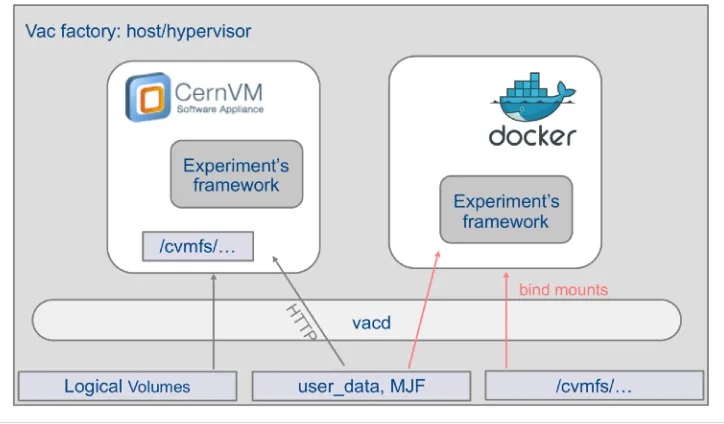
For CernVM-FS [10], each subdirectory of /cvmfs/ which is needed by the container is made available as a volume. This approach is used because it would currently be necessary to run the container as a privileged container if the CernVM-FS daemon were to be run inside it. By bind-mounting the necessary /cvmfs/ directory hierarchies, the CernVM-FS daemon can be run on the host, with the usual root-level privileges.
Finally the file user_data is made available at /user_data. This file is intended to provide contextualisation for containers which are not entirely based on files within their image. As with virtual machines, it is possible to use a generic image and then contextualise it for a particular experiment with a script, which can be contained in user_data. The name user_data is used following its existing use in contextualising VMs on OpenStack and Vac.
To tell Vac what the container requires, the Vacuum Pipe JSON files have been extended to allow the desired CernVM-FS repositories and fast work space directories to be listed. The initial bootstrap command to execute inside the container can be given, but otherwise defaults to the provided /user_data file. As with VMs, the source of the user_data file (typically a URL) is given to Vac in the Vacuum Pipe.
3 Vac implementation of Vacuum Containers
Most of the Vac functionality developed for use with VMs were reused in the support for containers. For example, the code to fetch the specified images and user_data files, to enforce time limits, and create logical volumes to use as work spaces was reused without modification. The only changes required were in the mechanism by which bind mounts are passed to the containers and the way in which containers rather than VMs are instantiated. The overarching aim is that containers may use the slots previously only occupied by VMs, with memory, virtual CPU and disk resources specified and partitioned in the same way.
implementations. From the point of view of the container, all the additions concern volumes which are made available via bind mounts created by the host when the container is instantiated.
The two read-only Machine/Job Features directories are available as within the container at /etc/machinefeatures and /etc/jobfeatures, containing the usual key/value files, named after the key and containing a single value.
The read-write directory /var/spool/joboutputs is provided for the container to write relevant log files and the shutdown_message file, which it can use to communicate why the container stopped. This is used by Vac to decide whether to create more containers of that type as slots become available.
Vac can be asked to provide directories to the container to be used as fast work space, and these are added as bind mounts one by one at the requested locations. As described in the next section, this is done in an efficient and performant way.
For CernVM-FS [10], each subdirectory of /cvmfs/ which is needed by the container is made available as a volume. This approach is used because it would currently be necessary to run the container as a privileged container if the CernVM-FS daemon were to be run inside it. By bind-mounting the necessary /cvmfs/ directory hierarchies, the CernVM-FS daemon can be run on the host, with the usual root-level privileges.
Finally the file user_data is made available at /user_data. This file is intended to provide contextualisation for containers which are not entirely based on files within their image. As with virtual machines, it is possible to use a generic image and then contextualise it for a particular experiment with a script, which can be contained in user_data. The name user_data is used following its existing use in contextualising VMs on OpenStack and Vac.
To tell Vac what the container requires, the Vacuum Pipe JSON files have been extended to allow the desired CernVM-FS repositories and fast work space directories to be listed. The initial bootstrap command to execute inside the container can be given, but otherwise defaults to the provided /user_data file. As with VMs, the source of the user_data file (typically a URL) is given to Vac in the Vacuum Pipe.
3 Vac implementation of Vacuum Containers
Most of the Vac functionality developed for use with VMs were reused in the support for containers. For example, the code to fetch the specified images and user_data files, to enforce time limits, and create logical volumes to use as work spaces was reused without modification. The only changes required were in the mechanism by which bind mounts are passed to the containers and the way in which containers rather than VMs are instantiated. The overarching aim is that containers may use the slots previously only occupied by VMs, with memory, virtual CPU and disk resources specified and partitioned in the same way.
When instantiating a VM or container, Vac creates a directory containing the relevant files and subdirectories. The machinefeatures and jobfeatures directories are created and populated here, and for containers they are shared with bind mounts rather than being published on an internal HTTP server as with VMs. The read-write directory joboutputs is handled in the same way, and appears as /var/spool/joboutputs inside the containers. The
work space directories requested by the container’s description are created in a subdirectory “mnt” which is itself the mount point for a logical volume created by Vac on the fly for this container. This mirrors the way in which scratch logical volumes are created for VMs, and both sets of logical volumes are created within the same volume group on the factory machine (the hypervisor / host), allowing the disk space to be reused as slots are occupied by VMs or containers.
CernVM-FS directory hierarchies are managed by the CernVM-FS daemon running on the host but only the requested hierarchies are shared into the container. Vac assumes that the usual CernVM-FS configuration with hierarchies automounted on demand is used. For this reason, Vac keeps track of the hierarchies which are in use and regularly accesses them itself to keep them mounted, as file accesses within the container are not sufficient to force the Linux automounter to keep them mounted.
Docker containers are managed by running the docker command directly, as the most stable interface to the Docker ecosystem. Docker provides a clean way of deleting containers and all their processes, including containers which have run past their time limit and must be forcibly removed.
Figure 1 shows VMs and Docker containers within a Vac factory.
Fig. 1. VMs and Docker containers, side by side, on a Vac factory
4 CernVM-based Docker containers
Although any image can be used, all of the production VM definitions used with Vac and Vcycle have been based on CernVM [11] boot images for convenience. In this model, the files in the root filesystem are obtained from a generic CernVM-FS directory hierarchy mounted at “/”. As well as minimising the size of the boot images which must be downloaded by each VM factory, this has the advantage that security updates to the root directory hierarchy published by the CernVM team are available immediately as each VM starts, without any effort (or even awareness) by the site.
We wanted a similar model to be easily adopted by the designers of containers following the Vacuum Container specification. To do this we produced a simplified version of an example procedure publicised [12] by the CernVM team, based on the busybox executable which contains many common Linux shell commands in a single file. Our image is available in the repository vacproject/vcbusybox on Docker Hub [13], and can be used with standard Docker installations. It contains the busybox executable and a script. A container instantiated from this image will build an apparent root filesystem using symbolic links to system directories such as /usr and /var in the same CernVM-FS directory hierarchy used to provide the CernVM root filesystem in VMs. Once initialised, the script then runs the /user_data file as a shell script, allowing contextualisation of the container for the experiment in question.
5 Docker containers for LHCb
In 2016, LHCb and Yandex School of Data Analysis developed a Docker container definition for the Yandex Skygrid [14] platform, using a monolithic CentOS image and then a script to contextualise it to run LHCb DIRAC jobs. This was itself derived from the LHCb DIRAC VMs [15] presented in a previous CHEP paper.
LHCb built on this experience in developing Docker containers following the Vacuum Container specification outlined in Section 2 and the CernVM-based Docker containers described in Section 4. Unix user accounts are created within the container to allow the isolation between root, DIRAC pilot and DIRAC payload jobs previously achieved in the LHCb DIRAC VMs.
6 Production tests with Vac and LHCb containers
4 CernVM-based Docker containers
Although any image can be used, all of the production VM definitions used with Vac and Vcycle have been based on CernVM [11] boot images for convenience. In this model, the files in the root filesystem are obtained from a generic CernVM-FS directory hierarchy mounted at “/”. As well as minimising the size of the boot images which must be downloaded by each VM factory, this has the advantage that security updates to the root directory hierarchy published by the CernVM team are available immediately as each VM starts, without any effort (or even awareness) by the site.
We wanted a similar model to be easily adopted by the designers of containers following the Vacuum Container specification. To do this we produced a simplified version of an example procedure publicised [12] by the CernVM team, based on the busybox executable which contains many common Linux shell commands in a single file. Our image is available in the repository vacproject/vcbusybox on Docker Hub [13], and can be used with standard Docker installations. It contains the busybox executable and a script. A container instantiated from this image will build an apparent root filesystem using symbolic links to system directories such as /usr and /var in the same CernVM-FS directory hierarchy used to provide the CernVM root filesystem in VMs. Once initialised, the script then runs the /user_data file as a shell script, allowing contextualisation of the container for the experiment in question.
5 Docker containers for LHCb
In 2016, LHCb and Yandex School of Data Analysis developed a Docker container definition for the Yandex Skygrid [14] platform, using a monolithic CentOS image and then a script to contextualise it to run LHCb DIRAC jobs. This was itself derived from the LHCb DIRAC VMs [15] presented in a previous CHEP paper.
LHCb built on this experience in developing Docker containers following the Vacuum Container specification outlined in Section 2 and the CernVM-based Docker containers described in Section 4. Unix user accounts are created within the container to allow the isolation between root, DIRAC pilot and DIRAC payload jobs previously achieved in the LHCb DIRAC VMs.
6 Production tests with Vac and LHCb containers
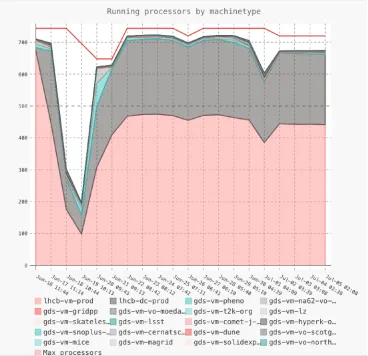
During June and July 2017, a test of the Vac support for Docker containers was carried out using a cluster of 30 worker nodes at the University of Manchester, each with 24 logical processors. The machines were configured to run a mixture of VMs (“lhcb-vm-prod”) and Docker containers (“lhcb-dc-prod”) for LHCb, and VMs for the many experiments supported by the GridPP DIRAC service (“gds”). The test ran successfully without intervention, apart from an unrelated software update required in mid June. As each VM or container lasted no longer than 48 hours, this validated the mechanisms for the reuse of resources reallocated between VMs and containers, and for repeatedly mounting and
sharing CernVM-FS directory hierarchies. Figure 2 shows a chart of the processor occupancy of these various VM and container types.
Fig. 2. VMs and Docker containers during a production test in June/July 2017. The trough in mid June was due to an unrelated software update.
7 Summary and implications
of running LHCb DIRAC jobs, and Vac has been validated with a production run in June/ July 2017 on a 30 machine cluster at the University of Manchester.
This new feature allows experiments and sites more freedom in the choice of platform, if containers rather than virtual machines are better suited to their needs. Some user communities may already have containers with their applications which can be modified to follow the Vacuum Container model with minimal changes.
Despite the support for Singularity containers in Vac, it is likely that Singularity will be of most use within experiments’ frameworks to isolate payloads from pilots for instance, rather than as standalone “black boxes” which sites can run. As such we do not expect Vac’s Singularity support to be used by experiments following this model, even if they separately use it within the Docker container or VMs that they define.
References
1. A. McNab, F. Stagni, M. Ubeda Garcia J. Phys.: Conf. Ser. 513 032065 (2014) 2. D. Bauer and S. Fayer J. Phys.: Conf. Ser. 898 052003 (2017)
3. Docker https://www.docker.com 4. Singularity https://singularity.lbl.gov
5. A. McNab J. Phys.: Conf. Ser. 898 052028 (2017)
6. A. McNab HSF-TN-2016-04 The Vacuum Platform (HEP Software Foundation, 2016) 7. P. Love, E. MacMahon, A. McNab J. Phys.: Conf. Ser. 664 022031 (2015)
8. https://docs.openstack.org/nova/rocky/user/metadata-service.html 9. M. Alef et al J. Phys.: Conf. Ser. 898 092032 (2017)
10. J. Blomer et al.; J. Phys.: Conf. Ser. 331 042003 (2011) 11. P. Buncic et al.; J. Phys.: Conf. Ser. 219 042003 (2010) 12. https://cernvm.cern.ch/portal/docker
13. https://cloud.docker.com/u/vacproject/repository/docker/vacproject/vcbusybox 14. A. Baranov et al J. Phys.: Conf. Ser. 664 022002 (2015)