Intelligent Information Management, 2017, 9, 236-244 http://www.scirp.org/journal/iim ISSN Online: 2160-5920 ISSN Print: 2160-5912
DOI: 10.4236/iim.2017.96013 Nov. 1, 2017 236 Intelligent Information Management
Database Development Based on MFC
Application in Management of Curriculum
Information
Mao Wang1, Tuo Chen2, Yong Jiang1
1China University of Geosciences, Beijing, China 2National Space Science Center, Beijing, China
Abstract
There are hundreds of records in the curriculum of our Language Learning Lab every semester and every record has several important properties. It takes too much time to manage the information in the traditional way and it always makes mistakes. Managing the information with database technology, de-signing program to access the database with Visual c tool, setting a combobox in the application UI and inquiring curriculum information by selecting the room name in the combobox. It is easy to operate the program for the staff members. The result is accurate, this way promotes the efficiency of managing information.
Keywords
Curriculum Information, Database, Programming Skill, Microsoft Foundation Classes
1. Present Curriculum Management in Language Learning
Center
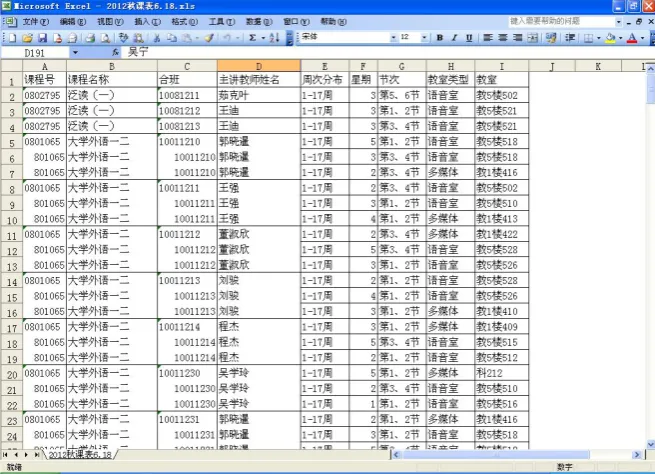
Foreign language is an important course for college students and all the fresh-men need to study language course in learning center. There are more than 200 language courses in learning center every semester. Every course includes day of the week, lesson time, room, teacher, lesson name, class name. We got the excel file includes course information from the office of academic affairs at the begin-ning of the semester. We can see the Figure 1. We can sort there cords simply with excel software.
Lab technicians get the course information. They need to order the informa- How to cite this paper: Mao, W., Chen, T.
and Jiang, Y. (2017) Database Development Based on MFC Application in Management of Curriculum Information. Intelligent Information Management, 9, 236-244. https://doi.org/10.4236/iim.2017.96013
Received: September 25, 2017 Accepted: October 29, 2017 Published: November 1, 2017
Copyright © 2017 by authors and Scientific Research Publishing Inc. This work is licensed under the Creative Commons Attribution International License (CC BY 4.0).
http://creativecommons.org/licenses/by/4.0/
DOI: 10.4236/iim.2017.96013 237 Intelligent Information Management
Figure 1. Original curriculum information.
tion by day of the week, lesson time, room number and then they can use it conveniently. It takes 1 day to order the hundreds of records manually. The pa-per applies database technology [1] [2] [3] to manage the course information with MFC program, so it solves the problem efficiently. In the MFC environ-ment we can design the convenient user interface [4] [5] and generate the choic-es automatically. The rchoic-esult is order by day of week; different records are shown in different colors. It is easy to find the records we need.
2. Query and Simple Sort of Database
2.1. Course Information Query and Simple Sorting
When we sort the course records of the learning center, we can know the room which is available sometime. We can maintain the equipment of the room in the vacant time, so query function is very important.
Introduction of SQL sentence [6]. We can input command to operate the da-tabase. The grammar is as follows.
SELECT column name FROM table name. We can add other condition, such as where, order by [7] [8]. The column name is the property.
Example of SELECT sentence (query course information of room 505 and or-der by day of week).
Select sentence is as follows. SELECT * FROM room where 教室 = “教5楼
505” order by 星期asc. Select is query. Room is the table name, 教室、星期is
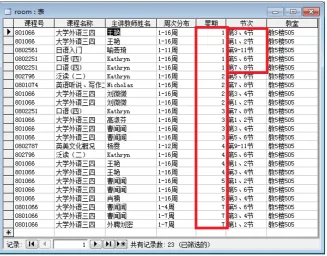
the attribute of the table. The data is order by day of week ascending. The result is shown as Figure 2.
In Figure 2, we can get the course records of “教五楼505”, and it’s sorted by
M. Wang et al.
[image:3.595.212.540.70.326.2]DOI: 10.4236/iim.2017.96013 238 Intelligent Information Management
Figure 2. The query result order by day of week for one room.
column for Monday shows “第3, 4节”, “第1, 2节”, “第9 - 11节”, “第5, 6节”,
“第7, 8节”. The information is unordered. It is used inconveniently.
2.2. Course Information Query and Complex Sorting
2.2.1. Query the Course Information for a Room and Complex Order Example of SELECT sentence (course records query of room 505 and order by day of week, lesson), SELECT sentence is as follows.
SELECT * FROM room where 教室 = “教5楼505” order by 星期, 节次asc
“Order by星期,节次asc” [9] means that query the course information sorted by
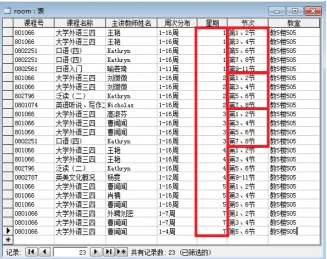
day of week ascending, and then sorted by lesson time for every day ascending. The result is shown as Figure 3.
In Figure 3, we can get the course records of room 505, and the result is sorted by day of week and lesson time. When we use SQL sentence to query the records, we can know the information of room 505 accurately and the result is ordered.
2.2.2. Course Records Query for All the Room in the Learning Center When a teacher wants to change a room, the technician needs to know the va-cant room at a time. We need to query the course records order by “星期、节次、 教室号”. The SQL sentence is as follows. SELECT * FROM room order by 星期, 节次, 教室asc. The result is shown as Figure 4.
DOI: 10.4236/iim.2017.96013 239 Intelligent Information Management
Figure 3. The query result sorted by day of week, lesson for one room.
M. Wang et al.
DOI: 10.4236/iim.2017.96013 240 Intelligent Information Management
3. MFC Structure and Program Designing
We can query data in database and it is very efficient. When lab technician wants to use it easily, we need to design software with MFC structure. The paper design an MFC program to query the course database, and it is easily for lab technician to operate [10] [11].
3.1. The MFC Frame Structure
Visual studio is a developing toolkit and is a developing environment pushed out by Microsoft Company. We design the program with MFC library. MFC means Microsoft Foundation Classes. When we create an MFC project, the project will generate 4 classes [12] [13] [14] (the view, the doc, the main Frame, the app). It is very convenient for programmer to design software in windows environment. The MFC frame defines the frame and offers the standard ways for user interface. The programer adds the functions in the frame.
CDocument: it is a document class [15], the memory data communicates with database data with it. CView: it is view class. Users communicate with the mem-ory data [16] with it and it includes interface and on draw function.
We add a combobox in the toolbar. The combox accesses the database and gets the course information. When the program is initiated, it adds the room number in the combobox. The user doesn’t need to type the room number.
CStringsel = “SELECT 教室 FROM room group by 教室”. The SQL
sen-tence can query the room number and the records of same room number can generate one room number. The number is sorted.
The variable frame is the pointer of Mainframe in view class, frame->m_wndToolBar.m_combo_room. AddString (strRoom). Add the room number in the combobox, room number is queried form database. strRoom is the room number from database.
When user chooses room number, the room number will be the variable m_strobj Room. The program will operate invalidate (TRUE) to call the On Draw function, then the visual region will be refreshed [17] [18].
3.2. Operating Database 1) Opening database
_ConnectionPtr m_pConnection; Define the variable to connect the database. m_pConnection->Open(“Provider = Microsoft.Jet.OLEDB.4.0;Data Source = room.mdb”,”“,”“,adModeUnknown);
The second parameter DataSource is the database name.
(2) Generatingsqlsentenceautomatically according the user’s demand. if(strcmp(m_strobjRoom,”全部”)==0)
{
sel.Format(“SELECT * FROM room order by 星期, 节次, 教室”);
DOI: 10.4236/iim.2017.96013 241 Intelligent Information Management
else {
sel.Format(“SELECT * FROM room where 教室=‘%s’ order by 星期, 节次 “,m_strobjRoom);
}
According the user’s choice the program generates the SQL sentence. If the user chooses all the room, we query all the room in the course database. If the user chooses one room, the program generates the SQL sentence to query the course information for the room. The variable m_strobjRoom is the selected room number. When the user chooses all the room, the program generate the first SQL sentence. When the user chooses one room, the program generates the second SQL sentence.
3) Query data from the database and get result.
_RecordsetPtrm_pRecordset; Define the variable to receive data m_pRecordset.CreateInstance(__uuidof(Recordset));
m_pRecordset->Open(_bstr_t(sel), //sel is the SQL sentence. m_pConnection.GetInterfacePtr(), //get the database connec-tion pointer
adOpenDynamic, adLockOptimistic, adCmdText);
Through opening operation, we can get result in variable m_pRecordset. 4) Traverse all the record
m_pRecordset->MoveNext(), move tothe next record.
m_pRecordset->adoEOF. The function checks whether the record is the last one. It always used in while circulation to traverse data [19] [20].
3.3. The Result Is Shown in the View Class
There is a function called on draw in view class. The result is shown with the function. In order to make it easy to be found for user, the record in a day of week is set a color. For example the data of Monday is green, Tuesday is red.
pDC->SetTextColor(RGB(255,0,0)). The function set text color can set color for data. The value in RGB is different then the color is different.
pDC->TextOut(ptorigin.x+xnstep1,ptorigin.y,strClass). The function prints the records in the view. The variable ptorigin is the origin point. When the next record is shown, ptorigin. y is added a step length. When we traverse the data, all the records are shown in the view with different color.
3.4. The Program Flow Char and Operation Interface The program includes several steps.
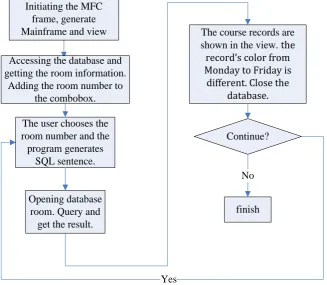
1) The program initiates MFC frame and generates the mainframe and the view.
M. Wang et al.
DOI: 10.4236/iim.2017.96013 242 Intelligent Information Management
the room number in the combobox.
3) The user chooses the choice in the combobox. The program generates SQL sentence.
4) The program opens the Room database, queries the information and gets result.
5) The result is shown in the view. The record’s color of different day is dif-ferent. Close the database. If the user continues to query, go to step 3.
The flow chart is shown as Figure 5.
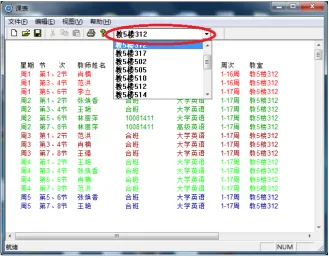
The program’s interface and the result is shown as Figure 6. The combobox is shown in the red ellipse. The user can choose room number in the combobox. The result is the course information of 教5 楼312. The data’s color from
Monday to Friday is different and course information is sorted by day of week, lesson time, it is easy find a record.
4. The Conclusion
[image:7.595.211.539.407.692.2]We design a program to access database with Visual studio; it can manage the course information efficiently. When the program query the database, the query time is less than 1 second (the count of records is several hundred). It is more convenient than the traditional way. The course information’s color is different, so we can find information easily. The user doesn’t need to study the database knowledge and SQL sentence. It can run in OS win 7 win 10 and so on. It solves
Figure 5. Program flow chart. Opening database
room. Query and get the result.
The course records are shown in the view. the
record’s color from Monday to Friday is
different. Close the database.
finish Continue?
Yes Initiating the MFC
frame, generate Mainframe and view
Accessing the database and getting the room information.
Adding the room number to the combobox.
The user chooses the room number and the program generates
SQL sentence.
DOI: 10.4236/iim.2017.96013 243 Intelligent Information Management
Figure 6. Program interface.
the problem efficiently. The program is appropriate for managing curriculum for the office of academic affairs.
Fund
The paper is supported by China University of Geosciences (Beijing) basic re-search funding (2-9-2017-096).
References
[1] Liu, G. and Lu, Y.J. (2016) Access Database Technology and Application. China Railway Press, Beijing.
[2] Tang, H.K. (2016) Database Technology and Application. Electronic Industry Press, Beijing.
[3] Zhang, J.L. (2016) Database Technology and Experiment Course. Zhejiang Univer-sity Press, Hangzhou.
[4] Qian, L.P. Wang, L.D. and Zhang, J. (2016) Object-Oriented Programming C++ Edition. China Machine Press, Beijing.
[5] Chen, L.M., Zhan, L.C.H. and Min, F. (2016) C++ Object-Oriented Programming. China Electric Power Press, Beijing.
[6] Chen, C.H. (2010) Tutorial of Access Database. China Railway Publishing House, Beijing.
[7] Huang, K., Bai, Y.N. et al. (2014) Access Database Knowledge and Application. Tsinghua University Press, Beijing.
[8] Wang, A.L., Guo, S.X., Gui, Z.S. and Liu, Y. (2016) Tutorial of Access Database Example. Tsinghua University Press, Beijing.
Tel-M. Wang et al.
DOI: 10.4236/iim.2017.96013 244 Intelligent Information Management
ecom Press, Beijing.
[10] Wang, H. (1999) Master Visual C++. Electronic Industry Press, Beijing.
[11] Yang, X.L., Zhang, Q. and Yang, L. (2016) Visual Programming Designed. Beijing Institute of Technology Press, Beijing.
[12] Wang, D.H. and Li, Y. (2016) Mastering VISUAL C++ Programming. Posts and telecom Press, Beijing.
[13] Qiu, G.F. (2015) MFC Programming Based on Visual C++. Tsinghua University Press, Beijing.
[14] Wang, H.T. (2016) Data Structure. Shanghai Jiao Tong University Press, Shanghai. [15] Wen, X.M. and Ding, X.J. (2013) Visual C++ Object-Oriented Programming and
Experiment. Tsinghua University Press, Beijing.
[16] Chuai, J.H. and Yuan, Q. (2016) Object-Oriented Programming and VC++ Appli-cation. Tsinghua University Press, Beijing.
[17] Hu, X.G. and Zhang, X.Y. (2016) Data Structure. Anhui University Press, Hefei. [18] Lin, R. and Han, Y.Q. (2012) High Quality Programming Guide: C++/C Language.
Electronic Industry Press, Beijing.
[19] Yan, W.M., Li, D.M. and Wu, W.M. (2016) Data Structure. C Language Edition, The Second Edition, Posts and Telecom Press, Beijing.