F0cit
404614047
Punch/Reode
t -Punch
IEEE-488
0perolol
guide
Edirion
I
BLANK TAPE SPOOL
T A P E F E E D A N D P U N C H M E C H A N I S M
P U N C H F E E D S L O T
M A I N S A N D I / O C O N N E C T O R P A N E L
STATUS D I S P L A Y
O P E R A T O R K E Y B O A R D
P U N C H HEAD RELEASE
TAPE EXIT
TAPE R E A D E R H E A D
re
C H A D B O X
4047 ReaderlPunch
C o n t e n t s
I a i n s c o n n e c t i o n
2 Punching
2 . 1 P u n c h t a p e l o a d i n g 2 . 2 P u n c h i n g i n s t r u c t i o n
3 R e a d i n g
3 . 1 R e a d e r t a p e l o a d i n g 3 . 2 R e a d i n g i n s t r u c t i o n
1 T a p e c o p y i n g
4 . 1 T a p e c o p y i n g i n s t r u c t i o n
5 C o d e c o n v e r s i o n p u n c h i n g 5 . 1 P u n c h i n g l S 0 t o E I A c o d e 5 . ? P u n c h i n g E I A t o l S 0 c o d e
6 C o d e c o n v e r s i o n r e a d i n g 6 . 1 R e a d i n g I S O t o E I A c o d e 6 . 2 R e a d i n g E I A t o I S O c o d e
7 C o d e c o n v e r s i o n t a p e c o p y i n g 7 . 1 T a p e c o p y i n g I S O t o E I A c o d e 7 . 2 T a p e c o p y i n g E I A t o l S 0 c o d e
I E r r o r s i g n a l s o n t h e s t a t u s d i s p l a y 8 . 1 P u n c h i n g
8 . 2 R e a d i n g
I C h e c k o f p a r a m e t e r s 9 . 1 D e l i v e r y p a r a m e t e r s
9 . 2 C h e c k o f p a r a m e t e r s s e t t i n g
2
2
3
4 4 5
5
5
6
6
6
7
7
7
I
I
I
p a q e
I
I
I
10
10
10
f{arning
I
Mains
connection
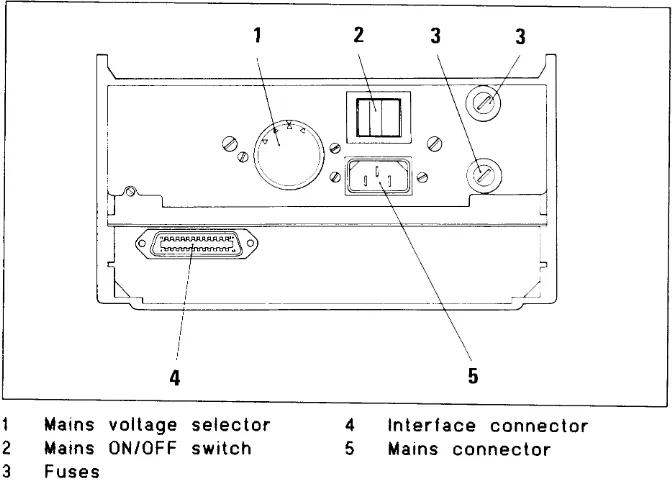
- c h e c k that the mains voltage selector on the rear p a n e l , see figure l, shows the actual mains voltage. - c o n n e c t t h e delivered mains cord to the rear panel mains
c o n n e c t o r a n d the mains.
- s w i t c h the oN/0FF toggle switch on the rear panel to the O N p o s i t i o n .
- c h e c k that the status display, see f igure z, shows oFF. - c h e c k the fuses FIA and TzA on the rear panel if the
sta-t u s d i s p l a y r e m a i n s exsta-tinguished.
1
2
3
M a i n s v o l t a g e s e l e c t o r M a i n s 0 N / 0 F F s w i t e h F u s e s
I n t e r f a c e c o n n e c t o r M a i n s c o n n e c t o r 4
[image:3.595.214.550.210.454.2] [image:3.595.214.398.533.733.2]5
Figure I R e a r p a n e l
t_-r l]
l l l ,
t_-, t:t
l_l U
M B B M ]
M B B B
B B B t r
2 Punching
2.1
Punch tape loading
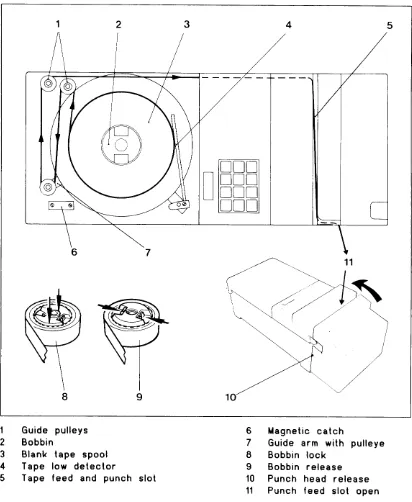
w i t h t h e m a i n s p o w e r switched OFF, load tape onto the
p u n c h t a p e bobbin as lollows (see figure 3 below).
--^-\
I
2
3
4
5
9
\ l
9
@
V \
\
8
G u i d e p u l l e y s
B o b b i n
B l a n k t a p e s p o o l
T a p e l o w d e t e c t o r
T a p e f e e d a n d p u n c h s l o t
6 M a g n e t i c c a t c h
7 G u i d e a r m w i t h p u l l e y e I B o b b i n l o c k
I B o b b i n r e l e a s e 1 0 P u n c h h e a d r e l e a s e 1 1 P u n c h f e e d s l o t o p e n
_trD-l
I l E D n l
I l E n l l
-
Etnl
[image:4.595.127.539.138.640.2]- M o v e t h e t a p e g u i d e arm until it touches the magnetic c a t c h .
T h i s a c t i o n a p p l i e s t h e b r a k e t o t h e t a p e bobbin and f r e e s t h e t a p e f e e d a n d p u n c h m e c h a n i s m .
- P u l l o u t a b o u t 2 metres (6 feet) of tape from the new r e e l a n d p l a c e t h e r e e l o n t o t h e b o b b i n with the free e n d r u n n i n g a s s h o w n .
- L o c k t h e b o b b i n by pushing the centre section
d o w n w a r d s b y h a n d a s f a r a s p o s s i b l e ( s e e f i g u r e 3). - P u s h t h e t w o p u n c h h e a d r e l e a s e s upwards (located one at
e a c h s i d e o f t h e p u n c h h o u s i n g ) a n d p u l l t h e p u n c h as-s e m b l y f o r w a r d t o o p e n t h e t a p e l e e d a n d p u n c h as-slot (as-see f i g u r e 3 ) .
- L e a d t h e t a p e around the guide pulleys and drop it into t h e t a p e f e e d a n d p u n c h s l o t .
- P u s h back the puneh assembly to close the tape feed and p u n c h slot.
- R e l e a s e t h e t a p e g u i d e arm from the magnetic catch. - S w i t c h the power 0N and depress fhe FEED key until the
t a p e i s t i g h t a n d f e e d i n g c o r r e c t l y f r o m t h e spool with f e e d h o l e s p u n c h e d .
- D e p r e s s t h e C O O E key. A l l t r a c k s w i l l b e p u n c h e d .
- C h e c k t h a t t h e h o l e s are punched properly.
2 . 2 P u n c h i n g i n s t r u c t i o n
- C o n n e c t t h e N C / C o m p u t e r cable plug to the CHANNEL 1 l l 0 P 0 R T c o n n e c t o r o n t h e r e a r p a n e l ( s e e figure 1).
- D e p r e s s the key ON L on the operator keyboard. T h e s t a t u s d i s p l a y s h o r s L I N E .
- S t a r t t h e p u n c h i n g t r o m t h e N0/Computer.
N 0 T E . T h e d a t a t r a n s m i s s i o n s h o u l d b e m a d e at 600 bit/s ( B a u d ) .
- T e a r o f f t h e t a p e r h e n t h e p u n c h i n g is ready.
3 Reading
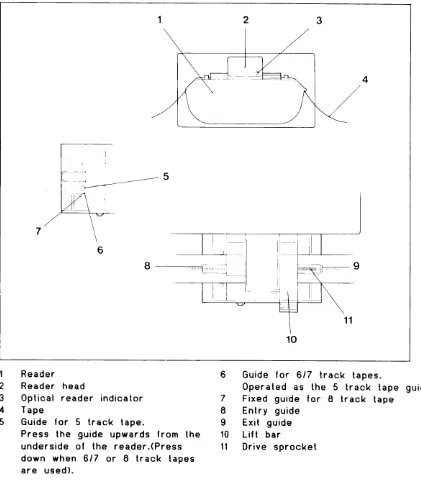
3.1 Reader tape loading L o a d t a p e i n t o t h e r e a d e r b e l o w ) .
(4.017 Reader/Punch
only)-a s f o l l o w s ( s e e f i g u r e 4
*}".'-
9
1
?
3
4
5
R e a d e r
R e a d e r h e a d
O p t i c a l r e a d e r i n d i c a t o r
T a p e
G u i d e f o r 5 t r a c k t a p e .
P r e s s t h e g u i d e u p w a r d s f r o m t h e
u n d e r s i d e o f t h e r e a d e r . ( P r e s s
d o w n w h e n 6 1 7 o r I t r a c k t a p e s
a r e u s e d ) .
6
G u i d e f o r 6 1 7 t r a c k t a p e s .
0 p e r a t e d a s t h e 5 t r a c k t a p e g u i d e .
7
F i x e d g u i d e l o r I t r a c k t a p e
I
E n t r y g u i d e
I
E x i t g u i d e
' 1 0 Lif t bar
1 1 O r i v e s p r o c k e t
[image:6.595.130.551.137.623.2]- R a i s e t h e lift bar to open the entry and exit guides. - s e l e c t t h e a p p r o p r i a t e tape guides (see figure 4) for the
t a p e w h i c h i s t o be used (5,617 or I track).
- P u t t h e tape into the reader and over the drive sprocket. - L o w e r the lift bar to hold the tape in position; ensure
t h a t t h e t a p e f e e d holes are engaged correcily in the d r i v e s p r o c k e t .
3 . 2 R e a d i n g i n s t r u c t i o n
- 0 e p r e s s the ON L key on the operator keyboard. T h e s t a t u s d i s p l a y shows LINE.
- C l e a r t h e NC/Computer for
reading-- D e p r e s s the START key to start the reading. - D e p r e s s t h e S T 0 P k e y to stop the reading. - D e p r e s s t h e START key to restart the reading.
B e c a u s e r e a d i n g i s faster than transmission, the reader c a n s t o p b e f o r e the whole tape is read. The reader will r e s t a r t a u t o m a t i c a l l y and continue until the whole tape is r e a d .
T h e t a p e c a n be run quickly through the reader either for-w a r d s o r r e v e r s e , for-without data being read, by depressing t h e F F o r F B key respectively. The equipment must be off I r n e .
A T
r
I a P e c o P y t n g
4 . 1 T a p e c o p y i n g i n s t r u c t i o n
- D e p r e s s t h e O F F L key on the operator keyboard. T h e s t a t u s d i s p l a y shous OFF.
-Depress the COPY key.
T h e s t a t u s d i s p l a y shoss COPY. - P u t t h e tape in the reader. - D e p r e s s the START key.
C o p y i n g r i l l s t a r t .
- D e p r e s s the oFF L and oN L keys when copying is
finished-l f t h e r e a d e r s t o p s during copying, it is due to the
5 Code
conversion
punching
C o d e c o n v e r s i o n p u n c h i n g f r o m lS0 to EIA standard and v i c e v e r s a a p a r a m e t e r i n p r o g r a m step 5 is changed a c c o r d i n g t o t h e t a b l e b e l o w . T h i s p a r a m e t e r is normally s e t t o 0 . A f t e r c o d e c o n v e r s i o n t h e p a r a m e t e r should be r e s e t t o 0 .
5.1 Punching ISO to EIA code
- S e t u p t h e f o l l o w i n g sequence on the operator keyboard:
P r e s s k e y D i s p l a y s h o w s C o m m e n t
I
\
O F F L
P R O G
*
5
*
*
E X I T
O N L
1 2 ( l S 0 t o E I A ) 1 2 O F F P r o g 1 5 0
6 O F F L i n e
P r o g r . s t e p 5
P a r a m e t e r = 0
P a r a m e t e r c h a n g e d
t o 1 2
P r o g r . s t e p 6
- S t a r t p u n c h r n g .
l f t h e t r a n s m i s s i o n o f d a t a i s t e r m i n a t e d w i t h t h e control c h a r a c t e r D C 4 , t h e p u n c h i n g w i l l b e f o l l o w e d by blank t a p e a u t o m a t i c a l l y . l f n o t , d e p r e s s 0 F F L a n d F E E D t o f e e d s o m e b l a n k t a p e b e f o r e t e a r i n g o f f .
5-2 Punching EIA to ISO code
- S e t u p t h e f o l l o w i n g s e q u e n c e on the operator keyboard:
P r e s s k e y D i s p l a y s h o w s C o m m e n t
O F F L
P R O G
*
5
*
*
E X I T
O N L
1 1 2 (E l A t o l S 0 )
1 1 2
O F F P r o g 1 5 06 O F F L i n e
P a r a m e t e r c h a n g e d to 112
6
C o d e c o n v e r s i o n
r e a d i n g
C o d e c o n v e r s t o n r e a d i n g from ISO to EIA standard and v i c e v e r s a a p a r a m e t e r in program step T is changed a c c o r d i n g t o t h e t a b l e below. This parameter is normally s e t t o 0 .
A f t e r c o d e c o n v e r s i o n the parameter shourd be reset to 0.
6 . 1 R e a d i n g I S O t o E I A c o d e
- s e t u p t h e following sequence on the operator keyboard:
P r e s s k e y D i s p l a y s h o w s C o m m e n t
O F F L
P R O G
*
7
*
T
E X I T
O N L
O F F
P r o g
1
7
0
I O F F L i n e 1 2 ( l S O t o E I A ) 1 2
P r o g r . s t e p 7
P a r a m e t e r = 0
P a r a m e t e r c h a n g e d
t o 1 2
P r o g r . s t e p I
- S t a r t r e a d r n g .
6 . 2 R e a d i n g E I A t o I S O code
- S e t u p the following sequence on the operator keybord:
P r e s s k e y D i s p l a y s h o w s C o m m e n t
O F F L P R O G * 7 *
*
E X I T
O N L
1 1 2 ( E l A t o I S O ) 1 1 2 O F F P r o g 1 7 0
8 O F F L i n e
P a r a m e t e r c h a n g e d to 112
7 Code
conYersion
[ape copying
C o d e c o n v e r s i o n t a p e c o p y i n g from ISO to EIA standard a n d v i c e v e r s a a p a r a m e t e r i n p r o g r a m step 6 is changed a c c o r d i n g t o t h e s e t u p b e l o w . T h i s p a r a m e t e r is normally s e t t o 0 .
A f t e r c o d e c o n v e r s i o n t h e p a r a m e t e r should be reset to 0.
7 -1 Tape copying ISO to EIA code
- S e t u p t h e f o l l o w i n g sequence on the operator keyboard:
P r e s s k e y D i s p l a y s h o w s C o m m e n t
O F F L
P R O G
*
6
*
*
E X I T
C O P Y
O F F
P r o g
1
6
0
7
O F F
c o p y
1 2 ( l S 0 t o E I A )
1 2
P r o g r . s t e p 6
P a r a m e t e r = 0
P a r a m e t e r c h a n g e d
t o 1 2
P r o g r . s t e p 7
- P u t t h e I S O t a p e i n t o the reader. - D e p r e s s S T A R T .
C o p y i n g i n E I A c o d e i s s t a r t e d .
- D e p r e s s 0 F F and 0N L when copying is terminated.
7 . 2 T a p e c o p y i n g E I A t o I S O c o d e
- S e t u p t h e f o l l o w i n g sequence on the operator keyboard:
P r e s s k e y D r s p l a y s h o w s C o m m e n t
O F F L P R O G * 6 *
*
E X I T
C O P Y
O F F P r o g 1 6 0
7 O F F c o p y
1 1 2 (E l A t o l S 0 )
1 1 2
P a r a m e t e r c h a n g e d to 112- P u t t h e E I A t a p e i n t o t h e r e a d e r .
- D e p r e s s S T A R T .
C o p y i n g in I S O c o d e i s s t a r t e d .
I
Error signals
on t,he status display
8.1
Punching
D i s p l a y s h o w s C o m m e n t
L o ( T a p e l o w ) T h e t a p e i s a l m o s t f i n i s h e d and the t a p e r o l l s h o u l d b e c h a n g e d as soon as p o s s i b l e . The punching will not be a f f e c t e d .
E r r ( E r r o r ) l . T h e t a p e i s f i n i s h e d . T h e p u n c h i n g c a n n o t b e c o n t i n u e d until the tape roll i s c h a n g e d .
2 . T a p e j a m . C h e c k t h e t a p e in the tape e q u i p m e n t .
- f f h e n t h e e r r o r i s corrected, depress the ON L key.
8 . 2 R e a d i n g
D i s p l a y s h o w s
C o m m e n t
E r r ( E r r o r ) l . T h e r e i s n o t a p e i n t h e reader.
2 . T a p e j a m i n t h e r e a d e r . Check the tape. 3 . T h e t a p e i s n o t c o r r e c t l y p u n c h e d .
T h e t a p e c a n n o t be read.
1 0
I
Check
of parameters
9.1 Delivery parameters
T h e 4 0 4 6 P u n c h a n d t h e 4 0 4 7 R e a d e r / P u n c h a r e d e l i v e r e d
w i t h t h e f o l l o w i n g p a r a m e t e r s s e t t i n g :
P r o g r a m s t e p P a r a m e t e r C o m m e n t
1
2
P u n c h / R e a d e r a d d r e s s
2
0 0 0 0
S e r v i c e R e q u e s t P u n c h
3
0 0 0
S e r v i c e R e q u e s t R e a d e r
4
1 0 0 0
P u n c h m o d e , I E E E / P u n c h / R e a d e r
P a r i t y
5
0
T r a n s p a r e n t P u n c h
6
0
T r a n s p a r e n t c o p y
7
0
T r a n s p a r e n t r e a d i n g
I
6 0
T i m e o u t
I
0 0 0 0
C o n t r o l C o d e P r o c e s s i n g
1 0
3 5 0 0
E n d a d d r e s s f o r P u n c h B u f f e r
1 1 - 1 1 2 -
4
0 0 0 0
1 3 - 1
1 0
L i n e f e e d
1 3 - 2
1 4 - 4
0 0 0 0
1 5 - 1
2 0
C o n t r o l c h a r a c t e r D C 4
15-2
20-4
0000
9 . 2 C h e c k o f p a r a m e t e r s s e t t i n g
- S e t u p t h e f o l l o w i n g s e q u e n c e o n t h e o p e r a t o r k e y b o a r d :
P r e s s k e y D i s p l a y s h o w s C o m m e n t
O F F L P R O G
ft
*
*
*
: _
a * , t
O N L
O F F
P r o g
1
2
2
0 0 0 0
: _
o r t
L i n e
Iocit 40 45/4041
Punch/Reader
- Punch
I EE
E-488
FAGIT
Australia
EAl-Electronic Associates Pty Ltd P.O. Box570
ARTARMONNSW2064 Tdephone24273322 Telex21130 Austria
Ericsson InJormation Systems GmbH
Richard Stauss Sn. 43 A.1232VIENNA Telephone0222-61 36 41 Teletex32222M Belgium EricssonS.A Dept Imprimantes RuedelaFusee40 1130BRI'XELLES Telephone02-2,13 82 11 Telex26519 Canada Facit Carnda Inc. 404OakwoodDrive BURLINGTON, ONTARIO L7N 1X2
Telephone 416 825-8712 Telex061-8015 Cyprus LBM (Lillytos) Ltd P.O. Box380 LIMASSOL Telephone 5164634 Telex2080
Denmark F'acitA/S KirkebjergAlle 86 2605BRONDBY Telephone 02-633311 Telex35394 Finland OyFacitAB P.8.279
SF-OOlsl HELSINGFORS Telephone(90)420 21 Teletex 1001119 France FacitS.A.
308, rue du Pdt. Salvador Allende 92707 COLOMBES C6dex Telephone (1) 4780 7117 Telex610 216 GreatBritain Facit Maidstone Road ROCHESTER, KentMEI3QN Telephone 0634-402080 Telex96447 Greece
Computer Application Co.. Ltd MesogeionAve. 259 ATHENS
Telephone 01-67197 221 23 Telex219 349 HongKong Gilrnan Office Machines G.P.O. Box 56 HONGKONG Telephone 5-8930022 Telex62454
Iceland GisliJ. Johnsen Slaifstofubrirndur SF P.O. Box397 IS-2O2KOPAVOGUR Telephone 1-641222 Telex2316 India
Forbes Forbes Campbell & Co, Ltd Communications & Engineering Imports, "Forbes Building" CharanjitRaiMarg Fort BOMBAY4OO OOl Telephone 22-2048081 Telex 011-2369 Ireland
Ericsson Information Systems Ltd Harcourt Centre
Harcourt Road DUBLIN2 Telephone 1-753093 Telex90292 Italy
Facit Data Products S. p. A. Centro Direzionale Colleoni Palazzo Orione Ingresso 1 2OO 41 AGMTEBRIANZA O{ilano)
Telephone03963 63 31 Telex32M23 Japan
Electrolux (apan) Ltd FacitDivision Gadelius Bldg
7 - 8, Motoakasaka l-Chome Minato-ku, TOKYO, Japan 107 Telephone 3-4797570 Telex242q.6n
Korea
True Trading Co., Ltd YoidoP.O. Box549 SEOUL
Telephone 2-783-3855-7 TelexK28700 TheNetherlands FacitB.V. P.O. Box450 3440ALWOERDEN Telephone 340-21784 Telex40203 NewCaledonia Maison Barrau BPA4
23 bis, RueJeanJaures NOTJMEA Telephone273774 Telex039NM NewZeeland
Nortlrop Instruments and Systems Prilate Bag
NEWMARKETAK Telephone 9-501801, 501219 Telex21570
Norway
Ericsson Information Systems A,,/S Avd. Facit
Postboks 6663, RodelOkka 0502 Oslo 5
Telephone02-38 65 00 Telex 19449 Portugal RegiscontaSarl Avenida Duque d e Loul6 7 2 Apartado 2047 1101 LISBOACedex Telephone 1-560091 Telex 14306
Singapore
Far East Office Eqlts Pte Ltd Unit 10-03 Alpha Bldg 45 KallangPudding Rd SINGAPORE 1334 Telephone 6G7458288 Telex50961 SouthAfrica Compulogix P.O. Box34560 JEPPESTOWN 2043 Telephone0ll-339 13 M Telex4-85904 Spain Facit
PaseodelaHabarn 137 28036MADRID Telephone4 57 90 81 Telex49298 Sweden HeadOfficeFacitAB 5-172 91 STINDBYBERG Telephone 08-764 30 00 Telex 12639 Sweden Sales Office
Ericsson Information Systems Sverige AB
Avd. VMDD Box 11100 5-161 1I BROMMA Telephone0&28 28 60 Telex 10485
Switzerland
Ericsson hrformation Systens AG Ringstasse.l5A
CH.86OODTJBENDORF Telephone 1-8215921 Telex825319 TaiwanR.O.C. Dimension
Computer Tecturologr Co. 147 Chien Kuo North Rd, Sec. 2 TAIPEI 104
Telephone2-501 55 68 Telex25117 Turkey Teknodata VoyvodaCaddes 152 IGrakriy, ISTANBUL Telephone 1 -14977 ffi , 144087 0 Telex24135
USA FacitInc. P.O. Box334 MERRIMACK, NHO3O54 Telephone (603) 424-8W0 Telex6972638 WestGermany Ericsson Information SystemsGmbH VogelsangerWeg9l P.O. Box300229 4OOO DUSSELDORF 30 Telephone 021V61094 Telex858 2415