95363c01.indd 2
Charlie Miller
Dino A. Dai Zovi
The Mac
®
Hacker’s
Handbook
95363ffirs.indd i
Published by Wiley Publishing, Inc. 10475 Crosspoint Boulevard Indianapolis, IN 46256 www.wiley.com
Copyright 2009 by Wiley Publishing, Inc., Indianapolis, Indiana
Published simultaneously in Canada
ISBN: 978-0-470-39536-3
Manufactured in the United States of America
10 9 8 7 6 5 4 3 2 1
Library of Congress Cataloging-in-Publication Data is available from the publisher.
No part of this publication may be reproduced, stored in a retrieval system or transmitted in any form or by any means, electronic, mechanical, photocopying, recording, scanning or otherwise, except as permitted under Sections 107 or 108 of the 1976 United States Copyright Act, without either the prior written permis-sion of the Publisher, or authorization through payment of the appropriate per-copy fee to the Copyright Clearance Center, 222 Rosewood Drive, Danvers, MA 01923, (978) 750-8400, fax (978) 646-8600. Requests to the Publisher for permission should be addressed to the Permissions Department, John Wiley & Sons, Inc., 111 River Street, Hoboken, NJ 07030, (201) 748-6011, fax (201) 748-6008, or online at http://www.wiley. com/go/permissions.
Limit of Liability/Disclaimer of Warranty: The publisher and the author make no representations or war-ranties with respect to the accuracy or completeness of the contents of this work and specifi cally disclaim all warranties, including without limitation warranties of fi tness for a particular purpose. No warranty may be created or extended by sales or promotional materials. The advice and strategies contained herein may not be suitable for every situation. This work is sold with the understanding that the publisher is not engaged in rendering legal, accounting, or other professional services. If professional assistance is required, the services of a competent professional person should be sought. Neither the publisher nor the author shall be liable for damages arising herefrom. The fact that an organization or Web site is referred to in this work as a citation and/or a potential source of further information does not mean that the author or the publisher endorses the information the organization or Web site may provide or recommendations it may make. Further, readers should be aware that Internet Web sites listed in this work may have changed or disappeared between when this work was written and when it is read.
For general information on our other products and services please contact our Customer Care Department within the United States at (877) 762-2974, outside the United States at (317) 572-3993 or fax (317) 572-4002.
Trademarks: Wiley and the Wiley logo are trademarks or registered trademarks of John Wiley & Sons, Inc. and/or its affi liates, in the United States and other countries, and may not be used without written permis-sion. Mac is a registered trademark of Apple, Inc. All other trademarks are the property of their respective owners. Wiley Publishing, Inc. is not associated with any product or vendor mentioned in this book.
Wiley also publishes its books in a variety of electronic formats. Some content that appears in print may not be available in electronic books.
95363ffirs.indd ii
I’d like to dedicate this book to the security research community and everyone who is passionate about advancing the state of offensive and
defensive security knowledge.
— Dino A. Dai Zovi
95363ffirs.indd iii
iv
Charlie Miller is Principal Analyst at Independent Security Evaluators. He was the fi rst person to publically create a remote exploit against Apple’s iPhone and the G1 Google phone running Android. He has discovered fl aws in numer-ous applications on varinumer-ous operating systems. He was the winner of the 2008 PwnToOwn contest for breaking into a fully patched MacBook Air. He has spoken at numerous information-security conferences and is author of Fuzzing
for Software Security Testing and Quality Assurance (Artech House, 2008). He was
listed as one of the top 10 hackers of 2008 by Popular Mechanics magazine, and has a PhD from the University of Notre Dame.
Dino Dai Zovi is Chief Scientist at a private information security fi rm. Mr. Dai Zovi is perhaps best known in the security and Mac communities for winning the fi rst Pwn2Own contest at CanSecWest 2007 by discovering and exploit- ing a new vulnerability in Apple’s QuickTime in one night to compromise a fully patched MacBook Pro. He previously specialized in software penetration test-ing in roles at Matasano Security, @stake, and Sandia National Laboratories. He is an invited speaker at information security conferences around the world, a coauthor of The Art of Software Security Testing: Identifying Software Security Flaws (Addison-Wesley, 2006) and was named one of the 15 Most Infl uential People in Security by eWEEK in 2007.
About the Authors
95363ffirs.indd iv
v
Credits
Executive Editor
Carol Long
Development Editor
Christopher J. Rivera
Technical Editor
Ron Krutz
Production Editor
Elizabeth Ginns Britten
Copy Editor
Candace English
Editorial Manager
Mary Beth Wakefi eld
Production Manager
Tim Tate
Vice President and Executive Group Publisher
Richard Swadley
Vice President and Executive Publisher
Barry Pruett
Associate Publisher
Jim Minatel
Project Coordinator, Cover
Lynsey Stanford
Compositor
Jeffrey Lytle,
Happenstance Type-O-Rama
Proofreader
Justin Neely, Word One
Indexer
Jack Lewis
Cover Illustration
Michael E. Trent
Cover Designer
Michael E. Trent
95363ffirs.indd v
vi
I’d like to thank my wife Andrea for not getting too upset when I locked myself away at night to work on the book after the kids went to bed. I’d also like to thank my two sons, Theo and Levi, for being good kids and keeping a smile on my face. Finally, I’d like to thank ISE for giving me time to do research for the book, and the following people for donating their time to look at early drafts of it: Dave Aitel, Thomas Ptacek, Thomas Dullien, and Nate McFeters.
— Charlie Miller
I’d like to thank my friends for their support and patience while I was working on this book and lacking a normal social life for the warmer half of the year. I’d also like to thank the members of the Apple Product Security team for their diligence in addressing the security issues that I have reported to them over the years, as well as Apple for creating an operating system and computers that are a joy to use. Finally, I’d like to thank our volunteer reviewers, Dave Aitel, Halvar Flake, and Thomas Ptacek, for their advice and comments.
— Dino A. Dai Zovi
Acknowledgments
95363ffirs.indd vi
vii
Contents
Foreword xi
Introduction xiii
Part I Mac OS X Basics 1
Chapter 1 Mac OS X Architecture 3
Basics 3 XNU 4 Mach 4 BSD 5
I/O Kit 5
Darwin and Friends 7 Tools of the Trade 8 Ktrace/DTrace 8 Objective-C 10 Universal Binaries and the Mach-O File Format 13 Universal Binaries 13 Mach-O File Format 14 Example 15 Bundles 17 launchd 19 Leopard Security 21 Library Randomization 22 Executable Heap 24 Stack Protection (propolice) 27 Firewall 29 Sandboxing (Seatbelt) 29 References 34
Chapter 2 Mac OS X Parlance 35
Bonjour! 35 Get an IP Address 36 Set Up Name Translation 37 Service Discovery 38 Bonjour 40 mDNSResponder 41
Source Code 44
95363ftoc.indd vii
QuickTime 47 .mov 47 RTSP 52 Conclusion 61 References 61
Chapter 3 Attack Surface 63
Searching the Server Side 63 Nonstandard Listening Processes 68 Cutting into the Client Side 72 Safari 75 All of Safari’s Children 77 Safe File Types 79 Having Your Cake 80 Conclusion 81 References 81
Part II Discovering Vulnerabilities 83
Chapter 4 Tracing and Debugging 85
Pathetic ptrace 85
Good Ol’ GDB 86
DTrace 87 D Programming Language 88 Describing Probes 89 Example: Using Dtrace 90 Example: Using ltrace 91 Example: Instruction Tracer/Code-Coverage Monitor 93 Example: Memory Tracer 95 PyDbg 96 PyDbg Basics 97 Memory Searching 98 In-Memory Fuzzing 99 Binary Code Coverage with Pai Mei 102 iTunes Hates You 108 Conclusion 111 References 112
Chapter 5 Finding Bugs 113
Bug-Hunting Strategies 113 Old-School Source-Code Analysis 115 Getting to the Source 115 Code Coverage 116 CanSecWest 2008 Bug 121 vi + Changelog = Leopard 0-day 122 Apple’s Prerelease-Vulnerability Collection 124
Fuzz Fun 125
Network Fuzzing 126 File Fuzzing 129 Conclusion 133 References 134
Chapter 6 Reverse Engineering 135
Disassembly Oddities 135 EIP-Relative Data Addressing 136 Messed-Up Jump Tables 137 Identifying Missed Functions 138 Reversing Obj-C 140 Cleaning Up Obj-C 141 Shedding Light on objc_msgSend Calls 145
95363ftoc.indd viii
Contents ix
Case Study 150
Patching Binaries 154 Conclusion 156 References 157
Part III Exploitation 159
Chapter 7 Exploiting Stack Overfl ows 161
Stack Basics 162 Stack Usage on PowerPC 163 Stack Usage on x86 164 Smashing the Stack on PowerPC 165 Smashing the Stack on x86 170 Exploiting the x86 Nonexecutable Stack 173 Return into system() 173 Executing the Payload from the Heap 176 Finding Useful Instruction Sequences 181 PowerPC 181 x86 182 Conclusion 184 References 184
Chapter 8 Exploiting Heap Overfl ows 185
The Heap 185
The Scalable Zone Allocator 186 Regions 186 Freeing and Allocating Memory 187 Overwriting Heap Metadata 192 Arbitrary 4-Byte Overwrite 193 Large Arbitrary Memory Overwrite 195 Obtaining Code Execution 197 Taming the Heap with Feng Shui 201 Fill ’Er Up 201
Feng Shui 202
WebKit’s JavaScript 204
Case Study 207
Feng Shui Example 209
Heap Spray 211
References 212
Chapter 9 Exploit Payloads 213
Mac OS X Exploit Payload Development 214 Restoring Privileges 215 Forking a New Process 215 Executing a Shell 216 Encoders and Decoders 217 Staged Payload Execution 217 Payload Components 218 PowerPC Exploit Payloads 219 execve_binsh 221 system 223 decode_longxor 225 tcp_listen 231 tcp_connect 232
tcp_fi nd 233
dup2_std_fds 234
vfork 235
Testing Simple Components 236 Putting Together Simple Payloads 237 Intel x86 Exploit Payloads 238
95363ftoc.indd ix
remote_execution_loop 241 inject_bundle 244 Testing Complex Components 254 Conclusion 259 References 259
Chapter 10 Real-World Exploits 261
QuickTime RTSP Content-Type Header Overfl ow 262 Triggering the Vulnerability 262 Exploitation on PowerPC 263 Exploitation on x86 273 mDNSResponder UPnP Location Header Overfl ow 276 Triggering the Vulnerability 277 Exploiting the Vulnerability 279 Exploiting on PowerPC 283 QuickTime QTJava toQTPointer() Memory Access 287 Exploiting toQTPointer() 288 Obtaining Code Execution 290 Conclusion 290 References 290
Part IV Post-Exploitation 291
Chapter 11 Injecting, Hooking, and Swizzling 293
Introduction to Mach 293 Mach Abstractions 294 Mach Security Model 296 Mach Exceptions 297 Mach Injection 300 Remote Threads 301 Remote Process Memory 306 Loading a Dynamic Library or Bundle 307 Inject-Bundle Usage 311 Example: iSight Photo Capture 311 Function Hooking 314 Example: SSLSpy 315 Objective-C Method Swizzling 318 Example: iChat Spy 322 Conclusion 326 References 326
Chapter 12 Rootkits 327
Kernel Extensions 327 Hello Kernel 328 System Calls 330 Hiding Files 332 Hiding the Rootkit 342 Maintaining Access across Reboots 346 Controlling the Rootkit 349 Creating the RPC Server 350 Injecting Kernel RPC Servers 350 Calling the Kernel RPC Server 352 Remote Access 352 Hardware-Virtualization Rootkits 354 Hyperjacking 355 Rootkit Hypervisor 356 Conclusion 358 References 358
Index 367
95363ftoc.indd x
xi For better or worse, there are moments in our lives that we can visualize with startling clarity. Sometimes momentous and other times trivial, we’re able to completely recall these snippets of our past even if we can’t remember the day or context. In my life, there’s one moment I’d like to call trivial, but the truth is, it was likely more central in establishing my eventual technology career than I care to admit at social gatherings.
I think it was the early 1980s, but that’s mostly irrelevant. My best friend’s parents recently purchased an Apple II (plus, I think), making my friend the fi rst person I knew with a computer in his house. One day we noticed a seam on the top of the plastic case; we slid the bulking green screen monitor to the side and removed the panel on the top. For the fi rst time, we peered into the inner guts of an actual working computer. This was defi nitely before the release of WarGames, likely before I’d ever heard of hacking, and long before “hacker” became synonymous with “criminal” in the mass media. We lifted that plastic lid and stared at the cop-per and black components on the fi eld of green circuit boards before us. We were afraid to touch anything, but for the fi rst time, the walls between hardware and software shattered for our young minds, opening up a new world of possibilities. This was something we could touch, manipulate, and, yes, break.
My young computer career began with those early Apples (and Commodores). We spent countless hours exploring their inner workings; from BASIC to binary math, and more than our fair share of games (for the record, the Apple joystick was terrible). Early on I realized I enjoyed breaking things just as much, if not more than, creating them. By feeling around the seams of software and systems, learning where they bent, cracked, and failed, I could understand them in ways just not possible by coloring between the lines.
The very fi rst Mac I could buy was an early Mac Mini I purchased mostly for research purposes. I quickly realized that Mac OS X was a hacker’s delight of an operating system. Beautiful and clean compared to my many years on Windows,
Foreword
95363flast.indd xi
with a Unix terminal a click away. Here was a box I could run Microsoft Offi ce on that came with Apache by default and still held full man pages. As I delved into Applescript, plists, DMGs, and the other minutia of OS X, I was amazed by the capabilities of the operating system, and the breadth and depth of tools available.
But as I continued to switch completely over to Apple, especially after the release of Intel Macs, my fi ngers started creeping around for those cracks at the edges again. I wasn’t really worried about viruses, but, as a security professional, I started wondering if this was by luck or design. I read the Apple documenta-tion and realized fairly early that there wasn’t a lot of good informadocumenta-tion on how OS X worked from a security standpoint, other than some confi guration guides and marketing material.
Mac security attitudes have changed a fair bit since I purchased that fi rst Mac Mini. As Macs increase in popularity, they face more scrutiny. Windows switchers come with questions and habits, more security researchers use Macs in their day-to-day work, the press is always looking to knock Apple down a notch, and the bad guys won’t fail to pounce on any profi table opportunity. But despite this growing attention, there are few resources for those who want to educate themselves and better understand the inner workings of the operating system on which they rely.
That’s why I was so excited when Dino fi rst mentioned he and Charlie were working on this book. Ripping into the inner guts of Mac OS X and fi nding those edges to tear apart are the only ways to advance the security of the plat-form. Regular programming books and system overviews just don’t look at any operating system from the right perspective; we need to know how something breaks in order to make it stronger. And, as any child (or hacker) will tell you, breaking something is the most exhilarating way to learn.
If you are a security professional, this book is one of the best ways to under-stand the strengths and weaknesses of Mac OS X. If you are a programmer, this book will not only help you write more secure code, but it will also help you in your general coding practices. If you are just a Mac enthusiast, you’ll learn how hackers look at our operating system of choice and gain a better understanding of its inner workings. Hopefully Apple developers will use this to help harden the operating system; making the book obsolete with every version. Yes, maybe a few bad guys will use it to write a few exploits, but the benefi ts of having this knowledge far outweigh the risks.
For us hackers, even those of us of limited skills, this book provides us with a roadmap for exploring those edges, fi nding those cracks, and discovering new possibilities. For me, it’s the literary equivalent of sliding that beige plastic cover off my childhood friend’s fi rst Apple and gazing at the inner workings.
—Rich Mogull
Security Editor at TidBITS and Analyst at Securosis
95363flast.indd xii
xiii As Mac OS X continues to be adopted by more and more users, it is important to consider the security (or insecurity) of the devices running it. From a secu-rity perspective, Apple has led a relatively charmed existence so far. Mac OS X computers have not had any signifi cant virus or worm outbreaks, making them a relatively safe computing platform. Because of this, they are perceived by most individuals to be signifi cantly more secure than competing desktop operating systems, such as Windows XP or Vista.
Overview of the Book and Technology
Is this perception of security justifi ed, or has Mac OS X simply benefi ted from its low profi le up to this point? This book offers you a chance to answer this question for yourself. It provides the tools and techniques necessary to analyze thoroughly the security of computers running the Mac OS X operating system. It details exactly what Apple has done right in the design and implementation of its code, as well as points out defi ciencies and weaknesses. It teaches how attackers look at Mac OS X technologies, probe for weaknesses, and succeed in compromising the system. This book is not intended as a blueprint for malicious attackers, but rather as an instru-ment so the good guys can learn what the bad guys already know. Penetration testers and other security analysts can and should use this information to identify risks and secure the Macs in their environments.
Keeping security fl aws secret does not help anybody. It is important to under-stand these fl aws and point them out so future versions of Mac OS X will be more secure. It is also vital to understand the security strengths and weaknesses of the operating system if we are to defend properly against attack, both now and in the future. Information is power, and this book empowers its readers by providing the most up-to-date and cutting-edge Mac OS X security research.
Introduction
95363flast.indd xiii
How This Book Is Organized
This book is divided into four parts, roughly aligned with the steps an attacker would have to take to compromise a computer: Background, Vulnerabilities, Exploitation, and Post-Exploitation. The fi rst part, consisting of Chapters 1–3, contains introductory material concerning Mac OS X. It points out what makes this operating system different from Linux or Windows and demonstrates the tools that will be needed for the rest of the book. The next part, consisting of Chapters 4–6, demonstrates the tools and techniques necessary to identify security vulnerabilities in the operating system and applications running on it. Chapters 7–10 make up the next part of the book. These chapters illustrate how attackers can take the weaknesses found in the earlier chapters and turn them into functional exploits, giving them the ability to compromise vulnerable machines. Chapters 11 and 12 make up the last part of the book, which deals with what attackers may do after they have exploited a machine and techniques they can use to maintain continued access to the compromised machines.
Chapter 1 begins the book with the basics of the way Mac OS X is designed. It discusses how it originated from BSD and the changes that have been made in it since that time. Chapter 1 gives a brief introduction to many of the tools that will be needed in the rest of the book. It highlights the differences between Mac OS X and other operating systems and takes care to demonstrate how to perform common tasks that differ among the operating systems. Finally, it outlines and analyzes some of the security improvements made in the release of Leopard, the current version of Mac OS X.
Chapter 2 covers some uncommon protocols and fi le formats used by Mac OS X. This includes a description of how Bonjour works, as well as an inside look at the Mac OS X implementation, mDNSResponder. It also dissects the QuickTime fi le format and the RTSP protocol utilized by QuickTime Player.
Chapter 3 examines what portions of the operating system process attacker-supplied data, known as the attack surface. It begins by looking in some detail at what services are running by default on a typical Mac OS X computer and examines the diffi culties in attacking these default services. It moves on to consider the client-side attack surface, all the code that can be executed if an attacker can get a client program such as Safari to visit a server the attacker controls, such as a malicious website.
Chapter 4 dives into the world of debugging in a Mac OS X environment. It shows how to follow along to see what applications are doing internally. It covers in some detail the powerful DTrace mechanism that was introduced in Leopard. It also outlines the steps necessary to capture code-coverage informa-tion using the Pai Mei reverse-engineering framework.
Chapter 5 demonstrates how to fi nd security weaknesses in Mac OS X soft-ware. It talks about how you can look for bugs in the source code Apple makes available or use a black-box technique such as fuzzing. It includes detailed instructions for performing either of these methods. Finally, it shows some tricks
95363flast.indd xiv
Introduction xv
to take advantage of the way Apple develops its software, which can help fi nd bugs it doesn’t know about or give early warning of those it does.
Chapter 6 discusses reverse engineering in Mac OS X. Given that most of the code in Mac OS X is available in binary form only, this chapter discusses how this software works statically. It also highlights some differences that arise in reverse engineering code written in Objective-C, which is quite common in Mac OS X binaries but rarely seen otherwise.
Chapter 7 begins the exploitation part of the book. It introduces the simplest of buffer-overfl ow attacks, the stack overfl ow. It outlines how the stack is laid out for both PowerPC and x86 architectures and how, by overfl owing a stack buffer, an attacker can obtain control of the vulnerable process.
Chapter 8 addresses the heap overfl ow, the other common type of exploit. This entails describing the way the Mac OS X heap and memory allocations function. It shows techniques where overwriting heap metadata allows an attacker to gain complete control of the application. It fi nishes by showing how to arrange the heap to overwrite other important application data to compro-mise the application.
Chapter 9 addresses exploit payloads. Now that you know how to get control of the process, what can you do? It demonstrates a number of different possible shellcodes and payloads for both PowerPC and x86 architectures, ranging from simple to advanced.
Chapter 10 covers real-world exploitation, demonstrating a large number of advanced exploitation topics, including many in-depth example exploits for Tiger and Leopard on both PowerPC and x86. If Chapters 7–9 were the theory of attack, then this chapter is the practical aspect of attack.
Chapter 11 covers how to inject code into running processes using Mac OS X–specifi c hooking techniques. It provides all the code necessary to write and test such payloads. It also includes some interesting code examples of what an attacker can do, including spying on iChat sessions and reading encrypted network traffi c.
Chapter 12 addresses the topic of rootkits, or code an attacker uses to hide their presence on a compromised system. It illustrates how to write basic kernel-level drivers and moves on to examples that will hide fi les from unsuspecting users at the kernel level. It fi nishes with a discussion of Mac OS X–specifi c root-kit techniques, including hidden in-kernel Mach RPC servers, network kernel extensions for remote access, and VT-x hardware virtual-machine hypervisor rootkits for advanced stealth.
Who Should Read This Book
This book is written for a wide variety of readers, ranging from Mac enthusiasts to hard-core security researchers. Those readers already knowledgeable about Mac OS X but wanting to learn more about the security of the system may want
95363flast.indd xv
to skip to Chapter 4. Conversely, security researchers may fi nd the fi rst few chapters the most useful, as those chapters reveal how to use the OS X–related skills they already possess.
While the book may be easier to comprehend if you have some experience writing code or administering Mac OS X computers, no experience is necessary. It starts from the very basics and slowly works up to the more-advanced topics. The book is careful to illustrate the points it is making with many examples, and outlines exactly how to perform the steps required. The book is unique in that, although anybody with enthusiasm for the subject can pick it up and begin reading it, by the end of the book the reader will have a world-class knowledge of the security of the Mac OS X operating system.
Tools You Will Need
For the most part, all you need to follow along with this book is a computer with Mac OS X Leopard installed. Although many of the techniques and examples will work in earlier versions of Mac OS X, they are designed for Leopard. To perform the techniques illustrated in Chapter 6, a recent version of IDA Pro is required. This is a commercial tool that must be run in Windows and can be purchased at http://www.hex-rays.com. The remaining tools either come
on supplemental disks, such as Xcode does, or are freely available online or at this book’s website.
What’s on the Website
This book includes a number of code samples. The small and moderately sized examples are included directly in this book. But to save you from having to type these in yourself, all the code samples are also available for download at
www.wiley.com/go/machackershandbook. Additionally, some long code samples
that are omitted from the book are available on the site, as are any other tools developed for the book.
Final Note
We invite you to dive right in and begin reading. We think there is something in this book for just about everyone who loves Mac OS X. I know we learned a lot in researching and writing this book. If you have comments, questions, hate mail, or anything else, please drop us a line and we’d be happy to discuss our favorite operating system with you.
95363flast.indd xvi
P a r t
I
Mac OS X Basics
95363c01.indd 1
95363c01.indd 2
3 This chapter begins by addressing many of the basics of a Mac OS X system. This includes the general architecture and the tools necessary to deal with the architecture. It then addresses some of the security improvements that come with version 10.5 “Leopard”, the most recent version of Mac OS X. Many of these security topics will be discussed in great detail throughout this book.
Basics
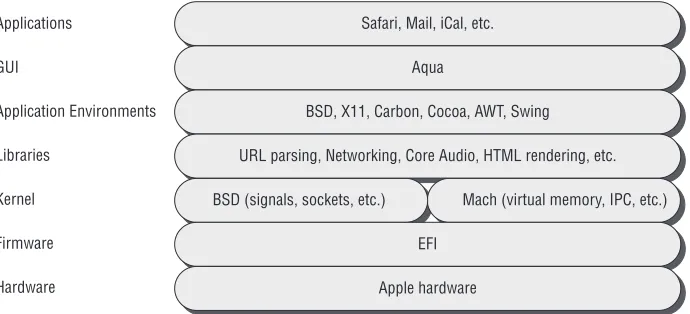
Before we dive into the tools, techniques, and security of Mac OS X, we need to start by discussing how it is put together. To understand the details of Leopard, you need fi rst to understand how it is built, from the ground up. As depicted in Figure 1-1, Mac OS X is built as a series of layers, including the XNU kernel and the Darwin operating system at the bottom, and the Aqua interface and graphical applications on the top. The important components will be discussed in the following sections.
C H A P T E R
1
Mac OS X Architecture
95363c01.indd 3
Applications GUI
Application Environments Libraries
Kernel Firmware Hardware
Safari, Mail, iCal, etc. Aqua
BSD, X11, Carbon, Cocoa, AWT, Swing URL parsing, Networking, Core Audio, HTML rendering, etc. BSD (signals, sockets, etc.) Mach (virtual memory, IPC, etc.)
[image:22.531.75.420.58.215.2]EFI Apple hardware
Figure 1-1: Basic architecture of a Mac OS X system
XNU
The heart of Mac OS X is the XNU kernel. XNU is basically composed of a Mach core (covered in the next section) with supplementary features provided by Berkeley Software Distribution (BSD). Additionally, XNU is responsible for providing an environment for kernel drivers called the I/O Kit. We’ll talk about each of these in more detail in upcoming sections. XNU is a Darwin package, so all of the source code is freely available. Therefore, it is completely possible to install the same kernel used by Mac OS X on any machine with supported hardware; however, as Figure 1-1 illustrates, there is much more to the user experience than just the kernel.
From a security researcher’s perspective, Mac OS X feels just like a FreeBSD box with a pretty windowing system and a large number of custom applications. For the most part, applications written for BSD will compile and run without modifi cation on Mac OS X. All the tools you are accustomed to using in BSD are available in Mac OS X. Nevertheless, the fact that the XNU kernel contains all the Mach code means that some day, when you have to dig deeper, you’ll fi nd many differences that may cause you problems and some you may be able to leverage for your own purposes. We’ll discuss some of these important differ-ences briefl y; for more detailed coverage of these topics, see Mac OS X Internals:
A Systems Approach (Addison-Wesley, 2006).
Mach
Mach, developed at Carnegie Mellon University by Rick Rashid and Avie Tevanian, originated as a UNIX-compatible operating system back in 1984. One of its pri-mary design goals was to be a microkernel; that is, to minimize the amount of code running in the kernel and allow many typical kernel functions, such as fi le
95363c01.indd 4
Chapter 1 ■ Mac OS X Architecture 5
system, networking, and I/O, to run as user-level Mach tasks. In earlier Mach-based UNIX systems, the UNIX layer ran as a server in a separate task. However, in Mac OS X, Mach and the BSD code run in the same address space.
In XNU, Mach is responsible for many of the low-level operations you expect from a kernel, such as processor scheduling and multitasking and virtual-memory management.
BSD
The kernel also involves a large chunk of code derived from the FreeBSD code base. As mentioned earlier, this code runs as part of the kernel along with Mach and uses the same address space. The FreeBSD code within XNU may differ signifi cantly from the original FreeBSD code, as changes had to be made for it to coexist with Mach. FreeBSD provides many of the remaining operations the kernel needs, including
Processes
■
Signals
■
Basic security, such as users and groups
■
System call infrastructure
■
TCP/IP stack and sockets
■
Firewall and packet fi ltering
■
To get an idea of just how complicated the interaction between these two sets of code can be, consider the idea of the fundamental executing unit. In BSD the fundamental unit is the process. In Mach it is a Mach thread. The disparity is settled by each BSD-style process being associated with a Mach task consisting of exactly one Mach thread. When the BSD fork() system call is made, the BSD code in the kernel uses Mach calls to create a task and thread structure. Also, it is important to note that both the Mach and BSD layers have different security models. The Mach security model is based on port rights, and the BSD model is based on process ownership. Disparities between these two models have resulted in a number of local privilege-escalation vulnerabilities. Additionally, besides typical system cells, there are Mach traps that allow user-space programs to communicate with the kernel.
I/O Kit
I/O Kit is the open-source, object-oriented, device-driver framework in the XNU kernel and is responsible for the addition and management of dynamically loaded device drivers. These drivers allow for modular code to be added to the kernel dynamically for use with different hardware, for example. The available drivers
95363c01.indd 5
are usually stored in the /System/Library/Extensions/ directory or a subdirectory. The command kextstat will list all the currently loaded drivers,
$ kextstat
Index Refs Address Size Wired Name (Version) <Linked Against>
1 1 0x0 0x0 0x0 com.apple.kernel (9.3.0) 2 55 0x0 0x0 0x0 com.apple.kpi.bsd (9.3.0) 3 3 0x0 0x0 0x0 com.apple.kpi.dsep (9.3.0) 4 74 0x0 0x0 0x0 com.apple.kpi.iokit (9.3.0) 5 79 0x0 0x0 0x0 com.apple.kpi.libkern (9.3.0)
6 72 0x0 0x0 0x0 com.apple.kpi.mach (9.3.0) 7 39 0x0 0x0 0x0 com.apple.kpi.unsupported (9.3.0)
8 1 0x0 0x0 0x0 com.apple.iokit.IONVRAMFamily (9.3.0)
9 1 0x0 0x0 0x0 com.apple.driver.AppleNMI (9.3.0)
10 1 0x0 0x0 0x0 com.apple.iokit.IOSystemManagementFamily (9.3.0) 11 1 0x0 0x0 0x0 com.apple.iokit.ApplePlatformFamily (9.3.0)
12 31 0x0 0x0 0x0 com.apple.kernel.6.0 (7.9.9) 13 1 0x0 0x0 0x0 com.apple.kernel.bsd (7.9.9) 14 1 0x0 0x0 0x0 com.apple.kernel.iokit (7.9.9)
15 1 0x0 0x0 0x0 com.apple.kernel.libkern (7.9.9)
16 1 0x0 0x0 0x0 com.apple.kernel.mach (7.9.9)
17 17 0x2e2bc000 0x10000 0xf000 com.apple.iokit.IOPCIFamily (2.4.1) <7 6 5 4>
18 10 0x2e2d2000 0x4000 0x3000 com.apple.iokit.IOACPIFamily (1.2.0) <12>
19 3 0x2e321000 0x3d000 0x3c000
com.apple.driver.AppleACPIPlatform (1.2.1) <18 17 12 7 5 4> …
Many of the entries in this list say they are loaded at address zero. This just means they are part of the kernel proper and aren’t really device drivers—i.e., they cannot be unloaded. The fi rst actual driver is number 17.
Besides kextstat, there are other functions you’ll need to know for loading and unloading these drivers. Suppose you wanted to fi nd and load the driver associated with the MS-DOS fi le system. First you can use the kextfi nd tool to fi nd the correct driver.
$ kextfind -bundle-id -substring ‘msdos’ /System/Library/Extensions/msdosfs.kext
95363c01.indd 6
Chapter 1 ■ Mac OS X Architecture 7
Now that you know the name of the kext bundle to load, you can load it into the running kernel.
$ sudo kextload /System/Library/Extensions/msdosfs.kext
kextload: /System/Library/Extensions/msdosfs.kext loaded successfully
It seemed to load properly. You can verify this and see where it was loaded.
$ kextstat | grep msdos
126 0 0x346d5000 0xc000 0xb000 com.apple.filesystems.msdosfs (1.5.2) <7 6 5 2>
It is the 126th driver currently loaded. There are zero references to it (not sur-prising, since it wasn’t loaded before we loaded it). It has been loaded at address 0x346d5000 and has size 0xc000. This driver occupies 0xb000 wired bytes of kernel memory. Next it lists the driver’s name and version. It also lists the index of other kernel extensions that this driver refers to—in this case, looking at the full listing of kextstat, we see it refers to the “unsupported” mach, libkern, and bsd drivers. Finally, we can unload the driver.
$ sudo kextunload com.apple.filesystems.msdosfs
kextunload: unload kext /System/Library/Extensions/msdosfs.kext succeeded
Darwin and Friends
A kernel without applications isn’t very useful. That is where Darwin comes in. Darwin is the non-Aqua, open-source core of Mac OS X. Basically it is all the parts of Mac OS X for which the source code is available. The code is made available in the form of a package that is easy to install. There are hundreds of available Darwin packages, such as X11, GCC, and other GNU tools. Darwin provides many of the applications you may already use in BSD or Linux for Mac OS X. Apple has spent signifi cant time integrating these packages into their operating system so that everything behaves nicely and has a consistent look and feel when possible.
On the other hand, many familiar pieces of Mac OS X are not open source. The main missing piece to someone running just the Darwin code will be Aqua, the Mac OS X windowing and graphical-interface environment. Additionally, most of the common high-level applications, such as Safari, Mail, QuickTime, iChat, etc., are not open source (although some of their components are open source). Interestingly, these closed-source applications often rely on open-source software, for example, Safari relies on the WebKit project for HTML and JavaScript rendering. For perhaps this reason, you also typically have many more symbols in these applications when debugging than you would in a Windows environment.
95363c01.indd 7
Tools of the Trade
Many of the standard Linux/BSD tools work on Mac OS X, but not all of them. If you haven’t already, it is important to install the Xcode package, which contains the system compiler (gcc) as well as many other tools, like the GNU debugger gdb. One of the most powerful tools that comes on Mac OS X is the object fi le displaying tool (otool). This tool fi lls the role of ldd, nm, objdump, and similar tools from Linux. For example, using otool you can use the –L option to get a
list of the dynamically linked libraries needed by a binary.
$ otool -L /bin/ls /bin/ls:
/usr/lib/libncurses.5.4.dylib (compatibility version 5.4.0, current version 5.4.0)
/usr/lib/libgcc_s.1.dylib (compatibility version 1.0.0, current version 1.0.0)
/usr/lib/libSystem.B.dylib (compatibility version 1.0.0, current version 111.0.0)
To get a disassembly listing, you can use the –tv option.
$ otool -tv /bin/ps /bin/ps:
(__TEXT,__text) section 00001bd0 pushl $0x00 00001bd2 movl %esp,%ebp 00001bd4 andl $0xf0,%esp 00001bd7 subl $0x10,%esp …
You’ll see many references to other uses for otool throughout this book.
Ktrace/DTrace
You must be able to trace execution fl ow for processes. Before Leopard, this was the job of the ktrace command-line application. ktrace allows kernel trace logging for the specifi ed process or command. For example, tracing the system calls of the ls command can be accomplished with
$ ktrace -tc ls
This will create a file called ktrace.out. To read this file, run the kdump command.
$ kdump
918 ktrace RET ktrace 0
95363c01.indd 8
Chapter 1 ■ Mac OS X Architecture 9
918 ktrace CALL execve(0xbffff73c,0xbffffd14,0xbffffd1c) 918 ls RET execve 0
918 ls CALL issetugid 918 ls RET issetugid 0 918 ls CALL
__sysctl(0xbffff7cc,0x2,0xbffff7d4,0xbffff7c8,0x8fe45a90,0xa) 918 ls RET __sysctl 0
918 ls CALL __sysctl(0xbffff7d4,0x2,0x8fe599bc,0xbffff878,0,0) 918 ls RET __sysctl 0
918 ls CALL
__sysctl(0xbffff7cc,0x2,0xbffff7d4,0xbffff7c8,0x8fe45abc,0xd) 918 ls RET __sysctl 0
918 ls CALL __sysctl(0xbffff7d4,0x2,0x8fe599b8,0xbffff878,0,0) 918 ls RET __sysctl 0
…
For more information, see the man page for ktrace.
In Leopard, ktrace is replaced by DTrace. DTrace is a kernel-level tracing mechanism. Throughout the kernel (and in some frameworks and applications) are special DTrace probes that can be activated. Instead of being an application with some command-line arguments, DTrace has an entire language, called D, to control its actions. DTrace is covered in detail in Chapter 4, “Tracing and Debugging,” but we present a quick example here as an appetizer.
$ sudo dtrace -n ‘syscall:::entry {@[execname] = count()}’ dtrace: description ‘syscall:::entry ‘ matched 427 probes ^C
fseventsd 3 socketfilterfw 3 mysqld 6 httpd 8 pvsnatd 8 configd 11 DirectoryServic 14 Terminal 17 ntpd 21 WindowServer 27 mds 33 dtrace 38 llipd 60 SystemUIServer 69 launchd 182 nmblookup 288 smbclient 386 Finder 5232 Mail 5352
95363c01.indd 9
Here, this one line of D within the DTrace command keeps track of the num-ber of system calls made by processes until the user hits Ctrl+C. The entire functionality of ktrace can be replicated with DTrace in just a few lines of D. Being able to peer inside processes can be very useful when bug hunting or reverse-engineering, but there will be more on those topics later in the book.
Objective-C
Objective-C is the programming language and runtime for the Cocoa API used extensively by most applications within Mac OS X. It is a superset of the C programming language, meaning that any C program will compile with an Objective-C compiler. The use of Objective-C has implications when applica-tions are being reverse-engineered and exploited. More time will be spent on these topics in the corresponding chapters.
One of the most distinctive features of Objective-C is the way object-oriented programming is handled. Unlike in standard C++, in Objective-C, class meth-ods are not called directly. Rather, they are sent a message. This architecture allows for dynamic binding; i.e., the selection of method implementation occurs at runtime, not at compile time. When a message is sent, a runtime function looks at the receiver and the method name in the message. It identifi es the receiver’s implementation of the method by the name and executes that method.
The following small example shows the syntactic differences between C++ and Objective-C from a source-code perspective.
#include <objc/Object.h> @interface Integer : Object {
int integer; }
- (int) integer;
- (id) integer: (int) _integer; @end
Here an interface is defi ned for the class Integer. An interface serves the role of a declaration. The hyphen character indicates the class’s methods.
#import “Integer.h” @implementation Integer - (int) integer
{
return integer; }
- (id) integer: (int) _integer
95363c01.indd 10
Chapter 1 ■ Mac OS X Architecture 11
{
integer = _integer; }
@end
Objective-C source fi les typically use the .m fi le extension. Within Integer.m are the implementations of the Integer methods. Also notice how arguments to functions are represented after a colon. One other small difference with C++ is that Objective-C provides the import preprocessor, which acts like the include directive except it includes the fi le only once.
#import “Integer.h”
@interface Integer (Display) - (id) showint;
@end
Another example follows.
#include <stdio.h> #import “Display.h”
@implementation Integer (Display) - (id) showint
{
printf(“%d\n”, [self integer]); return self;
} @end
In the second fi le, we see the fi rst call of an object’s method. [self integer] is an example of the way methods are called in Objective-C. This is roughly equivalent to self.integer() in C++. Here are two more, slightly more compli-cated fi les:
#import “Integer.h”
@interface Integer (Add_Mult)
- (id) add_mult: (Integer *) addend with_multiplier: (int) mult; @end
and
#import “Add_Mult.h”
@implementation Integer (Add_Mult)
- (id) add_mult: (Integer *) addend with_multiplier:(int)mult {
return [self set_integer: [self get_integer] + [addend get_integer] * mult ];
} @end
95363c01.indd 11
These two fi les show how multiple parameters are passed to a function. A label, in this case with_multiplier, can be added to the additional parameters.
The method is referred to as add_mult:with_multiplier:. The following code
shows how to call a function requiring multiple parameters.
#include <stdio.h> #import “Integer.h” #import “Add_Mult.h” #import “Display.h”
int main(int argc, char *argv[]) {
Integer *num1 = [Integer new], *num2 = [Integer new]; [num1 integer:atoi(argv[1])];
[num2 integer:atoi(argv[2])];
[num1 add_mult:num2 with_multiplier: 2]; [num1 showint];
}
Building this is as easy as invoking gcc with an additional argument.
$ gcc -g -x objective-c main.m Integer.m Add_Mult.m Display.m -lobjc
Running the program shows that it can indeed add a number multiplied by two.
$ ./a.out 1 4 9
As a sample of things to come, consider the disassembled version of the
add_mult:with_multiplier: function.
0x1f02 push ebp 0x1f03 mov ebp,esp 0x1f05 push edi 0x1f06 push esi 0x1f07 push ebx 0x1f08 sub esp,0x1c 0x1f0b call 0x1f10 0x1f10 pop ebx
0x1f11 mov edi,DWORD PTR [ebp+0x8] 0x1f14 mov edx,DWORD PTR [ebp+0x8] 0x1f17 lea eax,[ebx+0x1100]
0x1f1d mov eax,DWORD PTR [eax] 0x1f1f mov DWORD PTR [esp+0x4],eax 0x1f23 mov DWORD PTR [esp],edx
0x1f26 call 0x400a <dyld_stub_objc_msgSend> 0x1f2b mov esi,eax
95363c01.indd 12
Chapter 1 ■ Mac OS X Architecture 13
0x1f2d mov edx,DWORD PTR [ebp+0x10] 0x1f30 lea eax,[ebx+0x1100]
0x1f36 mov eax,DWORD PTR [eax] 0x1f38 mov DWORD PTR [esp+0x4],eax 0x1f3c mov DWORD PTR [esp],edx
0x1f3f call 0x400a <dyld_stub_objc_msgSend> 0x1f44 imul eax,DWORD PTR [ebp+0x14] 0x1f48 lea edx,[esi+eax]
0x1f4b lea eax,[ebx+0x10f8] 0x1f51 mov eax,DWORD PTR [eax] 0x1f53 mov DWORD PTR [esp+0x8],edx 0x1f57 mov DWORD PTR [esp+0x4],eax 0x1f5b mov DWORD PTR [esp],edi
0x1f5e call 0x400a <dyld_stub_objc_msgSend> 0x1f63 add esp,0x1c
0x1f66 pop ebx 0x1f67 pop esi 0x1f68 pop edi 0x1f69 leave 0x1f6a ret
Looking at this, it is tough to imagine what this function does. While there is an instruction for the multiplication (imul), there is no addition occurring. You’ll also see that, typical of an Objective-C binary, almost every function call is to objc_msgSend, which can make it diffi cult to know what is going on.
There is also the strange call instruction at address 0×1f0b which calls the next instruction. These problems (along with some solutions) will be addressed in more detail in Chapter 6, “Reverse Engineering.”
Universal Binaries and the Mach-O File Format
Applications and libraries in Mac OS X use the Mach-O (Mach object) fi le for-mat and may come ready for different architectures, which are called universal binaries.
Universal Binaries
For legacy support, many binaries in Leopard are universal binaries. A universal binary can support multiple architectures in the same fi le. For Mac OS X, this is usually PowerPC and x86.
$ fi le /bin/ls
/bin/ls: Mach-O universal binary with 2 architectures /bin/ls (for architecture i386): Mach-O executable i386 /bin/ls (for architecture ppc7400): Mach-O executable ppc
95363c01.indd 13
Each universal binary has the code necessary to run on any of the architec-tures it supports. The same exact ls binary from the code example can run on
a Mac with an x86 processor or a PowerPC processor. The obvious drawback is fi le size, of course. The gcc compiler in Mac OS X emits Mach-O-format binaries by default. To build a universal binary, one additional fl ag must be passed to specify the target architectures desired. In the following example, a universal binary for the x86 and PowerPC architectures is created.
$ gcc -arch ppc -arch i386 -o test-universal test.c $ file test-universal
test-universal: Mach-O universal binary with 2 architectures test-universal (for architecture ppc7400): Mach-O executable ppc test-universal (for architecture i386): Mach-O executable i386
To see the fi le-size difference, compare this binary to the single-architecture version:
-rwxr-xr-x 1 user1 user1 12564 May 1 12:55 test
-rwxr-xr-x 1 user1 user1 28948 May 1 12:54 test-universal
Mach-O File Format
This fi le format supports both statically and dynamically linked executables. The basic structure contains three regions: the header, the load commands, and the actual data.
The header contains basic information about the fi le, such as magic bytes to identify it as a Mach-O fi le and information about the target architecture. The following is the structure from the header, compliments of the /usr/include/ mach-o/loader.h fi le.
struct mach_header{
uint32_t magic; cpu_type_t cputype; cpu_subtype_t cpusubtype; uint32_t filetype;
uint32_t ncmds; uint32_t sizeofcmds; uint32_t flags; };
The magic number identifi es the fi le as Mach-O. The cputype will probably be either PowerPC or I386. The cpusubtype can specify specifi c models of CPU on which to run. The fi letype indicates the usage and alignment for the fi le.
95363c01.indd 14
Chapter 1 ■ Mac OS X Architecture 15
The ncmds and sizeofcmds have to do with the load commands, which will be discussed shortly.
Next is the load-commands region. This specifi es the layout of the fi le in memory. It contains the location of the symbol table, the main thread context at the beginning of execution, and which shared libraries are required.
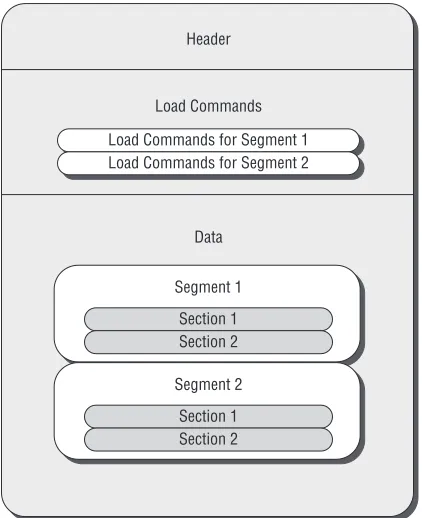
The heart of the fi le is the fi nal region, the data, which consists of a number of segments as laid out in the load-commands region. Each segment can contain a number of data sections. Each of these sections contains code or data of one particular type; see Figure 1-2.
Header
Data Segment 1 Load Commands Load Commands for Segment 1 Load Commands for Segment 2
Section 1 Section 2 Segment 2
[image:33.531.99.310.189.448.2]Section 1 Section 2
Figure 1-2: A Mach-O file-format example for a file with two segments, each having
two sections
Example
All of this information about universal binaries and the Mach-O format is best seen by way of an example. Looking again at the /bin/ls binary, you can see the universal headers using otool.
$ otool -f Fat headers
95363c01.indd 15
fat_magic 0xcafebabe nfat_arch 2
architecture 0 cputype 7 cpusubtype 3 capabilities 0x0 offset 4096 size 36464 align 2^12 (4096) architecture 1 cputype 18 cpusubtype 10 capabilities 0x0 offset 40960 size 32736 align 2^12 (4096)
Looking at /usr/include/mach/machine.h, you can see that the fi rst architec-ture has cputype 7, which corresponds to CPU_TYPE_X86 and has a cpusubtype
of CPU_SUBTYPE_386. Not surprisingly, the second architecture has values CPU_TYPE_POWERPC and CPU_SUBTYPE_POWERPC_7400, respectively.
Next we can obtain the Mach header.
$ otool -h /bin/ls /bin/ls:
Mach header
magic cputype cpusubtype caps filetype ncmds sizeofcmds flags 0xfeedface 7 3 0x00 2 14 1304 0x00000085
In this case, we again see the cputype and cpusubtype. The fi letype is MH_ EXECUTE and there are 14 load commands. The fl ags work out to be MH_ NOUNDEFS | MH_DYLDLINK | MH_TWOLEVEL.
Moving on, we see some of the load commands for this binary.
$ otool -l /bin/ls /bin/ls:
Load command 0 cmd LC_SEGMENT cmdsize 56
segname __PAGEZERO vmaddr 0x00000000 vmsize 0x00001000 fileoff 0
filesize 0
maxprot 0x00000000 initprot 0x00000000 nsects 0
flags 0x0 Load command 1
95363c01.indd 16
Chapter 1 ■ Mac OS X Architecture 17
cmd LC_SEGMENT cmdsize 260 segname __TEXT vmaddr 0x00001000 vmsize 0x00005000 fileoff 0
filesize 20480 maxprot 0x00000007 initprot 0x00000005 nsects 3
flags 0x0 Section
sectname __text segname __TEXT addr 0x000023c4 size 0x000035df offset 5060 align 2^2 (4) reloff 0 nreloc 0
flags 0x80000400 reserved1 0
reserved2 0 …
Bundles
In Mac OS X, shared resources are contained in bundles. Many kinds of bundles contain related fi les, but we’ll focus mostly on application and frame-work bundles. The types of resources contained within a bundle may consist of applications, libraries, images, documentation, header fi les, etc. Basically, a bundle is a directory structure within the fi le system. Interestingly, by default this directory looks like a single object in Finder.
$ ls -ld iTunes.app
drwxrwxr-x 3 root admin 102 Apr 4 13:15 iTunes.app
This naive view of fi les can be changed within Finder by selecting Show Package Contents in the Action menu, but you probably use the Terminal appli-cation rather than Finder, anyway.
Within application bundles, there is usually a single folder called Contents. We’ll give you a quick tour of the QuickTime Player bundle.
$ ls /Applications/QuickTime\ Player.app/Contents/
CodeResources Info.plist PkgInfo Resources Frameworks MacOS PlugIns version.plist
95363c01.indd 17
The binary itself is within the MacOS directory. If you want to launch the program through the command line or a script, you will likely have to refer to the following binary, for example.
$ /Applications/QuickTime\ Player.app/Contents/MacOS/QuickTime\ Player
The Resources directory contains much of the noncode, such as images, mov-ies, and icons. The Frameworks directory contains the associated framework bundles, in this case DotMacKit. Finally, there is a number of plist, or property list, fi les.
Property-list fi les contain confi guration information. A plist fi le may contain user-specifi c or system-wide information. Plist fi les can be either in binary or XML format. The XML versions are relatively straightforward to read. The fol-lowing is the beginning of the Info.plist fi le from QuickTime Player.
<?xml version=”1.0” encoding=”UTF-8”?>
<!DOCTYPE plist PUBLIC “-//Apple//DTD PLIST 1.0//EN” “http://www.apple.com/DTDs/PropertyList-1.0.dtd”> <plist version=”1.0”>
<dict>
<key>CFBundleDevelopmentRegion</key> <string>English</string>
<key>CFBundleDocumentTypes</key> <array>
<dict>
<key>CFBundleTypeExtensions</key> <array>
<string>aac</string> <string>adts</string> </array>
<key>CFBundleTypeMIMETypes</key> <array>
<string>audio/aac</string> <string>audio/x-aac</string> </array>
<key>CFBundleTypeName</key> <string>Audio-AAC</string> <key>CFBundleTypeRole</key> <string>Viewer</string> <key>NSDocumentClass</key> <string>QTPMovieDocument</string> <key>NSPersistentStoreTypeKey</key> <string>Binary</string>
</dict>
95363c01.indd 18
Chapter 1 ■ Mac OS X Architecture 19
Many of the keys and their meaning can be found at http://developer .apple.com/documentation/MacOSX/Conceptual/BPRuntimeConfig/Articles/
PListKeys.html. Here is a quick description of those found in the excerpt:
CFBundleDevelopmentRegion: The native region for the bundle
■
CFBundleDocumentTypes: The document types supported by the
■
bundle
CFBundleTypeExtensions: File extension to associate with this
docu-■
ment type
CFBundleTypeMIMETypes: MIME type name to associate with this
■
document type
CFBundleTypeName: An abstract (and unique) way to refer to the
docu-■
ment type
CFBundleTypeRole: The application’s role with respect to this
docu-■
ment type; possibilities are Editor, Viewer, Shell, or None NSDocumentClass: Legacy key for Cocoa applications
■
NSPersistentStoreTypeKey: The Core Data type
■
Many of these will be important later, when we’re identifying the attack surface in Chapter 3, “Attack Surface.” It is possible to convert this XML plist into a binary plist using plutil, or vice versa.
$ plutil -convert binary1 -o Binary.Info.plist Info.plist
$ plutil -convert xml1 -o XML.Binary.Info.plist Binary.Info.plist $ file *Info.plist
Binary.Info.plist: Apple binary property list Info.plist: XML 1.0 document text XML.Binary.Info.plist: XML 1.0 document text $ md5sum XML.Binary.Info.plist Info.plist
de13b98c54a93c052050294d9ca9d119 XML.Binary.Info.plist de13b98c54a93c052050294d9ca9d119 Info.plist
Here we fi rst converted QuickTime Player’s Info.plist to binary format. We then converted it back into XML format. The fi le command shows the conversion has occurred and md5sum confi rms that the conversion is precisely reversible.
launchd
Launchd is Apple’s replacement for cron, xinetd, init, and others. It was intro-duced in Mac OS X v10.4 (Tiger) and performs tasks such as initializing systems, running startup programs, etc. It allows processes to be started at various times or when various conditions occur, and ensures that particular processes are always running. It handles daemons at both the system and user level.
95363c01.indd 19
The systemwide launchd configuration files are stored in the /System/ Library/LaunchAgents and /System/Library/LaunchDaemons directories. User-specifi c fi les are in ~/Library/LaunchAgents. The difference between daemons and agents is that daemons run as root and are intended to run in the background. Agents are run with the privileges of a user and may run in the foreground; they can even include a graphical user interface. Launchctl is a command-line application used to load and unload the daemons.
The confi guration fi les for launchd are, not surprisingly, plists. We’ll show you how one works. Consider the fi le com.apple.PreferenceSyncAgent.plist.
<?xml version=”1.0” encoding=”UTF-8”?>
<!DOCTYPE plist PUBLIC “-//Apple Computer//DTD PLIST 1.0//EN” “http:// www.apple.com/DTDs/PropertyList-1.0.dtd”>
<plist version=”1.0”> <dict>
<key>Label</key>
<string>com.apple.PreferenceSyncAgent</string> <key>ProgramArguments</key>
<array>
<string>/System/Library/CoreServices/
PreferenceSyncClient.app/Contents/MacOS/PreferenceSyncClient</string> <string>--sync</string>
<string>--periodic</string> </array>
<key>StartInterval</key> <integer>3599</integer> </dict>
</plist>
This plist uses three keys. The Label key identifies the job to launchd. ProgramArguments is an array consisting of the application to run as well as any necessary command-line arguments. Finally, StartInterval indicates that this process should be run every 3,599 seconds, or just more than once an hour. Other keys that might be of interest include
UserName: Indicates the user to run the job as
■
OnDemand: Indicates whether to run the job when asked or keep it
■
running all the time
StartCalendarInterval: Provides cron-like launching of applications at
■
various times
Why should you care about this? Well, there are a few times it might be handy. One is when breaking out of a sandbox, which we’ll discuss later in this chapter. Another is in when providing automated processing needed in fuzzing, which we’ll discuss more in Chapter 4’s section “In-Memory Fuzzing.” For example, consider the following plist fi le.
95363c01.indd 20
Chapter 1 ■ Mac OS X Architecture 21
<?xml version=”1.0” encoding=”UTF-8”?>
<!DOCTYPE plist PUBLIC “-//Apple Computer//DTD PLIST 1.0//EN” “http://www.apple.com/DTDs/PropertyList-1.0.dtd”>
<plist version=”1.0”> <dict>
<key>Label</key>
<string>com.apple.KeepSafariAlive</string> <key>ProgramArguments</key>
<array>
<string>/Applications/Safari.app/Contents/MacOS/Safari < /string>
</array>
<key>OnDemand</key> <false/>
</dict> </plist>
Save this to a fi le called ~/Library/LaunchAgents/com.apple.KeepSafariAlive. plist. Then start it up with
$ launchctl load Library/LaunchAgents/com.apple.KeepSafariAlive.plist
This should start up Safari. Imagine a situation in which fuzzing is occur-ring while you’re using a Meta refresh tag from Safari’s default home page. The problem is that when Safari inevitably crashes, the fuzzing will stop. The solution is the preceeding launchd fi le, which restarts it automatically. Give it a try, and pretend the fuzzing killed Safari.
$ killall -9 Safari
The launchd agent should respawn Safari automatically. To turn off this launchd job, issue the following command:
$ launchctl unload Library/LaunchAgents/com.apple.KeepSafariAlive.plist
Leopard Security
Since we’re talking about Mac OS X in general, we should talk about security features added to Leopard. This section covers some topics of interest from this fi eld. Some of these address new features of Leopard while others are merely updates to topics relevant to the security of the system.
95363c01.indd 21
Library Randomization
There are two steps to attacking an application. The fi rst is to fi nd a vulner-ability. The second is to exploit it in a reliable manner. There seems to be no end to vulnerabilities in code. It is very diffi cult to eliminate all the bugs from an old code base, considering that a vulnerability may present itself as a missing character in one line out of millions of lines of source code. Therefore, many vendors have concluded that vulnerabilities are inevitable, but they can at least make exploitation diffi cult if not impossible to accomplish.
Beginning with Leopard, one anti-exploitation method Mac OS X employs is library randomization. Leopard randomizes the addresses of most librar-ies within a process address space. This makes it harder for an attacker to get control, as they can not rely on these addresses being the same. Nevertheless, Leopard still does not randomize many elements of the address space. Therefore we prefer not to use the term address space layout randomization (ASLR) when referring to Leopard. In true ASLR, the locations of the executable, libraries, heap, and stack are all randomized. As you’ll see shortly, in Leopard only the location of (most of) the libraries is randomized. Unfortunately for Apple, just as one bug is enough to open a system to attacks, leaving anything not random-ized is often enough to allow a successful attack, and this will be demonstrated in Chapters 7, 8, and 10. By way of comparison, Windows is often criticized for not forcing third-party applications (such as Java) to build their libraries to be compatible with ASLR. In Leopard, library randomization is not possible even in the Apple binaries!
Leopard’s library randomization is not well documented, but critical informa-tion on the topic can be found in the /var/db/dyld directory. For example, the map of where different libraries should be loaded is in the dyld_shared_cache_ i386.map fi le in this directory. An example of this fi le’s contents is provided in the code that follows. Obviously, the contents of this fi le will be different on different systems; however, the contents do not change upon reboot. This fi le may change when the system is updated. The fi le is updated when the update_dyld_shared_cache program is run. Since the location in which the libraries are loaded is fi xed for extended periods of time for a given system across all processes, the library randomization implemented by Leopard does not help prevent local-privilege escalation attacks.
/usr/lib/system/libmathCommon.A.dylib
__TEXT 0x945B3000 -> 0x945B8000 __DATA 0xA0679000 -> 0xA067A000 __LINKEDIT 0x9735F000 -> 0x9773D000 /System/Library/Frameworks/Quartz.framework/Versions/ A/Frameworks/ImageKit.framework/Versions/A/ImageKit __TEXT 0x945B8000 -> 0x946F0000 __DATA 0xA067A000 -> 0xA0682000
95363c01.indd 22
Chapter 1 ■ Mac OS X Architecture 23
__OBJC 0xA0682000 -> 0xA06A6000 __IMPORT 0xA0A59000 -> 0xA0A5A000 __LINKEDIT 0x9735F000 -> 0x9773D000
This excerpt from the dyld_shared_cache_i386.map fi le shows where two libraries, libmathCommon and ImageKit, will be loaded in memory on this system.
To get a better idea of how Leopard’s randomization works (or doesn’t), con-sider the following simple C program.
#include <stdio.h> #include <stdlib.h>
void foo(){ ; }
int main(int argc, char *argv[]){ int y;
char *x = (char *) malloc(128);
printf(“Lib function: %08x, Heap: %08x, Stack: %08x, Binary: %08x\n”, &malloc, x, &y, &foo);
}
This program prints out the address of the malloc() routine located within libSystem. It then prints out the address of a malloced heap buffer, of a stack buffer, and, fi nally, of a function from the application image. Running this pro-gram on one computer (even after reboots) always reveals the same numbers; however, running this program on different machines shows some differences in the output. The following is the output from this program run on fi ve dif-ferent Leopard computers.
Lib function: 920d7795, Heap: 00100120, Stack: bffff768, Binary: 00001f66
Lib function: 9120b795, Heap: 00100120, Stack: bffffab8, Binary: 00001f66
Lib function: 93809795, Heap: 00100120, Stack: bffff9a8, Binary: 00001f66
Lib function: 93d9e795, Heap: 00100120, Stack: bffff8d8, Binary: 00001f66
Lib function: 96841795, Heap: 00100120, Stack: bffffa38, Binary: 00001f66
This demonstrates that the addresses to which libraries are loaded are indeed randomized from machine to machine. However, the heap and the applica-tion image clearly are not, in this case at least. The small amount of variaapplica-tion in the location of the stack buffer can be attributed to the stack containing
95363c01.indd 23
the environment for the program, which will differ depending on the user’s confi guration. The stack location is not randomized. So while some basic ran-domization occurs, there are still signifi cant portions of the memory that are not random, and, in fact, are completely predictable. We’ll show in Chapters 7 and 8 how to defeat this limited randomization.
Executable Heap
Another approach to making exploitation more diffi cult is to make it hard to execute injected code within a process—i.e., hard to execute shellcode. To do this, it is important to make as much of the process space nonexecutable as possible. Obviously, some of the space must be executable to run programs, but making the stack and heap nonexecutable can go a long way toward making exploitation diffi cult. This is the idea behind Data Execution Prevention (DEP) in Windows and W^X in OpenBSD.
Before we dive into an explanation of memory protection in Leopard, we need fi rst to discuss hardware protections. For x86 processors, Apple uses chips from Intel. Intel uses the XD bit, or Execute Disable bit, stored in the page tables to mark areas of memory as nonexecutable. (In AMD processors, this is called the NX bit for No Execute.) Any section of memory with the XD bit set can be used only for reading or writing data; any attempt to execute code from this memory will cause a program crash. In Mac OS X, the XD bit is set on all stack memory, thus preventing execution from the stack. Consider the following program that attempts to execute where the XD bit is set.
#include <stdio.h> #include <stdlib.h> #include <string.h>
char shellcode[] = “\xeb\xfe”;
int main(int argc, char *argv[]){ void (*f)();
char x[4];
memcpy(x, shellcode, sizeof(shellcode)); f = (void (*)()) x;
f(); }
Running this program shows that it crashes when it attemps to exeucte on the stack
$ ./stack_executable Segmentation fault
95363c01.indd 24
Chapter 1 ■ Mac OS X Architecture 25
This same program will execute on a Mac running on a PPC chip (although the shellcode will be wrong, of course), since the stack is executable in that architecture.
The stack is in good shape, but what about the heap? A quick look with the vmmap utility shows that the heap is read/write only.
==== Writable regions for process 12137
__DATA 00002000-00003000 [ 4K] rw-/rwx SM=COW foo __IMPORT 00003000-00004000 [ 4K] rwx/rwx SM=COW foo MALLOC (freed?) 00006000-00007000 [ 4K] rw-/rwx SM=PRV MALLOC_TINY 00100000-00200000 [ 1024K] rw-/rwx SM=PRV DefaultMallocZone_0x100000
__DATA 8fe2e000-8fe30000 [ 8K] rw-/rwx SM=COW /usr/lib/dyld
__DATA 8fe30000-8fe67000 [ 220K] rw-/rwx SM=PRV /usr/lib/dyld
__DATA a052e000-a052f000 [ 4K] rw-/rw- SM=COW /usr/lib/system/libmathCommon.A.dylib
__DATA a0550000-a0551000 [ 4K] rw-/rw- SM=COW /usr/lib/libgcc_s.1.dylib
shared pmap a0600000-a07e5000 [ 1940K] rw-/rwx SM=COW __DATA a07e5000-a083f000 [ 360K] rw-/rwx SM=COW /usr/lib/libSystem.B.dylib
shared pmap a083f000-a09ac000 [ 1460K] rw-/rwx SM=COW Stack bf800000-bffff000 [ 8188K] rw-/rwx SM=ZER
Stack bffff000-c0000000 [ 4K] rw-/rwx SM=COW thread 0
Leopard does not set the XD bit on any parts of memory besides the stack. It is unclear if this is a bug, an oversight, or intentional, but even if the software’s memory permissions are set to be nonexecutable, you can still execute anywhere
except the stack. The following simple program illustrates that point.
#include <stdio.h> #include <stdlib.h> #include <string.h>
char she